Wednesday, May 26, 2021

Your Guide to Making a Scroll-Stopping YouTube Thumbnail

You can upload the most interesting video on YouTube, but it might not get the views it deserves if you're relying on a simple freeze-frame to tell viewers what it's about.

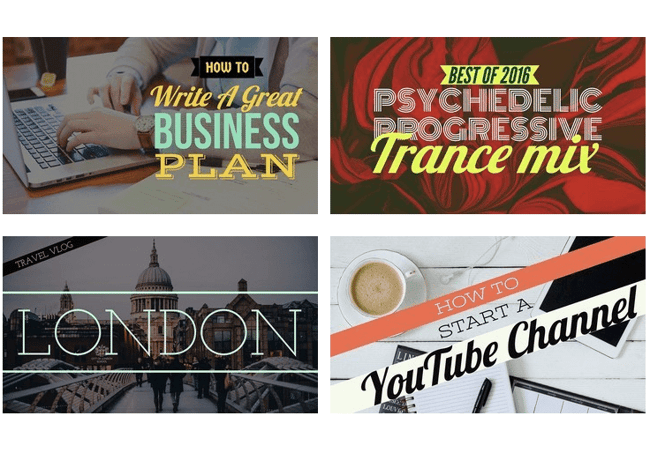
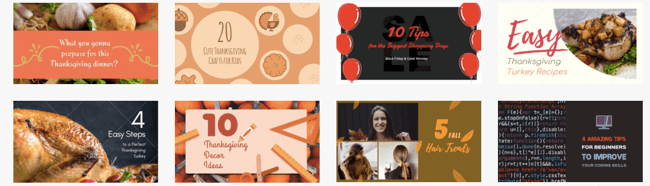
Thumbnails, the small, clickable snapshots that viewers see when they search for videos on YouTube, can be just as important as a video’s title. They provide a preview of your video and entice viewers to click through.

Creating vibrant YouTube thumbnails can also instantly grab people’s attention and this can help you differentiate yourself on a platform clogged with standard thumbnails all screaming for attention.
Download Now: 10 Free YouTube Image Templates

Thumbnails can affect your search ranking on YouTube, too. Since your video’s click-through rate is one of the most important ranking factors in YouTube’s search algorithm, especially during its first hour on the platform, an eye-catching thumbnail can make a huge difference in ranking number one for a query and not ranking at all.

If your video has an ordinary or sub-par thumbnail, it won’t persuade anyone to click through. YouTube could deem the video irrelevant and won’t rank it in the search results or distribute it through the “Recommended Videos” feed.

Fortunately, pulling freeze frames from your YouTube videos isn’t the only way you can create thumbnails. There are online tools, made specifically for people who might not have a ton of design experience, that can help you craft custom thumbnails — all for free.

Below, we’ll guide you through an easy five-step process for creating visually appealing YouTube thumbnails that will cut through the noise, boost your video’s click-through rate, and lift your rankings.

1. Visit a free online YouTube thumbnail maker.

There are seven free online YouTube thumbnail makers listed below, but we featured FotoJet in this guide because it’s one of the only YouTube thumbnail makers that doesn’t make you sign up for a free account before you can create a thumbnail. Their robust thumbnail maker lets you customize and download your thumbnails completely for free — no email address necessary.

The free version of this online app lets you download small and medium-sized image files, but large and extra-large are premium features. This means you’ll get to be creative with your designs to ensure they appear as crisp as possible on YouTube.

2. Upload a photo or choose one of the thumbnail makers’ templates.

YouTube will let you upload any picture from your computer as your video’s thumbnail. But if you don’t have a vivid visual on your computer or you need some inspiration, Fotojet’s got you covered. It has over 23 free templates that can serve as your thumbnail’s foundation.

To create striking a thumbnail in Fotojet, consider including a talking head. People are naturally drawn to human faces because it’s an ingrained survival mechanism to help us quickly gauge someone’s emotions and determine if they’re a threat or friend. Research Gate also discovered that Instagram photos with faces are 38% more likely to receive likes and 32% more likely to receive comments.

3. Add text, clipart, or a background to your thumbnail.

Once you’ve picked your picture or template, you can make your thumbnail stand out even more by adding text, clipart, or a background to it.

To further clarify your video’s subject matter, consider adding your video’s title to the thumbnail. Additionally, if your photo, graphic, or text is bright, consider placing it on top of a dark background. The color contrast will make your thumbnail pop. The same logic applies to dark objects and bright backdrops.

4. Download the finished product to your computer.

In Fotojet specifically, after you finish polishing your thumbnail, press the Save button at the top of the page to export your thumbnail.

Last, title your thumbnail and save it as a JPG or PNG. Its resolution will already match YouTube’s recommended resolution — 1280 x 720 pixels — so you don’t have to worry about resizing it later.

8 YouTube Thumbnail Makers

Along with Fotojet’s free online YouTube thumbnail maker, there are seven other thumbnail makers that can help you customize your own YouTube thumbnails. Before you create a thumbnail with these tools, though, you need to sign up for a free account on their websites.

1. FotoJet

FotoJet YouTube thumbnail maker homepage

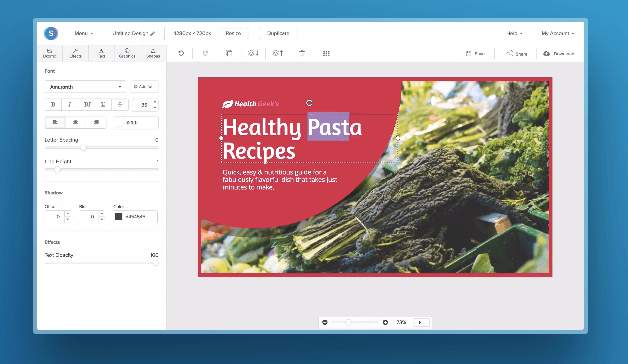
FotoJet is a leading YouTube thumbnail maker that comes with templates to help you summarize your video into a click-worthy image. You can get started with FotoJet as soon as you land on the homepage — no email or account set up required. Choose from a variety of stock images, font styles, and clipart elements to customize your design, then export it in either a JPG or PNG format. 

2. Canva

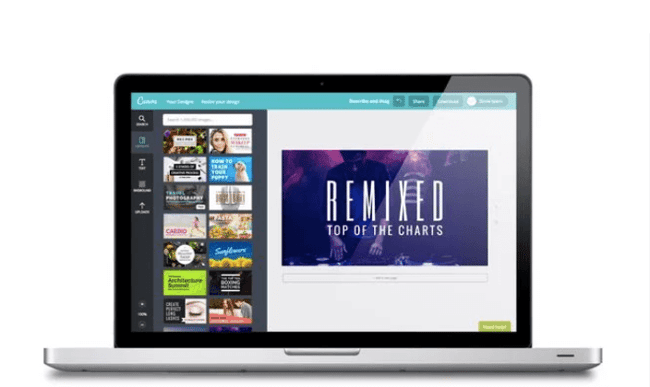
canva design dashboard

With more than 2 million images in their library, hundreds of fonts, and customizable backgrounds and colors, Canva gives you more than enough resources to unleash your creativity.

You can sign up for the free or paid version of the online design tool, but be prepared to take your own images as Canva’s image gallery can cost up to $1 per photo. Don’t let that deter you, this robust tool is jam-packed with free design elements that can help you create click-worthy YouTube thumbnails.

3. Adobe Spark

adobe spark design templates

Adobe Spark lets you select from thousands of photos on the web and a variety of built-out themes with their own unique layouts, colors, and fonts to craft eye-catching YouTube thumbnails. Although the free version does come with a watermark on all content you download from the system, you can always upgrade to the paid version to have unique thumbnails that are truly your own.

4. Crello

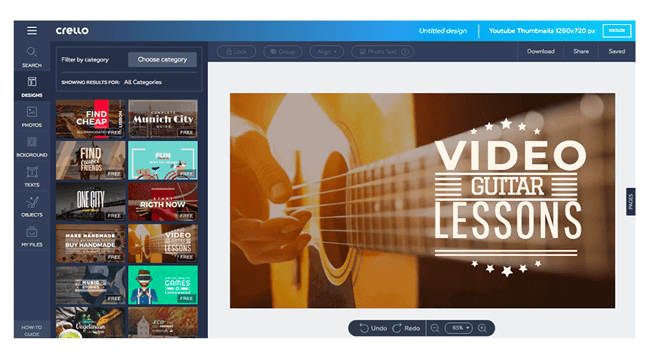
crello design dashboard

With Crello, you can create engaging thumbnails by blending a multitude of designs, photos, backgrounds, text, and objects together. When compared against other popular design tools, Crello emerges as a less expensive option, but bear in mind that resizing your thumbnails could be a pain due to some improvements that need to be made within the app.

5. Visme

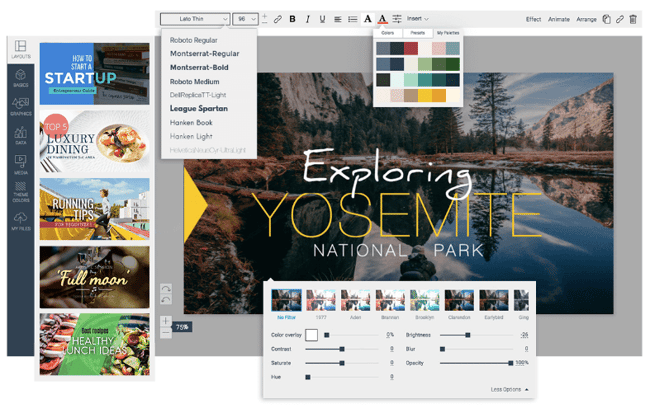
visme design dashboard

Choose from a wide selection of templates, photos, graphics, colors, and fonts to create a thumbnail in Visme. This app was made with video thumbnails in mind, so you won’t have to worry about sizing and finding the perfect layouts. Visme offers creators various templates to choose from so you can spend more time adding your finishing touches.

6. Fotor

fotor design dashboard

Fotor provides templates under certain themes to help you create captivating thumbnails. It includes all the trending YouTube thumbnail features like photo frames, the lomo effect, and background remover. The options are virtually limitless with Fotor as the canvas for your YouTube thumbnail.

If your workflow can’t be completed all in one session, Fotor’s premium version allows you to save version history of your thumbnails so you can pick up right where you left off.

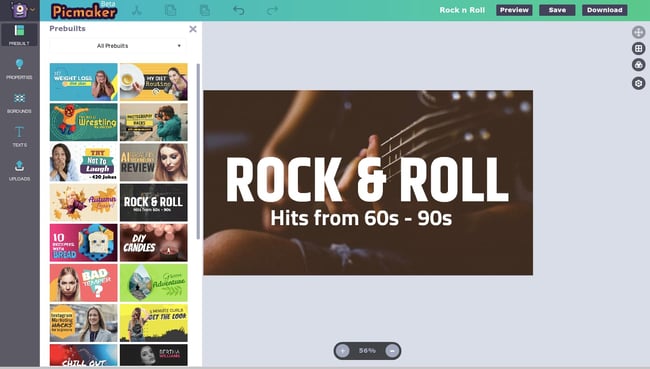
6. Picmaker

picmaker design dashboard

With over 100,000 graphics, 1,000 stock photos, stickers, borders, backgrounds, text, icons, and filters, and an automatic background remover, you can create a gripping thumbnail on Picmaker. If you have set brand colors, the free options won’t be the easiest to work with since you can’t save colors, logos, or fonts. But upgrading to just the starter tier opens up a variety of benefits including a brand kit, premium photos, and multi-sized designs.

8. Snappa

snappa design dashboard

Snappa has over 500,000 stock photos, an assortment of professionally designed templates, and customizable graphics, shapes, and text to help you create a YouTube thumbnail. If you’re making more than three thumbnails per month, Snappa might affect your workflow as the free version only allows three downloads per month. If three is enough for you, you’ll be glad to know there’s a drag and drop functionality to help you create your own custom thumbnail template.

Create Scroll-Stopping YouTube Thumbnails

Just like a peephole, the subject line of an email, and even caller-ID, a YouTube thumbnail gives the viewer a peek behind the curtain to see what’s on the other side. It’s a major component in a search result that will determine whether someone clicks and watches your video. Taking the tips and examples in this article, you’ll have to know-how to make scroll-stopping YouTube thumbnails that will draw in new subscribers.

Editor's note: This post was originally published in November 2018 and has been updated for comprehensiveness.

YouTube-Templates
Your Guide to Making a Scroll-Stopping YouTube Thumbnail was originally posted by Local Sign Company Irvine, Ca. https://goo.gl/4NmUQV https://goo.gl/bQ1zHR http://www.pearltrees.com/anaheimsigns

How to Gain Your First (or Next) 1,000 Instagram Followers

It's no secret that business opportunities are quickly growing on Instagram.

Approximately 90% of Instagram's 1 billion active monthly users follow a business account on the platform. And, while Instagram hasn't reported its current number of business users, the platform reportedly hosted more than 25 million of these accounts in late 2017.

As the platform continues to grow and develop more interactive features, such as Instagram Stories and Instagram Live, businesses are regularly using it as a tool to humanize brands, recruit future employees, showcase products and company culture, delight customers, and generate new business.

New Data: Instagram Engagement Report [2021 Version]

But here's the deal: Unless you're famous, it's really hard to amass a huge following on Instagram without some hard work.

For the average person or business, growing your following takes daily time and attention.

Luckily, there are a few things you can do right away to collect at least 1,000 quality followers for your personal or professional Instagram account. It's all about knowing where to invest your time and effort.

Let's discuss a few strategies that will help you gain those followers, from creating a follow-worthy Instagram profile to using contests, to staying true to your brand.

Whether you're gathering your first 1,000 followers or you just want 1,000 more, keep reading.

1. Create and optimize your profile.

First thing's first: Customize your Instagram profile to make it look good. Tell your potential followers who you are, and give them a reason to follow you.

How? Start by making sure your username is recognizable and easily searchable – like your business name.

example of how to get more followers on instagram with an optimized profile

Image Source

If your business name is already taken, try keeping your business name as the first part of your username so that people searching for your business are more likely to come across you. For example, the Australian activewear line Lorna Jane uses the username @lornajaneactive.

Setting Up Your Account

Step 1. Add your full business name to the "Name" field in the "Options" section. To find "Options," tap the three lines in the top right corner of the iOS app, followed by "Settings" which will appear at the bottom of the screen next to a gear. If you're on Android, tap the three dots in the corner. Your business or name will appear under your profile picture and your username in search.

Step 2. Make your profile public. To make your profile public, open Instagram, open "Options," and make sure "Private Account" is turned off.

Screenshot of private account toggle on Instagram

Step 3. Choose a profile picture that's on-brand with your other social networks, like your company logo.

Step 4. Fill your bio with delightful, actionable, and informative information about your brand. Information like this lets people know what you're about and gives them a reason to follow you. Include who you are and what you do, and be sure to add a hint of personality.

Here are a few examples for inspiration:

  • @cheekbonebeauty: "Less waste. Ethical and safe ingredients."
  • @Oreo: "Playful moments from your favorite cookie."
  • @mrsbrittanyhennessy: "Helping Influencers go beyond #sponcon and create sustainable businesses."
  • @CalifiaFarms: "Something different, something better. Let us show you what plants can do."
  • @coragedolls: "Elevating, educating, & encouraging girls of color to be unstoppable with dolls that finally look like her."

Step 5. Add a link tree to your bio to make it easy for people to go straight from Instagram to your other platforms if they want to. The space allotted for URLs is precious real estate. When you receive 10,000 followers, you can add swipe-up links to your Instagram Stories.

Until then, your bio is the only place within Instagram where you can place clickable links, so use it wisely. We recommend using a shortened, customized Bitly link to make it more clickable.

Step 6. Enable notifications so you can see when people share or comment on your photos. This'll let you engage with them more quickly – just like a lot of companies do on Twitter. To enable notifications, go to "Options" and then "Push Notification Settings." Select "From Everyone" for every category.

A word to the wise: We don't recommend you link your Instagram account to Twitter and Facebook (or other social media platforms) for automatic posts. Because every platform caters to a different audience and requires different types of posts.

2. Designate a content creator.

Just like there should be one (maybe two) people managing your other social media accounts, there should only be one or two people managing your Instagram account.

If possible, choose someone with experience on the platform who will "get" it — and be sure they stay updated on all new features Instagram has to offer.

If you work for a large organization, you might find that a lot of people want a say in what's posted. That's when an organized request or guidelines document comes in hand.

This document should inform people how to request a post on your Instagram account, when, the value of the post, and why.

3. Follow photography and editing best practices.

On Instagram, post quality matters. A lot. Your Twitter followers might forgive a few bad tweets, but a bad photo on Instagram is a big no-no.

Fortunately, you don't have to take a photography course to be a good Instagram poster — nor do you have to practice for weeks before you start. But you should get familiar with basic photography tips and photo editing apps.

Photography Best Practices

Since Instagram is a mobile app, chances are, some content you post to Instagram will be taken on your mobile device. That's expected.

If your budget allows, consider investing in professional photography for your Instagram photos, as that will elevate your profile. Otherwise, a smartphone and a few editing apps will do.

Focus on one subject at a time.

  • Embrace negative space.
  • Find interesting perspectives.
  • Look for symmetry.
  • Capture small details.
  • Make your followers laugh.

Edit photos before you post.

Instagram has some basic editing capabilities, but oftentimes, they aren't adequate to make visuals really great.

Most of your photos should go through at least one or two photo editing apps on your mobile phone before you open them on Instagram.

Additionally, consider creating a cohesive Instagram theme across your feed, so anyone visiting your account for the first time can get a sense of your brand.

Byrd Consults example of cohesive instagram theme

Image Source

4. Set a regular posting schedule.

Once you've created and optimized your profile, have someone managing it, and have your creative assets ready, it's time to start posting.

It's a good idea to have a solid number of great posts up – maybe 15 or so – before you start engaging people and working down this list. That way, when people visit your profile, they'll see a full screen of photos and will know you'll post great content regularly.

To start posting on Instagram, download this social media content calendar template first and plan out your posts. It's best to build a backlog of content ready a few days or weeks ahead of the publishing date.

This will ensure you always have content during holidays, vacations, and even creative blocks.

Keep your target persona in mind as you plan out your posting schedule, as that can drastically impact your posting timing and frequency – especially if you're targeting an audience in a different time zone. (Download this free template for creating buyer personas if you don't have a few already.)

Optimizing your schedule for your specific audience might take time and experimentation.

best times to post on instagram graphic

Experiment with these times and days to see what works with your audience. You may find that your target users are most active and engaged at different times.

5. Allow outside contributors to curate your content.

Although it's best to have only one or two people manning your account, one or two people can't be everywhere at once taking photos. What about that fun sushi night the engineers had last night? Or the event your head of sales spoke at earlier this week?

There's a whole breadth of content you'll want to post to Instagram, and more often than not, one person won't be able to keep track of it all.

One solution? Create a system where you can curate photos and content from members of your team.

There are a few ways to do this. The first option is to create a specific email address for employees to send their photos, short videos, memes, hyper-lapses, and so on.

Encourage people to add a descriptive subject line so you can easily sort through the content they're sending. While this doesn't seem like the smoothest way to curate photos, it's actually the easiest for the people sending you photos — and the easier you can make it for them to send content, the more content you'll get.

If your team shares a Box or Dropbox account, you could also create a shared folder where people can automatically drop their photos and videos.

6. Use a consistent, platform-specific brand voice.

Photos and videos might be the most important part of your Instagram posts, but captions, comments, and other text should never be an afterthought. If you're managing a channel for a brand or have more than one Instagram manager, consider developing a consistent voice that humanizes your brand.

This shows potential followers that you are credible and relatable, rather than formal or intimidating.

When developing a voice, you should keep the platform and your audience in mind.

For example, many influencers and prominent accounts on Instagram have a very casual voice and style but remain professional and on-brand. Once you've got your voice down, make sure it stays consistent and natural in your captions, comments, messages, and your bio.

7. Write engaging, shareable captions.

Captions are an essential part of your post — the icing on the cake if you will. Consistently great captions can do wonders for humanizing your brand, winning over followers, and making your content more shareable — thereby giving you more exposure.

Here are a few things you might see in a winning Instagram caption:

  • Clever or witty comments
  • Calls to action
  • Relevant emojis
  • Hashtags

More on that below.

Clever or Witty Comments

Some brands and influencers have used clever or witty captions, or even audience-appropriate jokes to further humanize themselves on Instagram.

My colleague Kelly Hendrickson, HubSpot's social media team manager, says that she loves Netflix's account and sub-accounts, particularly because of the post captions.

"They have such a clear brand voice, and you laugh along with them. They're in on the joke, just like one of your friends," she says.

example of how to get more followers on instagram with clever and witty instagram captions

Netflix's voice is casual, trendy, and humorous while still staying on brand.

In the post above, the caption is funny, authentic, and relatable. Who hasn't flipped through a friend's Instagram Story with the hope that you'll be featured?

Calls to Action

Another way to increase the shareability of your caption and engage your followers is to ask questions or have some sort of call-to-action in the captions of your photos.

For example, you might write, "Double-tap if you find this funny," or "share your story in the comments."

In the example below, we asked followers of the @HubSpot Instagram account to leave a comment with a book that's had a positive impact on their work, along with tagging the author:
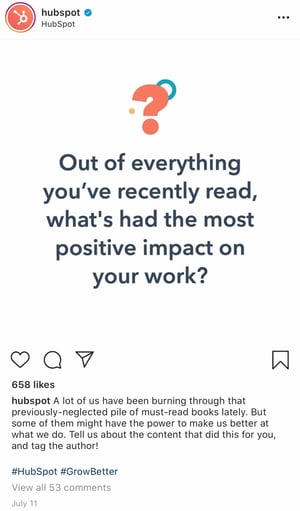
example of how to get more followers on instagram with calls to action

Relevant Emojis

Adding just a few relevant emojis can add even more personality to your posts. It could also make them even more noticeable on an Instagram feed. In the post below, Danielle Gray, a beauty expert with over 50K followers, (@Stylenbeautydoc) includes witty text with relevant emojis to make the post pop.
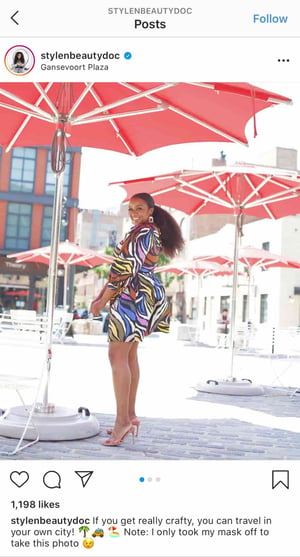
how to get more followers on instagram with relevant emojis

Along with the three items listed above, you'll also want to include hashtags.

8. Optimize posts with relevant hashtags.

On Instagram, a hashtag ties conversations from different users who wouldn't already be connected into a single stream. If you use relevant hashtags, your posts will gain exposure to a wider audience and help you become discoverable to potential customers.

The key to using hashtags effectively is to be selective and use them sparingly. Try to limit the number of hashtags per caption to around three. Similarly, don't use "like for like" hashtags, like #like4like or #like4likes.

This is a shortcut tactic that'll only leave you with low-quality followers.

To find the hashtags your audience might be using, do a little research on relevant hashtags in your niche or industry. The easiest way to do this research is in the Instagram app itself, in the Explore tab (i.e., the magnifying glass icon).

When you search for one hashtag, it'll show you a list of related hashtags at the top of your screen.

For example, when I search for #digitalmarketingstrategy on Instagram, it shows me relevant hashtags like #digitalmarketingexpert, #digitalmarketing, and so on.

instagram hashtags

To help relate to your followers on a personal level, you might consider hopping on hashtag trends like #tbt ("Throwback Thursday"), #MotivationMonday, #TransformationTuesday, or other trending hashtagsHere's a post from @fanmdjanm, a headwrap collection and lifestyle brand with over 150K followers on its Instagram account, using the #HappyMothersDay hashtag:

Once you build up a bit of a following, you can try creating your own hashtags — like your company name or a slogan that applies to your content. This is a great way to build up your brand on the platform and build a more cohesive presence.

1. Engage with users through follows, likes, and comments.

Instagram is very much a community, and one great way to get involved in that community is to find people who post pictures that interest you, and follow their accounts and interact with their content. It's the most natural way to draw attention to your own Instagram account.

This accomplishes two things: for one, when they get the notification that you've followed them, there's a good chance they'll check out your profile. This goes back to the importance of having great content on your account before you start reaching out to others.

Secondly, it means you'll be seeing their recent posts in your feed, so you can Like and interact with them if you choose to.

As you build a following, celebrate your followers by responding to and pinning their comments, and even reposting their posts for user-generated content.

2. Cross-promote with influencers and brands with similar audiences.

Once you build rapport with the folks behind accounts with similar audiences to your own, consider collaborating with them.

Partnering with influencers and brands helps with discoverability, reach, and social proof.

Example of influencer cross promotion on Instagram

For instance, influencer @sweetlikeoyin who has around 60K followers, posted a sponsored image of herself on the beach wearing a dress from Lulu's. The clothing brand then published the same image.

With this partnership, both accounts can expand their reach and gain new followers. It's a win-win. However, be sure to create content that seems natural and makes sense for your brands and collective audience.

3. Run Instagram contests to encourage engagement.

Another great way to expand your reach while increasing engagement on your photos is to run a contest or giveaway. As part of your contest, you can ask users to follow your account, like, and/or comment on the post to be eligible to win.

I mean, come on. Who doesn't love winning free stuff?

You can also add a user-generated content (UGC) element to the contest, too, where people post a photo of their own and use a specific hashtag.

Here's an example from @PlayaBowlsNortheastern, where followers were asked to follow Playa Bowls as well as their brand partner, Scoop and Sushi, and tag a friend in the comments. In exchange, followers had the chance to win a free bowl:

4. Explore Instagram Stories' interactive features.

Instagram has always given brands the platform to share beautiful, curated photos to represent their companies.

However, with the introduction of ephemeral Instagram Stories, brands can also share on-the-fly, behind-the-scenes looks for 24 hours that may not be as polished as a published photo, but give your brand more personality on the platform.

Just look at how Snapchat exploded a few years ago. Once platforms like Instagram and Facebook introduced similar features, it made those apps more valuable and interesting in the eyes of users. Although Snapchat pioneered this feature, Instagram Stories now has over 500 million daily users.

Along with sharing video clips and static images through Instagram Stories, users can also use polls, event reminders, and the "Ask a Question," tool to gain more engagement and learn more about their audiences.

Once a user is verified or has over 10,000 followers, they can even include a link to a webpage within a story.

How Brands Can Use Instagram Stories

Instagram Stories disappear after 24 hours unless they are marked as a "Story Highlight."

Highlighted stories will show up at the top of your profile between the photo feed and your bio.

example of instagram highlight stories

Image Source

Here are a few other brands we recommend following to see what they're sharing:

Dana Shultz (@miniamlistbaker) publishes easy vegan and gluten-free recipes on her blog. Her Stories feature neat how-to videos of her making breakfast and testing out new recipes in her kitchen. The behind-the-scenes aspect of her Stories provides a lot of human context for her blog's brand, and everybody loves a good how-to video.

Casper (@casper) publishes quirky Instagram content to advertise their mattresses – without overtly doing so. The main theme of their content? Staying in is better than going out (because you can stay in and lay on a comfy Casper mattress, naturally).

They've even created a gallery for followers to use as backdrops for their Snapchat and Instagram stories to make it look like they're out at a party when in reality, they're laying in bed.

One of their latest Instagram Stories featured someone watching "The Sopranos" in bed, with the caption: "Who needs plans when you have five more seasons?"

This video supports Casper's campaign to stay in bed with a very real look at what millions of people do when they're hanging out at home.

Here are our tips for using Instagram Stories for your brand:

  • Whether it's funny, sad, or unique, be authentic. Your photo gallery is where content can be perfect and polished. Instagram Stories are for the raw, unscripted, and unretouched. Use Stories to share the other side of your brand that followers might not be able to see elsewhere. Do you have a dog-friendly office? Is your team trying out the latest challenge? Start filming to showcase the more human side of your brand.
  • Go behind the scenes. These are by far our favorite types of content for ephemeral video sharing. Show followers what goes into the planning of an event or the launching of a product, and make it fun. Your followers want to feel included and in the know. You could also use Stories to cultivate a brand loyalty program that only rewards people who check out your content.

5. Use the Live Video feature.

Instagram also lets users record and share live videos, another content format that's proven to be hugely popular on other social networks. What's unique about live videos on Instagram? They disappear when users stop filming.

This authentic, bi-directional experience lets brands share unscripted, raw moments with their audience to incorporate human elements into a social media platform that's highly edited and polished in its traditional use.

Since the Live feature launched, Instagram has added even more features that may enable further engagement or interactions from viewers, such as:

  • Request feature to go live with the live account
  • Pinned comment
  • Q&A box
  • Up to four accounts on Live at a time
  • Filters

Live video is a growing trend across a variety of social media platforms, so if something interesting is happening, start rolling. Whether it's an event, a team birthday party, or behind-the-scenes footage, your devoted followers want to see what you're up to.

6. Share your profile link on your website and social media channels.

Have a website? Newsletter? YouTube channel? Make sure you include a link to your Instagram on every single platform.

The first place you'll want to make sure to add an Instagram badge is your website, specifically your footer and "About Us" page.

Here's what the badge could look like:
instagram badge on a website

If your brand has brick-and-mortar locations, put out a good ol' print call-to-action letting people know you have an Instagram account and encouraging them to follow you. You can also place them on your business cards. You might even offer a discount code for doing so.

Also, be sure to promote your Instagram account on your other digital platforms. Chances are, the folks who already follow you on Facebook and Twitter will also follow you on Instagram without much prodding.

Let those followers know you're on Instagram and encourage them to follow you there.

example of how McBride Sisters brand embed instagram link in newsletter to gain more followers

In this example, wine company The McBride Sisters encouraged their email subscribers to follow them on Instagram with a simple CTA: "Join the community."

7. Post user-generated content.

Similar to cross-promotion, brands can publish user-generated content to show appreciation for existing customers and generate social proof at the same time.

If I see a regular person endorsing a product on Instagram, I'm more likely to believe they really like the product.

The same is true for most consumers. That's why sites like Yelp are so popular.

Ultimately, user-generated content can be an excellent strategy when trying to increase brand awareness and trust in your products or services.

For instance, @bevel reposted a video from blogger Rickey Scott using and recommending their products to their 600+ followers.

Posting Scott using Bevel is a smart move.

Firstly, the product is designed with black men in mind. Having Scott, who is part of the brand's target demographic, recommend the product serves as the social proof the brand wants.

Furthermore, part of Scott's audience will likely fall within Bevel's target audience. Simply put, the two brands have similar audiences and brands that align well, which is why it's a good opportunity for Bevel to promote Scott's content.

8. Diversify your audience to resonate with different types of users.

As your followers grow, it can be tricky to identify what content types will resonate with them. With this in mind, divide your audience into sub-groups and target your content to various demographics.

For instance, if you have 200K followers, those followers probably come from different regions of the world, have different interests and hobbies, and likely different careers. Rather than post all-encompassing content that will satisfy all your followers at once, conduct some analytics research to separate them into smaller sub-groups.

Take Starbucks as a good example of this. @Starbucks has close to 18 million followers. There's no way the global coffee brand can post content to satisfy 18 million people at once — and it doesn't try to.

Instead, Starbucks regularly posts more exclusive content geared towards particular groups, such as this post they published recently celebrating #TeacherAppreciationWeek:

Example of how Starbucks caters to various audiences on Instagram

Image Source

This post won't appeal to the majority of Starbucks followers who aren't teachers, but that's OK.

You don't always need to post content to please everyone. Instead, demonstrate your company's ability to connect and engage with sub-groups and post what aligns with your own brand's values.

Education is something that matters to Starbucks, so by posting about teachers, they're doing more to demonstrate their values than they are appealing to everyone. Which is kind of the point, isn't it?

9. Apply for a verification badge.

When an account on Instagram is verified, it has a blue dot, called a badge, next to the username. When another user comes across this profile or finds the verified username in search, the blue dot confirms to them that the account is the business, individual, or brand that it's claiming to be.

Example of Instagram verification page on @LouellaShop account

Image Source

While Instagram has a list of eligibility requirements for the badge, the platform does allow users to apply for one. You can learn more about that process on Instagram's Help Center.

Quality Over Quantity Still Matters

Ultimately, it's important to focus less on the number of followers you have, and more on the quality of content you create. Your audience will grow naturally if you put effort and time into creating engaging, informative, or inspirational content without worrying about "quick fixes" for boosts in followers.

Plus, if you think about it, your followers don't continue to follow you because of the size of your audience. They continue to follow you because of the content you create.

Sure, maybe I've initially followed an influencer because she had 200K followers, which signified to me that she was worth following — otherwise, why would 200K people be looking at her content?

But that doesn't mean I've continued to follow influencers and brands because of the size of their audience. I've unfollowed plenty of mega-influencers or brands with thousands — if not millions — of followers, simply because I was no longer impressed with their posts.

You want to play the long game on Instagram, and that starts with focusing on what you can control: the quality of the content you produce, the messages you promote, and the brand you build.

Ironically, I'm willing to bet the less you worry about the number of followers you have, the more community members you'll attract.

instagram statistics


How to Gain Your First (or Next) 1,000 Instagram Followers was originally posted by Local Sign Company Irvine, Ca. https://goo.gl/4NmUQV https://goo.gl/bQ1zHR http://www.pearltrees.com/anaheimsigns


7 Features You Need in a Bulk Email Service [+ Top 5 Best Providers]

When it comes to email marketing, there's no denying how powerful this channel can be.

According to a 2019 Campaign Monitor report, for every $1 you spend, you earn $42 – an astonishing return on investment.

→ Download Now: The Beginner's Guide to Email Marketing [Free Ebook]

If you're scaling a business, you may have relied on personal or business email providers like Gmail and Outlook in the past. However, they're not equipped to manage large volumes of email and provide the data needed to track performance.

That's where a bulk email service can come in.

Discover the key features you should find in a bulk email service and the top providers in the market.

A mass email service helps you reach a large audience and nurture them one email at a time. In addition to getting direct access to your customer base, you can also track how your emails perform and test various methods to increase clicks and conversions.

While traditional advertising methods, such as print ads and direct mail, can have high return on investment (ROI), it can be difficult to understand how consumers are interacting with your materials. With a bulk email service, you can find out what attracts consumers and what elements lead to higher conversions.

Furthermore, many bulk email services offer automation tools – think workflows and sequences – to help you move leads down the funnel and retain your current clients.

Using a personal or business email can work in the first few months of starting a business but will quickly become ineffective as you grow.

Reasons to Send Bulk Emails

Not sure if it's the right time to try a bulk email service? The first question you should ask is, "Is our brand investing in email marketing this quarter/year?"

If the answer is yes, then that's your sign to invest in an email service.

Here are specific examples of when you would send out a mass email to your subscribers:

  • Sales promotion – Say you want to promote discounts on certain products or services, sending a mass email to your subscribers is a great way to generate sales.
  • Newsletter – Do you want to send out exclusive content to your subscribers? Then a newsletter is the way to go.
  • Product updates – A great way to announce a new product feature or line is via email. You can include previews to build some excitement and include calls-to-action (CTA) for conversions.
  • Announcements – Are you updating your hours, prices, or services? Or perhaps there's been a change in your policy. Notifying your subscribers in an email blast is an effective way to spread the news.

With every email you send to subscribers, you'll want to keep in mind your goals, your audience, the time and day, personalization, and compliance with data protection laws.

You want to invest in an email marketing service, but you're not sure what to look for - here's your guide.

These are the key features you should look for in a bulk email service. Some of these features will only be available in a premium package. However, others will be included in the standard or free versions.

1. User Behavior Tracking

The number one tool you'll need in any bulk email service you select is reporting capabilities. Because what's the point of investing your time in designing and sending emails if you can't see how they performed?

You should be able to track key email metrics, such as:

  • Open rate
  • Unique clicks
  • Click-to-open rate (CTOR)
  • Clickthrough rate (CTR)
  • Unsubscribe rate
  • List growth rate
  • Bounce rate

Email providers with advanced reporting features may also allow you to track revenue per subscriber and revenue per email.

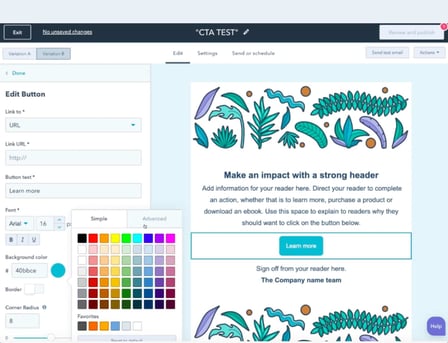
2. Drag-and-Drop

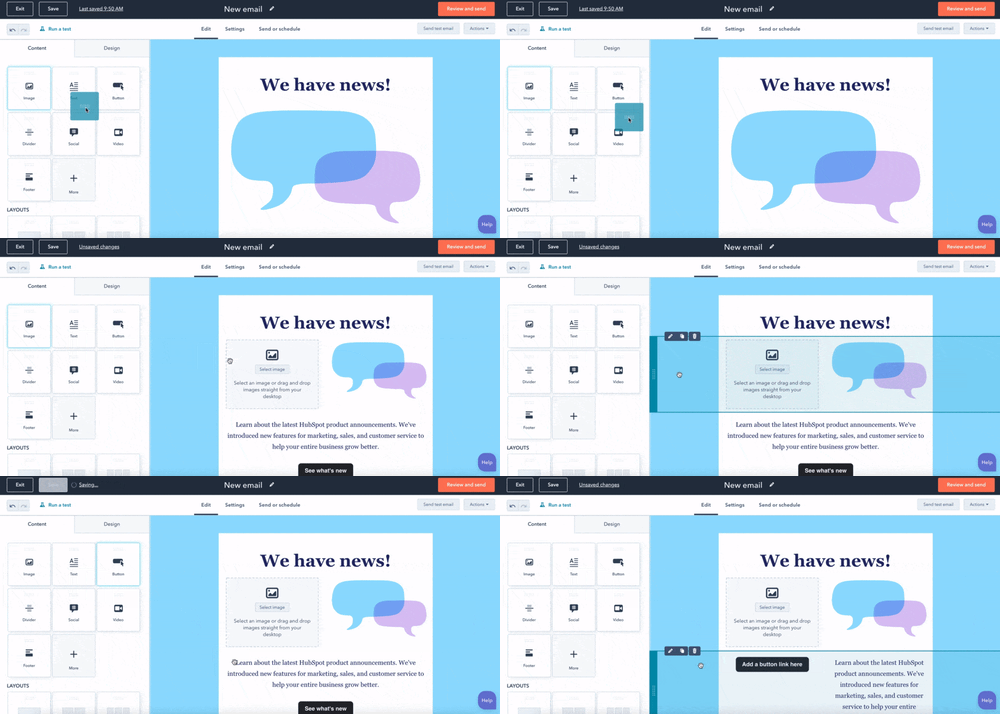
email drag and drop tool

A drag-and-drop tool makes designing your email easy. This intuitive feature allows you to select an element from the sidebar, like an image, quote, or button, and drag it to a section in your email.

This will save you time as you determine the best flow for your email and move things around.

3. Email Segmentation & Personalization

Segmenting your emails ensures that your emails are reaching the right people at the right time.

You should look for a bulk email service that allows you to segment your subscriber list based on:

  • Location
  • Actions taken in the email
  • Purchase history
  • Type of subscriber (ex: prospect vs current customer)

When you segment your list, you can get higher engagement rates, as the content will be more relevant to your recipients.

4. Split Testing

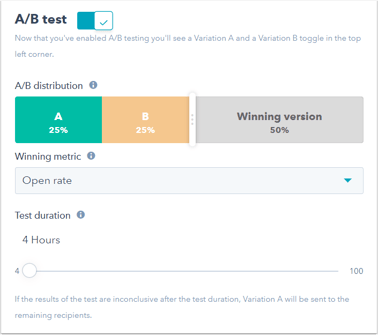
Split testing, also known as A/B testing, is a great way to understand what resonates with your audience.

A/B test example

Image Source

This feature is particularly helpful if you are struggling to generate high open rates and get subscribers to convert.

By testing out different subject lines and elements within the body of your email, you can determine what works best.

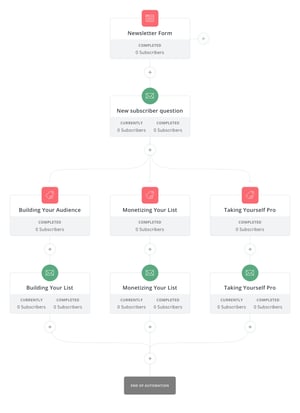
5. Automation

When you're scaling your email list, the name of the game is automation.

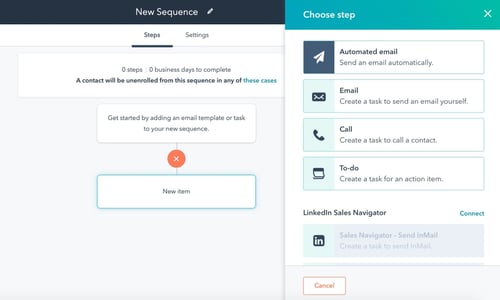
Say you have a content offer and you want to send a sequence of emails to leads after they've downloaded the offer. With an automation tool, you can pre-select which emails will go out, in what order, and how many days in each email.

email automation example

Once you complete the set-up, the automation does all the work for you – nurturing your subscribers and moving them down the buyer's journey.

This hands-off approach allows you to focus on strategy instead of the tedious work of sending out emails. It can also become impossible to keep track of each subscriber's stage in the journey and send the appropriate email.

With automation, you can take the guesswork out of the process.

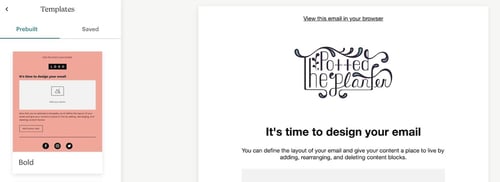
6. Design Templates

If you're like me, designing isn't your forte. So, when designing an email, you'll take all the help you can get.

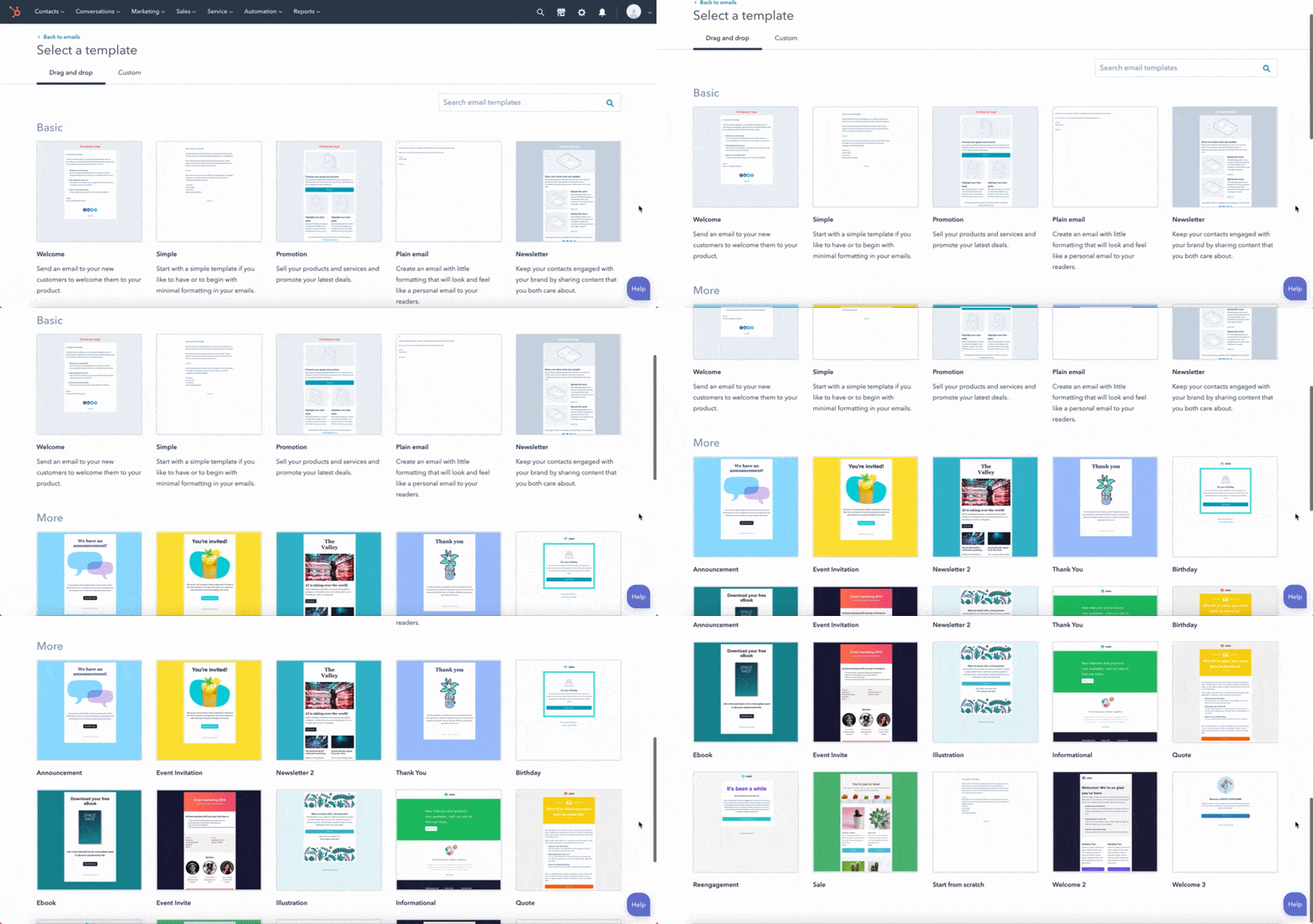
design template example from HubSpot

Having a design template based on the type of email you want to send can not only save you time but ensure you're following email best practices. This is particularly helpful if you have limited experience designing emails and are just starting out.

What's great about having a template is that it's a foundation. You can customize it to fit your needs, but it provides a blueprint from which to work.

7. High Email Delivery Rates

Imagine you work so hard on an email campaign, and it never reaches your subscribers' inboxes. Frustrating right?

That's why it's important to verify your provider's email delivery rates. You'll want to select a service with high email delivery rates, as close to 100% as possible.

Best Bulk Email Services

1. HubSpot's Email Marketing Tool

With HubSpot, you can create, customize and optimize your emails without any coding or design experience.

HubSpot bulk email service

Image Source

You can send up to 2,000 emails a month, and that doesn't include test emails to check functionality. The platform offers a user-friendly interface and tools like a drag-and-drop tool to easily design your email, tokens to personalize every email, and an a/b testing feature.

In addition, you can create custom reports based on the data you want to collect and analyze.

The best part? It's free.

2. ConvertKit

As their name suggests, the platform is designed to help you earn more conversions and generate more revenue.

ConvertKit is known for its advanced automation tools, including custom email funnels, smart filters, and link triggers.

Convertkit bulk email service

Image Source

Furthermore, the platform has a 98% delivery rate, ensuring that your emails will always reach your subscribers. In addition, the average open rate for ConvertKit emails is an astonishing 30%, according to their website.

ConvertKit offers a free version of its platform all the way up to custom pricing for enterprise-level businesses with over 365,000 subscribers.

3. Mailchimp

Mailchimp is a great email service for those who are just starting out in email marketing.

Mailchimp bulk email service

Image Source

The platform offers a user-friendly interface and over 100 templates to choose from.

With their free plan, you can send up to 10,000 emails a month to 2,000 contacts – a great option for small to midsize businesses. As your business grows, you can scale to the premium version, which includes unlimited audiences, multivariate testing, and advanced segmentation with up to 200,000 contacts.

4. Drip

If you have an ecommerce business, consider Drip for your email marketing.

The platform offers pre-built email templates that you can customize to your liking and a user-friendly workflow builder for automation.

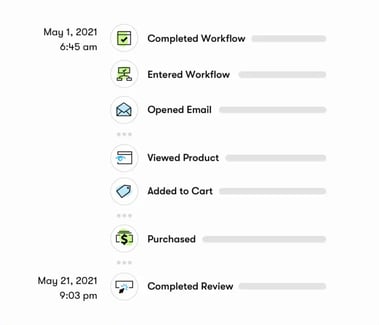
In addition, you can schedule automation based on actions your subscribers take. For instance, viewing a product, abandoning their cart, and making a purchase.

Drip bulk email service

Image Source

With Drip, you can easily integrate your online store (like Shopify, Magento, and WooCommerce) to make data gathering easier and help you design more targeted emails.

Pricing starts at $19 and goes up based on how many subscribers you have.

5. Insycle

Insycle doesn't fall under the email provider list. However, this software does work in tandem with providers like HubSpot and Mailchimp to keep your contact list clean.

Insycle bulk email service

One of the downsides of having a subscriber list is the potential for duplicate contacts. This can not only impact your metrics (and consequently your data) but also make it difficult to tailor your emails.

Insycle allows you to clean your contacts in bulk, merge duplicate ones, and avoid overwriting data.

Knowing what to look for in an email service is half the battle. Now that you have a list of key features and few tools to choose from, you can find a platform that helps you grow your email list and generate revenue.

New Call-to-action


7 Features You Need in a Bulk Email Service [+ Top 5 Best Providers] was originally posted by Local Sign Company Irvine, Ca. https://goo.gl/4NmUQV https://goo.gl/bQ1zHR http://www.pearltrees.com/anaheimsigns

The Top 3 Buyer Persona Myths, and How They Hurt Your Marketing Efforts

Meet Elizabeth: a 27-year-old nurse who drives a Honda Civic, enjoys making TikToks, and spends most of her time with her beautiful 9-month-old baby.

Elizabeth desperately wants to make more time for herself, but struggles to find the balance between work and home responsibilities. She tries to give herself moments of self-care, but these moments are few and far between. Elizabeth needs a way to recharge, relax, and care for herself.

By this description, you know Elizabeth's age, profession, gender, desires, struggles, and pain points. All of this information helps you place her in a category in your mind — but none of that information tells you why she buys your product.

Buyer personas typically include descriptions like Elizabeth's, along with other demographics and personality information.

In the early days of customer segmentation, this would have been more than enough to inform marketing campaigns and product development. But with growing markets and increased consumer awareness, companies need to go beyond standard buyer personas to reach their audiences.

If we can apply what we've learned about how people make decisions, and how we as companies group people together, we'll be able to reach customers like Elizabeth with empathetic solutions that help her, rather than stereotypical cure-alls that are easily overlooked.

Here, let's dive into three myths of the buyer persona — and what you can do, instead. 

Download Our Free Buyer Persona Guide + Templates 

Standard Buyer Personas Aren't Enough

The first mention of audience segmentation was by Wendell Smith in 1956. Smith defined market segmentation as, "the adjustment of market offerings to consumer or user requirements."

Smith knew that creating segments would lead to higher consumer/user satisfaction. But Smith's idea of segmentation was years before we had a clear understanding of psychology, behavioral economics, unconscious bias, and deeper knowledge about how to provide consumer satisfaction.

Since Smith's discussion on segmentation, we've had major discoveries in the way people think, rationalize, and categorize others. Daniel Kahneman and Amos' Tversky's 1974 research paper A Judgement Under Uncertainty: Heuristics and Biases revealed the way people process information, and are influenced. And Clayton Christensen first shared his jobs-to-be-done theory in 2003.

Both of these studies on human behavior, purchasing, and thinking have made a lasting impact on the way we create ad copy, price products, introduce call-to-actions, and influence many other marketing activities — but have yet to influence our way of creating buyer personas.

Using the lessons from Kahneman, Tversky, and Christensen, there are three myths of the standard buyer persona that could be detrimental to your marketing and customer relations. Let's dive into those, now. 

Myth #1: Your Buyer Persona Needs a Name

We've all seen the old advice to give your persona a name that is memorable. Names like Sally Sales Girl and Mary the Marketer will bring your persona to life and create a more concrete persona in your mind and marketing — or so we're told.

Fact: Naming your buyer persona introduces bias.

The problem with giving your buyer personas a fake name is that you could introduce bias into your marketing.

Introducing naming bias in your marketing means that consciously you've determined a particular person as your best customer. That's good! The problem is you might also unintentionally exclude people who could be a good fit for your product but may not resemble the person you envisioned. And that's bad.

If Elizabeth is your best fit customer, then you're more likely to seek out customers who meet your unconscious idea of who Elizabeth is, rather than seek out customers who actually use your product or service.

Studies show that when someone has an easier-to-pronounce name, they are judged more favorably than someone with a harder-to-pronounce name.  And while most studies on unconscious name bias focus on resumes and job applications, we can apply those lessons to buyer personas, as well.

Ease of pronunciation varies depending on where you live or what language you speak. But remember, a name that sounds familiar to you might not sound familiar to your audience.

Solution: Name personas based on segmentation data.

When we create buyer personas, we're grouping a large number of people into one category. Instead of naming your personas after a person, try naming them after the traits they share. 

Do the majority of these best-fit customers enjoy soccer? Great! Name them 'The Soccer Players.' Or maybe they're using your product to free-up time in their scheduling processes. Wonderful — let's call them the Free Timers.

Naming this group of people according to their segment, or their need, helps to eliminate any bias that could exist.

This helps focus buyer personas on the category of people you're serving, not just one pretend person.

Myth Two: Your Buyer Persona Needs a Photo to Make Them More Relatable and Realistic

Most buyer personas have a stock photo on the first page. I've even heard of companies using cardboard cutouts of buyer personas in their office.

While I admire the effort to bring to life a category of people, assigning one picture or person to represent a large group of people lays a foundation for bias in your marketing.

Fact: Your buyer persona doesn't need a face to be realistic.

The buyer persona's picture most likely represents who you believe your ideal customer looks like, but it's not likely a good determination of your entire audience. If you've given your Elizabeth persona a picture of a middle-aged white female, and 100% of your audience isn't middle-aged, white, and female, you've inaccurately portrayed your audience. 

When we give our personas a stock photo it could introduce racial, gender, or beauty bias. These kinds of biases are so ingrained in our minds that we follow bias patterns even if we don't logically believe the bias to be true.

This phenomenon is known as the bias blind spot. Studies show that 95% of cognition happens below the threshold of conscious thought. Meaning, you may not be racist, misogynistic, or ageist, but there are patterns ingrained in your mind that influence your decision-making whether you realize it or not.

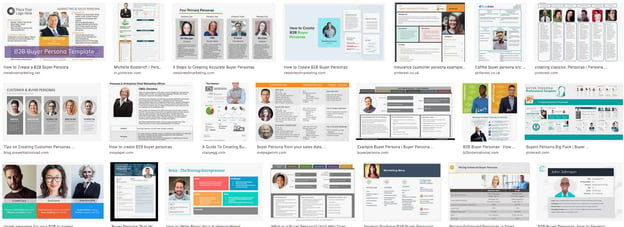
A Google Image search when searching for 'Buyer Personas' blatantly shows the issue with assigning pictures to buyer personas. There's not a lot of diversity in these images, and that lack of diversity hurts a company's growth.

A 2019 survey by the Female Quotient, Ipsos, and Google found "64% of people surveyed said they took some sort of action after seeing an ad that they considered to be diverse or inclusive. Those numbers increase for Latinx+ (85%), Black (79%), Asian/Pacific Islander (79%), LGBTQ (85%), millennial (77%), and teen (76%) consumers."

Solution: Forget the photo.

Leave the stock photo out of your buyer personas. This isn't going to harm or hurt any of your marketing efforts and functions. It will be a step toward eliminating unconscious bias. Instead of using a stock photo, get straight to the crucial information.

You may have the urge to add a cartoon character, but that doesn't alleviate the problem. Skip the pictures altogether, and get straight to the information that will help you resonate, reach, and sell to your customers.

This is the first step in acknowledging that your customers look like a wide variety of races, genders, shapes, and sizes.

When your marketing better represents your audience, your product, messaging, and communications will resonate more clearly.

Myth Three: Buyer Personas Should Describe Character Traits

Most B2B buyer personas are created to inform marketing teams and executives on who their customers are and keep promotional efforts consistent, but limiting buyer personas to only character traits, demographics, and socio-graphic information limits your audience and ability to reach the right people in the right way.

Fact: Buyer personas should tell you why people buy a product or service.

The best way to resonate with your audience is to understand them and empathize with their pain points. Understanding your audience begins with how you build and segment your buyer personas.

If you're segmenting your audience based on attributes such as brands they like, habits they have, or job titles, then you are grouping people together based on fleeting attributes. 

For instance, say our persona example, Elizabeth, changes jobs, moves to a new city, or changes any trait about her life. As a result, you might unnecessarily shift Elizabeth out of your customer demographic. She loves your product,  and would still buy your product, but now you're no longer invested in marketing to her segment.

Solution: Segment according to the job-to-be-done.

Instead of building your personas around demographics and character traits, base your personas on what your customers have hired your product/service to do for them.

For example, Elizabeth is a mom, loves long baths, and buys Suave deodorant. The reason she buys Suave has nothing to do with her age, job title, or love of baths. She buys Suave because she's used it for years, loves the smell, and the way it makes her feel. She is 'hiring' Suave deodorant to keep her feeling and smelling great.

Clayton Christensen was the first person to discuss the concept of people hiring products and services for a particular job. 

Combining the emotional psychographic information of buyer personas with a jobs-to-be-done approach will help to inform your marketing efforts and open up your market in a way that allows you to serve all kinds of people. According to Christensen, "Companies that develop offerings centered on jobs, instead of customer attributes and buying behaviors, can excel in the market and avoid disruption."

The Best Buyer Personas Will be the Tool that Grows Your Business

It's time buyer personas caught up with our knowledge of how people think, behave, and purchase. When undertaking your next buyer persona project, ditch the fake name and picture, and focus on what your customers hire your product to do for them.

Your marketing deliverables will be more inclusive to a wider audience, while still being narrowly focused and empathetic. Creating better buyer personas will lay a foundation of better marketing practices that resonates with your audience and grows your business.

Blog - Buyer Persona Template [Updated]


The Top 3 Buyer Persona Myths, and How They Hurt Your Marketing Efforts was originally posted by Local Sign Company Irvine, Ca. https://goo.gl/4NmUQV https://goo.gl/bQ1zHR http://www.pearltrees.com/anaheimsigns