Wednesday, May 19, 2021

Google Posts: The Free and Simple Way for SMBs to Leverage Local Search

In 2019, nearly one-third of online consumers in the U.S. used the internet on a daily basis to search for local businesses. And as of 2021, Google had 86.6% of the market share of search engines — meaning, getting noticed on Google is an effective way to boost business volume and find new customers.

To help companies reach prospective consumers, Google introduced a feature called My Business Posts. It allows businesses to share relevant information that appears within Google Search and Maps results themselves, rather than taking users to a new webpage.

→ Download Now: SEO Starter Pack [Free Kit]

Despite their potential benefits, however, Google My Business Posts haven’t seen significant uptake from brands. Do a quick Google search and you’ll find a My Business Help page along with a host of questions like, “Do Google Posts work?” or “Do businesses really use Google Posts?”

In part, this lackluster uptake stems from the ubiquity of Google and our own familiarity with these posts — many businesses assume that Google’s algorithms will pick and place relevant data automatically. In actuality, companies need to create and schedule their own My Business Posts.

Here’s what you need to know about the best-kept secret of local SEO — and how to make My Business Posts work for your brand.

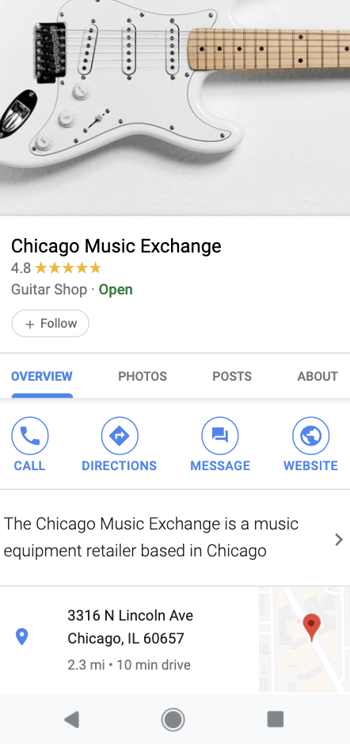
example of a google my business listing

Source

When crafting your Google Posts, you’ll have ample opportunity to grab your audience’s attention. You can describe your offer, product, or event in up to 300 words, upload an image, video, or GIF, and add call-to-actions to prompt product purchases, reservations, and newsletter signups. Your audience can share your Google Posts on social media too.

To make sure your business is constantly publishing fresh content on their search results, Google sets a seven-day life span on each of your Google Posts. The only posts that won’t expire after seven days are ones promoting events, but they’ll disappear once the events end.

Google Posts also has an analytics feature, which shows you how many impressions and clicks your posts get. This might seem like a limited amount of metrics, but they ultimately provide enough information to help you grasp which Google Posts resonated with your audience and which ones did not.

It’s also worth noting that Google My Business listings are free to create, schedule, and post.

While it’s logical to assume that Google would try to monetize the surging popularity of local search by selling ad space on company listings, the search giant decided to do the opposite — they gave every company with a Google My Business account access to a tool that lets them advertise on their business listings for free. Posts created with Google My Business will appear both in Search and Maps results, making it easy for users to find what they’re looking for without being redirected.

How to Use Google My Business Posts to Get Customers

Originally launched as “Candidate Cards” in 2016, Google Posts would only show up in relevant search queries for political candidates who wanted to promote their brand on the search engine.

A few months later, Google decided to roll them out to a select group of small businesses. And by July 2017, the search engine made Google Posts available to every business with a Google My Business account.

Giving every business the opportunity to use Google Posts levels the playing field in the digital marketing space. SMBs without much SEO expertise are now able to leverage the massive reach of local search to grow their business. Consider that for the first six months of 2020, calls to businesses driven by data on My Business Posts rose 61% as customers grappling with pandemic pressures looked to verify if companies were open, closed, or somewhere in between.

Ready to try making a Google My Business Post? Here’s how.

Let’s break down each step in more detail.

1. Log into Google My Business.

Start by signing into your Google My Business account on your desktop or mobile device. If you have more than one location, select the location you’re creating the post for and then select “Posts”.

Worth noting? You can also create a post directly from Google Search. First, make sure you’re logged into your Google My Business account, then search for and select your business profile. Click “Promote” to get started.

how to log into google my business

Source

2. Choose the type of post you want to create.

Next, choose the type of post you want to create — Update, Event, Offer, or Product.

Now, you can add elements including photos, videos, texts or buttons. 2020 also saw the addition of COVID-19 Posts, which can be used to add temporary business hours, operating conditions, or safety and hygiene notices.

how to Choose the type of post you want to create in google my business

Source

3. Craft the post.

If your content isn’t engaging, regardless of the strength of your marketing strategy, it won’t produce results. Crafting captivating content is the only way you’ll attract your audience’s attention and gain their trust. To effectively connect with people and inspire action using Google Posts, here are three copywriting tips you can follow.

1. Create headlines that appeal to people’s self-interest or give news.

With only 58 characters to spare in your title, you must get to the point of your offer. But to get people to click, you also need to clearly communicate your offer’s value, benefits, and relevance. How do you grab someone’s attention with such little room to work with?

  • Headlines that appeal to the audiences’ self-interest
  • Headlines that provide news
  • Headlines with attention-grabbing words and phrases
  • Headlines that are clear, easy-to-read, and fluff-free

2. Publish Google Posts that are clear, concise, and compelling.

Even though you technically have up to 1,500 characters to describe your offer, only the first 100 characters show up in Google’s knowledge panel.

To immediately hook people and persuade them to click on your offer or read the rest of your description, try sticking to one message per Google Post. Spotlighting your offer’s main benefit or feature, especially in the first 100 characters, will make it easy for your customers to understand its value and increase the likelihood of their click-through.

Another way to boost your Google Post click-through rate is by leveraging scarcity. People value objects and experiences that are rare — having something that most people want but can’t have, boosts our self-worth and sense of power.

And since each Google Post has a seven-day lifespan, you can also align your offer’s deadline with your post’s expiration date and use words and phrases that evoke a sense of urgency, like “Exclusive offer” or “Limited availability”. These psychology-backed tactics will skyrocket your offer’s perceived scarcity and, in turn, its consumer demand.

3. Use a large, high-quality visual to make your Google Post stand out.

On a website that’s dominated by text, vivid visuals are refreshing and eye-catching. But supplementing your copy with a standard stock photo or amateur iPhone picture won’t grab anyone’s attention. Vibrant photos will make your Google Post stand out and grab the attention of your audience. So, make sure you take photos or record videos with good framing, lighting, and a decent camera.

You also want your visual to take up most of the space on your post, so make sure your photos have the minimum image resolution of 720 pixels by 520 pixels.

4. Publish your post.

When you’re ready to go live, click Publish. If you’d prefer to see what your post will look like before publishing, select Preview. Don’t like it? Click Back, then Edit to refine your My Business Post. Once live, your post will be visible on both Google Search and Maps results.

5. Check your post status.

If your post isn’t coming up on search results, head back to your My Business account to check the status. “Live” means it should be visible on both Search and Maps results, while “Pending” means it may be in the uploading stage, the processing stage, or is being verified by Google.

If the post status says “Not Approved”, it won’t show up on Maps or Search, but the question mark icon next to the post will show which content policies the post currently violates.

Google My Business Post Examples

Let’s take a look at a few engaging My Business Post Examples

1. Kate McElwee Photography

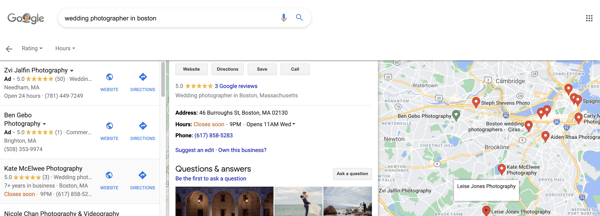
When you search “Boston wedding photographers, you’re shown a list of photographers in a list on the left-hand side of the page and their locations on the right-hand side of the page on a Google Map.

Screen Shot 2021-05-04 at 8.07.59 PM

Source

2. Boston Yoga Union

When you Google “Boston Yoga Studio”, a number of options appear in a list on Google. You’ll see the results on the Google Map.

boston yoga union example of how google my business works

Source

If you click on one of the photographers in the list, you’re shown their contact information, hours, rating, and samples of their photography, all without ever having to leave the Google Search results page.

boston yoga union example of google my business

Source

3. Bostonia Public House

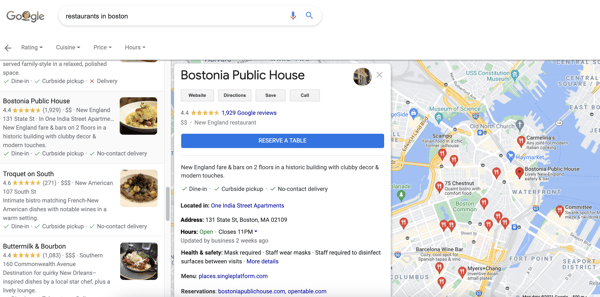
If you search “restaurants in Boston” on Google, you’ll be shown a long list of restaurants paired with a Google Map showing you where each restaurant is located.

If you click on a restaurant in the list, as I did with Bostonia Public House in the screenshot below, you’ll be able to “Reserve” your table without ever leaving Google. You also have access to the menu, reviews, images of the restaurant, and more all on this page.

Screen Shot 2021-05-04 at 8.05.54 PM

Source

Use Google My Business Posts to Maximize Local SEO Marketing

As a free and easy tool for connecting with customers, Google My Business Posts offers massive potential for local SEO marketing. The caveat? While your posts will appear on both Maps and Search results, generic content won’t get noticed in an increasingly competitive marketing landscape.

In effect, Google provides the tools you need to get the job done — but it’s up to your business to create compelling, context-aware content that captures consumer attention.

Editor's note: This post was originally published in September 2018 and has been updated for comprehensiveness.

marketing


Google Posts: The Free and Simple Way for SMBs to Leverage Local Search was originally posted by Local Sign Company Irvine, Ca. https://goo.gl/4NmUQV https://goo.gl/bQ1zHR http://www.pearltrees.com/anaheimsigns

Tuesday, May 18, 2021

What Are Email Whitelists, & How Do You Get On Them?

A few weeks ago, I planned a trip to Charlotte. I booked my flights, and the day before I was supposed to leave, I tried to find my confirmation email.

I couldn't find it anywhere. Panicking, I called the airline. "Ma'am, your payment was denied. We emailed you about this."

Very quickly, I learned the importance of email whitelists.

Fortunately, I was able to book another flight. However, this didn't save me from the stress or frustration I felt at the airline for being unable to contact me any other way.

At the end of the day, you don't want a similar experience to happen to your customers. And, as a marketer, nothing is more frustrating than realizing your email marketing tactics, meant to engage and delight new prospects, aren't working simply because they aren't being delivered to your prospects' inboxes.

Here, we'll explain what email whitelists are, and how you can ensure your company is on the whitelists of your email recipients.

→ Download Now: The Beginner's Guide to Email Marketing [Free Ebook]

How To Get On Your Email Subscribers' Whitelists

To get on your email subscribers' whitelists, you can ask your subscribers to whitelist your email address. Consider using simple language that frames the extra step as a benefit to the recipient:

"To be sure our emails always make it to your inbox, please add us to your email whitelist."

Ideally, you'd include this message in the first email you send new subscribers to improve email deliverability at the onset of a new relationship.

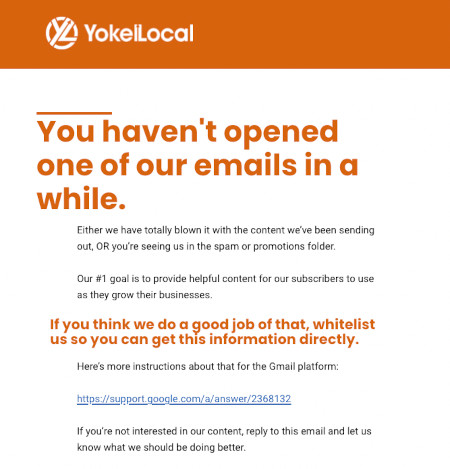
You might use your own flair and brand voice to craft a compelling email message. HubSpot Agency Partner Yokel Local does this well in their re-engagement campaign aimed at reconnecting with customers who may not be opening their emails:

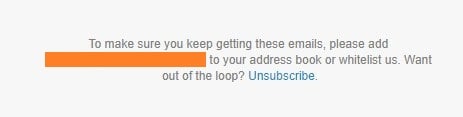
whitelist email example from yokel localWhile the email above is serving a specific function in an email marketing campaign, you can also include a more general whitelist reminder in the footer of all your communications like so:

whitelist message in footer

Keep in mind that not all of your recipients may know what a whitelist is, so you might also want to incorporate steps they need to take. To make the process simple, you can include links to the instructions for the most common web clients like this:

"To be sure our emails always make it to your inbox, please add us as a contact or put us on your whitelist. If you have a Gmail account, follow these instructions. Alternatively, if you use Outlook, click here."

Just be sure that you accommodate the typical email clients your recipients use, which could even include Apple Mail, Yahoo, and more.

If you want to provide more specific instructions in your email, or if you ever have a need to walk someone through the process, here are the steps for whitelisting and email in the two most common email clients, Gmail and Outlook:

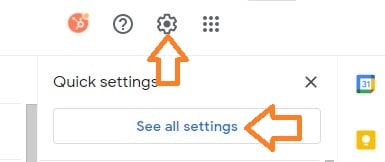
1. Click the gear icon in Gmail and select "See all settings" from the Quick settings menu.

In your Gmail inbox, there is a gear icon in the top right corner. When you select it, you'll either get a "Quick settings" menu (see below) or a drop-down with several options to choose from.

gmail gear icon and quick settings menu

If you get the "Quick settings" menu, you'll select See all settings. Otherwise, navigate to the Settings option.

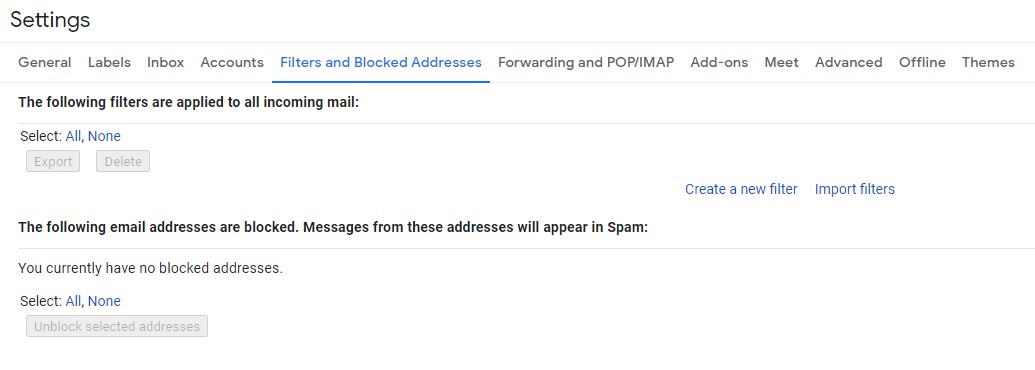
2. Navigate to "Filters and Blocked Addresses" in the top menu.

Once you're in your expanded settings area, you'll want to click Filters and Blocked Addresses in the top menu. You'll end up on a page that looks like this:

gmail filters and blocked addresses page

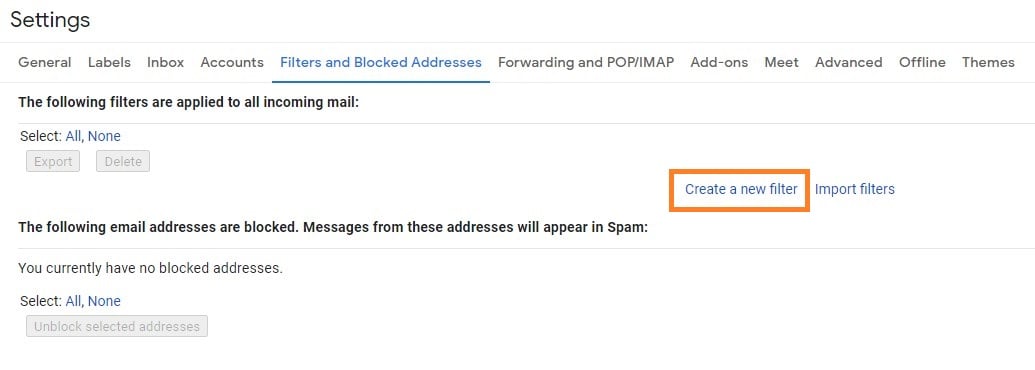
3. Select "Create a new filter."

In Gmail, whitelisting an email actually involves creating a filter.

gmail create filter on filters and blocked addresses page

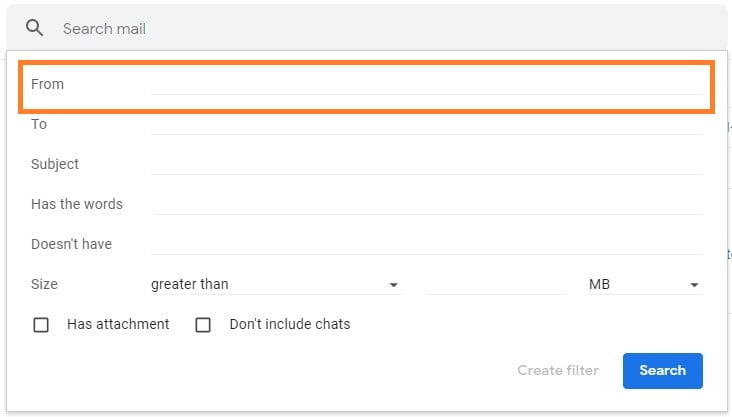
4. Add a specific email or a whole domain in the "From" field.

The "From" field is where you'll specify what's getting whitelisted. In Gmail, you can specify either a specific email address (e.g. hello@domain.com), or you can whitelist a whole domain by omitting everything before the at symbol (e.g. @domain.com). The former will whitelist one specific email address while the latter whitelists anyone who is sending email from that domain.

gmail-create-filter-process

5. Click "Create filter."

From there, you don't need to input any additional information. Simply click the Create filter button at the bottom of the window (next to the blue Search button).

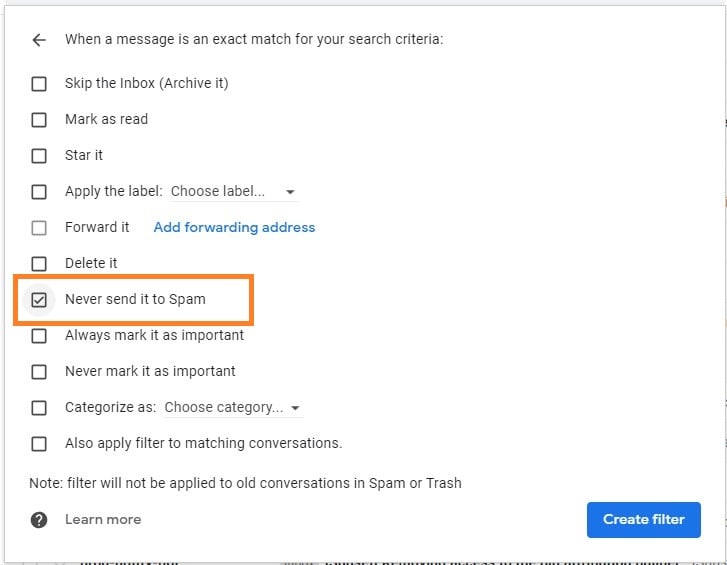
6. Check "Never send it to Spam" in the checkbox.

Clicking the button brings up a new window. Here's where you'll actually specify that what you're doing is whitelisting. In Gmail, you do this by checking the Never send it to spam box. Doing so will ensure that emails that meet the criteria you specified never end up in Spam or Trash (unless you do so manually).

gmail never send to spam checkbox

7. Click "Create filter."

Once this information is specified, you click the "Create filter" button again, and this creates the whitelist within Gmail.

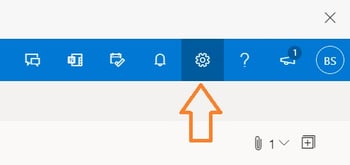
1. Click the gear icon in Outlook and select "View all Outlook settings."

Sign in to the web version of Outlook. There will be a gear icon in the top-right corner.

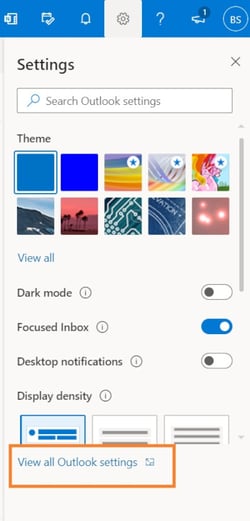
outlook gear iconWhen you select it, a drop-down menu will appear. At the bottom of the drop-down menu, you'll choose View all Outlook settings.

outlook settings menu with "view all outlook settings" highlighted

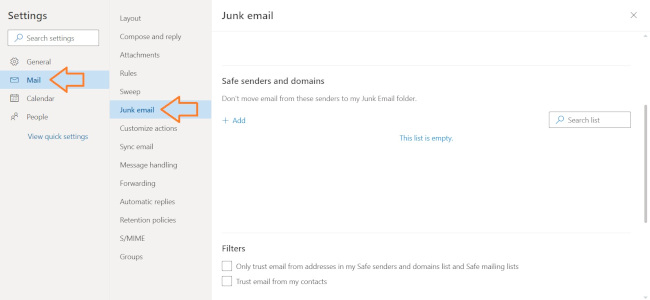
2. Select "Mail" from the settings menu.

Once you have the Settings page expanded, you'll want to select Mail from the menu on the right-hand side of the page.

outlook junk email settings

3. Choose "Junk email" from the submenu.

Clicking on Mail gives you access to an expanded submenu where you'll have the option to click Junk email.

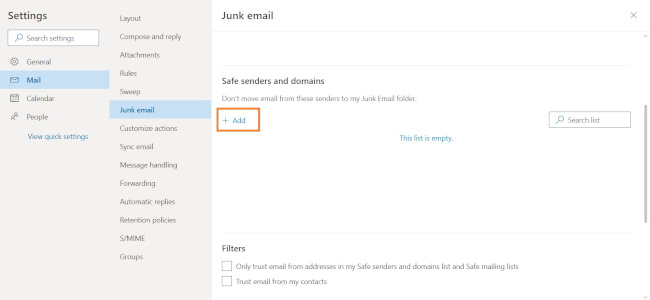
6. Click "Add" under "Safe senders and domains."

In the "Junk email" window is an option for adding safe senders and domains. Underneath this heading is the word Add with a plus sign next to it. Click this.

outlook add safe senders and domains

7. Enter the email address that you want whitelisted.

This is where you'll specify what's getting whitelisted.

8. Choose "Save."

This will save your whitelist preferences and ensure that emails that fit the criteria don't make it to your junk email folder in Outlook.

Whitelisting as a Best Practice

Encouraging your email recipients to whitelist your email or domain from the outset of the relationship is an email marketing best practice that can help you improve the deliverability of your messaging. After all, your prospects and customers will likely not take this action on their own unless they are reminded.

However, whitelisting is not the only factor that can help you increase deliverability. You can help mitigate the possibility that your recipients' email providers mistake your emails as spam by following email marketing best practices, such as:

  • Using inbound methods to populate your database rather than buying email lists and sending spam email
  • Segmenting your email database to ensure you're always sending the right email to the right recipients
  • Keeping your contact information clean and removing defunct or nonresponsive emails

All of this is so important in ensuring that your message is heard by your prospects and customers so that you stay top of mind and grow your business.

Editor's note: This post was originally published in April 2019 and has been updated for comprehensiveness.

New Call-to-action


What Are Email Whitelists, & How Do You Get On Them? was originally posted by Local Sign Company Irvine, Ca. https://goo.gl/4NmUQV https://goo.gl/bQ1zHR http://www.pearltrees.com/anaheimsigns

7 Budget-Friendly Steps to Brand Your Business [w/ Expert Tips & Data]

In marketing, it seems like the word "brand" is used a lot — the leading brand, off-brand, personal brand ... you get the picture.

But there's often confusion around its meaning in business. What does it entail? Should you hire an expert? Most of all — branding is expensive, right? Not exactly.

As it turns out, there are some creative ways to brand your business effectively without a ton of cash. While it does require time, the ROI won't go unnoticed — in some cases, it can actually help you save money, while also growing your business.

Download Now: Free Brand Building Guide

Building your brand is a crucial part of developing your business. It's the foundation that will give your organization a voice, identity, value, and awareness among consumers.

Thanks to the plentiful number of resources, tools, and platforms available today, brand building might not be as burdensome (or costly) as you may think.

Read on to learn what makes up a brand and how to develop one on a budget.

How to Brand Your Business

A brand is made up of tangible and intangible elements. For instance, your logo is a visual representation of your company. It evokes emotion and speaks to your brand's personality. Your identity, on the other hand, isn't something concrete but it is integral to building a connection with your audience.

These elements work together to create consumers' perception of your company. So, you must take time crafting each element to ensure your business resonates with your ideal customer.

Don't know where to start? Alicia Collins, brands campaign manager and copywriter at HubSpot, has a few tips.

She recommends developing a brand playbook that includes:

  • Your brand story and positioning
  • Your company tagline
  • Your company mission statement and key values
  • Your target audience
  • Information on the voice and tone you want to use when communicating with customers
  • High-level copy your team can use in assets
"This playbook will help your team talk about your company clearly and consistently," said Collins.

Once you know your identity, build strategic messaging to appeal to your audience. Your messaging should convey what makes your brand unique, what you offer, and why consumers should want your products or services. It should also reflect the attributes your target audience wants to see.

Take Oatly, the oat milk brand known for its witty, self-referential marketing campaigns.

The brand's identity is rooted in ethical food production and sustainability without taking itself too seriously. Oatly reinforces these ideas in its product packaging, social media, and interactions with consumers.

Is this business advice from 'The Richest man in the world'!? We're oat'ver the moon to hear you drink so much oat drink, but not everyone wants to consume 2-3 litres within a 5 day window pal. And the last thing we want is to create food waste. Love, Oatly

— Oatly (@oatly) April 23, 2021

Next up: your brand assets, such as your logo, typography, packaging, colors, visual designs, and content.

A 2019 survey by Promotique found that even if consumers hear positive things about a brand, three out of five won't use the company if they think its brand image is terrible. The study also revealed that most consumers believe the look and feel of a logo can make or break the brand.

This shows just how important your assets are to brand perception.

"The aim is to use visuals that reflect your brand in a way that also tells your audience what you're about," said Harriet Van Tongeren, Canva's Creative Lead for Nonprofits. "Having timeless but memorable brand livery helps retain awareness of your brand, and consistency helps to develop trust."

So, don't skimp on your creative assets. They are an investment that will contribute to the longevity and growth of your brand.

"A great way to ensure consistency on a budget is by developing Canva templates," said Collins. "With Canva, your team can create beautiful graphics quickly using pre-approved layouts."

She adds that your team should use the same Hex color codes in your designs, to ensure a consistent visual identity.

Lastly, build a photo library to have images ready to use for your marketing efforts. Once you edit them, use the same editing style to create a cohesive library. 

A theme you may have noticed in this article by now is the importance of consistency.

Van Tongeren says forgetting about this key element is the biggest mistake brands can make. 

"Everything that comes from your brand should be cohesive and feel like part of one family – the language, the tone, everything," said Van Tongeren.

"The best way to think about this," she adds, "is by asking whether your audience would be able to tell the material is coming from your brand, even if the logo was removed."

According to a 2019 State of Brand Consistency study by Lucidpress, brands estimate that their revenue would increase by 33% if they maintained brand consistency across all platforms. 

Having consistent branding helps consumers recognize and identify with your brand. Another way to solidify your brand is by building a community. This can look like:

  • Setting up a platform where your audience can meet and interact with you and others in the community, such as a Facebook Group or Slack channel.
  • Engaging your audience on social media, through comment sections, polls, and surveys.
  • Organizing events, such as webinars and meet-ups.
  • Involving your followers in your process behind the scenes.

And as you build your brand, remember that it's not solely a marketing play.

"Brand extends beyond marketing," said Collins, "so make sure your brand strategy style aligns with your product strategy, sales strategy, service strategy, and more."

7 Steps to Market Your Brand on a Budget

You don't have to break the bank to grow and maintain a brand. In fact, you can complete most of these tips without spending money.

Two things to always remember: Keep your customers in mind and deliver messages that support your company's mission.

Below, let's discuss a budget-friendly way to grow better on a budget.

1. Create a persona to understand your audience.

You've probably heard that knowing your audience is the key to creating marketing messages that appeal to them. A great way to get to know them? Create a buyer persona: a semi-fictionalized representation of your ideal customer's values and characteristics.

"The job of the brand assets or 'livery' is to visually communicate what each brand wants to tell its audience," said Van Tongeren. "Before you even think about the visual component, you need to know who your audience is and how you want to be perceived by them."

Personas also outline your customer's challenges and where your business fits into solving them.

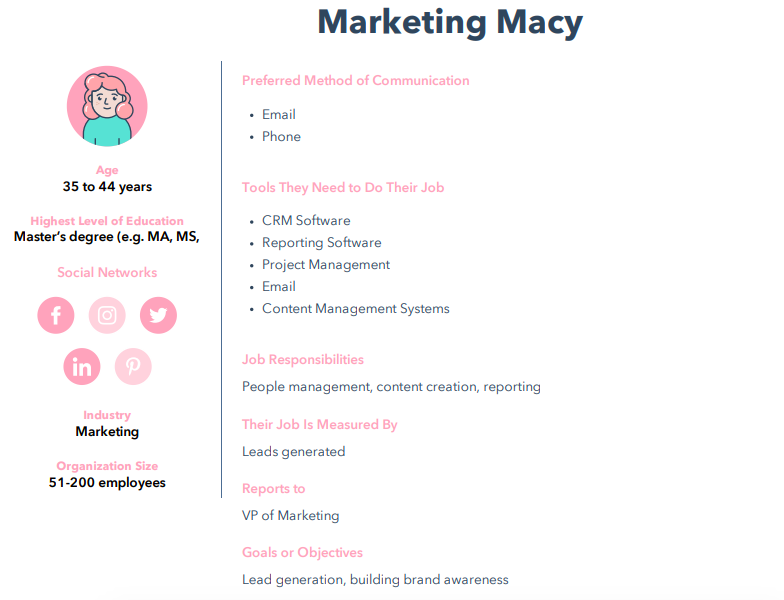
Below is an example of a buyer persona, Marketing Macy. Notice how my persona lists demographics, like age and education, as well as tools needed for their day-to-day responsibilities, like a CRM.

Marketing Macy buyer persona

The needs, goals, and behavior of your potential customers dictate how you convey your product or service. So for Macy, I want to focus on a B2B strategy that caters to her goals of lead generation and brand building.

Understanding those goals helps you determine what kind of media your personas are consuming, what motivates them, and where they "live" online. With this information, you can also develop a compelling, effective brand that reaches the right people.

Make your own buyer persona with HubSpot's free MakeMyPersona tool, which guides you through a series of questions about your ideal customer.

The tool is fun, interactive, and gets you thinking critically about who you want to reach with your brand and how you want to reach them.

2. Develop an identity and voice for your brand.

Once you've identified your buyer personas, your brand can start to take shape.

Create a brand identity — what makes your brand, your brand — and its voice, which is the tone you use in any marketing copy or public communication.

Developing a brand voice and identity is similar to constructing your personas.

But instead of answering questions about your target audience, you're answering questions that are more introspective to your brand: What are your company's values, what do they represent, and how do you want people to talk about you?

"The most important part of developing a brand is prework discovery," said Van Tongeren. "If you've done the work and deep-dived into who you are as a brand, figured out what you want to be known for and what your brand personifies then you're in a great spot to start."

When you answer these questions, focus on creating content that supports them. Craft compelling emails, blogs, social posts, and multimedia that reflect your company's mission, values, and how you want to appear to customers.

For example, if one of your values is to be accessible to customers, make your contact information available to users, engage them regularly, and answer their service questions in comment sections.

Developing your voice comes through in the copy of that content. Are you going to use conversational language that relates to customers? Or will it be more beneficial to reach your audience from a technical standpoint?

For example, a lifestyle company with a great understanding of brand identity is Fanm Djanm.

When you navigate to the brand's website and social channels, what you'll see is consistency in their branding. Warm and vibrant colors, powerful images of women, and copy that creates a sense of community.

example of great branding on instagram

It's a direct reflection of the brand name, which translates to "strong women" and its celebration of sisterhood and self-love.

Even if you're not starting from scratch, establishing a strong(er) brand voice can be valuable.

Just take operating system software service Android, for instance. Their 2019 rebrand was a logo re-up, making the design cleaner and modern:

The Android rebrand of 2019

Image Source

The logo came from a need to speak to a shift in audience. Initially, Android's target audience was the developer, but instead, the company has become more consumer-facing. The change was bred from this analysis.

3. Map out a consistent social media presence.

So, we know who your personas are. And now, we have an idea of what and how to create messaging that connects with them. But where are they?

There's a good chance you'll find them on social media, and that's an opportunity you don't want to miss. We've talked about how effective it is to reach people where they're already present, and that includes their online behavior.

A 2020 Sprout Social Index report found that 89% of consumers will purchase from the brands they follow on social media. The study also shows that social media users want to learn about brands' new products and services. In fact, 57% of respondents said it's the top reason they follow companies on social media.

Now that you have a clear picture of what your audience is interested in, the next step is figuring out where they're spending the most time on social media.

Don't worry, you don't have to play Inspector Gadget to figure this out. Check out competitors — see where they're most active (and how their language may or may not connect to audiences).

Additionally, look at each social platform's demographic breakdown to better understand who you're targeting and where.

For instance, the highest percentage of U.S. men and women who use Facebook are between the ages of 24 and 35. TikTok, on the other hand, tends to have a younger audience, with many users falling in the Gen Z population.

If you find the majority of your audience prioritizes one social network, you'll have an idea of where to allocate your resources.

However, don't ignore other sites. When you build a presence on multiple social media platforms, you'll have an opportunity to diversify how you reach audiences.

Diversifying the methods and channels you use for obtaining new leads helps you to connect with as many potential customers as possible.

Maintaining a presence is just as important as building one — for example, have you ever gone to a brand's Facebook page, only to find that nothing has been posted in the past three months? Chances are, it didn't have a positive impact on your perception.

That can be avoided by planning and scheduling social media posts like you would with any marketing calendar. This free Social Media Content Calendar can help.

It's also important to think ahead of time about the content you'll be posting on social media and the interactions you want to have with your followers.

One of the top reasons why consumers unfollow brands on social media is irrelevant content and too many ads, according to the Sprout Social Index report.

If you're wondering what they're looking for, the survey respondents said it's engagement first, followed by memorable content and compelling storytelling.

4. Start a company blog.

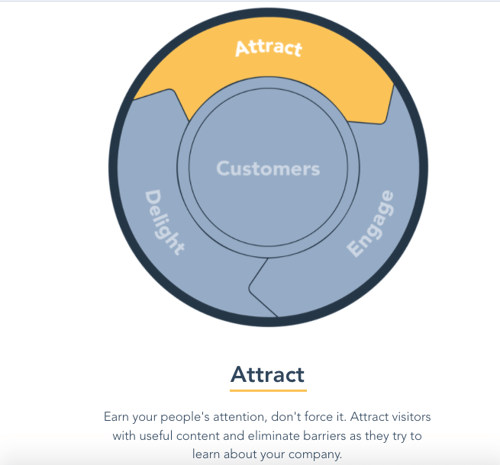
We've covered the importance of blogging before, and it can't be emphasized enough. It's a core part of the inbound marketing flywheel, especially the "attract" stage, which turns website browsers from strangers to visitors.

Inbound Marketing flywheel attract stage.

Image Source

Starting a blog is a fundamental step of inbound marketing. It helps you reach qualified customers, like your personas, by creating content that matches what they're searching for. That's why it's so important to make blog posts relevant to audiences (and optimize them for search engines — here's how).

"HubSpot's success has been a direct result of our blog. In fact, we had a blog before we even had a product," said Lisa Toner, director of content at HubSpot.

"Dharmesh and Brian always had the belief that in order to build a remarkable brand, you have to create remarkable content, and we've done that consistently on our blog ever since we started out in 2006."

Senior Team Manager of the HubSpot Blogs Karla Cook adds that our blog is a big discoverability point for our target audience.

"It's the very first interaction many people have with our brand – even before they learn about our products – and it helps us start that relationship off in a positive way," she said.

Customers are looking for the information you're able to provide. Plus, that content can serve as material to populate your social media networks.

To find what your audience is searching for, conduct keyword research, which will tell you what the most important topics for your audience are via search engines.

While blogging can be inexpensive, it does take time.

The inbound marketing version of that question would ask, "Would you rather blog for one hour each day and promote content created by and for your company, or several hours a day sourcing content for your ideal customer from your competitors?"

An editorial calendar is also helpful in maintaining consistent timing and fresh content on your blog. That's why we put together a free blog editorial calendar template, complete with instructions and content management tips.

5. Make customer service a priority.

When we hear the name "Zappos," most of us immediately think, "Unparalleled customer service." The online apparel retailer built this level of service into its core approach to doing business.

Why is that so important? For Zappos, making excellent customer service the cornerstone of its brand actually saved money on marketing and advertising. That's because it created word-of-mouth among existing and potential customers.

This is called earned media: The recognition that your brand has earned, not paid for, from people talking about something you did that was remarkable.

For example, when I'm shopping on a new website, the first thing I do is read reviews. If I see reviews that mention speedy shipping, friendly customer service, and high-quality products, I'm more inclined to purchase.

And I'm not alone. A 2020 Zendesk Customer Experience Trends study found that customer service is a top consideration for consumers when deciding whether to purchase from a brand – more than the product or service itself and convenience.

It only takes one bad experience to potentially lose a customer, with the report revealing that about half of consumers will switch over to a competitor after just one negative experience.

This revisits the importance of your identity and voice. As you go through these brand-building steps, think about the values that you want your audience to experience, like excellent service. Those values are what shape the brand's culture, and that influence the voice you project to an audience.

Wondering what actionable steps you can take? Here are research-backed ways to improve your customer experience:

6. Take advantage of co-branding.

I'll never forget what my colleague, Lisa Toner, says about negotiating co-branding agreements.

"Larger companies may have a large reach," she explains, "But what do they not have?"

When you're just starting to build a brand, you might not have the reach that Toner's talking about. You can take the steps to build it, but that takes time. Until then, one way to get your name in front of a broader audience is to partner with a brand that does have that reach.

"Working with a co-marketing partner (an external brand) can be a really valuable way of growing your audience while building a beneficial relationship with a partner," said Margot Mazur, principal marketing manager of strategic partnerships at HubSpot.

"You don't have to have a huge budget," she adds. "Working with a partner means that you can split up the marketing duties."

Let's say you're working with a partner on a lead generation campaign, such as a gated e-book, Mazur explains that one partner can take on copywriting duties and the other can take on design, or vice-versa depending on your resources.

"This way, you can save money on any freelance costs by working together on a project. Ideally, both you and your partner distribute the content piece to your audiences, driving visibility to an audience you may not have had access to," she said.

"That saves you advertising costs and exposes you to a new set of people interested in your content."

But don't just pick any brand for a partnership. Make sure it's one that's aligned with yours, so it makes sense in the minds of your audience. Here are the questions we recommend asking when seeking a co-branding partner:

  1. Will your partner's audience be interested in your brand? Is this audience difficult for you to reach without this partnership?
  2. Will your audience trust your co-brand? That's crucial to getting them to listen to you, so make sure your partner reaches the audience in a way that instills confidence.
  3. Do you have something to offer your co-brand? Just like Toner asks, "What do they not have?" The experience should be a win-win-win: For you, your co-brand, and the consumer. As an example, if you have an international audience that your partnering brand doesn't, consider pointing to that when discussing the partnership.

Building a brand might seem like a huge undertaking, especially when resources are limited. However, there are plenty of economic ways to get started and continue the momentum.

A great starting point that's both affordable and offers high ROI is video. Wondering how you can pull it off? Just use an iPhone or a smartphone with high camera capabilities and use free video editing software like iMovie.

Mazur explains that you can then script your video internally, share it on YouTube and promote it across all digital channels.

"Video marketing is incredibly effective – videos can go on your product pages, help pages, blog posts, social media posts, Product Hunt pages, etc.," said Mazur.

She continues, "Work with your partner to split up the recording duties, as well as splitting distribution. You'll get access to a whole new audience and have an engaging piece of content you can use across your channels."

And don't forget to have fun with the process.

Of course, there has to be a degree of strategy and logic involved — that's why there are tools to help you determine the different pieces of your brand. But it's a creative exercise, so keep that in mind if you get bogged down in technicalities.

7. Host a masterclass or webinar.

What are some of the talents the minds at your company display daily? Are they masters of email marketing? Do they excel at coding? Do you earn a "World's Best Brand Strategist" superlative every year?

A fantastic way to grow your brand – and earn leads – is to leverage these talents into a masterclass or webinar, and promote them online.

By optimizing your class with hashtags and witty captions, you'll find audiences who are interested in the talents for which you're offering lessons. These masterclasses can be 45- to 60-minute sessions that provide an overview of your special expertise and showcase how to do it right.

For example, if I were to offer a webinar, it would highlight the art of using emojis for business, an experiment I'm passionate about. I would start by describing why engaging copy is important for attracting customers.

Then, I'd explain the pros and cons of emoji usage. Finally, I'd share the right and wrong times to include emojis in marketing messages.

After that, I would present an experiment and report on my findings. Whether the experiment supports or negates my thesis always leaves room for fruitful discussion — leading to the last portion, questions.

Voila – an outline for a masterclass that uses my talents to back up the credibility of a business that focuses on, let's say, marketing or social media.

Running experiments doesn't have to cost a dime, and hosting a webinar takes only about an hour of your day.

The result, however, is spreading the word about the value of a company, providing data that supports credibility, and promoting company values like delighting customers and giving helpful, educational content to your audience.

Branding on a budget? Absolutely possible. What counts, when you're brainstorming ways to brand effectively, is how to use the resources you have to the best of your ability.

Keeping your audience in mind is the first step — after that, it's about thinking of creative ways to engage those target customers.

Have fun building your brand. After all, this is a creative process and while every experiment may not work, you can always learn to improve. Good luck, and happy branding.

New Call-to-action


7 Budget-Friendly Steps to Brand Your Business [w/ Expert Tips & Data] was originally posted by Local Sign Company Irvine, Ca. https://goo.gl/4NmUQV https://goo.gl/bQ1zHR http://www.pearltrees.com/anaheimsigns

20 of the Best Professional Bio Examples We've Ever Seen [+ Templates]

Does your professional bio make a statement?

In this article, we have great professional bio examples you should compare yours to — and a series of free bio templates you can use to make it perfect.

If you’re anything like me, you probably don't think about your professional bio until you’re suddenly asked to "shoot one over via email." You have approximately one afternoon to come up with it, and that's when you scramble, and the bio ends up reading like this:

"Rodney Erickson is a content marketing professional at HubSpot, an inbound marketing and sales platform that helps companies attract visitors, convert leads, and close customers. Previously, Rodney worked as a marketing manager for a tech software startup. He graduated with honors from Columbia University with a dual degree in Business Administration and Creative Writing."

Woof, that was dull. Are you still with me? I swear, not even adding a tidbit about his cats would liven that bio up.

→ Download Now: 80 Professional Bio Examples [Free Templates]

To be fair, in certain contexts, your professional bio does need to be more formal, like Mr. Erickson's up there. But in many cases, writing a readable bio — even conversational — is a really good thing. That means dropping that traditional format of listing your accomplishments like a robot and cramming as much professional-sounding jargon in there as you can.

Here, let's dive into how you can create your own professional bio (with templates for both long and short bios). Then we'll dive into the best professional bio examples we've ever seen. 

Skip to one of these sections if you know what you're looking for: 

Professional Bio Templates

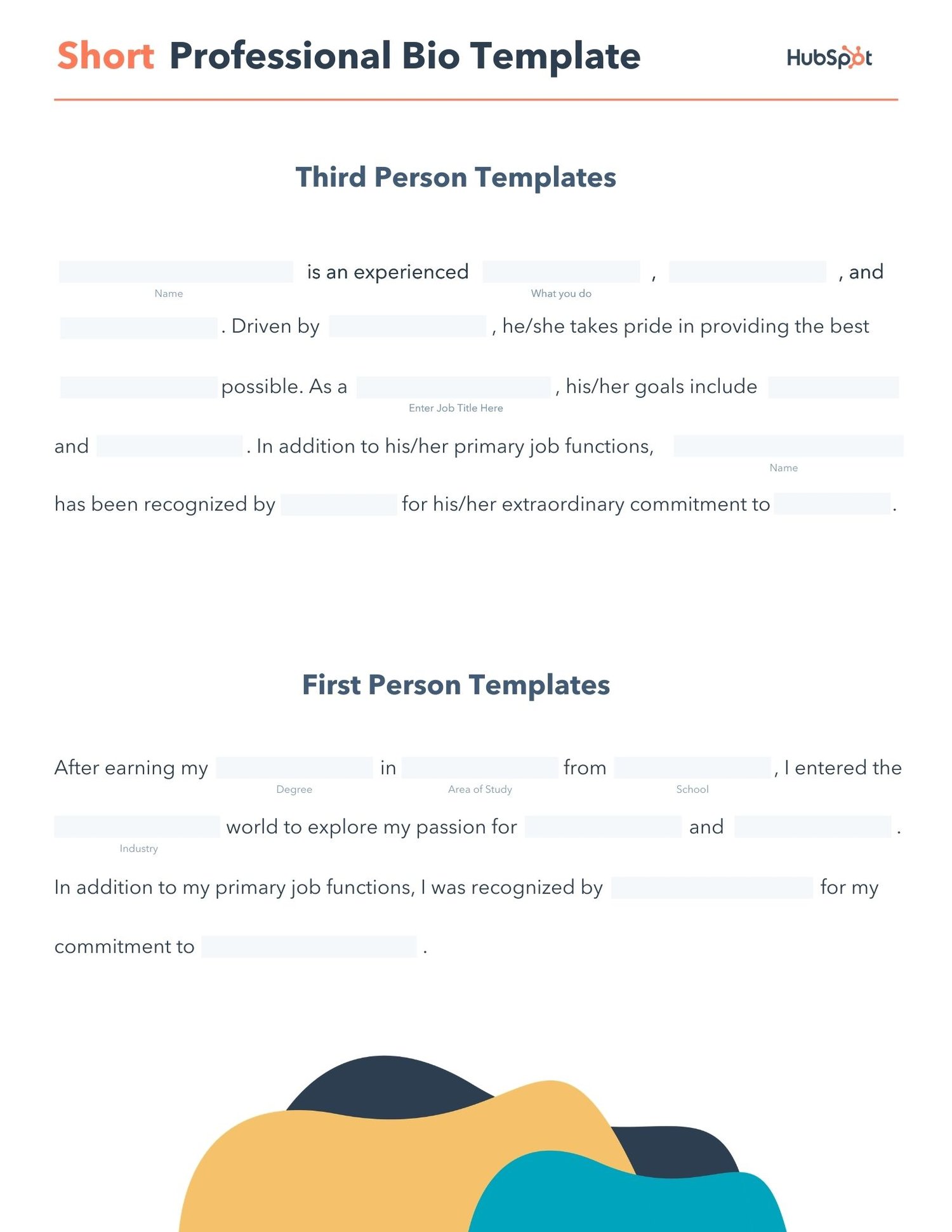
editable short professional bio pdf template

Download a free, editable short professional bio template.
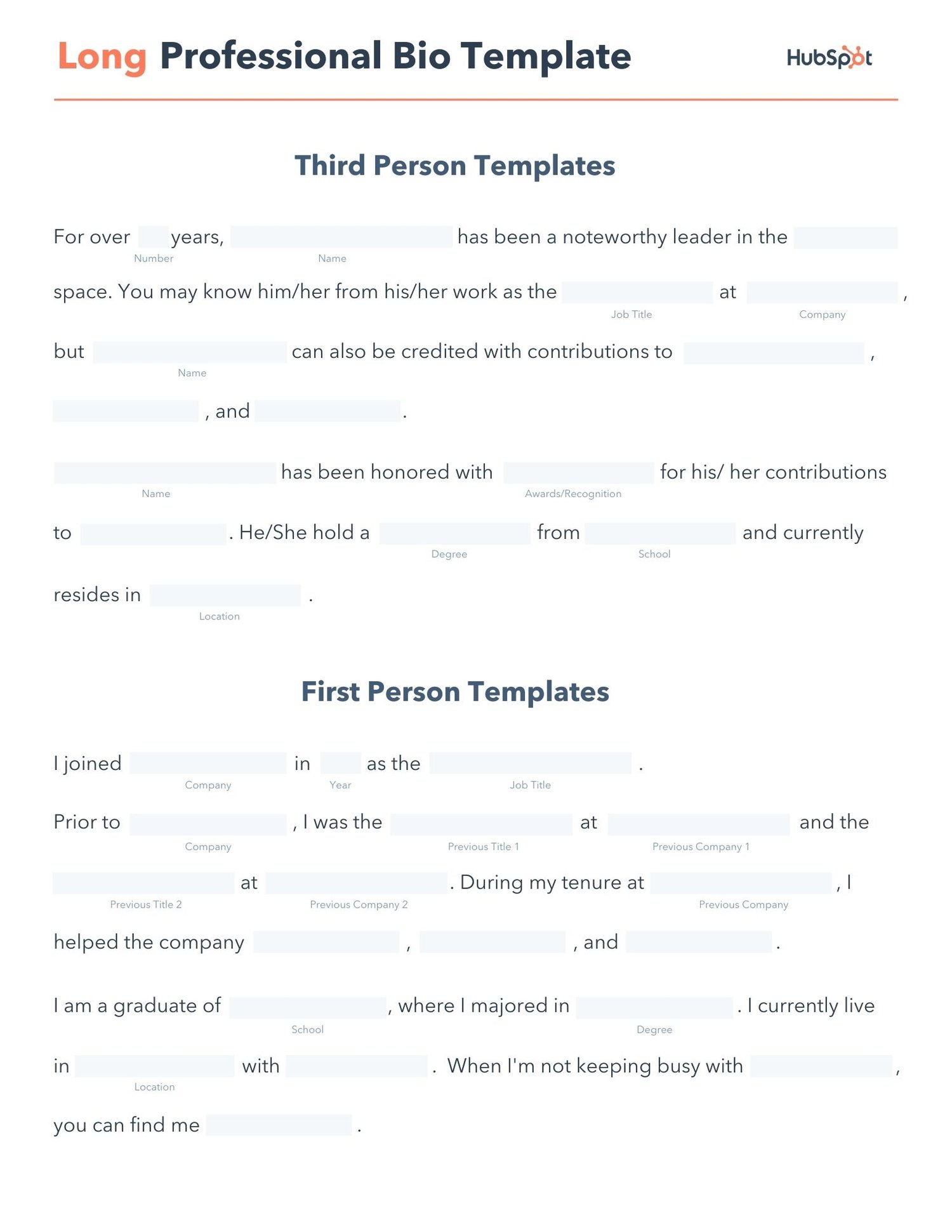
free editable long professional bio pdf template

Download a free, editable long professional bio template.

Writing a professional bio that captures your brand and what you offer to your audience can help you grow better. But doing it right is just as important.

Here's how to write a bio, step-by-step.

1. Create an 'About' page for your website or profile.

Before you can publish your professional bio, you need a living space for it. Here are a few to consider (some of these you might already have in place):

  • Facebook Business page
  • LinkedIn profile
  • Instagram account
  • Personal website
  • Personal blog
  • Industry website
  • Industry blog byline

As you'll see in the professional bio examples below, the length and tone of your bio will differ depending on which of the above platforms you choose to be on.

Instagram, for example, allows only 150 characters of bio space, whereas you can write virtually as much as you want on your personal website — or even your Facebook Business page. But once created, this bio should represent who you are in the eyes of your audience.

2. Begin writing your bio with your first and last name.

If your readers don't remember anything else about your bio, make sure they remember your name. For that reason, it's a good idea for your first and last name to be the first two words of your professional bio. Even if your name is printed above this bio (hint: it should), this is a rare moment where it's okay to be redundant.

For example, if I were writing my own bio, I might start it like this:

Lindsay Kolowich

Lindsay Kolowich is a Senior Marketing Manager at HubSpot.

3. Mention any associated brand name you might use.

Will your professional bio represent yourself, or a business you work for? Make sure the brand you want to be associated with is mentioned in your bio. If you're a freelancer, perhaps you have a personal business name or pseudonym you advertise to your clients. Here are a few examples:

  • Lindsay Kolowich Marketing
  • SEO Lindsay
  • Kolowich Consulting
  • Content by Kolowich (what do you think ... too cheesy?)

Maybe you founded your own company, and you want its name to be separate from your real name. Don't be afraid to keep it simple: "Lindsay Kolowich is the founder and CEO of Kolowich Consulting."

4. State your current position and what you do.

Whether you're the author of a novel or a mid-level specialist, use the next few lines of your bio to describe what you do in that position. Don't assume your audience will naturally know what your job title entails.

Make your primary responsibilities known to the reader, helping them paint a picture of who you are during the day and what you have to offer the industry.

5. Include at least one professional accomplishment.

Just as a business touts its client successes in the form of case studies, your professional bio should let your own audience know what you've already achieved. What have you done for yourself — as well as for others — that makes you a valuable player in your industry?

6. Describe your values and how they inform your career.

Why do you do what you do? What might make your contribution to the market different than your colleagues?

Better yet, what values do you and your colleagues share that would make your business a worthwhile investment to others? Start to wrap up your professional bio by simply explaining what gets you up in the morning.

7. Briefly tell your readers who you are outside of work.

Transition from describing your values in work to describing who you are outside of work. This may include:

  • Your family
  • Your hometown
  • Sports you play
  • Hobbies and interests
  • Favorite music and travel destinations
  • Side hustles you're working on

People like connecting with other people. The more transparent you are about who you are personally, the more likable you'll be to the people reading about who you are professionally.

8. Consider adding humor or a personal story to add flavor to your professional bio.

End your professional bio on a good note — or, more specifically, a funny note. Leaving your audience with something quirky or uniquely you can ensure they'll leave your website with a pleasant impression of you.

It's important to follow the steps above when writing your bio, but don't obsess over any one section. Remember, the people reading your bio are suffering from information fatigue. If you don't hook 'em in the first line, you'll lose them quickly.

(P.S. Want to give your professional brand a boost? Take one of HubSpot Academy's free certification courses. In just one weekend, you can add a line to your resume and bio that's coveted by over 60,000 marketers.)

Why Good Bios Are Important for a Professional

Alright, I know what you may be thinking ... So what? It's just a bio. I mean, how many people read professional bios, anyway?

The answer: A lot of people. More importantly, though, there's no way to tell exactly who is reading it — and you always want it to be ready for when the right people come across it. And when they do, you want it to catch their eye. In a good way.

You see, while your resume is only useful for when you're actively applying for specific positions, your professional bio is much more visible. It can live on your LinkedIn profile, your company's website, your guest blog posts, your speaker profiles, your Twitter bio, and many other places.

And, most importantly, it's the tool that you can leverage most when you're networking.

Bottom line? People will read your professional bio. Whether they remember it, and whether it makes them care about you, is a matter of how well you present yourself to your intended audience.

So, what does a top-notch professional bio look like?

Below, we've curated some of the best real professional bio examples we've ever seen on Twitter, Instagram, Facebook, LinkedIn, and the various websites where you might describe yourself.

Check 'em out, and use them as inspiration when crafting your own.

The Best Professional Bio Examples We've Ever Seen

1. Chimamanda Ngozi Adichie

Bio Platform: Personal Website

Chimamanda Ngozi Adichie begins her professional bio with an invitation into her world. In just one sentence, she describes the depth and breadth of her body of work as it has been translated into thirty languages and several publications.
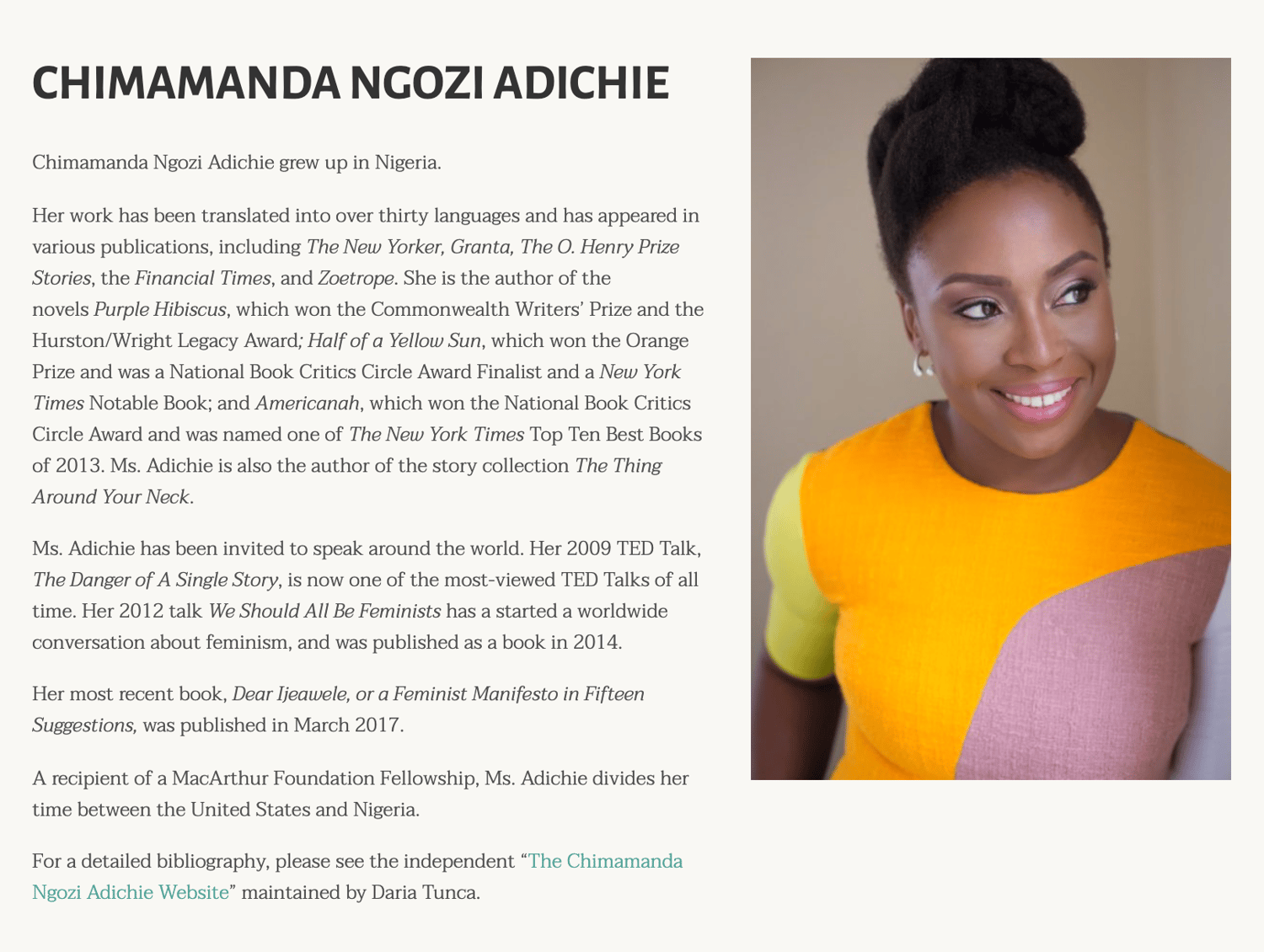
Chimamanda Ngozi Adichie Professional Bio Example

Along with her notable writing career, Chimamanda showcases her speaking career which introduces readers to a well-rounded view of who she is as a professional. From there, her bio seamlessly flows into her recent work and a glimpse into how and where she spends her personal time – the United States and Nigeria.

Finally, Chimamanda’s bio ends with a call-to-action to read a more detailed biography, giving the reader a choice to read the information available about her life and career.

2. Chime Mmeje

Bio Platform: LinkedIn

A bio with a hook is sure to keep you reading. Chima Mmeje is a freelance SEO copywriter who’s “extremely good at one thing”: helping companies rank for their target keywords.

By leading with a strong hook that aligns with her target audience’s marketing needs, she’s able to keep readers engaged.
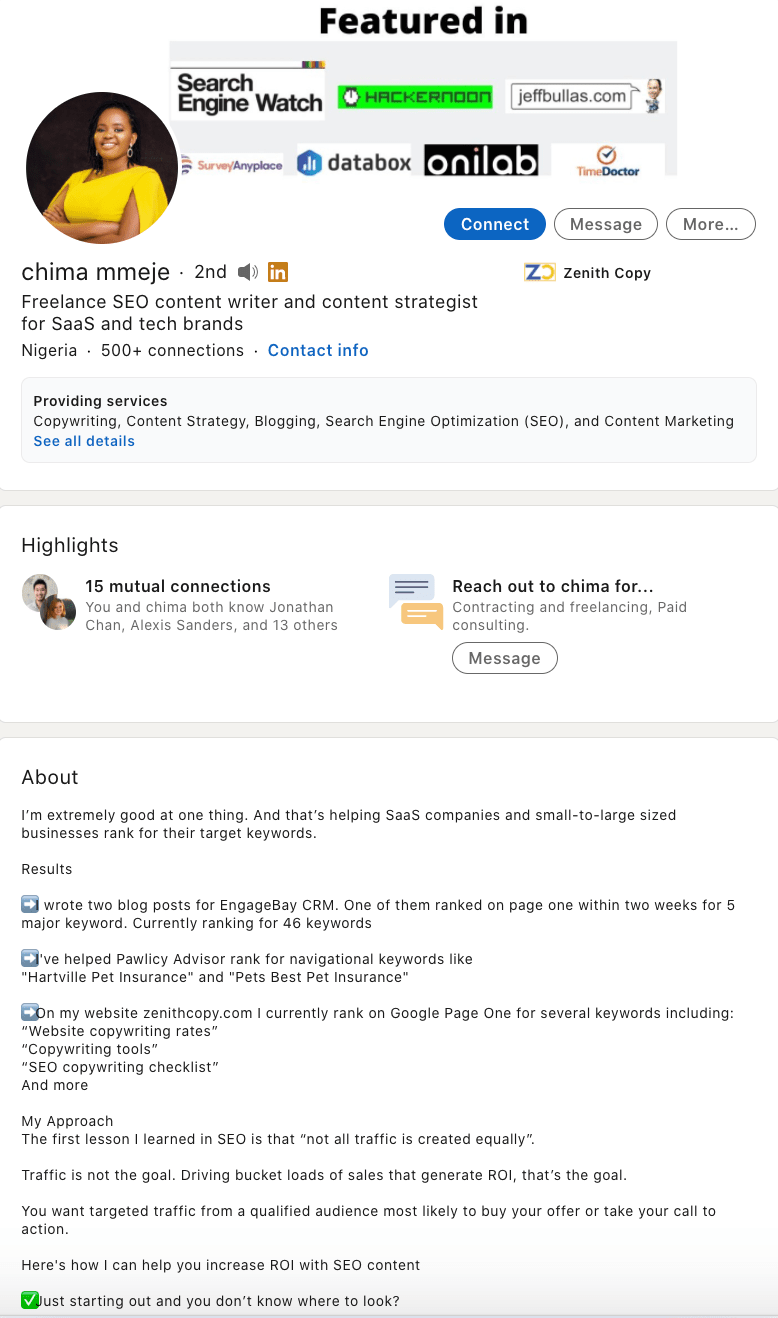
Chima Mmeje Professional Bio ExampleWhat comes next is a unique differentiator in a professional bio. Instead of listing accolades, Chima shares a few wins she’s secured for her clients. This nifty section does two things: it builds the readers’ confidence in her ability to deliver results and it’s a practical way to name-drop her clients in a professional bio.

In the body of her professional bio, Chima briefly lists her process at a high level, giving her potential clients a birds-eye view of what they can expect when they book her services.

The simple call to action “Drop a message” in her email inbox is a casual invitation to learn more about her services.

3. DJ Nexus

Bio Platform: Facebook

This New England-based DJ has single-handedly captured the Likes of more than 2,000 people in and beyond Boston, MA. And even if you don't listen to the type of music he produces, it's hard not to listen to his compelling Facebook bio.

For instance, consider his tagline, under "About" — "Quiet during the day. QUITE LOUD at night!" DJ Nexus tells you when he works in an awesome way. I got goosebumps just imagining a dance club he might play his music in.
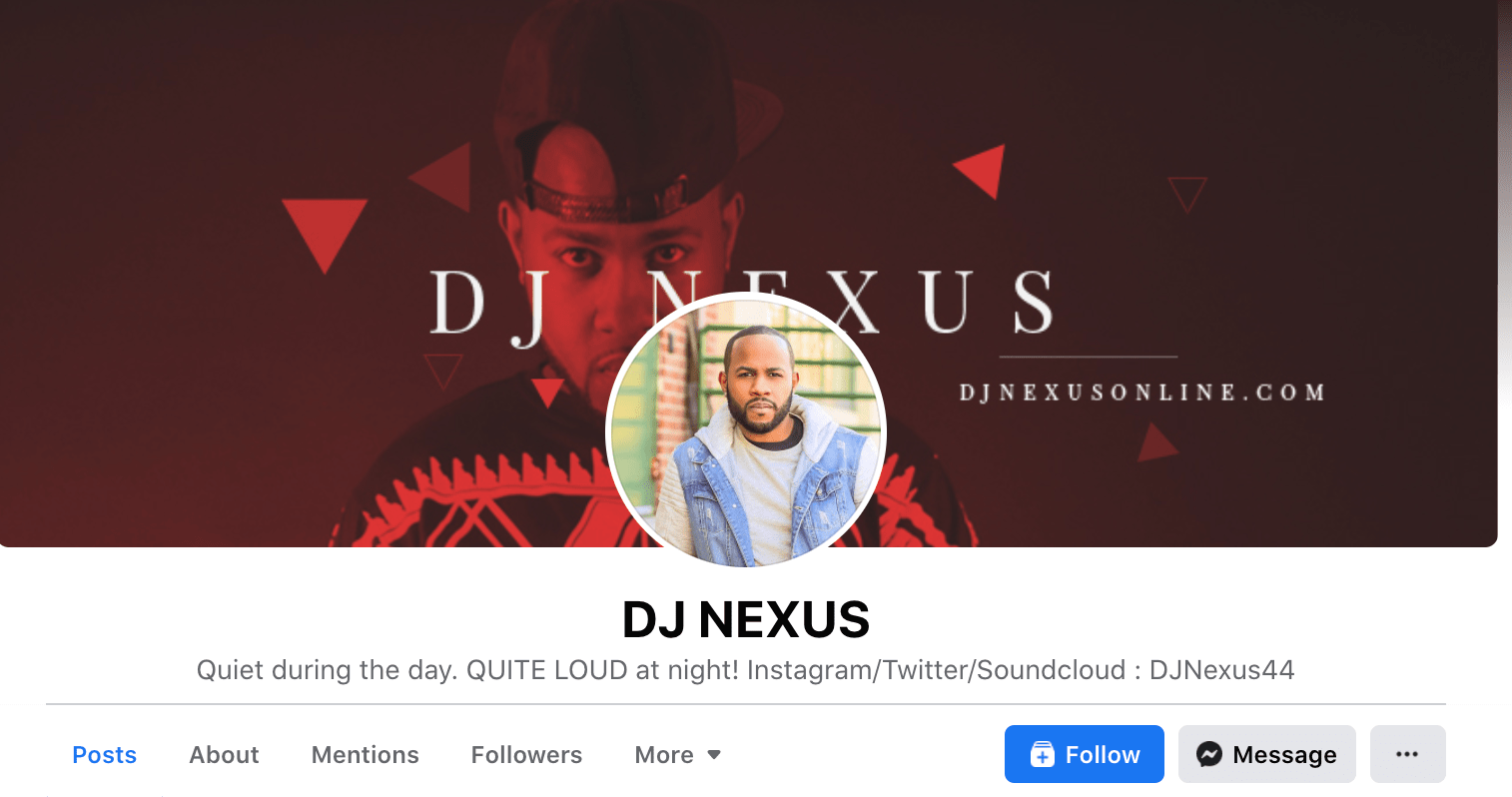
DJ Nexus Professional Bio ExampleDJ Nexus's bio brilliance doesn't stop there.

DJ Nexus links his Facebook account to his personal website, where he has the space to tell the full story of his background. Here's a preview, below: 
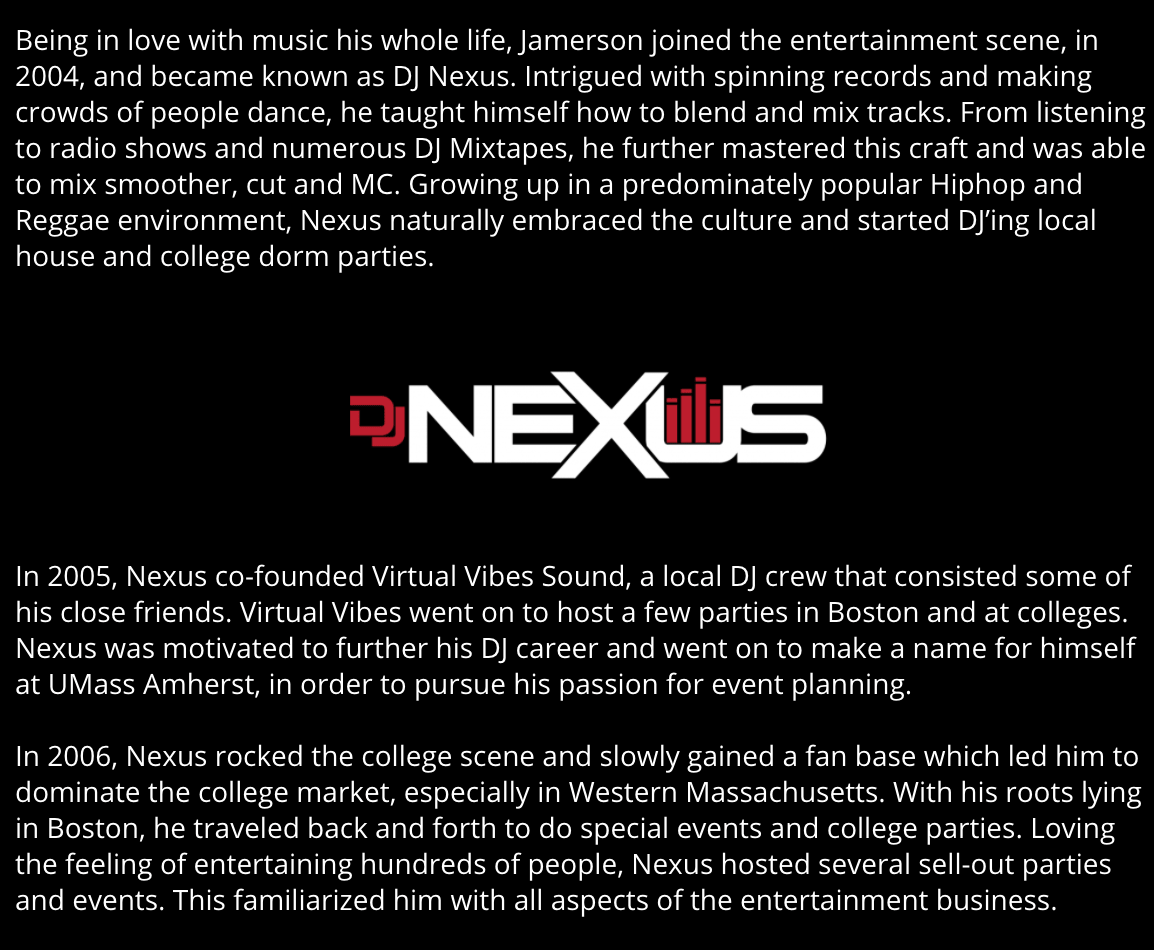
DJ Nexus Professional Bio ExampleIn this story, DJ Nexus describes both when he "became known as DJ Nexus" and a company he founded shortly afterward — all before going to college.

This is a terrific lesson for professional bios: Customers want to learn about you. Consider how you might also lead your Facebook visitors off your Facebook page and onto your personal website to learn more about who you are. 

4. Lena Axelsson

Bio Platform: Industry Website

When it all comes down to it, your professional bio is no different than any other piece of persuasive copy — no matter where it lives. One of the most common mistakes people make is thinking of it as its own beast, separate from other pieces of writing. If you think about it that way, you're far more likely to write something painfully uninteresting.

When you sit down to write your professional bio and you're watching that cursor blinking on the screen, think about how you would introduce a blog post. You don't just dive right into the meat of the thing, now, do you? No. You start with an introduction.

The best bios are often concise (around 200–300 words), so you don't have a lot of room to play around. But a single sentence that tees your reader up and provides context for the accomplishments that follow could make the rest of your bio that much more persuasive.

Take Lena Axelsson's bio, for instance. She's a marriage and family therapist — a job where empathy and compassion are a big part of the job description. That's why she chooses to open her bio with a great introductory sentence: "When human beings experience trauma or severe life stressors, it is not uncommon for their lives to unravel."
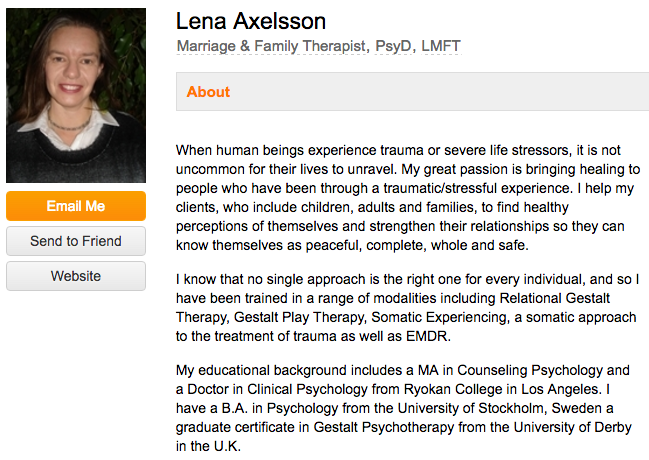
Lena Axelsson Professional Bio Example

Then, she goes into why she's passionate about her job, how she helps her clients, and how she caters her approach to each individual patient. The necessary educational information is left for the end, after the reader has been hooked.

Your bio doesn't have to be super serious, nor does it have to start with a joke. This bio shows how you can capture your reader's attention by being empathetic and showing how that empathy shapes a valuable professional.

5. Mark Levy

Bio Platform: Personal Website

Mark Levy is a small business owner who's taken a more traditional approach to the professional bio on his website — but in a way that takes care to speak to his intended audience.

What we love about his bio is the way he's set it up: On his business' "About" page, he's listed two biographies, which he's labeled "Mark Levy's Biography #1" and "Mark Levy's Biography #2."
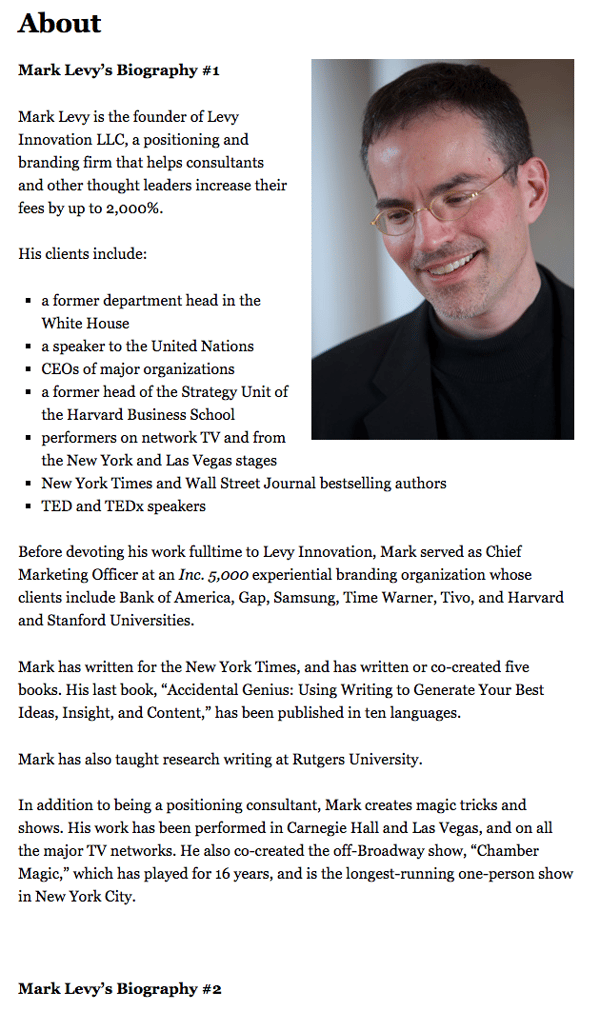
Mark Levy's professional bio in his personal website

Click here to see the full version.

Like Ann, Mark's given his readers two different options. The first biography is a "short version," which includes a combination of bullet points listing his credentials and a few short paragraphs.

The second is the "long version," which is actually even more interesting than the first one. Why? Because it reads like a story — a compelling one, at that. In fact, it gets really funny at parts.

The second sentence of the bio reads: "He was frightened of public school, loved playing baseball and football, ran home to watch ape films on the 4:30 Movie, listened to The Jam and The Buzzcocks, and read magic trick books."

Here's another excerpt from the middle:
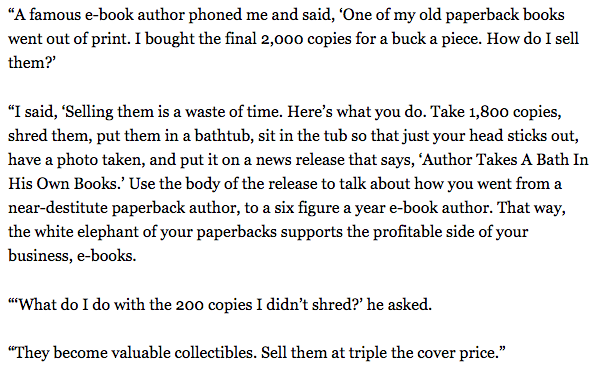
A snippet from Mark Levy's full professional bio on his personal website

Of course, the fantastic copywriting isn't a surprise, given that this guy wrote several books. But the conversational tone and entertaining copy let his quirky personality (and great writing skills) shine.

6. Audra Simpson

Bio Platform: Personal Website

With a classic take on the professional bio, Audra Simpson crafts a brief overview of her career in just a couple of paragraphs. The “why” behind her work is emphasized in the first half of her bio before transitioning to the way she carries out that work in practice.
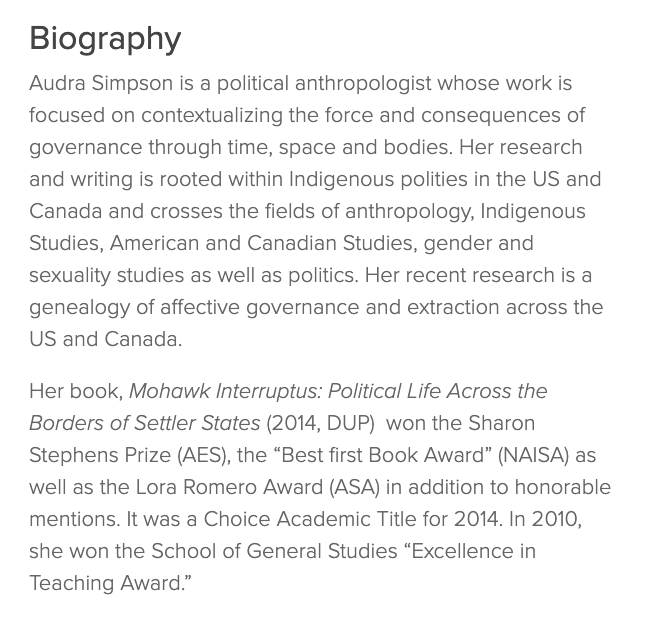
Audra Simpson Professional Bio

The second half of her bio combines her bodies of work and the awards she’s won for each from the year 2014 to 2020. This subtle timeline gives readers a picture of her experience in the field of political anthropology without listing her resume in detail. 

Audra’s professional bio is an example for those of us with several years of experience to communicate, but a strict word-limit to write within.

7. Marie Mikhail

Bio Platform: LinkedIn

Marie Mikhail checks off nearly every box for what makes an excellent bio. A professional recruiter, she expresses her "passion for recruiting" upfront, in the first sentence, while using that sentence to hook her profile visitors into a brief story of her background.
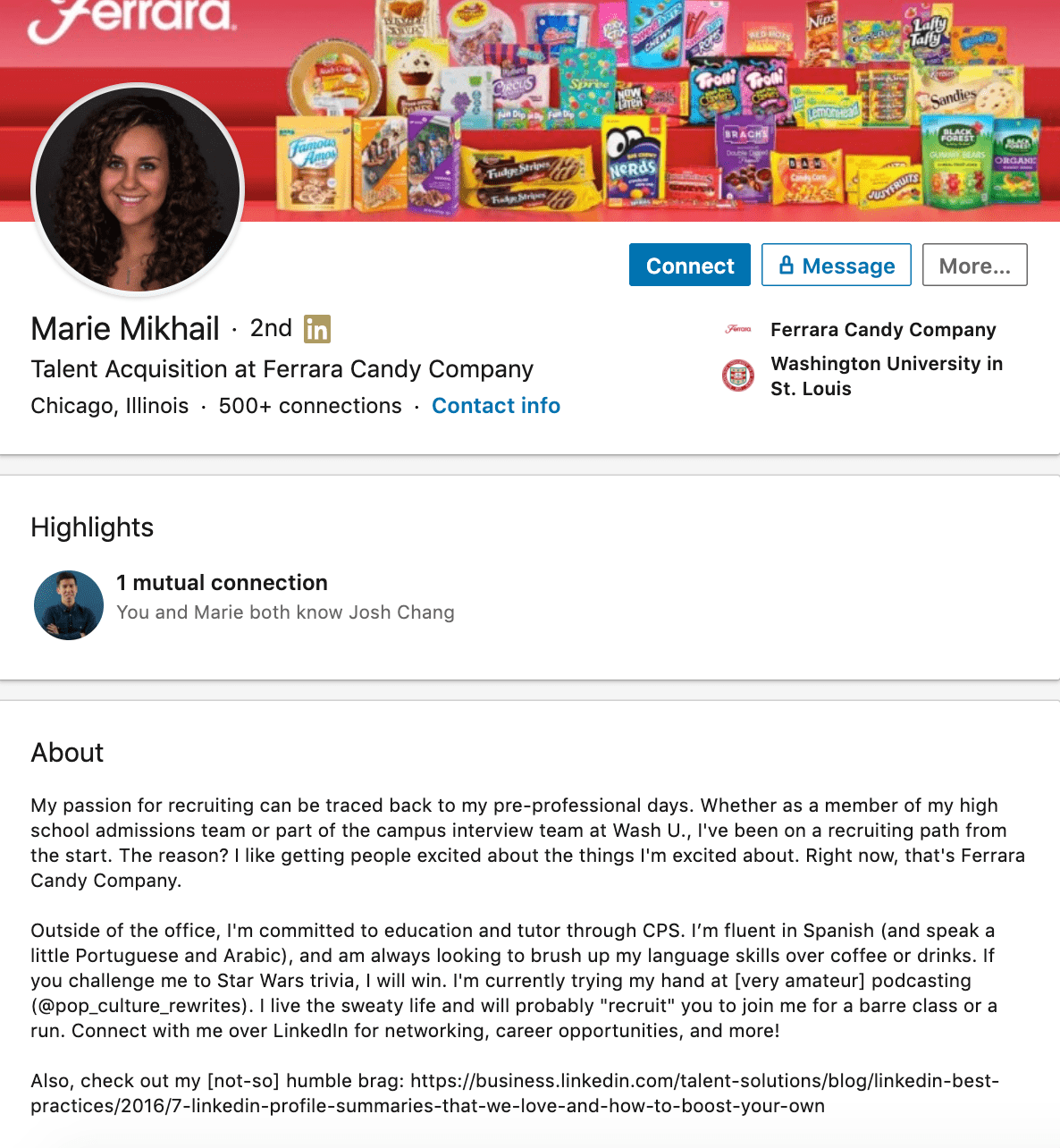
Marie Mikhail's professional bio on LinkedIn

But there are a lot of recruiters out there, and Marie knows that. So, to differentiate herself, she closes the first paragraph of her bio explaining that she likes "getting people excited about the things [she's] excited about." It's a well-put value proposition that sets her apart from the rest of the HR industry.

Marie Mikhail finishes off her bio by including a smooth mixture of professional skills, such as her Spanish fluency; and personal interests, such as podcasting and Star Wars (she mentions the latter with just the right amount of humor).

8. Wonbo Woo

Bio Platform: Personal Website

Wonbo Woo is the executive producer of WIRED's video content, and he has a number of impressive credits to his name. What does this mean for his professional bio? He has to prioritize. With this in mind, Wonbo opens his bio with the most eye-catching details first (if the image below is hard to read, click it to see the full copy).
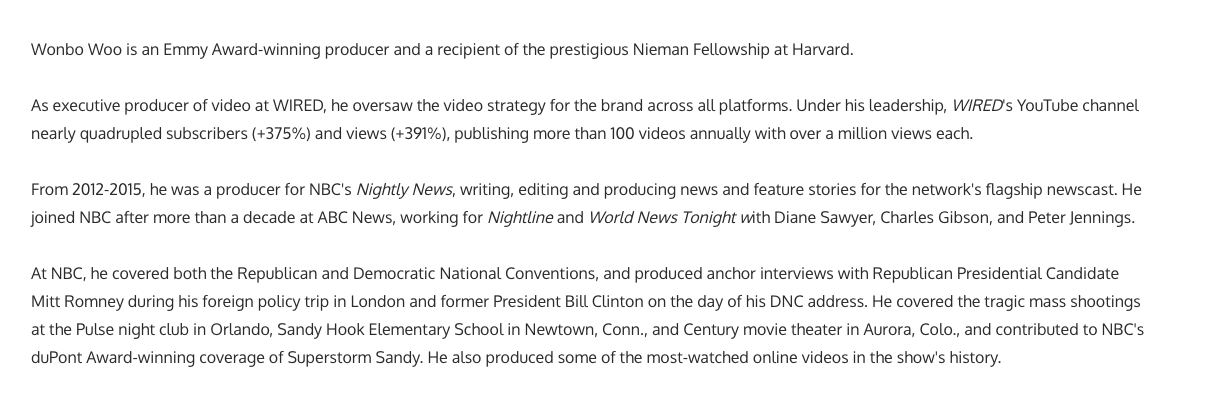
Wonbo Woo Professional Bio

Not only does Wonbo's bio start strong, but he also takes readers on a suspenseful journey through some of his most harrowing assignments — where he was when news broke and how he responded. You can see this quality below.

Wonbo Woo Professional Bio ContinuedThe accomplished journalist concludes his gripping bio as strong as it began, measuring his experience by the number of states, countries, and continents to which he's traveled in his career. See how this looks above. All in all, it's a fantastically concise bio for as much detail as it holds.

9. Chris Burkard

Bio Platform: LinkedIn

If you're writing your bio but having trouble figuring out how to showcase your accomplishments without boasting, photographer Burkard's LinkedIn bio is a great example for inspiration.

Written in third-person, his bio tells a fluid story, starting with his ultimate mission — "capture stories that inspire humans to consider their relationship with nature" — before diving into more tangible accolades (giving a TED talk, publishing books, etc.).
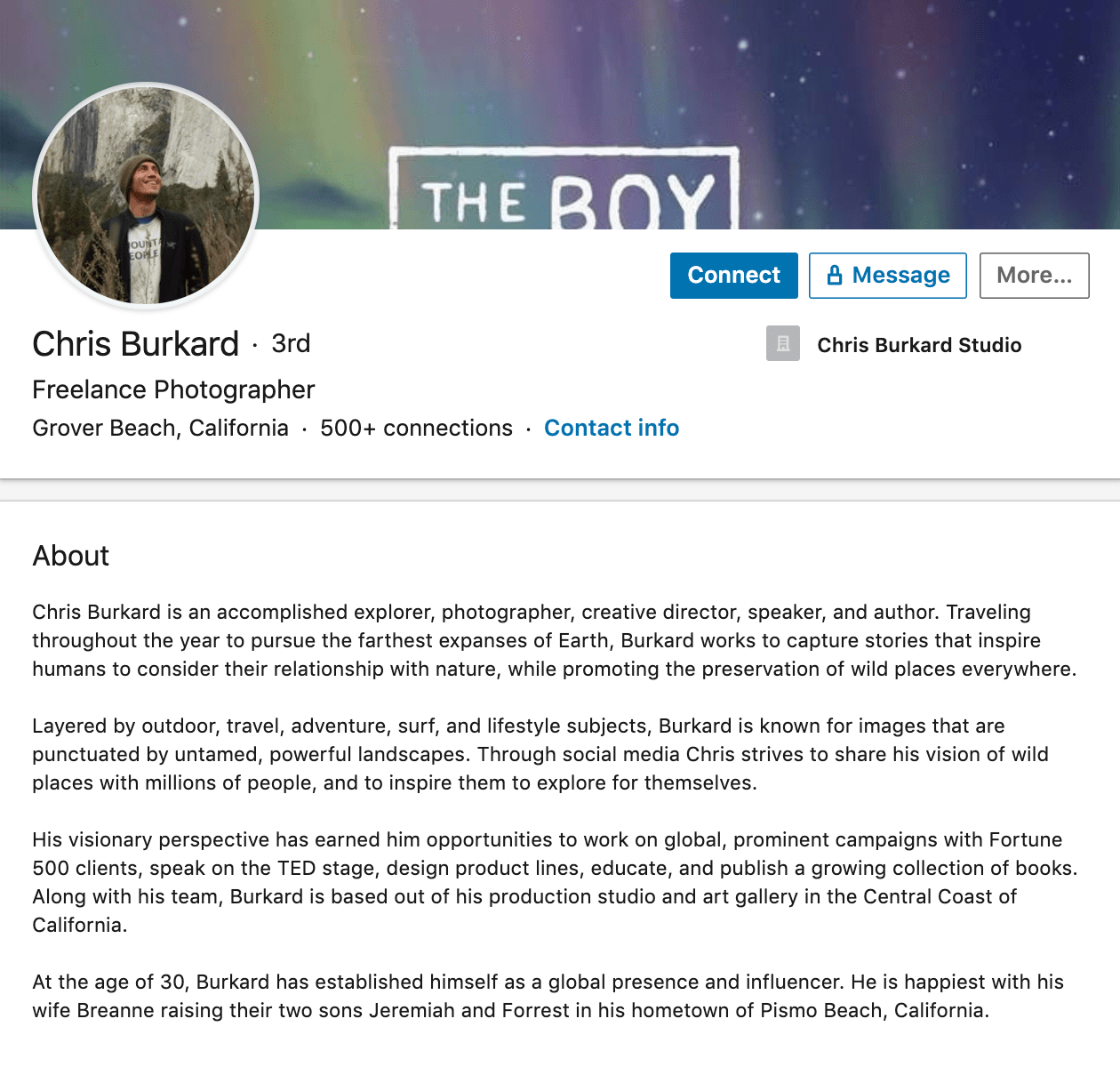
Chris Burkard's professional bio on LinkedIn

Best of all, rather than using his bio as an opportunity to brag, he instead ties his talents into how he hopes to help others, writing, "Through social media Chris strives to share his vision … and inspire [his followers] to explore for themselves."

I wouldn't necessarily be inclined to follow Chris if his bio had simply read "I post beautiful images" … but inspire me to travel? Now that's something I can get behind.

Lastly, he ends on a humble, sweet note, writing "He is happiest with his wife Breanne raising their two sons". Don't be afraid to inject some personal information into your bio — it could help you seem more approachable as a result.

10. Lisa Quine

Bio Platform: Portfolio Website

Although a picture is worth 1,000 words, a portfolio is quite different from a professional bio. While this might present a challenge for creative professionals who specialize in visual art to tell their stories, Lisa Quine quantifies her creativity to give her professional bio balance.

Throughout her bio, you’ll notice the number of murals she’s completed and a brief timeline of her career thus far which helps paint the picture of who she is as a professional.
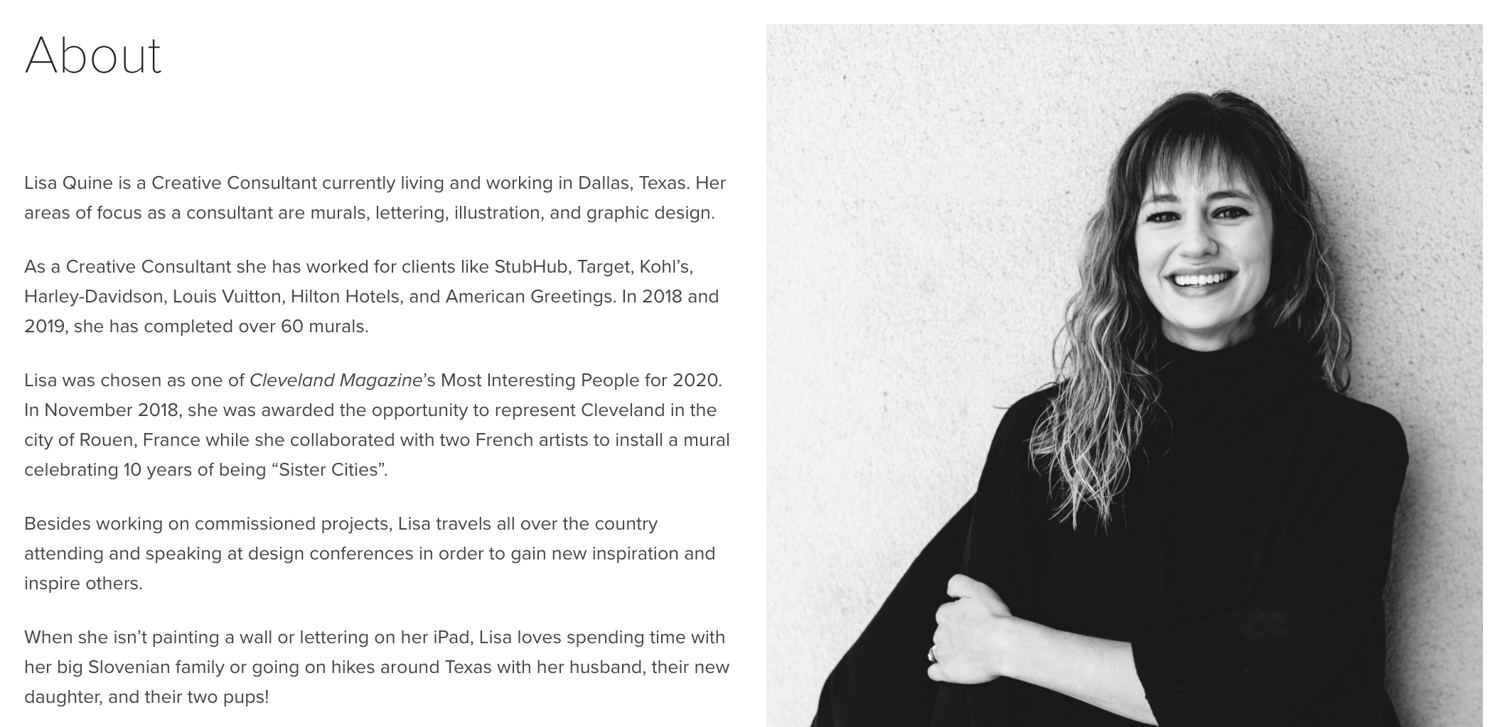
Lisa Quine Professional Bio Example

Lisa’s bio checks the box on nearly all of our recommendations for a great bio. She begins with her full name, her location, and what she does best. From there, she gets creative by appropriately mentioning the brands she’s worked with and highlights some of her favorite projects. With a third-person approach to the writing, this bio invites the reader behind a metaphorical door to meet Lisa as a professional, traveler, learner, wife, and mother.

11. Nancy Twine

Bio Platform: Company Website

As Founder and CEO of Briogeo — a popular natural hair care line that's received rave reviews in publications such as Allure and InStyle — there are undoubtedly plenty of accolades Twine could boast about.

But she chooses to start her bio from a humbler place, stating: "Nancy Twine is no newcomer to the beauty-sphere — in fact, she made her first foray into the world of natural product formulation at the ripe age of five."

The rest of her bio similarly focuses on Twine's strengths as someone who's able to take hair care "back to basics". The bio focuses on why Twine made the decision she did to start her company, and what ultimately drives her. 
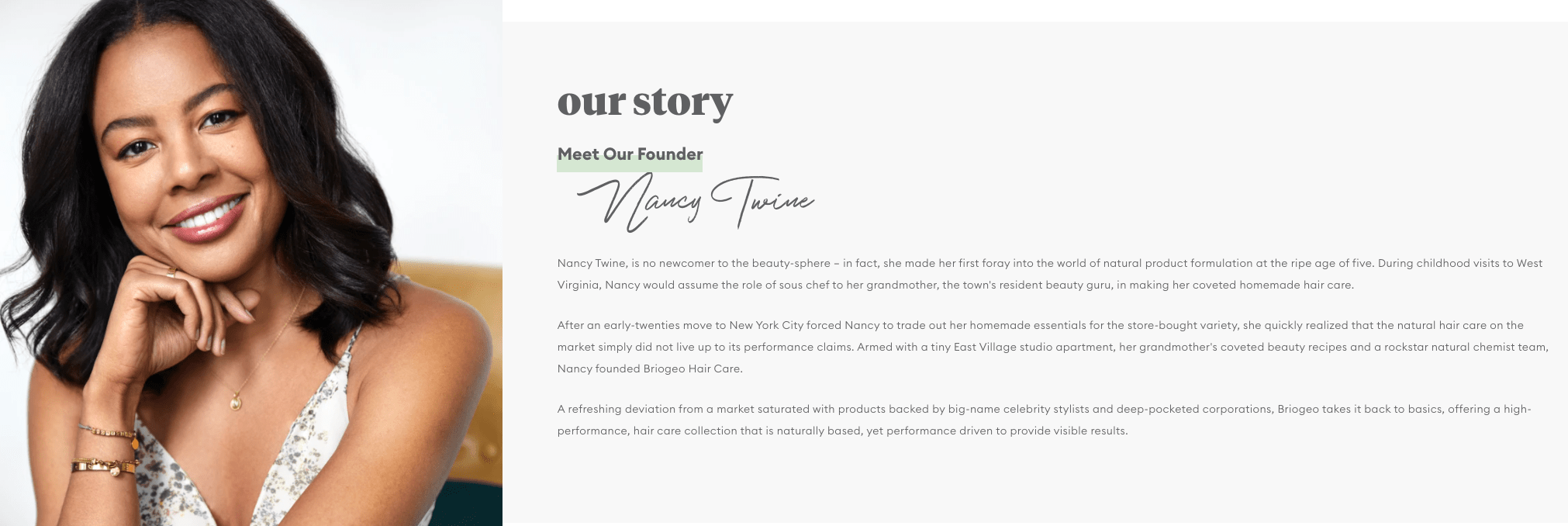
Nancy Twine Professional Bio

Similarly, you might consider using your personal bio as an opportunity to highlight your bigger purpose or vision. As Twine demonstrates, sometimes it's best to keep it simple, and let your message resonate with the right audiences. 

12. Trinity Mouzon

Bio Platform: Personal Website

I gravitated towards Mouzon's bio from the first sentence: "I'm obsessed with leveling the playing field." Mouzon effectively grips the reader's attention with this introduction, and then dives into some of her impressive accomplishments — including a brand that's now sold at Urban Outfitters and Target.

The language used throughout Mouzon's bio is authentic, real, and honest. Consider, for instance, the beginning of the second paragraph, where she admits, "While building a brand may have looked effortless from the outside, starting a business at age 23 with no resources or funding quickly forced me to realize that early-stage entrepreneurship was anything but transparent." 
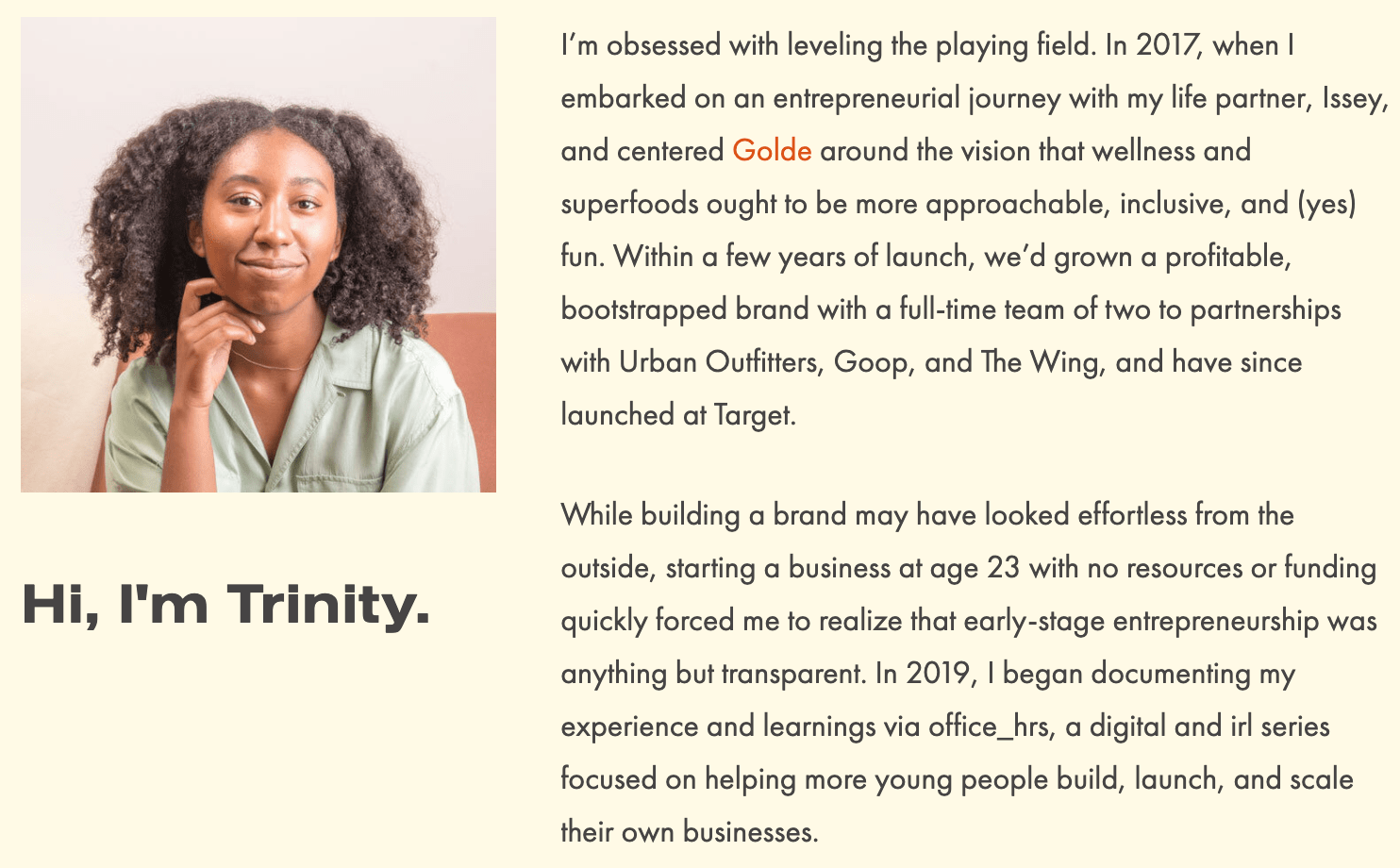
Trinity's Professional Bio Example

Ultimately, this bio doesn't just focus on Mouzon's (impressive) background ... it also highlights how she can help her readers start and scale their own businesses.

By focusing on the reader, Mouzon effectively demonstrates the real power of a good bio: the power to convert newcomers into leads and customers. 

13. Alberto "Beto" Perez

Bio Platform: LinkedIn

As an avid Zumba fan, I was excited to include this one in the list. Perez styles his LinkedIn bio as a short story, starting with his background as a hard-working teen who held three jobs by age 14. 

His bio tells the fun and fascinating origin story of Zumba, in which Perez, an aerobics teacher in Florida at the time, forgot his music for class and used a Latin music cassette tape instead ... "And it was an instant hit!"

His bio continues, "Shortly after he was connected to Alberto Periman and Alberto Aghion and Zumba was officially created ... what started as a dream now has 15 million people in more than 200,000 locations in 186 countries who take Zumba classes every week."
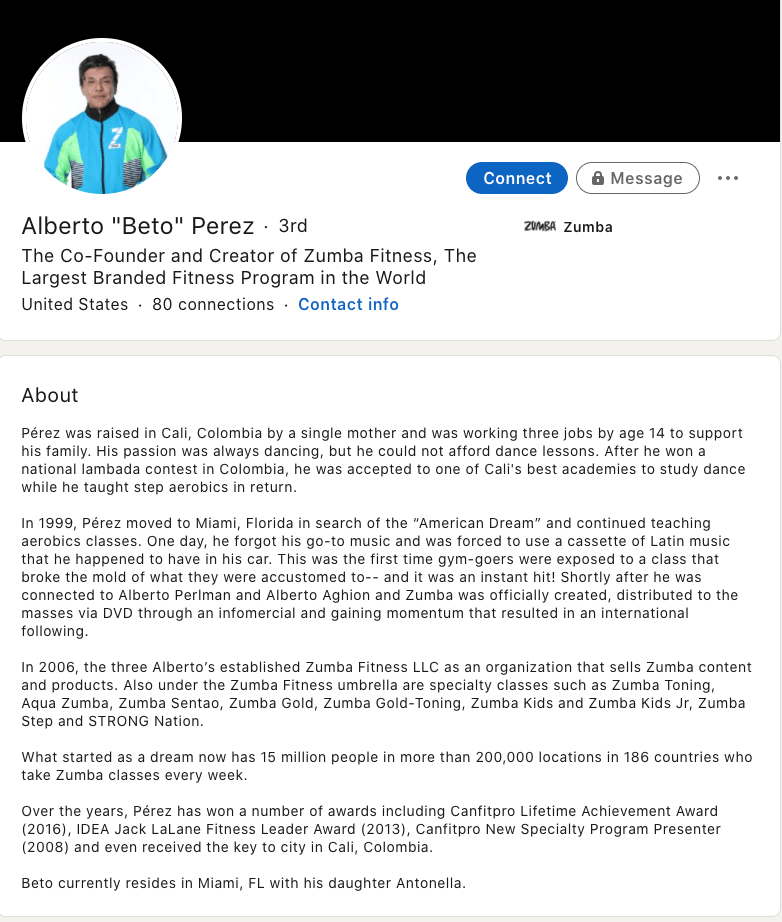
Alberto Perez professional bio example

What I like best about this bio is Perez's decision to use the space to tell the story of his business, rather than list out his accomplishments. It provides a more real and colorful introduction to Perez, and immediately makes him feel both relatable and inspirational. 

Let's dive into a few more examples of short professional bios, next.  

Short Bio Examples

14. Ann Handley

Bio Platform: Personal Website

If you're a marketer, you've likely heard of Ann Handley. Her list of credentials is lengthy, and if she really wanted to, she could go on and on and on about her accomplishments.

But when people list out all their accomplishments in their bios, they risk sounding a little egotistical. Sure, you might impress a handful of people with all those laurels, but many people who read your bio will end up feeling either intimidated or annoyed. Think about it: Is that how you want the majority of your readers to feel when they read your bio?

To minimize the egoism that comes with talking about yourself, think about how you can list out your accomplishments without sounding like you're bragging. Ann does this really well, choosing a tone in her bio that's more approachable.

Best of all, Ann chooses to focus on her readers' challenges and motivations, rather than her own. For instance, she writes, "Ann Handley writes and speaks about how businesses can escape marketing mediocrity to achieve tangible results. And she will inspire you to do work you're proud of."
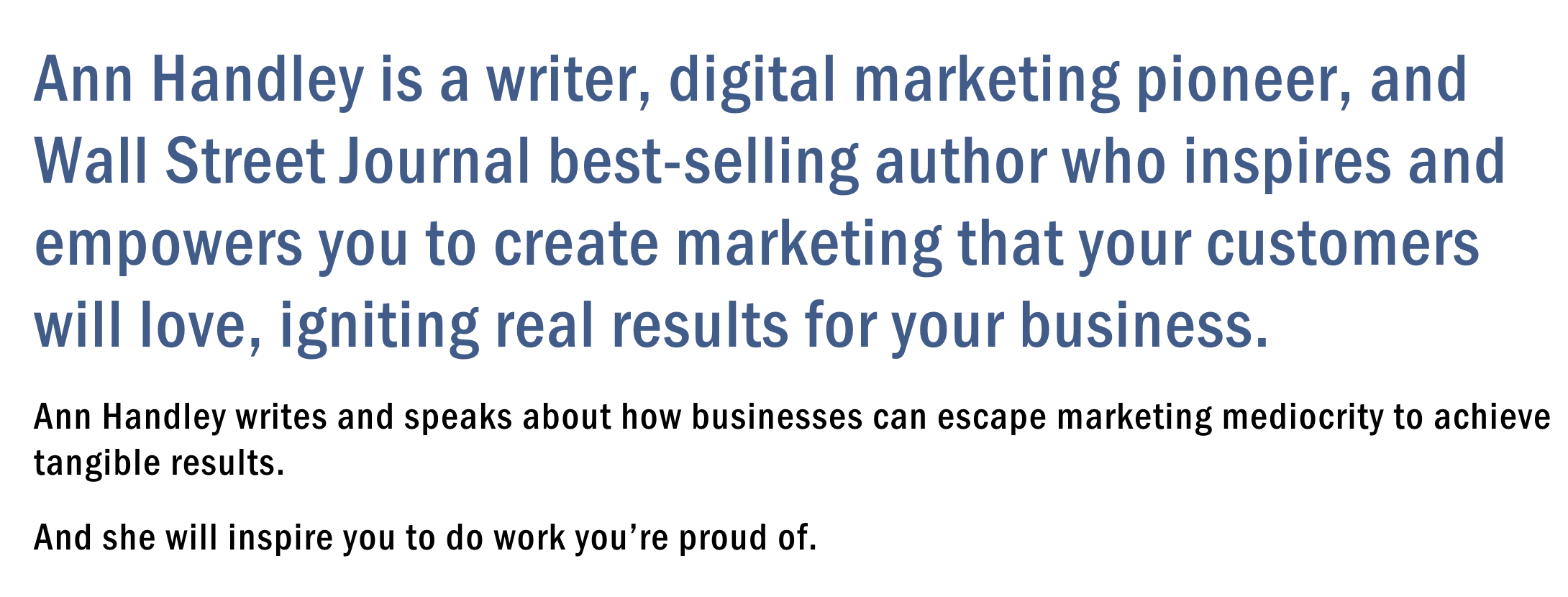
Ann Handley professional bio example

Follow the link and you'll be led to a page dedicated to a fuller bio, which she's divided into two parts: a "short version" (literally a bulleted list of key facts) and a "long version," which includes traditional paragraphs. There's something in there for everyone.

15. Rebecca Bollwitt

Bio platform: Instagram

Instagram is a notoriously difficult platform on which to write a good bio. Similar to Twitter, you simply don't have room for a professional bio that includes everything about you. And because Instagram is primarily a mobile app, many viewers are reading about you passively on their mobile device.

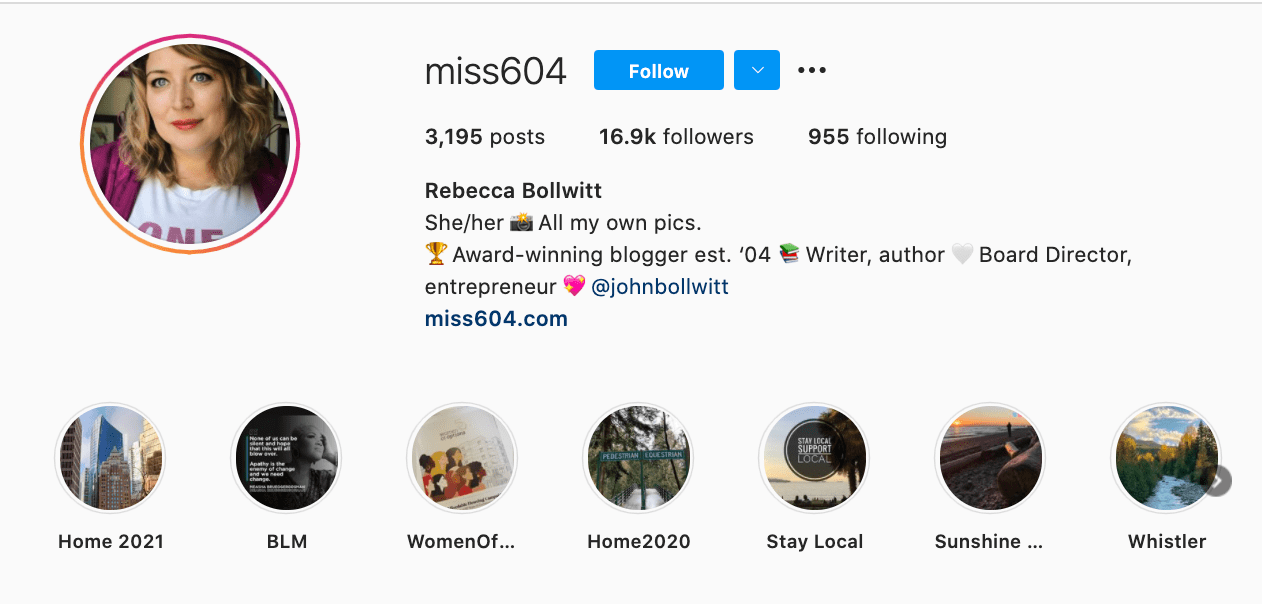
Instagram's limited bio space requires you to highlight just your most important qualities, and blogging icon Rebecca Bollwitt does so in her own Instagram bio in an excellent way.

Rebecca's brand name is Miss604, and cleverly uses emojis in her Instagram bio to tell visitors exactly what makes her a valuable content creator. Take a look in the screenshot below:
Miss604 short bio example

Starting with a trophy emoji, Miss604 says she's an award-winning blogger. I haven't even looked at her pictures yet and the introduction of her bio has already sucked me in.

The rest of her bio follows suit, breaking up the text with an appropriate emoji and a perfect collection of nouns to tell me who she is as a person. She even links out to her husband's Instagram account after the heart emoji (an adorable addition), and assures her followers that all of her pictures are authentically hers.

Take a lesson from Miss604, and show your personal side. Just because you're branding yourself as a professional doesn't mean you have to take your human being hat off. Often your most personal attributes make for the best professional bio content.

16. Corey Wainwright

Bio Platform: Blog Byline

Corey Wainwright is a Principal Marketing Manager here
at HubSpot. She's written content for HubSpot's Marketing Blog for years, and her blog author bio has caught my eye since before I ever started working for HubSpot. (Back then, it started with, "Corey just took a cool vacation.")

What I love most about Corey's bio is that it's a great example of how to deliver information about yourself without taking things too seriously. And in this context, that's totally appropriate.

Despite having a number of impressive accomplishments under her belt, she simply doesn't like displaying them publicly. So, she prefers making her author bio a little more "light."

Her bio (pictured below) reads, "Corey is a Bruce Springsteen fan who does content marketing, in that order."
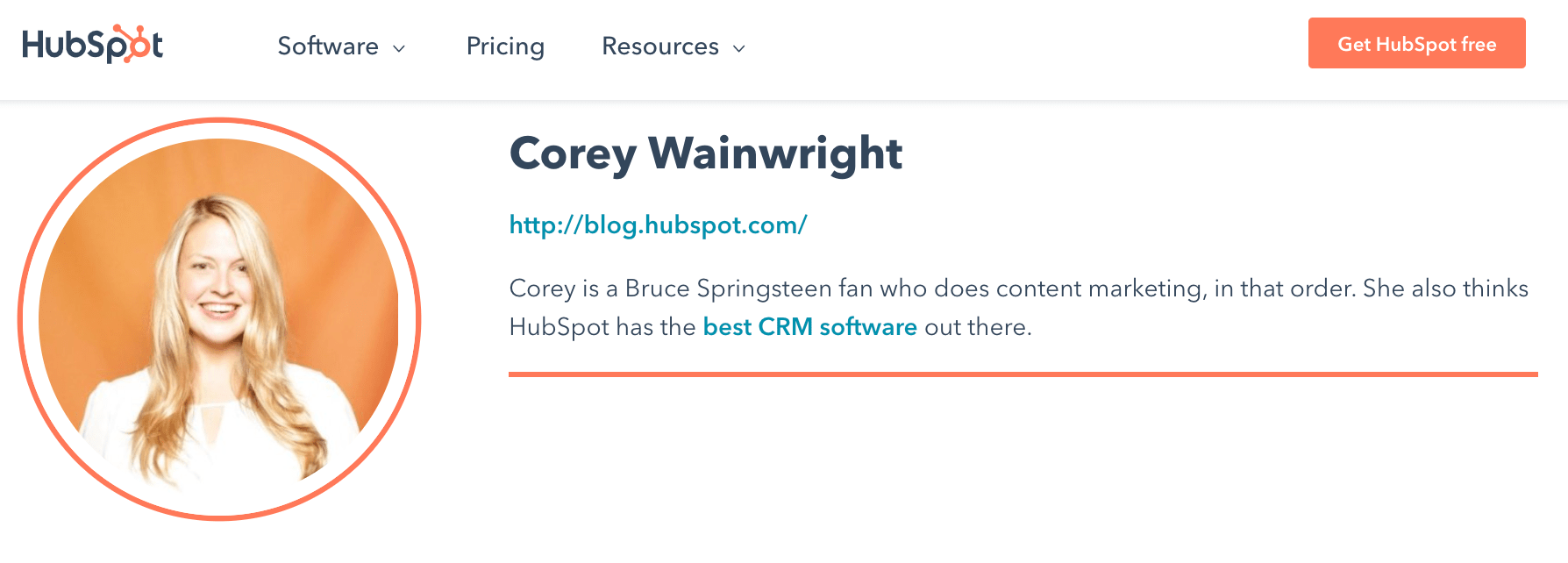
corey wainwrights short hubspot bioIt works in this particular context because, at HubSpot, our blog authors often prefer to make themselves as friendly and approachable as possible — while letting the content speak for itself.

It helps that authors' social media accounts are located right below our names and above our pictures. For folks who really do want a list of Corey's credentials, they can click the LinkedIn button to go to her LinkedIn page. (You can read this blog post to learn how to create social media buttons and add them to your website.)

17. Megan Gilmore

Bio Platform: Instagram

Megan Gilmore is a best-selling cookbook author, and she often posts healthy recipes on her Instagram page to inspire followers' to realize that you don't have to sacrifice taste for the sake of health.
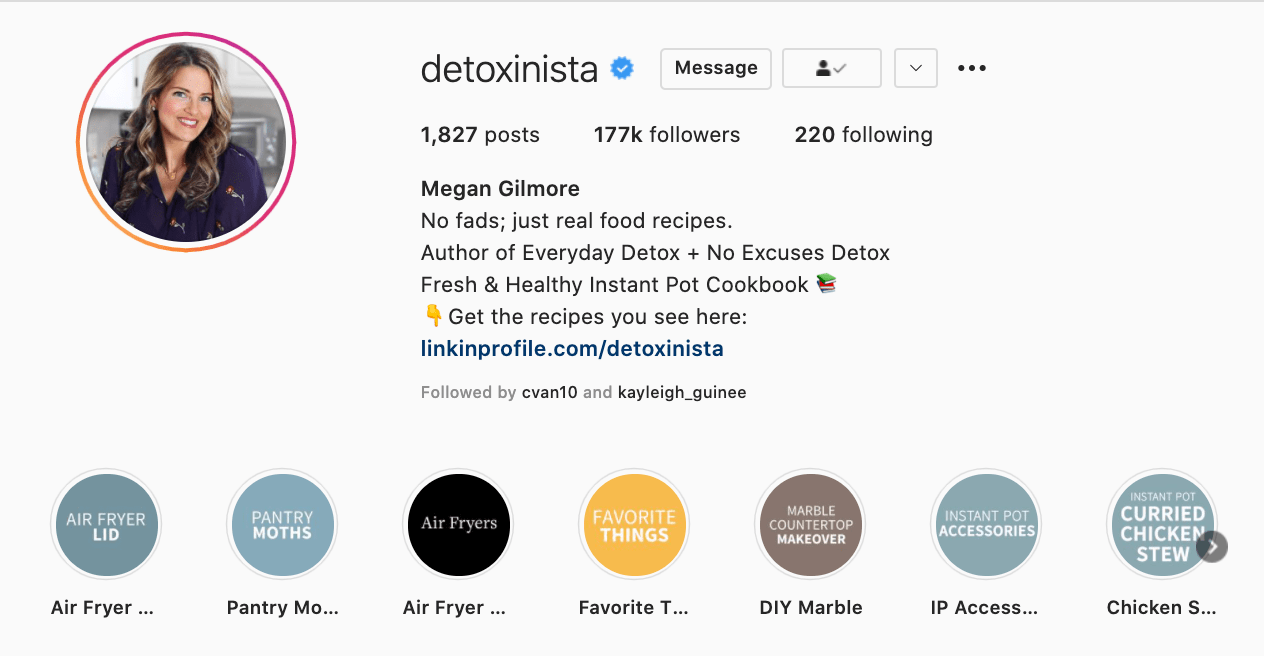
detoxinista professional bio exampleFortunately, you glean most of this information immediately from her Instagram bio, which is short and to-the-point: "No fads; just real food recipes. Author of Everyday Detox + No Excuses Detox." Her "no fads" call-out shows followers she aims to be helpful rather than gimmicky.

Plus, Gilmore includes a CTA link within her Instagram bio that leads followers to free, ready-to-use recipes. You might be thinking — Why would she do that, since it discourages people from buying her book? But that couldn't be further from the truth.

By giving her followers the chance to try out her recipes, she's slowly turning leads into customers. After I tried a few of her Instagram recipes and loved them, I decided to go ahead and buy her book, knowing I'd like more of what she had to offer.

18. Van Jones

Bio Platform: Twitter

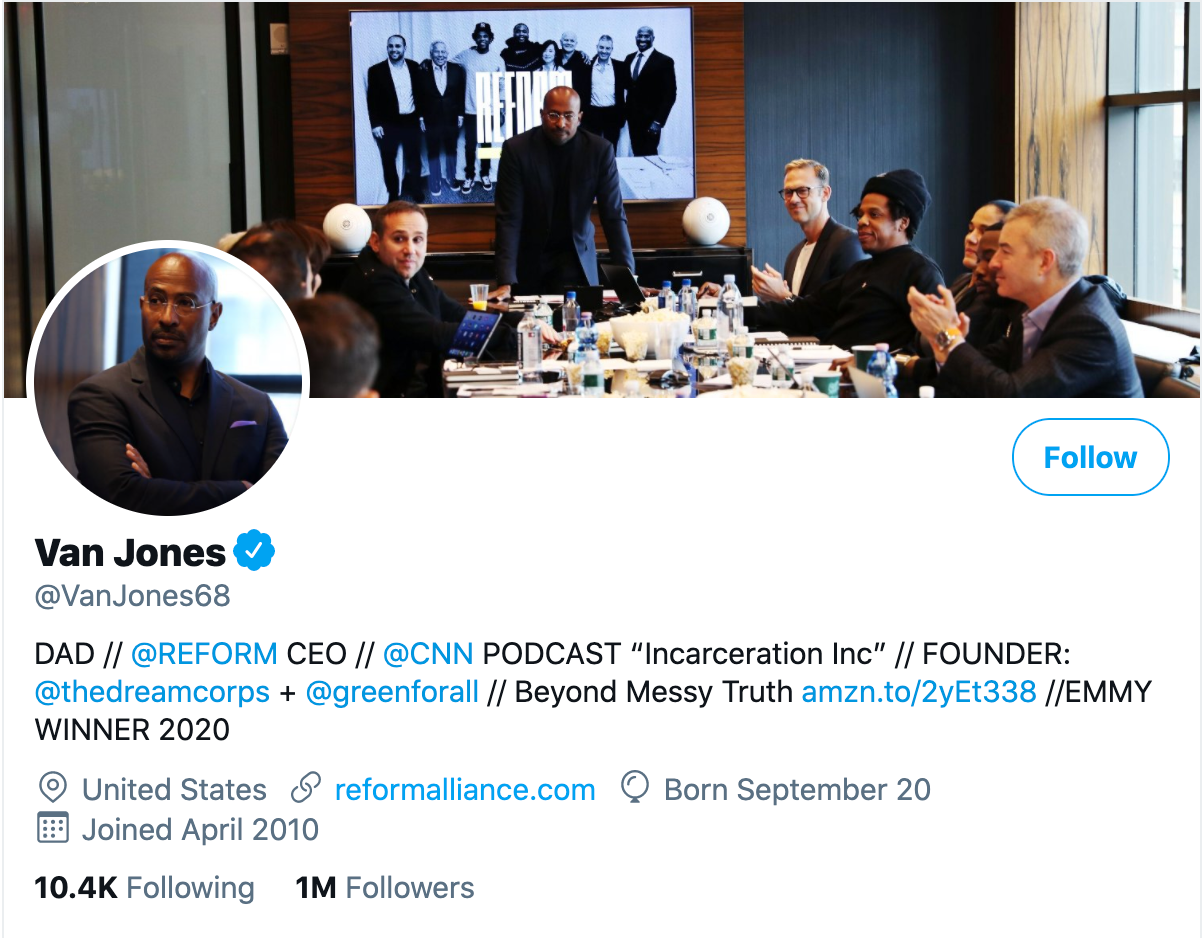
Someone who’s known for a variety of talents and skills may find it difficult to capture who they are in a professional bio. When limited to just over 100 characters on Twitter, the feat is nearly impossible. But Van Jones effortlessly explains who he is and why it matters to everyone who visits his Twitter profile.
Van Jones Professional Bio Example

He starts his professional bio with a token of personalization and prioritization of his values. By mentioning that he is a dad first, we recognize what’s important to him in his long list of successes.

As we’ve seen in other bios, sharing who we are outside of work makes us more personable and should find its way into your bio, if possible. Van leaves plenty of room to share a variety of professional experiences in his bio including CEO of REFORM and his 2020 Emmy award.

What’s great about Van’s Twitter bio is his ability to link valuable offerings to his readers. He invites us to check out his latest book and has his website reformalliance.com linked at the top.

19. Sarah Haskins

Bio Platform: Twitter

When in doubt, a few words go a long way. 

Consider, for instance, the funny and impactful bio of Sarah Haskins on her Twitter page, which reads: "writer. bad but enthusiastic dancer." 

What more do you need to know?

She doesn't take her bio too seriously, and uses the space to highlight one serious accomplishment/skill (writer) and one not-so-impressive skill (bad dancer), to demonstrate her sense of humor and realness. 
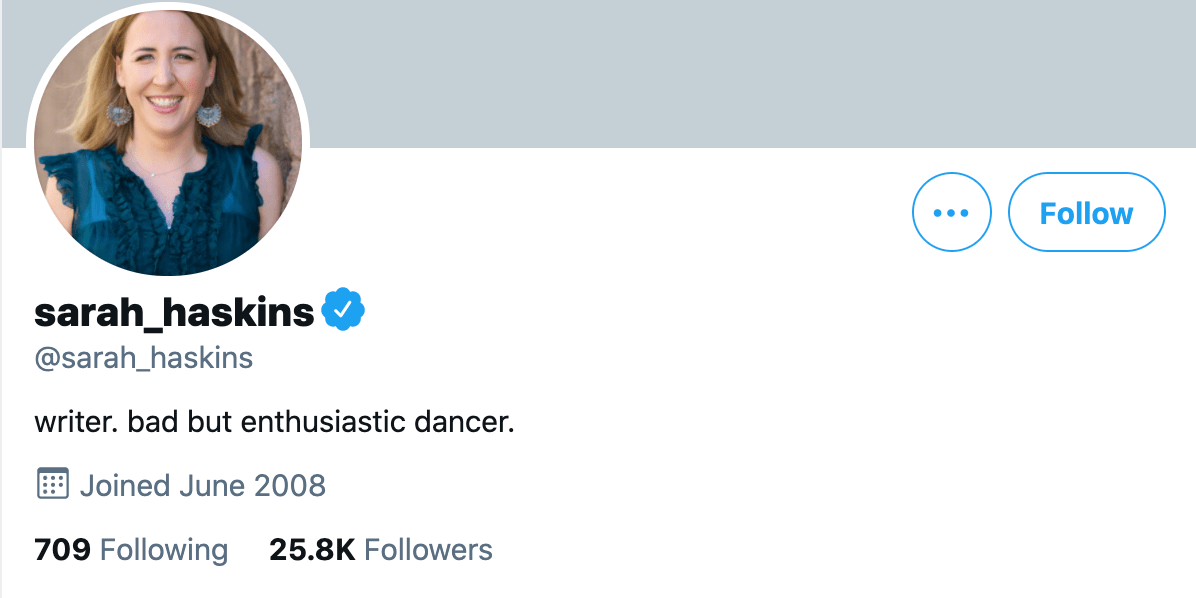
Sarah Haskins short twitter bio

Particularly for a social media account that already restricts word count, consider how you might showcase your own uniqueness in just a few words. 

20. Bea Dixon

Bio Platform: Instagram

Bea Dixon, Founder and CEO of The Honey Pot Company, efficiently uses her space on her Instagram profile to highlight who she is as a well-rounded human — not just a businesswoman. 

For instance, while she highlights her Girl boss attitude with a tiara emoji, she equally calls attention to her fashion interests (Free People), her pets Boss and Sadie, and her love for ramen noodles. 
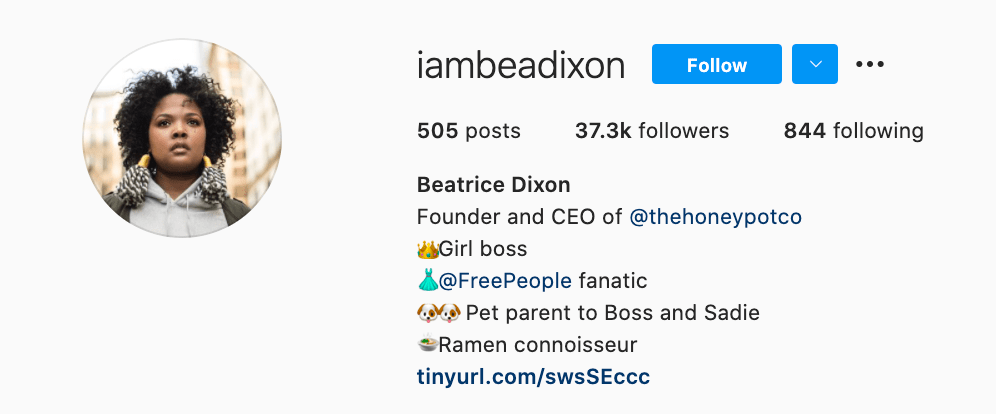
bea dixons professional bio on instagram

Consider how you might also highlight your interests, hobbies, or passions outside of the 9-to-5. If people are reading your bio, they're interested in getting to know the full you. 

How to Write a Short Bio

If you're posting a bio on a social media account or sending a quick blurb to a client, you want to keep it short and sweet — but you also want to ensure you're including all necessary components to showcase your accomplishments.

To do this, when writing a short bio, you'll want to include the following: 

  • Name
  • Current job title
  • Personal or professional goals, or a personal mission statement
  • Skills or area of expertise
  • 1-2 achievements 
  • Your personality! (Which might be best portrayed through a joke, a mention of a hobby, a fun fact, or a few emojis related to your interests)

Remember, you can always link out to your personal website and include a longer bio there. Your short bio is just a teaser of who you are, what you care about, and what you can do for others.

Additionally, if you're sending it to a client or potential employer, try out a different iteration that highlights your skills as they pertain to your client or employers' needs. 

Create Your Own Professional Bio

Prim and proper, relaxed, or studded with accomplishments, your bio is a reflection of your best professional self. Your professional bio will often precede your physical presence. Before people meet you for the first time, they’ll probably read your bio.

Whether you’re creating an about page for your website or social media profile, one thing’s for sure, you’ll want to put your best foot forward with a top-notch professional bio.
New Call-to-action

Editor's Note: This post was originally published in November 2019 and has been updated for accuracy and comprehensiveness.


20 of the Best Professional Bio Examples We've Ever Seen [+ Templates] was originally posted by Local Sign Company Irvine, Ca. https://goo.gl/4NmUQV https://goo.gl/bQ1zHR http://www.pearltrees.com/anaheimsigns