Friday, October 23, 2020

What is a website taxomomy?

While scavenger hunts can be fun, users don't want to frantically search through a website to find answers to their questions. They want them quickly, and they want them to be easy to find.

The structure users want is called taxonomy. Scientifically, a taxonomy is a classification scheme that dictates how things are organized and classified based on their characteristics.

A website's taxonomy can dictate the user experience, and can also influence search engine rankings. This post will go over what a website taxonomy is, and give you the resources to create a successful organization system for their site.

Website taxonomy is also related to URL structure, which is how URLs are organized to reflect content within specific site pages. Every website domain stays the same for every URL address, but subdirectories and URL slugs change as page content gets more specific.

For example, say your website’s primary domain is www.samplewebsite.com.

Your taxonomic structure will include subdirectories within your domain that are relevant to the page’s content. So, if your samplewebsite has a ‘Contact’ or ‘Announcements’ page, the URLs would change to reflect the information displayed on each page. The URLs for these pages would be www.samplewebsite.com/contact and www.samplewebsite.com/announcements, respectively.

Why is a website taxonomy important?

A well-planned taxonomy can transform how users interact with your site, especially when your content is organized logically. If users can get to your site and find what they’re looking for, they’ll view you as a reputable source and they’ll stay longer.

Websites that don’t have a specific structure tend to be difficult for people to understand. In fact, an average of 38% of site visitors will leave a site if it's poorly organized.

A carefully crafted taxonomy is also crucial for search engine optimization (SEO), as a taxonomic organization is easier for search engine bots to recognize as they analyze and index your site.

Let's put all of this in context with a hypothetical website. Say you own www.recipes.com. Since you know that your visitors are coming to your site for specific recipes, you want to set up categories that help them find what they’re looking for as quickly as possible. If they’re looking for desserts, for example, they likely want to find those recipes through the corresponding category page, not by browsing through a list of unrelated meals.

The URL for this page would be www.recipes.com/desserts. A user knows what they’ll find within this subcategory of recipes. For search engine bots, the URL subdirectory helps them understand what the page is about and when they should show the page in search results.


Best Practices for Creating a Website Taxonomy

Ultimately, you want both users and search bots to understand your site. You don’t want them to be bombarded with content that isn’t going to fulfill their needs. While it may seem clear cut, various factors go into creating a successful website taxonomy.

Know your audience.

Just like all types of marketing, the key to creating your taxonomy is understanding your users.

You’ll want to know who they are, why they’re visiting your site, and what they want to find on your site. It’s essential to understand what their specific needs are so you can structure your content accordingly. To better understand your users, you can do things like create buyer personas.

Continuing with the recipes.com example, whoever runs the site knows that their visitors are coming because they want help with their cooking. It’s great to know this, but is there anything else they’ll want from your site? They may also want you to recommend kitchen supplies that will help them make these recipes, or recommend brands to buy ingredients from.

If you take the time to get to know your future users, you can design your site accordingly.

Conduct keyword research.

When you know who your users are and what they want, you want to make sure you have the necessary information to keep them on your site.

You can use your site's primary purpose to rank in search results, but it’s essential to have multiple keywords for the additional categories you’ll create within your site. These keywords should be directly related to the content that users will find on those specific pages.

For instance, if you run a blog on travel tips, travel tips can be your main keyword. However, your research may show that users also associate travel tips with travel packing tips and travel insurance tips. You’ll want to use that information when creating your structure.

Be consistent.

Consistency with categories and the content within those categories makes it easier for users to understand your site. It also makes it easier for those executing your content strategy to create relevant content. For example, on the HubSpot Blog, we have four different properties: Service, Sales, Marketing, and Website.

Blog posts are categorized based on their relationship to each property, and this organizational consistency makes it easier for visitors to find relevant information. For example, a user would know to search within blog.hubspot.com/website rather than blog.hubspot.com/service for a tutorial on how to use WordPress.

Consistency is also important for SEO, as bots dislike poorly organized websites, and sites with jumbled and unrelated content is considered spammy. Bots also recognize contextual relationships between categories and content, and they’ll learn how to index your site for specific search queries.

Keep it simple.

While there are certainly hundreds of categories and subcategories you could come up with to sort content on your site, less is more. The ideal web taxonomy is focused and straightforward.

With recipes.com, there are so many different types of dishes that it would (and will) become overwhelming for users to sift through hundreds of different categories.

Keeping it simple means creating fewer high-level categories that can house lower-level categories. You can have a high-level category page dedicated entirely to baking recipes, and the content you post within that page will be specific to baking recipes.

The URL for this category would be recipies.com/baking rather than recipes.com/pie-recipies and recipes.com/scone-recipies. Then, if a user goes on your site to find a blueberry pie recipe, the page URL may be www.recipes.com/baking/blueberrypie.

Leave room for growth.

Taxonomy can, and should, change as your business scales.

If you create new forms of content, you may need to shuffle categories to ensure that they still relate to each other and have room for new content.

Say you’re running a blog about content marketing, but you cover the topic generally. It’s unlikely that you’ll have multiple page categories or subfolders within those pages. However, suppose you decide to hire new team members who are experts in specific types of content creation. In that case, you’ll want to create different taxonomic categories to distinguish between the different types of content.

You may also realize that certain categories and subcategories aren’t as intuitive as you’ve hoped, per user feedback. Taking the time to understand what is and isn’t working for those who interact with your site is essential.


Types of Website Taxonomy

Once you know your audience and have created your keyword-relevant categories, it’s essential to decide on the taxonomic structure that works best for your site. Since taxonomy is a classification system, it may seem like the logical structure is a hierarchical one, organized by importance. However, this isn’t always the case. Let’s review the different types of website taxonomies so you can select the one that works best for your site.

Flat Taxonomy

A flat taxonomy, sometimes called unlayered taxonomy, is a simple list of top-level categories. All categories on this site carry equal weight in comparison to each other. It’s a perfect structure for smaller websites that don’t have a large amount of content.

For example, a veterinarian's office likely doesn’t have many needs to fulfill. Their homepage may only have three to four categories, like ‘About Us,’ ‘Book an Appointment,’ ‘Location,’ and ‘Services.’ Users visiting the site won’t need much more than that.
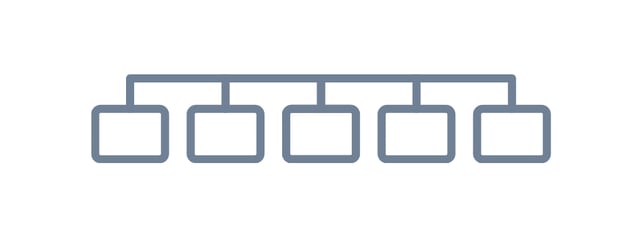
flat taxonomy website structure representational diagram

Image Source


Hierarchical Taxonomy

A hierarchical taxonomy is an arrangement of categories by order of importance. Larger websites typically use it, and top-level categories are broad.
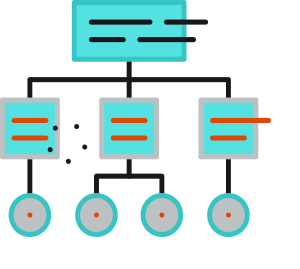
hierarchical website taxonomy model

Image Source

Moving down a hierarchical structure means getting more specific. This allows users to quickly identify and navigate between different sections and categories. Search engines will recognize these relationships as well.

For example, hubspot.com displays three main categories at the top of the page: Software, Pricing, and Resources. Each of those categories is broad and overarching. If a user mouses over them, they’re then shown more specific categories.

In turn, our URLs for these categories look like this: hubspot.com, hubspot.com/products, hubspot.com/products/marketing, and hubspot.com/marketing/seo.

It’s important to note that there shouldn’t be too many high-level categories or subcategories, as excessive groups can become confusing for users and SEO crawlers.

Network Taxonomy

A network taxonomy involves organizing content into associative categories. The relationships and associations between categories can be basic or arbitrary, but they should be meaningful to users.

For example, a ‘Most Popular’ category within a website may contain lists of different articles covering a broad range of topics that are popular among that audience. Still, they’re all similar in the sense that they are highly rated, viewed, and visited by others.
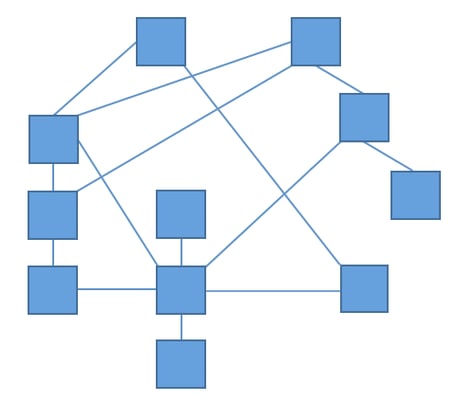
network taxonomy website structure diagram

Facet Taxonomy

A facet taxonomy is used when topics can be assigned to multiple different categories. Sites that typically use this structure allow users to find content by sorting for specific attributes. It’s also great for users who will likely arrive at certain content by different means.
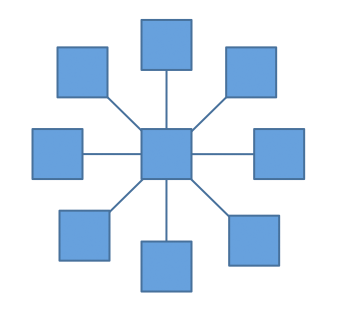
facet website taxonomy model

Image Source

For example, Nike sells a variety of different products. While there are specific categories for shoes and clothing, there are also subcategories for color, size, and price. A shoe that shows up on a search for ‘blue shoes’ may also show up on a list of cheap shoes because they’re currently on sale.


Put time into your website's taxonomy.

Creating and maintaining a successful website taxonomy that makes sense for users and search engines essential to your marketing strategy.

If other elements of your site are already optimized for other SEO ranking factors, the addition of a structured taxonomy will help your site rank highly in search query results, not to mention, it’ll keep users on your site.

If you want to learn more about website best practices, consider taking the HubSpot Academy Website Optimization course!


What is a website taxomomy? was originally posted by Local Sign Company Irvine, Ca. https://goo.gl/4NmUQV https://goo.gl/bQ1zHR http://www.pearltrees.com/anaheimsigns

Thursday, October 22, 2020

60 Best Free Online Courses For Whatever You Want to Learn

Benjamin Franklin once said, “An investment in knowledge always pays the best interest.”

That’s never been truer than it is today. With new technology emerging at breakneck speeds, there's a palpable pressure to continuously upskill.

Whether you want that job promotion or to sidestep into a new field, you'll need to commit to learning new skills.

However, learning new skills can be both time-consuming and challenging. In fact, according to Josh Kaufman, international bestselling author of The Personal MBA, it takes 20 hours to go from knowing nothing about a particular subject to being pretty good at it. Of course, if you want to become an expert -- well, that takes even longer.

Blog posts and podcasts are great starting points for exploring a particular topic. But online business courses will provide you with the time and space you need to go deep and truly master a new skill. Plus, most courses are made up of on-demand videos and exercises that you can progress through at your own pace.

Below, we've gathered 60 of the best free online business courses. These cover the main business skills you'll need to advance in today's rapidly changing workplace -- from digital marketing and coding to selling, leadership, and more. Keep reading to become an expert in whatever subject you feel can best help you succeed.

If you'd prefer, click on one of the following topics to jump straight to courses regarding that topic in particular:

Free Online Courses

Fundamental Marketing Courses

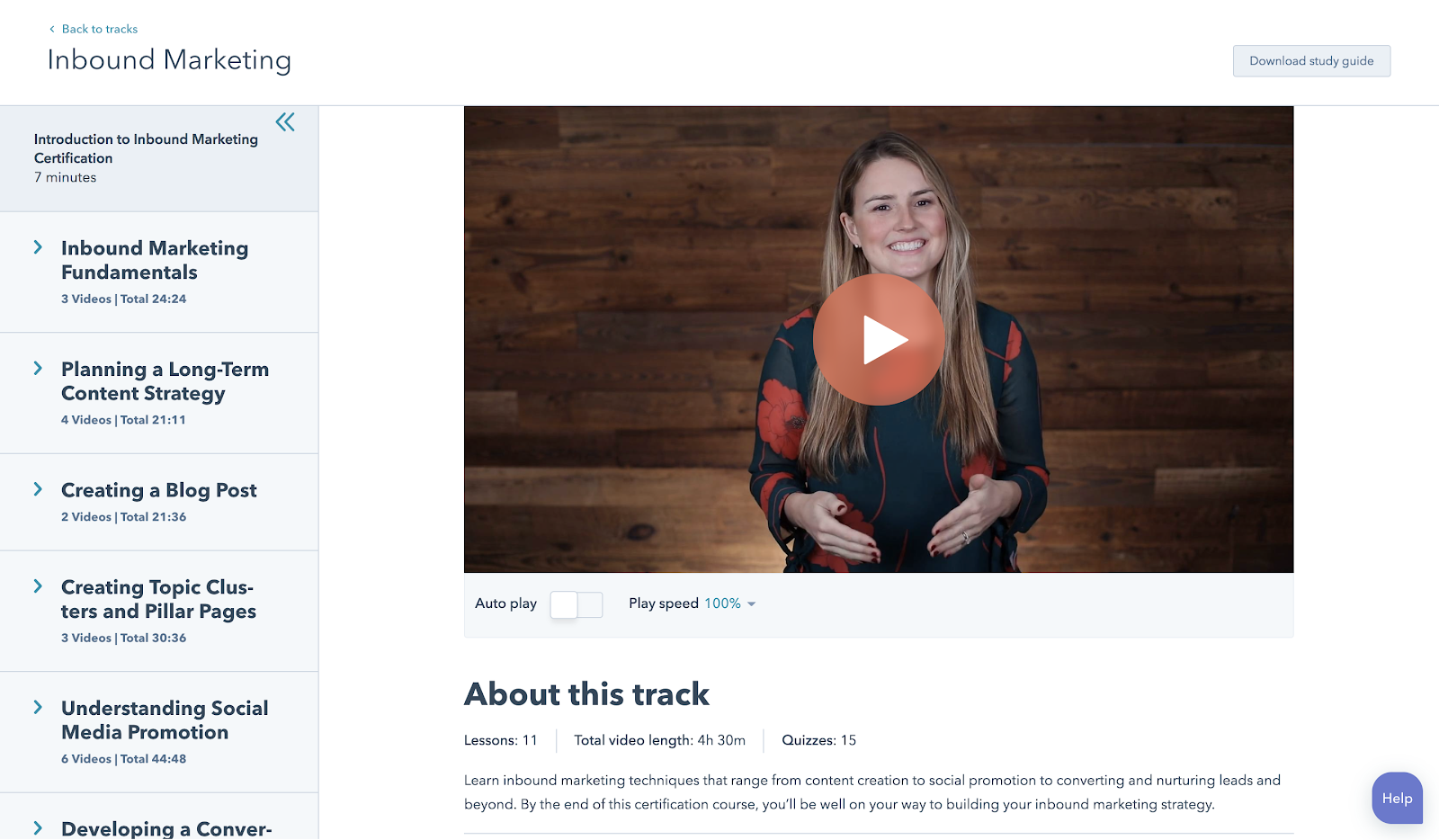
1. Inbound Marketing Certification by HubSpot Academy

Length: 4:12 Hours

From attracting leads to engaging prospects and delighting customers, this course covers the fundamentals of what inbound marketing is all about.

Example of HubSpot Academy

2. Marketing Fundamentals: Who Is Your Customer? by EdX

Length: 4-6 Hours / Week (4 Weeks)

Discover how to acquire the right customers and grow your business.

3. Build Your Web Presence by Google Garage

Length: 40 Minutes

Learn the basics of websites, local business listings, review sites, social media, mobile apps, and more.

4. Google Analytics for Beginners by Google

Length: 4-6 Hours

This course shows new Google Analytics users how to create an account, implement a tracking code, and set up data filters. You'll learn how to navigate the Google Analytics interface and reports, and set up dashboards and shortcuts.

Content Marketing Courses

5. Content Marketing Certification by HubSpot Academy

Length: 6:20 Hours

Power your business with remarkable content. This course will teach you how storytelling, content creation, repurposing, and promotion come together to build a content marketing machine that grows your business, and your career.

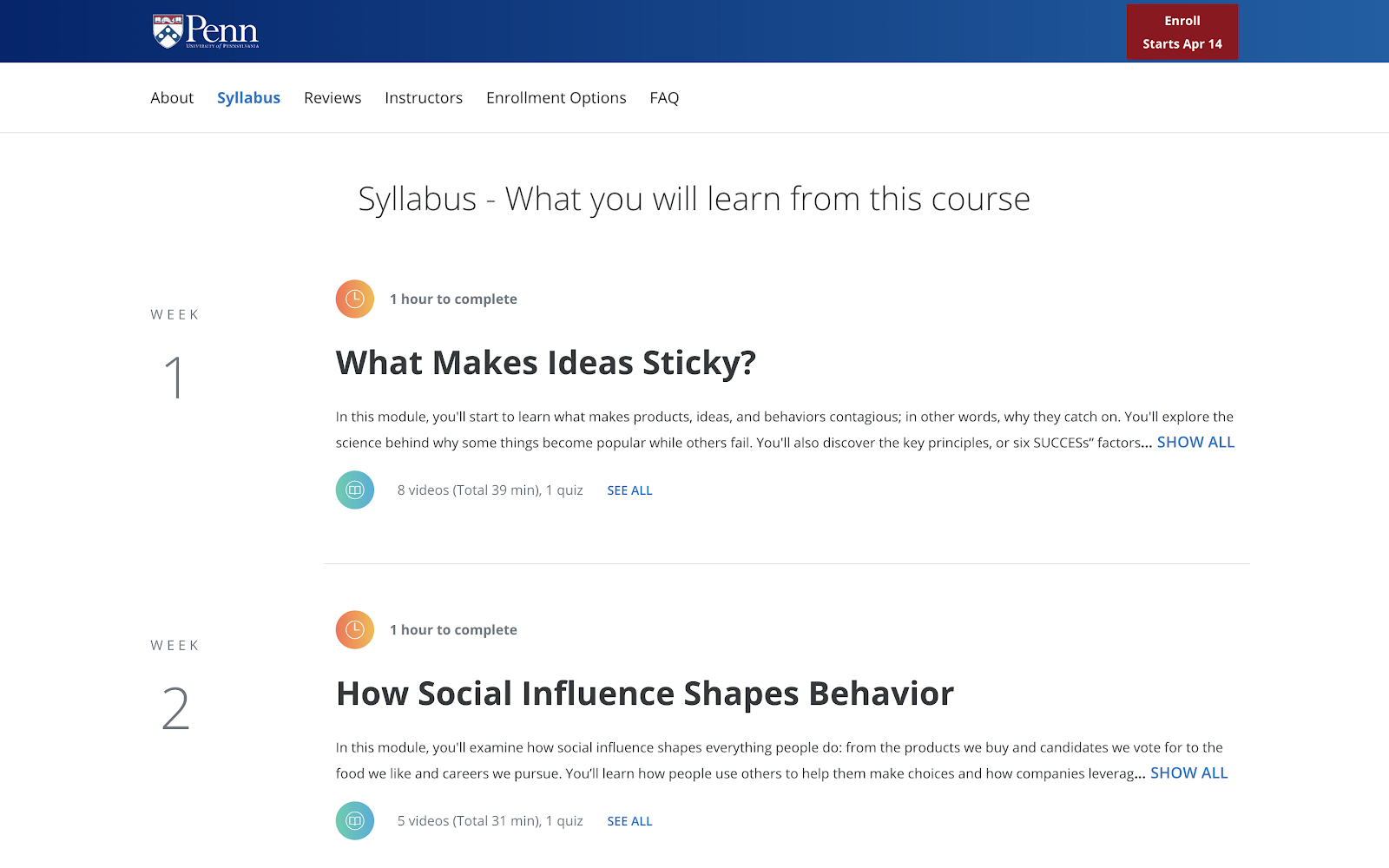
6. Viral Marketing and How to Create Contagious Content by Coursera

Length: 4 Hours

Ever wondered why some things become popular, while other things don't? This course explains how things catch on, and can help you apply those ideas to become a more effective marketer.

Example of marketing course syllabus

7. Business Blogging by HubSpot Academy

Length: 1:57 Hours

Business blogging is more than just writing and publishing content in the hopes you'll attract customers. In this course, you'll learn how to craft a blogging strategy that drives business growth, create quality blog content that customers love, and build a guest blogging strategy that's powered by SEO.

8. Online Video Marketing Course by HubSpot Academy

Length: 2 Hours

This online video marketing training will teach you how to get started with online video marketing to better attract, engage, and delight your audience.


Social Media Marketing Courses

9. Social Media Course by HubSpot Academy

Length: 5 Hours

This course provides you with everything you need to build a social media strategy — including tools to help you attract new customers, build loyalty, and shape a positive conversation around your business. The course is free, but it's $199 to take the exam.

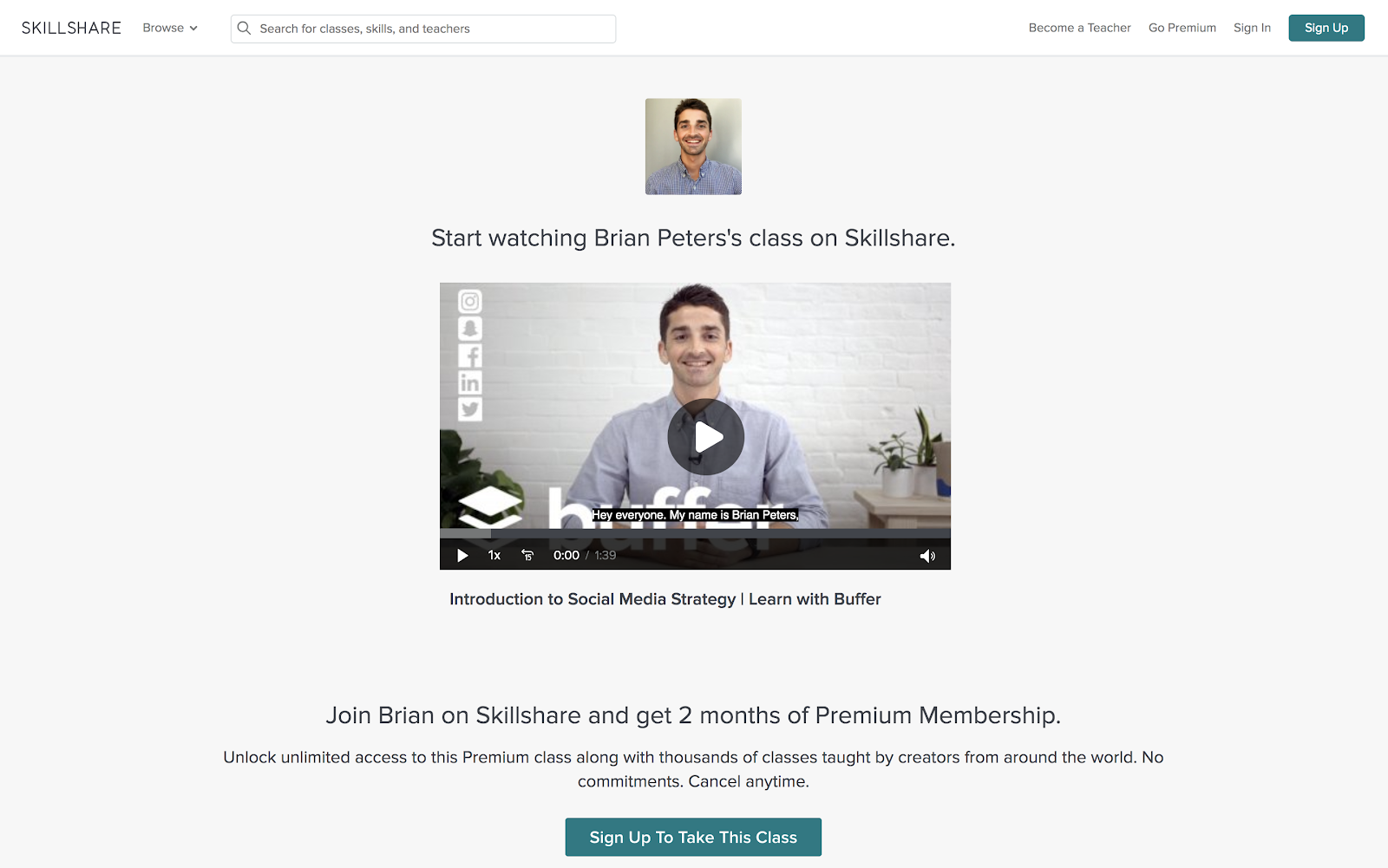
10. Introduction to Social Media Strategy by Skillshare/Buffer

Length: 45 Minutes

Whether you're looking to foster brand awareness, increase website traffic, or drive sales, this course can teach you how to craft a social media strategy to achieve your goals on Facebook and Twitter. From finding your voice to paid advertising, Brian Peters (Digital Marketing Strategist at Buffer) walks through his process for custom social strategies.

Note: Skillshare offers community members 14 days of Skillshare -- you'll need to sign up as a member to access the class for free.

Example of Buffer course

11. Facebook Blueprint by Facebook

Length: Various

This huge resource of free, self-paced social media classes will cover best-practices and top strategies used by some of the world's largest brands.

12. YouTube Marketing by HubSpot Academy

Length: 1:20 Hours

HubSpot's course in YouTube Marketing is an in-depth, expansive set of tools and lessons that offer successful strategies to grow a monetizeable, optimized YouTube channel. 

13. Video Storytelling for Social Media by Social Creators

Length: Self-Paced

This crash course is set up like a challenge. The goal? Help you make high-quality videos with your iPhone or Android device so you can start vlogging and share engaging videos on your social media accounts.

14. Developing an End-to-End Facebook Marketing Strategy by HubSpot Academy

Length: 1:18 Hours

Facebook is a huge platform, ripe with marketing opportunity...and can be confusing. Learn how to develop an effective marketing strategy using Facebook that covers all the bases. 

15. How to Build an Advanced Twitter Strategy by HubSpot Academy

Length: 2:04 Hours

You know Twitter beyond the basics, now it's time to bump it up a notch. In this course from HubSpot Academy, you'll learn the advancements in building and launching a successful Twitter marketing strategy. 

16. How to Create an Instagram Content Plan by Later

Length: Self-Paced

This video series is a great introduction to the Instagram world. You'll learn how to gain more followers, build a community, and create content that drives true engagement.

17. Free Social Media Analytics Course for Beginners by Quintly

Length: 10-11 Hours

This class will cover the basic principles of social media analytics, and is helpful both for beginners and for marketers who want to refresh their knowledge. It aims to help anybody involved in social media analytics, whether you're working for a brand, an agency, or the media.

18. Flight School — Video Ads on Twitter by Twitter

Length: Various

Whether you're a traditional TV Buyer, a Digital Buyer, or a Social Strategist, these two courses will help you build the knowledge and skills you need to meet your clients' video advertising goals. The courses have been designed to help you level up your expertise with video advertising on Twitter, so that you and your clients can succeed.

19. Developing an End-to-End Instagram Marketing Strategy For Your Business by HubSpot Academy

Length: 1:35 Hours

Social media advertising is one of the most powerful ways to connect with customers and drive marketing impact. This course takes you from the beginning to the end of planning an Instagram marketing strategy. 


Email Marketing Courses

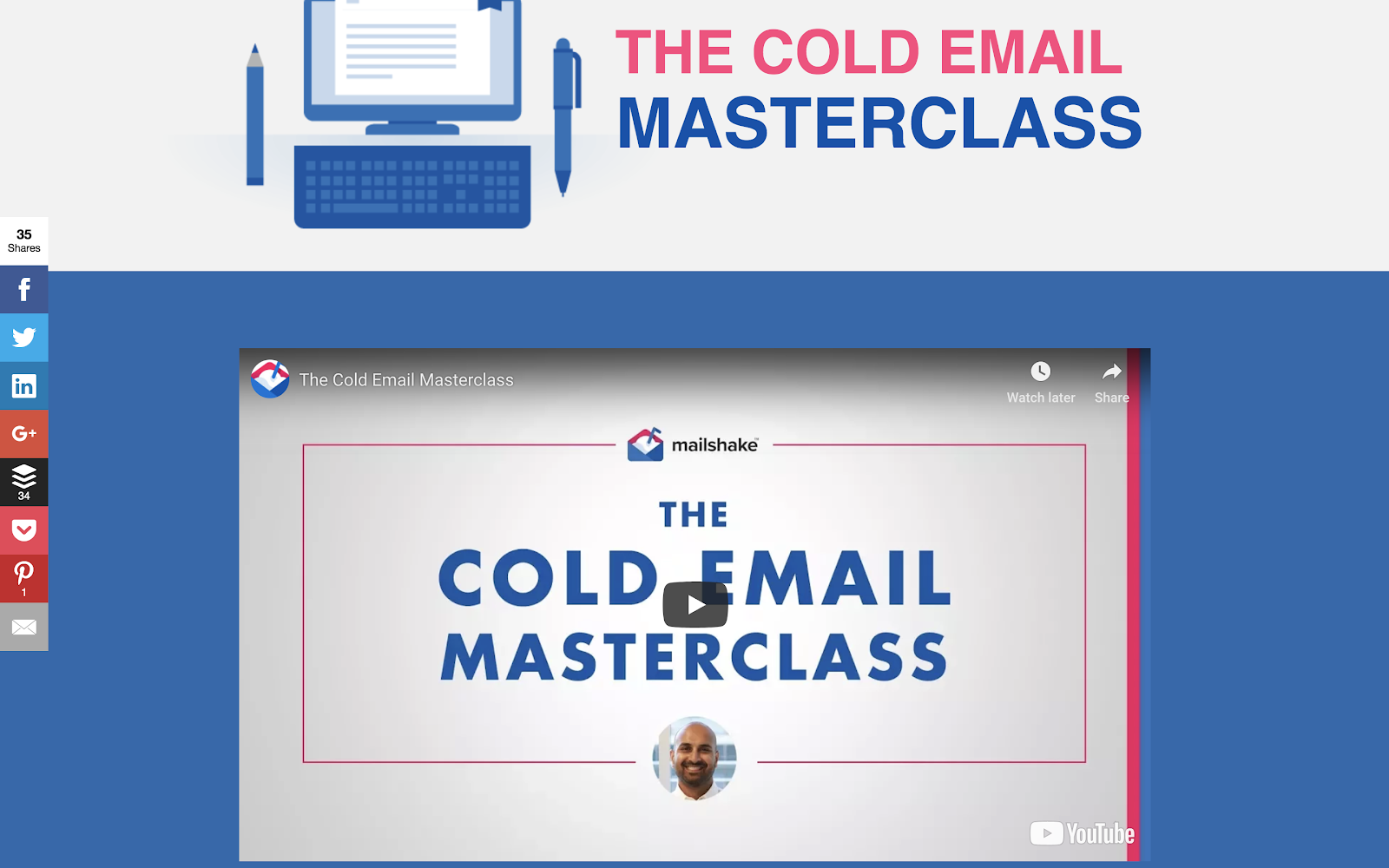
20. Cold Email Masterclass by Mailshake

Length: Self-Paced

Whether you use cold email to connect with influencers, build your personal brand, find mentors, or grow your network, there's no underestimating its power. Sujan Patel reveals eight lessons that will show you how to turn theory into practice, tapping into existing cold email best practices and deploying them in a way that's both efficient and effective.

Cold Email Masterclass screenshot

21. Email Marketing Certification by HubSpot Academy

Length: 3:18 Hours

Email marketing is a necessity to learn. By completing HubSpot's course, you'll walk away with an expansive knowledge in all things email marketing, from templates to testing, as well as a certification to add to your resume.

SEM Courses

22. Paid Ads by Google

Length: Various

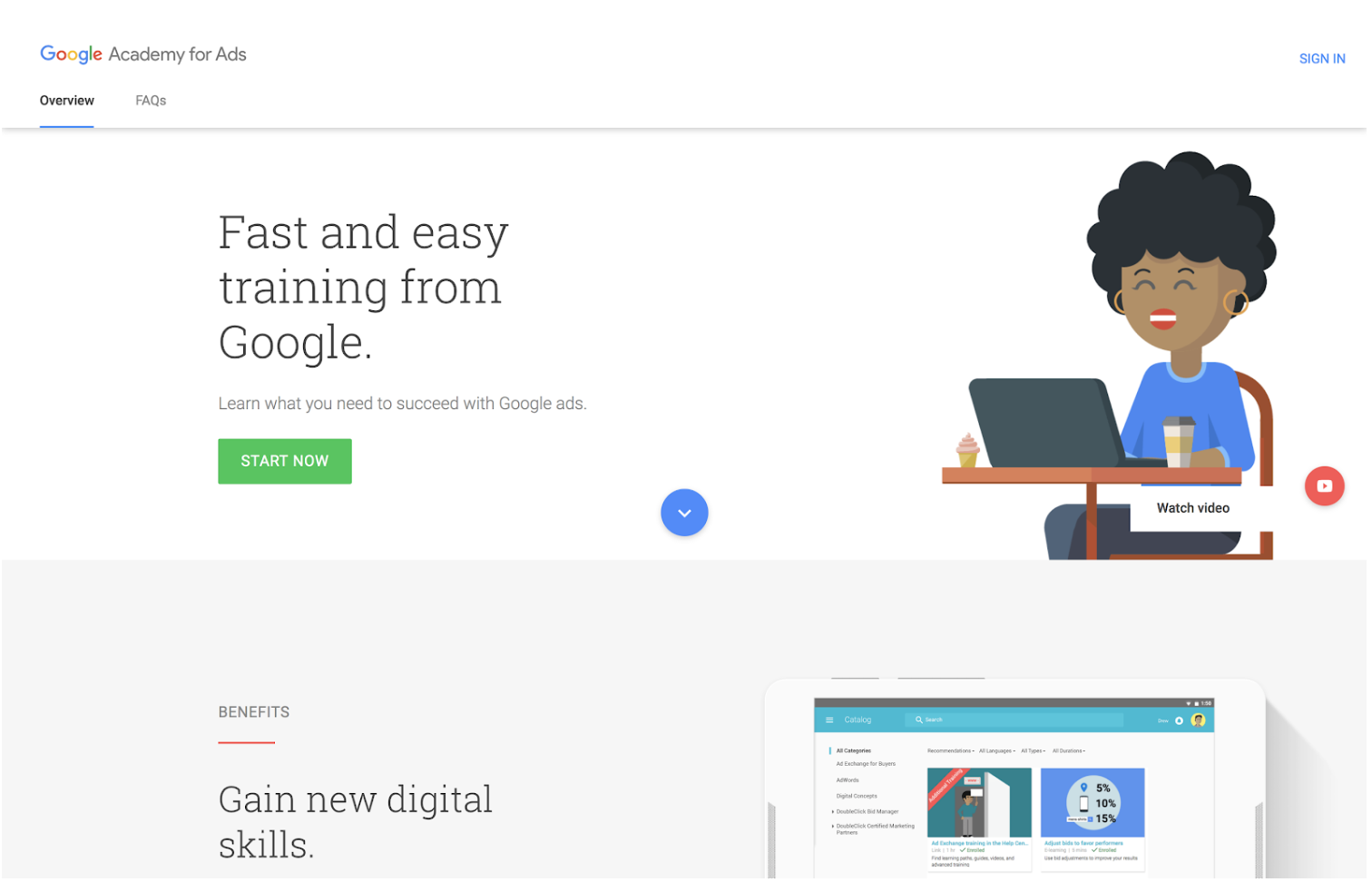
If you don't know where to start with Google's ad products, Academy for Ads may be for you. You'll figure out where to get started in mini, bite‐sized lessons. Topics include programmatic ads, Google Ads, double-click and video ads.

Google Academy example

23. SEO Training Course: Building Sustainable Traffic for Business  by HubSpot Academy

Length: 1 Hour

Interested in building traffic, but unsure about a successful strategy? Our SEO crash course eliminates the pains of navigating a concrete SEO strategy and provides you with the tools to implement a winning one. 


Sales Courses

24. Inbound Sales Certification by HubSpot Academy

Length: 2:11 Hours

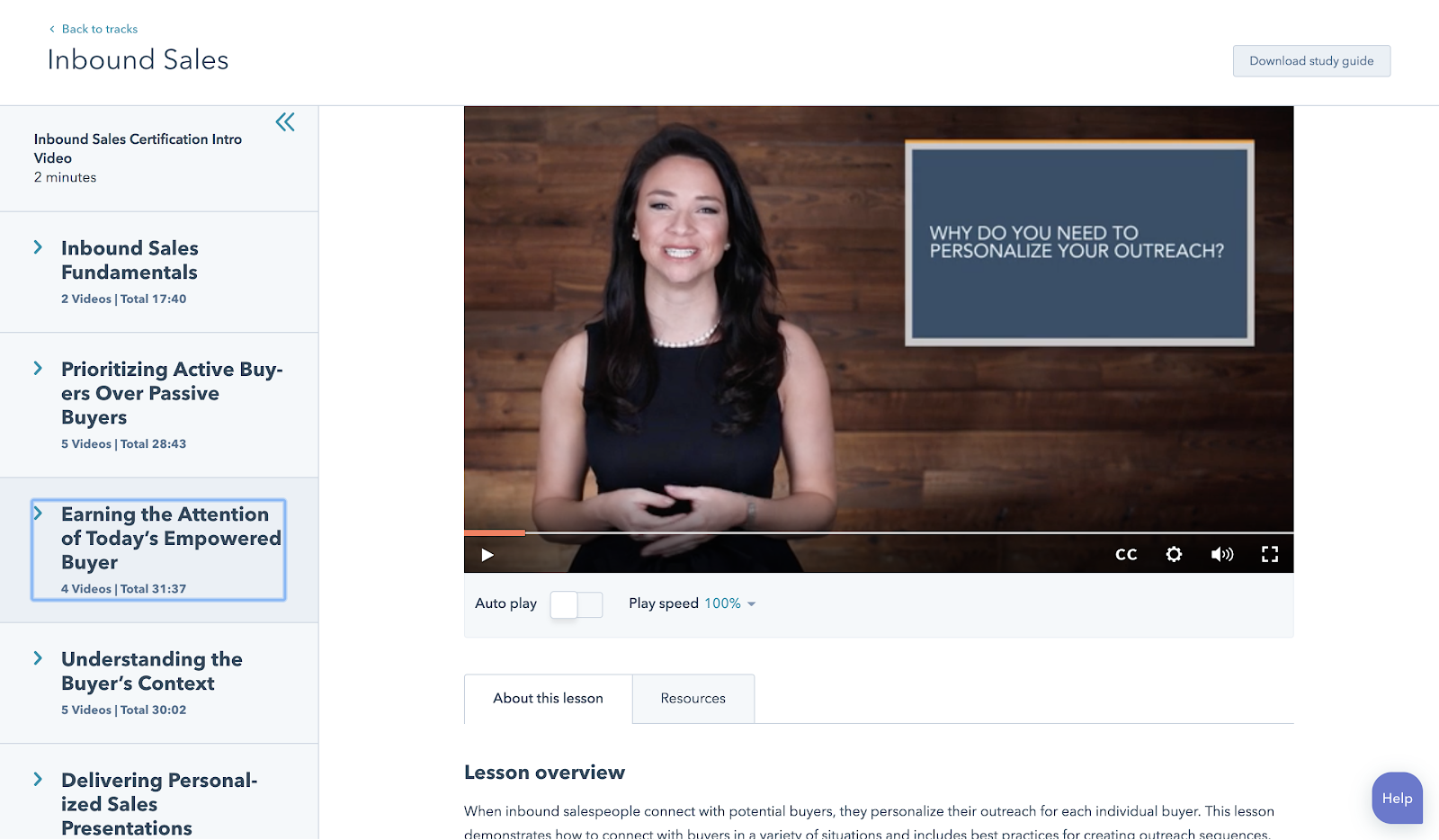
In this certification course you'll learn how to grow your sales pipeline, close more leads, and grow your career.

Inbound Certification example

25. The Art of Sales: Mastering the Selling Process Specialization by Coursera

Length: 6 Months

This course is designed to make you more effective and efficient as you pursue your sales goals. Understand how to stand out in the crowd, attract customers, and build support for initiatives within your company.

26. Sales Enablement Certification by HubSpot Academy

Length: 4:29 Hours

In this self-paced online course and exam, you'll learn how to align marketing and sales for optimal efficiency. Bridge the gap between marketing and sales teams with strategies and tactics from over 25 world-renowned leaders.

27. Sales Manager Training by HubSpot Academy

Length: 2:59 Hours

Learn how to define your target market, create a scalable sales process, and build training, coaching, hiring, and on-boarding programs to help your sales team grow.

28. Sales Prospecting Advanced Techniques by SalesScripter

Length: 21 Modules

This program is designed to give you a strategy-backed process. It covers building a value proposition, asking the right questions, closing more effectively, and more. You'll sell more, and even better -- selling will become more fun.

29. The Art of Sales by Coursera

Length: 3 Hours / Week (4 Months)

Perhaps the most important art in sales is knowing how to get a "yes." This course teaches this as well as methods to improve efficiency as a salesperson and earn buy-in for your initiatives.

30. Sales Courses by Class Central

Length: Various

Class Central offers over 50 sales courses and MOOCs from a variety of institutions and organizations. You'll be able to hone your skills from prospecting to sales management.


Ecommerce Courses

31. Dropshipping 101 by Shopify Academy

Length: 1:33 Hours

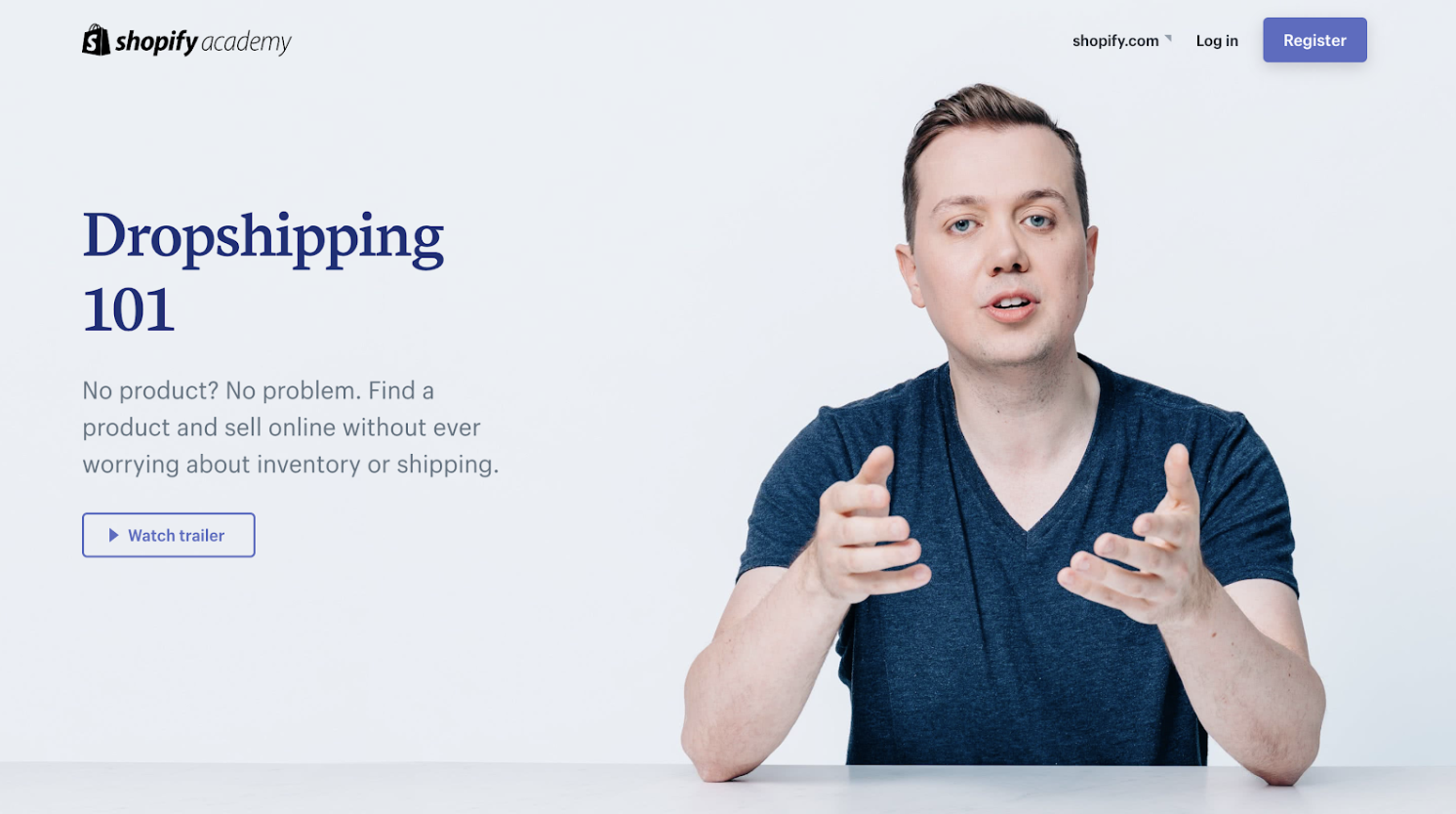
Corey Ferreira shares his methods for finding a product to sell, testing its popularity, and building an unforgettable brand. Shopify Academy screenshot

32. Product Photography for Ecommerce by Shopify Academy

Length: 1:58 Hours

In this course, you'll learn how to set-up your own home studio and take product photos with your smartphone or digital SLR.

33. Learn Ecommerce Marketing and Sell More Online by HubSpot Academy

Length: 34 Minutes

If you work for an ecommerce business and want to implement an inbound marketing strategy, this is a good course for you. In this 30 minute crash course, you'll learn the basics about selling more online, and how that fits into an inbound strategy. 

34. Email marketing for Ecommerce by Skillshare

Length: ~26 Minutes

Learn how to use automation, optimization, and personalization to boost your business through email.


Coding & Developer Courses

35. Learn to Code by Codecademy

Length: Various

Online coding tutorials with easy-to-follow instructions, immediate feedback, and a tested curriculum that can help anyone learn how to code.

36. Intro to Computer Science by Udacity

Length: ~5 Weeks

Get to grips with key computer science concepts in this introductory Python course. You'll learn by doing, and will build your own search engine and social network.

37. Intro to HTML and CSS by Udacity

Length: ~3 Weeks

In this course, you'll learn the fundamentals of web development, along with best practices and professional problem-solving techniques using Developer Tools.

38. App Development for iPhone by Alison

Length: 10-15 Hours

This iPhone app development course will give you all you need -- from how to use Objective C programming to creating multi-touch functionality. With clear video tutorials that are easy to follow, this course will get you up-to-date with the latest in iPhone app development trends.

39. Algorithms, Part I by Coursera

Length: ~53 Hours

This course by Princeton University covers the essential information that every serious programmer needs to know about algorithms and data structures, with emphasis on applications and scientific performance analysis of Java implementations.

40. Self-Driving Fundamentals: Featuring Apollo by Udacity

Length: ~4 Weeks

Through this course, you'll be able to identify key parts of self-driving cars and get to know Apollo architecture. You'll be able to utilize Apollo HD Map, localization, perception, prediction, planning and control, and start the learning path of building a self-driving car.

41. Machine Learning by Coursera

Length: ~60 Hours

Machine learning is the science of getting computers to act without being explicitly programmed.


Personal & Professional Development Courses

42. Conquering the Fear of Public Speaking by Udemy

Length: 37 Minutes

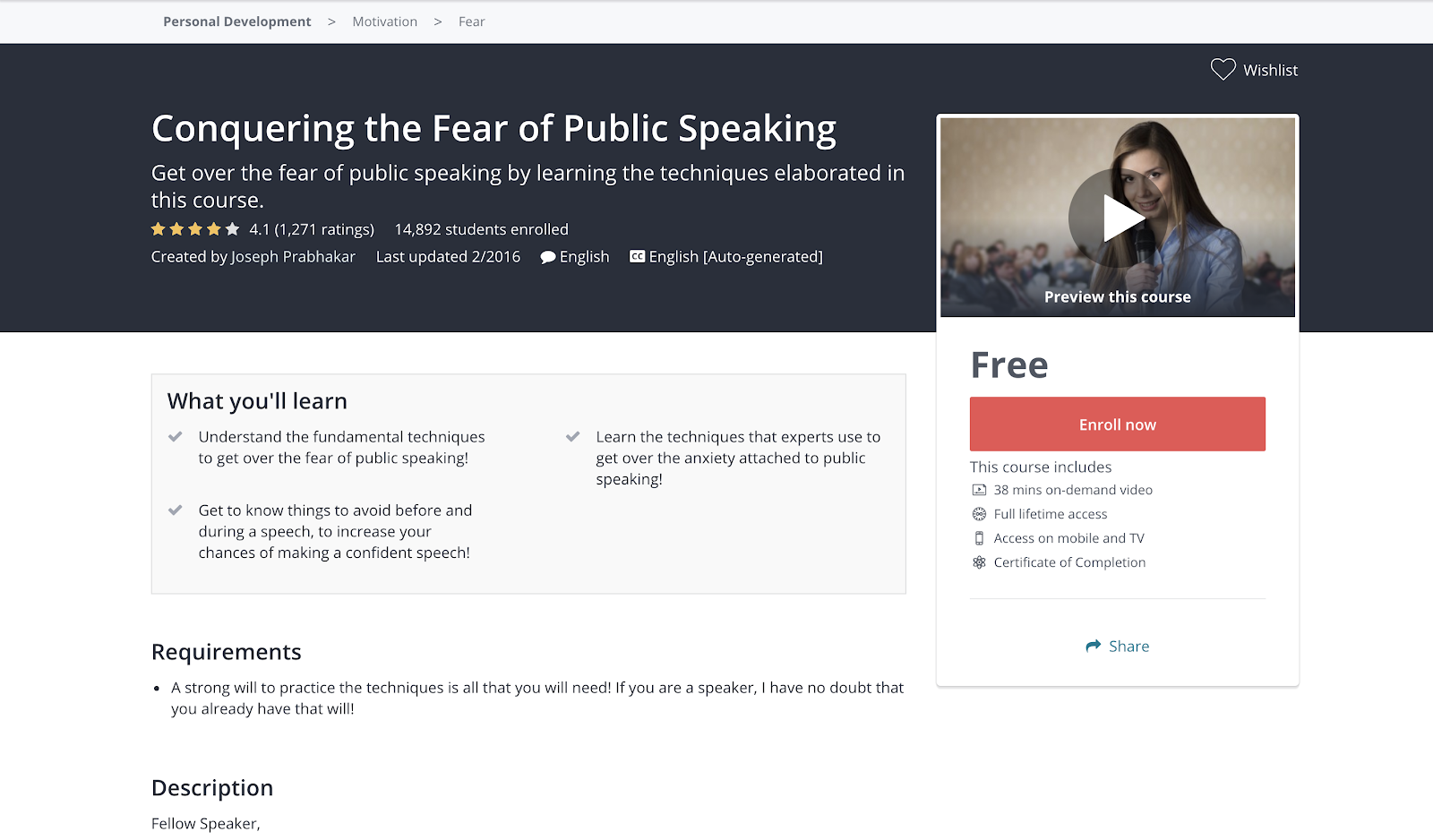
Understand the fundamental techniques to get over the fear of public speaking.

Example of personal development course

43. Learning How to Learn: Powerful Mental Tools to Help You Master Tough Subjects by Coursera

Length: ~15 Hours

This course gives you easy access to invaluable learning techniques used by experts in art, music, literature, math, science, sports, and many other disciplines.

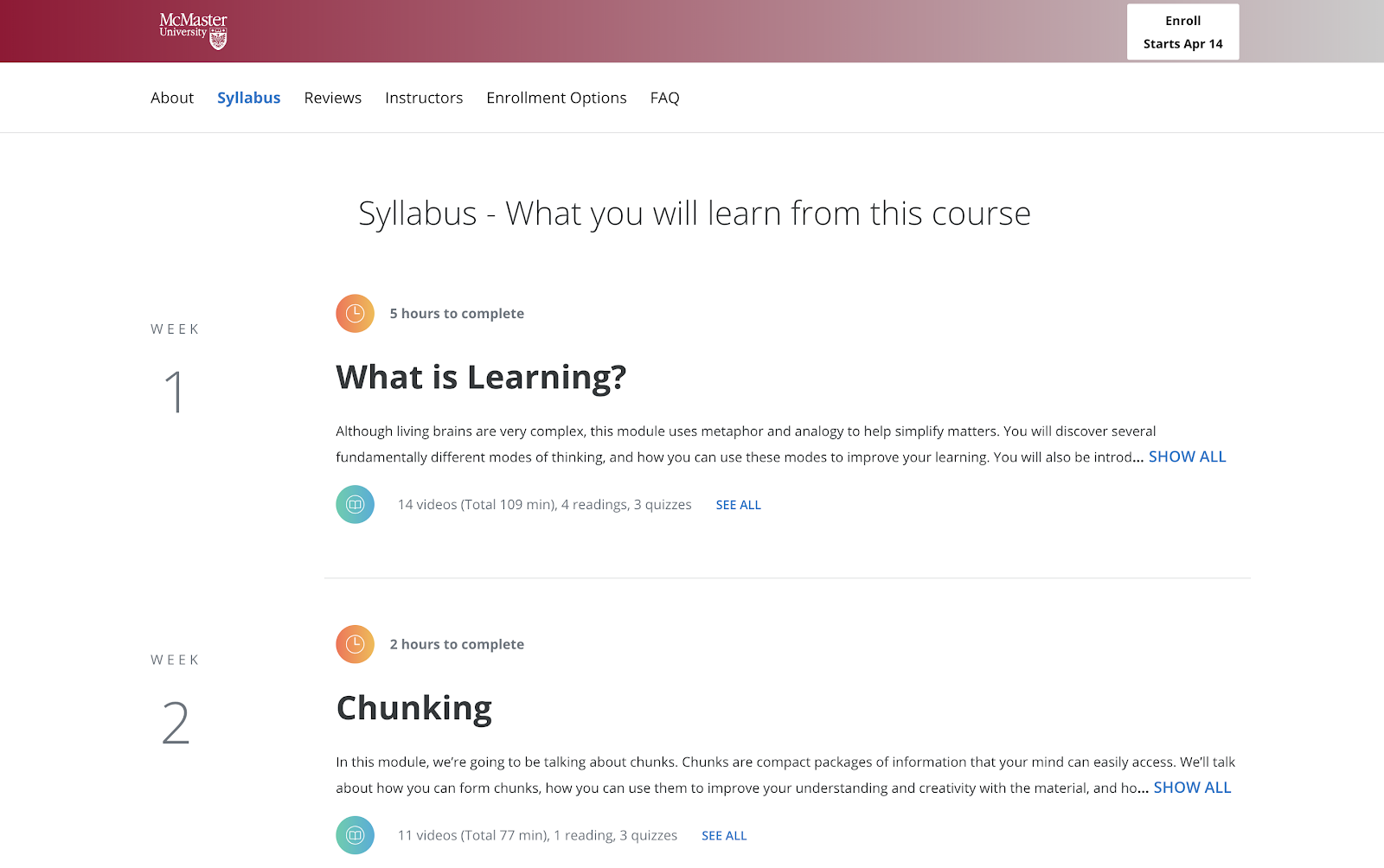
Example syllabus of personal development course

44. Communication Skills - Persuasion and Motivation by Alison

Length: 1.5-3 Hours

This course will introduce you to the essential communication skills that aid persuasion, guide you through the differences between persuasion and manipulation, and show you how to use strong communication to motivate the people around you. These abilities will be a great boost for both your career and personal relationships.

45. Successful Negotiation: Essential Strategies and Skills by Coursera

Length: ~16 Hours

In the course created by the University of Michigan, you'll learn about and practice four key steps to a successful negotiation.

46. The Manager's Toolkit: A Practical Guide to Managing People at Work by Coursera

Length: ~29 Hours

This course gives you a practical guide to managing people at work. It doesn't matter whether you are a first time manager in a shop or a middle manager in an office environment -- the same skills apply to every work place.

47. What Great Leaders Do by Alison

Length: 1.5-3 Hours

Professor Bob Sutton outlines the hallmarks of great leaders, why leaders need to hear the truth, and how to deal with team disagreements. You will learn the types of habits practiced by those who fail to lead, and gain a strong understanding of how to become a better group leader.

48. Introduction to Project Management by Udemy

Length: 1:37 Hours

This course offers essential project management tools and techniques.

49. Conflict Resolution Skills by Coursera

Length: ~4 Hours

Learn listening skills, verbal and non-verbal communication skills, and how to assemble a conflict management plan likely to yield positive resolutions.

50. Career Success Specialization by Coursera

Length: ~1 Hour / Week (11 Months)

Build essential skills for the workplace. Improve your employability and advance in today's dynamic workforce.

51. The Science of Happiness by EdX

Length: 4-5 Hours / Week (11 Weeks)

A free eight-week Science of Happiness course that will offer practical, research-backed tips on living a happy and meaningful life.

52. The Science of Wellbeing by Coursera

Length: ~19 Hours

The purpose of this course is to not only learn what psychological research says about what makes us happy, but also to put those strategies into practice.


Design Courses

53. Graphic Design Essentials by HubSpot Academy

Length: 44 Minutes

Need to become a graphic designer? Have less than an hour? This course by HubSpot Academy offers basic concepts in graphic design that have proven to be excellent marketing strategies. 

54. Adobe Illustrator for Absolute Beginners by EduOnix

Length: 5 Hours

Learn how to master Adobe Illustrator with real world examples.


Business & Finance Courses

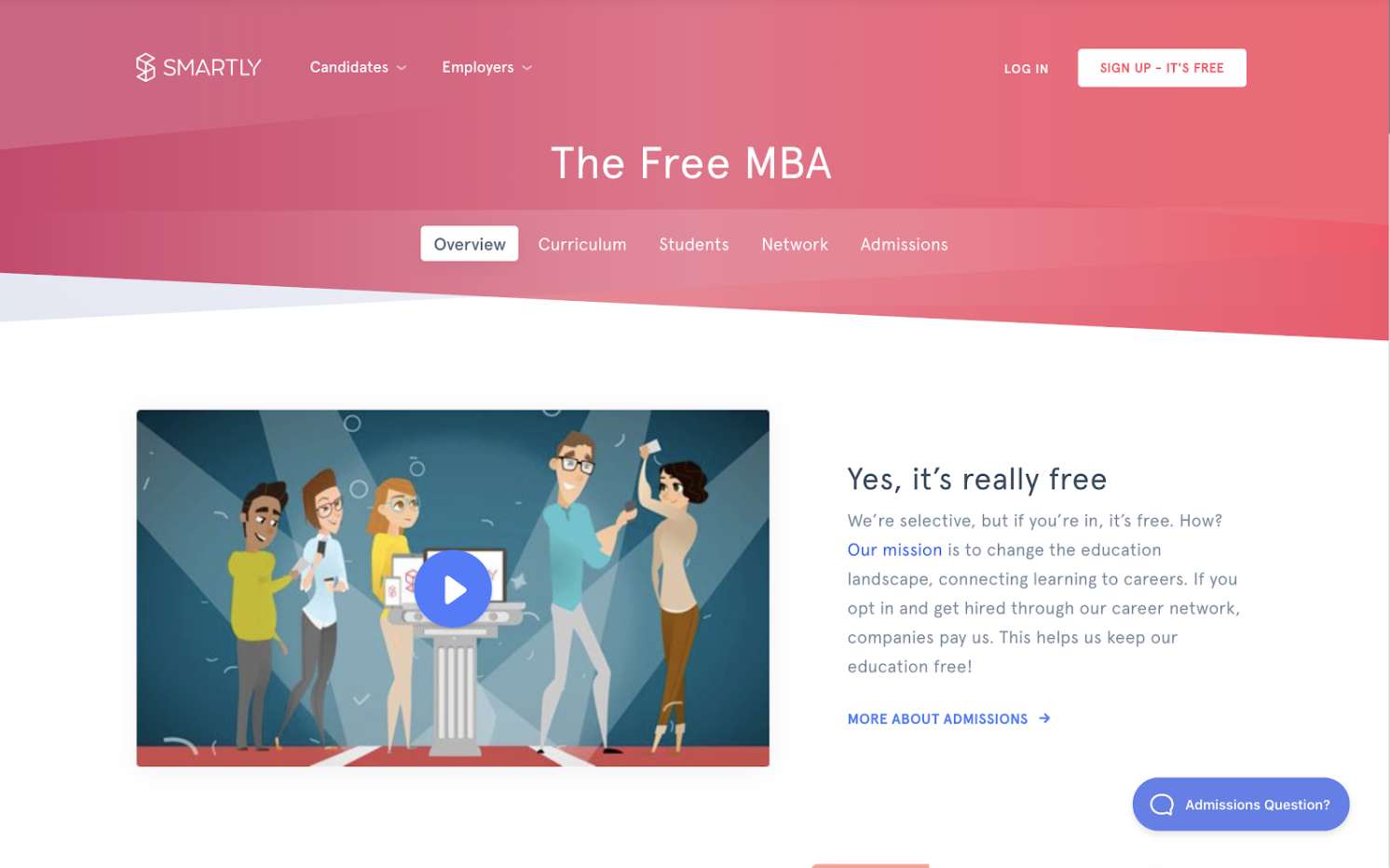
55. Free Online MBA by Smartly

Length: 5-15 Hours / Week (11 Months)

Designed with business professors from top residential MBA programs, Smartly's proprietary curriculum combines a self-guided software approach with collaborative online case studies and group projects. It's flexible, yet structured for the modern professional.

Smartly screenshot

56. Foundations of Business Strategy by Coursera

Length: ~9 Hours

Develop your ability to think strategically, analyze the competitive environment, and recommend firm positioning and value creation. In this course, you'll explore the underlying theory and foundation of a successful business strategy, and gain the tools you need to understand that strategy.

57. How to Build a Startup by Udacity

Length: ~1 Month

In an introduction to the basics of the famous Customer Development Process, Steve Blank provides insight into the key steps needed to build a successful start-up.

58. Alison Free Diploma in E-Business by Alison

Length: 6-10 Hours

This course is designed to boost your understanding of what e-business involves and how to implement a successful e-business strategy, so that the website you manage truly delivers.

59. Stock Market Investing for Beginners by Udemy

Length: 1:29 Hours

Learn the basics of the stock market through comprehensive, interesting and fun lectures.

60. Corporate Finance by New York University by iTunes

Length: Self-Paced

Corporate Finance is a big picture class. It looks at the financial principles that govern how businesses raise funds, invest those funds in assets and projects, and return those funds to investors.

Learning is an investment that continues to pay

We hope you find the online business course you need to take the next step in your career -- whether you're looking for a promotion or a sidestep into an entirely new field.

Whatever your reason, learning new skills will give you a competitive advantage in today's rapidly changing workplace. Plus, the more you invest in your learning, the better you'll grow.

If you're looking for one single place to learn how to take your career to the next level and/or grow your business, check out HubSpot Academy. It contains tons of free certified courses on everything from inbound and content marketing to social media and sales.

Editor's note: This post was originally published in January 2020 and has been updated for comprehensiveness.


60 Best Free Online Courses For Whatever You Want to Learn was originally posted by Local Sign Company Irvine, Ca. https://goo.gl/4NmUQV https://goo.gl/bQ1zHR http://www.pearltrees.com/anaheimsigns
7 Australian Companies with Great Taglines [+What Marketers Can Learn From Them]

It's no secret that people who live in startup-filled cities have seen some of the wildest brand names.

And, that variety in company names makes sense. When many startups in similar industries are founded in one geographic area, brands need to come up with a name that grasps attention, lightly hints at their mission, differentiates them from competitors, or encourages prospects to learn more about them.

This is especially true in Australia, which hosts startups from Sydney to Melbourne. These cities are the founding place of uniquely named startups and major brands like Sukin, Canva, and Billabong.

While the successful companies listed above have made their names noteworthy and easy to recognize, their company titles only hint at what their brands offer. This is why successful brands like these also lean on taglines to give prospects a quick, clear view of a brand's overall mission or purpose.

With a great name and an effective tagline, prospects will remember your brand's uniqueness, mission, or what types of products you offer. Then, when they're looking for a product in your industry or space, they might think of your brand's name and catchy tagline.

If you're working in a busy startup hub like Australia, or are starting a business in an already crowded business landscape, take note of these seven Australian companies with taglines that stand out and set them apart from the competition.

7 Australian Companies With Great Taglines

"More than Money" - National Australian Bank (NAB)

During a rebrand in 2016, National Australian Bank changed its tagline from "More give, less take" to "More than money."

The new tagline came with a series of commercials led by NAB's agency -- Clemenger BBDO. Each ad highlighted the bank's history, credibility, and how their financial institution still plays a positive role in impacting countless Australian lives.

In the ad below -- which was part of the "More than money" campaign -- NAB invokes nostalgia by showing home video-like clips that follow a new-born baby as she grows into an adult, as well as the milestones her parents will need to budget for, such as violin lessons, schooling, and travel:

In an interview with CMO, Andrew Knott, NAB's Chief Marketing Officer, said the pivot aimed to be more customer-centric.

“We felt it was time to move on from what has been a very effective brand expression around fair value, and ‘more give, less take’, to something that’s far more reflective of what we stand for today, but that’s also consistent with our heritage,” Knott explained. “When we are at our best is when we take time to understand customers and understand where they are at in their lives and to help them with the financial aspects of doing so.”

By linking money to major life milestones, NAB's tagline and campaign effectively place emotion behind logistical offerings. To prospects unsure of where to place their money, the tagline makes the financial institution seem more relatable and potentially more trustworthy than other banks with basic emotionless marketing.

"Life's better in boardshorts." - Billabong

When it comes to taglines, Billabong keeps there's short and sweet. Knowing that most of its customers are looking for swimwear for surfing, beach vacations, or summer sports, Billabong created a tagline just to remind people how much fun they can have in bathing suits.

Throughout Billabong's history, it has embraced this tagline in a number of its online and print campaigns. Beginning in 2017, the brand began producing a YouTube surf series with the same phrase as its title. Here's one of its chapters:

Billabong's tagline is a great example of how a bold statement in a tagline can persuade a prospect to buy a product to make their lives more enjoyable. But, depending on the prospect who hears it, the tagline could also either play up a sense of vacation-related FOMO or seasonal nostalgia.

For example, if someone lives in a cold climate and hears that life could be better in boardshorts, they might yearn to go surfing somewhere warm. Or, if someone has been working long hours, they might remember a time they spent on the beach as a child. The emotions or memories invoked by this tagline might not convince someone to buy a ticket to a beachy destination. But, if they do go on vacation, Billabong might be the first brand they remember when making beachwear purchases.

"Skincare that doesn't cost the Earth" - Sukin

As a budget-minded, environmentally conscious shopper, I can attest to the fact that it's hard to find environmentally-friendly products that meet your skin's health needs and don't cost a fortune.

Sukin, a Melbourne-founded skincare brand, aims to solve for the dilemma above, by selling affordable, sustainably produced skin products. It's tagline cleverly reflects this mission with a play on words: "Skincare that doesn't cost the Earth."

sukin skincare that doesn't cost the earth tagline

Aside from cleverly explaining the brand in just one sentence, Sukin's tagline also lines up well with its overall mission.

"Here at Sukin, we're committed to providing skincare that doesn’t cost the earth. This isn’t merely a commitment to creating affordable products, but also with minimal cost to our precious environment. We achieve this by thinking and acting sustainably wherever possible.​ Keep reading for our environmental initiatives," Sukin's Brand Values page notes.

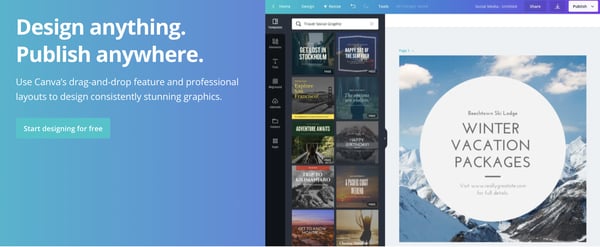
"Design anything. Publish anywhere." - Canva

While Canva seems like a giant global company now, it was once a startup founded in Sydney, Australia.

For those who haven't used Canva, the website allows individual users or teams to easily create and publish aesthetically-pleasing graphic designs for websites, social media, and other platforms.

Because Canva is artsy by nature, the brand could've gotten away with an overly creative tagline. But, instead, the company keeps things simple -- but still incredibly effective -- with, "Design anything. Publish anywhere."

canva design anything publish anywhere tagline

In just four simple words, Canva describes its minimum viable product and entices both designers and artistic novices to try its tools.

"Australians Wouldn't Give an XXXX for Anything Else." - XXXX

Today, XXXX beer's tagline simply reads "Pride of Queensland." But, before the brand became globally known, they had another great tagline that caught attention from Australian masses due to the light curse-related controversy around it.

For decades, XXXX -- formerly known as Castlemaine XXXX -- embraced Australia's edgy sense of humor and slang with the memorable tagline, "Australians Wouldn't Give an XXXX for Anything Else."

The tagline, which cleverly uses XXXX to insinuate a four-letter curse word, dates back to 1985. At that time, commercials would present a longer, TV-friendly tagline of "Australians Wouldn't Give a Castlemaine XXXX for Anything Else."

These early commercials often showed rural Australian residents, farmers, and construction workers getting into humorous, but dangerous, situations just to get XXXX beer. After a wild scene, a narrator would read the tagline, insinuating that Australians wouldn't care so much about any other beer. Here's one classic example:

Moving into the 1990s, the brand began using the shortened headline to express a more eye-popping message.

Although the tagline was scrapped in a 1996 rebrand, it's still a historically great example of how a company can be cheeky, attention-grabbing, and memorable while still tastefully marketing a product.

"Tastes like Australia." - Vegemite

For generations, many Australians and Australian visitors have spread on Vegemite on to bread and sandwiches for extra flavor.

Not only is Vegemite a common snack in Australia, but it's also been featured in global content such as films or TV shows that discuss the continent. And, when people who aren't from Australia see or taste Vegemite, they might ask, "What is this made of?"

Knowing that people link Australian to Vegemite, while also wondering what's in the iconic snack, the brand launched, "Tastes like Australia." -- a new tagline and commercial in 2018.

The commercial, which explains the tagline, opens with a confused person wondering how Vegemite is made. A narrator with an Australian accent then presents videos of Australian scenes -- such as sporting events, crocodiles, and destinations -- along with photos of fruit-based ingredients. Ultimately, the ad insinuates that Vegemite is metaphorically made of fruits, vegetables, cheese, and iconic scenes of Australian pride.

"Find your thing." - Redbubble

Redbubble is a store chain and online store where people, organizations, or small businesses can sell clothing, art, or other items that might be considered zany, humorous, or unique. When scrolling through the site, you might find T-Shirts with pizza cat memes on them, strangely decorated pottery or pants with sparkles or brightly colored patterns.

Because you can buy all sorts of unique or funny independently-made treasures on the site, Redbubble keeps its tagline broad -- but still motivating.

With, "Find your thing," Redbubble insinuates that there's something for everyone on the site. It also embraces that everyone has an independent style and can look to this site for the clothing or items that will allow them to embrace their inner uniqueness.

Aside from including "Find Your Thing" in videos like the one below, Redbubble also includes a section with the same name on its website.

"Find your thing." is a great example of how a company with many offerings can create a broad tagline that hints what their company is about without being too vague.

Crafting a Great Tagline

If you've been inspired to change or create your own tagline, here are a few themes you can take from the Australian examples above:

  • Keep it simple: You don't need to be vague or overly clever to persuade someone to check out your brand. Sometimes, simply reiterating your MVP -- as Canva does -- is effective enough to win over an audience.
  • Be Bold: Is your company or product known by locals, award-winning, or potentially iconic. If so, you can try incorporating your company or product achievements into a bold phrase, like Vegemite's "Tastes like Australia."
  • Get clever: If you can't cram your entire mission into a short concise phrase, consider using an easily recognized metaphor or play on words, like Sukin's "Skincare that doesn't cost the Earth."

Want to learn more about brainstorming and crafting catchy taglines or slogans, check out this helpful guide or download the free resource below.


7 Australian Companies with Great Taglines [+What Marketers Can Learn From Them] was originally posted by Local Sign Company Irvine, Ca. https://goo.gl/4NmUQV https://goo.gl/bQ1zHR http://www.pearltrees.com/anaheimsigns
B2C Marketing Automation and 5 Top Software Tools to Power It

Any B2C marketer can attest to the total relief that comes right after setting up successful email automation. To know that your customers will receive personalized emails without you having to manually write each and every one … whew, that’s powerful stuff.

Did you know that segmented (a.k.a. personalized) email campaigns can drive a 700+% increase in revenue? And that’s just email.

From text reminders to cart abandonment emails to multi-channel campaigns that span social media and in-app messaging, B2C marketing automation marries the power of personalized messaging and hands-off marketing. It simultaneously saves time (and money) while delighting your customers wherever they are.

What is marketing automation?

Marketing automation refers to any marketing efforts, campaigns, and tasks that are managed, executed, and measured with software versus manually. These efforts and campaigns are typically triggered by actions taken by leads or customers.

Marketing automation has many benefits. It can help save your resources, nurture your leads, and increase your revenue — all at once and with minimal manual effort. Amazing, right?

It’s important to note, however, that marketing automation shouldn’t replace human touch. This is especially true for B2C — unlike B2B, the B2C sales cycle is much shorter and the customer journey much more personalized.

What is B2C marketing automation?

B2C marketing automation encompasses any automated marketing messages and campaigns targeted to individual consumers versus business audiences. This type of marketing automation must be much more personalized and data-driven to best appeal to the individual in his or her specific customer journey.

Both B2C and B2C marketing automation work to send relevant messages, increase efficiency, and drive revenue, but let’s further unpack their differences.

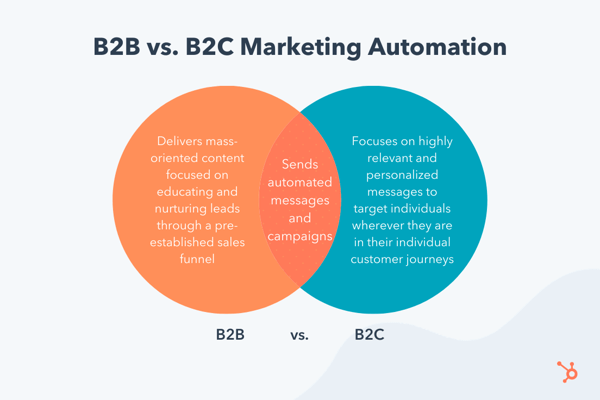
B2B vs. B2C Marketing Automation

B2B marketing automation delivers more mass-oriented content that’s focused on educating and nurturing leads through a pre-established sales funnel. Since there are typically more stakeholders involved in B2B purchases, B2B marketing automation also works to provide action-triggered information that can help influencers educate their decision-makers.

Let’s say a junior social media strategist is searching for a new social media management software for their entire team. They download an ebook on social media strategy from a prominent SaaS company, thus prompting the company’s B2B marketing automation software to send them nurturing emails about building a social media strategy and how to use its tool to do so.

The junior strategist is now equipped to bring this information to his or her director, who will make the final decision about which social media SaaS tool to purchase.

b2c marketing automation

On the other hand, B2C marketing automation typically focuses on highly relevant and personalized marketing messages. B2C marketing automation also targets individuals wherever they are in their individual customer journeys and attempts to deliver customized product or service recommendations based on action triggers and captured data.

For example, one type of B2C marketing automation is cart abandonment email. By tracking shopper behavior and capturing personal information like email addresses, B2C companies set up a marketing automation “rule” to send an email to consumers who leave un-purchased products in their shopping carts.

Typically, abandoned cart emails include the specific products left behind — a dose of personalization that may motivate shoppers to return to the website and complete their individual purchase.

Benefits of B2C Marketing Automation

Marketing automation sure has its perks — for both marketers and their audiences. These marketing automation benefits include:

  • Keeping your brand top-of-mind with potential customers
  • Allowing your team to send personalized, targeted messages without having to manually track users and repeatedly write content
  • Increasing efficiency amongst your marketing team
  • Closing the gaps in your marketing analysis by removing human error
  • Tracking user data that can be used to better serve up personalized product or service suggestions
  • Delighting site visitors, leads, and customers with customized content

Now, let’s discuss some B2C marketing automation tools software tools that can help you reach, engage, and convert your shoppers and customers.

There are countless marketing automation tools on the market. According to our research, the following five are a great fit for B2C marketing automation.

However, when comparing what tool may meet your B2C marketing automation needs, consider 1) how complex each tool is and what onboarding resources are offered, 2) what integrations each tool offers and how they may fit into your current tech stack, and 3) how each tool is priced and how much your marketing automation needs may cost.

1. HubSpot Marketing Hub

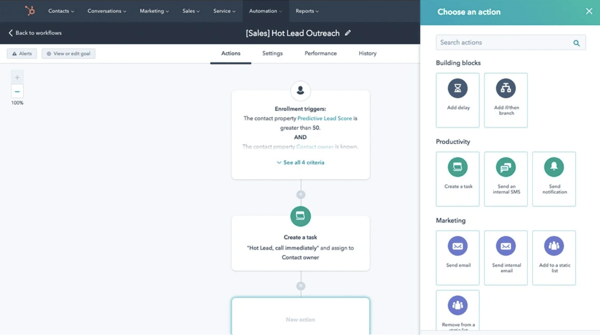
b2c marketing automation software hubspot

Source

Built on the foundation of the free HubSpot CRM, HubSpot Marketing Hub holds a wealth of B2C marketing automation tools that allow you to use your lead’s behavior to personalize emails, content, and outreach at scale. From email to SMS, and even internal automations like lead scoring and CRM updates, HubSpot is easy to get accustomed to and can quickly become your team’s marketing automation best friend.

Onboarding support: HubSpot’s award-winning customer support is available 24/7 through email and chat, as well as over the phone for Professional and Enterprise subscribers. You can also access a knowledge base and various HubSpot Academy courses.

Integrations: HubSpot Marketing Hub integrates with over 500 third-party applications.

Pricing: HubSpot Marketing Hub offers a Free plan as well as multiple subscription options. Note that the marketing automation features are only available for paid subscribers.

2. Mailchimp

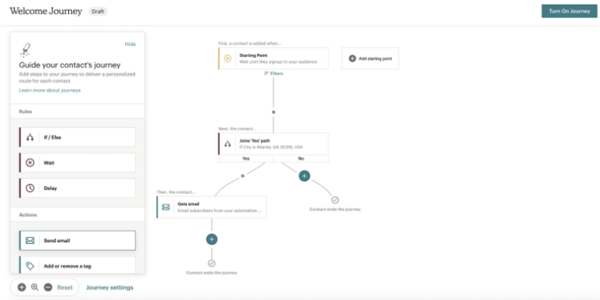
b2c marketing automation software mailchimp

Source

Mailchimp is an industry leader in email marketing automation. Use the Mailchimp tool to deliver transactional emails, such as order confirmation emails and other personalized messages. The tool also allows you to build visual customer journeys so you can provide the best possible experience to each customer — or convert your leads and prospects into one.

Onboarding support: Mailchimp has a large library of resources, including guides, tutorials, and case studies. Free users get 30 days of email support, and paid subscribers get unlimited email and chat support.

Integrations: Mailchimp integrates with over 200 third-party applications.

Pricing: Mailchimp offers a Free subscription, but the more in-depth marketing automation tools aren’t available unless you invest in the Essentials subscription or higher.

3. ActiveCampaign

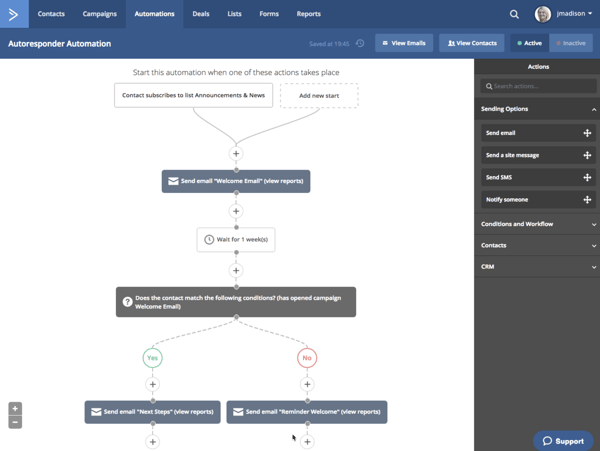
b2c marketing automation software activecampaign

Source

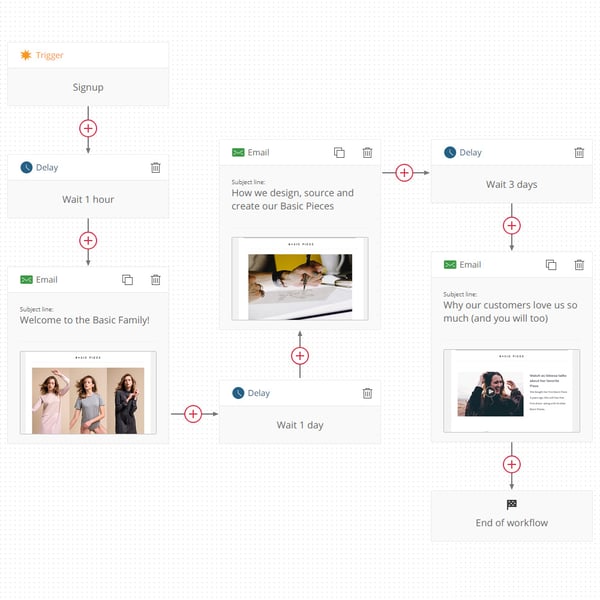
ActiveCampaign is a renowned marketing automation software and was the first to develop the visual automation workflow builder. (You know, the one with the boxes and labels and lines going everywhere — like the one above.) In addition to email, it offers site tracking, lead scoring, attribution, and more.

Onboarding support: ActiveCampaign offers a free demo and a whole slew of resources, such as a blog, developer documentation, and a library of pre-written automations. All subscriptions include data migration and implementation services, and more expensive subscriptions include limited one-on-one training.

Integrations: ActiveCampaign integrates with over 300 third-party applications.

Pricing: ActiveCampaign offers a free trial. From there, you can pay for a Lite subscription at $9 per month or more.

4. AutoPilot

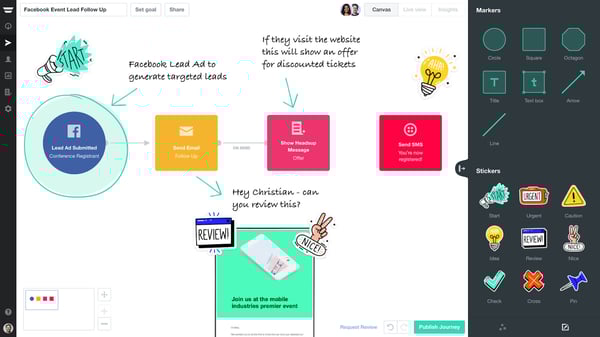
b2c marketing automation software autopilot

Source

AutoPilot, like others on this list, offers a visual automation workflow builder … but with a twist. It sets itself apart with emojis, stickers, custom notes, and other details that help your team collaborate and, well, have fun building your marketing automation sequences. Although the tool doesn’t offer its own built-in CRM, it is fairly intuitive, easy to use, and offers fantastic reporting features.

Onboarding support: All AutoPilot subscriptions include unlimited emails and access to support. You can purchase an Expert Setup and Training add-on for $1699.

Integrations: AutoPilot integrates with dozens of third-party applications.

Pricing: AutoPilot offers a free trial, after which you can join at as little as $49 per month.

5. Omnisend

b2c marketing automation software omnisend

Source

Omnisend is a leading marketing automation tool specifically tailored for e-commerce businesses. Not only does it offer dozens of pre-written templates for all e-com automation scenarios, but it also integrates with nearly every possible e-commerce-related tool, including both email and SMS automation software.

Onboarding support: Omnisend offers a library of resources, including an onboarding course. Unfortunately, live support is only offered to paying subscribers.

Integrations: Omnisend integrates with hundreds of third-party applications, although most aren’t available with the Free plan.

Pricing: Omnisend does offer a Free subscription option, although most automation features aren’t available unless you’re paying.

These five tools are among the most powerful for B2C marketing automation efforts. Whether you’re sending time-triggered birthday emails or following up with prospective customers with automated SMS messages, try these B2C marketing automation software tools to reach, engage, and convert your customers.


B2C Marketing Automation and 5 Top Software Tools to Power It was originally posted by Local Sign Company Irvine, Ca. https://goo.gl/4NmUQV https://goo.gl/bQ1zHR http://www.pearltrees.com/anaheimsigns
Wednesday, October 21, 2020

35 Office Costume Ideas for Marketing Nerds & Tech Geeks

Halloween is a fun holiday, and it doesn't get the attention it deserves. It doesn't have recognizable songs or vacation days associated with it, and it falls on a busy time of year for most people in the workforce.

But that doesn't mean you should skip the festivities at your office Halloween celebration.

How many days of the year are you encouraged to dress up and goof around at work? Probably just one -- Halloween -- and even then, it can be hard to know what's office-appropriate.

We want you to have fun this Halloween, so we're taking the work out if it for you. We've compiled a list of DIY Halloween costume ideas that are easy to put together, inexpensive, and perfect for the digital marketer or tech professional.

If your family and friends don't get your costume, your colleagues definitely will.

35 Office Costume Ideas for Marketing Nerds & Tech Geeks

Computer or App-Related Costumes

1. Alt Text

Alt text isn't just the metadata of an image published on the web -- you could also say it's an "alternative" fashion statement with the text to describe the era. This was HubSpot Director of Content Corey Wainwright's office Halloween costume a few years ago. It's great because you don't even look dressed up if you have a casual office dress code, so you can just blend in.

To dress as alt text this halloween, break out your best 90s alternative garb -- our coworker Corey went with black jeans, combat boots, and a flannel. Then, tape hyphenated text that best describes what you're wearing, much like an image of your outfit would do online to help search engines read the file.

We edited a sash of alt text on to the alternatively dressed girl below, just to help you picture your awesome costume.

Computer costume of girl in 90s alternative outfit with alt text written across her shirtSource: That's Life

2. SEO Ninja

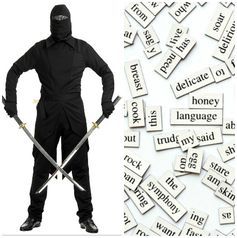
Speaking of dorking out on SEO, you could be everyone's favorite LinkedIn title -- the SEO ninja. Dress in all black, buy a black ski mask, and tape keywords all over yourself. Voila ... you're an actual ninja -- just one much more concerned with search engine optimization than lurking in the darkness.

seo-ninja-costumeSource: Pinterest

3. Mobile App

Wander around holding an appetizer -- candy, cheese and crackers, chips and dip ... whatever you have on hand. Boom. You're a mobile "app."

This costume also doubles as a great way to introduce yourself and make friends at a party.

mobile-app-costume.pngSource: Opportunity Max

4. Instagrammer

Want another way to turn handing out food into a costume? Dress up like a hipster and hand out graham crackers. You're an "instant" "gram" cracker server -- or, for short, an Instagrammer. Pun absolutely intended.

5. Ghostwriter

Have you ever written something for somebody else's byline? Such is the life of a "ghostwriter." Turn your author-less accomplishment into this year's office Halloween costume.

To dress up as a ghostwriter, grab a white sheet and cut a hole for your head and arms. Dob some black ink spots on the sheet, get a book and one of those feather quills (or just get a feather, I suppose), and boo -- you're a ghostwriter.

ghostwriter-costume

6. Whitespace

Whitespace on the internet might just denote all the blank space you use to help your design stand out, but on Halloween, "whitespace" isn't just the absence of space.

Dress in all white -- add white face paint and a white wig if you're ultra-committed. Then add a hint of color somewhere on the outfit, like a colored tie or scarf, or even a paint splotch. That color splotch will make the white space more prominent, transforming you into "whitespace."

7. Error 404 Code

You've most likely encountered a funny error 404 page before, and you can make it a funny costume, too. Grab a sheet of paper, write "Error 404: Costume Not Found," and tape it to your outfit.


A photo posted by RachAel Klopfenstein (@theklopf) on Sep 5, 2015 at 12:33pm PDT

8. (Monty) Python

If you're into programming code, British comedy, and low-effort costumes, being (Monty) Python is perfect. Dress up in anything remotely snakelike in your closet: olive green clothing, snakeskin accessories, and fake vampire teeth that can serve as your fangs.

Then, to amp up the dork factor on this costume, add two coconuts or a gold chalice to embody Monty Python on his quest for the Holy Grail.

9. Facebook

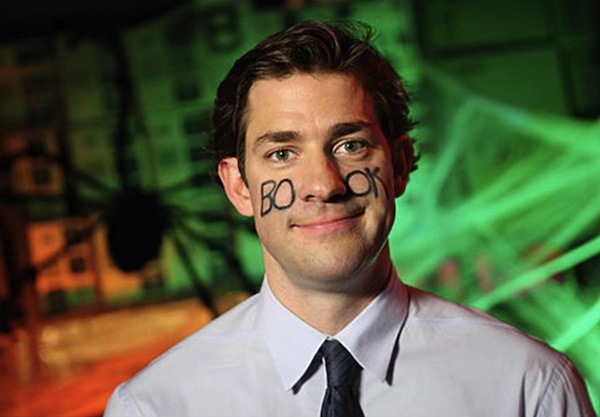
Grab face paint or eyeliner and write "book" across your cheeks. Just like that, you're the world's biggest social network for Halloween.

And for your sake, we hope your colleagues actually get it:

Halloween-Jim_Bookface-Jim.jpgSource: AndPop

10. Unicorn

Here's another tech-friendly, double-entendre costume: Be your own version of a tech unicorn. Here at HubSpot, we love this tech icon, and you can easily make your own version of a unicorn horn with help from this article.

aid2617087-v4-900px-Make-a-Unicorn-Horn-Step-10-Version-3.jpgSource: WikiHow

11. Phishing Emails

Phishing emails are nothing to joke about -- they can seriously threaten your technology and data security. But on Halloween, you can dress up as a play on phishing emails for an easy DIY costume. All you need are a stick, a piece of string, and an envelope. Bonus points if you own a bucket hat and vest to complete the ensemble. Check out an amusing version of this costume below.

Email phishing Halloween costume with fishing rod with Passwords label as baitSource: Car and Driver

12. Copycat

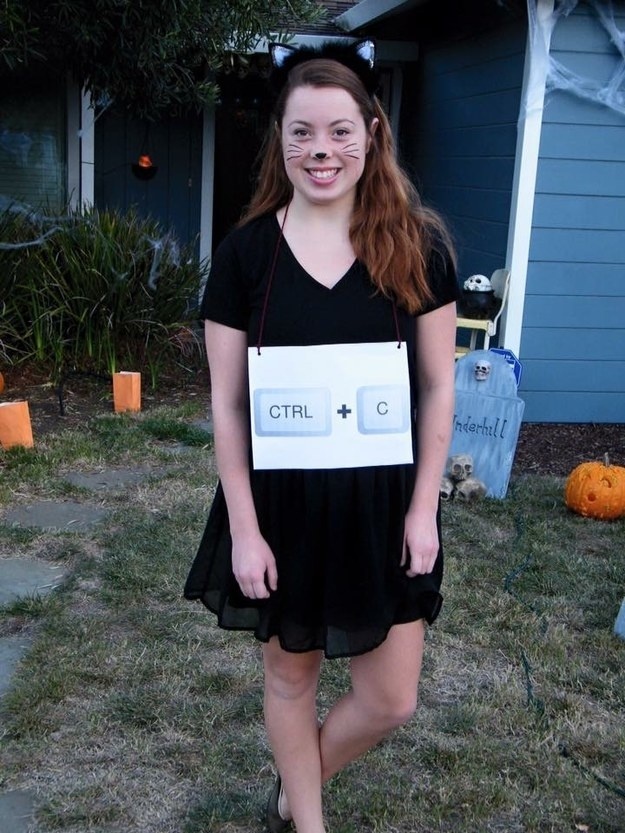
"CNTRL + C" is the popular keyboard macro allowing you to copy items from one place to another on your computer. Well, here's a technology spin on a classic Halloween costume. All you'll need are cat ears, eyeliner-drawn whiskers, and a sheet of paper. Write "CNTRL + C" on the paper, tape it to your outfit, and you're a "copycat."

Girl in copycat Halloween costume with black cat makeup and CNTRL + C labeled necklaceSource: BuzzFeed

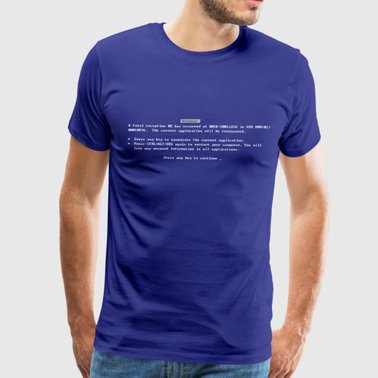
13. The Blue Screen of Death

You know the screen, even if you don't know the morbid nickname the tech world has given it. This classic error screen is known for signaling the end of a computer's useful life, and you know it when you see it. It causes so much stress on site, in fact, that the color alone is scary enough for October 31.

Believe it or not, there are official T-shirts you can get with the blue screen of death copy printed on them. Want to make your own? All you need is a royal blue t-shirt and a printed version of this horrifying error message to pin to it.

T-shirt with Blue Screen of Death error message printed on itSource: Spreadshirt

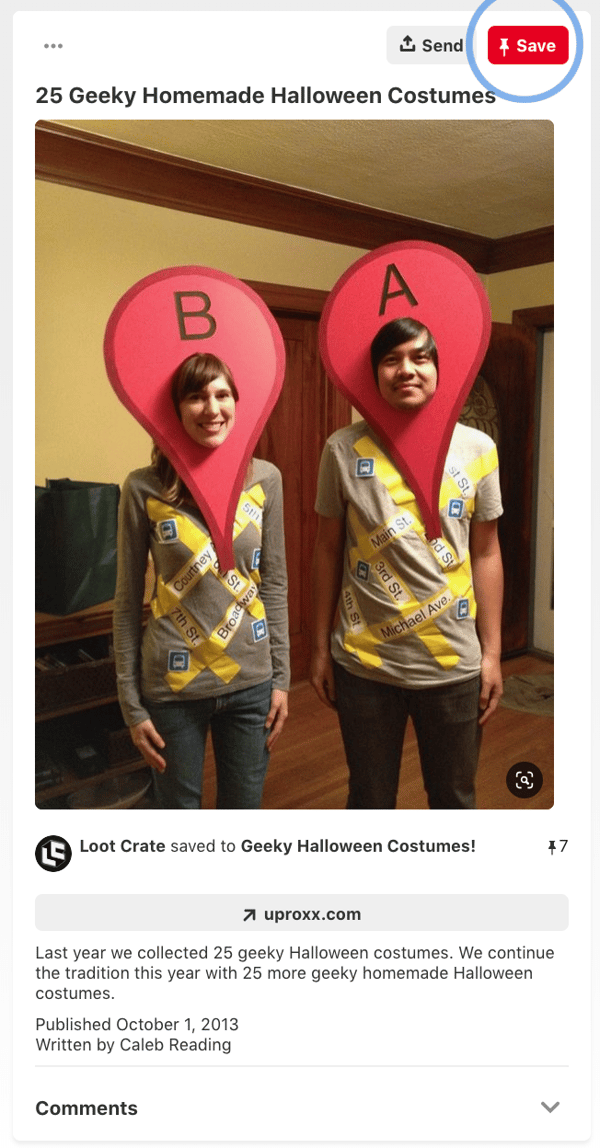
14. GPS Costume

This will work best with two people. You can cut a Point A and Point B pin shape out of cardboard, paint both red, and simply write A and B on it. From there, you can personalize the costume whichever way you'd like. You can even get more intricate by finding a T-Shirt with a map on it. 

GPS office costume

Source: Pinterest

15. Dead Battery and Low Wi-Fi 

Nothing is more terrifying than a dead battery or no Wi-Fi. This costume brings all of techy's fears to life. It's also pretty simple to create. Just tape or glue images of dead Wi-Fi and low battery signals on to a black shirt. To emphasize the low-connectivity fears, put on some zombie or skeleton makeup. 

Although this can work as a couples costume, this could also be a fun option for office colleagues. Since both costumes within the set don't rely on each other to be understandable, an individual could also wear either the Dead Battery outfir or the No-Wi-Fi suit and still be easily recognized.

Dead Battery and Low Wi-Fi Halloween Costume

Source: Pinterest

Emoji Costumes

16. Information Desk Girl

This genius professional found a golden (or, rather, purple) opportunity to be the "information desk emoji, the many gestures of whom we've all come to know, love, and use at some point in a text conversation.

The best part about this awesome tech reference is that you don't need to alter your regular attire to make it work. As Naomi shows us below, it's all in the hand gestures.

17. Dancing Girls Emoji

If you're the owner of one of the nearly more than 1 billion Apple iPhones sold worldwide, you're probably familiar with the dancing girls emoji, shown below.

The easiest version of this costume is to find a buddy and dress all in black together. If you're committed to emoji authenticity, buy black bunny ears to complete the look.

Screen Shot 2016-10-25 at 2.13.14 PM.pngSource: Brit + Co

18. Heart Eyes

Are you just in love with Halloween? Prove it with this passionate emoji face. You don't have to paint your entire face, chin to hairline, to get the Heart Eyes Emoji just right, but it certainly helps. It'll also disguise your stress when you're at your most focused during the day.

"This employee just seems to love her job, I can't put my finger on why," your manager will think ... See how to paint this emoji onto your face below (you'll need some help for this one).


Topical Office Costumes

19. Fully Vested

At work, "fully vested" usually refers to one's ability to earn all matching funds of a 401(k) retirement plan. But for some, you just can't help but picture someone wearing lots of sleeveless jackets at the same time. Now's the time to personify that image.

If you work in a company where people would get the joke, put on a bunch of vests (at least three, but even more is encouraged), and that's about it. You're fully vested.

20. Nerd

What I love about the nerd costume is that it's effortless and always unique -- there are many ways to be a nerd in this day and age. Are you a tech nerd, a video game nerd, or a book nerd? The sky is the limit with this costume. Show up wearing glasses with your favorite accessories, such as a magic wand, book, or lightsaber, to complete the effect.

Worlds cutest nerd costumes. Erin Harrison and Chandler Abney everyone!! ;) Follow me for my next Halloween costume!

Source: Pinterest

21. A Solar Eclipse

Last year, the solar eclipse took over the internet -- and the country. As millions of people flocked to the path of totality to (hopefully) catch a glimpse of this rare event without burning their corneas, millions more made jokes about it on social media.

To dress up as a solar eclipse for Halloween, you'll need a work pal to dress up as the sun and the moon with you. One of you wears black, the other wears yellow, and you both wear dark sunglasses. Then, at the Halloween party, the one dressed in black spends the whole time standing in front of the one in yellow.

Two girls dressed in solar eclipse costume at an officeSource: Pinterest

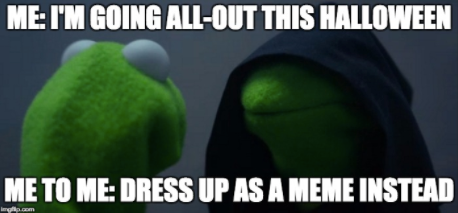
22. The 'Evil Kermit' Meme

If you haven't heard of this mega-popular meme this year, you've probably seen it somewhere: It features Kermit the Frog, face-to-face with his evil twin, Evil Kermit. Evil Kermit looks identical, except for the black cloak.

For this costume, you and a coworker can keep it simple: You both wear green shirts, and one of you wears a black hoodie or jacket on top. If you really want to commit to the costume, you'll spring for some green face paint to complete the ensemble. Walk around the party together, facing one another, for maximum effect.

evil kermit halloween.png

23. Fifty Shades of Grey: PG Paint Swatch Costume

Want to do something cheeky, but still office friendly? This is PG pun costume shares the name of a popular romantic novel and film, "50 Shades of Grey."

Go to your local paint or hardware store and buy 50 grey paint swatches. Then, tape them to a black shirt and tell your colleagues you're, "50 Shades of Grey." 

50 Shades of Grey Pun Halloween Costume

Source: Fox 24 of Kansas City

24. The "But That's None of My Business" Meme

If you love Kermit the Frog, but don't have a colleague to team up with for the "Evil Kermit" costume, consider going solo with a costume based off of the "But That's None of My Business" meme, where Kermit is seen judgmentally drinking coffee.

All you have to do is stick a pair of eyes on a green hoodie and start sipping your tea or coffee. For an added effect, you can cut a white photo frame to hold in front of you so you can look like an image posted on social media. 

But That's None of My Business Meme Halloween CostumeSource: Pinterest

25. Eleven from Stranger Things

Eleven from Netflix's hit series Stranger Things is universally beloved, and it's a bonus that her signature look is a comfortable and easy-to-assemble costume. Rock your best Eleven with a dress, a denim jacket, and a box of Eggo Waffles.

the-stranger-things-actress-behind-eleven-doesnt-love-eating-tons-of-eggo-waffles.pngSource: Business Insider

26. Scoops Ahoy Employee from Stranger Things

While Eleven, noted above, is an absolute classic Stranger Things character, 2019's season inspired another great costume opportunity. During the newest installment of episodes, Stave, a main character played by Joe Keery, worked at an icecream shop called Scoops Ahoy. As a server, he had to wear a goofy sailor uniform alongside his coworker Robin

Since the season aired, the uniform has been regularly worn by cosplayers and at Comic Con as people mimic Steve and Robin.

Since it's a pretty generic sailor uniform, you might be able to easily find one that's similar in a variety of Halloween shops. This costume could work for both individuals or two colleagues. 

27. Pokémon GO Trainer

Pokémon GO had roughly 45 million people walking around in cities glued to their phones last summer (I, among them). To pay homage to the explosion of this tech trend, you'll need a t-shirt that's red, yellow, or blue. Using fabric paint or permanent marker, write Valor (for red), Instinct (for yellow), or Mystic (for blue) on your shirt.

Spend Halloween walking around pointing your phone at objects, and you're the spitting image of a Pokémon GO trainer. Gotta catch 'em all, right?


A photo posted by Odinia (@marshmallowsie) on Aug 9, 2016 at 4:44pm PDT


Group Office Costumes

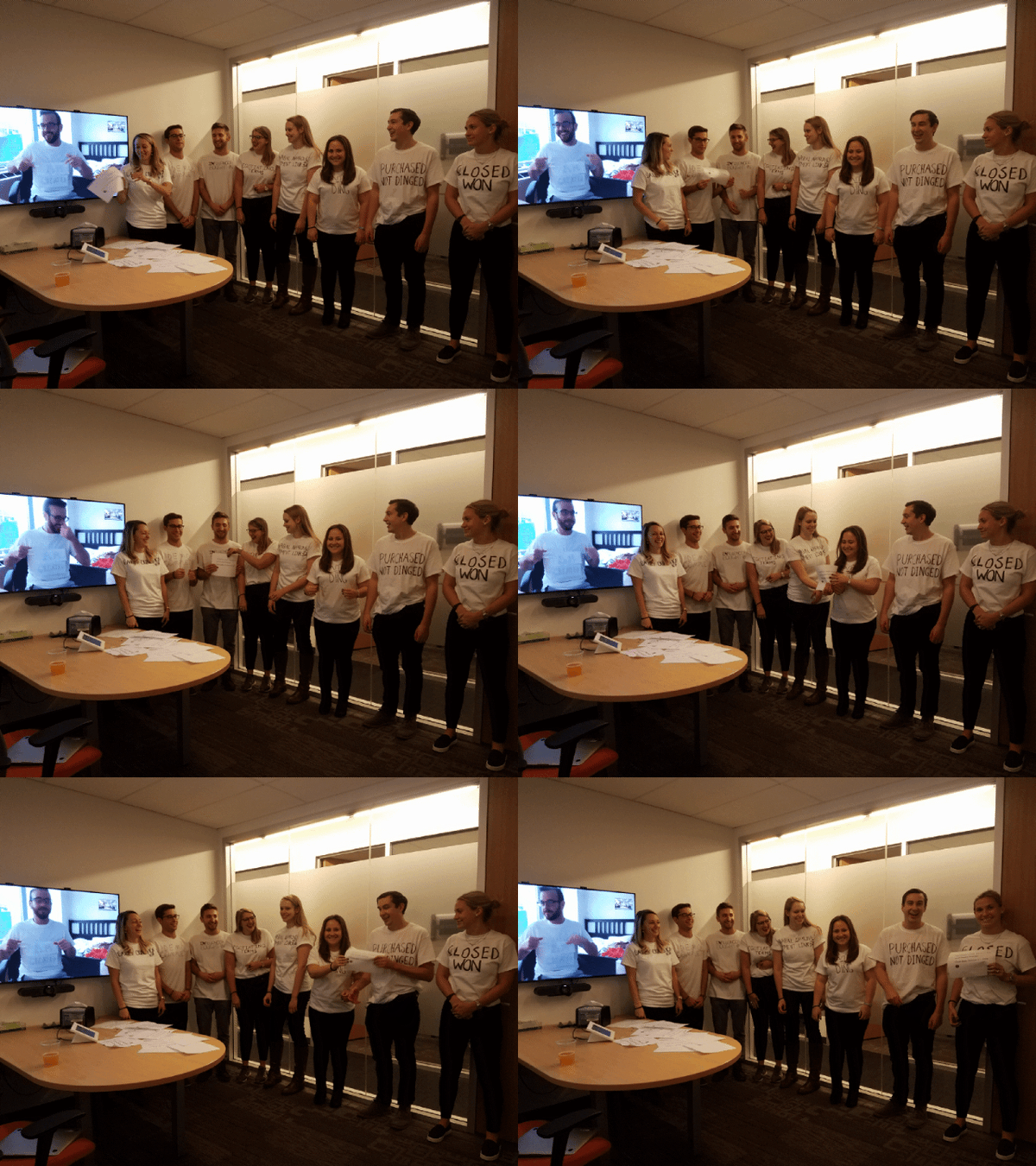
28. The Sales Lifecycle

At HubSpot, we love embracing team costumes. In 2018, a handful of HubSpot employees grabbed some T-Shirts and wrote the stages of the sales lifecycle on them. Then they lined up accordingly and passed a fake prospect listing around to symbolize the process of making a sale. This was such an easy costume to coordinate that the team could even include an out-of-office employee over a video call. 

HubSpot Employee sales cycle halloween costumeSource: Maggie Bomze, Principal Customer Success Manager of Strategic Accounts at HubSpot

29. Social Media Channels

While this Pinterest image shows classmates posting as the major social media networks, this could easily be modified to fit the office setting. 

Simply pick out a solid list of the hottest social networks, then by blank T-Shirts that match the colors of each platform. From there, you can either draw, tape or glue the logos on to each shirt. If you're not interested in the tutus worn below, you could also find matching pants, or just wear jeans and keep things simple.

Social Media Network team costumes

Source: Pinterest

30. Google Algorithm Update

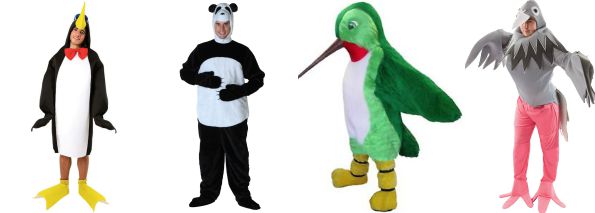
Find a couple of office buddies for this one -- one panda, one penguin, and one pigeon. You might be thinking, "what the heck is the pigeon algorithm update?" 1) It's a thing, and 2) we checked Amazon for hummingbird costumes and there aren't any cheap ones available.

google-algorithm-update-halloween-costumes.jpgSource: Opportunity Max

31. Black Hat and White Hat SEO

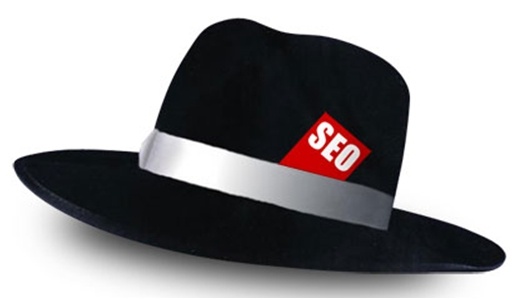
This is another SEO-related costume, and I think you can figure this one out on your own. I recommend wearing a black hat for one, and a white hat for the other, and having "SEO" embroidered on each one -- which you can easily custom order.

Black hat with SEO label on topSource: SEO-Hacker

32. Snapchat Filters

Here's another group costume idea that pays tribute to Snapchat's filters feature.

There are numerous options that you and your team can choose from to embody this costume. You could dress up as vomiting rainbows, cat and dog ears, a flower crown, or a face swap, and this could be as DIY or store-bought as you're interested in pursuing. For example, here's some inspiration for a couple of the dog filters:

snapchat filter team costumeSource: PopSugar

33. Snapchat Ghosts

Put a marketing spin on a classic Halloween costume by arriving as a Snapchat ghost. You'll all need a white sheet and to pick which ghost you like the most.

Snapchat Ghost team halloween costumeSource: YouTube

34. PAC-MAN and Company

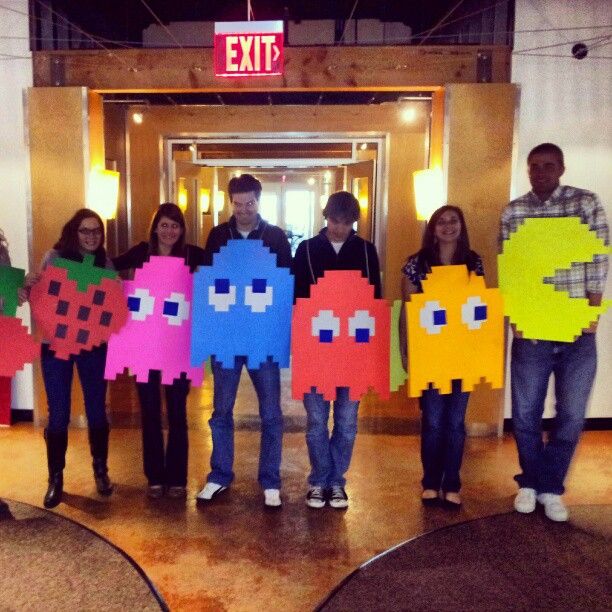
Here's yet another awesome ghostly costume idea your whole team at work can get in on. Have your team lead wear the yellow pie-shaped garb of PAC-MAN, with each team member dressed as the multi-colored ghosts that roam the screen in this vintage arcade game.

Just make sure the team lead doesn't actually try to eat the ghosts -- you're in an office, and you're all technically on the same team.

Group costume with PAC-MAN, four ghosts and fruit from the vintage arcade gameSource: Meningrey

35. Instagram Filters

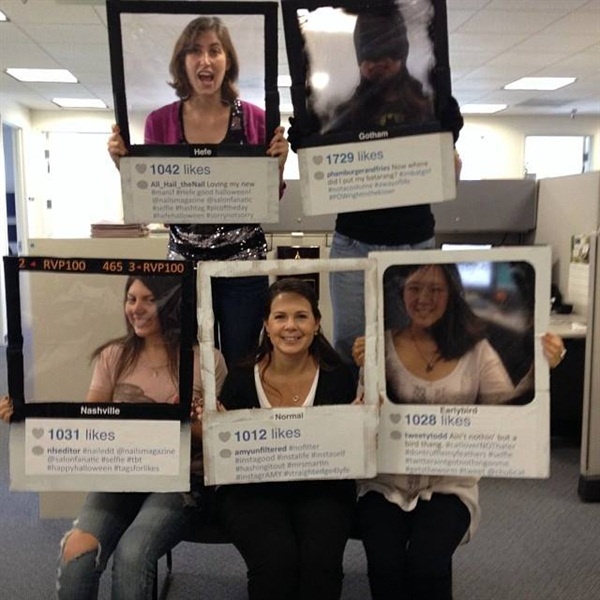
For this group costume, you'll need white t-shirts and fabric markers. Draw an Instagram photo frame on the front of your shirts, and each team member can write a different Instagram filter's name inside the photo frame. Or, create frame props with different filters on them like the group did below:

Instagram Filter Halloween costumesSource: Nails Magazine

The clothes don't make the marketer, but the costume can certainly make the culture at your company. Find out what it takes to hire and train the best fits for your open roles in the free ebook, available below.

Editor's Note: This post was originally published October 21, 2018 but was updated in October of 2019 for comprehensiveness.


35 Office Costume Ideas for Marketing Nerds & Tech Geeks was originally posted by Local Sign Company Irvine, Ca. https://goo.gl/4NmUQV https://goo.gl/bQ1zHR http://www.pearltrees.com/anaheimsigns