Tuesday, April 27, 2021

Outsourcing a Design Project? Here’s How to Write a Design Brief

During my career, I have freelanced on and off. The biggest lesson I’ve learned in working with clients was the importance of setting expectations from the very beginning.

It helps both parties get on the same page and can prevent miscommunication down the line. That’s why you often have initial discovery calls, set meetings, and draft contracts.

Free Download: Creative Brief Templates

Another way to set expectations is by creating a design brief. It’s essential in the early stages of your design project, whether you’re working with someone in-house or outsourcing it to an agency or independent contractor.

Here’s everything you need to know about what to include in a design brief and the templates that will help you create one quickly.

Think of this brief as a blueprint: It lays out all the information your designer will need to complete the project and helps align both parties on the expectations. Typically, the client (or brand) will fill out most sections in the brief once they know what they’re looking for.

The assigned designer will then complete it based on conversations with the client. It serves as a baseline from which to build the project.

So when would you use a design brief? For:

  • A website (re)design
  • A logo (re)design
  • A (re)branding package
  • Creative assets for social media or ad campaign
  • Video assets

What to Include in your Design Brief Template

1. An Overview of Your Brand

The first thing you’ll want to outline in your design brief is information about your brand. This gives a big-picture understanding of your business and helps frame the rest of the brief.

Here’s what to include:

  • Your industry
  • Your products and/services
  • Your unique selling position (USP)
  • Your mission and your values
  • Your competitors

In this section, you can also list your direct and indirect competitors, depending on the project.

If you already know who you will be working with on this project, list the decision-makers for the project and any key stakeholders involved. Outlining the points of contact right from the beginning will streamline the workflow and prevent communication silos.

2. Your Project Overview

As one of the most important sections in your brief, spend time figuring out what you’re looking for before writing this section.

Don’t know where to start? Answer this question: What problems are you trying to solve? This provides context for the intention behind the project and can also help the designer generate new ideas. It’s like going to the doctor. You have to say where it hurts for them before they can prescribe something for relief.

For instance, let’s say you want to redesign your website. The reason could be your users aren’t converting, or because the company has recently shifted and needs a website to reflect this change. Knowing the reason behind the project is equally as important as the project itself.

Next, state your goals and objectives. What do you want to accomplish through this project? Is this a part of something larger? Are there any roadblocks that could hinder your project?

The more detailed you can get, the better. Your goals could include improving website conversions, reducing bounce rates, and/or increasing traffic. It all depends on the project.

Answering these questions will be instrumental in aligning your vision with the designer and creating the space to address any potential issues.

Finally, this section should list your deliverables, such as:

  • Required assets (illustrations, photos, videos, mockups, wireframes)
  • File formats
  • Dimensions

3. Your Branding Guidelines

Unless your design project is for branding, list your branding guidelines in your design brief. This breaks down the rules your designer will need to follow and keep in mind for your project. Rules relating to your:

  • Color palette
  • Brand voice and tone
  • Typography
  • Logo

For any design project, you want to make sure your designer creates something that aligns with your brand identity. If you’re in the process of developing your brand identity, you can also provide mood boards to help the designer understand your vision and the direction you’re heading in.

4. Your Target Market

Every design project is developed with the end-user in mind. In this section, dive into who that user is.

Describe your user persona and how you imagine them interacting with this project once it is completed. If you have already done some market research, you should list your target audience’s demographics, behavioral habits, values, interests, and online behavior.

For instance, let’s say you’re an affordable shaving cream brand for men and your current branding and messaging aren’t resonating with consumers. After running a few experiments, you’ve realized that your target market doesn’t see your brand as approachable, inviting, or relatable.

For your design project, you’ll want to revamp your branding package to reflect your consumers. By knowing more about your target market, your designer can use their knowledge of design principles and studies to create a product suited to your audience’s needs.

5. Your Budget and Timeline

These are the nitty-gritty details that are necessary to determine the right partner for your project. You may find a designer who’s great but cannot meet your expectations in terms of timeline.

Similarly, you may find out during a discovery call with a design agency that they cannot work within your budget.

Outlining your budget and timeline will help to weed out people who aren’t the best fit for your project. While timelines can be flexible, it’s important to set an ideal timeframe from the beginning and adjust later, if needed.

Once you select a designer or agency, together you’ll decide on milestones or deadlines during the length of the project.

A Design Brief Example

Your design brief should be detailed, providing as much context as possible to facilitate your designer’s understanding.

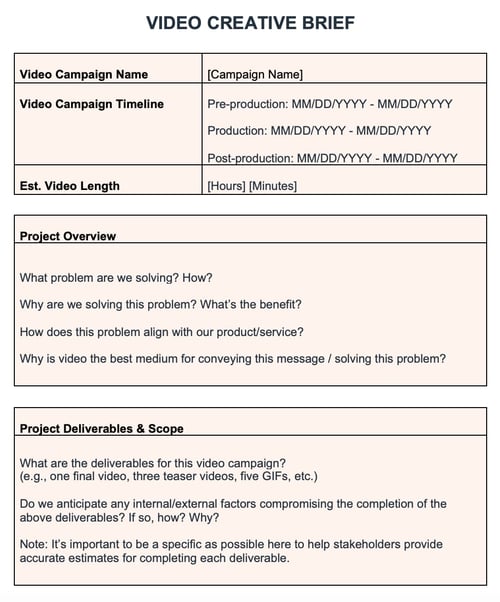
This video creative brief template presents the key questions you’ll need to answer to write an effective brief. 

HubSpot video creative brief template

Having templates for each type of design project saves time and can ensure that everyone on your team follows the same process.

Design Brief Generators

1. HubSpot’s Creative Brief Template

If you’re looking for a set of design brief templates to use for future projects, HubSpot’s got you covered.

HubSpot design brief generator

The document includes three creative brief templates designed with different goals in mind:

  • A campaign template for when you’re launching an ad campaign and need to outsource the creative assets.
  • A video template for a video project that involves ideation, production, and distribution.
  • A client template for both designs and marketing managers who are working on a design project.

Each template includes detailed sections to help you flesh out the key elements of your project and build an effective design brief for every situation.

The best part? It’s free.

2. CreateBrief

Createbrief is a great place to start if you’ve never created a design brief before.

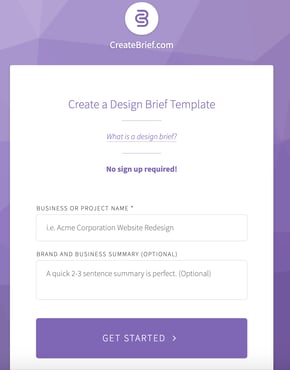
CreateBrief design brief generator

The tool is designed like a survey, asking you key questions about your brand to understand what you’re looking for and your requirements.

Once you answer all of the questions, you get a design brief that you can share with others through a custom URL. While it isn’t very in-depth, it can be useful during the initial process of building your brief.

There’s no sign-up required and you can use the tool as soon as you land on the webpage.

3. Bonsai’s Design Brief Generator

Bonsai is a freelance management app that helps freelancers manage their clients. If you’re a small business looking to outsource your design work, you can build a design brief template right on the platform.

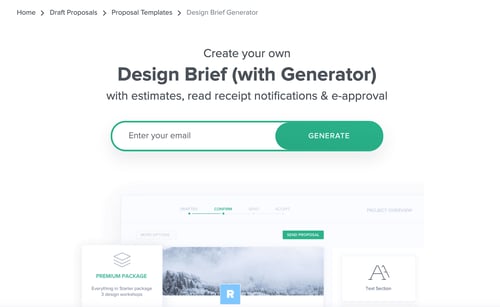
Hello Bonsai design brief generator

Once you create it, you can also send it via email for approval and get read notifications.

What’s great about Bonsai is that its templates are typically reviewed by experts, ensuring that it will have everything you need for your project.

To use the template, you must enter your email and sign up for the software.

4. TemplateLab

The TemplateLab offers hundreds of free customizable templates you can sift through and download. TemplateLab design brief generator

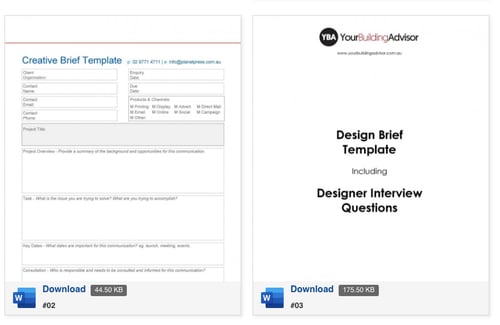
The site currently has 50 design brief templates, ranging from website briefs to interior design briefs. A standout feature on the website is the ability to see exactly what’s included in the template before you download it.

Once you download it to Microsoft Word, you can customize it to meet your needs.

While you could start your design project without a brief, fleshing out the details ahead of time ensures everyone is on the same page. It’s a short, but important step that will save you time (and money) down the line.

New Call-to-action

from Irvine Business Signs https://ift.tt/3aKhJXp
via Irvine Sign Company


Outsourcing a Design Project? Here’s How to Write a Design Brief was originally posted by Local Sign Company Irvine, Ca. https://goo.gl/4NmUQV https://goo.gl/bQ1zHR http://www.pearltrees.com/anaheimsigns

How Can AI Chatbots Improve Customer Experience?

Customers these days are looking for a way beyond the typical product or the service they have paid for; they have been lounging for ‘Experience.’ The fact is, it is the experience provided by a brand that helps make a difference in this cut-throat competition because every supplier offers good quality of the product or service.

With the emergence of chatbots, it has been one of the trendiest ways brands interact with their customers. High-Quality chatbots have become the need of the hour, and the companies that have made use of chatbots, have seen positive changes instantly.

8 Human Jobs A.I. Robots Will Eventually Take Over

8 Human Jobs A.I. Robots Will Eventually Take Over

Advances in AI and automation has been making the mainstream news as of late. It’s not just Filipinos… Read more

Customer experience is no doubt one of the biggest game-changer in the current times, and here are some of the stats that prove that:

  1. Research conducted by the 2017 Gartner Customer Experience in Marketing Survey claimed that, by the end of 2019, almost 81% of the companies would be competing with each other based on the customer experience.
  2. There was a survey carried out by Oracle which stated that 80% of the brands did plan to use chatbots by the end of 2020.
  3. A study by Ubisent stated that 35% of the consumers today want to see companies using chatbots which are considered an effective way of interacting with the audiences.
  4. A study conducted by PwC claimed that almost 80% of American consumers feel that the main elements for a positive customer experience are speed, knowledgeable help, convenience, and friendly service.
  5. A study by Helpshift, a chatbot developer, claimed that 94% of the total 2000+ respondents “dread contacting customer support”.

With technology rapidly improving every day, the old and traditional methods of connecting with the customers are becoming obsolete. Customers today are impatient and do not wait to get a response for days or even hours.

They need companies to respond to them immediately, and this is where the significant role of chatbots comes into the picture.

There are already many big brands such as Starbucks, Sephora, Duolingo, etc., who make use of AI chatbots to communicate with the users and resolve their queries. Let’s understand AI and how it is helping chatbots to improve the experience.

AI Chatbots Refining the Customer Experience:

AI Chatbot uses Natural Language Processing (NLP) and machine learning to replicate human-like dialogues and then learn from these conversations over some time period.

Their reaction to a similar inquiry will vary across different clients. Building and implementing AI chatbots take time and effort.

Once it is implemented, then chatbots have the potential to assist customers in a better way and drive user experience. Thus, there are multiple benefits of using chatbots, and the primary one is that it helps in saving the company’s high cost.

This is because the staff appointed to chat live with the customers will be charging 10x times more salary than a company would spend on setting up a chatbot.

Here are some of the other primary benefits of using an AI chatbot:

1. Live Chats

Customers will never feel the difference of whether they are chatting with a chatbot or a human. This is because chatbots use very natural languages and methods to communicate with customers.

live-chatlive-chat

Chatbots can analyze the query of the customers and then respond accordingly, hence letting AI improve customer experience. Thus, it’s not much of a learning curve or any difference for the customers, and they can easily enjoy the seamless live chats and get instant replies.

2. Full assistance

One of the reasons why businesses have been investing and relying on chatbots increasingly is because they provide complete assistance to the customers.

Chatbots act as agents who are 24*7 there for their customers and make it easy for them by answering all their queries instantly.

With the emergence of chatbots, customers no longer have to wait to converse via emails or phone calls or raise their issues via different platforms such as social media. Just one conversation with the chatbot is enough to get their query solved.

That’s why chatbots are preferred for business growth and increased revenue.

3. Smooth journey without any stress

All customers want is an easy purchasing process, and this is what chatbots help them with. Chatbots can pop up on any of the products to offer additional information in images, text, videos, or discount coupons to the users.

ecommerce-journeyecommerce-journey

Chatbots also helps the users gather all the relevant information, including the items they plan to purchase, the method of paying, the process of shipment, etc.

4. Collection of feedbacks

For any business, it is essential to collect feedback, and it constitutes an essential task.

It is important to assess for the business, to understand how their target audience feels about the product or service offered by them and whether they are enjoying the experience or not. In the current times, data is of prime importance, and chatbots help in gathering the relevant data.

5. Final goodbye to IVR

One of the primary complaints which the customers have with the whole entire customer service process was the IVR (Interactive Voice Response) systems during the customer calls to provide customer support.

interactive-voice-responseinteractive-voice-response

The chatbot is used very similar to that of IVR, but the only difference is that less IVR-induced frustration is used.

6. Product accessibility and navigation

Sometimes we face difficulty navigating and exploring our required product in an online site or commercial marketplace.

This is normally the situation with stores, especially those with an enormous inventory, where it sometimes gets hard to clear your way through plenty of alternatives and categories.

With chatbots at your service, your customers need to type in the product name, and the bot will help them reach their required product, thus simplifying the search.

7. Monitoring social media

For every organization, today, having a robust social media presence is of prime importance. Customers today make use of social media platforms, and companies are always on the go to grab the attention of the customers on social media.

social-media-botsocial-media-bot

Chatbots have lately entered the social media space. Chatbots that get employed on social media are known as social chatbots. These chatbots provide automatically generated messages.

Ending Thoughts

Chatbots have proven to garner great results. In customer services, chatbots are way more than just the wave of the future.

With the high influx of customer support requirements, there is a dedicated need for a support team. Maintaining such a large team will result in cost. Thus, chatbots have been allowing the vendors’ ample opportunities to engage with the targeted customers in innovative ways.

Editor’s note: This article is written by Smith Johnes for Hongkiat. Smith is a Content Writer who loves to write his understanding and knowledge in a simplified and engaging manner. He is an early adopter, likes to stay up to date with the latest trends & technologies.

The post How Can AI Chatbots Improve Customer Experience? appeared first on Hongkiat.

from Irvine Business Signs https://ift.tt/32PrrDJ
via Irvine Sign Company


How Can AI Chatbots Improve Customer Experience? was originally posted by Local Sign Company Irvine, Ca. https://goo.gl/4NmUQV https://goo.gl/bQ1zHR http://www.pearltrees.com/anaheimsigns

In Tinker case, SCOTUS should rule in favor of free speech, not school control

In 1969, the US Supreme Court held, in Tinker v. Des Moines Independent Community School District, that students don’t “shed their constitutional rights to freedom of speech or expression at the schoolhouse gate.”   Schools may only prohibit, censor, or punish student speech which would “materially and substantially interfere with the requirements of appropriate discipline in the operation of the school.”

But what about speech that occurs outside the schoolhouse gate, and outside school hours? The Court is about to take on that issue in Mahanoy Area School District v. B.L.

In 2017, 14-year-old high school freshman Brandi Levy found herself suspended from her school’s cheerleading squad for a year over an intemperate Snapchat post published from off campus and over the weekend.

“F*** school f*** softball f*** cheer f*** everything,” Levy wrote, emphasizing her upset at not making the varsity cheer squad with a photo of herself and a friend raising their middle fingers.

Levy sued over the suspension and won.  Four years later, she studies accounting in college as she awaits a US Supreme Court ruling on her former school’s appeal.

The school district claims the power to regulate and punish “substantially disruptive” student speech, even when the student speaks off campus and outside school hours.

Brandi Levy says the district’s power over student speech ends at the campus property line and the end of the school day.

Even leaving aside the question of whether Levy’s rant was “substantially disruptive” (as a student, I heard much worse on campus and during school hours without any accompanying “disruptions”), it’s important to draw a bright line here: She’s right, they’re wrong, and it isn’t a close call.

Most state laws mandate attendance at government-operated schools for most minors (with some exceptions for private or home schooling).

The government gets substantial control of our kids for several hours a day, five days a week, not counting homework and extracurricular activities.

That substantial control must end at the schoolhouse door and at the final bell.

Apart from true threats of violence, which are actionable whether the perpetrator is a student or not,  what our kids say, how they say it, and who they say it to when they’re not at school is simply none of the school’s business.

In the age of social media, it’s more important than ever for the Supreme Court to protect students’ free speech rights off campus as well as on.

Thomas L. Knapp (Twitter: @thomaslknapp) is director and senior news analyst at the William Lloyd Garrison Center for Libertarian Advocacy Journalism (thegarrisoncenter.org). He lives and works in north central Florida.

from Irvine Business Signs https://ift.tt/3gID2ws
via Irvine Sign Company


In Tinker case, SCOTUS should rule in favor of free speech, not school control was originally posted by Local Sign Company Irvine, Ca. https://goo.gl/4NmUQV https://goo.gl/bQ1zHR http://www.pearltrees.com/anaheimsigns

Niles: The new version of Disneyland debuts

Welcome to Disneyland 2.0.

After a pretty much uninterrupted run of nearly 65 years, Disneyland is returning after a break of more than 13 months. It’s been a hard reset for the resort, which now will be forced to operate in ways different than it has before.

Some of these changes will be temporary. But some might endure, as Disneyland adapts to operate within a new reality. The pandemic has been just one of several factors shaping this new reality, creating challenges not just for Disneyland but every attraction in the travel business.

Sign up for our Park Life newsletter and find out what’s new and interesting every week at Southern California’s theme parks. Subscribe here.

Physical distancing requirements will force the parks to operate at sharply reduced capacity, but managing crowds has been a challenge at Disneyland for years now. The resort has implemented an advance reservation system for its reopening. Will Disneyland keep this new tool to manage more comfortable crowd levels for its fans even after pandemic restrictions have passed?

Disneyland no longer needs to worry about annual passholders crowding its parks, as Disneyland ended its AP program this winter. Disneyland officials have talked about a replacement for its wildly popular pass program, but does the resort really need to offer a volume discount anymore? Initial ticket sales during this reopening period no doubt will influence that decision.

Disneyland and other theme parks have accelerated the development of mobile ordering, touchless payment and virtual queuing systems in response to the pandemic. With apps handling more and more customer service functions, will parks lose the human touch that enabled them to distinguish their customer service from competitors?

When guests do interact with cast members at Disneyland, those employees might look a bit different now. Disneyland has changed its “Disney Look” appearance requirements to remove gender-based distinctions and to allow cast members to display hairstyles, makeup and tattoos that had been banned previously.

Disney has promoted the change as part of its adoption of “inclusion” as the “Fifth Key” in Disney theme park operations, joining safety, courtesy, show and efficiency. But will Disneyland fans be as open to new expressions of cast member diversity as the company has been?

The need to be more inclusive in a diversifying society is driving changes in Disney’s theme park attractions as well as its rules for cast members. The company announced that it will re-theme Splash Mountain to “The Princess and the Frog” as it severs its final connection to the minstrelsy of “Song of the South.”

The Jungle Cruise also is getting a rewrite, as Disney exorcises the casual racism of its indigenous caricatures. But more remains to be done on this issue, including the removal of racist depictions of native people on Disneyland’s Peter Pan ride.

Reopening Disneyland is not about getting back to a pre-pandemic normal, because the pandemic exposed many of the ways that the old normal simply wasn’t working anymore. Disneyland, like any business, needs to evolve to survive and prosper in a changing world. The past 13 months have challenged Disneyland to do that faster than it ever had before. Now we will see how successful the company has been in doing that.


from Irvine Business Signs https://ift.tt/3xppvjc
via Irvine Sign Company


Niles: The new version of Disneyland debuts was originally posted by Local Sign Company Irvine, Ca. https://goo.gl/4NmUQV https://goo.gl/bQ1zHR http://www.pearltrees.com/anaheimsigns

Outsourcing a Design Project? Here’s How to Write a Design Brief

During my career, I have freelanced on and off. The biggest lesson I’ve learned in working with clients was the importance of setting expectations from the very beginning.

It helps both parties get on the same page and can prevent miscommunication down the line. That’s why you often have initial discovery calls, set meetings, and draft contracts.

Free Download: Creative Brief Templates

Another way to set expectations is by creating a design brief. It’s essential in the early stages of your design project, whether you’re working with someone in-house or outsourcing it to an agency or independent contractor.

Here’s everything you need to know about what to include in a design brief and the templates that will help you create one quickly.

Think of this brief as a blueprint: It lays out all the information your designer will need to complete the project and helps align both parties on the expectations. Typically, the client (or brand) will fill out most sections in the brief once they know what they’re looking for.

The assigned designer will then complete it based on conversations with the client. It serves as a baseline from which to build the project.

So when would you use a design brief? For:

  • A website (re)design
  • A logo (re)design
  • A (re)branding package
  • Creative assets for social media or ad campaign
  • Video assets

What to Include in your Design Brief Template

1. An Overview of Your Brand

The first thing you’ll want to outline in your design brief is information about your brand. This gives a big-picture understanding of your business and helps frame the rest of the brief.

Here’s what to include:

  • Your industry
  • Your products and/services
  • Your unique selling position (USP)
  • Your mission and your values
  • Your competitors

In this section, you can also list your direct and indirect competitors, depending on the project.

If you already know who you will be working with on this project, list the decision-makers for the project and any key stakeholders involved. Outlining the points of contact right from the beginning will streamline the workflow and prevent communication silos.

2. Your Project Overview

As one of the most important sections in your brief, spend time figuring out what you’re looking for before writing this section.

Don’t know where to start? Answer this question: What problems are you trying to solve? This provides context for the intention behind the project and can also help the designer generate new ideas. It’s like going to the doctor. You have to say where it hurts for them before they can prescribe something for relief.

For instance, let’s say you want to redesign your website. The reason could be your users aren’t converting, or because the company has recently shifted and needs a website to reflect this change. Knowing the reason behind the project is equally as important as the project itself.

Next, state your goals and objectives. What do you want to accomplish through this project? Is this a part of something larger? Are there any roadblocks that could hinder your project?

The more detailed you can get, the better. Your goals could include improving website conversions, reducing bounce rates, and/or increasing traffic. It all depends on the project.

Answering these questions will be instrumental in aligning your vision with the designer and creating the space to address any potential issues.

Finally, this section should list your deliverables, such as:

  • Required assets (illustrations, photos, videos, mockups, wireframes)
  • File formats
  • Dimensions

3. Your Branding Guidelines

Unless your design project is for branding, list your branding guidelines in your design brief. This breaks down the rules your designer will need to follow and keep in mind for your project. Rules relating to your:

  • Color palette
  • Brand voice and tone
  • Typography
  • Logo

For any design project, you want to make sure your designer creates something that aligns with your brand identity. If you’re in the process of developing your brand identity, you can also provide mood boards to help the designer understand your vision and the direction you’re heading in.

4. Your Target Market

Every design project is developed with the end-user in mind. In this section, dive into who that user is.

Describe your user persona and how you imagine them interacting with this project once it is completed. If you have already done some market research, you should list your target audience’s demographics, behavioral habits, values, interests, and online behavior.

For instance, let’s say you’re an affordable shaving cream brand for men and your current branding and messaging aren’t resonating with consumers. After running a few experiments, you’ve realized that your target market doesn’t see your brand as approachable, inviting, or relatable.

For your design project, you’ll want to revamp your branding package to reflect your consumers. By knowing more about your target market, your designer can use their knowledge of design principles and studies to create a product suited to your audience’s needs.

5. Your Budget and Timeline

These are the nitty-gritty details that are necessary to determine the right partner for your project. You may find a designer who’s great but cannot meet your expectations in terms of timeline.

Similarly, you may find out during a discovery call with a design agency that they cannot work within your budget.

Outlining your budget and timeline will help to weed out people who aren’t the best fit for your project. While timelines can be flexible, it’s important to set an ideal timeframe from the beginning and adjust later, if needed.

Once you select a designer or agency, together you’ll decide on milestones or deadlines during the length of the project.

A Design Brief Example

Your design brief should be detailed, providing as much context as possible to facilitate your designer’s understanding.

This video creative brief template presents the key questions you’ll need to answer to write an effective brief. 

HubSpot video creative brief template

Having templates for each type of design project saves time and can ensure that everyone on your team follows the same process.

Design Brief Generators

1. HubSpot’s Creative Brief Template

If you’re looking for a set of design brief templates to use for future projects, HubSpot’s got you covered.

HubSpot design brief generator

The document includes three creative brief templates designed with different goals in mind:

  • A campaign template for when you’re launching an ad campaign and need to outsource the creative assets.
  • A video template for a video project that involves ideation, production, and distribution.
  • A client template for both designs and marketing managers who are working on a design project.

Each template includes detailed sections to help you flesh out the key elements of your project and build an effective design brief for every situation.

The best part? It’s free.

2. CreateBrief

Createbrief is a great place to start if you’ve never created a design brief before.

CreateBrief design brief generator

The tool is designed like a survey, asking you key questions about your brand to understand what you’re looking for and your requirements.

Once you answer all of the questions, you get a design brief that you can share with others through a custom URL. While it isn’t very in-depth, it can be useful during the initial process of building your brief.

There’s no sign-up required and you can use the tool as soon as you land on the webpage.

3. Bonsai’s Design Brief Generator

Bonsai is a freelance management app that helps freelancers manage their clients. If you’re a small business looking to outsource your design work, you can build a design brief template right on the platform.

Hello Bonsai design brief generator

Once you create it, you can also send it via email for approval and get read notifications.

What’s great about Bonsai is that its templates are typically reviewed by experts, ensuring that it will have everything you need for your project.

To use the template, you must enter your email and sign up for the software.

4. TemplateLab

The TemplateLab offers hundreds of free customizable templates you can sift through and download. TemplateLab design brief generator

The site currently has 50 design brief templates, ranging from website briefs to interior design briefs. A standout feature on the website is the ability to see exactly what’s included in the template before you download it.

Once you download it to Microsoft Word, you can customize it to meet your needs.

While you could start your design project without a brief, fleshing out the details ahead of time ensures everyone is on the same page. It’s a short, but important step that will save you time (and money) down the line.

New Call-to-action

from Irvine Business Signs https://ift.tt/3aKhJXp
via Irvine Sign Company


Outsourcing a Design Project? Here’s How to Write a Design Brief was originally posted by Local Sign Company Irvine, Ca. https://goo.gl/4NmUQV https://goo.gl/bQ1zHR http://www.pearltrees.com/anaheimsigns

Outsourcing a Design Project? Here's How to Write a Design Brief

During my career, I have freelanced on and off. The biggest lesson I've learned in working with clients was the importance of setting expectations from the very beginning.

It helps both parties get on the same page and can prevent miscommunication down the line. That's why you often have initial discovery calls, set meetings, and draft contracts.

Free Download: Creative Brief Templates

Another way to set expectations is by creating a design brief. It's essential in the early stages of your design project, whether you're working with someone in-house or outsourcing it to an agency or independent contractor.

Here's everything you need to know about what to include in a design brief and the templates that will help you create one quickly.

Think of this brief as a blueprint: It lays out all the information your designer will need to complete the project and helps align both parties on the expectations. Typically, the client (or brand) will fill out most sections in the brief once they know what they're looking for.

The assigned designer will then complete it based on conversations with the client. It serves as a baseline from which to build the project.

So when would you use a design brief? For:

  • A website (re)design
  • A logo (re)design
  • A (re)branding package
  • Creative assets for social media or ad campaign
  • Video assets

What to Include in your Design Brief Template

1. An Overview of Your Brand

The first thing you'll want to outline in your design brief is information about your brand. This gives a big-picture understanding of your business and helps frame the rest of the brief.

Here's what to include:

  • Your industry
  • Your products and/services
  • Your unique selling position (USP)
  • Your mission and your values
  • Your competitors

In this section, you can also list your direct and indirect competitors, depending on the project.

If you already know who you will be working with on this project, list the decision-makers for the project and any key stakeholders involved. Outlining the points of contact right from the beginning will streamline the workflow and prevent communication silos.

2. Your Project Overview

As one of the most important sections in your brief, spend time figuring out what you're looking for before writing this section.

Don't know where to start? Answer this question: What problems are you trying to solve? This provides context for the intention behind the project and can also help the designer generate new ideas. It's like going to the doctor. You have to say where it hurts for them before they can prescribe something for relief.

For instance, let's say you want to redesign your website. The reason could be your users aren't converting, or because the company has recently shifted and needs a website to reflect this change. Knowing the reason behind the project is equally as important as the project itself.

Next, state your goals and objectives. What do you want to accomplish through this project? Is this a part of something larger? Are there any roadblocks that could hinder your project?

The more detailed you can get, the better. Your goals could include improving website conversions, reducing bounce rates, and/or increasing traffic. It all depends on the project.

Answering these questions will be instrumental in aligning your vision with the designer and creating the space to address any potential issues.

Finally, this section should list your deliverables, such as:

  • Required assets (illustrations, photos, videos, mockups, wireframes)
  • File formats
  • Dimensions

3. Your Branding Guidelines

Unless your design project is for branding, list your branding guidelines in your design brief. This breaks down the rules your designer will need to follow and keep in mind for your project. Rules relating to your:

  • Color palette
  • Brand voice and tone
  • Typography
  • Logo

For any design project, you want to make sure your designer creates something that aligns with your brand identity. If you're in the process of developing your brand identity, you can also provide mood boards to help the designer understand your vision and the direction you're heading in.

4. Your Target Market

Every design project is developed with the end-user in mind. In this section, dive into who that user is.

Describe your user persona and how you imagine them interacting with this project once it is completed. If you have already done some market research, you should list your target audience's demographics, behavioral habits, values, interests, and online behavior.

For instance, let's say you're an affordable shaving cream brand for men and your current branding and messaging aren't resonating with consumers. After running a few experiments, you've realized that your target market doesn't see your brand as approachable, inviting, or relatable.

For your design project, you'll want to revamp your branding package to reflect your consumers. By knowing more about your target market, your designer can use their knowledge of design principles and studies to create a product suited to your audience's needs.

5. Your Budget and Timeline

These are the nitty-gritty details that are necessary to determine the right partner for your project. You may find a designer who's great but cannot meet your expectations in terms of timeline.

Similarly, you may find out during a discovery call with a design agency that they cannot work within your budget.

Outlining your budget and timeline will help to weed out people who aren't the best fit for your project. While timelines can be flexible, it's important to set an ideal timeframe from the beginning and adjust later, if needed.

Once you select a designer or agency, together you'll decide on milestones or deadlines during the length of the project.

A Design Brief Example

Your design brief should be detailed, providing as much context as possible to facilitate your designer's understanding.

This video creative brief template presents the key questions you'll need to answer to write an effective brief. 

HubSpot video creative brief template

Having templates for each type of design project saves time and can ensure that everyone on your team follows the same process.

Design Brief Generators

1. HubSpot's Creative Brief Template

If you're looking for a set of design brief templates to use for future projects, HubSpot's got you covered.

HubSpot design brief generator

The document includes three creative brief templates designed with different goals in mind:

  • A campaign template for when you're launching an ad campaign and need to outsource the creative assets.
  • A video template for a video project that involves ideation, production, and distribution.
  • A client template for both designs and marketing managers who are working on a design project.

Each template includes detailed sections to help you flesh out the key elements of your project and build an effective design brief for every situation.

The best part? It's free.

2. CreateBrief

Createbrief is a great place to start if you've never created a design brief before.

CreateBrief design brief generator

The tool is designed like a survey, asking you key questions about your brand to understand what you're looking for and your requirements.

Once you answer all of the questions, you get a design brief that you can share with others through a custom URL. While it isn't very in-depth, it can be useful during the initial process of building your brief.

There's no sign-up required and you can use the tool as soon as you land on the webpage.

3. Bonsai's Design Brief Generator

Bonsai is a freelance management app that helps freelancers manage their clients. If you're a small business looking to outsource your design work, you can build a design brief template right on the platform.

Hello Bonsai design brief generator

Once you create it, you can also send it via email for approval and get read notifications.

What's great about Bonsai is that its templates are typically reviewed by experts, ensuring that it will have everything you need for your project.

To use the template, you must enter your email and sign up for the software.

4. TemplateLab

The TemplateLab offers hundreds of free customizable templates you can sift through and download. TemplateLab design brief generator

The site currently has 50 design brief templates, ranging from website briefs to interior design briefs. A standout feature on the website is the ability to see exactly what's included in the template before you download it.

Once you download it to Microsoft Word, you can customize it to meet your needs.

While you could start your design project without a brief, fleshing out the details ahead of time ensures everyone is on the same page. It's a short, but important step that will save you time (and money) down the line.

New Call-to-action


Outsourcing a Design Project? Here's How to Write a Design Brief was originally posted by Local Sign Company Irvine, Ca. https://goo.gl/4NmUQV https://goo.gl/bQ1zHR http://www.pearltrees.com/anaheimsigns

Monday, April 26, 2021

How to Sell on Instagram Using Shoppable Posts

After months of testing, Instagram announced a big change to its user interface (UI) in late 2020: replacing the user "Activity" tab with the "Shop" tab, the social platform's latest move to be more business-friendly.

It's a big evolution from where the feature was just a few years ago. Today, it's infinitely easier for users to shop products from brands without ever leaving the app.

New Data: Instagram Engagement in 2020

So, how exactly does the tool work and how can you leverage it to generate revenue? Find out everything you need to know in the sections below.

Why Your Business Should Sell on Instagram

Thanks to the Instagram shoppable posts feature and other supportive tools (like the product wishlist, product launch reminder, and shopping stickers on Instagram Stories), users can go through the entire buyer's journey, from discovery to checkout.

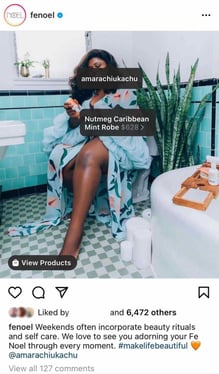
Example of Fenoel brand selling on Instagram with product tags

Social media platforms are typically seen as great brand awareness tools. However, Instagram's new integrations have made it a big revenue driver.

A 2019 Facebook study revealed that 54% of respondents purchased items in the moment or some time after seeing a product or service on Instagram.

And it's not only direct-to-consumer brands that can benefit from using Instagram's shopping features. A Q4 2020 report by HootSuite revealed that 36.2% of B2B decision-makers use the app to source new products and/or services.

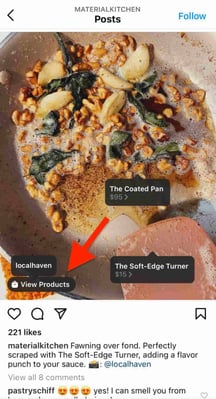
Shoppable posts are marked with a clickable shopping bag icon that displays the product information and the "View Products" call-to-action to visit the brand's Shop page.

Example of Material Kitchen selling on Instagram with product tags

This creates a seamless experience for the user and allows you to advertise your products without being too promotional.

1. Meet the eligibility criteria.

There are a few eligibility requirements you must check off before you start selling on Instagram. You must:

Once you meet the above requirements, follow the steps below.

2. Upload your product catalog.

Your catalog is a file that contains the products you want to sell along with their information, such as pricing and description. There are two ways to upload your product catalog:

  • Take the do-it-yourself route through the Facebook Business Manager by manually adding the items.
  • Connect to an ecommerce platform partner, such as Shopify or BigCommerce. Find a full list of compatible partners here.

How to Upload Your Products Manually

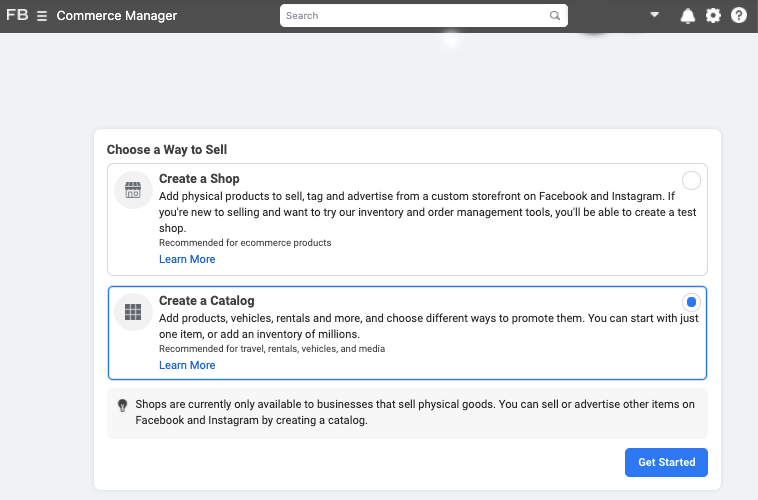
To create a catalog through Facebook, you must first have a Facebook Business Manager account, which is different from a Business page. From there, head to the Commerce Manager and set up your catalog.

Steps to create a catalog on Commerce Manager

Here's a step-by-step guide on how to do it.

It's very important to keep your product catalog synced with your Instagram Page, and that your product descriptions and prices are accurate. If you're running a sale or promotion, be sure to update your product catalog to reflect it.

How to Upload Your Products through an Ecommerce Platform

A second way to connect your Instagram Business Profile to a Facebook catalog is to do it through an ecommerce platform. Here are the steps using two popular platforms.

Shopify

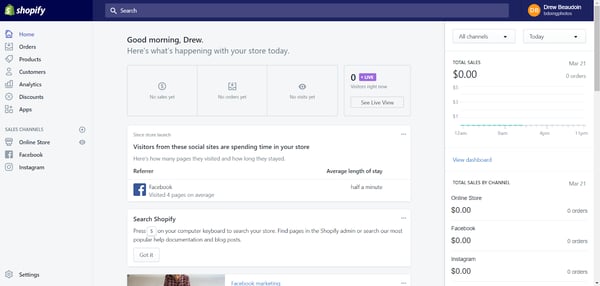
Before you get started, you need to have the Facebook sales channel (included in all paid Shopify plans) installed on your Shopify store, which creates a Shop tab on your Facebook page.

How to create a catalog on Shopify

For specific details on how to connect your Facebook page to your Shopify account, you can view the Shopify guide here.

Once you've done the above, you can easily add the Instagram Sales Channel to your Shopify store, which connects the products from your Shopify page to your Instagram business profile.

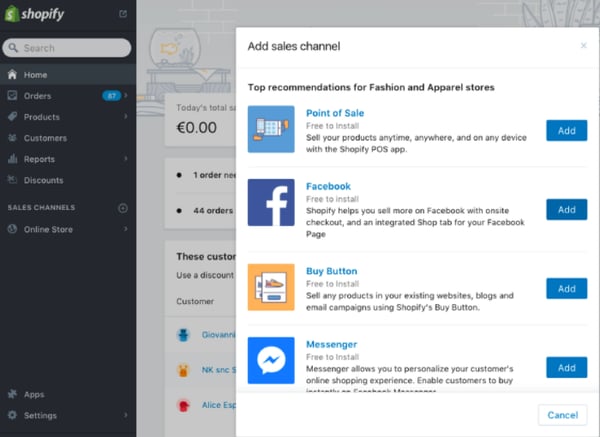
To do this, head to your Shopify admin and click on the "+" button located beside the "Sales Channels" heading.

How to complete product catalog on Shopify

Next, on the "Add sales channel" dialogue, click "Instagram" and then "Add channel."

You'll need to log into your Facebook account page to authenticate your Instagram account in the sales channel.

Once the Instagram Sales Channel is installed, you can enable the feature in your settings on Instagram.

BigCommerce

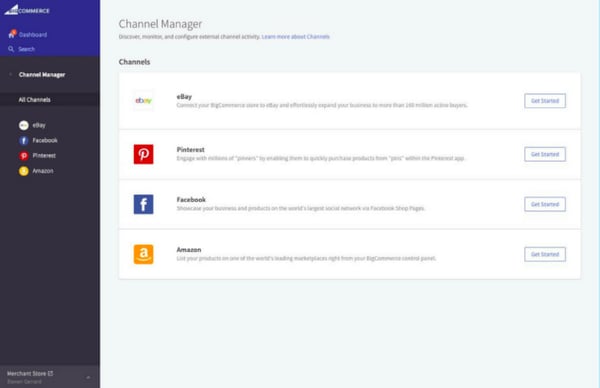
Start by opening Channel Manager on your BigCommerce account and click "Get Started" next to Facebook.

How to create catalog on BigCommerce

On the next screen, confirm that you're using a compatible currency, sign up for a Facebook account (if you don't have one), review the product requirements, then click "Get Started."

Next, fill out your details on the Configuration page, including your business' contact email, phone number, and the Facebook Page you'd like your shop to appear on.

Here's the complete BigCommerce guide on how to do it.

Once Facebook approves your catalog, head back to Channel Manager, click "Get Started" next to Instagram, and confirm that your store meets the requirements.

3. Submit your account for review.

Once you've connected your product catalog to your Instagram account, you can submit your account for approval.

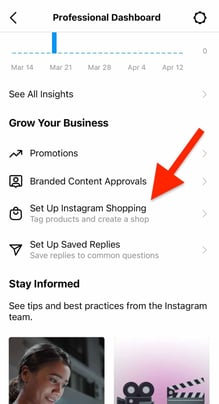
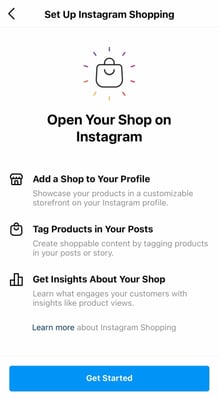
1. Go to your professional dashboard. Once there, click on "Set Up Instagram Shopping."

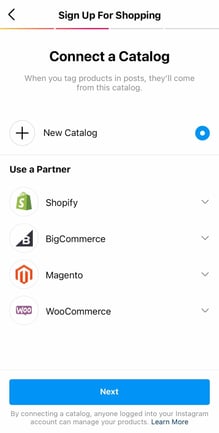
How to submit your Instagram shop account for review on your professional dashboard2. On the setup page, click on "Get Started."How to submit your Instagram shop account for review step 23. Select your catalog.
How to submit your Instagram shop account for review step 34. Review the details and click "Submit for Review."
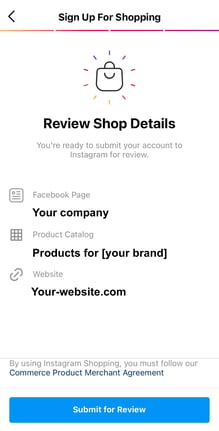
How to submit your Instagram shop account for review step 4

The approval process can take a few days. You may also need to provide additional information, such as domain verification.

How to Tag Products with Instagram Shoppable Posts

Once you get access to shoppable posts on Instagram and you've completed all the steps listed above, adding tags to your posts is quick and easy.

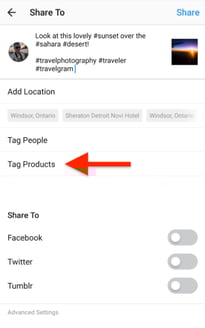
1. Upload your image and once you're done editing, hit "Next."

2. Click on "Tag Products."

How to Tag Products with Instagram Shoppable Posts step 2

3. Tap on the item in your image you want to tag.

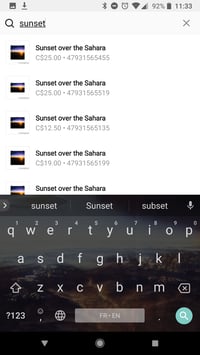
4. Search for the product and select it.

How to Tag Products with Instagram Shoppable Posts step 3

5. Click on "Done" and share the image.

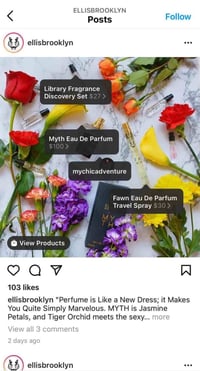
Have an older post that still gets good traction, but doesn't have a shoppable tag? You can tag products in both new and existing posts from your Instagram Business Profile, up to five products per single image post or 20 products per multi-photo (or carousel) post.

Instagram shoppable tag example

How to Optimize Your Posts for Shoppable Purchases

1. Create posts that feel natural to the Instagram feed.

While selling on Instagram is easier than ever, remember that your audience shouldn't feel like they are being sold to. You should maintain their current content strategy, incorporating shoppable tags on photos that are a natural fit for your profile.

Material Kitchen example of natural Instagram product integration

2. Leverage influencer content.

A great way to organically add shopping tags to your post is by leveraging posts from consumers. Studies show consumers trust influencers much more than brands and these posts serve as social proof, i.e., credibility and validation for the brand.

For example, Fe Noel recently reposted this post from a fashion influencer and added the product tag.

Fenoel example of influencer product tag

You can also optimize your Instagram sales strategy by using influencer posts. Influencer collaborations and sponsorships have nearly replaced traditional ads and are a huge part of social media strategies today.

55% of fashion shoppers have purchased a fashion item after seeing it promoted on the platform, according to a 2020 post from Instagram's creator account.

Below, popular fashion model Michelle Dee is shown sporting a Herschel Supply suitcase on the brand's profile:

HerschelSupply example of influencer product tag

An Instagram influencer's stamp of approval goes a long way and is a great strategy to drive sales from your Instagram shoppable posts.

3. Optimize your post with multiple tags.

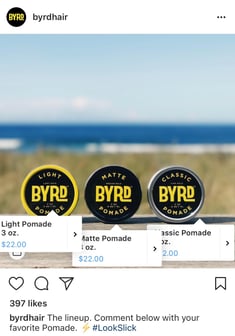
Lastly, including multiple shopping tags in your photos will help your audience explore and browse through your products quickly. You can also try adding shopping tags to carousel posts to test their performance against single-photo posts.

ByrdHair example of multiple Instagram product tags

4. Activate the Shop page on your Instagram profile.

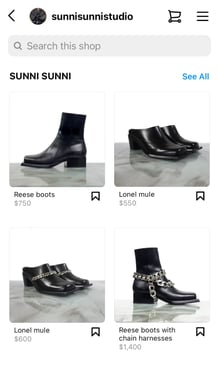
Create at least nine shoppable posts to activate the "Shop" tab on your Instagram profile. This will group all your shoppable posts under one tab for easy shopping and product discovery.

Sunni Sunni Studio example of how to activate your Instagram Shop page

Measuring the Results of Your Shoppable Posts

Instagram business accounts have access to analytics for their shoppable posts, including data on how many people viewed product information and clicked through to the product page. This information helps determine what type of products resonate with your Instagram followers and identify gaps in the buyer's journey.

As with all of your social media marketing efforts, you should measure performance data to see what drives the best results (and why) and use that to inform future posts.

Once your business begins selling on Instagram, keep experimenting with images, copy, shopping tags, and other factors that may contribute to your sales.

No matter what type of products you sell, delving into your analytics allows you to understand your audience's wants, improves your content, and ultimately helps you drive more traffic and sales.

Selling on Instagram is a unique opportunity to reach users in all stages of the buyer journey through a seamless experience.

Improve your website with effective technical SEO. Start by conducting this audit.  


How to Sell on Instagram Using Shoppable Posts was originally posted by Local Sign Company Irvine, Ca. https://goo.gl/4NmUQV https://goo.gl/bQ1zHR http://www.pearltrees.com/anaheimsigns