Wednesday, January 12, 2022

What Is PDCA? Understanding the Plan-Do-Check-Act Method

No matter the industry your organization operates in and the products and services you provide, your business needs to be constantly improving to keep up with a competitive marketplace and evolving consumer needs.

This process of change isn’t optional. It’s required if you want to succeed. The hard truth is that businesses that do not improve and evolve will eventually find themselves extinct.  

When change is required at your organization, how do you go about implementing it? Willy nilly action without planning can do more harm than good. Rather than approaching change blindly, you may want to borrow a concept from lean manufacturing philosophy — the Plan-Do-Check-Act Cycle. Read on to learn more.

→ Download Now: Free Product Marketing Kit [Free Templates]

What is PDCA?

PDCA, which stands for Plan-Do-Check-Act, is an iterative cycle for continuous improvement of people, products, services, and business processes.

The foundation for this concept was developed by American statistician and physicist Walter Shewhart who was passionate about using statistical analysis to create quality improvement. The model itself was developed years later by William Deming who took this concept and turned it into a learning and improvement cycle.

The PDCA model follows a four stage process, which we’ll discuss in more detail below.

The Four Stages of the PDCA Model

As mentioned earlier, approaching change without a plan can spell disaster for your business. Along those same lines, acting on a plan without evaluating your progress can be just as dangerous.

The PDCA cycle aims to eliminate those issues with a four step process, where each step is imperative because it sets you up for success in the next stage. Let’s take a closer look at these steps and what they represent.
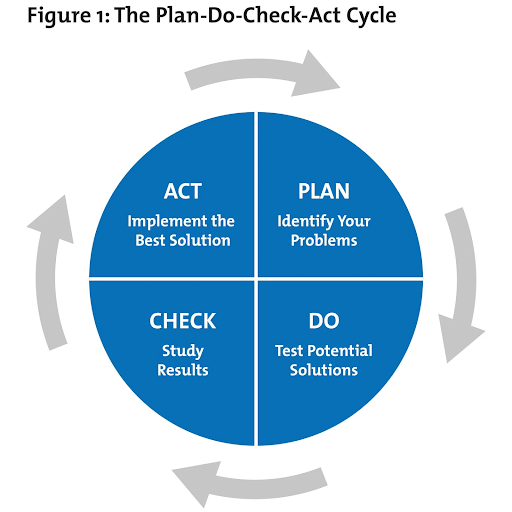
pdca cycle model

Image Source

1. Plan

To devise a plan that will successfully implement the desired change in your organization, you will need to ask the following questions:

  • What’s the problem you are experiencing?
  • What resources will you need to fix this issue?
  • What resources do you already have available to us at this time?
  • How can you best solve this issue with your available resources?
  • What does success look like?

Depending on the magnitude of the problem, this step may be quick and easy, or it may take weeks or even months of discussion to arrive at a plan. Theoretically, the more time you spend here, the easier the rest of the steps will be.

2. Do

With your plan in place, it’s time to put your ideas into practice. The most important thing to keep in mind during this stage is that issues will arise no matter how solid your plan is. Take these problems in stride and be willing (and able) to make adjustments as you go. This is often done in a smaller, controlled environment so you can learn from mistakes and correct them.

Proper communication amongst your team members will help to limit the number of problems as everyone will have a clear idea of their responsibilities and expectations.

3. Check

The most important (and overlooked) stage of change implementation is the “Check.” How did your plan work in the controlled environment? Were your goals achieved or did your intentions fall flat during execution? Now’s your time to identify the flaws in the process and correct them. Perhaps it wasn’t a complete flop, but you have recognized some opportunities for improved effectiveness. Either way, this step is essential.

4. Act

Now that you’ve planned out your change, applied it, and then checked to make sure it was working, it’s time to act on it. If you determined during the Check phase that you met your goals, you can apply your initial plan. This then becomes the “standard” process and best practices for this aspect of your organization. It also becomes the jumping-off point for your next change implementation.

The PDCA Cycle doesn’t stop once you’ve achieved your initial goal, as it is a continuous system that you should consistently review. The great news is that the more you work with it, the easier it becomes. It will be your go-to plan for every member of your team and will help you reach new heights with your business.

PDCA Template

Now that you understand how the PDCA process can help you implement change in your business, you’re probably wondering how to get started.

Like any new program, process, or tool, it’s helpful to have a physical document to work in to compile all of your information, share it with team members, and make updates as time goes on.

You can create your own in Excel or your project management tool or use one of the ready-made templates available to you. The key to a successful PDCA template is clarity. You should write out every step in detail, along with who is responsible for getting it done and by when. The more detailed your plan, the better your execution will be.
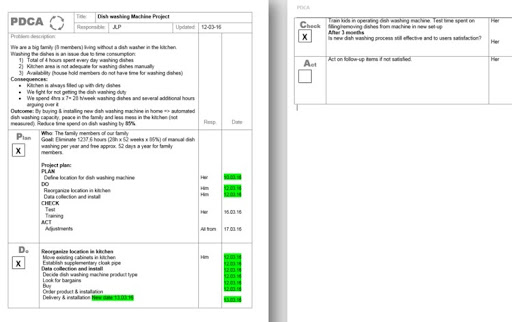
pdca cycle template

Image Source

PDCA Best Practices

Along with utilizing a PDCA template, a few other tips will help you implement changes successfully.

1. Ensure that upper management is on-board with these changes. Without their approval, you will not be able to enforce the new policy or procedure you create.

2. Never stop improving. Remember that PDCA isn’t a one-and-done type of procedure. Repeat this cycle constantly, making improvements with each revolution and looking for the next opportunity to create positive change.

3. Once you’ve implemented a policy change, do so across your entire organization. Every department that deals with whatever shift you are creating should adopt this as a new way of operating.

Over To You

Implementing change across your organization won’t be difficult when you learn to plan, do, check, and act.

It is, however, necessary if you want your business to continue growing and thriving. The organizations that reinvent themselves to better meet market needs, their customers, and their employees are the organizations that we will see far into the future.

Adopt the PDCA cycle today and create the best business you can make.
Product Marketing Kit


What Is PDCA? Understanding the Plan-Do-Check-Act Method was originally posted by Local Sign Company Irvine, Ca. https://goo.gl/4NmUQV https://goo.gl/bQ1zHR http://www.pearltrees.com/anaheimsigns


Tuesday, January 11, 2022

6 Try Before You Buy Brands [+What Marketers Can Learn]

Recently, I took a leap of faith and bought leggings online.

I was nervous because of the obvious: I couldn't see the leggings in person or try them on in-store, and I wasn't sure how the sizing worked. I didn't want to pay for shipping and item tax without even knowing if I was going to love my purchase.

Even though ecommerce is a booming industry, projected to earn $6 trillion in 2022, there's still some anxiety for consumers when buying products through a screen.

→ Download Now: Free Product Marketing Kit [Free Templates]

Fortunately, some brands have taken that into consideration, and have come up with a way to let consumers try products and services before purchasing them: Try before you buy. Let’s dive into what it is, how it works, and see examples of brands who use this strategy.

According to the 2021 Virtual Shopping Habits Report by Pertfitly, shoppers name the inability to try clothes on as their biggest concern when shopping online. The survey also found that the number one reason consumers return clothes is due to the inability to try them on.

For retailers, this creates a big problem. Not only do they have to worry about losing a customer, but the cost of acquiring another customer.

As a result, many brands are attempting to solve this issue by offering a trial period. In addition, the try-before-you-buy model, some brands are leveraging augmented reality to allow consumers to preview items on themselves or in their homes.

Now that you know what try before you buy is, let’s get into how it works.

How does "Try Before You Buy" work?

Every brand that uses try before you buy may have a slightly different process for this model. In most cases, here’s how it goes:

  1. The shopper picks out one or several products to try out.
  2. After receiving said product(s), the shopper will have a trial period determined by the retailer.
  3. Once the trial period expires, the consumer will have to decide between keeping or returning the item.

Trial periods vary greatly by brand. In addition, some brands will only allow consumers to try one product at a time while others will offer multiple products at a time.

To offer some inspiration, we've made a list of six brands that offer unique try-before-you-buy models and takeaways marketers can gain from them.

Try Before You Buy Brand Examples

1. Gemist

Gemist is a sustainable, L.A.-based jewelry brand that offers a two-week trial period for their rings.

While some brands offer the try-before-you-buy option for all products, Gemist limits it to rings, as they’ve identified that as the product that creates the most hesitation from shoppers.

On their website, they say "We all love jewelry, but we get that fit can be tricky—especially with rings."

try before you buy brand: gemist

Image Source

They allow shoppers to order up to three styles for two weeks with a $45 deposit. However, that amount is fully refunded once the products have been returned.

Takeaway

Gemist has found a great balance between meeting its customers' needs without overextending itself. They are offering a service that they know is of interest to their target audience.

However, this model doesn’t come without risks. As such, they’ve limited it to a product category – making it more manageable. As marketers, our goal is to delight our audience, but it’s important to find a strategy that will also work in the best interest of the company.

2. Prime Wardrobe

Amazon Prime offers a try-before-you-buy service through its clothing service, Prime Wardrobe.

Customers get to shop on the website and choose up to six items to enjoy for seven days, and they're only charged for what they decide to keep.try before you buy brand: prime wardrobe

Image Source

Members can enjoy a full-service shopping experience, with options sorted by style, occasion, or fit, shown above. For consumers that want even more help, Prime Wardrobe offers a personal shopper tool, in which stylists curate a list of items based on your style and budget for $4.99.

Takeaway

Prime Wardrobe is a member-exclusive program for Amazon Prime customers. It’s important to note that this program didn’t always exist. They fit one into their business model in 2017, more than 10 years after the launch of Amazon Prime to delight customers even further.

With this in mind, marketers should always be in touch with their audiences’ challenges, pain points, and interests, as they can spark ideas for future marketing campaigns and even products/services.

3. Warby Parker

As someone who wears glasses, I was especially interested to dive into how Warby Parker works. Here's the low-down: consumers try five pairs of frames at home for free, prescription-ready, pick and pay for the frame(s) they like, and send the rest back.

try before you buy brand: warby parker

Image Source

Let's expand on that.

Warby Parker's shopping experience can start a few different ways: consumers can either begin shopping for glasses right away or take a quiz for suggested pairs. All consumers need to do is upload their prescription to get started.

If you don't have an updated prescription, you can receive one from Warby Parker by booking a comprehensive eye exam at a physical store location. After about 20 minutes, you'll receive a prescription on the spot. This option shows the business's commitment to being a full-service eyewear company.

Takeaway

Warby Parker is a great example of how to market a product or service seamlessly. From the design of the website to the copy, shoppers can quickly find what they’re looking for and have the answers to their most pressing questions already there.

4. Casper

Casper is a mattress company that provides consumers with up to 100 nights of trying out its products before committing to a purchase. Additionally, the company offers free shipping, returns, and a 10-year limited warranty on all mattresses.

Casper offers six different mattress types and sizes, like 'The Wave,' pictured below.

try before you buy brand: casper

Image Source

On the website, consumers can also purchase other bedding items, such as sheets, glow lights, or pillows, to complete a shopper's bedroom experience. After a consumer picks their mattress, extras, and finishes their trial, they make the decision to keep or return the product.

If the consumer does not fall in love with their mattress, they can enjoy a full refund of the mattress and ship it back for free. If they do love their mattress, they get to keep it and enjoy night 101 with their new bed.

Casper's extended free trial is something unique to their service. The idea is that customers can take the time to get used to their new mattress and incorporate it into their nightly routine. After a couple of months with a new mattress, it would be a culture shock to go back to a different one.

Best of all, customers can feel peace of mind knowing that even if they make a huge purchase such as a mattress, they can receive a full refund and free return if they're not happy — but if they are, their job is done.

Takeaway

While most try-before-you-buy brands have a limited trial period, Casper offers a least 30 days to accommodate its consumers. The brand understands that it takes much longer to assess the value of a bed than it does clothing or a pair of glasses.

The keyword here is value – as marketers, it’s important we understand how our audience perceives the value of our brand and market to them accordingly.

5. Stitch Fix

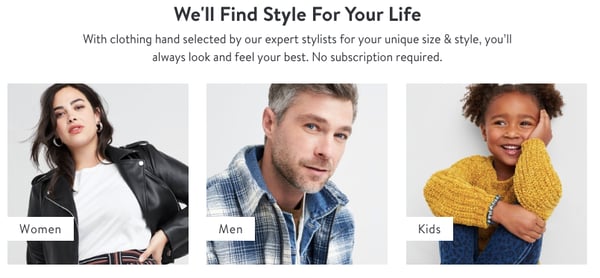
Stitch Fix is an online clothing company that lets customers create a personalized shopping experience using collections made by real stylists. Customers can take a style quiz, set their budget, and pay a $20 styling fee.

Then, after paying the styling fee, customers receive pieces based on their quiz answers and budget, which they can try on at home before they commit to a purchase. They keep their favorites, send back the others with the company's free shipping policy, and that's it.

try before you buy brand: stitch fix

Image Source

Stitch Fix's wardrobe options include a variety of brands. A customer, depending on their budget, can receive clothes from retailers including The North Face, Free People, Calvin Klein, Nike, Bonobos, Toms, and O'Neil.

The company's model is appealing to customers who don't want to leave their house to find an outfit they'd love. The style quiz, with questions about sizing, shopping behavior, and personal preference, is built to ensure that customers will receive choices they like.

The company also doesn't run on a subscription, so there's no set commitment. Customers also can enjoy free shipping and returns using Stitch Fix, and the $20 styling fee is a credit toward the items kept, so the customer will always have $20 off their purchase.

Takeaway

Stitch Fix's service gives power to the customer and delivers the most personalized shopping experience possible to the shopper, from the style quiz to the curated collections by real stylists. They take the worries out of commitments to online shopping, such as shipping prices, incorrect sizing, and receiving items you might not like.

Consumers want to feel in control of their shopping experiences. As such, marketers should consider this in every stage of the buyer’s journey, as they craft their strategies.

6. BlackCart

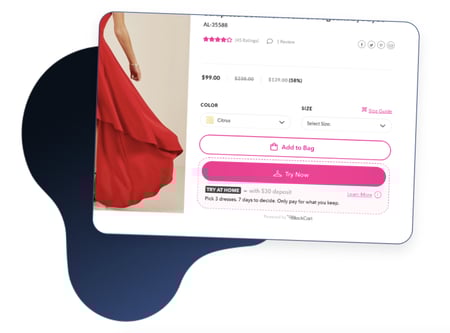
BlackCart was created to make try-before-you-buy shopping less of a painful guessing game for merchants. They offer a service for merchants that want to implement a try-before-you-buy option within their online store.

With BlackCart, merchants can enjoy integrations with Shopify, Magneto, and WooCommerce, customization options to fit their branding, and no fulfillment charges, all on a fully automated platform.

Merchants can use multiple settings to personalize the sale and shopping experience on their website. These settings include choices such as placing the trial period, exclusions, minimums, a deposit requirement, price, and refunds.

try before you buy brand: blackcart

Image Source

On the consumer side, shoppers can select items to try from the merchant's website and pay a fee set by the merchant (shown in the photo above). From there, the items are shipped to try on at home for the time period set by the merchant. After the customer sends unwanted items back, the kept items are charged automatically.

Takeaway

Online business owners will appreciate that BlackCart fits in as part of a merchant's online store. BlackCart is an example of B2B having a place with try-before-you-buy services as well. They make sure the merchant experience is seamless so they can focus on delighting the consumer.

How is your brand delighting its target audience and how are you communicating that to consumers? If that’s not clear, that’s a sign you may need to go back to the drawing board and re-assessing your marketing strategy.

Try-before-you-buy programs are so versatile, and marketers can definitely take note of the unique ways these programs delight customers and personalize the shopping experience.

Editor's Note: This post was originally published in March 2020 and has been updated for comprehensiveness.

Product Marketing Kit


6 Try Before You Buy Brands [+What Marketers Can Learn] was originally posted by Local Sign Company Irvine, Ca. https://goo.gl/4NmUQV https://goo.gl/bQ1zHR http://www.pearltrees.com/anaheimsigns

Clubhouse vs. Twitter Spaces (+ How Other Audio Platforms Match Up)

When a new social media app goes viral, you can almost guarantee that at least one of the social tech giants will test a similar, competitive feature.

A couple of months after Clubhouse's launch, Twitter announced Twitter Spaces, a feature limited to accounts with 600+ followers.

Download Now: Social Media Trends in 2022 [Free Report]

Today, both platforms have greatly expanded. And, each time this happens, marketers wonder, "Which of these social media channels should I use in my strategy? And, is this trend even worth investing in?"

​​The good news? Strong competition around a social media trend, like chat streaming, signals that it's not going away anytime soon and might be worth investing in. So, the only thing you'll need to figure out is where to experiment with the trend.

Below, I'll give you a breakdown of Clubhouse's biggest competitors as well as some marketing takeaways to help you determine which platform is right for your brand.

Need to brush up on your Clubhouse knowledge before diving in? Check out this post for a recap of what Clubhouse is and why competitors are trying to get in on the action.

Download Now: Social Media Trends in 2022 [Free Report]

Clubhouse Vs. Twitter Spaces

According to HubSpot Blog Research, 44% of marketers plan to leverage live audio chat rooms for the first time on social media in 2022.

The research also suggests that marketers are more interested in Twitter Spaces than in Clubhouse. In fact, it's the number one emerging social media platform brands invested in this year and marketers say they'll invest more in that audio platform than Clubhouse.

Meanwhile, 15% of marketers plan to decrease their Clubhouse investment in 2022.

So how does Twitter Spaces match up to Clubhouse? Let's get into it.

Twitter Spaces was softly rolled out to a small group of beta testers in late December and fully launched in May of 2021.

The Spaces experiment was announced late last year following the success of audio apps like Clubhouse. At that time, Twitter Product Lead, Kayvon Beykpour told TechCrunch, "We think that audio is definitely having a resurgence right now across many digital spaces. … It'll be fascinating to see how other platforms explore the area as well, but we think it's a critical one for us, too."

The feature, which closely resembles Clubhouse Rooms, originally only allowed users with over 600 followers to host a space. Today, the tool is open to all Twitter users regardless of follower count and features prominently on the app as a center tab.

How Twitter Spaces Works

To create a Space, the first thing you must do is click on the center tab icon on the Twitter app. From there, you can scroll through all the conversations happening on the platform.

twitter spaces tab

Once you find a Space you're interested in, you simply click on it and select "Start Listening." From there, you can navigate anywhere on the app as you listen and even leave the app while the Space continues.

twitter spaces conversation

If one of your followers is hosting a Space, you will see that at the top of your timeline.

Tiwtter space in nav bar

Twitter Spaces also allows you to:

  • Add captions for accessibility.
  • Engage with speakers through emoji reactions.
  • Share the Space via Tweet, DM, or link.
  • Add up cohosts and speakers.
  • Share relevant tweets in the Space.
  • Record the Space and share it with audience later on.

In addition, you can preschedule Spaces and prompt audience to set reminders for the event.

At the moment, those who launch a Space can invite up to 10 hand-picked speakers. From there, they can adjust who speaks based on who raises their hand and which speakers need to leave early.

When entering the Space, the UX is similar to Clubhouse in that you can see who's speaking and who created the Space before seeing a list of other listeners. You'll also see a down arrow at the top that allows you to minimize, but continue listening to the chat, as well as a "Leave," request to speak, share, and heart icon – allowing you to signal that you enjoy the discussion.

Like Clubhouse, users will be muted as they enter the room and will need to get speaking privileges from the Space moderator if they'd like to say something

Takeaways for Marketers

While both platforms offer many of the same features, Twitter Spaces has a wider reach.

The platform has over 200 million monetizable daily active users, compared to Clubhouse's reported 4.9 million daily active users.

In addition, Twitter already has an established platform that offers a timeline, an explore page, and many other tools beyond its audio feature. For brands, this means that you can accomplish many goals on the same platform.

With this in mind, Spaces could also be a natural transition for brands aiming to build a community. At this point, people are already using Twitter to respond to text-based threads and tweets related to their interests, industry, beliefs, and passions.

Now, they can vocally share their thoughts in Spaces without worrying about character limits. This could further engage Twitter's community-centered audience while also helping brands take community marketing to the next level.

Clubhouse is another community-building platform that is more niche and may work better for brands that already have a strong presence on other social networks.

Clubhouse's Other Competitors

Instagram Live Rooms

Shortly after Facebook's CEO and Co-Founder Mark Zuckerberg spoke in a Clubhouse room, the social media company was reportedly experimenting with a similar audio feature. While we're still not certain if and when Facebook will launch a competing feature yet, its company, Instagram, is expanding its Live feature to add chat rooms.

What makes Instagram Live Rooms significantly different from Clubhouse or Spaces is that it streams full video chats rather than audio discussions.

instagram live rooms

Image Source

Before March, Instagram Live allowed two Instagram users (one broadcaster and one guest) to stream their video call for public audiences or followers. For viewers, this experience was like watching two people video call without being able to participate.

Now, Instagram has upped the guest capacity of these rooms from one to three.

A March 1 announcement from Instagram explained, "In the past year, special moments have happened on Live, including informational talks about science and COVID-19 guidelines, interviews with celebrities, and record-breaking rap battles."

"Creators of all kinds — from fitness instructors to musicians, beauty bloggers, chefs, and activists, all relied on Live to create moments and bring people together to reach their communities in creative ways. We can't wait to see what more creativity comes from this highly-requested update."

"We hope that doubling up on Live will open up more creative opportunities — start a talk show, host a jam session or co-create with other artists, host more engaging Q&As or tutorials with your following, or just hang out with more of your friends," the Instagram statement added.

How to Instagram Live Rooms Will Work

At the moment, the Live Rooms feature is still rolling out, but the brand says it will soon be available to global Instagram users.

When Live Rooms is fully implemented, any user can tap their Stories icon, swipe left to the Live setting, choose a title or foundation to promote in their stream. Then, they can tap the "Rooms" icon and pick guests to be in their broadcast. Viewers will also be able to request to join rooms that are already in progress, as shown below:

Image Source

Takeaways for Marketers

While Live Rooms could be an interesting prospect for brands that already have a following there, they do seem to have some limitations.

For example, Twitter Spaces and Clubhouse allow more than five guests while Live Rooms only allows three additional guests. This might make it harder to take questions or comments from audience members who'd like to add to the conversation.

Another factor that could be a pro or con depending on the brand considering it is the visual nature of Live Rooms. Because speakers must appear on camera, some brands will have more opportunities to show products or visuals. Meanwhile, other brands looking for a more open dialogue will need to find only speakers comfortable with appearing on video.

One solid feature that could make Instagram Live Rooms more competitive for brands is Instagram Shopping. In 2020, Instagram added new shopping features that allow brands to share links to products in live streams that can be purchased directly on Instagram. According to Instagram's announcement, these features will be available in Live Rooms so brands could begin to monetize their live chats.

Facebook and LinkedIn's Clubhouse Rivals

At this point, Facebook's Clubhouse alternative is still in the very early stages of development while LinkedIn's was confirmed in late March. At this point, there aren't many details on what LinkedIn or Facebook's final audio platforms could look like when they launch. However, reports hint that they'll both have a very similar audio-only user experience to Clubhouse.

For example, here's a look at the audio chat UX LinkedIn is testing, as reported by TechCrunch:

LinkedIn Room UX

Image Source

Suzi Owens, a LinkedIn spokesperson, confirmed that LinkedIn is testing a new audio feature with the UX shown above.

"We're doing some early tests to create a unique audio experience connected to your professional identity," Owens said. "And, we're looking at how we can bring audio to other parts of LinkedIn such as events and groups, to give our members even more ways to connect to their community."

When it comes to Facebook, not much has been publicly announced about its feature. However, TechCrunch reported back in May that the feature could be part of the Facebook Messenger app. Here's a very early mockup of the feature, which was recently leaked on Twitter:

Facebook audio chat feature ux leak

Image Source

While Facebook confirms that the mockup above was part of its "exploratory" process, the tech company told TechCrunch that the image doesn't accurately depict the finalized version of the feature.

Takeaways for Marketers

At this point, marketers should keep these options on their radar and be ready to consider these alternatives if they do launch.

While Clubhouse users that love to network and discuss their industry might transition well to LinkedIn's version, Facebook's pure size could mean that their in-app audio chat experiences could get more listeners than you'd find on Clubhouse.

Which audio social media platform should marketers use?

Like we saw with Stories and short-form music video features, every social media platform wants to take advantage of audio social media trends. Because each version is pretty similar to all the others, you might be wondering which channel you should invest in.

At the moment, the jury is still out on which platform will be the most successful for the longest, especially since Twitter and Instagram's features aren't fully launched yet. However, when all the social media competitors implement their new features, you'll want to consider a few factors to determine which is right for you, such as:

  • Potential reach: While Twitter and Instagram have the biggest audiences by far, Clubhouse is quickly growing. If this app were to launch an Android version soon, it could potentially burst in growth due to its current buzz and popularity.
  • Your following: Do you already have a large following on one platform that has a chat streaming feature? If so, you might want to start there before investing time into another app where you have no audience.
  • Media formats: Clubhouse and Twitter's chat streams are designed to be audio-only, while Instagram Live Rooms will show video. If you prefer staying off-camera, you might want to avoid one of the apps that requires your camera.
  • Miscellaneous features: While Clubhouse enables users to make clubs – or groups of users with similar interests, Instagram enables brands to place Instagram Shopping CTAs in their Live streams. While you're exploring each platform, take note of the smaller features that differentiate them in case one of these tools could help your brand.

Want to learn more about the latest social media trends and expert insights? Download HubSpot's 2021 Social Media Trends Report for free below.

Editor's Note: This post was originally published in June 2021 and has been updated for comprehensiveness.

New call-to-action


Clubhouse vs. Twitter Spaces (+ How Other Audio Platforms Match Up) was originally posted by Local Sign Company Irvine, Ca. https://goo.gl/4NmUQV https://goo.gl/bQ1zHR http://www.pearltrees.com/anaheimsigns

How to Start an Ecommerce Business in 2022 [Steps + Must-Follow Tips]

In June 2021, over 440,000 businesses were launched, making it a record high since the start of the pandemic in March 2020.

Download Now: Ecommerce Marketing Plan Template

Many are focusing on ecommerce businesses, as they offer an easier point of entry. There's no physical space to scope out, rent to pay, or permits to obtain. However, that doesn't mean starting an online business is a piece of cake.

Learn what it takes to start an ecommerce business and the steps to start one today.

Tips for Starting an Online Business

1. Design your website with intention.

Your website is your storefront – you don't want potential customers arriving, looking around, and walking right out.

Think of your website title and meta description as your window display. You want the description to be enticing enough to beat out the competition and get users to click on your website.

Your homepage is the first thing visitors see when they land (or walk in). What will you present to make them keep scrolling? Maybe it's your latest offer or a striking image from your latest campaign, or perhaps it's a simple but compelling CTA that will invite curiosity.

Users should be able to navigate your site seamlessly with little friction. That requires a lot of planning, designing, and iterating.

Just as you would take time to curate every section of your store, be sure to give that same care with your website. Every section should have a clear goal and lead users to your desired action.

A first impression can last and can be hard to change – so make sure it's a good one.

2. Don't skimp on your creative assets.

We've already mentioned the importance of designing your website with care and intention.

Now, let's get into the elements that will make up your website: your copy and visual elements, such as images and videos.

Your creative assets can make or break your brand perception. Don't believe me? Look at insurance company The General.

The company recently rebranded and revamped its entire marketing strategy because the public doubted the brand's credibility due to its perceived low-budget ads. They even addressed it in a commercial.

All this to say that it's vital that you invest in high-quality visuals as they will be a representation of your brand.

As for your copy, this is important to ensure every message you are putting out is driving the action you want. Otherwise, you may get visitors to your site but not get them to convert. If you don't feel equipped to take this on yourself, hire a copywriter who specializes in your industry.

For your visual assets, you can:

  • Outsource the work to a marketing or branding agency, or work directly with professionals on a contract basis.
  • Leverage sites like Pexels and Unsplash to get some high-quality stock product photos and videos that are free for commercial use.
  • Use sites like Canva to create beautiful visuals that fit within your brand identity.

3. Social media will be key to your success.

Think of social media as a high-traffic area you want your store to be in.

Social media is one of the biggest discovery points for ecommerce brands, aside from search. If you post content where your audience lives online, you can help them discover your company and build a strong community of brand loyalists.

If you're doing it right, social media gets them interested in your brand, your website gets them to stick around and move to that next step in the buyer's journey.

4. Help customers help themselves.

Many ecommerce brands struggle with customer service.

They often have a small team that's unable to manage large volumes of requests from customers. One way to combat this is by offering helpful resources to current and prospective customers so they can the answers they need quickly.

After running your business for a while, you may notice that you get the same questions repeatedly. This is a clear sign that customers are experiencing friction on your site and need more support. FAQ and knowledge base pages are great ways to address that.

An FAQ section will not only be great for SEO, but also address your visitors' most pressing questions. A knowledge base will help your customers troubleshoot and solve their issues on their own.

This will also allow your team to focus on addressing more important issues instead of fielding simple requests.

5. Automate when and where you can.

On the topic of customer service, automation is the name of the game.

There are many ways to automate interactions in a way that leads them further down the buyer's journey. For instance, you could set up a chatbot that is designed to answer common questions from website visitors.

Automation can also look like:

  • Email workflow after a customer makes a purchase to ask for a product/service review.
  • Ticket creation for a member of your sales team to reach out to a prospect once they visit the pricing page.
  • Unpublishing out-of-stock products and email notification sent to fulfillment team.

If you have a workflow in place, there's probably a way to automate it.

6. Leverage multi-channel selling.

As an ecommerce business, you want to maximize your reach and be everywhere your audience lives.

You may have some customers who shop directly from your store on your website. However, you may have some who shop exclusively on Amazon or Etsy.

To maximize your earning potential, sell your products on multiple marketplaces, as long as they align with your target audience and product.

How to Start Your Own Business Online

1. Identify a gap in the market and validate your idea.

The best ideas stem from personal experience.

Maybe you experienced friction when completing a task and figured out a way to streamline it. Or perhaps you thought of a product that would make your life 10 times simpler.

Wherever the inspiration comes from, it's definitely worth exploring.

If you're having trouble coming up with an idea, try the SCAMPER method for brainstorming:

  • Substitute – If there's an existing product/service you want to model yours after, perhaps you can substitute some elements to make it unique. Think vegan ice cream.
  • Combine – You also have the option of combining two existing products to make one great one.
  • Adapt – Have a product that you think needs some changes? See how you can adapt it to the times, the audience, or the location.
  • Modify, Minify, or Magnify – This urges you to look at an existing product or service, and identify certain elements that could use some tweaking.
  • Put to another use – Although something may have originally been used for one purpose, doesn't mean you can't repurpose it for something else. For instance, Misfits Market takes grocery items that are deemed too ugly for the stores and repurposes them by selling them directly to consumers.
  • Eliminate – If you find a current product or process clunky and complex, perhaps you can develop a simpler way of doing things.
  • Reserve/Rearrange – The way you present a product or idea can have a big impact on how it's perceived. This can be your entry into the market.

These options give you the freedom of developing something without the pressure of starting from scratch.

2. Validate your idea.

Once you identify a product or service, you have to validate it.

The hard truth is that not every idea is sustainable for a business. In this stage, you want to make sure that there's an audience for it and a need in the market.

How do you accomplish this? There are a few ways:

  • Research – Resources like Google Trends can help you separate fads from trends that have longevity.
  • Competitive analysis – Are there other companies currently offering the same or a similar product? How are they performing?
  • Crowdfunding – Crowdfunding puts the power in the hands of the people by allowing them to fund ideas they believe in. This is a great way to confirm the need for your product but also get funds to jumpstart your business.

3. Develop your product and/or service.

This stage is the one that may take the longest.

You'll need to figure out manufacturing, sourcing, packaging, shipping, pricing – all of the -ings.

The process you follow will all depend on your business type and industry. For instance, if you are developing a new product, that will involve a lot more steps than if you are white labeling (the process of purchasing products from a supplier and marketing it under your brand).

Need more help on this? Read this article on the product development process.

4. Name and file your business.

Once you have a clear understanding of your business and what it offers, you must come up with a name.

When it comes to naming your business, here are a few tips to keep in mind:

  • Avoid names that can limit your business. Say I name my business "Martina Bretous Copywriting," it insinuates that I only offer copywriting as a service. Say I expand into marketing as a whole, I'll have to do more work to let my audience know.
  • Make sure the name is not already trademarked or tied to a business in your same industry.
  • Consider a name that's catchy and has a relevant meaning.
  • Say your business name out loud to see how it sounds.
  • Avoid names that are too general. E.g.: "Lux Clothing"
  • If you're debating between a few options, see if the domains and social media handles are available. That can help you narrow down the best choice for you.

After submitting your business name to your state department, you'll also want to apply for an employee identification number (EIN) for tax purposes.

Lastly, do you need any permits and licenses to operate? Be sure to speak with a professional about the rules and regulations in your state and submit proper documentation before launching your business.

5. Build your brand identity.

Now that the legal details are all covered, you can get to the fun part: Building your brand.

This step is key as it will influence how you market your brand to your target audience. In this step, you'll need to ask yourself a few questions:

  • What is our mission?
  • What do we stand for?
  • If this brand was a person, how would we describe them?
  • How do we want to be perceived in the market?

From there, you can start working on your brand logo, colors, tone, and other creative assets that reflect your identity.

6. Secure your domain and social media handles.

Developing a strong online presence will be instrumental to the success of your ecommerce business. As such, you want to start early.

It's easy to find and buy a domain online. Top domain sites include:

Many site builders, like Squarespace and Wix, and most hosting platforms also allow you to buy your domains directly from them. That way, the site that owns your domain will be the same one where you host your ecommerce site.

7. Choose an ecommerce platform.

The internet is full of ecommerce platforms, each offering different features and benefits.

To start, determine the level of customization you want. There are four categories of ecommerce platforms you can choose from:

  • Strictly ecommerce platforms that offer tiered packages based on your needs. Think Shopify, BigCommerce, and Shift4Shop.
  • Website builders with templates and ecommerce tools like Square, Wix, Squarespace that can be used to build any site but offer features like product catalog management, shipping tools, abandoned cart recovery.
  • Ecommerce WordPress plugins, like WooCommerce, that are ideal for people who already use the CMS and are familiar with its platform, and want to build from it.

To decide, look at what your timeline and what you want to accomplish. Pre-built websites make it easy to build an ecommerce site quickly. However, they're not very customizable and can be limiting.

On the flip side, there are fully customizable platforms that offer a lot but can take much longer to set up.

Top features to look for in an ecommerce platform include:

    • Product and order management
    • Mobile compatibility
    • Reporting and analytics
    • Built-in SEO capabilities
    • Abandoned cart recovery
    • Third-party system integrations
    • Advanced content management system
    • Multi-channel sales

8. Develop a marketing strategy.

The last step before launching your business is developing a pre- and post-launch strategy.

The idea behind a pre-launch strategy is to get your target audience excited about your product or service before it's available. If done right, you'll have a line of customers waiting to try out your products.

A post-launch strategy is a more long-term marketing strategy that involves tying your business objectives to specific marketing goals, such as building brand awareness and acquiring more leads.

Your marketing strategy should also account for audiences at all stages of the buyer's journey. If you focus too much on the top of the funnel, you won't be able to convert leads into customers. If you focus on the bottom of the funnel, you won't be able to attract new customers to your business.

In 2022, building an ecommerce business is more accessible than it's ever been. If you follow the steps outlined above, you'll have your company up and running in no time.

ecommerce plan


How to Start an Ecommerce Business in 2022 [Steps + Must-Follow Tips] was originally posted by Local Sign Company Irvine, Ca. https://goo.gl/4NmUQV https://goo.gl/bQ1zHR http://www.pearltrees.com/anaheimsigns

Monday, January 10, 2022

Interview Preparation Checklist: 18 Tips to Get the Job

You’ve submitted your resume, talked to a recruiter, and set up a date for the first interview with a great company. But in the days leading up to the big interview, you’re feeling anxious, jittery, and downright scared.

What if you blank on how to answer a question? What should you say about your weaknesses? How soon do you follow up afterward?

→ Click here to download our free guide to hiring and training a team of all-stars [Free Ebook].

If you’re feeling nervous about an upcoming interview, take a deep breath, grab a notepad, and work your way through this interview preparation checklist. You’ll be feeling a little less worried and a lot more confident in no time.

Pre-Interview Preparation Checklist

The steps you take leading up to the interview can really transform a normally stressful experience into something more pleasant. Sure, you could "wing it," and answer questions on the fly as they come. But nothing will impress an interviewer more than showing that you did your homework. In your interview question prep, it’s smart to analyze your own working habits and study the company.

1. Print multiple copies of your resume.

Some interviews may require you to meet with multiple members of management, plus you may want to have one handy to reference as you talk about prior experiences. Print at least five copies of your resume on nice, high-quality paper, if possible.

2. Prepare a portfolio of your past work.

If the position requires you to show past work, like photographs, successful marketing campaigns, graphic designs, or written articles, gather your best work into one portfolio to share with the hiring team.

3. Review common interview questions.

Create a list of common questions, so you can begin preparing strong answers. Having some general talking points to the most-asked interview questions can help you feel less anxious for the interview process.

Even if the interviewer doesn’t ask one of the exact questions you’ve prepared for, they will likely ask something similar. For example, the interviewer might not ask "Why should we hire you?" but instead may say, "Tell us what makes you stand out from our other candidates."

Here are some of the most common questions that come up in interview settings:

  • Why do you want to work for us?
  • What are your greatest strengths and weaknesses?
  • Why should we hire you?
  • Tell me about a time that you solved a problem at work.
  • Why are you leaving your current position?
  • Where do you see yourself in five years?
  • What’s your biggest accomplishment?
  • What’s something your current supervisor would say you could improve on?
  • What is your leadership style?
  • What would you plan to accomplish in your first 3 months here?

4. Practice answering interview questions out loud.

Now that you’ve come up with a list of commonly asked interview questions, you can start outlining responses. Jot down some notes for every question you come up with, and once you have it all down on paper, start practicing your answers out loud. Sit in front of a mirror and recite responses. Your goal is to make them clear, concise and to the point, so you aren’t rambling in the actual interview.

5. Try having a mock interview for extra practice.

Practicing an interview with a housemate or friend is another effective way to practice your interviewing skills. The mock interviewer can help give you notes on improving your answers or digging more in-depth for certain questions.

6. Spend time researching the company.

It can be embarrassing to enter an interview, only to not know the basics like what the company does or who the CEO is. You should, at bare minimum, be prepared with the company’s products or services, ownership, customer demographics, and main competitors.

It’s also smart to look up any recent press releases about the company to be in the know on its latest developments, and check in on their social media to get an idea of the tone, voice, and key initiatives of the company.

7. Create a list of your accomplishments.

The main point of the interview is to show off your skills and talents in order to score a new job. But when you’re nervous, it’s easy to forget some of the impressive projects you’ve completed or problems you’ve solved during your career. Take notes on some of your biggest career highlights to share with the interviewer.

8. Prepare questions to ask your interviewer.

Asking thoughtful questions to the interviewer shows that you’ve done your homework and you’re interested in the company. Plus, the interview is a two-way street. Just as the company wants to make sure you are the right fit for the job, you should do your due diligence to make sure the company and position are a good fit for you.

Here are some questions to ask about the position, the interviewer, the culture, and the company as a whole:

  • What does a typical day in this position look like?
  • What are the biggest challenges in this role?
  • What do the training and evaluation processes look like for this role?
  • Why is the person previously in this position leaving?
  • What do you hope to see the person who takes this position accomplish in the first three months, six months, and first year?
  • Why did you come to this company, and what is your favorite part of working here?
  • What are some of the company’s short- and long-term goals, and how would the person in this role help in reaching those targets?
  • Can you tell me more about the team I’d be working with? What are the strengths and weaknesses of the team or department?
  • How would you describe the work environment here?
  • What are the next steps in the hiring process?

Interview Preparation Checklist

job interview preparation checklist

It’s the day of the interview. You have your portfolio and resume copies next to your car keys or bus pass, you’ve recited questions and answers in your head for days, and you’re just hours from walking through the front door of the company building. Here’s what to do before and during the interview.

1. Dress the part.

In general, you should wear clothing that fits well and makes you feel good. Mend holes, treat stains, and lint-roll any pet hair on your favorite interview outfit.

What you wear to the interview may vary based on the job and company, but here are some guidelines for what to wear depending on the company’s dress code.

  • Casual: Dark jeans, slacks, long skirts, or long dresses; button-down shirts, blouses, cardigans, or sweaters; tops without graphics; neat, closed-toe shoes.
  • Business Casual: Dark slacks or long skirts; button-down tops, blazers; neat, closed-toe shoes.
  • Formal: Dark suits with slacks or long skirts; dark, tailored dresses; a tie with suits; neat, closed-toe shoes.

2. Arrive on time (or early).

Showing up to an interview can leave a bad first impression. Plan to arrive 10 to 20 minutes early, and give yourself time to find the building, park, and check-in with the front desk. Account for traffic, too — that 9 a.m. interview means that you’ll be driving along during morning rush hour. Have a backup transportation option, such as biking, walking, or getting a ride from a friend, if you typically take public transit, in case the train or bus is running late that day.

If the building is in a location you’ve never been to, make sure you map it out to avoid getting lost. If you’re not great with directions, you may want to practice the drive once or twice in the days leading up to the interview.

3. Bring paper and something to write with.

Taking notes shows that you are invested in what the interviewer is saying to you. But it also means you can review your notes for pros and cons if you are offered the job. Plus, you can revert back to any points the interviewer made early on in your appointment and ask for more information or clarification when it’s your turn to ask questions.

4. Have cash on hand for parking.

Some companies have paid parking garages or valet services for guests. While they might validate the parking ticket for you, don’t assume they will. Bring about $20 in cash just in case you need it for parking. If you don’t need the cash, take yourself out to lunch as a post-interview treat!

5. Be personable and courteous.

Everyone you meet from the parking garage to the interviewer could be your future co-workers. They may also be asked for input on how you interacted with them during the hiring process. Smile, wave hello, and greet anyone you pass. It never hurts to be kind to others!

6. Remain honest and take breaks as needed.

If you fabricate your resume or interview responses, the truth will become clear while you’re on the job. Answer questions honestly, and if you aren’t sure how to respond to a question off the bat, don’t be afraid to take a moment. Simply say, "Great question! Let me think for just one second on this." We’re all human, and it’s a completely normal response to need to pause before thoughtfully answering a question.

7. Use the STAR method.

The STAR method is a popular technique for responding to even the toughest interview questions. Interviews ask situational questions to gauge how you respond to certain issues. The STAR method addresses multiple components of a problem while allowing you to clearly, thoroughly explain your logic and response.

  • Situational: Describe the situation or issue.
  • Task: Explain what your tasks or responsibilities were relating to the situation.
  • Action: Share what actions you took to complete your tasks and address the situation.
  • Results: Outline how your actions resolved the issue or what results came from your actions.

8. Stay focused and positive.

Interviewing is stressful and nerve-wracking, but remaining positive and upbeat can make all the difference in your performance. You might be asked why you are leaving your position or how you performed under previous managers and their varied leadership styles. Talking poorly about the company and previous leaders can leave a bad impression on your interviewer.

Keep your answers positive, and stay focused on answering each question with your experience rather than rambling as you respond. This is where practicing answers in the pre-interview preparation can come in handy.

Post-Interview Preparation Checklist

Just because you’ve shaken the hands of your interviewer(s) and taken a big sigh of relief, it doesn’t mean the interview is behind you. Of course, you could be brought in for second, third, or fourth interviews, but no matter what stage you’re at, it’s important to leave a good, lasting impression.

1. Ask about the next steps.

Either at the end of your interview or immediately after, you’ll want to ask about the timeline for the next steps of the hiring process. This way, you can anticipate when you’ll hear back from the company. You may need to take an edit test, share more samples of your work, or return for another interview.

2. Follow up with a thank you.

Always follow up an interview with a thank-you note. It’s best to send along a handwritten note to show your care and attention to detail. But if you don’t have the time to do so, an email is also a thoughtful way to show your appreciation for the interviewer’s time and consideration. If you don’t know the interviewer’s email, you can also email the recruiter or other point of contact and ask them to send along your gratitude.

Get Your Dream Job with Some Interview Prep

The interview question prep process can make or break your interview experience. While sending along your resume and portfolio in advance can give recruiters a good idea of whether or not you’d be great at the job, the interview helps the team learn more about you and how you work.

Don’t forget, interviewing is a two-way street, and the more you prepare, the better questions you can ask. By following this interview preparation checklist, you’ll feel more confident and prepared as you navigate your next interview.

New Call-to-action


Interview Preparation Checklist: 18 Tips to Get the Job was originally posted by Local Sign Company Irvine, Ca. https://goo.gl/4NmUQV https://goo.gl/bQ1zHR http://www.pearltrees.com/anaheimsigns
Podcast Advertising: 5 Experts Reveal Their Secrets

Are you one of the 7.8 million Americans who commute to work every day? If so, I'm guessing you've listened to a podcast or two. You're not alone. According to Infinite Dial, U.S. podcast audiences listen to an average of four to five podcasts per week.

The podcasting industry continues to grow YoY. In fact, Infinite Dial reports that, in 2021, 7 million more people were listening to podcasts than in 2020 alone.

That's why it's important to consider podcast advertising for your brand. Here, you'll learn everything you need to know about podcast advertising — from top podcast advertising strategies to advertising rates and networks.

➝ Free Guide: How to Start a Podcast

Podcast Expert Advertising Strategies

Before you get started with podcast advertising, consider this advice from the experts.

Use podcasting for brand awareness, not lead generation.

Rebekah Bek: As a UX writer for Ahrefs, Bek was put in charge of podcast sponsorships. She writes her advice for podcast advertising strategies in this Medium post. Here are the key takeaways:

  • Rather than being a tool for lead generation, podcast advertising is a tool for gaining exposure and brand awareness.
  • It's not always about measurable ROI.
  • Organic, not scripted, mentions perform best.

Understand your audience may have eclectic tastes.

Midroll: Midroll, a company that matches advertisers with shows , gives their advice to advertisers. Here is the key takeaway:

  • It's wise not to adhere too strictly to a category. Don't assume that comedy audiences aren't also entrepreneurs or that listeners to a sports podcast aren't interested in a comedy special. You may be surprised at how broad and eclectic your audience tastes and needs are.

Ads read by the host perform better than third-party ads.

Jason Hoch: Former Chief Content Officer at HowStuffWorks, Hoch revealed what type of ads work best for their brand in an interview with DigiDay. Here are the key takeaways:

  • Ads read by the host perform better than scripted, third-party ads placed in the podcast.
  • Listeners feel like they are being shouted at with third-party ads.
  • Consider producing organic mentions for better results.

Test and measure the success of your campaigns.

Kurt Kaufer: Partner and CMO at Ad Results Media, a podcast advertising agency, Kaufer wrote a survival guide for podcast advertising in this Forbes post. Here are the key takeaways:

  • Measurement is the key to determining success in a podcast advertising campaign. Use promo codes, custom links, and post-checkout surveys to track success.
  • Be comfortable knowing not every ad will work at first and that a breadth of shows will need to be tested to figure out what works and what doesn't.

Measuring the success of your podcast campaigns is best done with a tool, like Casted, that gives you an overarching view of critical metrics. With the tool, you can access behavior metrics, demographic data, and traffic information that helps you understand your content's true value. 

You don't need to sponsor the biggest podcasts, you can reach the same people on smaller shows.

Sam Balter: Former podcast marketer at HubSpot, Balter wrote about his podcast advertising learnings in this post. Plus, I spoke with him about his top podcast advertising strategies. Here are the key takeaways:

  • Pre- and post-roll ad spots are generally cheaper than mid-roll and take less time. In addition, most ads have some sort of call-to-action that prompts listeners to go to a specific URL or use a discount code to get a discount.
  • Podcast popularity and listenership will only continue to rise and so will the opportunity to connect with people in a new and novel way.
  • When sponsoring podcasts, trust the host to deliver a message in their own voice.
  • It's better to go for frequency than reach. Pick a podcasts where you can purchase three to five ads versus one on a large podcast.

Podcast Advertising Rates 2022

The amount you pay for podcast advertising will vary depending on the length and type of the ad.

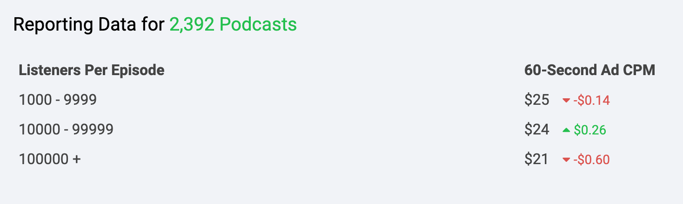
It's essential to know that podcasts offer different pricing structures. Ads are sold on a cost per mille (CPM) or cost per acquisition (CPA) rate. CPM is the cost you'll pay per 1,000 impressions or downloads. CPA is the cost you'll pay to acquire a customer. Most ads are priced on a CPM model.

The current average cost of podcast advertising is a CPM of about $25.

AdvertiseCast notes that the average CPM for 30-second ads is $18, and the average CPM for 60-second ads is $25.

podcast advertising cost 2022

Image Source

Podcast Advertising Networks

A podcast advertising network is an agency that connects companies or brands with respected podcasts on which to advertise. The goal is to take away the friction in podcast advertising by helping brands promote their products on podcasts and helping podcasters monetize their projects. A few examples include:

1. Midroll

Midroll, now part of SXM Media, is used by over 800 brands to buy ad spots on 300+ podcasts. With such a wide variety of shows, advertisers have the opportunity to use audience-based buying to ensure ads align with podcast topics most relevant to your brand, helping you accurately target relevant users and maximize reach.

Your ads can be pre-recorded or host read, the ladder being a valuable tool for generating brand trust as audiences trust hosts and see them as a valuable source of social proof. 

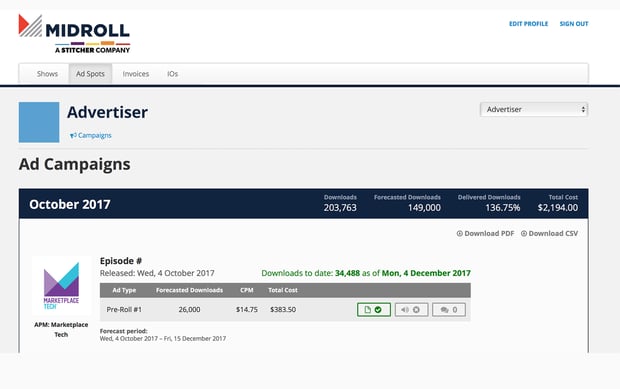
Midroll prices ads on a CPM model, so you pay based on the number of certified downloads each episode receives. Its website notes that prices can range from $18 to $50 CPM, with higher performing shows being more expensive. 

The advertiser portal also gives you an overview of campaign metrics, helping you see important data like forecasted downloads and ad placement cost per show. 

podcast advertising network: midroll

Image Source


2. Podcast One

Podcast One sees more than 2.1 billion annual downloads and 350 different episodes produced weekly, making it a high-impact platform for podcast advertisers. 

It offers pre-recorded and live host endorsements, and you can use its geo-targeting and copy-split capabilities to ensure you target the right audiences and pick placements for your ads that are most relevant to your business. 

With PodcastOne, you also have the unique ability to use visual integrations for your ads in the form of a sponsorship splash, an ad banner, or a forced video ad.

3. Megaphone

Megaphone offers powerful podcast advertising tools with the Spotify Audience Network, helping you target the most relevant listeners that are likely to drive the most impact across a wide variety of podcasts. 

With the service, you can:

  • Reach listeners according to their interests, purchase behavior, and things like apps, devices, and platforms that they use.
  • Get actionable campaign insights that help you understand performance to ensure you have the right strategy.
  • Use dynamic ad insertion to populate ads when downloaded so messaging is fresh and relevant.


Contact Megaphone to obtain pricing information.

4. AdvertiseCast

AdvertiseCast boasts 2,300+ podcasts, a 150,000,000+ monthly listener reach, and 4,200+ available ad spots to choose from, making it a valuable tool for podcast advertisers as you can select target audiences that are the best fit for your business. 

You also have three different podcast ad opportunities to choose from: 

  • Baked-in host-read ads (its most popular option), where podcast hosts read your ads within the episode. Pricing is based on length (60 seconds or 30 seconds) and whether you select mid-roll or pre-roll placement. 
  • Dynamically inserted ads, which are pre-produced, pre-recorded and scheduled to be inserted into podcast content. Pricing is based on the average number of downloads in the first 30 days. 
  • Custom podcast ad units where you can be as creative as you’d like, like a social media plug for your profiles, a 10-second shout out, or a 90-second baked-in mid-roll ad. 

AdvertiseCast also offers an end-to-end ad campaign platform that you can use to manage your ads and view detailed metrics that help you understand campaign performance. You can also make use of the full service solution, where AdvertiseCast manages the process for you.

Podcast Advertising Statistics 2022

1. There are around 2,000,000 podcast shows and over 48 million podcast episodes as of April 2021. (PodcastInsights, 2021)

2. 75% of the US population is familiar with the term “podcasting,” which is up 5% since 2019. (Infinite Dial, 2020)

3. Half of Podcast ads lasted longer in 30 seconds in length. (Interactive Advertising Bureau, 2021)

4. A survey of 300,000 listeners found that 63% of people bought something a host had prompted on their show. (AdvertiseCast)

5. Cost per mille (CPM) or cost per 1,000 listeners is the most common pricing method for podcasts. (AdvertiseCast, 2021)

6. Dynamically-inserted ads increased the share of revenues from 48% to 67%. (Interactive Advertising Bureau, 2021)

7. Streaming audio and podcasting is projected to be one of the channels with the largest growth in 2022, with a 17.8% increase. (Inside Radio, 2021)

8. Host-read and pre-product ads increased share of revenues from 27% to 35%. (Interactive Advertising Bureau, 2021)

9. Local advertising for streaming audio and podcasting will outperform targeted banner advertising and broadcast TV. (Inside Radio, 2021)

10. U.S. Podcast Ad Revenue is set to exceed 2 Billion by 2023. (Interactive Advertising Bureau, 2021)

Podcast advertising is a marketing tactic that is continuing to grow. As a majority of people have listened to a podcast, and engagement rates are increasing, brands can no longer ignore podcast advertising.

New Call-to-action
Podcast Advertising: 5 Experts Reveal Their Secrets was originally posted by Local Sign Company Irvine, Ca. https://goo.gl/4NmUQV https://goo.gl/bQ1zHR http://www.pearltrees.com/anaheimsigns
What is User Story Mapping? Steps, Examples + Best Tools Available

Picture this: You're a product owner and your team has a backlog of features to implement.

The problem is: Your team is overwhelmed and no one is sure where to start and how to prioritize the tasks. Well, this is where user story mapping can come in handy.

→ Download Now: Free Product Marketing Kit [Free Templates]

Keep reading to learn how user story mapping is helping product teams get a better understanding of consumer needs and prioritize tasks with a user-first approach.

Before we get into user story mapping, let's go over the basics. A user story is a short and simple description of a feature told from the perspective of the user. For example, "As a user, I can add items that I'm not ready to purchase yet to my wishlist."

It forces product teams to build with a user-first approach. A user story map takes this a step further by visualizing the steps a user takes to complete an action.

When product managers, designers, and developers work on a product, sometimes they focus too much on feature specifications. User story mapping gets them out of this framework and redirects them to focus on consumer needs and desired outcomes.

In addition, a user story map will help break down the customer journey into bite-size pieces that teams can tackle and ensure nothing gets lost in the process.

But to be clear, the mapping process isn't solely for product teams. It can be a valuable cross-functional exercise that helps align marketing, engineering, UX/Design teams along with other departments.

In addition to getting everyone on the same page, creating a user story map also helps:

  • Determine how to prioritize work if there's a large backlog of feature implementations, separating must-haves from nice-to-haves.
  • Break down requirements and visualize how each piece interacts with the other.
  • Expose roadblocks and dependencies that can impact product delivery.

Is agile story mapping different?

The short answer is no because user story mapping is used within an agile framework.

User stories are used in an agile framework as a way to provide context using simple and natural language. They also represent the smallest unit of work, just as sprints and epics are other measurements.

So, it's agile story mapping is another way to describe the process of mapping a user story.

User story mapping typically happens at the beginning of a project, as it helps offer structure and get everyone on the same page. However, it can be used at any phase of the project to help identify roadblocks and reprioritize.

  1. Set the frame.

Before you start mapping the story, you'll want to narrow the scope. Otherwise, you may quickly start feeling overwhelmed and unable to start.

Here are some questions you should be asking:

  • What problem are we trying to solve?
  • How does this feature add value?
  • Who is the audience subset we are building for? (If any)

Once you answer these questions, put it in user story format: "As a [user], I want to be able to [filter my search] results so that I can [quickly find what I'm looking for."

Following this approach will help you approach the problem tactically.

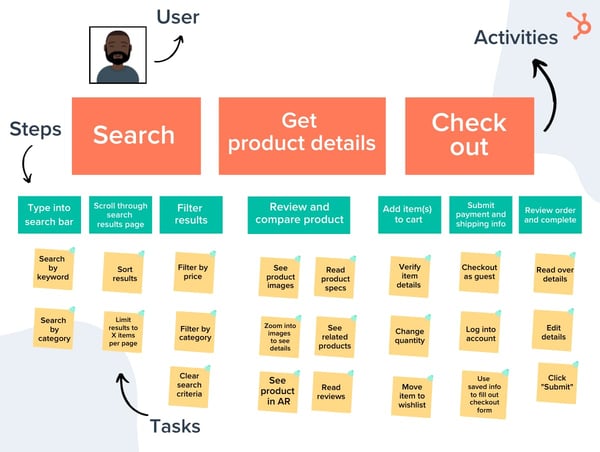
2. Map out the activities and the steps in the story.

In this step, you want to create a general roadmap for how the user would access and use this feature. Those are your main activities.

The goal here is to outline the big steps necessary to get from start to finish. From there, you lay out the steps.

Following the same example from the previous section, here's how it could look:

Activities:

  • Search for products.
  • Review product details.
  • Check out. 

Steps:

  1. Type into the search bar and head to the results page.
  2. Scroll through search results in search of specific information.
  3. Select the filtering option to narrow down options by cost.
  4. Review the search results page again with updated options.
  5. Select item and place in cart.
  6. Complete purchase.

As you'll notice, story mapping requires going from macro to micro.

You'll likely use input from your participants to map out these details. You want your map to paint an accurate and full picture of what does (and can) happen in this story.

So, you'll want to lean on your team for input in this step.

3. Group and define the tasks.

Once you've mapped out the big details, this is where the collaboration takes off.

Under each step, you should highlight the key actions involved in each activity.

For instance, when a user is in step 5, which is selecting an item and placing it in their cart, there are several substeps they will follow, including viewing the image, reading reviews, scanning related items.

All of these should be mentioned under the big activity groups, also known as the steps. The goal is to identify any gaps in the features of your product currently.

By adding a must-have, could-have, and should-have options in your map, you can rank features by priority. Here's what you want to consider:

  • Is there anything else your user could do during one of these activities?
  • What could disrupt their process at this point? Where could they get stuck?
  • How else could the user navigate through this page?

This will require a collective effort from your various teams to figure out what's realistic and what's doable. For instance, an engineer might point out that a particular task is too big to count as one iteration. Your user researcher could highlight an important step in the process that you guys hadn't considered.

4. Slice your tasks and get your minimum viable product.

Once everything is laid out, you and your team can start to move through the map to prioritize a list of tasks and cut them into slices.

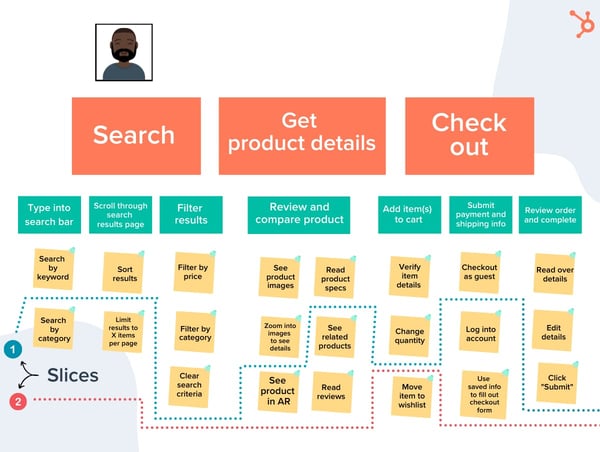
Each "slice" will include tasks from each activity to create a viable end-to-end experience. It should have a clear outcome as well as a way to measure success. This will be important later when testing and tracking user behavior.

You will continue to separate your slices until you include all the tasks and have a clear plan to move forward.

User Story Mapping Example

In this example, the user story is as follows: "As a user, I want to buy a product easily on this website."

Once you have all those details, then you can create your map.

user story mapping example

Once you've added the activities, steps, and tasks, now you can figure out your slices. 

user story mapping example

For instance, in this example, the first slice would skip two tasks in the "Search" activity, skip three in the "Get product details" one, and three in the "Check out" section.

The second slice would include features like "Search by category" and "See product in AR." Once you have all your slices, your team is ready to get to work. 

User Story Mapping Tools

When it comes to user story mapping, there are a lot of ways you could do this.

The most straightforward way is with a conference room, a whiteboard, and a whole lot of sticky notes. That way, you can easily move pieces around as you work and make it a collaborative effort.

Now, if your team is remote, you'll have to rely on online tools to assist you in this process. Many agile project management software have story mapping features, such as Atlassian's Jira.

Additional online tools for user story mapping include Featmap, Miro, and Avion.

If your product team can't agree on where to start for an upcoming or ongoing project, consider creating a user story map. It may take some time away from building but it will definitely pay off down the line.

Product Marketing Kit


What is User Story Mapping? Steps, Examples + Best Tools Available was originally posted by Local Sign Company Irvine, Ca. https://goo.gl/4NmUQV https://goo.gl/bQ1zHR http://www.pearltrees.com/anaheimsigns