Friday, January 7, 2022

71 Photoshop Shortcuts to Help You Edit Photos Like a Pro [+ PDF Cheatsheet]

Have you ever wasted an entire day in Photoshop?So have I. It's not like you start out aimlessly. You have a simple goal in mind, like cropping a photo, improving the resolution, or changing the size of the canvas. But then, you see all the options. And before you know it, you're attempting to solve The Riddle of the Sphinx.

Wouldn't it be nice if you could just press a button, and magically, Photoshop would do what you wanted it to do? It turns out there are a wealth of Photoshop shortcuts that do exactly this.

Download Now: The Marketer's Guide to Photoshop

By pressing a few keys on your computer keyboard at the same time, you can select tools, manipulate images and layers, and even make adjustments to your project's canvas. We'll show you how to do all of that (and more) in this guide.

Save all of these shortcuts to your desktop by downloading the PDF version here.

Note: All of these shortcuts can be accessed on PC and Mac, but sometimes, they're different on each operating system. We've included both types below, and in the cases where they might be different, Mac instructions appear in italicized parentheses. Also, in these formulas, the plus sign (+) is present only to represent the combination of key commands. On occasion, it might be part of the command itself, like when you press the plus sign to zoom into a part of an image. Otherwise, don't press the plus sign between commands.

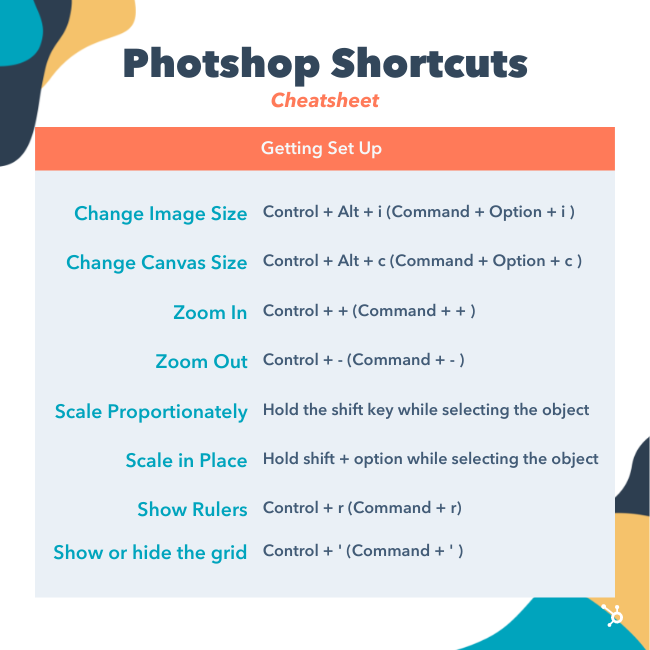
Getting Set Up

You'd think setting up your content in Photoshop would be second nature. But sometimes, the shortcuts to change the background size, or zoom into your project aren't what you think. Here are some of the most crucial fundamental shortcuts to know:

Photoshop Shortcuts: Getting Set Up

1. Change image size

Control + Alt + i (Command + Option + i )

2. Change canvas size

Control + Alt + c (Command + Option + c )

3. Zoom in

Control + + (Command + + )

4. Zoom out

Control + - (Command + - )

5. Scale Proportionately

Hold the shift key while selecting the object

6. Scale in place (from center of the object)

Hold shift + option while selecting the object

7. Show Rulers

Control + r (Command + r)

8. Show or hide the grid (the automatically-generated horizontal and vertical lines that help align objects to the canvas.)

Control + ' (Command + ' )

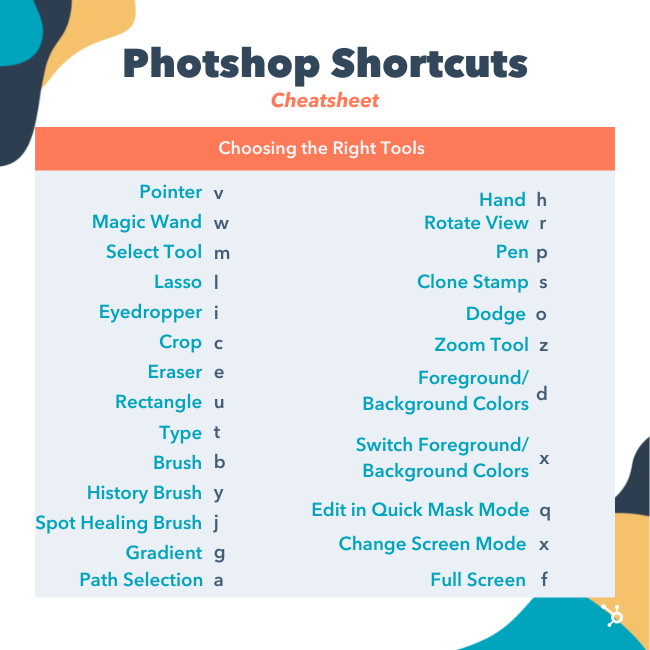
Choosing the Right Tools

These shortcuts will activate different groups of tools, like "Lasso," "Brush," or "Spot Healing Brush." Within these tools, though, there are different functions. Under the "Magic Wand" tool group, for example, you have the option to execute a new selection or add and subtract from a current one.

Each one of these tools has a keyboard shortcut, and we've outlined some of them below.

 Photoshop Shortcuts: Choosing the Right Tools

9. Pointer, a.k.a. Move Toolpointer-tool.png

v

10. Magic Wandmagic-wand-tool.png

w

11. Rectangular Marquee, a.k.a. the Select Toolmarquee-tool-1.png

m

12. Lassolasso-tool.png

l

13. Eyedroppereyedropper-tool.png

i

14. CropScreen Shot 2017-05-26 at 12.09.20 PM.png

c

15. EraserScreen Shot 2017-05-26 at 12.21.32 PM.png

e

16. Rectanglerectangle-tool.png

u

17. Horizontal Typetext-tool.png

t

18. BrushScreen Shot 2017-05-26 at 12.15.15 PM.png

b

19. History Brush

history-brush-tool.png

y

20. Spot Healing Brushspot-healing-tool.png

j

21. GradientScreen Shot 2017-05-26 at 12.14.32 PM.png

g

22. Path Selectionpath-selection-tool.png

a

23. Handhand-tool.png

h

24. Rotate Viewrotate-view-tool.png

r

25. Penpen-tool.png

p

26. Clone Stampclone-stamp-tool.png

s

27. DodgeScreen Shot 2017-05-26 at 12.16.48 PM.png

o

28. Zoom Toolzoom-tool.png

z

29. Default Foreground and Background ColorsScreen Shot 2017-05-26 at 12.23.24 PM.png

d

30. Switch Foreground and Background ColorsScreen Shot 2017-05-26 at 12.25.24 PM.png

x

31. Edit in Quick Mask ModeScreen Shot 2017-05-26 at 12.26.26 PM.png

q

32. Change Screen ModeScreen Shot 2017-05-26 at 12.27.48 PM.png

x

33. Full Screen

f

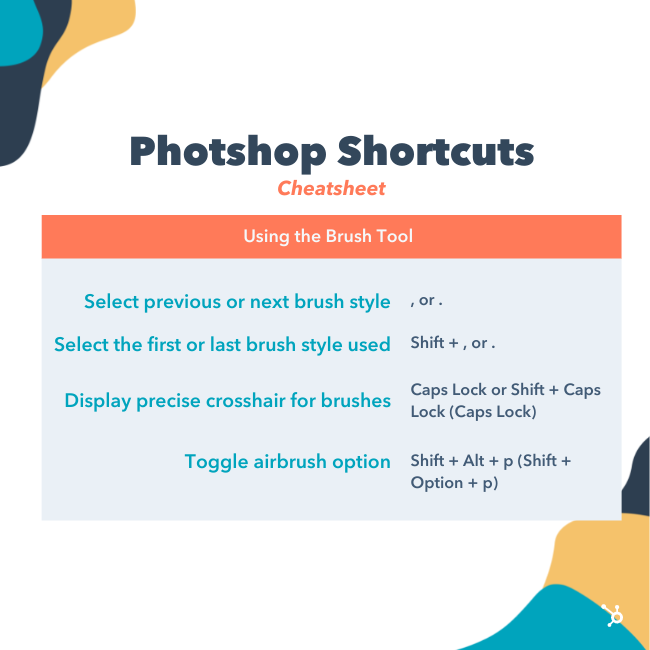
Using the Brush Tool

With the brush settings, you can change the size, shape, and transparency of your brush strokes to achieve a number of different visual effects. To use these keyboard shortcuts, first select the Brush tool by pressing b.brush-tool.png

Photoshop Shortcuts: Using the Brush Tool

34. Select previous or next brush style

, or .

35. Select the first or last brush style used

Shift + , or .

36. Display precise crosshair for brushes

Caps Lock or Shift + Caps Lock (Caps Lock)

37. Toggle airbrush option

Shift + Alt + p (Shift + Option + p)

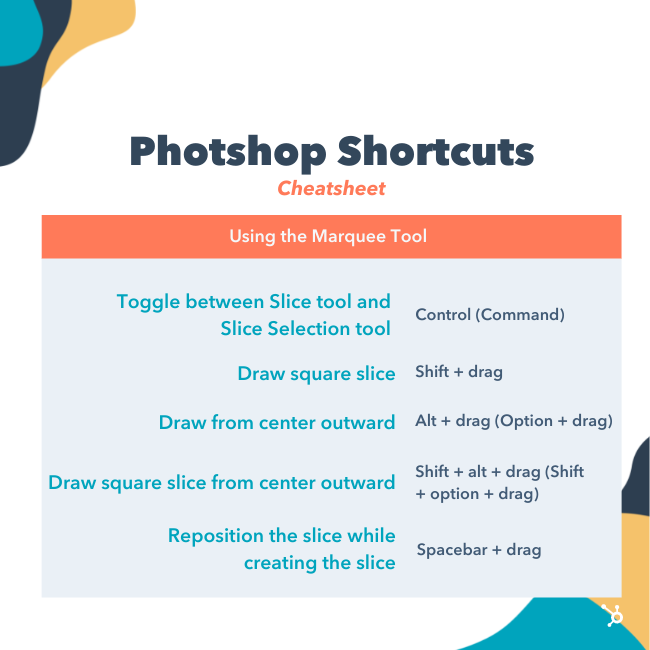
Using the Marquee Tool (for Slicing/Selecting)

When used correctly, the marquee tool will let you select individual elements, entire graphics, and determine what is copied, cut, and pasted into your graphics. To use these keyboard shortcuts, first select the Marquee tool by pressing m.marquee-tool-2.png

Photoshop Shortcuts: Using the Marquee Tool

38. Toggle between Slice tool and Slice Selection tool

Control (Command)

39. Draw square slice

Shift + drag

40. Draw from center outward

Alt + drag (Option + drag)

41. Draw square slice from center outward

Shift + alt + drag (Shift + option + drag)

42. Reposition the slice while creating the slice

Spacebar + drag

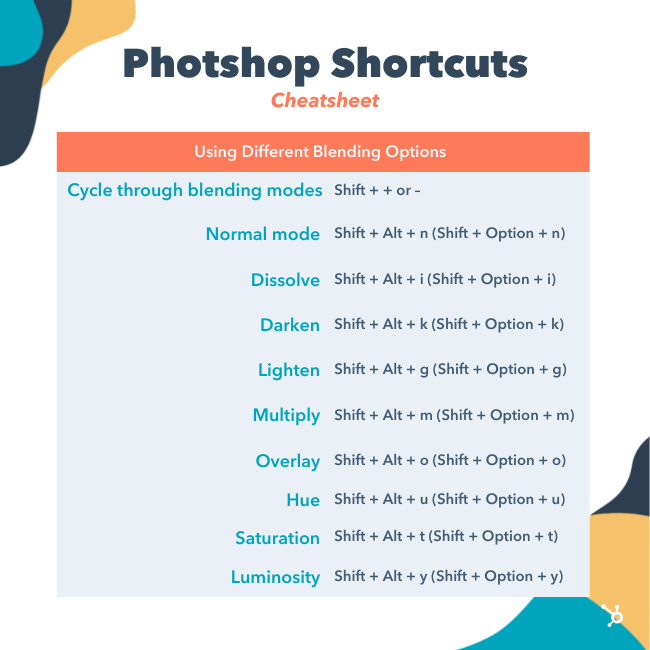
Using Different Blending Options

Blending options include a number of features to enhance the look of your graphic. You can always choose a blending option by going to the top menu bar, under Layer > Layer Style > Blending Options. Or, you can double-click any layer to bring up the options for that particular layer.

Once you open blending options, you can use keyboard shortcuts to select them without moving your mouse. To use the shortcuts, select the Move tool ("v"), and then select the layer you'd like to use the blending options on. Below are some of the most popular modes.

Photoshop Shortcuts: Using Different Blending Options

43. Cycle through blending modes

Shift + + or –

44. Normal mode

Shift + Alt + n (Shift + Option + n)

45. Dissolve

Shift + Alt + i (Shift + Option + i)

46. Darken

Shift + Alt + k (Shift + Option + k)

47. Lighten

Shift + Alt + g (Shift + Option + g)

48. Multiply

Shift + Alt + m (Shift + Option + m)

49. Overlay

Shift + Alt + o (Shift + Option + o)

50. Hue

Shift + Alt + u (Shift + Option + u)

51. Saturation

Shift + Alt + t (Shift + Option + t)

52. Luminosity

Shift + Alt + y (Shift + Option + y)

For more niche blending shortcuts, check out these tips from Adobe.

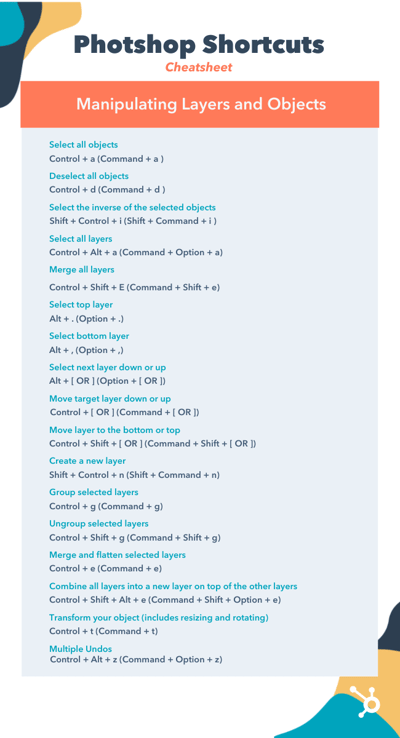
Manipulating Layers & Objects

If you want to modify an object or get complex with multiple layers, here are some shortcuts you might like to know:

Photoshop Shortcuts: Manipulating Layers and Objects


Click to Enlarge

53. Select all objects

Control + a (Command + a )

54. Deselect all objects

Control + d (Command + d )

55. Select the inverse of the selected objects

Shift + Control + i (Shift + Command + i )

56. Select all layers

Control + Alt + a (Command + Option + a)

57. Merge all layers

Control + Shift + E (Command + Shift + e)

58. Select top layer

Alt + . (Option + .)

59. Select bottom layer

Alt + , (Option + ,)

Note: In shortcuts 55-57, the brackets ([ ]) are the keystrokes in the command, and "OR" refers to the actual word — as in, press one bracket OR the other, not the letters "o" and "r."

60. Select next layer down or up

Alt + [ OR ] (Option + [ OR ])

61. Move target layer down or up

Control + [ OR ] (Command + [ OR ])

62. Move layer to the bottom or top

Control + Shift + [ OR ] (Command + Shift + [ OR ])

63. Create a new layer

Shift + Control + n (Shift + Command + n)

64. Group selected layers

Control + g (Command + g)

65. Ungroup selected layers

Control + Shift + g (Command + Shift + g)

66. Merge and flatten selected layers

Control + e (Command + e)

67. Combine all layers into a new layer on top of the other layers

Control + Shift + Alt + e (Command + Shift + Option + e)

Note: This step gets you one, combined layer, with all elements of that layer in separate layers below — which is different from a traditional merge-and-flatten layers command.

68. Transform your object (includes resizing and rotating)

Control + t (Command + t)

69. Multiple Undos

Control + Alt + z (Command + Option + z)

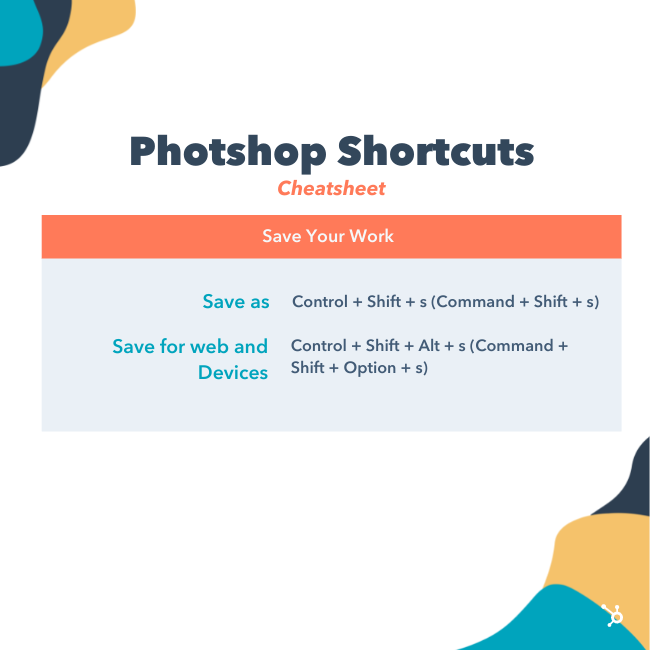
And Finally — Save Your Work for Later

Congratulations — you've finished working on your project, and now, you're ready to share it with the world. Save time-saving your project by using these simple shortcuts:

Photoshop Shortcuts: Save For Later

70. Save as

Control + Shift + s (Command + Shift + s)

71. Save for web and devices

Control + Shift + Alt + s (Command + Shift + Option + s)

Marketer's Guide to Photoshop


71 Photoshop Shortcuts to Help You Edit Photos Like a Pro [+ PDF Cheatsheet] was originally posted by Local Sign Company Irvine, Ca. https://goo.gl/4NmUQV https://goo.gl/bQ1zHR http://www.pearltrees.com/anaheimsigns

21 of the Best Landing Page Design Examples You Need to See in 2022

How do you convince visitors your website is worth their time? There are so many elements that a top-notch landing page needs, and making those elements the "best" they can be often depends on what your landing page goals are.

Free Guide: How to Build & Optimize Landing Pages

If you're looking to up your landing page game, it's helpful to know what goes into a great one. We’ve compiled a list of landing pages we love so you can see these impressive designs in action and implement their tactics into your own landing pages.

Sign-Up Landing Pages

1. Shopify

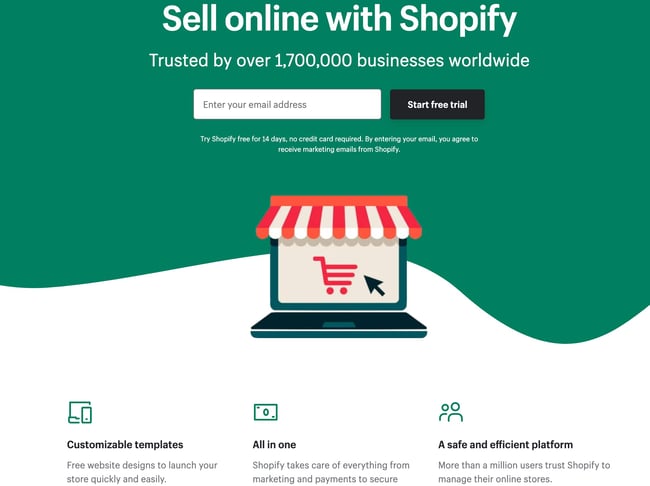
Shopify sign up landing page example

Like many of the other landing pages in this post, Shopify's trial landing page for sellers keeps it simple. It’s not too text-heavy, but still manages to persuade users by noting a few key points about its top-notch product. Visitors come away knowing that Shopify is an all-in-one platform that is easy to use and trusted by many.

Why This Landing Page Works:

  • Clean Interface: The user-oriented headline is just a few words, for example, and the page relies on simple graphics and short paragraphs to communicate the trial's details and benefits.
  • Concise CTA: There are only a few fields you need to fill out before you get started. All of this makes it easier for you to quickly get started selling online with their tool.

What Could Be Improved:

  • Emphasize Security: The last column states that the platform is safe, but doesn’t explain why. Instead, it mentions that over a million businesses use it. A few words that speak to site security would improve this section since the number of vendors is already stated at the top of the page. Additionally, it would eliminate friction for visitors with security concerns.

2. Great Jones

Great Jones landing page example

Many of us have been doing a lot more cooking during the pandemic and looking to upgrade our gear. Great Jones offers up a landing page that’s as beautiful as its Dutch Ovens. It’s very aspirational and taps into all of our ideal kitchen dreams.

Why This Landing Page Works:

  • Use of Color: Great Jones’ site is colorful just like its cookware. The use of bold colors quickly draws visitors in and makes the cookware stand out.
  • Prominent CTA: You can’t miss this giant yellow CTA and bold font $100 Off coupon. Who wouldn’t want $100 off these gorgeous pots?

What Could Be Improved:

  • Rollover Descriptions: With so many pans and utensils pictured at once, it would be great if users had the ability to view the name of the item. That way they could find it easier on the site when they’re ready to buy.

3. Muzzle


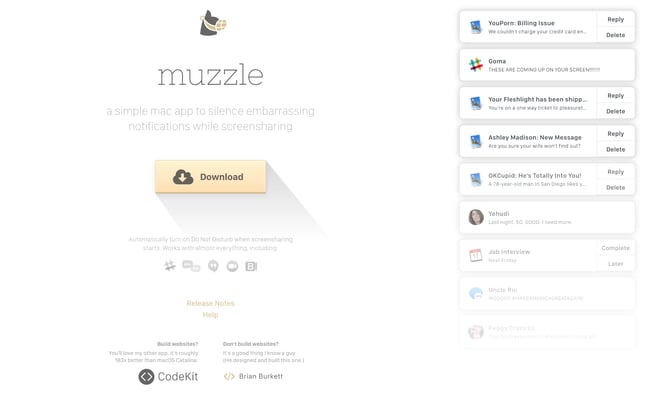
Muzzle sign-up landing page with yellow download button

Muzzle, a Mac app that silences on-screen notifications, fully embraces this show don't tell mentality on their otherwise minimal landing page. Landing pages help users decide whether or not your product or service is actually worth their precious time and energy. What better way to clearly and straightforwardly communicate your value proposition than by confronting visitors with the very problem your app solves?

Why This Landing Page Works:

  • Show Rather Than Tell: Visitors to the page are greeted with a rapid-fire onslaught of embarrassing notifications in the upper left of the screen. Not only is the animation hilarious, it also manages to compellingly convey the app's usefulness without lengthy descriptions.
  • Cohesive Visual Experience: Even the text on the page is a muted gray color, mirroring the function of the product.

What Could Be Improved:

  • Could Be Difficult to Read: While the light gray text on white background is great at mimicking the product’s function, it may be harder to read for some.

4. DoorDash

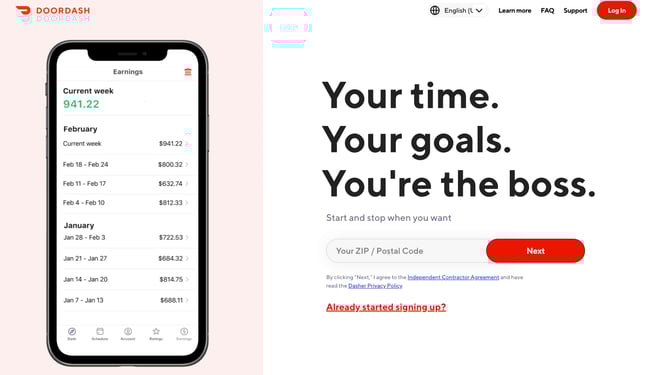
DoorDash landing page example

Takeout enthusiasts are no doubt familiar with DoorDash, the app that lets you order food from a variety of restaurants from your phone. Well, instead of customers, this landing page is geared towards recruiting Dashers who make the deliveries.

Why This Landing Page Works:

  • Emphasizes Dasher Autonomy: This landing page really plays up that Dashers are independent and free to work when they want.
  • Highlights Potential Earnings: While there’s no way to prove these earnings are typical, they are certainly enticing for anyone who wants to make extra cash on the side.

What Could Be Improved:

  • Advantage Over Competitors: DoorDash is not the only delivery game in town. They could highlight what sets them apart from a competitor like UberEats.

5. Wise

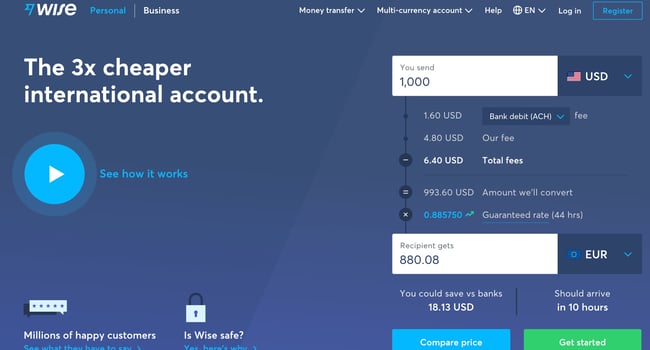
Wise sign-up landing page with CTAs for sending money, receiving money, and debit card

Wise allows you to send or receive money in different currencies and countries, and its landing page separates customers into two categories of either Business or Personal so you're not distracted by options that don't apply to you. There’s even a short video to show visitors how the service works before they try it. Since they’re dealing with money, it’s important to get the customer experience right the first time.

Why This Landing Page Works:

  • Highlights Safety: The security information is out front and center on this page, helping to ease any hesitancy a potential customer might have and assures them that Wise is a safe service to use to send money and receive .
  • Emphasizes Value: In several places on the page, in both text and video, Wise reiterates that it's less expensive than transferring money through a traditional bank.

What Could Be Improved:

  • Interface is a Little Busy: While it’s great that customers have access to a wealth of information about the service, there’s a lot going on. There’s video, menus that appear when you scroll and multiple buttons — all within the top half of the page.

6. Airbnb

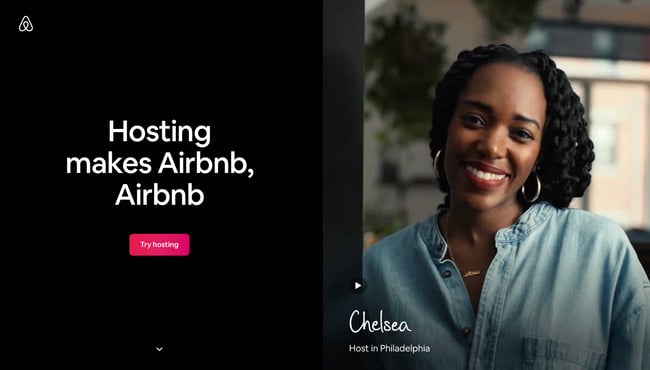
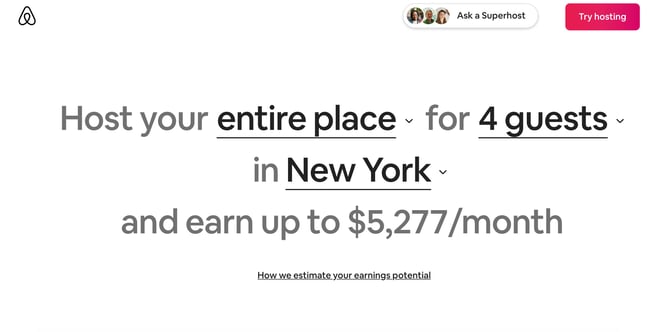
Airbnb Landing PageTo help convert visitors into hosts, Airbnb offers some enticing personalization: an estimated weekly average earnings projection based on your location and home size. You can enter additional information about your potential accommodations into the fields to get an even more customized estimation.

Airbnb 2nd landing page exampleIf you visit the page already convinced, the clear call-to-action at the top of the page makes it easy to convert on the spot.

Why This Landing Page Works:

  • Personalization: Airbnb shows you right at the start what you could potentially earn based on your area and the size of your home. This is useful for potential new hosts who may still be figuring out how much they should charge and what they can expect to earn.
  • Leverages Community: Further down on the page, those curious about hosting have the option to contact a seasoned Superhost to answer any questions they may have.

What Could Be Improved:

  • Nothing: The page is clear, concise, reassures potential hosts Airbnb is safe to use, and offers a personalized experience.

7. Wag!

Wag landing sign up page example

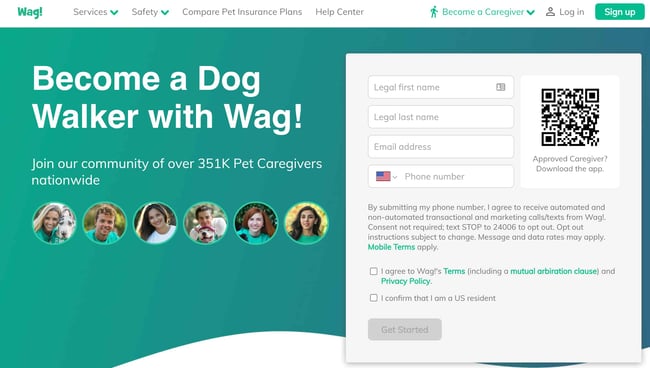
Wag! is a service that connects dog owners with dog walkers and sitters. This page gets right to the point with a large font encouraging prospects to join, and puts the sign-up form prominently on the right half of the page. The green background color makes the white font and other elements on the page pop. The addition of a QR code on the form is also a nice touch, enabling visitors to scan it, quickly download the app, and sign-up.

Why This Landing Page Works:

  • Efficient Form: Leaving the form field open on the page means visitors don’t even have to click on a CTA to access it. The QR code further expedites the process.
  • Emphasizes Credibility: Including caretaker photos and that more than 351,000 caretakers currently use the service nationwide makes Wag more trustworthy.

What Could Be Improved:

  • It’s Not Compelling: Unlike DoorDash mentioned earlier, Wag! makes no mention of why people should join. What are the perks? Are the hours flexible?

8. Wistia

Wistia Landing Page Example

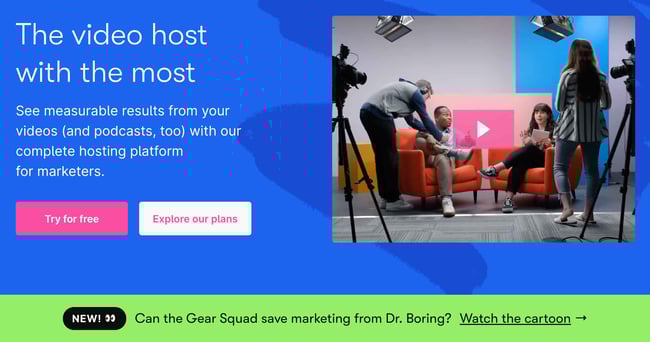
Right off the bat, you notice the blue background with the pop of pink in the form of a “Try for free” button. The page gets right into the action with a video showcasing all the cool content you can create. If you’re having doubts, you can always scroll below to read testimonials from some of Wistia’s 375,000 happy customers.

Why This Landing Page Works:

  • Ease of Use: The form itself allows users to quickly fill it out by linking to their Google account. Doing so enables the autofill feature, which cuts down on friction for the user.
  • Capitalizes on Visuals: As a video host, Wista does a great job of showcasing its capabilities using a variety of mediums. There’s colorful graphics, videos and even a link to marketing focused cartoons.

What Could Be Improved:

  • Include an FAQ: Testimonials are great, but sometimes customers have a few concerns that could be answered quickly with an FAQ section. That way they can decide whether or not to sign up without having to leave the page to search for answers.

9. Webflow

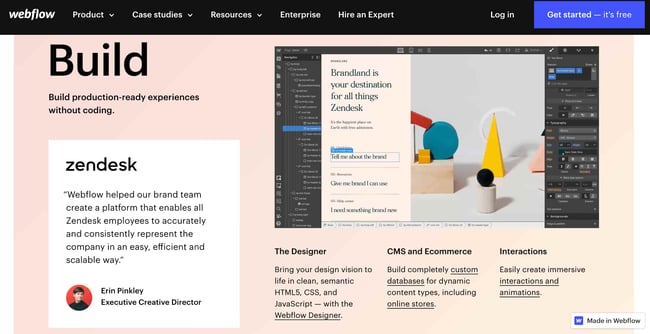
Webflow Landing Page ExampleWebflow, a design tool for web developers, packs a lot of information into just one GIF. As with Muzzle, Webflow also gets right to the point and demonstrates what their tool can do, rather than just talking about it. The animated GIF is visible in the same frame on the website, so users can see how the product works and sign up without scrolling.

Why This Landing Page Works:

  • Show Rather Than Tell: Being able to view Webflow’s tool in action gives potential customers a clear idea of not only what it does, but how their user experience will be.
  • Removes Risk: In several places on the landing page, visitors are reminded that the service is free. There’s no trial to sign up for. They can build their site for free and decide whether or not to sign up for a plan when they’re ready to launch.

What Could Be Improved:

  • Nothing: This landing page is the perfect balance of information, usability, and visuals.

10. Talkspace

Talkspace Landing page example

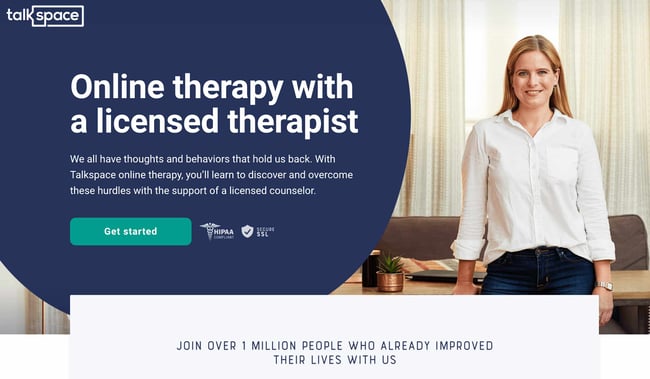
Talkspace, an online therapy service, really focuses on trustworthiness with this landing page. All of the information on this page emphasizes that customers will have access to licensed therapists, and drives home that the service is secure and confidential. It’s a great way to reassure those who may be hesitant to participate. The use of shapes is also a clever idea. Pages are often filled with squares and boxes, so putting the CTA inside a large circle immediately draws the viewer in. Overall, the layout is clean, inviting, and informative.

Why This Landing Page Works:

  • Builds Trust: The focus on customer security works in their favor, especially noting that they are HIPPA compliant.
  • Provides Value: In addition to providing details about how Talkspace works, this page also provides several mental health resources and articles.

What Could Be Improved:

Nothing: This page has a great user interface and serves as a great starting point for mental health resources.

Ebook Landing Pages

11. Nauto

nauto-ebook-landing-page

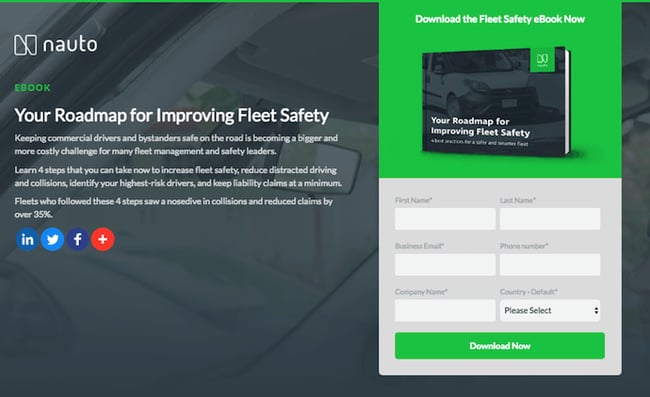
Nauto, a data platform for self-driving cars, helps make autonomous driving safer for companies who manage fleets of self-driving vehicles. Naturally, its customers would need all kinds of information to sell them on this platform. Nauto has it, packaged into a super-simple ebook whose landing page gives you both a brief contact form and some preview statistics to prove why this resource is so important.

At the top of the page, shown above, a warm photo of a car's exterior r hugs the lead-capture form. The green "Download Now" button might've even been on purpose (on the road, green means go, after all).

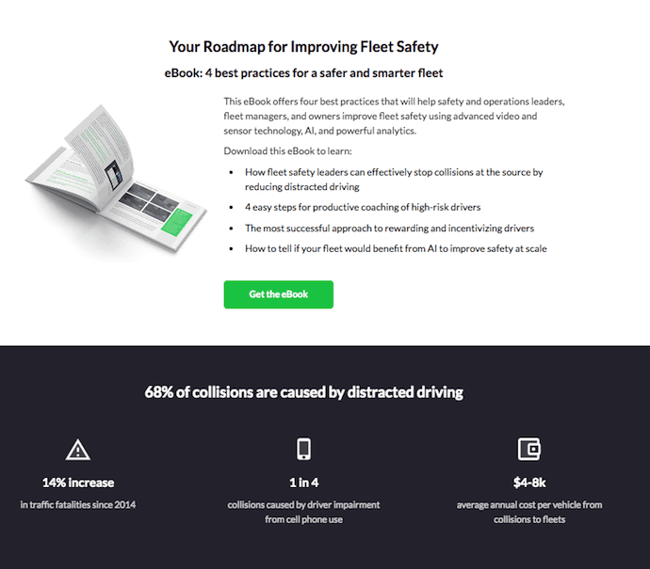
Scroll down, and you'll see another "Get the eBook" CTA to remind users what's waiting for them. You'll also see three jarring statistics about car accidents to entice users to learn more. Check it out below.

nauto-ebook-landing-page-CTA-1

Why This Landing Page Works:

  • Simplicity: There’s no distractions on this landing page, which is perfect given the company’s focus on safe, self-driving vehicles.
  • Great Use of Comparison: Further down the page, Nauto offers up side by side footage of a distracted driver vs. a self-driving vehicle. It’s an excellent way to drive the point home that A.I. is a safer bet.

What Could Be Improved:

  • Graphics: The warm photo at the top is really difficult to see. Slightly more definition would have helped visitors easily recognize the image as cars.

12. Industrial Strength Marketing

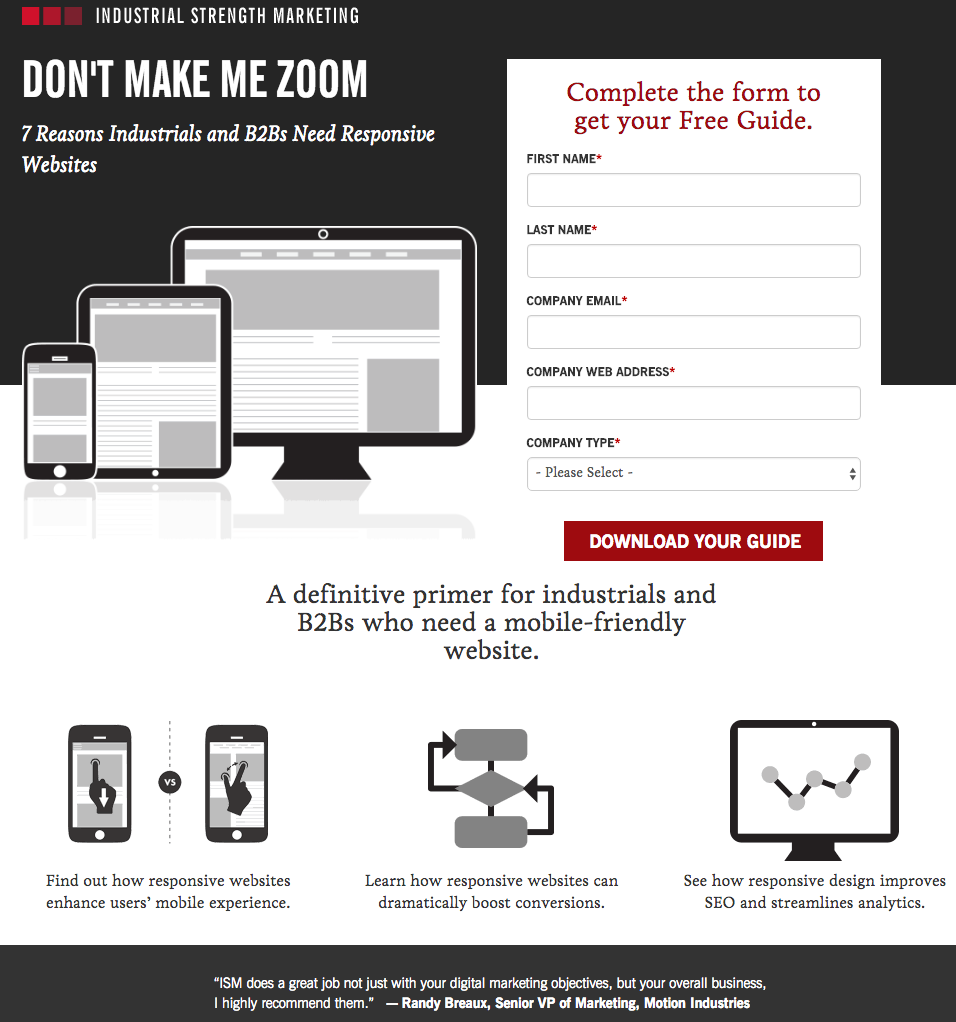
industrial-strength-marketing-landing-page-example.png

Right off the bat, this landing page pulls me in with a compelling, punchy header: "Don't Make Me Zoom." It directly speaks to a common experience most of us have had when we're browsing on our phones or tablets — and it's a little sassy, too.

But that's not the only thing keeping me interested in this landing page. Notice how the color red is strategically placed: It's right at the top and bottom of the form, drawing you even closer to the conversion event.

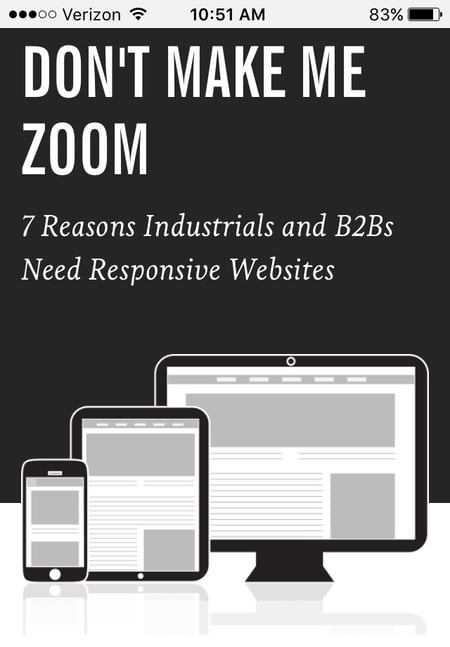
industrial-strength-marketing-mobile-landing-page-1.jpg

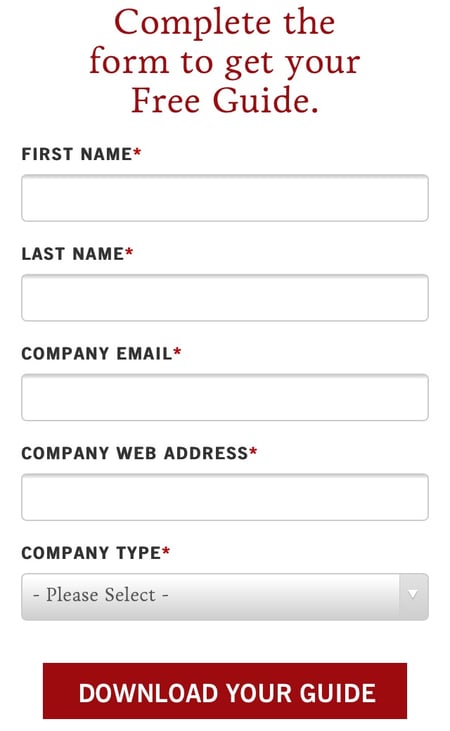
industrial-strength-marketing-mobile-landing-page-2.jpg

Plus, this design is meta to boot: It looks and works great on mobile, too (pictured above) Keep in mind that a lot of visitors will be accessing your landing pages on their smartphones or tablets, and if the design of your website doesn't work well for them, they might give up and leave your page.

The folks at Industrial Strength Marketing made the fonts and form field big enough so that visitors don't have to pinch-to-zoom to read and interact with the content, for example.

Why This Landing Page Works:

  • Voice: The language is punchy and relatable, quickly drawing the reader in.
  • Minimalist: The black and white color scheme with just a few pops of red really make the sign up sheet stand out. Additionally the minimalist design works beautifully on mobile and desktop, no pinching required.

What Could Be Improved:

Nothing: Both the mobile and desktop versions illustrate the perfect execution of a

13. Inbound Emotion

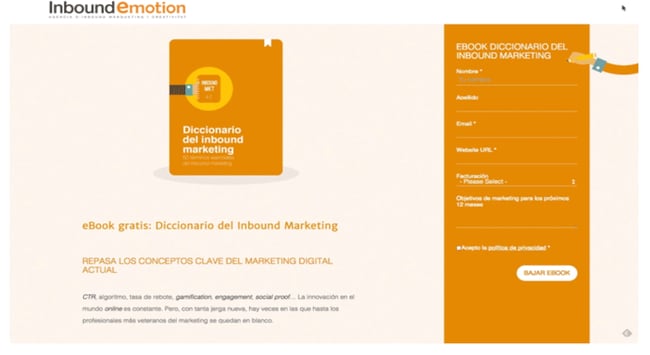
Inbound Emotion Spanish language landing page example

Even if you don't speak Spanish, you can still appreciate the conversion capabilities of this HubSpot partner site. My favorite feature of the page? The form stays in a fixed, prominent position as you scroll through the site. I also love the simple layout and warm colors.

Why This Landing Page Works:

  • Fixed Form: Having access to the form while scrolling provides a better user experience. No need to scroll back up to the top of the page to find it.
  • Simple Interface: The layout is simple, but effective. The use of only two shades of orange give a monochrome feel and keeps the focus on the benefits of the ebook.

What Could Be Improved:

  • Make the Form Brief: There were six items to fill out, not including the check boxes option at the end. Longer forms could be a turnoff for some visitors.

14. IMPACT Branding & Design

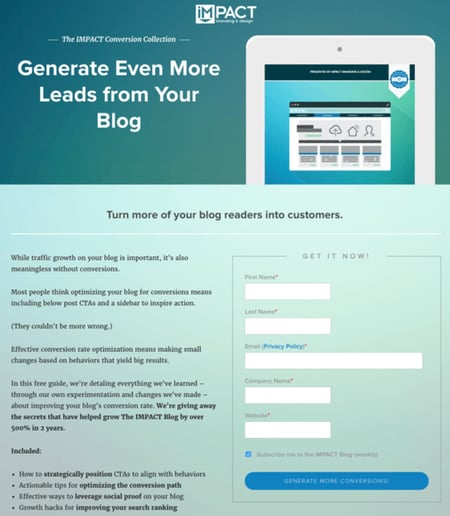
Impact Branding landing page example with creative CTA

Full disclosure: IMPACT is a HubSpot partner — but that's not why they're included here. IMPACT's landing pages have long been a source of design inspiration. I love the simple layout of the page, from the large headline copy and detailed featured image, to the outline that surrounds the form, to the colors and fonts that are very pleasing to the eye.

The free guide IMPACT is offering for download here also doesn't emphasize the download itself in the blue button that allows you to submit your filled-out form. Rather, IMPACT is inviting you to "generate more conversions" — putting the focus on what you stand to gain as a result of reading the guide.

Why This Landing Page Works:

  • Clever Messaging: You’re not downloading an ebook, you're learning how to “generate more conversations.” This rephrasing is far more enticing than simply putting a regular download button.
  • Simple Use of Color and Fonts: The blue tones work really well on this landing page, giving it variety while keeping the look cohesive. Since there’s lots of text on the page, a simple font is perfect.

What Could Be Improved:

  • Nothing: This page encourages downloads in a clever way using a simple layout and colors.

Landing Pages to Learn More

15. Unbounce

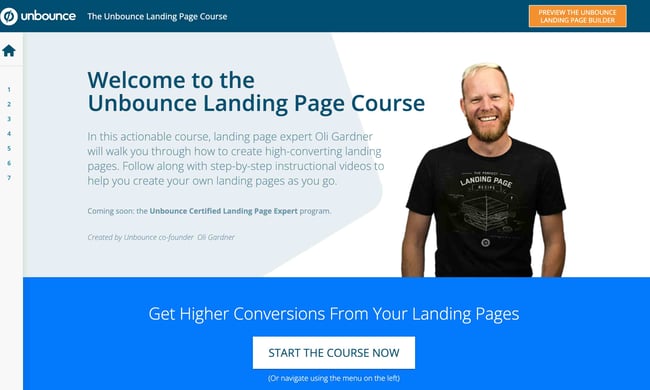
Unbounce Landing Page Example

It's no surprise Unbounce made this list —they've actually written the book on creating high-converting landing pages. Although there are lots of amazing things about this landing page, the two that I absolutely love are: the multiple ways to access the course, and additional industry-specific report offerings. Unbounce is really skilled at providing visitors the information they need, but also what they didn’t know they needed until they landed on the site.

Why This Landing Page Works:

  • Gives Visitors Options: When it comes to accessing the course, users can either click the main button above the upper half of the page, or if they’ve been scrolling, click on the course from the sidebar on the left. Eliminating the need to scroll back up to the top of the page.
  • Sometimes More is More: In addition to the course, Unbounce provides visitors with industry-specific reports and answers to other landing page-related topics. Providing even more useful information sets Unbounce up as a trusted authority in their field.

What Could Be Improved:

  • Descriptions: The course offers several modules and it would be helpful if some offered a brief description. The sidebar menu offers a course list, but a short sentence summarizing what visitors can expect to learn would be helpful.

16. Bills.com

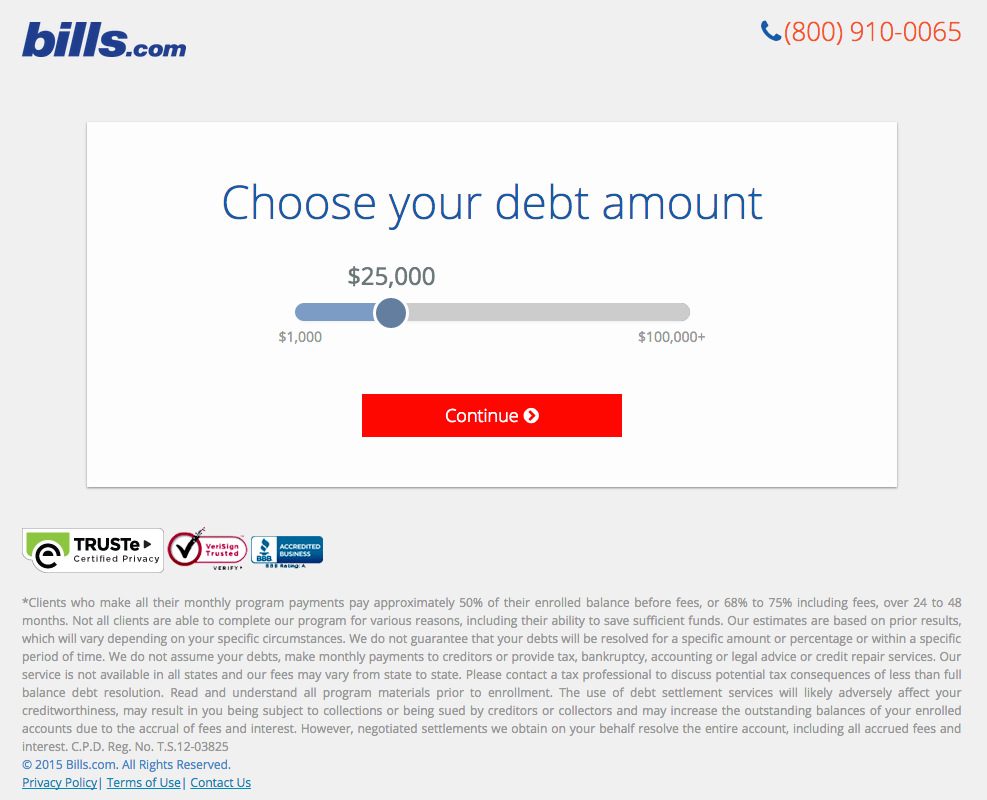
bills-dot-com-landing-page-example.png

Often, people think landing pages are static pages on your website. But with the right tools, you can make them interactive and personalized.

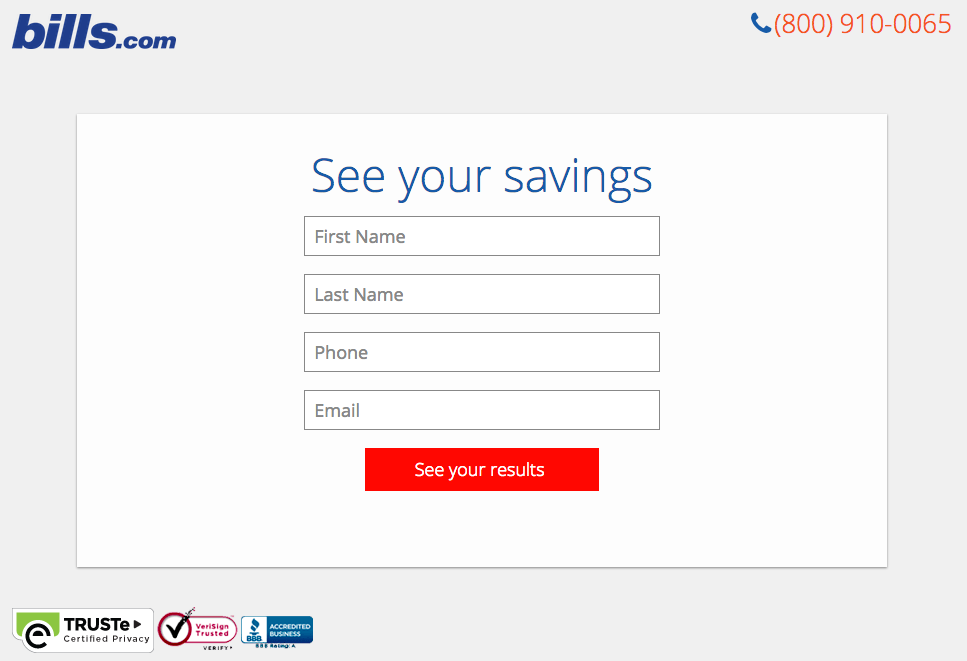
Take the example above from Bills.com. To see if you'd benefit from their consultation, you answer three questions before you are shown a form.

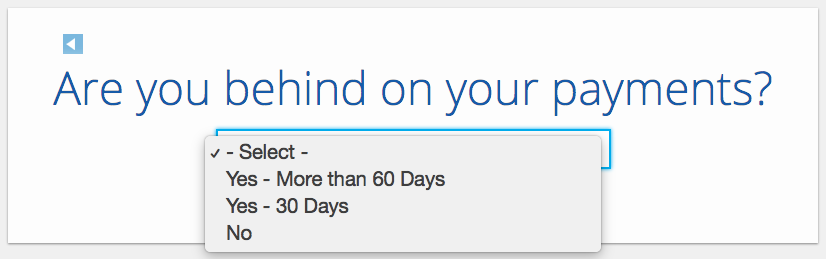
Then, you answer two more questions, like the one below:

bills-dot-com-landing-page-2.png

And here's the final landing page form where you fill out your information:

bills-dot-com-landing-page-3.png

I'm not sure how the algorithm works (or if there's one at all), but while I was filling it out, I had some anxiety about not qualifying. Once I found out I did, I was excited to fill out the form, which I'm sure most people who are in debt and using this tool are. By making this offer seem more exclusive before the form appeared on the landing page, I'd bet that Bills.com increased conversions pretty significantly.

Why This Landing Page Works:

  • Exclusivity: Everyone likes to feel special, which is why exclusivity works so well. The page gives the impression that the offer isn’t given to just anyone, you have to qualify first.
  • Interactivity: Anytime you can get users to interact with the page, even if it’s something as simple as using a form with a sliding bar question.

What Could Be Improved:

  • More Color: While the site is geared to not so fun topics like bills and debt, it doesn’t mean it has to be boring. The gray leaves much to be desired.

17. Zillow

Zillow Landing Page Example

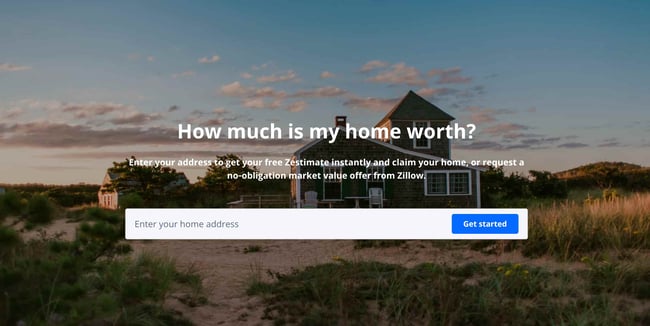
Zillow did something very similar to Bills.com with their landing page. It starts with a simple form asking for "your home address" ( sounds creepy, but don’t worry. This form field is set on top of a hero image featuring a quaint home at dusk followed by a handy FAQ section.

Of course, the address itself won't be enough to get a true appraisal value of a home. It just denotes the home's neighborhood. It’s a bit like playing The Price is Right. You can guess how much homes in the area are worth and then type in an address to see how close you got. If you want to learn more info about a property, Zillow then prompts users to sign-up to continue.

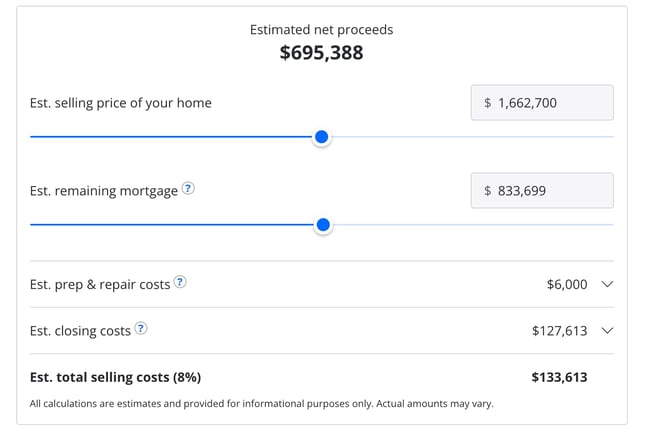
Zestimate landing page exampleOnce you hand over your email, you’ll have access to more data like comparable homes in the area, mortgage tools, and the estimated net profits should you decide to sell.

Why This Landing Page Works:

  • Games are Fun: Anytime you can make filling out a form feel like a game, it’s a win.
  • Establishes Authority on the Topic: Zillow has access to so much housing and neighborhood data, it’s no wonder they are one of the top home search sites in the nation.

What Could Be Improved:

  • Nothing: The Zestimate page is simple, but effective. Those with concerns about what a Zestimate is and how it’s calculated have easy access to the homebuying FAQ on the second half of the page.

18. Landbot

Landbot Landing Page Example

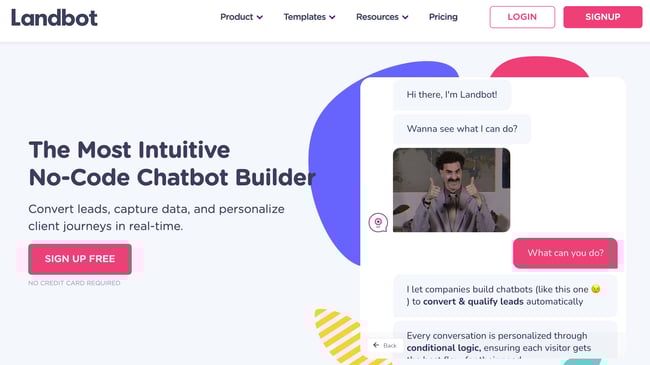
Landbot, a service that creates chatbot-based landing pages, puts their own product front and center on their chat-fueled landing page. Visitors are greeted by a friendly bot —complete with emojis and GIFs —who encourages them to provide information in a conversational format instead of via a traditional form.

Why This Landing Page Works:

  • It’s Fun: From the bright colors to the GIFs, this page keeps visitors engaged and entertained.
  • Show, Not Tell: By having the chatbot right on the page, doing its thing, potential customers can see exactly what they’re getting. The whole experience simulates what it’s like to use Landbot’s product.

What Could Be Improved:

  • Nothing: Landbot’s use of a live demo, testimonials, highlighted integration features and detailed breakdown of how the product works leaves new customers ready to sign up at first glance.

19. Webprofits

Webprofits landing page example

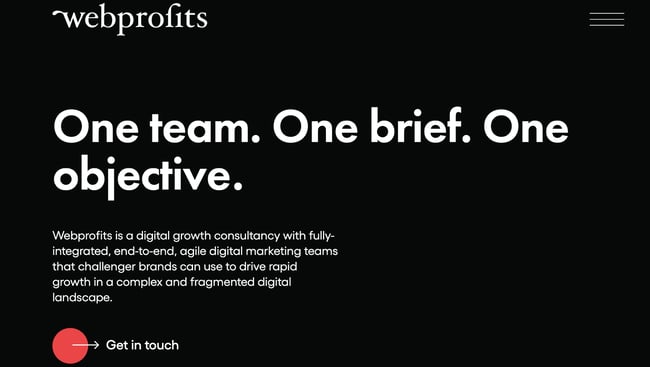
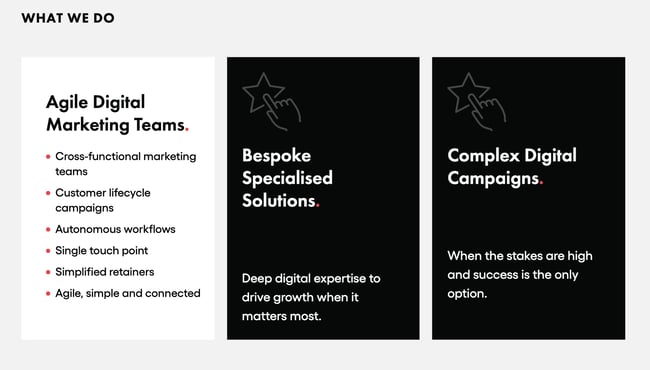
Like Industrial Strength Marketing mentioned earlier, Webprofits also makes great use of a predominantly black, white and red color scheme. The result is a clean layout that makes great use of the pops of color on the page. It’s a testament to the organization's expertise in digital marketing and UX design.

The rollover description feature throughout the “What We Do” section, while black and white, uses movement to draw the reader’s attention to the content. Each section changes color and rolls down like a shade to reveal more in depth features.

Webprofits landing page example

They also make it easy for you to figure out what Webprofits actually does. The rest of the page offers detailed information about what you'll get when you give over your information. Plus, it includes strategic CTAs throughout, like "Get in Touch”

Why This Landing Page Works:

  • Informative, But Not Overwhelming: There’s a lot of information and text on this page, but the use of well-placed graphics and videos help break things up.
  • Multiple CTAs: Placing the same CTA throughout the page makes it so visitors don’t have to scroll all the way to the top to “Get in Touch.”

What Could Be Improved:

  • Nothing: Webprofit makes great use of the long landing page format, packing in all the pertinent information visitors would need in one place with a visually appealing experience.

20. Native Poppy

Native Poppy Landing Page example

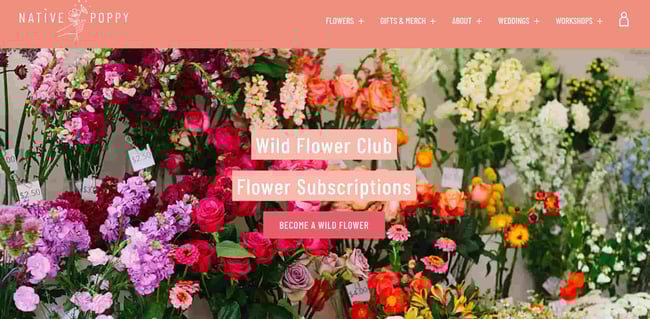
Sometimes, you've just got to stop and admire a landing page for being beautiful. Using high-resolution photography and lots of white space, Native Poppy's landing page is a pleasure to look at.

Aside from its beauty, the page has some great elements: a clear and delightfully pink CTA, an informative “How It Works” section, plus an FAQ at the bottom. Best of all, it plays with language, ditching the phrase “become a subscriber” for “become a wild flower.” I don’t know about you, but I’d much rather be a “wild flower” over a subscriber any day.

Why This Landing Page Works:

  • Captures Brand Voice: The layout of Wild Poppy mirrors the whimsical vibe of the brand. From the photos, font choice, and “wild flower” subscription, all the messaging works in harmony.
  • Persuasive: By highlighting all the perks and discounts of being part of the subscription program, it entices customers to join.

What Could Be Improved:

  • Form Visibility: While there are multiple CTAs, it would have been nice to have the form fields on the page for faster sign-up, or as a pop up after clicking, instead of having to click the CTA and then be taken to another series of prompts.

21. Conversion Lab

Conversion Lab Landing Page example

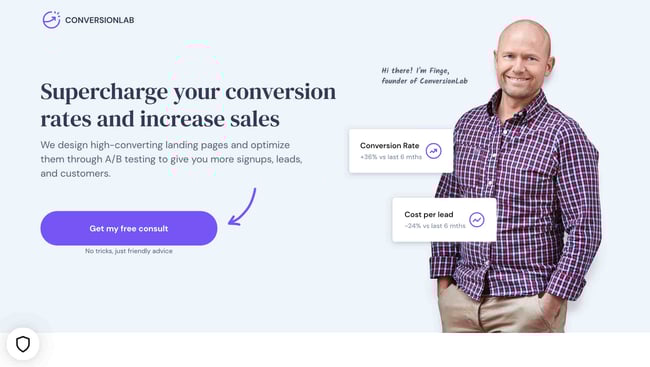
While I wouldn't typically include an example of a homepage with a form on it in a post about landing pages, this website is special. The homepage is the entire website -- the navigation links just take you to the information below.

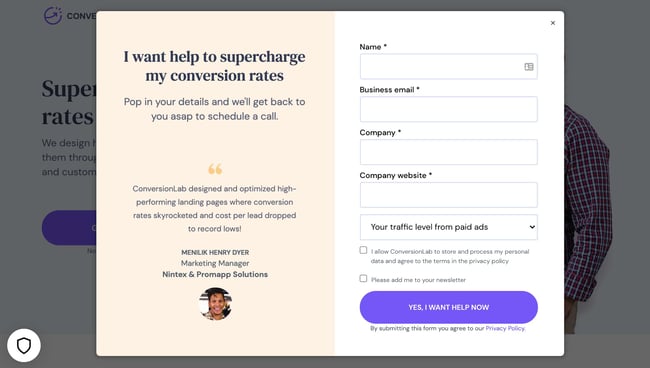
When you click "Get My Free Consult," the entire page darkens to highlight the form. See what it looks like before you click in the photo above.

And, when you click that CTA, check out how the form appears:

Conversion Lab landing page example CTA

It’s a similar function when clicking on any of the headings on the page. Instead of taking you to a different page, it simply jumps to the corresponding section on the homepage.

I love how you don't have to leave the page to fill out the form, or view any of the features, creating a seamless user experience.

Why This Landing Page Works:

  • Creative: Having a homepage that also functions as various landing pages makes Conversion Lab unique. Best of all, it still provides a pleasant user experience.
  • Organized Layout: Despite having the homepage and landing pages as one, the page doesn’t feel cluttered or busy at all.

What Could Be Improved:

  • Form Placement: It would be nice if the form maybe opened up on one side so visitors could still read the content on the rest of the page.

Landing Page Ideas

A well-optimized landing page can transform prospects into leads by gathering information that can help you better understand, market to, and delight visitors. Since landing pages are crucial for conversions, it's important to make sure they're well planned, designed, and executed.

Here are a few things to keep in mind when creating landing pages:

  • Appealing aesthetics: Giving your landing page color and a clean UI can only help. Visitors will want to learn more about your products and see evidence of the value you're offering. Take a look at #18 on our list — Landbot for a great example of a stunning web page.
  • Less is more: Let the offer or images do most of the talking, but be sure to include any and all descriptive headlines and supporting text to make your landing page clear and compelling. This goes for just about all the components on the page: try white space, simple copy, and shorter forms.
  • Keep visitors on the page: By removing the main navigation or any distracting backlinks, it's less likely there will be any lead generation friction that could cause visitors to abandon your page.
  • Social Sharing: A simple way of getting visitors to engage with your landing page is including social media sharing buttons so that they can spread your content to their social followings. After all, customers are the center of your marketing flywheel.
  • A/B testing: Landing pages are important to get right, and since consumer psychology can sometimes be surprising, it's always better to experiment with different versions of your pages to see which has the highest conversion rate (CVR). Test the positioning of the offer, kinds of CTAs, or even the color scheme.
  • Call-To-Action: The CTA is where the meat of the landing page is, or the tipping point where prospects become contacts. CTAs could ask visitors to subscribe, download, fill out a form, share on social media, and more -- but, overall, CTAs are necessary for getting your audiences more engaged with your offering. To generate leads, CTAs should be bold and eye-catching, but most importantly, they need to effectively communicate value.

Creating Landing Pages That Shine

Landing pages aid in growing your customer base and increasing conversions. Create a page that delights customers with a user interface so great, they continue to come back for more.

This article was originally published April 2, 2020 and has been updated for comprehensiveness.

optimize landing pages

21 of the Best Landing Page Design Examples You Need to See in 2022 was originally posted by Local Sign Company Irvine, Ca. https://goo.gl/4NmUQV https://goo.gl/bQ1zHR http://www.pearltrees.com/anaheimsigns

Thursday, January 6, 2022

46 Best Free Online Courses For Whatever You Want to Learn

Whether you want that job promotion or to sidestep into a new field, you'll need to commit to learning new skills. One of the best ways you can do that is by taking free online courses.

Blog posts and podcasts are great starting points for exploring a particular topic. But online business courses will provide you with the time and space you need to explore a topic in depth and truly master a new skill. Plus, most courses are made up of on-demand videos and exercises that you can progress through at your own pace.

Access all of HubSpot's free tools and training to grow your business, and your career.

Below, we've gathered the best free online business courses. These cover the main business skills you'll need to advance in today's rapidly changing workplace — from digital marketing and coding to selling, managing conflicts, and more. Keep reading to become an expert in whatever subject you feel can best help you succeed.

If you'd prefer, click on one of the following topics to jump straight to courses regarding that topic in particular:

Free Online Courses

Learning new skills can be both time-consuming and challenging. In fact, according to Josh Kaufman, international bestselling author of The Personal MBA, it takes 20 hours to go from knowing nothing about a particular subject to being pretty good at it. Of course, if you want to become an expert, that takes even longer.

Online courses allow you to get a head-start on the fundamental skills you need to grow in your career or switch to a new field. Here are the absolute best ones:

Ready to start developing your skills? Let’s take a look at the best courses below.

Free Fundamental Marketing Courses

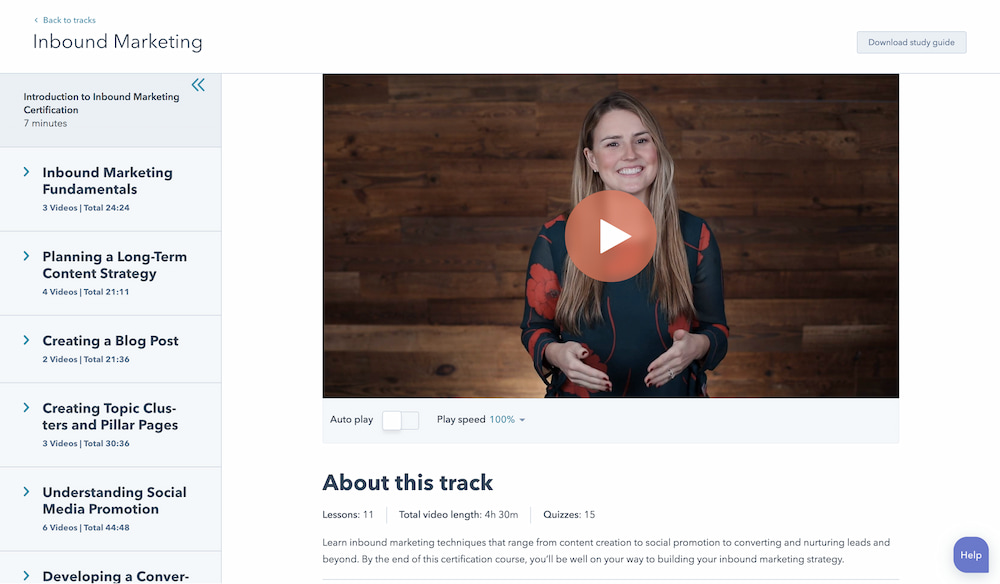
1. Inbound Marketing Certification by HubSpot Academy

free online courses: inbound marketing certification

Length: 4-5 Hours

From attracting leads to engaging prospects and delighting customers, this course covers the fundamentals of what inbound marketing is all about. It’s ideal for new graduates who’d like to go into marketing or for any experienced professional who’s considering shifting into a marketing career. It will give you the foundational knowledge you need to move into any marketing job.

Recommended for:

  • New marketing professionals
  • Experienced non-marketing professionals shifting into marketing

2. Build Your Web Presence by Google Digital Garage

Length: 30-60 Minutes

Learn the basics of websites, local business listings, review sites, social media, mobile apps, and more. This course is a helpful introduction to making your business visible online without delving too deeply into the specifics. We recommend it for small business owners and marketers just starting out in their careers.

Recommended for:

  • Small business owners
  • New marketing professionals at small businesses

3. Google Analytics for Beginners by Google Analytics Academy

Length: 4-6 Hours

This course shows new Google Analytics users how to create an account, implement a tracking code, and set up data filters. You'll learn how to navigate the Google Analytics interface and reports, and set up dashboards and shortcuts. We recommend this course for both beginner and advanced marketers who need a refresher on Google Analytics or need more advanced instruction.

Recommended for:

  • Marketing professionals at every level

Free Content Marketing Courses
4. Content Marketing Certification by HubSpot Academy

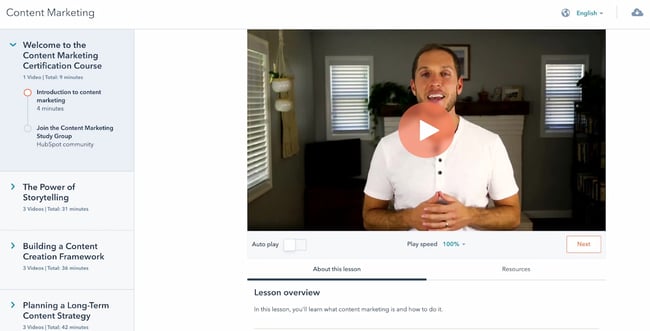
free online courses: content marketing certification

Length: 6-7 Hours

Power your business with remarkable content. This course will teach you how storytelling, content creation, repurposing, and promotion come together to build a content marketing machine that grows your business, and your career. While every professional will benefit from taking the content marketing certification course, it’s especially recommended for new content writers and content managers.

Recommended for:

  • New content marketers, content writers, and content managers
  • Experienced non-marketing professionals moving into a content marketing role

5. Viral Marketing and How to Create Contagious Content by Coursera

Length: 4-5 Hours

Ever wondered why some things become popular, while other things don't? This course explains how things catch on, and can help you apply those ideas to become a more effective marketer. This is a good course to take if you feel your marketing efforts aren’t yielding the results you want or aren’t becoming as widespread as you’d like.

While individual contributors would benefit from taking this course, marketing managers who have a hand on ideation and strategy would most benefit from the knowledge they gain.

Recommended for:

  • Mid- and senior-level marketers with a hand on strategy and ideation
  • Brand managers of all levels

6. Online Video Marketing Course by HubSpot Academy

Length: 2 Hours

This online video marketing training will teach you how to get started with online video marketing to better attract, engage, and delight your audience. It’s an excellent course for individual contributors with a hand on video creation and content creation. Managers would also benefit from taking the first course, “How to Create a Successful Video Marketing Strategy,” if they’ve not yet established a video marketing strategy.

Recommended for:

  • Video and content marketers getting started with video marketing
  • Marketing managers who want to start a video marketing strategy

Free Social Media Marketing Courses
7. Social Media Marketing Course by HubSpot Academy

free online courses: social media marketing

Length: 4-5 Hours

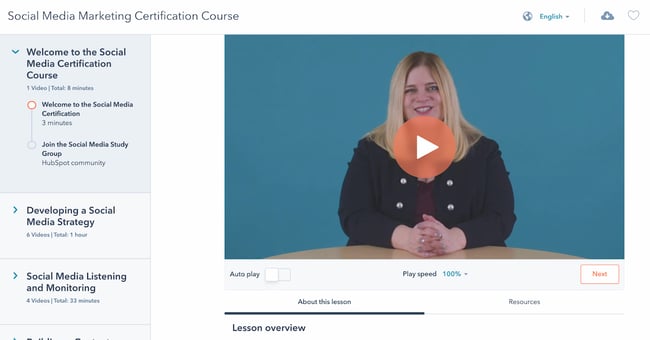
This course provides you with everything you need to build a social media strategy — including tools to help you attract new customers, build loyalty, and shape a positive conversation around your business. It’s a great fit for marketers of all levels who need a strong foundation on social media marketing.

Recommended for:

  • Marketers of all levels delving into social media marketing
  • Business owners who want to create a social media marketing strategy

Once you’ve completed this overarching social media marketing course, you can then jump into the following channel-specific courses.

  • Facebook Marketing (~1.5 Hours): Facebook is a huge platform, ripe with marketing opportunity. Learn how to develop an effective marketing strategy using Facebook that covers all the bases.
  • Twitter for Business Marketing (~2 Hours): You know Twitter beyond the basics, and now it's time to bump it up a notch. In this course, you'll learn the advancements in building and launching a successful Twitter marketing strategy.
  • Instagram Marketing (~2.5 Hours): An Instagram marketing and advertising strategy is one of the most powerful ways to connect with customers and drive marketing impact. This course takes you from the beginning to the end of planning an Instagram marketing strategy.
  • YouTube Marketing (1.5-2 Hours): HubSpot's course in YouTube Marketing is an in-depth, expansive set of tools and lessons that offer successful strategies to grow a monetized, optimized YouTube channel. It’s ideal for social media managers and anyone who would be creating videos for your company’s YouTube channel.

8. Introduction to Social Media Strategy by Skillshare

Length: 30-60 Minutes

Whether you're looking to foster brand awareness, increase website traffic, or drive sales, this course can teach you how to craft a social media strategy to achieve your goals on Facebook and Twitter. From finding your voice to buying paid advertising, this course walks you through a proven process for creating custom social strategies. It’s ideal for new marketers who need a quick refresher or overview.

Note: Skillshare offers community members free access to its courses for 14 days — you'll need to sign up as a member to access the class for free.

Recommended for:

  • Marketers of all levels delving into social media marketing
  • Business owners who want to create a social media marketing strategy

9. Video Storytelling for Social Media by Social Creators

Length: 5 Days

This crash course is set up like a challenge. The goal? Help you make high-quality videos with your iPhone or Android device so you can start vlogging and share engaging videos on your social media accounts. It’s ideal if you’re planning to market your brand or business over video-based channels such as Instagram or TikTok, and it’s specially a good fit if you don’t want to spend money on expensive video gear.

Recommended for:

  • Video marketers and content creators wanting to create storytelling videos
  • Freelance bloggers and content creators wanting to create more videos

10. How to Create an Instagram Content Plan by Later

Length: 1-1.5 Hours

This video series is a great introduction to the Instagram world. You'll learn how to gain more followers, build a community, and create content that drives true engagement. It’s ideal for you if you’re interested in finding influencer partners on Instagram and build a visual identity.

Recommended for:

  • Marketers at small businesses without an Instagram strategy
  • Freelance bloggers and online content creators

11. Free Social Media Analytics Course for Beginners by Quintly

Length: 10-11 Hours

This class will cover the basic principles of social media analytics, and is helpful both for beginners and for marketers who want to refresh their knowledge. It aims to help anybody involved in social media analytics, whether you're working for a brand, an agency, or the media. We highly recommend this course for new social media marketing managers who don’t know how to measure analytics for their company’s social channels.

Recommended for:

  • New social media marketing managers who are unfamiliar with social media analytics
  • Any marketer who’s interested in specializing in social media marketing

12. Twitter Flight School by Twitter

Length: Various

Twitter Flight School isn’t so much as a course as it is a school for both advanced and beginner Twitter marketers. Whether you're a social media coordinator or the director of social media marketing at an enterprise firm, Twitter Flight School’s courses will help you build the knowledge and skills you need to scale and improve your Twitter marketing strategy.

The courses have been designed to help you level up your expertise with advertising on Twitter, so that you can succeed. We don’t recommend it if you’re not planning to extensively use Twitter as a marketing channel.

Recommended for:

  • New and experienced social media professionals who are planning to use Twitter extensively
  • Any marketer or professional who wants to specialize in Twitter marketing

Free Email Marketing Courses
13. Cold Email Masterclass by Mailshake

free online courses: cold emailing

Length: Self-Paced

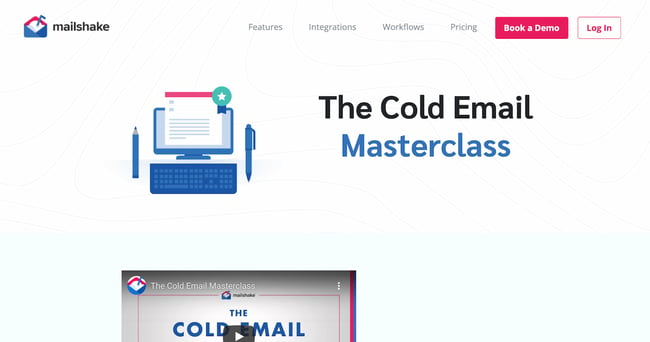
Whether you use cold emails to connect with influencers, build your personal brand, find mentors, or grow your network, there's no underestimating their power. Sujan Patel reveals eight lessons that will show you how to turn theory into practice, tapping into existing cold email best practices and deploying them in a way that's both efficient and effective.

It’s not applicable just to cold emails, either. You can use the course to learn email writing best practices that will serve you as you market to leads and prospects who’ve subscribed to your email list.

Recommended for:

  • Any marketer or professional who’s planning to email leads or other professionals in their network
  • Any professional who wants to improve their cold emailing skills

14. Email Marketing Certification by HubSpot Academy

Length: ~3.5 Hours

Email marketing is a necessity to learn. By completing HubSpot's course, you'll walk away with expansive knowledge in all things email marketing, from templates to testing, as well as a certification to add to your resume. This is an excellent follow-up to the Cold Email Masterclass, allowing you to specialize specifically in email marketing. You’ll learn to segment your user base and optimize email deliverability rates.

Recommended for:

  • Marketers of all levels who are planning to do email marketing

Free SEM Courses

15. Google Ads by Google Skillshop
free online courses: google ads

Length: Various

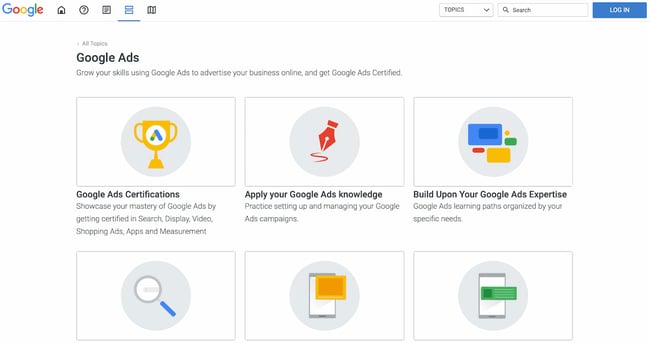
If you don't know where to start with Google's ad products, Google’s Skillshop for Google Ads may be for you. You'll figure out where to get started in mini, bite-sized lessons or jump straight into the certification process. Topics include programmatic ads, search ads, discovery ads, and video ads. If you already have experience with Google Ads, you can forgo taking the courses and instead apply your existing knowledge using a series of exercises.

Recommended for:

  • Marketers of all levels who want to further their knowledge or practice their existing Google Ads knowledge
  • Business owners who want to learn how to set up Google Ads

16. SEO Certification Course by HubSpot Academy

Length: 2-3 Hours

Interested in building traffic, but unsure about a successful strategy? Our SEO crash course eliminates the pains of navigating a concrete SEO strategy and provides you with the tools to implement a winning one. Because it starts from a basic starting point, we recommend it for beginner marketers only. If you’ve been in a digital marketing role for a few years, chances are you’re familiar with most of this information.

Recommended for:

  • New marketers who want to learn the basics of SEO and improve their SEO skills
  • Experienced non-marketing professionals who want to learn SEO

Free Sales Courses
17. Inbound Sales Certification by HubSpot Academy

free online courses: inbound sales certification

Length: 2-2.5 Hours

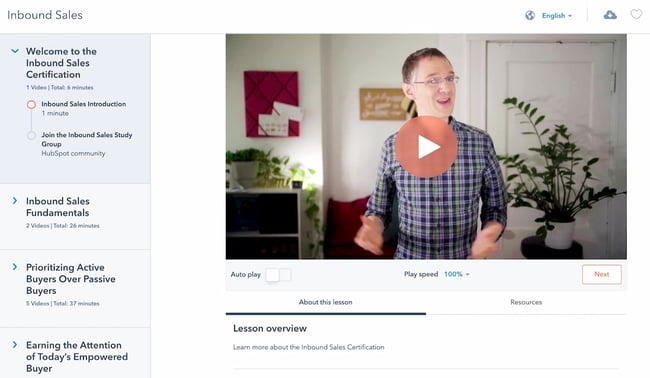
In this certification course, you'll learn how to grow your sales pipeline, close more leads, and grow your career. It’s ideal for new sales professionals or experienced salespeople who need a refresher or formal training in core sales skills.

Recommended for:

  • New and aspiring salespeople
  • Experienced sales professionals who need a refresher in sales fundamentals

Once you complete this initial certification, you can then dive into more specific topics such as sales enablement and management training.

  • Sales Enablement Certification (Length: 4-5 Hours): In this self-paced online course and exam, you'll learn how to align marketing and sales for optimal efficiency. You’ll learn to bridge the gap between marketing and sales teams with strategies and tactics from sales leaders.
  • Sales Management Training (Length: 3 Hours): Learn how to define your target market, create a scalable sales process, and build training, coaching, hiring, and on-boarding programs to help your sales team grow.

18. The Art of Sales: Mastering the Selling Process Specialization by Northwestern University

Length: 6 Months

This course is designed to make you more effective and efficient as you pursue your sales goals. Understand how to stand out in the crowd, attract customers, and build support for initiatives within your company. Plus, the most important art in sales is knowing how to get a "yes." This course teaches this, as well as methods to improve efficiency as a salesperson.

Recommended for:

  • Sales managers who want to improve the performance of their sales team
  • Experienced salespeople looking to level-up their skills

19. The SMART Sales System by SalesScripter

Length: 16-18 Hours

This program is designed to give you a strategy-backed process. It covers building a value proposition, asking the right questions, closing more effectively, and more. You'll sell more, and even better — selling will become more fun. After you’ve watched all of the videos in the training course, you’ll have an overview of the most important topics in sales.

Recommended for:

  • New sales professionals trying to get a high-level overview of the most important sales topics
  • Sales managers who want to level-up their team

Free Ecommerce Courses
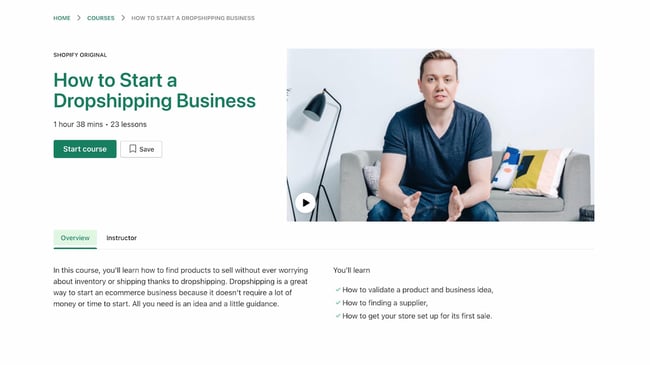
20. How to Start a Dropshipping Business by Shopify Academy

free online courses: dropshipping

Length: 1.5-2 Hours

Dropshipping is a business model where you don’t keep any products in stock at your own warehouses, but rather ship them directly from the manufacturers’ or suppliers’ warehouses. It’s one of the best ways to start an ecommerce business with few overhead and startup costs. In this course, Corey Ferreira shares his methods for finding a product to sell, testing its popularity, and building an unforgettable brand.

Recommended for:

  • Anyone who’d like to start an ecommerce business with a dropshipping model

21. Product Photography for Ecommerce by Shopify Academy

Length: 2 Hours

In this course, you'll learn how to set up your own home studio and take product photos with your smartphone or digital SLR. This is an ideal course for anyone who’s planning to sell the products they make in their online store. If you’re starting a dropshipping business, you can skip taking this course.

Recommended for:

  • Ecommerce sellers who need photos of the products they sell
  • Marketers at small ecommerce businesses

22. Ecommerce Marketing Training by HubSpot Academy

Length: 30-60 Minutes

If you work for an ecommerce business and want to implement an inbound marketing strategy, this is a good course for you. In this short crash course, you'll learn the basics of selling more online, and how that fits into an inbound strategy. We recommend taking this course once you’ve got the basics down, such as how to run a dropshipping business.

Recommended for:

  • Ecommerce sellers who want to grow their business

23. Email Marketing for Ecommerce by MailChimp

Length: ~30 Minutes

Learn how to use automation, optimization, and personalization to boost your business through email. Once you’ve got the leads from your ecommerce website, it’s time to nurture them through email marketing. This course will run through the entire process. Due to its inclusion of advanced marketing topics such as A/B testing and segmentation, we recommend it for experienced marketers at an ecommerce retailer.

Recommended for:

  • Experienced marketers working at ecommerce businesses
  • Freelance marketers with ecommerce clients

Free Coding & Developer Courses
24. Intro to HTML and CSS by Udacity

free online courses: intro to html and css

Length: ~3 Weeks

In this course, you'll learn the fundamentals of HTML and CSS, two core web development languages, along with best practices and professional problem-solving techniques using Developer Tools. This online coding lesson offers easy-to-follow instructions, interactive quizzes, and a tested curriculum that can help anyone learn how to code.

Recommended for:

  • Marketers, salespeople, and freelancers wanting to learn HTML and CSS

Udacity offers a variety of other courses that can teach you to code. Once you’ve covered HTML and CSS, you can then dive into:

  • Intro to JavaScript (Length: ~2 Weeks): After HTML and CSS, JavaScript is an essential language to learn if you’re planning to create high-performing websites. Udacity’s Intro to JavaScript course will cover all the basics you need to know.
  • Intro to Python Programming (Length: ~5 Weeks): Get to grips with key computer science concepts in this introductory Python course. You'll learn by doing, and will build your own search engine and social network.
  • Self-Driving Fundamentals: Featuring Apollo (Length: ~4 Weeks): Through this course, you'll be able to identify key parts of self-driving cars and get to know Apollo architecture. You'll be able to utilize Apollo HD Map, localization, perception, prediction, planning, and control, and start the learning path of building a self-driving car. We recommend taking this course for fun.

25. Learn Java by Codecademy

Length: 25 Hours

Codecademy offers an excellent repository of coding courses. If you didn’t like Udemy’s HTML and CSS class, we highly recommend learning it from Codeacademy instead. One of the languages you can learn is Java, which can be used to create web applications, software-as-a-service products, and mobile apps.

Because it’s a more advanced programming topic, we only recommend it if you’re planning to start a computer science career or develop your own web app or SaaS.

Recommended for:

  • Any professional who’s interested in shifting into a developer role or code their own app

26. Introduction to iOS App Development, Xcode, and Interface Builder by Devslopes

Length: 10-15 Hours

This iPhone app development course will give you all you need to create your very own iOS app from the ground up. You’ll specifically learn how to create an app using XCode, Apple’s iOS app builder, and Interface Builder, which is a feature within Xcode. With clear video tutorials that are easy to follow, this course will get you up-to-date with the latest in iPhone app development trends.

Recommended for:

  • Any professional who’s interested in coding their own iOS app

27. Algorithms, Part I by Princeton University

Length: ~53 Hours

This course by Princeton University covers the essential information that every serious programmer needs to know about algorithms and data structures, with emphasis on applications and scientific performance analysis of Java implementations. Because algorithms are a more advanced coding topic, we only recommend it if you’re planning to shift into a programming career. If that doesn’t sound like you, start with Udemy’s HTML and CSS course instead.

Recommended for:

  • Any professional who’s interested in shifting into a programming career

28. Machine Learning by Stanford University

Length: ~60 Hours

The description of this course reads, “Machine learning is the science of getting computers to act without being explicitly programmed.” In other words, machine learning allows computers to act based on prior user input. Speech recognition and self-driving cars are examples of machine learning. If you want to create a web or mobile application that uses machine learning to improve the user experience, we recommend this course. This is an advanced coding topic that’s only recommended for current programmers.

Recommended for:

  • Programmers who want to get foundational knowledge in machine learning

Free Personal & Professional Development Courses
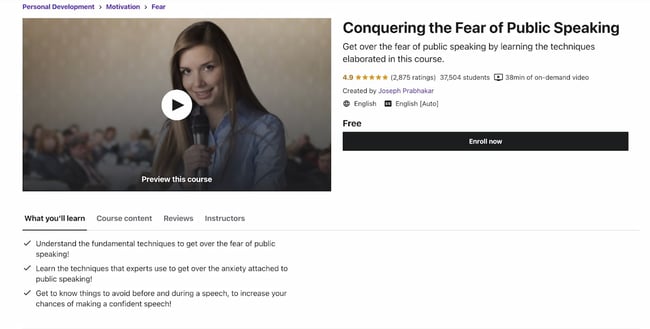
29. Conquering the Fear of Public Speaking by Udemy

free online courses: public speaking

Length: 30-60 Minutes

We all fear public speaking — or, at the very least, feel a measure of anxiety whenever we have to give a speech or a presentation. This course will teach you techniques to overcome the fear of public speaking, as well as how to avoid feeling nervous before speaking publicly. It’s a short course, too.

Recommended for:

  • Anyone who wants to overcome the fear of public speaking

30. Learning How to Learn: Powerful Mental Tools to Help You Master Tough Subjects by Deep Teaching Solutions

Length: ~15 Hours

Whether you’re a student or a young professional, learning how to digest and access information is a key skill to succeed at both school and work. This delightfully “meta” course teaches you how to learn new subjects and retain information.

Recommended for:

  • Students of all levels who want to get better at retaining information
  • Professionals of all levels who want to learn how to retain information

31. Successful Negotiation: Essential Strategies and Skills by University of Michigan

Length: ~17 Hours

In this course created by the University of Michigan, you'll learn about and practice four key steps to a successful negotiation. While negotiation skills may be most often used at work, and specifically during a sales call or prior to signing an employment contract, it can also be used in your day-to-day and personal interactions.

Recommended for:

  • Professionals of all levels

32. The Manager's Toolkit: A Practical Guide to Managing People at Work by University of London

Length: ~29 Hours

This course gives you a practical guide to managing people at work. It doesn't matter whether you are a first-time manager in a shop or a middle manager in an office environment — the same skills apply to every workplace.

Recommended for:

  • Mid- to senior-level professionals moving into a managerial role

33. Career Success Specialization by University of California, Irvine

Length: ~2 Hours / Week (11 Months)

This series of courses will teach you project management skills, communication skills, time management skills, and financial skills — all of which are needed to succeed in today’s workforce. You’ll also learn business writing and negotiation skills. We recommend it for new graduates or anyone who’s still in college.

Recommended for:

  • New college grads or current college students

34. The Science of Happiness by University of California, Berkeley

Length: 4-5 Hours / Week (11 Weeks)

Feeling down because of the pandemic? We’re right there with you. This course by UC Berkeley will walk you through the concept of happiness from a scientific and psychological standpoint, and give you practical tips for boosting happiness when you’re feeling blue.

Recommended for:

  • Anyone who’d like to improve their happiness in work and life

35. The Science of Wellbeing by Yale University

Length: ~19 Hours

The purpose of this course is to not only learn what psychological research says about what makes us happy, but also to put those strategies into practice. It’s an excellent follow-up to UC Berkeley’s course above. It’ll help you rewire the way you think about happiness.

Recommended for:

  • Anyone who’d like to improve their happiness in work and life

Free Design Courses
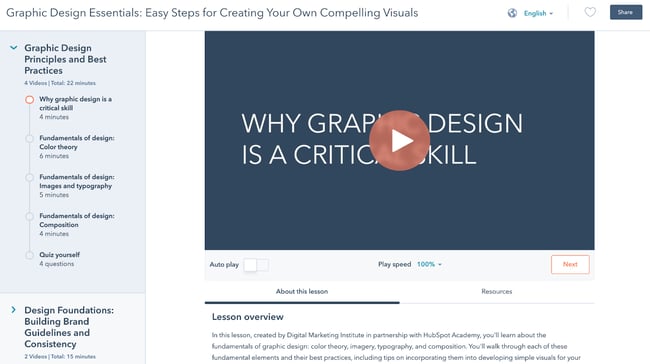
36. Graphic Design Course by HubSpot Academy

free online courses: graphic design

Length: 30-60 Minutes

Need to become a graphic designer in less than an hour? This course by HubSpot Academy offers basic concepts in graphic design to create designs that accurately represent your brand. You can then translate these concepts to any tool of your choosing, including Adobe Illustrator, Canva, and even PowerPoint.

Recommended for:

  • Non-design professionals who need to learn the basics of graphic design

37. Learn Adobe Illustrator From Scratch by EduOnix

Length: 10-11 Hours

Adobe Illustrator is one of the best tools you can use for your graphic design projects. In this course by EduOnix, you’’ll learn how to master Adobe Illustrator with real world examples. We only recommend it if you have an active Adobe Creative Cloud subscription.

Recommended for:

  • Designers who need to learn how to use Adobe Illustrator quickly

Free Business & Finance Courses
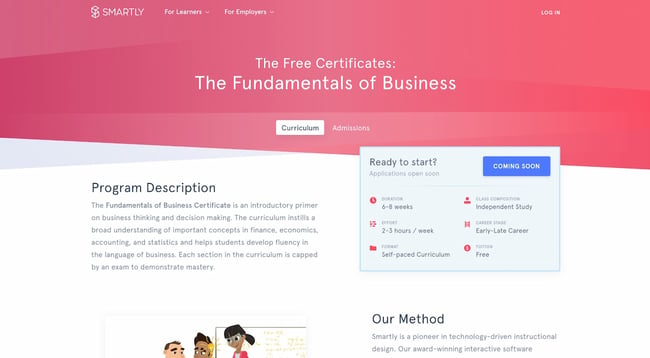
38. The Fundamental of Business by Smartly

free online courses: fundamentals of business

Length: 2-3 Hours / Week (6-8 Weeks)

Designed with input from business professors, Smartly's Fundamentals of Business course combines a self-guided software approach with collaborative online case studies and group projects. It's a flexible yet structured course for the modern professional who wants to learn the basics of business.

Recommended for:

  • Early-career professionals who want to start a business or move into executive roles

31. Stock Market Investing for Beginners by Udemy

Length: 1.5-2 Hours

Learn the basics of the stock market through comprehensive, interesting, and fun lectures. This is an essential course for anyone who’d like to invest and diversify their portfolio.

Recommended for:

  • Anyone who wants to start investing

32. Corporate Finance by New York University

Length: Self-Paced

New York University’s Corporate Finance course is a big-picture class. It looks at the financial principles that govern how businesses raise funds, invest those funds in assets and projects, and return those funds to investors. This would be a helpful course for both entrepreneurs and professionals considering starting a career in corporate finance.

Recommended for:

  • Entrepreneurs
  • Professionals moving into executive roles
  • Professionals interested in shifting into corporate finance

Free Writing Online Courses

33. Good with Words: Writing and Editing by University of Michigan

Length: 18-20 Hours

Good with Words: Writing and Editing prepares you to write strong prose from a grammatical, technical, and syntactical standpoint. This is an excellent option for anyone who’d like to strengthen their writing skills without necessarily diving into additional topics such as marketing or essay writing. It’s a great foundational course for any type of writing discipline, including fiction writing.

To take this course for free, click the “Enroll for Free” button. In the pop-up, click “Audit the course.” This will give you the option to view the course materials without paying for the certificate.

Recommended for:

  • Any professional who writes emails, social posts, articles, and web pages in their role

34. Business Blogging by HubSpot Academy

Length: 2 Hours

Business blogging is more than just writing and publishing content in the hopes you'll attract customers. In this course, you'll learn how to craft a blogging strategy that drives business growth, create quality blog content that customers love, and build a guest blogging strategy that's powered by SEO.

Recommended for:

  • Mid- to senior-level marketers who have a hand on their company’s marketing strategy

Free Communication Online Courses

35. Communication Skills - Persuasion and Motivation by NPTEL

Length: 1.5-3 Hours

This course will introduce you to essential communication skills that aid persuasion, guide you through the differences between persuasion and manipulation, and show you how to use strong communication to motivate the people around you. These abilities will be a great boost for both your professional and personal relationships.

Recommended for:

  • Anyone who’d like to improve their communication skills

36. Conflict Management Specialization by University of California, Irvine

Length: 4 Months

With this series of courses by the University of California Irvine, you’ll learn listening skills, verbal and non-verbal communication skills, and how to assemble a conflict management plan likely to yield positive resolutions. While anyone would benefit from taking this course, it’s specially recommended for professionals in people-management roles.

Recommended for:

  • Mid- to senior-level professionals who manage teams or other people
  • Anyone who’d like to improve their conflict management skills

Free Entrepreneurship Online Courses

37. How to Build a Startup by Udacity

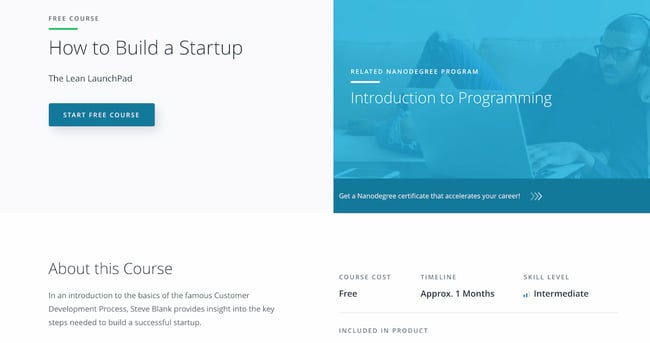
free online courses: how to build a startupLength: ~1 Month

In this course, Steve Blank provides insight into the key steps needed to build a successful start-up. You’ll learn the various types of business models, the parts of a value proposition, the concept of customer segmentation, and more. This is a top-to-bottom course that will give you the foundations you need for starting a business.

Recommended for:

  • First-time entrepreneurs

38. Business Strategy Specialization by University of Virginia

Length: ~6 Months

Develop your ability to think strategically, analyze your competition, recommend a positioning strategy, and create value. In this course, you'll explore the underlying theory and foundation of a successful business strategy, and gain the tools you need to understand that strategy.

Recommended for:

  • Entrepreneurs with an existing business they’d like to grow

39. Marketing Fundamentals: Who Is Your Customer? by Babson College

Length: 3-4 Weeks

Marketing Fundamentals: Who Is Your Customer? will help you discover how to acquire the right customers and grow your startup business. While it’s branded as a marketing course, it’s designed for entrepreneurs who don’t know how to begin marketing their new product or service, and who want to understand their target market. That said, it’s also a great course to take if you’re interested in going into marketing.

Recommended for:

  • Entrepreneurs without a marketing background
  • Professionals with an interest in marketing

Free Humanities Online Courses

40. Introduction to Digital Humanities by Harvard University

Length: ~7 Weeks

The term “humanities” encompasses a wide variety of disciplines and fields. Regardless of your favorite humanities subject, learning how to carry out research and visualize the subject using digital tools is essential if you’d like to progress in your career.

Recommended for:

  • Any professional who carries out research in the humanities

41. Modern Masterpieces of World Literature by Harvard University

Length: ~8 Weeks

Explore some of the world’s most salient literary masterpieces in Harvard’s Modern Masterpieces of World Literature course. You’ll get a taste not only of the English literary tradition, but of others around the globe, too.

Recommended for:

  • Any professional who’s interested in global literature

42. Global History Lab by Princeton University

Length: ~3 Months

If you’re in need of a history course, consider Princeton University’s Global History Lab. We recommend it for beginners who want an overview of history from the 14th century up until now. While the course is sometimes archived, you may be able to access it live and discuss the course materials with other current students.

Recommended for:

  • Any professional who’s interested in history

43. Gender and Sexuality: Applications in Society by the University of British Columbia

Length: ~6 Weeks

If you’re interested in studying gender from a theoretical and epistemological standpoint, Gender and Sexuality: Applications in Society is the course you need to take. It will give you an overarching overview of gender and sexuality through a variety of perspectives and lenses.

Recommended for:

  • Any professional who’s interested in gender and sexuality

Free Language Online Courses

44. Basic strongish 1: Getting Started by the Universidad Politécnica de Valencia

Length: ~7 Weeks

Learning a new language is always a worthwhile investment, especially if you’re a global marketer or salesperson. This basic strongish course by the Universidad Politécnica de Valencia will help you establish a foundation for further learning.

Recommended for:

  • Any professional who’s planning to use strongish at work or for leisure

45. Mandarin Chinese Level 1 by MandarinX

Length: ~6 Weeks

If you’re planning to expand your business into the Asian market, then learning Mandarin is key, given that Mandarin is the most spoken language in Asia. It’s also a popular language for business. Mandarin Chinese Level 1 will give you the foundation you need to take more advanced Mandarin courses.

Recommended for:

  • Any professional who’s planning to use Mandarin at work or for leisure

46. Getting Started with French 1 by The Open University

Length: ~6 Weeks

Have you been wanting to learn French? Getting Started with French 1 will teach you the basic phrases you need to interact with others in a French-speaking environment. We highly recommend taking all of the courses in this series as a precursor for more advanced language study.

Recommended for:

  • Any professional who’s planning to use French at work or for leisure

Learning is an investment that continues to pay.

Benjamin Franklin once said, “An investment in knowledge always pays the best interest.”

That’s never been truer than it is today. With new technologies emerging at breakneck speeds, there's a palpable pressure to continuously upskill.

We hope you found the online business courses you need for the next step in your career — whether you're looking for a promotion or a sidestep into an entirely new field.

Whatever your reason, learning new skills will give you a competitive advantage in today's rapidly changing workplace. Plus, the more you invest in your learning, the better you'll grow.

If you're looking for one single place to learn how to take your career to the next level and/or grow your business, check out HubSpot Academy. It contains tons of free certified courses on everything from inbound and content marketing to social media and sales.

Editor's note: This post was originally published in January 2020 and has been updated for comprehensiveness.
HubSpot Academy - Grow your business, and your career.


46 Best Free Online Courses For Whatever You Want to Learn was originally posted by Local Sign Company Irvine, Ca. https://goo.gl/4NmUQV https://goo.gl/bQ1zHR http://www.pearltrees.com/anaheimsigns