Wednesday, December 22, 2021

How to Create An Action Plan: A Straightforward Guide for Marketers

Have you ever sat down at your desk first thing in the morning and spent a good 45 minutes browsing social media or getting lost in your inbox because you can’t focus on what you need to do? At the end of the day, you feel as if you’ve wasted 8 hours of your life that you’ll never get back.

On the other hand, have you ever sat down, opened your calendar app or a to-do list, and jumped right into work, knocking out task after task in a matter of minutes? When you shut your computer at the end of the day, you feel accomplished and know that you’ve done everything possible to move towards your professional goals.

What’s the difference between these two scenarios? A plan. Having your day (or week, or project) mapped out with a concrete action plan will help you feel more focused and accomplished in less time. When it comes to marketing, an action plan could mean the difference between a campaign that sizzles and a campaign that fizzles.

Now that you know there’s a way to ensure more days end with the satisfaction of work done well, let’s take a closer look at what these plans actually are and how they can benefit you.

What is an action plan?

An action plan is a proposed strategy for whatever you want to accomplish. It’s a clear, detailed list of all the steps you need to take to reach your goal, along with a proposed timeline of when you’ll complete each step or task.

Perhaps you’ve heard of action plans in the past, but never tried to create one of your own, Or maybe, this is a brand new concept to you and you’re pretty sure you just heard a choir of angels in the background.

What is the purpose of an action plan?

Action plans are designed to help you reach your goals faster. By breaking down projects into smaller steps, you can ensure that you:

  • Meet your goal in a timely fashion
  • Don’t skip a step
  • Communicate effectively with team members
  • Set reasonable expectations for what you can accomplish in a specific period of time

While they will vary in complexity, action plans are good for small projects, large projects, projects that you complete on your own, and projects that involve other team members or individuals outside of your organization.

Convinced you need action plans in your life? Good. Let’s take a look at the steps necessary to implement them.

How to Write an Action Plan

Action plans can be as simple or complex as they need to be. However, before you start writing out the steps to reach your goal, you’ll need to identify something very important… your goal, of course!

What is it that you’d like to accomplish? Is there a new campaign you need to prepare before a specific launch date? Maybe you’re teaming up with another business or a nonprofit for cross-promotion. Perhaps you’re looking to increase brand awareness through various channels.

Whatever your goals, get very clear on what it is you want, why it’s important, and when you need it done. You may wish to create a SMART Action Plan by incorporating SMART goals into it. SMART stands for: specific, measurable, attainable, relevant, and timely. This framework helps you determine if your goals are realistic, identify what actions are needed to reach your goals, and defines what success looks like.

SMART goal action plan example from HubSpot

Once you’ve determined what you want to accomplish and when it will need to be done, it’s time to start devising your plan. Follow these easy steps to create your plan of action.

  1. Use a template or tool to capture your action plan and share it with anyone who needs to be involved. (You’ll find some options in the next section)
  2. Brainstorm. Consider all the steps that need to get done to complete your project. You may find it helpful to start with larger aspects of the project and then break those down into smaller tasks. No task is too small to be listed (let’s be honest, checking things off a to-do list feels amazing).
  3. Delegate and assign responsibilities to team members. You don’t have to go it alone! Hopefully, you have a trustworthy team standing by to help complete tasks and inch you closer and closer to the finish line. This also allows you to identify what resources you need to achieve the goal.
  4. Schedule due dates. If your project needs to be done by a specific day (which it should or it could stretch on indefinitely), then each task will have its own due date. Keep in mind that some tasks can be worked on at the same time, while others will require that a previous task has been finished before you can start the new one.
  5. Set up alerts to keep yourself (and your team) on track. It’s very easy to get caught up in the day-to-day grind and forget about a larger project looming in the distance. Use your scheduled due dates to set up reminders and pencil in time to work on specific tasks.
  6. Track your progress and check in with your team. Your action plan may have looked top-notch when you wrote it, but as you work through it, you may discover that things need to change. If you see that you’re falling behind in the tasks, it may be time to re-evaluate and potentially tweak your action plan.
  7. Celebrate. Completing a project is often cause for celebration, but don’t forget to review what worked and what didn't for a smoother project next time.

Leadership action plans will not only help you achieve your goals, but will also help your team be clear on what they need to do, and feel accomplished once they’ve done it. They will also serve to identify any weak links in your organization.

Action plan Formats may differ depending on the needs of our specific project, however, as long as you include the goal, the steps, the people involved, and the due dates, you’ll have a solid plan to work with.

Action Plan Templates

When you’re ready to create an action plan, there’s no need to start from scratch. There are a number of templates and examples available that will provide the framework you need to devise your marketing strategy.

Below, is an action plan example for a 30-60-90 Day onboarding plan. This can always be tweaked to onboard individuals into a marketing position, or to create a marketing plan for your organization.

Sample action plan for onboarding

A marketing action plan may be as simple as this template:

Sample action plan for marketing

Image Source

You can also use Hubspot’s Marketing Plan Generator to guide you along the way.

No matter how you do it, an action plan may take a little bit of time to create, however, you’ll save time, energy, and resources when you have a clear plan of action for your next project or campaign.

New Call to action


How to Create An Action Plan: A Straightforward Guide for Marketers was originally posted by Local Sign Company Irvine, Ca. https://goo.gl/4NmUQV https://goo.gl/bQ1zHR http://www.pearltrees.com/anaheimsigns

Podcasting in 2022: What You Need + 9 Steps To Get Started

I first discovered podcasts a few years ago when I was commuting for work two to three hours a day, every day.

The first podcast that got me hooked was NPR’s "How I Build This" show on entrepreneurship. 

➝ Free Guide: How to Start a Podcast

Today, I listen to a wide range of podcasts on business, pop culture, and current events, like The Nod and "Louder Than a Riot." So, what does it take to start a podcast in 2022? We’ll cover that in more in this article.

  1. Find a unique and compelling topic or theme.
  2. Set up your show format.
  3. Leverage your network.
  4. Record and edit your episode.
  5. Finalize your creative assets.
  6. Set up a website.
  7. Build a promotion strategy.
  8. Track your metrics.
  9. Learn how to monetize your podcast.

What is a podcast and how does it work?

A podcast is an audio series that a user can download to a personal device and listen at their leisure. It centers around one theme or topic, with each episode typically ranging from 20 to 60 minutes.

Think of a podcast as the audio version of any television series. It follows the same production format: It follows a specific theme or topic, t’s episodic and can have several seasons, and can be reality- or fiction-based.

One thing that sets podcasts apart from TV series is the use of a podcast host. Every podcast needs a host who can narrate the story and guide the listener through the episode. In addition, podcasts are only audio. Otherwise, the two mediums are very similar.

The most popular platforms to listen to podcasts include Apple Podcasts, Spotify, and Google Podcasts.

Google Trends shows that podcasts have gradually become more popular, peaking around the fall of 2019 and the spring of 2020 worldwide.

Today, 28% of the U.S. population over 12 years old listens to podcasts on a weekly basis, according to the 2021 Infinite Dial study – a 17% year-over-year increase.

Podcasts vs Standard Audio Files

The difference between a podcast and standard audio files is the same as the difference between a video and a television series.

An audio file is a file format used to store audio on a digital device. A podcast, on the other hand, is a produced show that involves storytelling, formatting, and audio sourcing. You need audio files to create a podcast, but the same is not true the other way around.

What is a podcast host?

A podcast host is a platform that stores your podcast and distributes it to publishing platforms like Apple Podcasts and Spotify. Here’s how it works: You first upload your audio file to your hosting platform, then they create an RSS feed and send your episodes to various directories (AKA publishers).

The most popular podcast host platforms include Casted, Buzzsprout, Captivate, Libsyn, and PodBean. Here are the top features you should look for as you evaluate your options:

  • Transcription integration
  • Unlimited storage and bandwidth
  • Custom website
  • Analytics
  • Text editor for show notes

What equipment is needed for a podcast?

One of the best things about starting a podcast is that it doesn’t take much to get started. All you need are these high-quality items:

  • A microphone – While you might be tempted to use your computer’s or phone’s built-in microphone, invest instead in an XLR or USB mic that will offer better sound quality. If you’re just starting out, you might opt for a dynamic mic that’s less sensitive to ambient noise. If you have a studio set up, a condenser mic might be better.
  • A studio or soundproof room – When recording a podcast, you should minimize ambient noise as much as possible as that can distract listeners. Because of this, it’s important to create a quiet, soundproof space to record.
  • Editing software – Once you record your episode, you will need to edit it to add in music and ad spots and remove any content that may not fit. There are various audio editing software that you can use, including Audacity, Adobe Audition, and Descript – each ranging in editing features.
  • Noise-canceling headphones – Headphones are important both during production and in post-production as they allow you to monitor and detect sounds during the recording.
  • A hosting platform subscription – Before you can distribute your episodes, you must first upload your files to a hosting platform first.

1. Find a unique and compelling topic/theme to cover.

The first thing you need to start a podcast is an idea. For an individual, it can stem from a passion for or expertise in a particular topic/industry. For a brand, this can come from research you’ve gathered about your audience.

At the core, your podcast should speak to a particular audience. Because if there’s no interest in it, then you’ll be speaking into an empty room. And if you’ve ever done an 8 a.m. PowerPoint presentation in college, you know exactly what that’s like.

If you’re reading this article, there’s a good chance you already have an idea for a podcast. In this case, the goal is to dive deeper into your idea and see if it’s worth pursuing.

To do this, here are the questions you want to ask yourself:

  • Has this been covered before in another podcast? If so, is there another angle I can take?
  • Is this idea relevant and timely?
  • Is there an audience for this? If so, what type of listeners will it attract?
  • Is there enough content to create a season?

You’ll know you have a winning idea when you have a clear answer to these questions. Your idea may go through some changes as you develop it but the foundation starts here.

During this step, you may be tempted to secure your name and logo but we recommend waiting on that. More on that in step five.

Want some inspiration? Check out these marketing podcasts.

2. Set up your show format.

The great thing about podcasts is that they can follow just about any format.

Some are interview-based and conversational with one or several hosts bringing on guests while others focus on storytelling (fictional and non-fiction). It’s up to you to decide which format will suit your theme the best.

From there, start brainstorming your episode segments, which break down your show into sections to make it easier for listeners to follow.

Segments aren’t always clearly stated either. Sometimes, it’s as simple as act one, two, and three. It’s all about finding the best way to tell the story in a way that captures and maintains the audience’s attention.

3. Leverage your network.

Once you’ve figured out which format you want to follow, you might need to reach out to your network.

Perhaps you need a co-host, or you need to line up a few high-profile guests for upcoming shows. This is when you reach out to your network.

In addition to posting on your social platforms, you should also reach out to your network in shared interest groups, like Facebook Groups, as members may have a special interest in your project.

4. Record and edit your episode.

Now that you’ve worked out all the editorial details of your podcast, it’s time to record your first episode.

While this may seem nerve-racking, see it as a dry run. Once you review the recording, you can work out any kinks in the episode regarding segments, flow, storytelling, etc.

Don’t be afraid to ask for feedback from others. While you’re in the early stages of developing your podcast, this is the perfect time to get notes on where you can improve and implement them before it officially launches.

5. Finalize your creative assets.

So, earlier I mentioned not finalizing your name and logo during the initial development stages. That’s because, from idea to production, your idea may have evolved into something different from what you originally thought.

In addition, you may get more inspiration after creating your first episode and having a clear product to name.

You may find that you had a name for your podcast from day one, and that’s great. But if you need something more concrete to get your juices flowing, that’s fine too.

6. Set up a website.

Consider your website as your home base for your podcast.

It’s where all information surrounding your podcast will live, including show notes, transcripts, episode descriptions, host descriptions, and more. It also allows you to get more listeners by increasing organic traffic to your website.

By following SEO best practices, you can reach consumers who may be interested in your content and make them convert once they land on your website.

7. Build a promotion strategy.

Having a great podcast concept won’t be enough to attract users. You have to build a robust promotion strategy to get it in front of your target audience. Because how will they listen to something they don’t even know exists?

First, the pre-launch. Promotion doesn’t start after your first episode has aired, it should start before.

Why? It builds anticipation surrounding your show and can help you start out with a strong listenership right out of the gate. Share on platforms you’re already on along with those you haven’t yet explored.

For instance, you might start by securing your handle on social media and sharing a few posts to count down the air date for your first episode. If you already have a captive audience elsewhere, like a newsletter or a blog, prioritize promotion on those channels as well.

Once your show launches, be consistent about promoting the episodes, and don’t be afraid to test various methods.

You may find that posting audio snippets from episodes get higher engagement rates than posting about your guests. Or vice versa.

Once you identify what your audience responds to, stick with it.

Pro-tip: Reviews can go a long way in gaining new listeners. During your post-launch strategy, consider incentivizing your audience to leave a show review by hosting a giveaway.

8. Track your metrics.

If you’re not tracking it, did it even happen?

Once your podcast launches and is in full swing, start monitoring its performance. Here are the metrics you want to keep an eye on:

  • Subscriber count
  • Monthly episode downloads
  • Unique page views to the podcast page
  • Average listening time

Every piece of data you track will offer insight into your listeners and inform your strategy for future episodes.

For instance, say your top episode is on a particular topic, you could cover that more. Here's an in-depth piece on how to grow a podcast.

9. Learn how to monetize your podcast.

Finally, it’s important to figure out how to earn an income based on your podcasting.

The most straightforward way is through sponsorship. Ever heard "This episode is brought to you by [insert brand]"? Well, it means the show has set up a partnership with the brand to increase brand awareness or meet another marketing goal.

In some cases, the sponsorship will also include ads pre-roll (at the beginning of the episode) and mid-roll (in the middle of the episodes). However, that’s not always the case.

Affiliate marketing, which refers to the process of promoting a product or service in exchange for a commission on the sale. Podcasts hosts will often do this by offering a unique discount code that includes the show name.

With both strategies, you’ll have to actively seek out these brands in the beginning. Create a pitch explaining the benefits of partnering with you. It’s easy to do this once you have a few episodes under your belt and can show metrics to support your points.

Another podcast monetization strategy is offering paid membership tiers for exclusive, bonus content through services like Patreon and Stitcher Premium. For instance, say your podcast is interview-based.

You could promote extended interviews at the end of each episode and encourage your listeners to join your membership platform.

If you join a podcast network or advertising network, some of this work is done for you. But it also means you don’t have full control over which ads are placed on your show. Additionally, you may not receive the full profit from the ad, as that may be split between you and the network.

Lastly, you can also maximize your podcast by publishing it on YouTube. If you have a good at-home setup or a studio setup, consider recording both video and audio – particularly if your show is educational or conversational.

This way, you can publish it on YouTube, access a wider audience, monetize your channel, and diversify the ways in which you promote your show.

New Call-to-action


Podcasting in 2022: What You Need + 9 Steps To Get Started was originally posted by Local Sign Company Irvine, Ca. https://goo.gl/4NmUQV https://goo.gl/bQ1zHR http://www.pearltrees.com/anaheimsigns

What Is Bounce Rate? (And How Can I Fix Mine?)

Bounce rate is a metric that can be confusing when you first stumble upon it. I’m sure several questions pop into your head: Is a bounce rate close to 100% good or bad? Is it at all like a bounced email? Is it a vanity metric that I should ignore? And if I want to fix it, what should I do?
Access Now: 21 SEO Myths to Leave Behind in 2021

Luckily, you're not alone. Many marketers have asked those questions and might not have found a solid answer yet. We're here to demystify bounce rate with an overview of what constitutes a bounce rate — what doesn't — and exactly how you can fix it.

Keep in mind that bounce rate is different from an exit rate. Bounce rates only measure "one-and-done" visits — the ones in which people arrive and leave your website without navigating away from a single page. Here's what they look like in your HubSpot Web Analytics Dashboard, for example:

Bounce rate by source in HubSpot dashboard

Exit rates, on the other hand, are a little more complicated. They include the percentage of people who leave your website from a certain page — but, that's not necessarily the only page they've visited on your website. The page from which they exited could be the last in a long sequence of page visits. That's why the exit rate isn't always as troubling as bounce rates.

But a high exit rate, on the other hand, wouldn't be cause for concern. It would mean that this page was the last in a chain of visits — people exiting from that page probably arrived from its preceding landing page, downloaded the offer on the thank-you page, and left to go make use of the content they just downloaded.

Keep in mind that this scenario is hypothetical, and these takeaways can differ based on other page metrics — but it serves as a simple illustration of the difference between bounce and exit rates.

For example, if 100 people visit your site and 10 of them only visit one page, then your bounce rate would be 10%. This number will likely change over time, so using an analytics provider to track all the changes is beneficial for understanding what’s affecting your bounce rate.

What is a good bounce rate?

If you’ve recently taken a look at your website’s bounce rate, you might find yourself discouraged at the number. But if you then decide to aim for a 0% bounce rate, you’ll probably find yourself even more discouraged. The average bounce rate is somewhere between 26% and 70%, with the optimal range being between 26% and 40%. To land anywhere under 20% is generally unlikely, so if that’s what your data is showing then you may want to double-check some things. Duplicate code, incorrectly implemented tracking, and third-party add-ons can all result in an inaccurately reported bounce rate.

The average bounce rate can also change depending on the viewer’s device. Mobile devices, for instance, have the highest bounce rate across all industries at 51%. Whereas the average bounce rate on a desktop is 43% and the average for tablets is 45%. So, take into account where the traffic is coming from as you’re judging your site’s bounce rate.

High Bounce Rate

A bounce rate over 70% is above average, but it’s not necessarily on the high side until it’s reaching 56%. If it’s over 90%, that’s a major cause for alarm but it's usually easy to decrease because there’s something specific scaring everyone off. Things like bad design, errors in your tracking code, excessive bots, or browser incompatibility could be the culprit. Also be aware that high traffic from social media or paid ads, as well as a lot of mobile visitors can be increasing your bounce rate as well.

How to Reduce High Bounce Rates

Now you know what a bounce rate is. But what can you actually do about it?

In general, high bounce rates might indicate that the page is irrelevant or confusing to site visitors. But don't jump into drastic actions like deleting a page or undertaking a redesign right away. There are some important steps you need to take before you figure out which action to take.

Remember: Bounce rates only tell you that someone landed on a web page and left it without visiting any other page on your website. It doesn't tell you how someone interacted with your page. That's why it's important, says Director of Product Marketing at Iterable Jeffrey Vocell, to take "practical steps" to examine other metrics and pieces of your web presence to see what might be behind the bounce rates. We've outlined these steps below.

1. Ensure your website is mobile-friendly.

Mobile users account for about half of web traffic globally. That makes it crucial, says Vocell, "to not only provide a mobile-ready experience," but to make sure that experience is engaging. How annoying is it when you arrive at a mobile site, only to have to zoom in to read its content? Having a responsive site is no longer enough — engagement with the mobile version has to be user-friendly and interactive.

Video is one particularly engaging type of content. It can often explain complex topics more concisely than text, which might be why 4X as many customers would rather watch a video about a product than read about it. But when it comes to mobile usage, long videos require a significant amount of data and might therefore slow the user experience — causing the visitor to bounce. For that reason, Vocell suggests eliminating these longer videos from your mobile site or creating more concise versions that still address the most important points.

This kind of improvement, however, isn't limited to video. Take a holistic approach to evaluating your mobile experience, and consider how you'll address contingencies like these.

2. Look at your bounce rate based on different sources.

Sometimes, the sources directing traffic to a given page might have something to do with its bounce rate. That's why the HubSpot Web Analytics Dashboard allows you to break down the bounce rate according to source:

bounce rate by direct traffic source in hubspot

Let's say your bounce rate is particularly high from direct traffic — take a close look at the URL to make sure it's easy to read, remember, and type in. Then check to see that the visitor isn't being greeted with a 404 error or a home page that isn't very inviting. The headline should be clear and signal to the person that they're in the right place.

You have to meet the expectations of the visitor — regardless of source.

3. Avoid other disruptions that might hurt the user experience.

We've already discussed the importance of a good mobile user experience, and that goes for all platforms. Things like full-screen pop-ups, for example, are not only annoying but can also result in search penalties.

The key thing to consider is the user. "You want visitors to be drawn into your page and stay for as long as needed to convert," says Vocell, and while "some pop-ups are good," — like well-crafted inbound messages that add context to a site — avoid any that significantly disrupt the user experience in a way that might cause visitors to leave.

4. Determine which keywords this page ranks for — and if your content sufficiently covers those topics.

Remember how we cautioned against misleading visitors about your site's content in social distribution? The same goes for keyword rankings. "Matching keyword intent to your content is important to ensure organic visitors get the content they expect," explains Vocell.

Let's say someone is searching for "marketing automation software solutions" — it's likely that this person is looking for software to help nurture leads into customers. But if someone is using the query, "What is marketing automation?", she's probably not at a stage where she's looking to buy a product. Rather, this person is looking for content that's more informative than anything else.

So when you evaluate the keywords for which your page is ranking, make sure they're aligned with the actual content. Once you've done that, try looking at a topic-cluster framework — the kind that groups your site's pages into clusters according to subject — to help attract organic traffic to the right pages.

Let's Bounce

When you're investigating bounce rates, make sure you're looking at the full picture. Take a look at the time people spend on your site, where they're coming from, and what device they're using — and if your content and experience are aligned with all of those factors. You might uncover patterns that show how you can fix the bounce rate problem.

Think of bounce rates like your car's "check engine" light. When it goes on, you know there might be a problem — but you need to check all of the car's systems to accurately diagnose the issue. There's no one-size-fits-all fix for bounce rates, but knowing what they are and how they can inform your marketing strategy can help ensure your website's success.

Editor’s Note: This post was originally published in April 2014 and has been updated for accuracy and comprehensiveness.

New Call-to-action
What Is Bounce Rate? (And How Can I Fix Mine?) was originally posted by Local Sign Company Irvine, Ca. https://goo.gl/4NmUQV https://goo.gl/bQ1zHR http://www.pearltrees.com/anaheimsigns

Tuesday, December 21, 2021

6 Types of Advertising Brands Are Investing In This Year

And just like that, another year is (almost) in the books. As marketers begin to map out their 2022 marketing plans, it's the perfect time to dust off the crystal ball and predict what will shape the industry over the coming year.

Download Now: Free Ad Campaign Planning Kit

There's certainly a lot to consider — the continuing impact of the global pandemic, the massive shift to digital advertising, and the rise of platforms like TikTok — to name a few. Simply put, what worked for your marketing strategy in the past might not fly in 2022.

Ready to explore the future of marketing? Let's look at all different types of advertising, and the 6 types brands are investing in this year.

1. Video Advertising

As marketers look for innovative ways to engage audiences, video has become an integral part of the conversation. Video advertising uses videos to promote products and services, educate or entertain consumers, and reach new audiences in an engaging way.

But let's be honest — video isn't a new, "up-and-coming" strategy. It's here, and its impact is already undeniable. And with the popularity of video-related platforms like YouTube and TikTok, it remains a top priority for marketers.

2. Social Media Advertising

It's hard to imagine any company successfully marketing its offerings today without a social media account. With over 4 billion people on social media, it's easy to see why companies gravitate to this medium.

Social media advertising serves paid ads to your target audience on social media platforms like Twitter, Facebook, LinkedIn, and Instagram. Aside from its reach, it also offers a wealth of opportunities to boost brand awareness, generate and convert leads, and foster customer relationships.

Social media is also great for retargeting, which is the process of targeting audiences who have previously interacted with your website or social media. SharpSpring Ads is one retargeting platform that lets users recapture lost viewers by sending them targeted ads on Facebook, Twitter, and across the web.

3. Mobile Advertising

Digital advertising is all about meeting people where they are, and more often than not, they're on their phones. In fact, as of July 2021, 56% of all web traffic came from mobile phones. If we jump back to 2011, this number was just over 6%.

Mobile advertising encompasses all forms of advertising on mobile devices — anything from banner ads and popups to SMS text messages. When done correctly, marketers can take their campaigns mobile to reach audiences exactly where they are.

4. Display Advertising

Display advertisements are mostly found along the top or sides of third-party websites. And due to their flashy style and placement, they aren't exactly subtle. However, display ads can offer impressive reach, and they are easy to create and track in Google AdWords.

During a time where consumers want less intrusive ad experiences, it can be easy to write off display ads. Although it may take some trial-and-error, marketers can create effective displays ads while providing consumers a great experience. Plus, if the ads are enticing enough, they can build brand awareness and capture leads.

5. Print Advertising

When I think of print advertising, I picture the infamous poster of Rosie the Riveter, recruiting women for defense industries in World War II. While the ad industry has evolved since the 40s, print is still an effective and universally-used medium. It's now migrated to the digital space, encompassing digital magazines, newspapers, and brochures, among others.

Unlike digital ads, print advertising is nearly impossible to track and analyze as accurately. However, many businesses have found innovative ways to incorporate print into digital ad campaigns.

6. Broadcast Advertising

Broadcast advertising uses TV and radio to promote products and services. TV ads, in particular, have a broad reach and can provide a more engaging, multi-sensory experience. But, these ads are expensive and the audience may avoid them (by clicking to another channel).

A cheaper alternative is radio, which plays spoken advertising spots between music and programs. It's particularly powerful for local and regional advertising. But if you're looking for national reach, podcast advertising is a similar method.

7. Native Advertising

Have you ever seen an advertisement on Instagram that looks exactly like a normal post from someone you’re following? That's one example of native advertising.

Native ads often resemble the design, style, position, and functionality of the content around them. They're undoubtedly harder to spot, but that's actually a good thing. Because native ads naturally integrate with other content, they’re almost impossible to spot and skip — capturing three times more time and attention than other digital ads.

For example, you may run an ad campaign across TV, print, and social media to promote a new product launch. Regardless of the medium, the singular message is there — we have a new product, and we want you to know about it.

Types of Advertising Campaigns

Here are three main types of advertising campaigns:

1. Promotional Campaigns

Promotional campaigns focus on promoting products or services and building awareness in new markets or locations. In other words, the name of the game is customer acquisition. For example, you may run a Facebook campaign to promote an upcoming business event.

2. Engagement Campaigns

Engagement campaigns have a simple goal: provide enough value that people complete an action (make a purchase, sign up for an e-newsletter, download an eBook, etc.). It's an excellent way to attract, retain, and, ultimately, convert leads and build brand awareness.

3. Advocacy or Retention Campaigns

We've all heard the statistic — it's cheaper (and arguably easier) to retain customers than to convert new ones. This is why advocacy and retention campaigns are so important. These campaigns keep your business top-of-mind for your existing client white boosting repeat business long-term.

6 Types of Advertising Brands Are Investing In This Year

Ad spending in the US will surpass the $200 billion mark in 2022. Let's find out where marketers are investing their time and money next year:

1. Short-Form Videos

Short-form videos are everywhere nowadays. In a 2021 HubSpot Blog poll of 1,000+ global marketing professionals, 85% of marketers ranked short-form videos as the most effective type of content in 2021. Additionally, 64% of marketers surveyed plan to invest their ad spend into video in 2022.

The popularity of short-form videos has continued to rise since the introduction of TikTok, and it has no signs of slowing down. Unlike its digital marketing counterparts, short-form video can create immersive experiences for users. They're more "sticky," shareable, and, in my opinion, way more addicting than other formats.

A variety of social media platforms have tried to emulate TikTok's format. This creates a lot of ground for marketers to cover — from Stories on YouTube to Reels on Instagram. For marketers who have the budget for creating, producing, and editing video content — and the creativity to make engaging videos — the iron is hot for the striking.

2. TikTok and YouTube

Since short-form videos are skyrocketing in popularity, it only makes sense that video-sharing platforms are too.

Marketers are certainly setting their sights on YouTube and TikTok next year. In a 2021 HubSpot poll, 44% of marketers plan to leverage YouTube for the first time in 2022. And 61% of marketers plan to increase their investment in TikTok marketing in 2022.

When it comes to video marketing, YouTube has become the go-to destination for marketers. It now has over 1 billion active users, and is the second most popular website behind Google (which owns YouTube). All this to say, your audience is probably on there.

Then there's TikTok. It's climbed the ranks over the past few years, becoming the most downloaded app in 2020 and 2021, respectively. Not only is it the app of choice for Gen-Z'ers, but it's also quickly growing in popularity among Millennials. The app has yet to plateau, so there's still time to leverage it.

3. Live Video Streaming

Before the COVID pandemic, I'd never heard of Zoom. Now, I use the app a few times per week. Turns out I'm not alone — many marketers did experiments with live video in 2020 and realized its power as a customer acquisition and retention tool.

In terms of expenses, live video is typically more cost-effective than producing and editing an actual business video. Additionally, many social media platforms like Facebook and Twitter have live video capabilities, presenting a great opportunity to expand your reach.

We predict live video streaming will become a default for marketers moving forward. Whether that means refining your presentation skill or learning to engage views on stream, marketers will need to keep a pulse on best practices and industry standards in this space.

4. Conversational Marketing

Conversational marketing and chatbots are becoming commonplace online. In 2021, 47% of marketers report using bots for marketing efforts, up from 45% the year before — and this trend isn't slowing down.

Here's why we're hedging our bets on conversational marketing in 2022 — first, chatbots are now much easier to use and add to websites. Second, AI powers many of these tools — which significantly impact (and improve) the way we connect with customers and manage leads.

Marketers should expect to see AI powering a growing number of customer support, ad targeting, campaign management, and automation tools. This leads to our next trend...

5. Marketing Automation

Odds are, you have at least one marketing automation tool in your wheelhouse — and we predict this number will grow in the next year.

76% of companies in 2021 report using automation. Of those that don’t, 26% plan on adopting automation in 2022.

The trend is clear — marketers are turning to automation to make their life easier. For instance, AdStage offers automation for scheduling and tracking digital ads — which frees up valuable time for other tasks.

When nearly 90% of agencies say their marketing automation strategy is successful, it's clear why it's here to stay.

6. Hybrid Events

Hybrid events occur both in-person and "virtually" through a streaming platform.

Engagement is what distinguishes a hybrid event from, say, a Ted talk on YouTube. Hybrid events cater to both in-personal and online attendees by using technology to spark participation between them. Virtual attendees can typically still ask questions (if applicable) and engage with presentations with no issues.

A report found that 93% of event professionals plan to invest in virtual events post-pandemic. That's a staggering number, and we predict it will continue to rise.

Final Thoughts

Marketers are always learning to evolve in a world where consumer preferences are ever-changing. As we inch closer to 2022, it's important to revisit the past year, pinpoint areas for improvement in your advertising efforts, and leverage emerging trends and shifts.

Improve your website with effective technical SEO. Start by conducting this audit.  


6 Types of Advertising Brands Are Investing In This Year was originally posted by Local Sign Company Irvine, Ca. https://goo.gl/4NmUQV https://goo.gl/bQ1zHR http://www.pearltrees.com/anaheimsigns

How to Set Up Automated Email Marketing Workflows (+ Examples)

Without email marketing automation, your marketing team is missing out on major opportunities to nurture and engage your target audience and existing contacts.

In this article, we'll review common types of email marketing automation, the tools to help you establish and maintain an email marketing automation strategy, and different automation triggers you may implement at your company. But first, let's begin by answering the most important question: what is email automation?

Boost Opens & CTRs with HubSpot’s Free Email Marketing Software

Email Automation

Email automation helps convert leads into customers, delight existing customers, and encourage activity like greater product adoption, upsells, evangelism, and additional purchases.

 
Email marketing automation eliminates time-consuming tasks, such as preparing email lists, sending generic messages, or scheduling events manually. This gives marketers and salespeople more time to work on projects that actually require their attention (or cannot be fully automated).

Email marketing automation is centered around workflows which are a pre-determined, triggered set of actions you're directing your automation software to take for you.

Now let's look at how this process actually works.

 
Pro tip: While you work through the following steps, keep the teachings from this video on email marketing in mind — many of the topics covered below are also touched on in the video and vice versa — after all, your email marketing automation is part of your email marketing strategy.
 

1. Select email automation software.

There are a number of email automation software on the market today — the key is selecting the option that works best for your business and goals.

For the sake of this article, we're going to work through the following steps in this section by looking at HubSpot's Marketing Automation tool.

But here are a few more tools for your consideration with their main features and benefits to give you an idea of what these tools are capable of.

Email Marketing Automation Tools
1. HubSpot Marketing Automation

email marketing automation software: hubspot marketing automation

Best email marketing automation software for: Automating email campaigns and personalizing them using integrated CRM contact data to move prospects down the funnel.

Price: Free, $45/mo (Starter), $800/ mo (Professional), $3,200/ mo (Enterprise)

With HubSpot's Marketing Automation Software, you can automate your email drip campaigns without any code. Select triggers, conditions, and actions so your emails are sent to the right audience members at the right time.

Pair your email campaign workflows to goals so you're able to track and analyze their success. And speaking of workflows, you can visualize, customize, and personalize them to help you target every individual in your contact database.

(You can also use HubSpot to automate a number of other tasks aside from email such as lead scoring, lead rotating, setting up web hooks, etc.)

Pro Tip: Use HubSpot's Marketing Automation software to automate and personalize email campaigns to move prospects down the funnel and generate qualified leads.
2. Versium Reach

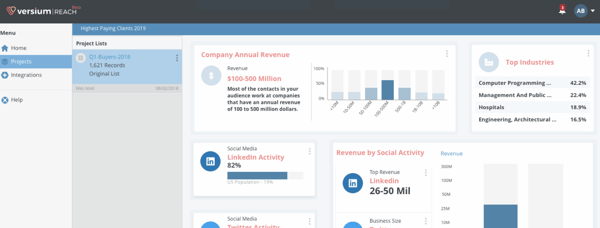
email marketing automation software: Versium Reach

Best email marketing automation software for: B2B businesses that want to segment their customers to more effectively reach them across a variety of marketing channels including email.

Price: $300/mo (Tier One), $500/mo (Tier Two), $750/mo (Tier Three)

Versium Reach allows you to create target audiences that you can use across various marketing platforms (like HubSpot) and channels to help you effectively target and reach those groups through your email (and other digital) campaigns.

Versium Reach helps you visualize and segment your customers so you can tailor your email campaigns to them no matter which stage of the buyer's journey they're in.

The tool also helps you maintain a cost-effective lead generation strategy — Versium gives you the ability to experiment with a single data source for better-performing customer segments.
3. Mailchimp

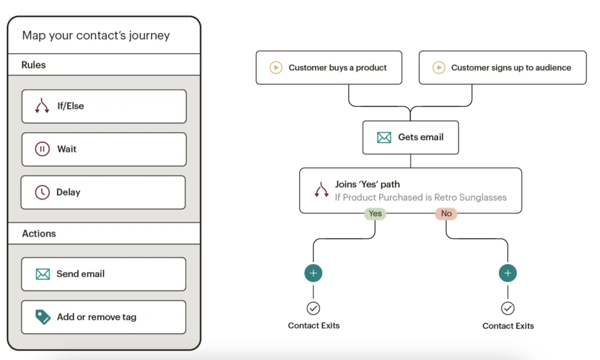
email marketing automation software: mailchimpBest email marketing automation software for: Connecting your ecommerce platform to your email platform so you can target customers based on purchase behaviors.

Price: Free, $9.99/mo (Essentials), $14.99/mo (Standard), $299/mo (Premium)

Mailchimp makes it easy to deliver personalized and relevant messages and purchase paths to individuals based on their contact information and how they interact with your company. Send-time optimization then schedules your emails to be sent when your customers are most likely to engage with them.

Mailchimp offers a number of ecommerce integrations (e.g. WooCommerce, Shopify) so you can connect your online store to the email tool — this way, you can target customers based on their purchases.

Mailchimp offers six main types of email automation to make your team more productive and efficient — these include 1) customer journey automation, 2) behavior automation, 3) transactional email automation, 4) postcard automation, 5) date-based automation, and 6) RSS-to-email automation.
4. Moosesend

email marketing automation software: moosesendSource

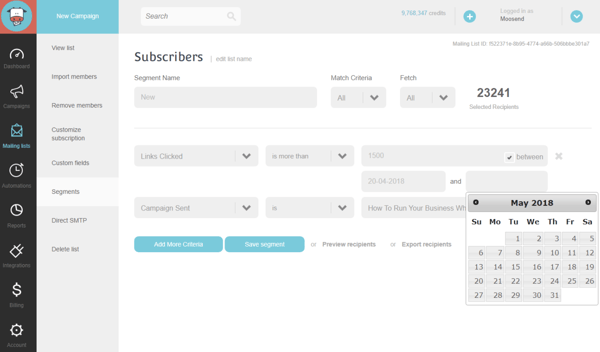
Best email marketing automation software for: Managing several email campaigns and mailing lists, and creating any condition combinations to segment your audience.

Price: Free, $8/ month (Pro), custom price (Enterprise)

Moosesend is an email marketing platform for managing several email campaigns and mailing lists. Design and A/B test responsive emails and newsletters to ensure they effectively target your audience.

Personalize your emails by creating any condition combinations in order to segment your audience based on the specific behaviors you care about on both your emails and your website.

Understand the success of your email marketing campaigns with Moosend's analytics dashboard — track email opens, clicks, social shares, unsubscribed, and more.

2. Identify who you're sharing your email campaigns with.

Determine who you want to send your emails to. For example, you might use lifecycle stages to group your email recipients — for upsell campaign, you send emails to existing customers who have not purchased a particular product yet.

Your email marketing tool should be able to help you efficiently segment your customers ahead of your campaign using the criteria you've decided upon. Again, your contact data in your CRM should help with this — for instance, in HubSpot, segment your email recipients by lifecycle stage.

3. Determine your email campaign's goal.

Your email marketing is only as good as your strategy — so ensure you know exactly why you're contacting these individuals. Do you want them to buy something? Learn something? Do something?

Once you answer this question, you can figure out the messaging you need to take them from where contacts are currently to where you want them to go.

You also have to plan for what happens when you succeed.

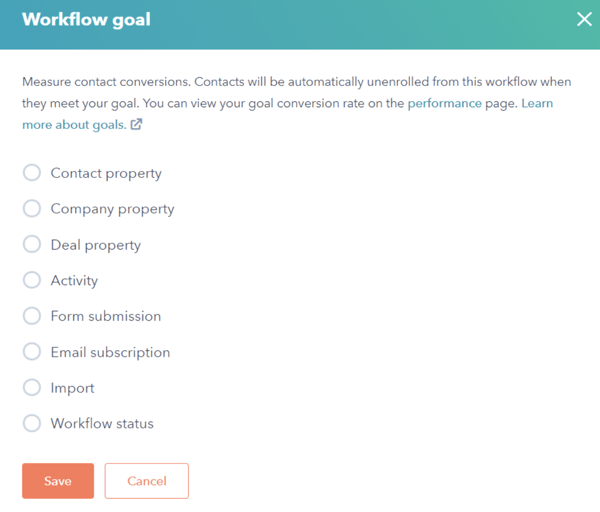
For example, imagine a 10-email series to get prospects to request a consultation. Prospect A converts within the first email. If Prospect A continues to receive emails telling them to do what they've already done, they'll get frustrated.

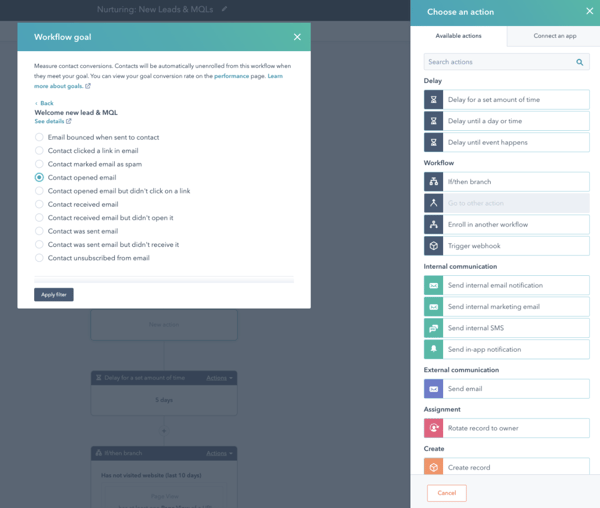
In HubSpot, if you define your goal, it will unenroll any contacts who meet the goal.email marketing automation tool: define your workflow goal
4. Set enrollment criteria.

Enrollment criteria refer to the qualifications that must be met for a contact to be entered into a workflow.

If you're using HubSpot Workflows, for example, you can create personalized, automated email workflows that can get triggered in a number of different ways — when a contact gets added to a list, submits a form on your website, clicks a link in an email, views a page on your blog, clicks on one of your ads, or becomes a marketing qualified lead.
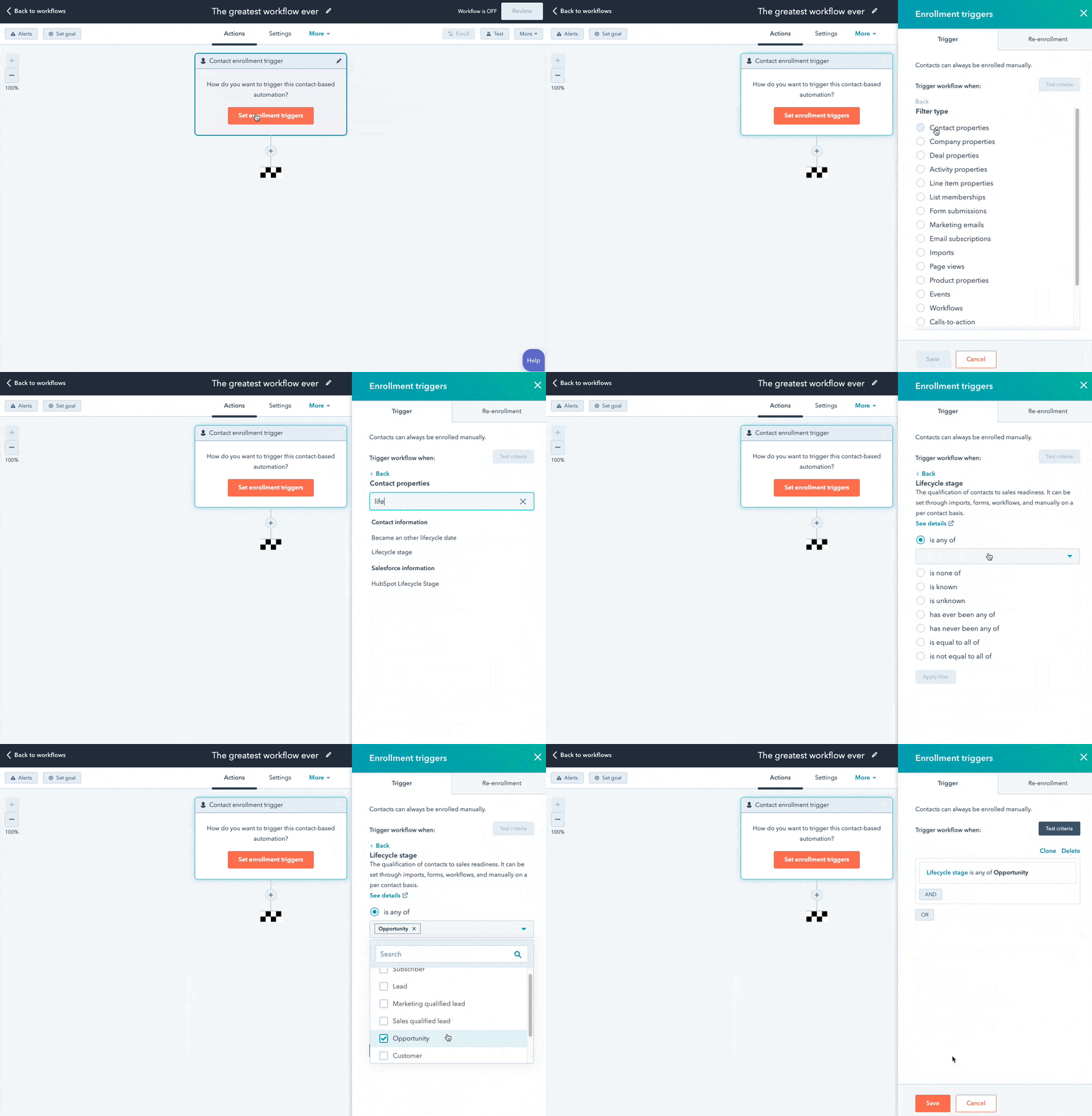
You can also set up email workflows based on any information you have about the contacts in your marketing database, such as page views, email or social media clicks, content downloads, contact properties, or any combination of these and more.

5. Determine which processes you want to automate with Workflows.

If you were manually emailing these contacts, what would you do? Think of your email marketing workflows as blueprints that outline each action your tool will take for you.

For instance, in HubSpot, specify which actions you want the software to take. Examples of automatable actions are:

  • Sending an email.
  • Scheduling an email (and/or delaying it).
  • If/ then email branching.
  • Updating and syncing all email and contact data to your CRM.
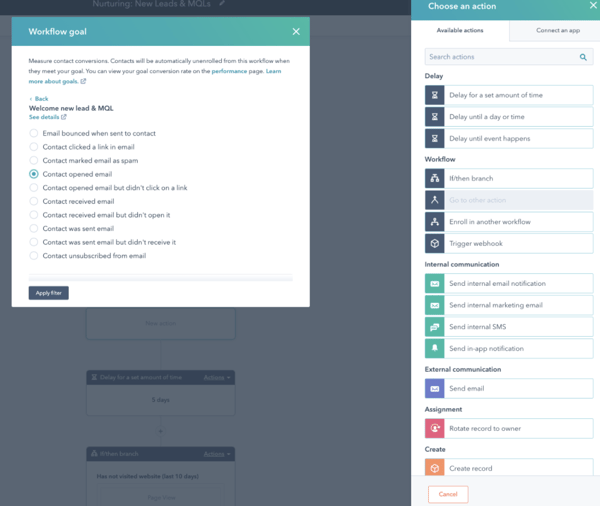
email marketing automation software: Select your workflow action

6. Create your email campaign assets.

By this point, you know how many emails you want to send, the general messaging you'll include in the emails, and which groups of customers the emails are going to.

Now ensure all of your email campaign assets are created and available in your email automation software so you can add them to campaigns.
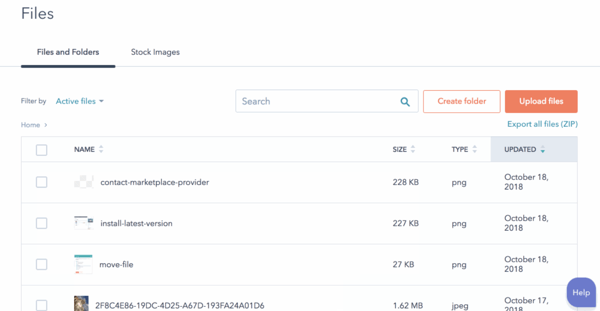
make your assets available in hubspot

7. Check your email automation setup and run a test, if possible.

Some things to consider implementing into your workflow publishing process are:

  • Looking at your list of enrolled contacts for errors.
  • Ensuring the number of enrolled contacts is what you'd expect.
  • Considering your workflow chart and use cases.
  • Checking your "Send" settings.

In HubSpot, you can test your workflow to ensure the automation you plan to set live is working as planned.
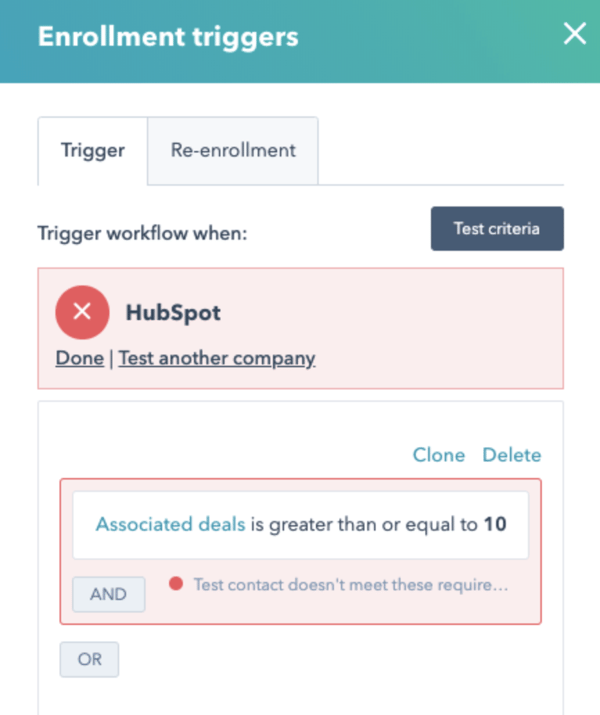
email marketing automation software: test your automation to make sure it's working

8. Make our email automation workflow live and monitor its progress.

Once you're happy with the workflow, set it live.

Mistakes can happen, so monitor for anomalies. Don't be afraid to adjust as needed to resolve issues or improve the performance of your email automation workflow — similar to your other marketing strategies, this is also an iterative process.

Additionally, you can always expand upon your workflows to support other business goals. Use them to automate other actions such as setting or clearing a contact property value, updating a contact's lifecycle stage, adding/removing a contact from a list, and other administrative tasks that allow for more targeted, effective marketing to your prospects and customers.

15 Examples of Email Marketing Automation Workflows You Should Try

Now let's walk through some examples of automated email workflows you can set up to start getting more out of your contacts database and marketing automation software.

1. Topic Workflows

Main triggers: Page views or content offer downloads.

Create a workflow for each of the industry-related topics you create content about.

Imagine you're a unicorn breeder whose main content topics include unicorn diets, unicorn gear, and unicorn boarding. Then you could bucket your content marketing offers (e.g. ebooks, webinars, kits, etc.) and blog posts by these topics. You could also create an email workflow for each topic and then trigger the appropriate workflow when one of your contacts views a page or downloads an offer centered around that topic.

Trigger a content download workflow based on a form submission from a tool conversion tool like HubSpot's Free Marketing & Lead Generation Software. To trigger an automated workflow in HubSpot, you can use the "Lead Flow Submission” option as the starting condition.

So if a contact downloaded your ebook called 10 Tips for a Balanced Unicorn Diet, your "unicorn diet" workflow would be triggered, sending that contact more helpful content, such as blog posts describing unicorn dietary tips.

2. Blog Subscriber Welcome Workflow

Main trigger: Subscription to your blog.

Give your brand new blog subscribers a nice, warm welcome with a blog welcome email. Use this email to thank contacts for subscribing, remind them what they'll get out of reading your blog, review their subscription settings (and allow them to make adjustments), and promote your blog's best-performing articles or other offers.

(Get tips for creating a successful blog welcome email here, and learn more about optimizing welcome emails here.)

3. New Customer Welcome/ Training Workflow

Main trigger: Lifecycle stage.

While we're on the subject of warm welcomes, consider setting up a series of welcome emails when a contact converts into a paying customer, which you can trigger when a contact's lifecycle stage gets updated to "customer."

Not only is this a great way to kick off your new customer relationship on a positive note, but it can also keep your customers engaged after they buy. And if your product or service requires a little training on your customers' part, use this workflow as an opportunity to introduce helpful training materials on an incremental basis.

4. Engaged Contact/ Evangelist Workflow

Main triggers: Visits, clicks, or form submissions.

Create a smart/ dynamic list that automatically updates to include contacts that you've really engaged.

To create this list, use trigger criteria such as a high threshold of visits to your website, clicks on your emails or social media posts, or form submissions. Then create an email workflow to leverage this list as a way to encourage evangelism of your top content in social media.

Because these contacts are highly engaged with you already, they're more likely to share your top content. You can also consider adding list criteria to pull in contacts with a certain number of Twitter followers to leverage the power of those social media influencers in your database.

5. Lead Nurturing Workflow

Main trigger: Multiple top-of-the-funnel conversion events.

If a contact has downloaded several of your top-of-the-funnel marketing offers like ebooks and webinars, it might be a sign that they're ready for a bit more. Set up workflows that help advance these contacts further down the funnel.

If the contact is a lead, send them emails containing more middle-of-the-funnel content that can upgrade them to a marketing qualified lead (MQL) or an opportunity in your sales process.

This workflow may include content and web pages you've identified from an attribution report analysis as influential in converting leads into customers — perhaps content like customer success stories/case studies, free trial offers, or product demos.

6. Internal Sales Rep Notification Workflow

Main triggers: Bottom-of-the-funnel page views/ conversion events.

On any given website, there are certain page visits and conversion events that indicate more product interest than others.

First, identify these pages and conversion events using an attribution reporting tool like HubSpot. You’ll notice that, more often than not, the pages you unearth will be your pricing page, product pages, etc. — the pages that your contacts view when they're truly considering your products or services.

Use workflows here to trigger an internal email notification to your sales rep to inform them of these high-value activities. Using personalization, give the rep all the information they need about the lead in question, including relevant mid- and bottom-of-the-funnel content that they can send to the lead in their outreach email. This allows you to connect sales reps with the best possible leads at the right time.

7. Re-engagement Workflow

Main trigger: Inactive contacts.

Reawaken inactive contacts with a re-engagement workflow, enrolling contacts once they've met certain list criteria.

For example, you could set conditions such as the length of time since their last form submission, website visit, or email click, triggering the email once it's been a while since a contact last engaged with you.

In your workflow, try sending them an exclusive offer or coupon to get them excited about your company again. For more tips about launching an effective email re-engagement campaign, check out this post.

8. Event Workflow

Main trigger: Registration or attendance.

Hosting a live, in-person, or virtual event? Use email workflows to automate your communication to event registrants and attendees before, during, and after the event.

For example, create a workflow that delivers important information registrants should know leading up to the event, such as hotel accommodations and agenda information for live events, or webinar log-in information for online events.

When the event ends, set up a workflow that gives attendees online access to session slides and continues to nurture them with additional content or promotion for future events.

9. Abandoned Shopping Cart Workflow

Main trigger: Shopping cart abandonment.

If you're an ecommerce business, you'll likely benefit from an abandoned shopping cart workflow.

The concept here is simple: When someone adds an item to their online shopping cart but leaves your site without completing the purchase, you can trigger an email workflow that reminds them of their forgotten purchase. By offering a special discount code or incentive to buy, you motivate the individual to return to your website in order to complete the transaction.

10. Upsell Workflow

Main trigger: Past purchases.

Communication with your customers shouldn't stop after they make a purchase. This is especially true if you sell a variety of different products and/or services. Use workflows to help you upsell or cross-sell existing customers.

Create dynamically updating lists of contacts who purchase a certain product or combination of products — and create workflows aimed at recommending other products/ services or encouraging upsells or add-ons.

11. Customer Happiness Workflow

Main trigger: High or low NPS scores.

If you administer regular Net Promoter surveys of your customer base, you can use customers' Net Promoter Scores as a property to trigger workflows.

Simply determine what your ideal customer happiness score is, and use that as the threshold for your dynamic list of happy customers. Then trigger a workflow for customers with "happy" scores and reward them with exclusive content, offers, or discounts.

Trigger a different workflow for your "unhappy" customers that includes content/offers aimed at helping to improve their happiness.

You can even segment unhappy customers by the specific reasons they're feeling unsatisfied — then, send them even more targeted workflows aimed at addressing their issues.

12. Customer Success/ Engagement Workflow

Main triggers: Success metrics or product usage.

If you keep track of customer success metrics, you have a prime workflow opportunity on your hands.

For example, if you're trying to build up your arsenal of customer case studies, automatically trigger an email that asks customers if they'd be interested in being featured as a success story once certain customer success metrics were met.

Furthermore, if you track of customers' product adoption or feature usage, you could trigger a workflow for users who are exhibiting low product engagement, providing resources that educate and train them on how to use the product features they're not taking advantage of.

13. Upcoming Purchase Reminder Workflow

Main trigger: Purchases made on a cycle.

Does your contacts database include customers who typically purchase on a cycle? Enter those people into a workflow that gets triggered when they make a purchase.

For instance, let's say you sell eye care products, and a customer purchases a six-month supply of prescription contacts. Enroll that customer into a workflow that sends them an automated email five months later as a reminder that their six-month supply is about to run out, and it might be time to order a new batch of contacts.

14. Customer Service or Ticket Workflow

Main Trigger: A customer or prospect contacts customer service via email or an online form.

Sometimes, your customers or prospects might have trouble using your free or paid software. When this happens, fielding a bunch of customer service emails and messages can take tons of valuable time from your schedule.

One way to avoid this is to create a workflow that turns customer concerns into tickets that can be categorized, labeled, and assigned to customer service reps on your team. These tickets can also help you keep track of ongoing problems as well as when issues with a customer or prospect are resolved.

15. Deal-Based Workflows

Main Trigger: When someone e-signs a quote or contract.

Sealing the deal is obviously key to successful marketing and sales. Automating small aspects of this process, like emails someone might get after signing a contract or quote page with you, allows your sales reps more time to nurture the client over the phone, during demos, or via other messages.

With a deal-based workflow, you can trigger confirmation emails when a prospect becomes a client or qualified lead by signing a quote or contract. With systems like HubSpot, you can also set the workflow to change the contact's status to show where they are in the lifecycle.

Automate Your Email Marketing Campaigns

Email marketing automation increases efficiency and gives your team back valuable time that can be spent on customers and other work that requires their attention.

Additionally, the process helps optimize your email marketing strategy and personalize email content to increase its effectiveness among your target audience and customers.

Identify your ideal email marketing automation tool and begin setting up the workflows your team needs.

Editor's Note: This post was originally published in September 2012 and has been updated for freshness, accuracy, and comprehensiveness.
New call-to-action


How to Set Up Automated Email Marketing Workflows (+ Examples) was originally posted by Local Sign Company Irvine, Ca. https://goo.gl/4NmUQV https://goo.gl/bQ1zHR http://www.pearltrees.com/anaheimsigns

10 Native Advertising Examples People Actually Enjoyed Reading

You've heard it a million times, native advertising is one of the most immersive advertising experiences. But what exactly is native advertising, and why is it causing such a stir for brands, agencies, and publishers?

Native ads developed as a concept over 10 years ago and have a unique ability to evolve with media as it changes. They have since overtaken display ads as the most popular form of digital advertising.

Native advertising is a chance to put editorial expertise to work for advertisers and brands. It provides a more trusted and valuable, channel to reach readers as compared to banner or traditional display advertising.

Download Now: Free Ad Campaign Planning Kit

In this article, we’ll cover why they’ve continued to grow in popularity and effectiveness and how you can incorporate them into your marketing strategy next quarter.

A small icon is also an indicator, often a small “s,” that if you click on it will indicate that the content is a paid ad. Google search results often include native ads in the form of listings that appear at the top or in the sidebar. The nature of native advertising is that it doesn’t stick out like a sore thumb as the ad. So, the signs are often more subtle than traditional ads.

How to Spot Native Advertising in a Search Engine Results Page

Image Source

How to Spot Native Advertising on a Blog

Image Source

How to Spot Native Advertising on Social Media

Image Source

Native Advertising vs. Content Marketing

The purpose of native advertising is to blend in and not disrupt the viewer’s experience with the given content and media. Native ads engage new audiences through a third-party with an established audience. It’s a method for distributing content, rather than the content itself. This might sound similar to content marketing, but the goal differs.

Content marketing is content that lives on your platforms, such as your website or social media pages. The purpose of this content is to build a following, grow a reader base, establish yourself as an industry expert, build trust with your audience, demonstrate credibility, increase engagement, improve sales, or all of the above.

1. Altran Engineering in the Financial Times

This native advertisement combines some of the best elements of digital advertising: video, a human interest story, and classy hi-tech with an Elon Musk connection.

Produced by the Altran engineering company, and published in the Industrial Tech section of the Financial Times, the above video, "Hyperloop: designing the future of transport?" tells the story of a group of students from the Technical University in Valencia, Spain who are competing in the 2018 Hyperloop Pod Competition run by Musk's SpaceX company.

This native video ad has a palpable human component — the students and the Altran staff who are supporting them in the tough competition. This brings in its futuristic aspect — the best and the brightest working to design the fastest transport pod that will transform the future of transportation. And it's presented as a news story, not as a promotion or ad for Altran or the SpaceX competition (although it's actually promoting both).

What Stood Out

This video has a high production value, making it a high-quality native video ad. The compelling narrative it provides also strongly pulls viewers in and gives them a story they want to engage with.

2. Land Rover — A Mini Suspense/Action Movie

Land Rover uses diverse outstanding content marketing campaigns to promote its vehicles. These native content strategies are in full form in Land Rover's Dragon Challenge video, shown above. It's eye-catching, slick, and suspenseful. It's everything a native campaign can and should be.

This nail-biting ad shows the world's first attempt to scale the stairs leading to the Heaven's Gate landmark in China — by vehicle. A specially fitted Range Rover SUV successfully drove up the 999 steps to Heaven's Gate, at a frightening angle of 45 degrees.

What Stood Out

This native campaign perfectly captures the brand essence of Land Rover — daring, excellence, adventure, and ultimately, success. Promoted via social Land Rover's networks, it's much more than an ad. It's a record-breaking event and a story of its own.

3. Eni Energy on CNN

Native Advertising Example: Eni Energy on CNN

Image Source

Here's an example of graphic, luscious storytelling, ripe with green landscapes, promoted by oil and energy conglomerate Eni. It focuses on the Green River Project in the Niger Delta, an Eni development program for farming and livestock to improve the livelihoods of local communities. The campaign is promoted with native ads on CNN.com, linking back to the Green River Project. It's a truly impressive example of native content.

The site is designed as a story, divided into three sections: Past, Present, and Future. The content is a mix of just about everything — text, imagery, audio, video, personal stories, animations, and illustrations. The complete look and feel is reflective of an environmental agency, rather than an oil company.

What Stood Out

In this native campaign, Eni succeeds in distancing itself from the criticisms faced by energy conglomerates. They also manage to create a brand image as a 21st-century social and environmental force for good, and a beacon of corporate responsibility.

4. Mercedes in The Washington Post

Native Advertising Example: Mercedes in the Washington Post

Image Source

This native campaign by Mercedes is an example of smooth, clean content designed to pique interest and engage the user. The campaign is called "The rise of the superhuman," and it focuses on various technologies that are turning people into "superhumans," such as robotic exoskeleton suits, virtual reality in medical settings, and the Mercedes Benz E-class series that integrates the new Intelligent Drive system.

The native content above is highly interactive, featuring quiz questions and hot spots the user can click to get more information. But one of the best things about this campaign is how it effortlessly creates a connection between Mercedes and the "superhuman." It's reminiscent of one of the oldest native examples, the "Penalty of Leadership" ad by Cadillac, which enhanced the Cadillac image as a prestigious leader. That simple print ad, published in 1915, is credited with reviving the Cadillac brand and boosting flagging sales that plagued the company at the time.

What Stood Out

The major draw of this native ad is the powerful connection it creates between the car and the concept of cutting-edge excellence. It establishes Mercedes as a company that is about more than just crafting cars.

5. Viral Meme on VentureBeat

Native Advertising Example: Viral meme on venture Beat

Image Source

Nothing beats a viral meme in terms of sheer stickiness, and it's a great way to promote brand awareness. Recently, during the famous "Laurel or Yanny?" dispute, we saw VentureBeat take advantage of the meme in native content to promote the upcoming Transform conference on artificial intelligence and analytics. How? By using an artificial intelligence (AI) device to settle the dilemma of Laurel versus Yanny, once and for all.

VentureBeat promoted an article that briefly describes how AI was used to determine whether the stated name was Laurel or Yanny. The native article discusses some of the problems that arose, and how the engineers had to adjust the algorithms to get an accurate result.

What Stood Out

Using a viral meme is a smart move because it capitalizes on a large audience that already exists. It’s attention-grabbing and exposes you to a wider pool of viewers.

6. Allbirds in The New York Times

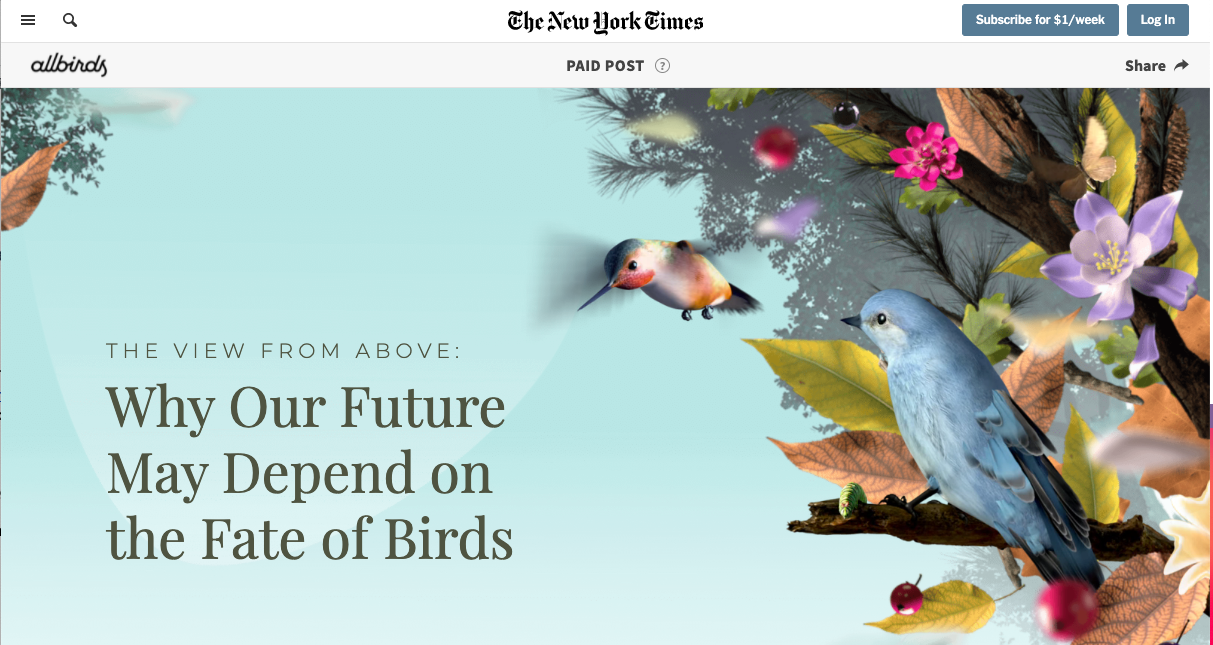
Special articles in The New York Times focus on creating an experience, not just a story. This is a great opportunity for native advertising to come into play. This paid post, The View From Above: Why Our Future May Depend On the Fate of Birds, was placed online and sponsored by the shoe company Allbirds. This example was placed as an in-feed/in-content ad on the platform’s newsfeed.

The article is about how valuable birds are to our environment and the ways climate change is putting them at risk. Allbirds as a company has a major focus on sustainability, and, obviously, has “birds” in its name. The post’s beautiful animated graphics and soundtrack of bird sounds create an awesome experience for viewers that also promotes the company.

Native Advertising Example: Allbirds in the New York Times

What Stood Out

The format of native advertising is at its best when the media can align with the brand. Allbirds being able to create an experience about sustainability promotes not just their product but also their priorities as a company.

7. Influencer Promotion on BBC.com

BBC Future is one of the BBC's "storytelling" channels, which connects brands to audiences via sponsored stories. An interesting example is this BBC article, which purports to show the face of the "average American politician."

In fact, this is achieved by using technology to perform "face averaging," creating composite images of all American politicians to derive the average face.

This technology can lead to all kinds of research and suppositions about what the average politician represents, including gender, race, republican, and democrat — all hot topics in a highly politicized time period.

The article ends with a call-to-action (CTA) to learn more about face averaging with an online tutorial on OpenCV, an open-source computer vision software. The link leads to a website owned, not by a large corporation or software giant, but by an individual entrepreneur, programmer, and blogger: Satya Mallik.

Native Advertising Example: Influencer Promotion on BBC.comNative Advertising Example: Influencer Promotion on BBC.com

Image Source

What Stood Out

In this example, we love how native advertising is accessible to small businesses and influencers, affording powerful promotion opportunities on premium websites like the BBC.

8. Colored Corn on Business Insider

Native Advertising Example: Colored Corn on Business Insider

Image Source

One of the best native tactics is creating a story. And if the story is visual and colorful, well, that's a huge help. Take this example of native content promoted on Business Insider.

The example above looks and feels just like a regular Business Insider article. It's about Glass Gem Corn, a multi-colored corn variety that became a public sensation in 2012. It's the story of one man and his search for his Native American roots that led him to develop the colored corn. And in true Business Insider fashion, the story of the rainbow corn is retold in amazing, bold, eye-catching visuals.

The article contains links to buy the seeds online from Native/SEARCH, a not-for-profit conservation company that now owns the product. So what's in effect a product sales page is presented as a remarkable, colorful news story.

What's most interesting about this article is the disclaimer published by Business Insider: "This article was originally published in 2013 and has been updated because the story is timeless." It just goes to show: Evergreen content promoted natively can truly be a long-term success story.

What Stood Out

Crafting a story that is fun, interesting, and promotional is a great way to format a native ad. This also has the benefit of being attached to a viral story, making it even more effective.

9. KPMG on Forbes

Native Advertising Example: KPMG on Forbes

Image Source

Forbes' BrandVoice is a platform for native advertising and sponsored content. Many brands have their own BrandVoice channels, such as Mitsubishi Heavy Industries, SAP, Deloitte, and even the government of Japan.

KPMG has taken its native content on Forbes to the next level, with a campaign called "The Great Rewrite."

Big and bold (just like native advertising should be), The Great Rewrite focuses on different industries and how they are being "rewritten" in a post-innovation age. The campaign look and feel is grand and ultra-modern, yet easy to navigate.

What Stood Out

This native ad connects KPMG with the future of innovation, while continually adding new "chapters" about various sectors. Each chapter is packed with content, including video, featured articles, and content recommendations. This is a great example of a native campaign that, just like its title, is rewriting the rules of native in an ongoing, ever-growing, content-rich user experience.

10. Orbit Gum on CollegeHumor

Native Advertising Example: Orbit Gum on College Humor

Image Source

Videos make great native ads because the entertainment value makes it easy to blend into traditional media. “Dating Footnotes” presented by Orbit was released ahead of Valentine’s Day on the popular YouTube comedy channel CollegeHumor. It’s short, funny, and capitalized on the holiday of the time.

Orbit has a history of fun, memorable commercials, so a native ad like this fits perfectly into their branding. This native ad also blended well into the humor of the channel where it’s posted and was able to promote Orbit Gum’s products without feeling like a regular commercial.

What Stood Out

Humor and creativity go a long way when it comes to advertising. This, plus the real-world application of a product, like gum on a first date, makes for a memorable and effective native ad.

Native Ads Have Great Potential

These days, many native ads that we see online are truly spectacular. Some are eye-catching, others are original, and yet others offer inspiration for new ways to promote compelling content and capture mindshare.

The nine examples give a taste as to how native advertising is constantly advancing, pushing the boundaries of content and design to create new, unexpected online brand experiences.

Editor's note: This post was originally published in June 2018 and has been updated for comprehensiveness.

Improve your website with effective technical SEO. Start by conducting this audit.  


10 Native Advertising Examples People Actually Enjoyed Reading was originally posted by Local Sign Company Irvine, Ca. https://goo.gl/4NmUQV https://goo.gl/bQ1zHR http://www.pearltrees.com/anaheimsigns