Monday, October 4, 2021

Sustainable Marketing: Key Principles & How to Leverage It [+Examples]

In 2018, 63% of consumers surveyed in an Accenture study revealed that they preferred to shop from purpose-driven brands. Fast forward to 2021 and that sentiment has only grown.

IBM ran a study in 2020 on consumer behavior and found that 57% of consumers are willing to change their shopping habits to be more environmentally conscious. In the same study, nearly eight of out 10 respondents stated that sustainability is important to them.

→ Download Now: Free Marketing Plan Template

So, how does a brand leverage sustainable marketing to appeal to a growing, socially conscious audience? We'll cover that and more below.

Green Marketing vs. Sustainable Marketing

While both terms are often used interchangeably, there is a difference between green marketing and sustainability marketing.

Green marketing focuses on strategies that promote environmental awareness and protection. Sustainable marketing, on the other hand, is a little broader.

It encompasses green marketing but it also includes practices that go beyond the environment, like social and economic issues.

1. Have a larger purpose.

Brands typically judge their success by the numbers. How much revenue they have or will generate in any given period is usually the biggest indicator of success.

Sustainability shifts this perspective by having brands evaluate themselves by something bigger than profit.

As a brand, you have to promote something that's bigger than your products and services and transcends any particular industry.

Do you have a clear social mission? If not, spend time discovering what that is and how your brand plays a role in furthering that mission.

For instance, fashion brand Autumn Adeigbo sells clothing, accessories, and home decor items. However, its mission, as stated on its website, is to impact the lives of women on a global scale. They do so by using female-owned production facilities, employing female artisans, among other practices.

2. Think ahead.

Sustainability marketing is all about building long-term value.

Too often, brands focus on gaining immediate returns. For instance, many marketing tactics like running Google Ads and blogging are great lead generators.

However, what happens once your lead has made a purchase and turned into a customer? How will you build loyalty and create brand evangelists?

Sustainable marketing looks at ways to nurture consumers during the entire buyer's journey.

Education is one way to build loyalty with your audience early on. From when they first discover you on social media to after they've made a purpose.

For instance, a food brand could educate its audience on the importance of ethical farming on social media and continue this process post-purchase with package recycling tips.

3. Be customer-oriented.

You might be thinking, "Isn't being consumer-oriented what all marketing is? "

Ideally, yes but that's not always the case.

In traditional marketing, a brand will often try to push a product or service to a customer. With consumer-oriented marketing, it's more about understanding your customers' needs and tailoring your marketing to that.

For instance, say your audience is craving more transparency in your sourcing practices or want you to be more vocal on social issues. You could use that information for your next campaign.

With so much competition out there, one way to stay customer-oriented is by innovating.

We've all heard the Blockbuster and Netflix cautionary tale. But that speaks to a huge societal shift that Blockbuster was unwilling to make.

But the truth is, innovation doesn't always have to be so big. It can happen in small iterations – the key here is staying in touch with your audience's needs.

4. Reflect sustainability in every aspect of your brand.

Sustainability marketing doesn't work if it's not authentic.

Imagine finding out a business that claims to be sustainable has failed to implement any practices to promote its mission. Consumers would distrust that brand and it would be difficult to earn it back.

Make sure your brand is looking at sustainability from a holistic lens.

Are you preaching about sustainability but use unsustainable resources to build your product? Are you collaborating with brands that conflict with your mission? Is your team representative of the future you want to promote?

These are the questions you should ask to determine if your brand reflects the mission you've set out to achieve. Identify the areas that need work and go to the drawing board to figure out strategies that align with your mission.

Audiences don't expect perfection, they do, however, value transparency. It's OK – and recommended – to share where you currently fall short and how you plan to remedy these issues.

Sustainable Marketing Examples

1. Pangiai

Materials science company, Pangiai, wants to save the environment.

Every piece of marketing the brand puts out is centered around this core mission, including this video campaign.

In it, the brand explains its mission to "reverse the cycle from the unnatural to natural, from plastic to plants […], from the new to the recycled."

What's effective about this ad is that Pangiai describes the future they want to see and outlines the strategies it will implement to get there.

Throughout the ad, you see Pangiai products but they're not the focus. This tells viewers the mission drives the products, not the other way around -- and that's sustainable marketing done right.

2. Nada Duele

In the previous section, we discussed the importance of having a holistic approach to sustainability marketing.

With Nada Duele, their mission is reflected in everything: from their name, which represents the idea that products should not cause harm, to the initiatives they take part in.

sustainable marketing example

Image Source

When you visit their "How We Work" section, you learn about their collaboration with a Guatemalan institute dedicated to protecting the forestry sector.

It's important that the partnerships your brand takes on align with your values. Otherwise, you risk losing credibility and trust.

3. Satya + Sage

Social media is one of the best and easiest ways to implement a sustainable marketing strategy.

You can share a range of content, from educating your followers on sustainable practices to sharing ways your brand is being sustainable.

In this example from candle company Satya + Sage, they share tips on how to use the seed paper that comes with every candle.

sustainable marketing example

Image Source

On social media, in particular, pay attention to the questions your followers ask and the comments they make, as that can inform which marketing strategies you test in the future.

Why is sustainable marketing important?

Sustainability is a topic that has gained a lot of traction as of late, however, research shows it transcends age.

The 2020 IBM study on consumer behavior revealed that while Millennials are the most interested in sustainability awareness, Boomers (and all consumers in between) strongly consider it when choosing brands.

As a result, even if your brand isn't rooting in this mission, you will still find value in investing time and resources in sustainable practices and marketing to attract more customers.

Marketing Plan Template


Sustainable Marketing: Key Principles & How to Leverage It [+Examples] was originally posted by Local Sign Company Irvine, Ca. https://goo.gl/4NmUQV https://goo.gl/bQ1zHR http://www.pearltrees.com/anaheimsigns

Friday, October 1, 2021

Social Commerce: What It Is & How to Use It in 2021

Recently, I set an iPhone time limit on my social media use to "45 minutes".

I figured 45 minutes would be more than enough. Almost an hour? In between working at HubSpot, catching up with friends, and attending exercise classes, I had no doubt 45 minutes would be plenty of social media consumption.

Unfortunately, I learned pretty quickly that I actually spend 45 minutes on social media before I even get to work in the morning.

I know I'm not alone. In fact, the average daily social media use of internet users worldwide amounts to 145 minutes per day.

With all that social media consumption, it makes sense that more businesses are turning to social media to market to their audiences. But marketing is just one aspect of the buyer's journey -- what about sales? Can that be done within social media platforms, as well?

It's actually now entirely possible for businesses to sell products and services natively within social media sites.

Here, we're going to explore that very concept -- known as social commerce -- and take a look at some impressive examples of social commerce, so you can consider trying it for your own company. Additionally, we'll list some of the most popular social commerce platforms available today, so you can decide which one could give you the highest ROI.

Download Now: Social Media Trends in 2021 [Free Report]

Since many businesses are marketing on these social media sites already, it makes sense to allow users to purchase from within these platforms without leaving the site at all.

Should you leverage social commerce?

If you sell physical products online, leveraging social commerce is a great way to drive sales and revenue to your business. Users are used to the native purchasing experience at this point and prefer to be able to quickly make a purchase right on the social media app.

1. Social media checkout capabilities.

One of the best examples of social commerce is the ability to click a product and checkout right from within a social media site, like Instagram or Facebook.

For instance, Instagram has a "checkout" feature on their app, which allows you to click on a product within a post, choose a size and color, and proceed to payment within the platform.

The first time you use Instagram's checkout feature, you simply need to enter your name, email, billing information, and shipping address. Once your order is complete, Instagram saves your information so you don't need to enter it the next time you shop.

Additionally, you'll receive notifications about shipping and delivery right from within Instagram, so you can also track your purchase without leaving the app.

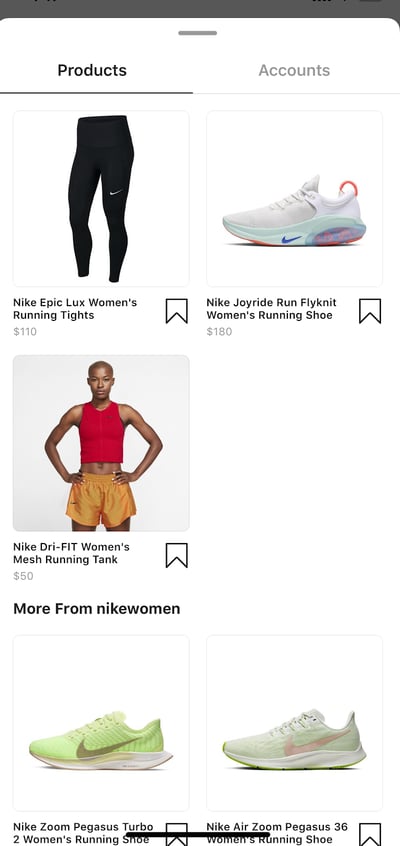
For instance, let's take a look at what happens when I click the "View Products" button (bottom right) on one of @NikeWomen's Instagram posts:

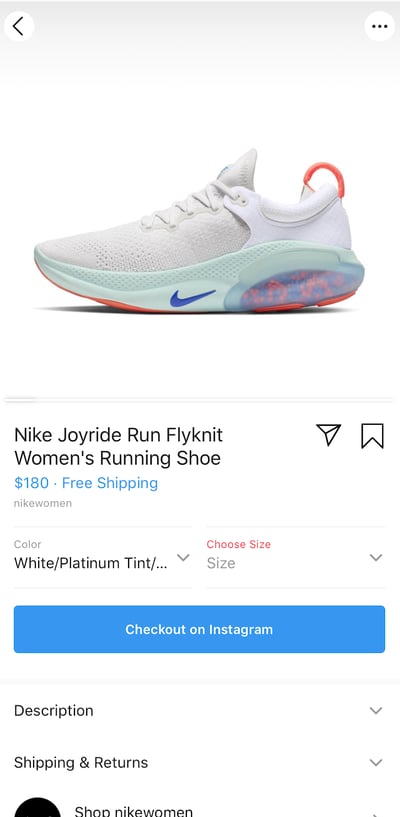
Instagram immediately pulls up a page with all the details of every product included in the image.

Let's say I'm particularly interested in the sneakers. From within Instagram, I can choose a color and size and then click the blue "Checkout on Instagram" button. If I've shopped on Instagram before, I don't even need to re-enter my information. Pretty simple, right?

Plenty of other social networks have these checkout features, including Facebook, Pinterest, and Twitter.

2. Social commerce plugins and apps.

As social commerce continues to rise in popularity, we'll continue to see more plugins and third-party apps emerge to make the process even more seamless for businesses and users alike.

For instance, one third-party app called Soldsie allows your followers to make a purchase on one of your products by simply typing "Sold" into the comments section of a post. Once they've commented "Sold", the app takes care of the rest, emailing the user an invoice to complete.

Image Source

Soldsie notes -- "As fans comment, your sales trend on Facebook as each photo is shared with your fan's Facebook friends." For instance, if my friend comments "Sold" on a Facebook post of a cute sundress, I'll see the picture in my News Feed and might consider purchasing one for myself.

Ultimately, social commerce is a good opportunity to increase brand awareness while also increasing sales -- a win, win.

3. Shoppable ads.

Shoppable ads is another example of social commerce, and is currently available on both Instagram and Snapchat.

Simply put, shoppable ads allows businesses to tag products in an Instagram or Snapchat sponsored post, ideally creating a more efficient ad-to-purchase experience. Best of all, this type of social commerce helps businesses collect valuable data on which ads convert prospects into customers immediately.

The features you'll find on shoppable ads within both Snapchat and Instagram continue to improve -- for instance, Snapchat has advanced features on their shoppable ads, including collection ads, product catalogs, advanced pixel targeting, and 30+ new Snapchat partners.

Wish, an e-commerce app, successfully uses Snapchat's product catalog feature to create different Snap Ads and Story ads to showcase a large variety of their products, as shown below.

Image Source

Shoppable ads are undeniably profitable if done well -- on Snapchat alone, FabFitFun lowered cost-per-purchase by 36%, while American Eagle increased return-on-ad-spend (ROAS) by more than 3X.

With shoppable ads, you're able to market and sell directly to your intended audience without causing friction in a user's social media experience. For instance, 73% of Snapchat users are between 18-24 years old. If this is your ideal demographic, why not try including your products or services directly within the ads you're creating on Snapchat? This allows users to find products of interest to them without needing to leave the app at all.

4. Chatbot checkouts.

One final example of social commerce that's critical to point out is chatbot checkouts -- the ability for a user to find and purchase a product by chatting with a chatbot within a social platform.

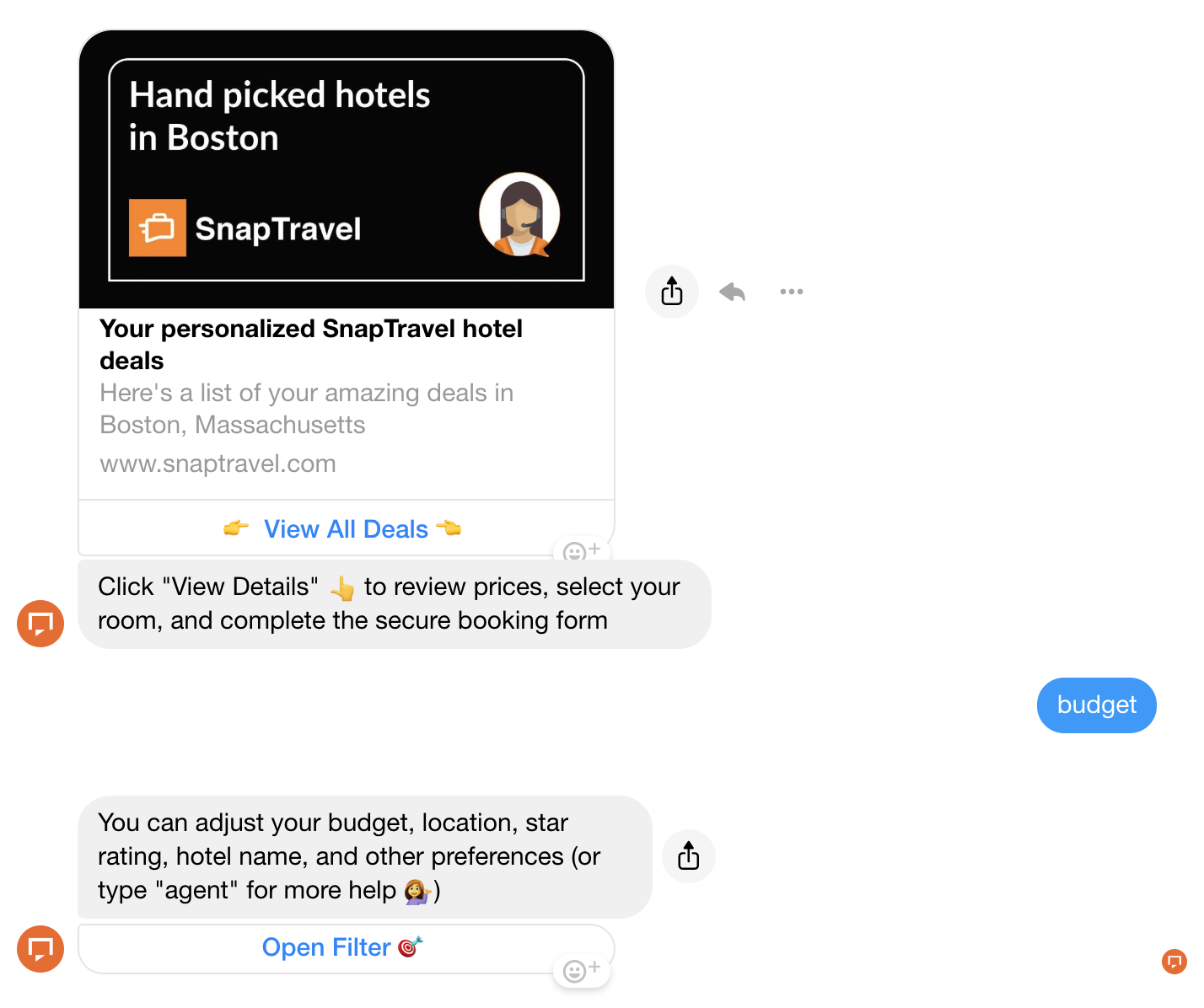
For instance, consider SnapTravel's Facebook Messenger bot, which helps people find hotel deals and book rooms right from within Messenger:

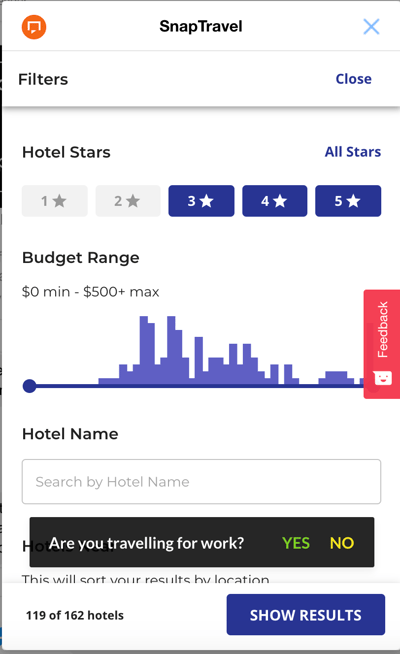
As you continue chatting with the bot, you'll receive better, more customized deals based on your requirements. Additionally, you can click "Open Filter" to further modify your search based on your criteria, and a new screen will open up right from within Messenger:

SnapTravel offers deals only available in Messenger, incentivizing users to book with the chatbot rather than on their website.

Using a chatbot to streamline your buyer's journey is particularly helpful for mobile users who want to find and purchase products on an app they already have on their phones -- like Messenger.

1. Instagram

Between its checkout capabilities and shoppable posts tool, Instagram is undeniably one of the most popular platforms for social commerce. Many Instagram users are already using Instagram as an opportunity to discover and purchase new products -- for instance, 80% of users use Instagram to decide whether to purchase a product or service, and 83% use it to discover new products. Since these users are already prepared to find and purchase new products, it's critical that they're given the option to buy them in-app.

Image Source

2. Pinterest

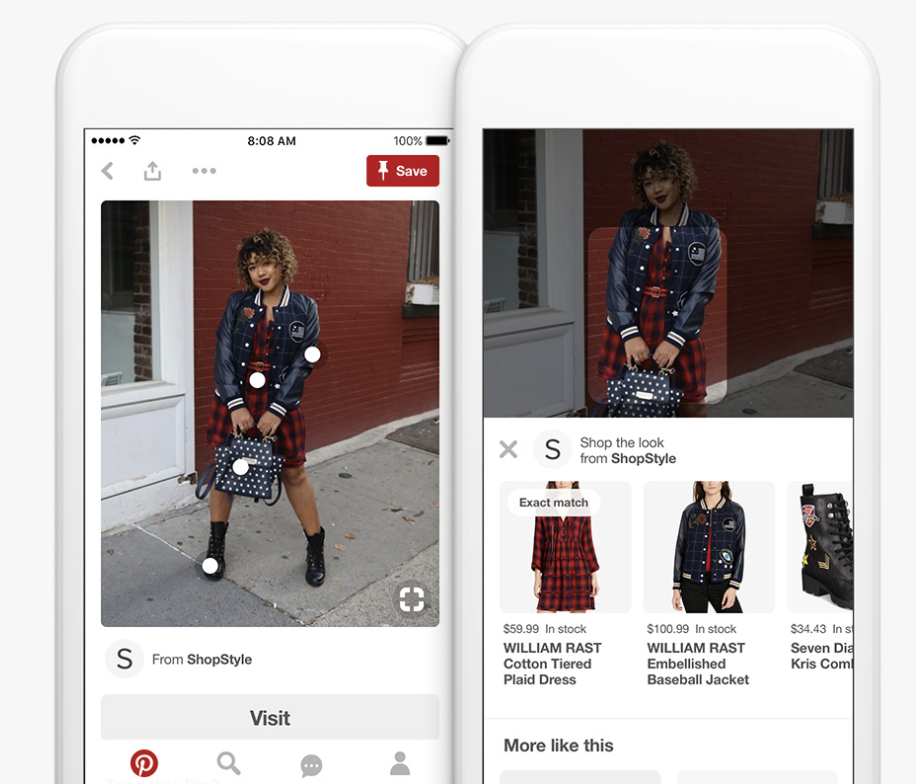
People often turn to Pinterest for fashion, home decor, or beauty inspiration, so it makes sense that Pinterest would be a viable platform for social commerce. In fact, 93% of active Pinterest users said they use Pinterest to plan for purchases, and 87% said they've purchased something because of Pinterest.

Pinterest's Shop the Look Pins allows users to click on small white dots on various products within a post, and either purchase that product within the app or browse similar products. They can make purchases on both desktop and mobile.

Image Source

3. Facebook

With over two billion active users, Facebook is one of the most popular social platforms in the world, making it a good place for social commerce.

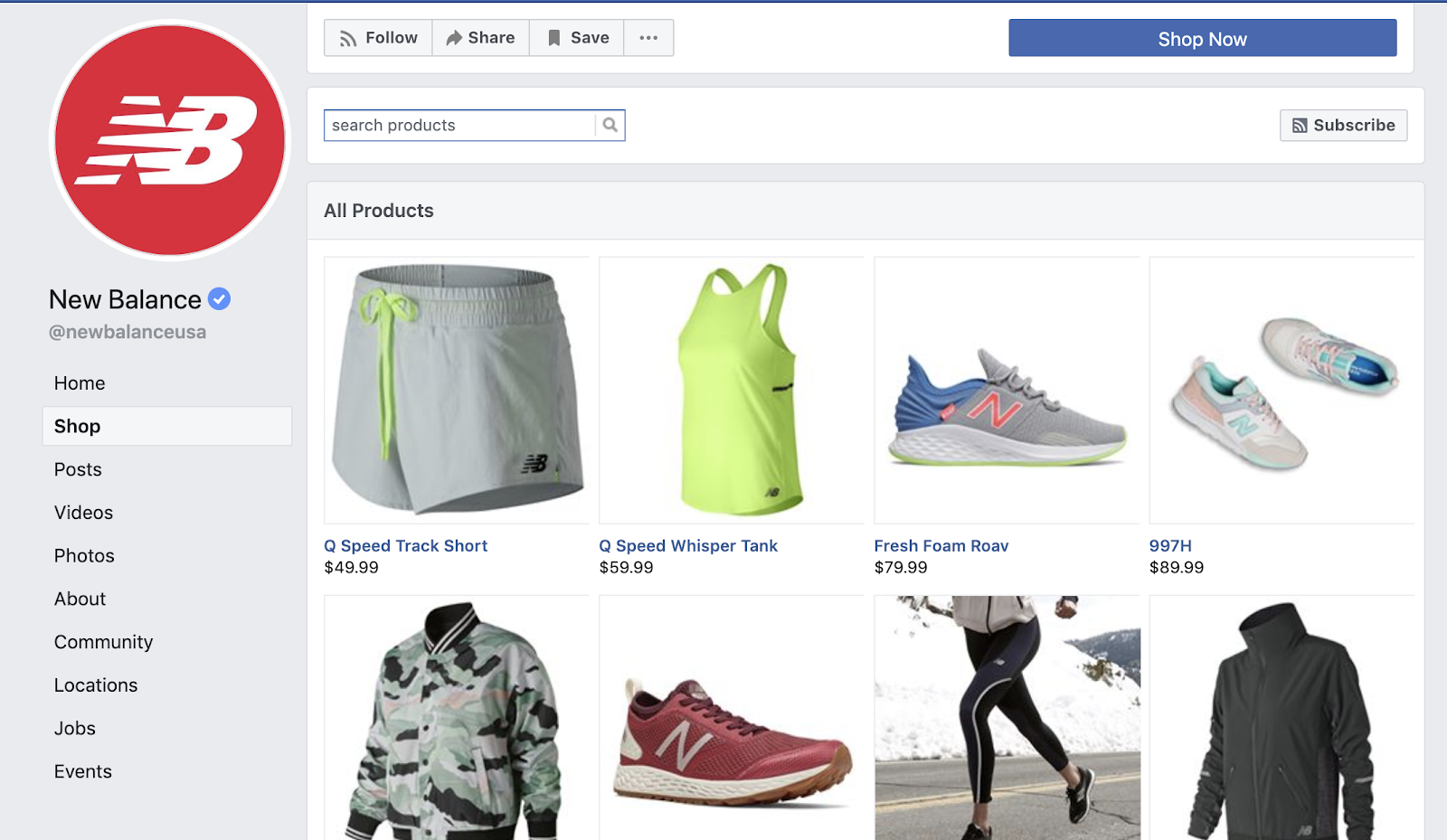
If you have a Facebook Business Page, you can set up a Facebook shop to sell your products and services directly within the social platform.

Facebook notes -- "While any business can have a shop, this feature best serves merchants, retail and e-commerce advertisers. We recommend it for businesses selling apparel, accessories (including bags and luggage), home furnishings, and baby or kids' products."

To upload your inventory to Facebook and create a shop section, you can either use a third-party ecommerce platform like BigCommerce or Shopify, or you can upload and manage your products yourself.

For further inspiration, try searching for major retailers and checking out how they've set up their Facebook shop. For instance, take a look at New Balance's Facebook shop:

Facebook shop is a fantastic opportunity for your business to reach a larger audience -- and, even if your customers don't end up purchasing your products on Facebook, having these products listed on your Facebook Business Page is a good idea for making Facebook users aware of the products you sell in-store.

4. Poshmark

Poshmark is a social commerce marketplace that allows people in the U.S. to buy or sell clothing, shoes, and accessories, either new or used. Poshmark makes the experience even more social with features like "Posh Parties", which are virtual buying and selling events that you can attend with friends.

Popular brands on Poshmark currently include Nike, Lululemon, and Chanel -- to sell on Poshmark, simply download the app and follow seller instructions from there.

5. Shopee

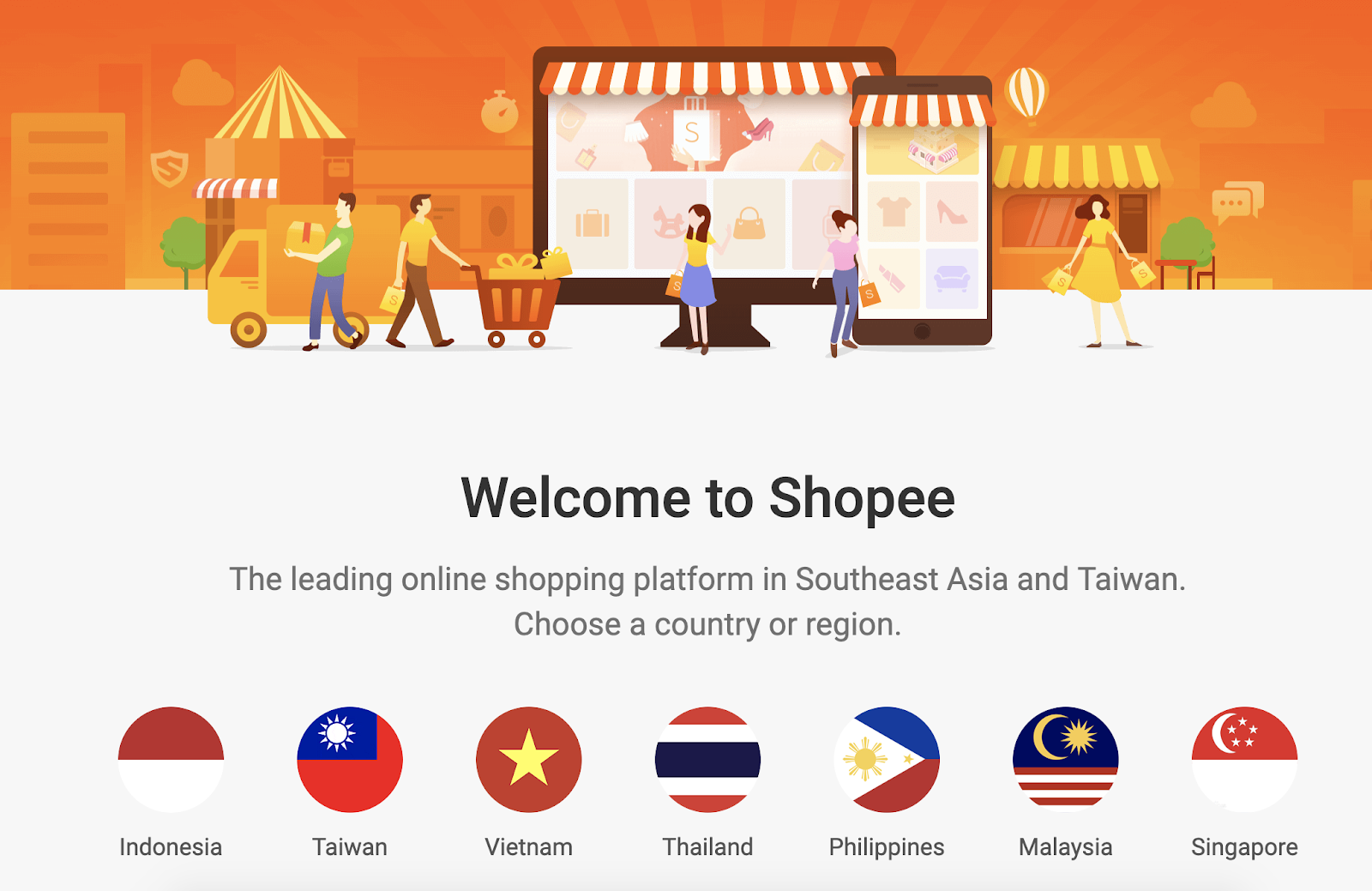
Shopee, reportedly the largest online shopping platform in Southeast Asia and Taiwan, is a social commerce marketplace that enables users to buy and sell products ranging from home & living to mobile & gadgets.

Major brands on Shopee include Kleenex, L'Oréal, and Oreos. Selling on the app is easy enough -- simply verify your phone number, ensure your products aren't prohibited and click "Add New Product" on your Shopee page. With over 95,000 users on the app worldwide and a unique focus on the Asian market, Shopee is a good option for brands looking to expand their global presence.

How to Create a Social Commerce Strategy

1. Align the brand experience.

Before you can get started with a social commerce strategy, it's important to consider your brand experience and target market.

When customers make a purchase online, do they need to look at multiple pages on your website? Do they have a lot of questions? Do they usually get in touch with a sales rep?

If so, then your brand experience might not be suited for social commerce.

On the other hand, if your brand experience has a quick sales turnaround, from looking up the product to purchasing, then your product might perform well on social commerce.

It's important to make sure the brand experience is aligned with social commerce before creating a strategy.

2. Consider your target market and choose which social commerce sites to use.

Once you decide to move forward with a social commerce strategy, consider your target market and think about what social commerce sites they use.

Are your customers on Instagram and Snapchat, but not on Pinterest? In that case, you'll want to make sure you focus your social commerce efforts in the right place.

To develop a social commerce strategy, you'll first want to think about which sites you're going to focus on.

3. Decide which products to sell on social media.

Next, think about which products are best suited to be sold on social commerce sites. If your products require more time and thinking before making a purchase, then those won't fit well within a social commerce strategy.

However, some of your products might work well while others don't. This means you should consider which products you're going to focus your social commerce efforts on.

Ultimately, social commerce has the ability to eliminate friction in a user's online shopping experience, and catch users' at moments when their excitement over your products is highest.

However, it's critical you do market research to ensure you're using the right social commerce platforms or apps to reach your audience in the social spaces they frequent the most.

Additionally, remember social commerce is fundamentally social in nature -- if your business doesn't also engage and communicate with its followers, then your company won't get much out of social commerce as a long-term strategy.

Editor's note: This post was originally published in February 2016 and has been updated for comprehensiveness.

New call-to-action


Social Commerce: What It Is & How to Use It in 2021 was originally posted by Local Sign Company Irvine, Ca. https://goo.gl/4NmUQV https://goo.gl/bQ1zHR http://www.pearltrees.com/anaheimsigns

10 Tips for Parents Working From Home With Kids

Working from home can sound like a dream for many people. You get to enjoy more time in your house, you cut out the commute, and you get to see much more of your family.

But the flip side has some not-so-dreamy realities, especially for parents having to balance work and childcare: a difficulty to focus; having to juggle work with looking after children and, in some cases, homeschooling them; blurry lines between work time and personal time, and kids lobbying for your undivided attention when you need to GSD.

On the least glamorous WFH (work from home) days, you might feel like you've got no work done and you've been a bad parent. Juggling work and looking after kids can be done, but it does require a recalibration of expectations and working styles.

To make your remote work reality more functional, here are some of our top tips for parents working from home.

Download our complete productivity guide here for more tips on improving your productivity at work.

10 Tips for Parents Working From Home With Kids

1. Focus on the positives.

Although some parents work from home by choice, others have had to unexpectedly adjust to this new reality.

This situation comes with its own challenges, but we can all find some advantages in working from home — whether that's avoiding the daily commute, having more time with the family, being home for dinner, or proximity to the fridge.

It won’t always be easy, but focusing on the positives (and reminding yourself of what you're avoiding in the office) can help enormously on stressful days.

2. Adjust your schedule.

Just like kids, adults thrive on routines and work much more efficiently when we have a schedule.

Having a WFH routine helps us to stay focused and avoid the productivity lulls that come with multitasking or battling constant interruptions.

To add more structure and predictability to your day, create a morning routine and be strict about it whenever possible. When it's wake-up time, get up and prep for the day as you would before going to the office. Then head to your home office, whatever this looks like to you, and get into a state of mind for work.

To optimize the rest of your day, adjust your work schedule to allow for home life, whether this includes breaks to relax or time to catch up on chores and take over childcare.

If you can, take advantage of a flexible schedule and come up with a routine that works for you and your kids — but remember that you can always adjust it to accommodate daily changes.

In our collection of remote work tips from our team, we shared this great tip:

Create a schedule with the people you live with. I work in the AM, watch kids (aged two and four) in the PM, and my husband does the opposite.

3. Be upfront with your colleagues.

While there are many steps parents can take to maintain their productivity while working from home, disruptions will still happen. Your kids will run into your office, throw a tantrum during a Zoom call, or require you to help with an emergency in the house.

The worst thing you can do is pretend everything is fine, approach work the same way you did in an office, and insist you don't need any help.

Be upfront with your team about what working from home will look like for you and think about what requests you can make to make it easier and more productive. This might be an adjusted schedule that allows for more flexibility, or just a bit of extra patience.

4. Optimize your workspace for focus.

Although you don't have to stick to this 100% of the time, assign one area of the house as your dedicated workspace.

This makes it easier to limit distractions and focus on work without having it seep into personal life.

When you start your workday by arriving at your dedicated workspace with a coffee and wearing daytime clothes, you let your mind know that this is the time and space where you start working.

Ideally, this would be a separate room that you can turn into a home office. But if that’s not an option, try to find a non-communal corner of your home to turn into your workspace. Agree with everyone in your household the rules for when and how they can get your attention.

Parents can also get their kids to help out designing homemade office signs, with green for "yes, you're allowed in" and red for "don't even think about it."

5. Work in short bursts.

Parents of babies and toddlers have a harder time of it than most, since you can't leave them alone.

If you're responsible for childcare, your best option may be to work in short bursts when you’re able to, such as when the children are sleeping.

But if you're lucky to be able to focus on work while your partner helps with childcare at home, design your schedule so you can come out of your office and help every so often, rather than locking yourself in all day.

6. Nurture creative activities.

Your kid probably isn't going to sit quietly and read a book all day while you're working. If you're responsible for childcare, keep your kids immersed in play by nurturing creative activities.

Rotating between different sets of toys and other activities can encourage deeper and more meaningful play while giving you a bit more time to focus. If your children aren’t used to playing independently, you can try sparking their imagination by making it into a game in its own right — one that encourages independent activities such as solving a puzzle or creating something from scratch with art materials, with a set time to show you what they've come up with.

If you're okay with your kids having some screen time while you're taking important calls or needing to focus, check educational resources like Scholastic Learn at Home, digital games that teach things like spelling and music skills, or even virtual museum tours.

7. Schedule meetings wisely.

Almost every parent who works at home has a few unfortunate mishaps to share.

While a lot of this is inevitable and all you and your colleagues can do is laugh, plan for interruptions by giving your children a nonverbal ‘do not disturb’ when you’re on conference calls.

Of course, that isn’t always going to work with free-roaming toddlers, in which case it can be better to schedule calls during their normal sleep times. At times, you might just need to mute your calls or even reschedule if you need to be on childcare duty.

8. Get technology on your side.

The rise of cloud computing is precisely what’s enabled the surge in remote working. Instead of having to manually exchange documents or log in to user accounts on-site, employees can now access the information they need to do their jobs online.

With collaboration platforms like Microsoft Teams, project-management software like Trello, and web-based CRM (customer relationship management) software, it's easier than ever to get work done at home.

Whether it’s having a bit of fun setting your own video conferencing background on Zoom or taking time to create a tech stack that makes your job that much easier, choosing the right applications can make a world of difference.

9. Know when to switch off.

Mastering the work-life balance has never been more difficult. While many are quick to praise the virtues of working from home, you can also end up feeling like you're always at work. That’s why it’s crucial to know when to switch off.

Being a parent, chances are you’ll need to account for some flexibility when it comes to drawing up your daily schedule. Still, it’s important to set a time when you can confidently say you’re finished for the day. This naturally requires some self-discipline and expectation setting with your team, but you need to have clear boundaries to keep stress at bay.

10. Be easy on yourself — and ask for help.

If you're a parent juggling work and childcare, you deserve a medal and all of the opportunities you can get for a helping hand.

This might mean getting support from a family member, hiring someone to help with childcare, or asking your employer for flexible hours or a bit more lenience during WFH.

But above all, don't expect yourself to balance everything effortlessly and effectively all the time. Look for the opportunities to make your work-life easier, but also be kind to yourself when things don't go as planned. If things are hard to manage, try to take some time off if you can, and remember to focus on self-care too. It can be a stressful situation for a lot of people, so it's important to focus on your own well-being and know your limits.

Take me to Projects


10 Tips for Parents Working From Home With Kids was originally posted by Local Sign Company Irvine, Ca. https://goo.gl/4NmUQV https://goo.gl/bQ1zHR http://www.pearltrees.com/anaheimsigns

How Ecommerce Businesses Build Healthy Relationships With Customers

A customer walks up to your store. What’s the first thing you do?

Ask them what they need? Show them a few choices that are trending? Let them check the store out before reaching out to them?

The question is: why?

Download Now: Ecommerce Marketing Plan Template

Why do you need to make contact with your customers and understand their needs?

Showing interest in your customer’s needs makes them feel valued and important. And that’s what every customer wants to feel when they walk into a store. It’s this feeling of attachment to a brand that makes customers come back and buy something again.

But how will you go about the situation if you’re starting an ecommerce business? How do you build relationships with your customers online?

It may seem like a difficult question, but it isn’t. There are so many ways you can build relationships with your customers online.

Here are a few tips that will help you build and maintain a relationship with online customers.

How Ecommerce Companies Build Relationships With Customers

1. Direct Engagement on Social Media

Every business needs to be on social media platforms like Facebook, Twitter, and Linkedin. They are some of the most significant online marketing tools that businesses can use to publicize product offerings, advertise the company, share news about the industry, and connect with customers.

On social media, you can create a page and fill it with content about your product. Potential customers will drop their comments, and you can reply and start conversations with them. When you get along with them they will be convinced to trust you. The trust you build with them will lead them to purchase your goods or services.

Apart from building trust, communicating with customers makes them feel confident and important. By talking to customers, you will provide them with your business contact and assurance of quality service. Other prospects can also go through your social media conversations and decide to support you.

When you have direct conversations with your customers you'll build personal connections and also make them see how responsive you can be to their questions and feedback.

2. Follow-Up

When a customer has made a purchase, following up is important. Calling or sending personalized emails may be ideal but you may not have enough time. You can use automatic messaging and emailing strategies to customize your messages and make them more personalized.

For a seamless process, create a base template and after each purchase, personalize it and reach out to the customer to make sure they got their product in good condition and if they are pleased with the experience.

This way, you will gather valuable customer feedback that will help improve the experience of future customers. You can even use automation to include the customer’s name and other relevant information in the email.

3. Email Communication

email marketing

You must build an email list if you intend to keep in touch with customers. And, make sure that the emails you're sending out are not sales-y. Every email sent to a customer should contain relevant content that can help them solve a problem. That way, you will create a connection with your customer and improve your online relationship.

Other than this, you need to have an email strategy: When do you plan to send out emails to your customers? What will you wish to achieve through emails? What USPs will you promote via emails?

Another reason to send out emails to your customers is to capture their feedback. Whether a customer avails your service or purchases a product through your website, it is essential to send out surveys and get an insight into their overall purchasing experience. This way, you know whether you need to improve upon your customer journey and what stops you from providing a delightful customer experience.

4. Creating/Hosting Events

When you invite your customers to a promotional event or a product launch, it allows you to socialize and improve your relationships. The invitees will know more about your brand from the event while it gives you the chance to meet with your customers personally, create a strong impression, and foster trust.

Let's say you run an online clothing and accessories brand. You can invite your online customers to attend a fashion show, for example, so you will have an idea about the audience you're targeting and they will have a close look at your products.

5. Excellent Customer Support

Your customer service should be top-notch, since there are only a few moments of two-way communication between your business and customers in the ecommerce world. Therefore, those few times should count.

You have a lot of options to choose from because online customer support has been improving steadily in the past few years. You can use FAQs, customer forums, searchable knowledge bases, and many other methods to provide information. Some businesses use self-service support, but if you are determined to maintain long-term online relationships, live chat and phone support are your two best bets.

This is because these support channels provide a direct line of communication between your business team and customers. If your support team communicates directly with customers, they'll be able to understand the customer's needs perfectly and improve their experience. These are some ways you can provide the best support experience for your customers:

  • Let support be your competitive advantage: Your customer base will increase if you're able to provide excellent support. You can use that as an advantage against competitors offering the same service and products.
  • Let customers have personal attention: When you provide live chat for your customers, support reps can attend to the problems of several customers at once.
  • Listen: Because of how many customer complaints they respond to, support teams may just pour out the first solution they think of. However, for customers to have a better experience, reps must break a little and listen so they can offer the best solution.
  • Equip support agents: Your customers will have a bad experience if you keep pushing them from one team of agents to another. Equip your support team with the mastery needed to solve real customer problems quickly and easily.

6. Customer Loyalty Programs

Another strategy to improve customer relationships and increase revenue is creating a loyalty program to benefit both old and present customers. They can be enticed with discounts or coupons so they can sign up for the program. You can also give extra benefits to those who buy repeatedly.

Also, show gratitude by celebrating with your customers on birthdays, holidays, and anniversaries with personalized messages.

Ecommerce businesses can also improve customer relationships by using applications to make things easy for them. However, no matter the method adopted, every online business should aim to build strong customer relationships.

Right from creating insightful surveys to providing 24/7 customer support, these tips will help you build a long-lasting relationship with your customer base.

ecommerce planning template


How Ecommerce Businesses Build Healthy Relationships With Customers was originally posted by Local Sign Company Irvine, Ca. https://goo.gl/4NmUQV https://goo.gl/bQ1zHR http://www.pearltrees.com/anaheimsigns

7 Effective Ways to Automate and Grow Your Business

There's more scope for automation in your business than ever before. With automation, you can schedule emails to be sent at the perfect time, follow up with leads that have abandoned their cart, sync data between apps, and notify team members of new tasks.

However, all of these options can be overwhelming, especially if your business isn't a huge corporation with a lot of budget and resources to throw at automation.

You might be wondering:

  • What types of automation will benefit my business the most?
  • What should I stay away from?
  • How can I easily implement these while keeping life simple?

Let's explore the best types of business automation so you can start implementing a strategy in your own organization.

Download our complete productivity guide here for more tips on improving your productivity at work.

7 Ways to Automate Your Business

1. Email Marketing Automation

When you think of automation, email marketing automation might come to mind first. It's not only one of the most popular types of automation, it's one of the most accessible, too.

Types of Email Automation:

  • Triggering emails based on actions, such as webinar sign up confirmations or abandoned basket notifications
  • Email drip workflows that send content at set intervals
  • Delivering content or requested information after filling out a form
  • A/B testing content and automatically sending the best performing version of the content
  • Personalizing each email you send
  • Segmenting groups based on data and automatically sending the right email to each group

A good way to get started with email marketing automation is to have a look at the automation capabilities that your email marketing platform already has and think about how you can use them to execute your strategy.

All popular email marketing tools have built-in automation functionality. However, if you haven't picked an emailing tool yet, make sure to pick an option with enough automation functionalities to meet the needs of your business.

2. Marketing Automation

What about the other types of marketing automation beyond email marketing? We can divide these into external automation that is customer-facing and internal automation that helps streamline the workflows inside your team.

Examples of External Marketing Automation:

  • Automated SMS messages
  • Scheduling or republishing social media messages
  • Unlocking new course content at set intervals after enrolling

Examples of Internal Marketing Automation:

  • Lead scoring and qualification
  • Routing qualified leads between apps, such as from your CRM to your email marketing platform
  • Notifying team members if a contact meets conditions or takes certain actions
  • Creating a strong bridge between marketing and sales
  • Streamlining multi-stage processes such as publishing content or setting up a new marketing campaign

3. Sales Automation

Sales automation is about managing your pipelines more effectively, reducing friction, and increasing conversion rates.

Benefits of Sales Automation

  • Stay on top of a busy pipeline
  • Better calendar management
  • Identify and focus on the most sales-ready leads
  • Collect and act on data insights
  • Sync the latest data across all apps
  • Create a strong bridge with marketing
  • Pass new customers to onboarding
  • Avoid spending time on bad-fit leads

To get started with sales automation, first look at any built-in automation functionality that your CRM offers. You can then look into adopting and integrating other apps to automate more powerful workflows.

4. Data Automation

Although automation is great for streamlining repetitive tasks and freeing up time for important work, it's also powerful at managing data behind the scenes.

While our brains are good at looking at data insights to draw conclusions and plan actionable next steps, we're not so good at manually managing that data. We don't have the time, attention to detail, or accuracy to control large data sets — and we don't need to.

With automated data management, you can leave the heavy lifting to the machines and free up time for taking action on the insights instead.

Ways to Automate Data:

  • Trigger/action workflows that push data between your apps
  • Syncing contact data two ways between apps and automatically making updates as soon as anything changes
  • Sending all contact data to your CRM for a centralized database
  • Combining data from all apps for integrated reporting on one dashboard
  • Automatically merging or fixing duplicate contacts in your database

To get started, first optimize the data in your individual apps. You can then use software integration tools to allow them to communicate data with each other.

5. Customer Care Automation

What about your support and customer care teams?

Ways to Automate Customer Service:

  • Optimize customer experience
  • Personalize interactions
  • Make sure your customer care team automatically has access to all available customer data

Automation is not about removing the human element from 1-1 interactions. In fact, it's about making more time for these and providing a better experience for your customers.

You can automate notifications to let you know when is the right time to reach out to a customer, meaning you can spend less time working out what you should be doing every day.

You can automate customer satisfaction surveys that alert you when a customer needs quick attention to reduce the risk of churn.

You can introduce chatbots or knowledge bases with built-in AI that quickly answer simple questions, or route a customer to the best support rep for their inquiry if that doesn't fix it.

Simply put, automation enables your customer care staff to manage a higher volume of customers more effectively, without burning out or diminishing the quality of 1-1 interactions.

6. Ecommerce Automation

It used to be that to sell products, you had to do it yourself. You had to oversee production of your inventory. You had to open up your shop in the morning, answer customers' questions, and process their payments for your products.

But that's all changed. As an ecommerce store owner, you don't even need to be there. You can keep your store open 365 days a year, even while you're sleeping or traveling.

Types of Ecommerce Automation:

  • Purchases via an online shopfront such as Shopify or WooCommerce
  • Online payments through providers such as Stripe and PayPal
  • Discount codes to prospects, first-time customers or engaged buyers
  • Abandoned cart notifications to customers
  • Product suggestions based on previous purchases
  • Inventory management
  • Requesting reviews post-sale

With dropshipping, you can even automate all of the fulfillment work for an order. As someone else creates the products, stores them in a warehouse, and sends them to the customer, all you have to do is create an online storefront and get eyes on it.

7. Management Automation

As with customer care automation, management automation isn't about removing the human-to-human interactions. Instead, it can free up a manager's time to look after their team and support their growth.

Types of Management Automation:

  • Team reminders to prep for meetings
  • Chasing overdue work
  • Following up on tasks after set intervals
  • Sharing onboarding materials with new hires
  • Collecting daily feedback on wins and blockers
  • Self-reviews and performance tracking
  • Reporting dashboards
  • Syncing data with meeting slides

For simple ways to start automating management processes, Trello, Slack, and Asana are tools you might already be using that also offer great automation functionality.

Automation is a long-term strategy: it's not about trying to change everything at once or creating processes that are overly complex for the stage your business is at.

Take a look at where your business is now. Where are the blockers, manual tasks, and inefficiencies?

Ask yourself how can you start automating these areas to free up your focus for the areas where you have the most impact.

Take me to Projects


7 Effective Ways to Automate and Grow Your Business was originally posted by Local Sign Company Irvine, Ca. https://goo.gl/4NmUQV https://goo.gl/bQ1zHR http://www.pearltrees.com/anaheimsigns

9 Ways to Make Your Business Data More Reliable

Your business data is the lifeblood that runs through your organization. It powers automated workflows, gives customer service reps the full story every time the phone rings, and informs decision-making.

Even small businesses can benefit from the rise of big data by optimizing their organization's data and creating processes to put it to work. According to Experian, eight in ten businesses believe data is one of their most valuable assets.

When your business data is reliable and accurate, it's smooth sailing. But when errors, duplicates, and question marks surface... it's not so pretty. When you can't trust your business data, problems quickly arise and multiply in every area of your organization.

Businesses lose as much as 20% of revenue due to poor data quality, shares Kissmetrics. Back in 2013, HBR also talked about the ripple effect of unreliable data as part of "Data's Credibility Problem":

"When data are unreliable, managers quickly lose faith in them and fall back on their intuition to make decisions, steer their companies and implement strategy. They are, for example, much more apt to reject important, counterintuitive implications that emerge from big data analyses."

To get the best results as a data-driven organization, here are some of the best practices to strengthen the foundations and make your business data the most reliable it can be.Get HubSpot's Free CRM Now

9 Ways to Fix Unreliable Data and Increase Accuracy

1. Improve your data foundations.

Data debt – the cost attached to poor governance of data in a business – is a significant problem for many organizations, and 36% of businesses say data literacy is crucial to future-proof their organization, shares Experian.

Making your business data more reliable doesn't just happen by magic: it requires strong frameworks, processes and a data-literate workplace. As early in your business journey as possible, ensure that you have:

  • A strong CRM system to centralize all contact data
  • Processes to organize and segment data
  • Integrations between apps
  • Formal data literacy programs in place to educate your team
  • A clear strategy of how you will use and maintain the data you collect

Remember the old proverb: the best time to plant a tree was 20 years ago, the second-best time is now. The same goes for getting your data in order!

2. Look at where new data is coming from.

Just like reliable data, messy and unreliable data doesn't happen accidentally. There's always a source. To make your business data more reliable, follow the trail back to where data is coming from.

How is data being added to your CRM? Are there forms or manual imports that are causing bad data to clutter your database? Are different team members importing conflicting data in different ways to multiple apps?

3. Optimize forms and data collection channels.

Once you have identified how new data is entering your apps, take some time to optimize these data collection channels.

To collect valid and reliable data, make sure that these factors are true for every piece of data you collect:

  • You actually need to collect the data
  • You are collecting it in a consistent and standardized format between apps
  • You have clear permission to collect it based on data protection regulations
  • It will be stored and organized in the right app for the right purpose

4. Break down data silos.

A recipe for unreliable data is having data silos. A data silo is a collection of data that one department has access to but others do not.

The negative effects of data silos are bad news for performance and productivity for any organization: they include a lack of transparency, efficiency, collaboration, and trust.

To remove data silos, use a central CRM between departments, connect data between the apps in your tech stack, and focus on building a culture of collaboration between departments.

5. Segment your data.

Good business data is organized, adds value to your company, and is collected with explicit permission from users. To make your data more organized, segmentation is your friend.

Segmentation can look like labels, tags, list memberships, groups, or other properties that tell you more about each contact and divide your database into clear categories of preferences, demographics, buying history, and more.

When you integrate your data between apps using an iPaaS (Integration Platform as a Service), you can create syncs based on your segments and connect the right data two ways between your apps.

6. Clean up your databases.

To make your business data more reliable, clean up any messy data as soon as possible. This means fixing or removing:

  • Incorrect data
  • Outdated data
  • Duplicate data

According to SiriusDecisions, on average it costs about $1 to prevent a duplicate, $10 to correct a duplicate, and $100 to store a duplicate if left untreated.

To help prevent duplicates and other bad data, create company-wide standards for data entry and maintenance, then sync data from the most accurate source to your other apps and create a holistic view of your database. It's also valuable to set up and document processes to standardize and verify new data.

7. Connect your apps to integrate data.

The most effective data management strategies connect data between apps. This removes data silos, creates an integrated view of all of your data, and syncs up-to-date data to the right places as soon as anything changes.

The easiest way to achieve quality data integration is with a zero-code iPaaS solution that connects the dots between all of your key business apps, from your CRM to your email marketing system and customer support software.

Customizable contact sync with iPaaS

8. Create accessible reporting dashboards.

Instead of hiding your data insights away on private dashboards, make them transparent to the right people in your team. For many KPIs, that means your whole team.

Organizations with the most effective and reliable data typically choose a limited number of impactful KPIs and make these very visible inside the team.

Not only does this help your team to be invested in company, team, and individual performance, but it increases the odds that errors and discrepancies in your data are picked up on. *The most reliable data has eyes on it. *

9. Schedule regular maintenance.

Maintaining data quality in your business isn't a one-time job: it requires continual upkeep, cleanups, and optimization. If your organization has a dedicated operations manager, part of their job role can be to monitor and optimize data quality. But in any case, it's worth making data integrity and literacy part of your company DNA – or part of every team member's day-to-day role.

This means creating the foundations for healthy data to flow into your organization and undergo regular cleansing, alongside processes to fix problems and automate integration.

By optimizing data reliability, you can ensure your company can receive the most accurate results and insights from your database both now and further down the line as data integrity keeps gaining importance.

With automated two-way syncs between apps including your CRM and email marketing tool, you're in the best position to manage your data holistically, perform regular health checks, and create an updated 360-degree view of your customer data.crm software free


9 Ways to Make Your Business Data More Reliable was originally posted by Local Sign Company Irvine, Ca. https://goo.gl/4NmUQV https://goo.gl/bQ1zHR http://www.pearltrees.com/anaheimsigns

14 Ways to Automate Your Ecommerce Business

When it comes to owning a business, time is your most valuable resource — but, time is finite, and are a lot of tasks competing for your attention. You need to make sure the right products are listed on your website, that you're fulfilling orders and payments 24/7, and that you're processing and dispatching packages efficiently... all while staying on top of marketing campaigns, user reviews, and customer service.

And, as you scale, your ecommerce processes get even more demanding.

So, how can you make time for the work that brings in more customers while keeping everything else on track?

With ecommerce automation.

Automation is playing a vital role in the future of tech — and it's no surprise that we're seeing more of it in tools designed for ecommerce businesses. As a store owner, it's your secret to putting your time-consuming tasks on auto-pilot.

In this post, we'll explain what ecommerce automation is, then show you what it looks like with 15 ways you can automate your online business.

Download Now: Ecommerce Marketing Plan Template

What is ecommerce automation?

It means using software to turn manual tasks into automated workflows. These workflows can trigger internal or external emails, notifications, or actions in other apps — such as creating new support tickets in your help desk. To make sure everything works perfectly, you can set multiple conditions that need to be true for the workflow to run.

Although ecommerce automation saves you time, it doesn't mean firing your employees — or yourself. Rather, it frees up your team's time for the customer interactions, creativity, and big-picture thinking that matter most in your line of work.

To get started, here's a list of some of the best ways to use marketing automation for ecommerce, whether you're using Shopify, WooCommerce, or another platform.

Ecommerce Automation Software

There are several types of automation software you can use for your ecommerce business. The most popular tools are:

Shopify

One of the most popular ecommerce platforms, Shopify offers plenty of powerful productivity apps in its App Store. Many of these are designed for automation, including Arigato Automation, or "the app with a million uses," Shop Workflow Automation, and Stock Sync.

Shopify Flow

This ecommerce automation suite is available with Shopify Pro – which certainly isn't the cheapest (you'll want to be making over $1 million in annual revenue to justify it). It's workflow-based and makes it impressively simple to create automation both within Shopify and with other apps via seamless integrations. It includes automation templates that you can copy and adapt to easily get set up.

Shopify Flow automation templates are divided into buyer experience, customers, inventory and merchandising, loyalty, orders, promotions, and risk.

shopify

WooCommerce

If you're using WooCommerce to power your store on Wordpress, you also have a lot of options for automation. Most of these are powered by WooCommerce's huge number of extensions, which enable you to power up your WooCommerce site with premium features and integrations.

Other Software to Integrate With Your Ecommerce Platform

You can also use automation software on top of your ecommerce platform. These include:

  • Email marketing automation tools, like Mailchimp to trigger emails to your customers
  • Automation tools like ActiveCampaign to trigger workflows for internal process and communication with customers
  • CRM tools with automation features, like HubSpot
  • Help desk tools with automation features, like Freshdesk and Zendesk
  • Accounting and invoicing tools like Wave Accounting, Xero or Quickbooks Online

Read on for 14 of the best ways to automate your ecommerce business, including features from your ecommerce platform as well as other automation tools you can easily keep in sync.

15 Ways to Automate Ecommerce Businesses

Customer Experience & Management Automation

1. Track and reward your most engaged customers.

Do you reward your best customers? Customer retention is valuable for all businesses, including ecommerce.

Turns out you can increase your profits anywhere from 25-95% by increasing your retention rates by just 5%.

To reward customer loyalty, you could automatically add a free gift or free delivery to orders over $100. With a tool like ActiveCampaign, you can also segment customers based on lifetime spend and send them automated emails with rewards inside.

2. Sync your customers to a Mailchimp list.

All of the top ecommerce platforms — including WooCommerce and Shopify — have native integrations with Mailchimp. So, if you're using the popular email marketing tool to send your newsletters and email marketing workflows, make sure to sync your accounts.

An integration with Mailchimp can automatically pass the email addresses of shoppers who show interest in your emails into a specified Mailchimp list, so you can keep them updated with your latest products and offers.

3. Gather feedback after a purchase.

Every ecommerce store knows how powerful reviews and honest feedback are. It can make or break your business. To encourage reviews, set up automated email workflows to send follow-up emails a certain amount of time after a purchase is made. Ask for honest feedback and share a link to where they can post their review.

4. Reach out to negative reviews.

If you receive an unfortunate 1-star review, make sure you respond to it. You can set up an automation to create a support ticket in your helpdesk software to make it easier to reach out quickly and make amends — or at least listen and understand what's happened.

5. Tag and segment customers based on buying behavior.

Segmentation can help you understand your customers and stay on top of the different individual needs they might have. With a CRM, you can tag or segment based on demographics (e.g. gender or location), lifetime order value, milestones, number of orders, or any subscriptions or memberships, for example.

Inventory Automation

6. Automate inventory management for low-stock items.

Running out of a product can mean missed income and frustrated customers. To avoid this, automate your inventory management so you know when a product is low in stock.

With Woocommerce, you can trigger low stock notifications (based on thresholds you set) and out-of-stock notifications. This way you can instantly know when a product needs reordering from your supplies.

woo-products-inventory-settings

Order Management Automation

7. Send abandoned cart emails.

75% of ecommerce shopping carts get abandoned. Abandoned cart reminders help you bring customers back to your site — and with automation, you don't have to do a thing.

Integrating your ecommerce software with a mailing provider is an easy way to send abandoned cart emails. You can also look at other native integrations between your ecommerce platform and transactional email providers.

8. Try dropshipping for passive income.

Did you know some ecommerce businesses automate order fulfillment and delivery? It's possible with dropshipping — a way to find products, add them to your online store, and ship them directly to your customers without holding any inventory or risk yourself.

Oberlo, acquired by Shopify in 2017, is one of the most popular dropshipping tools. As expected, it integrates neatly with Shopify and you can add dropshipped products to your existing Shopify store, or create a new one for your dropshipped products.

The main challenge with dropshipping is finding the products that match your store's branding and quality standards.

9. Print shipping labels and send out tracking numbers with one click.

By integrating WooCommerce with ShipStation, a single click can complete several time-consuming tasks:

  • Sync your orders with ShipStation.
  • Create and print shipping labels for your WooCommerce orders.
  • Mark all orders as complete.
  • Generate and send tracking numbers.

10. Send reminders to re-order consumables.

Do you sell food, health, or beauty products? Your customers might be interested in repurchasing consumables once they run out.

To let them know, set up automated workflows to send reminder emails for these products a certain time after purchase.

Marketing Automation

11. Nurture leads into customers with email marketing.

People don't always become customers right away. Your company will have its typical customer journey, with people spending time in research and consideration phases before deciding to hand you any money.

However, if someone has given you their email address and permission to contact them, you can nurture this process along with marketing content. Just make sure that anything you send them is top-quality and valuable, perhaps with discount codes or free gift offers.

12. Schedule social media posts automatically.

If social media takes up too much of your time, there are lots of tools out there to streamline processes.

Use the Shopify app, Post Studio ‑ Auto Posting, to automatically post products to your Facebook and Twitter pages every day.

7f046f5deefc97e816b299359a5530c0

Buffer is another app that lets you easily schedule messages ahead of time. It's simple to reschedule content that's performed well, too.

Business Management Automation

13. Add tasks to Trello, Asana, or Slack.

If you've used automation to find out when a product is low in stock or when a customer left a frustrated review, you will also want to notify your team so they can do something about it. Another perk of using automation is that you can notify your team on the internal platforms that you use most — like Trello, Asana or Slack.

If you're a Shopify user, Arigato Automation offers 100+ pre-built automation features including pushing data to Google Sheets, Slack messages, Trello cards, and more.

Screenshot 2019-11-10 at 10.24.45

14. Choose a powerful help desk software.

As you scale your ecommerce business, it's important to make sure your customer service is covered. Implementing help desk software is one of the best ways to do this.

With a help desk platform, you're in the best position to centralize your customer support in one place and get a clear view of tickets from all channels. These tools also give you many options for improving your customer experience with automation, such as with bots and satisfaction surveys.

New Call-to-action


14 Ways to Automate Your Ecommerce Business was originally posted by Local Sign Company Irvine, Ca. https://goo.gl/4NmUQV https://goo.gl/bQ1zHR http://www.pearltrees.com/anaheimsigns

How to Create the Perfect Project Timeline [Template + Examples]

Piecing together a project timeline template usually involves a Google Doc and mediocre formatting skills. Then comes assigning tasks to teammates and promising to hit the agreed-upon delivery date. But a few weeks go by, and the timeline falls apart. Higher priorities pop up, and deadlines slip past without much progress.

Projects can fail for many reasons: a lack of support from leadership, unforeseen budget cuts, or overpromising outcomes. In fact, poor project management is more common than you think – only 55% of projects are completed on time.

But creating a timeline where everyone involved knows what they're working on and when it's due can help ensure your project doesn't creep past its original deadline. It's essential for keeping projects (and the people completing them) on track.

→ Access Now: 16 Timeline & Flowchart Templates [Free Tool]

To make sure your next project stays on schedule, we'll cover how to set up a project timeline, the best templates to use, and a handful of examples to inspire your future scheduling.

Why Create a Project Timeline?

Time management is one of the top skills employers look for in candidates. Missed deadlines and rushed projects can set entire teams (and companies) behind schedule.

A structured project timeline offers more than brownie points from your boss. It can also:

  • Bring leadership and structure to a project
  • Outline what is being delivered, by when
  • Share who is responsible for each task and sets expectations for the scope, quality, and delivery of work
  • Show how the project outcome contributes to company goals
  • Decrease risk by accounting for any changes to the project scope, budget, deliverables, or deadlines.

Ultimately, a project timeline makes it easier and more efficient to manage a project. But it's important to match the timeline structure to the project scope. Planning an editorial calendar for the quarter may take more time and effort than creating a marketing video for an upcoming product launch.

That's where the right template comes in.

Project Timeline Example

Without the right project timeline template, organizing a project can be a lot of manual work — not to mention the formatting mess once multiple people get their hands on it.

The ideal timeline brings direction to a project, yet is easily adaptable when changes arise. Here's a look at a project timeline for opening a new company office.

HubSpot Company Project Timeline Template

You can create a project timeline for any process that relies on a schedule (almost everything these days), like onboarding employees, handling a crisis, or planning social media campaigns. All you need to know is how to outline the steps of a project and the tasks required to complete each phase.

Let's get into the details.

How to Create a Project Timeline

Crafting the perfect project timeline takes strategy, organizational skills, and a whole lot of collaboration. You need buy-in from supporters and clear directives for everyone involved.

To get started, follow this step-by-step guide to set up a structured timeline — no matter your job, industry, or management level.

1. Write a project brief.

A project brief communicates how you will approach a project. It includes details on the goals, deliverables, timeline, tasks, process, people involved, and resources needed to take a project from start to finish.

Asana outlined the steps to create a simple, yet effective, project brief. You can use this free project plan template to outline the project's goals, roles and responsibilities, schedule, deliverables, budget, and more. It's a great starting point for any planning process.

HubSpot Project plan template

Or if you need a more comprehensive overview that includes key messaging and distribution processes, a creative brief may be the right fit for your project.

2. List all tasks and action items.

Every task involved in achieving a project's objectives needs to go into the project timeline. After creating the brief, make a list of these tasks. You can start with large tasks and break them down into smaller to-dos.

Let's say you're responsible for creating a marketing video to launch your company's newest product. Your list may include the following:

  • Establish project leads from each department
  • Set project budget
  • Find a video production company
  • Layout the video storyboard
  • Choose main features for video
  • Write video script
  • Capture video content
  • Add in sound and background music
  • Add animations and graphics
  • Edit video
  • Write announcement copy
  • Craft marketing campaign
  • Create clips for social sharing
  • Get video and marketing assets approved

Once you have the major milestones down, break down each task into smaller pieces. For example, choosing a video production company involves:

  • Research video production companies
  • Curate a list of production companies
  • Get quotes from each production company
  • Compare quotes and narrow down options
  • Meet with the selected companies
  • Choose a production company
  • Finalize the contract

3. Connect dependencies.

In a project, certain tasks can't be started until another is complete. These tasks are called dependencies. For example, a video can't be filmed until the storyboard is finalized. And the storyboard can't be finalized until the video theme is chosen.

Mapping out dependencies helps you solidify the order of each task and decide who's responsible for what. Everyone will know what part of the project they're working on, which tasks must be completed before their own, and who to contact for the deliverables they need.

Here's a look at how dependencies can play out in a project timeline.

Project timeline example

Image Source

In the example, you can see that hiring a caterer has to happen before finalizing the lunch menu. But other tasks, like finding a DJ and deciding on an event theme, can happen at the same time. So as you map out each task, you'll have to see which steps can overlap and which need to wait for others.

4. Estimate the time it will take to complete each task.

Once you figure out the sequence of tasks, you need to figure out how much time each will take. Estimate as best you can. That way, it'll be easier to create the project roadmap and understand the project's overall time frame.

As you go, make sure to consider the other projects and priorities your team has going on. A designer may be able to come up with a rough draft of video animations in one week, but if they're wrapping up another project, they may not be able to start on yours for another two weeks.

Being mindful of your team's time will make it easier to put together a reasonable, reliable timeline.

5. Create the project timeline.

Build your timeline by organizing your tasks from the first to the final step. Make any necessary adjustments to the task times, add milestones, and solidify the deadline. If your team works with project management software, organize the timeline and tasks so it's ready to share after the project kickoff meeting.

You can save time during this step by using one of the project timeline templates below. It's simple to customize each and avoid the extra work of creating your own from scratch.

6. Share the timeline with the project team.

Whew, your timeline is complete! Now, you have to share it with stakeholders. This includes everyone who is involved in the project. You've already listed these people out in your brief (during step one), so it's time to share your clear path forward for the project with them.

It's a good idea to hold a project kickoff meeting with both stakeholders and individual contributors so everyone starts on the same page. You can communicate the project goals, deliverables, roles, and deadlines — without going into an overwhelming amount of detail. From there, you'll want to schedule time with the project's immediate contributors to chat specifics and answer any questions before the work begins.

Need help visualizing the entire project? It can help to include a timeline graphic like the one below to give everyone a sense of the overall time frame. You can add or remove steps, depending on the complexity of your project.

Taskforce Project Timeline Example

Image Source

7. Adapt as you go.

Remember how just over half of projects are finished on time? Roadblocks and setbacks are inevitable in every project. So if your team runs into a delay, you'll have to understand the impact and adjust the timeline if necessary.

While it's possible to make up for delays without changing the final deadline, it's your job as the project owner to update stakeholders on the project's progress. Reporting a minor issue (like a coworker being out sick for a few days) isn't always necessary to higher-ups. But if it's a major roadblock that requires an extreme adjustment to the timeline (like a core contributor leaving the team), you have to communicate a new timeline to stakeholders.

Change is part of every company, so don't panic if you have to adjust your timeline. It's better to be transparent about the scope of work and timeline than keep people in the dark until the deadline hits. The earlier you adjust to change, the easier it will be to get back on track.

Project Timeline Examples

Visualizing a project makes it simple to understand what needs to happen from start to finish. Whether you need a template for a product launch or campaign meeting, these well-designed project timeline templates are perfect for your next planning session.

Employee Onboarding Timeline

Employee onboarding project timeline

Product Launch Timeline

Product launch project timeline

Crisis Response Project Timeline

Crisis response project timeline

Historical Timeline

Historical project timeline

Task Project Timeline

Task project timeline

Meeting Project Timeline

Meeting project timeline

Need as many templates as you can get? Download all of these project timelines (and more) for free. With the right timelines in hand, it's easy to keep everyone up to date and informed. Now all you have to do is make sure your projects stay on schedule. Good luck!

New Call-to-action


How to Create the Perfect Project Timeline [Template + Examples] was originally posted by Local Sign Company Irvine, Ca. https://goo.gl/4NmUQV https://goo.gl/bQ1zHR http://www.pearltrees.com/anaheimsigns