Friday, May 14, 2021

The Ultimate Guide to Infographics

Did you know that people retain 65% of the information they see, but only 10% of the information they hear?

Also, people follow directions 323% better with a combination of text and illustration than instructions without illustrations.

That's why, as a marketer, it's important to display information in a combination of visual and text, in an easy-to-consume way.

A great way to do that is through infographics.

If you've wanted to create and publish an infographic, you've come to the right place. I know you might be thinking, "I'm not a graphic designer" or "I've never made an infographic before." But you're not alone.

And that doesn't mean it can't be easy for you to learn.

In this post, we'll take you through everything you need to know about infographics, from what they are to what kinds of infographics there are to how to promote an infographic once you've created it.

Table of Contents

→ Download Now: 15 Free Infographic Templates

Infographics typically use engaging visuals to quickly and clearly communicate what the graphic is about.

People use infographics because they can provide a quick overview of a topic, explain a complex process, and display data easily. Infographics are also great for comparing two opposing concepts or ideas.

As a marketer, you might've experienced the feeling of indecisiveness when you want to create a marketing asset for a campaign, but you're not sure the best way to disseminate the information. Is your idea best suited to a blog post, YouTube video, or social media post? The great news is that for any medium, in any industry, you can use infographics in your marketing.

Infographic Examples

1. What is Guerilla Marketing, by Invite Referrals

Below is a great example of an infographic by Invite Referrals, which focuses on describing guerilla marketing. Instead of making a blog post or video, the company decided to explain, in detail, the concept of guerilla marketing in an infographic.

With an infographic, the information is easier to digest because it uses succinct copy and visuals to help get the point across.

Additionally, this infographic has a clear headline that communicates what it's about, so readers can instantly tell what they're going to get from reading it.

Infographic on guerilla marketing.

2. Small Business and Marketing, by SEO.com

This is another excellent example of an infographic because it uses a combination of data and visuals to give information on small business marketing.

The creator, SEO.com, also broke down the information into sections, so readers can easily scan the graphic and see what information they want quickly.

One of the ways this graphic excels is that it knows its buyer persona. SEO.com, a site to help marketers, made this infographic that directly targets small business owners and marketers.

Small business marketing infographic.

3. Video Marketing, by Visual.ly

In this example, Visual.ly uses data and visuals to communicate why video marketing is important. Additionally, the company uses bright colors to attract attention. If someone is scrolling social media, the color and design might make them stop to see what the graphic is about. It pulls the reader in.

With an infographic, you can hook readers with the visual design and communicate an idea in a way that doesn't take up too much of your audience's time.

Again, the concise copy and visuals will help readers get interesting information right away. And this information is exactly what marketers might want to learn about.

Video marketing infographic.

4. Modern Marketer, by Get App

This is an excellent example of an infographic because it uses concise copy and engaging visuals to communicate information.

My favorite element of this infographic is how it's visually easy to understand and you can see the hard and soft skills of being a modern marketer without needing to dive into the topics. This is a quick, easy-to-scan infographic, which is what marketers are looking for when they're working.

Infographic on the skills it takes to be a modern marketer.

5. Content Marketing, by Ditto Digital

Another great example of an infographic is by Ditto Digital. This infographic focuses on giving tips to content marketers. What I like about this example is that the copy is easier to read than a blog post on the same topic might be.

The copy is concise and the visual elements of headers and subheaders make it easier to read. Additionally, this is visually interesting and has several graphics to pull your attention.

Infographic on effective content marketing.

Infographic Dimensions

So, now that you know what an infographic is and have seen some examples, you might be wondering how to get started with your own infographic.

Before you can jump into designing, it's important to understand what size your infographic should be.

The answer is that it depends on where you're going to promote it. Below are the most common places you might post an infographic with the recommended sizes:

  • Facebook: 1200 x 628 pixels
  • Pinterest: 600 x 900 pixels
  • Website/Blog: 600 x 1800 pixels
  • Twitter: 1200 x 675 pixels
  • Instagram: 1080 x 1080 pixels
  • LinkedIn: 1104 x 736 pixels

1. Comparison Infographics

A comparison infographic is an infographic that compares two ideas. Infographics are a great way to compare and contrast because you can visually see things side by side.

Below is an example of a comparison infographic which compares bad posture with good posture. Not only can you visually see the difference, but you can also read the copy which explains how posture can impact your health, feelings, communication, and appearance.

Comparison infographic on good posture versus bad posture.

Image Source

2. Marketing Infographics

A marketing infographic is a graphic whose main purpose is to build awareness for a brand and boost engagement.

With a marketing infographic, you can showcase business achievements, deliver news, display a new product or service, improve a course with handouts, drive interest on social media, show data, present quotes, summarize key points in a blog post, and more. The options are honestly endless.

Really, infographics can be used for anything. Whenever you're thinking about creating a marketing asset, consider whether an infographic will help prove your point.

3. Process Infographics

A process infographic simplifies and explains the steps of a process in primarily visual terms.

Generally, it illustrates what happens during each step or phase with an intuitive layout that's easy for the viewer to follow from start to finish.

A well-designed process infographic makes the concept you want to share more accessible and saves you and the audience time.

Below is an example of a process infographic which explains the process of mechanical recycling.

Process infographic on mechanical recycling.

Image Source

4. Timeline Infographics

A timeline infographic is a way to quickly communicate important information — from key dates in your company's history to upcoming project milestones or predicted market trends.

This type of infographic is what you would use if you were planning a product launch for example. Or perhaps you want to communicate a timeline of your business achievements for your website.

Featured Resource: 8 Free Timeline Templates for Business
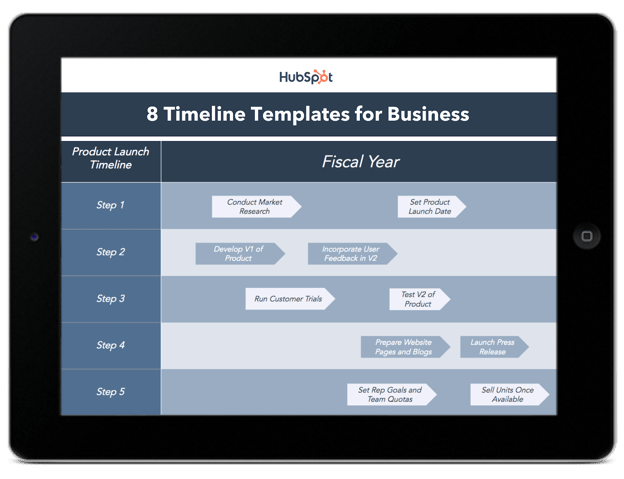
HubSpot timeline infographic templates.Download Now for Free

5. Statistical Infographics

A statistical infographic is a graphic whose main purpose is to show data and research. Let's say that your company has first-party data about your industry. What better way to communicate that than with an infographic?

Now that we know what types of infographics there are, let's give you a few tips on the process of creating one.

1. Find resources.

Before you start creating your own infographics, look for resources that can help you. This is particularly helpful if you aren't working with a graphic designer.

For example, you can use PowerPoint templates or Canva templates. In fact, there's really no shortage of design resources -- charts, reports, and infographics. And, depending on your budget and needs, there are a plethora of options available, all of which have their pros, with very few cons.

2. Target your buyer personas.

When we went through the examples above, you might've noticed that I commented on infographics that correctly targeted their audience. With any marketing asset, it won't accomplish what you want if it's not created for the correct buyer persona.

Don't forget what the purpose of marketing is: to deliver the right message to the right audience at the right time.

3. Keep it focused and simple.

Infographics are a great way to stay focused and use simple language to communicate a message.

The best messages are succinct and very specific to the audience. That's why your infographics should be as focused and simple as possible.

As a marketer, it's important to simplify your messaging whenever you can. Simple messages are easier to understand and retain.

4. Use visuals.

Of course, you can't have a great infographic without visuals. In fact, the whole point of an infographic is to communicate a message with both text and visuals.

The goal of the visuals should be to hook the reader and make it easier to digest the information. And you don't have to be a graphic designer to accomplish this.

In fact, you can use premade templates to make your life easier. Below let's go over why templates are useful.

Infographic Templates

Infographics are a powerful tool for capturing the attention of your target audiences. In fact, businesses that publish infographics grow their traffic an average of 12% more than those that don't.

The hard part, of course, is finding time and resources to create these infographics. That's why HubSpot created fifteen fully customizable infographic templates that will give you the inspiration and foundation you need to build your own infographics right in PowerPoint or Illustrator.

Use these infographic templates to present data for your next meeting, promote an offer on social media, or in your next blog post. Visual information is becoming more and more popular -- and now you have the resources to easily create this visual content.

Featured Resource: 15 Free Infographic Templates in Powerpoint (+5 Bonus Illustrator Templates)

Infographic template from HubSpot.

Download Now for Free

1. Optimize your infographic for search engines.

Infographics don't go viral by accident -- even if you've got the best infographic in the world.

Instead, strategically promoting your infographic by identifying the right people and the right websites can get your infographic in front of thousands of people fast.

But before we do that, you'll want to make sure to optimize your infographic for search engines. SEO won't necessarily help your infographic go viral, but it's extremely beneficial because it will help increase your search engine rankings (which means more free traffic to your website).

Check out this infographic by Backlinko to help guide you while you're optimizing your infographic(s) for search engines:

Infographic from Backlinko.

Image Source

2. Find websites and blogs that share similar infographics.

For example, if I had just published an infographic on email marketing, I would go to Google at type in: "Email marketing infographic." What you're looking for are websites and blogs that have published similar infographics made by other people.

After you've got a decent list of websites that you think will be willing to share your infographic, it's time for some email outreach. First, start by identifying the authors from each of the websites that published similar infographics. You can usually find the author's name in the article's byline:

Graphic on finding websites that publish infographics.

Once you've got a list of authors, use a tool like Viola Norbert or ContentMarketer.io to find email addresses so you can start sending personalized emails.

If you want to learn how the pros do email outreach, check out this article from Brian Dean at Backlinko. Part of that case study highlights the "Pre-Outreach" and "Content Roadshow" strategies he used to generate buzz for his content.

For example, check out Emil's 2-step approach to email outreach. Instead of doing what most people do and asking for a backlink or share right away (1-step approach) here's what he did:

An email asking for infographic publishing.

And because he wasn't being pushy, he gets responses like this from people asking to send his content over (2-step approach):

Screenshot of an email asking for infographic publishing.

See the difference?

Now I'll be the first to admit that email outreach is not the most exciting part about infographic marketing -- but it's crucial if you want to get more eyeballs on your work.

Plus, the long-term benefits from the relationships you'll build with influencers and bloggers will become invaluable down the road.

3. Share infographic with the right bloggers and influencers.

The best tool to find these influencers is BuzzSumo. Just type in a topic or copy/paste a specific link to pull up content that is sorted by number of social media shares.

For example, if I were doing an infographic on gardening, I'd type in "gardening infographic" into BuzzSumo. Next, I would go through the results one by one and click "View Sharers" on any infographics that are similar to mine:

BuzzSumo screenshot.

This will give you a list of the people who have shared that infographic, which is helpful because you can sort by number of followers to identify influencers with a large number of followers who have shared infographics that are similar to yours.

Like in the last step, find their email address and start reaching out one-by-one. Aside from Viola Norbert and ContentMarketer.io, another clever way to find someone's email address is to subscribe to their blog -- the welcome email and all future emails should come from an address that you can respond to.

As an alternative, if you can't find someone's email address, you can always use Twitter to reach out publicly:

Screenshot of a tweet asking for infographic promotion.

Sam Hurley has hundreds of thousands of followers but still responded and shared content from Brian Downard:

Screenshot of a Twitter exchanging asking for infographic promotion.

See how he used the same 2-step outreach approach like the email example from above? He asked if they wanted to see it and then sent the link afterward.

Not being pushy is the key to getting responses and getting your content shared. You might also consider sending a friendly "thank you" note after an influencer shares your content to strengthen the relationship:

Screenshot of a Twitter exchange.

4. Submit your infographic to infographic directories.

These directories are basically websites that curate infographics for other people to see. And they are the perfect place to get your infographic discovered by people who might want to share it on their website.

Trouble is, there are dozens of these directories out there, so instead of manually doing each one by yourself, I recommend using Fivver to pay someone to do it for you. You don't need to have someone submit your content to 50+ directories -- just stick with the people who only add it to the top 10-30 infographic directories.

Screenshot of Fivver freelancers providing infographic submissions.

5. Promote through all your digital marketing channels.

Once you've added your infographic to the right directories, share it through all of your marketing channels:

  • Share with your email lists
  • Schedule multiple social media posts
  • Paid ads / remarketing ads
  • Add links to infographic on relevant website pages
  • Share with industry partners
  • Send to influencers/bloggers who've shared your content in the past
  • Share with any brand or person you mentioned in your content

Infographics are a valuable resource that marketers can use to communicate with their audience in an easy-to-understand way. Next time you're coming up with content, consider if an infographic is a better way to communicate your message.
New Call-to-action


The Ultimate Guide to Infographics was originally posted by Local Sign Company Irvine, Ca. https://goo.gl/4NmUQV https://goo.gl/bQ1zHR http://www.pearltrees.com/anaheimsigns

Thursday, May 13, 2021

9 Social Media Trends Marketers Should Watch in 2021 [Data + Expert Tips]

Over the past year, we've seen a shift in the way brands promote their products or services on social media. 

And, as social media popularity continues to grow — we reached over 3.6 billion social media users globally in 2020 — brands aren't just wondering how they'll engage huge social media audiences next year. They're also asking, "What social media trends should I expect in this constantly changing landscape?"

To learn more about what brands can expect in 2021 and beyond, I spoke with HubSpot's Social Media Manager Kelly Hendrickson and dug through research, including HubSpot and Talkwalker's Social Media Trends Report.

Below, I've compiled nine expert or research-backed trends social media marketers should watch and leverage in 2021.

Download Now: Social Media Trends in 2021 [Free Report]

1. Brands will continue to take a "less is more" posting approach.

This year, many brands spent less time churning out social media posts and more time producing only content that felt thoughtful, valuable, and in-touch with the world around them.

According to Hendrickson, the trend of "less is more" is likely to continue in 2021. 

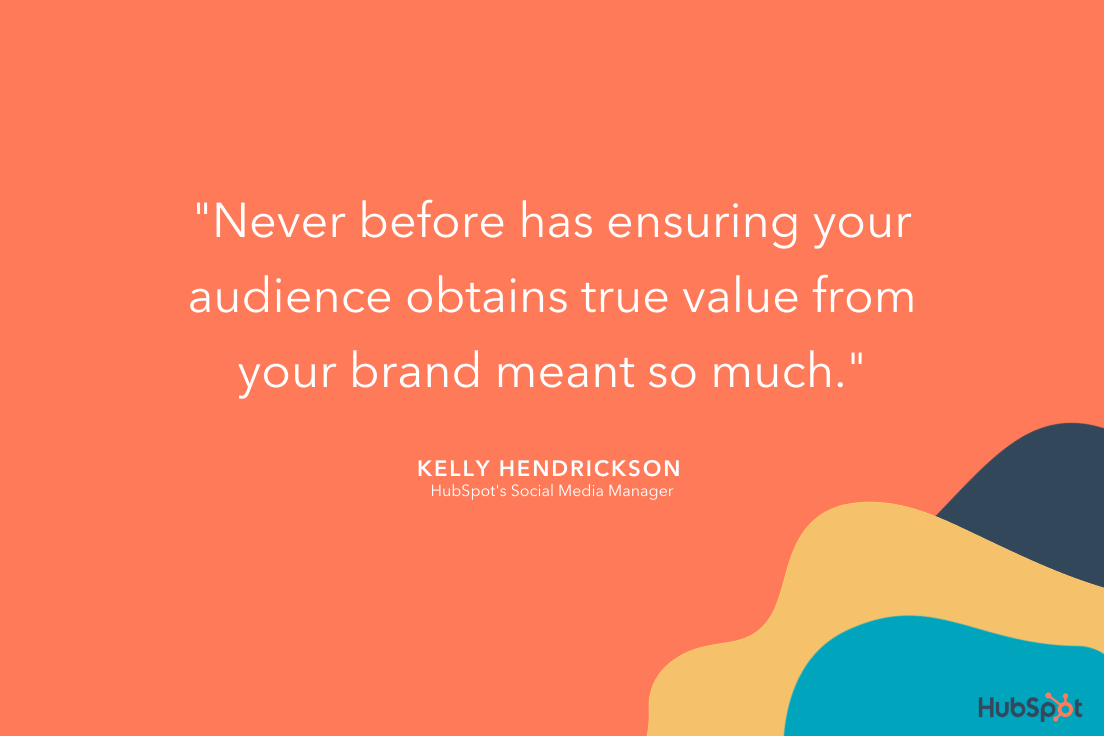
"COVID-19 had brands starting to ask a question they may have never asked themselves before: 'Does my audience even want to hear from me right now?'," Hendrickson says.

"I expect we'll see brands being more thoughtful about when they post. This may even mean posting less — regardless of algorithms — because it's the right thing to do," Hendrickson explains. "There will also be more thoughtful ad buys and partnerships."

kelly hendricksons take on social media trends 2021

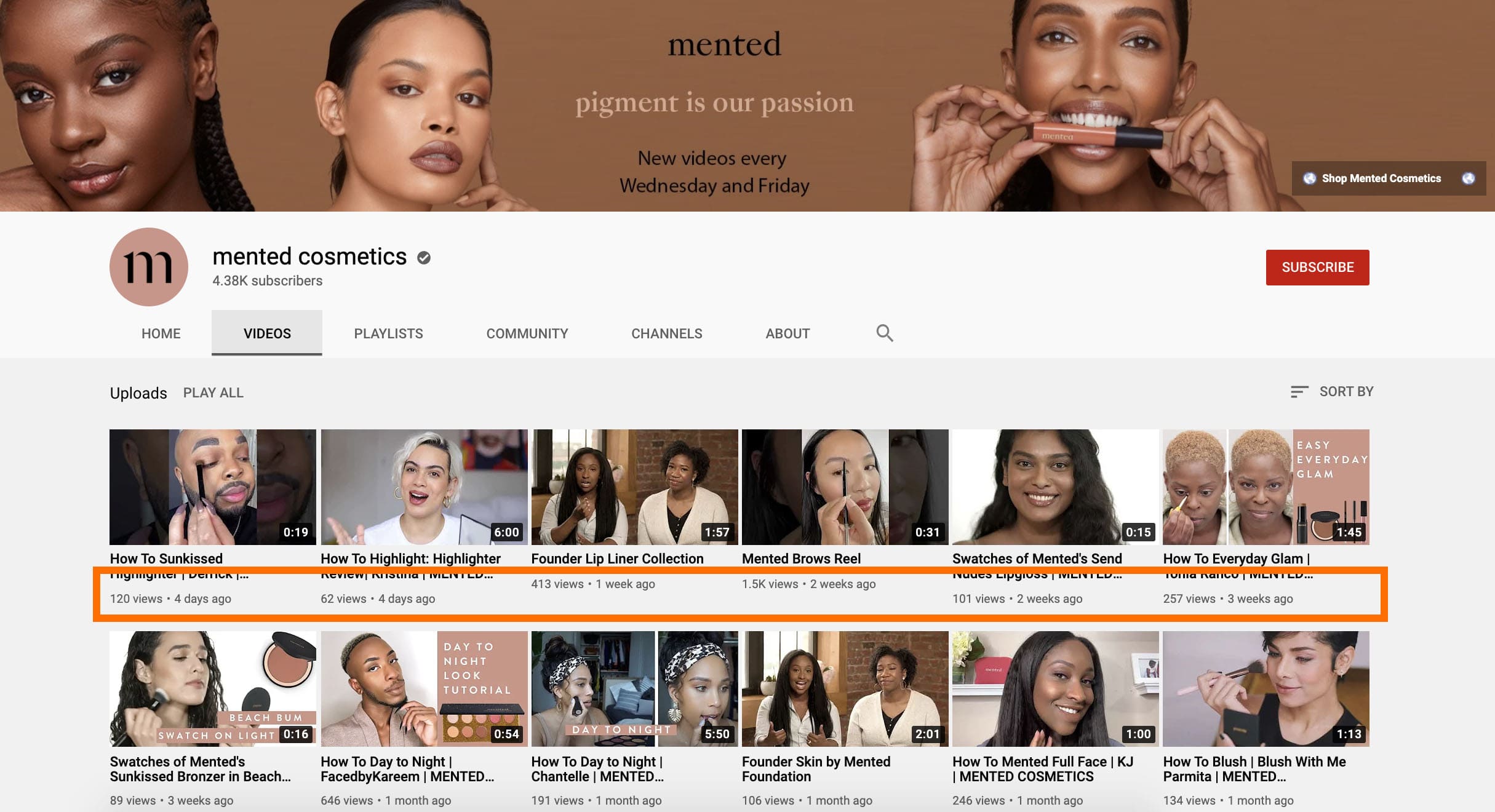
For instance, take a look at Mented Cosmetics' YouTube page. The brand ensures it's thoughtful about when it posts new videos, and typically posts a new video only once per week.

This helps ensure Mented Cosmetics' followers don't feel bombarded with content too often, and keeps the sense of excitement when a new video is posted. 

mented cosmetics on youtube with lower publishing volume

2. Content value will beat production quality.

When many businesses were forced to go completely remote in 2020, social media and video marketing teams needed develop scalable production processes that could be done from home

When consumers still continued to engage with videos, live streams, and other social media content that was clearly made from home offices, marketers realized that content with lower production quality can still be engaging — if it provides value. 

"COVID19 forced many brands to get scrappy when it came to producing content, especially video work," Hendrickson explains. "Without a production studio or tons of equipment available, production value became a bit more lo-fi and in the end, but also a bit more human."

"The exciting thing for brands is that — generally — audiences loved it. If anything, they saw themselves more in the work," Hendrickson adds. "They too were on Zoom, filming things with their phones, or stuck in their homes."

Hendricks predicts that "we'll see bare bones productions in 2021. But, audiences will continue to appreciate it."

For instance, Airbnb's YouTube advertisement, "Meet Dan", is lower production quality — and for good reason. The more authentic behind-the-scenes feel adds to the humor it evokes, as we get a tour of Dan's Airbnb space, complete with alpacas and segways. The brand made a wise decision in forsaking fancier video effects in favor of something much more real — more human. 

3. Conversational marketing will change its tone.

Conversational marketing isn't new. In fact, most of the big brands we know and love allow you to connect with them via social media messaging channels at any time. 

But, in 2021, with more messaging channels than ever — and consumers needing more information to make a worthy investment —  the tone of digital conversations might change. 

For example, while past conversational marketing tactics centered around promotions and making sales as quickly as possible, 2021's conversational marketers might be more focused on helping a user with something, educating them about a product, and nurturing them to conversion with a more thoughtful or empathic tone.

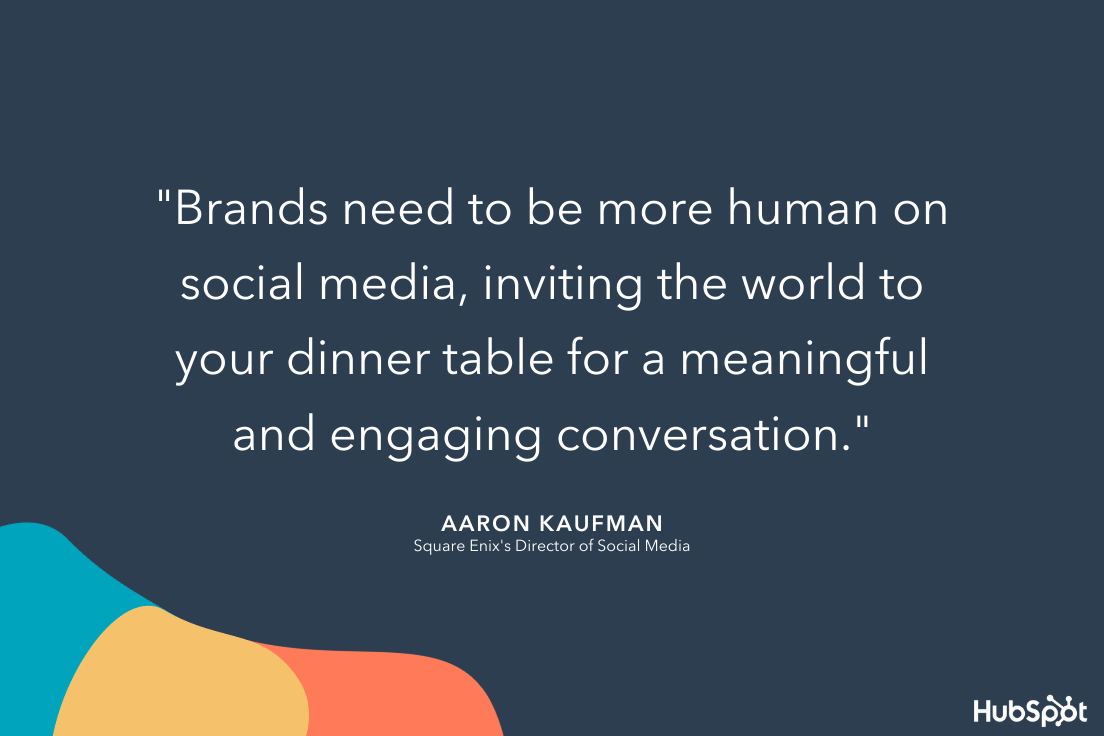
"Brands need to be more human on social media, inviting the world to your dinner table for a meaningful and engaging conversation," says Aaron Kaufman, Director of Social Media at Square Enix in our Social Media Trends Report.

social media trends from aaron kaufman

"You are your fan's greatest fans and need to embody that no matter what social media channel you live on. Emote, respond, recognize, relate, be engaging. We're not robots."

For example, Asana recently posted a #TakeYourKidsToWorkDay inspired post on LinkedIn, along with a sweet message: "Sending much [love] to our parents & caregivers community!" The message has nothing to do with Asana's products or services — instead, it focuses on making a connection with Asana's audience on a deeper level. 

Asanas LinkedIn post on take your kids to work day to demonstrate authenticitySo, how will brands deal with more demand for thoughtful conversational marketing? A mix of AI tools and human interaction could help. 
A healthy combination of AI and human interaction could enable brands to run efficiently on social media while still giving consumers the authenticity they need to see to trust a brand and make a purchase. For example, a bot could handle quick message queries, while sales, service, or community management reps could respond to more complex questions and concerns. 

To learn more about scaling up your conversational marketing strategy, check out this guide to building a chatbot or learn how HubSpot increased qualified leads with by mixing human and bots in our conversational marketing.

4. Consumers will crave snackable content.

In 2020, we saw the rise of TikTok and Instagram Reels, continued engagement on Stories content from Facebook, Instagram, and Snapchat, and brands creating other short-form or "snackable" pieces content to educate consumers about their brand. 

As social media attention spans continue to shrink and more people scroll endlessly through feeds while bored at home, don't expect snackable content to lose steam anytime soon. 

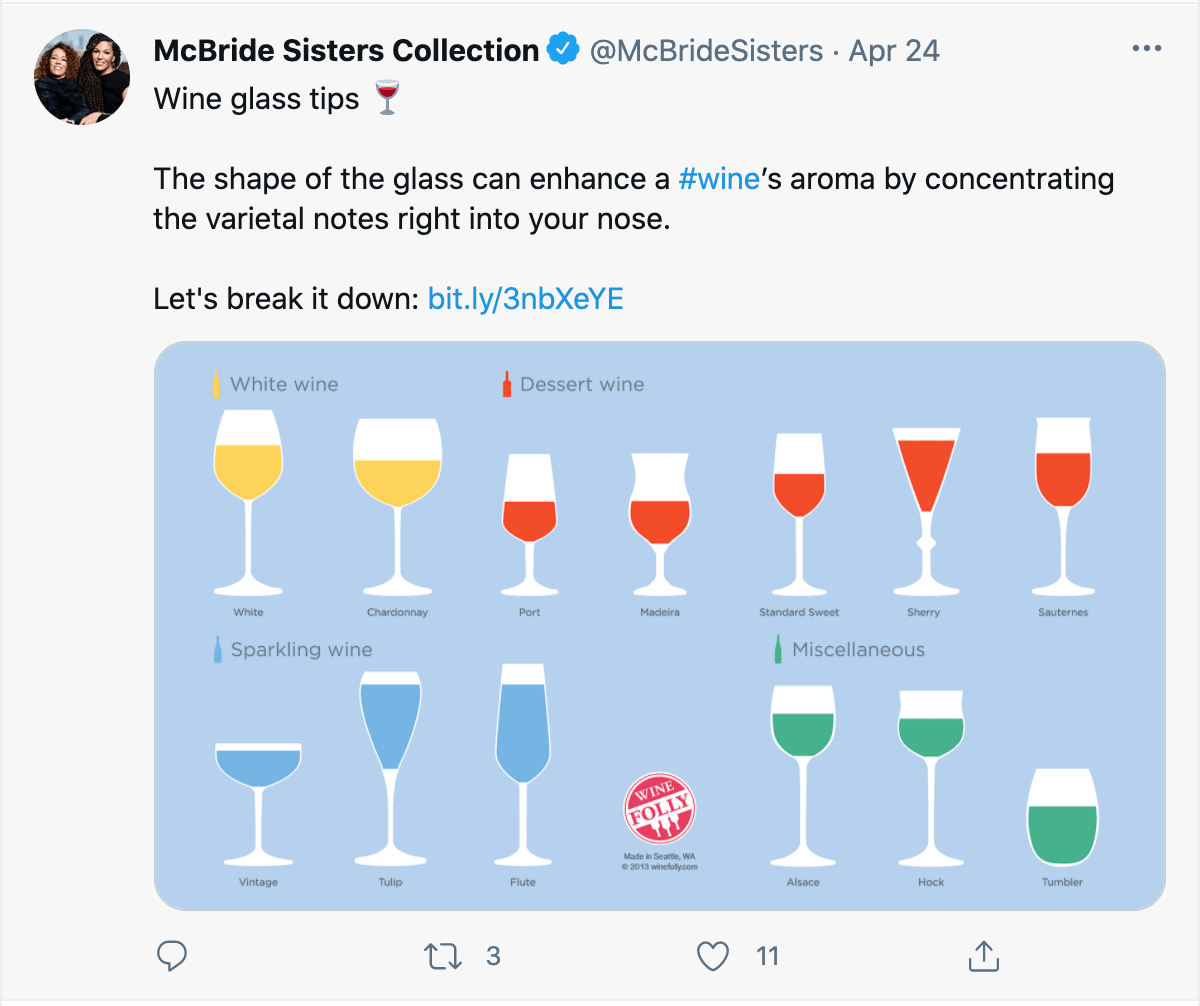
Take a look at McBride Sisters Collection's recent tweet, showcasing a design that quickly summarizes which wine glass shapes you should use for various wine types — including white, dessert, and sparkling.

The image is easily digestible (or snackable), so the brand's followers can quickly get value from the post without spending too much time looking at it. 

McBride Sisters Collection snackable content

To learn more about four types of snackable content your brand should leverage next year, check out this helpful post. 

5. Video will continue to take center stage. 

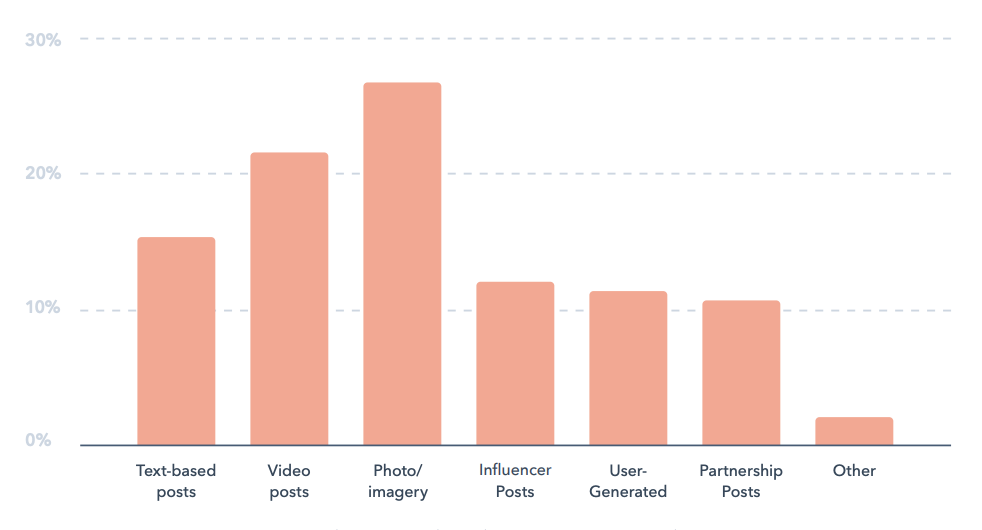
Early in 2020, HubSpot's Not Another State of Marketing Report found that video was the most commonly used marketing content — and the second most engaging content type on social media. 

Screen Shot 2020-11-17 at 2.59.58 PMImage Source

As major platforms, like Facebook, Instagram, TikTok, Twitter, and LinkedIn increasingly amp up their video capabilities, marketers can expect high video consumption to continue and grow in coming years. 

6. More brands will go live.

In 2019, one in five Facebook videos were live. In May of that year, YouTube users cumulatively spent 284 hours watching live video.

In 2020, as many brands were forced to take conferences, events, and other marketing experiences online, it's not shocking to think that 2020 live stream numbers could be higher. 

At the moment, many brands are using Facebook, Instagram, Twitch, and Twitter to live stream events, Q&As, tutorials and other types of content. These types of content keep your followers engaged with your brand by bringing an event they otherwise might not be able to attend directly to their screens.

For example, each year, INBOUND interviews some of its noteworthy speakers and guests in live INBOUND Studio episodes on Facebook. This allows followers who can't join us to get live tips from experts. It also allows followers of interviewed experts to learn more about INBOUND and HubSpot.

To learn more about going live online, check out this guide to live streaming, as well as these tips for marketing your next virtual event

7. Social media platforms could double as shopping channels.

As many brands learned how to do business completely online, platforms like Facebook, Instagram, Twitter, Snapchat, and TikTok raced to develop more online business marketing solutions.

While TikTok and Snapchat expanded business marketing offerings in 2020, Facebook and Instagram actually brought shopping capabilities directly to their apps. 

With Facebook Shops, Instagram Shoppable posts, consumers can buy a product seen in a post without even leaving the app they're on.

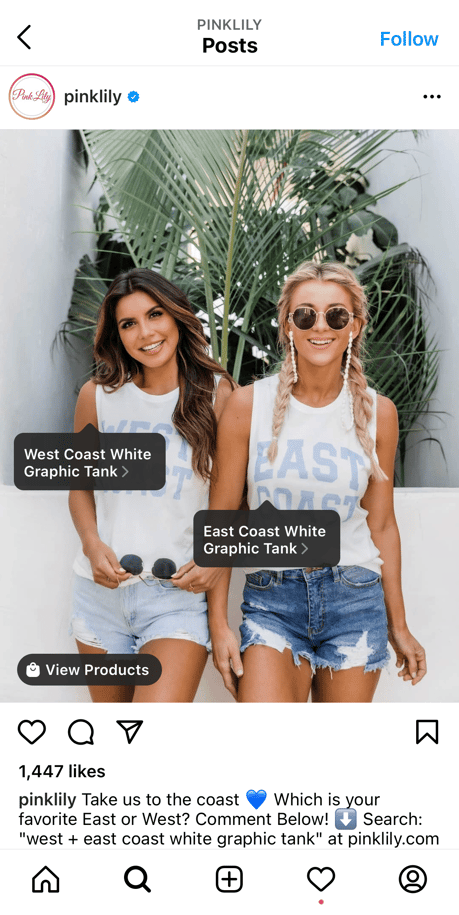
For instance, take a look at Pink Lily Boutique's shoppable Instagram post. When you click on the image, you'll see a few tags of each product the model is wearing — you can then click on the link to purchase immediately, all without leaving the app. 

Shopping on Pink Lilys Instagram channelFor consumers, this adds convenience. For brands that couldn't build their own ecommerce store, the online shopping tools noted above are providing new opportunities to effectively sell products online. 

8. Social media users will embrace gaming and VR.

In the last year, the number of social media users who identify as "gamers" increased by more than 10 million — or 32%. Our Social Media Trends Report reveals that the highest uptick in gamer identification happened in COVID-19's heaviest lockdown months.

Now, with Facebook's company, Oculus, launching new VR products, Twitch continuing to expand online game-streaming capabilities, and platforms like Snapchat launching mini-game apps, it's clear that gamification and social media will continue to go hand in hand in 2021. 

As a small to medium-business marketer, gaming-related promotions might be inaccessible now, but with Facebook and other major platforms continuing to launch brand tools around their newest features — it's not shocking to think that more social media in-game advertising opportunities could be possible in the future. 

Brands should keep an eye out for game-related promotions in 2021.

Wendy's took advantage of the gaming world via Twitch in 2019 when the brand created an avatar for the popular game Fortnite to destroy freezers and showcase the brand's commitment to fresh meat.

The marketing promotion earned 1.5 million minutes watched, and garnered an 119% increase in Wendy's brand mentions across all platforms.

Even if advertorial game content becomes available to big brands but not smaller companies, marketers can still watch what bigger companies are doing and hit the ground running with fresh ideas if gamified promotion become more scalable.

9. Authenticity will be vital.

This year, consumers and brands faced a global pandemic, uncertain financial times, and a number of major events that paused nations in front of news channels.

Now, consumers need more than just great deals to trust, identify with, and invest in a brand. At this point, many brands have taken notice by embracing authenticity and their human side on social media.

For instance, Tipping Cow Ice Cream chose to forgo an ice cream post on New Years Eve to focus on something more important: The founders' appreciation for their customers' support, particularly during the challenging year of 2020. The post demonstrates authenticity and a sense of realness you can't earn with only product-focused posts.

tippingcowicecream-minWhile some brands have spoken directly about their thoughts related to COVID-19 or other news items, others have shown authenticity by zoning on their customers through user-generated content or customer testimonials. 

When done authentically, both strategies can help brands gain trust from their audiences while boosting awareness as a company that cares about people.

"We will continue to see the growth in creators in the social media space. Influencers will continue to be present, but accountability, authenticity, and transparency will be the areas brands and companies will use to determine who to partner with, and who to pass on," says Karen Freberg in our Social Media Trends Report.

"Empathy and advocacy will be elements that will be integrated within messages and purposes for creator campaigns. The days of 'faking it till you make it' without any experience other than having lots of followers are over."

In 2021, expect authenticity to take center stage on social media as successful brands continue to build trust from their audiences.

How to Capitalize on 2021 Social Media Marketing Trends

Now that we've covered some of the most popular social media trends you'll see in 2021, let's recap steps you can take to leverage these trends to boost your own social activity. 

Here are a few steps your social team can take to leverage these trends, attract new audiences, and build a larger following:

  • Leverage video whenever possible. People love video right now, especially live video content, which feels especially authentic. Test out live video channels like IGTV or Facebook Live to see how they perform. 
  • Create relatable content. Don't be afraid to show a different side to your brand. Highlight customer stories; talk about your company's larger mission or purpose; give us a 'day in the life' of one of your employees. Go beyond your product or service to create a deeper connection with your audience.
  • Use a conversational tone. Create social media captions like you're speaking to a friend. Of course, you'll want to stick to your brand's voice, but play around with how you might converse with your audience through social channels. Consider asking your followers questions or telling stories to increase engagement levels. 
  • Use design elements for snackable content. Test out memes, gifs, short videos, quick quizzes, fun infographics, etc. to figure out how you might attract, and hold, an audience's attention even when they're scrolling quickly through their feeds. 
  • Quality over quantity. No need to post once a day. Audiences appreciate quality over quantity — consider how you might set up a schedule so you're regularly posting content but not overposting. Use analytics to determine the right cadence for your own brand. 

Navigating Social Media in 2021

Today, the world around us is constantly changing. And, although we think we know what to expect with social media, this list of trends is likely not exhaustive of what we'll see in 2021.

As a social media marketer, the best thing you can do is to continue to research trends, online consumer behaviors, and your team's social media data to determine which trends or strategies to lean into or how to navigate unprecedented online scenarios. 

One great place to start doing this research could be our HubSpot and Talkwalker's recent Social Media Trends Report.

Along with insights and quotes from social media experts, our Social Media Trends Report walks through all the major 2021 trend predictions to know about and data on how COVID-19 could impact social media marketing. To see the free report, click here or the banner below.

New call-to-action


9 Social Media Trends Marketers Should Watch in 2021 [Data + Expert Tips] was originally posted by Local Sign Company Irvine, Ca. https://goo.gl/4NmUQV https://goo.gl/bQ1zHR http://www.pearltrees.com/anaheimsigns

Header Tags: What They Are and How to Use Them

When I first started blogging, I had no idea how to structure my posts to rank for search engines, or even why it was important.

I just threw in bolded words and phrases that looked good and hoped to be randomly selected for the search engine results pages (SERPs).

Now I know there is a science to blog optimization, and what I was throwing into my blog posts to make them look professional was called header/heading tags — and are an important tool for comprehension and SEO.

→ Download Now: SEO Starter Pack [Free Kit]

Here's a quick guide on header tags and what they're used for:

  • H1 — The title of a post. They're usually keyword-centric, focused around the "big idea" of a page or post, and crafted to grab a reader's attention.
  • H2 — These are subheaders that classify the main points of your paragraphs and separate sections. Consider using semantic keywords related to the "big idea" in your H1 while also helping the reader easily find the sections they want to read.
  • H3 — These are subsections that clarify the points made in the H2 further. Alternatively, they can be used in formatting lists or bullet points.
  • H4 —These are subsections that clarify the points made in the H3 further. Alternatively, they can be used in formatting lists or bullet points.

The "H" in H1, H2, etc. officially stands for "heading element," though the SEO community also commonly calls these tags "header tags."

As you can guess from the guide above, the numeral indicates the hierarchal relationship between each one (with H1 being the most important, H2 being less important, and so on).

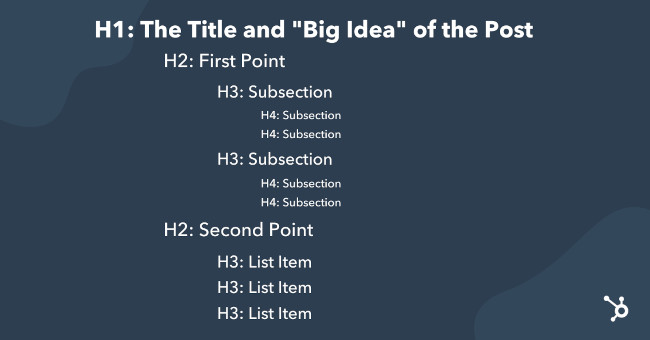
Here's an example of how this hierarchal structure might manifest in a blog outline:

heading-tag-hierarchy-exampleNow that you understand that header tags provide structure to a page, let's talk about them with greater specificity, starting with the H1 tag. 
Don't make the mistake of using header tags as nothing more than stylistic elements. After all, they are structural in nature. Think of the H1 as you would a book title. Usually, there's only one title for a book, so there should only be one title for your page or post. 

In addition, H1 tags should always be at the top of your page before the rest of your content, just as the book title is on the outside cover before you dive into the text inside.

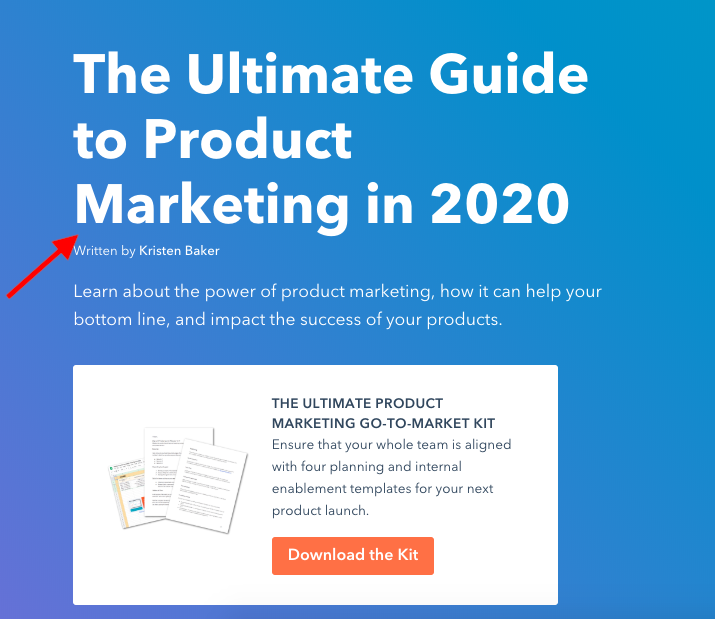
To illustrate, the header tag in the example below is the title, "The Ultimate Guide to Product Marketing in 2021."

example of an h1

The title is designated as the H1 for the page using HTML code. This code might manifest in the web page's source code like so:

See the Pen H1 Example 1 by Christina Perricone (@hubspot) on CodePen.

However, as we alluded to earlier, there are other heading tags that also help with creating the structure of a page.

How many header tags are supported by HTML?

HTML supports up to six header tags (H1-H6) for you to use to structure your page as needed. They can be stylized visually according to your brand, and with the exception of the H1, you can have as many of these tags on a page as you want. 

Your headers should stick to the theme of what you're writing about because they can help the reader (and the search engines) find the main points within the content and guide them through the flow of the page. When you're formatting, use your best judgment when breaking up sections.

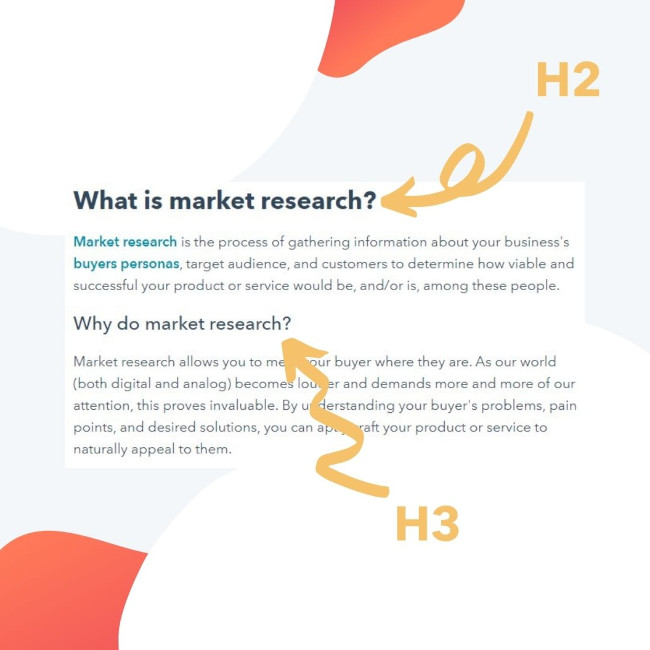
Below is a screenshot of a HubSpot blog post with examples of header tags indicated with arrows:

example of h2 and h3 heading tags

As you can see, every header tag looks different visually, and each header tag is used for a new idea.

Now that you know a little more about what header tags are, let's get into how they're used for SEO.

Header Tags and SEO

You may think that header tags are inconsequential in the grand scheme of website-related things. However, header tags can help provide structure to a piece of content and call attention to the most important ideas, themes, and (in effect)  keywords in that content. As a result, header tags hold weight with keyword relevancy and readability. 

Consider this: Google finds content to serve up to its users by crawling web pages. As it does so, it analyzes the text, images, and other elements it finds to understand what that page is about.

When you put text into a header tag, you're signalling that this text is important, and Google will use these to determine the context of the page, which then helps Google serve up results that are relevant to searchers' queries.

That's why it's important when using header tags to make sure they're correctly matching a keyword intent. If a post's H1 tag doesn't have a keyword, or if you put irrelevant text in H2 and H3 tags, Google will have a harder time understanding a page. As a result, that page won't rank as well as it could. 

To illustrate, let's say your keyword is "eCommerce." You'd want this to be reflected in your H1 tag, so a title like "The Guide to Starting an eCommerce Business" would be ideal. That would tell Google exactly how to send web browsers to your post.

Search engines also look at header tags within your post, so it's good to keep those keyword-centric, as well. For instance, you might create some H2 sections surrounding popular long-tail keywords related to eCommerce, like "five steps for creating an eCommerce business" or "best social media tools for eCommerce."

You don't have to think of keywords by yourself, either — in fact, you can do some easy keyword research to help you out or look into keyword research tools like SEMRush or Ahrefs. Just make sure that your header tags are friendly to both humans and the search engine robots.

Headers also make pages easier to read. Sectioning off different parts of a webpage keeps information organized and broken up in a comprehensible way. This helps readers find information they're looking for but also search engines which are scanning along, too.

If your sections aren't making sense, your page might not rank. Think of the sections in this post — do you think they were broken up in a readable way?

How to Add Header Tags in HTML

Adding header tags in HTML is a fairly simple process. If you want to notate an H1, you would type in <h1> and </h1>, putting the H1 text in-between those two tags. This is the same method for any type of header tag.

For example, if your h1 was "The Guide to Starting eCommerce," it would look like this:

See the Pen H1 Example 2 by Christina Perricone (@hubspot) on CodePen.

This will work for HTML4 or older. If you're working with HTML5, you might have to use a slightly different line to get the same result. The change is to give a heads up to Google about what the H1 is:

See the Pen H1 Example 3 by Christina Perricone (@hubspot) on CodePen.

You can also include punctuation between the two tags. For instance, you might have:

See the Pen H3 Example 1 by Christina Perricone (@hubspot) on CodePen.

Remember, Google will scan the HTML of header tags to tell web browsers what your page is about, so it's important to look them over and see if your headers in HTML are formatted correctly.

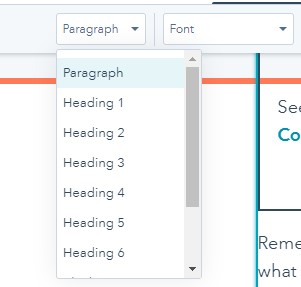
Some blogging platforms, like WordPress and HubSpot, have an option on the toolbar to create header tags, so every time you want to add one, you don't have to dig into the source code or HTML to do so.

applying heading tags using HubSpot's blog editor

The next time you create a post for your website, see if adding relevant header tags affects SEO, and how your readers are comprehending information.

A good test I like to use is sending posts to a close family member who doesn't know much about blogging or marketing. Using outsider feedback and asking if they can comprehend my writing before I publish helps me format posts so they're understandable.

Because using headers can help with readability for your users as well as crawlability for search engines, there's no reason not to use them when creating pages and posts. You may even see jumps in search engine rankings, traffic, and time on page.

Editor's note: This post was originally published in January 2020 and has been updated for comprehensiveness.

marketing


Header Tags: What They Are and How to Use Them was originally posted by Local Sign Company Irvine, Ca. https://goo.gl/4NmUQV https://goo.gl/bQ1zHR http://www.pearltrees.com/anaheimsigns

How to Find the Perfect GIF: 10 Must-Try Websites

Serving as snackable — and often laughable — bits of visual content, GIFs help us accurately convey our thoughts and feelings when we're limited to virtual communication.

The trouble is, finding the perfect GIF by hunting through Google Image Search or that desktop folder of your favorites can take way more time than it's worth.

Finding the right GIF doesn't have to be a lengthy process, you just have to know where to look. To help, we've collected 10 awesome websites below that'll help you find what you're looking for quickly, without forcing you to lower your GIF standards.

(Or, want to create your very own GIF? Check out this tutorial to learn how to make an animated GIF in Photoshop.)

Note: Some of these websites might feature GIFs that are NSFW.

Free Download: How to Use Photos in Marketing

1. GIPHY

This is my go-to resource for GIF hunting. Launched by Alex Chung and Jace Cooke, GIPHY started out as a search engine for GIFs. They've grown GIPHY significantly by partnering with brands, introducing integrations, creating browser extensions, and much more. (To catch up on all of their expansion efforts, check out GIPHY Labs.)

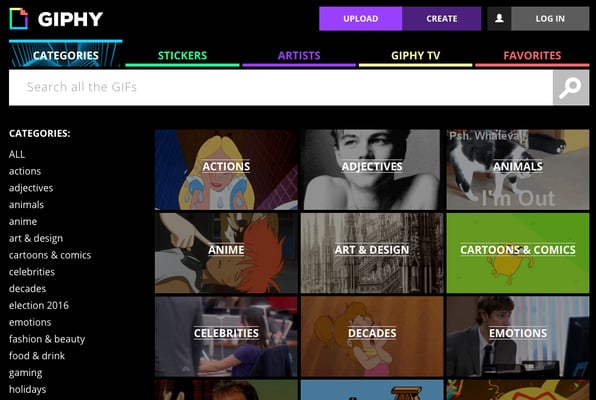
Giphy Categories pages

The best part? Navigating the database of GIFs couldn't be easier: Users can browse categories — Adjectives, Music, Nature, Science, etc. — or seek out a specific word or phrase using the search functionality.

2. Reddit

Reddit is like the mothership for GIFs: The community boasts not one, but several impressive GIF-related subreddits. Here are a few noteworthy ones:

While all of the different, categorized options make it easy for you to find what you need, many of these subreddits commit to a series of guidelines to refine their entries even further. For example, while "reaction gifs" and "analogy gifs" may sound pretty similar, there's actually a difference according to the /r/reactiongif's wiki page. Allow me to demonstrate...

Reaction GIF

I don’t know about you but when I find out payday is coming up I react like:

Reddit reaction GIF

Image Source

Analogy GIF

When I try answering emails before my coffee, I feel like:

Reddit analogy GIF

Image Source

As explained on the /r/reactiongif's wiki page, "A reaction gif is a physical or emotional response that is captured in a .gif which you can link in response to someone or something on the Internet. A gif which is a metaphorical reaction to something does not qualify as a reaction gif. Generally speaking, most posts that use the term "How I Feel When" are analogy gifs."

3. Tumblr

Tumblr is a huge blogging platform where GIFs are made and shared like crazy. Bloggers on this platform do an excellent job of pairing relevant GIFs with relatable scenarios. There’s plenty of blogs dedicated to sharing funny GIFs daily, but my favorite ones to share on a Monday would be in hashtags like #work-memes #workfromhome and more.

For instance:

Tumblr funny work meme GIF

Image Source

We all know that feeling — right? (If not, then I must ask you, what’s it like to be perfect?)

Anyways, all you have to do is use the top search bar to lookup hashtags of the content you’re looking for, or follow some blog pages that are dedicated to uploading GIFs daily. GIFs featured on Tumblr are either handmade in Photoshop by the creators or sourced from different websites, and they're pretty good about giving credit where credit is due.

4. Gfycat

Gfycat is another gallery with millions of GIFs to dive into. Not only is it one of the most popular GIF sites, but it has an easy Video-to-Gif creator tool to turn your favorite Twitter, Vimeo, and Twitch streams into your library of memes.

Navigate its selection of GIFs from the search bar or left menu, choosing from the latest “Trending” or “Explore” section to find different popular categories of GIFs or stickers.

And who would I be to share a site called “Gfycat” without an obligatory cat GIF?

Gfycat cat GIF

Image Source

5. Tenor

Tenor is a great way to throw a relatable GIF into any conversation, whether on your PC or iPhone.

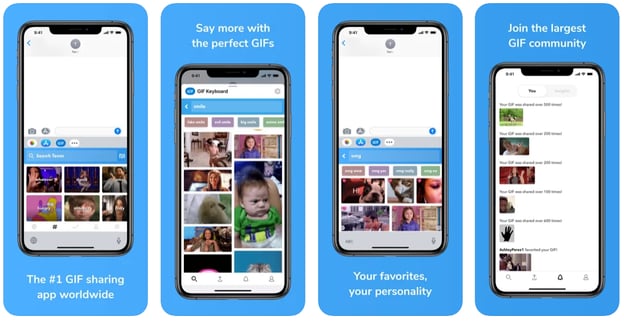
Tenor mobile GIF keyboard

Having funny GIFs at your fingertips is a great way to share a quick laugh with your friends and family. All you have to do is type in how you’re feeling on your phone’s keyboard and Tenor will automatically start populating tons of GIFs. Perfect for putting in your conversation with cousin Katy who still gets a kick out of watching America’s Funniest Home Videos.

6. Reaction GIFs

This site serves up an appropriate GIF for just about anything you're thinking. Depending on what you're searching for, there are several different ways to uncover a perfect match.

One way is to use the dropdown menus on the right side of the site. These menus allow users to surface GIFs that match a specific feeling (tired, confused, proud, etc.) or answer (yes, no, undecided, etc.). For example, a search for "excited" might surface something like this:Excited Perfect GIF Tina Fey

Users also have the option to search by galleries or tags. Galleries are organized into categories such as "OMG," "Dance Party," and "LOL," but there’s plenty more tags to explore.

7. GIFbin

Here's another stellar resource for uncovering GIFs.

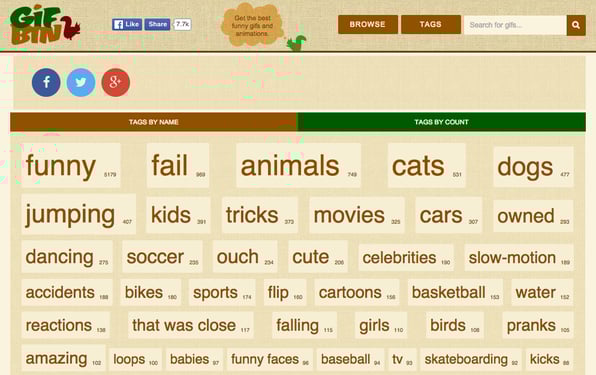
On GIFbin, users can filter thumbnails by "Newest," "Top Rated," and "Most Viewed," or by tags. The interesting thing about GIFbin's tag system is that they are categorized by both name and count.

While the names are pretty standard search terms — animals, babies, sports, etc. — the count feature allows you to easily uncover terms with the highest volume of available GIFs. Check it out:

GIFbin Browse Gif Tags page

Or if you’ve got too much free time on your hands like me, click through the rabbit hole— I mean— “random GIF” button for endless fun.

8. Imgur

Ah yes, Imgur, the Reddit of GIF sites without all the text threads.

Imgur is an image hosting site that shares an array of funny or cool GIFs. It’s library is a mix between new uploads and even some of my favorites from the 2010s.

Imgur perfect GIF lotr

Image Source

Search up any tags for all the funny movie edits, or whatever else you’re interested in via Imgur.

9. Imgflip

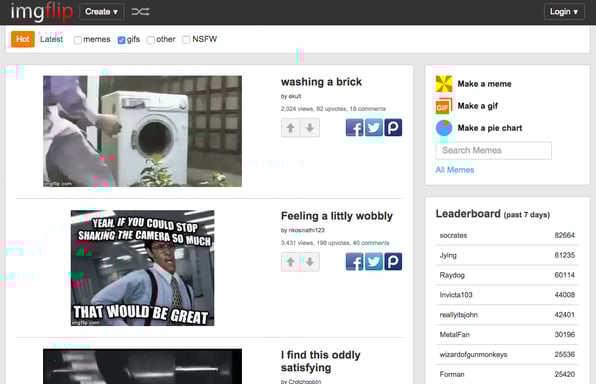
Imgflip is another extensive library of GIFs. There are a few ways to browse Imgflip content, as detailed on the website:

  • Hot/Latest images on the homepage
  • Use the Previous / Next / Random navigation on image pages
  • Use the hotkeys as described on image pages
  • Tag pages (such as cats)
  • Meme pages such as Grumpy Cat, found on the meme templates page

imgflip GIF gallery

If you like a little competition, you can create your own GIFs and earn a spot on the leaderboard. If your GIF gets upvoted enough, you can bask in the glory of making strangers on the internet laugh.

10. Gyazo

Last but not least, we have Gyazo. This website is a bit different from the others, but with this tool you can capture your PC screen (like a clip instead of a screenshot) and create GIFs out of them. Made to convert footage into GIFs quickly, it stores your library in your account, so you can link or download your favorite GIFs whenever you want.

As a different method to making your own GIFs, Gyazo makes it easy to create, store, and share your favorite GIFs with your favorite people.

For your viewing pleasure, enjoy some GIFception as I used Gyazo myself to make a GIF out of a video of someone using Gyazo to make a GIF.

Gyazo gif maker video

Image Source

Why You Should Use GIFs in a Business Setting

On a more serious note, GIFs are another form of visual content that can be used for both fun, and strategically for marketing. For businesses, they can be a tool to demonstrate company culture and drive more engagement by appealing to customers looking for authenticity.

Internal Use

On an internal level, exchanging GIFs in conversation or including them throughout presentations can help break up the monotony of day-to-day business.

Adding some level of quirkiness in meetings or seminars can keep employees more engaged and satisfied than otherwise. Plus, it never hurts to share a quick laugh in the office, as long as you don’t get too carried away.

External Use

55% of B2C content creators say that creating or sharing visual content is a big priority for them presently. Similar to videos or live recordings, using GIFs to convey ideas in a business setting offers viewers visuals that are more stimulating than text-only content.

For instance, when people hear information, they're likely to remember only 10% of that information three days later. However, if a relevant image is paired with that same information, people retain 65% of the information three days later.

Also, using GIFs on social media accounts is a great way to catch the attention of potential customers. Whether it’s Instagram, Twitter, or a blogging platform, adding a visual like GIFs to your post can prove useful to a business.

The World is Your Image Library

There’s plenty of websites to choose from when it comes to finding some pretty cool GIFs. Whether you need to send one to your coworker's birthday email chain, or make your brother, Trevor, laugh at the dinner table, we hope this list helps narrow down your search for the perfect GIF.

Editor's note: This post was originally published in January 2016 and has been updated for comprehensiveness.

visual marketing


How to Find the Perfect GIF: 10 Must-Try Websites was originally posted by Local Sign Company Irvine, Ca. https://goo.gl/4NmUQV https://goo.gl/bQ1zHR http://www.pearltrees.com/anaheimsigns

A Beginner's Guide to Data Flow Diagrams

Ask any professional athlete or business executive how they became successful, and they’ll tell you they mastered a process. By figuring out which of their habits led to success and which didn’t, they improved their efficiency, effectiveness, and productivity at work.

But implementing a process into a business, department, or even a team is a completely different animal than honing your own personal process. With so many moving parts, how do you track each aspect of your business' process and how do you refine it?

Data flow diagrams provide a straightforward, efficient way for organizations to understand, perfect, and implement new processes or systems. They’re visual representations of your process or system, so they make it easy to understand and prune.

Before we dive into how data flow diagrams can help refine any of your business’ systems or processes, let’s go over what it exactly is.

Download Now: An Introduction to Data Visualization for Marketers [Free Guide]

data-flow-diagram

Image Source

DFDs became popular in the 1970s and have maintained their widespread use by being easy to understand. Visually displaying how a process or system works can hold people’s attention and explain complex concepts better than blocks of text can, so DFDs are able to help almost anyone grasp a system’s or process’ logic and functions.

There are two types of DFDs — logical and physical. Logical diagrams display the theoretical process of moving information through a system, like where the data comes from, where it goes, how it changes, and where it ends up.

Physical diagrams show you the practical process of moving information through a system, like how your system’s specific software, hardware, files, employees, and customers influences its flow of information.

You can either use logical or physical diagrams to describe the same flow of information or you can use them in conjunction to understand a process or system on a more granular level. But, before you can use a DFD to understand your system or process’ flow of information, you need to know the standard notations or symbols used to describe it.

Data Flow Diagram Symbols

Data Flow Diagram symbols are standardized notations, like rectangles, circles, arrows, and short-text labels, that describe a system or process’ data flow direction, data inputs, data outputs, data storage points, and its various sub-processes.

There are four common methods of notation used in DFDs: Yourdon & De Marco, Gene & Sarson, SSADM and Unified. All use the same labels and similar shapes to represent the four main elements of a DFD — external entity, process, data store, and data flow.

Data-flow-diagram-symbols

Image Source

External Entity

An external entity, which are also known as terminators, sources, sinks, or actors, are an outside system or process that sends or receives data to and from the diagrammed system. They’re either the sources or destinations of information, so they’re usually placed on the diagram’s edges. External entity symbols are similar across models except for Unified, which uses a stick-figure drawing instead of a rectangle, circle, or square.

Process

Process is a procedure that manipulates the data and its flow by taking incoming data, changing it, and producing an output with it. A process can do this by performing computations and using logic to sort the data, or change its flow of direction. Processes usually start from the top left of the DFD and finish on the bottom right of the diagram.

Data Store

Data stores hold information for later use, like a file of documents that’s waiting to be processed. Data inputs flow through a process and then through a data store while data outputs flow out of a data store and then through a process.

Data Flow

Data flow is the path the system’s information takes from external entities through processes and data stores. With arrows and succinct labels, the DFD can show you the direction of the data flow.

Before you start mapping out data flow diagrams you need to follow four best practices to create a valid DFD.

1. Each process should have at least one input and one output.

2. Each data store should have at least one data flow in and data flow out.

3. A system’s stored data must go through a process.

4. All processes in a DFD must link to another process or data store.

Levels of Data Flow Diagrams

DFDs can range from simple overviews to complex, granular representations of a system or process with multiple levels, starting with level 0. The most common and intuitive DFDs are level 0 DFDs, also called context diagrams. They’re digestible, high-level overviews of the flow of information through a system or process, so almost anyone can understand it.

Level 0: Context Diagram

This DFD level focuses on high-level system processes or functions and the data sources that flow to or from them. Level 0 diagrams are designed to be simple, straightforward overviews of a process or system.

Level 1: Process Decomposition

While level 1 DFDs are still broad overviews of a system or process, they’re also more detailed — they break down the system’s single process node into subprocesses.

Level 2: Deeper Dives

The next level of DFDs dive even deeper into detail by breaking down each level 1 process into granular subprocesses.

Level3: Increasing Complexity

Level 3 and higher-numbered DFDs are uncommon. This is largely due to the amount of detail required, which defeats its original purpose of being easy to understand.

Data Flow Diagram Examples

Professionals in various industries, like software engineering, IT, ecommerce, and product management & design, can use DFDs to better understand, refine, or implement a new system or process.

But what does a data flow diagram look like in practice — and how does it help your business? Here are three examples to help contextualize DFD impact.

1. Level 0 DFD

Level 0 DFD


Image Source

This Level 0 DFD provides a contextual map of a securities trading platform. Data flows in one direction from the customer service assistant and the broker to the platform, and in two directions from customers to the platform and back again.

2. Level 1 DFD

Level 1 DFD

Image Source

This Level 1 DFD breaks down the customer process in more detail, expanding it to include account creation, cash withdrawals, and eventual securities transactions.

3. Level 2 DFD

Image Source

This Level 2 DFD decomposes the “Place Order” process to contextualize the steps required to place an order — either by a customer or by a broker. It even accounts for a third-party stock exchange center where transaction details are forwarded after an order is placed.

1. Select a system or process.

Begin by selecting a specific system or process you want to analyze. While any system or process can be turned into a DFD, the larger the process the more complicated the diagram and the more difficult it will be to contextualize. Wherever possible, start with a small function or process you’re looking to improve.

2. Categorize related business activities.

Next, categorize all activities related to this process into external entities, data flows, processes, and data stores.

Consider a restaurant food ordering system. Customers are external entities, the food ordering system is a process, and the interaction between customers and the system (which goes in both directions) is the flow. 

Also worth noting? The ordering system doubles as a data store, so for an SSADA model, this means drawing it as a rectangle with rounded corners with two horizontal lines inside to represent its dual function.

3. Draw a Context DFD.

Now it’s time to start drawing. DFDs can be created by hand, using free templates available online, or via browser extensions.

Begin with a simple, Level 0 DFD: Start with your process or system, then map all basic connections and flows.

4. Check your work.

Before diving into more complex DFDs, check the work you’ve already done to make sure it’s accurate and complete. If you’ve missed (or added) a process, entity, or flow, your next-level DFDs may not make sense and you may be forced to start over.

5. Create child diagrams.

For each process or system described in your Level 0 DFD, create a new child diagram with its own entities and flows. Eventually, you can use these child diagrams to connect processes together. 

6. Expand processes into Level 1 DFDs.

Using your child diagrams, you should map more in-depth connections between each process. In the case of our restaurant example, this could mean digging deeper into the food ordering system and its connection to suppliers, managers, customers, and kitchen staff.

7. Repeat as needed.

Each process — no matter how large or small — can be reimagined as a Level 0 context diagram and the cycle can begin again. Repeat these steps as needed to create as many DFDs as required, or break processes down further to develop Level 2, 3, etc. DFDs.

Perfecting Your Process

While there’s no such thing as a “perfect” data flow diagram, continued practice can help streamline the process and offer critical insight into what’s working, what isn’t and where your business can make improvements that offer the biggest impact.

Your best bet? Remember the rule: Keep it simple. Start with context, build out connected processes, and repeat as needed to map key connections, flows, and entities across your organization.

Blog - Data Visualization [List-Based]


A Beginner's Guide to Data Flow Diagrams was originally posted by Local Sign Company Irvine, Ca. https://goo.gl/4NmUQV https://goo.gl/bQ1zHR http://www.pearltrees.com/anaheimsigns

The Ultimate Guide to Viral Campaigns


“He once ran a marathon because it was on his way. Sharks have a week dedicated to him. Mosquitoes refuse to bite him purely out of respect.”

Have you heard of him before? Yes, he’s “The Most Interesting Man in the World”— a fictional character that drinks Dos Equis beer and stars in the company’s viral commercials.

The commercials — which make me laugh every time — are part advertisement, part comedy skit and have a similar theme so fans always know when they’re watching a Dos Equis advertisement.

The company targets its audience of sophisticated beer drinkers in an engaging, creative, and humorous way through TV, social media, and YouTube. The unique campaign created fans around the world that helped spread it across multiple platforms, so much so that people even dress up as the commercial's main character for Halloween

Dos Equis may not have been 100% sure that their campaign would take off the way it did, but they had a good idea about its potential popularity. 

Similarly, there is no guaranteed way to ensure your content goes viral, but there are certain steps you can take to give your marketing campaign the best chance at success.


Many marketers hope for a campaign to go viral — meaning it's recognized, widely-accepted, and influential. But there's no guaranteed formula. However, if you think about some of your favorite viral marketing campaigns, you'll notice some common features. Marketers wanting to reach a bigger audience should keep these attributes in mind when creating their next campaign:

1. It appeals to a target audience.

A successful viral marketing campaign considers the target audience. For any campaign to go viral, it needs to resonate with the audience and make them feel so strongly about your content that they decide to share it with their family, friends, and followers.

Determine who your target audience is in the earliest stages of your campaign creation. To achieve this, ask questions such as: Who do I want to connect with? What content would they feel passionate about? What are their hopes, dreams, and values? Why would they care about my campaign? What will can I do to make them want to share my content with their social network?

2. It has a strong visual strategy.

Viral marketing campaigns require a visual strategy — this guides potential customers to understand your brand through the use of images.

A campaign should tell a story and that story is best told using visual elements that resonate with your audience. Your visual strategy needs to be compatible with your brand and target audience — it should be interesting, informative, and contain some element of intrigue, such as humor or hope.

3. It's highly creative.

Think about your favorite viral marketing campaign. What sets it apart from others?

Marketing campaigns don’t go viral unless they have a unique, interesting, and innovative idea behind them — your campaign needs to be something new and attention-grabbing.

4. It has emotional appeal. 

Have you seen the Dove Real Beauty Sketches campaign? It makes you feel frustrated, insecure, strong, and confident in just a few minutes.

Each commercial shows a person sitting behind a curtain describing their appearance while an artist — who cannot see them — draws their portrait. After the individual is done describing his or her features and the portrait is complete, the curtain is removed. The artist then draws a second portrait of the individual based off what they actually see.

After the second portrait is finished, the artist places the two drawings next to each other. As you can probably imagine, the portrait derived from the individual’s self-description is less attractive than what the artist draws in the second portrait.

In fact, in each video throughout the campaign, the portrait that the artist creates is a much brighter and more realistic depiction of the individual. This is a message about self-esteem and the beauty within all of us.

The campaign went viral because of its relatability and emotional appeal. You need to make your audience feel something — otherwise, why would they want to share your content?

5. It's easy to share and promote.

Thanks to the internet and social media, sharing and promoting your content with the rest of the world is pretty simple. You don’t need huge sums of money to produce successful photo or video content that can be consumed by the greater population. 

For something to actually go viral, it needs to be shared over and over again. This means you and your company need to share the content first in as many places — and in as many ways — as possible. Then, you need to make it easy for your audience to share it as well.

Enable sharing, embedding, and downloading capabilities on all of your content so your viewers can tag their parents on Facebook, message their best friends on Instagram, or download your video so they can easily turn your content into a memorable GIF. Create calls-to-action or elements that encourage people to send it to their friends. 

Think about asking a celebrity to promote your content if an influencer would fit with your overall message and add value to your campaign. For example, viewers may find your insurance commercial more entertaining and share-worthy if Peyton Manning or Brad Paisley are singing.

6. It's published at the right time.

You should also consider the date and time that you share your content. Marketers use major holidays — such as Christmas — as well as major events, like the presidential race and the Super Bowl, to their advantage.

More people are scrolling through their social media feeds, watching TV, and keeping up with current events during these times which causes marketers to spend more money on their campaigns. 

Similarly, anyone who uses a platform like Instagram knows what I’m talking about when I say the date and time of your posts matter.

For example, if you post on a Saturday at 8 p.m., most people are out at dinner, seeing a movie, or just hanging out with friends — meaning they are most likely not browsing their newsfeed ... at least not as much as they do on Tuesdays

After all of this sharing and promoting, you need to wait and see whether or not people latch onto your content. If so, you could have created a viral campaign. If not, you may have to try again.

Read this blog to learn about the reasons why some older campaigns stand the test of time.

The Advantages of Viral Marketing Campaigns

Creating a viral marketing campaign isn’t an easy or predictable achievement. But if your campaign does go viral, it can mean thousands or even millions of new people being introduced to your brand and buying your products — money in the bank!

For example, the Dollar Shave Club’s campaign video went viral, which made them a household name. They were then acquired by Unilever for $1 billion — not bad.

Here are a few more advantages of producing viral content:

1. They can build your brand.

When a marketing campaign goes viral, your audience automatically learns about your company, products, services, and brand. This includes people who may not have ever heard about your company otherwise. This is how some small companies make their “big break” and how large companies stay relevant.

2. They don’t require a large budget.

Some of the most successful viral content is created on a low budget. These days, individuals and companies of any size can film high-quality video and take professional-looking photos all on an iPhone.

Many content creators, or people who simply upload a random video, have found themselves become famous almost overnight. It’s not about the resources and budget — it’s all about what catches the attention of the internet. Marketers don’t always need a large-scale production with a celebrity to make their campaign funny, surprising, relatable, or informational. 

Fun fact:Jonathan Goldsmith, the man behind the “Most Interesting Man in the World” commercials, had only done a few gigs prior getting his big break when the campaign went viral. 

3. They get your brand in front of a new (and larger) audience.

Campaigns are considered “viral” when they have a large reach. Companies may experience an increase in sales, greater engagement on social media, and a boost in conversation about their brand and products.

This is exactly what happened for Smart Water when they brought Jennifer Aniston on board for their campaign in 2012. The video has over 6 million views on YouTube, and their humorous campaigns have done so well with the public that Aniston was featured in them through 2017.

3 of the Most Famous Viral Campaigns

Now that we have reviewed the features of successful viral campaigns and how to launch one yourself, let’s dive into some of the most popular viral campaigns ever created.

Old Spice: “The Man Your Man Could Smell Like”

Old Spice found that women are the ones to purchase men’s personal hygiene products, so they created an ad that spoke directly to this audience.

The “Old Spice Man” talks directly to the audience in a bold, confident, and humorous way. He tells women that anything is possible when your man uses Old Spice — all while he sails the ocean shirtless, turns sports tickets into diamonds, and rides a white horse on the beach.

This campaign went viral because … well … humor works. It was so successful that it even increased sales for the brand. The commercial has received over 55 million views on YouTube, won an Emmy for Outstanding Commercial at the Creative Arts Primetime Emmy Awards, and won the Film Grand Prix at the Cannes Lions International Advertising Festival.

ALS: “Ice Bucket Challenge”

The ALS Ice Bucket Challenge began four years ago and was created to raise awareness for the debilitating disease. For the challenge, you had to pour ice cold water over your entire body and then nominate a friend to do the same. This became a movement that raised $115 million in the summer of 2014 alone. Because ... who doesn’t want to watch a family member or friend pour freezing cold water on their head?

Celebrities from around the world started participating, challenging their famous friends, donating, and raising awareness. There was an Ice Bucket Challenge hashtag that gained popularity allowing for the videos to spread easily over multiple social media channels.

Most importantly — the challenge is fun and makes participants feel like a part of a bigger movement, which is why it remains relevant years later.

Always “#LikeAGirl”

This video became a major hit because it directly addressed how phrases that are so commonly used can be detrimental to someone's self image and confidence. In the video, various men, women, and young boys are asked to "run like a girl" or "fight like a girl". Then young girls are asked to do the same, with a very different approach: They show strength and confidence in their movements. 

It made viewers recognize how quickly we use female-oriented phrases as insults, and that doing something #LikeAGirl should be seen as inspiring and brave. 

The original TV commercial that came out in 2014 has over 65-million views on Youtube, and the hashtag — #LikeAGirl — remains popular today.

For more great examples of viral video marketing campaigns, check out this blog.

Conclusion

There is no roadmap for making your content “go viral.” You can review what has been successful in the past and try to emulate this, but ultimately, it’s about creating great content that connects with your audience and makes them want to share it. Do this, and you just might find that your brand is the one everyone is talking about. 


The Ultimate Guide to Viral Campaigns was originally posted by Local Sign Company Irvine, Ca. https://goo.gl/4NmUQV https://goo.gl/bQ1zHR http://www.pearltrees.com/anaheimsigns

Wednesday, May 12, 2021

Best Banner Ads: Examples of Remarkable Display Advertising

The best banner ads are a combination of many different elements. They can feature impactful imagery, unique interactivity, brilliant copy, or highlight the very best in advertising technology.

Great online advertising not only needs to capture a viewer’s attention but fulfil a clear purpose. From brand awareness, to a single ad part of a large personalised campaign with thousands of banners.

Yet, without further ado, here are examples of the best display advertising campaigns around:

Meliá Hotels International


Meliá Hotels International personalised Autumn display campaign features a variety of rich media interactive elements. What’s more, each design element works together perfectly to drive the viewer to engage and click to a specific landing page.

This best display ad from Meliá really highlights the benefits of combining rich media and data feeds. Just look at the the drop-down selection of different locations, which changes the imagery in the ad. Not only does it allow the display campaign to highlight multiple destinations but it serves as a beautiful branding campaign. Plus, the use of personalisation enables them to shorten the sales funnel, getting the user to select where they want to go.

Bluestep Bank


One brand experimenting with video and interactive campaigns is Swedish bank, Bluestep Bank. This best banner ad uses Bannerflow’s drag and drop HTML5 widgets. Plus, is emotive, both working with and enhancing the colours of the brand in its design.

Its design team has added eye-catching playfulness and engagement to the ad. This enables the campaign to to stand out in what can be a saturated digital landscape. The result? An ad that is super engaging and simple for any viewers to interact with. In fact, the paintbrush effect is a number of drag and drop Rich Media widgets combined to present the effect of painting the wall.

Hallon

Next on our best banner ad list is this striking display ad by Hallon of Sweden. Hallon are a relatively young mobile phone brand and have a history of using elements of “fun” in their branding. Whether through the use of their bubble-like logo, or as in this banner through the act of celebrating.

The looping semi-transparent background video makes it seem as if the viewer is looking through the window of a happy Hallon customer. The big bold copy for “REA!” (sale in Swedish), helps explain why the woman in the video is so excited. While the copy, graphical elements, and colours of the deal graphic, are all appealing and on-message.

Ladbrokes

With a striking palette of black, red, and white, Ladbrokes Belgium’s HTML5 banner ad for the Mayweather Vs. McGregor is a knockout. With copy that is simple and to-the-point, the message is clear. The pacing of the frames is good. Plus, the addition of the flash just before the appearance of Mayweather is similar to that of a flash bulb going off.

The last frame’s call to action stands out in fluorescent green. The contrast grabbing the viewers’ attention.

MSC Cruises

So how do you convey the luxury of a warm and relaxing cruise? Well, MSC Cruises have done just that with the above ad! Bannerflow’s very own Product Specialist, Jamal Morris, sums it up nicely. “The combination of video and static works together to create a campaign that’s bigger than the sum of each part”. It’s an excellent example of how to use static elements with in-banner video.

What makes this one of our best banner ads is how MSC Cruises have taken their video advertising from other channels and used it in-banner. Rather than force it, the short video merges with the ocean colours of the rest of the banner. It also helps to rotate the viewer’s eye to the sand-like CTA.

Three

Another ad on the best banner ad list is this one produced by Three in Sweden. Like the majority of the ads featured on this list it’s designed in an ad creator which automates the production of digital ads. This removes tasks like coding individual banners, and fiddly image optimisations. Essentially, the Three design team benefits from A.I. to automatically optimise and scale a master design to hundreds of different sizes and formats. Thus designers spend more time being creative (and less time being bored).

What we like about this ad is the optimising of the video, space, and CTA position for the leaderboard style of the banner. In fact, the Three campaign uses the same video and copy across the entire campaign. Variations were automatically created for different devices thanks to production automation using the Bannerflow platform. This display ad by Three is just one of many different sizes published for its campaign.

CM.com


CM.com’s best display ad is a great example of a strong message and animation being used together to make something even more powerful. The modern design immediately catches your attention, and works perfectly going from anonymous to personalised ad.

CM.com’s display campaign was designed to help launch its latest mobile marketing platform. And its concept of turning an anonymous profile into a person with preferences and habits using HTML5 animation is a great way of showcasing the idea of how its personalisation offering works.

bwin

The beauty of combining display advertising with data feeds is the sheer number of opportunities this hook-up provides. Take this bwin banner for the German football league. It’s utterly clear and works a treat.

Incorporating the colours of the bwin brand, it simply offers punters the latest odds for the games that are currently playing in the league, live. Not only that but if offers viewers the chance to fill-out a betting slip too.

According to Bannerflow Product Specialist, Travis Isaacson, “the simplicity is being able to bet directly on a match – in-banner. This shortens the time spent placing the bet, and more time focusing on the match. For the consumer, knowing that this banner is live, equates to also getting the best odds.” There’s no messing around. Viewers convert quicker and banner content is kept up-to-date and relevant.

ATG


ATG’s emotive and sleek display advertising iGaming campaign uses video to show a different angle to the world of horse racing. It’s also a great example of how to be clever and creative with existing resources. Using simplicity and sincerity the video display ad grabs your attention without begging for it.

In fact, the ATG in-house team reused b-reel footage from an earlier campaign to create something new and fresh. Indeed, during 2020 repurposing of older content would become a creative and cost effective trend for many other brands.

Saxo Bank


This 300×600 “half page” banner ad from Saxo Bank is a good example of how to build a message using rich media and video. It uses a combination of good editing, video, and well-timed copy to grab the viewer’s attention.

It’s worth nothing that according to AdSense the 300×600 banner is considered visually impactful and preferred by more and more brand advertisers. It’s also one of the fastest growing sizes by impressions. Read the case study about how Saxo Bank transformed its display campaigns.

Color Line

This banner by Norwegian ferry company Color Line is beautiful. It is an excellent example of how HTML5 animation and design is easily creates something simple, yet eye catching. The different design elements work in harmony with one another, creating a typical summer postcard-like feel – instantly recognisable to the intended viewer.

Georg Jensen

Video is an incredibly effective tool no matter what the channel. Georg Jensen’s business relies heavily on sales over the festive period, accounting for roughly 35% of their annual sales, so creating exceptional banner adverts are a necessity.

For Art Director, Kasper Sierslev, premium elements are incredibly important for banner design. “We see our video banners performing 3 to 6 times better than those without. What’s more, by connecting the video with dynamic content, we are able to tailor product offerings to different audiences.”

Shutterstock

Shutterstock has access to millions of high-quality images which it uses to captivating effect in the design of its display advertising. Its always on campaigns use high quality imagery and bright colours to effect.

Yet, for this particular HTML5 display ad, simplicity is key. The ad copy, animation, and imagery work together to take the viewer on a journey around the world before ending with the copy: “see global cultures through local eyes”. It’s straightforward, engaging, and showcases their product to great effect.

Nova

Iceland Telecom brand, Nova, produced an outstanding winter campaign in 2018. Using a HTML5 Spotify widget, video, and animation they designed this creative and impactful campaign.

Starting as a concept series, it promotes both the Nova brand and a musical event featuring an up and coming Icelandic artist. By adding the Spotify campaign widget they were able to highlight the music. Then by slotting in a video widget too they were further able to grab the attention of the audience.

As the designer of the banner commented: “We just wanted to make something fun”.

Elko


Engagement and impact are two of the biggest drivers of success in display advertising! And this is exactly what what another Icelandic brand, Elko achieves with its unique HTML5 banner.

Elko’s unique ad campaign uses a Rich Media slider to to showcase the capabilities and placement of a Samsung Frame TV in the real world. This simple interactive feature not only got viewers to engage with the ad but increased click-through rates for Elko too.

Nextory


Originally made for Instagram, Nextory’s campaign is simple and effective. Over 50 different titles are rapidly displayed in the ad and viewers are invited to press print screen to select their next title to read or listen to. This fun and interactive campaign was developed for Valentine’s Day, and featured across its display and social channels. It was designed and built using Creative Studio.

Best banner ads: final thoughts

So there you have it, some of the best banner ads around.

Whether it’s innovative use of video, embracing HTML5, or using data feeds well, each banner shows the flexibility of display advertising.

See more banner examples and other ad formats here.

One last thing…

All of these banners and display campaigns were built using Bannerflow’s latest ad creator, Creative Studio.

What’s that you ask? It’s a one-stop-shop for all your display advertising production needs. From display ad production to optimisation, to translating and dynamic creative optimisation (DCO).

Furthermore, it’s just one product in the Bannerflow Platform for digital advertising, which when combined is a Creative Management Platform, or CMP. Get the complete package to transform your display advertising campaigns and become even more effective! Apply for a demo today!

The post Best Banner Ads: Examples of Remarkable Display Advertising appeared first on Bannerflow.


Best Banner Ads: Examples of Remarkable Display Advertising was originally posted by Local Sign Company Irvine, Ca. https://goo.gl/4NmUQV https://goo.gl/bQ1zHR http://www.pearltrees.com/anaheimsigns