Thursday, April 1, 2021

How to Size & Design Your Facebook Cover Photo or Video [Templates]

When people arrive at your Facebook Page, where do you think they first look?

I'll give you some hints. It's a visual piece of content that sits at the top of your Page. Its dimensions are 820 pixels wide by 312 pixels tall. It takes up almost a quarter of the screen on most desktop browsers.

That's right — it's your Facebook cover photo.

Free Templates: Facebook Cover Photos for Businesses

Sometimes called your Facebook banner, this graphic is one of the most noticeable parts of your Page. It's therefore crucial that you follow Facebook cover photo best practices and optimize your cover photo for the right dimensions.

A cover photo can take your Facebook Business Page to the next level. Whether you're using Facebook to generate leads, close your next sale, or create a customer community, knowing how to make and optimize your cover photo is very important. And when you consider the Facebook cover photo dimensions above, it can be tough to balance creativity with the requirements of the platform.

Facebook cover photo dimensions (with a green space denoting what's visible on both mobile and desktop)

As you can see from the figure above, there's a lot of space that you can risk cutting off of your final cover photo design depending on where your audience is viewing the page — mobile or desktop.

Therefore, it's best to focus the brunt of your content in that green space, where everyone can see your cover photo regardless of the device they're using.

Need help getting started? Below, you'll find Facebook cover photo templates, and just as many best practices to guide you when designing your brand's banner artwork. At the bottom of this post, find out how to turn your cover photo into a cover video, and check out a few examples to see what others have done.

Facebook Cover Photo Best Practices

1. Do abide by Facebook's cover photo guidelines.

It seems like a no-brainer, but obeying Facebook’s cover photo guidelines is crucial to your Facebook Page existing in the first place. I'd highly suggest reading through the full Page Guidelines, but here are a few important things to keep in mind for your Facebook banner:

  • Your cover is public.
  • Covers can't be deceptive, misleading, or infringe on anyone else's copyright.
  • You can't encourage people to upload your cover to their personal timelines.

If you get caught violating the above terms, Facebook could take action against your Page. And while Facebook doesn't explicitly say what will happen if you violate their cover photo guidelines, it's probably not smart to get your Facebook Page taken down over a cover photo infraction, so read the guidelines in full and adhere to them.

2. Do make sure your Facebook cover photo size is right.

As stated at the beginning of this article, the best Facebook banner size is 820 pixels wide by 312 pixels tall for computers, and 640 pixels wide by 360 pixels tall on mobile devices.

You don't want to spend all this time designing a cover photo only to have it look weird when you upload it to Facebook.

If you upload an image smaller than those dimensions, Facebook will stretch it to fit the right size, as long as it's at least 399 pixels wide and 150 pixels tall.

If you want a no-hassle way to make sure your cover photos are the right size, download our pre-sized template for Facebook cover photos.

Featured Resource: Facebook Cover Photo Templates

Facebook Cover Photo TemplatesDownload the Free Templates

3. Don't worry about the old '20% text' rule, but still try to stay visual.

Back in 2013, Facebook removed any reference to the 20% rule on text in cover photos ... but that doesn't mean you should go wild with using text in your design. The previous rule said that only 20% of your cover photo could be text. Personally, I thought that was way too restrictive for marketers, but the sentiment behind the rule was a good one.

If you're going to use text in your cover photo, keep that text concise. Your photo will be much more informative and engaging. You can see how we've tried to strike that balance on HubSpot's Facebook Page below.
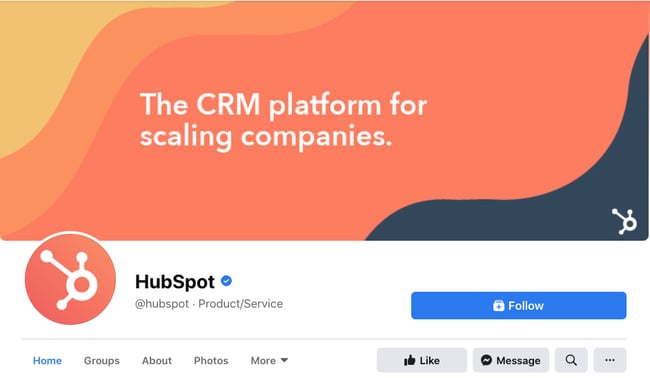
HubSpot Facebook cover photo Want to see how HubSpot uses Facebook? Like our Facebook Page here.

4. Do give your cover image a focal point and colors that match your brand.

Think of your cover photo as the portion of your Page that's "above the fold." If it's distracting or confusing, people will be more likely to click off the Page.

Many of the best Facebook cover photos include a centerpiece to focus visitors' attention, along with a color scheme that aligns with the rest of their brand. Remember, your social media accounts are extensions of your business, and should give that impression to visitors right away.

They also use negative white (i.e., empty) space as an advantage to make the subject, the copy, and the elements unique to Facebook (like the CTA button on Facebook business Pages) stand out even more.

Here's an example from The New York Times:
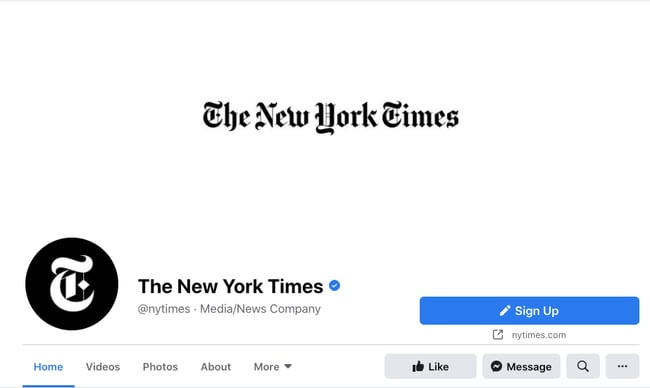
The New York Times' simple Facebook cover with its logo against white text

And one from social media management platform Sprout Social:
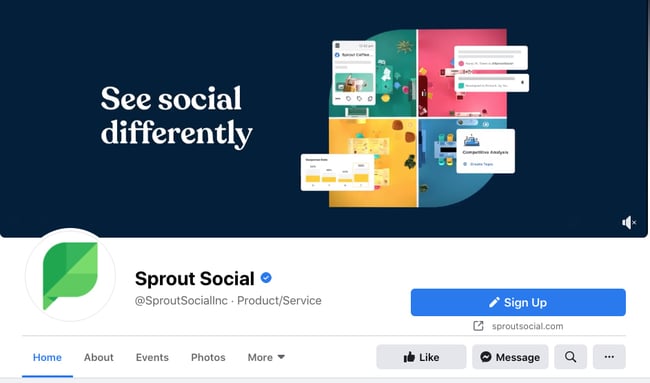
Sprout Social Facebook cover photo

5. Don't try to blend the contents of your cover photo with your profile picture.

With some clever design tweaks, you used to be able to manipulate your profile picture and cover photo so they appear as if they're two parts of the same canvas.

One of Paris' old cover photos is a great example of this:
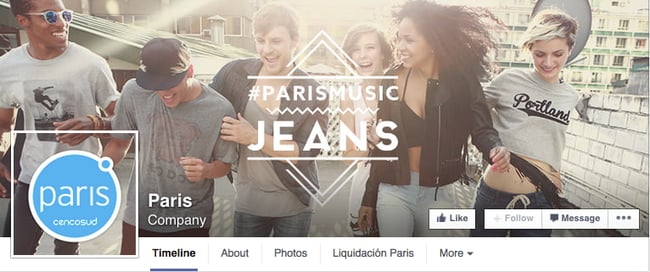
Paris Facebook cover photo with blended profile picture

You can still do this on your personal profile, but Facebook no longer sets up Business Pages this way.

Now, as shown in the examples earlier in this article, the profile picture is completely separate from the cover photo.

We admire your creativity, but don't prepare your design this way if you haven't yet launched a Business Page.

6. Do draw attention to the action buttons on the bottom right.

You might've noticed in a few of the cover photo examples above that their primary call-to-action (CTA) buttons were different. HubSpot’s says "Send Message," while Sprout Social's says "Sign Up."

Depending on your business, you can launch a Page on Facebook with a unique CTA button to the bottom right of your cover photo. Take this button into consideration when designing your cover photo, and make it clear in the photo that this is a visitor's next step.

LinkedIn Learning does this in a subtle way below, placing the graphic of a man on a laptop over the “Sign Up” button, drawing your eye to that call-to-action.
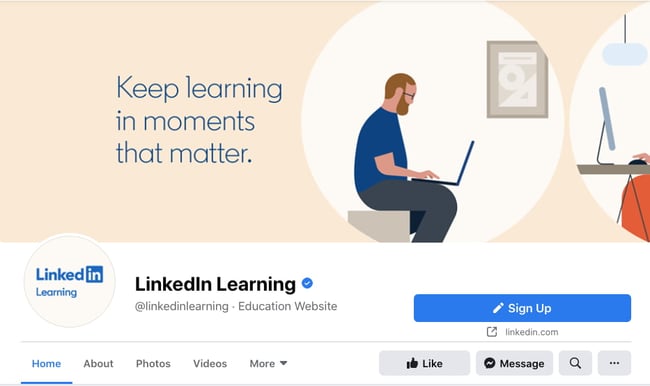
LinkedIn Learning Facebook cover photo

Note: While it might seem like a good idea to add directional cues like an arrow to get people to click on the CTA buttons, note that those CTA buttons don't appear the same way on the mobile app. In other words, it might be confusing to mobile users if you directly integrate the cover photo design with the buttons.

I'll show you how Business Pages look on mobile devices in just a minute.

7. Do right-align the objects in your cover photo.

Since your profile picture is on the left, you want to add some balance to your Facebook cover photo design by having the focus of the image be on the right.

Take a look at these cover photos. Which one looks more aesthetically pleasing?

Right-aligned focus:
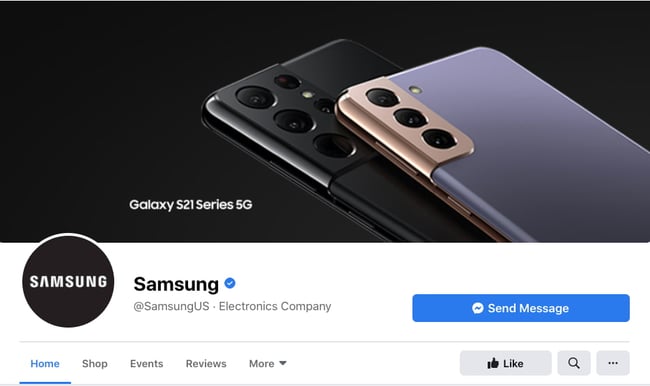
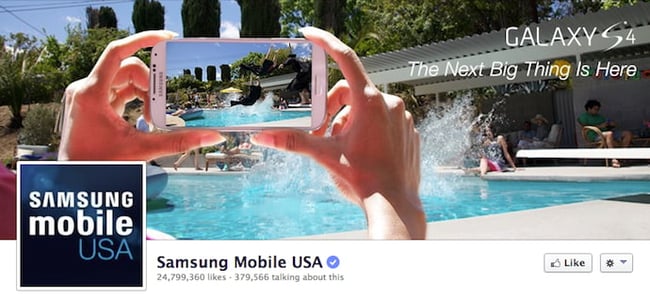
Samsung's new Facebook cover photo with a pair of phones on the right

Left-aligned focus:

Samsung's old Facebook cover with important elements on the left

Doesn't the right-aligned cover photo look better? In Samsung’s new cover photo, the biggest design elements (the profile picture, the text, and the two phones) are evenly spaced. In Samsung's old cover photo, your attention goes immediately to the left side of the page, completely missing the name of the product on the upper-right side.

Not only is adding balance a crucial element of design, but it also allows for your cover photos to be more visually effective on mobile. Which brings me to my next point ...

8. Do keep mobile users in mind.

Statista reports that 98.3% of Facebook's user base accesses the social network from mobile devices like smartphones and tablets. That's huge — and it's exactly why it's so important to keep mobile users top-of-mind when designing your Facebook cover photo.

On mobile, a much larger portion of your cover photo is blocked out. The right side is typically cut out entirely.

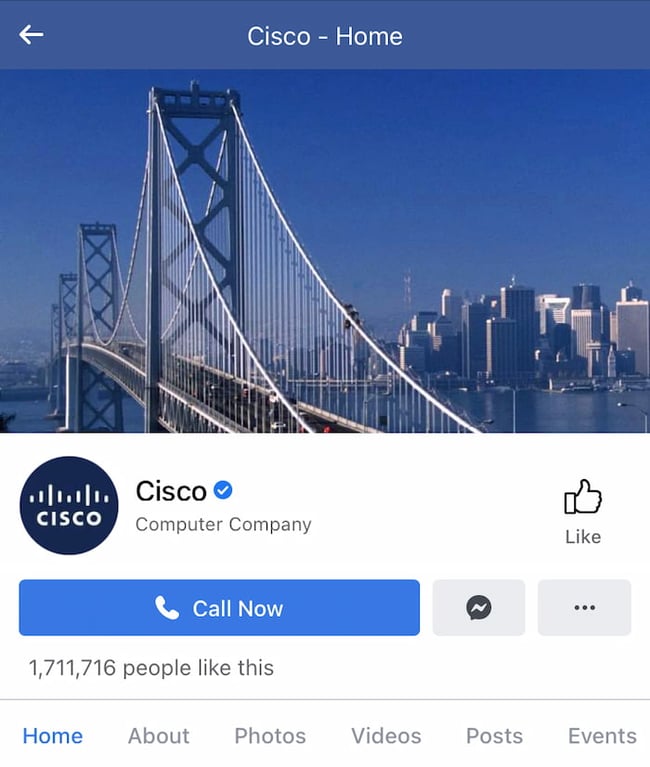
Let's take a look at a real-life example. Below, check out what Cisco's Facebook Page looks like in a desktop browser versus on Facebook's mobile app.

Desktop:
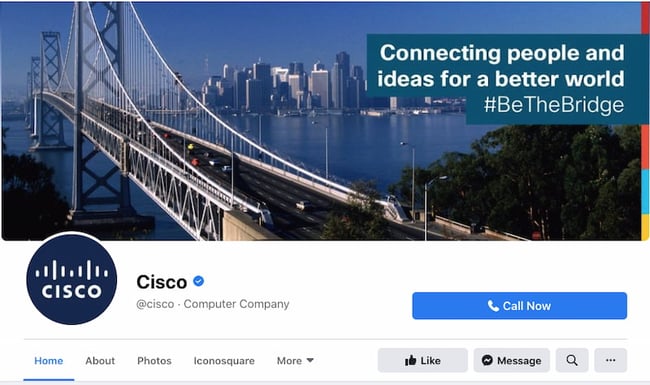
Cisco's Facebook cover on desktop

Mobile:

Cisco's Facebook cover on the mobile websiteWhereas your cover photo displays at 820 pixels wide by 312 pixels tall on desktop, it displays only 640 pixels wide by 360 pixels tall on smartphones. Take a look at this Facebook help document for more information.

It’s important to note that the text in Cisco’s cover photo is completely cut off. While it looks best to right-align your visual elements, be careful not to put important content so far to the right that it gets cut off on mobile.

9. Do include a shortened link in your cover photo description that aligns with your page CTA.

If you want to use your cover photo to support a Page CTA, make sure your cover photo description also includes a text CTA and link to the same offer. This way, any time people view your cover photo directly, they can access the link.

Here's this practice in action on the Adobe Creative Cloud Facebook Page:
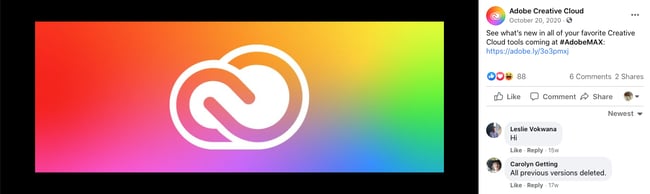
Adobe Creative Cloud Facebook cover with a CTA link in the description

Make sure you shorten your links and add UTM codes so you can track clicks on them. Shortening and tracking features are available in Marketing Hub and in tools like bitly.

(If you want to learn more about how to write effective call-to-action copy for your cover photo description, click here to download our free ebook on creating compelling CTAs.)

10. Do pin a related post right below your Facebook cover image.

Have you ever "pinned" a post to your Facebook Page's Timeline? Basically, pinning a post allows you to highlight a typical Facebook post on the top of your Timeline for seven days. It's signified by a “PINNED POST” title on the top right of the post, like on Behance’s Page below:
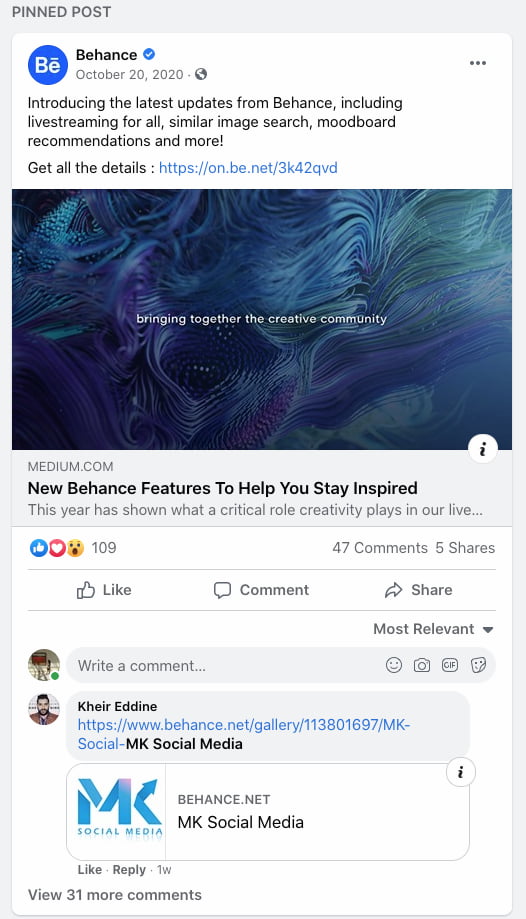
Behance pinned Facebook post announcing its new features

How does this relate to optimizing your Facebook cover photo? Well, if you're spending time aligning your Facebook Page CTA, your cover photo design, and your cover photo description copy, you should also make sure to post about the same thing directly to your page, and pin that post to the top of your Timeline.

That way, you're giving people one very clear call-to-action when they arrive to your page (albeit in several different locations) — which should help conversions.

To pin a Facebook post: Simply publish the post to Facebook, then click the three dots on the top right corner of the post and choose "Pin to Top of Page."
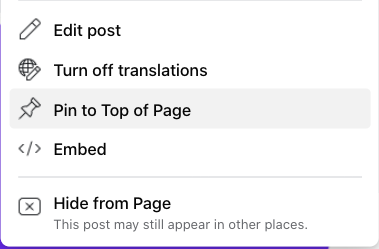
Drop-down menu with pin to top option highlighted

11. Do consider publishing a Facebook cover video.

You read that right. Facebook Business Pages now have the option to add a video in lieu of a static cover photo, provided they meet certain requirements.

Let’s go over how you can do that.

Post a Facebook cover video by first saving a video file at 820 pixels wide by 312 pixels tall to your desktop.

Next, upload that video to your Page’s video library.
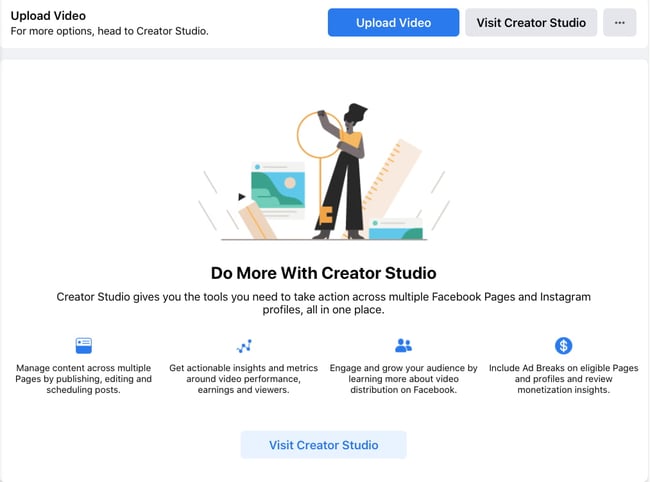
Facebook Creator Studio with a blue button that says "Upload Video"Facebook will only let you choose a video that fits its dimension requirements. The platform currently supports cover videos that are between 20 and 90 seconds long, and a minimum of 820 pixels wide by 312 pixels tall. The maximum (and recommended) size is 820 by 462 pixels with a video resolution of 1080p.

After uploading the video, click "Edit" at the bottom right of your cover photo, and select “Choose from Videos."
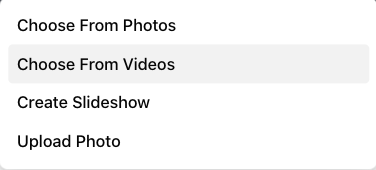
Drop-down menu with the Choose from Videos option highlighted

Pick the video you’ve just uploaded and reposition it so that it focuses on the element you’d like to highlight.

When you click “Next,” you'll be asked to select from 10 thumbnails for your video. Choose the one that works best.

Keep in mind that Facebook cover videos play on a loop — once it ends, it automatically starts over if the viewer is still on your Facebook page. With that in mind, make sure whatever you post is pleasant if seen more than once. Extreme, action-packed videos might appear exhausting when played over and over.

Facebook Cover Video Examples

Cover videos are a terrific option for the video-inclined, and brands across numerous industries have already taken advantage of it to hold their visitors' attention.

Here are some great cover videos to inspire you.

REI

REI sells outdoor equipment for activities like camping, hiking, running, boating, and biking. The company's subtle cover video reflects its products, all in one peaceful time lapse of the scenery it knows its audience craves.
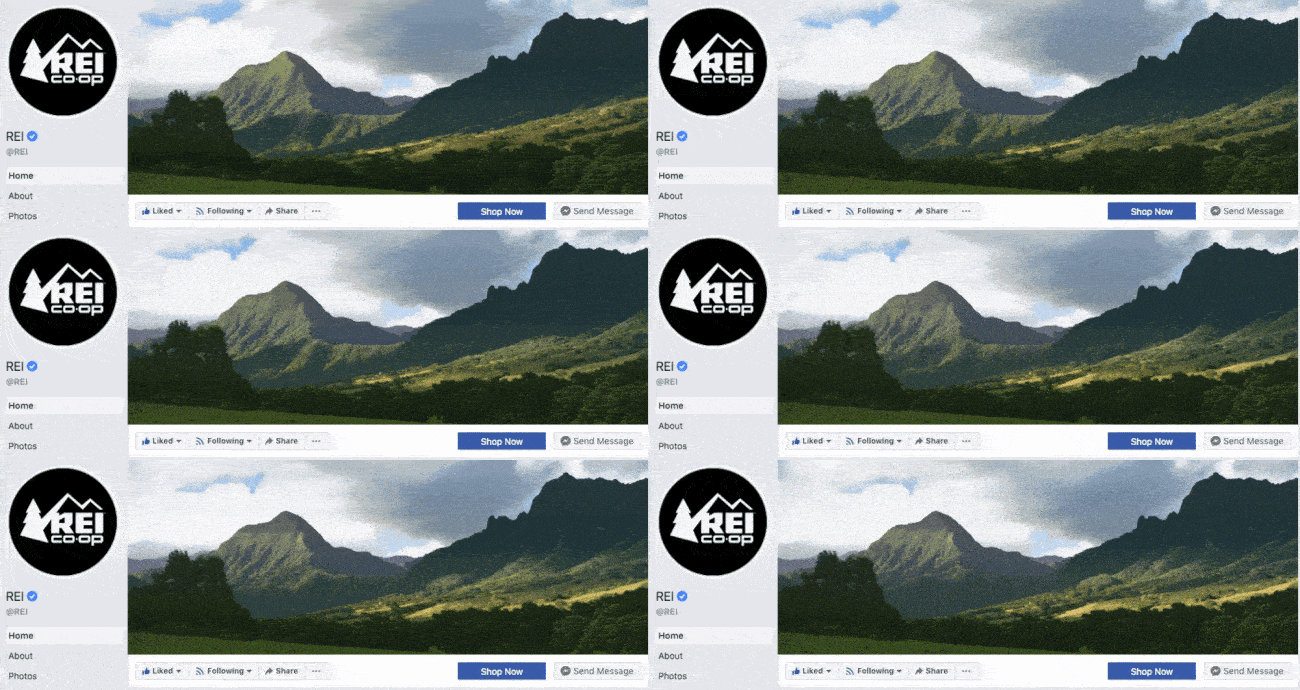
REI Facebook cover video with a landscape

Image Source

Nokia

Nokia wants to be everywhere its users are — whether they're paddle-boarding, scuba diving, skateboarding, or working. Its Facebook cover video embodies its core customer in a visually pleasing way.
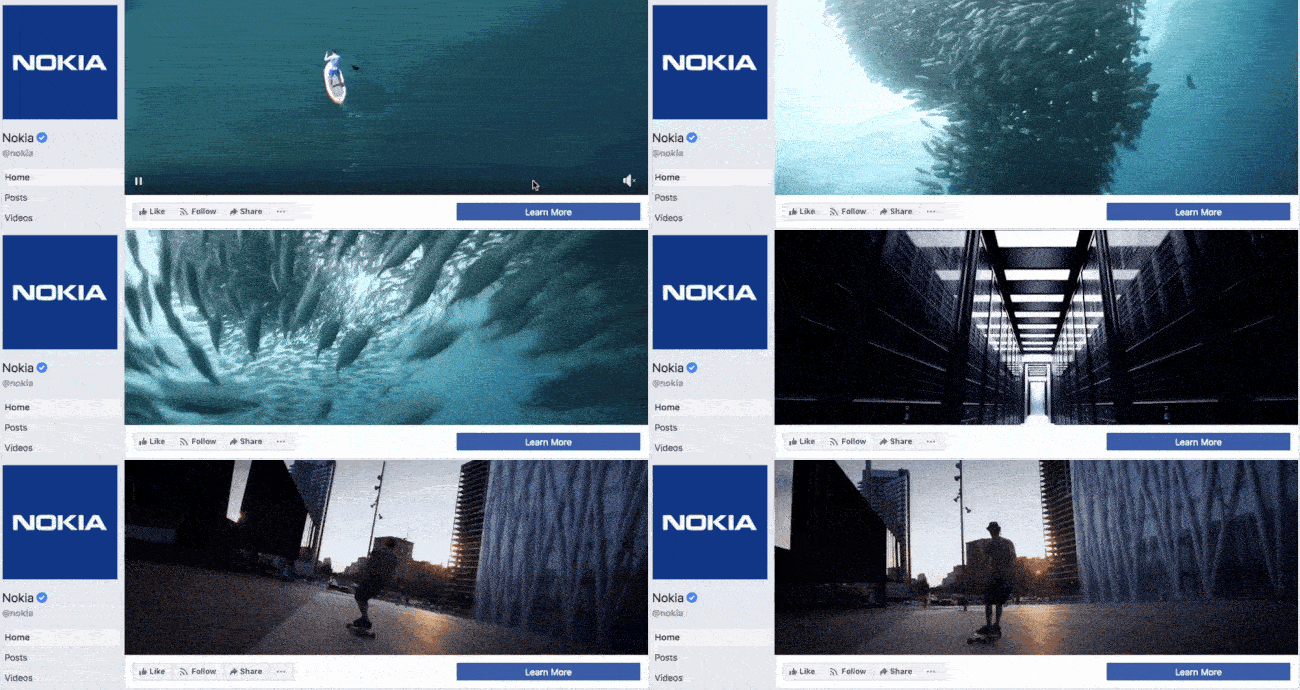
Nokia Facebook cover video with exciting scenes

Image Source

WIRED Magazine

When your publication changes as fast as the news cycle, it can be hard to keep your readers focused on the stories you feel deserve extra attention. WIRED Magazine uses its Facebook cover video for just this purpose, as shown in the example below.
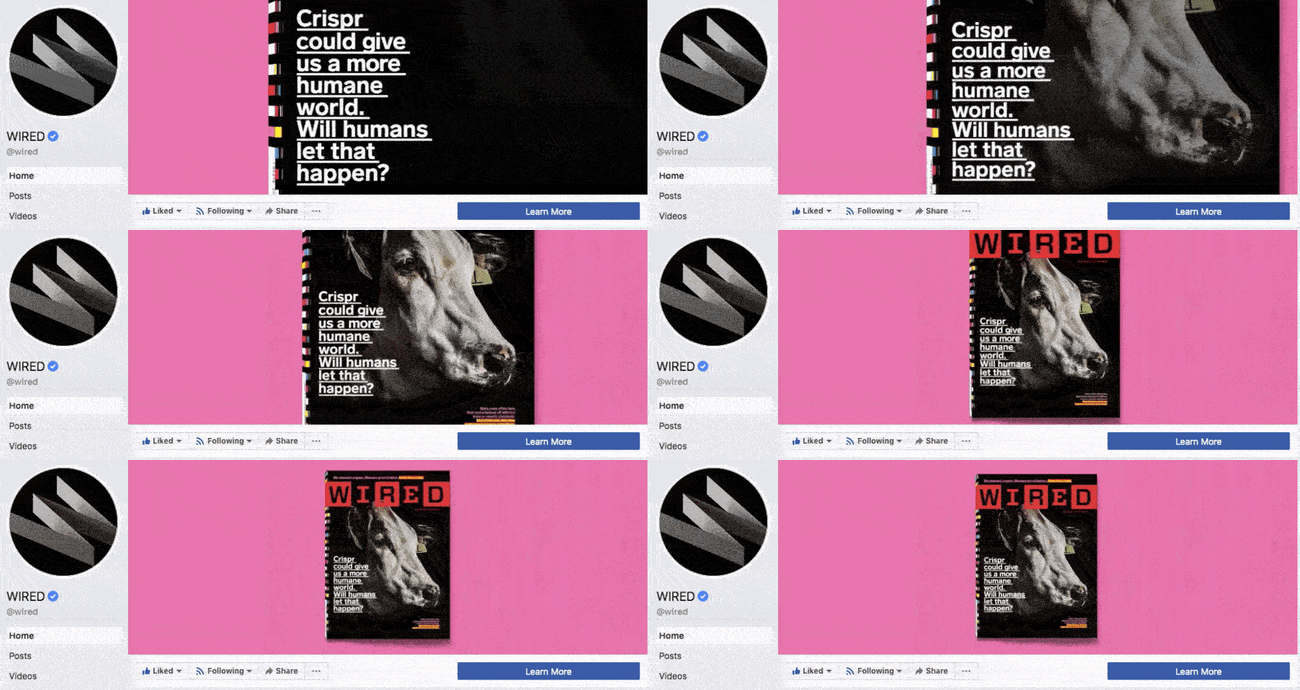
Wired Facebook cover video with the magazine zooming out into a pink background

Image Source

HubSpot Academy

Alright, maybe we're biased, but our brilliant creative team crushed it with the video below, made for HubSpot Academy. Sometimes, animation is the best way to capture the essence of your brand.
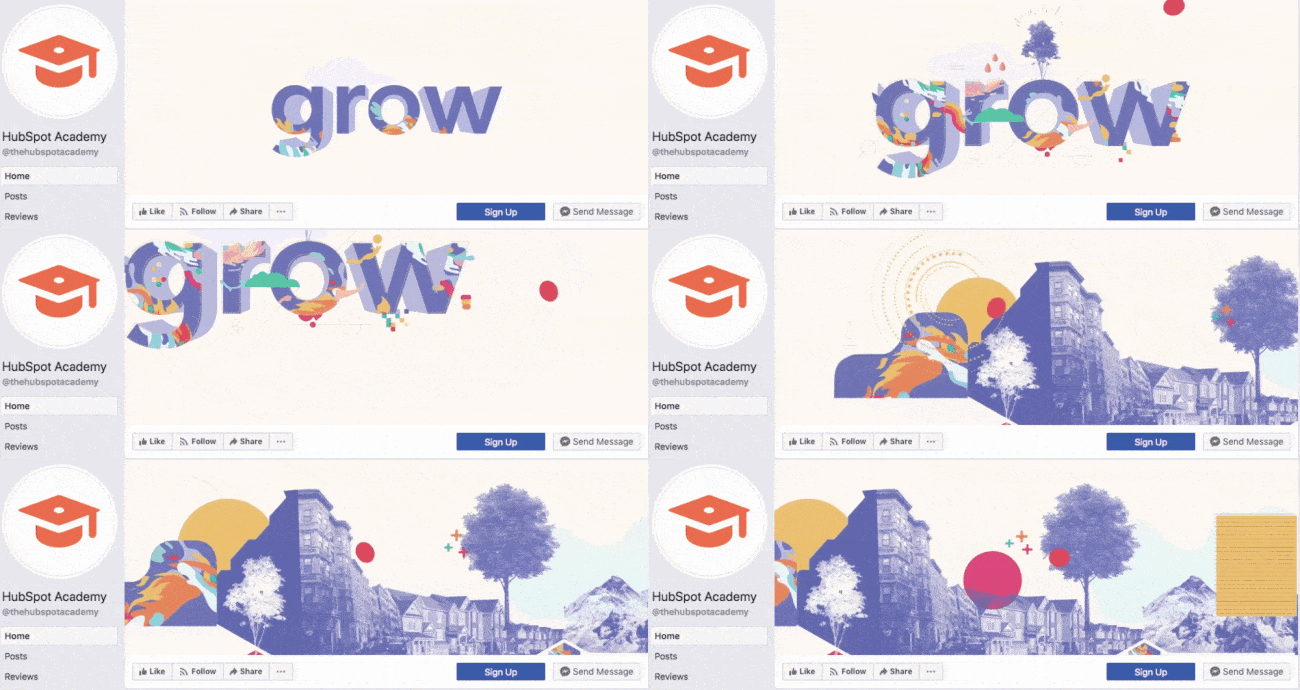
HubSpot Academy Facebook cover video with the word "Grow"

Image Source

Next, let’s look at some examples of what Facebook cover videos look like when you’re logged into the platform.

Black Girl Sunscreen

Black Girl Sunscreen makes us feel all the good things with its Facebook cover video. In it, the brand shows its customers enjoying the sun, making us wish that summer were here (or that it would last forever).
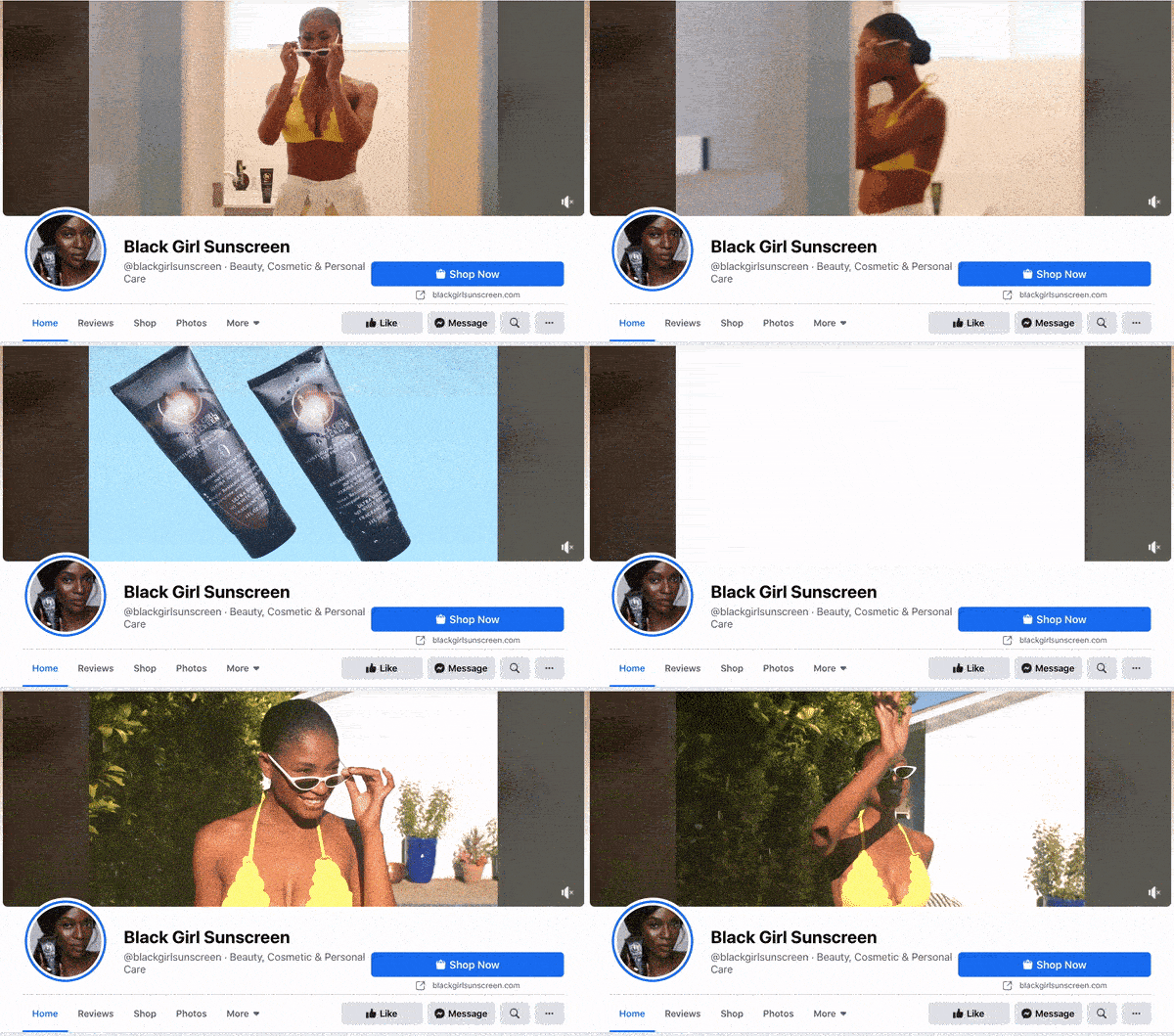
Black Girl Sunscreen Facebook cover video with woman walking to the pool

Image Source

Grammarly

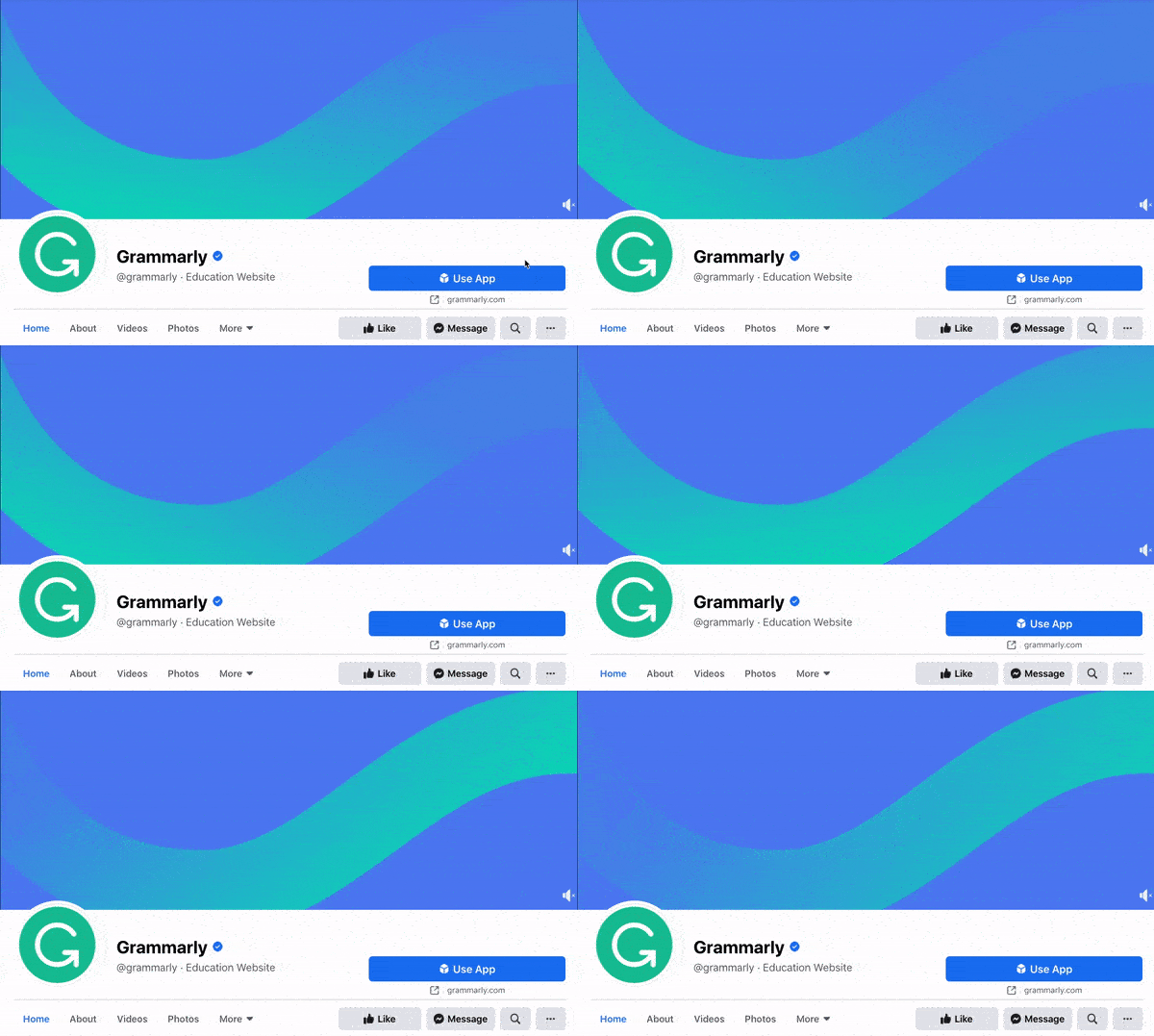
Grammarly is a tool for error-checking articles, emails, and any other written documents. The company's subtle cover video reflects how smooth its customers’ writing will be after they run it through the Grammarly program.
Grammarly Facebook cover video with smooth gradient

Image Source

The Sip

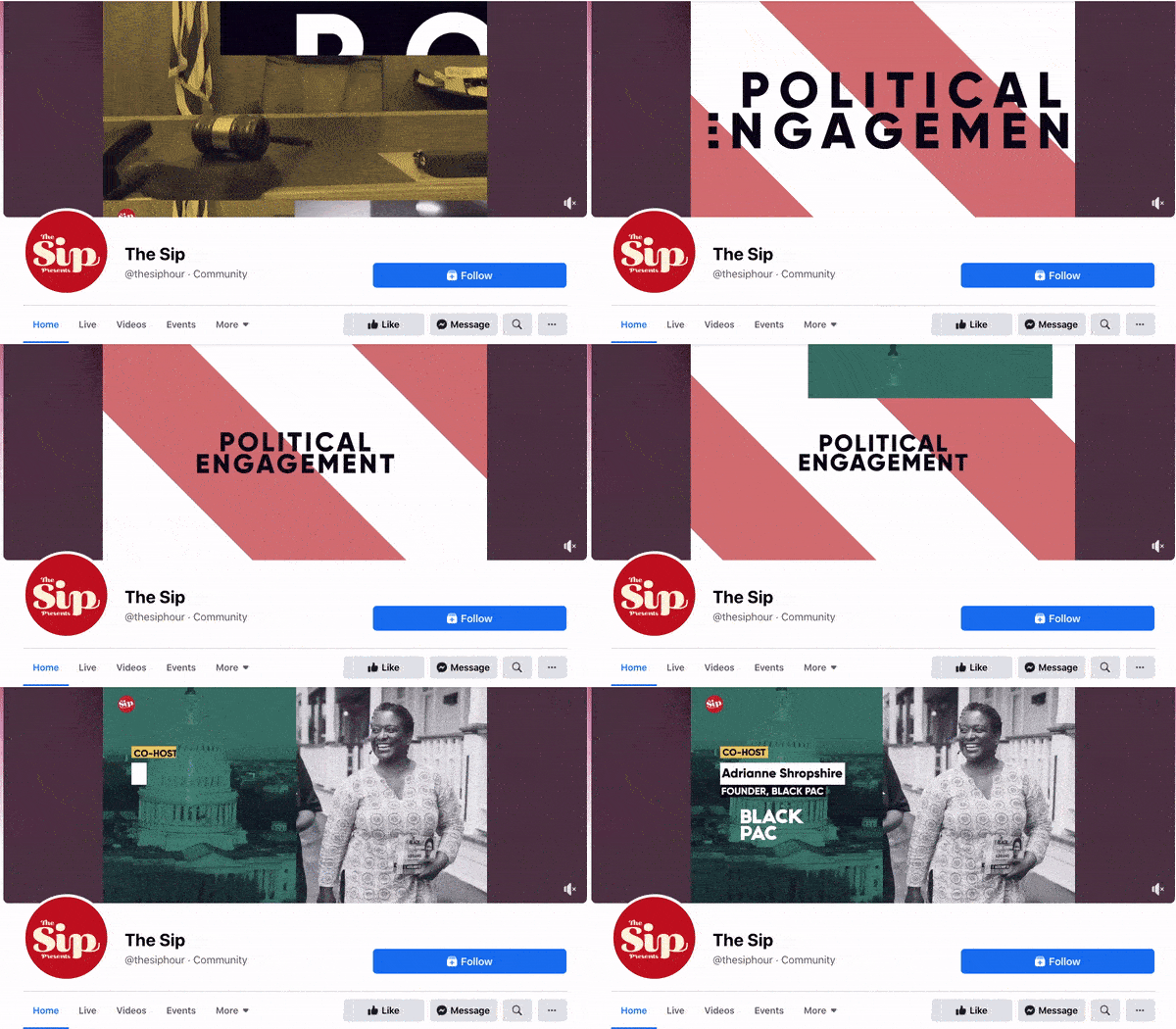
The Sip is a Black-run and woman-owned Facebook community dedicated to promoting self-care and social awareness. The brand uses a video to present the topics that they cover in their platform, which invites users to stay on the page and engage.
The Sip Facebook cover video with the text "Political Engagement"

Image Source

Sprout Social

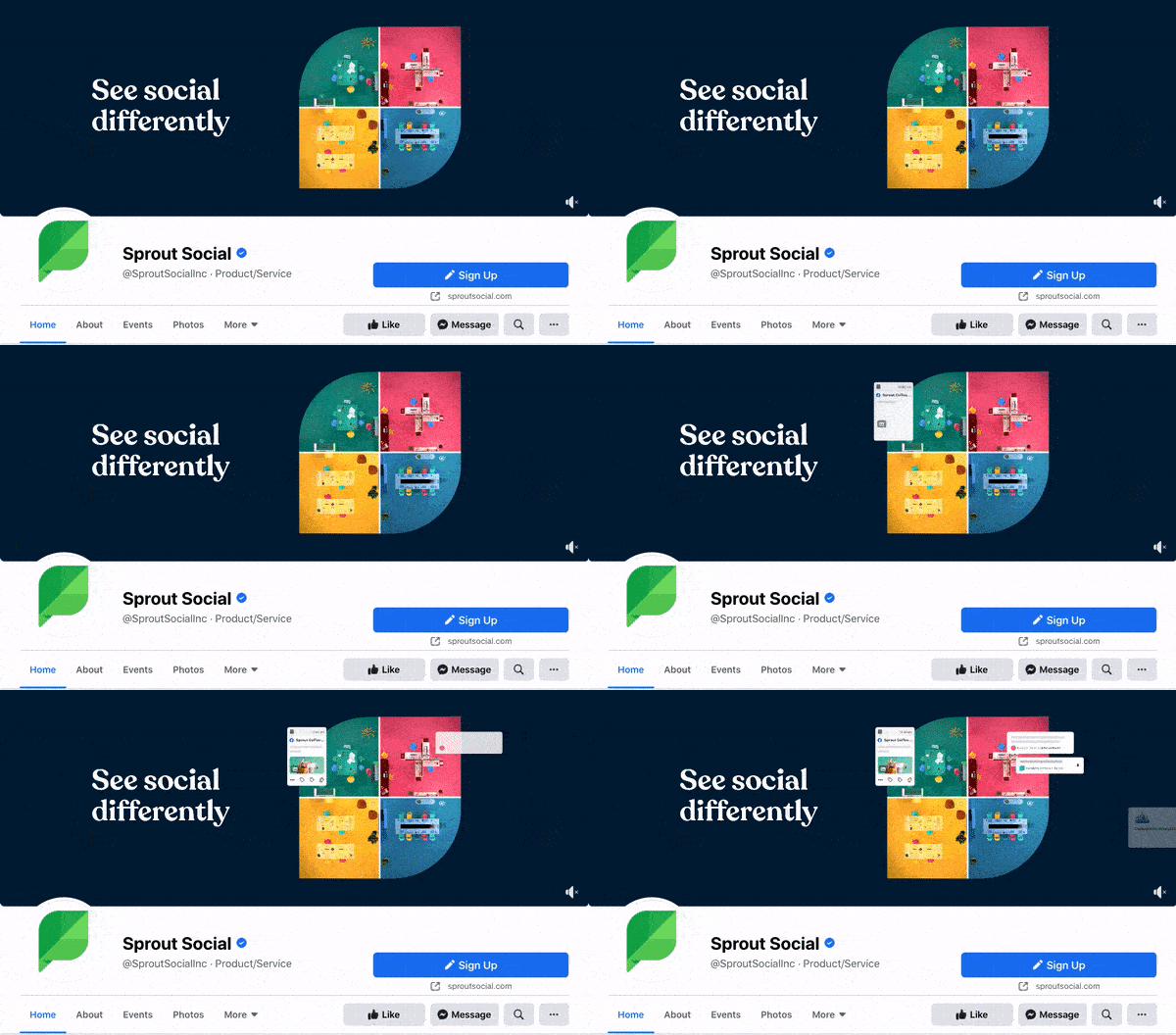
Sprout Social allows brands to manage their social media profiles in one platform. Its Facebook cover video shows four different bubbles that signify the writing, posting, reporting, and analyzing of social media posts in a single box. In this way, Sprout Social shows exactly how its tool works.
Sprout Social Facebook cover video with text boxes sliding in

Image Source

Sundays Studio

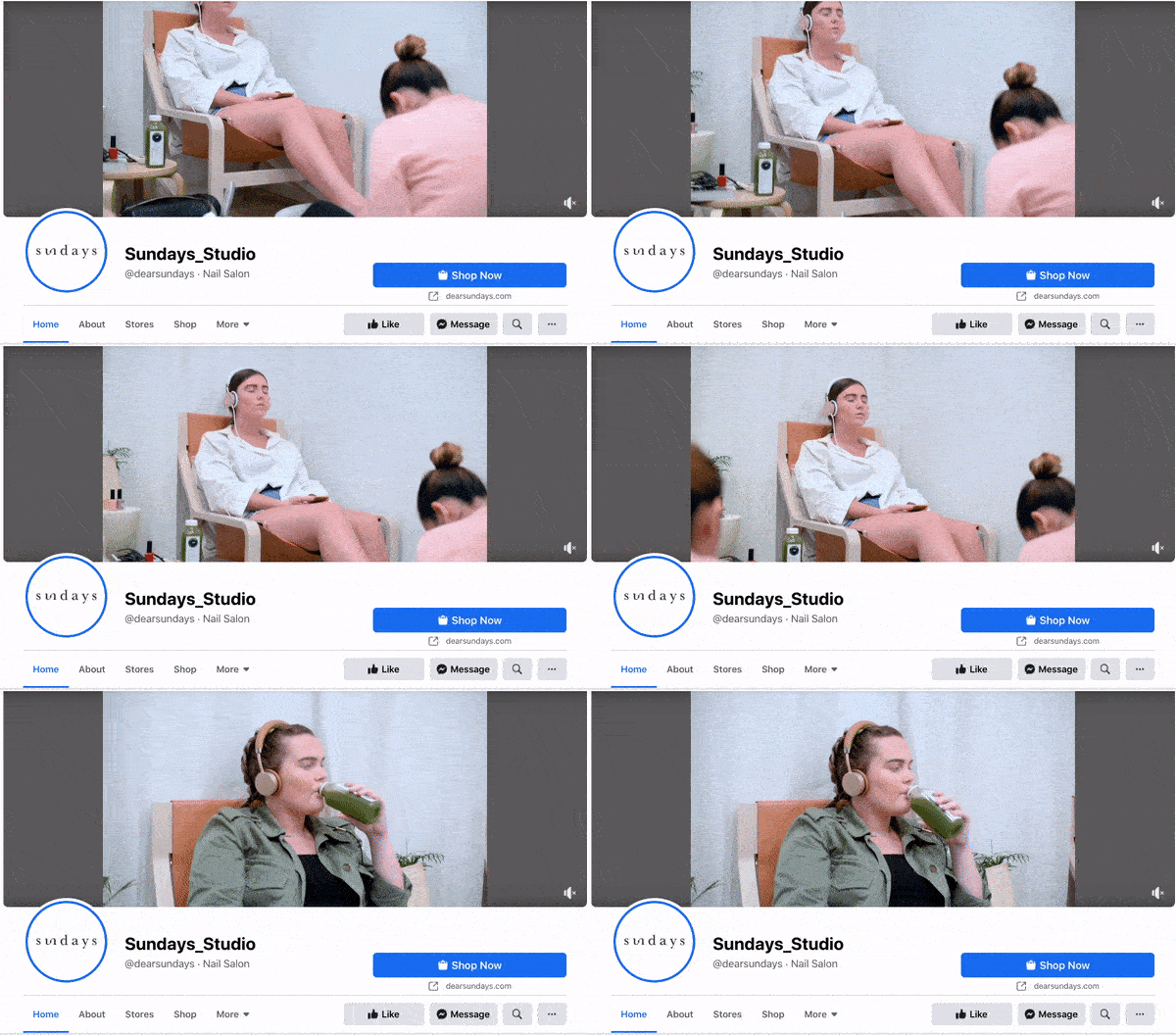
This woman-owned nail care brand uses its cover video to show how customers feel once they step into a Sundays salon — or wear Sundays nail polish.
Sundays Facebook cover video with woman getting her nails done

Image Source

ComicBook.com

ComicBook.com is a news website covering everything that’s related to movies, shows, and pop culture. In its Facebook cover video, it gives viewers a taste of the topics, movies, and actors the publication covers on a daily basis.
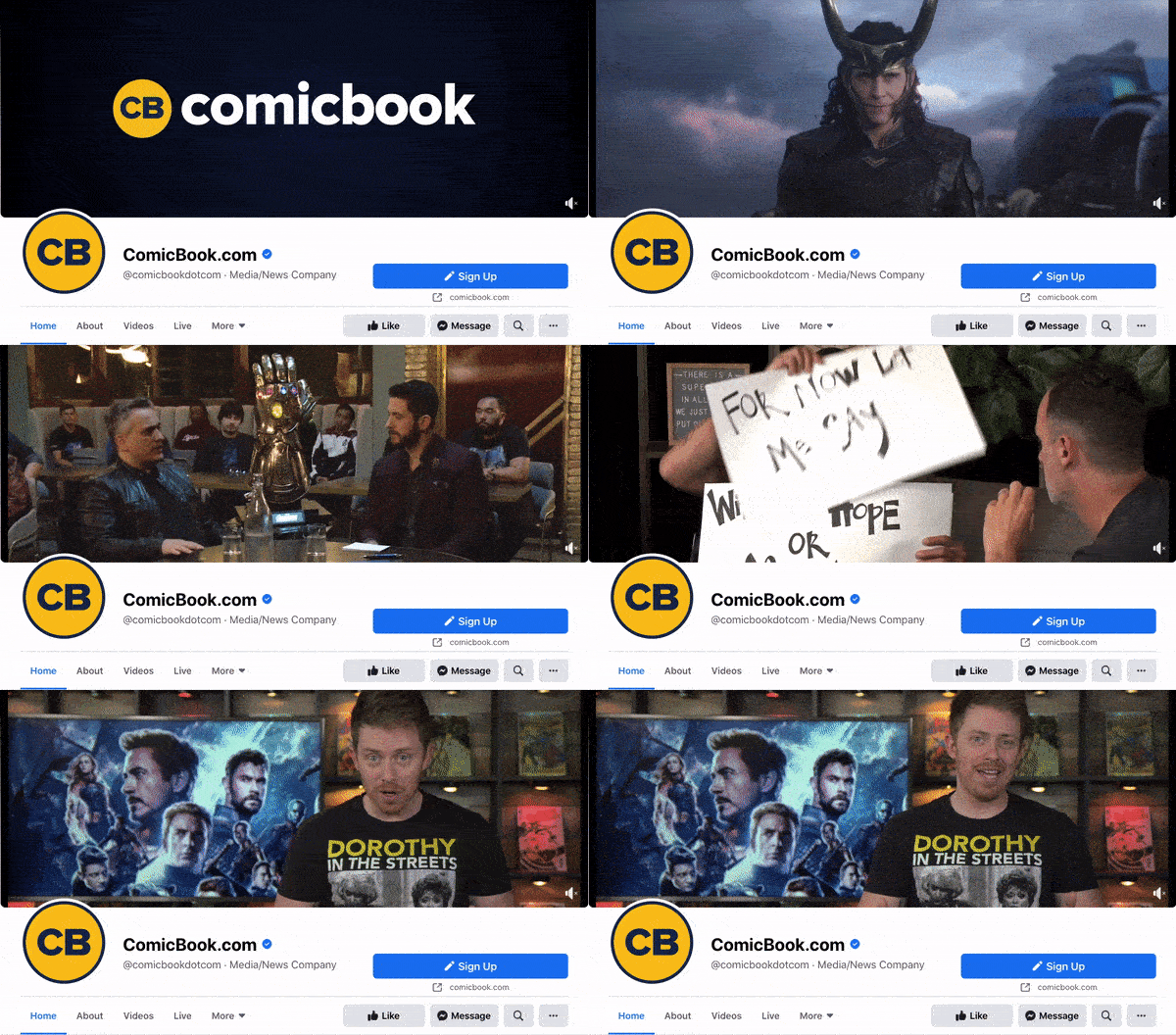
ComicBook.com Facebook cover video with various actors speaking

Image Source

Stasher

Stasher appeals to eco-conscious buyers with a fun, animated Facebook cover video that shares how your purchase impacts the planet.
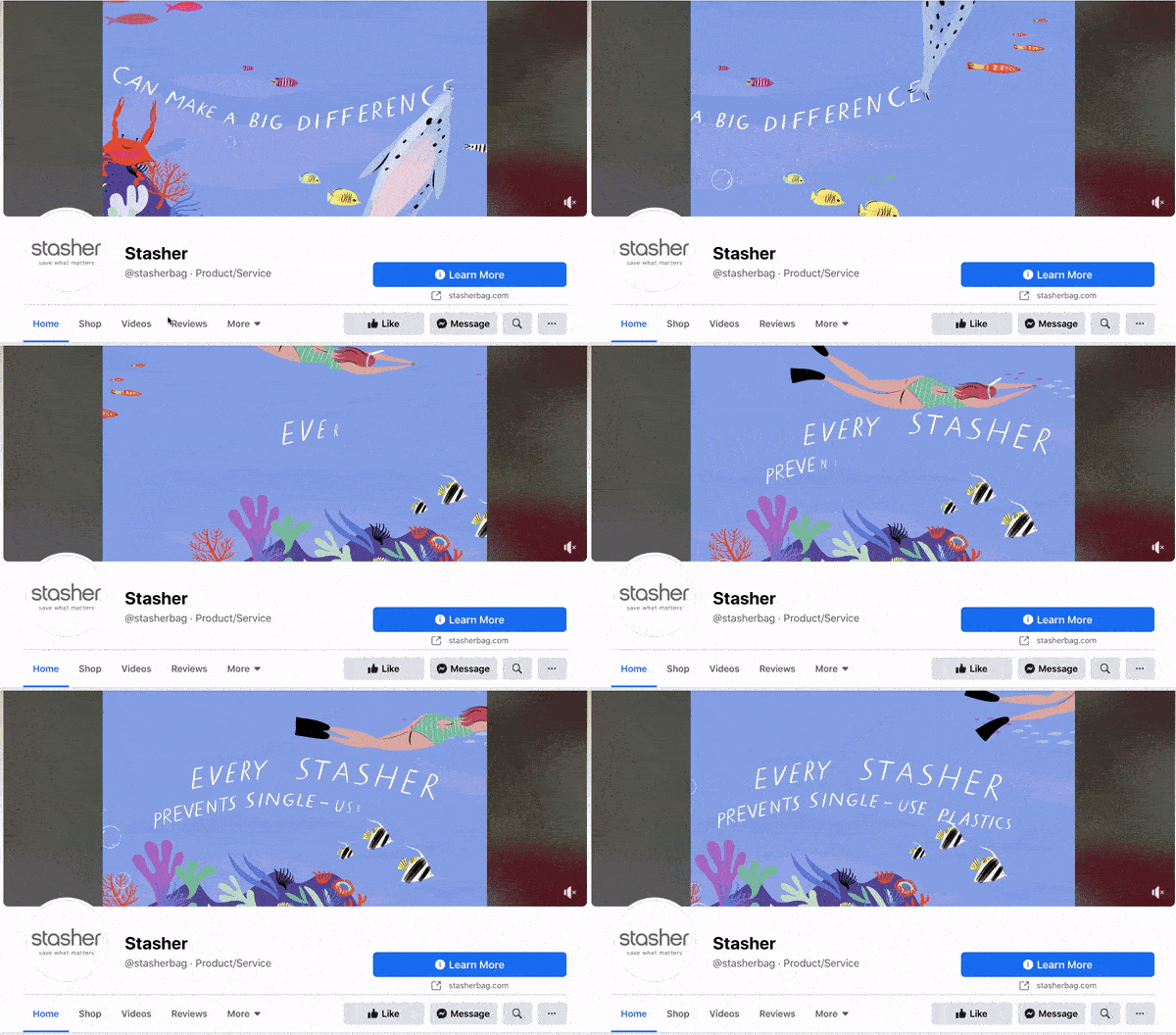
Stasher Facebook cover video with a graphic about single-use plastic

Image Source

As you can see from these examples, your video should be just as simple as a cover photo. Keep in mind that the same guidelines outlined in best practice #1 apply to cover videos as well.

Facebook Cover Photo Sizes that Work for Your Business

Choosing the right cover size for your Facebook Page may seem simple, but it can have a huge impact on users and prospects visiting your Page. An ill-fitting cover photo or video can look unprofessional and give the wrong impression about the quality of your products or services. With the tips I’ve shared, you’ll be sure to choose a Facebook cover photo that embodies your brand, conveys quality, and engages users on the platform.

Editor's note: This post was originally published in July 2020 and has been updated for comprehensiveness.

New call-to-action


How to Size & Design Your Facebook Cover Photo or Video [Templates] was originally posted by Local Sign Company Irvine, Ca. https://goo.gl/4NmUQV https://goo.gl/bQ1zHR http://www.pearltrees.com/anaheimsigns

Regal to reopen six Southern California theaters Friday

Itching to see a movie … at a local theater, no less?

You’re in luck because Regal announced that six of its Southern California theaters will reopen for business on Friday, April 2.

Pandemic-starved moviegoers will get to see “Godzilla vs. Kong” from Warner Bros., as well as “The Unholy” and “Tom & Jerry,” along with a slate of additional films opening in the coming weeks, including “Mortal Kombat,” “A Quiet Place Part II” and “Top Gun: Maverick.”

Here are the Regal theaters that will reopen Friday:

  • L.A. LIVE & 4DX, 1000 W. Olympic Blvd., Los Angeles
  • South Gate & IMAX, 8630 Garfield Ave., South Gate
  • West Covina & ScreenX, 1200 Lakes Dr., West Covina
  • Temecula & IMAX, 40750 Winchester Road, Temecula
  • Valencia ScreenX & IMAX, 24435 Town Center Dr., Santa Clarita
  • Irvine Spectrum ScreenX, 4DX, IMAX, RPX & VIP, 500 Spectrum Center Dr., Irvine

Regal’s reopening plan include a wide range of health and safety measures that adhere to CinemaSafe protocol and guidelines aimed at curbing the spread of COVID-19.

Regal employees will wear masks and undergo daily health screenings, including temperature checks where mandated.

Moviegoers will be able to purchase their tickets in advance on Regal’s mobile app. They’ll also have the ability to buy popcorn, soda and other concession items via the app once inside the theater.

Every other concession register will be closed to maintain social distancing, self-service condiment condiment stands will be closed and refills for drinks and popcorn will be given in new containers.

Guests will be required to wear masks while in the lobby, hallways and restrooms, and wall-mounted hand sanitizers will be available on both sides of the main entrance.

A subsidiary of the Cineworld Group, Regal operates one of the largest movie theater chains in the U.S. It includes 6,979 screens in 526 theaters in 42 states and the District of Columbia and Guam as of Feb. 28.

from Irvine Business Signs https://ift.tt/3weUldL
via Irvine Sign Company

from Irvine Business Signs https://ift.tt/3fwBp4r
via Irvine Sign Company


Regal to reopen six Southern California theaters Friday was originally posted by Local Sign Company Irvine, Ca. https://goo.gl/4NmUQV https://goo.gl/bQ1zHR http://www.pearltrees.com/anaheimsigns

Galaxy preseason recap: 3 things from Wednesday’s loss to New England

The Galaxy concluded the home and California portion of its preseason schedule with a 4-1 loss to the New England Revolution on Wednesday night in Carson. The club will now head to Arizona for three games, beginning Saturday against Sporting Kansas City.

Here are three things from Wednesday’s game:

Learning process continues

Unlike Saturday’s meeting with New England, Galaxy coach Greg Vanney turned to the youngsters for the majority of the match, including some players on trial with L.A. Galaxy II.

The results were mixed.

“In these type of situations, what I’m seeing is what each of these guys is picking up in terms of what we’re trying to do and understanding their roles within the collective group,” Vanney said. “You’re also assessing individuals, but also the collective, in terms of how people are fulfilling their responsibilities and who is ready for the big games and who understands the direction we’re going.”

In the starting lineup, only Ethan Zubak, Kai Koreniuk, Carlos Harvey and Jonathan Klinsmann had any first-team experience.

“I thought the first half was very clean by the group,” Vanney said. “I thought the first half group for us actually had a nice clean performance, aside from the goals that we gave up.

“The final pass, final action, is something that could be a little better. The second half, I just felt like we never caught the speed of the game and our decision-making was too slow, our intensity was too low, part of that I think is guys are still a little bit … they’re thinking a lot while they’re on the field and they’re not in that natural decision-making mode, when the opposition does something different, that we are picking up on it and we’re reading it at the intensity and speed their first team was. We were behind the game and we ended up chasing for most of the half.”

Galaxy II trialist Felix Barajas, 18, scored the Galaxy’s lone goal.

Kljestan providing veteran presence

The Galaxy has played a lot of teenagers in these last two games, but Vanney also was able to sprinkle in some veteran leadership.

Sacha Kljestan was one of the second-half subs, along with Cameron Dunbar, Adam Saldana, Jonathan Perez and others.

“I’m 35, I still think I can get better every day when I show up to training,” Kljestan said Saturday. “Maybe my best years were years ago, but I still think it, and that’s my mentality when I come to train every day.”

Having Kljestan around will be valuable for all of the teenagers on the roster.

“The sky is the limit for these kids,” he said. “These guys are starting younger than when I started with the first team. I was 20, I wish I started when I was 16, 17, 18, like these guys. For them to grasp and understand what’s at stake for them right now and just for them to keep getting better … they’re all good kids and I think they do good listening.”

Kljestan is back for his second year with the Galaxy. He played in 15 games last season.

“I feel amazing, both mentally and physically,” he said.

Ferkranus learning on the job

It was an interesting night for 17-year-old defender Marcus Ferkranus.

In the sixth minute, Ferkranus attempted a back pass to goalkeeper Jonathan Klinsmann, but New England’s Teal Bunbury intercepted and slid it to Adam Buska, who scored the opening goal.

From that moment forward, Ferkranus, who was signed to a Homegrown contract during the offseason, handled himself well, while dealing with Buska, who is one of New England’s Designated Players.

from Irvine Business Signs https://ift.tt/3wkuvoy
via Irvine Sign Company


Galaxy preseason recap: 3 things from Wednesday’s loss to New England was originally posted by Local Sign Company Irvine, Ca. https://goo.gl/4NmUQV https://goo.gl/bQ1zHR http://www.pearltrees.com/anaheimsigns
Villa Park baseball cools off sizzling Dana Hills to win Ryan Lemmon tournament

IRVINE — The Villa  Park baseball team didn’t have to swing the bats too often against Dana Hills in the championship game of the Ryan Lemmon Series on Wednesday night at the Great Park Stadium.

The Spartans came away with a 7-2 victory, and in doing so, handed the No. 3-ranked Dolphins their first defeat of the season. Dana Hills had won nine in a row coming into the game.

Villa Park (5-2) won four in a row to win the tournament after starting the season with a 1-2 record.

The Spartans took advantage of 13 walks, one hit batter, two wild pitches and one passed ball by the Dolphins (9-1).

“That’s something we’ve really stressed over the past couple of weeks, to be disciplined,” Villa Park coach Burt Call said of his team’s at-bats. “Our guys were really able to work counts and did a great job keeping the line moving and getting the next guy up.”

Villa Park sophomore shortstop Gavin Grahovac was named tournament MVP.

Grahovac, who has committed to Arizona State, hit two home runs in the tournament, including a game-winning, two-run home run in the Spartans’ 2-1 victory over Yucaipa on Tuesday.

He had a double and scored two runs to contribute to Wednesday’s victory.

“We were ready go,” Grahovac said. “We were prepared from the first pitch.”

The Dolphins were the designated road team and led 1-0 going into the third.

Grahovac doubled to lead off the third and Aaron Perez followed with a double to drive in Grahovac with the tying run.

Perez took third on a pick-off attempt where the ball went into the outfield. He scored on a wild pitch to give the Spartans a 2-1 lead.

The score was 2-2 going into the fourth when the Spartans loaded the bases on two walks and a bunt single.

By the time the half-inning ended, Villa Park scored three runs on a single and five walks to go ahead for good.

Villa Park defeated Pacifica, Mission Viejo and Yucaipa to reach the championship game.

The Dolphins reached the championship with victories over El Modena, Foothill and Notre Dame of Sherman Oaks.

from Irvine Business Signs https://ift.tt/39xl1fX
via Irvine Sign Company


Villa Park baseball cools off sizzling Dana Hills to win Ryan Lemmon tournament was originally posted by Local Sign Company Irvine, Ca. https://goo.gl/4NmUQV https://goo.gl/bQ1zHR http://www.pearltrees.com/anaheimsigns
How to Verify Your Facebook Page in 5 Steps [+ Why You Should]

The other day, I searched for "Taylor Swift" on Facebook.

I was shocked to find hundreds — if not thousands — of Taylor Swifts in the United States alone.

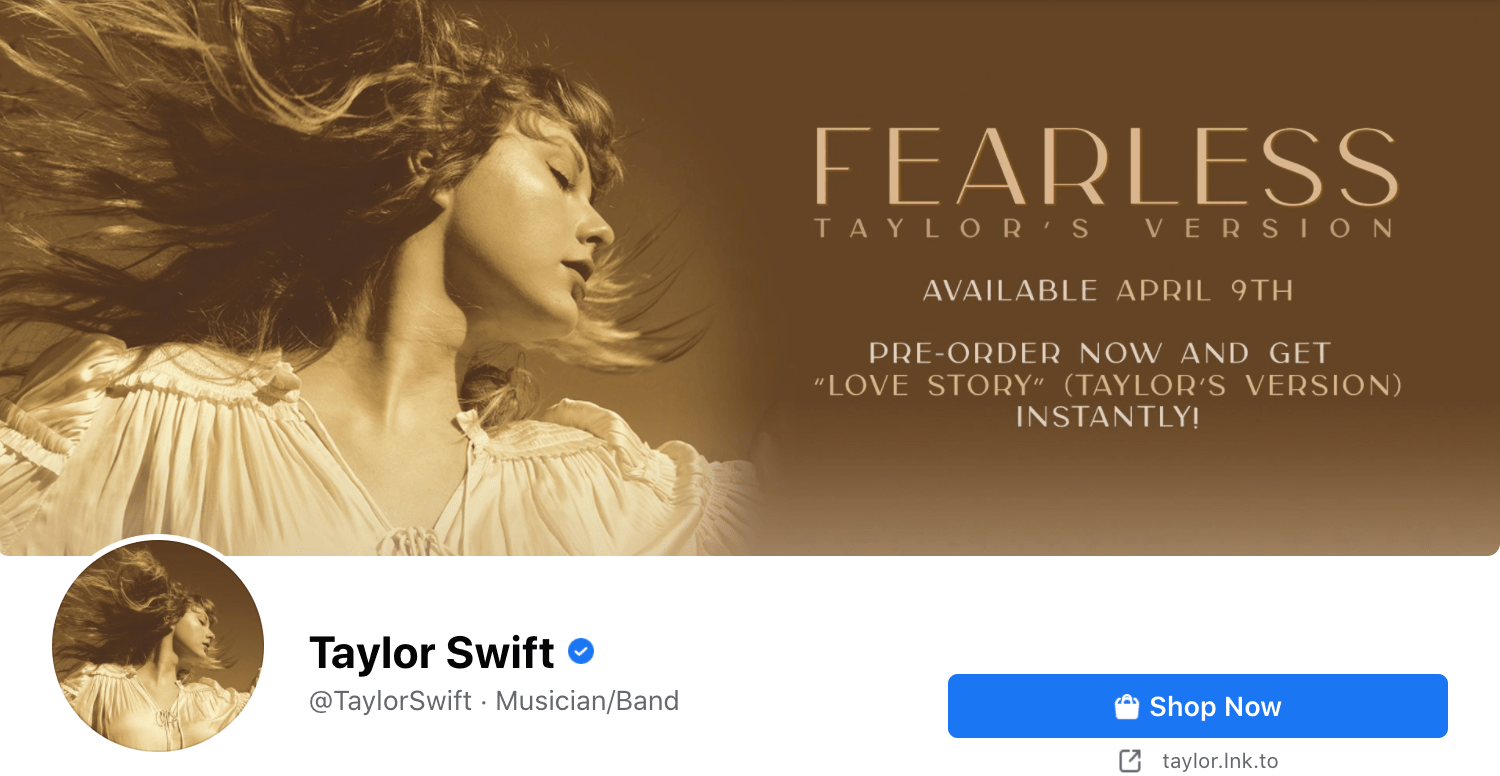
Fortunately, I was able to find the mega-pop star's page easily, with the help of a small blue badge:

taylor swift verified badge on facebook

When searching for a business (or person) on Facebook, a verified badge is often the easiest and most reliable way to ensure the page you've found is authentic.

As a business, it's critical you use a verified badge so that prospects and customers can easily find your true page and access up-to-date, accurate information about your brand. Without a verified badge, it can be difficult to trust whether the page is legitimate.

However, the process for securing a verified badge is different for a business' Page than it is a personal profile. Here, we'll explore the steps you need to take to obtain a verified badge — plus, why it's important for your brand in the first place.

Download Now: Free Facebook Advertising Checklist

How to Verify a Facebook Page

Note: The following steps outline how to verify a Facebook Business Page — if, instead, you want to verify a profile, you'll fill out the same form, but you'll need to upload a copy of your official government-issued photo identification, instead. (You only need to verify a profile if you're a public figure or celebrity.)

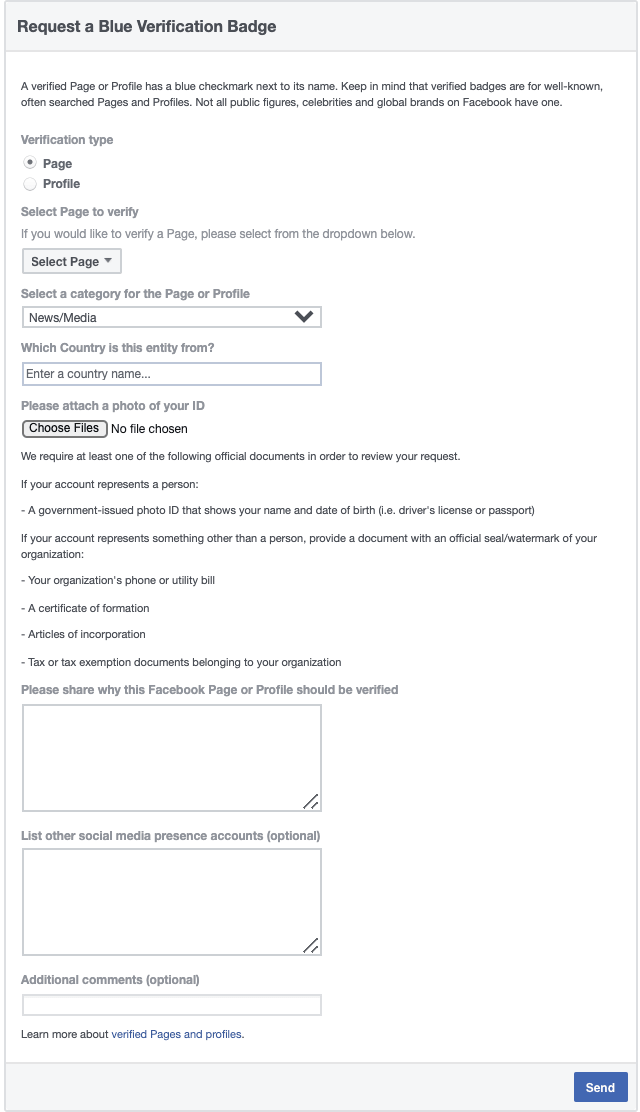
1. You'll need to fill out this form to request a blue verification badge from Facebook. Since this is for business purposes, you'll want to click "Page" rather than "Profile" ... 

request a blue verification badge empty form on facebook

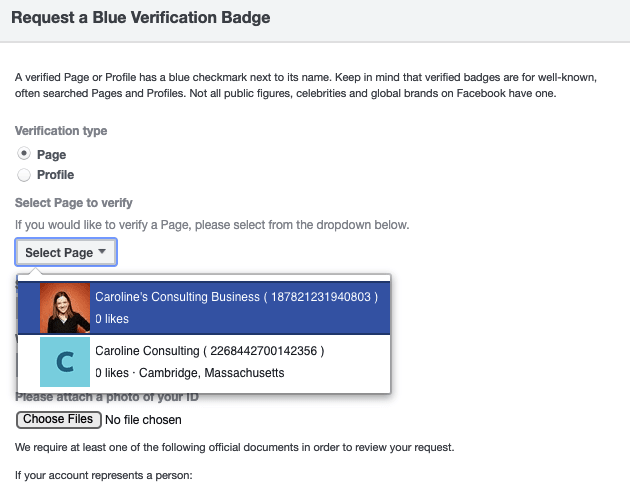
... and then click the "Select page to verify" drop-down menu to find your business page in the list. (Note: You must be an admin of the Business Manager account to submit this form.)

drop-down menu on the form to select your business page

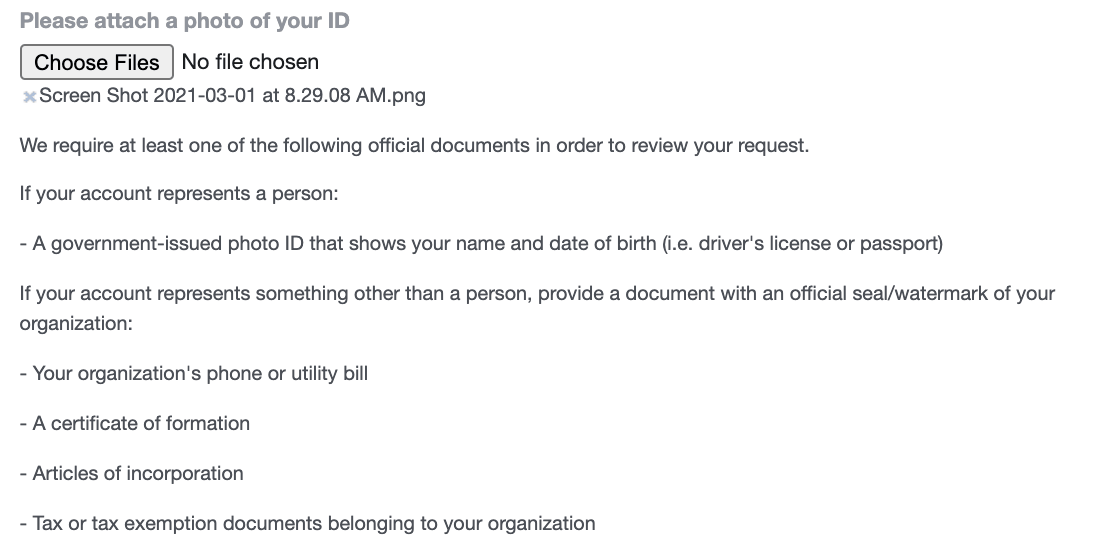
2. Since this is a business page, you'll need to attach a copy of a phone or utility bill, certificate of formation, articles of incorporation, or tax exemption documents.

the section of the form that asks you to attach a document verifying your business

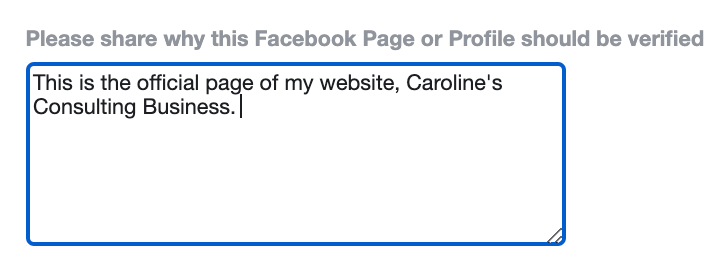
3. Fill in the box explaining why the account should receive a verified badge. You'll need to include a minimum of 10 characters.

the box on the form that asks you why your page should be verified

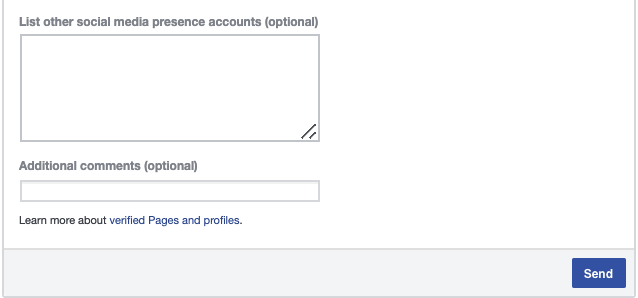
4. Add other social media account URLs if possible, as well as any additional comments.

the section of the form that asks you to include social media accounts or additional comments

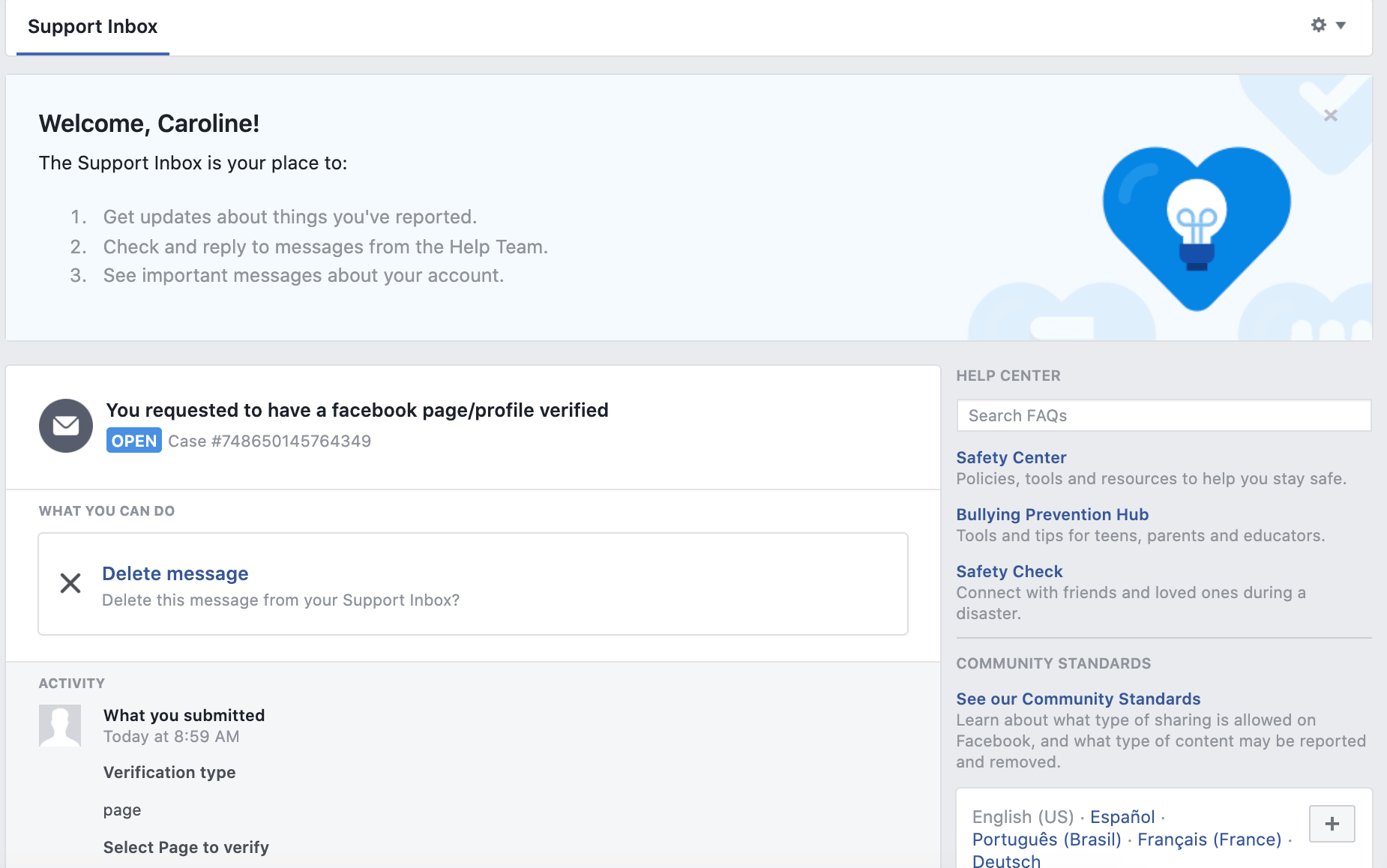
5. When you're ready, click "Send". You'll be re-directed to the following page, where you can watch the status of your request: 

the support inbox you'll be redirected to once you click "send" on your form

(Facebook notes: "You'll receive a notification once we review your request. Please don't submit more than one request for your account. For denied requests, you can submit a new request after 30 days.")

Why can't I verify my Facebook Business Page?

There are a few reasons Facebook might deny your request. Let's explore two common ones, and how you can fix them.

1. Something is wrong with your submitted documents.

Facebook outlines a few primary issues you might have with the documents you submitted in the request form. If your document doesn't align with Facebook's requirements — or is low resolution or low-quality — consider re-uploading a new document that fits Facebook's standards.

For instance, your document:

  • Might not be the type of document Facebook accepts (more on that here).
  • Might be a self-filed document. Facebook needs to see a document with an accompanying official signature or seal.
  • The document is blurry, low resolution, or corrupted. Ensure you've scanned your document at a high resolution or format.
  • The document is expired.
  • The document you submitted doesn't contain your full business address.
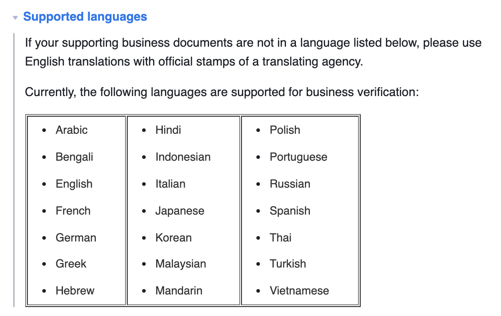
  • The document's language is unsupported (supported languages are shown in the image, below):

the languages facebook supports for verified badges

2. Your information — including business website, business address, and your business's legal name — doesn't match up.

When it comes to requesting a verified badge, accuracy and attention to detail is key. For instance, your request might be denied if your company's name listed on your Facebook Business Settings is different from the name that appears on your submitted documents.

Here are a few considerations to keep in mind:

  • The legal business name on your submitted document needs to match the name that appears in your Business Settings. (To fix this, update your business name in Business Settings or submit a new document that includes the business name that appears in your Business Settings.)
  • Your document needs to include your business's full address and business phone number. (A partial address won't be accepted.)
  • Your email domain and website address need to match, and your website should feature your company's name or logo.
  • Your business name needs to be listed on your submitted document. For instance, if a utility bill has your business' phone number but your business name isn't included, it won't be accepted. (More information on acceptable documents here.)

Why Its Important to Verify My Facebook Business Page

A verified badge tells prospects and customers that they can trust your Facebook Page as the true, authentic presence of your brand. Additionally, it's often critical for differentiating your brand from other, similar terms that might make it difficult for users to find your business on Facebook.

However, there are a few other major benefits to having a verified Facebook Business Page, aside from increased visibility.

For one, Facebook's algorithm automatically places verified badges at the top of search results when someone is looking for your business. This is especially important if your brand hosts a few groups on Facebook.

For instance, HubSpot has a few dedicated groups for various, niche purposes like HubSpot education or HubSpot marketers. It's critical Facebook users are able to find the more general, official HubSpot Page when searching "HubSpot", which is why it's good HubSpot's Page has a verified badge, which enables it to rise to the top of search results:

search for hub

Since the verified badge will help surface your brand to the top of search results, you'll ideally increase followers and leads as a result of having a verified badge — a major benefit of the symbol.

Additionally, a verified badge earns you early access to new Facebook features that aren't yet available for all users. This can help you level-up on competitors who might not have the same access. 

And that's it! You're all set to request a verified badge for your own business' Page. Next, take a look at the Ultimate Guide to Facebook Marketing for more tips on driving demand and growing your business on Facebook. 

New call-to-action


How to Verify Your Facebook Page in 5 Steps [+ Why You Should] was originally posted by Local Sign Company Irvine, Ca. https://goo.gl/4NmUQV https://goo.gl/bQ1zHR http://www.pearltrees.com/anaheimsigns
Tree fire spreads to Compton pallet yard, homes

COMPTON — What began as a tree fire was pushed by gusting winds into an industrial pallet yard and warehouse complex in Compton on Wednesday, creating a plume of thick black smoke visible from as far as Orange County and prompting evacuations as embers ignited blazes at homes in an adjacent neighborhood.

Update: Slew of street closures in effect near large Compton industrial fire that has spread to several homes. See the list here. https://t.co/69LbXFEXGn

— NBC Los Angeles (@NBCLA) April 1, 2021


A passerby initially reported a fire burning in a tree near Alameda Street and East Rosecrans Avenue around 4:30 p.m., fire officials said.

With the Southland in the tail end of a Santa Ana wind event, gusty conditions quickly pushed the flames into the industrial yard, sparking an inferno as flames chewed through flammable materials stacked in the yard and inside metal-roof structures on the property.

Sporadic small explosions could be seen within the fire.

Fire crews from Compton, Santa Fe Springs, Downey and Los Angeles County were among those responding to the blaze, which quickly went to a third alarm.

Unable to access the property due to the raging inferno, ladder crews were relegated to a surround-and-drown attack, pouring water on the flames from above.

The winds, however, continued pushing embers from the blaze into adjacent neighborhoods, where at least three structures were damaged, including one several blocks away. Sheriff’s deputies were dispatched to the neighborhood and were evacuating some homes. It was unclear how many residents were affected.

There were no immediate reports of any injuries.

Sheriff’s officials urged residents to avoid the area, announcing a series of road closures around the blaze.

from Irvine Business Signs https://ift.tt/3rEcIFC
via Irvine Sign Company


Tree fire spreads to Compton pallet yard, homes was originally posted by Local Sign Company Irvine, Ca. https://goo.gl/4NmUQV https://goo.gl/bQ1zHR http://www.pearltrees.com/anaheimsigns
City of Hope Orange County lands $50 million gift from Lennar Foundation

The size of the gift Lennar Foundation just awarded City of Hope Orange County is eye-popping: $50 million.

Made public on Wednesday, March 31, the money represents the biggest gift yet in the three-year-old effort by City of Hope to bring its expertise in fighting cancer to Orange County.

It’s also the second-largest donation in City of Hope’s 108-year history. The organization has been known for its hospital and research center in Duarte, but the move into Orange County is part of an expansion that will include a specialty hospital, two outpatient treatment centers and a planned network of services that will be closer to home for Orange County patients.

Annette M. Walker, president of City of Hope Orange County, called Lennar Foundation’s donation a “gift to our children” because of the future possibilities it unlocks. Walker spoke on a conference call that included Jon Jaffe, co-chief executive officer and co-president of Miami-based homebuilder Lennar Corp., and City of Hope’s chief philanthropy officer, Kristin J. Bertell.

“The impact of this gift is going to be felt for generations,” Walker said.

  • The 4th Floor Infusion area of the future Lennar Foundation Cancer Center at City of Hope Orange County. (Rendering courtesy of City of Hope Orange County)

  • The patient and family arrivals area for the future Lennar Foundation Cancer Center at City of Hope Orange County. (Rendering courtesy of City of Hope Orange County)

  • The future Lennar Foundation Cancer Center at City of Hope Orange County. (Rendering courtesy of City of Hope Orange County)

  • The lobby of the future Lennar Foundation Cancer Center at City of Hope Orange County. (Rendering courtesy of City of Hope Orange County)

  • The reception area of the future Lennar Foundation Cancer Center at City of Hope Orange County. (Rendering courtesy of City of Hope Orange County)

  • The patient care room of the future Lennar Foundation Cancer Center at City of Hope Orange County. (Rendering courtesy of City of Hope Orange County)

  • The exam room of the future Lennar Foundation Cancer Center at City of Hope Orange County. (Rendering courtesy of City of Hope Orange County)

  • The future 190,000-square-foot Lennar Foundation Cancer Center at City of Hope Orange County will be located on 11 acres at Five Point’s Great Park in the heart of Irvine. (Rendering courtesy of City of Hope Orange County)

  • The Porte Cochere shown at night for the future Lennar Foundation Cancer Center at City of Hope Orange County. (Rendering courtesy of City of Hope Orange County)

of

Expand

Bertell said Lennar Foundation’s philanthropy follows a $100 million award to City of Hope made six weeks ago by its own research director, Dr. Arthur Riggs. Riggs has earned his wealth through pioneering work at City of Hope that includes development of the technology to create synthetic human insulin for diabetics. The research center in Duarte has been renamed the Arthur Riggs Diabetes & Metabolism Research Institute after the researcher, who has contributed more than $310 million over his three-decade tenure at City of Hope.

Walker and Bertell said the gift from Lennar will enhance the care provided to patients at the Orange County facilities and possibly spur other local donors to make their own stake in the Irvine project. Naming rights are in play: the 190,000-square-foot outpatient center set to open next year is now known as the Lennar Foundation Cancer Center.

City of Hope’s outpatient center in Newport Beach, which opened in January 2020, was the first piece in the cancer care provider’s planned $1 billion investment in Orange County.

Though Walker said it is too soon to say what specific cancer-related services will be supported by the $50 million donation, she termed it “transformational.”

“A gift of this magnitude is going to touch all parts of that cancer center.”

An unspecified portion of the money will go toward research and development of precision medicine to prevent, treat and cure cancer. Lennar is helping to launch a new partnership between City of Hope Orange County and Sylvester Comprehensive Cancer Center at the University of Miami in Florida.

City of Hope officials believe the relationship with Miami-based Sylvester Center, which serves an economically and racially diverse population, will help researchers get a better understanding of the health care inequities in Orange County, including some that have been exposed by the pandemic.

“We’re excited to help bring about equality in health care,” said Jaffe, who lives in Orange County and was a 2004 recipient of City of Hope’s “Spirit of Life” award.

Jaffe suggested his company’s gift was made possible by its ongoing relationship with City of Hope and the partnership with Sylvester. He said Lennar made similar financial support to the University of Miami health care system.

“It was only a natural extension of our partnership for Lennar to step up,” said Jaffe, whose Lennar Corp. office in Irvine is in a building next to the cancer treatment center, all part of the FivePoint Gateway campus near the Great Park.

City of Hope Orange County has set a goal of raising $300 million by 2025, when the hospital is expected to open. Bertell declined to disclose how much of that money is in hand, but said contributions so far have come from about 12,000 donors and that overall fundraising will beat the stated goal.

“We’re very confident we are going to blow that $300 million away,” Bertell said.

Another gift in the range of the amount contributed by Lennar Foundation could include naming rights for the cancer-centric hospital that will be adjacent to the Irvine outpatient center. Walker said conversations with potential donors have turned more “serious and significant” as construction in Irvine has advanced enough for City of Hope Orange County to show what’s underway.

“We believe the gift from Lennar will inspire all the people we’ve been talking to.”

from Irvine Business Signs https://ift.tt/3cChFu2
via Irvine Sign Company

from Irvine Business Signs https://ift.tt/3rIEWim
via Irvine Sign Company

from Irvine Business Signs https://ift.tt/2PJ05fc
via Irvine Sign Company

from Irvine Business Signs https://ift.tt/3dmOudH
via Irvine Sign Company

from Irvine Business Signs https://ift.tt/3mdQjhk
via Irvine Sign Company


City of Hope Orange County lands $50 million gift from Lennar Foundation was originally posted by Local Sign Company Irvine, Ca. https://goo.gl/4NmUQV https://goo.gl/bQ1zHR http://www.pearltrees.com/anaheimsigns
The Plain English Guide to Writing a Business Case

Have you ever heard the age-old classic story of a company that got its start from a back-of-the-napkin idea? Or about the start-ups that started in someone's garage?

While all those stories are, of course, inspirational, a huge element that they leave out is that every business started because someone felt the project justified spending time and money on it.

That's why some projects require you to write a business case. Whether you want to start a company, pitch a new product, or perhaps you just want your business to use a new project management tool. Either way, a project that requires time and resources will also require justifying those expenses in the form of a business case.

Below, let's review what a business case is, plus an example and template to inspire your own business case.

→ Download Now: Free Business Plan Template

In a business case, you might include the background on a project, expected benefits, costs, risks, and opportunities. This document will justify taking on a certain project. So, how do you develop a business case? Let's dive in below.

Business Case Development

To develop a business case, you'll need to write several key components, including a proposal, strategy, budget, SWOT analysis, and project plan. With these documents, you should be able to prove that the project you're pitching is worth doing.

Let's dive into the steps for how you'll develop a business case below:

1. Research

Before you can write a business case, you need to do your research. First, you should have a goal in mind for your project, whether it's to create a new product, help drive more traffic/leads, or improve user experience.

Write down your goal and then conduct research to prove that your project is the way to achieve your goal.

You can begin by researching what competitors are doing and look for gaps that your project solves.

Start to brainstorm what this project's strengths, weaknesses, opportunities, and threats are. Additionally, you'll want to learn about your market -- whoever will be the consumer of the project, even if that's your own team.

Finally, you should start to look into what a budget would look like for your proposed solution.

2. Focus on one component at a time.

A business case will usually include several documents. Focus on one at a time, while keeping your notes organized.

Start with your proposal, then move on to your SWOT analysis, the competitive analysis, the project plan, overall strategy, and then the budget. It can be easy to get lost in just one of these tasks, so focus on one thing at a time to complete the bigger picture business case.

3. Write an implementation plan.

Once you've gathered your research and you're working through each component, it's time to start thinking about implementation.

How will you implement your project? Once you've made the business case that your project should be done, stakeholders will wonder how you'll execute it.

To do this, write an implementation plan that discusses how you'd complete the project and metrics that you'd track to measure success.

Once you're done writing your business case, look at the whole document and ask yourself whether it's comprehensive, measurable, and adaptable.

A business case doesn't need to be an entire business plan for a new product. Sometimes it will be less formal due to the size of the project. Either way, you want to make a strong case for your project, so it should be easy to understand and implement.

Now, let's look at an example of what a business case might look like.

Business Case Example

Now that you've seen what it takes to write a business case and what the process looks like, let's look at an example for inspiration.

In the example below, the project is about getting a new phone system to help the sales staff. Because this is a fairly small project, the business case isn't several pages long with exhaustive research.

However, it's important to keep in mind that while your business case might look something like this for a small scale project, it might include several pages of information if you're pitching something like a new product or a new UI to improve user experience.

The point in the business case is that it's adaptable to be whatever you need. However, the components of the business case will be the same regardless of how long it is. Every business case should include why a project should be done, the benefits, costs, risks, and budget.

A business case example.

Image Source

Simple Business Case Template

Proposal

  • Project details
  • Strategic context
  • Vision, goals, objectives
  • Benefits

SWOT (Strengths, Weaknesses, Opportunities, Threats)

Competitive Analysis

  • See if competitors are doing the same thing
  • Look for gaps in their offerings, if applicable

Risk Analysis

  • What risks are involved?
  • Will these risks present opportunities?

Market Assessment

  • Do your consumers want this?
  • How will this help your stakeholders?

Budget

  • Economic analysis
  • ROI

Implementation/Project Plan

  • Roles/Team
  • Duties/Responsibilities
  • Stakeholders
  • Specs and Requirements
  • Timeline

If you have a new project idea for your company that requires a budget and resources, it might be a good idea to develop a business case to show your superiors that the project is worth taking on.

Business Plan Template


The Plain English Guide to Writing a Business Case was originally posted by Local Sign Company Irvine, Ca. https://goo.gl/4NmUQV https://goo.gl/bQ1zHR http://www.pearltrees.com/anaheimsigns