Wednesday, February 10, 2021

20 Ways To Get More Views on YouTube

YouTube, launched in 2005, the second most visited website in the world. It’s available in 100+ countries, features videos in 80 different languages, and its users watch over a billion hours of content daily.

Many businesses take advantage of the large number of users and daily viewership to advertise for their business. In fact, YouTube is the second most popular channel for businesses sharing video content.

However, despite the sheer amount of hours watched every day, it can be challenging to hold up on YouTube. Creators sometimes struggle to get their channel off the ground, resorting to paying for YouTube views to generate engagement. The platform's algorithm has become better at detecting bots, and, as you can guess, fake engagement doesn’t do much in the way of meeting your business goals.

Although it will take time, it is possible to generate views (for free) and grow your channel on YouTube. In this post, we’ll go over how to get more views on YouTube and how to continue growing your channel after reaching your first 1000 views.

How To Get More Views on YouTube For Free

Getting views on YouTube takes time and effort. But, if done right, it pays off (Forbes estimates that you can make anywhere from $3-$5 per 1000 views). Below, we’ll go over a few ways to get more views on your YouTube account.

1. Be mindful of SEO and organic search results.  

YouTube is the second most popular search engine in the world, only topped by Google. To get more views on YouTube, follow the same SEO tactics you use to surface your content in organic Google search queries.

Since Google owns the platform, YouTube has similar algorithms for displaying the most relevant content. The video below goes into detail, but the tips that follow highlight the best steps you can take to obtain more views.  

2. Use keyword-rich descriptions.

Your viewers initially see the first 100 characters of your video descriptions (example below), so you should aim to use keywords in snippets that provide the most relevant explanations to your viewers.

seo optimized youtube description example

But using your keywords doesn’t mean an excuse to be dull. Get creative with your descriptions and aim to stand out. After all, the goal is to entice users to view your videos over your competitors.

Your first 100 characters should also entice users to click ‘Show more’ to learn more about what you have to say.

3. Use business-relevant tags.

YouTube’s algorithm determines 70% of what people watch on the platform. Using relevant tags for your business is key to surfacing your content in search results and obtaining more views.

Opt to use a combination of long-tail and short-tail keywords that truly relate to your video, listing the most important keywords first. Be mindful of keyword stuffing, as it is against YouTube policy and doesn’t help you generate more views.

4. Create unique, enticing titles.

Video titles are what people read first when browsing search results. So, aim to create compelling, unique video titles that clearly describe your video’s content and make people curious and interested in learning more. For SEO results, you can include your most relevant keyword in your video title.

Be mindful of clickbait, though, when creating your titles. It can be a valuable tool for getting users to click on your videos (see this article from a HubSpotter who was effectively clickbaited), but it can also backfire.

You don’t want to say your videos will be about one thing and have interested users find that you don’t touch on it at all. Ensure that your titles align with your content.

5. Use creative, relevant thumbnails.

Just as titles are the first exposure to your video content, thumbnails are the first images. Creating thumbnail previews that are exciting but relevant to your content is an excellent strategy for driving views. High-quality, engaging thumbnails can attract users in organic search results.

Your thumbnails can be screencaps from your videos or even text-based titles. Here’s an example of a thumbnail from popular YouTuber Marques Brownlee. He’s effectively created a thumbnail that depicts the content of the video: reactions to upcoming Apple product rumors.

marques brownlee youtube video thumbnail example

Image Source

6. Use closed captions and transcripts. 

Subtitles and closed captions are another way to optimize your video SEO, as they highlight additional keywords and phrases for the algorithms to detect when indexing your videos.

Most importantly, closed captions and video transcripts make your YouTube account more accessible. If you solely rely on audio and visuals, you’re probably going to lose a large portion of your audience that’s unable to interact with your content in that form. When you create content that is accessible, all audiences can enjoy what you have to offer.

You should also opt for using closed captions instead of subtitles, as closed captions include dialogue and additional sound descriptions for actions like laughter or closing a door. Here are some resources that can help with understanding web accessibility and how to align your content with accessibility standards:

7. Encourage subscribers

While organic search results can be great, the algorithms won’t always surface your videos.  Encouraging viewers to subscribe to your channel is another way to ensure that people can see your videos.

This means that when you post, your videos will show up in their subscriptions tab (shown below).
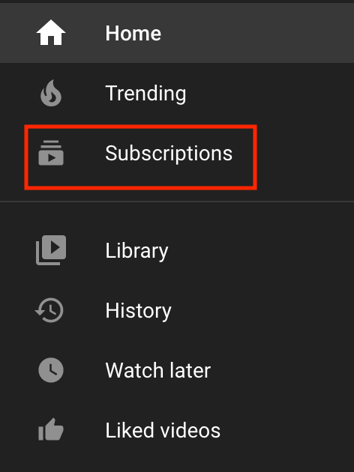
youtube sidebar subscription box

In addition to encouraging subscribers, ask users to turn on post notifications to get notified when you post a video.

Notifications can be a valuable tool for generating excitement. Users may feel they want to stop what they’re doing to watch your videos so they can actively participate in conversations about your content.

8. Repurpose your existing quality content.

Content repurposing is re-using existing content and presenting it in a new format to prolong its shelf life. Repurposing could mean creating a video from a high-performing how-to blog post (the bonus here is that YouTube users love how-to videos) or posting recording sessions from a popular podcast episode.

You’re repurposing helpful content and sharing it with a new audience in a format you know they enjoy.

9. Create a unique introductory hook for your videos.

It’s a unique tip, but it’s worth considering as many popular creators use this strategy.

Mr. Beast is a famous YouTube persona with almost 52 million subscribers. Each one of his videos begins with a clip of an exciting moment that doesn’t usually play out until at least halfway through the video.

Users must keep watching to see the moment unfold. Here’s an example:


10. Create a playlist.

If you create content clustered around a relevant, related topic, create playlists to encourage video views. The image below shows the playlists on the HubSpot YouTube account, where videos are organized by topic.
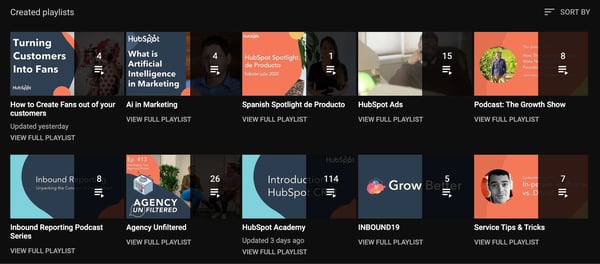
hubspot youtube account playlists page demo

Image Source

Playlists default to autoplay, so users can watch an entire playlist without taking action themselves.

Playlists and autoplay allow your users to view subject-relevant content that they may not have found themselves. This gives them a well-rounded experience and increases your video views.

11. Lead users to other videos in end screens.

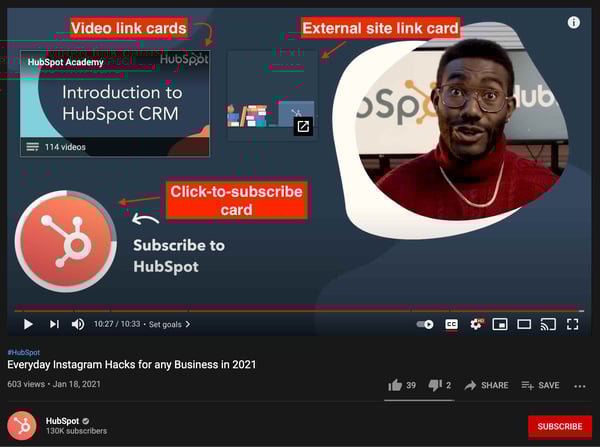
End screens are the final 15-20 seconds of your video, sometimes called credits, used to recommend additional content on your channel as cards. Below is an example from the HubSpot YouTube account.
youtube end cards with subscription, external link, and video link demo

Video Source

Your end screens can feature cards for single videos or entire playlists, a subscribe button, links to your associated websites, or secondary channels your business has (we’ll touch on this below.) It’s important to note that end screens should recommend relevant content.

12. Enable embedding.

Almost anything can be embedded these days, including YouTube videos. If you’ve created a YouTube strategy, you’ve likely identified your target audience on the platform. They’ll probably give you the most views, but enabling embedding can help you introduce yourself to additional viewers that may not have known your content would be relevant to them.

Here’s an example of a YouTube video embedded in a blog post.
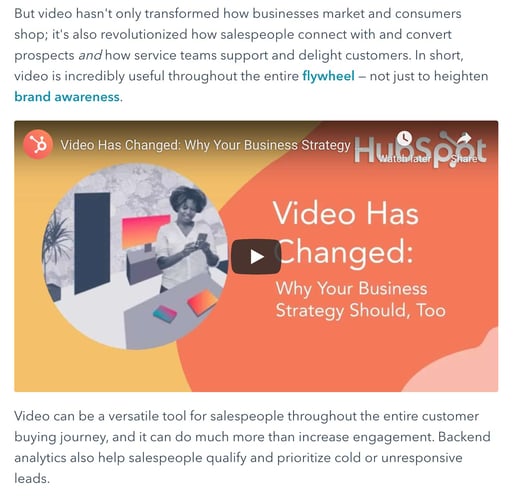
demo of youtube video embedded into blog post

Image Source

You can embed your videos in your content, like blogs and email newsletters, but it’s also a valuable way to expose your content to new audiences.

Other people can embed your content within their own pages and share your expertise with their audiences. These views still count towards your overall view count, even if they’re not on YouTube.

13. Promote videos on other platforms.

YouTube probably isn’t your only social media profile, and you should use this to your advantage. Share new video announcements on your Instagram Stories, share links and clips on Twitter and Facebook, and share them in your blog posts and emails.

You’ll expose new audiences to your content, and, as mentioned above, views on other platforms count towards your YouTube view count.

14. Leverage current trends.

Leveraging YouTube trends is a valuable tool for obtaining more video views. This doesn’t necessarily mean that you should create content that is exactly in line with a current, trending meme on YouTube, but you should pay attention to what types of videos get lots of views.

For example, Mediakix released a list in 2019 of the most popular types of videos. Among them are how-to and Q&A videos.

Suppose you’re a business hoping to utilize one of these trends. You could create a how-to video demonstrating how to use your product or service and a Q&A video where you troubleshoot consumer inquiries. You’re creating content that users want to see that provides value to them to generate more views.

15. Focus on creating relevant content.

Leveraging trends is important for generating views, but you shouldn’t abandon your topic type to get views.  

A YouTube channel filled with unrelated content can generate views but won’t be seen as a source of authority. Your content would be scattered, users might write you off, and algorithms won't know your niche. So, the two tips come together to leverage current trends to create content that aligns with your existing strategy.

Also, relevant content outweighs video quality. YouTube found that, when deciding what to watch, content relating to a user's passions is 1.6x more important than the video’s quality (like visuals and camera quality), and 3x more important than whether it features well-known actors.

This means that the most valuable content you can create isn’t expensive and high budget — it’s content that’s in line with your audience's needs. When you understand what they want, it’ll be easier to earn views.

16. Collaborate with similar accounts.

One of the exciting aspects of YouTube is its community. There are people creating all different types of content, from gaming videos to exercise classes. You’ll likely find people who make content like yours, and collaborating with them is a valuable tool for generating more views.

Collaborations usually involve creating two separate videos, one for your channel and another for the collaborators’ channel. When they’re posted, you’ll gain exposure to their audience group and them from yours.

If you’ve collaborated with a topic-relevant channel, new viewers will likely already be interested in your content and may even subscribe to your channel. It’s also a valuable way to create more content, and more content always inspires more views.

17. Post at the right time.

There is a right time to post on YouTube. The best times to post on YouTube are Thursday or Friday afternoons between 12:00 and 3:00 PM, and on Saturdays between 9:00 and 11:00 AM.

You can certainly leverage these numbers and obtain views, but it’s also essential to create a posting schedule that aligns with your existing viewership.

You can get this information from YouTube’s native analytics tool or your preferred service. If you’re a HubSpot user, you can connect your YouTube account to Marketing Hub and generate custom reports.
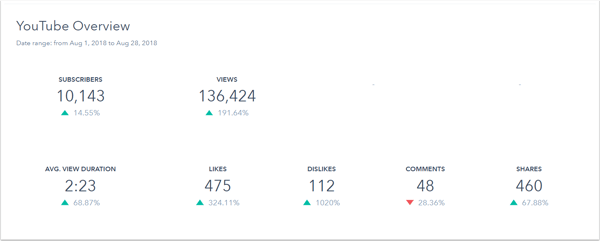
youtube analytics overview report in hubspot dashboard demo

Image Source

Posting at the right time translates into views, because your subscribers are more likely to watch during a time that they’re free versus when they’re at work.

18. Use a multi-channel approach.

If you’re a large business, consider creating multiple YouTube channels for different purposes. For example, HubSpot has five separate YouTube channels (shown below) tailored to different audience groups.
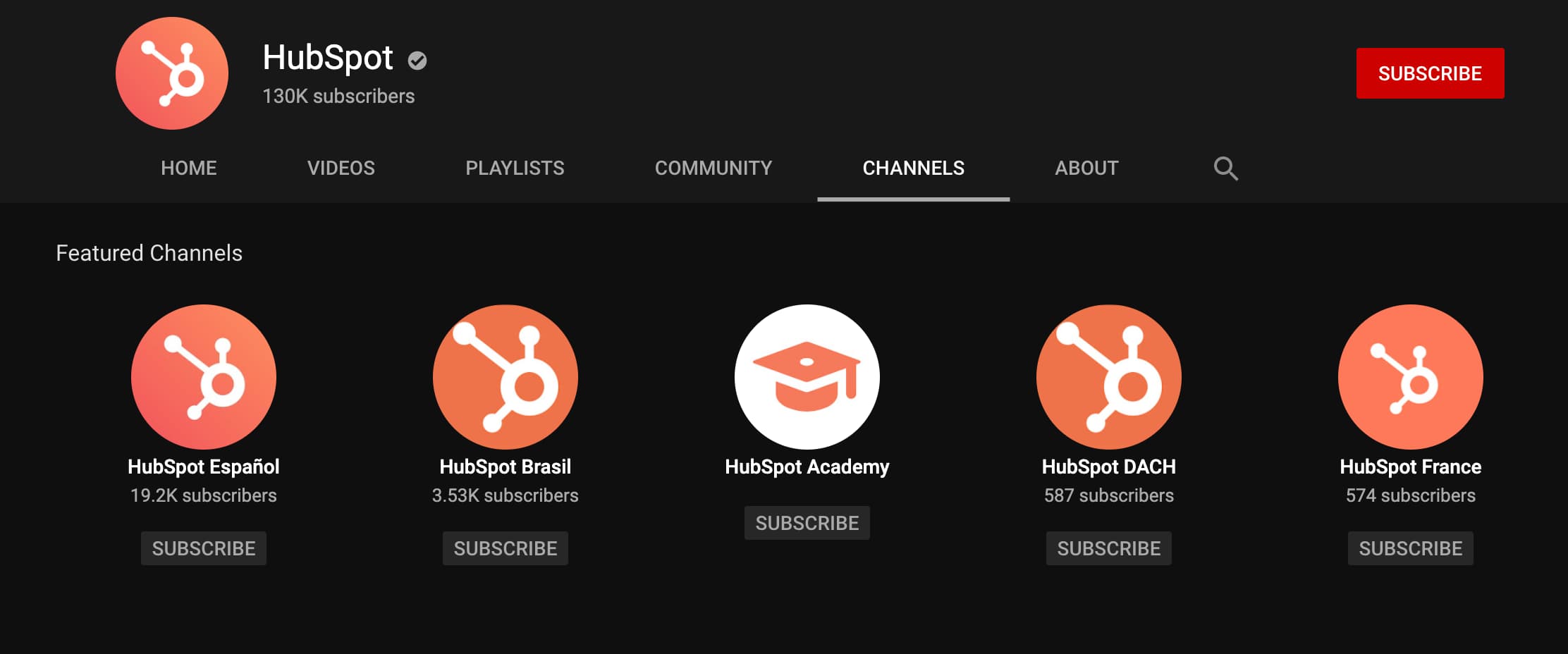
channelsImage Source

Multiple channels ensures that content is accessible to different viewers, and it generates more views.

This isn’t just a HubSpot thing — Interbrands says that the top 100 brands on YouTube have an average of 2.4 channels.

19. Optimize for mobile viewers.

More than 70% of YouTube watch time comes from mobile devices, so create content that these audiences can enjoy.

Optimizing for mobile viewers means creating videos that can adapt to different mobile device aspect ratios, video titles and thumbnails that don’t get distorted on smaller devices, and recommend videos in end-screen cards.

20. Remember to be patient.

As marketers, we all want virality and immediate success for the content we create. While you may sometimes get lucky, generating more YouTube views takes time and patience.

There’s not much concrete advice to give with this tip, but understand that if you’ve leveraged the tips on this list, you’ll likely gain more views to begin growing your channel.

Next, we’ll go over how to keep growing your channel after reaching your first 1000 views on YouTube.

How To Reach 1000 Views on YouTube and Keep Growing Your Channel

Although it certainly would be nice, there is no equation to help you generate your first 1000 views on YouTube. Some people gain instant success, while others struggle to reach even 100 views after making hundreds of videos. In fact, 88.4% of YouTube videos generate fewer than 1000 views.

This may be discouraging to hear, especially since you can only begin to monetize your videos on YouTube after having more than 4,000 public watch hours. Many creators, including Zac Snyder, have attempted to figure out the perfect formula.

Snyder highlighted his mathematical approach in a Medium article recommended that a good start could be to make 300 videos a year at 10 minutes a piece. However, this strategy may not work for all creators.

There are ways to generate more views sooner rather than later. First, you should use and reference the tips mentioned above when creating your videos. There are also four additional tips to consider to continue growing your YouTube channel after reaching 1000 views.

1. Increase your upload frequency.

If it’s taken you a long time to reach 1000 views, it may make you nervous to risk your viewership by doing anything differently. However, it's easier to generate more views with more videos than to generate more views from one or two standalone videos.

Pay attention to your channel analytics, understand when you generate the most views, and increase your upload frequency to match your engagement metrics.

Once you’ve developed a schedule, identify time frames in which you’ll reassess your strategy. For example, maybe you’ll aim to upload three times per week until you reach 10k views, and then you’ll analyze your metrics and switch to uploading twice a week.  

2. Keep introductions and opening credits short and to the point.

Attention spans are short, so any unnecessary content in your videos can cost you viewers. Once you’ve reached 1000 views and generated an audience, you don’t want to lose them.

Use analytics to understand their behavior and adjust accordingly. If viewers seem to stop watching after a certain amount of time, consider shortening your introductions so viewers get to the core of the content faster and feel more inclined to finish the video.

3. Optimize for ‘Suggested Video’ views.

Suggested videos show up in the sidebar of a desktop YouTube screen, as shown below in the red outline.
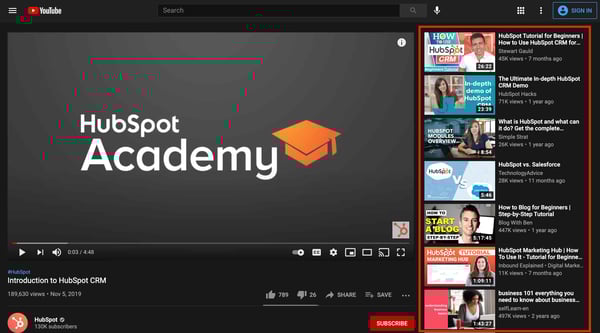
youtube suggested views sidebar tab on hubspot academy channel

Image Source

The algorithm recommends videos based on tags, so choose industry-relevant tags that your competitors are also using. When they match, you have a significant chance of showing up in suggested videos for the same tags.

YouTube also doesn’t discriminate by subscriber count, so even if you don’t have as many subscribers as your competitors, it's still possible to be suggested after their videos.

4. Engage with subscribers in the ‘Community’ tab.

The Community tab is built for YouTube creators hoping to interact with their audience outside of their video comments. You can create polls, feature images, and generate hype for upcoming videos.

Post snippets to get subscribers excited about what’s to come, and they’ll likely be looking out for your video and ready to watch when it goes live.
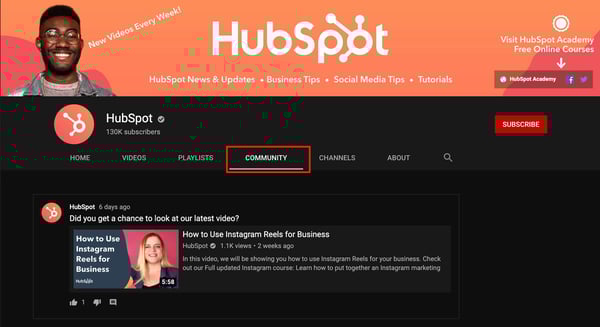
hubspot youtube channel community tab exampleImage Source

If you’re interested in learning more in-depth strategies for growing your channel, check out this HubSpot Academy YouTube Course featured resource. You’ll learn how to build your brand, develop an audience, and gain insight from YouTube influencers on creating a successful channel.

Create Content That Inspires Subscribers and Encourages Views

You’re creating YouTube videos because you know you can provide value to your audience.

Remember, it may be frustrating if results aren’t immediately significant. But if you optimize your videos and channel for SEO, create consistent, relevant content, and engage with your audience, you’ll not only reach 1000 views but own a channel that just keeps on growing.

New call-to-action


20 Ways To Get More Views on YouTube was originally posted by Local Sign Company Irvine, Ca. https://goo.gl/4NmUQV https://goo.gl/bQ1zHR http://www.pearltrees.com/anaheimsigns


What is a Media Kit — and How to Make One [+ Examples]

Your competitor releases a new product or service. You offer something similar — but, of course, much better.

Then, suddenly, your competitor's product is everywhere. News articles, online reviews, best-of lists, buyers' guides, even TV segments.

How is this happening? And your real question: why isn't it happening to you?

To compete against your competitors, there's one thing you'll need in your wheelhouse: a media kit.

Here, we'll explore what a media kit is, and how it can help you increase brand awareness and, ultimately, sales.

Plus, how to make one for your own brand.

Download Now: Free Press Release Template

Media kits may live fully-online as responsive online press pages. Or, businesses may choose to make their press kits available as static, downloadable resources, like a presentation deck.

Whatever format you choose, this much is clear: businesses of all sizes benefit from having a professional, readily-accessible media kit. This vital resource is a key to the earned media coverage all businesses covet — from massive Fortune 500 corporations all the way down to individual influencers and solopreneurs.

A comprehensive media kit should include a description of the company or individual, contact information, social media statistics, case studies, information on partnerships and collaborations, and testimonials from past customers.

Basically, it's all the information a journalist would need to feature your brand in a breaking news story — without the headache of a last-minute information request.

How to Make a Media Kit: What to Include

So, you want press coverage and partnerships (what brand doesn't?). And you understand how a media kit helps make this all possible. But how do you make a media kit?

Here's some good news: most of the content and creative assets you need to create your press kit likely already exist.

Key elements of a media kit include a bio or About Us page, social media statistics, case studies, partnerships and collaborations, and testimonials. To make it even easier for the press to cover your work, you'll want to include high-quality brand identity images (think both logos, and other brand images or product/service images).

It's up to you to (1) find this information, (2) make it look spectacular, and (3) make it painfully easy to find on your site. The rumors you've heard about journalists and how overworked they are? Entirely true.

To catch the attention of someone on tight deadlines with an internet full of story prospects, you're going to want to make this simple. Most brands choose a direct page name like "Press" or "Media" –– or, if they're really fancy, "Newsroom" –– and make it accessible directly from their homepage (often in the Footer).

Even if you prioritize a web version, having a downloadable media kit or deck is worth the time investment. Some media users might prefer the traditional form of this resource, and it gives you the best opportunity to control your pitch and tailor content to all audiences.

Biography or About Us

Let's start with the star of your media kit: you. Here's where you introduce your name, your logo, your mission. Make sure your media kit design reinforces your overall brand identity, utilizing the colors, fonts, and other visual hallmarks set out in your branding guide.

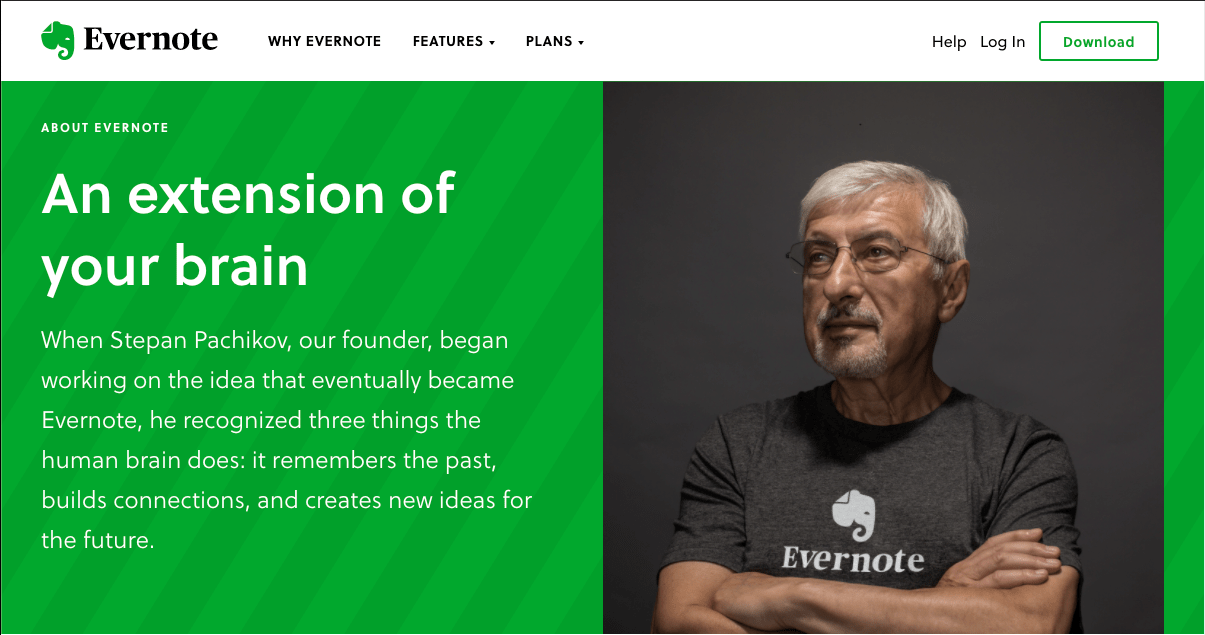
Evernote goes all-out in this section, housing their press kit information within the broader "About Us" portion of their website. All the essentials for journalists and partners are there too, but the organization's values take center stage.

Evernote's media kit homepage

Social Statistics

For social stats, you'll need to conduct a social media audit or collect this data from whoever manages your social channels. Remember your audience for the press kit: media and PR professionals.

Your media kit needs to effectively pitch your brand to people who specialize in getting people's attention. So show them you're capable of sparking conversation — and show them there's already an audience eager for stories about you and your work.

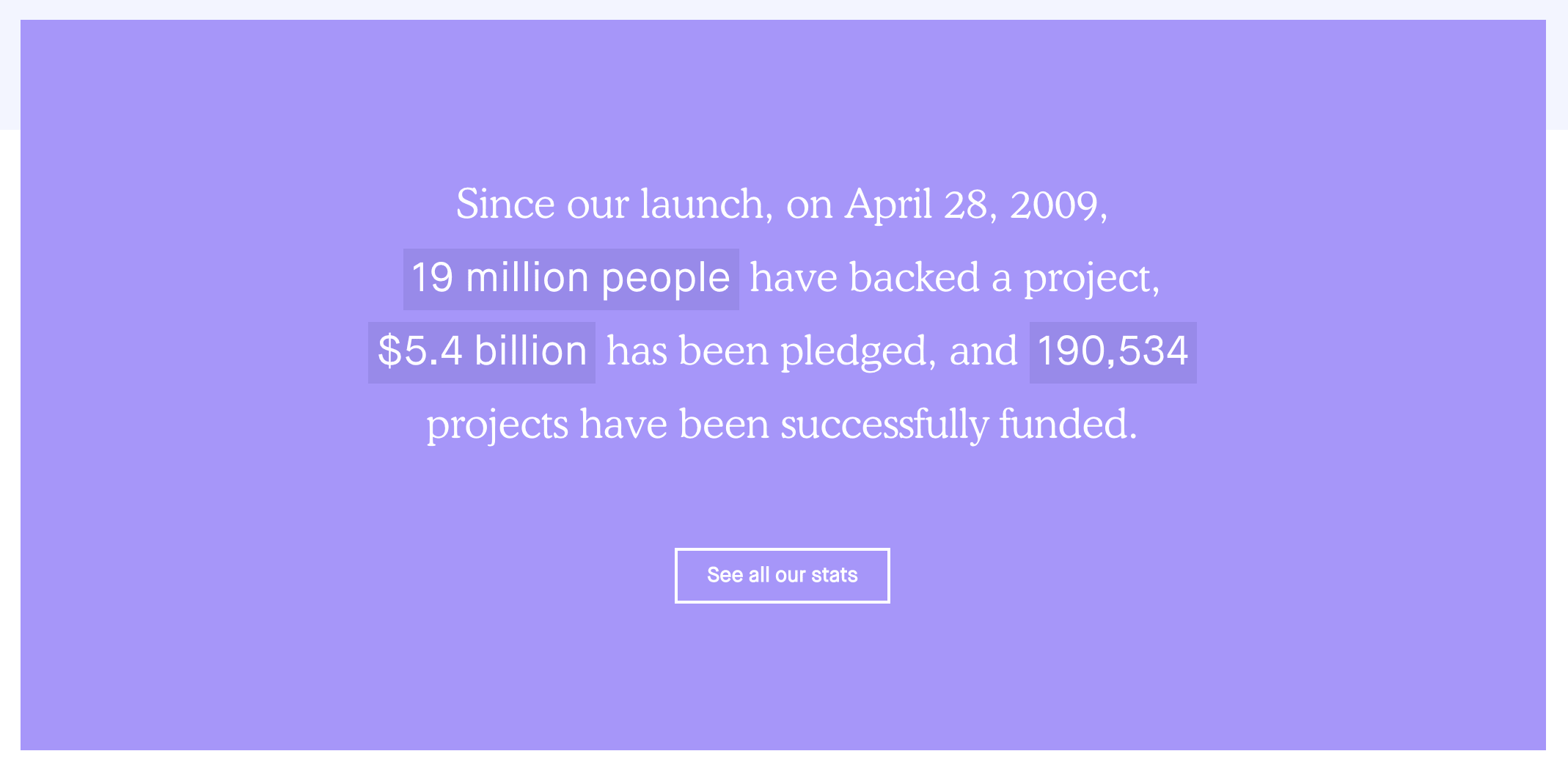
Kickstarter puts a unique stamp on this section of their media kit page, highlighting a few top metrics that show massive engagement with their service.

Kickstarter's media kit social media statistics

Media kits aimed at partnerships and collaborations should prioritize engagement rates and similar actionable metrics alongside the bread-and-butter statistics like follower counts. Savvy marketers want to partner with brands and influencers that move people to action.

[Note: If you are a HubSpot Social user, you can use Reports to analyze the performance of your social posts and determine how well your social media efforts are performing.]

Partnerships and Case Studies

This section is your chance to let past partnerships and brand collaborations speak for themselves. Let the old adage "show; don't tell" be your guide here. Featuring the right partnerships –– either via logos or through short case studies –– is a subtle but powerful tool for positioning your brand.

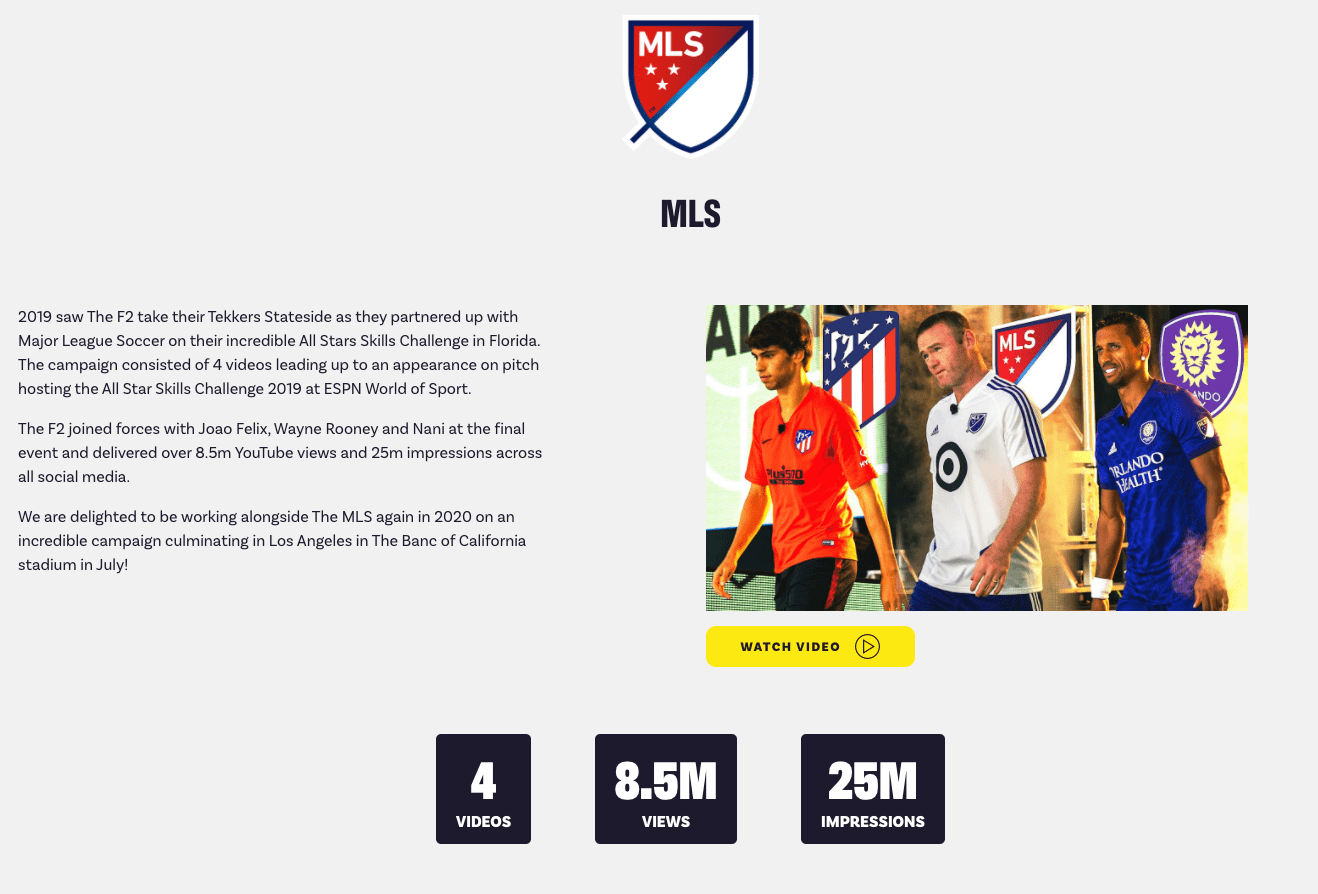
International football influencers The F2 highlight past campaigns, putting reputable brand names and logos front-and-center. They also note key engagement statistics for these campaigns

F2's media kit homepage

Testimonials

Testimonials are another great way to show media professionals the impact and effectiveness of your brand or product.

Keep this section succinct: just a single testimonial should suffice. Only a few lines of text (even just a single short quote) and a single related image gets the point across, lending your pitch greater credibility thanks to social validation.

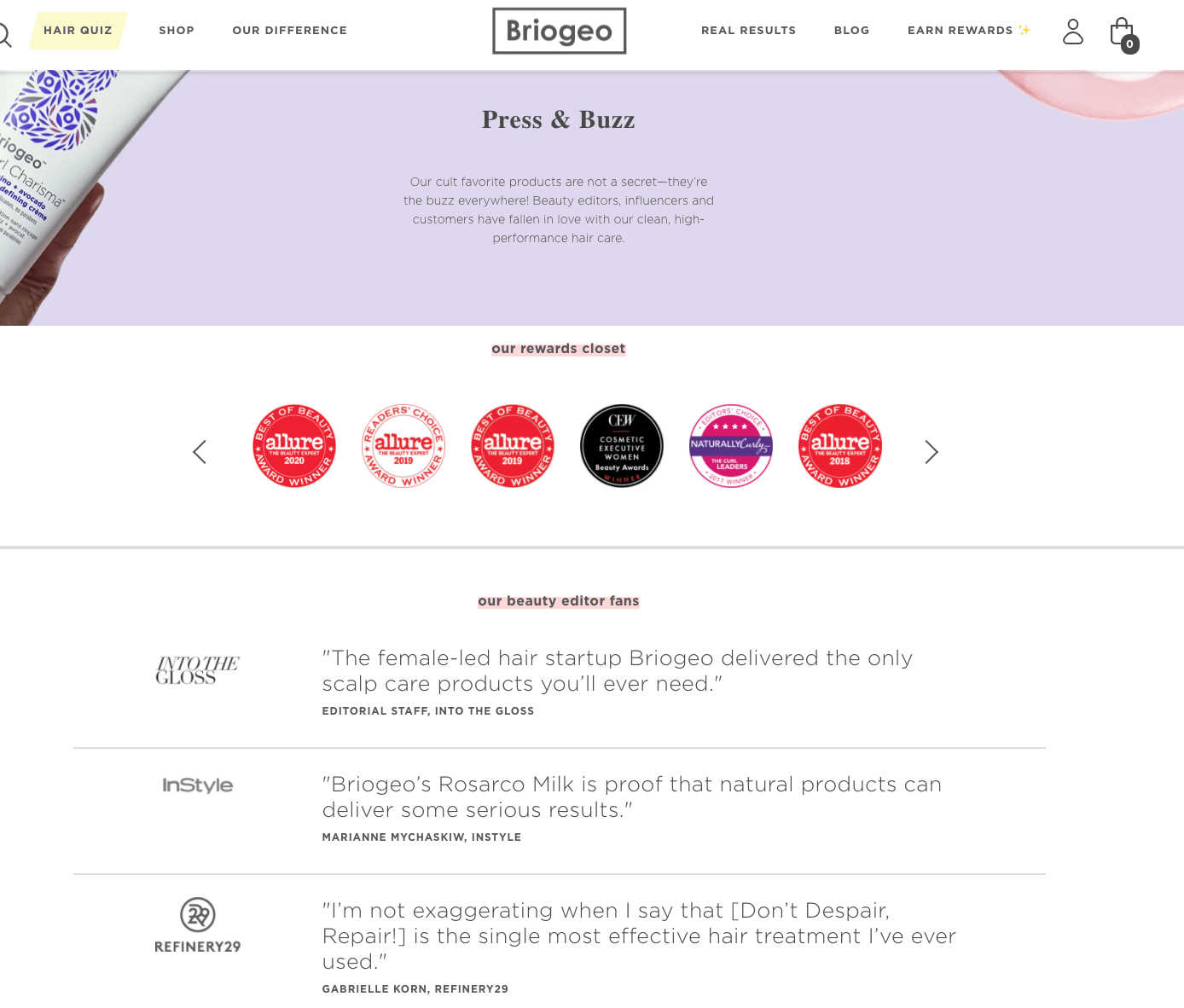
Briogeo does a fantastic job highlighting testimonials on its Press & Buzz page, right below the rewards section for easy access:
briogeo's media kit homepage with testimonials

Visual Assets (Downloadables)

Your media kit isn't a style guide, but it should pull in the most essential elements of your visual brand. Want your logo and that slick product screenshot to display correctly?

Provide exactly the images and files you want featured. Have a killer data visualization, infographic, or product video? Include that, too.

Journalists will especially appreciate portraits of your management team. They're most likely to cover stories involving people, so show them the people they'll want to write about.

Birchbox makes this easy. They highlight "Press Materials" and link to a short but comprehensive set of resources. Having everything in well-organized cloud folders is a nice touch –– especially for those browsing on mobile.

birchbox's media kit homepage

Without downloading or unzipping a large batch of images, visitors can quickly confirm you have visual assets to make their publication look good. Remember, the audience for your media kit is especially busy and juggling lots of competing priorities. Jump to the top of their "potential posts" pile by making their job as easy and painless as possible.

(Added bonus: your external media resources are easily updated –– sparing you anxiety about outdated media kits and image files misrepresenting your brand.)

Perhaps unsurprisingly, Instagram also really crushes it in this portion of their press resources. They even provide branded, editable templates for broadcast media use, making it easy for publishers to adhere to their iconic visual brand.

Now you know the what and the how of creating a media kit to garner beneficial coverage for your brand. Click here to download our free media kit template and get started.

And go ahead, give yourself a pat on the back when that Features story comes out. You won't see your name on the byline, but we both know who the real hero is here.

New Call-to-action


What is a Media Kit — and How to Make One [+ Examples] was originally posted by Local Sign Company Irvine, Ca. https://goo.gl/4NmUQV https://goo.gl/bQ1zHR http://www.pearltrees.com/anaheimsigns
Tuesday, February 9, 2021

What You Need To Know About Lead Conversion [With Expert Tips]

So, you've designed a lead generation strategy and it's working. Your website visitors are coming to your website, filling out your forms, and boom, you've got leads. Now what?

Download Now: Free 8-Week Conversion Rate Optimization Planner

That's the question I ask myself after re-watching all nine seasons of The Office for the 19th time. But it's also the question we, as marketers, have to answer when consumers have passed that first threshold.

Once your visitors have shown an interest in your brand, how do you turn them into customers? That process is called a lead conversion.

Let's dive into how to build your brand's lead conversion strategy and how to improve your current conversion rate.

A lead goes through several stages before becoming a customer. They start as a lead, then grow into a marketing-qualified lead (MQL), and then become a sales-qualified lead (SQL). This means brands have to nurture their leads at every stage and create opportunities for them to take action toward becoming customers.

How to Build a Lead Conversion Process

No two brands have the same process. Every brand builds its own conversion path tailored to its leads. Below, you'll find a few strategies to help with your process.

1. Gather information on leads.

Start with the data you have on your leads: source, industry, company, employee size, pain points – any information that will help you build a strategy that aligns with your leads' needs.

Remind me to trademark "leads' needs" after writing this article. Now, back to the important stuff.

"You will waste a lot of time building out a conversion strategy that is not based around facts about your audience," says Marwa Greaves, director of global messaging at HubSpot. "Ask yourself where your leads are. Are your leads most engaged in your newsletter? Your website? On messaging channels? Make sure you are meeting your audience where they are and not asking them to bend to your strategies."

Jordan Pritikin, the head of email and growth marketing at HubSpot, also highlights another important element to consider.

"Understand why these leads are coming to your website in the first place. What is the underlying problem they are trying to solve?" says Pritikin. "If you can create email nurturing to help them solve that challenge, you're much more likely to connect with them and convert them into a new customer."

If you're missing that information, work on obtaining it through forms and user research. From there, you can design a tailored conversion process.

2. Identify high-intent behaviors in each stage.

How do you know when a lead is ready to make a purchase? What behaviors will the lead exhibit? Having these answers is key to differentiating between leads who are ready to make a purchase and those who aren't.

A lead who only reads your brand's blog posts is likely not at the same purchase readiness as a lead who visits your pricing page. So, if you send an unqualified lead to the sales team, they will likely have a much harder time closing a sale.

How do you avoid that? Team up with your sales team to determine what signals low-intent and high-intent behaviors. Specifying those behaviors allows marketers to know what follow-up actions to take.

3. Use an SLA to align your sales and marketing teams.

A lead conversion strategy will struggle immensely without alignment between sales and marketing. One thing you'll need to agree on is a handoff cadence that works for both teams. That's where a service-level agreement (SLA) comes in.

It's typically used to outline an agreement between a business and a customer. However, it's also used internally between sales and marketing teams to better align their lead conversion strategy.

An internal SLA should include each team's goals, initiatives, and accountability measures for a given time frame, say Q1. That said, this agreement will require regular updates as priorities change with the business.

4. Build the lead conversion path.

Think of your lead conversion path as a trail of breadcrumbs guiding your leads to purchase. The path itself will include offers and calls-to-action to offer opportunities to convert.

Lead Conversion Strategy Example

Let's use Zion, a fictional UK SaaS company, as an example. Zion's sales and marketing teams have collaborated on an SLA, which includes the following: Marketing commits to sending 100 qualified leads to the sales team every month and the sales team commits to following up with those leads within a week of receiving them.

Both teams have also identified high-intent behaviors that will trigger automated emails and have implemented a lead scoring system. For instance, when a lead reaches a score of 95, this will automatically trigger an email sequence inviting the lead to schedule a product demo with a sales rep.

On the back end, that sales rep will receive a notification, with information on the lead, their activity, and a timeline in which to follow up. If the lead does not take action within a certain time frame, an automated, personalized email on behalf of the sales rep will be sent to the lead.

This is an example of the path Zion can build to convert leads, both on the customer-facing end and on the back-end between sales and marketing.

How to Calculate Lead Conversion

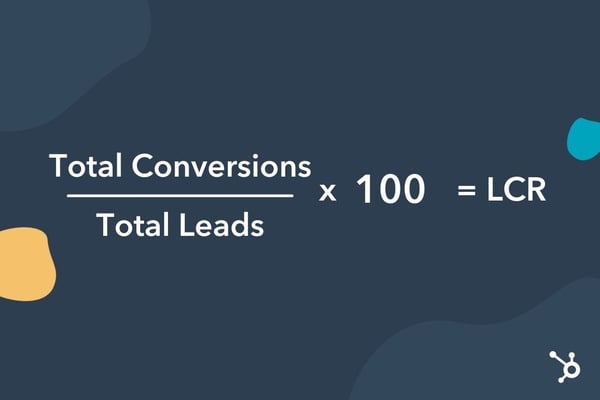
Calculating your lead conversion rate is simple: Take your total number of conversions, divide that by your total number of leads and then multiply by 100. That final number is your LCR.

lead conversion formula

Example time: Let's say from January to February, you generated 105 qualified leads. From those leads, 20 became customers. The formula will look like this: 20/105 x 100. This means the lead conversion rate for that month was 19.04%.

Average Lead Conversion Rates

Because lead conversion happens at several stages across various touchpoints, there is no single average that can be used across industries.

Your brand would benefit more from looking at conversion rates at a more granular level, such as by channel (i.e., email conversion versus landing page conversion) and/or by stage (i.e., MQL-to-SQL rate).

Lead Conversion Strategies

1. Implement behavior automation.

There are two reasons to use automation: it saves time and it scales well.

Let's say a lead is sifting through testimonials on your website. That may indicate an interest in your product. With this in mind, why not automate a follow-up email that could bring the lead one step closer to a purchase? This could be a free trial offer or a product demo.

According to Pritikin, emails based on behavior perform much better than other types of automated emails. However, Greaves encourages brands to broaden their perspective when defining those behaviors that suggest purchase readiness.

"Activity-based triggers are an easy win for marketers, but think outside the box when creating them," Greaves says. "It's not just views on your pricing page that may require an automated follow-up, it could also be views of other customer stories or reviews on your site."

Here is a list of behaviors that could benefit from automation. The lead:

  • Reviews your pricing page
  • Schedules a product demo
  • Signs up for a free trial
  • Engages often in email marketing
  • Inquires about product features through chatbot, email, or other channels
  • Downloads a high-intent content offer

Working with your sales team to recognize those key behaviors will be instrumental in automating follow-ups that convert.

2. Nurture your leads through email.

Email nurturing is the process of engaging your leads through email marketing with the end goal of turning them into customers. When nurturing leads via email, offering relevant and valuable information is key.

This is when the data piece becomes important. Using the information you've compiled on your leads, you can deliver content that piques their interest, aligns with their goals, and solves their challenges.

There are a few tips to make your emails stand out:

  • Personalize your emails with the lead's name.
  • Use automation software to trigger actions based on email engagement.
  • Segment your email list.

3. Leverage social proof.

When leads are considering your products or services, social proof can help nudge them toward a purchase. Examples of social proof include customer testimonials and reviews, which give leads a look into customers' experiences with your brand.

They are best used when leads are in (or close to) the decision-making stage. So, you'll often see them on landing pages and pricing pages.

User-generated content is another great use of social proof and can be incorporated into your social media and email marketing content.

4. Use lead scoring.

If you're having trouble aligning your sales and marketing teams on MQLs and SQLs, lead scoring can help.

Lead scoring works by attributing points to actions taken by leads and helps marketers know where a lead falls in the funnel. It also helps sales reps prioritize leads and know which follow-up actions to take. It also ensures that both teams are qualifying leads in the same way.

A well-qualified lead means one that's more likely to convert once they reach your sales team.

5. Retarget through PPC.

Retargeting is a great way to reach leads who have considered your brand before but weren't quite ready to make a purchase. When you retarget them, you can re-introduce offers they may be interested in or present new ones that align better with their interests.

Retargeting is a proven method for lead generation. However, according to Greaves, it can also work well to turn leads into qualified leads. With the latest restrictions on cookies – commonly used for retargeting ads – brands will have to rely more on first-party data for their retargeting efforts.

How to Increase Lead Conversion

1. Start with the analytics.

If your lead conversion is low, your first step should be looking at your analytics. Specifically, your conversion path over a broad time frame to determine if the low rate has been consistent or is recent.

If it's the latter, narrow down the period when the dip started and see what could have led to this change. If it's been consistent, you may need to run various experiments with your conversion path.

Greaves recommends looking at your conversion CTA placements and the difference between them. You'll want to look for the difference between high-performing and low-performing CTAs. If there are steep drop-offs on certain pages, that could indicate friction with your forms, like the length or the order of the fields, or even the type of information requested.

If the data shows that leads drop off shortly after the handoff to the sales team, it could be that marketing over-promised on what could be delivered.

With so many potential causes, start with the data to lead you in the right direction. Pun intended.

2. Redefine what is high-intent behavior.

Many brands may have lead qualification issues and not even know it. Marketing may be sending their sales team leads and later realize that those leads aren't ready for sales engagement.

How do you identify the leads that are ready? It starts with gathering the right information. Reach out to your sales team to determine what information needs to be collected. Then, create a comprehensive list of high-intent behaviors and low-intent behaviors that the marketing team will use to segment leads.

This process can help pass on more qualified leads to the sales team and drive your conversion rate up.

3. Experiment with the conversion path.

Think of your lead conversion path as a house. I know you might be thinking, "Why not go with a road metaphor?" but stick with me for a second. Regardless of the condition in which you buy your house, there will always be room for improvement. Things to remove, fix, add, and revamp. And as your tastes change, so will your house's look.

It's the same with your path. There will always be room to improve your path. Besides, your leads' interests, goals, and decision-making processes may change over time and require a different approach.

"Lead conversion requires a lot of experimentation. You will not succeed if you set one strategy and forget it," Greaves says. "Creating an experimentation process that allows you to test every part of your flywheel will allow you to learn more about your leads and your own internal process than you would have before."

Although the work is never fully done, every experiment you run will bring you that much closer to converting your leads.

3. Experiment with the conversion path.

When trying to scale your lead nurturing process, automation is the name of the game. Manually sending out personalized emails to your leads might have worked in the early days, but that will quickly get overwhelming as your business grows.

Automation allows you to maintain the same level of personalization at a quarter of the time and resources. Once you've set up your conversion path, automate the follow-ups that will be triggered when leads exhibit certain behaviors.

These tactics can not only save your team time but also streamline the conversion process so that no lead falls through the cracks. This practice also leaves room for your sales and marketing team to focus on big-ticket items.

The key takeaway here is that lead conversion isn't a one-and-done process. It calls for strategy, cross-team collaboration, and a whole lot of experimentation.

Get the 8-Week CRO Planner


What You Need To Know About Lead Conversion [With Expert Tips] was originally posted by Local Sign Company Irvine, Ca. https://goo.gl/4NmUQV https://goo.gl/bQ1zHR http://www.pearltrees.com/anaheimsigns
7 Types of Corporate Events [+ Virtual Event Ideas]

One of my favorite episodes of "The Office" is called Launch Party. During this episode, Dunder Mifflin hosts a corporate party, plus several satellite parties when its website launches. Hilarity ensues.

But during your corporate event, you probably don't want to kidnap the pizza delivery person, and you might want to spell launch correctly on the sign.

As a business, you probably have several corporate events on the horizon, whether it's a team-building event or a seminar.

In this post, we'll learn about the different types of corporate events, plus give your party planning committee a few virtual event ideas.

Download free resources for executing your best event yet. [Free Kit]

Now, let's dive into the different types of corporate events.

1. Seminars

A seminar is an event that's focused on educating people, whether it's your customers or employees. It's similar to a conference or a workshop.

A seminar is usually a short event, while a conference might be a several-day event with multiple speakers. On the other hand, a workshop is usually a small, intimate event with only a few registrants.

You might consider hosting a seminar as a way to get leads and introduce people to your company.

2. Retreats

A retreat can be held to simply bond with your team, or you can sell tickets to customers. This is usually a several-day event with several workshops or seminars to attend.

Sometimes the purpose is just to relax, but other times it's to learn, strategize, and plan for the future.

3. Team Building

Team building events are meant to boost team morale, and help people learn how to work together. Usually, these are collaborative events, where teams need to work together to solve something. It could be a ropes course, or perhaps an escape room.

Sometimes these events can even be formal if you'd prefer. For example, you could run a workshop about psychological safety or sensitivity training.

4. Milestones

Has your company just hit a revenue goal? Or perhaps you have a major anniversary coming up? Either way, it's nice to celebrate with a corporate event.

These are similar to appreciation events (more on these below), where you can thank your team for achieving the milestone.

5. Launch Party

A launch party is when you throw a corporate event for the launch of something: your company, a product, a website (like "The Office"), etc.

These are celebratory events that are usually meant to create buzz around the release of something. Think Apple's big product launch announcements.

6. Fundraising

A fundraising event is meant to raise money for charity, usually. Or sometimes it's to help raise money for your company. These are usually concerts, golf tournaments, dinners, or festivals.

7. Appreciation Events

An appreciation event is meant to thank your customers, partners, or employees. These are usually fun events, such as holiday parties, private concerts, or a special dinner.

The goal is to spend informal time showing people how much you appreciate and care about the value they bring to your company.

1. Virtual MasterChef Team Building Event

A great corporate team building event is to host a virtual MasterChef. To do this, you can have one person host and send out a list of ingredients (or modified ingredients for dietary restrictions) and supplies.

On the night that you host the event, everyone will dial into Zoom and cook the same meal as the host walks them through the recipe.

When everyone is done cooking, you can have a virtual dinner party together. This is a great informal team-building event for your team to hang out and get to know each other.

2. Airbnb Online Experience Appreciation Event

One of my favorite virtual corporate events that I've researched is the Airbnb Experiences. On Airbnb, hosts put on virtual events that you can book for your team.

This is a great appreciation event idea for any team, customer, or partner. There are scavenger hunts, drag shows, and even remote escape rooms.

3. Mystery Dinner Partner Event

Mystery dinners are a fun way to treat your partners. You can have partners sign up to be a part of mystery dinners. Every month, you can select a partner randomly, and then host those partners to a mystery dinner party.

This could even be virtual if need be, and it's a great way to show appreciation for your partners and to get to know them.

4. Professional Development Workshop

The classic corporate event is a professional development workshop. You can find workshops like the Disney Institute and have your team learn something from the experts. This shows appreciation, but also is a great learning opportunity.

5. Splash Webinar

If you need software to host a virtual corporate event, then Splash is a great product for you. Let's say you want to host a webinar? You can do so on Splash. This helps with the registration process, invitations, virtual waiting rooms, and even post-event content. Everything you need for a corporate webinar is on this software.

Hosting a corporate event is a great way to boost morale, get to know your team, show appreciation, and even develop your company. Plus, hosting virtual events has never been easier.

Event Marketing


7 Types of Corporate Events [+ Virtual Event Ideas] was originally posted by Local Sign Company Irvine, Ca. https://goo.gl/4NmUQV https://goo.gl/bQ1zHR http://www.pearltrees.com/anaheimsigns
How to Create a Communication Strategy [+ Free Templates]

There are certain characteristics that should be at the core of any successful business. For instance, every business should have a great product or service, awesome employees to keep the internal engine running, and loyal customers who support through purchases and advocacy.

There also has to be underlying elements to help establish the aforementioned characteristics. And one of the most necessary is clear and effective communication.

Communication is at the root of every interaction for businesses. Without transparent communication at every level, there's more room for error, and — depending on the magnitude of the error — it can make or break a business.

But, while 89% of people feel communication is extremely important for work, 8 out of 10 people rate their own business' communication as either average or poor.

Developing a communication strategy for your business will help you understand how your company best communicates, internally and externally, and can give you measurable results to better understand the efficacy of your communication tactics.

In this post, we'll explain how to create a communication strategy and plan for your business to ensure efficient, cohesive communication with colleagues and customers alike.

What is a communication strategy?

A communication strategy is a process developed by the appropriate stakeholders to identify where communication efforts need to be improved. The next step in this process is to ideate and select measurable actions that will be used to develop a communication plan to achieve your desired outcome.

1. Use a communication plan template.

HubSpot's Communication Plan Templates are a great resource to help you develop actionable steps without having to spend too much of your time on this task.

Your communication plan will clearly go through all of the steps you need to take to address the challenges you're up against — like completing an audit, setting SMART goals, and understanding how long each step in your plan will take. Depending on your overall strategy, you may develop multiple plans to be carried out to meet the needs of different audiences.

You'll want to break your plan into steps so you can easily make and measure progress on a daily, weekly, or monthly basis. Additionally, as you're creating your communications plan, you'll need to factor in a working timeline, potential budget, and ensure you're delegating tasks to the appropriate team members.

Over time, you want to be able to reflect on what changes have been made and if these changes are actively contributing to helping you achieve your ideal results.

HubSpot's communication plan template

Download HubSpot's Crisis Management & Communication Kit today!

2. Determine current and potential problems.

Identifying the problems hindering your company's communication efforts is the first, and most important, step of developing a solid communication strategy.

Start by asking questions like:

  • Are we experiencing communication problems internally or externally?
  • If externally, is this across all channels of customer communication, or a specific team or department?
  • If internally, is this a company-wide issue, or specific team or department?
  • Is there a specific issue that arises consistently? If so, what is that issue?
  • What are the problems that aren't consistent, but still present challenges?

Ideally, the more questions you ask, the more you'll be able to clearly identify areas for improvement that will influence your overall strategy. If you're struggling to come up with questions, reach out to team members within your company, and/or your customers.

You can issue surveys, start organic conversations in the office or via social media, schedule one-on-ones — whatever you feel will get the most relevant answers.

When there are issues that directly impact company employees or customers, people are more willing to provide feedback. It's also possible that someone may already be working to find a solution to some of the problems you'll identify — which brings us to our next step.

3. Select key stakeholders who need to be involved.

Now that you've asked the right questions, you need to make sure that you involve the right people to help you carry out building your communication strategy.

If you're at a smaller organization, it's possible that you may be the only person you need on your team. However, for larger organizations, you'll most likely want to include a few of your co-workers to help you divide and conquer.

Selecting which individuals should be involved should directly relate to the biggest challenges you identified from your list of questions. If the most pressing challenge is customer-related, you may want to include someone from your organization's customer service or customer success team. If there's an issue about how a product or service is being advertised or sold, include a representative from your marketing or sales team.

You'll also want to make sure that appropriate leadership team members are aware and as involved as they need to be. This way, if you end up wanting to make any major company changes like purchasing a new tool or restructuring teams, leadership will already be aware of what's happening.

If your coworkers are maxed out and don't have the bandwidth to assist you, or the problems are more significant than expected, you may want to source an external agency or a consultant to assist your company. For instance, if you're addressing a major external communications crisis, you may consider contracting a PR agency.

Overall, use your best judgment to select who will be involved and make sure they're involvement ties directly into the specific challenges you've identified.

4. Understand your audience.

Understanding your audience is fairly simple. The audience is either internal (meaning your coworkers, and the company as a whole), external (meaning your customers, shareholders, etc.), or a combination of both.

From there you can get more specific:

  • Are you addressing the entire company?
  • Are you addressing a certain department or team?
  • Are you addressing all customers?
  • Are you only addressing certain customers? If so, can you segment by buyer persona or stages of the buyer's journey?

It's important to take the time to thoroughly understand who your audience is so you're truly speaking to them in a way that will be well-received. Once you know who your audience is, you'll be able to use audience insights to inform all stages of development for your communication strategy.

5. Brainstorm your ideal results, and then work backwards.

This is when you use all of the information that you've gathered to propose what your ideal outcome will be. This is a high-level goal that will be achieved through the implementation of a well thought-out plan.

If your business has struggled with communication regarding events, an ideal result could be improving internal alignment and providing clarity for customers.

Alternatively, if you find that employees at your company feel it's difficult to voice their ideas or opinions, your goal might be ensuring all employees feel heard by developing a specific feedback system.

Whatever you specify as your ideal result, keep it simplified so it can be easily understood by anyone. It should carry weight because you're addressing challenges, but it shouldn't be too complex, either. Think of it as the central mission or vision statement of your communication strategy. The details will come after.

Developing an effective strategy is a process and may take a few different tries before you figure out what works best. However, it's a necessary investment to ensure you're clearly communicating the best way possible.

Check out How to Write an Effective Communications Plan [+ Template] and download HubSpot's Free Communication Template to start achieving all of your communication strategy goals.

crisis communication


How to Create a Communication Strategy [+ Free Templates] was originally posted by Local Sign Company Irvine, Ca. https://goo.gl/4NmUQV https://goo.gl/bQ1zHR http://www.pearltrees.com/anaheimsigns
What's Attention Marketing, & Should You Use It?

Did you know that the cost of acquiring consumer attention has increased dramatically (seven- to nine-fold) in the past two decades?

It might not be surprising to hear, but overall our collective attention span has been narrowing.

You might be wondering, "What does this mean for marketers?"

As marketers, it's our job to attract people to our brand. We need to deliver almost magnetic-like messaging to grab our audience's attention. But when you only have seconds to do this, it might seem like an insurmountable task (hint: it's not, we have some ideas).

In this post, let's review what attention marketing is and how you can use it to grab your audience's attention.

Download Now: Free Marketing Plan Template

The term attention marketing was coined by Steve Jelley and popularized by Seth Godin, as a way to describe a business model that focuses on capturing users' attention through non-invasive content rather than interrupting users' attention with something like a pop-up ad. With attention marketing, once you have your audience's attention, you can then engage with and convince them to purchase your product or service when the opportunity presents itself.

Before this concept was introduced, around the beginning of social media, the marketing landscape looked a lot different. Brands would usually market themselves on a massive scale, using TV ads, billboards, or radio spots. This means that they weren't able to target individuals, but instead had to focus on appealing to a broader audience.

With social media, brands can now figure out what interests individual customers and then market to them individually. Ultimately, it's important to consider using attention marketing because you want your marketing assets to engage customers and pull them in.

Marketing Attention Span

Now that you're thinking about capturing your audience's attention instead of interrupting it, let's focus on some logistics. To start, you don't have as much time as you think.

Years ago, Microsoft reported that the average person's attention span was 8 seconds. A more recent study shows that our collective attention span is narrowing.

Essentially, you only have seconds to capture your audience's attention before they continue scrolling or click through to something else.

So, how should you capture your audience's attention? Let's go over some ideas below.

Marketing Attention Grabbers

1. Be platform-specific.

A great way to grab your audience's attention is for your content to show up natively in your audience's feed (if we're talking social media).

For example, if your video shows up as recommended on YouTube and they click the video and it's clearly in sync with what your title was and what they were expecting, then you'll probably be able to keep them watching.

But, if they click through and the content is a photo montage instead of a video (a vast difference from what they might expect), then you might lose them.

In that same vein, when brands repost content from Instagram on Twitter, instead of making a separate Twitter post, people are less likely to click on the link than if they were to see the post right on Twitter.

An important thing to remember here is that some users are on mobile and some on desktop. Think about how you can design your website or content for those platforms specifically, so it's easier for the consumer to interact with your content.

2. Write super clear messaging.

When people can immediately tell what your value proposition is, it will hold their attention longer. It might seem simple, but review your marketing assets and ask yourself, "Is my value proposition clear for my audience? Can they tell within seconds the value we can provide?"

If so, that will hold people's attention longer because if they clearly see the value in what you offer, then they'll want to look further into your brand. Your messaging should be clear, concise, and written specifically for your target audience.

3. Use integrated media.

Integrated media, or a multichannel and multimedia approach to marketing, will help grab your audience's attention.

This means that you use several forms of media, including video, images, podcasting, GIFs, memes, etc. Different types of media on different platforms will help you figure out what your audience likes and dislikes.

Your overall marketing strategy should also include interactive media as well. In fact, 81 percent of marketers say that interactive content is more effective than static content when it comes to grabbing consumers' attention.

Ultimately, it's important to play around with your media content -- both the type of assets you create and the channels that you use to distribute it.

4. Tell a story.

People love a story. They love watching TV, reading books, or listening to a podcast. If you can capture your audience with a good story, then it'll be easier to market to them.

To do this, you can start off your videos, blogs, or Facebook ads, with a storytelling hook. Once you've got your audience's attention, then you can proceed to engage and delight them.

5. Consider emotional marketing.

Have you ever heard of emotional marketing?

This is the concept that your marketing assets should primarily use emotion to grab your audience's attention. By tapping into a singular emotion, your audience will naturally have a response to your content. And isn't the goal to get your audience to respond in some way?

6. Don't forget about co-marketing.

Co-marketing is when you use brand partnerships and collaborations to grow your audience. It's the process of working with another brand and sharing expertise and value with each other's audiences.

In that same vein, you can also work with influencers. 51% of marketers believe that they can acquire better customers with influencer marketing.

By using influencers, or working with other brands, you can tap into their audience -- which is usually large and engaged -- to market your product or service and grab your audience's attention.

7. Have a good website.

One of your greatest marketing assets is your website. It should be engaging, have a great user interface, and be built with user experience in mind.

If your homepage on your website can grab your audience's attention within seconds, then you've done it right.

Attention marketing isn't just about creating viral content like the name might imply. It's about truly creating content that will grab your audience's attention and keep it in the long run.

Marketing Plan Template


What's Attention Marketing, & Should You Use It? was originally posted by Local Sign Company Irvine, Ca. https://goo.gl/4NmUQV https://goo.gl/bQ1zHR http://www.pearltrees.com/anaheimsigns

Monday, February 8, 2021

How Micromarketing Can Take Your Strategy to the Next Level [+ Examples]

Good news: on the internet, your business can connect with hundreds of millions of potential customers.

Bad news: your competitors have the same access, and they're already throwing money at the problem.

Also not so good: your mighty, scrappy team has to figure out how to connect with, well, hundreds of millions of potential customers.

Or do you?

For your business to go big, sometimes it helps to think small – especially when it comes to your marketing strategy. 

We're talking about micromarketing — targeting a small group from your customer-base — which can be a transformative strategy for your business.

Let's dive into what micromarketing is, and why it's important. Plus, we'll explore examples to inspire your first micromarketing campaign.  

Download Now: Free Marketing Plan Template

What is micromarketing?

For your business, micromarketing means drilling down past the level of niche marketing (targeting a specific segment within the larger market) to target specific individuals or micro ("extremely small") groups.

By targeting smaller, more specific audiences, you’re able to customize your outreach and use audience insights to tailor your messaging for more personalized, effective marketing.

Yes, this requires a different type of time and effort than more traditional mass marketing — and it's worth it.

Why invest time and resources in micromarketing?

Micromarketing requires more resources — if you measure your efforts by potential customers reached.

However, targeting specific, segmented audiences is often more effective in the long-run towards acquiring high-quality leads and turning those leads into customers.

Sure, your first micromarketing campaign is unlikely to reach the same number of individuals as a Super Bowl Ad. But you'll certainly spend far less than the required $5.6M for a 30-second spot. 

And, just as importantly, you don’t want to reach every Super Bowl viewer, when you can create targeted ads that inspire and delight a smaller pool of very interested consumers.

With micromarketing, your efforts are aimed at crafting personalized messages, and talking directly to the individuals most likely to respond to your pitch. The benefits are in your ROI.

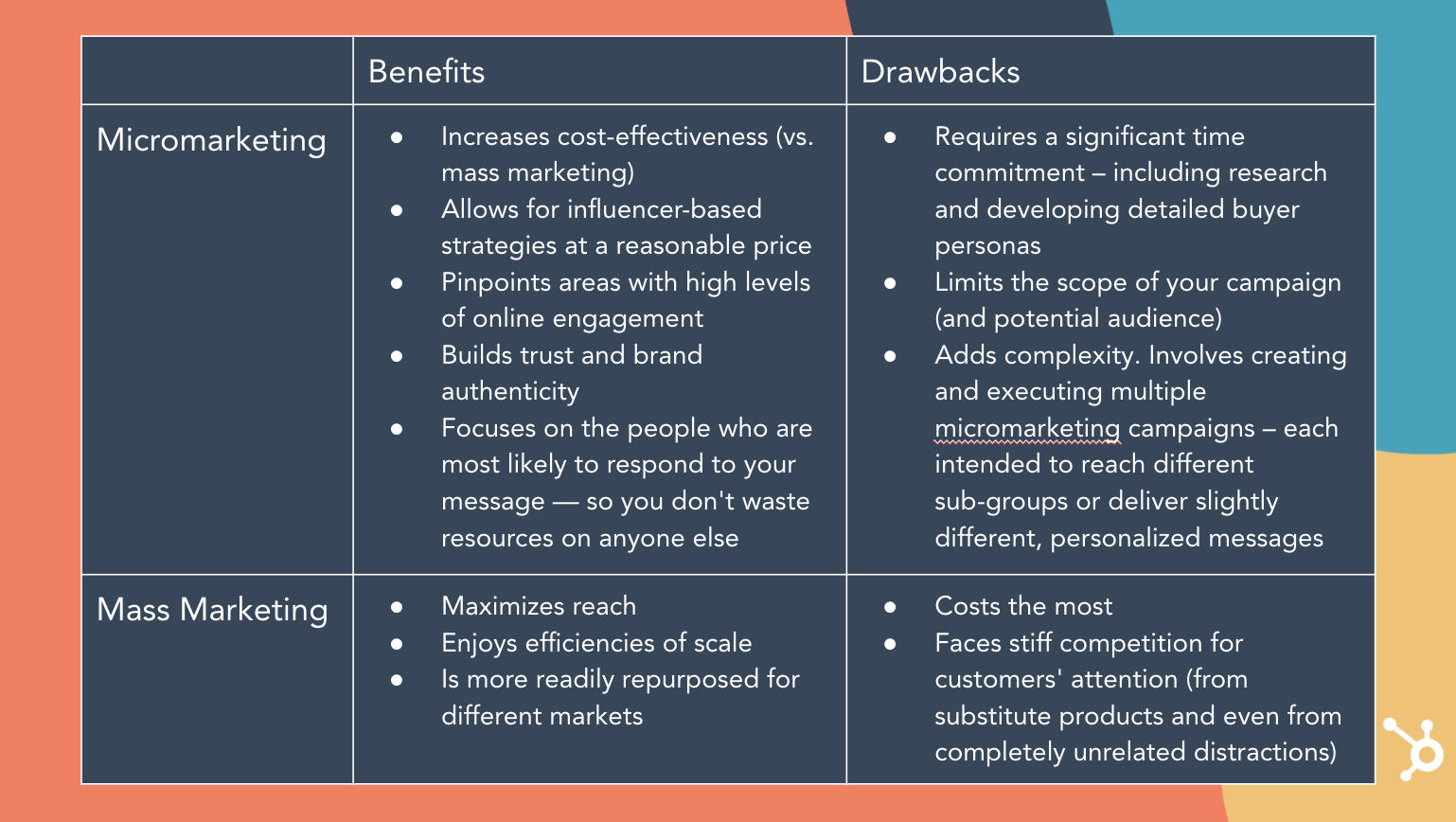
Mass Marketing vs. Micromarketing: Benefits and Drawbacks

micromarketing benefits and drawbacks

See chart here. 

As you can see, micromarketing requires a greater investment to target each individual, but a greater return on investment since each individual is much more likely to respond positively to your call-to-action.

Think of it this way: you might see your CPC (cost-per-click) rise with an online micromarketing strategy. But, when executed well, you're also going to see an encouraging decline in your cost-per-conversion — a much more important KPI.

Micromarketing Opportunities

Considering and creating a micromarketing strategy is an opportunity to step back, consider alignment between your sales and marketing efforts, and make sure you're first-and-foremost solving for your customers' success.

Are you selling complex enterprise software or massive industrial machinery? There may only be a small number of potential customers in your region or industry. In this case, micromarketing is likely the most effective strategy for your needs –– you need to find your potential customers, and only your potential customers. Anything else is a waste of time and resources.

Here are some questions you should ask yourself when considering a potential micromarketing strategy for your business:

  • Who buys your product?
  • Who's the decision maker who buys it for their company?
  • Who does your product help the most –– and why is it so perfect for them?
  • What are your customers' needs, fears, hopes, and dreams? What are their interests and passions, and what makes them happy?
  • Who do your customers follow online?
  • Who does your ideal customer aspire to be?
  • Who does your ideal customer most admire?

These questions, along with an ongoing grasp of your buyer personas, should lead you towards the answer to the two key questions that drive micromarketing decisions and campaigns:

1. Who is most likely to respond to your messages?

2. How can you best talk to them — and no one else?

For instance, if you know your product requires CMO buy-in, you can use strategic micromarketing to appeal to CMOs via a targeted marketing campaign on LinkedIn.

Ultimately, micromarketing helps you get your product directly in front of the eyes that matter most.

To see micromarketing in-action, let’s take a look at a few examples next.

Micromarketing Examples

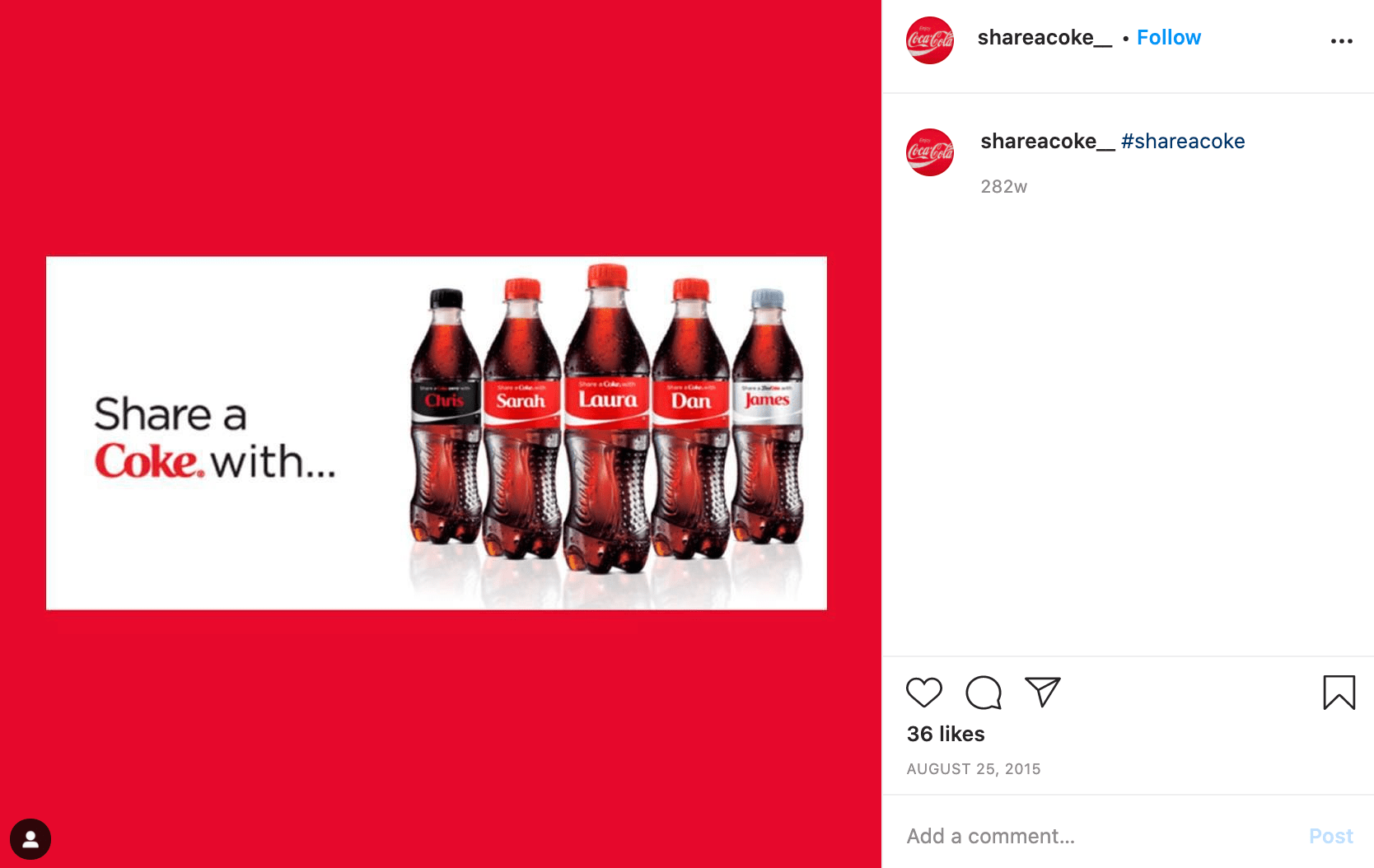
1. Coke creates a "Share a Coke" campaign.

micromarketing example with coca cola

Image Source

Coke's "Share a Coke" campaign started in Australia, but has since expanded to over 70 countries. If you haven't already seen a name on a Coke bottle, here's the gist: the marketing team in Australia chose 150 of the country's most popular names, and printed those names on Coke bottles with the command to "share the Coke" with friends and family.

The campaign is a fantastic example of micromarketing. The campaign enables Coke to connect locally with people in specific regions by identifying a group of names most popular in that area. And the results were astounding: the summer it first launched in Australia, Coke sold more than 250 million named bottles in a country with roughly 23 million people.

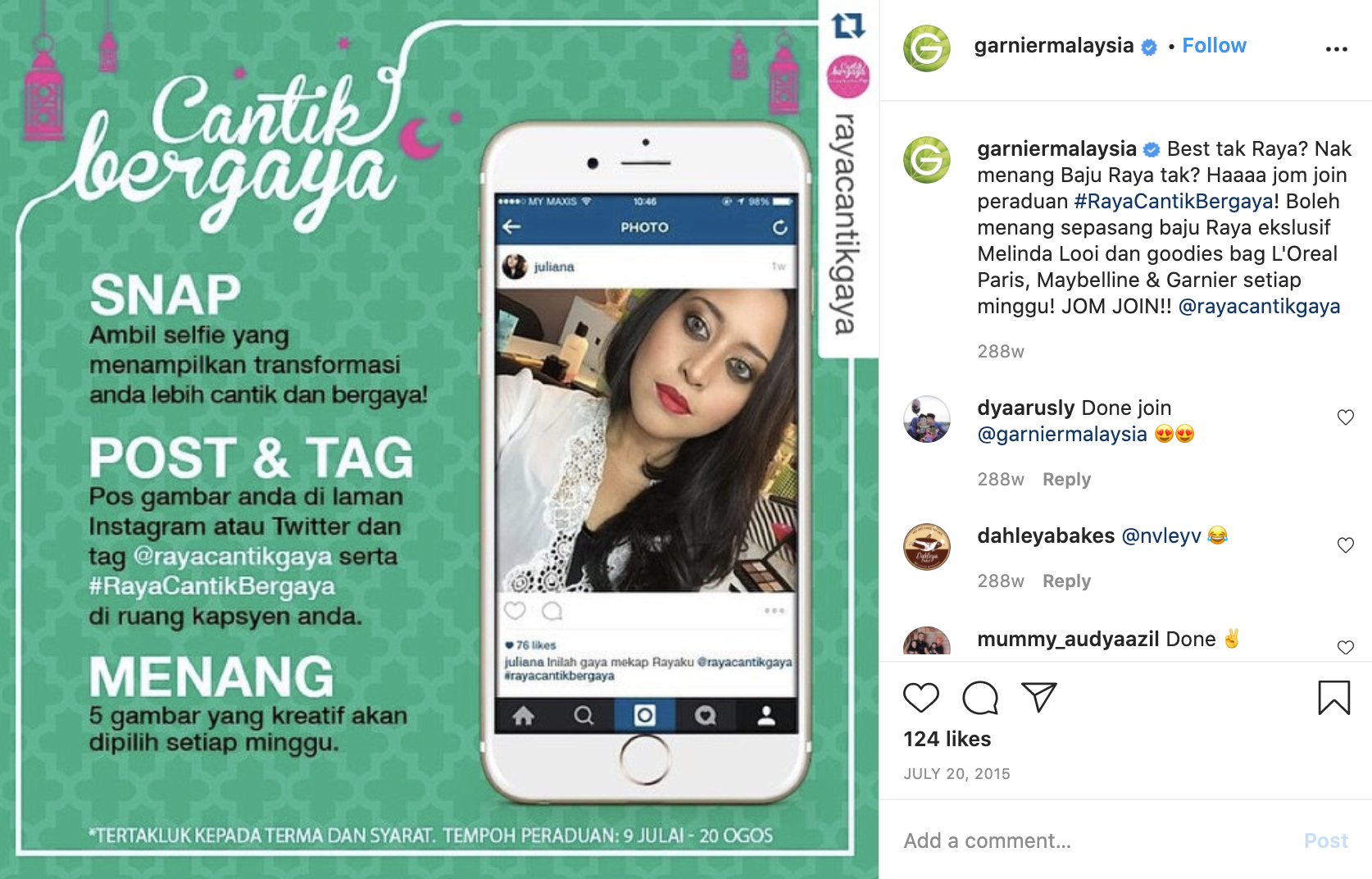
2. L'Oreal Malaysia leverages local, user-generated content.

micromarketing example with l'Oreal

Image Source

L'Oreal uses micro-influencers and user-generated content to help break down geographical barriers for products, opening markets in an authentic, engaging – and personal – way.

For instance, L'Oreal Malaysia worked with local micro-influencers to create video tutorials of products for L'Oreal, Maybelline, and Garnier. The videos were shared directly to the influencers’ own audiences. As a result of the campaign, L'Oreal Malaysia saw a 12.9% increase in engagement rates, and 1.9 million trend impressions.

Instead of agonizing over individualizing content internally and navigating cultural differences, L'Oreal leveraged local influencers to increase interests in its products for each local market.

3. La Croix uses branded hashtags to find micro-influencers’ content and reach new audiences.

micromarketing example with la croix

Image Source

La Croix leverages micro-influencers by searching for Instagram users who’ve used branded hashtags such as #LiveLaCroix — and then asking those micro-influencers for permission to use the user-generated content in La Croix's marketing materials.

This greatly cuts costs since La Croix doesn't need to produce the materials, and it also enables La Croix to target each of the micro-influencers' audiences for more personalized, effective content.

4. Sperry reposts influencers' content on its own account.

micromarketing example with sperryImage Source

Sperry identifies influencers around sharing Sperry products on various social channels, and reposts those images to the official Sperry account.

This enables Sperry to leverage on-brand content with a pre-built segmented audience, while foregoing a more official influencer strategy that would require more budget and resources. Instead, these micro-influencers are satisfied with recognition and exposure as a form of compensation.

Marketing Plan Template


How Micromarketing Can Take Your Strategy to the Next Level [+ Examples] was originally posted by Local Sign Company Irvine, Ca. https://goo.gl/4NmUQV https://goo.gl/bQ1zHR http://www.pearltrees.com/anaheimsigns

Friday, February 5, 2021

How HubSpot's Blog Team Comes Up With High-Performing Post Ideas

When I used to work at a marketing agency, I would read expert industry blogs, such as HubSpot, Marketing Brew, and Backlinko (to name a few).

One of my main questions every day was, "How do these brands do it? How do they constantly come up with brilliant blog ideas?"

Now, obviously, I work at HubSpot and I know what a blog strategy looks like at a big company with a recognizable brand.

By taking the time to do solid research and idea brainstorming, you can come up with blog topics that drive thousands of readers, like me, in -- while boosting traffic, authority, and credibility.

Today, I want to pull the curtain back for you. We'll discuss how the HubSpot blog continuously comes up with high-performing blog ideas.

→ Download Now: 6 Free Blog Post Templates

How the HubSpot Blog Comes Up With Ideas

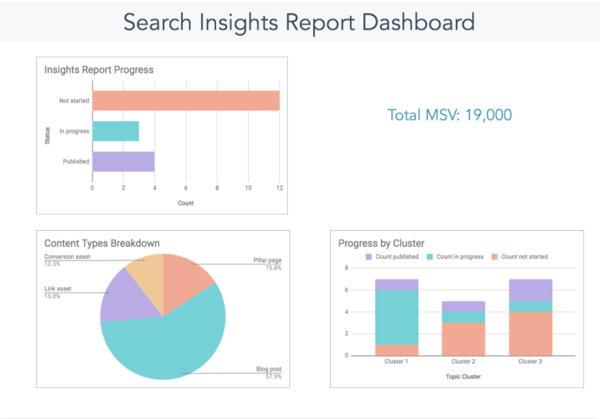
Before we get started, it's important to know that when the HubSpot team comes up with blog ideas, several teams are involved (SEO, blog, and lead generation). Because of this, we divide our brainstorming process into two parts: trend research and SEO topic research. We then combine these efforts in our Insights Report on a quarterly basis (which you can download a copy of below).

Featured Resource: Search Insights Report Template

Search Insights report template by HubSpot.

Let's dive into both those processes below.

How the HubSpot Blog Generates Trend-Responsive Blog Post Ideas

Blog topics that relate to trends, research, or thought leadership yield bursts in non-organic traffic that can help you gain visitors while you're waiting for SEO-driven posts to rank. Because they often include data, quotes, or other exclusive information, these posts can also earrn backlinks, which indirectly boost your search authority.

However, finding trendy non-organic post topics isn't always straightforward and often requires brainstorming.

Pamela Bump, HubSpot's Audience Growth Manager, leads the charge with our team's brainstorming efforts while also managing the blog's non-organic content strategy.

She says, "While our SEO team uses specialized tools to identify blog posts that will pull in organic traffic, I leverage a number of trend research tactics to identify post ideas that will pull in non-organic traffic from sources like email, social media, and referrals."

Below is the process she asks bloggers to use during our virtual idea brainstorms.

1. Focus on your blog categories.

Before you get started, it's important to have some sort of road map in mind. Choose the most important clusters, or blog categories, that you want to focus on for the quarter and develop ideas around them.

Immediately, just knowing the clusters you want to focus on could spark a few ideas for thought-leadership or data-driven research posts.

Each quarter, the HubSpot acquisition team chooses seven to ten clusters for each blog property -- for us, that's marketing, sales, service, and website. Usually the clusters relate to things like business goals or industry trends.

Additionally, we include other categories besides those clusters, such as Audience Growth, Lead Acquisition, and User Acquisition to help us brainstorm topics that are related to our lead generation goals.

2. Review the content you've already written to inspire new topics.

Now that you've done a quick brainstorm of some new ideas, let's see what's already been written in each cluster that you're focusing on.

To do this, search your site for the cluster. We do site searches at HubSpot, but just typing in "site:blog.hubspot.com/service customer experience" in Google. With this formatting, you can change the link and change the keyword to be whatever you're looking for. Then, Google will find posts on that keyword on that site specifically.

When you're coming up with blog ideas, searching the site to see if the topic has been covered is very important. The reason you'll want to do this is that you can find high-performing posts that give you inspiration for new angles or you can find posts that you want to update with more quotes, data, or new research. Additionally, this will help you avoid keyword cannibalization.

Caroline Forsey, the HubSpot Marketing Blog property manager, says. "Think of different angles for popular topics you've already covered. For instance, let's say you have plenty of content regarding LinkedIn — but you have none from a thought leader in the space. Perhaps you could conduct an interview with a LinkedIn employee for a thought leadership angle, like 'Top X Tips from a LinkedIn Marketer'."

3. See what the competition is doing.

While you never want to copy your competitors, it's important to see what topics they're writing about. This will help you fill in gaps that your competitors are missing and perhaps improve on blog topics they're discussing.

This also lets you know what's going on in your industry. What's the latest news and should you be writing about it?

Additionally, you can browse social media for this reason as well. Social media can let you know the pain points of your audience and check-in with what's going on with your target audience.

Staying up on industry news is one of the best ways to brainstorm blog ideas.

Forsey adds, "When new features become available for a social media platform or tool, there's often plenty of opportunities to explore new angles there, as well — recently, LinkedIn released its own version of Stories, so perhaps you brainstorm a topic like ‘X Best LinkedIn Stories We've Seen', or ‘LinkedIn, Instagram, or Facebook Stories: Which is Best?'"

4. Have a checklist of blog topic idea criteria.

Once you've created some blog ideas, you should check and make sure each blog post topic is aligned with your overall blog criteria. If you don't have blog criteria yet, maybe it's time to set some standards around what each blog topic should cover.

For example, at HubSpot, all our blog posts need to provide value to your blog audience, align with a cluster or lead-gen goal, provide non-organic opportunities, be either trend-responsive or evergreen, and have some keyword opportunities.

5. Stay organized.

You should track your blog ideas in an organized fashion. At HubSpot, we use an idea generation spreadsheet where writers and editors can brainstorm ideas for quarterly clusters, or just write down ongoing ideas.

Ultimately, this process helps keep us organized when it comes to generating consistent blog post ideas.

Jay Fuchs, a blog writer at HubSpot, describes his process. He says, "I try to find topics that reconcile engaging subject matter with practicality when coming up with research or trend-based blog topics. That means finding buzzy, intriguing subject matter that lends itself to an article with a compelling title, interesting supporting materials, and — perhaps most importantly — actionable advice."

Fuchs explains, "That could mean a piece about something like avoiding common pricing mistakes or sales strategies that will become prominent in the near future. One way or another, you need to pick topics that hook and help — ones that command your reader's attention and let you make the most of it with insight that they'll be able to apply, going forward."

Now that you know the HubSpot process when it comes to generating non-organic blog ideas, let's dive into the SEO side.

Brainstorming SEO-Optimized Ideas

While Bump and the blog writers brainstorm non-organic ideas, our SEO team is hard at work creating blog topics that have an organic goal in mind. This is their process:

1. Look at your company's products, goals, and customer base.

To start, HubSpot's SEO team will review our products, goals, and customer base.

Amanda Kopen, an SEO Strategist at HubSpot, says, "When coming up with blog post ideas, first you need to look at your company's products, goals, and customer base. At HubSpot, we brainstorm blog posts as they relate to our different products (marketing, sales, service, etc.). Then, we narrow it down to topics where we have expertise but are potential pain points for our customers (social media marketing)."

During this phase, our SEO team is reviewing our personas, prioritizing blog clusters (decided by SEO and lead-gen teams), and brainstorming what would be helpful to our audience.

Additionally, the SEO team will identify large topics, underperforming topics, and old but high-performing topics.

2. Conduct keyword research and run a content gap analysis.

After the initial brainstorm, it's time to do your keyword research and content gap analysis.

Kopen explains, "Once we have a potential pain point in mind, we use SEO best practices -- like conducting keyword research and running content gap analyses -- to see exactly what people want to learn about (how often should I post on LinkedIn), and we start writing from there."

During this part of the process, our SEO team will gather domains with similar audiences and conduct a content gap analysis (find out what these sites are ranking for that HubSpot isn't).

We'll also look at related searches on Google to see what people are searching for. Then, we'll identify opportunities where we can update old blog posts or recycle the URL (so we don't lose the SEO juice, but have updated content for that topic).

3. See if there are any linking opportunities.

Finally, the SEO team will also communicate with HubSpot's product and academy teams to see if there are linking opportunities such as any courses or products of ours we should be linking to.

Creating Traffic-Generating Ideas

And that's how the HubSpot blog comes up with high-performing blog post ideas consistently. To learn more about our process, you can learn how SEO works for the HubSpot Blog with our Insights Report course on HubSpot Academy.


How HubSpot's Blog Team Comes Up With High-Performing Post Ideas was originally posted by Local Sign Company Irvine, Ca. https://goo.gl/4NmUQV https://goo.gl/bQ1zHR http://www.pearltrees.com/anaheimsigns