Friday, February 5, 2021

5 Marketing Alternatives to High-Priced Super Bowl Ads [+How Brands Pivoted This Year]

This year, CBS opened the bidding for a 30-second Super Bowl ad slot cost roughly $5.6 million -- plus $300,000 if brands wanted their ads on CBS' Super Bowl live stream.

And, although the price above is about the same as it was for 2020, it took until January for all of CBS' slots to sell out.

This year's sluggish ad-buying isn't shocking. Due to the ongoing global pandemic and times of financial uncertainty, many big brands that used to rush to buy ad slots are now trying to avoid spending millions of dollars on commercials that last only 30 seconds.

While $5.6 million seems like a lot of money for just a slot, think about how much advertisers are spending on the additional costs of producing these commercials, often known for having A-list talent, crazy special effects, or even award-winning directors.

Download Now: Free Ad Campaign Planning Kit

Three notable brands that won't be airing Super Bowl ads on CBS this year are Budweiser, Coca-Cola, and Pepsi

While Pepsi Co. opted out of ad slots to direct more budget to its sponsored halftime show, the two other brands took current events and the current financial climate into account.

For example, Budweiser will donate its Super Bowl commercial budget to charity this year, Coke, which will also be donate some funds to charity, opted out to conserve its budget. 

"This difficult choice was made to ensure we are investing in the right resources during these unprecedented times. We'll be toasting to our fellow brands with an ice-cold Coke from the sidelines," read a statement Coke sent to CBS News.

While a Super Bowl ad can obviously provide major visibility to millions of viewers, this year's shifts show that a company doesn't necessarily need to pay $5 million to gain awareness. 

Below, I'll walk through a few examples of what big brands that opted out of Super Bowl ads did to market their brand instead. Then I'll explain how you can use common Super Bowl-season marketing strategies affordably in your own campaigns.

What 4 Big Brands Did Instead of Buying Super Bowl Ads

Budweiser

While Bud Light Seltzer's Super Bowl commercial tackles the "lemons" of 2020, Budweiser opted out of an ad for its flagship beer. 

Instead the brand decided to launch a Twitter campaign where a video featuring its mascot -- the Clydesdale -- would be tweeted during each commercial break.

Our Clydesdales are returning to the Super Bowl. Not for one commercial break, but for all of them. You'll find them on Twitter during every break in the game, and if you follow along you could win a retro fridge stocked with Bud. Keep your #EyesOnTheClydes this Sunday. pic.twitter.com/WNID0DXzY8

— Budweiser (@budweiserusa) February 4, 2021

This is a great example of how a brand can leverage the Super Bowl commercial break without actually having an ad in it. While millions are glued to Super Bowl ads, they also scroll through Twitter or social media feeds for live game coverage. While doing so, they might discover Budweiser's campaign.

Avocados from Mexico

While Avocados from Mexico aired a few Super Bowl ads in the past, this year, they've embraced the #GuacBowl instead.

Because guacamole is a popular football snack made with avocados and some sports viewers are missing the excitement of being in a stadium, Avocados from Mexico created a virtual sports facility called Guac Bowl Stadium

When you enter the stadium, you can click to see content from Avocados from Mexico, buy Guac Bowl Swag, and learn more about a contest where Avocados from Mexico fans could win $1 million. 

Here's a look at what this online experience looks like: 
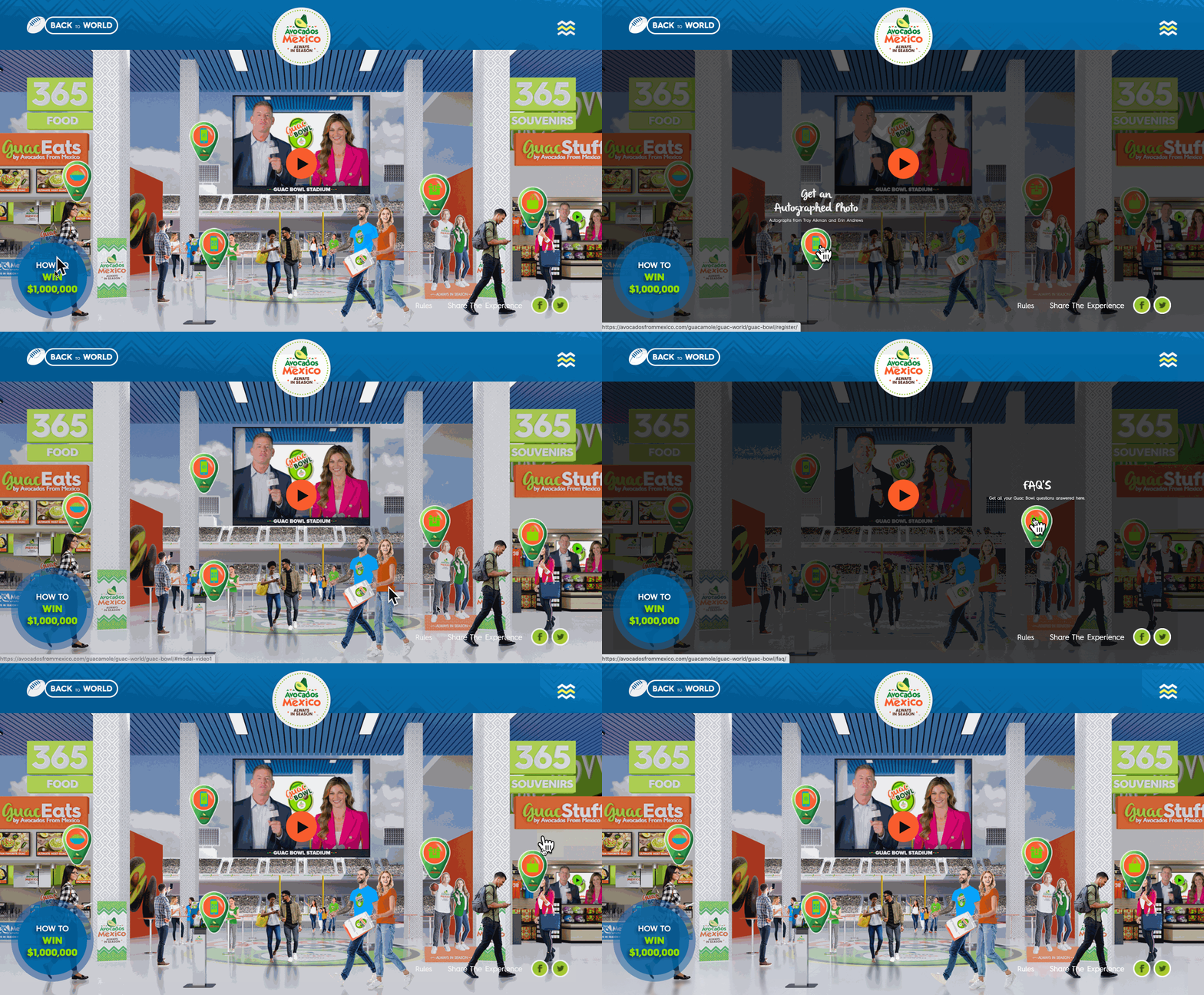
Guac BowlThis is a great example of how a brand can engage audiences with a virtual experience that discusses a product, highlights intriguing content, and gives them the opportunity to interact with the brand. In a time where businesses are increasingly going virtual, brands can take a note from Avocados from Mexico for building this creative but somewhat simple web experience.  

Audi

Instead of creating a high-priced Super Bowl ad, Audi has seemingly avoided acknowledging the Super Bowl entirely on social media. Instead, the brand is ramping up for the "world premiere" of its latest car, the Audi e-tron GT -- which has an early February launch plan. 

Instead of focusing on a 30-second commercial slot, Audi has been rolling out content including interviews with its Senior VP to discuss the creation of the new car and how it will solve for consumer pain points.

Starting a new era. Henrik Wenders, Senior Vice President, Audi Brand, is ready to see the world electrified.

The story continues, 3 days until the Audi e-tron GT* world premiere on February 9.https://t.co/v9oEP2NVrO#Audi#etronGT#FutureIsAnAttitude pic.twitter.com/8iCjDtb1cW

— Audi (@AudiOfficial) February 5, 2021

Although Audi is not diving deep into Super Bowl campaigns, it is a good example of a brand that might have redistributed funds for a multimedia marketing campaign. This shows that, sometimes, an effective campaign doesn't need to leverage current events at all.

Skittles

This year's wasn't the first time we saw major brands opt out of the big game.

Take 2018 for example. That year, Skittles decided they didn't want to shell out millions of dollars on a Super Bowl ad. Instead, they used the money to create a full-length Broadway musical.

What could the Skittles musical possibly have been about? Well, it was described as a musical commercial that discussed the insincere and high-priced world of advertising.

The musical was never aired on TV or streaming services, but here's a look at the musical's main ballad, "Advertising Ruins Everything:"

While what Skittles did was both creative and clever, it was still pretty expensive. And, as a small to medium-sized business marketer, you likely can't afford a Super Bowl ad or a Broadway musical alternative just yet.

So, what do you do if you don't have millions in your budget like the brands above?

Below, I'll list five common advertising strategies that brands use during the Super Bowl. For each, I'll walk you through how you can take advantage of each on a much smaller scale while still effectively gaining brand awareness.

5 Affordable Marketing Alternatives to Super Bowl Advertising

1. Buy video ad space on social platforms.

As a small business marketer, you don't need to pay for a high-priced televised ad slot to get seen by the right audiences.

With the growth of online platforms and social media networks, like YouTube, Facebook, and Twitter, we've also seen the growth in opportunities for in-stream advertising. If you're less familiar with this form of advertising, it allows you to submit a video-based ad to a service like YouTube or Facebook. Then, the ad will usually be seen as pre-roll or mid-roll within longer videos.

Investing in online on in-stream video ads might also be a better bet than investing in traditional television commercials. Aside from the Super Bowl and other major televised events, people are tuning in less and less to live television. Meanwhile, consumers are streaming video, surfing the internet, and logging into social media channels more than ever before.

Additionally, while Super Bowl or TV ads usually have one up-front cost, online ad placements have more flexible costs that can be higher or lower depending on how long they are, how long you'd like to circulate the ads, and the size or scope of your target audience. To put it plainly, while brands pay millions for just 30-seconds during the Super Bowl, ad platforms like Facebook or YouTube allow you to spend less while targeting audiences that are most likely to engage with your content.

Another perk? While televised commercials require a consumer to remember and look up your brand later, online ads often allow audiences to click on them directly when they're interested in your product or offer. This automatically adds a greater chance of ROI and decreases friction between the brand and the customer.

If you decide to take advantage of online video ads, you'll want to drill down on your buyer persona before putting money behind an ad platform. Ask yourself questions like, "Which social media platforms do they use?", or "What's their gender and age range?" The answers to these questions will help you determine which social media platforms you should run ads on and which audience targets you should set for your ads.

After defining your audience, you'll also want to create attention-grabbing content targeted specifically for your target buyers.

On online platforms, you'll often be able to purchase an ad slot between six seconds to one minute long. However, because the internet is so fast-paced, your audience's attention span could be much less than your allotted time. For example, on average, Gen Z and millennials will only pay attention to online content for eight to 12 seconds.

If you purchase a more budget-friendly skippable ad placement, drawing attention will be an even more crucial strategy as uninterested viewers will press the "Skip Ad" button to watch the video they've searched as soon as they're able to.

Here's a great example of a pre-roll ad from the job search site Reed.co.uk. The ad immediately draws attention with a video of meowing kittens. Then it embraces its pre-roll placement by calling out YouTube viewers for watching videos because they're "distracted from their job." At the end, Reed, the site's founder, tells the viewer to click on the video, which will send them to the job site:

As you create an ad, take a note from Reed.co.uk by ensuring that it draws attention immediately.

Don't have a box of kittens like the ad above? Consider using other techniques to draw attention, such as presenting a relatable pain point, offering a value proposition, or placing viewers into an action-filled scene when the video starts playing.

2. Dive deeper into a video narrative.

Aside from traditional commercials that establish a basic pain point and offer a simple product-based solution, Super Bowl ads are also known to have a unique storyline or feel like miniature movies.

Here's one historic Super Bowl example that sits in the Clio Hall of Fame. During its 1984 ad spot, Apple announced the Macintosh with a commercial themed around the George Orwell novel, "1984."

The novel, written in 1948, told the story of a dystopian society where all people followed one leader, dressed the same and conformed to the same ideologies.

The Apple commercial stays in line with the George Orwell classic as it begins with thousands of men walking in a lined formation as they enter an auditorium where an all-powerful leader preaches about their society on a giant screen. The ad's narrative gets interesting when a woman in colorful clothing suddenly runs into the room and hurls a hammer into the superior leader's screen, figuratively destroying the bland conformist society.

At the end of the commercial, a narrator announces, "On January 20th, 1984, Apple will introduce the Macintosh. And you'll see why 1984 won't be like 1984."

Why was the Apple ad so fascinating and iconic? At the time, Apple was considered a young disruptive underdog company while the PC world was monopolized by IBM -- a much more traditional big corporation. This commercial is a deep metaphor for how Apple's brand, innovative products, and mission would free computer users from the monopolies of past tech giants.

Yes, Apple did have more resources than the average startup when producing this ad. In fact, it was directed by Ridley Scott -- known for his work on award-winning films like Alien and The Martian.

But, on a smaller scale, all it takes to create an attention-grabbing narrative ad is one or two creative team members and affordable video equipment.

Additionally, commercials that tell a great story don't necessarily have to discuss a deep or intense topic, like Apple's. Alternatively, they can also be quick and funny anecdotes.

This smaller-scale example from Bernie & Phyl's Furniture simply tells the story of a bulldog getting behind at his office job. The storyline encourages people to spend more money on crucial things, like job candidates, while still saving money on furniture at the store chain:

https://www.youtube.com/watch?v=dBMjOh7XObQ

Interested in crafting a compelling advertisement script? Check out this template. If you have a great idea but aren't sure where to start production-wise, read this step-by-step guide.

3. Leverage major events or holidays.

Whenever there's a major event, like the Super Bowl, big brands jump to create campaigns that leverage trends related to it. This is because people who are interested in the event might also enjoy the content or ads that discuss it.

Although big brands air commercials during major events, you can instead create campaigns that make pop culture or event references. These could include blog posts about how an event relates to your industry, a social media post that leverages topical hashtags, or a marketing video about how your customers might be celebrating an event.

Here's an example where the energy drink brand G-Fuel asks Twitter users to reply to their tweet with who they think will win the 2020 "#SuperBowl." In the tweet, they include an image of two G-Fuel drinks in front of a football field:

G-Fuel Super Bowl Tweet

This is smart because those who are interested in the Super Bowl might click the #SuperBowl hashtag or search the topic and find this post. Although it doesn't directly advertise the drink and doesn't have an endorsement from the NFL, the post still leverages the trend and enables Super Bowl fans to learn more about the sporty energy drink.

However, while leveraging a holiday and social media trends might seem like low-hanging fruit, you should keep in mind that each event has certain legalities around it.

For example, the NFL has trademarked the term Super Bowl and does not allow brands to say the event name in content with commercial intent. So, if G-Fuel were to promote its drinks as "official Super Bowl beverages," it would infringe upon this trademark. However, by showing a picture of their product in front of a football field and simply asking fans about their thoughts on the actual game, they aren't saying that their product is in any way endorsed by the NFL.

To avoid any further blurred lines when referencing the Super Bowl in a paid ad or commercial, brands usually call it, "the big game" or "the football game," instead.

4. Lean into co-marketing.

Sometimes, even for big brands, it's more budget-friendly and engaging to create a co-marketed Super Bowl ad. With this strategy, two or more brands put money, time, effort, or resources into creating a joint piece of content that cleverly highlights all brands involved.

Here's a great example of a 2015 ad where Newcastle pooled its money with 37 other brands to buy a Super Bowl ad slot that mentions all the companies at some point. The ad was appropriately titled, "Band of Brands:"

The example above is one of the most insane examples of co-marketing, but this is a strategy that is incredibly scaleable to small businesses and has been used as a tactic for ages.

Below is an example of how Louis Vuitton and BMW joined forces as luxury travel and transportation product providers by launching a series of ads that show their sleek, black products together. The campaign was titled, "The Art of Travel."

The co-branding example above is effective because it features two companies that complement each other rather than competing against each other. Their audiences, which are made up of upper-class professionals, also mesh well together and will engage similarly with this type of promotion.

5. Consider influencer marketing.

Aside from high-budget productions and interesting storylines, Super Bowl commercials are also known for their star-studded casts. Remember this Amazon Echo commercial where Alexa is voiced by a handful of popular celebrities?

Although you probably can't hire stars like Cardi B, you might be able to budget content from a micro-influencer who's heavily followed or considered credible in your industry.

When you sponsor an influencer that really understands their audience and your industry, they'll create and publish content that intrigues their audience while also highlighting your product.

Influencer marketing is similar to co-branding. But, instead of increasing the chances of two branded audiences learning about both companies featured in one piece of content, influencer marketing enables the influencer's audience to learn about your product while your audience can learn more about the influencer.

An influencer marketing strategy can also be especially effective on social media channels like Facebook, Instagram, YouTube, or TikTok.

In this example, the smartphone game "Run Around" sponsored a TikTok user who's gained more than 15,000 followers simply by recording herself playing mobile games.

In the effective TikTok example above, the brand identified that gaming-oriented audiences were on TikTok and sponsored an influencer who's audience anticipates her mobile gaming reviews and demonstrations.

Creating a (Somewhat) Super Bowl-Quality Ad

As you work towards creating a quality ad on a budget, keep these scaleable big brand tips in mind:

  • Tell a great story. Pull your viewers in, allow them to relate to your brand, and hook them by presenting how your product can help them.
  • Embrace current events: Craft campaigns that touch on highly-discussed on trendy events, such as the Super Bowl, award shows, or holidays -- especially if they relate strongly to your brand.
  • Leverage brands and influencers: Partnering with brands and influencers can allow your product or company to get attention from similar audiences that you haven't already reached. To get started, research and build relationships with brands and influencers that your audiences or industries look to for credible tips.

Want to see more effective big brand campaign strategies that you can learn from? Check out this post where we reveal our favorite Super Bowl ads of all time. 

Editor's Note: This piece was originally published in February 2020, but was updated in 2021 for comprehensiveness and freshness. 

advertising plan


5 Marketing Alternatives to High-Priced Super Bowl Ads [+How Brands Pivoted This Year] was originally posted by Local Sign Company Irvine, Ca. https://goo.gl/4NmUQV https://goo.gl/bQ1zHR http://www.pearltrees.com/anaheimsigns


How to Write a Webinar Script [+ Template]

Whether or not you enjoy public speaking, I’d bet you don’t like hopping on stage without preparing for a speech or keynote address.

Running through slides, practicing in front of a mirror, or pre-writing a script — whatever type of preparation you prefer, it’s key to calming nerves and delivering an engaging, valuable presentation.

The same goes for a webinar. You and your panelists may be at home and behind a screen, but that doesn’t mean webinars are any less important to prepare for (or that they can be any less nerve-wracking).

To help your preparation and quell your nerves, consider writing a webinar script.

Not only will this guarantee your webinar presenters and panelists stay on topic, but it will also ensure you deliver a relevant, actionable webinar that doesn’t waste your audience's time.

Download Now: Free Webinar Planning Kit

What is a webinar script?

A webinar script is a pre-written dialogue of what you plan to share and teach during your webinar. At a minimum, your webinar script should include an introduction, an agenda of what you and your panelists plan to discuss, the specific points that your panelists will cover, and a closing call-to-action.

Webinar scripts can also include timing details (to ensure your guests don’t veer off course or take time from another presenter), navigational instructions (such as when to share a screen, direct attendees to a certain website, or at what point certain panelists may join or drop off), and certain terms or discussion points to avoid.

Why write a webinar script?

Webinar scripts are valuable because they help keep your webinar valuable. Without proper planning, it’s easy to lose your train of thought due to nervousness, excitement, or perhaps an audience question.

Writing a script for your webinar ahead of time also allows you to decide on the goal of your webinar. Think:

  • What do you want your audience to learn?
  • Who do you want to invite to speak that would help teach your audience?
  • What actions do you want your audience to take during and after your webinar?

By answering these questions before your webinar (and before you write the script), you can tailor your webinar script and angle its speakers and content to stay focused on these deliverables. You can also share your webinar script with your speakers so they have an idea of the presentation flow.

Let’s say I was teaching a webinar on content marketing. There are so many topics and stories I could share — from freelance writing to building a strategy to SEO- vs. non-SEO-driven content.

If I sat down to write my webinar content ahead of time, I’d be forced to face how vast (and ambiguous) just “content marketing” is as a topic. Writing the script would require me to hone the purpose and goal of my webinar, which would then inspire my guest panel and subsequent CTA.

Webinar scripts keep your webinar focused, confident, and audience-centric. Finally, webinar scripts can inspire much of your webinar marketing, saving you significant work for writing up emails, social media copy, and promotional blog posts.

How to Write a Webinar Script

In this section, we’ll talk about what to consider when writing your script. I’ll also touch on when you should certainly use a script, and when a webinar script may be more limiting than liberating.

First, open a blank Google Doc or pull out a fresh notebook. Jot down why you want to run a webinar, what some main points or takeaways you want to feature, and any other ideas you may have. You may see a flow begin to form — what points you’ll open with, how to support your takeaways with panelists or research, and where they may be some gaps you can fill with further brainstorming. Consider this your webinar script “outline.”

(I encourage you to do this in a Google Doc versus slide deck as a slide deck will force you to parse up and order your ideas before you’re ready, which can interfere with the brainstorming process.)

Once you have a script outline, you’re ready to start fleshing out the script. Yes, I mean writing verbatim what you plan to say and what points you want to cover—your webinar talk track. If you’ll have panelists on your webinar, encourage them to do the same as it pertains to their sections.

While you can’t script the Q&A section, writing your webinar content ahead of time also allows you to understand what you plan to cover from start to finish. Therefore, if an audience member asks a question about a topic you know you or a guest speaker will be covering later on, you can ask them to wait versus derailing the presentation.

Now, let’s unpack the important components of a webinar script.

1. Webinar Introduction

The webinar introduction sets the stage (albeit digital) for your whole presentation. The introduction script should include a brief introduction of yourself and your business, explain why you’re equipped to teach, and touch on the webinar agenda — including what speakers your audience can expect to see.

Be sure you thank your audience in the introduction, too. If you plan to ask for audience engagement through polls or the webinar chat feature, make note of that for your attendees and briefly explain how they can participate if they so choose.

2. Webinar Agenda

You might’ve touched on the webinar agenda in your introduction, but this section is your chance to explain more of what your audience members will see and learn. You can break up your webinar into sections (e.g., What, Why, How, etc.) or, if you have guest speakers, outline what your speakers will be discussing.

This is also where you can mention how long each section and/or presentation will take, as well as how much time will be left at the end for questions. As I mentioned before, the goal of your webinar script is to keep your presentation on track and avoid wasting your audience’s time — a webinar agenda will do just that.

3. Webinar Goal and Purpose

Next, feature a section that discusses the “why” of your webinar. Perhaps you have a single, punchy sentence that will grab the attention of your audience. Or, you may choose to feature a bulleted list of ways your audience will benefit from the webinar.

However you choose to present your webinar goal or purpose, be sure to script supporting content to discuss during the section or slide. Don’t forget to mention what your audience can expect after the webinar, too, be it a CTA or bonus for attending.

4. Webinar Educational Content

For your webinar, you may be bringing in panelists, or you may be presenting the webinar alone

If the former applies to your webinar, ask your panelists to script their sections ahead of time and send them over for your review. (You can also provide one of the recommended templates below or share your script as an example.)

If the latter applies, this section is the crux of your webinar script. It contains the valuable, educational information that your audience likely signed up to see. According to how you organized your presentation in the agenda section, develop the talk track for each section — down to the transitions. If you plan to include imagery, engage your audience, or share your screen to demonstrate a concept, make note of these actions in your script.

Don’t forget to incorporate stories and examples in your webinar lessons, as these will help your audience relate your concepts and takeaways to real-life scenarios. If you don’t want your anecdotes to feel too scripted or forced, perhaps make a note where you will tell that story (instead of writing it out word-for-word). This is an example of where a script can limit you.

Tip: If you’ve written blog content about your webinar topic, consider pulling in some of that content and reworking it to fit your lessons and main takeaways.

5. Webinar Conclusion and Q&A

The conclusion to your webinar is crucial; it helps anchor your lessons for your audience and recaps important takeaways. You can also script an engagement activity, such as a short concept quiz or brief feedback session when your attendees can share something new they learned.

This section serves as the TL;DR, so the script should be short and concise, too. After you’ve recapped your presentation, open the floor for questions.

6. Webinar Next Steps and Close

After you and/or your speakers have shared your webinar content and answered any questions, it’s time to wrap up. First, script your closing comments — thanking the audience and sharing any important contact or follow up information.

Then, share the next steps. What would you like your audience to do now that they’ve attended your webinar? Close the webinar presentation with a strong call-to-action and concise instructions on how your audience can follow suit.

Congratulations! You just wrote a webinar script. Now, I have a few final tips for you:

  • Write your script as you talk, in a conversational tone and with everyday language. It helps to write the script with full sentences so you don’t get lost in a sea of bullet points or fragmented sentences.
  • Practice your script from top to bottom, verbatim. Time yourself to see if the script is too long. Ask your presenters to do the same with their scripts.
  • Only when you’ve read your script aloud a few times through should you begin to design your webinar slides. Don’t copy and paste your script to your slides; use the script to inspire important bullets and talking points.

Above, I encouraged you to start with a blank Doc or notebook as a starting point for your webinar script. If you need some help organizing your thoughts and ideas, consider using the following webinar script template as a starting point.

Webinar Script Template

This template serves as an example webinar script — not one to copy and plug the appropriate details. Even if you use this as a starting point, I encourage you to personalize the content to match your presentation, speakers, and audience.

Hello, everyone! Welcome, and thank you for dialing in for our webinar today. My name is [name] and I'm the [role] at [company]. At [company], we help [audience] like you [unique value proposition / product or service mention]. Today, we’ll be discussing [topic] and featuring [speaker], [speaker], and [speaker].

You can expect each speaker to have the floor for about 10 minutes, and we’ll conduct a short Q&A at the end of each session. If you have any questions during the webinar, please type them into the chat window — we’ll address them during the Q&A.

By the end of our time today, we hope you feel more comfortable and confident about [topic]. We’re very passionate about [topic] and have many exciting stories and learnings to share here today. Our goal is to [goal].

We’ll start with [speaker], who will be speaking on [topic]. [speaker] is [details and bio for credibility].

[Insert speaker’s webinar script here when I receive it.]

Thank you, [speaker]! Who has questions for her?

[I read questions from the chat window for the speaker to answer.]

Those are all of our questions. [speaker], anything else you want to touch on before we move onto our next guest?

[All speakers present and take questions.]

Well, that’s all we’ve got for you here today. Thank you for joining [company] to discuss [topic]. We appreciate you signing in and hope you learned [goal].

Before we sign off, I’d love to tell you about [main announcement or call-to-action]. Feel free to reach out to me via email if you’re interested or want to know more. We’ll see you next time!

How much you prepare for your webinar has a direct impact on its quality and benefit to your audience.

Writing a webinar script ahead of time helps you get aligned and focused on your topic, inform your guests of the purpose and flow of your webinar, and practice, practice, practice until you’re confident in your presentation. Use this guide to help you get started writing your next webinar script.

New Call-to-action


How to Write a Webinar Script [+ Template] was originally posted by Local Sign Company Irvine, Ca. https://goo.gl/4NmUQV https://goo.gl/bQ1zHR http://www.pearltrees.com/anaheimsigns

Thursday, February 4, 2021

What Is an SRT File, & Why Is It So Important for Video?

Nowadays, subtitles are becoming increasingly common, particularly as businesses expand their marketing efforts and aim to reach a broader, global market. Additionally, subtitles are often necessary to ensure your video and audio files are as inclusive as possible.

Fortunately, there's an easy solution to adding subtitles to video -- an SRT file.

To ensure your videos are inclusive and easily digestible for any audience, it's critical you include an option to watch with subtitles. Here, we'll explain what an SRT file is, and how to create and edit one for your marketing videos moving forward.

→ Access Now: Video Marketing Starter Pack [Free Kit]

What is an SRT File?

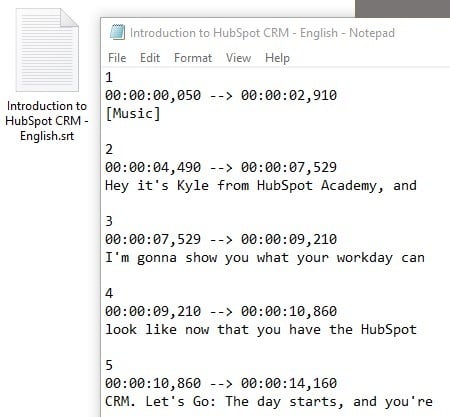
An SRT file (otherwise known as a SubRip Subtitle file) is a plain-text file that contains critical information regarding subtitles, including the start and end timecodes of your text to ensure your subtitles match your audio, and the sequential number of subtitles.

It's important to note, an SRT file is just a text file you would use alongside video or audio -- it does not also include the video or audio you're subtitling.

How to Create an SRT File

  1. You can create an SRT file in any text editor, including Notepad, TextEdit, and Notepad++.
  2. Open a text editor of your choice, and order each line of your subtitles, starting with 1.
  3. Next, put the time the subtitle begins, then "-->", and the time it ends.
  4. Format your timestamp like this -- "hours:minutes:seconds,milliseconds".
  5. Below your start and end timestamp, put your first line of text.

SRT files can be created from scratch or downloaded and edited. Before we get into the basics of editing SRT files, let's take a look at what an SRT file looks like and how it's formatted. 

SRT File Example

Generally, Wordpad or Notepad are the easiest programs to open SRT files with because you can view them in plain text. However, you can also use software specific to SRT files such as Subtitle Workshop (more on this later).

In order for an SRT file to work in conjunction with the video or audio file it's paired with, it must follow a specific format consisting of: 

  1. The line number
  2. The time range where the line should appear in the video
  3. The text that should appear on the line

srt file example

The timestamp is formatted like so with the milliseconds rounded to three decimal points: 

Hours:Minutes:Seconds,Milliseconds

The timeframe is formatted like so with an arrow denoting range:

[First Timestamp] --> [Second Timestamp]

The arrow must consist of two hyphens and a right-pointing angle bracket (also known as the greater-than sign or carrot).

If you're creating one from scratch, feel free to copy and paste this sample SRT formatting:

Example SRT Formatting
1

00:00:00,000 --> 00:00:00,000

[Insert your first line of text here, and don't forget to change the timestamps.]

2

00:00:00,000 --> 00:00:00,000

[Insert your second line of text here, and don't forget to change the timestamps.]

If you notice your subtitles don't align with your audio, or you need to change the phrasing, it's easy enough to edit your SRT file. Consider using Subtitle Workshop or another subtitle editor of your choice.

Alternatively, if you don't want to download an editor, you can open your SRT file in Notepad. You can change the time and phrases within the file, but don't change the punctuation. Then, click "File" → "Save as", and choose the SRT file extension.

How to Edit an SRT File

  1. Download Subtitle Workshop.
  2. Find "File" and then select "Load Subtitle" to insert your SRT file.
  3. Click "Movie" and then "Open", and select the corresponding video file.
  4. Next, select "Edit". You can choose from Timings, Texts, Subtitles, or Translations.
  5. Adjust the time or the text on each line.

Captions are one element that you can include in your video marketing strategy that makes your content more inclusive and valuable to your audience. 

Editor's note: This post was originally published in December 2018 and has been updated for comprehensiveness.

video marketing starter pack
What Is an SRT File, & Why Is It So Important for Video? was originally posted by Local Sign Company Irvine, Ca. https://goo.gl/4NmUQV https://goo.gl/bQ1zHR http://www.pearltrees.com/anaheimsigns

TAM SAM SOM: What Do They Mean & How Do You Calculate Them?

With all the excitement that comes with starting a new company and gauging its industry’s profit potential or forecasting a revenue goal for your business, you must remember to root these figures in reality.

If you don’t, you could enter a market that doesn’t have a large enough market size to convince investors to back you, or you could set an unrealistic revenue goal for your business and burn your employees out.

→ Download Now: Market Research Templates [Free Kit]

To help you avoid these issues, we’ve put together a guide that’ll teach you exactly how to calculate your industry’s total addressable market, serviceable addressable market, and share of market. 

TAM SAM SOM

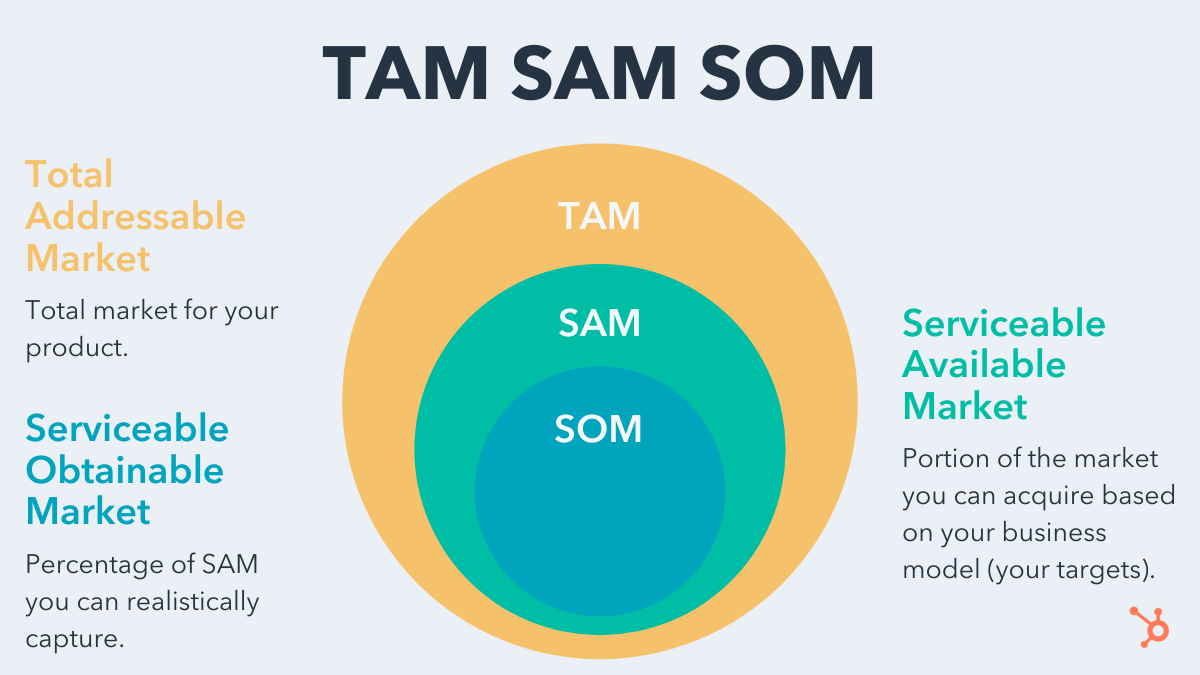
TAM, SAM, and SOM are acronyms for three metrics to describe the market your organization operates in. These metrics are key components of a business plan, particularly as you craft your marketing and sales strategy, set realistic revenue goals, and choose to enter the markets that are worth your time and resources.

tam sam som definitions

TAM (Total Addressable Market)

Total addressable market or TAM refers to the total market demand for a product or service. It’s the maximum amount of revenue a business can possibly generate by selling their product or service in a specific market.

Total addressable market is most useful for businesses to objectively estimate a specific market’s potential for growth.

SAM (Serviceable Addressable Market)

Due to the limitations of your business model (such as specialization or geographic limitations), you will not likely be able to service your total addressable market. 

Serviceable addressable market is most useful for businesses to objectively estimate the portion of the market they can acquire to determine their targets.

SOM (Serviceable Obtainable Market)

Unless you're a monopoly, you most likely can’t capture 100% of your serviceable addressable market. Even if you only have one competitor, it would still be extremely difficult to convince an entire market to only buy your product or service. That’s why it’s crucial to measure your serviceable obtainable market to determine how many customers would realistically benefit from buying your product or service.

Serviceable Obtainable market is most useful for businesses to determine short-term growth targets.

TAM SAM SOM Template

Now that you know what each of these acronyms are and what they're used for, let's get into the nitty gritty on how to calculate TAM, SAM, and SOM. Doing so requires advanced market research ahead of time, but here are the formulas once you're able to obtain those figures:

Total Addressable Market (TAM) Calculation

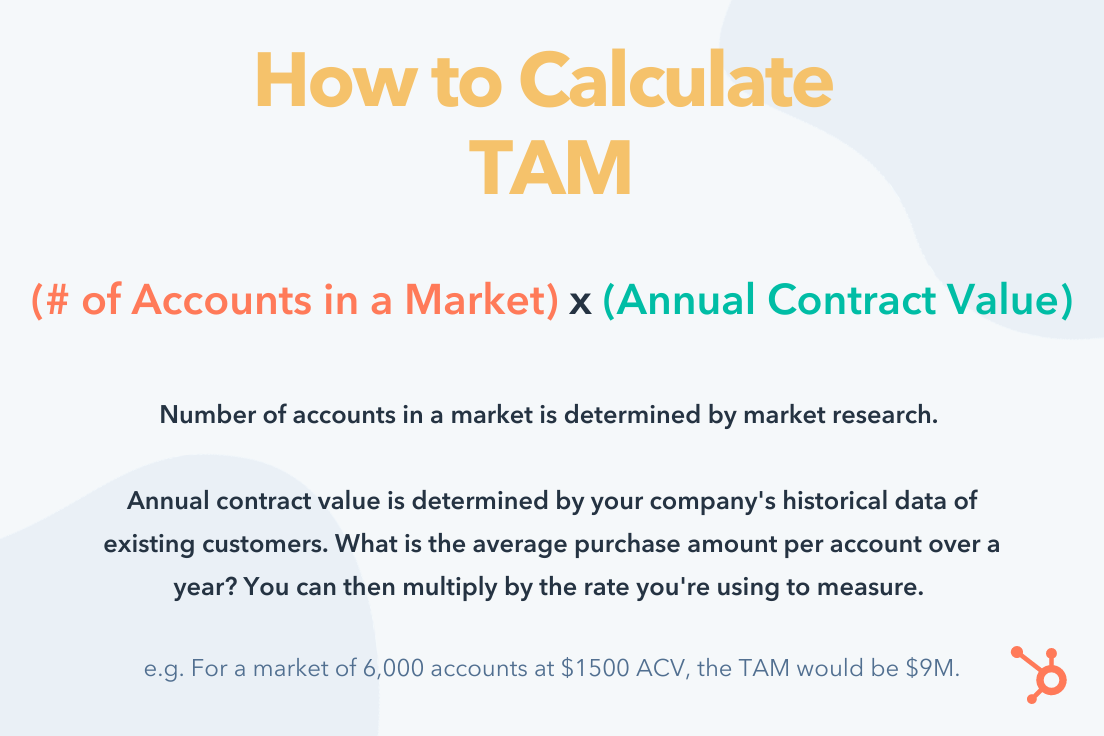
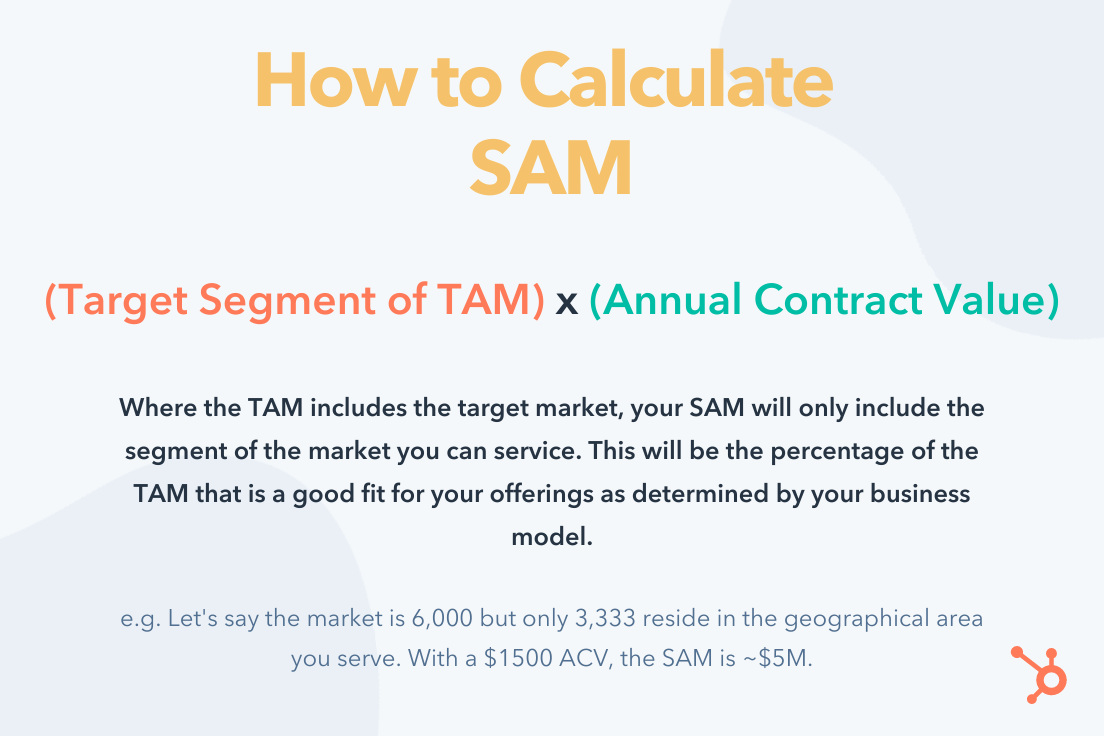
how to calculate tam formula

The best way to calculate total addressable market is by running a bottom-up analysis of an industry. A bottom-up analysis involves counting the total number of customers in a market and multiplying that number by the average annual revenue of each customer in this market.

Serviceable Addressable Market (SAM) Calculation

how to calculate sam formula

To calculate your serviceable addressable market, count up all the potential customers that would be a good fit for your business and multiply that number by the average annual revenue of these types of customer in your market.

Serviceable Obtainable Market (SOM) Calculation

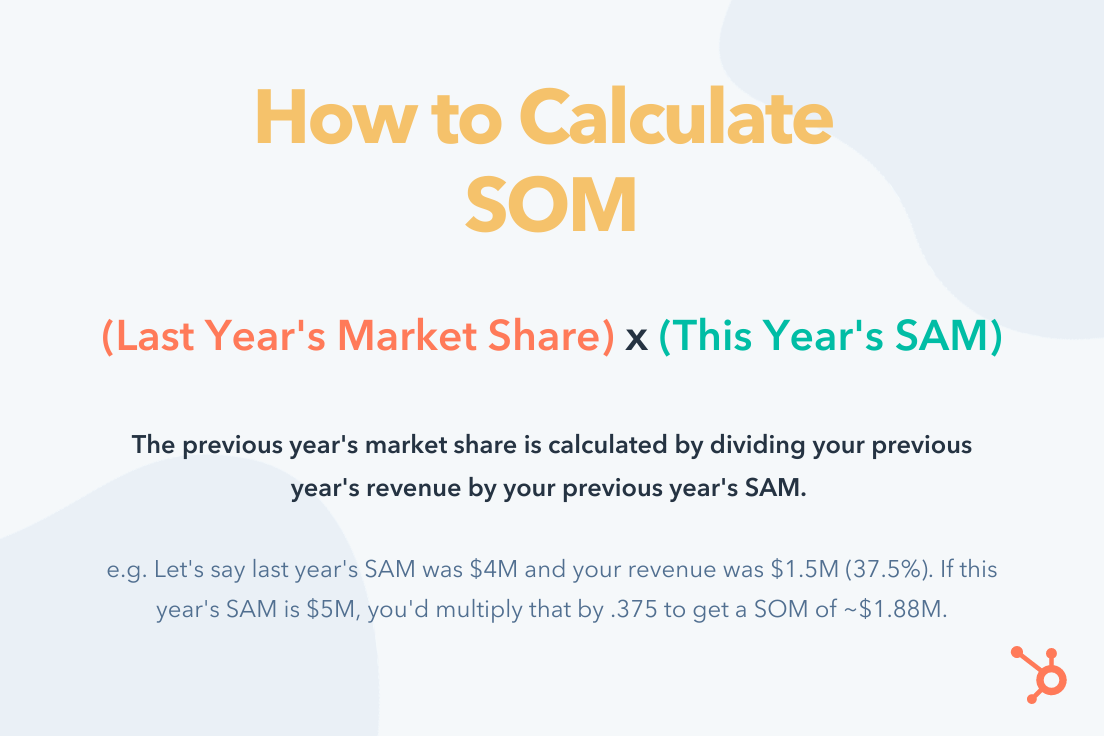
how to calculate som formula

Divide your revenue from last year by your industry’s serviceable addressable market from last year. This percentage is your market share from last year. Then, multiply your market share from last year by your industry’s serviceable addressable market from this year.

Keep in mind that these figures will largely be estimates to inform your strategy. The more market research you do and the more historical data you build up, the more precise your planning will be.

Editor's note: This post was originally published in March 2019 and has been updated for comprehensiveness.

market research kit

TAM SAM SOM: What Do They Mean & How Do You Calculate Them? was originally posted by Local Sign Company Irvine, Ca. https://goo.gl/4NmUQV https://goo.gl/bQ1zHR http://www.pearltrees.com/anaheimsigns

Why HubSpot is Acquiring The Hustle

The battle for customer attention has never been so fierce.

We've seen an explosion in brands using online channels to promote their services and products to potential customers.

The problem with this model is that you're not only battling other competitors for that attention; you're competing against every site that publishes informative videos, the latest trends, and educational content that serves the needs of their audiences.

We've built HubSpot on the belief that you earn attention by being of value. That belief is at the very heart of HubSpot's success; creating remarkable content is what makes a remarkable brand. It's why we've invested in publishing blogs, courses, ebooks, templates, and videos that help generate millions of visits to HubSpot every month.

We can't stop there, though. Just as the product requirements of growing companies have changed over time, so have their content needs. Newsletters, podcasts, premium content, and other media have exploded in popularity for startups and scaleups looking for best practices and tech news.

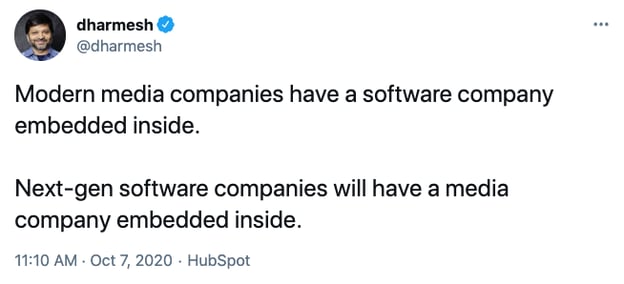
So how can companies adapt to this change? We believe that the next generation of software companies will invest in media that earns the attention of their audience. Instead of the traditional model of having a software company embedded inside of a media company, we predict that the next generation of tech companies will have the opposite – a media company embedded inside a software company.

We're taking our first steps in that direction today with an acquisition that we believe will help HubSpot deliver on the diverse content needs of entrepreneurs, startups, and scaleups across the mediums they love.

HubSpot has signed an agreement to acquire The Hustle, a much-loved media company whose mission is to inspire the next generation of entrepreneurs and innovators.

Traditionally, a B2B company's marketing plan was focused on getting their product into decision-makers' hands and convincing them to buy it. The majority of content published were whitepapers, functional specs, and content that helped their buyers make a purchase decision. Companies spent their time and resources building relationships with a small group of people who were actively looking for a product to buy.

Over the past decade, we've seen huge changes in how B2B companies approach media, with an explosion in popularity of those developing media products paired with inbound marketing to build relationships with large audiences across all stages of their business flywheel (attract, engage, convert, delight).

Today, B2B brands can be a daily part of their customers' lives before they even use their product. They can become a daily source of education and information for their customers. They can grow a large audience for that content by creating it for the people who buy their product and the many more who will use it. They can earn the attention of their audience by continually creating value for them.

As we considered how we could keep meeting our customers' needs, we knew there was an opportunity to diversify the content we published and the mediums through which we delivered that content.

We started looking for potential opportunities to acquire media companies who had the talent and experience in the mediums we wanted to invest in. It became obvious to us that The Hustle perfectly met all those needs.

We loved The Hustle's content. They have a daily newsletter that reaches over 1.5 million subscribers each day with the latest tech and business news. They've recently launched a premium content subscription named Trends, offering thousands of business ideas for the next generation of entrepreneurs and innovators. And they have a very successful business podcast, "My First Million."

We were also incredibly impressed by the entire Hustle team - led by founder Sam Parr. Together the Hustle team has built an incredible product and loyal customer base. You can expect the same great content you've become accustomed to getting from The Hustle and HubSpot is excited to be a part of that.

We live in a busy world; it's not easy trying to grow a scaling business and to keep on top of all the critical content that can help you be more successful. With this acquisition, we want to give our audience and customers the content they need in the medium they engage with most, whether that's blogs, YouTube, newsletters, or podcasts. We're excited about the current media products The Hustle has and the new ones we plan to launch together in the coming year.

It's never been a more exciting time for a software company to become a daily part of their customer's lives through media, and we can't wait to continue innovating on how we earn the attention of our audience.

Learn more here.


Why HubSpot is Acquiring The Hustle was originally posted by Local Sign Company Irvine, Ca. https://goo.gl/4NmUQV https://goo.gl/bQ1zHR http://www.pearltrees.com/anaheimsigns

What Is Digital Transformation?

Over the past year, the term digital transformation has been a huge focus for many businesses. This is no surprise considering the impact of COVID-19.

Companies across a variety of industries have had to stand up to varying challenges the pandemic brought about with short-term fixes. However, many have used this situation as an opportunity to speed up their adoption of new practices and technologies for the long-term too.

Some studies have also shown how the process of digital transformation has actually advanced by a matter of years.

A McKinsey report showed that businesses have sped up digital communications and interactions with their customers and suppliers by up to four years. Furthermore, companies surveyed showed that ‘the share of digital or digitally enabled products in their portfolios has accelerated by a shocking seven years.’

Another study, highlighted in IoT Now, discovered that COVID-19 has moved digital transformation forwards by 5.3 years. Businesses have had to adapt to such unique and unprecedented times and find fixes for current challenges. In addition, they’ve also used the situation to get ahead digitally.

Many industries have had to press fast forward on technological conversions that may have been phased in over a longer period of time in any other circumstances.

The global situation is helping to create a bigger-than-ever buzz around digital transformation. However, not everyone makes the same journey. And, many brands still ponder what exactly digital transformation is.

In this guide, we provide an introduction to digital transformation. We will explore its definition, what it means for your business, and provide examples and services that could help evolve your brand.

What will we be covering in this digital transformation guide?

  1. What is digital transformation?
  2. Why is digital transformation important?
  3. Digital transformation services
  4. Digital transformation examples

1. What is digital transformation?

The overarching term ‘digital transformation’ is essentially the name given to the incorporation of digital technology into all aspects of your business processes. These adjustments are put in place with the aim of transforming the way in which a company operates for the better.

Every process a business refines should ultimately be there to better serve the customer – and this is exactly what one of the main focuses of digital transformation is. By changing your processes to make them more efficient. You’re also providing vast improvements for your customers or clients when it comes to delivering value, speed and effectiveness.

This kind of conversion into the digital space requires buy in from every person within a business and also needs a cultural shift. Businesses have to be open to adapting to a completely different way of working and this often means parting with embedded practices. COVID-19 forced this on many industries during 2020.

What does digital transformation mean for my business?

The definition of digital transformation will have a slightly different meaning for each business. Practices and processes will be dependent on the industry and circumstances. For instance, what an online retailer views as digital transformation will be independent from that of a graphic designer or a gas engineer.

However, as we’ve said above, in the broad sense, digital transformation means integrating digital technologies within every area of your business processes. What that looks like in your sector and for your particular business will depend on your existing structure.

2. Why is digital transformation important?

No matter which sector you operate within, business is increasingly competitive. What the global pandemic has done is intensify this. Customer demand has morphed – their expectations have heightened along with the need for services to be digitised. Not only this, but previously manual processes won’t work in the socially distanced coronavirus climate. A company’s time to market is under undue pressure and supply chains have been in disarray.

The way in which consumers have reacted – in terms of purchasing decisions and the services they choose to interact with – might change post-pandemic. However, these are behaviours being adopted over a prolonged period of time, so they’re unlikely to disappear completely.

Digital transformation is so important because it satisfies customer needs and helps them encounter heightened value. This level of service and experience will now, therefore, be the benchmark.

What’s become imperative is a business’s ability to be agile and swiftly adapt to these extraordinary challenges. This is largely done by removing pressure from traditional, outdated or manual processes and replacing them with more efficient technologies.

Digital transformation is important for your business and simply surviving is precisely the reason why this is so.

In a competitive landscape, under extra pressure, small 1% differences can help you to stand out against rivals and see your business not only survive, but thrive.

Without meeting customer demand for efficiency and value, people will simply look elsewhere – and competitors which have successfully adopted new technologies will reap the benefits. Customers think and act digitally, so you need to do likewise.

Can in-housing play an important role in digital transformation?

In-house marketing has experienced a surge in popularity in recent years. And this growth feeds directly into the need to adapt and have control. In-housing can put the power in the hands of your business. It also facilitates successful digital transformation and speeds up processes.

In fact, the Bannerflow State of In-housing 2021 report highlighted some fascinating statistics showcasing the operational benefits of bringing creative work in-house. A stand-out fact being that 63 percent of the respondents said their ROI had seen a positive change from in-housing.

In addition, tech was transformative in terms of how in-house teams used data, were creative and how they collaborated:

  • 58 percent said they use data more than ever before
  • 55 percent said creativity levels have been boosted
  • 54 percent are seeing greater collaboration.

When we consider the way in which businesses are having to operate due to COVID-19, many face more remote working in 2021 and beyond.

This isn’t a concern for a number of the in-housing report respondents, though – it’s largely being seen in a positive light:

  • 62 percent of respondents said in-housing will allow for efficient remote working
  • 59 percent said it would improve agency transparency
  • 58 percent said it would save external costs

In-house marketing looks set to accelerate the digital transformation efforts of an organisation.

The state of in-housing 2021 launch blog header

3. Digital transformation services

Investing in digital transformation services can assist businesses by enhancing how agile they can be. In order to scale, you’ll likely need to work with increased levels of information. Plus, you will need to successfully utilise data as and when required.

This can be swiftly achieved by improving how easily organisations can access and harness this information. The improvement of insights and leveraging that data can be key.

But what is a digital transformation service? In short, it’s a management solution – or collection of management systems – designed to help businesses get optimal value from their technologies.

Businesses may also find it useful to employ the services of digital transformation agencies. These organisations can ensure a holistic approach is taken; helping you execute a successful process with the correct tech for your business.

These solutions can heighten efficiencies within the operational function of your organisation by designing workflows that fit for your specific business and by creating slick processes. Without these technologies in place, businesses have to rely on outdated or manual processes, which can leave them in the shadow of competitors.

Digital transformation of digital advertising

Once you understand what a digital transformation service is, it’s very easy to understand how Bannerflow fits into this world and can transform an organisation’s digital output.

With our cloud-based platform, brands are able to bring together and control all their digital advertising efforts from this one solution. A process that would previously take multiple tools, people, agencies and more, can be streamlined with this powerful technology.

In-house marketing departments can have full control over the output of their brand from this single source. This is from designing, scheduling and publishing all the way through to ad optimisation and personalisation.

This isn’t just on a small scale, either. The possibilities for any brand’s advertising efforts are global and wide ranging. Bannerflow’s creative management platform (CMP) can operate across markets, channels, different languages and at volume in real-time.

Digital transformation strategy

It’s important to note that embarking on transforming the operations of your business into the digital space can be easier in theory than in practice. This is why having a robust and comprehensive strategy is key before taking on the challenge of reorganising your business in this way.

A strategy for any digital transformation project is essentially a plan of attack. It is essentially how an organisation could, should and must thrive in the digital landscape. As we’ve already discussed, customer and consumer behaviours have transformed and will continue to do so. Businesses must keep pace with these changes. By doing this you can stay ahead of the curve – and harnessing tech is the way forward in order to be successful.

What a strategy does is first help your brand with what it can do with your business model to use the latest technology and how it can transform this operationally.

4. Digital transformation examples

It can be incredibly helpful as a business decision maker to see examples of digital transformation in practice. And, of course, understand how other brands have made things work is useful too.

At Bannerflow, we have worked with many businesses and brands to transform their digital capabilities and give them the power to succeed.

Digital transformation case studies:

Here, are some of our favourite case studies of digital transformation in a action.

Telia Company

Telia is uniquely positioned as a showcase of what can be achieved with the assistance of robust technology. The telecommunications brand has redesigned its digital marketing operations with the help of a Bannerflow CMP.

Lena Lindgren, Digital Transformation Manager for the brand said:

“Technology has allowed us to scale our production without using extra resources. It’s a very cost-efficient way of mass-producing our online advertising.
“Moreover, since using a CMP, we have been able to shorten our go-to-market time from 20 to 4 days!”

Read the full Telia interview here

Kindred Group

This in-house marketing force manages some of Europe’s best performing gambling brands. By adopting Bannerflow, Kindred Group is able to be innovative at scale, serving a number of different languages.

Without the use of a CMP, Max Taub, Head of Acquisition Optimisation at Kindred Group, says they’d require far more staff:

“(We’d need) a lot (more people). Just thinking of all the translations, optimising, and then having a designer do it all manually – you just can’t go back to the old way.”

Read the full Kindred Group interview here

Bonnier Magazines & Brands

By streamlining processes with a CMP and bringing display ad production in-house, Bonnier has eliminated the need to use multiple external agencies. In doing so, the brand has reduced costs, regained creative control and has increased the speed and agility with which they can produce ads.

Kajsa Lindwall, Campaign Production Specialist at Bonnier told us that this digital transformation has helped them to become more flexible:

“We changed from a traditional organisation to one with an agile workflow and structure. This means that we are now working in sprints and reach the end of the projects fast so – it’s important we can be flexible.”

Read the full Bonnier interview here

More inspiration

If you want to discover more examples of what embarking on a digital transformation journey can help your organisation achieve, head to the inspiration section of our website.

In this area, you’ll find all of this and more:

  • Display advertising examples
  • Trends
  • Reports, guides and e-books
  • Webinars

Conclusion

There’s no question that the process of digital transformation is happening across all industries. What this looks like in yours will surely differ to others. However, what will always separate one brand’s success from another – regardless of the industry or circumstances – is how quickly and how well fresh technological solutions are integrated.

During the past year of global turbulence, consumers have been forced to look online for services in even greater numbers. As a result, they are becoming more demanding of these services. In order to keep pace, businesses need to become agile and take a holistic approach to their digital transformation strategy. This long-term perspective will stand any business in good stead for evolution and will ensure competitive advantage.

Has this guide left you feeling inspired? Are you ready to take the next steps towards transforming your processes and heightening your efficiencies? Bannerflow can help your business to put the customer at the heart of everything. Create powerful, memorable, personalised digital advertising assets with our premium cloud-based platform.

Apply for a demo today to experience this seamless CMP process for yourself from ideation to roll out and beyond.

The post What Is Digital Transformation? appeared first on Bannerflow.


What Is Digital Transformation? was originally posted by Local Sign Company Irvine, Ca. https://goo.gl/4NmUQV https://goo.gl/bQ1zHR http://www.pearltrees.com/anaheimsigns

How HubSpot Content Strategists Improve SEO

If you need help building a website, creating a company blog, or getting webpages discovered by search engines, there's plenty of SEO training that can help you get started.

But, once your website is built and your customers find your content online, how do you improve your search ranking and reach a larger audience?

While keyword research, overlap tests, and link-building, are a must for creating an online presence, there's much more you can do to increase the amount of traffic coming to your webpages.

That's why we spoke to experts on HubSpot's SEO team to learn how they've improved content strategy over time. Read on for a list of their tips that can help you rank higher on search engines and optimize the accessibility of your marketing campaigns.Access Now: 21 SEO Myths to Leave Behind in 2021

How to Improve SEO Like HubSpot

1. Encourage visitors to search for your brand.

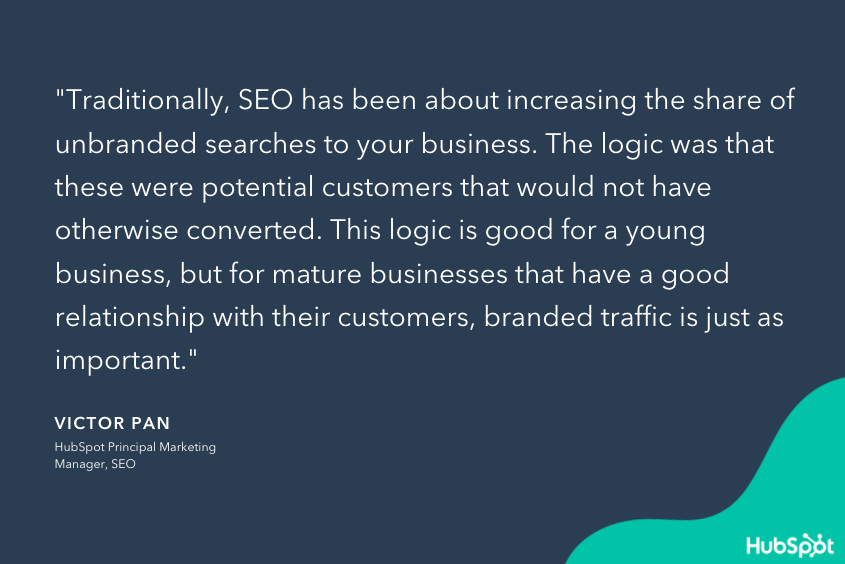
When your business is growing, it's important to increase the share of unbranded searches coming to your website. These are keywords that aren't specific to your brand, but they may be relevant to your industry.

For example, if you were a power-washing company located in Massachusetts, then you would want to rank for a search like, "best power-washing companies in New England." While the name of your company isn't included in this search, you would still want your website to appear in the search results when someone is looking for power-washing services in the New England area.

SEO-HubSpot-1

Once your company grows and develops stronger relationships with its customers, you can encourage branded traffic to your webpages. In fact, companies like Amazon have even influenced their buyers' search habits, and now its customers add "amazon" to their search queries when researching products on Google. This ensures that the top result on the SERP is most likely a link to an Amazon page.

Your company can have a similar effect on its customers by becoming a thought leader and resource for topics related to your industry. For instance, if customers had questions about how powerwashing works, its benefits, when you should do it, etc. then our powerwashing company might have a blog that answers all of these questions. As people read these articles and become familiar with our content, they might amend their search queries to include the name of our company so they can access our content faster.

2. Update your content.

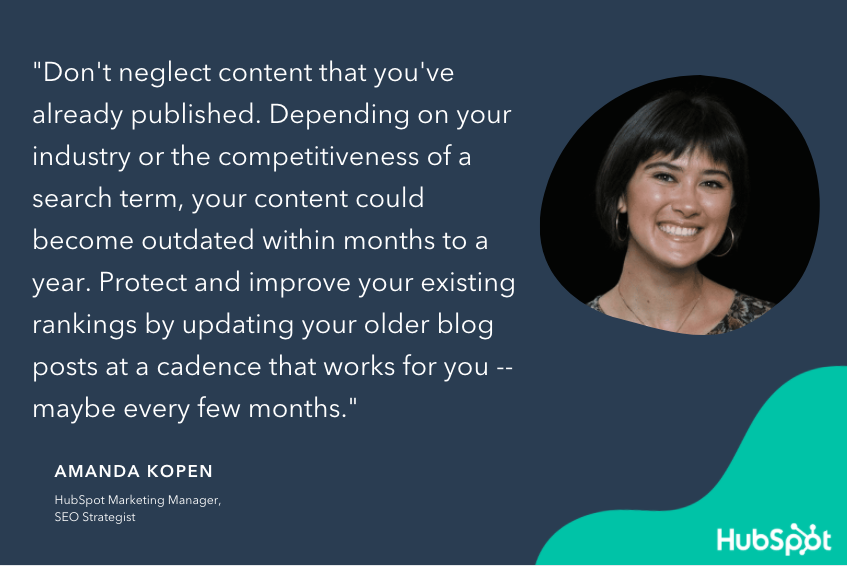
Search engines are constantly updating their algorithms and improving their tools to provide better search results for their users. This means that your content can become outdated within months to a year and the keyword research that you did when you first created a piece may change as search engines adapt over time. That's why it's important to regularly update your content, so you can keep tabs on its performance and ensure it continues to rank high on search engines.

SEO-HubSpot-2

When updating content, you should replace old statistics and outdated terminology, and fill in any content gaps that you may have missed when you first created the piece. You should also fix any broken links or images and make sure that the formatting and branding is consistent with your current content. Do this at a cadence that makes sense for you — for many teams, it's every few months.

3. Analyze keywords beyond search volume.

When analyzing keywords, it's easy to locked in on search volume and prioritize keywords with the most potential traffic. However, it's important to look beyond just search volume and consider the intent of the keyword before you create content that's targeted towards it.

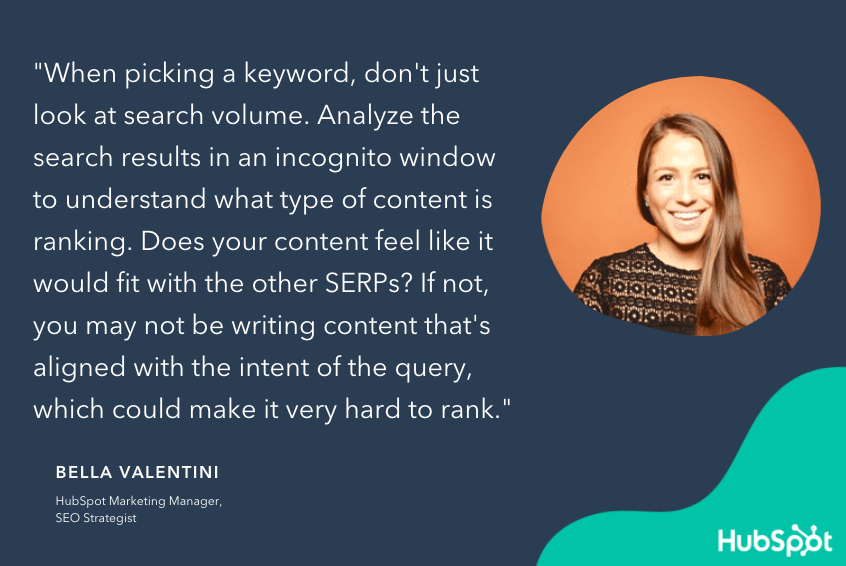
Open an incognito window and search for your keyword. Look at the content that's currently ranking for it and ask yourself if your content would fit with this SERP. If it doesn't, then it might be hard to rank for this topic with the content you're currently using.

SEO-HubSpot-3

Here's an example. Let's say our powerwashing company recently revamped its support team and we wanted to rank for the term, "progressive customer service." While we could write alot about our new and improved service team, we probably won't beat the insurance company, Progressive, from winning over this keyword. That's because the intent behind this keyword is for Progressive's service team and not for content related to the customer service industry.

4. Prioritize internal linking.

It's easy to grow organic authority when publishing content consistently, but it's just as easy to plateau if you don't consider where it should be published. This is a form of SEO "tech debt" that can hamper your growth the bigger your site gets.

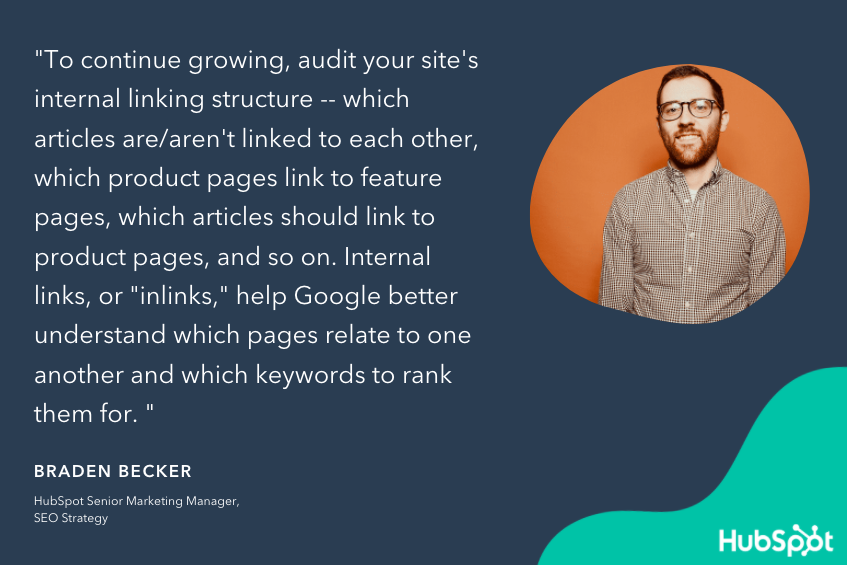
To avoid this setback, it's important to audit your internal linking structure and identify different pieces of content that should be linked together. Adding links between internal pages helps search engines understand which content is related to one another as well as the keywords that these pages are targeting. It can also help Google index new pages faster if they're linked from the right pages to begin with.

SEO-HubSpot-4

You can use a number of SEO tools to systematically find these opportunities and update the pages that matter most to your sales efforts.

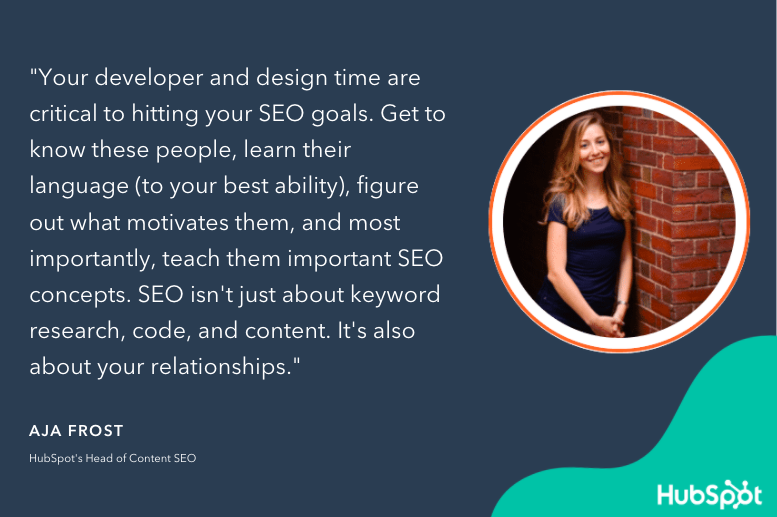
5. Form strong relationships with your developers and designers.

As your online presence grows, you might be surprised to find your SEO team is working closely with your web developers and designers. This is expected, though, since SEO is influenced significantly by how your content is designed and maintained.

The better relationship between your SEO team and web designers, the higher your content will rank. After all, if your web developers understand the importance of SEO, then they're more likely to listen to your SEO team's advice when creating and designing new content.

SEO-HubSpot-5

At the very least, open communication between these two teams can be the key to more consistent digital growth. For example, if your web developers want to delete a page that has 500 backlinks, they should first check in with your SEO team to see if there would be any negative repercussions. Effective communication between your developers and your SEO team can help you avoid SEO headaches and maintain high search rankings.

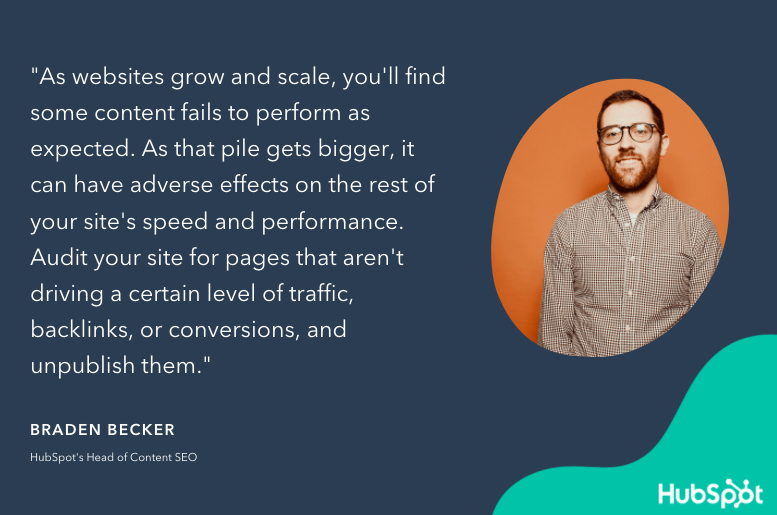
6. Prune content after long periods of growth.

Not all of your content is going to hit it out of the park — and, that's okay. Some content will fall shorter than expected and even though you update it, it might not obtain the amount of traffic you were originally hoping for.

As this content piles up, it can impact the speed and performance of your website. If it does, then you might want to consider pruning these pages so that they don't adversely affect user experience. Even though you'll forfeit a small amount of traffic from these pages, you'll likely save alot more by improving the user experience on your other, more popular pages.

SEO-HubSpot-6

7. Optimize Search-Friendly Content.

Not everything that you publish is going to be search-friendly — like ad landing pages, thank-you pages, internal sales enablement pages, and login pages. These pages aren't typically target by search engines and therefore aren't as important to optimize for search.

Instead, you should focus your attention on pages that are search-friendly. These are the ones that search engines are looking for and they play a much bigger role in the customer experience. If you can get this content in front of your target audience, they'll eventually discover your other pages as they continue to explore your site.

SEO-HubSpot-7

Optimizing Your Content Strategy

SEO is always a work in progress. So long as search engines continue to update their algorithms, marketing teams will have to create content that's not only relevant to their audience but can be easily discovered, too.

While SEO marketing software can help brands shape their content strategies, ultimately it will be up to marketers to create effective content that ranks high on search engines and attract new leads for their business.

For more ways to improve your content's search ranking, read these SEO tips.New Call-to-action


How HubSpot Content Strategists Improve SEO was originally posted by Local Sign Company Irvine, Ca. https://goo.gl/4NmUQV https://goo.gl/bQ1zHR http://www.pearltrees.com/anaheimsigns

Wednesday, February 3, 2021

How to Create a YouTube Channel Step-by-Step

If you're reading this article, I probably don't need to tell you that video content accounts for over 74% of all online traffic, or that over five billion YouTube videos are watched every single day.

You already know video is an important channel, and you're ready to start leveraging YouTube for your own business. I'm here to show you how to do it.

This article will cover everything you need to know about creating a YouTube channel, so you can start uploading your own videos and growing your audience today.

How to Make a YouTube Channel

  1. Sign in to your Google account (or register and sign in if you don't have one).
  2. Create a new YouTube channel using your Google account.
  3. Navigate to the Customize Channel page.
  4. Add Basic Info to your channel for discoverability.
  5. Upload branding elements to your channel.
  6. Customize your more advanced layout options.
  7. Add videos and optimize them for search.

Can't create a new channel?

If you're seeing a "This action isn't allowed" message when you try to create your channel, you may be using an outdated version of the YouTube app.

Here are your options to move forward:

  1. Update the YouTube app on your device.
  2. Create your YouTube channel using a browser on your PC (following the steps outlined in more detail below).

How to Create a YouTube Channel

Creating a well-managed YouTube channel with consistent content can help businesses grow better, but doing it right is just as important. Here's how to do it step-by-step.

1. Sign in to your Google account.

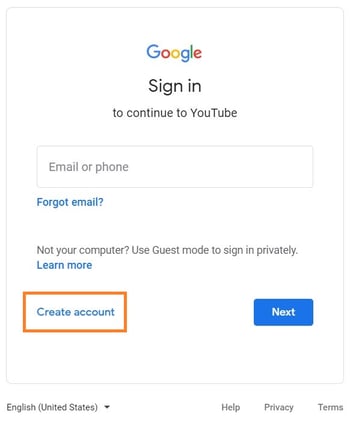
To watch, share, create, and comment on YouTube content, you'll need a Google account. Go to youtube.com and click "Sign In" in the upper right-hand corner. From there, you'll be taken to a Google sign-in page. 

  1. If you have a Google account, you'll be prompted to sign in. 
  2. If you have multiple Google accounts, be sure to select the one you want to be associated with the YouTube channel.
  3. If you do not have a Google account, click "Create Account" and follow the prompts to register for one.

youtube sign-in page with "create account" prompt

2. Create a new YouTube channel using your Google account.

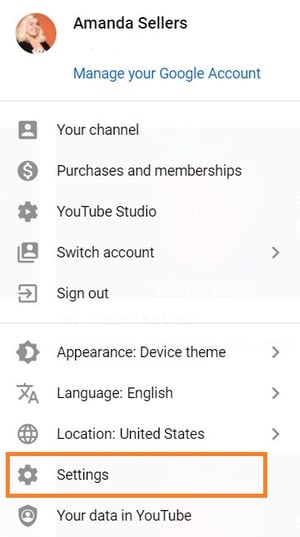
Once you're set up with and signed into your Google account, it's time to create a channel. Click your user icon in the upper right-hand corner. This represents both your Google account and you YouTube account (as YouTube is owned by Google). You'll see a drop-down menu, where you'll want to click "Settings."

youtube channel settings menu

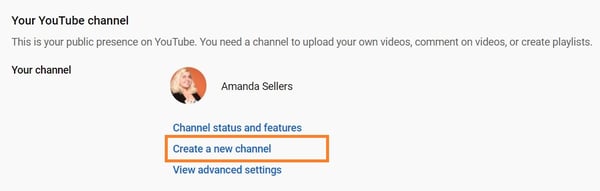
From there, you'll be taken to your account overview. Click "Create a new channel" under "Your channel."

youtube create new channel

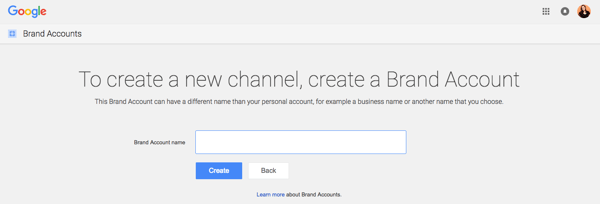
The first step is to create a Brand Account. It can be whatever name you want, and doesn't have to be the same name that you used to create your Google account -- but we do recommend that it reflects the brand the YouTube Channel will represent.

create a brand account in youtube

After you enter the Brand Account name, you might be asked to verify the account via text message or voice call. If that happens, enter the code you receive from the option you choose.

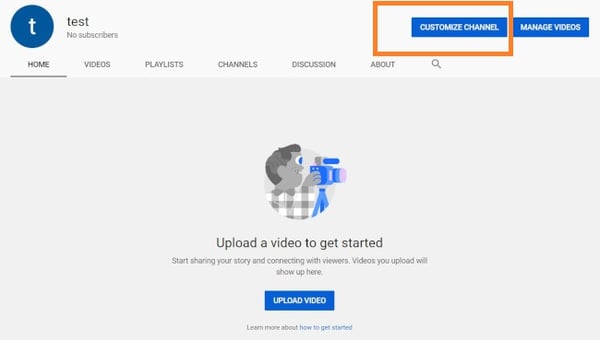
Once you've verified your Brand Account, you'll be taken to the dashboard for your channel. Now, it's time to start customizing it.

3. Navigate to the Customize Channel page.

We'll start with the fundamental details about your channel. From your channel dashboard, click "Customize channel."

youtube customize channel

From there, you'll be taken to the channel customization page.

You'll notice three tabs: "Layout," "Branding," and "Basic info." These three tabs will help you optimize your channel for viewers.

4. Add Basic Info to your channel for discoverability.

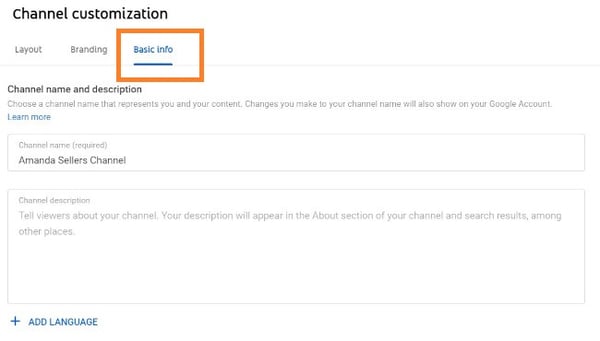
Start by clicking "Basic info."

youtube channel customization basic info

Here's where you'll enter some basic information about your channel, like the language your videos are in, as well as a description that helps people discover your channel when they enter search terms that describe what videos they're looking for. These keywords can include what your channel is about, the problems it helps solve, the people and products featured, your industry, and more.

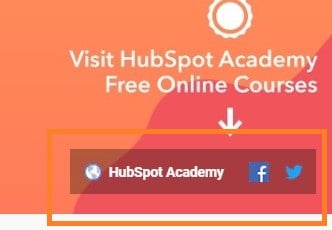
You'll also be able to add links to sites you want to share with your viewers. These links will be displayed over your banner image (more on this later) like so:

youtube featured links

5. Upload branding elements to your channel.

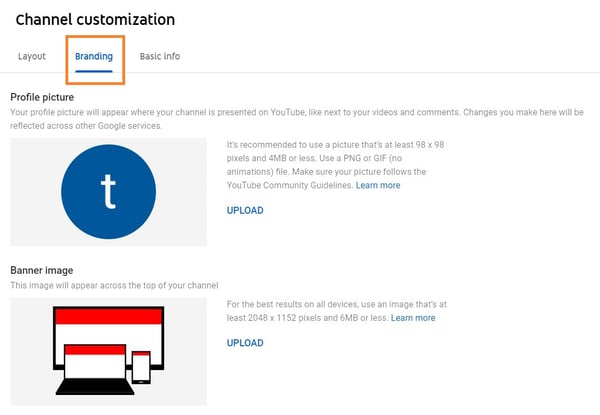
In addition to the descriptive details that you've added, there's another element of customization for a new YouTube channel: The visuals.

youtube channel customization branding

Under the "Branding" tab, you'll be able to add your:

Profile Picture

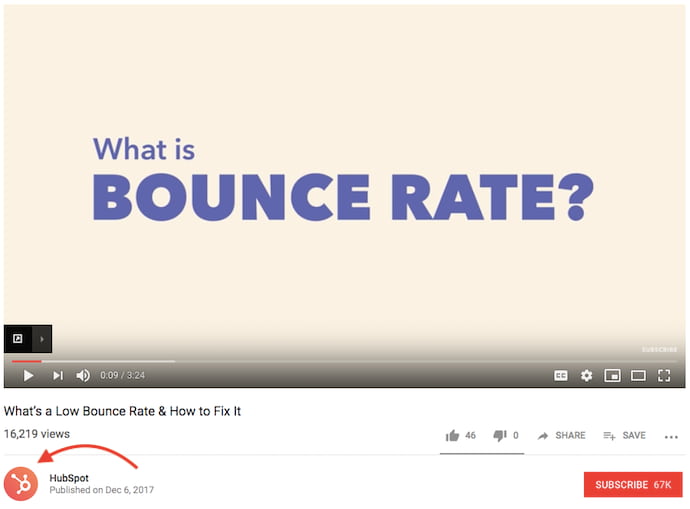
Among this channel art is your profile photo -- this is how YouTube users will identify the creator of a video when browsing video content. You'll see this image appear beneath YouTube videos on the play page, as shown below. YouTube recommends using a picture with dimensions of at least 98 x 98 pixels.

youtube profile photo

Banner Image

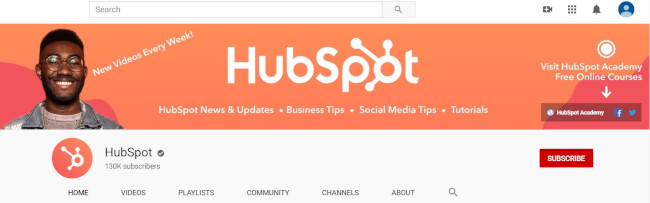
The banner image is a large banner displayed at the top of your channel page, and it's a big opportunity to convey your brand to your viewers. YouTube recommends using an image that's at least 2048 x 1152 px.

youtube banner image

Video Watermark

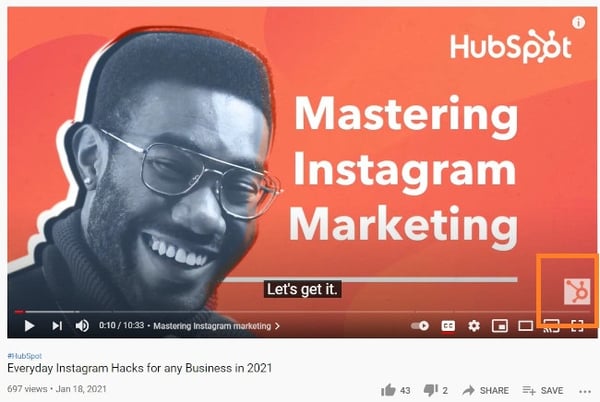
The video watermark is displayed at the bottom right of every video you post (see below). You'll want to choose a logo that best represents you sized at 150 x 150 px.

youtube video watermark

6. Customize your more advanced layout options.

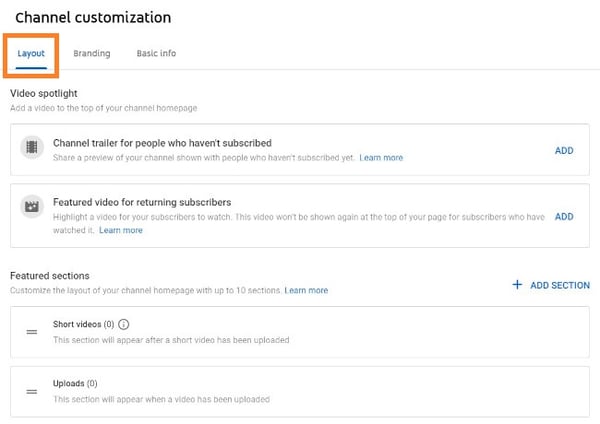
Click the "Layout" tab.

youtube channel customization layout
From here, you'll be able to specify certain details about how you want your content presented on your channel's page. You'll have the option to designate a video spotlight and organize your channel page with featured sections.

7. Add videos and optimize them for search.

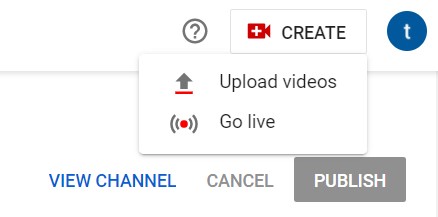
To upload your first video to YouTube, click the "Create" button in the top-right corner and follow the prompts.

youtube upload videos by clicking "Create" button

Optimizing your channel for discoverability is just the beginning. Once you start adding videos, you'll want to optimize them for search, which in turn helps users discover your video.

But this goes beyond giving your videos accurate, clear, and concise titles -- though that is important. Below, we describe some of the most important things to optimize on YouTube. (For a fully comprehensive post on YouTube SEO, visit this post.)

Title

When we search for videos, one of the first things that our eyes are drawn to is the title. That's often what determines whether or not the viewer will click to watch your video, so the title should not only be compelling but also clear and concise.

Description

This should be limited to 1,000 characters -- and remember that your viewer came here to watch a video, not to read a lot of text. Plus, YouTube only displays the first two or three lines of text, which comes to about 100 characters, so front-load the description with the most important information.

Tags

Using tags doesn’t just let viewers know what your video is about -- they inform YouTube, too, which uses tags "to understand the content and context of your video," according to Backlinko. That way, YouTube can associate your video with similar videos, which can broaden your content's reach. But approach with caution -- just as with your title, don't use misleading tags because they might get you more views -- in fact, Google might penalize you for that.

Category

Choosing a category is another way to group your video with similar content on YouTube -- but that might not be as simple as it sounds. YouTube's Creator Academy suggests that marketers "think about what is working well for each category" you're considering by answering questions like:

  • Who are the top creators within the category? What are they known for, and what do they do well?
  • Are there any patterns between the audiences of similar channels within a given category?
  • Do the videos within a similar category have share qualities like production value, length, or format?

That's it -- you've officially not only created a YouTube channel but now also know how to optimize its content for discoverability. For more information on how to best leverage YouTube for marketing, check our entire collection of resources.

Editor's note: This post was originally published in November 2019 and has been updated for comprehensiveness.

New call-to-action

New call-to-action

How to Create a YouTube Channel Step-by-Step was originally posted by Local Sign Company Irvine, Ca. https://goo.gl/4NmUQV https://goo.gl/bQ1zHR http://www.pearltrees.com/anaheimsigns

8 Simple Ways to Segment Your Social Media Audience

Segmentation is not a new concept for marketers. We use segmentation to send personalized emails, create buyer-specific pricing models, and understand the behaviors of our most loyal customers.

It is also a valuable tool for generating more leads on social media. While publishing more often and posting different types of content is great for generating engagement with your audiences, segmentation can bring additional benefits, like....

New to social media? Check out this featured resource: Social Media Certification Course 

This post will show you how you can apply the principles of segmentation to social media, outline the benefits it can bring to your business, and give you tips for accurately segmenting your social media audience.

→ Free Download: Social Media Calendar Template [Access Now]

Segmentation is important because it increases your marketing success. When you know the key characteristics and desires of your target audience, you can become more focused with your brand messaging and create hyper-targeted advertisements that speak directly to your audience's interests. Then, when your advertisements are tailored to their interests, customers are more likely to interact with them and take further action.

Let’s go over eight strategies for segmenting your social media audiences.

1. Understand your audience.

Just as with any marketing strategy, understanding your target audience is the key to accurate, relevant social media segmentation. Without knowing who your customers are, what they want, and how they like to be marketed too, it will be challenging to devise other strategies to help you succeed in your process.

To better get to know your audience, you can create buyer personas from your analytics and research data. Buyer personas are semi-fictional representations of your ideal customers that help you focus your time on qualified prospects, attract high-value customers, and create content that best speaks to their interests and desires.

You can think of it like this: if the data you’ve collected shows you that Facebook brings you the most engagement, dig deeper into who your audience is on that platform and create a buyer persona that brings a more comprehensive understanding of who they are. These representations you’ve created directly relate to our next tip, as many social media platforms come with audience targeting tools that you can use to market specifically to your different segmented audiences.

2. Use native social media targeting tools.

When most people think of social media segmentation, they think of paid targeting options. However, for low and high budget marketers alike, there are organic targeting options on different platforms that you can use to speak to your various audiences.

For example, Facebook allows businesses to target their messages to users based on demographics, interests, and geographical location (as shown below).

hubspot facebook page audience targeting demo

On LinkedIn, there are also built-in targeting tools that allow you to filter and segment by industry, company size, and much more (shown below).

linkedin-ads-audience-attributes-750@2xImage Source

3. Create audience groups.

Social media is all about community. Building communities of people who share common interests is an easy way to segment your audience and gain valuable insights. You may decide to keep the group open (anyone can join) or closed (a moderator must approve new members), and there are advantages to each.

Open groups enable you to gather information about how a more general audience feels about your brand. You can use this forum to have discussions and ask open-ended questions such as, “What are your biggest challenges?” or “What makes excellent customer service?” You can also test new ideas with your audience members or discover new content ideas that they would find interesting and relevant. The advantage here is that you will have a large group to bounce ideas off of. The disadvantage? They may not be as knowledgeable about your industry as you need.

That's where closed groups can come in handy. You are approving each member's admission to the group, and you can cherry-pick the most qualified candidates. Maybe they're a group of customers whose opinions you value or a list of people who have attended an event you've hosted. Regardless of admission requirements, this can be a great way to get specific, helpful feedback from a group you trust — but you may not get as many responses as an open group discussion.

Various social media platforms have group functionalities, specifically Facebook and LinkedIn. On Facebook, you can create a group that is relevant to your business and your target audience’s interests that can be public or private, as mentioned above. The same can be said for LinkedIn, but you should only opt to use it if your target audiences are professional-aged, business minded individuals.

4. Create audience lists.

Most marketers are familiar with creating lists — we do that every time we send a new email campaign. But did you know you can use lists to have more productive social media conversations? Social networks like Facebook and Twitter allow users to create lists of friends, followers, people who have attended an event, and more.

On Twitter, your lists can separate followers into specific categories, like where they are in their buyer’s journey. Whenever these people in your lists Tweet, you’ll be able to view them all within a specific channel to get an idea of what kinds of things they tweet about and what they enjoy. When you have this information, you can create better-targeted ads that speak to your segmented audience’s preferences.

If you’re a HubSpot customer, the lists you use for your email can actually be one and the same as your social monitoring lists. You can set up a stream for each one of your buyer personas, such as a stream for leads who are talking about your brand, or customers in a certain industry. You’ll spend much less time trying to filter through the noise, and much more time having relevant, targeted conversations.

5. Post at different times of the day.

As marketers, we know how important timing is to marketing — especially on social media. If you’ve created accurate, relevant buyer personas, you’ll likely realize that your followers are distributed throughout different geographic regions. This means that your followers in the central United States are going to bed while your followers in Australia are getting ready to wake up.

Differentiating your publishing times allows you to generate engagement from a larger portion of your audience, as followers from all over the world have the opportunity to engage with your posts.

An additional benefit to doing this is that you’ll have multiple posts out there for your target audience to see. You can think of it like this: if you post three times throughout the day for three different audience segments, each one of those segments can also see the posts meant for the other. Three more opportunities for them to interact with your content and three more chances to drive conversions.

6. Leverage multiple networks.

As you master the various ways to segment your specific audiences, more people will be interested in connecting with you through social media. If you don’t already run multiple social media accounts, you may realize that one of the best ways to serve relevant content to specific audiences is to create several social media profiles, each with specific intent.

For example, if you’re a clothing brand, your target audience is likely widely dispersed age-wise. While you may hope to reach all of them on one platform, you’re more likely to get your younger audiences (aged 10-19) on TikTok and your older audiences on Instagram.

Additionally, within each of those different platforms, it’s also worth considering creating multiple accounts focused on various aspects of your business or the demands of your different audiences. At HubSpot, we maintain more than five different Twitter accounts to provide content relevant to each segment of our audience. For example, @HubSpotAcademy is a channel that marketers can use to learn how to be a better inbound marketer, while @HubSpotSupport is a channel that our customers can use to get help using the HubSpot platform. Both Twitter accounts are relevant to anyone interested in HubSpot, but they are most relevant to their particular segments.

Keep in mind that each social media account should still serve a larger audience, so be sure to work on building your overall audience from one account before you try building out more. If you decide to start building out more accounts, be sure that people can easily differentiate their purpose (ex: customer support, marketing materials, your yearly event, etc.) — otherwise, you'll be creating more work for yourself.

7. Streamline your processes.

Should you choose to leverage multiple platforms or simply just want to streamline your processes, there are various social media tools that can help you create and publish advertisements built for your segmented audiences.

Falcon.io is one of those tools. It comes with an all-in-one social platform for creating paid and organic advertisements, managing customer engagement data from all your accounts, and even creating custom and lookalike audiences for further segmentation, as displayed by the image below.

falcon.io audience segmentation tool demo

Image Source

8. Test your strategies.

Although this tip is not directly related to grouping your audience, the success of your segmentation depends on how well you’ve created your groups. Using social media testing as a means of understanding how your content is performing among your target audiences is a way to know if you’ve accurately segmented your audience, and it can help you perfect your strategy.

For example, say you’ve found your millennial audience to be most active on Instagram. You know that they’re there, so you can begin creating content for them. However, what if you want to better understand their preferences? Maybe you want to know whether they prefer Instagram Stories or Instagram Reels? Conducting an A/B test with both of these content types will help you better understand how to communicate with these segmented groups.

Speak To Your Different Audience Groups

Unless you’re a very niche business, you likely have a large audience group. Within these audience groups, there are probably other distinct communities with different preferences and desires.

It may be challenging to figure out how to tailor your message to individually speak to all of your diverse customers, but the eight tips mentioned above will help you carefully segment your social media audience for more relevant conversations — and eventually, more conversions.

social media content calendar


8 Simple Ways to Segment Your Social Media Audience was originally posted by Local Sign Company Irvine, Ca. https://goo.gl/4NmUQV https://goo.gl/bQ1zHR http://www.pearltrees.com/anaheimsigns