Thursday, January 14, 2021

How to Run Marketing Team Meetings That Don't Suck

Meetings suck. They're time for people to avoid doing actual work, stare blankly at each other, throw in generic comments to look like they're paying attention, and if you're lucky, maybe come out with some wicked notebook doodles.

Is that how people perceive your marketing meetings? I hope not, because they don't actually have to be that way.

Turn your marketing meetings into something useful by — you guessed it — creating compelling content! (Oh my gosh, inbound marketing concepts work in real life, too!)

As your team grows, it's important for everyone to get in a room together and talk about what they've been working on in their corner of the world. So to ensure those marketing meetings aren't blocks of time your team dreads, make note of these tips for how to make marketing team meetings truly useful for your employees.

How to Run an Effective Meeting

While this post will primarily focus on marketing meetings, I want to address a team-agnostic section about effective meetings as a whole.

As I said above, meetings can be a grandiose waste of time. It's tempting to run your work by others, gather feedback or affirmation, or simply avoid the tough stuff by calling meetings.

I'm here to tell you — don't do it. The first step to running effective meetings is to only schedule meetings when absolutely necessary.

Quarterly meetings to report on company progress and important news? Of course. Monthly meetings to touch base on KPIs and recruit help for projects? Sounds great. Weekly meetings to report on current responsibilities and asks? I'm torn on whether this one is necessary, but for large teams or teams with new employees, this could be a good move.

Every moment in a meeting is time away from heads-down work, the work that arguably moves your business forward. Are meetings necessary to take a break, touch base, and rally with your team? Of course.

Secondly, to understand the effectiveness and efficiency of a meeting, ask your team. Ask, "is [meeting] helpful for you? If so, what are its top two benefits for you?" This can help you understand what percentage of your teams finds value in your meetings and what components or agenda items may be able to be removed to save time.

Speaking of agendas, let's discuss next what your marketing meeting agendas should resemble.

Marketing Meeting Agenda

Whether your marketing team meeting is weekly monthly, this section will explain the content you should every single time. We also recommend creating a slide deck that you project for your team in each meeting so you can all follow along with each agenda item.

Marketing Meeting Agenda Example

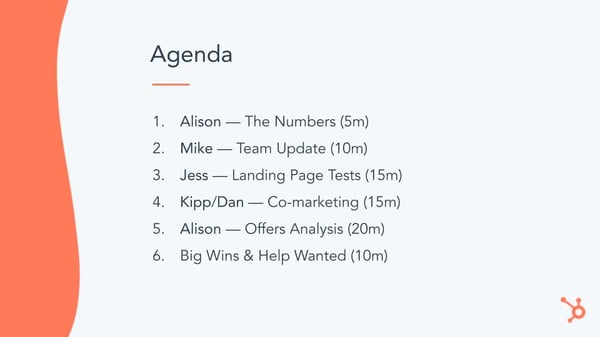
For every meeting, you should have a dedicated agenda slide that lays out three things:

  • What will be discussed in today's meeting
  • Who will be leading each discussion
  • How much time is allotted for each discussion

Take a look at one of our recent marketing team meeting agenda slides:
marketing meeting agenda

Outlining who is talking, what they're covering, and how much time they have to discuss it will help prevent the meeting from getting derailed. It will also prevent people from delving into unproductive conversations that are best had at another time and place.

As for what components should be on your marketing meeting agenda, let's discuss what to cover during your marketing meeting.

Review Important Metrics

Do a quick review of your most important marketing metrics. These shouldn't be niche metrics, like email unsubscribe rate, social media reach, or blog subscriber growth; save those for your monthly meetings where you review month-over-month progress.

These should be the metrics your marketing team is measured on. In other words, at the end of the month, what metrics will tell you whether the marketing team succeeded?

While every business will likely review something different depending on their business model, here are some ideas for you:

It's important to review your team's important metrics because these are how you're measured onas an overall marketing team. And if you don't all know how you're faring as the month progresses, individual contributors can't do anything to step up and help your team's numbers improve.

A Bit of Education

Marketing meetings should be a healthy mix of state-of-the-union content and educational content. Each week, have a couple team members present briefly about interesting projects they've been working on. This serves two purposes: it lets people know what their team members do all day, and they get to learn something new!

Think about it ... wouldn't it be interesting for a blogger to learn a little bit about a PPC experiment? Or for a social media intern to learn about the results of the latest email A/B test?

Sharing lessons from projects helps everyone expand their knowledge base, sidestep landmines if a project backfired, and implement effective new techniques that they never knew worked.

Boom — everyone leaves your weekly meeting a smarter, better marketer!

The Nitty Gritty Retrospective

Your meeting should also contain a review of the projects each employee (or if you're a larger marketing department, each team) worked on last month/quarter/year, plus the results they've seen.

This is good for a few reasons. First, it keeps everyone accountable knowing that each meeting they need to stand up in front of their colleagues and explain just what they do all day. Second, everyone gets to learn from what everyone else worked on and become generally better marketers. Third, it helps everyone identify how individual teams are faring, and what projects they're doing to improve their own metrics.

For example, if you have a social media team, this is their opportunity to report on the success of every single social network they manage. How is their reach faring? How much traffic are those networks sending to your site? How many leads are being generated? Why are some networks more successful than others?

While your weekly meetings (if you have them) may focus on more high-level, team-based metrics, a monthly or quarterly meeting is a good opportunity to do a deep dive into the channels and metrics that enable the entire team to meet its goals.

How You'll Meet This Month's Goals

After the retrospective, each employee or team should also present on their individual goals for the month or quarter, and how exactly they will meet those goals. This is not the time to be generic.

Teams should explain, point by point, everything they'll be doing during the time period to meet the metrics they're measured by.

For example, let's say the email marketing team is responsible for driving more reconversions this month. What exactly will they do to, well, do that? Well, that slide might have some initiatives like A/B test email copy with and without a P.S., anoffers analysis to determine which offers convert at the highest rate, list segmentation experiments, tailoring lead generation offers to align more closely with personas to improve CTR ... the list could, and should, go on.

This is also a critical time in your meeting for feedback. Build in time during every presentation — at least 5 minutes, more if you find you need it after a few meetings — for each team to solicit feedback on their proposed projects. This will help individual teams from getting derailed on projects that might not help them meet their goals, or perhaps other members of the marketing team have fantastic ideas that the teams hadn't even thought of yet!

Big Wins

A little bit of recognition is a good thing. Set aside a couple of minutes — come on, you can't find 5 minutes? — to showcase some of the amazing things your team members or department as a whole have accomplished.

This could be anything from press coverage, speaking engagements, engaging with power players on social media, a smash hit blog post, an email that received unprecedented click-through rates ... you get the point. It's easy to harp on where you're falling behind, but a little cheerleading can help rally your team and remind them just how successful they can be when they put their mind to it.

Solicit Help

Everyone should have the opportunity to solicit help from team members during your marketing team meetings. The larger your team gets, the easier it is to work in silos — but everyone has their own little super powers that sometimes go unnoticed.

If there is a platform during every meeting for employees to share (if they need it) something they need a little help with, you may find others pipe up with a simple solution or resource that solves the problem.

There should also be a few minutes built into each presentation for a little feedback. If someone is presenting on the progress of an ongoing project, part of "soliciting help" may be getting feedback on what steps to take next. For example:

  • Is this project still worth pursuing?
  • How should we measure the success of this project?
  • Does anyone have a solution to a major roadblock?

So while there should be a few minutes at the end of each meeting dedicated solely to giving employees the floor to solicit help, time for feedback should be built into presentations if the presenter needs it.

You know what content to include in your marketing team meetings. Now, let's discuss how to make those meetings run smoothly. These tips, despite helpful content, can make or break the usefulness of any marketing meeting.

1. Stay on time.

Start on time, you end on time, and honor the budgeted time set for individual presentations. I know it's hard, especially when there's a good discussion going on, but delegate a timekeeper who lets presenters know when they're coming up to the end of their allotted time.

If you're vigilant about this, people will start to self-edit their presentation, and meeting-goers will self-censor their comments, only contributing what truly needs to be said.

2. Don't allow computers ...

... said the internet marketing company. Seriously though, only the meeting coordinator should have a computer to pull up the agenda and presentations.

If others bring their laptops, you'll find people can't help but check their emails, get little bits of work done, and chat online, no matter how riveting the presentations are.

3. Build in time for a break.

Your weekly meeting may only be 30 or 60 minutes, but your monthly meeting could take a lot longer. In that case, build in time for people to get up, stretch their legs, go to the bathroom, get coffee, whatever.

You'll start losing people's attention otherwise.

4. End every meeting with action items.

Whatever you talked about during your meeting should be revisited briefly at the end of the meeting, preferably by the meeting coordinator. If you spend 20 minutes talking about how to solve your lead shortage problem at the beginning of your 90-minute meeting, there's a good chance some of the to-dos and initiatives trickled out of people's minds.

Make sure there's someone taking notes throughout the meeting, and allot five minutes at the end of every meeting to review what people should start doing once they walk out of that meeting room.

5. Consider your remote folks.

Whether your entire team or just a few members are remote, it's important to consider the remote meeting experience. As a remote worker myself, dialing into meetings as one of the few remote attendees takes a bit to get used to.

Research helpful technology to mitigate the gap between in-office and remote workers. Zoom is obviously a great choice, but other technology like The Meeting Owl by Owl Labs may be a good fit for your team. At the start of each meeting, test your connectivity and walk through your slides to be sure the message is clear for folks at home.

remote meeting

Source: Getty Images

Most importantly, gather separate feedback from your remote team members to understand their struggles and accommodate their requests.

6. Review metrics and celebrate wins.

You know those marketing metrics you decided to measure and review in the first section? The ones that noted your team's progress throughout the month?

Now's the time to see whether you hit your goals or not! If you hit your goals, do two things: celebrate, and explain exactly why you hit those goals. That second one is critical. Someone should explain what marketing activities strongly contributed to you hitting, say, your leads goal. That way you can repeat those activities this month!

Meetings Don't Have to Suck

Meetings are a necessary part of work. They're a time to celebrate wins, ask for feedback or help, and get aligned with your team and company.

Sit down with your colleagues to audit your meeting schedule and see where you can trim time or cut meetings altogether. Effective and efficient meetings are much more important than meetings for the sake of it. Your team will thank you.

Editor's note: This post was originally published in July 2012 and has been updated for comprehensiveness.


How to Run Marketing Team Meetings That Don't Suck was originally posted by Local Sign Company Irvine, Ca. https://goo.gl/4NmUQV https://goo.gl/bQ1zHR http://www.pearltrees.com/anaheimsigns

How to Leverage Sensory Language in Your Blog Posts [Data + Expert Tips]

Check this out:

"You're sitting in the creaky, mesh-backed, black ergonomic desk chair you bought at a discount off Amazon — hunched over, eyes reluctantly wide open, staring intently at a dimly lit laptop screen bearing a blank document.

It's 4:45 PM. For most of the day, you've heard hardly anything except for the occasional click-clack of keys to commit some fruitless inspiration to your blog post and the intermittent spells of grating silence that came after deleting everything you jotted down.

The lasting taste of the coffee you drank about two hours earlier has gone sour but still coats your tongue and the roof of your mouth. And you can feel the effects of the caffeine slowly waning. Subtle muscle fatigue is setting in. Your eyelids are heavy and it's a struggle in and of itself to keep them from covering your aching, weary eyes.

Your mind has gone stagnant — trapped in the clutches of what's most commonly known as writer's block."

Now, I like to think that passage was vivid and immersive, and that's mostly a credit to the kind of language I used and the personal sensations I played on — specifically how it described the sensory experiences of the subject matter.

That language is most commonly known as sensory language, and it's a powerful resource for any writer to understand and apply. Here, we'll cover what sensory language is, review some of the data surrounding it, and go over how you can use it in your blog posts.

Sensory language is used to describe the five primary senses — touch, sight, sound, smell, and taste. They're most commonly used to convey the specific details of scenes or add a more imaginative element to concept descriptions.

Sensory language is most commonly associated with literature. It's a central component of most fiction and poetry, but that doesn't mean this kind of vocabulary is exclusively artistic in its application. Marketers stand to gain a lot from understanding how to leverage it as well.

Let's take a look at some of the data on sensory language to get a better picture of why it's effective and how to apply it.

What Data Says About Sensory Language

Our day-to-day experiences are multisensory, but that's hard to capture linguistically.

A 2012 study from Charles Spence, published in Science Direct, established that "most of our everyday experiences are multisensory." Very rarely — if ever at all — are our senses siloed when we perceive the world around us.

That said, the English language is limited in its ability to capture that phenomenon and general sensory overlap. In his book Sensory Linguistics: Language, Perception, and Metaphor, linguist Bodo Winter, explains those limitations by describing the experience of eating Kimchi.

He says, "The experience involves the salty and spicy mélange of pepper and garlic notes that excite the taste buds, on top of the fermented smell, the tingly mouthfeel, and the crunchy chewing sound."

Though his description is vivid and engaging, he notes that "conveying this experience forces the use of decoupled sensory adjectives such as salty and crunchy. The compression inherent in these words, each one singling out one aspect of the experience, means that the simultaneity of the multisensory taste experience cannot be conveyed."

This passage helps illustrate what might be the main challenge that comes with using sensory language. Ultimately, the goal is to capture a seamless multisensory experience, but the language you have at your disposal is mostly categorized by individual senses.

Taste and smell are the most difficult senses to describe.

The five senses are essentially tiered when it comes to expressing them linguistically. Certain senses are more ineffable — or difficult to put into words — than others.

A 2014 study from Stephen Levinson and Asifa Majid, published in the journal Mind and Language, found that “in English, at least, it seems generally easier to linguistically code colors than (non-musical) sounds, sounds than tastes, tastes than smells."

Everyone's sensory perceptions are different, but how we individually experience taste and smell — also known as "the chemical senses" — is particularly unique.

A landmark 1990 study in the journal Physiology and Behavior found that the number of taste buds humans have on their tongues can vary radically from person to person. It's also been found taste and smell vary as a function of factors like age, gender, and culture.

In short, it's tough to capture the essence of senses so personal and, in turn, ineffable. And the English language's limited vocabulary for the senses doesn't exactly make things easier.

As Winter puts it, "Detailed descriptive characteristics of smells are not encoded in the English lexicon." Instead, smell is often described in terms of perceived pleasantness through words like aromatic and pungent.

It might seem like taste and smell have less practical application in marketing — especially when it comes to elements like blog copy — but don't count them out. You can get a lot of mileage out of those senses if you can convey them articulately and compellingly.

The perception of taste and smell is more emotional than other senses.

Though these senses are harder to capture, it's in your best interest to try when appropriate. Sensory language is used to invoke meaningful images and feelings. And research indicates that language describing taste and smell bear more emotional weight than other kinds of sensory language.

As Winter puts it, "Taste and smell [as senses] are more emotional in perception, and the associated words are more emotional as well, compared to words from the other senses...There is, by now, a wealth of converging evidence for the emotionality of taste and smell language "

This point can mean a lot in the context of certain schools of marketing. If you can believe it, emotionally charged and compelling language can be an asset to a company's emotional marketing efforts.

And if you're interested in using sensory language in your copy in the interest of that cause, it's worth having a pulse on which aspects of the concept are the most emotionally evocative.

Multisensory language makes for better marketing.

As I mentioned, our perception of the world around us is always multisensory, so it's intuitive to assume that we're naturally more receptive to marketing that reflects those kinds of experiences. And the data on the subject is consistent with that notion.

A 2009 study published in The Journal of Consumer Research focused on how multisensory advertising impacted subjects' perceptions of taste. It found that multisensory ads result in higher taste perception than ads focusing on taste alone.

And while the study focused primarily on multisensory advertising's impact on a single sense, other researchers have extrapolated upon its findings and assumed it applies to the other senses as well.

What does this tell us? Well, this means that multisensory marketing — supported by tactful use of sensory language — is more engaging and enriching than marketing that focuses solely on conventionally touched-on senses like sight or sound. It shows that there's tremendous value to using a robust sensory vocabulary in your copy.

How to Use Sensory Language in Your Blog Posts

Understand when it's appropriate to use.

First and foremost, you need to understand that sensory language can seem awkward and jarring when you force it in certain contexts that don't necessarily warrant it.

For instance, if you're writing a matter-of-fact, professional post about a business concept, you probably wouldn't want to use sensory language while defining it.

Take this definition from a HubSpot blog about strategy consulting:

"Strategy consulting is when businesspeople — generally executives, boards, or management — bring in a third party to offer an outside, expert perspective on their business challenges. Strategy consultants usually have considerable industry knowledge and are expected to assess high-level business issues objectively. They take a holistic look at specific problems companies are dealing with and give advice on how they should approach them."

It's more appropriate to keep that aspect of the article more straightforward and professional. Overloading it with sensory language might undermine your ability to clearly establish what the concept is. That said, there are ways you could incorporate sensory language to bring that dry concept to life and make it engaging.

Add a narrative element to the post.

Even though sensory language might not be the best way to convey the more rigid, objective aspects of your post, you can still use it to qualify and illustrate certain concepts. One of the best ways to do that is by giving your piece some narrative flair.

This method gives you some space to use sensory language and make concepts more engaging and entertaining. Here's an example of how you could do that when covering the concept of strategy consulting I just described above:

"Picture this: A CEO sits, poised in a high-backed pleather chair at the head of an engineered wood conference table, eyes shut tight with a cast of stuffy, sharply suited board members flanking the table's sides. They look on intently — expressions caught somewhere between frustration and desperation.

The smell of stale coffee and the special kind of silence that only comes after an hour or so of beratement hang in the air. Day has turned to night out the floor to ceiling windows without any resolution about how to amend the company's recent marketing campaign — the one that's been trending on social media for all the wrong reasons.

The CEO finally opens their eyes, and in a tone that's equal parts stern and exhausted, they say it: 'We need to bring someone in.'

Enter the strategy consultant."

With that kind of description, I was able to set the stage, capture reader attention, and pave the way for a more thorough description of what a strategy consultant does.

Use metaphors or similes.

This point ties into the one above — to a certain extent. Sometimes the subject matter you're writing about is too dry to pull a narrative from without coming across as desperate to force sensory language on a concept that it doesn't naturally gel with.

In those cases, it can help to use metaphors or similes — rife with sensory language and vivid description — to simultaneously engage and inform the reader. For instance, let's imagine you're writing a piece about quote graphics. You might want to incorporate something like this:

"Think of your quote as the entree to a Michelin star meal — an immaculate cut of filet mignon that tastes like heaven and cuts like butter.

It's the centerpiece of the dish, and it's delicious in its own right, but some side dishes and 'eye-eats-first' presentation would take it to another level. By filling out the plate with crispy, golden-roast potatoes and perfectly charred, still-sizzling Brussel sprouts, you can take the dish from 'intriguingly a la carte' to 'bonafide five-star.'

That's the fundamental principle behind quote graphics. The engaging backdrop, distinctive font, and other engrossing visual elements you use can elevate your content and make it compellingly complete."

Though it might not always be obvious, you can often find ways to incorporate sensory language into your blog content. And when done tastefully and effectively, it can pay off in spades. So if you're interested in finding ways to add some oomph to your blog copy, consider taking some time to better understand sensory language.


How to Leverage Sensory Language in Your Blog Posts [Data + Expert Tips] was originally posted by Local Sign Company Irvine, Ca. https://goo.gl/4NmUQV https://goo.gl/bQ1zHR http://www.pearltrees.com/anaheimsigns

Wednesday, January 13, 2021

How Do Your Pins Perform? A Beginner's Guide to Pinterest Analytics

Social media is an instrumental component of any business's marketing strategy. But for users, scrolling through the mass amount of branded content across every social media platform can be exhausting.

However, there's one social media site where users actually embrace branded content -- Pinterest.

Pinterest can be an incredibly useful tool for attracting consumers to your products. In fact, 66% of Pinterest users make a purchase after seeing a brand's Pins.

Because of Pinterest's power to influence purchases, it makes sense to develop and maintain a strong Pinterest presence. And, whether your business's social media goals align with improving brand recognition or increasing traffic, keeping an eye on analytics is critical for ensuring your content strategy is successful.

Additionally, JD Prater, an Ads Evangelist at Quora, told me, "Keep in mind Pinterest is all about discovery. Understand the Pinner's journey and how it's influencing future purchases -- and not necessarily today's."

To ensure you're able to achieve your Pinterest goals and see success on the platform, we're going to explore what Pinterest Analytics is, and show you the seven most important metrics you should be tracking.

What is Pinterest Analytics?

Pinterest Analytics is Pinterest's completely free, native tool that you can use to help measure your performance on Pinterest. Pinterest Analytics lets you collect traffic insights -- including impressions and link clicks -- so you can modify your strategy to better meet your users' needs.

To access Pinterest Analytics, you'll need a business account, which will also unlock the ability for you to create advertisements and promote Pins.

Why Use Pinterest Analytics

Pinterest Analytics offers the ability to sort your data from any time period, so whether you're doing a monthly or yearly report, you're covered. Data can also be sorted by device, which can be helpful when figuring out how you should optimize for mobile versus desktop.

You can also export your stats in a CSV file, which will come in handy for your next report or audit.

Now that we know a little more about Pinterest Analytics, let's see what tools we can use to get the most insight.

Pinterest Analytics Tools

1. Pinterest Analytics

Of course, the main tool we've discussed so far is Pinterest Analytics.

When you go into Pinterest Analytics, you'll see the dashboard divided into three major sections -- Profile, Audience, and Website analytics.

Pinterest Analytics is also split into four sections -- Impressions, Saves, Link clicks, and All-time. Let's explore those four sections now.

1. Impressions

Impressions are the number of times your Pin has been viewed. This could be through a user's home feed, category feed, or search.

2. Saves

Saves are the number of times someone has saved one of your Pins to a board. This is how new people discover your content on Pinterest.

3. Link clicks

Link clicks are what drive your users to a destination -- whether that be your website, blog post, or another Pin.

4. All-time

Your All-time metrics include an assortment of things dating back to the very beginning of your Pinterest history. Here, you'll be able to see your most popular Pins, and the content ranked highest in search.

Lastly, it's important to note -- analytics should be used only once you fully understand the Pinterest user.

For instance, as Prater notes,"Before you start analyzing the data and drawing insights, it's important to understand the Pinner journey. There's no one way to pin. People's pinning habits are diverse and are centered on what they care most about (their interests)."

2. Tailwind

Another great tool you can use to analyze your Pinterest metrics is Tailwind. Tailwind is a social media scheduling tool for Pinterest and Instagram that includes analytics as a part of its features.

The tool goes beyond vanity metrics and tracks followers, engagement, and even virality. You can even track your ROI by looking at visits, transactions, and revenue down to the specific pin.

Additionally, there are powerful filtering tools so you can uncover insights by board, interest heatmaps to verify that you're focusing on the right content, and trending reports to see what's trending right now even if it was pinned months ago.

If you're looking for a detailed tool with a lot of insight, Tailwind might be worth exploring.

3. ViralWoot

ViralWoot is a social media scheduling and analytics tool that can help you get your bearings on your Pinterest analytics.

This tool includes an influence score, which will help you understand what you need to do to boost your Pinterest presence.

Besides the influence score, all the important metrics are available to track with this analytics tool. A great feature of the ViralWoot is the straightforward explanations that can help you actually understand your analytics. You can learn what the best days and times to pin are, how to increase your search impressions, and discover trending keywords on Pinterest.

4. Olapic

Olapic is an all-in-one user generated, influencer, short-form video enterprise content platform that helps brands drive engagement.

With its scheduling and analytics tool, you can track ROI, influencer interactions, and engagement.

Pinterest Metrics to Track

There are seven metrics you'll want to track on your Pinterest account to assess how well your content is performing. Of course, depending on your team's unique goals, you might want to focus more heavily on a few of these metrics, rather than all of them.

1. Impressions

As with any other social media network, impressions measure the number of times your content is displayed. Pinterest impressions include the number of times your content appears in a user's feed, search results, or a different category feed.

To get a sense of what your audience is searching for, look for patterns within your content to see which categories and keywords gain the most impressions. For instance, if you notice your "Quotes from impressive marketing leaders" post performs exceptionally well, you might want to lean more heavily into thought leadership content on Pinterest.

2. Repins

Repins are the number of times someone saves your pin to one of their own boards.

Repins are like a retweet on Twitter. It means that the user found your post both interesting and shareable. This action is more valuable than an impression because it counts as actual engagement.

The more people that engage with your content, the more likely it is to show up in people's search.

3. Clicks

Clicks are the metric that determines whether or not your content is driving your audience to your website. This metric is extremely important if your goal is to increase traffic with your Pinterest presence.

The number of clicks and visits to your website from Pinterest can be found at the bottom of the 'Site Metrics' tab in Pinterest Analytics. Clicks indicate the action of a click, while Visitors signal the number of unique users visiting your site.

4. Top Pins

Pinterest content has a long lifespan. This means that your content can accumulate metrics over a longer period of time than they do on other platforms.

Your Top Pins will be useful in determining your best content over time. If you launched an extremely popular campaign that resonated with your audience a year ago, you'll be able to go back and see the actions taken on that content. You can use that information to inform the strategy of your next campaign.

5. All-time stats

To see what content formats have worked for your account in the past, look at your data dating back to your account's inception. This data includes your most repinned pins, pins that performed best in search, and the pins most engaged with your most engaged with pins of all time.

Like your Top Pins, you can use your best-performing pins to optimize new content and provide your audience with what they want to see.

6. Audience affinities

In this section, you will see a breakdown of the categories your followers engage with and the top boards to which your content is pinned. This will help you understand your audience and what attracts them to your content.

7. Saves

A save means that people like your content and are saving it for later on one of their boards while, simultaneously, recommending it to their followers.

Saves increase the reach of your post on Pinterest and may indicate that the user plans on further engaging with the content later.

This metric is key to understanding which content your audience is identifying with, which will enable you to build deeper relationships with customers over time.

There are plenty of other metrics that Pinterest provides that will be helpful for your business. Remember, what works for one business's Pinterest strategy may not work for your company's unique voice and positioning. Using Analytics can allow you to test different content formats, which will ultimately add value to your customers' overall experience with your brand.

Take a look at The Ultimate Guide to Pinterest Marketing to learn more about how to use Pinterest for your business.

Editor's note: This post was originally published in April 2019 and has been updated for comprehensiveness.


How Do Your Pins Perform? A Beginner's Guide to Pinterest Analytics was originally posted by Local Sign Company Irvine, Ca. https://goo.gl/4NmUQV https://goo.gl/bQ1zHR http://www.pearltrees.com/anaheimsigns
How HubSpot's Report-Based Acquisition Campaign Hit 150% of Our Lead Goal in 30 Days

This post is a part of Made @ HubSpot, an internal thought leadership series through which we extract lessons from experiments conducted by our very own HubSpotters.

Acquisition marketing campaigns are critical to bring in new customers and revenue. At HubSpot, we run these campaigns quarterly.

Despite the rapid cadence, every quarter we work to create new, remarkable ways of reaching, informing, and converting our audience.

I wrote this post to share with you how we crafted our latest acquisition campaign to hit and exceed our acquisition targets.

Establishing the Campaign

The beginning of our Q1 2020 Acquisition Campaign started with a blinking cursor. As we brainstormed how to start our research, we had a few inputs to work with.

First, we knew our target audience consisted of marketing managers, as we were re-launching our Marketing Hub Enterprise product that month.

We knew that reports were a content type that worked well for us in the past. We saw our 2019 Instagram Engagement Report and a 2020 Social Media Report successfully attract new audiences.

At the very least, it was a motion that our audience was familiar with, which meant there was less of a barrier to show the value.

Additionally, seasonality played a large role in our planning. We wanted to build content to support marketers planning their strategies for the upcoming year.

With the combination of 1) a target audience, 2) an understanding of high-performing content types, 3) timing, and 4) our additional user research, we wanted to create a remarkable go-to resource for marketing managers building their strategies for the year.

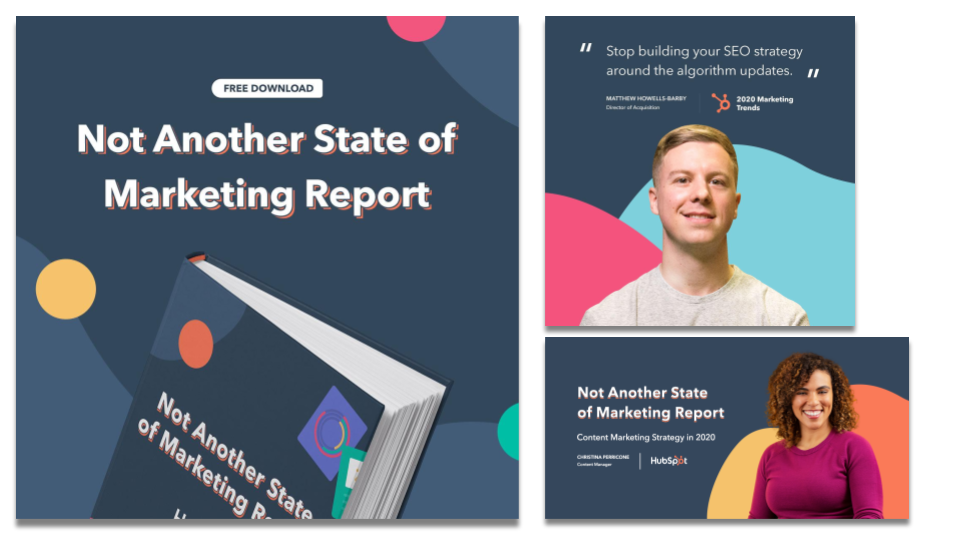
Thus, the idea for “Not Another State of Marketing Report” was born.

In this article, I’ll talk through the report surveys and content, the web experience, the promotion, and the results. Hopefully, it gives you a peek behind the curtain and some inspiration for future campaigns.

Running the Surveys and Creating the Report Content

The first and most important thing about the content of this report was to start collecting survey data for analysis and visualization.

Working with our team at HubSpot Research, we ran our first survey in November/December of 2019 that went out to 3,400 global marketers.

After we sent out the survey, we talked about what might differentiate this content from other reports we had released in the past. While the data was valuable, we knew that data can be dull without human context or insights.

So, we brought in the humans.

Our first criterion for selecting our experts was their subject matter expertise. We had come up with a list of topics we wanted the report to cover (from SEO strategy to content marketing strategy and more) and wanted our experts to have deep and specific knowledge about the topic we chose them to represent.

Our second criterion was seniority. We were crafting a report for higher-level marketing managers, directors, and VPs, so we wanted our experts to have a similar level of seniority.

We are fortunate enough to work with a lot of brilliant marketers at HubSpot, so eight of our experts were internal. The other two, Cynthia Price (VP of Marketing at Litmus) and Ellie Mirman (CMO at Crayon) were generous enough to offer their time when we asked them to share their expertise with us.

We interviewed each of our experts for about an hour, took detailed notes, and recorded the interview. We also shared the survey data with them to gather their commentary about the data points. Finally, we worked with the experts to craft detailed articles with their advice for the upcoming year.

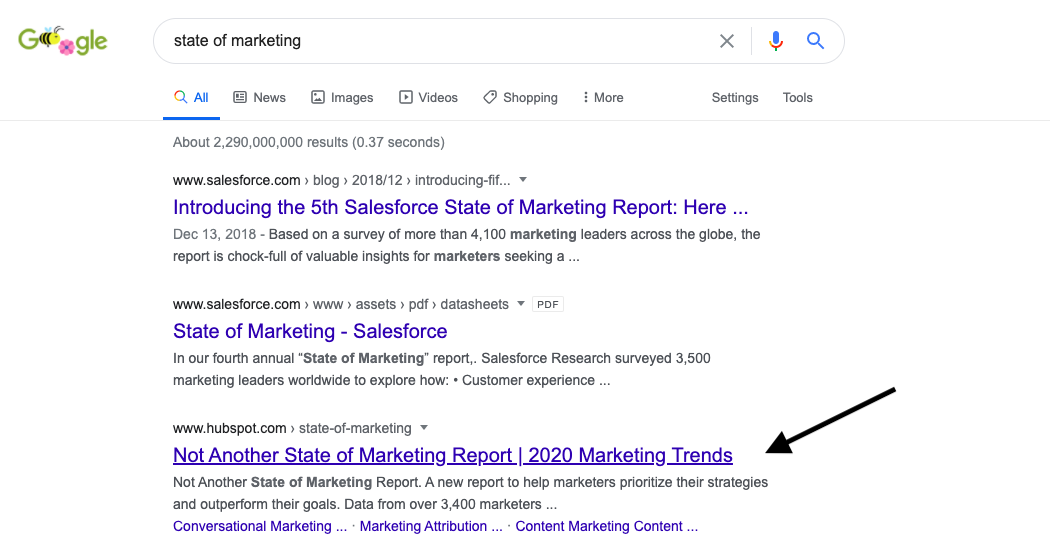
We decided to leave these articles ungated on the web experience, so we optimized them for organic search with extensive keyword research. We’ve seen some exciting results from that play — generating over 15,000 backlinks in the first two months and taking the number three result for the search term “state of marketing”.

state of marketing search engine results page

When we received the initial survey data, we were thrilled by the results — but knew we needed to take it one step further. So, we ran an additional survey in January to a North American database of marketers.

At this point, with the additional survey data and expert commentary, we sourced some quotes from experts across the industry. We ended up with a great group of contributors from Dropbox, Twilio, and more.

When all was said and done, we had 19,000 words worth of insights and 70+ data points.

Designing and Developing the Web Experience

Differentiating this campaign didn’t stop at the expert insights. We wanted to create an immersive web experience to pair with the report PDF.

The result was a fully custom web experience with a homepage, nine child pages for each article, and custom interactive form that follows the user in a non-intrusive banner. It was designed by an incredible lead designer, and built from the ground up by three developers. (It’s better seen than described, so I’ll leave you with this.)

state of marketing report hubspot

We were curious about what kind of conversion rates this custom web experience could drive.

To date, the homepage of the report is converting at around 35%. This metric is calculated as the ratio of views vs. submission and is measured in HubSpot’s own HubSpot portal.

We’re really excited about that conversion rate, but we’ve noticed that it doesn’t stay as high throughout each page of the web experience.

For example, on a sample article page, we noticed the conversion rate was about 5%. The leading theory right now is that people are downloading the offer when they land on the homepage, and then they explore the rest of the experience after downloading, so they aren’t converting on the offer pages.

Overall, though, we’re very proud of how the web experience turned out and think it’s a strong differentiator. After all, 38% of people will stop engaging with a website if the content doesn’t look pretty on the page.

How We Promoted the Campaign

When it came time for promotion, we had to decide on three things: the story we wanted to tell, our creative promotional assets, and the channels we wanted to pursue.

1. The Story

The literal offer that we were marketing was a report. However, the emotion that we wanted to portray was confidence. This was the story we wanted to report and campaign to tell.

For some marketing managers, feeling confident about a strategy can prove difficult. Are other people in the industry doing this? How will I know if it will work?

Data can help ease those concerns, as can long-form articles from deep subject matter experts.

So, we wrote 20 headlines around that concept. This was a good exercise because, although most of them ended up unused, we found this process sharpened our writing “muscle”.

One of the early headlines we landed on was, “A report for marketers who use data to outperform their goals.”

2. Our Creative Assets

The design of this campaign was important to us. We wanted it to feel cohesive across the web experience, the PDF offer itself, and our promotional efforts.

So, under the guidance of our lead designer, we put together a detailed brief for a freelancer, and he came up with some beautiful stuff.

not another state of marketing report hubspot

Our learning here is that cohesive design across all campaign assets makes the campaign feel larger than life.

3. Promotional Channels

On the Global Campaigns Team here, we like to bucket our promotion into three categories:

  • Paid : What channels can we activate that we have to put direct dollars into?
  • Owned: What organic channels and established HubSpot audiences can we leverage?
  • Earned: What are some additional free promotion and placements (e.g. organic SEO) can we leverage?

For our paid channels, we chose to focus on Facebook Ads (historically the lowest CPL for us) and LinkedIn Ads (typically more expensive but more effective targeting for the audience we wanted to attract). For this channel, we built a more standard landing page to drive conversions.

For our owned channels, we activated our brand channels (social media, email, etc.), our solutions partner channels, our customer channels, our HubSpot Academy Channels, and Sales Channels (our BDRs used the report as a conversation starter). We also asked our authors to promote it on their personal social networks, and we gave them personalized assets to make that promotion remarkable.

For our earned channels, we focused heavily on the organic SEO value of our ungated articles, the promotion from our partners in the report (Litmus and Crayon), and media placement in marketing publications.

Tracking and Analyzing the Results

This campaign was quickly successful: We hit 100% of our net new lead goal in 16 days and 150% of the goal in just over one month.

As of April 21st, there are 15,800 backlinks to the report. We are ranking for over 350 organic keywords and secured the #1 result for the search term “state of marketing.”

The custom homepage is converting at over 30%, and the paid landing page is converting at 25%.

About 50% (48%) of the net new leads for the campaign came from paid social media. We are hoping to see that percentage decrease as organic traffic continues to gain traction.

There were a lot of factors to our success, but we’ve identified the following as the main ones:

  1. Spend time in the strategic planning process. It’s tempting to rush a campaign out the door, but a well thought out strategy goes a long way. Use qualitative, quantitative, and search data to inform the direction you choose.
  2. Think about how you can contribute to a conversation that’s already being had in a new way. There are a lot of State of Marketing Reports out there. We focused on providing that same value but took it a step further.
  3. Help your creative team by giving them strong creative guidelines. This makes the design more cohesive and powerful in the end.
  4. Identify at least three channels you can activate for promotion. You should prioritize the ones that will most help you with your goal. Since we were looking to attract a new audience, our paid channels made the most sense to invest in.
  5. Double down on the details of your content. If someone is willing to give their information for your content, you better make sure it delivers on value.

Best of luck with your future campaigns!


How HubSpot's Report-Based Acquisition Campaign Hit 150% of Our Lead Goal in 30 Days was originally posted by Local Sign Company Irvine, Ca. https://goo.gl/4NmUQV https://goo.gl/bQ1zHR http://www.pearltrees.com/anaheimsigns
13 Tips on How To Nail a Presentation To the Board of Directors

In college, I always made it a point to listen intently to presentations. I knew how stressful and nerve-wracking it was to present in a room of peers and authority figures.

I would nod feverishly to let presenters know I was invested in their presentation. And they knew it too. They often zeroed in on me as I became their focus point and silent motivator. The fixation felt awkward at times, but that felt like one of my small contributions to society. That, and an endless supply of cat videos.

Back then, the stakes were relatively low. But when you’re tasked with putting together a presentation to a board of directors, the pressure’s on.

But with a few tricks in your arsenal, you won’t need a sympathetic audience member to gauge how well you’re doing.

Let’s walk through some tips to prepare for your presentation and review some things to avoid.

1. Know your audience.

Knowing your listeners is as important as the content of your presentation. When you understand their priorities, you can put together a presentation that speaks directly to them.

If you don't know the board well, do some research and get answers to these questions:

What does the board care about?

This will help you see from what lens they look at things. For instance, a board keen on community impact may not be drawn to a presentation focused on return on investment (ROI).

There are a few ways to find this out. You can start by looking into each board member’s professional background. If most members have a finance background, for instance, you’ll want to make sure you cover any financials as it relates to your presentation. This could be cost, expected ROI, or operating margins.

You can also get some insight into what the board cares about by looking back at your interactions with its members. Think about the conversations you’ve had: What comes up most often? Is it company culture, profit, philanthropy, innovation, or something else?

What are their main concerns?

A board of directors is responsible for making decisions that will ensure the growth and sustainability of a company. So naturally, they will be looking out for anything that may impede that process.

Common concerns a board may have are:

  • Costs: How much time and money will it require?
  • Timeline: How long will this project take and is that timeline feasible?
  • Risks: How risky is your proposal and what is the risk-to-return ratio?

You may find that each board member has a different focus, which means your presentation should be well-rounded to tackle these issues.

Once you know this answer, you can subtly handle each concern throughout your presentation. Getting those answers will help you create a presentation that not only interests your audience but also aligns with their goals. This, in turn, will bring you much closer to accomplishing the plans laid out in your presentation.

2. Plan ahead.

The next step in delivering a great presentation is making a plan. This means figuring out the focus of your presentation, what you’ll cover, and what you’ll leave out.

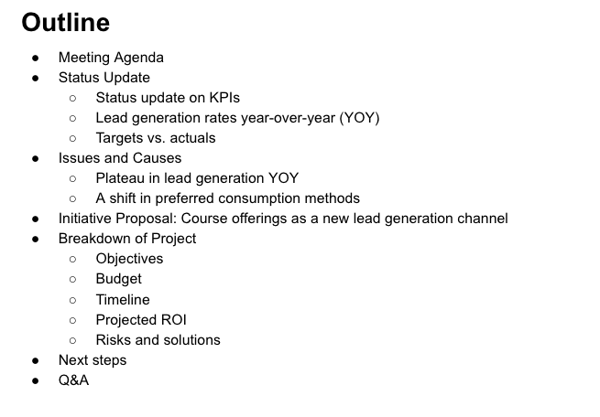
A presentation should follow the structure of any good movie, with a beginning, middle, and an end. Here’s an example outline for a presentation where the head of the marketing team is proposing course offerings as a new lead generation channel.

Presentation outline exampleIn the beginning, you should set expectations for what you will cover. This is also an opportunity to set the baseline and explain the current state of affairs. This may look like discussing KPIs or reviewing goals and outcomes.

The middle is the meat and potatoes of your presentation. You'll likely spend time providing data, contextualizing it, and explaining your approach.

Your ending should bring together your key points and leave your audience with actionable steps. Because what good is providing the information if you have no plan for what to do moving forward?

3. Structure your presentation based on the board’s process.

Not every board of directors operates in the same way. Sure, there are standard guidelines for every meeting. However, the approach may vary for presentations.

Some may operate more like a town hall, pausing periodically to discuss the points as they come up. In this case, leave room after each section of your presentation to discuss what was covered.

Others may follow the more standard approach: presentation followed by a discussion. Studies show that humans remember best the beginning and end of what they read, hear, and see. What’s in the middle tends to get lost. With that in mind, consider sharing your most pertinent information toward the beginning and end of your presentation.

4. Keep it concise.

One thing board members aren’t known for is open availability. That said, you want to make the most of your time with them. How do you do that? Stick to the scope of the presentation.

While it’s great to incorporate storytelling, avoid getting sidetracked and wasting time. Be clear and keep it simple.

If you’re showing data, only share one highlight per data graph. There are several reasons for this:

  • Data itself doesn’t tell a story. You, as the presenter, do. As such, you have to explain what it means and why it matters. Let’s say lead generation at your company has plateaued in the past year across all channels. That’s all the data says. But during your research, you realize it’s due to a shift in how your audience is consuming information. Your role is to present the data and explain the "why" behind the plateau along with a solution.
  • You want to prevent information overload. Share the piece of data that best supports your points and has the most impact. For instance, if a new lead generation channel is the focus of your presentation, diving into the specifics of another channel may not be worth your time.

If you leave it to your audience to make sense of the data, they might reach a conclusion that doesn’t align with your message.

5. Set up early.

There’s nothing more awkward than silence during a technical difficulty.

Everyone’s looking at you while you’re figuring out why technology has forsaken you. The more time the issue takes to resolve, the more panicked you get. We’ve all been there.

To avoid this, set up early and do a run-through before your scheduled presentation time. It’ll give you time to get familiar with the space and any technology you’ll need to run during your presentation.

6. Incorporate visuals into your presentation.

When choosing between words and media, pick the latter.

Visuals help us make sense of information at a much quicker pace than words do. We’re also better at remembering what we see versus what we hear by 55% – it’s called pictorial superiority.

It’s also beneficial to keep your visuals simple. If you have too much going on, your audience will be confused. But if it’s too bare, it will take too many visuals to paint the picture. So, pull your most significant data and use data visualization tools to design intuitive graphics.

7. Focus on results.

A board of directors typically focuses on big-picture decisions that will have a long-term impact on the company.

In this vein, every piece of your presentation should get you closer to answering these questions:

  • "Why does this matter? "
  • "What is the long-term impact? "
  • "How does this bring the company closer to its goals? "
  • "Any potential roadblocks? How will you address them? "

Incorporating these answers into your presentation will set you up for a smoother Q&A session.

8. Send materials beforehand.

Depending on what you’ll be covering in your presentation, it may be helpful to send the board materials to review in advance. This should only be supplemental information that would be too time-consuming or distracting to cover in a presentation, like reports and demos. This way, the focus during the presentation will be on the "why" and not the "how."

The one material you don’t want to send is your presentation, as you want to be the one to contextualize it. Otherwise, the board might form an opinion based on limited information.

A week before the meeting is a good rule of thumb, leaving room for you to respond to initial comments or feedback.

Think of this process as an advantage. You get insight into what the board members may bring up during the meeting and more context to prep. Secondly, it ensures everyone is on the same page ahead of the meeting. That way, you can dive straight into key points during your presentation without covering minute details.

9. Build confidence with your power outfit.

Building confidence is one of the less concrete tips on the list to implement. But the good news is, there are research-backed techniques you can use to achieve it. One of them is right within your reach: clothing.

Many of us can relate to the feeling of trying on clothes in a fitting room and feeling like a million bucks. It tends to put us in a better mood and shift our perspective.

Well, turns out there’s a reason for this. In 2012, two researchers coined the term "enclothed cognition" to refer to the impact clothes can have on the psyche. They found that the clothes we wear can shift our perspective.

In that spirit, put on your best blazer or suit the day of your presentation. That outfit may be just the boost you need.

10. Rehearse your script.

During a presentation with a board of directors, you want to avoid the Michael Scott approach at all costs.

Instead, go the exact opposite route: practice. Practice is the cure to presentation jitters and the formula for seamless delivery. The more familiar you become with your content, the better the presentation will be.

If it’s been a while since your last presentation, start by practicing in the mirror. You’ll immediately notice any mannerisms that may be distracting to your audience. Recording yourself also works great.

Then, practice in front of an audience. And, unfortunately, your dog won’t cut it for this one. Practice with family or friends who can give you feedback on how to improve.

And remember: You’re the only one who knows your speech and presentation. So, if you mess up or forget to mention something, you’re likely the only one who noticed.

11. Don’t fall into the PowerPoint trap.

You’ll likely use a tool like PowerPoint to guide you during your presentation. Yet, it’s important that you don’t overly depend on it.

For instance, packing your slides with heavy text or bullet points is a surefire way to lose your audience. In fact, 40% of respondents in a 2018 study by Prezi said it caused disengagement and made it harder to retain information.

So, stick to one key point on each slide. It’s easier for your audience to remember and prevents information overload.

12. Read the room.

Even if you follow every tip listed above, you might hit a point in your presentation where there’s a disconnect between you and your audience. You might notice confused looks or a shift in body language. If that happens, that’s your cue to pivot.

If your audience seems confused, dive in a little bit deeper on your point. If you sense disagreement, tackle those concerns head-on.

Let’s say you’re proposing a new initiative for the company, and you sense some pushback on the timeline.

You can address it by saying something along the lines of, "You may have some concern regarding the timeline and whether it’s feasible given our current projects. While the timeline may seem tight, we have factored in X, Y, and Z, and, given our past initiatives, we believe this timeline will account for A, B, and C."

A response like this can mitigate the situation while still keeping you on track.

13. Include time for questions.

As a foodie, dinner for me isn’t complete without a good piece of chocolate. Whether it’s a KitKat or a chocolate cake, having chocolate after dinner feels like the perfect ending. Q&A sessions are kind of like that. It’s the audience’s chance to ask questions and discuss the presentation.

Be ready for questions regarding the data and solutions you presented. The length of the Q&A session will vary depending on the length of your presentation, the size of the board, and other factors.

Additionally, it’s your opportunity to address any looming concerns and re-emphasize your key points. Not sure what to do if you don’t have an answer to something? Here are a few responses:

  • "That’s a great question. I don’t have an answer for you at the moment, but I will follow up over email by end of day."
  • "I don’t have much experience in that X [topic/department/]. However, I will reach out to X and get back to you within a week."
  • "We haven’t explored that yet, but what I can tell you is …"
  • "That’s a great point we hadn’t considered before. My team and I will reconvene and strategize on the best way to approach this."

When the stakes are so high, a presentation to the board can seem daunting. By incorporating these tips into your strategy, you can remove the stress and focus instead on your delivery.


13 Tips on How To Nail a Presentation To the Board of Directors was originally posted by Local Sign Company Irvine, Ca. https://goo.gl/4NmUQV https://goo.gl/bQ1zHR http://www.pearltrees.com/anaheimsigns
7 Best Event Registration Tools

When it comes to event marketing, there are many tasks that need to be completed prior to (as well as during and after) your event. This can become overwhelming, especially if you're on a small team. 

The good news is that there are a variety of event marketing tools available to help with all aspects of your event, including event registration. In this blog post, we’ll cover seven of the best event registration tools on the market today.

For the sake of simplicity, the free event registration section includes one option that is always free for event registration. The second section includes event registration tools that are either always paid, or offer free and paid plans. 

Free Event Registration Tools

1. HubSpot Free Online Form Builder

HubSpot Free Online Form Builder event registration tool

Source

HubSpot’s Free Online Form Builder makes it easy to create, integrate, and share forms with your audience. The drag-and-drop builder makes the process of designing your registration forms simple — then, all attendee contact information obtained is automatically stored in your CRM.

Share your event registration form on an event website or web page. There are over 1,000 form fields and over 12 field types you can use to customize your event’s registration form. Then, decide if you want to trigger notifications when an attendee signs up for your event by completing and submitting your form.

Are you a WordPress user? Well HubSpot still applies to you thanks to the HubSpot WordPress Plugin. 

Source

When it comes to using HubSpot as your event registration tool (or as your CMS, CRM, Marketing Software, Sales Software, or Service Software, for that matter), you have a lot of flexibility — even if your website is built on WordPress. In fact, HubSpot’s free WordPress plugin, which is built natively in WordPress, helps capture, organize, and engage visitors with free forms (as well as live chat, contact management, email marketing, and analytics).

Select to receive notifications once an attendee completes registration, as well as automate event-related follow-up emails. Use the drag-and-drop form builder for your event registration or stick to the WordPress builders you already use (this is made possible by the many integrations HubSpot offers, like Gravity Forms). Lastly, built-in analytics and reporting dashboards allow you to keep track of your attendees and their contact data with ease.

Next, let's look at some more event registration tools. 

Best Online Registration Tools

2. Google Forms

best online event registration tools google forms

Source

Google has a variety of tools you may find yourself using every day (I know I do) — Google Docs, Google Sheets, and Google Slides are just a few examples. So what about a Google Event Registration Tool? Well, Google Forms offers the necessary features for just that. Similar to other Google products, Google Forms offers a plan for personal use (that's free) and a plan for your team (that's paid and comes with greater security and control).

With this paid Google Business plan, you can create event registration forms for attendees, students, or patients and track all sign-ups. To create your event’s registration forms, simply open a new form and begin customizing the form fields. Drag and drop these form fields so they’re positioned accordingly, and add images, videos, and custom logic as you see fit.

Then, send registration forms directly to your audience members' email addresses and view data about submitted forms within the built-in analytics dashboard.

Price

Google Forms Workspace requires a Google Business Plan. You’ll gain access to Google's other products in addition to Froms with a paid plan. Plans range in price from $6 per month to $18 per month. If you’re looking to use the product at the enterprise level, contact a rep for a quote.

3. Splash

splash best online event registration tools

Source

Splash is an event marketing program for online, in-person, and hybrid events. This tool allows you to design and customize responsive web pages and emails for your event. As for attendee sign up, choose to share registration forms and RSVPs that your audience can then send back to you with ease. Smart guest lists, targeting, and email marketing features exist to optimize and streamline event registration and promotion.

Splash also provides the necessary tools to check-in attendees, share event-related surveys, and run sweepstakes and contests. Integrate Splash with your marketing automation platform and CRM, and analyze event data via the tool's reporting dashboard.

Integrate Splash with HubSpot to create, plan, and host on-brand events all from a single tool and leverage attendee data in HubSpot for future campaigns and events.

Price

Try Splash for free, request a demo, or speak with a sales rep to learn about the right plan for your team.

4. Eventbrite

eventbrite best online event registration tools

Source

Eventbrite is an event technology platform ideal for supporting and managing any event you host. The tool's event registration feature is so easy to use that it only requires you to work through three steps.

Start by entering your event details. This is when you’ll finalize your event’s who, what, where, when, and why.

Then, create your tickets — select whether or not your tickets will be free as well as which type of tickets you'll offer (e.g. single vs. multi-day pass). This is also when you'll determine whether you want to offer a discount or promo code for early-bird and group purchases.

Lastly, open registration to your audience via web page or social media. Specifially, Eventbrite makes it easy to share registration via Facebook and Instagram.

Price

Eventbrite offers both free and paid plans. The Essentials and Professional plans are free if you host a free event.  Eventbrite will only charge you when you sell a paid ticket.

If you are hosting a free event, you have access to all features offered in the Essentials plan, and you have access to all features offered in the Professional plan except for phone, chat, and email support. There’s also a third plan option, Premium, which offers the greatest amount of flexibility and customization at the highest price.

5. Whovawhova best online event registration tools

Source

Whova is an event management tool that comes with an online registration feature. Create tickets within minutes and customize registration in a number of ways. Offer discount pricing (for early-bird or group ticket purchases), offer different types of tickets (e.g. single vs. multi-day pass), and ask attendees questions about your event when they're registering (e.g. what made them want to attend your event or what they're most excited for).

You can also create a registration web page and embeddable widgets to link to your registration as well as use the real-time reporting dashboard to track sales and attendance. 

Price

Contact Whova directly for a quote via their pricing page.

6. Wild Apricot

wild apricot best online event registration tools

Source

Wild Apricot is a membership and event management software with an online event registration feature. The tool makes it easy to create an online event listing that attracts your target audience as well as includes images and your online event registration form. Any event you create with Wild Apricot is added to the tool's calendar and/or your website so your audience can learn about and sign up for the event from anywhere.

Share early-bird discounts or coupon codes, offer add-ons at checkout, and schedule automatic confirmation emails to be sent to attendees. Wild Apricot also automates your event’s promotion, accepts online payment, and manages event check-in. The tool even allows attendees to connect and network with each other via the mobile app. 

Price

Wild Apricot has eight different plans that range from free to $600 per month. Each plan offers different features and capabilities as well as a free trial so you can test out the tool before committing to it.

7. Bizzabo

bizzabo best online event registration tools

Source

Bizzabo is an event management platform for all events including those that are online, in-person, and hybrid. The software offers an event registration tool that's customizable and embeddable so attendees can register without ever leaving the event website. You can also brand your event’s registration form so its design complements the event.

Customize your event registration form’s fields to ensure you get all of the information you need from attendees — then, view these details in Bizzabo’s contact management dashboard. Bizzabo also integrates with a few social media platforms so you can promote your event and share content that your attendees post with ease.

Price

Reach out to the Bizzabo team for your free demo and a quote.

Think about the various features you need out of a registration tool for your event and get started sharing event registration with your audience members. Then, sit back and watch attendee sign-ups start flowing in. 


7 Best Event Registration Tools was originally posted by Local Sign Company Irvine, Ca. https://goo.gl/4NmUQV https://goo.gl/bQ1zHR http://www.pearltrees.com/anaheimsigns

Tuesday, January 12, 2021

How to Create a Successful Blog Strategy: A Step-by-Step Guide

Did you know that 55% of marketers say blogging is their top inbound marketing priority?

Did you also know that these marketers are 13x more likely to see positive ROI than marketers who don't invest in blogging?

Over the last decade or so, businesses have increased revenue, improved brand awareness, and boosted conversions with valuable written content published for their target audience and customers. The key here is that their blog content is valuable — it isn't enough to simply have a blog; there has to be a purpose or reason for its existence.

So, how can you create and maintain a successful blog that provides your target audience worthwhile, high-quality content — all while building your business's reputation as an industry thought-leader and expert?

The answer is with a blog marketing strategy.

Before we review the steps to your blog marketing strategy, let's take a look at how to start a successful blog. We'll also include examples of successful blog sites to illustrate some of these steps.

1. Choose your blog topic and purpose.

The first part of developing your blogging strategy is to clearly define your blog's topic and purpose.

Your blog topic should be broad enough so you can write hundreds of articles about it but also specific enough to relate to your business niche and area(s) of expertise.

When thinking about your blog's purpose, ask yourself, "Why does this blog exist?"

You should be able to answer that question in one, straightforward, defining statement. (Document your blog's purpose to you can refer to it as you grow and your business evolves.)

If you need help defining your blog's purpose, take a moment to ask yourself these questions:

  • What is the greater purpose your company is trying to fulfill?
  • What story supports this purpose?
  • Who shares your passion for this purpose?
  • Is your team aligned with the meaning of this purpose?

Example

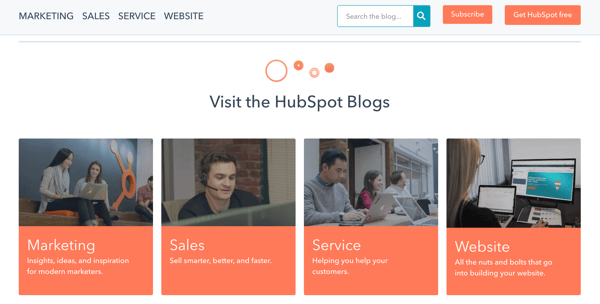
HubSpot has four blog properties: Marketing, Sales, Service and Website. Each blog focuses on its respective industry and relates the content back to the appropriate HubSpot product.

hubspot blog choose your blog topic and purpose

Source

2. Register and host your blog

This step is two-fold. First, let's talk about your blog's URL structure.

A domain name, also known as the root domain, is the text in a URL that identifies your website — and, therefore, your business — for a web browser. For example, HubSpot's domain name is hubspot.com.

Subdomains are part of your root domain — they appear before the domain in your URL like this: blog.hubspot.com. "Blog" is the subdomain. Subdomains are helpful for organizing a lot of content, including multiple content types. If you have a large blog operation, this structure can help you over time. However, it does pass less authority from your root domain in the short-term.

Subdirectories are divisions of your domain that live on your website, but represent specific pages on your website. For example, a subdirectory that'd take visitors to a specific blog post on a website would look something like this: hubspot.com/blog/article-name. Subdirectories often pass more authority from your root domain and subdomain. However, they can make it hard to scale your content strategy over time since you need more subdirectories to organize your content properly and protect your user experience (UX).

Subdirectories can also represent certain types of content within a subdomain. For example, blog.hubspot.com/marketing/article-name takes visitors to a marketing article on blog.hubspot.com.

The option you choose for your blog has the potential to impact your organic ranking, which is why it's important to choose wisely.

Next, you'll need to pick a host for your business's blog. The simplest way to host your blog is through the same software on which your website is run.

For example, HubSpot users can employ HubSpot CMS and access their website creation and management tools alongside their blogging tools — all from a central location.

Another common way to host your business's blog is through WordPress — compare HubSpot vs. Wordpress here. Other popular options include Wix, Bluehost, and Squarespace.

3. Design your blog.

Design your blog in a way that entices your readers to regularly read (and hopefully, share) your content.

Your blog should be inviting and on-brand. It should be well-organized, clean, and easy to navigate. Within seconds of visiting your blog, readers should know it's published by your company.

To do this, choose a theme that's consistent across your blog properties and articles. Depending on the host you choose for your blog, you'll likely have several theme options that are both free and paid.

For example, HubSpot offers a marketplace of free and paid blog template options. Templates help you easily customize and edit your blog template to tailor it to your business.

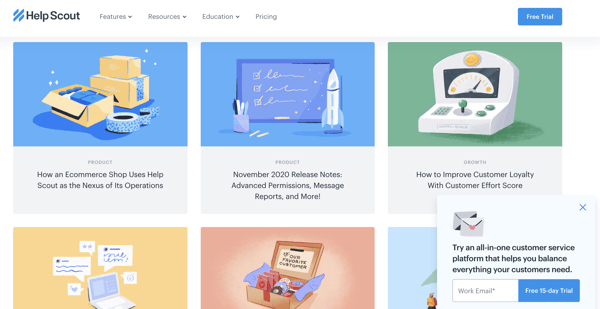
The Help Scout blog is a wonderful example of beautiful blog design. Its minimalist design limits the use of copy and embraces negative space by promoting the latest posts with gorgeous feature images. The blog is aligned with the Help Scout brand and promotes readability and easy navigation.

beautiful blog design help scout

Source

4. Decide who will write and manage your blog.

Now it's time to think about who's writing, running, and managing your blog. Ask yourself (or your team): Who's accountable for each role within your blog strategy?

There are lots of moving parts when it comes to your blog — if you don’t create ownership around each component, it'll be difficult to reap the benefits of a successful blog operation.

We've put together a list of some examples of the roles you need to fill to effectively implement a blogging strategy.

Depending on your resources and the size of your marketing team, you may find one person holds responsibility for multiple roles.

5. Determine how frequently you’ll share blog posts.

How many blog posts can you commit to writing and publishing? How often are you planning on producing blog content for your audience?

Consistency is the key to keeping your audience engaged and interested. This will also allow you to maintain your status as an active thought-leader and expert in your industry. Use a content calendar to consistently manage and schedule your blog posts.

Plan and optimize your marketing content with these free calendar templates.

The beauty of creating this type of blogging rhythm and sharing that information via an editorial calendar is that it creates a sense of accountability among your team of bloggers. It ensures all writers and contributors have optimized for keywords, added CTAs, and edited their pieces by a certain time and date. This way, you'll have a consistent stream of content your readers can get in sync with.

If you're a HubSpot CRM user, you already benefit from an editorial calendar built right into the COS.

6. Write compelling and valuable content.

It's important to reiterate just how critical it is for your blog content to be both compelling and valuable to your readers. This plays a large part in how you're viewed by your target audience, customers, competitors, and other industry leaders. It's also how you're going to keep readers engaged and loyal to your blog — and hopefully converting to customers, too.

Remember, it takes more time and energy to obtain new subscribers than to maintain current readers. Plus, your current readers have the potential of becoming your brand advocates faster than new subscribers do. So, focus on consistently producing content that captivates your audience all while providing them with useful and worthwhile information so they stick around for the long run.

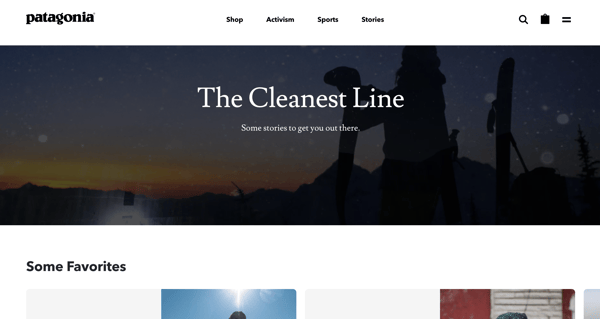
Patagonia's blog, The Cleanest Line, is a fascinating publication. It's not a generic brand blog that discusses Patagonia products or customers; it tells compelling stories written by some of the best writers on the web — yet it still resonates with Patagonia's target audience and those who share its core values. I've personally spent hours reading the articles on The Cleanest Line, and it's endeared me to Patagonia in the process.

patagonia the cleanest line write valuable content

Source

7. Include CTAs.

Are any of the reasons you're developing your business's blog to drive organic traffic to your website, improve conversions, and boost sales?

That's great news — but to accomplish these goals, you'll need to include relevant calls-to-action (CTAs) throughout your blog posts.

CTAs can be paid or free for your audience members. Either way, effective CTAs provide readers with a level of value that they simply cannot pass up.

A CTA might share in-depth content and information with your audience on a specific topic. Or maybe it includes a discount code or special deal on your product or service. A CTA could also provide further training related to the subject of your blog article.

Check out this blog post if you're looking for some examples of clickable CTAs to insert in your content.

If you're a HubSpot user, the CRM offers a CTA creation tool to help you develop relevant — and even personalized — offers to drive traffic to your landing pages and convert more leads.

For example, the Omniscient Digital blog naturally weaves CTAs into its posts, making the linked items part of the broader story or takeaway. The goal of CTAs should be to encourage readers to take action without deviating too far from the purpose of the post.

Screen Shot 2020-12-15 at 12.41.38 PM-1Source

8. Launch your blog.

Now it's time to launch your blog!

This is the exciting part — you finally get to share the content you've been working so hard to develop. Put your blog content on it's corresponding landing page on your website and send your email list of recipients their blog article(s). Share it via social media and send it to members of your network as you see fit. 

9. Track and analyze your blog’s success.

Remember to track and analyze the success of your blog over time. To do this, decide which metrics matter most to you and your business. Once you understand how a specific metric contributes to a positive outcome, then you'll be able to make your blogging strategy more targeted. Examples of blogging metrics you might track include:

  • Number of readers and subscribers
  • Number of page views per post
  • Number of conversions
  • Number of backlinks
  • Number of referrals
  • Overall traffic

When applying these metrics to the goals you're looking to set, consider the following questions to provide concrete targets that make sense for your business.

  • Does this goal help you achieve your purpose, or is there something more relevant we can aspire to?
  • Is this goal aligned with the initiatives of other parts of our business?
  • Which metrics track the progress towards this goal? Are these metrics complementary or counterintuitive?

Once you determine which metrics you're going to use, start by setting goals for a 60-day period. This gives you enough time to see whether your strategy is working and then you can adapt your goals based on the results you see.

Next, let's dive into your blog strategy.

Blog Marketing Strategy

Your blog is an important component of your business marketing strategy and will hopefully market your products and services, but in order for it do this, you must market the blog itself.

A blog marketing strategy is how you share and promote the content on your blog. Unfortunately, "build it and they will come" doesn't apply to blogging as well as it does in Field of Dreams.

For your blog to do its intended job — drive traffic, convert visitors, increase revenue, and/or promote your brand as a thought-leader or expert — it must have a marketing strategy in itself. How will people locate your blog? What type of content will keep them reading? How can you use your other promotional channels to elevate your blog content?

Follow these blogging best practices to promote and market your blog content to your target audience.

Always keep your buyer personas top of mind.

When writing, managing, and scheduling your blog — or working on anything related to your blog, really — keep your buyer personas in mind. 

Ask yourself, "Who are our ideal customers?" and "Why do they need our product or service?" Once you can answer these questions in detail, you'll be nail down your buyer persona(s).

Use this free template to create your business's buyer personas.

Once you create your buyer personas, document a detailed description of who this person is so you can reference it has your business and blog grow. You should be able to refer to this description every time you write a new blog post.

This way, you'll be able to create content specifically suited to your target customers' wants, needs, challenges, and/ or pain points. This will also help you turn your blog into a powerful lead conversion tool for your business (i.e. your blog will show your readers and target audience why they need your product or service).

To get a deeper understanding of the actions your buyer personas are likely going to take, research the behaviors of your target audience so you can adapt and tailor your blog content to meet their needs in a way that pushes them to convert in some way. To conduct this type of customer research, you can use:

Keep an eye on your competition.

Speaking of your competitor's blogs, it's important to keep an eye on these other thought-leaders in your industry. Your competitors provide insight into what's working (or not working) in terms of blog content among your target audience.

It also tells you a little bit about what they're experimenting with and what you'll need to accomplish to stand out and provide your readers with valuable content they can't get anywhere else — something unique to your business and your business only.

Create a list of 5-10 of your closest competitors with blogs you could conduct a content audit on. Make conclusions about the type of content they share, unique techniques they've implemented in their blog, and how they're doing in terms of ranking for the keywords you hope to rank for.

Then, look for gaps in their content so you can capitalize on them. To help you do this, use tools like QuickSprout, Open Site Explorer by Moz, and SEMRush Competitor Research.

Perform SEO and keyword research.

When one of your customers searches a phrase on Google (or any search engine), you want them to find your blog (or web page), not a competitor’s. To make this happen, dedicate some time to researching which keywords and phrases your target audience is typing into search engines so you can include them in your blog posts where they naturally fit.

In other words, you'll significantly improve your chances of ranking on the search engine results page (SERP) by performing appropriate search engine optimization (SEO) and keyword research prior to writing your blog post, and then incorporating those findings in your content.

Start by creating a list of 5-10 keyword groups you want to rank for, along with their associated long-tail keywords, in the SERP.

Remember, Google's algorithms are constantly changing to become more intuitive — meaning, old tactics like keyword stuffing will hurt your ranking in the SERP. Instead, you're better off writing copy that engages audience members first and search engines second.

Note: HubSpot customers have access to a built-in keyword and SEO tool to help with this.

Focus on your blog's SEO and keyword research with HubSpot CRM's Content Strategy tool.

Decide where you'll distribute your blog content.

Strategically determine where you'll distribute your blog content. You chose a host for your blog already, meaning your content is likely already easily shareable on your website.

For example, if you use the HubSpot CRM and blogging software to host and manage your website and blog, it's simple to add your articles to their corresponding landing page on your site.

Other ways and platforms through which you might distribute your content include social media, such as Facebook or LinkedIn, and online publishing platforms, such as Medium. You might also work with industry leaders, experts, and influencers to share your content on their websites and social profiles.

Promote your blog content.

It's probably safe to assume you want your blog content to be as discoverable as possible. In terms of your blogging strategy, this refers to your ability to get your content out there so members of your target audience find, read, and (hopefully) share it.

There are many inbound tactics you can use to promote your blog. We touched on a few options above, but another common form of effective blog promotion involves an influencer marketing strategy.

Get started promoting your content with the help of a free influencer marketing guide.

To begin, identify the key influencers in your niche or industry you want to contact and work with. These should be people your current customers and target audience perceive as credible, trustworthy... and, yes, influential.

As you begin making and managing your influencer connections, remain in regular contact with the ones who are promoting your blog content. Be sure you know what they're doing to support, share, and promote your blog content and that their tactics meet your business's standards — you want to ensure they're representing your brand accurately. After all, you're likely paying them to promote your content among their audience members.

You can make your relationship with your influencers even stronger by interacting with their content regularly to show your support. For example, if you're working with an influencer who also has a blog, then go to their blog and read, comment on, and share it (even when the content they're publishing isn't necessarily related to your business). 

How to Maintain a Blog

Creating and marketing your blog is merely half the battle. As we mentioned above, consistency is key to a successful blog — which means maintenance is most of the hard work.

Creating blog content can be time-consuming, especially when you aim to command authority in your niche with researched, thoughtful, and planned posts.

This is why updating, repurposing, and republishing your existing blog content is so valuable — it saves you time and energy but it also allows you to efficiently achieve the results you're looking for.

What do I mean by this? Well, ranking in the SERP with a net new post takes significantly more time (I'm talking months) than an updated post. Meaning, you'll see a positive impact sooner if you start repurposing existing posts rather than solely creating new content.

Audit your existing blog posts to determine what you can repurpose and update. Outdated content to remove and/ or replace might include statistics, examples, infographics, quotes, product or service details, research, and irrelevant ideas. You can also add keywords you've determined are missing through your research.

(Check out this post if you're looking for more ideas on how you can effectively repurpose your blog content.)

The process of updating content also allows you to reinvigorate the brand new content you've worked so hard on. Updating allows you to maintain the quality and relevance of your blog without having to recreate blog posts from scratch.

Grow Better With An Effective Blogging Strategy

Growing an influential blog in your niche is a surefire way to nurture your potential customers. By creating regular content that solves the challenges of your readers and fulfills their biggest curiosities, you'll start to build a vault of trust and advocacy. This will inevitably contribute to the overall success of your business. Start with your purpose — the big why — and slowly unpack the individual levers that will contribute to your blog marketing performance through the steps and strategy we've reviewed above.

Editor's note: This post was originally published in December 2014 and has been updated for comprehensiveness.


How to Create a Successful Blog Strategy: A Step-by-Step Guide was originally posted by Local Sign Company Irvine, Ca. https://goo.gl/4NmUQV https://goo.gl/bQ1zHR http://www.pearltrees.com/anaheimsigns