Tuesday, December 22, 2020

16 Cheerful Examples of Holiday Homepage Designs

According to the National Retail Federation, eCommerce accounted for 20.9% of total holiday sales in 2019, and that number seems to increase every year. As a result, you have the opportunity to position your online shop in front of a huge base of consumers who are actively browsing the web with intent to purchase goods.

The smartest marketers prepare for website traffic increases not only by prepping their website for higher-than-normal traffic and optimizing it for mobile devices, but also by giving their website design a dose of holiday cheer.

It all starts with the homepage: The first page many people will see when they come to your website.

Holiday Homepage Designs to Get You in the Spirit

How have other companies redesigned their homepages for the holidays? Let's take a look.

Note: Businesses change their homepages on a regular basis. The examples below may not be current.

1. Free People

When your business has a loud personality like American bohemian retail company Free People does, making a big first impression on your homepage can be a great thing. Free People's redesign is all-encompassing, starting with a large banner promising free express shipping, which appeals to any buyers concerned about delivery times when doing their last-minute shopping.

Underneath the main banner are four navigational calls-to-action emphasizing gifts and festive products. This directs holiday shoppers to the pages of their site they'll find most useful.
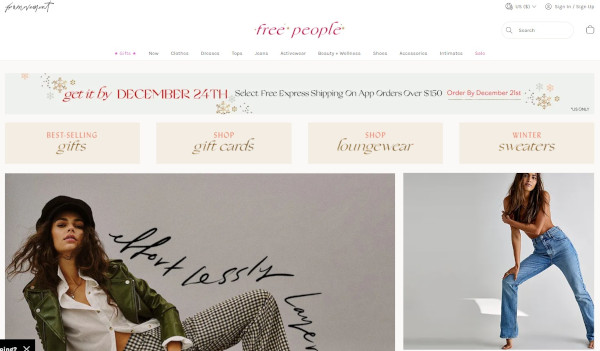
free people holiday homepage

2. PayPal

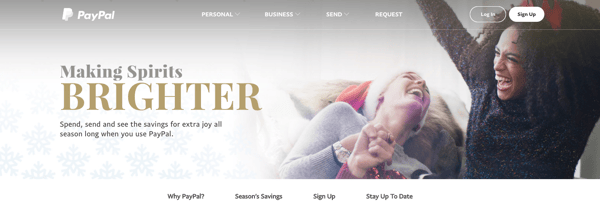
Who ever said online money transfer websites can't have fun at the holidays? After all, sometimes the best gift is a little more padding in your bank account, and PayPal acknowledges this with the slogan: "Making Spirits Brighter: Spend, send and see the savings for extra joy all season long when you use PayPal."

This holiday design from PayPal works because it still looks like PayPal -- just a little more festive. It's still easy to navigate but adds seasonal flair with a clever spin on a lyric from "Jingle Bells" as its holiday slogan. The whitespace encourages visitors to focus on the happy models in the image, putting human faces to an industry that's businesslike and technical.
paypal holiday homepage

3. Sephora

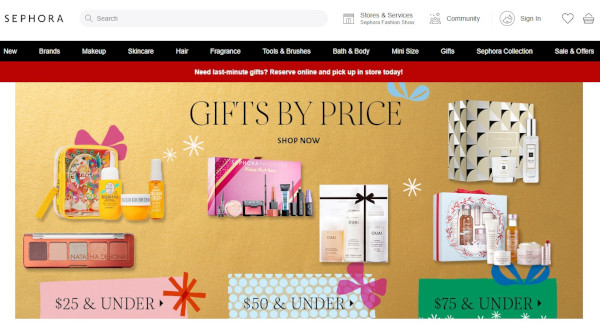
Like PayPal, Sephora didn't make many changes to the overall look and feel of its website. What it did do was feature a holiday edition of its highest-rated products and editors' picks, specially curated for different gift recipients, price ranges, categories, and so on.

By putting editors' picks front and center, Sephora is reminding customers how much the company values customers' success. Plus, we love the gold background color -- it's a cute, festive way to make the homepage cheery and bright.
sephora holiday homepage

4. Baudville

While seasonal website redesign is often dominated by B2C companies, a few B2B businesses have been known to dress up websites a bit too. Baudville, an employee recognition solution, is one.

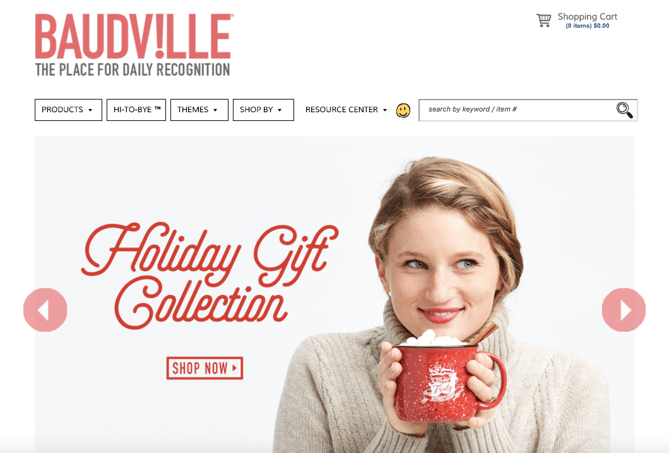
While some web designers like to add a ton of new elements to their holiday designs, Baudville's design below shows you don't have to. Something as simple as adding a holiday gift shop slide to your homepage photo banner can be enough to warmly welcome users to your site during this time of year.
baudville holiday homepage

5. La Colombe

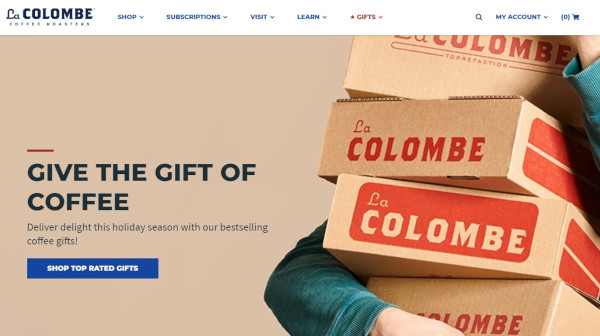
La Colombe's holiday homepage design features soft, warm hues and with festive red accents. Visitors are greeted with an image of La Colombe coffee products in boxes, a call-out to the idea that many shoppers are sending gifts through the mail. The slogan "Give the Gift of Coffee" is a great example of a business staying true-to-brand with an added holiday touch.
la colombe holiday homepage

6. L.L. Bean

For a U.S. outdoor retail company like L.L. Bean, the holidays mean winter... which means cold. (For most of us, unfortunately.)

This design keeps the holidays out of the seasonal redesign completely: The featured photo on the homepage is a model wearing apparel in front of pine trees covered in show, which is in keeping with the brand's outdoorsy theme.

L.L. Bean shares a list of holiday gift ideas featuring some of its most popular and beloved products. The seasonal homepage slogan -- "Gifts That Last Beyond the Present" -- reminds visitors of L.L. Bean's amazing satisfaction guarantee.

If you're more attracted to a winter-themed seasonal redesign, consider using winter-themed stock photos for your homepage. You might also consider cooling down the color scheme of your whole site for the holiday season. This means using cooler tones like blues, purples, and greens to give it a more "wintry" feel.
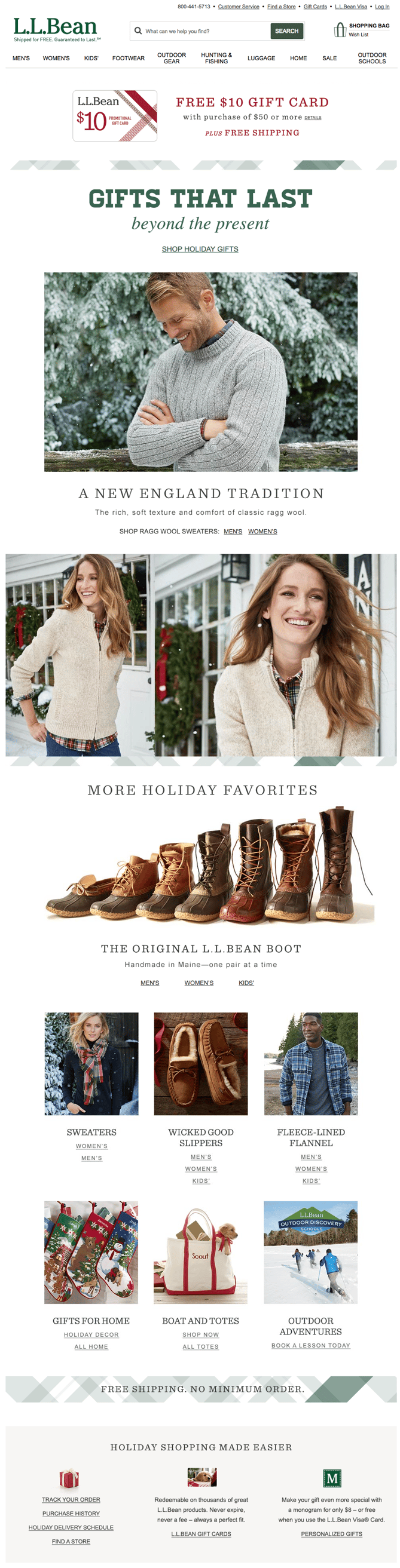
llbean holiday homepage

7. The Container Store

The Container Store's homepage design below is a fantastic move for the holidays because it is chock-full of goodies for visitors. Every module on this homepage has something helpful to offer customers -- stocking stuffers, gift ideas, luggage for holiday travel, party favors, and DIY projects.

The various CTAs on the homepage are clear and tell visitors everything they need to know about what's on the rest of the site. The geometric shapes organize all of the content cleanly, so despite the fact that the homepage has several different offers on it, it's not cluttered.
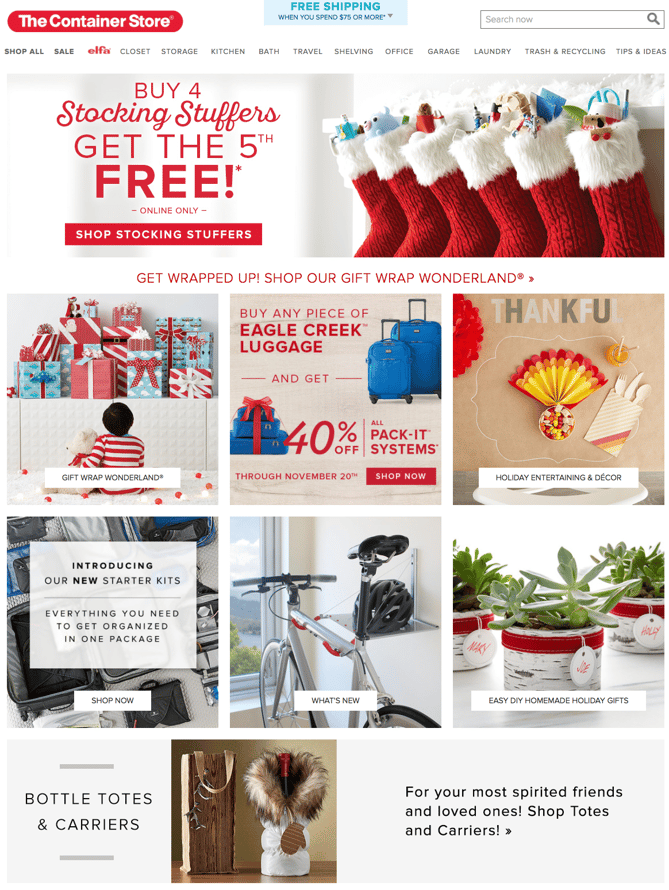
Container Store holiday homepage

8. Base Butter

Instead of tapping into the greens, reds, and golds that you'd typically expect on a holiday homepage, Base Butter keeps to their cool color palette and foregoes the pine trees, ornaments, and other holiday imagery. Instead, they use a minimalistic image of their product being gifted from one person to another with the headline "Gift a Glow." This is significant because it's emphasizing the act of giving.

Notice also that it's "Gift a Glow" rather than "Gift Skin Care Products." They are selling the outcome rather than their product, enhancing the idea of giving a gift that truly matters.
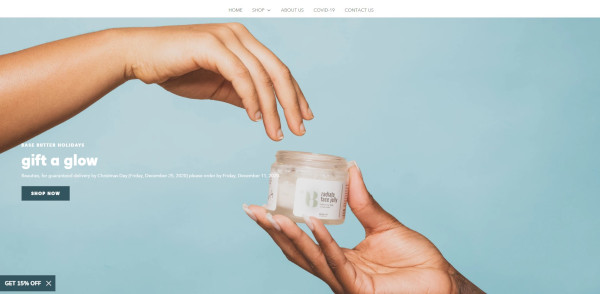
basebutter holiday homepage

9. J. Crew

This J. Crew holiday homepage design goes above and beyond expectations for a clothing store. The whitespace on the page is simple and lets the clothing and accessories stand out to prospective shoppers while keeping the website true to brand.

Its homepage advertises "Present-Topia," a Gift Guide that breaks down J. Crew products by age, gender, and price for ease of shopping. The black callout box advertises a sale it's running that includes seasonal clothing. J. Crew also published curated looks that visitors can browse or directly shop from to make the shopping experience easier and more visual. This homepage redesign prioritizes the user experience while still keeping the site beautiful and on-brand.
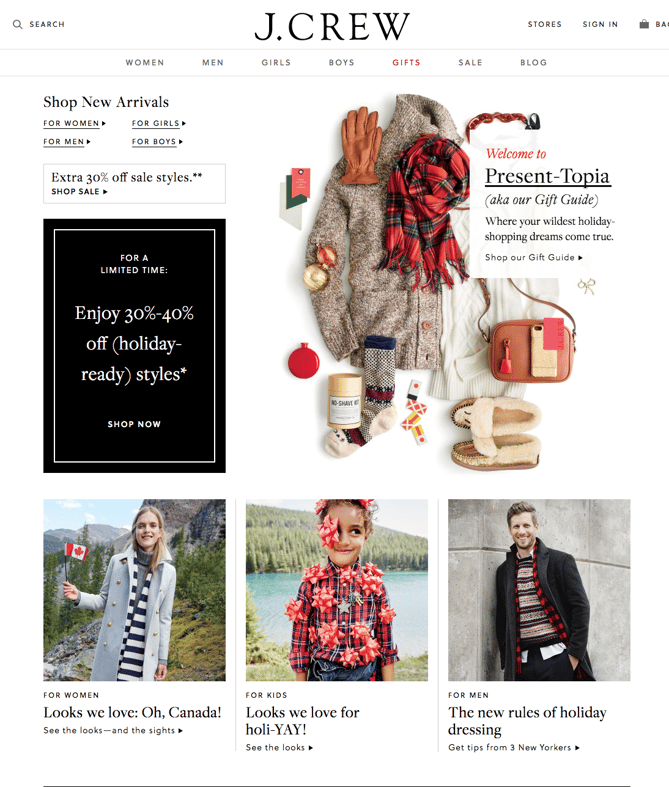
jcrew holiday homepage

10. Lume

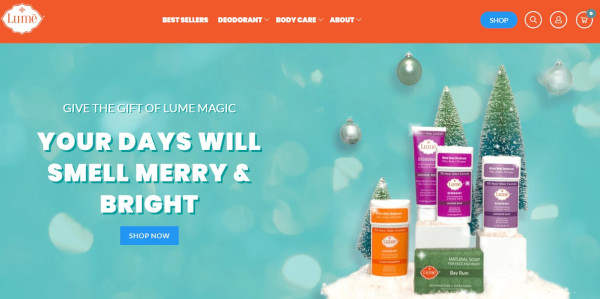
Like the rest of Lume's advertising, they take a humorous spin with their homepage.

As a natural deodorant company, Lume flips expectations of "Your Days Will Be Merry and Bright" in their hilarious and witty copy, which instead says "Your Days Will Smell Merry & Bright." This falls in line with the tone of their brand, pushing the benefits of their product with entertaining jokes.

Paired with the copy is attractive imagery of their products along with a snowy pine tree spread and ornaments in the background.
lume holiday homepage

11. Fitbit

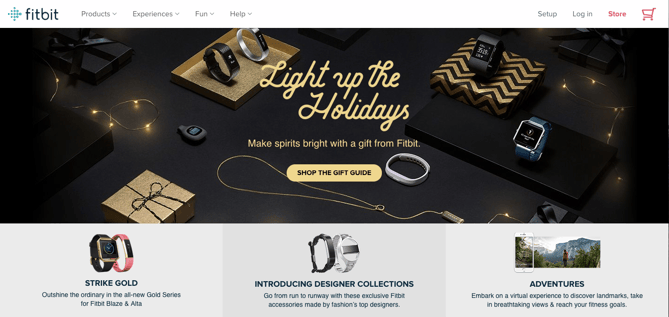
The dark background of this Fitbits homepage design lets the festive gold color scheme and the products shine. The photography styling positions Fitbits as a gift similar to jewelry in beautiful boxes, rather than a piece of sporting equipment, to make Fitbit products appeal to a wider variety of shoppers and not just athletes.
fitbit holiday homepage

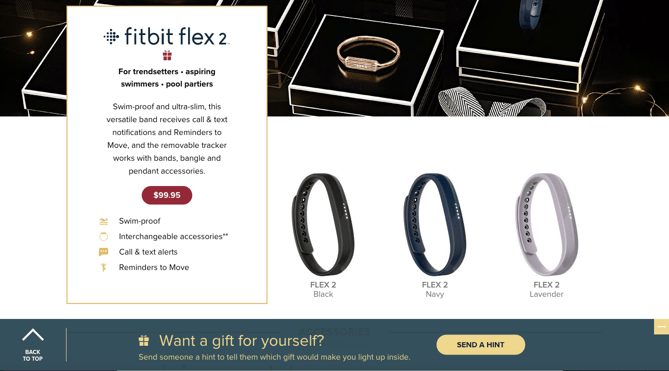
The primary CTA -- "Shop The Gift Guide" -- serves to lead visitors through all of the products with descriptions that suggest who they might purchase it for, making it easy for shoppers to imagine their family and friends using the product.

Fitbit included a neat feature where visitors can hint to someone that they themselves want to get a Fitbit as a gift.
fitbit gift guide

12. Peloton

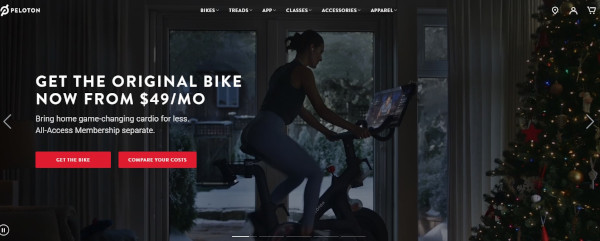
Peloton doesn't change much by way of copy, choosing instead to highlight membership information and their most important CTAs. However, here they do include several videos in their full-page slider that are quite festive. Happy Peloton users exercise in front of decorated Christmas trees, in cozy living rooms, or in front of snowy windows. The focus stays on the bike and its benefits, but the setting is one of holiday cheer.
peloton holiday homepage

13. HP

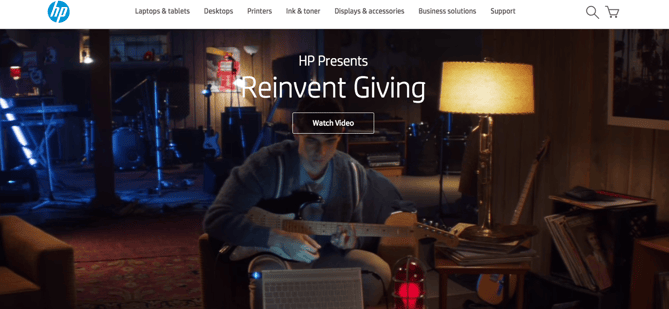
Instead of the traditional holiday homepage layout presenting products as potential gifts, this HP design kept the page minimally decorated with only their featured video, "Reinvent Giving," above the fold. 
hp holiday homepage

The touching video features a brother using HP technology to come up with the perfect gift for his brother, who is hearing impaired -- a guitar set that displays flashing lights when played so his brother can see himself playing music, even if he can't hear it.

HP - BROTHERS REINVENT GIVING from 151 Awards on Vimeo.

Emotion in advertising is effective, especially around the holiday season -- everyone has a friend or family member they want to find the perfect gift for. We can't guarantee that HP's holiday homepage video won't make you cry, but we can say that it's a unique and heartfelt spin on traditional holiday marketing.

14. Madewell

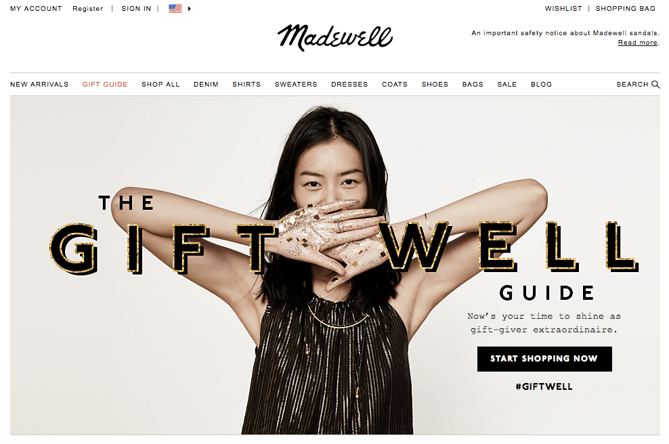
The image and header on Madewell's design are very much in line with the company's typical branding: a model wearing a gorgeous dress in front of a neutral background, accompanied by a holiday spin on their name in festive, embellished font.

This is both attractive to first-time visitors who are greeted with simple imagery and user experience as well as returning users who expect a design like this but still appreciate the added holiday touches. The #giftwell hashtag prompts visitors to start a conversation about their shopping experiences on social media, which fosters a sense of brand loyalty.
Madewell holiday homepage

15. Pholk

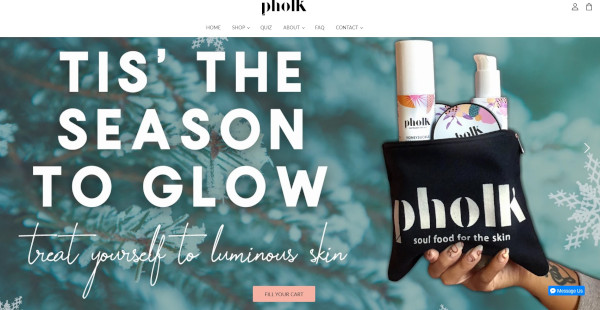
Pholk also uses the word "glow" on their homepage, pairing this benefit-driven copy with a seasonal touch: "Tis' the Season to Glow." However, their focus is on treating yourself, which is a refreshing angle when other websites are hoping to attract shoppers that are getting gifts for others.

What makes this holiday homepage especially attractive is the typographic style paired with a soft, cool pine background image. Of course, it wouldn't be complete without an image of a bag of their products advertised on the opposite side of the text.
pholk holiday homepage

16. Pillow Cube

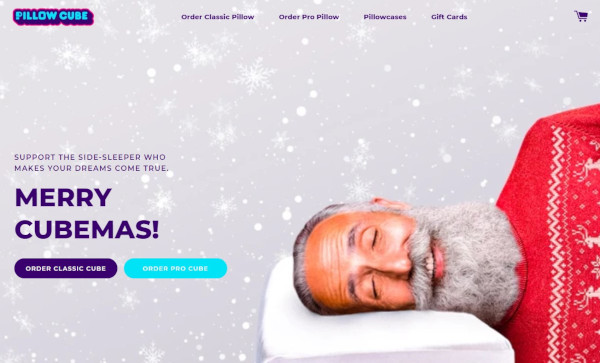
Pillow Cube is... pretty much what it sounds like: A cube-shaped pillow designed for side-sleepers. On their homepage, they use imagery to bring up an important question: What if Santa was a side-sleeper?

The copy then calls the website visitor to consider buying a Pillow Cube for the side-sleeper in their life: "Support the side-sleeper who makes your dreams come true." Support being a sneaky way to talk about the product's big advantages.

In addition, the big heading "Merry Cubemas!" is just adorable.
pillow cube holiday homepage

As you plan your own marketing strategy and website design for the holidays, be sure to plan and prepare your site for higher-than-normal traffic. The last thing you want is for your site to go down during a time when you hope to be doing great business.

Editor's Note: This post was originally published in November 2015 and has been updated for freshness, accuracy, and comprehensiveness.


16 Cheerful Examples of Holiday Homepage Designs was originally posted by Local Sign Company Irvine, Ca. https://goo.gl/4NmUQV https://goo.gl/bQ1zHR http://www.pearltrees.com/anaheimsigns

Monday, December 21, 2020

How to Create a Holiday Marketing Campaign: A Step-by-Step Guide

The malls are decked with holly, your inbox is filling up with holiday-themed promotions, and you've deemed it socially acceptable to start listening to your favorite holiday playlist on Spotify... or maybe that's just me. 

Either way, the holiday season is here, and marketers are gearing up to finish off the year strong. But just like shopping for gifts, planning your holiday campaign is something you don't want to shove off until the last minute.

There's going to be a lot of spending going in over the next month or so, which is why it's important to have a plan for reaching your customers and prospects before your competitors do.

Haven't started planning your campaign yet? Don't panic.

We've mapped out a comprehensive guide with everything you need to launch a holiday marketing campaign this season. From offer templates to free holiday-themed stock photos, we've peppered this step-by-step guide with resources designed to get your campaign up and running right away.

1. Decide on a campaign theme.

While creating content has become ingrained in the day-to-day lives of most inbound marketers, launching a campaign is a little different. Unlike a tweet or an infographic, campaigns require you to align all of your marketing channels around one specific goal or message.

Holiday campaigns -- like all campaigns -- typically run for a concentrated period of time. Depending on your industry, they can start as early as October and often spill over into January.

Now that you know what you're in for, let's not waste any more time. Below we'll kick off this process by walking you through establishing your campaign and offer.

2. Choose your campaign goals.

Before you start creating an offer, you need to determine what it is that you're looking to achieve. What is the ideal outcome of this campaign? 

Once you define your focus, you can begin to create goals that will be used to benchmark your campaign's performance once it's wrapped. Your goals should be specific, measurable, attainable, relevant, and time-bound (SMART goals, for short). Here's an example of how to structure this type of goal:

Generate [number] leads focused on [topic/product] by [date]

Depending on what you want to get out of your campaign, your goals might look something like this:

  • Generate 1,000 leads who are interested in our annual holiday sale by December 5, 2015.
  • Generate 5,000 sign-ups for our holiday shopping app by November 30, 2015. 
  • Collect $50,000 in donations for charity XYZ by December 20, 2015.

To help you better align your marketing efforts with SMART goals, check out this free goal setting template. You can use this template to summarize your goals, calculate your greatest marketing need, and set deadlines.

3. Define your target audience.

With goals in place, the next step is to define your target audience. The more information you can gather about the people you're trying to reach, the better. Where are they hanging out on social media? Do they prefer to consume information on their desktop or mobile? This will help you make smarter marketing decisions when it comes time to create content and plan promotions.

If you already have a few buyer personas in place for your marketing efforts, you'll want to start by narrowing your focus. Does your campaign pertain to all segments of your audience? If not, you'll need to immediately weed out the folks who you don't want to include.

If you don't already have buyer personas or would like to create campaign-specific personas, we recommend you check out our free buyer persona templates. These templates will make it easy for you to build out and organize your persona data.

4. Create an offer.

The offer that you create will serve as the center point for all of your campaign initiatives. Typically offers take shape in the form of ebooks, whitepapers, templates, online courses, videos, tools, etc. While there are a lot of options to choose from, we advise you to run with an approach that makes the most sense for your intended audience. 

Think about it: If you know the people you're trying to reach are typically strapped for time -- particularly during the holidays -- you might want to create a set of easy-to-use templates instead of a lengthy ebook, right?

If you decide to take the ebook route, we can help -- you can download our free, customizable ebook templates. We've already taken care of the design element, so all you have to do is focus on writing the content. And if you're in search of some compelling visuals to use throughout your offer, download our 250 free holiday stock photos here

5. Create a landing page.

Once your offer is created, you need to provide a place for it to live. This is where the landing page comes in. 

Considering your landing page is the page that you'll be driving traffic to, it needs to be convincing. Here's a list of some of the essential elements you should include:

  • Compelling headline. This is how you're going to capture the attention of potential visitors. For tips on how to craft the perfect headline, turn to this guide.
  • Interesting visuals. Your landing page shouldn't just be a jumble of text. Think about how you can provide visual context for your offer.
  • The benefits of your offer. This typically takes shape in a bulleted list. The goal here is to drive home what the visitor can expect to get from this offer, and why it matters.
  • A form. This is how you'll collect information in exchange for the offer. Keep in mind that there's no magic number for form fields. In fact, the amount of information you need to ask for on a form will vary from business to business. That said, if you don't really need a piece of information, don't ask for it.

If you need some more guidance as to what goes into a great landing page, check out this roundup of 15 brilliant landing page designs

6. Design a promotion plan.

"If you build it, they will come," said no marketer ever. Now that your content has been created, it's time to figure out how to get the word out. Here are some of the promotion tactics you should be implementing per channel: 

Email Marketing

If you already have a list of people you know will be interested in your offer, that's great. If you want to slice and dice your database to go after a more specific group, you should take care of that segmentation first. For HubSpot customers, it's easy to segment your database using a smart list in the Lists App. (Here's a resource to help you get started.)

During the holiday season, we'd argue that segmenting your list is more important than ever. Due to the increased number of incoming promotions and the limited amount of time busy shoppers have, well-targeted emails will often take priority over mass messages. 

Once you've squared away your recipients, you can kick off the actual email creation process. Here are some noteworthy elements to keep in mind while crafting your email:

  • Subject line.Focus on what the offer solves. Check out this helpful post for tips on improving your subject lines.
  • Body copy. The body of your email should be short and sweet, much like the copy on your landing page. This is also a great opportunity to incorporate personalization using personalization tokens. Here are some great examples to get you thinking about personalization opportunities. 
  • Sharing Options. Don't forget to add buttons to your emails that allow recipients to quickly pass your offer along to their network. 

Check out HubSpot's Template Marketplace to find an email template that fits your needs. 

Blogging

Once you've sent an email to get your offer on the radar of your intended audience, it's time to build out your reach even further. Blog posts serve as an effective campaign element for attracting people to your offer, and can be approached in a couple different ways. 

One way to use your blog to promote your offer is to create a simple "promo post" -- that's what we call them, anyway. This post is typically a very focused piece offering a quick introduction to the offer, advice on how to implement it, and a compelling CTA to drive people to the landing page.

example of a holiday promo post

According to a 6-month analysis of HubSpot's Marketing Blog run by my colleague, Ginny Soskey, promo posts proved to be the most effective lead generators out of the seven post types we typically publish. While this may vary depending on your industry and audience, it's certainly a type we'd encourage you to explore on your own.

Promo posts aside, it's also a great idea to add a CTA for your offer to a post that aligns with its subject matter. You can create an entirely new post and revisit older, related posts to swap out their CTAs. This way, if people who reach the end of your post are looking for more information or a deeper dive into the subject, they can click through to the offer.

Social Media

Now that you have some tangible promotional material in place, you can start promoting it through your social media channels. Whether you share the related blog post or a link to the landing page, be sure that you're switching up the messaging so you're not repeating the same tweet or Facebook post over, and over, and over...

You'll also want to tailor the post to the platform you're posting it on. For example, maybe you create a teaser video for your offer to promote it on Instagram and then use a colorful visual when you serve it up on Twitter:

The holidays provide an interesting opportunity for businesses looking to explore platforms they wouldn't typically try. With busy consumers looking for holiday help and inspiration in all corners of the internet and social media, you may find that it's worth promoting your campaign on a wider variety of platforms. 

Wherever you're sharing your content, you'll need a place to organize and plan your distribution strategy. For that, check out this free social media content calendar

PPC

Paid advertising can be a great tool to boost some of your inbound efforts -- especially around the busy holiday season.

If your budget allows and you know there's search demand for your offer, you may want to experiment with putting a little money behind some of your campaign assets to promote them on social media. For advice on how to create successful paid advertising campaigns across the three main social media platforms -- Facebook, Twitter, and LinkedIn -- check out this guide.

7. Create lead nurturing paths.

What will happen to your leads once you've generated them? And once the holidays have come and gone, what will they mean to your business?

Before you launch your campaign, it's best to design a plan for qualifying and developing your leads once they've filled out your form.

Email Segmentation

With marketing automation software, you can use email nurturing to keep leads engaged with your business and move them closer to a sale. 

Before you can begin creating emails and workflows, you need to take another look at your list to determine if there are opportunities for segmentation. Dividing your list of leads will make it easier for you to deliver more contextual follow-up emails, which will help you separate yourself from holiday inbox chaos, and ultimately help recipients see the value in your relationship.

Email Nurturing

Next, determine what content you'll use to nurture your leads. You can narrow your focus by honing in on what your goals are for this nurturing process. Do you want them turn these people in sales? Subscribers? Are you looking to direct them to a particular page? 

For your campaign, it might make sense to re-engage those leads with helpful, related resources.

And to track your progress, make sure you set a goal for your workflow. If you're a HubSpot customer, you can do so in HubSpot's Workflow App, which makes it easy for you to gauge the performance of your email sequence. 

8. Take the campaign live.

Now that you've got everything in place -- offer, landing page, blog promotion, nurturing workflows, etc. -- it's time to take your campaign live. 

We recommend issuing a "soft launch" before you initiate any promotion, as this will provide you with an opportunity to run through all of the steps yourself to ensure that everything is functioning as it should be. If you can get a few colleagues to fill out the form and run through the stages too, it'll be much easier for you to spot any glitches or missed marks. 

Once you know everything is sailing smoothly, it's time to kick up promotion and start driving traffic to your landing page. 

9. Measure and report.

This is the final -- and arguably the most important -- step in the process. Once your campaign has had some time to gain traction, you'll want to dive into its performance and see what you can learn from it. 

Remember those goals we set all the way back in step one? Now is the time to determine if you actually hit them -- and if you didn't, identify what might have prevented you from doing so. Analyzing where people dropped off in your workflows, blog posts that flopped, or areas of your offer that fell a little flat might reveal what held your campaign back from reaching those numbers. Take note of these details, and use them to inform your next campaign strategy.

If you need some help defining what numbers you should actually be concerning yourself with, check out this introductory guide to inbound marketing analytics. This resource will walk you through how to effectively analyze the following: your website and landing pages, search engine optimization, paid search, blogging, social media, email marketing, and lead nurturing and automation.

Editor's note: This post was originally published in November 2015 and has been updated for comprehensiveness.


How to Create a Holiday Marketing Campaign: A Step-by-Step Guide was originally posted by Local Sign Company Irvine, Ca. https://goo.gl/4NmUQV https://goo.gl/bQ1zHR http://www.pearltrees.com/anaheimsigns

10 Common Copywriting Templates to Use in Marketing

Ask any marketer who's responsible for copywriting about their writing process, and you'll quickly find out that there's no specific process to follow.

Additionally, copywriting varies depending on your audience, purpose, and format — copywriting for an Instagram post, for instance, is entirely different than copywriting for a press release.

At HubSpot, we know the struggle. Copywriting demands creativity, inspiration, and hard work — and it can be difficult to find all three, day-in and day-out.

To help with writer's block, we've put together 10 copywriting templates you might use for any of your marketing efforts, including blogging, social media, email marketing, and even internal memos.

Let's dive in.

10 Copywriting Templates to Use in Marketing

1. Email Marketing

First, you'll need to determine what type of email you're writing to ensure you're speaking to the right audience. Coordinate with your team to see if this is a one-off marketing email like a monthly newsletter, or if you're being asked to write for a series of emails, like a nurture campaign.

As you're drafting your copy, consider how your email will encourage the reader to take a desired action, like clicking a link to purchase or scheduling a call with a sales rep to learn more about your services.

If you're not aiming for the reader to take a specific action and instead just want to send a general update, like a company announcement, you'll want the copy to easily and clearly communicate the core of your message to your reader.

Here's an example of a template you might use to welcome new subscribers to your newsletter:

Hi [First Name],

Thank you for signing up for [include what someone just signed up for like a blog subscription, newsletter subscription, company services, etc.]

At [Company Name] we're working to [list a few of your company's core goals, or include your mission statement]. We highly encourage you to check out [suggest a few recommendations so the reader can continue learning more about your company].

If you ever have any questions please feel free to contact us at [Contact information].

Thank you,

[Company Name, or individual sender's name]

Featured Resource: 15 Email Templates for Marketing and Sales

We've considered the types of emails marketers and salespeople are likely to send on a repeat basis, and crafted templates that can help eliminate that time.template for an email pitch to a company

Download these templates

2. Blogging

Blogs give copywriters a chance to dive deeper into topics in a way that isn't captured through emails, ads, or social media posts. There are so many different types of blogs you might write, so be sure to develop your blog strategy to keep a close pulse on what types of blog posts and clusters perform best for your business.

Since blogs tend to be longer than other types of copy, you want to make sure you're keeping your audience engaged. Consider what your reader is reading your post for and center your post on answering the topic-related questions readers are most likely to ask.

This blog post template is an example of a product or service review.

Title

Introduction

[Introduce the product/service that you're reviewing and relevant background information about the company the product/service is from. Clearly state what the reader will gain from reading the post.]

Subheading

[Write a brief using keywords. Use headings throughout the post to break up the key sections your post]

Body

[A few paragraphs will cover the bulk of the review here. If there are multiple features to the product/service section them separately as you review. Be detailed and answer as many questions you think your audience may have about the product or service]

  • How much did it cost?
  • How is the functionality?
  • How was the customer service?
  • Are you recommending the product/service?
  • Who would benefit from using the product/service?

Conclusion

[Wrap up your post with final thoughts and a CTA if you want readers to check out the product/service.]

Featured Resource: 6 Free Blog Post Templates

We've put together six essential blog post templates every marketer needs — from how-to posts to listicles.

image of hubspot's free blog post templates

Download these templates

3. Social Media

Writing copy for social media depends on the social platform. If you're writing copy for Twitter, you have a strict character count, so the copy has to be brief but still appealing enough to get the attention of someone scrolling.

Similar to Twitter, Instagram is known for catchy captions. Character count isn't as much of a concern on Instagram. However, since the social media powerhouse is visually oriented, you'll want to write a caption that echoes the image or video in a post.

Overall, the primary goal when copywriting for social media is to thoroughly understand the different use cases of the social media platform for which you're writing. Here's an example of an outreach template you could use for another major social media platform, LinkedIn.

Hi [First Name], I just finished [reading/watching your post, reading/watching a post you shared, reading a comment you left on a post, etc.] I found it interesting that [include a few brief key points you found interesting, or anything that you feel showcases some common ground]. I also noticed that we share a few mutual connections like [list mutual connections].

Let's connect and keep sharing great content with each other!

Featured Resource: Social Media Templates

social media template

Download these templates

4. Website Copy

Copywriting for websites is about staying true to the business' overall brand, while making it easy for users to navigate the site. The copy that makes it to a site plays a huge role in setting the tone for a brand's voice. When writing website copy, then, it's critical you collaborate with key decision-makers for feedback to ensure your copy is on brand.

There's so many different components of a website, so start with clarifying what type of page you're writing for on the site. This may include, but is not limited to, the following:

  • Home page
  • About Us page
  • Contact page
  • Product or Service category page(s)
  • FAQ page
  • Blog page

Let's take a look at one of the most necessary pages to include on your site, the About Us page:

[Company name] was founded in [Year] by [Founder's name]. When [Founder's name] began building [Company name] [he/she/they was/were] determined to [help ,build, create] a company that offers [include the solution that the company problem solves for].

[Include as much or as little about the founders of your company. Sharing personable stories about how your company was founded is a great way to connect with readers and provide more insight into the people behind your brand.]

[Company name] helps people with [identified pain points of your buyer persona(s)]. To give our customers the best [product or service] we focus on [value proposition #1], [value proposition #2], and [value proposition #3].

[Company name] takes pride in working with people like you to provide quality [product/s or service/s] and exceptional customer service. We look forward to having you as a valued customer.

[Closing Signature]

Featured Resource: About Us Pages Guide + Lookbook

Get inspired by these awesome 'About Us' page examples and learn how to make yours great, too.

about-cover-1

Download these templates

5. Ebooks

Ebooks are one of the most common types of content copywriters can create. Since ebooks are meant to contain extensive information, it's best to take the drafting process one section at a time.

Here's an example of a general ebook template.

Cover/Title Page

[In addition to including the title of your ebook, you'll also include your cover image. If this is a company resource also add your company's logo. If it's a resource coming directly from an individual contributor, include the author's name.]

Table of Contents

[The table of contents should clearly include a list of all the chapters or sections in the ebook, with the corresponding page numbers.]

Introduction
[Introduce the ebook topic with relevant background information and clearly state what the reader will gain from reading the ebook.]

Chapter/Section Pages

[This is the best part of your ebook because it's where the core of your information will be for your readers. Break the writing into digestible paragraphs for better readability, and include relevant images to help break up the copy and fill excessive white space.]

Conclusion Page

[This is the closing of your ebook. The goal of your conclusion should emphasize what the reader has gained, and any actionable steps they can use to put their new knowledge to good use.]

Optional pages to include:

About the Author page

[This page helps readers learn more about the author. The background information can vary depending on the author's level of comfortability, but overall the tone should be personable. This is also an opportunity to speak to the author's credibility of the ebook topic.]

Interactive pages

[Interactive pages can help keep your readers engaged. These pages may include: quizzes, worksheets, checklists etc. Including an interactive page in each chapter or section can help your reader feel they're actively learning as they read.]

Resources page

[You've most likely referenced tons of sources to help you get the final version of your ebook. Include the most important resources on this page for readers that may want to do further exploration on their own.]

Featured Resource: Ebook Templates

Let us take care of the design for you. We've created six free ebook design templates — available for PowerPoint, Google Slides, and InDesign — for a total of 18 templates.

Ebook-Templates-2-2

Download these templates

6. Crisis Communications

If you've been tasked with writing for a crisis, you'll need to be especially attentive since this type of content is usually addressing serious or sensitive matters.

Developing clear messaging for crisis communications requires a special level of detail. You'll want to convey an empathetic tone that appropriately addresses the crisis. It's a good idea to collaborate with team members to ensure the overall message is properly aligned with your company's brand.

You may end up creating several pieces of content for a crisis including blog posts, social media posts, emails, an announcement from the CEO, a newsletter, etc. The following template is an overview of what to address:

An overview of the crisis

[Clearly identify the crisis and share detailed background information on what has occurred. If you're addressing something that includes individuals use discretion. Check with your company's legal team to ensure all documents are following proper protocol.]

Plan of action and timeline

[Create a plan that includes a timeline of how the events have developed and how your team will be addressing the issue/s at hand. Consider the types of questions media outlets could ask and write prepared statements the company, leadership, and general team members can use to respond.]

Contact information

[Share the best contact information people can use to learn more about what's happening and ask any additional questions. This could be your company's PR team or agency or an internal customer service or support team.]

Featured Resource: Crisis Management and Communication Kit

The templates in this crisis communication kit will help your crisis management team prepare for how to handle a crisis and respond to the media during the difficult time. Having clear lanes gives your team to operate effectively during times of crisis.

cover image of hubspot's crisis management and communications kit

Download these templates

7. Customer Communications

Customer service is an essential part of any business. Writing to better understand and better communicate with your customers is necessary to foster stronger connections. One of the best ways to better understand your customers is by creating buyer personas. Buyer personas are semi-fictional representations of your ideal customers based on data and research.

Use this template outline to begin developing your buyer personas.

Background

[Create a background for your persona that best exemplifies the types of customers you have. This can include their job title, career path, and family life.]

Demographics

[Include age, gender, salary range, location, and anything else that best represents your customer persona.]

Identifiers

[Identifiers can include your personas general demeanor or communication preferences. This type of information is vital because it helps businesses build a more curated approach for their customers.]

Featured Resource: 17 Templates to Help You Put the Customer First

To help you foster better relationships with delighted customers, we put together this collection of templates — buyer persona templates, email templates, and survey templates — that put the customer first.

image of hubspot's templates to help readers put the customer first

Download these templates

8. Case Studies

Potential customers often turn to case studies when they're researching a product or service they're interested in buying. Case studies provide evidence as to how a product or service has helped customers by identifying a pain point and providing a solution. They're a great resource for copywriters to show off their interview skills and boast strong statistics.

The key components of a case study are listed in the following template:

Executive Summary

[Provide a mini headline to grab your reader's attention. Then, underneath this headline, write 2–4 sentences (under 50 words) summarizing the whole story, making sure to include the most relevant points of the case study.]

About the Client

[Share a brief description of the company you're featuring in the case study. This should include the name of the company, when the company was founded, what the company does, and any other relevant information you think would be helpful for readers.]

The Challenges

[Write 2–3 short paragraphs describing the pain points your client was experiencing before they bought from you, the challenges this presented and/ the goals that were trying to be achieved.]

The Solution

[Write 2–3 short paragraphs describing how your company worked with your customer to find a solution to their challenges and implement a winning strategy. Use this space to describe how they are now using your product or service to solve their challenges from the previous section.]

Results

[Write a 2–3 paragraph conclusion to prove that your product/service impacted the customer's business and helped them to achieve their goals, especially if they've been able to quantify or speak to the ROI of their investment.]

Call-to-Action

[Use your CTA to lead your prospect to a landing page or a contact form. This will give you more information on who's reading your case study and who's interested in your company.]

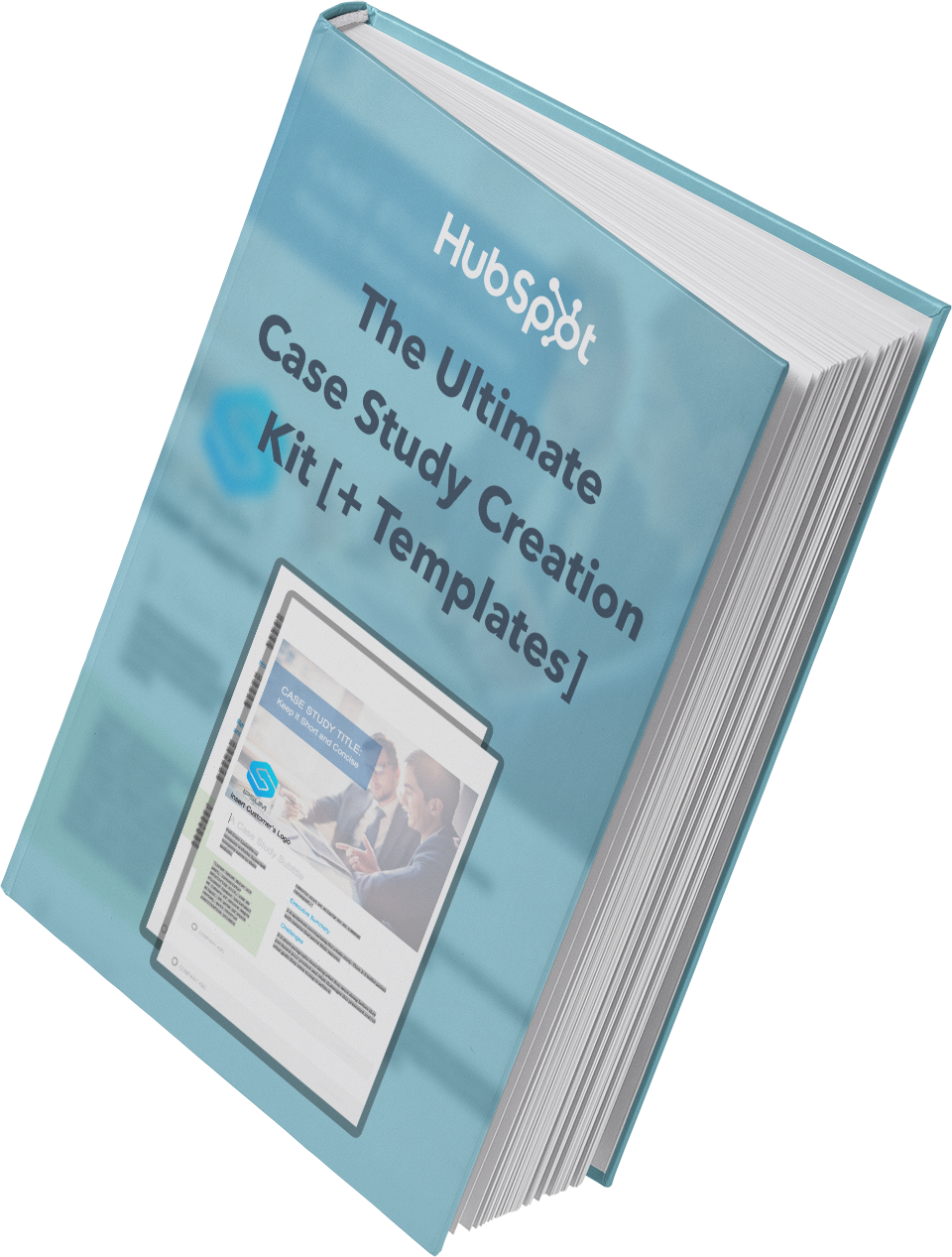
Featured Resource: Case Study Template

Need help getting your first case study off the ground? Look no further. We've put together a comprehensive guide, complete with templates, designed to make the process a whole lot easier.

Case-Study-Cover

Download this template

9. Call-to-Action

A call-to-action (CTA) is an image or line of text that's included in different types of content to encourage leads and/or customers to take action. In short, you want someone to click your CTA to carry out a desired action.

Add CTAs to blogs, emails, ebooks, and anywhere else you want a lead to complete a certain action to push them to the next stage of the buyer's journey.

Featured Resource: CTA Templates

These resources will empower you to create an impressive call-to-action strategy by helping you understand how CTAs work across different use cases, while also providing you with the means to create them for your own website.

image of hubspot cta templates

Download these templates

10. Memos

A memorandum, or memo, is used to address internal communications within an organization. Think about the type of message you're aiming to communicate. If you're sharing minutes from a meeting, or detailing new policies and procedures, or communicating anything that people may need to refer back to in the future, a memo is likely a good idea.

Memos tend to be longer and more formal than emails (although you may attach a memo to an announcement email) and may be formatted according to your company's style guidelines.

Use this general memo template to get started.

Memo: [Memo Title]

Date: [Date of sending]

Memo To: [Individual(s), Department(s), or Organization(s) the memo is being sent to]

From: [Your Name, or the Name of the Department on whose behalf the memo is being sent]

Subject: [Enter a brief, 5-10 word subject line to describe the purpose's memo]

Introduction

Provide an executive summary of this memo in one-two paragraphs, highlighting the change that is happening, when it is effective, and what the key takeaways are for the memo recipient.

Background

Explain the background for this organizational change in one-two paragraphs. Some questions to answer in this section might be:

  • Why was this idea pursued in the first place?
  • What data, research, or background information informed this decision?
  • What are the intended results of this organizational change?

Overview and Timeline

Describe the organizational change in clear, direct language. Specify the following:

  • What will be changing.
  • Who will be responsible for driving the change.
  • When the changes will go into effect.

Closing

Close things out with a final note on:

  • Why employees should feel excited and motivated about this change.
  • Where and when employees should submit questions, comments, and/or concerns.

Featured Resource: 4 Free Memo Templates

We've drafted up four free memo templates for general, organizational, financial, and problem-solving updates. We've also included a best practices checklist for you to review before sending your memo out.

image of hubspot's memo templates

Download these templates

Adding these templates to your marketing arsenal can help you save time during your drafting process. Copywriters are shifting gears from blogs to case studies to emails all the time.

If you're responsible for writing amazing copy for different types of content on a regular basis, using templates is a great way to get your creative juices flowing.


10 Common Copywriting Templates to Use in Marketing was originally posted by Local Sign Company Irvine, Ca. https://goo.gl/4NmUQV https://goo.gl/bQ1zHR http://www.pearltrees.com/anaheimsigns

Friday, December 18, 2020

The 5 Best Ebook Formats for Marketers [Free Templates]

Some argue that in the world of marketing, ebooks are dead. Others say they are not. But the fact is that ebooks — when written, designed, and marketed properly — can generate thousands upon thousands of contact submissions for your business.

Whether you're just getting started with ebook creation as a marketing tool, or you're reconsidering the role of ebooks in your existing content strategy, you're likely asking yourself an important question: What is the best ebook format for the ebooks in my marketing library?

It's important to note that this question can be answered in two different ways:

  • What is the best ebook format for content creation?
  • What is the best ebook format for content consumption?

Here, we'll cover best practices for both of these topics — and explain how HubSpot's Ebook Templates can help you achieve your marketing team's lead generation goals.

Featured Resource: 18 Free Ebook Formatting & Creation Templates

cta-Dec-10-2020-10-48-41-89-PM
Download Free Ebook Templates

Need help formatting your ebooks? Our collection of 18 free ebook templates will help you create and format your ebook content for an incredible reader experience in Microsoft PowerPoint, Adobe InDesign, and Google Slides so that you can format your ebooks in the way that best suits your marketing team and your content readers.

The 3 Best Ebook Formats for Content Creation

1. Adobe InDesign

Adobe's advanced design software gives content creators a myriad of options for creating and formatting their ebooks.

These advanced features do come at a price, but experienced marketing designers rely on Adobe InDesign because of those features.

Click Here to Download 6 Adobe InDesign Ebook Templates.

Pros:

Adobe is known for being feature-rich. As a result, you can expect your ebooks to look their best when made with InDesign, as you'll be able to create and incorporate original design elements right in your document.

Cons:

For an inexperienced designer or for the marketer who just needs to get a serviceable offer released, the bells and whistles that InDesign offers might not be necessary. InDesign's interface and usability aren't the most straightforward, and could require you to put in more effort than is needed for your final deliverable.

2. Google Slides

Google Slides is a simpler tool for making an ebook when compared to InDesign, and the fact that documents live online mean you can collaborate in real-time with your team members to make a fantastic deliverable. Oh — and it's free, which is helpful if you have a limited marketing budget. 

Click Here to Download 6 Google Slides Ebook Templates.

Pros:

Google Slides is a great tool for marketers who need to make a good ebook quickly — especially if you're working alongside team members and are sourcing feedback from them. The interface of Slides is arguably more straightforward than InDesign's, meaning you can move and edit creative elements faster if you're new to both tools.

Cons:

Because Google Slides is primarily a presentation tool rather than an ebook creation tool, you may miss out on some necessary features that would help make your ebooks the quality they need to be in order to warrant your leads' attention.

Conversely, you might need to make design elements elsewhere, such as an Adobe software or Canva, and later import these creative elements into your Slides deck. This could create an inconsistent creation experience if you need to track down design elements after you've created them.

3. Microsoft PowerPoint

A slightly more advanced option than Google Slides — but not quite as advanced as Adobe software — PowerPoint is another presentation-making platform that can be used to design an ebook.

Pros:

PowerPoint has some features that Google Slides does not, such as better effects for designing. PowerPoint is also an offline software, meaning you can build your ebooks without wifi.

Cons:

PowerPoint is a paid software, as opposed to a free tool available in G Suite. You'll also be in asynchronous communication with your team if you're collaborating with them on edits and additions. Lastly, while it has better creative features than Slides, it doesn't come close to the advanced features of InDesign.

Click Here to Download 6 Microsoft PowerPoint Ebook Templates.

The 2 Best Ebook Formats for Consumption

1. Interactive PDF

The best ebook format for ebook consumption is an interactive Portable Document Format, or PDF.

PDFs are the go-to option for content marketing ebooks for many reasons — among them the consistency of their design and readability on different devices.

We at HubSpot use PDFs for our ebooks because we can embed links to relevant pages and sources in them, can upload them right into our content library and File Manager, and trust that the design will appear as intended if our leads open the ebook in Chrome, Safari, Preview, on their phones, or on a desktop.

The interactive nature also means if we include an open text box for readers to complete an activity in the book (like in our Content Marketing Workbook), readers can complete the activity in whatever application they're consuming the content.

2. EPUB

EPUB, short for electronic publication and saved with an .epub file extension, is another way for you to save your ebooks.

EPUBs rose in popularity after becoming a prominent ebook format for e-readers, but given its accessibility on Apple macOS and iOS products via Apple Books, the format is also a viable — though somewhat limiting — option for content marketing ebooks.

epub-3One unique feature of the .epub file format is its scrollability. To mimic the reading of an actual book, readers can view one page at a time and must scroll or swipe horizontally, as opposed to vertical scrolling with PDFs, which gives your readers the feeling of reading a book as opposed to interacting with website content. However, this also means readers might have to do more work to navigate the content and find the information they are looking for.

Additionally, video and audio files can be embedded in the .epub format, unlike PDFs, which means your readers can consume more interactive content without leaving the ebook.

If you're tired of the PDF option and want to spruce up your content format, you can save your InDesign ebooks as an .epub file – just be prepared for some readers being unable to read your content, which is something you likely don't want to be the case.

Formatting Your Ebooks

There's no one perfect ebook format, but that just means there's more options for your team to work with.

If you're just getting started, we recommended using Google Slides – since you'll be able to collaborate with your team more easily, create your content for free, and see how your audience reacts to ebooks before making a major investment in time and resources.

As you scale, and if you're able to work with a designer, we suggest formatting your ebooks in InDesign.

When it comes to saving your ebooks, it's best to stick with the interactive PDF format for wider accessibility.

Either way, make sure you check out HubSpot's 18 Ebook Templates for free InDesign, PowerPoint, and Slides templates to build, format, and design your ebooks.


The 5 Best Ebook Formats for Marketers [Free Templates] was originally posted by Local Sign Company Irvine, Ca. https://goo.gl/4NmUQV https://goo.gl/bQ1zHR http://www.pearltrees.com/anaheimsigns

Thursday, December 17, 2020

Google Maps Marketing Strategy: The Ultimate Cheat Sheet

When I’m looking for a business that will have what I need, whether it’s food or office supplies, I use Google Maps. I know that the search results will give me enough information to pick the best option, like reviews, ratings, photos, and location information.

I’m not alone in my preference for Google Maps, as it is six times more popular than other navigation apps. Given its popularity, it’s critical you optimize your business to appear in Google Maps search results.

In this piece we’ll cover the basics of Google Maps marketing, best practices for optimizing your Google My Business for search results, and marketing tactics you can employ to improve your local SEO.  

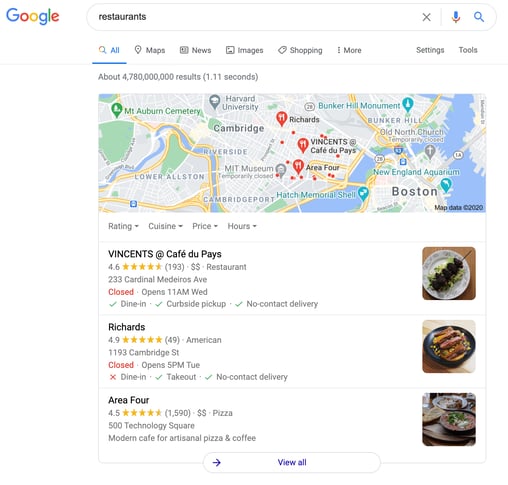
Google Maps marketing is beneficial for large and small businesses alike, especially because of Google Maps Local 3-Pack. Local 3-Pack is the first three businesses shown in search results that Google considers to be most relevant based on a user's current location or the location where they’re searching.

The image below is an example of a Local 3-Pack for a restaurant query in Cambridge, MA. These three businesses are what Google considers to be most relevant based on the search query and the location where the search is being conducted.

example of google maps local 3-pack for restaurant query

You can think of it like this: if your Google Maps marketing strategy is focused on optimizing your Google My Business profile for search results, Google will take note of this and show your business in the Local 3-Pack for relevant queries relating to your company. This increases visibility, and increases the likelihood of consumers visiting your business and making a purchase.

What is Google My Business?

Google My Business is a free tool for business owners to manage and optimize their business’ profiles on Google Maps.

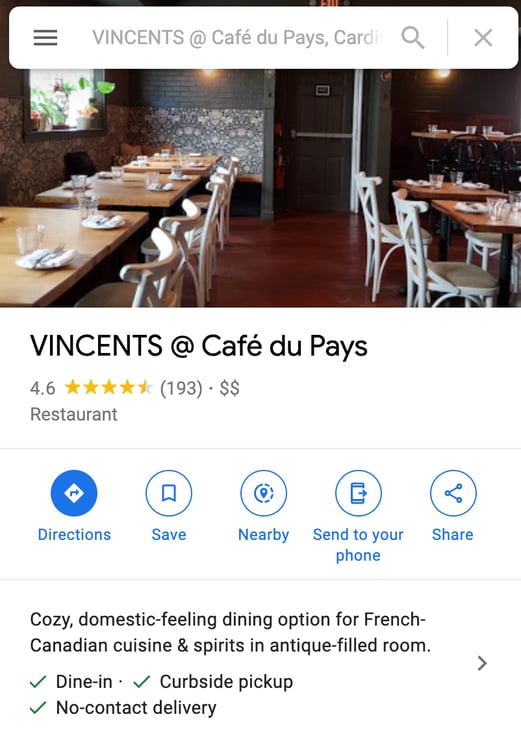
A Google My Business profile typically includes your business’ name, location, and hours of operation. The image below is an example of a typical Google My Business profile from one of the top restaurants from the image above.

example of optimized google my business account for a restaurant google maps marketing

When you claim your business using a Google My Business profile, you can optimize your Google Maps presence by ensuring that customers only have access to relevant, up-to-date information.

You can also use your profile to interact with customers when they leave reviews and track Google Maps Ads insights to understand how customers interact with your profile.

Google Maps Ads

Although marketing on Google Maps is free, local search ads can boost your business’ visibility in Google Maps search results.

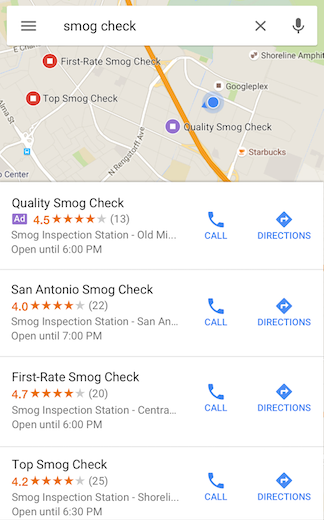
Using these ads will bring your business listing to the top of search queries for keywords relevant to your business. Google Maps ads use location targeting, so they’ll only show up for location-relevant searches. These ads appear in desktop and mobile searches (shown below).  

example of google maps marketing business ads in search results

Image Source

When you create ads for your business, you can track their performance to get a sense of how customers respond to your ads and take further actions like using your address to get Google Maps directions or click on the listed phone number to call you.

How To Optimize Your Google My Business Account

To appear in Google Maps results, you need to optimize your Google My Business profile to include up-to-date information. Let’s go over the profile elements that marketers should focus on to perfect their Google Maps marketing strategy.

Verify Your Business

The first thing you’ll want to do is claim and verify your business. This means that you claim a business as your own within Google Maps, so you’re the only person with the ability to change information in your business profile.

This verification process is done through Google, and most businesses can do so through postal mail.

Mark Relevant Categories and Attributes

Categories describe your business and the services you provide. Customers often come across businesses in Google Maps by searching for categories, like “pizza restaurant” or “coffee shop.”

Google recommends that you choose a primary category that describes your overall business, like “Pet Groomer.” A further best practice is using additional categories that let customers know more about what your business offers. So, continuing with the previous example, if you’re a pet groomer that also sells pet supplies, you’d want to include an additional category for “Pet Supplies.”

Attributes are the amenities a business offers, like accessibility functions or outdoor seating. Google has recently added attributes to mark when businesses are black-owned, women-owned, and LGBTQ friendly. Google recommends that businesses select the most-relevant attributes to display in their profile.

Location and Service Areas

If your business has a store-front location, using the right address is crucial for optimizing your profile. Google recommends using a USPS or postal service approved address that includes all relevant information like room or suite number and a nine-digit zip code.

If your business services customers at their homes or businesses, like a cleaning service, you’d want to include an address for your primary location and add specific service areas where you do business.

Optimized Introduction

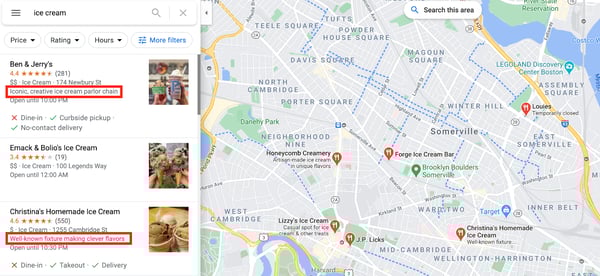
One of the most essential optimization factors for your Google My Business profile is an optimized introduction that gives customers a summary of your business. These introductions should be brief and include relevant keywords that users may search for. Short descriptions of your business are shown in tile search results, as shown below.

google maps marketing optimized introduction example

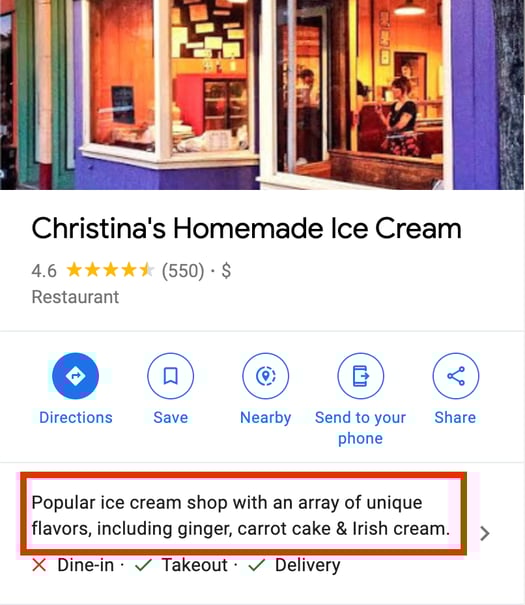
Longer descriptions appear when a customer clicks on your specific business, as shown below.

optimized introduction in google my business profile

Reviews

Google recommends responding to online reviews of your business, which enables new people to find you online, and demonstrating to existing customers that you value their feedback. You might consider asking happy customers to leave reviews or even incentivizing them with a coupon in exchange.

Having reviews on your profile is also a great way to build social proof based on a psychological idea that says people determine what is good by finding out what other people think is correct. Reviews help build social proof because consumers value enthusiasm from other consumers, and they spend 31% more when a business has positive reviews. Consumers also trust user-generated content (UGC), like reviews, 9.8x more than paid advertisements.

Alternatively, if someone leaves a negative review, it's still essential you respond. Look at Google's guidelines for how to respond to a negative review.

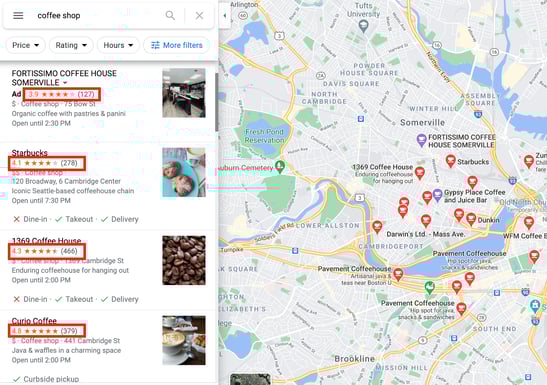
In search result overviews, reviews appear as star ratings in a business profile, as shown below.

google maps search results business ratings example

When a user clicks on the business they’re interested in, reviews appear towards the bottom of the business’ profile. Anyone can read these reviews, view ratings, and leave their own. This is demonstrated in the GIF below.

google maps business profile reviews example

Photos

According to Google, businesses with photos receive 42% more requests for driving directions to their location and 35% more click-throughs to their website. To optimize your account for search, it's vital that you provide pictures of your physical store and images of your products or services.

Customers can also upload photos, which is another form of UGC to benefit from in business reviews.

Best Google Maps Marketing

Let's look at two examples of businesses in the Boston area that have successfully optimized their Google My Business profile for effective Google Maps marketing.

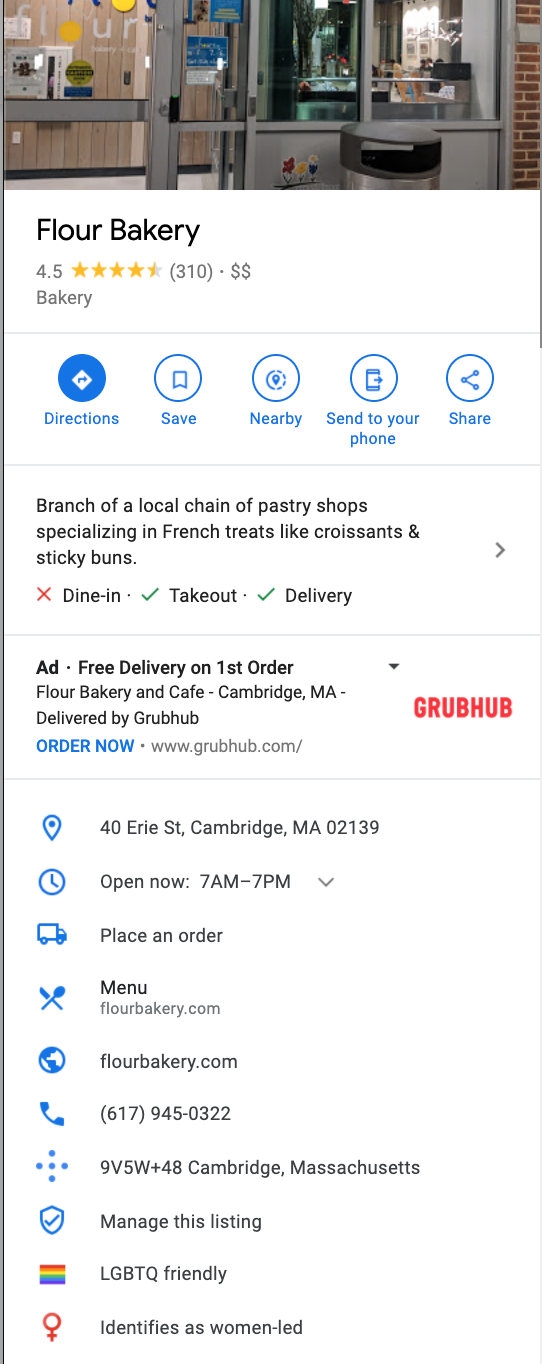
Flour Bakery

When I searched for “bakery” in my area, Flour Bakery was one of the first results. Flour Bakery has taken advantage of all Google My Business optimization options to build their Google Maps presence. They’ve included a brief summary of their services, accurate location, hours, and links. They also used the Google Attributes feature to call out relevant aspects of their business, like being women-led and LGBTQ friendly.

example of optimized google maps marketing profile for a restaurant

They’ve also included relevant photos and allow customers to leave reviews.

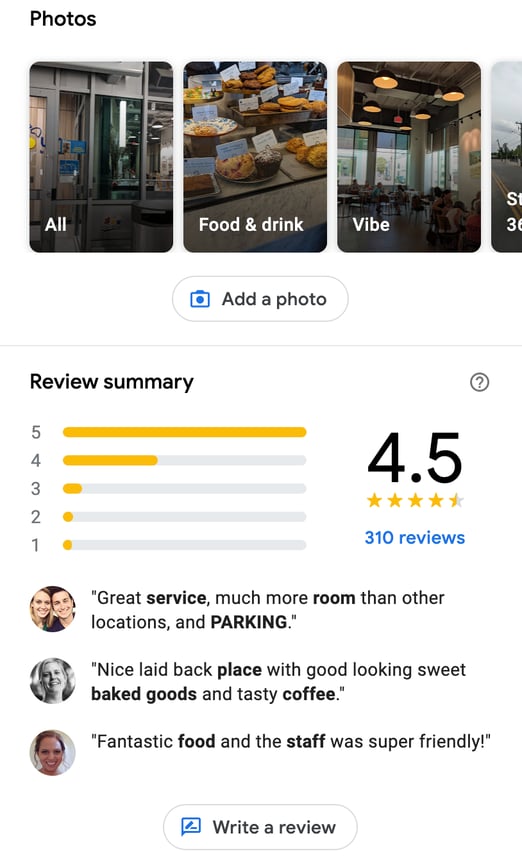
example google maps business profile reviews and photos

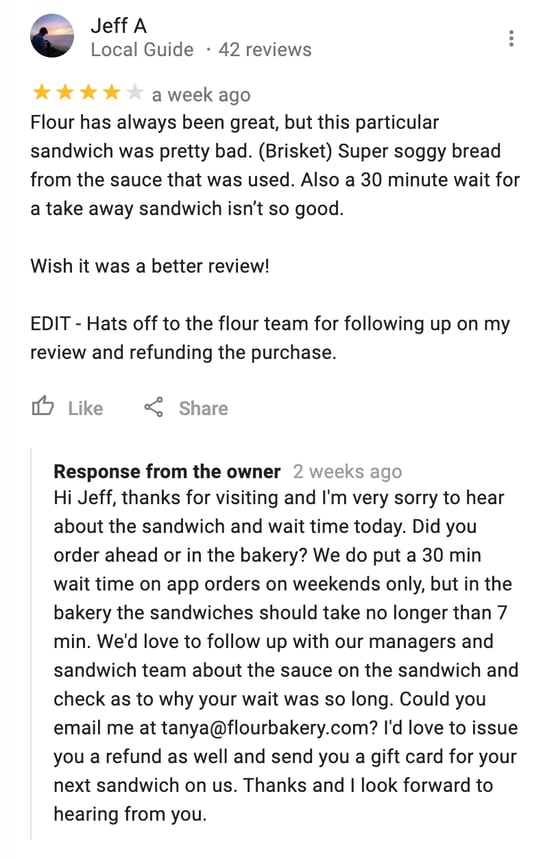
Flour Bakery also responds to reviews, showing existing and future customers alike that they care about consumer experience and are willing to rectify problems, should they arise (shown below).

business replying to google maps customer reviews example

Blue Nile Restaurant

Say you’re looking for a black-owned business to support during your next meal. If I query the words “black-owned,” Blue Nile Restaurant comes up.

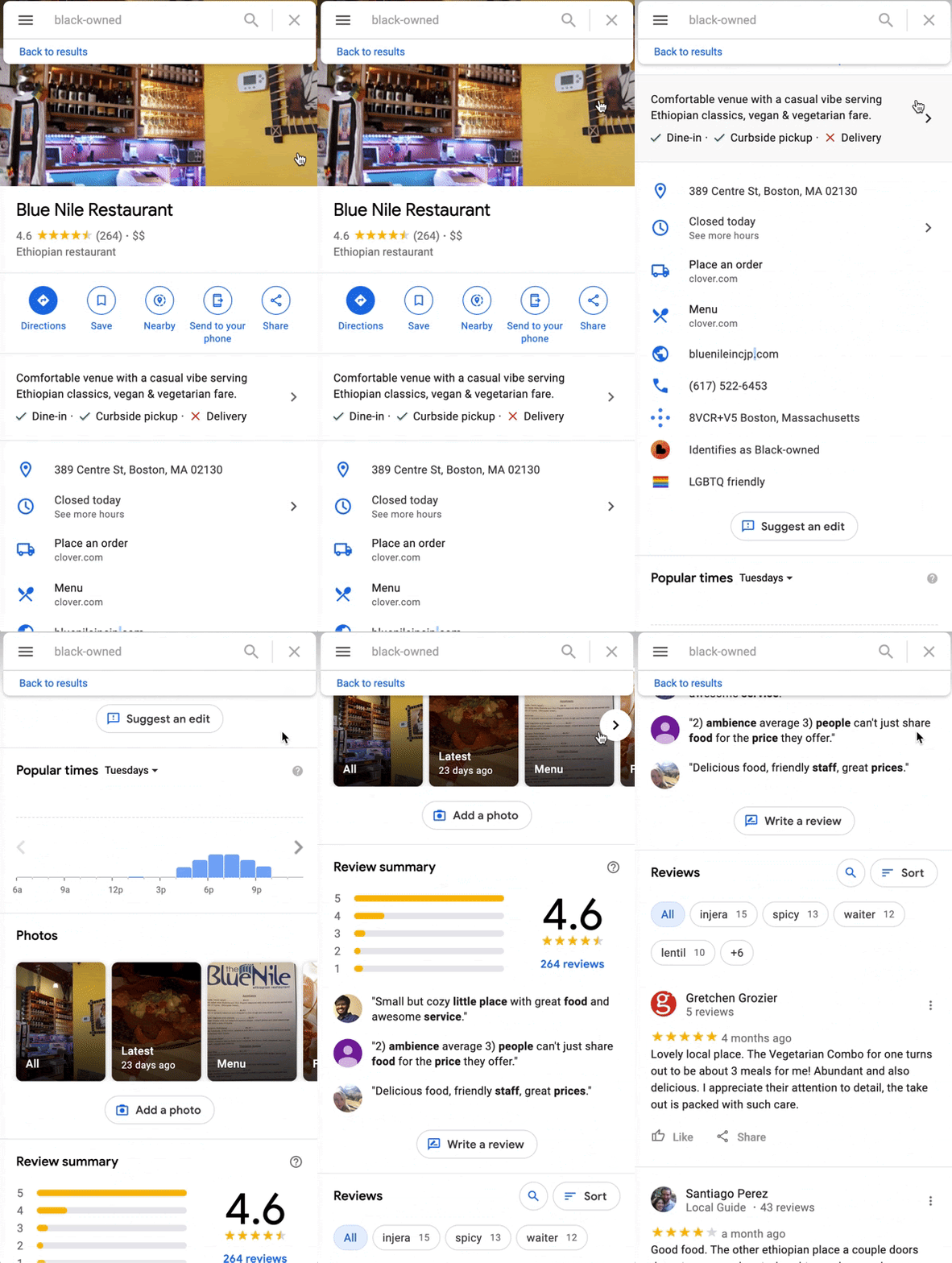
They’ve successfully optimized their Google My Business profile and selected an attribute that makes them easily identifiable (being black-owned). They’ve included an accurate address, hours, and phone numbers and allowed customers to leave reviews and add their own photos (shown in the gif below).

example of optimized google my business profile using attributes

Marketing Strategies to Improve Local SEO

Google Maps is the most popular navigation app by a landslide, with 67% of total navigation users — second to Maps is Waze, with only 12% of total users.

This means it's a critical tool for ensuring local consumers can find your business.

Google Maps can help bolster your online presence in local search results, which demonstrates your legitimacy and relevancy as a company — you wouldn't be able to rank #1 for "nail salons near me" if you'd closed down months ago. Additionally, ranking high in search will ideally convince consumers to choose your business over a competitor's.

To improve local SEO, try these three tactics:

Get links back to your site from local businesses or bloggers.

To improve your local SEO, consider crafting a strategy to get backlinks from other local businesses. You could create a deal in which you link to another business' site in exchange for a link from them.

Alternatively, depending on your industry, try reaching out to local bloggers to ask for reviews — for instance, if you run a Bed & Breakfast, you might ask travel bloggers to stay for free in exchange for an online review.

Submit your site to local business directories.

Try submitting your site to local business directories like Yelp, Local.com, and Superpages, and ensure all information across each of the sites is accurate — ultimately, the more websites that reference your business, the better.

To submit your site to Yelp, for instance, go to https://biz.yelp.com/signup_business/new and fill in the form. Once the site is verified and approved by moderators, you'll receive an email on how to claim your business page.

Keep track of performance via Google's Insights tool.

Once you've created a Google My Business profile and optimized it for Google Maps, you'll want to track analytics using Google's Insights tool.

To access Insights on a desktop, sign in to your Google My Business account, open the location you'd like to manage (if you have multiple locations), and click "Insights" from the menu. On mobile, open the Google My Business app, click "More,” and then tap "Insights."

Insights allow you to see how many times people have seen your business information, how many times people have requested driving directions to your location, and how customers can find your listing.

Optimize Your Google Maps Presence

Ultimately, an optimized Google My Business profile is another addition to your digital marketing strategy that gives your business more visibility, especially in Google Maps search results.

A business profile that gives an accurate address, phone number, and contains a significant amount of customer reviews will likely attract new customers, helping you grow your reach and drive revenue.


Google Maps Marketing Strategy: The Ultimate Cheat Sheet was originally posted by Local Sign Company Irvine, Ca. https://goo.gl/4NmUQV https://goo.gl/bQ1zHR http://www.pearltrees.com/anaheimsigns
How to Maximize Your Marketing Efforts with These High-Impact Techniques

As a marketer, I'd like to believe all my marketing efforts are high-impact.

Unfortunately, that isn't always the case.

Consider the blog post that resulted in 25 views, and 0 leads — or the Facebook campaign that totally flopped, with a much lower ROI than expected.

Of course, high-impact marketing is any marketer's goal. High-impact marketing means you're getting the biggest bang for your buck, and that your time and resources are having a strong, positive impact on your business' bottom-line.

But high-impact marketing is easier said than done. Here, we'll explore what high-impact marketing is, examples of high-impact marketing, and finally, how you might maximize your own marketing efforts for highest possible impact.

Let's dive in.

What is high-impact marketing?

High-impact marketing is any marketing efforts that have significant impact on your business' bottom-line.

High-impact marketing can range depending on your business goals and industry — additionally, high-impact marketing doesn't necessarily correlate with the amount of money you spend.

For instance, perhaps you create a low-budget YouTube video that results in thousands of views, and a 15% lead conversion rate. That's high-impact, regardless of the amount of money you put into the video.

Fortunately, this means high-impact marketing doesn't have to break the bank to be effective. 

Of course, which types of marketing will have a high impact on your bottom-line depends on your unique marketing goals. For instance, if your goal is to increase brand awareness, perhaps you find Instagram has the highest impact. Alternatively, if your goal is to establish thought leadership, perhaps you find you have higher impact by guest posting on various blogs.

Examples of High-Impact Marketing

To fully understand the definition of high-impact marketing, let's consider a few examples of high-impact marketing in-action:

  • A YouTube strategy that increases leads for your company while reaching new audiences and increasing brand awareness.
  • A podcast advertisement that increases sales for your new product.
  • A PR campaign that increases positive perception of your brand, as measured by a public perception survey.
  • A blog post with a 10% conversion rate, higher than industry standards.
  • An Instagram post that receives high engagement rates and increases your account's follower count.
  • An online co-marketing webinar that enables you to reach new networks via your partner's channels.

There are many more, of course, but ultimately, these examples are meant to demonstrate just how wide-ranging high-impact marketing can be.

High-impact marketing will depend on your goals, industry, and the types of marketing best-suited for your brand. What results in a high ROI for one company could be a waste of time for another.

Next, let's dive into some specific high-marketing techniques you might implement depending on your goals to drive lasting results for your company.

How to Maximize Your Marketing's Impact

1. Ensure you're targeting the right audience.

Best for: Brand awareness, increased leads.

To create the highest-impact marketing campaigns, it's critical you do your research to ensure you're targeting your ideal audience.

Of course, your audience will vary depending on your goals. For instance, perhaps you're putting together an online event targeted towards entrepreneurs. If that's the case, you'll want to target a wide audience by identifying any social media users who've shown an interest in entrepreneurship. Since your goal is to get as many attendees as possible, you don't need to get too hyper-targeted.

Alternatively, let's say you're looking to increase sales on a new product. If that's the case, you don't want to target a large audience — instead, you want to focus on a select group of people who seem ready-to-buy. In that case, you'll want to target viewers who've visited a landing page for your product, or viewers who've clicked on an ad for that product over the last six months.

Ultimately, you don't want to spend too much money or resources targeting people who are never going to convert, so for truly high-impact marketing, it's critical you take the time to target the right audiences.

Take a look at How to Find Your Target Audience to learn how to identify the right audience for your own goals.

2. Create a strong partnership program.

Best for: Reaching new audiences.

A partnership program, or co-marketing campaign, can help you reach new audiences, demonstrate expertise in your industry, create high-quality content for leads and customers, and so much more.

Additionally, backlinks from other companies is invaluable for SEO, so a partnership program is a win-win on all accounts.

To create a truly impactful co-marketing campaign, consider hosting a webinar with a partner, creating an e-book with a partner to share with the partner's network and increase brand exposure, or writing a series of guest blog posts for each other's sites.

Co-marketing campaigns can have high impact by delivering exceptional value to leads and customers. For instance, consider this actionable guide HubSpot created with LinkedIn to help viewers learn how to get the most out of their LinkedIn marketing efforts.

While HubSpot could have written its own content regarding LinkedIn best practices, it's higher-value when it combines forces with LinkedIn. Additionally, this ebook is now shown to both HubSpot and LinkedIn networks, ensuring broader reach.

Best of all, co-marketing efforts don't have to be high-budget. In fact, partnership programs can be incredibly cost-effective, since you're dividing the amount of resources needed by half.

3. Publish on various social channels.

Best for: Increased brand exposure, establishing thought leadership in an industry.

Social media is one of the most effective opportunities to achieve any of your marketing goals.

Don't believe me? Consider this: 54% of social browsers use social media to research products.

Additionally, 73% of marketers believe that their efforts through social media marketing have been "somewhat effective" or "very effective" for their business.

Best of all, social media is one of the most cost-effective marketing strategies.

Of course, a social media strategy needs to be comprehensive to be as high-impact as possible. For instance, to increase thought leadership, you might consider asking executives to post thought leadership content regularly on LinkedIn and share it with experts in the industry. Alternatively, perhaps you'll want to post advice from industry leaders on your own Instagram or YouTube accounts.

Additionally, it's critical you ensure you're using the best platforms to reach the right audiences. There's a wide variety to choose from — including Facebook, Instagram, LinkedIn, Tik Tok, YouTube, Twitter, and more.

Conduct research to find where your target audience spends the most time, and then alter your strategy accordingly.

4. Maximize referrals.

Best for: Increased sales.

Considering it costs anywhere from five to 25 times more to acquire a new customer than to retain an existing one, it makes sense that you'll want to leverage existing customers for high-impact marketing.

The inbound flywheel is made up of three sections: Attract, Engage, and Delight. To create sustainable, long-term growth, it's critical you enable your flywheel to reach maximum speed.

To do this, you might create a formal referral program, in which existing customers earn a discount for recommending new customers.

Additionally, you might consider encouraging current social media followers to refer new followers to your social pages. To incentivize them, you could host a giveaway — if a follower tags 3-5 friends in the comments section, they have the chance to win.

You'll also want to ensure customers have a good experience with your brand, start-to-finish. If customers are impressed with your customer service, for example, they're more likely to recommend you to friends for free.

Now that's high-impact.

5. Optimize for SEO.

Best for: Demonstrating expertise, increasing exposure to new audiences.

Finally, optimizing your website, blog posts, and even social media pages for SEO is critical for long-term marketing success.

Your blog posts, for instance, will be much higher-impact if they appear in search results for related queries. Otherwise, email and social media traffic can only get you so far.

Additionally, your website will have much higher-impact on your company's bottom-line if it ranks in the top ten search results for related keywords.

Consider, for instance, the impact your website might have on sales if prospects are able to find your company whenever they search for products or services related to your industry.

An SEO strategy is a long-term play, but it's one of the best opportunities you have for creating content that continues to impact your bottom-line well into the future.


How to Maximize Your Marketing Efforts with These High-Impact Techniques was originally posted by Local Sign Company Irvine, Ca. https://goo.gl/4NmUQV https://goo.gl/bQ1zHR http://www.pearltrees.com/anaheimsigns