Monday, December 14, 2020

How Three New Instagram Shopping Tools Could Help Marketers Boost Sales

For years, millions of brands have flocked to Instagram to spread awareness to millennials, Gen Z, and members of other generations on the app.

And, at this point, Instagram marketing has proven to be a smart tactic. Currently, 90% of Instagram's 1 billion-plus user base follows a Business page on the platform.

But, while Instagram has been a great place for brands to engage target audiences, it hasn't always been easy for those companies to turn their followers into customers.

When the app launched, Instagram only allowed links in profile bios. Shortly after, the platform allowed users to place links in Stories -- but only if they had a verified account or more than 10,000 followers. This meant that smaller or less-followed brands had to think strategically to get their Instagram audience to view product information, research the brand, and ultimately leave the Instagram app to buy products.

Things got easier for brands with the global launch of Instagram Shopping's Shoppable posts in 2017. This was the first time standard feed-based posts or Story images could be linked to a brand's Facebook product catalog. However, the feature still required Instagram users to leave the app to make a purchase.

But this summer, with the launch of Facebook Shops, Instagram Checkout, and Instagram Live Shopping, many of the friction points between discovering products on Instagram and buying them have been eliminated.

In this blog post, I'll highlight the three free, new tools that brands can use to make sales directly from Instagram's platform, as well as any brand requirements for using them.

3 New Instagram Shopping Tools to Know About

1. Facebook Shops

Technically, this tool was launched by Facebook, which owns Instagram. However, your Instagram followers won't need a Facebook account to make purchases with this feature.

Facebook Shops, launched in May, enables brands to create online stores that link directly to a brand's Instagram, WhatsApp, Messenger, or Facebook Business Page.

When creating a free Shop, brands can upload bulk or individual product listings with photos, prices, and descriptions; change the store's button colors and text to make it consistent with their brand; and choose to have visitors buy products directly from the shop or through an integration with an ecommerce website they already use.

Facebook Shops can be created on Facebook Commerce Manager. To get started, you'll need admin privileges to the Instagram Business or Facebook Business account you'll be linking the Shop to -- as well as admin privileges for your brand's Facebook catalog.

Once a Shop is created, it can be linked directly to your Instagram Business profile. When this is done, an icon that says "View shop" will appear on your mobile profile under your bio. At this point, you can access Facebook Shops on desktop from Facebook Business profiles, but not from Instagram or WhatsApp desktop sites.

Here's what the Shop experience looks like when an Instagram app user visits the account of Ink Meets Paper, a printing company which offers a Facebook Shop:
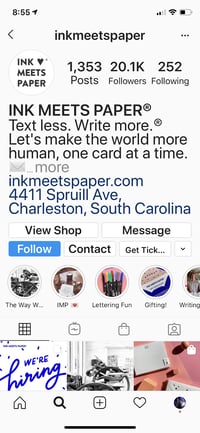
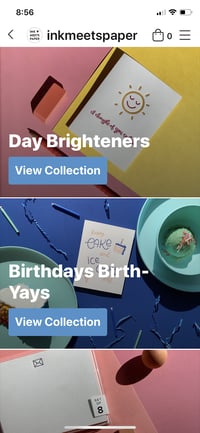
Ink meets paper facebook shop link on instagrqam bioink meets paper facebook and instagram shop

Facebook Shops, which is free to all businesses that fulfill the business page requirements noted above, could be a great option for small or medium-sized businesses that are interested in ecommerce but don't have the time or bandwidth to create and promote a full ecommerce site around their brand.

To learn more about how Facebook Shops works and the background of why Facebook launched it, check out this post.

2. Instagram Checkout

For brands that want to sell a few select products on Instagram, or don't have time to create a Facebook Business Page or catalog to open a Shop, Instagram also now offers an in-app Checkout experience that links to Instagram Shoppable posts.

Before 2020, several brands were already using Shoppable posts. These posts, which often highlighted an image of a product or experience, allowed users to tap the content to view it in an online catalog outside of the platform.
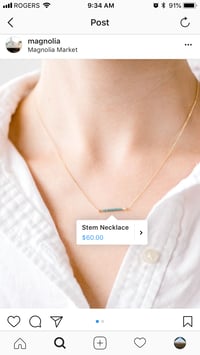
Instagram shoppable post

But, in March, Instagram launched a Checkout feature that allowed Shoppable purchases to happen directly in the app.

In an announcement, Instagram explained that it launched in-app Checkout to keep users on the platform when they were inspired to make a purchase.

Instagram also adds, "Businesses can truly leverage the full ecosystem of Instagram Shopping features to build experiences that drive awareness and transactions all in one place.

Currently, Checkout is free to brands through until at least 2021. However, there might be selling fees for businesses after that.

"We also want to help reduce the cost of doing business during this tough economic time, so we’re waiving selling fees for businesses that use Checkout on Instagram through the end of the year," Instagram's post said.

Now, when users click on a Shoppable post that links to the Checkout feature for the first time, they'll be asked to give their name, billing information, and shipping address and can then click "Place Order" directly on Instagram. To further eliminate friction, users can set the app to remember purchasing information so they don't need to submit it each time they place orders.
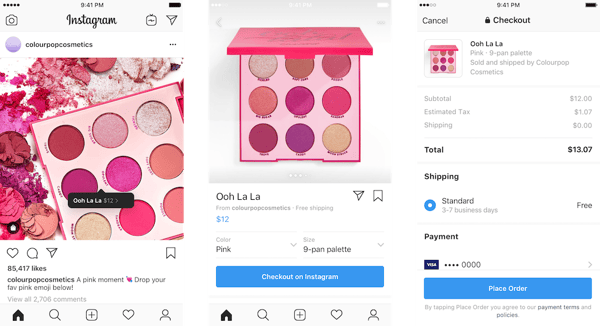
Instagram shopping post and store

Image Source

At this point, you might be wondering, "How is this different from Facebook Shops?"

Both tools similarly allow consumers to make purchases directly on Instagram. However, a Shop is a mini-online store where you can purchase one of many products listed by one brand. Meanwhile, Checkout allows consumers to buy a product they happen to see on an Instagram Shoppable post within their feed or a brand's profile page.

Additionally, to use the Checkout feature, you'll need to fulfill the same requirements as Facebook Shops, plus approval for Instagram Shopping.

Checkout might be a good option for your brand if you want to dabble in internet sales but don't want to monitor how multiple products are selling in a wider shop. With Checkout, you can choose to sell one or two products within a few posts, and monitor your content for engagements and sales metrics.

3. Instagram Live Shopping

Aside from adding Checkout to posts within a feed, Instagram Live Shopping brings a similar purchasing experience to live content streamed on the app.

Essentially, Instagram Live Shopping lets brands or Instagram influencers present a small CTA for a product at the bottom of an Instagram Live stream. Below is an example where an influencer discusses a product live as its Checkout CTA is highlighted at the bottom of the screen:

Instagram live shopping content

Image Source

When an Instagram Live viewer sees the Checkout CTA and clicks "Add to Bag," they can either save the order for later if they want to continue watching the stream, or they can purchase the product immediately via Checkout.

If a user places a product in their Instagram Bag, they can find it by going to the app's Explore tab and tapping "Shop" in the top navigation. Fram the  Shop page, they can then tap the bag icon in the upper right corner to see carted products:
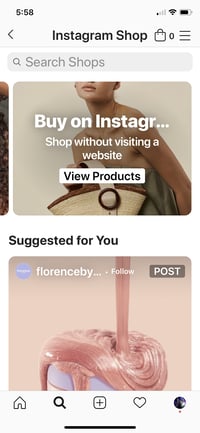
Instagram shopping tab of app

Because users who purchase items via Instagram Live Shopping will be directed to Instagram Checkout to finalize the purchase, brands will need to gain access to Instagram Checkout before using Live Shopping.

What to Keep in Mind When Selling Products on Instagram

At this point, you might be ready to sell your brand's products using Instagram's in-app shopping features. However, as you would with any new marketing or selling technique, you'll want to keep a few key things in mind:

Your content strategy is still key.

While it might sound tempting to blast your followers with posts filled with product shots or basic promotional messaging, and hope that users click the Checkout button immediately, some audiences might not respond well to content that feels like a basic advertisement.

Remember, social media users see ads with product shots and bland descriptions daily. If your content doesn't stand out above all the other promotional posts out there, your audiences might disengage from you, even if they like your brand.

Rather than posting basic images or videos of products linked to Checkout, consider going a step further. For example, you could air a live stream tutorial where an influencer discusses your product, or publish user-generated content such as customer testimonials. These types of content will show audiences more valuable details than a basic product shot, while also presenting how real people benefit your product. This could persuade them to click and buy your items much faster.

You'll want to pick the right feature for your company.

While Shops will allow customers to buy a bunch of different products from you all at once, Checkout and Instagram Live Shopping allow you to zone in on specific items or services through your content. While Facebook Shops might be great for brands that can deliver multiple products at once and handle potential high demand, Checkout and Live Shopping could be beneficial for smaller businesses that are more comfortable highlighting one standalone product at a time.

Additionally, if you have a killer supply chain, tons of products to sell, and no time to make content, a Facebook Shop could help you move your inventory. Meanwhile, if you have a great content team, but only have a few key products to sell, you might want to create solid product marketing content paired with Instagram Checkout.

You'll want to monitor your metrics, including revenue.

Although brands don't need to pay for Facebook Shops, Checkout, or Live Shopping, time and effort will still go into creating and maintaining a Shop or content that highlights items sold in Checkout. Because of this, you'll want to monitor the money and engagement-related metrics of each strategy you take on. While these metrics can help you learn what to do, and what not to do, they can also help you determine if these features are worth your team's time.

If you're considering an ecommerce strategy on Instagram or another online platform and don't know where to start in your planning, bookmark our Ultimate Guide to Ecommerce. If you're interested in learning how other brands shifted to ecommerce in 2020, check out this piece.


How Three New Instagram Shopping Tools Could Help Marketers Boost Sales was originally posted by Local Sign Company Irvine, Ca. https://goo.gl/4NmUQV https://goo.gl/bQ1zHR http://www.pearltrees.com/anaheimsigns

8 e-commerce advertising trends to boost results in 2021

E-commerce advertising trends for 2021 could be the saviour for many for brands. Especially as 2020 swept the rug out from under many brands’ feet! Making them realise just how important a good e-commerce offering is.

Indeed, those who were not prepared suffered when it came to sales. Consider Primark, for example, with no online shopping offering it lost an eye-watering £800m over the first Covid-19 lockdown.

The trend and preference for online shopping has been growing in recent years but the pandemic has proven the need for it.

But it’s not just those ‘treat yourself on payday’ purchases that consumers are shopping online for. Today, everything from food shops to prescriptions are now available via e-commerce platforms. You could get everything you need and never leave the house again – but we definitely don’t recommend that.

Instead, this poses a question for marketers: how do we improve our e-commerce offering to keep consumers coming back?

In this article, we consider the e-commerce trends we expect to witness in 2021.

What 2021 e-commerce advertising trends will we be considering?

  1. Bigger focus on dynamic display ads
  2. Adapting your e-commerce advertising post Covid-19
  3. Mobile display advertising
  4. Personalisation across platforms
  5. Reusing content
  6. Focus on key shopping days
  7. Niche e-commerce marketplaces will rise
  8. Shoppable TV is coming

1. Bigger focus on dynamic display ads

Today, every brand understands the need for an all-singing, all-dancing e-commerce platform. Yet, it’s also important that you stand out amongst the crowd when it comes to your display advertising.

Online shopping allows users the opportunity to research what they’re looking for and compare prices. Personalised and dynamic display advertising enables you to draw them back in if they’ve strayed. Marketers who put this to use should see customers return and hopefully make those all-important transactions.

What are dynamic ads?

Dynamic ads reduce the number of cart abandonments and in most cases, offer a consumer something that they’re actively looking for. You can also factor in A/B testing so you can determine which approach works best for the consumers you want to target.

Perhaps a potential customer is shopping for a new pair of winter boots? A dynamic ad featuring a data feed link to those very same boots will pop up on other websites and social media they visit, enticing them back.

It’s a tactic many will still be employing in 2021 – as long as it is done in such as way to continue to comply with GDPR laws.

2. Adapting your e-commerce advertising post Covid-19

Many of us came to rely upon online shopping to get what we needed during the pandemic. Supermarkets saw an incredible surge in online shopping orders – so much so that they struggled to keep up with demand. In fact, online supermarkets witnessed a 102.7% increase year on year in consumer spending and online clothing stores also enjoyed a 24.3% increase.

In 2020, it’s predicted that shoppers in the UK will spend £88.54 billion with retailers. And while this number is the lowest since 2015, these sales will be predominantly online. E-commerce sales are expected to increase by 16.7% and this trend is sure to continue into 2021 if the pandemic doesn’t ease off.

As we navigate this tricky Covid focused world with ever-shifting goalposts and guidelines, it’s important that your e-commerce advertising adapts and that you embrace this new trend.

Producing ads that point people towards your e-commerce offering is essential. Therefore, ensure your platform is up to scratch for those who land. And have a plan in place to remind people you’re still there for their online shopping needs if they navigate off the page.

3. Mobile display e-commerce advertising

E-commerce advertising trends mobile display advertising

Smartphones are where many of us do everything from communicating with friends and family to completing our Christmas shopping. Not only should your brand’s e-commerce offering be mobile-friendly but your advertising needs to be too. It’s predicted that by the end of 2021, 73% of e-commerce sales will be made on a mobile device.

Optimise your e-commerce advertising with a mobile-first approach

Here are a few ways to do this in 2021:

  • Focus on video. Video banner ads will become commonplace across industries, as brands look to capture the attention of those desired audiences. In 2019, the use of video in display advertising grew by 82% and people are twice as likely to take notice and share video content than any other type of content. In 2020, however, we witnessed a sharp decline in video display advertising. However, as businesses start to recover there should be a resurgence in the year ahead.
  • Ensure everything is mobile friendly. Did you know that 30% of people will abandon an online cart if they discover the website isn’t friendly? This means that any content you create needs to adapt for every shape and size of mobile. Loading time is important too. Keep ads simple to ensure your consumer sees them before they get bored and click away.
  • Go after voice search. Voice search optimisation is a rising star in the world of e-commerce advertising. We use voice assistants every day, from Alexa to Siri, and when we ask them questions they search Google for the most voice friendly answer to a query. If you’re targeting those between the ages of 25 and 49, it’s worth noting that 65% in this bracket use a voice-enabled device once a day.
  • Don’t forget about text message marketing. Ditch the email (okay, not entirely) and consider marketing to your consumers via text. (Of course, only if they’ve consented to this form of communication). Texts are personal, unavoidable and won’t get hidden amongst the other promotions in their email inbox.

4. Personalisation across platforms

Omnichannel advertising is a dream for any advertisers and is often named as an e-commerce advertising trend. This seamless approach ensures customers enjoy the same level of care and quality of interaction however they engage with a brand.

Whether they’re shopping in the bricks and mortar store or browsing the website for inspiration, everything they need adapts and works together. Only 26% of companies currently report having channel-specific personalisation solutions in place, this is set to change in 2021. It’s a personalised approach that customers love and brands can also track purchase journeys easily, allowing them to adapt and offer customers something they need again in future to encourage more engagement and sales.

H&M is an example of a brand doing omnichannel advertising and e-commerce well. Its app is easy to navigate on mobile and when a customer signs up they join the brand’s loyalty programme.

This links all their receipts – both in-store and online – allows them to track where orders are and see what rewards they’re owed for their loyalty. It also offers consumers early access to sales and discounts on trending items.

More and more brands will be looking into how they can adopt such an approach in 2021, as consumers who perhaps hadn’t considered online shopping before feeling the need to during the current circumstances.

5. Reusing content is a key e-commerce advertising trend

In 2021, rehashing and recycling content will be the norm as brands are still navigating an advertising world where they need to spend less and get more back.

In-house marketing departments took a hit in 2020, with an estimated 40,000 creatives being made redundant or put on furlough. However, there’s no shame in adapting and reusing e-commerce advertising content and assets to make something new.

The Swedish supermarket City Gross did just this in 2020, reusing assets to create an effective video display ad that offered up recipes and ingredients around Easter time to inspire its customers. GHD is another example, sharing a Christmas advertisement created last year on its social channels.

Reusing content gives brands a breather, especially when perhaps dealing with reduced staffing and lower capacities in-house. It also relieves the issue of having to produce ad after ad in short time frames, adapting and repurposing what’s already there – and with the average person seeing 1,700 digital ads every month, it’s no wonder teams are busy. There’s also the issue of being quick to supply assets for limited time slots. Reusing assets enables brands to capitalise on opportunities. And it’s a trend we’ll likely see more of in 2021, as more users head to online stores.

6. Focus on key shopping days

In 2020, the run-up to Black Friday and Cyber Monday saw brands advertising their deals earlier than usual to tempt buyers shopping online before the days arrived.

Amazon’s Prime Day and week-long Black Friday event saw shoppers doing most of their Christmas shopping in app. While, clothing retailers such as ASOS jumped on the bandwagon early, releasing their sale the day before Black Friday.

In 2021, brands will continue to target online shoppers with earlier advertising campaigns and exclusive offers for those who engage.

While every brand’s key shopping days are different – an online flower delivery service will prep for Valentine’s and Mother’s Day over Black Friday, for example – it does suggest that the earlier you get started the better.

Display campaigns that are ready for these dates will be essential.

7. Niche e-commerce marketplaces will rise

E-commerce display advertising trends niche e-commerce

Think Amazon is king? Well, as the need for digital e-commerce platforms and selling rises, single-brand marketplaces could become more competitive and less profitable.

Therefore, smaller more niche markets will arise selling items from a range of sellers that work better in terms of ROI and that can target consumers searching for the related products. It’s already happening in the world of handmade products. Although Amazon’s Handmade store has tried to wade into this niche too. Thus we may start to see marketplaces arising in 2021 that offer customers focused shopping experiences.

8. Shoppable TV is coming

Ever watched a TV programme and thought ‘wow, I really love that jacket’. Well, get ready the rise of shoppable TV advertising! Advertising that allows the purchasing of items we see on our screens.

For many we are talking about a futuristic e-commerce advertising trend. Yet, shoppable TV has already been rolled and tested over in the States on the NBCU channel!

Users watching a show are greeted with an ad featuring a QR code, they hold their phone up to this and it takes them through to a product that’s been shown on screen so that they can buy it! Brands such as Lacoste have already got involved, featuring advertisements offering the clothing that tennis players are wearing in the French Open.

It’s a new way of reaching more eyeballs than ever before and while it relies on tech-savvy customers to get involved. And it could become more than a gimmick if it takes off! In fact, NBCU has noted that during the testing stage conversion rates have been on average 30% higher than the traditional e-commerce benchmark and social media followings have grown by 10%.

Conclusion

Next year will be a test again as we continue to navigate the world of e-commerce. More and more consumers are moving online – even those who had not yet dipped their toes in the world of online shopping. Considering these e-commerce advertising trends and implement them into your strategy for 2021 to give your brand the best chance of standing out in the digital world.

The post 8 e-commerce advertising trends to boost results in 2021 appeared first on Bannerflow.


8 e-commerce advertising trends to boost results in 2021 was originally posted by Local Sign Company Irvine, Ca. https://goo.gl/4NmUQV https://goo.gl/bQ1zHR http://www.pearltrees.com/anaheimsigns

25 Stats That Make the Case for Infographics in Your Marketing

When we think about visual marketing content, it's easy to default to popular mediums like television, web video, and social media. It's for good reason, too. These channels do a great job of grabbing your audience's attention and getting them familiar with the visuals related to your brand.

But, there's one type of visual marketing content that's sometimes overlooked by marketing teams. It's not as flashy as high-end influencer videos or Super Bowl commercials, but it's one of the most effective and reliable forms of marketing content.

Infographics are an excellent marketing tool for educating customers and sharing information. They describe a product, service, dataset, or action in a visual way so that it's easier to comprehend as the reader. Infographics have been used for marketing purposes since the 19th century and they continue to be an effective tool for marketers to this day.

Read on for some additional stats you should know about infographics this year.

Infographic Stats to Know in 2020

Marketing Efforts

  • 32% of marketers believe that visuals are the most important type of content that they're business creates. (Social Media Examiner)
  • In 2019, 74% of marketing content contained a visual element. (Venngage)
  • 65% of brands use infographics for marketing purposes. (Xerox)
  • 56% of marketers use visuals in all of their marketing content. (Social Media Today)
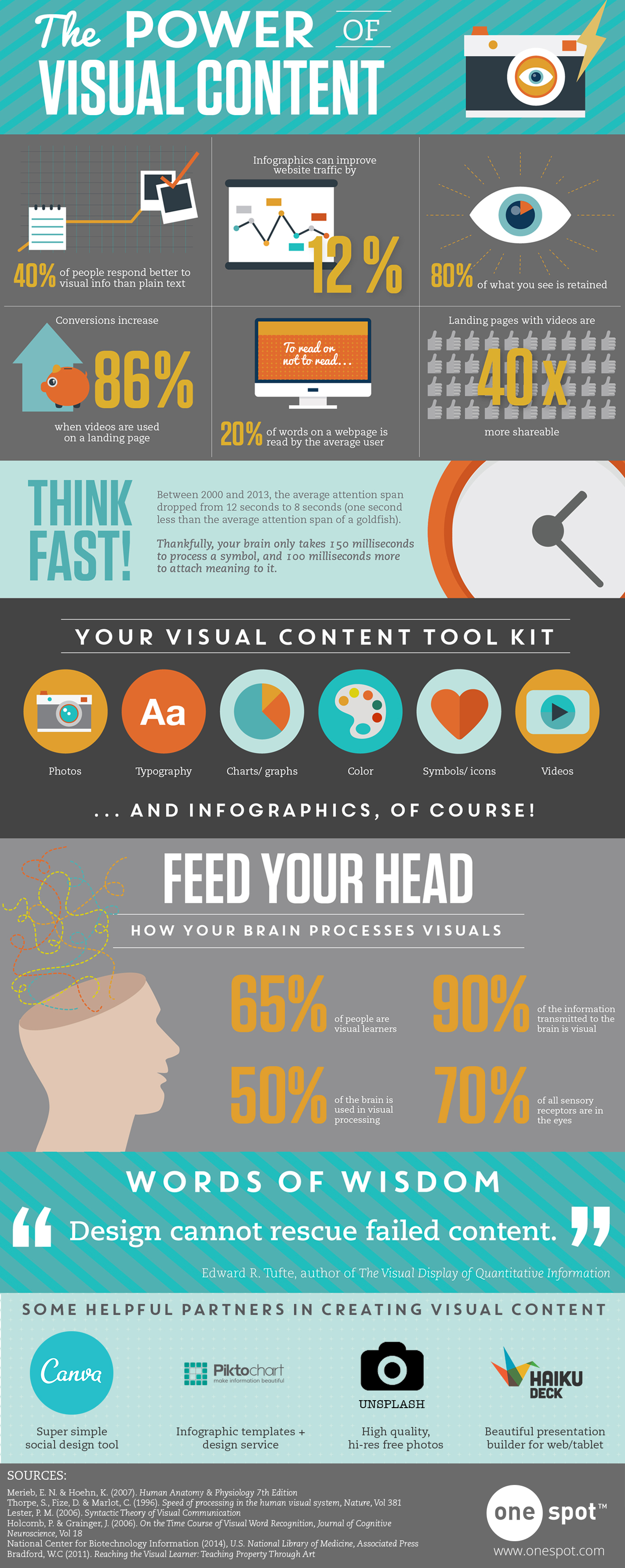
  • Infographics can increase website traffic by up to 12%. (One Spot)
  • Infographics are the fourth most-used type of content marketing. (HubSpot)
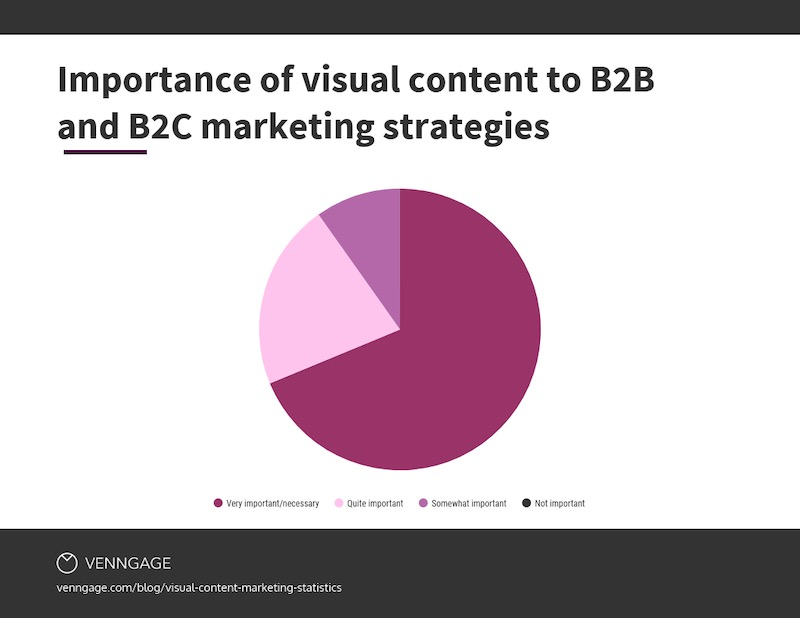
  • In 2018, 69% of marketers said that visual content was either "very important" or "absolutely necessary." (Venngage)

Infographic-stats-marketing

Image Source

Buyer Behavior

  • 90% of the information transmitted to the brain is visual. (Infographic World)
  • On average, people will remember 65% of the information they see in a visual. Whereas they will only remember 10% of the information that they hear out loud. (Cognition)
  • Infographics are 30 times more likely to be read in their entirety than blog posts or news articles. (Digital Information World)
  • 65% of buyers are visual learners — meaning they absorb the most information when they look at an image, graphic, or video. (Pearson)
  • Web articles that contain images receive 94% more views than articles that don't. (Jeff Bullas)
  • When directions are accompanied by visuals, readers are 323% more likely to complete the action described. (Springer)
  • Web content that includes images gets 650% more engagement than content that only includes text. (Webdam)
  • 84% of people who have used an infographic consider them to be useful. (Infographic World)

Sales Engagement

  • Infographics and other colorful visuals can increase sales by up to 80%. (Xerox)
  • Consumers tend to focus on "information-carrying images" like infographics more than they read the page's text. (NN Group)
  • Buyers understand infographics better than they understand written instructions. (Springer)
  • The brain processes visual information 60 times faster than written information. (Content Factory 1)
  • Presentations with visual aides are 43% more persuasive. (MIS Research Center)
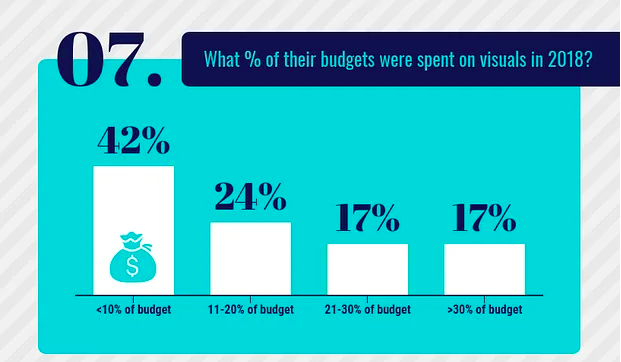
  • In 2018, 42% of marketing teams spent less than 10% of their budget on creating visual content. (Sproutworth)
Infographic-stats-sales

Image Source

Social Media

  • Infographics are liked and shared more than any other type of content on social media. (NN Group)
  • Facebook posts that include an image receive twice as much engagement than posts that don't include an image. (BuzzSumo)
  • 74% of marketers include visuals when posting on social media. (Social Media Examiner)
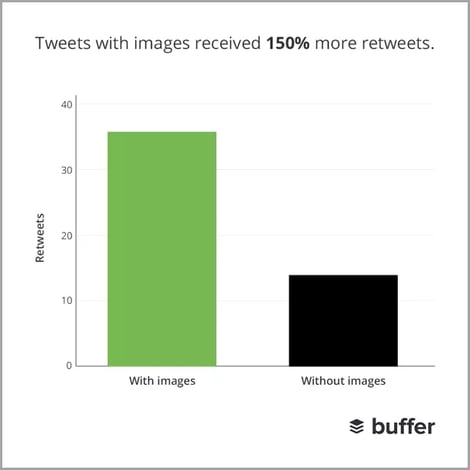
  • Tweets that include visuals are 150% more likely to be retweeted. (Buffer)

Image Source

Using Infographics With Your Marketing Strategies

Infographics are used in a variety of marketing campaigns. You can use them to educate buyers about new products or services, or you can use them to enhance your marketing content by adding an eye-catching visual element.

You can also utilize them to explain how to use a product or service effectively. Adding visuals to your onboarding process can make it a lot easier for new customers to learn how to use your product or service — which can make a significant difference in customer satisfaction and retention. After all, your customers may be happy when they buy your product, but they won't be thrilled for long if they can't figure out how to use it.

If your looking to create you're own infographics, learn how to create infographics with free PowerPoint templates.


25 Stats That Make the Case for Infographics in Your Marketing was originally posted by Local Sign Company Irvine, Ca. https://goo.gl/4NmUQV https://goo.gl/bQ1zHR http://www.pearltrees.com/anaheimsigns
Friday, December 11, 2020

17 Last-Minute Gift Ideas for the Marketer in Your Life

The days remaining in 2020 are few, and 2021 is just around the corner — things you undoubtedly know already.

But here's something you may have forgotten about: There's not much time left to finish up your holiday shopping. (Gasp! We know.)

Maybe you're a marketer looking to complete your wish list. Or, maybe you've got a team of marketers you want to make smile.

To help you out, I've searched the internet far and wide (it's kind of what I do), and found you some of this year's best gifts for marketers.

Without further ado ...

17 Last-Minute Gift Ideas for Your Favorite Marketers

1. Send a Starbucks eGift Card

Once upon a time, Starbucks offered a Tweet a Coffee program, which was retired after testing it in beta. I tried it for the first time earlier this season when Emily Maxie, B2B tech marketer at Very said something nice about our social media tool. I was really thrilled and just wanted to do something nice in return. Tweeting a coffee was an easy, hassle-free way to surprise co-marketing partners, customers, or others. Plus, it was almost instantaneous, so it was a savior for last-minute shoppers.

@emilymaxie, @meghkeaney just tweeted you a coffee! Redeem it now. https://t.co/0X3XIAVK4E

— Tweetacoffee (@Tweetacoffee) November 21, 2013

Although that program has been retired, there's still a good alternative: Send a Starbucks eGift Card. Just add a personal message and the amount you'd like to give, enter an email address, and hit "send."

Where to get it: Starbucks

Cost: Buyer's choice

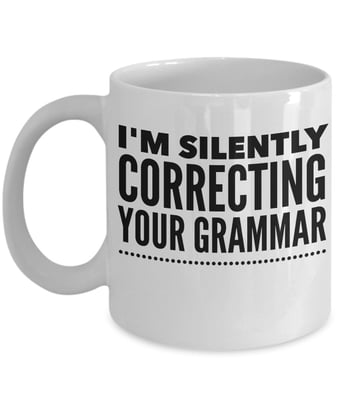
2. Blogging Fuel Mug

As comedic writer Dave Barry once explained, "It is inhumane, in my opinion, to force people who have a genuine medical need for coffee to wait in line behind people who apparently view it as some kind of recreational activity."

Not only is this mug a good way to keep your favorite marketer sufficiently caffeinated, but its message is also on point. Around here, at least, our marketers love creativity -- but we also love precision. And, we love the written word. So when this mug came across our radar ...

Source: Amazon

... we knew it had to make this list.

Where to get it: Amazon

Cost: $14.95 + $4.95 shipping

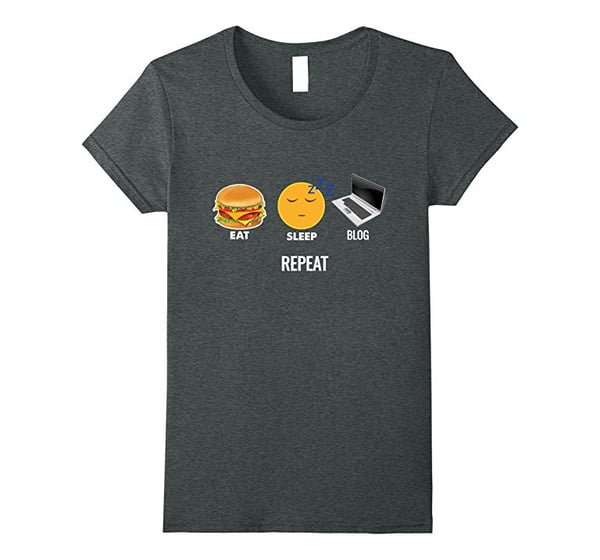
3. "Eat. Sleep. Blog." T-Shirt

This is a pretty great gig we all have. Sure, there are seemingly unattainable lead goals and endless writing deadlines. But think about it for a moment: Every day, we get to get up and figure out how to capture people's fascination. It's an amazing job.

This shirt summarizes that sentiment nicely.

Source: Amazon

Oh, and it's really comfortable for blogging.

Where to get it: Amazon

Cost: $17.39

4. HubSpot Fleece-Lined Winter Hat

We're not sure how the weather looks in your neck of the woods, but around the holiday season, it starts to get cold where HubSpot is headquartered, in Boston.

It's sweater weather. Hat weather. Fleece-lined hat weather, to be specific.

Luckily, HubSpot has a hat for that.

4dc92f34-150c-e611-80cb-0025907fdf4b

And while you're at it, check out these other last-minute gifts from the HubSpot Shop:

Where to get it: HubSpot Shop

Cost: $15

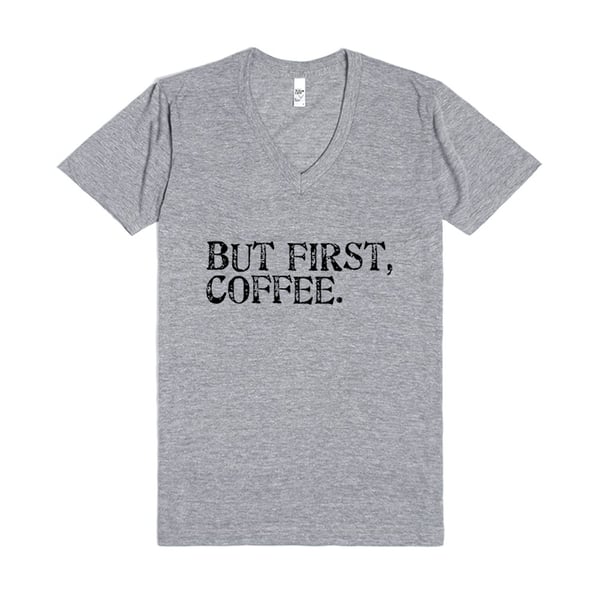
5. "But First, Coffee." T-Shirt

It's best to wear your priorities on your sleeve ... er ... torso. This cozy T-shirt puts your working style out in the open. In fact, it may double as a signal for the best way to bribe you for extra work.

Don't work in a jeans-friendly office? Nothing a blazer and nice pants can't fix (she writes as if she has actual fashion sense).

Where to get it: Skreened

Cost: $29.99

6. Mophie Smartphone Case

A few years ago, a group of HubSpotters got these cases while working long hours at the INBOUND. But they're not just any cases -- they're Mophie smartphone cases.

Mophie is a smartphone cover that also doubles as extra battery life.

Source: Mophie

They're a little clunkier than the standard phone case, but they can extend your phone's life by 100% or more. If you know a marketer who is often working on the road.

Where to get it: Mophie

Cost: About $100, depending on variety

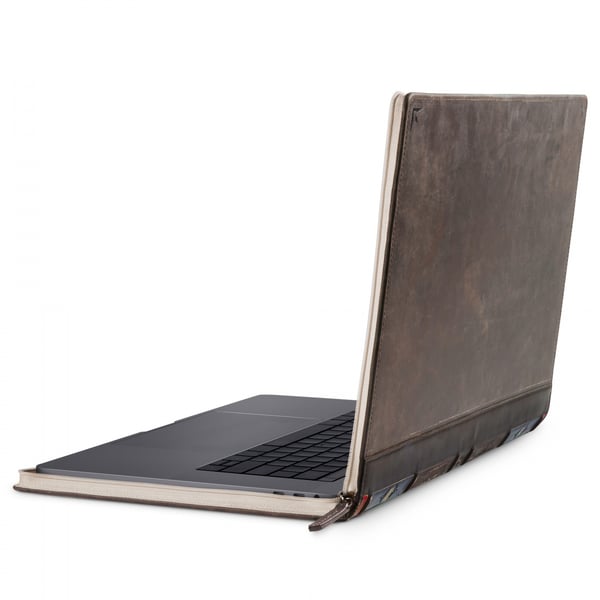
7. Book Cover Laptop Case

Rumor has it writer Jorge Louis Borges used to sleep surrounded by books. He'd crawl into bed with stacks of them on either side. His last scent before sleep would be that of open pages and intricately worded lines.

Source: Twelve South

This isn't quite as poetic, but it's close.

This laptop cover would be a good fit for the bookworm on your team.

Where to get it: TwelveSouth

Cost: About $80

8. Subscription to a Streaming Music Service

Okay, so music may not make you smarter, but it does make you happier. And isn't delight what we're really after here?

Many marketers already listen to streaming music while they work, but without a subscription, that streaming music is typically limited or interrupted by commercials.

Buying your marketing friend a subscription to a streaming music can get rid of all the commercial interruptions and just leave them with good working music. We're inbound marketers -- thus, we hate commercial interruptions.

Here are a few options:

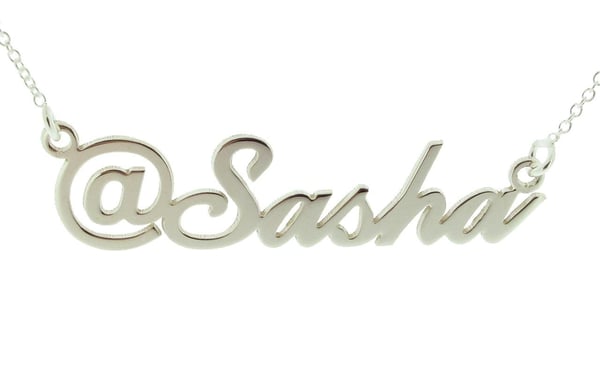
9. @TwitterName Necklace

It might be a bit excessive, but it's also kind of awesome. Here's a gift for the social media strategist who has single-handedly grown your company's Twitter following from 15 to 500 and beyond.

Source: Etsy

If jewelry isn't the right gift, there are also a range of social media coasters.

Where to get it: Etsy

Cost: $43.99

10. 1Password

Welcome to secure accounts on the internet. Your password must be 15 characters long with at least two capital letters, three symbols, two numbers, and at least one variation of the Jabberwocky poem.

Nope, that won't work. And it can't be the same as any password you've used since junior high school.

If you could spare the marketer in your life this frustration, wouldn't it be a happier new year? Take a look at the 1Password app. It will create and store all of your passwords securely and enable you to log into your accounts with one click.

Where to get it: 1Password

Cost: Plans start at $2.99/month

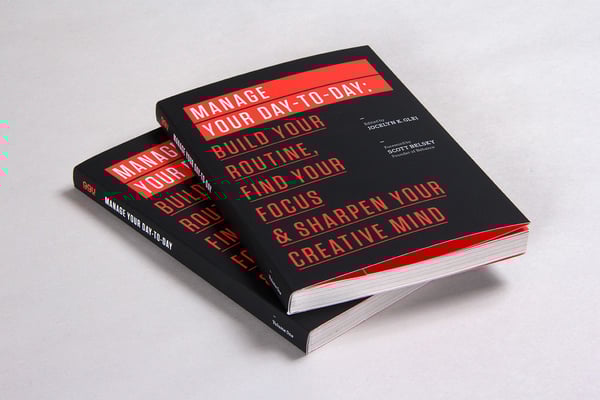
11. 99U Essays: Manage Your Day-to-Day

One of my favorite books, this collection of essays from 99U, focuses on how to develop a habit of creativity in your work and personal life. It gives you tips on how to put your creative work first and fend off a stream of endless emails, texts, and other interruptions.

Source: 99U

With an average 4.4-star rating on Amazon, this book offers concrete ideas for getting more out of your daily routine and finding the right moments for creative, complex work.

Where to get it: Amazon

Cost: $10.99

12. Freelancer Tools From WriterAccess or Zerys

While they don't do gift cards, you could help a freelancer's life easier with tools from WriterAccess of Zerys. Create a gift certificate yourself and wrap it up in a bow: Good for one day of reprieve from creating content.

Where to get it: Zerys or Writer Access

Cost: Varies

13. Premium Versions of Productivity Apps

Marketers use all sorts of freemium tools to organize their time and plan campaigns. Find out what online apps your marketer uses to make his or her day-to-day easier with access to all the bells and whistles for a year.

Here's a breakdown of some popular ones:

  • Evernote: Evernote is a repository for just about anything: ideas, articles, documents, photos, marketing examples. You can use the tool on your phone, desktop, and tablet, so it goes where you go. The big benefit of Evernote is how searchable it is. You can search documents or even the words in a picture to quickly retrieve your content again. The premium version gets you more storage, better search, and an interesting presentation mode. Cost: $69.99/year
  • Dropbox or Box: We all could use a little space. Help your marketer out by upgrading their Dropbox or Box accounts to a pro version. Cost: Varies
  • Feedly Pro: When Google Reader closed its doors, Feedly was widely adopted as the replacement RSS reader. Feedly Pro is a more powerful version of Feedly with one-click integrations, custom sharing URLs, and full support. Cost: Plans start at $5.41/month

14. Noise-Cancelling Headphones

Can you really put a price on peace and quiet? Turns out, Bose can: At a minimum, it's about $180. Yikes.

But if you can get over the price, this is an amazing gift for anyone who needs to focus throughout the day. Noise-cancelling headphones put your marketers in their own cozy and uninterrupted lead-generating world.

Whether they listen to Mozart or Modest Mouse, these headphones give marketers a chance to block out everything but the work ahead of them.

Where to get them: Bose

Cost: Models start at $179.95

15. Class Reimbursement

For intellectually curious marketers, think about giving them the combo-gift of classes plus the time to learn a new skill.

There are a number of low-cost and free online classes and tutorials out there for people looking to code (Codecademy), design (Skillshare), or acquire other relevant skills. The trouble is finding the time.

If you really want to thrill a marketer on your team this season, give them the classes plus an approved block of time each week to dedicate to the lessons. Wrap it up in one package.

Where to get it: Check out Code Academy and Skillshare, plus your local continuing ed classes. Then, help your favorite marketer figure out how to make the class time possible.

Cost: Varies

16. INBOUND Ticket

Surprise! It's not too early to buy tickets for INBOUND 2021.

INBOUND is an industry event like no other. Of course, I would say that, because as a HubSpotter, it is the center of my life in August and September. But as it turns out, others think so, too.

Darby Tinch of Mohawk Home said, "This was by far the best conference I've attended in a very long time. Not only was it the recharge I needed professionally but also on a personal level. It has been a long time since I've been this excited about my career. I cannot wait until [the next] INBOUND!"

Where to get it: INBOUND

Cost: Digital pass on sale right now for $49 (typically $149)

17. Donation in the Marketer's Name or Honor

If none of the above seems like a fit, consider a donation in your marketer's name or honor. Donations are a personal thing, so be sure you have a sense of the issues your marketer cares about. But once you do, a gift in his or her honor can be really meaningful.

Where to get it: Because the donation should reflect the gift recipient and there are so many nonprofits we care about here at HubSpot, I'm going to leave the door open here and not make any specific suggestions. Talk to the gift recipient and see what they care most about.

Cost: Whatever amount you see fit.

There's your starter list. There are dozens more ideas out there: subscriptions to magazines or journals, lunch from a local restaurant, or a plethora of other gift certificates anyone would love.

Editor's note: This post was originally published in December 2017 and has been updated for comprehensiveness.


17 Last-Minute Gift Ideas for the Marketer in Your Life was originally posted by Local Sign Company Irvine, Ca. https://goo.gl/4NmUQV https://goo.gl/bQ1zHR http://www.pearltrees.com/anaheimsigns
The 'Ethics' You Didn't Know Existed in Design

Just the other day, I was Googling something in a rush and came across a blog post that I thought would give me all the information I needed.

But, when I clicked on the page and tried to start reading the post, the entire screen went dark and a giant "Subscribe to our email" CTA popped up -- completely interrupting my experience.

I looked around for a "No thanks" button or an "X", but I almost couldn't find one. Just before I went to click the back arrow, I noticed a very faint, tiny "X" that was nearly the same color as the CTA background. It was obvious that this site's designers wanted to trick visitors into signing up for an email list before reading their content.

Not only did this CTA almost backfire by causing me to bounce off the site, but it also made me judge the brand's morals.

Although some business people might not think a code of ethics matters in design, it does.

In this post, I'll explain what design ethics is, what guidelines ethical designers might use, and a few tips for avoiding questionable design ethics.

Why are ethics in design important?

One of the best places to highlight your brand's mission, as well as its ethical values, is in your marketing and designs. After all, these are the areas of your company that prospects and customers might see most.

While ethics, inclusivity, and accessibility are not necessarily always top of mind for some busy marketers or designers,, it's incredibly important to review any public-facing projects from an ethical perspective.

Today, more than ever, consumers are paying attention to the moral standards of brands. Research shows 62% of consumers are attracted to brands that have strong, authentic ethical values.

When companies are considered ethical, consumers trust them, feel like the brand cares about their experience, and identify with the company. On the other hand, when brands use tactics that feel unethical, consumers lose trust in the brand which could lead to less brand loyalty or purchases.

Ultimately, every aspect of your brand's design contributes to the message you're putting out. If you want to create content and that demonstrates your company's values, you should regularly review your brand's design ethics.

Ethics in Graphic Design

When creating marketing content like landing pages, web experiences, or other visuals, ethical graphic designers consider a handful of guidelines. Here are just a few:

1. Designs should not be misleading.

You should aim for your designs to engage people and nurture them towards converting. Your designs shouldn't mislead, pressure, or coerce audiences into doing or thinking something.

In the intro, I noted a website I visited that tried to pressure me into signing up for email before I was even able to read their content. This just one of many sneaky dark pattern design techniques.

While it's not uncommon or unethical to create colorful or embellished designs that draw attention away from an "X" or opt-out button, dark pattern designs happen when designers make an obvious and conscious effort to trick visitors into doing something, such as giving out personal information.

For example, making the "X" nearly invisible and darkening content behind a pop-up ad so visitors think they need to convert or subscribe to email list to see content is a dark pattern technique. You might also see similar techniques in spammy emails where the unsubscribe link is hidden or made illegibly small so you can't easily find it.

While it's understandable that you want to get as many people as possible on a promotional email list, tricking visitors into subscribing for something is not the answer.

Why? If the contact didn't want to get signed up for the email, they might complain about the sneaky design, mark the email as spam, and unsubscribe immediately. If they aren't annoyed to the point of unsubscribing, they might not engage with the email because they weren't expecting it or were never interested in promotional content in the first place. This, in turn, could negatively impact email performance and future deliverability.

Ultimately, sneaking consent from visitors isn't likely to create major engagement or brand loyalty. So, if you must use a similar tactic or an automatically checked box in your design, make sure the text is large enough so visitors can see it and easily uncheck the box if they aren't interested in your offering.

2. Designs shouldn't hurt the user experience.

We've all been on a website where an ad or full-page CTA blocked the content we wanted to see. Sometimes, this gets so annoying, it causes us to leave websites entirely.

When we bounce off a website with too many pop-ups or design glitches, the site not only loses visitors and credibility, but it also loses SEO strength.

Designers should make sure they're creating experiences that nurture an audience member into doing something rather than force-feeding them an offer or advertisement. To do this, they should be asking themselves, "How can I design valuable online experiences that help visitors rather than shamelessly selling products to them?"

At HubSpot, we encourage companies to nurture leads rather than using unethical or desperate marketing tactics to trick them into signing up for something. Our natural lead nurturing approach can be seen right on our blog.

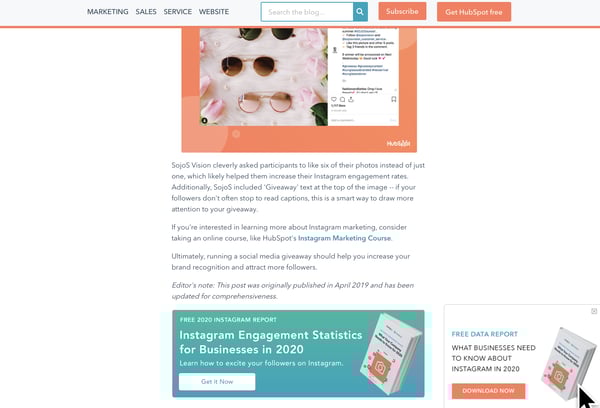
Each HubSpot blog post includes unintrusive CTAs at the bottom of the page, as well as a slide-in CTA that appears when the reader has scrolled passed a certain point in the post. Here's what the bottom of a post looks like:

How HubSpot designs slide ins and CTAs

Not only do these CTAs fit smoothly within our blog design (and don't cover up the content), but they also relate to the content we're posting. This way, the reader gets a taste of our expertise in our blog content. Then, they can choose to dive deeper into our offers.

With unintrusive CTAs like this, we primarily send offerings to contacts that want them most, are likely to download more free resources, and might turn into qualified leads later on.

3. Messaging, disclaimers, and policies are clear and legible.

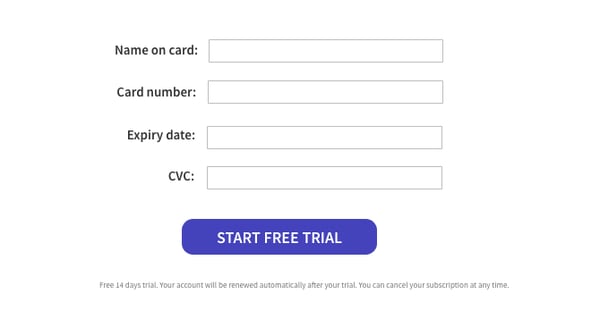
In the design below, another example of dark pattern design, the disclaimer, "Your subscription will renew automatically. You can cancel at any time," is so small you might not notice it.

example of unethical design

Image Source

Because of this, visitors might give credit card information not realizing that they'll be charged without being asked at the end of their free trial. Ultimately, when someone's card is surprisingly charged for a service they didn't want because they didn't see this message, they might get annoyed with the brand, unsubscribe, and potentially complain about the small text.

On the other hand, if your text is legible and understandable, you might only receive the customers that understand free-trial policies, are serious about your service, and won't rush to complain if they forget to cancel their subscription before the credit card charge.

4. Use proper representation and embrace inclusion, whenever possible.

Ethical designers always ask, "Does this design accurately represent groups of people discussed?"

Between 2011 and 2015, Access Icon embraced inclusive design ethics when they revamped the International Symbol of Access -- often seen on accessible parking spots or wheelchair-accessible bathrooms -- to better represent people with disabilities.

While the original symbol showed a simple stick figure sitting in a static wheelchair, the new symbol shows a person's arms moving with their body tilted forward as if they're actively moving or speeding in their wheelchair.

redesigned wheelchair symbol

Image Source

The new design came after a 2011 Boston-based street campaign, where Access Icon members placed a moving body over the static body on accessibility signs.

wheelchair symbol redesigned

Image Source

Although Access Icon did not intend to replace or criticize the original symbol, created in the 1950s, the organization wanted the new version to create an "occasion for asking questions about disability and the built environment, in the largest sense. Who has access—physically, yes, but moreover, to education, to meaningful citizenship, to political rights?"

Between 2012 and 2015, state governments, cities, major companies, and local businesses around the world adopted the symbol.

By refining this design, the group aimed to accurately represent people with disabilities as mobile, energetic, and empowered, rather than as static, less mobile figures. Ultimately, they realized the original design wrongly depicted those with disabilities and created a new design that solved for it.

Ethics in the Design of Technology

Design ethics doesn't just stop with imagery or website UX. Tech products, software, and other tools also need ethical designers to create smooth, pleasant, and trustworthy experiences for customers. While technical or product designers think about the ethical guidelines noted above, there are a few additional standards they might follow:

1. Designs should be accessible.

In recent years, accessibility has been a major topic in the world of tech and product design. Although you might not realize it, people with varying accessibility needs might be using your product. And, when your product is accessible to more people, more people can use it and buy it.

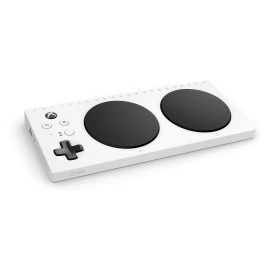
One recent example of an accessible technology design was Microsoft's Xbox Adaptive Controller.

After learning that children with physical disabilities, such as missing limbs, were having trouble playing Xbox video games with the console's controllers, Microsoft developed an adaptive touchpad controller, which enabled people with multiple types of disabilities to play games with their friends.

Microsoft gaming design

Image Source

Aside from two circular touchpads, which replace small controller buttons, the Xbox Adaptive Controller features large programmable buttons and can connect to external switches, buttons, mounts, or joysticks that make gaming more accessible for users.

The process of designing the controller was highlighted in a Super Bowl ad called, "We All Win," which you can watch below:

On a smaller scale, accessible technological design could also involve including accessibility tools and symbols within your software interface or web page. 

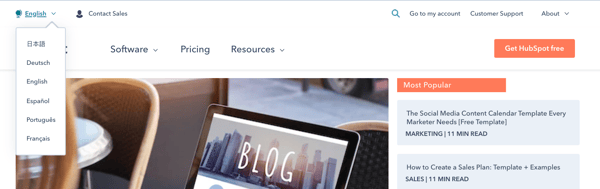
For example, some brands might offer an accessibility icon at the bottom of their website where you can click to adjust settings for a smoother experience if you have a disability. Or, to make their site or UX accessible to people in other countries, websites, like HubSpot's offer an icon and menu that allow you to toggle between languages:

HubSpot's blog homepage design is accessible to international users who speak languages other than English as a menu on it allows you to change languages.

2. Designs should promote safety and security.

In 2020, many people are thinking about data security as many are buying smart devices and software for workspaces and their homes. With many devices listening to our voices, logging our lifestyle habits, and even recording health data, some worry that this information could be sold, stolen, or used unethically later on.

Because of data concerns, many tech firms are emphasizing security in their overall product design.

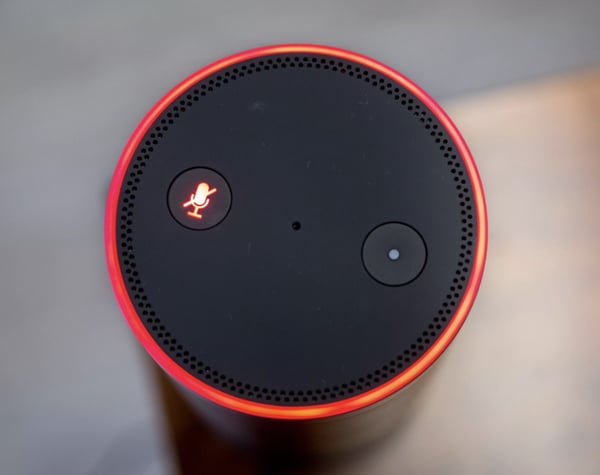
For example, when smart home devices with virtual assistants initially hit store shelves, consumers panicked when they learned that some devices, such as Amazon's Echo, would surreptitiously record them.

To make consumers feel more secure with Echo devices in their homes, Amazon designed each device with a very visible mute button on them. When the button is pressed, the Echo's light ring and the button turn orange to visibly show people that the device has deactivated recording.

Echo light design

Image Source

While this button might make Echo owners feel secure at home, it might also ease the nerves of prospects who see it in product shots or Echo ads before purchasing it.

3. Consider or respond to unexpected ethical dilemmas.

If you're helping to design a new piece of technology, you should consider all of the potential ethical dilemmas it could create and create a design that could either solve for them or ease your audience's concerns.

In 2018, Netflix was forced to address a design strategy on its platform when a recommendation algorithm was panned across the web.

The algorithm in question, which Netflix called, "Artwork Personalization," aimed to show users show thumbnails based on the design traits of thumbnails they'd previously clicked. While it sounded like an interesting personalization experiment, consumers quickly argued that this personalization was racially targeting users.

Specifically, some users noted seeing primarily content recommendations with white people in thumbnails while some BIPOC users saw mostly thumbnails that showed people of color. While Netflix denied that the algorithm targeted users by race, the news went viral.

In this scenario, had Netflix designers and developers researched their design tweaks or audited it from an ethical perspective, they might have been able to tweak the algorithm before launch.

How to Promote Design Ethics

If this post has inspired you to develop a new ethical standard for your designs, here are a few next steps you can take.

Audit Your Past Designs

Even if your designs have been successful in the past, it's still good to re-audit them to ensure that they continue to promote design ethics. For example, you can look at your website or product's design to ensure that they're accessible, easy to comprehend, and inclusive to all potential web visitors.

Review Your Current Projects.

Whether you're working on a product, website, graphic, or software-related design, reviewing it from a design ethics perspective might lead to a successful launch with fewer risks of complaints or concerns from the public.

Pivot if Needed

Sometimes a design tactic you once embraced is now considered out of date. For example, a design symbol that used to be culturally acceptable or valuable might now be seen as a misrepresentation or offensive. When you notice things like this changing, it's smart to adjust or modernize your design tactics.

Want to learn more about design and ethics? Check out this post for additional information on dark-pattern design or this post on ethics in modern marketing.


The 'Ethics' You Didn't Know Existed in Design was originally posted by Local Sign Company Irvine, Ca. https://goo.gl/4NmUQV https://goo.gl/bQ1zHR http://www.pearltrees.com/anaheimsigns
Thursday, December 10, 2020

What Is an API? The Answer in 300 Words or Less

When the marketing industry first shifted from outbound to inbound marketing, many marketers dropped their old roles of content interrupters for new ones as content creators.

But that shift is still producing aftershocks, and to keep up with your competitors today, you need to understand what APIs are, how they integrate with your content strategy, and the social insight they bring to your website.

Don't worry — APIs might seem complicated, but by the end of this post, you'll know how they work and what using them entails.Here's a brief definition of an API, followed by some key information on how to make one work for your business.

What is an API?

An API, short for application programming interface, is a series of rules. To be even clearer, it is an information middleman. APIs allow for an application to extract information from a piece of software and use that information in their own application, or sometimes for data analysis.

In the plainest terms, an API is a blueprint that enables "your stuff" to talk to and work with "their stuff." Your stuff, in this case, is known as the API endpoint.

Sound confusing? Don’t worry — we’ll walk through an example below.

API Endpoint Example

Let’s say you want to stream public tweets in real-time so that you can stay informed on a specific topic of interest or on current trends in the world. Then you could use Twitter’s filtered stream endpoint. Its URL is: https://api.twitter.com/2/tweets/search/stream

Technically, an API endpoint need only be referred to with the end path of the resource URL. The base path, which is common to all endpoints, is https://api.twitter.com. Because that stays the same, there’s no need to keep listing it. You can instead just list the endpoint: /2/tweets/search/stream.

How to Test an API Endpoint

There are several online tools available for testing an API endpoint. For the sake of this post, we’ll walk through how to set up a test using cURL. cURL is a command-line tool for transferring data that supports multiple protocols, including HTTP. It is able to make requests, get data, and send data — making it the perfect tool for requesting information from APIs.

Let’s use an example from Twitter’s own documentation. Say, you want to stay informed on the Twitter API. Then you will want to get tweets from major accounts like @TwitterDev and @TwitterAPI as soon as they’re posted. And maybe you only want tweets that contain links to articles or documentation so you’re getting as much context as possible. 

In that case, using the filtered stream endpoint is the perfect choice. But in order for the endpoint to know what kind of tweets to send you, you’ll have to define filtering criteria. Otherwise, you’d just be asking to see every tweet posted in real-time.

Filtering criteria will be applied to the endpoint in the form of rules. To build these rules, you’ll need a set of operators. For this example, you can use two operators — from: and has:links — in order to only see tweets from certain accounts and that contain links. To instruct the filtered stream endpoint to only show tweets from the accounts @Twitterdev and @TwitterApi that contain links, you’d use the following rule: “from:twitterdev from:twitterapi has:links”

To request this information from the filtered stream endpoint, you need to include the correct HTTP request to tell the API what action to take. There are four main options. Take a look at a brief description of each below:

  • GET: retrieve a resource 
  • POST: create a resource
  • PUT: update an existing resource 
  • DELETE: remove a resource

For this example, you’ll use the POST request. In addition to including the rule mentioned above in your request, you’ll include the content type and authorization. Below the content type is defined as “application/json” so the request is rendered in the lightweight data format JavaScript Object Notation (JSON). To authenticate your request, you’ll have to replace the placeholder text $BEARER_TOKEN with your app’s unique Bearer Token, which can be generated in your developer portal.

Why are APIs important?

One of the first questions many marketers ask is: Why do all of these businesses share their data openly, for free?

Normally, the answer is: scale. As software companies grow, the staff within those companies quickly realize they have more ideas than they have time and resources to develop them.

By creating APIs, companies let third-party developers create applications that can improve usage and adoption of the main platform. In that way, a business can build an ecosystem that becomes dependent on the data from their API — a dynamic that often leads to additional revenue opportunities.

How to Use an API

Understanding the value of a particular API is essentially about understanding what information is available through an API and how it can be accessed. To find out what a particular API can do for you, you can do one of two things.

  1. Ask a web developer to look at an API and discuss it with you.
  2. Do the research on your own. If you don't have access or budget to use a web developer, this is an appealing option. But don't panic — many online services have good API documentation.

API Documentation

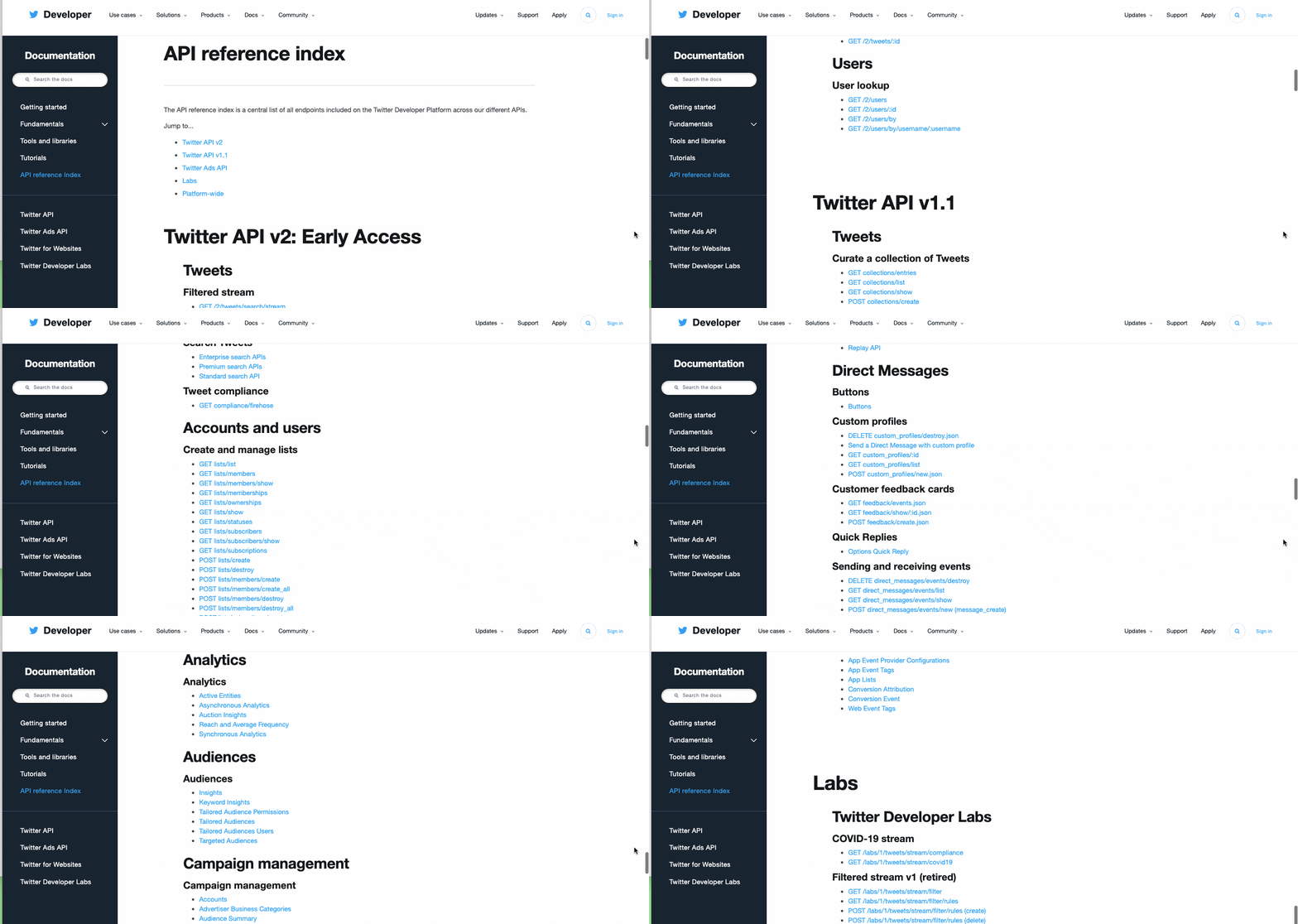
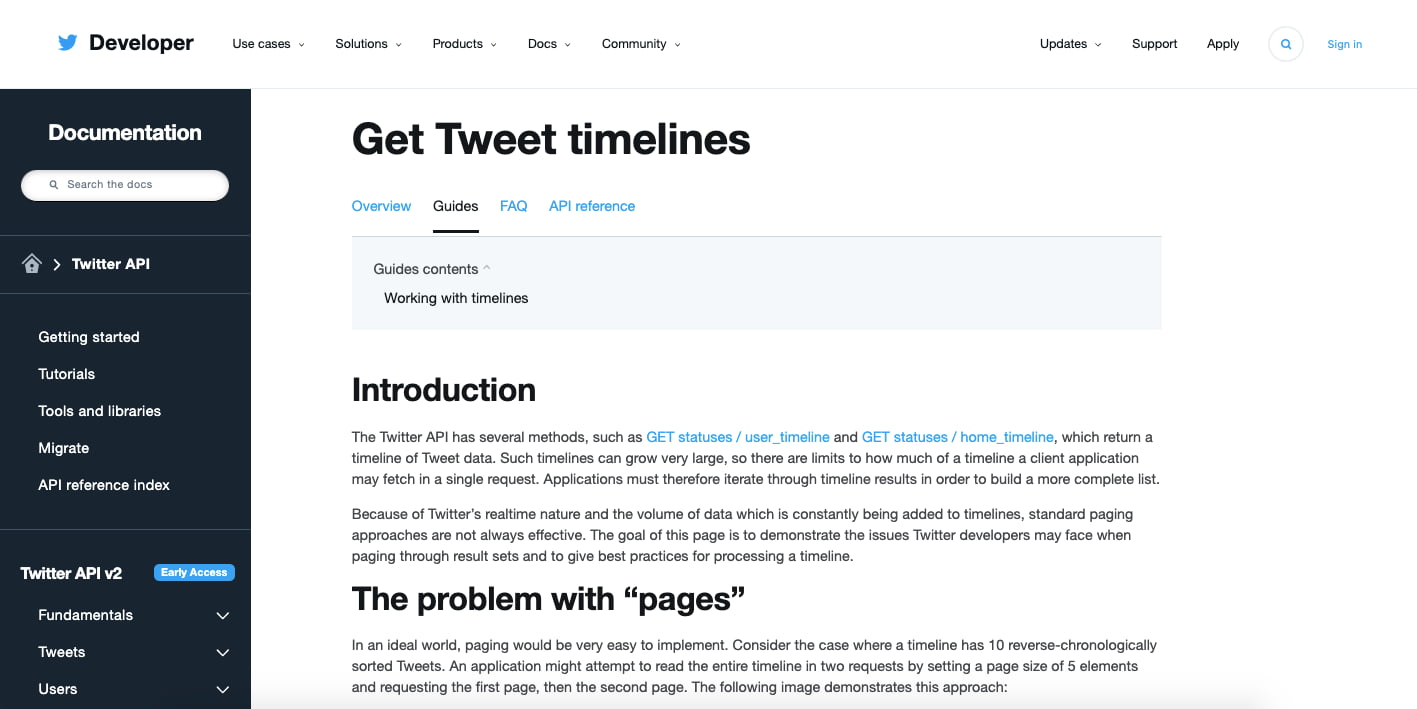
Let's take a quick look at Twitter's API reference index as an example.

Twitter API reference index

Much of Twitter's growth has been because of outside developers, and the first Twitter API started as a basic wiki. Since then, it has evolved into a detailed index of APIs that a savvy marketer can use to determine what information might be available to a developer in the form of an API  and how to include this API on your website.

Looking at the screenshot above, you can see there are multiple categories of information available to outside developers. Once you select an API you're interested in, you can click on it to see what information is available through this API. Check out Twitter's Tweet Timeline API endpoint below.

Twitters Tweet Timeline API endpoint documentation

In the API documentation above, Twitter's Tweet Timeline API explains how you can take a brief collection of recent tweets from a specific user's timeline and display them, in clickable form, on your own website. The API documentation includes tweet volume limitations, the API's resource URL, as well as what you can and cannot choose to display through this API.

Applying the API to Your Website

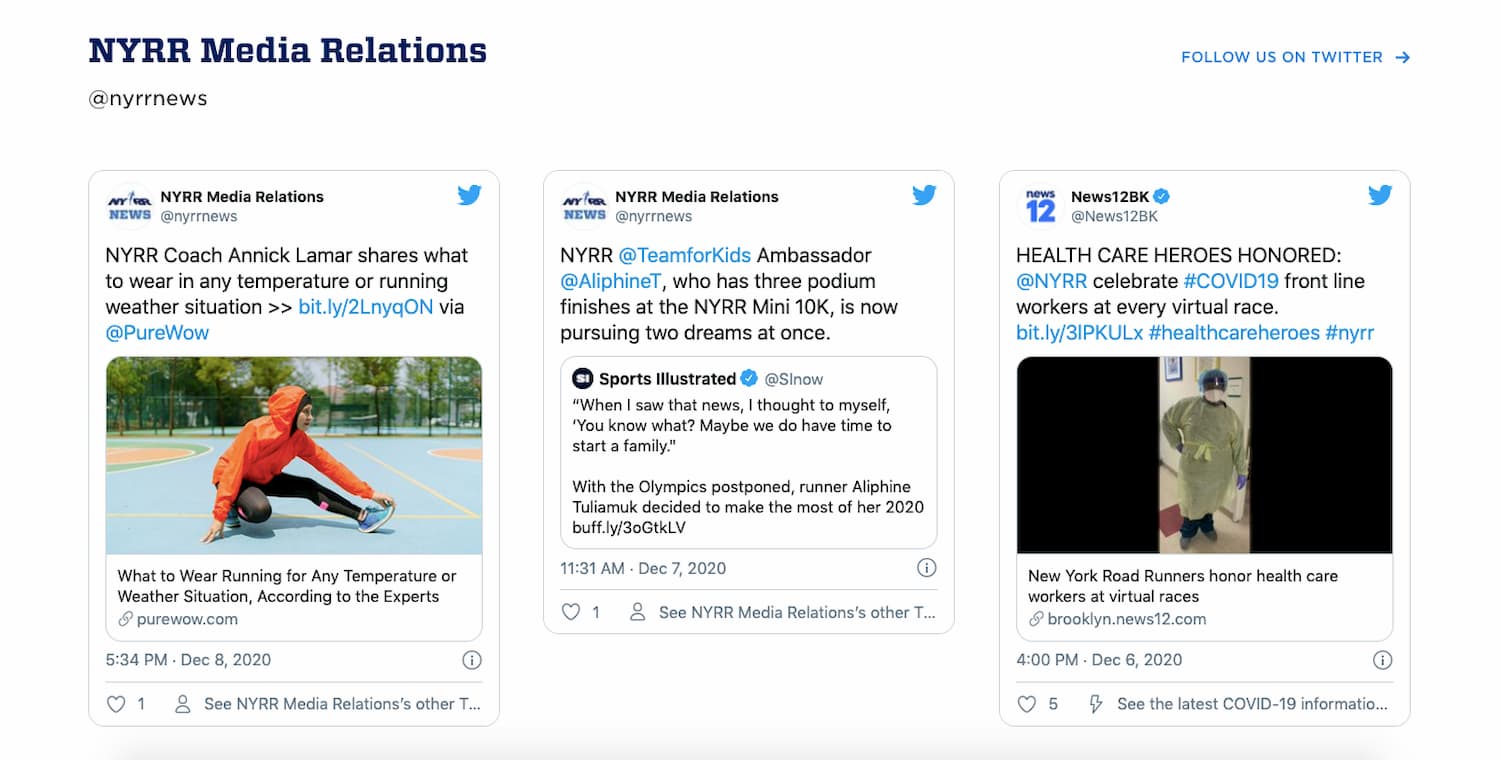
If you add the API's resource URL to the backend of your website, it'll return the information you called for to the frontend of your website. Here's what this looks like on the New York Road Runners website, helping them promote the New York City Marathon (with a few custom design modifications):

New York Road Runners website embeds Tweets using Twitter API

You can also check out the HubSpot API documention to see how you can build applications and integrations using data from HubSpot.

One last caveat: In order to officially use a developer's API, you might also need to be assigned an API key.

Think of your API key as your authentication token, declaring you a member of a developer's community. In effect, this token identifies what you're using the API for, and verifies that you've been given permission to carry out this project by the API's owner.

Rest assured, your API key does not give the developer access to personal information about you.

APIs as a Marketing Platform

Marketing in an inbound world is about companies developing useful applications and services to sustain customer retention. Brands will need to move away from intermittently dropping in advertisements to become conduits of consumer communications.

In that process, APIs facilitate the data needed to provide solutions to customer problems.

API Examples

Understanding what information is available through an API will help your determine if it is worth working with a developer to pursue the project further. Here are two examples.

Twitter Mentions

If you wanted to show tweets on your website that included mentions on Twitter to articles from your blog, you'd need to understand if you could request tweets with only specific URLs from the Twitter API.

YouTube Video Embedding

When you right-click a YouTube video on youtube.com, and select "Copy Embed Code," you're essentially requesting to use YouTube's API on your website. YouTube makes it easy for the public to embed YouTube videos to play directly on other websites.

API Terms of Service

No matter the project, it's critical that you actually read and understand the terms of service for an API you're considering for your website.

Most APIs have certain usage restrictions. If you don't take the time to understand the restrictions of an API you're interested in, you could invest more time and money in developing a marketing asset that's rendered useless once the API provider determines you've violated the API's terms of service (and revokes your access).

For this reason, most APIs have "call limits."

What is an API call?

An API call, also known as an API request, is an instance of a website owner "calling" for the use of a developer's API. Saving the API, logins to the developer's website, and queries about the application all count as API calls.

With this in mind, an API call limit is the number of times you can request information about an API from a web service within a given time period. Again, please read the terms of use for any APIs you are thinking about using. These documents should clearly detail any limitations as well as appropriate use of the program.

The Future of APIs in Business

Developing on the APIs of existing web services is only the beginning. We live in a world that now expects open and available content for all  the natural progression of this is for publishers themselves to release their own APIs, so that their customers can develop applications as a result.

API sharing applies to all businesses — not just those that are web-based, but rather anyone who has a web-based tool or component of their organization. Obviously, this concept could cause hurdles for some organizations, especially from the legal department. It's up to you to find out which APIs are most valuable and how you can lawfully and sustainably use them.

Editor's note: This post was originally published in March 2013 and has been updated for comprehensiveness.


What Is an API? The Answer in 300 Words or Less was originally posted by Local Sign Company Irvine, Ca. https://goo.gl/4NmUQV https://goo.gl/bQ1zHR http://www.pearltrees.com/anaheimsigns

Facebook Shops: What Is It and How Brands Can Use It

This year, brands are increasingly bringing shopping experiences online.

But, as businesses develop online strategies, they might find that launching a fully-fledged ecommerce website is easier said than done. While many tools make this process easier than it was in past decades, launching a successful online store still requires time, money, a web strategy, and a handful of other resources that smaller businesses might not have.

Luckily, tech giants like Facebook are actively launching tools that aim to help smaller brands convert social media followers into customers.

One of the Facebook corporation's newest ecommerce tools is called Facebook Shops. According to Facebook, Shops enables businesses to easily create a "mobile shopping experience for their audiences." But, what exactly does this experience look like?

In this post, I'll walk you through what Facebook Shops is and how marketers can leverage it to boost social media-driven sales in 2020 and beyond.

According to Facebook, setting up a Shop is simple and can be done on a desktop. Once a Shop is created, Facebook or Instagram Business Page followers on desktop or mobile platforms can visit the same universal store and make purchases from the app's they're on.

On top of linking to business pages on Instagram and Facebook, Shops can also be integrated into a Facebook Business account's Messenger or a WhatsApp Business account so audiences on all major Facebook platforms can make purchases.

Below is a short demo video that highlights what a Facebook Shop looks like to customers on a Facebook-owned platform and how they can use it to make purchases.

Why Facebook Launched Shops

Before 2020, brands were already looking for ways to scalably make sales online. But, the need for digital transformation grew even stronger during the COVID-19 pandemic when many brick-and-mortar stores were forced to close or move their offerings online.

According to a Facebook announcement, the 2020 landscape was a motivating factor in the launch of Shops.

"Right now many small businesses are struggling, and with stores closing, more are looking to bring their business online. Our goal is to make shopping seamless and empower anyone from a small business owner to a global brand to use our apps to connect with customers," Facebook noted in an announcement. "That’s why we’re launching Facebook Shops and investing in features across our apps that inspire people to shop and make buying and selling online easier."

Now that you know what Facebook Shops is and why Facebook launched the tool, you might be interested in using it for your own business.

If so, below is a quick step-by-step guide for setting up your first Facebook Shop.

How to Use Facebook Shops

1. Make sure you've fulfilled all the Facebook Shops requirements.

Although creating a Facebook Shop is free for all businesses, Facebook Shops still has a few requirements. To set up a Facebook Shop for your brand, you must:

  • Have a Facebook Business Page and/or an Instagram Business account that you have Business Manager admin privileges for.
  • Have manager privileges for your brand's Facebook catalog.

One thing to keep in mind is that while you do need to admin either an Instagram or Facebook Business Page, you can have one or the other and still create a Facebook Shop. This means that you don't necessarily need a Facebook Business account to take advantage of this tool.

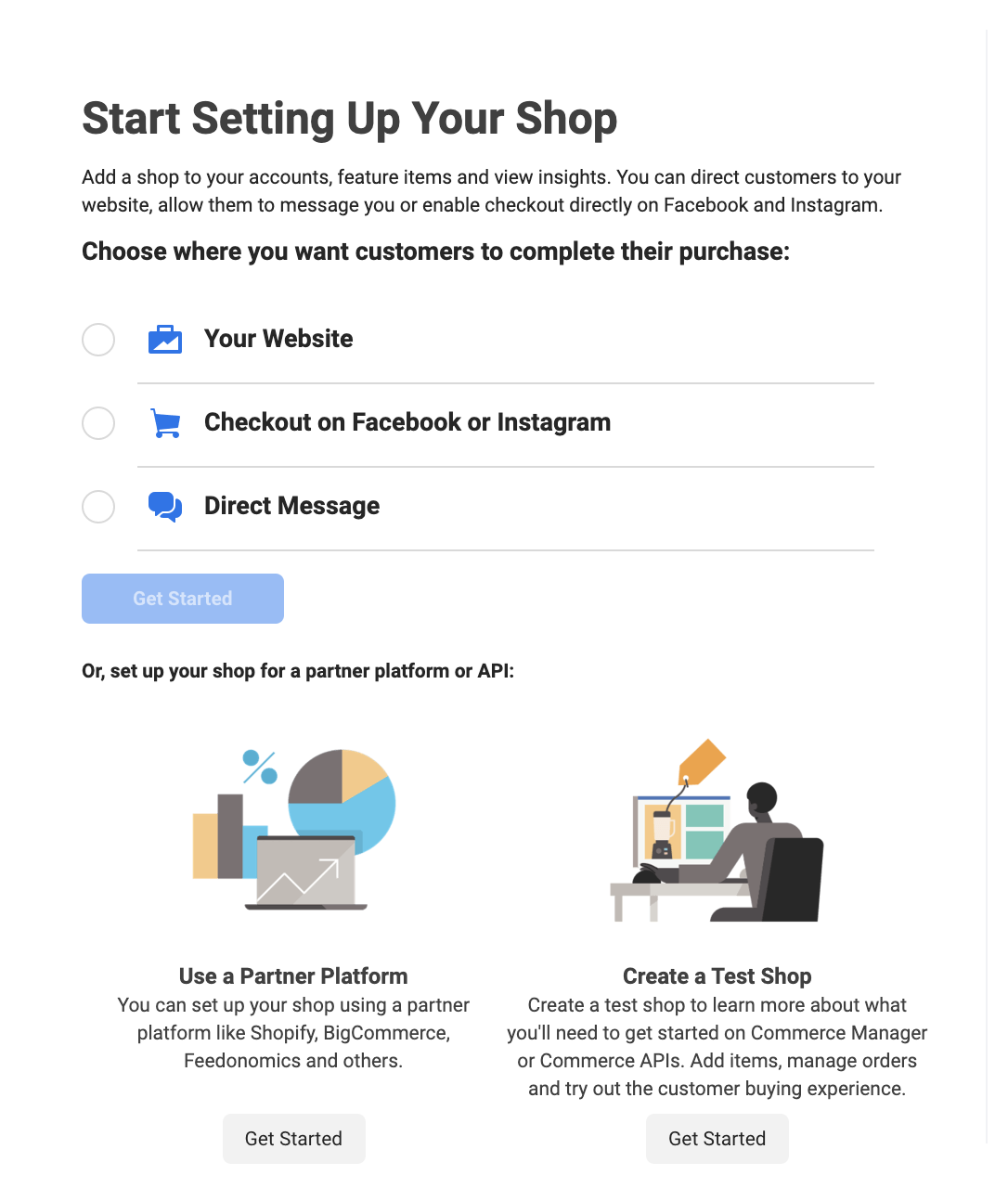
2. Go to Facebook Commerce Manager to access Facebook Shops

To start setting up your Facebook Shop, go to Facebook Commerce Manager and click the large "Get Started" CTA at the top of the page. From there, you'll be given a few settings-related questions, such as, "Choose how you want customers to make purchases."


At this point in the process, you can link an ecommerce website or API you've already set up and direct customers there to purchase your items or have them make buy items directly through Facebook, Instagram, or direct messages.

3. Add business information.

In this step of Shop creation, Facebook will ask you a few questions about your business, such as what category it belongs in, its location, and your preferred contact information. During this step, you'll also be able to include an overall business description.

4. Add your products and shipping information.

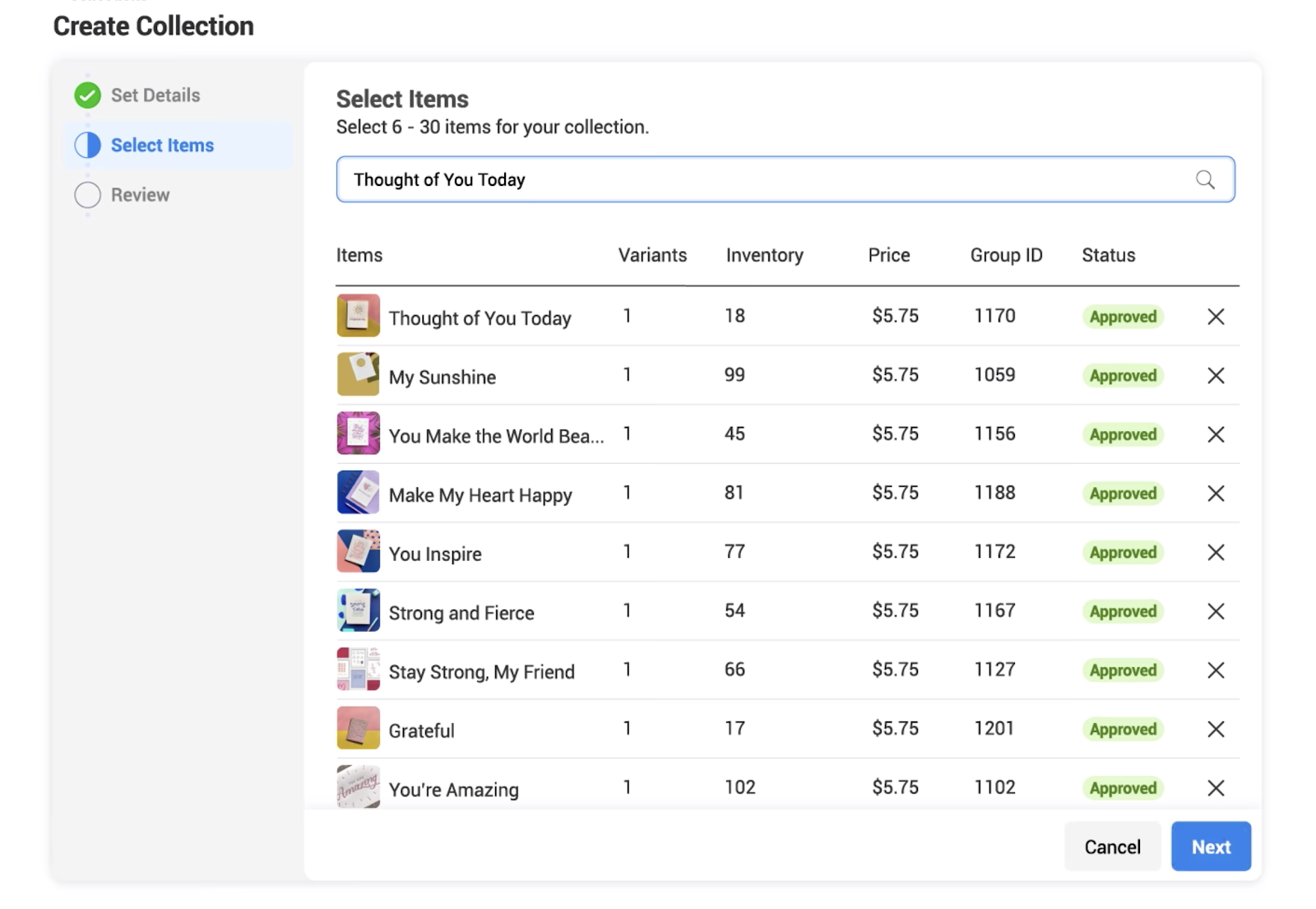
As you continue to follow the simple prompts given by Facebook Shops, you'll be asked to add products either one by one via a simple product listing form or in bulk with a spreadsheet list upload:


Image Source

After you add products, you'll be able to add or update product descriptions, images, or other important information. You can also enter shipping information as well.

While Facebook Shops will prompt you to add products before launching your store, you can still add, remove, or edit product listings later on.

5. Add banking and tax information.

If you don't have an ecommerce store and want to do all of your sales through Facebook or Instagram, you'll be prompted to give information about the bank account where your purchase revenue will go.

You'll also have to give your company's tax information and agree to Facebook Shops policies before setting up your shop.

6. Customize your Shop.

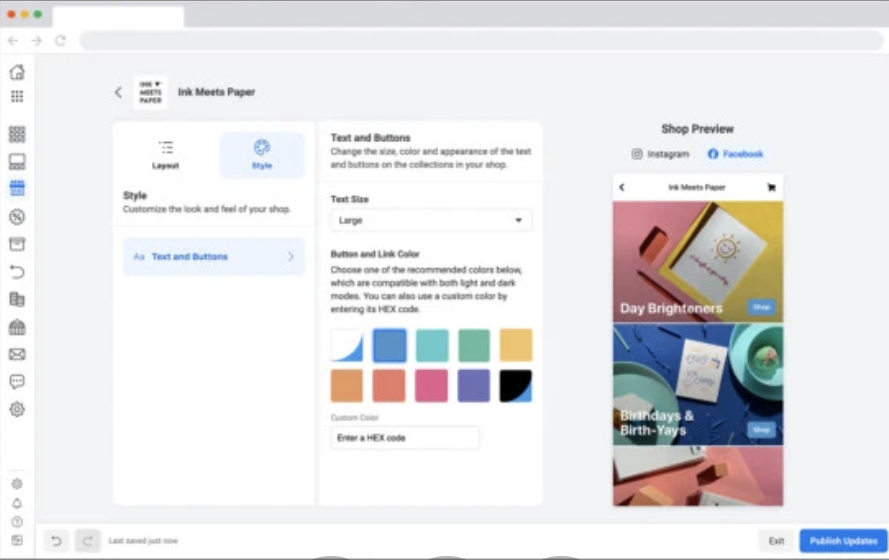
Once all of the logistical information is filled in, you can take the fun and creative step of designing your mobile store. Facebook Shops allows you to make basic tweaks to the layout and style of your Shop. As you make edits, such as adjusting text styles or button colors, you'll see them on a mobile preview screen to the right.

Here's a look at the Shops customization page. As you can see, it's simple and easy to understand, even for marketers with less design experience.


Image Source

7. Edit products or group them into "Collections."

Made a mistake with one of your product descriptions or need to add a new product shot? Facebook Shops allows you to edit or remove product listings, even after your mini-store is launched.

Additionally, If you have products that were launched together or with a similar theme, such as a summer line of clothing, you can group products as "Collections" on Facebook Shops. To add a "Collection," simply click "Layout" on the Shops customization page, then click "Add Collection" under the Featured Collections sidebar.

Once you create a Collection, you can add products to it from its Collection page or by editing the product's listing.

8. Launch and promote your Shop.

When you feel like your Shop is ready for business, publish it. When you do so, be sure to share about it on Facebook, Instagram, or other social media platforms to ensure you gain initial visitors.

What Brands Should Keep in Mind With Facebook Shops

Facebook Shops might be a great option for brands that want to dabble in ecommerce for the first time or expand their strategy to major social networks.

In fact, in the case study video below, a small printing brand called Ink Meets Paper shares how Shops helped them expand their ecommerce strategy while getting sales from Instagram and Facebook followers, with a small amount of effort required.

While Facebook Shops and other ecommerce platforms might be beneficial to your brand and revenue, there are still a few things you'll want to keep in mind before launching any online store or service:

  • Promote the shopping experience: If audiences don't know about your products or your brand, they might not find your Facebook Shop or ecommerce platform. That's why it's important to promote your Shop, product deals, and brand as you would with any other online store.
  • Prepare for high demand: If you have a great listing of products, people might rush to buy them. But, if your team can't respond quickly enough to customer demand, delayed orders or other snags could cause shoppers to avoid your Facebook Shop in the future. Prepare to respond to good purchasing outcomes and high demand, as well as poor outcomes.
  • Brand consistency is still important: Although Facebook Shops exists on a social media platform, that doesn't mean you shouldn't stay on-brand. If your Facebook Shop's style, images, and layout look unprofessional or inconsistent with your website or Facebook Business page, people might distrust it or be less willing to give your Shop their payment information.

If you're building or revamping your overall ecommerce strategy, bookmark this ultimate guide to ecommerce. If you're interested in learning more about how brands are pivoting to ecommerce in 2020, check out this piece.


Facebook Shops: What Is It and How Brands Can Use It was originally posted by Local Sign Company Irvine, Ca. https://goo.gl/4NmUQV https://goo.gl/bQ1zHR http://www.pearltrees.com/anaheimsigns