Monday, November 9, 2020

Made You Look! How to Make Headline Grabbers Work for You

Headlines are the first look (and sometimes, the only look) people give your content. Think of all the times you've scanned title after title before clicking on the one that stopped your scroll.

You're not the only one who whisks by without reading. We found that 73% of people admit to skimming blog posts, while only 27% consume them thoroughly. Without a compelling headline, your content will never get the eyes it deserves.

But what exactly are headline grabbers? And how do you write one that stands out among the black-and-white sea of copy monotony? Most importantly, how do you make sure it works for your audience?

Fortunately, we understand the ups and downs of crafting catchy headlines. It takes time, thought, and a few simple tricks. So settle into your favorite note-taking mode, because it's time to learn how to create headlines that reel in readers.

Thousands of articles exist on how to write an attention-grabbing headline. Every marketer has an opinion, from fixing horrible headlines to earning more clicks.

While most compelling headlines do pull from a similar bag of tricks, what works for one person may not work for someone else. That's because your audience, brand, voice, and content strategy differs from the companies popping up next to you in search results.

How to Write an Attention Grabbing Headline

Here's how to make sure your headlines spark interest and work for your brand.

1. Write a working title.

Remember when you were required to turn in a rough draft of your work? Well, thank your high school teachers, because this is a great first step to finding the perfect headline grabbers.

A headline draft is called a “working title.” It's a specific statement that clearly indicates what your post will be about. Let's say you write a blog about topics like "getting outdoors" and "staying active."

You can write hundreds of posts about either of those topics. But with a working title, you narrow in on a specific headline. For instance, you could create the following working titles from the above topics:

  • "Why Getting Outdoors Boosts Happiness and Long-Term Memory"
  • "Anti-Aging Activity: 7 Science-Backed Reasons to Get Off the Couch"

Each headline clearly states what your post will be about, but they still need to go through a writing workshop. They're called “working titles” because it will take time to make them perfect. But it's the right start to create an attention-grabbing headline.

2. Steer clear of clickbait.

We've all fallen into this marketing trap. You can't help but tap on headlines like these:

  • "You Won’t Believe This Dog’s Dance Moves!"
  • "Someone Gave This Kid Scissors. Here’s What Happened Next"
  • "When You Read These 19 Shocking Food Facts, You'll Never Want To Eat Again"

Oftentimes, the article you wind up reading is completely off-course from what the headline promised. Of course, carrot cake has a lot of sugar. So you get frustrated, leave the site, and vow never to return.

While clickbait can be effective for getting views, it can also annoy readers by exploiting emotional triggers like anger, anxiety, humor, inspiration, and surprise.

People won't stick around long if you consistently overpromise and underdeliver through over-the-top headlines. But there is something to learn from the effectiveness of clickbait.

Using emotive language can resonate on a personal level and stir readers' interest. For instance, these headlines nod to people's emotional tendencies without being overly sensational:

  • "Why You Shouldn't Always Reach Your Goals"
  • "Merriam-Webster Reveals What New Words Appeared the Year You Were Born"
  • "12 Ways to Give and Get Customer Love"

If you find yourself overpromising on what's behind your headline, pause. Reevaluate the benefit to your audience, and reel in the bait.

3. Stay on brand.

Maybe clickbait is part of your brand strategy. If so, bring on the outrageous headlines. The point is: your brand is the starting point of your content strategy. So you absolutely need to consider it when writing headline grabbers.

(To create a brand that attracts and inspires your audience, check out The Ultimate Guide to Branding in 2020).

Let's take a look at how two major players in the outdoor industry — Patagonia and Outdoor Research — use their distinct brands to write attention grabbing headlines.

  • Patagonia: "Will You Vote for Winter?"
  • Outdoor Research: "How To Stay Warm While Moving Fast In The Cold"

Both headlines would personally make me click, but the difference between the two is clear. Patagonia is known for their environmental activism, which comes across through the use of "vote" and asking readers to take a stance. While Outdoor Research solves a pain point through its tried-and-true gear to help customers "stay warm...in the cold."

As you brainstorm headline ideas, revisit your target market to consider what type of messaging will resonate with your audience.

4. Turn heads.

You know that person whose look is so on-point you can't help but do a double-take? You can make that happen with a headline grabber — if you use these writing style tips.

  • Build anticipation — This is all about creating intrigue so people need to find out what happened. Psychology professor George Lowenstein summed it up in the information gap theory, which states that a "curious individual is motivated to obtain the missing information to reduce or eliminate the feeling of deprivation." Buzzfeed is known for reeling people in with headlines like "33 Amazingly Useful Websites You Never Knew Existed." Click.
  • Add numbers — Studies have shown that numbers ease the stressful paradox of choice, stand out when odd, and help our brains spatially sort information. Researchers have even found that people with a number-free language are able to count. So next time you're typing up a headline grabber, try something like "27 Data-Backed Reasons to Personalize Your Marketing." Humans can't resist.
  • Solve a problem — When we run into a problem, our brains work overtime to find a solution. Which is why headlines that offer answers are great attention grabbers. Feeling overwhelmed at work? "Quick & Easy Ways to Get Organized At Work" would immediately draw you in because it promises simple ways to solve your problem. Bonus points if you offer actionable, inventive advice.

5. Optimize for SEO.

Learning how to write an attention-grabbing headline and optimizing it for search doesn't have to be a painful process. The key? Do your research, and sound like what you are — a human.

To find the right balance, dive into keyword research to discover what topics interest your audience. Once you have a list of relevant keywords, look at the search volume for each one to see how often it's typed into a search engine. (If you're new to SEO, or need to create a solid strategy, you can find helpful tips in our Ultimate Guide to SEO).

When you've chosen a keyword that interests your audience and has solid search volume, it's time to incorporate it into your headline. We recommend putting your keyword as close to the beginning of your headline as possible so it's recognized by the finicky search engine spiders. But remember to keep your headline under 70 characters so it doesn't get chopped off in the SERPs.

Let's say you're putting together a blog post on branding, and your goal is to rank for the keyword "brand voice examples." Your working title may look something like this:

"Get Inspired by These 9 Creative Brand Voice Examples"

While the sentiment is there, the keyword is at the end — and it's lacking pizzazz. A few simple switches can turn it into a headline grabber.

"9 Brand Voice Examples to Break Out of Writer's Block"

Moving the keyword to the front of the headline boosts SEO, and including "writer's block" helps solve a problem that plagues every brand writer. Plus, the headline is 53 characters, so readers will see your complete headline handiwork.

While people will scroll past a perfectly optimized headline, a poorly optimized one will send you right to the bottom of search results. Try to strike a balance that works for your brand. And above all, be human. If you're unsure whether or not your headline is strong enough to grab peoples' attention, think: Would you click?


Made You Look! How to Make Headline Grabbers Work for You was originally posted by Local Sign Company Irvine, Ca. https://goo.gl/4NmUQV https://goo.gl/bQ1zHR http://www.pearltrees.com/anaheimsigns

21 Mind-Blowing Black Friday Statistics for 2020 [New Data]

Ah, Black Friday — the biggest shopping weekend of the year is around the corner. 

In 2020, Black Friday is going to exist primarily online. Which means, as a marketer, it's critical you prepare marketing materials ahead of time to ensure you're able to break through the noise. 

Additionally, a few major retailers — including Home Depot, Walmart, and Target — have chosen to redefine Black Friday as a couple of days or even weeks to cater to shopper's changing buying habits. Consider following suite with your own re-imagined version of Black Friday. 

To inspire your 2020 Black Friday advertisements, emails, and social media posts, take a look at some mind-blowing statistics and predictions around the use of mobile devices, online coupons, and email marketing this holiday season. 

21 Black Friday Statistics for Marketers

1. In 2019, Black Friday beat Cyber Monday as the busiest online shopping day: 93.2 million shopped online on Black Friday vs. 83.3 million on Cyber Monday. (Source: National Retail Federation)

2. Amazon was the most-anticipated Black Friday ad in 2019 — despite the fact that it doesn't release an official Black Friday ad, just a list of deals. (Source: BlackFriday.com)

3. 50% of 2020 holiday shoppers say the sales offered over the last six months have lessened their interest in Black Friday and Cyber Monday sales this year. (Source: NerdWallet)

4. Electronics typically have the best deals on Black Friday, followed by home goods and home appliances. (Source: Nationwide.com)

5. On Black Friday 2019, more people shopped online than in stores — 142.2 million shopped online, while 124 million shopped in-store. (Source: National Retail Federation)

6. 65% of shoppers will choose to buy products online instead of in-store to avoid crowds in 2020, while 64% choose to purchase online for the comfort of shopping from home. (Source: Deloitte)

7. 66% of shoppers will increase their online purchases this year. (Source: Brightedge)

8. Online holiday spend will surpass $189B in 2020 — up 33% YoY. (Source: Adobe)

9. As consumers make the most of being at home, they plan to treat themselves to beverages (33%), food (30%), and clothes (30%). (Source: Deloitte)

10. In 2020, 42% of all online shopping is done from smartphones (up 55%), and $28B more than last year will be spent on smartphones. (Source: Adobe)

11. Millennials were the biggest Black Friday spenders in 2019, shelling out an average of $509.50 on Black Friday purchases, compared to an average of just $382.40 in 2018. (Source: PYMNTS)

12. 75% of all retailers are offering discounts before Black Friday, and many major retailers are reinventing Black Friday deals to last days ... or even weeks (including Home Depot and Walmart). (Source: Adobe)

13. 39% of consumers looked to emails from retailers for information on deals and promotions, and 38% used online search to find deals. (Source: National Retail Federation)

14. More than 50% of all Black Friday shoppers chose credit when checking out at the physical store or online in 2019. Roughly a quarter of all Black Friday online shoppers used PayPal to make a purchase, as well. (Source: PYMNTS)

15. Women make up the majority of Black Friday shoppers — but men are quickly closing the gap, with 45.1% male this year. (Source: Much Needed)

16. Small businesses can experience a +107% revenue boost over holiday season, and 38% of consumers will make a deliberate effort to shop at
smaller retailers throughout the holiday season. (Source: Adobe)

17. The five top states planning to spend money on Black Friday sales include Georgia at 52%, Wisconsin at 51%, Illinois at 50%, Virginia at 48%, and New York at 47%. (Source: Much Needed)

18. More than 201 million Americans (79%) plan to purchase gifts this holiday season, spending an estimated $167 billion — a little less than the $184 billion Americans planned to spend last holiday season. (Source: NerdWallet)

19. Mobile devices are used by 75% of shoppers to research products, compare prices, and make purchases — up from 66% last year. (Source: National Retail Federation)

20. Free or fast shipping expectations are increasing, with 64% of consumers refusing to pay extra for expedited shipping. (Source: NerdWallet)

21. 82% of consumers plan to finish purchasing holiday gifts after Black Friday, with 6% saying they will not be done until after Christmas. (Source: PYMNTS)

If you haven't finished putting together your online coupons, your mobile site optimization isn't quite complete, or your email marketing campaigns aren't quite nailed down yet, ask your marketing elves to get hopping! Even if you miss the Black Friday shopping rush, the rest of the holiday season will still be busy for retailers, especially those who can cater to the last-minute shoppers.


21 Mind-Blowing Black Friday Statistics for 2020 [New Data] was originally posted by Local Sign Company Irvine, Ca. https://goo.gl/4NmUQV https://goo.gl/bQ1zHR http://www.pearltrees.com/anaheimsigns

10 essential types of personalisation in display advertising

Personalisation within display advertising is growing ever more important. It is a key driver for increasing ad performance and getting a better return on investment from the channel.

Indeed, recent Bannerflow research found that “there was an 8% increase in click-through rate for personalised ads in 2019 compared to 2018”. However, not all brands and industries use a form of either audience or one-to-one personalisation.

For example iGaming personalises 21% of all its display ads, while retail personalises just 11% of all its display campaigns. Yet, with increasing CTR rates, the opportunity to increase ad performance through greater personalised content and messaging is clear.

Therefore, in this article we will explain the different types of personalisation you can do with display advertising to drive results. Including:

  • Audience personalisation
    1. User journey targeting
    2. Geo-targeting
    3. Device targeting
    4. Demographics targeting
    5. Behavioural prospecting
    6. Contextual targeting
    7. Product targeting
    8. Parameter targeting
  • One-to-one personalisation
    1. Product retargeting
    2. Dynamic Creative Optimisation (DCO)

Audience personalisation in display advertising

Personalisation in display advertising – audience personalisation

1. User journey targeting

User journey campaigns show consumers ad variations designed specifically for each level of the sales funnel. From top to bottom, from awareness to retention. You only show viewers ad variants with the message and imagery that is right for them. User journey targeting uses your own first person, customer data to show specific ad variations.

2. Geo-targeting

Like the name suggests, this type of audience personalisation relies on using location touch points to serve viewers with specific advertising. The touch-point data could be as simple as using an IP address or using a GPS location. The beauty of geo-targeting is that it lets you drill down to a granular level with your viewer.

3. Device targeting

Knowing the device that your ad is being served to is a powerful and mostly under-utilised form of audience personalisation. Targeting by device enables advertisers to serve specific creatives to specific devices. For example, a telecom operator may target iphone users with the latest iphone in their ad creative. Or an ipad-specific game campaign is only ever shown on ipads.

4. Demographics targeting

This type of audience personalisation sees brands using the first person data they hold (or purchased third person data) to plan, and create specific messages. It means taking the same product and offer, and producing ads that target specific demographics. For example, within travel, demographic groups will have very different reasons for visiting a holiday destination, when compared to one another.

5. Behavioural prospecting

Behavioural prospecting focuses on targeting users, via personalised ad creatives, who are either researching or interested in specific things. It determines ad placement using cookies that are tracking a user. This provides advertisers with personalised information on a viewer and can be used to create a digital profile – often created without the user’s knowledge.

Note: Since legislation such as the General Data Protection Regulation (GDPR) in Europe, and the California Consumer Privacy Act (CCPA) came into play, as well as restrictions on cookie usage in browsers (e.g. ITP) the era of easy behavioural prospecting ceased.

6. Contextual targeting

Contextual targeting is placing appropriate ads within the right contexts. Within display advertising there are two very popular ways to target contextually. Directly selecting what creative your ads appear next to, or changing the content of ad creative, based on the content and keywords on a website. And targeting with your Demand Side Platform, DSP, programmatically to buy ad inventory that matches key words and sentences.

7. Product targeting

Product targeting campaigns serve viewers with selected products and offers, via live, or spreadsheet-based, data. They target viewers who have browsed product pages, or have shown intent. Product campaigns target selected viewers, with specific products.

8. Parameter targeting

This utilises tracking based on external parameters made available by the web page. What’s more, these kinds of parameters (can potentially) help to serve display advertising that is tailored to a wide range of different campaign rules. For example, in affiliate display advertising, each affiliate has its own ID and a chosen display ad variant is served to an affiliate page based on this affiliate ID.

One-to-one personalisation in display advertising

Personalisation in display advertising – one-to-one personalisation

1. Product retargeting

Product retargeting is particularly useful for cross-selling or cart abandonment. Like product targeting it enables you to show an ad with a product that a viewer has previously expressed interest in and is an extremely effective form of dynamic ad. For example, it will display a product using a data feed in an ad, that is currently sitting in an unfulfilled shopping cart of a user.

However, you need to pay attention to your cookie usage. For retargeting cart abandonment with display ads, make sure to implement burn pixels for purchased items and set frequency caps to avoid irritating viewers.

2. Dynamic creative optimisation (DCO)

Dynamic creative optimisation is the ultimate way in which marketers can use data sources to personalise display campaigns. DCO applies live analytics, data sources and real-time creative optimisation to select the most appropriate ad creative. The end product: hyper-relevant, personalised display ads.

For example, a DCO produced display ad will not only show info based on precise viewer geolocation, but may also select the best offers and the most suitable imagery for a specific viewer. DCO campaigns are both data-driven and creative. They also require a marketing team’s in-house processes, knowledge and technology to be at a high level.

Find out more about about personalisation

If you would like to find out more about personalisation in display advertising we recommend you read our Ultimate Guide to personalisation in display advertising. Or if you would like to find out more about how Bannerflow can assist you in finding the right type of personalisation for your brand, then please get in touch.

The post 10 essential types of personalisation in display advertising appeared first on Bannerflow.


10 essential types of personalisation in display advertising was originally posted by Local Sign Company Irvine, Ca. https://goo.gl/4NmUQV https://goo.gl/bQ1zHR http://www.pearltrees.com/anaheimsigns

Friday, November 6, 2020

What Is a Focus Group in 100 Words or Less [+ Pros and Cons]

In an ideal world, you'd know just how your product or business idea would be perceived before it's released. This knowledge could help you make alterations to what you're offering for the best possible reception, and better inform your sales projections and marketing strategy.

Sadly, you'll never know exactly how what you're selling will be received by your target audience, which is why companies conduct market research.

But, while mass data collection through surveys provides you with necessary quantitative information, it doesn't offer as much qualitative insight into your target market's view or opinion of what you're selling.

This is where a focus group comes in.

So, what is a focus group, and how can it help you navigate your market research? Let's explore those two questions, next.

What is a focus group?

In the context of market research for businesses, a focus group is a cohort of individuals participating in a guided discussion about a business, brand, product, and/or service.

Typically, a focus group is facilitated by representatives from the business and is composed of individuals in the business's target market who share their thoughts and opinions on the topic or offering in question.

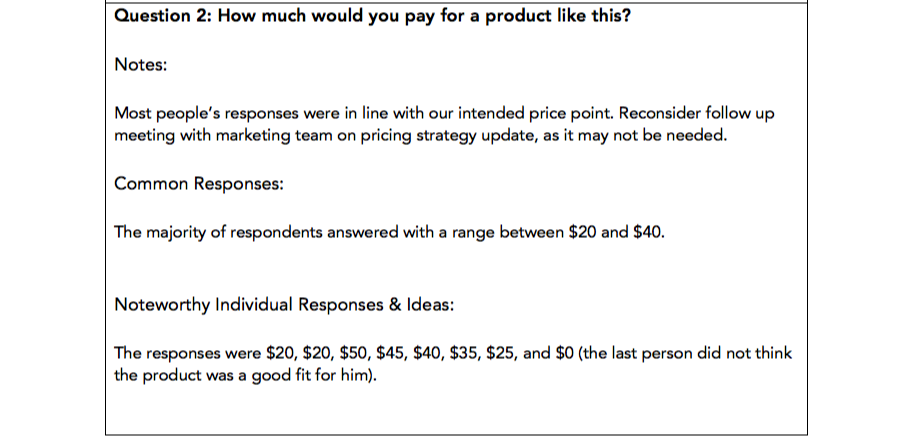
A focus group is usually moderated by a representative or representatives of the company, who ask 5-10 questions to the participants over the course of 30-60 minutes, with another facilitator keeping notes on the focus group questionnaire.

Follow Along With a Free Focus Group Questionnaire Template

How to Run a Focus Group for Your Business-1-2-1

HubSpot's Market Research Kit includes a questionnaire template to use in your focus groups, as well as four more templates to aid you in your market research efforts. You can download the kit here to help you plan your focus group and market research.

You can also read more about the process of conducting an effective focus group in our blog post, How to Run a Focus Group for Your Business.

Next, let's explore the pros and cons of a focus group. 

The Pros of a Focus Group

1. You get the story behind the data.

In focus groups, qualitative data takes center stage. Survey data is unbelievably powerful, but it's hard to understand the rationale for the numbers without context. Focus groups are a way to understand how someone truly feels about your business and provide the why behind the data.

If someone answers a question in a way that interests you, you'll have the chance to dig deeper. Ask “Why?” See how the other participants feel about the specific answer. Gauge facial expressions and tone of voice to see how people react to what you're talking about. You'll end up with the emotional input from your target market that your surveys may not be able to provide.

2. Focus groups are interactive.

Those responding to a survey or a questionnaire can't pick up your products or use them, but they can in a focus group. If the subject of your focus group is tangible, observe and ask questions about how participants use the product and feel about the packaging and design.

Here, you'll see your product through the end-users' eyes, which can help you realize something you hadn't before.

3. They're more efficient than interviews.

Interviewing individuals can take much longer than running focus groups with the same amount of people. Say you want to interview 100 people, and each interview or focus group takes one hour. Getting the opinions of those 100 people would take 100 hours if interviewed, but only 20 hours if participants were broken up into groups of five.

This way, you can get qualitative feedback from multiple people in a shorter amount of time — an enormous time saver, especially if most of your participants think alike.

The Cons of a Focus Group

1. They're not entirely representative.

What you gain from depth of opinion from focus groups, you lose in sample size.

Because focus groups take longer than surveys, you'll hear from dozens or hundreds of people in more time than it could take you to hear from thousands of people through your own surveys or exploring secondary research, such as previously conducted studies or surveys.

This constricts the amount of people whose input you'll receive, which means your findings may not represent the opinions of your entire target market.

2. They could encourage groupthink.

Have you ever been in a meeting where one or two people voice an idea you disagree with, but everyone else agrees with the idea before you have the chance to say your piece?

As a result, maybe you decide to go along with the idea ... even though you're not its biggest fan?

That's called groupthink, and it happens when a group rallies behind a vocalized idea that not everyone believes is correct for the sake of moving on or attempting to avoid a conflict.

Focus groups can quickly turn into one or two participants providing the bulk of the answers while the other four or five silently nod in agreement. The problem is you're now only getting input from two participants – not the entire focus group, as intended.

You can avoid this by calling on specific group members to answer in-depth, but some may be reluctant due to shyness or disinterest.

3. Your focus group moderators may have confirmation bias.

Focus group moderators are often attached to the project in question, and can come into the session with an idea of where they think it will — or want it to — go.

For example, one moderator may want a product to be priced, packaged, or colored a certain way, and can lead the discussion towards that conclusion. This is known as observer dependency.

For instance, let's say one moderator wants a product to be colored blue, and poses the open question to the group: "What color should this be?"

After everyone responds — and no one says blue — she might ask, “What about blue, would that work?” Everyone silently nods, and she notes that the group agreed blue would be a good color, despite that being far from the perfect truth.

To overcome this, focus group moderators should be explicitly instructed to put their personal preferences aside and act as an objective group facilitator. You could also work with a market research firm, which typically has less interest in the product or subject than those from the business who are actually creating it.

Focus groups may not be the most efficient source of gathering data, but when used appropriately, they can put a face and an emotion behind the statistics and quantitative data you've gathered to better inform your business, marketing, and product development.

Remember, focus groups are most effective when moderators organize their thoughts ahead of time and take notes during the session on a focus group questionnaire — which you can access for free here in our Market Research Kit.


What Is a Focus Group in 100 Words or Less [+ Pros and Cons] was originally posted by Local Sign Company Irvine, Ca. https://goo.gl/4NmUQV https://goo.gl/bQ1zHR http://www.pearltrees.com/anaheimsigns
Thursday, November 5, 2020

What Are YouTube Tags & Why Are They Important?

YouTube is the second largest search engine in the world, so keyword-optimizing your videos on the platform is just as important as keyword-optimizing your blog posts for Google.

Even if you’ve just created the next “Charlie bit my finger” video, you must remember that an algorithm dictates which videos YouTube will serve to its audience -- and which ones it won’t.

One of the best ways to keyword-optimize your videos for YouTube is leveraging tags. Below, we’ve put together a guide that will explain exactly what YouTube tags are, why they’re important, and some best practices to follow. 

What are tags for YouTube?

YouTube Tags are words and phrases you can include in your YouTube videos’ description. They let your viewers, and YouTube, know what your videos are about and can help them rank higher in the platform’s search results.

Why are YouTube tags important?

YouTube tags function to help YouTube grasp your video’s content and context. This way, YouTube can understand your video’s topic and category, and associate it with similar content, which can amplify your video’s reach. The rise of semantic search has made YouTube tags less important over time, but they're still a strategic element you can use to your advantage.

Even though YouTube sites the title, thumbnail, and description as being more important for video SEO on their platform, studies do indicate that there's a slight positive relationship between keyword-optimized tags and ranking (Backlinko). Neglecting to use them isn't a dealbreaker, but they can definitely help.

They're even more important in cases where your target keyword is commonly misspelled because you can tag the misspellings without including them in your title and description.

As a secondary benefit, tags even help you organize and find your own content if you do self-reference tagging (e.g. "Ireland trip 2019").

YouTube Tags Best Practices

To leverage YouTube tags to their fullest potential, check out these tips and tricks.

1. Make your first tag your target keyword and order the rest by importance.

YouTube heavily accounts for your video’s first few tags when ranking content in their search results, especially the first tag. So make sure your first tag is the exact keyword you want to target.

2. Use some broad keywords that describe the overarching topic your video falls under as other tags.

Using broad keywords as other tags helps YouTube understand your video’s context. For example, if you’re creating a video called “How to Hit a Baseball”, you’d want to add “Baseball” as a broad tag to indicate to YouTube that your video’s overarching topic is about baseball.

3. Use some specific keywords that describe the topics you covered in your video as other tags.

Using specific keywords that describe the topics you cover in your video as other tags helps YouTube understand your video’s content. For instance, in the same “How to Hit a Baseball” video, adding “hitting off a tee” or “hitting batting practice” as specific tags would indicate to YouTube the exact topics your video covers.

4. Keep most of your tags between 2-3 words.

While you should certainly include long-tail keywords and a few broad match variations, YouTube seems to prefer 2-4 word phrases (Briggsby).

5. Do not go overboard with tags.

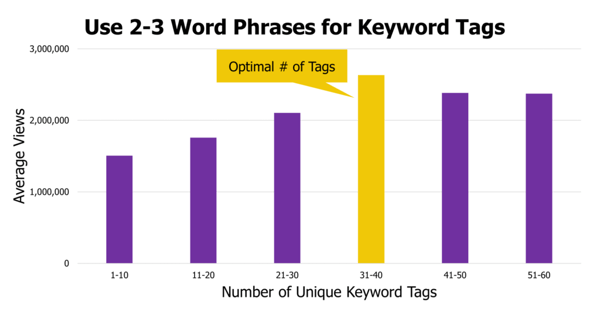
The point of tags is to help the algorithm understand what your video is about so it can surface it to users that are looking for a video like yours. Using too many keywords can cause confusion for what your video is actually about. Research suggests that the optimal number of tags is between 31 and 40 (when used correctly, of course). More than that dilutes their power.

graph showing the optimal number of tags as being between 31 to 40

Image Source

6. Get inspiration from videos that are currently ranking.

If you know what you want to rank for, take notes from those who are already ranking on the topic. Their keyword tags might give you a good starting point for research and inspiration.

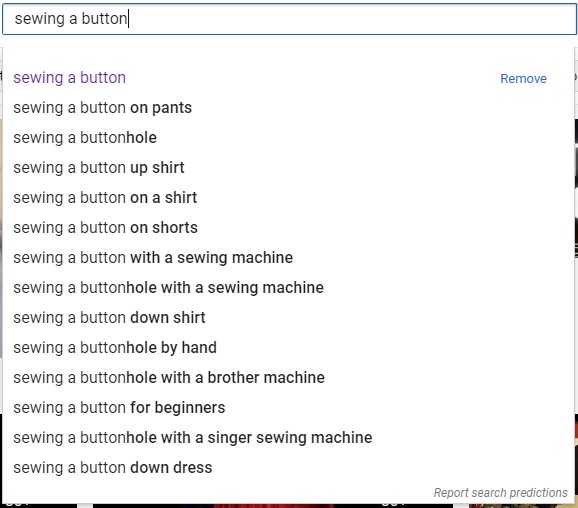
7. Get inspiration from YouTube auto-suggest.

Auto-suggest is a feature to help users find what they need. YouTube isn't surfacing these suggestions willy-nilly. Chances are, there's a reason these keywords are suggested, so don't be afraid to go straight to the horse's mouth, so to speak, to draw inspiration.

youtube auto-suggest results for "sewing a button"

Best YouTube Tag Generators

To discover the keywords you can tag in your videos and help them rank higher in YouTube’s search results, here are three of the best YouTube Tag Generators to try.

1. Keywordtool.io

keywordtool.io youtube generator tag results for "baseball"

After plugging your target keyword into its YouTube search bar, Keywordtool.io will provide you with suggested keywords, their search volume, how they’ve trended over the past 12 months, and questions, prepositions, and hashtags that also include your target keyword.

2. Rapidtags

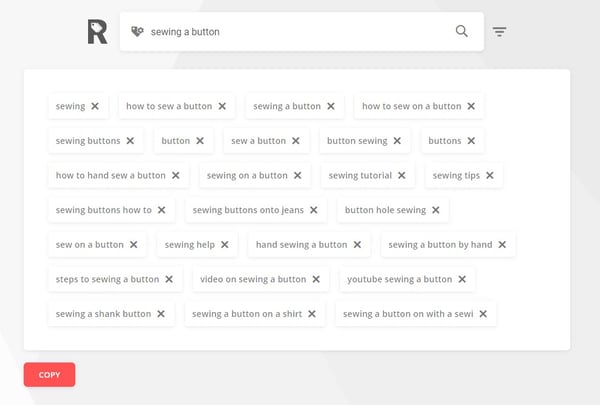
rapidtags youtube tag generator results for "sewing a button"

Entering a seed keyword into Rapidtags and then hitting the button will generate a number of related tags for your YouTube video. Best of all, there's a copy button for you to easily pull the text without entering it manually.

3. YTube Tool

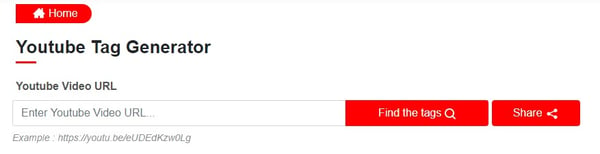
ytube tool youtube tag generator homepage

This tool helps you extract the tags from a competitor's YouTube video. All you have to do is enter the URL, and the tool will then return your results.

4. Keyword Keg

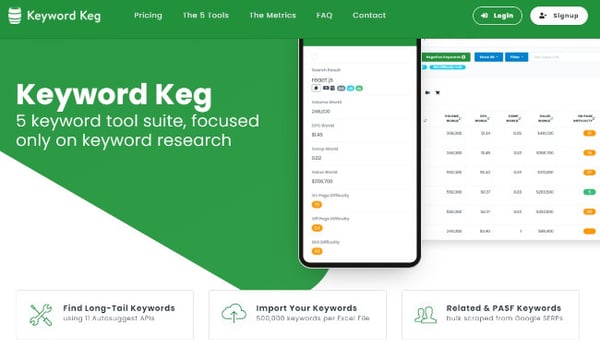
keyword keg youtube tag generator homepage

Using Keyword Keg, you can enter your target keyword into the tool and it’ll serve up its search volume, cost-per-click, competition, on-page difficulty, off-page difficulty, SEO difficulty, CTR scope, keyword power, trends, and suggested keywords. You can also filter your results by country and language.

5. VidIQ

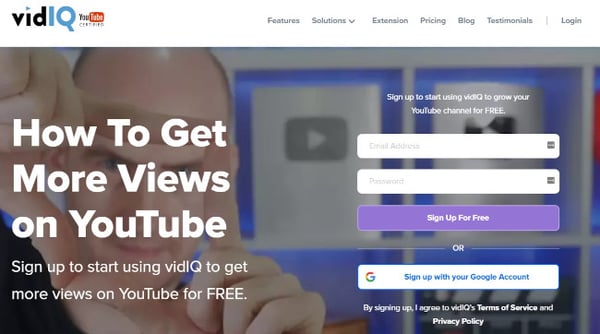
vidiq youtube tag generator homepage

VidIQ will display your target keyword’s related keywords, related score, search volume, search score, competition score, and overall score, which is a combination of a keyword’s related score, search score, and competition score.

With these tools and types for generating optimized YouTube tags for SEO, you're well on your way to getting your content found on YouTube. Continue optimizing other elements of the video as well and monitoring your channel's growth.

Editor's note: This post was originally published in July 2019 and has been updated for comprehensiveness.


What Are YouTube Tags & Why Are They Important? was originally posted by Local Sign Company Irvine, Ca. https://goo.gl/4NmUQV https://goo.gl/bQ1zHR http://www.pearltrees.com/anaheimsigns

The Surround Sound Series: How We Built a Bespoke SERP Tracker and Measured the Results of Our New Content Program (Part 3 of 3)

This post is a part of Made @ HubSpot, an internal thought leadership series through which we extract lessons from experiments conducted by our very own HubSpotters.

As our three-part series comes to an end, there’s one last question (or two) we need to address:

Does the surround sound strategy really work? And what results have we seen since we started using it?

The TL;DR answer is yes. It’s working and we’re sharing our preliminary results in this article.

So if you’re looking to use surround sound in 2021, the two of us (that’s Irina Nica and Alex Birkett) thought we’d end this short series with a handful of resources: the formula HubSpot uses to measure progress, our proprietary surround sound tracker (aka the SERP Tracker), and a sample of results to hopefully inspire your own endeavor.

What is the surround sound strategy?

At HubSpot, “surround sound” is the name Alex Birkett gave to a content marketing approach that aims to make HubSpot products visible every time someone searches for a product-related keyword (e.g. “best help desk software” or “best live chat software”).

The goal is for potential users to see HubSpot mentioned in all or most of the pages that rank in Google top results for those keywords. Check out the first two articles in the series for a deeper-dive into what is the “surround sound” effect and how we scaled the program at HubSpot.

Surround Sound vs. SEO

Here’s where a lot of people get confused: The definition of surround sound says its goal is to improve visibility in search engines, but isn’t that what SEO does, too?

The answer is surround sound includes SEO results, but doesn’t stop there.

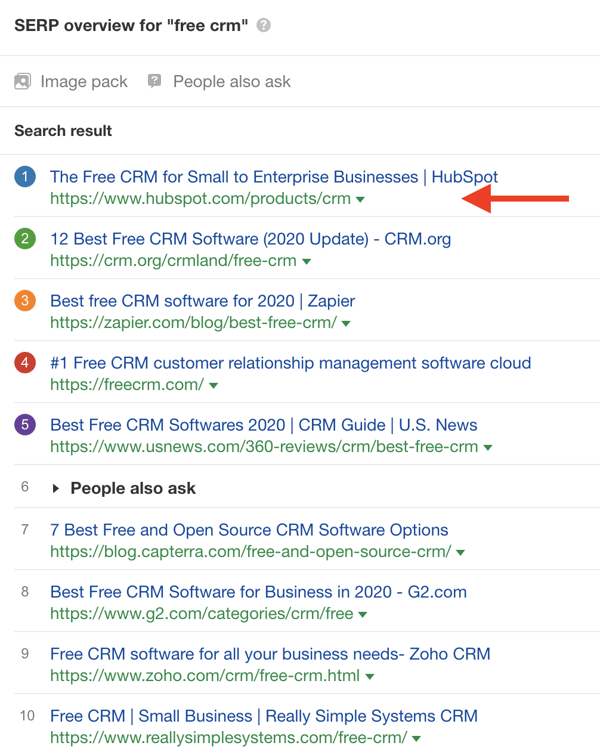
Here’s an example: say we want to increase our visibility in search engines for the keyword “free CRM.”

A first step would be to make sure our own domain ranks well for that keyword. That’s the “job” of the SEO function.

hubspot surround sound strategy content strategy seo

But visibility in SERP doesn’t stop there.

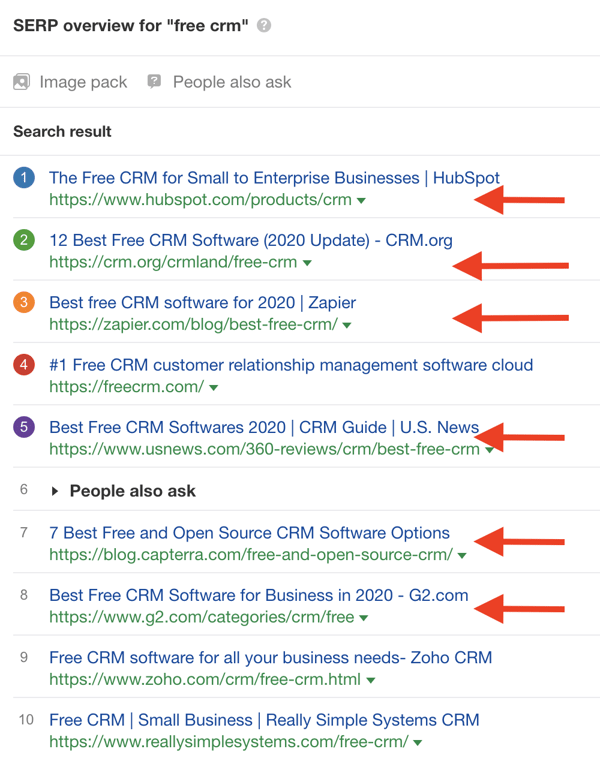
When potential customers are looking for a free CRM, they might not stop at the first results. Instead, they click through different suggestions of curated lists that they find in search results.

Our product awareness goal is to make sure HubSpot is visible in as many results as possible, especially on third-party domains. The level of SERP real estate that HubSpot is mentioned in (including owned and third-party domains) is what surround sound measures.

hubspot surround sound content strategy

That’s why we say that in order to measure surround sound results, we need to measure our visibility in SERP, for a particular keyword or topic, beyond SEO.

But surround sound isn’t really a “mainstream” product awareness tactic — yet. So there are no methods or tools to measure visibility in SERP, beyond rankings (as far as we looked). That’s why, in order to scale our efforts, we had to build our own systems from scratch.

How HubSpot Measures Surround Sound Results

Let’s talk about scale.

If HubSpot were to have only one high intent keyword in our purview (say, “best marketing automation software”), it wouldn't be insane to measure our visibility manually.

Once per month, you could simply open Google, search “best marketing automation software,” and count how many of the top 20 pages mention HubSpot.

This clearly becomes a problem when you add more than one keyword, however. Imagine the frustration of doing that for 600+ keywords per month.

In order to make this strategy “scalable” (a phrase I dislike, by the way, because it has been weaponized by curmudgeons who can all too easily shut down interesting ideas by saying ‘this won’t scale’), we needed to do a few things:

  • Build custom tools and infrastructure to automate aspects of the strategy
  • Educate others on the surround sound process and playbook
  • Evangelize and excite others into buying into the idea

The latter was easiest; once you get some results, others can easily grasp the importance of an idea.

I’ll focus here on building custom tools. First, I want to explain the value of investing in custom tools, automation, and infrastructure, because I can already sense the objections:

  • “We don’t have the technical resources to build our own tools and automations!”
  • “Won’t building custom tools cost us a lot of money and time?”

To address the first point, there’s always a creative solution. If you don’t have internal resources to code up new tools, you can easily outsource this as long as you have good specifications. Sites like Code Mentor or even Upwork are great for this. Additionally, this is a good excuse for (mythical) non-technical marketers to build some new skills.

Second, building tools to reduce the marginal cost or effort in the long run increases the expected value of the program.

Lots of jargon in that sentence, so let me unpack that with an example from experimentation.

Why invest in tools, automation, and infrastructure?

Imagine the expected value (the “predicted value of a variable, calculated as the sum of all possible values each multiplied by the probability of its occurrence”) of an A/B test is $1,000.

Some proportion of A/B tests will fail, which means you only “lose” during the time of the experiment, some will do nothing, and some will win (and those that win will do so by varying levels). All in, if you averaged out these values, a given A/B test could be predicted at a $1,000 value.

Now imagine every time you wanted to run an A/B test, you needed to get two engineers, one designer, and an analyst not only to set up the test from scratch (you’ve got no testing tool here), but also, you have to do minimum one month of research, wait two weeks for approval after you submit your hypothesis, and then you have to sit through, on average, four meetings with this crew.

What’s the cost of all that? Over $1,000? Congratulations, the expected value of your A/B test is now negative.

But what if, on the other hand, you had a testing tool that made it easy to set up and analyze experiments (with trustworthy data), and also imagine you prioritize to focus on only high impact tests. Now you lower the upfront cost of each additional test you run (the marginal cost), which increases the expected value of each test (just slightly). On a program level, though, now you are rewarded for running more tests, since the expected value is positive, and you’ve got very low marginal costs. You spent a little time investing in tools and automation, and you’ve drastically increased the ROI of your program without even improving your win rate.

This is exactly what we needed to do to make the surround sound strategy economically viable.

The amount of effort to manually audit, measure, and store SERP visibility, as well as the manual cost of outreach and relationship management, would forever outweigh the positive benefits of the placements we could get on a SERP. That is, unless we could lower the costs of data collection and storage as well as outreach and relationship management.

Enter: the SERP Tracker

Now we have a functional tool that does all this for us! We call it the “SERP Tracker.”

Here’s the aesthetically-gorgeous interface:

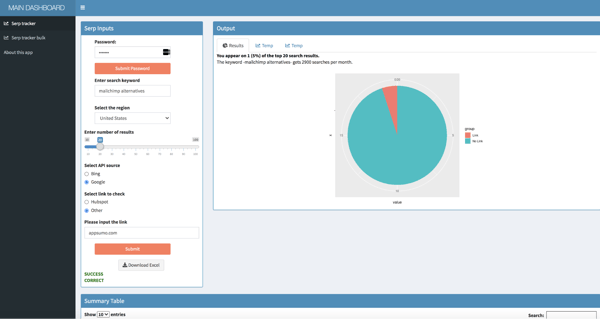
hubspot surround sound strategy content marketing serp tracker

(For any fellow nerds, it was written in R and it’s hosted and deployed with Shiny. We’re using serpapi.com to get Google’s search results, and we’re also using Bing’s API [free up to a certain number of credits]. I have an older version of the generic script here available for viewing — we’ve since updated it many times, but this version will still be functional.)

I’ll walk you through how it works, but you can also watch this Loom tutorial if you prefer video:

Here’s a quick tutorial on how you can use the tool and what kind of data it can give you.

First, you have to validate by entering a password. Since we use various APIs, we want to limit the usage to converse credits (again, we track some 600+ keywords, so it’s a weighty endeavor)

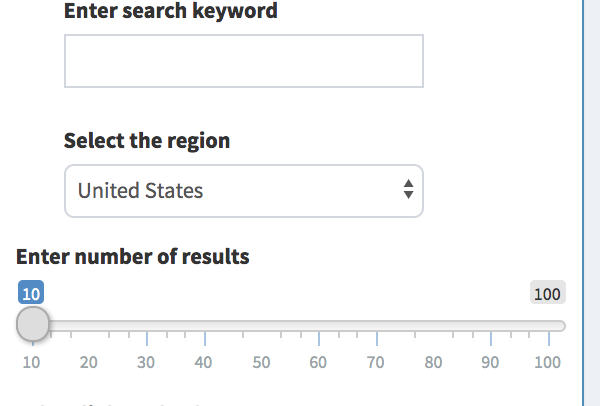
Then you can enter whatever keyword you’d like (like “best form builder” or “best help desk software”).

hubspot surround sound strategy serp tracker enter keyword

Then you can select a region and the number of search results you want to pull (up to 10 pages, or 100 results).

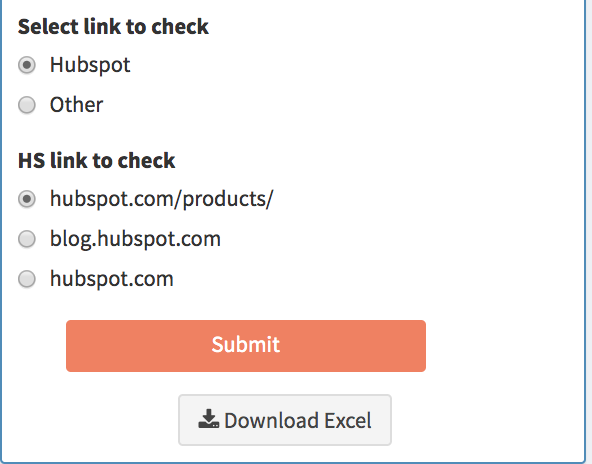
Finally, you need to enter the URL that you want to check the search results against.

In other words, if you want to check for the search keyword “best live chat software,” then you could enter “hubspot.com” or “drift.com” to see how many of the URLs that rank for the search keyword “best live chat software” mention that URL.

I have preset options for HubSpot URLs to check our product page, blog posts, or generic hubspot.com pages:

hubspot surround sound content strategy select link to check serp tracker

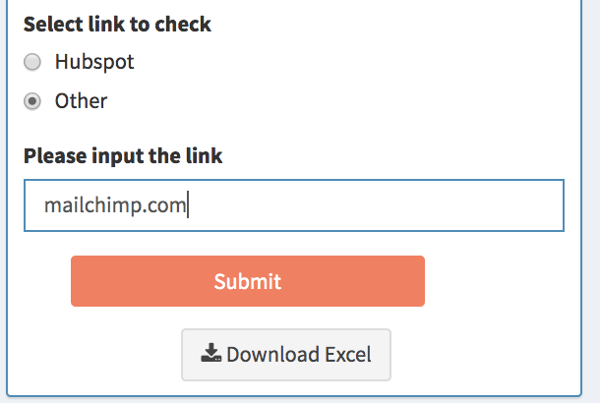
You can also enter a custom link by clicking “other.”

hubspot surround sound content strategy other link serp tracker

This allows for, among other things, competitor searches and custom HubSpot URLs (for example, if you just wanted to see who mentions our Forms product page or who mentions Academy pages - it’s also a workaround to check affiliate links, because they’re often structured like “affiliatesite.com/ref/hubspot” so you could just enter “hubspot” in the URL to check for those):

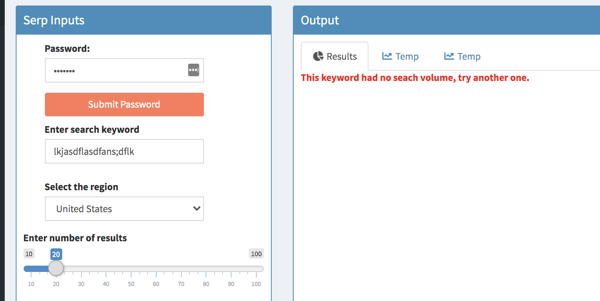
We use SEMRush’s API to pull keyword search volume, but there are times that SEMRush doesn’t have values for search volume. In this case, it just prints an error message:

hubspot surround sound content strategy serp tracker error message

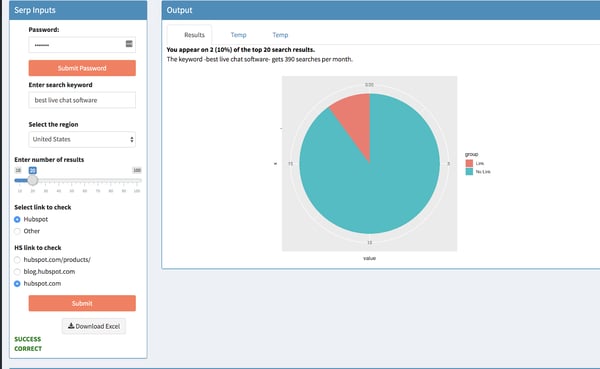
If all information is entered correctly, click “Submit” and it will start computing. After some processing time, this is the report it will create:

hubspot surround sound content strategy serp tracker report

You get a nice visual pie chart, beloved by analysts and data visualizers worldwide, representing how many ranking URLs contain the link (and how many don’t). This shows that, of the top 20 search results for the term “best live chat software,” our URL “hubspot.com” appears on 2 of them.

I also made it pull keyword level data as well (in the above example it shows that “best live chat software” gets 390 searches a month). This helps weigh the relative importance of a given keyword (ie if a keyword gets 10000 searches a month or 100, that matters strategically)

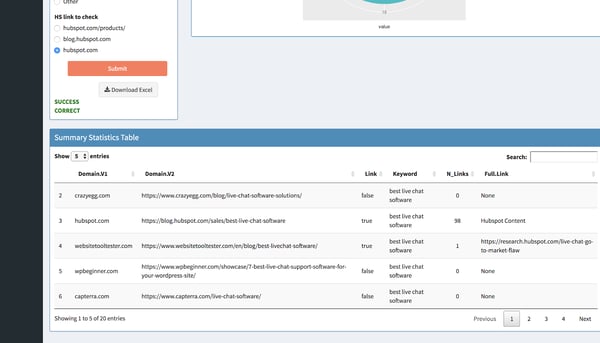
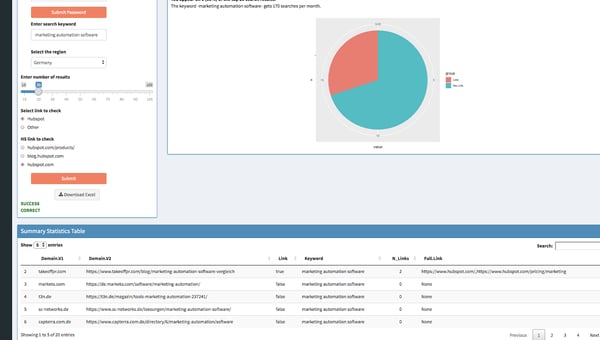
Then below that, you get a full data table that contains the domain and URL of all pages that rank for that keyword, whether or not the link you chose to check against is included (TRUE or FALSE), the keyword you searched (just for reference and if you want to pull the data to Excel), the number of links included, and the full link (so if you checked “hubspot.com” and the ranking page references “blog.hubspot.com/marketing/form-builder-tools,” it will pull that full link URL for you):

hubspot surround sound content strategy serp tracker report

Like I mentioned above, you can use this to check other websites’ links as well. This one shows how many of the top 20 ranking pages for “mailchimp alternatives” mention appsumo.com (which makes SendFox, an email marketing tool):

hubspot surround sound content strategy serp tracker report

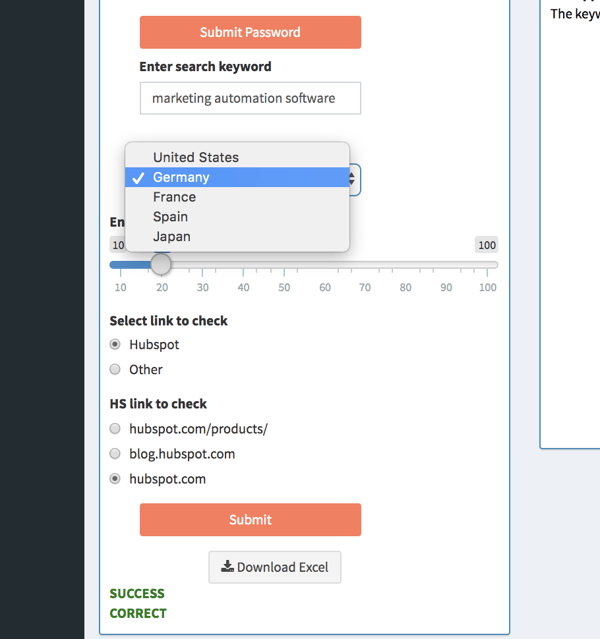
And like I mentioned above, you can choose the region. Currently, I have options for Germany, France, Spain, and Japan, though we can add more regions fairly easily. This is going to be incredible for international expansion (more on that later)

hubspot surround sound content strategy choose region serp tracker

This just changed the database to a different region (ie if you choose German, it will show what ranks in google.de). This report shows how many hubspot.com links appear on pages that rank for “marketing automation software” in Germany:

hubspot surround sound content strategy serp tracker report

Next Level: Automating Report for 600+ Keywords with Google Data Studio and Scripts

This data from the SERP Tracker, on its own, is valuable. One can quickly audit the search results pages for product mentions, compare to other websites, and even do a bulk audit.

However, to truly get the wheels turning on the surround sound Strategy, it’s imperative to store and access data across time in order to track results and identify gaps and opportunities.

To do this, we extract data from the SERP Tracker, transform it and blend it, and load it to BigQuery so we can visualize it and create reports using Google Data Studio.

All of this is done automatically with an R script that runs once per month. It pulls all SERP data for our list of keywords, stores the data in Sheets (in the future we’ll write directly to BigQuery). BigQuery is connected to Sheets, so we filter, clean, and blend the data with a quick SQL script. This is then connected to Data Studio, where all filters are applied and we visualize our reports.

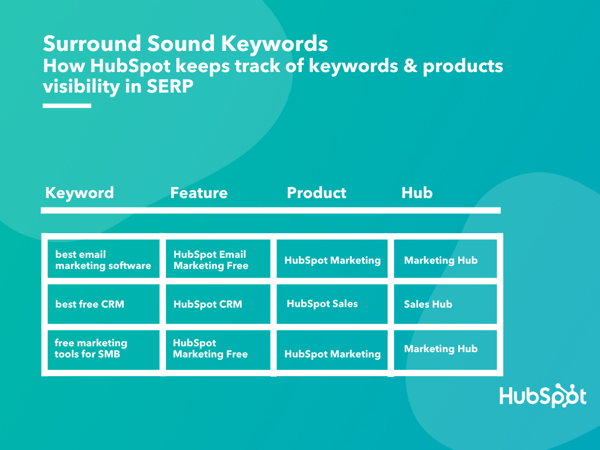
Our reports start with the way we map our target-keywords against the features, products and Hubs. This database is the source for the SERP tracker as well and the Google Data Studio reports which we use to track progress and communicate with stakeholders.

hubspot surround sound keywords

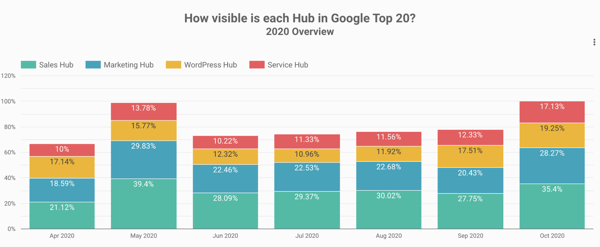
First, we use a birds-eye view of all of our product Hubs to understand overall progress and how each Hub stacks against the others. If you’re familiar with HubSpot’s products, it won’t come as a surprise that our Sales and Marketing Hubs lead the way when it comes to surround sound Visibility.

hubspot surround sound content strategy visibility

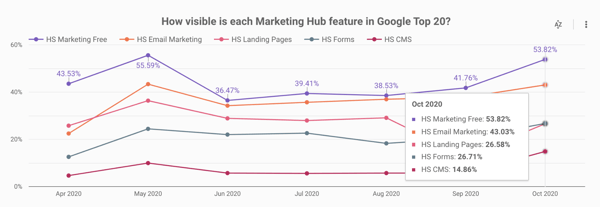
Our reports go one layer deeper and we can see in one chart how different features (e.g. HubSpot Email Marketing vs HubSpot Forms) perform against each other.

hubspot surround sound content strategy visibility

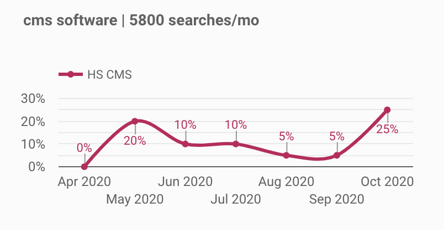
For a deeper analysis, we have feature-dedicated dashboards. In the example below, we see how one isolated feature (HubSpot CMS) evolved, as well as how our visibility changed for the most important keywords related to that feature.

1. Surround Sound: The First 6 Months

The main thing that you need to accept before starting a surround sound program is that you can never be fully in control of your visibility.

There are many factors that play a role into how your visibility evolves:

  • Search engine updates cause the Top 20 results to fluctuate (sometimes quite dramatically)
  • New content appears in Top 20 for the keywords that you’re focusing, maybe outranking you or results that mention your brand
  • Competitors and other third-party pages appear in Top 20 results, but don’t mention your brand

Even despite these challenges, the results we’ve seen in the first 6 months of our surround sound program prove you can make a change in your visibility by partnering with other websites.

If you want to learn more about how to execute a surround sound program, check out the previous article in this series.

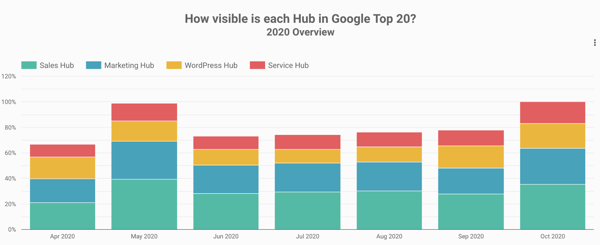
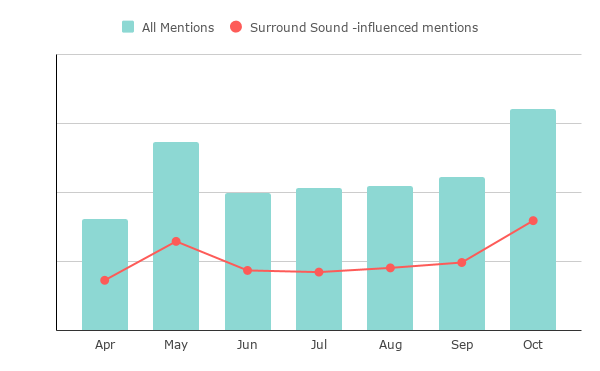
In the chart below you can see how HubSpot’s visibility in SERP changed since April. The Google May 2020 core update changed the SERP landscape quite dramatically, causing a lot of articles that used to mention HubSpot to disappear from the Top 20. After that, our visibility started climbing gradually, as we built more partnerships (e.g. more websites joined our Affiliate program).

hubspot surround sound content strategy visibility

If we only look at all the pages that mention HubSpot, for the 600+ keywords we’re monitoring for surround sound, about 50% of these are now influenced by our surround sound program.

hubspot surround sound content strategy visibility

Conclusion: Final Thoughts

There is still a lot of work and opportunities to tap into for our product awareness program. But the most important learning we had so far is that surround sound is a marathon, not a sprint.

It takes time and effort to build genuine partnerships and, as Brian Halligan always “add value > extract value”.

Also, having a strong brand name helps a lot, at least when first reaching out to a potential partner. In fact, it’s fair to say that if HubSpot were a startup, this progress wouldn’t have been possible in just 6 months. It takes time to build a brand and get others to recommend it.

As with everything, there’s no silver-bullet solution. While we share a lot of our process and tools, the way we do surround sound at HubSpot might not work exactly the same for other brands. The main thing we hope you take away from this is: there’s another way of looking at your visibility in SERP that’s not just SEO.

Have you thought about adding surround sound to your content marketing and acquisition strategies in 2021?

Want to learn more about the strategy and execution behind the surround sound strategy? Read part one and two of this series.


The Surround Sound Series: How We Built a Bespoke SERP Tracker and Measured the Results of Our New Content Program (Part 3 of 3) was originally posted by Local Sign Company Irvine, Ca. https://goo.gl/4NmUQV https://goo.gl/bQ1zHR http://www.pearltrees.com/anaheimsigns
The 7 Best Free Resume Builders We've Ever Discovered

A couple weeks ago, my brother Max sent me his resume in a text message, and asked me to 'spruce it up a bit' for him.

Undoubtedly, I needed to do more than copy-and-paste the text into a Word document. To truly stand out, I knew the resume needed to demonstrate a level of professionalism and effort -- something content alone can't always convey.

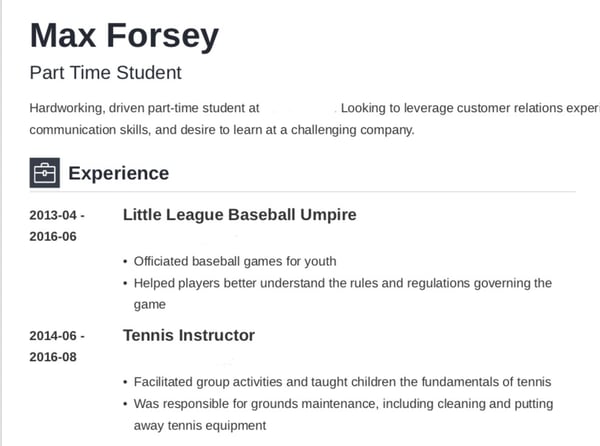
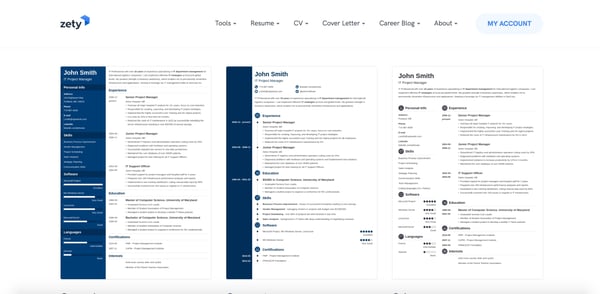
Fortunately, with the help of Zety, I was able to input Max's resume information, choose a template, and have Zety design the piece for me, within a span of 20 minutes:

A resume built with Zety.

Looks a little better than a text message, doesn't it?

Resume builders are incredibly helpful when creating a resume, and can help you showcase your unique personality. Best of all, they look a lot sleeker than whatever you can design in a Google Doc.

To ensure you can create a resume for free, we've compiled this list of the best free resume builders we've discovered. Keep reading, and then get to work designing your own -- trust me, with these tools, it's almost as easy as sending a text.

Featured Resource: HubSpot Resume Templates

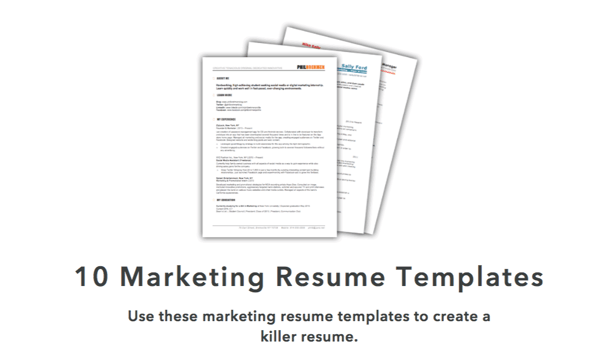
HubSpot's marketing resume templates.

Download these free templates and plug in your experience and information for a custom, well-crafted resume.

1. Resume Genius

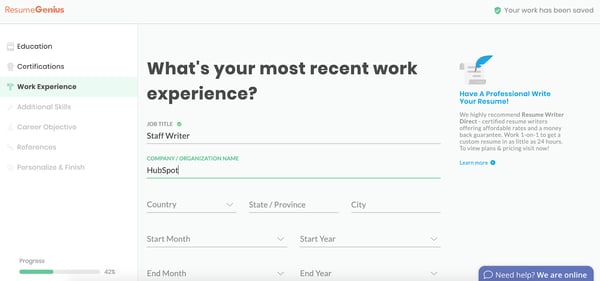
Resume Genius online resume builder.

Resume Genius is undoubtedly one of the easiest and fastest free resume tools you have at your disposal. With a clean and easy-to-use interface, the tool walks you (speedily) through categories including education, work experience, and references, and offers eight different templates varying from 'Taj Mahal' to 'Classic'. Resume Genius provides you with easy fill-in-the-blank sections, so you can have an impressive, comprehensive resume in no time.

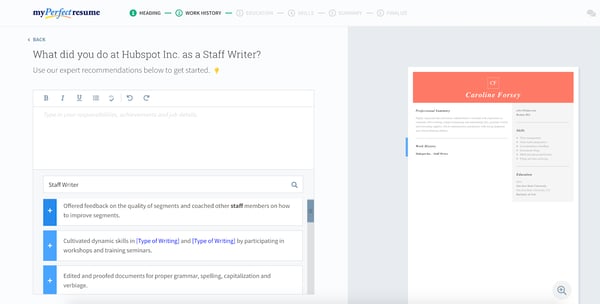
2. My Perfect Resume

My Perfect Resume online resume builder.

My Perfect Resume allows you to either start from scratch and input information into a blank template, or upload a pre-existing resume if you already have one. Additionally, the tool provides you with expert recommendations as you move throughout the process, including suggested phrases you can include for specific roles.

My Perfect Resume also enables you to include optional sections like certifications, accomplishments, and affiliations, which is vital particularly if you're just starting out, or switching industries. This tool is particularly useful if you're applying for a creative role and want to add color or a unique design to your resume.

To use My Perfect Resume for free, click "Download" on the left toolbar once you reach the final step of the builder -- instead of selecting "Save and next". Then, choose "Plain Text (.txt)" to download your resume for free.

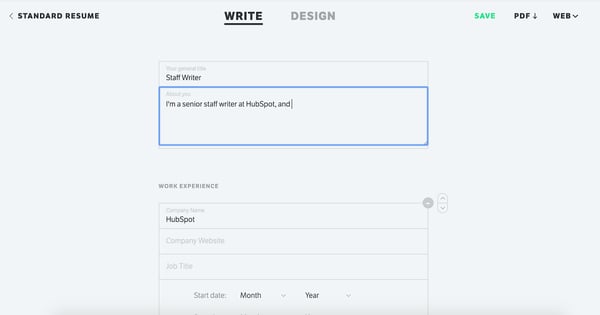
3. Standard Resume

Standard Resume online resume builder.

Standard Resume allows you to import your information straight from LinkedIn, making it an ideal time-savor if your LinkedIn profile is up-to-date. Plus, the white background and minimalist features enable you to focus on what really matters -- your content. You can switch back and forth between "Write" and "Design" to see how your resume looks as you go along, and download as a PDF when you're finished. Best of all, the tool also makes your resume mobile-responsive, so you can view it on your smartphone.

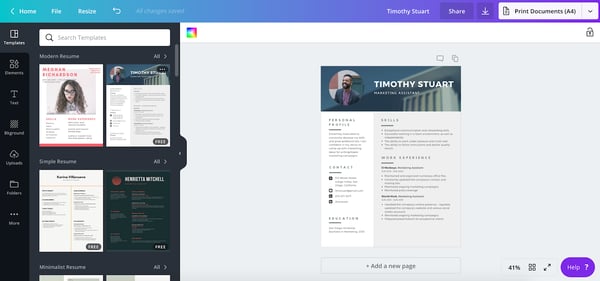
4. Canva

Canva resume templates.

If you're applying for a creative role or want a resume that truly lets you stand out, you might consider using one of Canva's hundreds of free, designer-made templates. Canva's selections are incredibly varied and unique, so you'll undoubtedly find one you like, and inputting resume sections can be as easy as copy-and-paste. Additionally, the templates are separated into categories, such as 'Graphic Design', 'Corporate', and 'Creative', making it easier to choose based on your preferred industry.

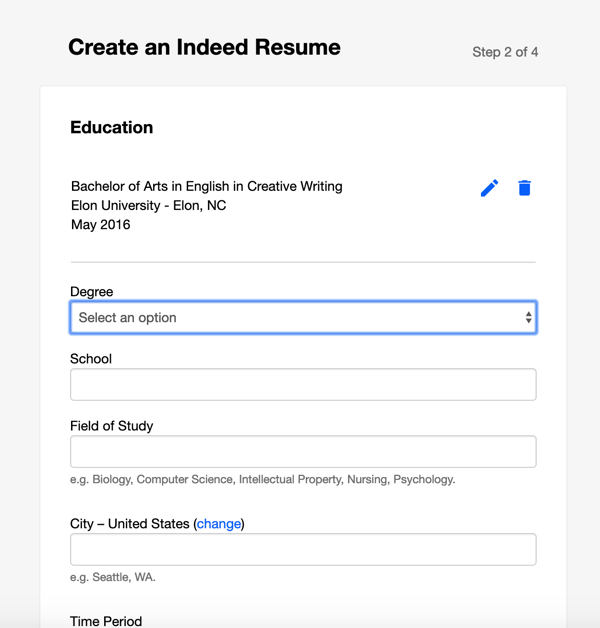
5. Indeed

Indeed resume builder.

Creating an Indeed resume is an incredibly quick process, and best of all, the site allows you to automatically share your resume with employers on Indeed as soon as you're finished. If you've already completed a resume, it's still a good idea to upload to the site for exposure to potential employers. While it admittedly doesn't offer as many options for creativity as some of the others in this list, Indeed is an impressive option if you want to create a more traditional resume and start sharing it immediately.

6. Zety

Zety online resume builder.

Zety is an excellent online resume builder because of the state-of-the-art templates. You can easily start from scratch and input your information. My favorite element of this tool is that the site will walk you through the process. All you need to do is fill out the information and then voila -- you have a resume. While this tool is free, you will need to make an online account.

To use Zety for free, click "Download" on the left toolbar once you reach the final step of the builder -- instead of selecting "Save and next". Then, choose "Plain Text (.txt)" to download your resume for free.

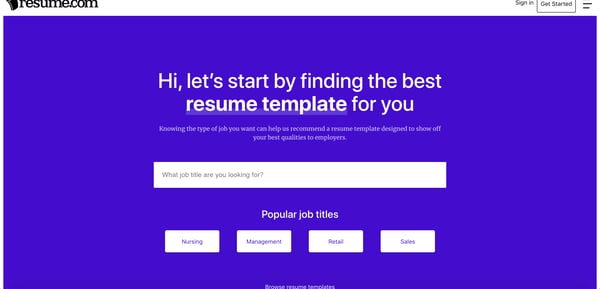
7. Resume.com

Resume.com resume builder.

With Resume.com you can build a beautiful resume in minutes. This tool is a great option if you're looking for recommendations on what to include in your resume. Additionally, the site has popular templates for various job categories to help you stand out among the competition.

To use this for free, when you're at the last stage, you'll see a pop-up that says to create an account -- instead, just click "Skip for now." Then, in the top right-hand corner, you can click the download button.

Building a resume can feel like you're staring at a blank canvas. But with an online resume builder, you can get recommendations and build a beautiful document that will stand out without needing a graphic design degree.

Editor's note: This post was originally published in March 2019 and has been updated for comprehensiveness.


The 7 Best Free Resume Builders We've Ever Discovered was originally posted by Local Sign Company Irvine, Ca. https://goo.gl/4NmUQV https://goo.gl/bQ1zHR http://www.pearltrees.com/anaheimsigns
How to Market an Ebook: Don't Let Your Content Offers Collect Dust

We all know that traffic alone doesn't pay the bills. Ultimately, our traffic must do its job to convert prospects who have problems that we can solve. One way of getting the right people into the pipeline is by creating compelling content offers that practically beg for the opt-in. There's just one problem: Making sure we generate enough demand for the offer to be successful.

So if your content is just sitting on your website not getting too many downloads or leads, your promotion might be the problem. That being said, read on to discover the best techniques for marketing your ebook, whitepaper, guide, or other lead-generating resource. 

1. Consider a co-marketing campaign.

Before your create your helpful content offer, consider if there's any partnerships that you can leverage. Co-marketing provides an opportunity for cross-collaboration on content so that two parties "own" that content and benefit from it. 

Here are some reasons why co-marketing is a good idea:

  • Sharing resources for the offer's creation doubles the value of the content and diminishes the cost/effort of its production
  • Promoting to two networks increases the reach of the campaign exponentially
  • Both partners have vested interest in the results of the promotion because both reap the benefits (the leads generated from it)

2. Utilize industry influencers for their thought leadership and reach.

Whether you decide to do co-marketing or not, you can't deny the power of good old-fashioned personalized outreach. Think through your existing partnerships as well as other major players in the industries or social circles you want to reach. 

Consider these thought leaders' goals: finding relevant articles to share with their fan base, increase their reach, and further establish themselves as an authority. 

You can appeal to these goals by featuring them in your content offer. For example, ask them for a quote that you can incorporate into your content offer or link to another article they wrote. When you finish the piece, send them a complimentary copy. I’d suggest telling them how much you’ve appreciated their expertise and that you were delighted to include them.

Don't forget to mention that you'll be promoting the offer to your network. Because they're featured in the content, this acts as an incentive for them to share your offer to their audience as well. 

The key to this tactic is to make your personalized outreach unique and worth their while. After all, they likely get bombarded with messages asking them to share content.

3. Use email marketing to promote the ebook with your existing audience.

Admittedly, outreach is arduous. Don't forget about the network you already have. Your email subscribers have already expressed interest in similar content offers, and if this new ebook continues to provide value for problems they need help with, this is another opportunity to continue engaging them. 

As you continue to provide value, you're establishing more credibility and authority in their eyes. As you stay top of mind in this way, you'll be first on their list when they are ready to make a purchasing decision.

To achieve maximum success with this tactic, it helps to have a segmented audience so that you're always providing relevant, timely, and personalized content. 

You don’t want to email a specific ebook to your entire contact database because it probably doesn’t relate to all your contact lists. When you don’t segment emails, your engagement will be lower and your success will be diminished.

Here's what I mean: 

On one of your opt-in forms, you could have visitors identify what they need help with. For an inbound marketing agency, it might say, "What Does Your Business Want to Improve?" with options to select: 

  • Grow our web presence
  • Rank higher on Google
  • Generate more leads

That way, if an ebook was created around SEO, it could be sent to all the subscribers who have already shown interest in ranking higher on Google. 

4. Promote your ebook on your highest trafficked (but still relevant) blog posts.

In addition to your other methods of promotion, you want to make sure that you're converting organic traffic as well. But here's the problem: A user can't convert on a landing page they never land on. They can never be interested in a content offer they don't know about. 

Content offers aren't an "If you build it, they will come" scenario. Instead, see how you can capitalize on the traffic you're already getting for its promotion.

By putting the CTA (call to action) on new blog posts, all you're doing is making a gamble. Mainly because you don't know if that blog post will ever generate traffic. After all, it's brand new.

However, you can put a CTA on an existing blog post that has proven success, pushing that ebook to a known source of demand. 

Promote your offer on relevant blog posts that already get traffic to put your ebook in front of the audience you have.

5. Create a PPC campaign to advertise your content offer.

If you know your content offer has a clear path to revenue, organic plays alone are not always the best route for promotion, especially if there is clear demand as people search for resources just like yours. 

PPC is a quicker tactic than SEO and is a great way to promote not just your company and its services but also campaigns to offers you create. A successful PPC campaign boosts visibility and downloads to your offer by driving high-intent users to the landing page. 

6. Announce your content offer on social media.

Email is a great tactic for promoting to an existing audience, and so is social media. An additional benefit is that social media promotion can reach beyond that existing audience much more easily.

Be sure to post on your social channels once your offer is live, conveying the value it contains for the reader and including an image to attract their attention. Mix these posts in with your other content so that your readers aren't put off by too much promotional content.

7. Consider putting advertising budget behind it.

On some social channels (I'm looking at you, Facebook), organic reach isn't what it used to be. Boosting posts helps to increase reach to both your followers and beyond. Alternatively, you can also create an ad that promotes your ebook and do paid promotion to a targeted audience. 

Just keep in mind that people don't browse social media with buying intent, so you'll have to ensure that the offers you promote and the way you promote them piques interest and conveys value. Otherwise, they'll just see it as an ad and scroll on past.

8. Repurpose your content into different formats.

The first time they see your post, they may not click and convert right away. Like with anything, it can take multiple "impressions" to attract attention and pique interest. At the same time, if you continue posting the same thing over and over, your content gets stale. 

Enter repurposing. 

Your ebook can easily be turned into a slideshare, infographic, quiz, or other format. By having multiple "versions" of your content for promotion, your ebook can go farther while getting more eyeballs on it. 

9. Connect with niche readers on social media.

Look on Twitter and LinkedIn for users that have been sharing similar content to what you have created. Just by searching on Twitter for #inboundmarketing, I can see who is sharing inbound marketing blogs, guides, and resources. Plus, I can see who is getting the biggest reach in terms of likes and retweets.

Reach out to these individuals with a simple message that encapsulates “Hey! I saw you shared [this article] and I thought you might like [this related content offer]”. This way you know that the individual is probably interested in what you’re writing because they’ve been interested in similar content before.

This tactic might not work as well as the influencer tactic in tip #2 since you're not providing mutual value, but many of these individuals spend a lot of time curating content for their audience, and you might just be helping them out.

10. Submit to a content community or online group.

Chances are, search engines and their social feeds are not the only places your audience hangs out. If your ebook contains specialized or niche information, you might be able to target these niches through content communities and online groups. For example: 

  • Niche Facebook groups
  • Niche LinkedIn groups
  • Reddit
  • Quora
  • Slack groups
  • NextDoor neighborhoods
  • Industry forums

For example, if you’re a roofer in St. Louis, join your community group on NextDoor.com and offer your content there. When your neighborhood gets hit by a hailstorm, your infographic on “Assessing Storm Damage as a Homeowner” can come in handy to the community’s residents.

Content communities are also a great resource for getting feedback, starting discussion, and sharing your passion for your services with others.

11. Find other linking opportunities.

Using tools like Arel="noopener" target="_blank" HREFs, you can see other websites who have linked to content like yours. Reach out to them with your content offer link and see if they want to include a link to your resource. I find that this is most helpful when you can find a broken link that your new link can replace. Webmasters generally appreciate when someone lets them know of a problem with their website links, and if you can provide a link to replace the broken one, it might get placed.

Alternatively, use a tool like BuzzSumo or Mention.net to find mentions of your company online. You’ll be able to see who has mentioned you or your content offer and determine whether they have linked back to you or not. If they haven’t included your link, reach out to that website and explain it might provide their readers a better experience if they could find the article that is being mentioned.

If you’re looking for more backlink opportunities, I highly recommend Backlinko’s “17 Powerful (Yet Untapped) Backlink Sources” to find other places you could get a link from!

12. Guest blog on popular websites with your ebook as CTA.

You may also have an opportunity to capitalize on a third party website's organic traffic and promotions through guest blogging. If your buyer persona goes to a popular website that provides solutions to the problems they're experiencing, your content offer should be there too (as long as it's similarly relevant and helpful, of course). 

Once you nail down which websites your buyer persona is reading to get information, see if these websites offer the opportunity for industry leaders to guest blog. Some websites will require an application or an article proposal, but once you get accepted blogging for one website, it becomes much easier to get accepted on other websites.

When you write your articles, keep them educational and don’t self-promote. Remember, you’re trying to help the reader solve a problem with your expertise and industry knowledge. A the conclusion of the article, use your ebook as a next step CTA so if a reader finishes the article and wants more information, your content offer is there.

Content that just sits on your website can’t properly do its job and bring in leads. But worry not, by using these promotion tips you’ll see a little bit of extra effort can really take a content offer from zero to hero.

If you're interested in creating attractive ebooks that capture attention and bring more leads to your business, check out the FREE resource below (see what we did there?).

Editor's note: This post was originally published in September 2016 and has been updated for comprehensiveness.


How to Market an Ebook: Don't Let Your Content Offers Collect Dust was originally posted by Local Sign Company Irvine, Ca. https://goo.gl/4NmUQV https://goo.gl/bQ1zHR http://www.pearltrees.com/anaheimsigns

Wednesday, November 4, 2020

Beyond Responsive Design: How to Optimize Your Website for Mobile Users

Everyone can acknowledge the importance of a mobile-friendly website, especially after Google's Mobilegeddon algorithm update.

Mobile optimization is here to stay, and it's demanding more and more of businesses and their websites. But mobile optimization is about more than just a responsive website design.

In this article, we tell you why and how to adopt a mobile-first mindset for your website.

Google's mobile-friendly algorithm change in 2015 (and a few more since then) was evidence that the search engine recognizes its responsibility to surface websites that painlessly get users what they need at the time that they need it.

Google doesn't want to send mobile users to websites that provide a frustrating browsing experience — that would damage its promise to its users to always deliver helpful, relevant content.

Moreover, this algorithm change was and is a signal of a much larger shift that’s afoot — consumer behavior is changing, and it's your job to adapt.

Building a mobile-friendly website is step one, but tweaking your website will not keep you ahead of consumers’ changing behavior and expectations.

In short, you have to infuse your marketing strategy with a mobile-first mindset. Here's how.

1. Map your customer journey.

Imagine the experience of Sally, a young marketer who has just moved to Chicago. While out for a walk, Sally passes by a hair salon and realizes she needs a haircut. She pulls out her phone a search for hairstylists in Chicago who specialize in curls and color. Her Google search pops up Joann’s Stylez.

She flips through the website quickly and wants to research more, but it’s too hard while on the move — so she texts herself a link. When she gets home, she opens her texts on her tablet and quickly checks Yelp reviews, examines her calendar, and then books an appointment using the simple form on the Joann’s website.

When Sally loads up her laptop later that night to check her email, she discovers an email from Joann’s that confirms her appointment and gives her the option to add it to her calendar. The next day, 30 minutes before her appointment, she receives a push notification on her work computer reminding her of the appointment.

The next day, Sally receives a mobile email asking for feedback on the cut and offering to set up a recurring appointment at a discounted rate. She’s sold.

Sally’s experience is illustrative of the cross-device, omnichannel journey that many customers now make as they move through the marketing funnel. Every day, consumers switch a handful of different devices when completing common tasks such as online shopping, readying blog posts, booking appointments, or communicating with each other.

HubSpot's Blogging Software equips you to publish relevant, conversion-optimized content you can preview on any device — allowing you to engage with customers wherever they are.

Consumers now expect this type of experience from all of their digital interactions. They want to be able to accomplish whatever fits their fancy on whatever device is at hand. This means that simply adapting your site to look nice on different devices is not enough. As a marketer, you must dig deeper into your customers’ and prospects’ lives.

For example, at HubSpot, we know that a visitor on a mobile device is very unlikely to fill out a long form on one of our landing pages. So we started using Smart Content to automatically shorten the form when a mobile viewer is looking at it. By doing this, our mobile prospects increased by 5x.

2. Seize intent-rich micro-moments.

You’ve likely already developed a strong set of buyer personas. You’ve conducted user research and testing to understand which content and CTAs to present to each persona as they move down the funnel. You must now go a step further. You must understand both the rhythm and rhyme to when, why, with what, and from where people are interacting with your website and content.

Google encourages marketers to identify the “micro-moments” in a customer's journey:

Micro-moments occur when people reflexively turn to a device — increasingly a smartphone — to act on a need to learn something, do something, discover something, watch something, or buy something. They are intent-rich moments when decisions are made and preferences shaped.

A number of brands have figured out how to anticipate and capitalize on these micro-moments. Apple Passbook loads up your Starbucks card when you’re near a coffee shop. Hertz sends you an email when your plane lands to let your know that your car is ready. Starwood allows you to check in and open your hotel room with your smartphone.

Consumers are increasingly becoming acclimated to companies offering such intimately responsive experiences. 59% of shoppers say that being able to shop on mobile is important when deciding which brand or retailer to buy from, and 39% of smartphone users are more likely to browse or shop a company or brand’s mobile app because it’s easier or faster to make a purchase.

How can you figure out these micro-moments and design your content to meet prospects’ intent? Tap into your data. Here are three analyses you should start with:

  • Search: Which queries, ads and keywords are bringing users on different devices to your website and landing pages? Once they land on your site, what types of searches are users on different devices performing?
  • Content: Examine the content that users access by stage in the funnel and by device. Is there a trend around what prospects on their phones are downloading? Sharing?
  • Flow: Dig into a flow analysis segmented by device. What is the path mobile-using prospects follow? What is the path tablet-using customers follow? From what sites and sources are these visitors arriving?

After building your trove of micro-moments, it would be easy to think: “Okay, we just need to strip our website down to the specific things our visitors will mostly likely want to access on the go.”

But mobile users are not limited to completing short, simple tasks. The device does not directly imply location or intent.

A busy professional may use her commute time to conduct in-depth industry research on her phone, process her email inbox on her tablet while watching a movie with her family, and browse the websites of potential contractors while flying across the country.

Confirming this intuition, the Pew Research Center’s study of U.S. smartphone found that 99% of smartphone owners use their phone at home, 82% use their phones while in transit, and 69% use their phone at work each week. (This study was conducted in 2015, but we believe it's still relevant, if not more so, today.)

People don't want a stripped down set of content. Instead, they want quick and easy access to the materials they need on whatever device they happen to be using.Thus, while you want to optimize your site, landing pages, emails, etc. for micro-moments, you do not want to force visitors into a box from which they cannot escape.

3. Consider (and reconsider) your metrics.

The metrics you established in the desktop-centric days may not seamlessly translate to our new multi-device, micro-moment world. For example, you might have fought tirelessly to find ways to increase visitors’ time on your site, recognizing that more time means higher engagement, which translates to higher conversion.

The micro-moments you identify for mobile visitors, however, might suggest that you want a lower time-on-site. A prospect visiting the website of a consulting firm may be looking for:

  • An infographic they want to show a coworker
  • The bio of a partner with whom they are about to meet
  • A case study to read while traveling

In order to meet this prospect's expectations for their mobile experience, you must design your website to quickly and intuitively help them find the specific piece of information for which they are looking. If their mobile visit is distracting, frustrating, or too time consuming, you’ve damaged their perception of your brand.

4. Embrace the intimacy of mobile.

For better or worse, I go to bed with my phone (reviewing tomorrow’s schedule and reading a nighttime meditation) and I wake up with my phone (silencing the alarm and checking the weather). I communicate with my partner and my best friends everyday — all through my phone. When my MBA classmate sends a GIF of Tyra Banks being sassy, I turn my phone to the person next to me, and we have a good laugh together.

Day-in and day-out, these interactions create an intimate connection between my phone and me. And I’m not alone: Most consumers imbue their mobile experiences with more intimacy than desktop experiences. The Pew Research Center found that Americans view their smartphones as freeing, connecting, and helpful, and associate their phones with feelings of happiness and productivity. These associations can inspire greater engagement with and interest in content.

As marketers, we should take advantage of these trends and consider how to make our prospects’ mobile experience more personal and social. Perhaps change your website to increase the proportion of social CTAs you display when someone arrives on mobile.

5. Remember the basics and think ahead.

Overall, embracing the mobile mindset means ensuring that the entire customer journey is responsive, relevant, actionable, and frictionless. As a marketer, you want to help consumers quickly and easily find what they want to find and do what they want to do. Again, this means thinking ahead, understanding when, with what device, and from where your prospects will interact with your content.

This can seem daunting, but mostly it means diligently applying the basics across channels. For example, since nearly half of all emails are opened on mobile, ensure your emails are mobile optimized. We recommend doing the following:

  1. Use large, easy-to-read text.
  2. Use large, clear images and reduce file sizes.
  3. Keep layouts simple and invest in responsive templates.
  4. Use large, mobile-friendly calls-to-action and links.

Recognizing the personal associations people have with their phones, you’ll want to ensure that the “From” name is familiar and that the preview text is inviting. And think ahead: Don’t email a link to a form or an event registration landing page that is not mobile-friendly.

Use HubSpot's Free Landing Page Builder to launch landing pages that look perfect across devices and automatically change content based on who's viewing your page.

Over to You: Time to Optimize

Follow these tips and you will be well on your way to living the mobile mindset and weathering the change in consumers’ digital behavior. Move quickly and your organization could be at the head of the pack.

Editor's note: This post was originally published in June 2015 and has been updated for comprehensiveness.


Beyond Responsive Design: How to Optimize Your Website for Mobile Users was originally posted by Local Sign Company Irvine, Ca. https://goo.gl/4NmUQV https://goo.gl/bQ1zHR http://www.pearltrees.com/anaheimsigns