Monday, November 2, 2020

How to Remove Render-Blocking JavaScript From Your WordPress Website

Have you ever finished creating a WordPress website and loved everything about it? Then, promptly began to hate it after realizing it takes forever to load?

Not only are slow loading speeds a nuisance for you and your visitors, but they can also cost you significantly when it comes to SEO. Since 2010, Google algorithms have accounted for loading speed in ranking decisions, so slow pages appear lower on results pages.

You might be familiar with the common culprits of poor page performance — uncompressed image files, insufficient hosting, and lack of caching to name a few. But, there’s another often-overlooked perpetrator in play: render-blocking JavaScript.

Don’t be mistaken — JavaScript is awesome. It helps to add dynamic, interactive, engaging elements that improve the functionality and usability of your website. But, too much of it can be a huge time hog.

Here’s why: When a web browser first loads a web page, it parses all the page’s HTML before displaying it onscreen to a visitor. When the browser encounters a link to a JavaScript file or an inline script (i.e., JavaScript code written within the HTML document itself) while parsing, it pauses the HTML parsing while fetching and executing this JavaScript code, which slows everything down.

If you’ve optimized your pages in WordPress and are still experiencing problems, JavaScript may very well be the culprit. Sometimes this code is important to run on the first load, but much of the time it can be removed or delayed until the very end of the loading queue.

In this post, we’ll show you how to remove this pesky code from your WordPress website and give your performance a boost.

1. Identify the render-blocking JavaScript code.

Before making any changes, you first need to locate the offending JavaScript. The best way to do this is by using Google's PageSpeed Insights tool. Simply plug in your site’s URL, and click Analyze.

When the scan is complete, Google assigns your website an aggregate speed score, from 0 (slowest) to 100 (fastest). A score in the 50 to 80 range is average, so you’ll want to land in the upper part of this range or above it.

To identify render-blocking JavaScript files that are slowing your page, scroll down to Opportunities, then open the Eliminate render-blocking resources accordion.

the report from google pagespeed insights

Image Source

You’ll see a list of files slowing the “first paint” of your page. In other words, these files affect the loading time of all content that appears in the browser on the initial page load. This is also called “above-the-fold” content.

Take note of any files ending with the .js extension, as these are the ones you’ll want to focus on.

2. Remove the identified JavaScript manually or with a plugin.

Now that you’ve identified the issue, there are two ways to go about fixing it in WordPress: manually, or with a plugin. We’ll cover the plugin solution first.

Several WordPress plugins can reduce the effect of render-blocking JavaScript on WordPress websites. Let’s discuss two popular solutions, Autoptimize and W3 Total Cache.

How To Remove Render Blocking JavaScript With the Autoptimize Plugin

Autoptimize is a free plugin that modifies your website files to deliver faster pages. Autoptimize works by aggregating JavaScript files (and inline JavaScript code if you choose), minifying the JavaScript (i.e., reducing file size by removing redundant or unnecessary code), and delaying its loading.

Since you’re modifying the backend of your site, remember to use caution with this plugin or any similar plugin. To remove render-blocking JavaScript with Autoptimize:

1. Install and activate the Autoptimize plugin.

2. From your WordPress dashboard, select, Settings > Autoptimize.

3. Under the JS, CSS & HTML tab, check the box next to Optimize JavaScript code?.

4. If the box next to Aggregate JS-files? is checked, uncheck it.

the settings page in the autoptimize plugin

5. At the bottom of the page, click Save Changes and Empty Cache.

6. Scan your website again with PageSpeed Insights and check for an improvement.

7. If PageSpeed Insights still reports render-blocking JavaScript files, return to Settings > Autoptimize and check the box next to Aggregate JS-files?.

8. Click Save Changes and Empty Cache.

How To Remove Render Blocking JavaScript With the W3 Total Cache Plugin

W3 Total Cache is another widely-used caching plugin that helps address laggy code. If you’re already using the solution, it’s easy to implement this additional feature. To remove render-blocking JavaScript with W3 Total Cache:

1. Install and activate the W3 Total Cache plugin.

2. A new Performance option will be added to your WordPress dashboard menu. Select Performance > General Settings.

3. In the Minify section, check the box next to Minify, then set Minify mode to Manual.

the settings page in the w3 total cache plugin

4. Click Save all settings at the bottom of this section.

5. In the dashboard menu, select Performance > Minify.

6. In the JS section next to JS minify settings, make sure the Enable box is checked. Then, under Operations in areas, open the first Embed type dropdown and choose Non-blocking using “defer”.

the settings page in the w3 total cache plugin

7. Under JS file management, choose your active theme from the Theme dropdown.

8. Refer back to your PageSpeed Insights results from your earlier scan. For each item under Eliminate render-blocking resources ending in “.js”, click Add a script in the JS minify settings area. Then, copy the full URL of the JavaScript resource from PageSpeed Insights and paste it into the File URI field.

the settings page in the w3 total cache plugin

9. Once you’ve pasted in all render-blocking JavaScript resources reported by PageSpeed Insights, click Save Settings & Purge Caches at the bottom of this page area.

10. Scan your website again with PageSpeed Insights and check for an improvement.

How to Remove Render-Blocking JavaScript Manually

Plugins can handle the backend work for you. Then again, plugins themselves are just more files added to your web server. If you want to limit these extra files, or if you’d just rather handle the programming yourself, you can address the render-blocking code manually.

To do this, locate the <script> tags in your website files for the resources identified in your PageSpeed Insights scan. They will look something like this:

<script> tags tell the browser to load and execute the script identified by the src (source) attribute. The problem with this process is that this loading and executing delays the browser’s parsing of the web page, which impacts the overall load time:

a visualization of the default script loading timeline

Image Source

To resolve this, you can add either the async (asynchronous) or the defer attribute to the script tags for render-blocking resources. async and defer are placed like so:

While they have similar effects on load times, these attributes tell the browser to do different things.

The async attribute signals the browser to load the JavaScript resource while parsing the rest of the page and executes this script immediately after it has been loaded. Executing the script pauses HTML parsing:

a visualization of the script loading timeline with the async attribute

Image Source

Scripts with the defer attribute are also loaded while the page is parsed, but these scripts are delayed from loading until after the first render or until after the more essential portions have loaded:

a visualization of the script loading timeline with the defer attribute

Image Source

The defer and async attributes should not be used together on the same resource, but one may be better suited for a particular resource than the other. Generally, if a non-essential script relies on a script to run before it, use defer. The defer attribute ensures that the script will run after the preceding necessary script. Otherwise, use async.

3. Re-run a site scan.

After making your changes, conduct one final scan of your website through PageSpeed Insights and see what impact your changes had on your score.

Hopefully, there’s a noticeable improvement, but don’t worry if not. Many factors can inhibit page performance, and finding and eliminating them is worth the effort.

4. Check your website for bugs.

In addition to a rescan, check your pages to make sure your site works. Does the page load correctly? Are all elements showing up? If something has broken or fails to load properly, revert your changes and troubleshoot the issue.

If you’ve reached a point where you’ve repeatedly tried various measures with minimal speed gains, it might be best to consider other ways to speed up your pages, rather than risk breaking your site.

Optimizing Your Site for Users

Many factors contribute to your users’ experience on your website, but few are more important than load time. Whenever you make big changes to content or appearance on your WordPress site, you should always consider how such changes affect performance.

Now that you’ve removed the render-blocking JavaScript, you should continue to optimize your website’s speed by analyzing other features that are known to slow down performance. Try to incorporate regular speed testing into your site maintenance schedule — staying ahead of any potential issues will be critical to your success.


How to Remove Render-Blocking JavaScript From Your WordPress Website was originally posted by Local Sign Company Irvine, Ca. https://goo.gl/4NmUQV https://goo.gl/bQ1zHR http://www.pearltrees.com/anaheimsigns

The Who, What, Why, & How of Digital Marketing

With how accessible the internet is today, would you believe me if I told you the number of people who go online every day is still increasing?

It is. In fact, "constant" internet usage among adults increased by 5% in just the last three years, according to Pew Research. And although we say it a lot, the way people shop and buy really has changed along with it — meaning offline marketing isn't as effective as it used to be.

Marketing has always been about connecting with your audience in the right place and at the right time. Today, that means you need to meet them where they are already spending time: on the internet.

Enter digital marketing — in other words, any form of marketing that exists online.

At HubSpot, we talk a lot about inbound marketing as a really effective way to attract, engage, and delight customers online. But we still get a lot of questions from people all around the world about digital marketing. So, we decided to answer them. Click the links below to jump to each question, or keep reading to see how digital marketing is carries out today.

So, how do you define digital marketing today?

A seasoned inbound marketer might say inbound marketing and digital marketing are virtually the same thing, but there are some minor differences. And conversations with marketers and business owners in the U.S., U.K., Asia, Australia, and New Zealand, I've learned a lot about how those small differences are being observed across the world.

At this stage, digital marketing is vital for your business and brand awareness. It seems like every other brand has a website. And if they don't, they at least have a social media presence or digital ad strategy. Digital content and marketing is so common that consumers now expect and rely on it as a way to learn about brands.

Long story short, to be competitive as a business owner, you'll need to embrace some aspects of digital marketing.

Because digital marketing has so many options and strategies associated with it, you can get creative and experiment with a variety of marketing tactics on a budget. With digital marketing, you can also use tools like analytics dashboards to monitor the success and ROI of your campaigns more than you could with a traditional promotional content — such as a billboard or print ad.

How does a business define digital marketing?

Digital marketing is defined by the use of numerous digital tactics and channels to connect with customers where they spend much of their time: online. From the website itself to a business's online branding assets — digital advertising, email marketing, online brochures, and beyond — there's a spectrum of tactics that fall under the umbrella of "digital marketing."

The best digital marketers have a clear picture of how each digital marketing campaign supports their overarching goals. And depending on the goals of their marketing strategy, marketers can support a larger campaign through the free and paid channels at their disposal.

A content marketer, for example, can create a series of blog posts that serve to generate leads from a new ebook the business recently created. The company's social media marketer might then help promote these blog posts through paid and organic posts on the business's social media accounts. Perhaps the email marketer creates an email campaign to send those who download the ebook more information on the company. We'll talk more about these specific digital marketers in a minute.

Here's a quick rundown of some of the most common digital marketing tactics and the channels involved in each one.

Search Engine Optimization (SEO)

This is the process of optimizing your website to "rank" higher in search engine results pages, thereby increasing the amount of organic (or free) traffic your website receives. The channels that benefit from SEO include websites, blogs, and infographics.

There are a number of ways to approach SEO in order to generate qualified traffic to your website. These include:

  • On page SEO: This type of SEO focuses on all of the content that exists "on the page" when looking at a website. By researching keywords for their search volume and intent (or meaning), you can answer questions for readersand rankhigher on the search engine results pages (SERPs) those questions produce.
  • Off page SEO: This type of SEO focuses on all of the activity that takes place "off the page" when looking to optimize your website. "What activity not on my own website could affect my ranking?" You might ask. The answer is inbound links, also known as backlinks. The number of publishers that link to you, and the relative "authority" of those publishers, affect how highly you rank for the keywords you care about. By networking with other publishers, writing guest posts on these websites(andlinking back to your website), andgenerating external attention, you can earn the backlinks you need to move your website up on allthe right SERPs.
  • Technical SEO: This type of SEO focuses on the backend of your website, and how your pages are coded. Image compression, structured data, and CSS file optimization are all forms of technical SEO that can increase your website's loading speed — an important ranking factor in the eyes of search engines like Google.

Content Marketing

This term denotes the creation and promotion of content assets for the purpose of generating brand awareness, traffic growth, lead generation, and customers. The channels that can play a part in your content marketing strategy include:

  • Blog posts: Writing and publishing articles on acompanybloghelps you demonstrate your industry expertise and generates organic search traffic for your business. This ultimately gives you more opportunities to convert website visitors into leads for your sales team.
  • Ebooks and whitepapers: Ebooks, whitepapers, and similar long-form content helps further educate website visitors. It also allows you toexchange content for a reader's contact information, generating leads for your company and moving peoplethrough the buyer's journey.
  • Infographics: Sometimes, readers want you to show, not tell. Infographics are a form of visual content that helps website visitors visualize a concept you want to help them learn.

Want to learn and apply content marketing to your business? Check out HubSpot Academy's free content marketing training resource page.

Social Media Marketing

This practice promotes your brand and your content on social media channels to increase brand awareness, drive traffic, and generate leads for your business. The channels you can use in social media marketing include:

  • Facebook.
  • Twitter.
  • LinkedIn.
  • Instagram.
  • Snapchat.
  • Pinterest.

If you're new to social platforms, you can use tools like HubSpot to connect channels like LinkedIn and Facebook in one place. This way, you can easily schedule content for multiple channels at once, and monitor analytics from the platform as well.

On top of connecting social accounts for posting purposes, you can also integrate your social media inboxes into HubSpot, so you can get your direct messages in one place.

Pay Per Click (PPC)

PPC is a method of driving traffic to your website by paying a publisher every time your ad is clicked. One of the most common types of PPC is Google Ads, which allows you to pay for top slots on Google's search engine results pages at a price "per click" of the links you place. Other channels where you can use PPC include:

  • Paid ads on Facebook:Here, users can pay to customize a video, image post, or slideshow, which Facebook will publish to the newsfeeds of peoplewho match your business's audience.
  • Twitter Ads campaigns: Here, users can pay to place a series of posts or profile badges to the news feeds of a specific audience, all dedicated to accomplish a specific goal for your business. This goal can be website traffic, more Twitter followers, tweet engagement, or even app downloads.
  • Sponsored Messages on LinkedIn: Here, users can pay to send messages directly to specific LinkedIn users based on their industry and background.

Affiliate Marketing

This is a type of performance-based advertising where you receive commission for promoting someone else's products or services on your website. Affiliate marketing channels include:

Native Advertising

Native advertising refers to advertisements that are primarily content-led and featured on a platform alongside other, non-paid content. BuzzFeed-sponsored posts are a good example, but many people also consider social media advertising to be "native" — Facebook advertising and Instagram advertising, for example.

Marketing Automation

Marketing automation refers to the software that serves to automate your basic marketing operations. Many marketing departments can automate repetitive tasks they would otherwise do manually, such as:

  • Email newsletters: Email automation doesn't just allow you to automatically send emailsto your subscribers. It can also help you shrink and expand your contact list as needed so your newsletters are only going to the people who want to see them in their inboxes.
  • Social media post scheduling: If you want to grow your organization's presence on a social network, you need to post frequently. This makes manual posting a bit of an unruly process. Social media scheduling tools push your content to your social media channelsfor you, so you can spend more time focusing on content strategy.
  • Lead-nurturing workflows: Generating leads, and converting those leads into customers, can be a long process.You can automate that process by sending leads specific emails and content once they fit certain criteria, such as when they download and open an ebook.
  • Campaign tracking and reporting:Marketing campaigns can include a ton of different people, emails, content, webpages, phone calls, and more. Marketing automation can help yousort everything you work on by the campaign it's serving, and then track the performance of that campaign based on the progress all of these components make over time.

Email Marketing

Companies use email marketing as a way of communicating with their audiences. Email is often used to promote content, discounts and events, as well as to direct people toward the business's website. The types of emails you might send in an email marketing campaign include:

  • Blog subscription newsletters.
  • Follow-up emails to website visitors who downloaded something.
  • Customer welcome emails.
  • Holiday promotions to loyalty program members.
  • Tips or similar series emails for customer nurturing.

Online PR

Online PR is the practice of securing earned online coverage with digital publications, blogs, and other content-based websites. It's much like traditional PR, but in the online space. The channels you can use to maximize your PR efforts include:

  • Reporter outreach via social media: Talking to journalists on Twitter, for example, is a great way to develop a relationship with the press that produces earned media opportunities for your company.
  • Engaging online reviews of your company: When someone reviews your company online, whether that review is good or bad, your instinct might be not to touch it. On the contrary, engaging company reviews helps you humanize your brand and deliver powerful messaging that protects your reputation.
  • Engaging comments on your personal website or blog: Similar to the way you'd respond to reviews of your company, responding to the people who are reading your content is the best way to generate productive conversation around your industry.

Inbound Marketing

Inbound marketing refers to a marketing methodology wherein you attract, engage, and delight customers at every stage of the buyer'sjourney. You can use every digital marketing tacticlisted above, throughout an inbound marketing strategy,to create a customer experience that workswith the customer, notagainst them. Here are some classic examples of inbound marketingversustraditional marketing:

  • Blogging vs. pop-up ads
  • Video marketing vs. commercial advertising
  • Email contact listsvs. email spam

Sponsored Content

With sponsored content, you as a brand pay another company or entity to create and promote content that discusses your brand or service in some way.

One popular type of sponsored content is influencer marketing. With this type of sponsored content, a brand sponsors an influencer in its industry to publish posts or videos related to the company on social media.

Another type of sponsored content could be a blog post or article that is written to highlight a topic, service, or brand.

To learn more about sponsored content, check out this blog post.

What does a digital marketer do?

Digital marketers are in charge of driving brand awareness and lead generation through all the digital channels — both free and paid — that are at a company's disposal. These channels include social media, the company's own website, search engine rankings, email, display advertising, and the company's blog.

The digital marketer usually focuses on a different key performance indicator (KPI) for each channel so they can properly measure the company's performance across each one. A digital marketer who's in charge of SEO, for example, measures their website's "organic traffic" — of that traffic coming from website visitors who found a page of the business's website via a Google search.

Digital marketing is carried out across many marketing roles today. In small companies, one generalist might own many of the digital marketing tactics described above at the same time. In larger companies, these tactics have multiple specialists that each focus on just one or two of the brand's digital channels.

Here are some examples of these specialists:

SEO Manager

Main KPIs: Organic traffic

In short, SEO managers get the business to rank on Google. Using a variety of approaches to search engine optimization, this person might work directly with content creators to ensure the content they produce performs well on Google — even if the company also posts this content on social media.

Content Marketing Specialist

Main KPIs: Time on page, overall blog traffic, YouTube channel subscribers

Content marketing specialists are the digital content creators. They frequently keep track of the company's blogging calendar, and come up with a content strategy that includes video as well. These professionals often work with people in other departments to ensure the products and campaigns the business launches are supported with promotional content on each digital channel.

Social Media Manager

Main KPIs: Follows, Impressions, Shares

The role of a social media manager is easy to infer from the title, but which social networks they manage for the company depends on the industry. Above all, social media managers establish a posting schedule for the company's written and visual content. This employee might also work with the content marketing specialist to develop a strategy for which content to post on which social network.

(Note: Per the KPIs above, "impressions" refers to the number of times a business's posts appear on the newsfeed of a user.)

Marketing Automation Coordinator

Main KPIs: Email open rate, campaign click-through rate, lead-generation (conversion) rate

The marketing automation coordinator helps choose and manage the software that allows the whole marketing team to understand their customers' behavior and measure the growth of their business. Because many of the marketing operations described above might be executed separately from one another, it's important for there to be someone who can group these digital activities into individual campaigns and track each campaign's performance.

Inbound Marketing vs. Digital Marketing: Which Is It?

On the surface, the two seem similar: Both occur primarily online, and both focus on creating digital content for people to consume. So what's the difference?

The term "digital marketing" doesn't differentiate between push and pull marketing tactics (or what we might now refer to as ‘inbound' and ‘outbound' methods). Both can still fall under the umbrella of digital marketing.

Digital outbound tactics aim to put a marketing message directly in front of as many people as possible in the online space — regardless of whether it's relevant or welcomed. For example, the garish banner ads you see at the top of many websites try to push a product or promotion onto people who aren't necessarily ready to receive it.

On the other hand, marketers who employ digital inbound tactics use online content to attract their target customers onto their websites by providing assets that are helpful to them. One of the simplest yet most powerful inbound digital marketing assets is a blog, which allows your website to capitalize on the terms which your ideal customers are searching for.

Ultimately, inbound marketing is a methodology that uses digital marketing assets to attract, engage, and delight customers online. Digital marketing, on the other hand, is simply an umbrella term to describe online marketing tactics of any kind, regardless of whether they're considered inbound or outbound.

Does digital marketing work for all businesses?

Digital marketing can work for any business in any industry. Regardless of what your company sells, digital marketing still involves building out buyer personas to identify your audience's needs, and creating valuable online content. However, that's not to say all businesses should implement a digital marketing strategy in the same way.

B2B Digital Marketing

If your company is business-to-business (B2B), your digital marketing efforts are likely to be centered around online lead generation, with the end goal being for someone to speak to a salesperson. For that reason, the role of your marketing strategy is to attract and convert the highest quality leads for your salespeople via your website and supporting digital channels.

Beyond your website, you'll probably choose to focus your efforts on business-focused channels like LinkedIn where your demographic is spending their time online.

B2C Digital Marketing

If your company is business-to-consumer (B2C), depending on the price point of your products, it's likely that the goal of your digital marketing efforts is to attract people to your website and have them become customers without ever needing to speak to a salesperson.

For that reason, you're probably less likely to focus on ‘leads' in their traditional sense, and more likely to focus on building an accelerated buyer's journey, from the moment someone lands on your website, to the moment that they make a purchase. This will often mean your product features in your content higher up in the marketing funnel than it might for a B2B business, and you might need to use stronger calls-to-action (CTAs).

For B2C companies, channels like Instagram and Pinterest can often be more valuable than business-focused platforms LinkedIn.


There are a few major benefits to digital marketing. Let's dive into four of them, now.

1. You can target only the prospects most likely to purchase your product or service.

If you place an advertisement on TV, in a magazine, or on a billboard, you have limited control over who sees the ad. Of course, you can measure certain demographics — including the magazine's typical readership, or the demographic of a certain neighborhood — but it's still largely a shot in the dark.

Digital marketing, on the other hand, allows you to identify and target a highly-specific audience, and send that audience personalized, high-converting marketing messages.

For instance, you might take advantage of social media's targeting features to show social media ads to a certain audience based on variables such as age, gender, location, interests, networks, or behaviors. Alternatively, you might use PPC or SEO strategies to serve ads to users who've shown interest in your product or service, or who've searched specific keywords that relate to your industry.

Ultimately, digital marketing enables you to conduct the research necessary to identify your buyer persona, and lets you refine your marketing strategy over time to ensure you're reaching prospects most likely to buy. Best of all, digital marketing helps you market to sub-groups within your larger target audience. If you sell multiple products or services to different buyer personas, this is especially helpful.

2. It's more cost-effective than traditional marketing methods.

Digital marketing enables you to track campaigns on a daily basis and decrease the amount of money you're spending on a certain channel if it isn't demonstrating high ROI. The same can't be said for traditional forms of advertising. It doesn't matter how your billboard performs — it still costs the same, whether or not it converts for you.

Plus, with digital marketing, you have complete control over where you choose to spend your money. Perhaps rather than paying for PPC campaigns, you choose to spend money on design software to create high-converting Instagram content. A digital marketing strategy allows you to continuously pivot, ensuring you're never wasting money on channels that don't perform well.

By and large, digital marketing is a more cost-effective solution, and provides you unique opportunities to ensure you're getting the most bang for your buck.

For instance, if you work for a small business with a limited budget, you might try investing in social media, blogging, or SEO – three strategies that can give you high ROI even with minimal spend.

3. Digital marketing lets you outrank bigger players in your industry.

If you work for a small business, it's likely difficult for you to compete with the major brands in your industry, many of which have millions of dollars to invest in television commercials or nationwide campaigns. Fortunately, there are plenty of opportunities to outrank the big players through strategic digital marketing initiatives.

For instance, you might identify certain long-tail keywords that relate to your product or service, and create high-quality content to help you rank on search engines for those keywords. Search engines don't care which brand is biggest — instead, search engines will prioritize content that resonates best with the target audience.

Additionally, social media enables you to reach new audiences through influencer marketing. I don't personally follow any big brands on social media, but I do follow influencers who will occasionally showcase products or services they like — if you work for a small-to-medium sized company, this could be a good avenue to consider.

4. Digital marketing is measurable.

Digital marketing can give you a comprehensive, start-to-finish view of all the metrics that might matter to your company — including impressions, shares, views, clicks, and time on page. This is one of the biggest benefits of digital marketing. While traditional advertising can be useful for certain goals, its biggest limitation is measurability.

Unlike most offline marketing efforts, digital marketing allows marketers to see accurate results in real time. If you've ever put an advertisement in a newspaper, you'll know how difficult it is to estimate how many people actually flipped to that page and paid attention to your ad. There's no surefire way to know if that ad was responsible for any sales at all.

On the other hand, with digital marketing, you can measure the ROI of pretty much any aspect of your marketing efforts.

Here are some examples:

Website Traffic

With digital marketing, you can see the exact number of people who have viewed your website's homepage in real time by using digital analytics software, available in marketing platforms like HubSpot.

You can also see how many pages they visited, what device they were using, and where they came from, amongst other digital analytics data.

This intelligence helps you to prioritize which marketing channels to spend more or less time on, based on the number of people those channels are driving to your website. For example, if only 10% of your traffic is coming from organic search, you know that you probably need to spend some time on SEO to increase that percentage.

With offline marketing, it's very difficult to tell how people are interacting with your brand before they have an interaction with a salesperson or make a purchase. With digital marketing, you can identify trends and patterns in people's behavior before they've reached the final stage in their buyer's journey, meaning you can make more informed decisions about how to attract them to your website right at the top of the marketing funnel.

Content Performance and Lead Generation

Imagine you've created a product brochure and posted it through people's letterboxes — that brochure is a form of content, albeit offline. The problem is that you have no idea how many people opened your brochure or how many people threw it straight into the trash.

Now imagine you had that brochure on your website instead. You can measure exactly how many people viewed the page where it's hosted, and you can collect the contact details of those who download it by using forms. Not only can you measure how many people are engaging with your content, but you're also generating qualified leads when people download it.

Attribution Modeling

An effective digital marketing strategy combined with the right tools and technologies allows you to trace all of your sales back to a customer's first digital touchpoint with your business.

We call this attribution modeling, and it allows you to identify trends in the way people research and buy your product, helping you to make more informed decisions about what parts of your marketing strategy deserve more attention, and what parts of your sales cycle need refining.

Connecting the dots between marketing and sales is hugely important — according to Aberdeen Group, companies with strong sales and marketing alignment achieve a 20% annual growth rate, compared to a 4% decline in revenue for companies with poor alignment. If you can improve your customer's' journey through the buying cycle by using digital technologies, then it's likely to reflect positively on your business's bottom line.

What types of digital content should I create?

The kind of content you create depends on your audience's needs at different stages in the buyer's journey. You should start by creating buyer personas (use these free templates, or try makemypersona.com) to identify what your audience's goals and challenges are in relation to your business. On a basic level, your online content should aim to help them meet these goals, and overcome their challenges.

Then, you'll need to think about when they're most likely to be ready to consume this content in relation to what stage they're at in their buyer's journey. We call this content mapping.

With content mapping, the goal is to target content according to:

  1. The characteristics of the person who will be consuming it (that's where buyer personas come in).
  2. How close that person is to making a purchase (i.e., their lifecycle stage).

In terms of the format of your content, there are a lot of different things to try. Here are some options we'd recommend using at each stage of the buyer's journey:

Awareness Stage

  • Blog posts. Great for increasing your organic traffic when paired with a strong SEO and keyword strategy.
  • Infographics. Very shareable, meaning they increase your chances of being found via social media when others share your content. (Check out these free infographic templates to get you started.)
  • Short videos. Again, these are very shareable and can help your brand get found by new audiences by hosting them on platforms like YouTube.

Consideration Stage

  • Ebooks. Great for lead generation as they're generally more comprehensive than a blog post or infographic, meaning someone is more likely to exchange their contact information to receive it.
  • Research reports. Again, this is a high value content piece which is great for lead generation. Research reports and new data for your industry can also work for the awareness stage though, as they're often picked-up by the media or industry press.
  • Webinars. As they're a more detailed, interactive form of video content, webinars are an effective consideration stage content format as they offer more comprehensive content than a blog post or short video.

Decision Stage

  • Case studies. Having detailed case studies on your website can be an effective form of content for those who are ready to make a purchasing decision, as it helps you positively influence their decision.
  • Testimonials. If case studies aren't a good fit for your business, having short testimonials around your website is a good alternative. For B2C brands, think of testimonials a little more loosely. If you're a clothing brand, these might take the form of photos of how other people styled a shirt or dress, pulled from a branded hashtag where people can contribute.


1. Define your goals.

When you're first getting started with digital marketing, it's critical you start by identifying and defining your goals, since you'll craft your strategy differently depending on those goals. For instance, if your goal is to increase brand awareness, you might want to pay more attention to reaching new audiences via social media.

Alternatively, perhaps you want to increase sales on a specific product — if that's the case, it's more important you focus on SEO and optimizing content to get potential buyers on your website in the first place. Additionally, if sales is your goal, you might test out PPC campaigns to drive traffic through paid ads.

Whatever the case, it's easiest to shape a digital marketing strategy after you've determined your company's biggest goals.

2. Identify your target audience.

We've mentioned this before, but one of the biggest benefits of digital marketing is the opportunity to target specific audiences – however, you can't take advantage of that benefit if you haven't first identified your target audience.

Of course, it's important to note, your target audience might vary depending on the channel or goal(s) you have for a specific product or campaign.

For instance, perhaps you've noticed most of your Instagram audience is younger and prefers funny memes and quick videos — but your LinkedIn audience tends to be older professionals who are looking for more tactical advice. You'll want to vary your content to appeal to these different target audiences.

If you're starting from scratch, feel free to take a look at How to Find Your Target Audience.

3. Establish a budget for each digital channel.

As with anything, the budget you determine really depends on what elements of digital marketing you're looking to add to your strategy.

If you're focusing on inbound techniques like SEO, social media, and content creation for a preexisting website, the good news is you don't need very much budget at all. With inbound marketing, the main focus is on creating high quality content that your audience will want to consume, which unless you're planning to outsource the work, the only investment you'll need is your time.

You can get started by hosting a website and creating content using HubSpot's CMS. For those on a tight budget, you can get started using WordPress hosted onWP Engine, using a simple them from StudioPress, and building your site without code using the Elementor Website Builder for WordPress.

With outbound techniques like online advertising and purchasing email lists, there is undoubtedly some expense. What it costs comes down to what kind of visibility you want to receive as a result of the advertising.

For example, to implement PPC using Google AdWords, you'll bid against other companies in your industry to appear at the top of Google's search results for keywords associated with your business. Depending on the competitiveness of the keyword, this can be reasonably affordable, or extremely expensive, which is why it's a good idea to focus building your organic reach, too.

4. Strike a good balance between paid and free digital strategies.

An digital marketing strategy likely needs both paid and free aspects to truly be effective. 

For instance, if you spend time building comprehensive buyer personas to identify the needs of your audience, and you focus on creating quality online content to attract and convert them, then you're likely to see strong results within the first six months despite minimal ad spend.

However, if paid advertising is part of your digital strategy, then the results might come even quicker.

Ultimately, it's recommended to focus on building your organic (or 'free') reach using content, SEO, and social media for more long-term, sustainable success.

When in doubt, try both, and iterate on your process as you learn which channels — paid or free – perform best for your brand.

5. Optimize your digital assets for mobile.

Another key component of digital marketing is mobile marketing. In fact, smartphone usage as a whole accounts for 69% of time spent consuming digital media in the U.S., while desktop-based digital media consumption makes up less than half — and the U.S. still isn't mobile's biggest fan compared to other countries.

This means it's essential to optimize your digital ads, web pages, social media images, and other digital assets for mobile devices. If your company has a mobile app that enables users to engage with your brand or shop your products, your app falls under the digital marketing umbrella, too.

Those engaging with your company online via mobile devices need to have the same positive experience as they would on desktop. This means implementing a mobile-friendly or responsive website design to make browsing user-friendly for those on mobile devices. It might also mean reducing the length of your lead generation forms to create a hassle-free experience for people downloading your content on-the-go. As for your social media images, it's important to always have a mobile user in mind when creating them, as image dimensions are smaller on mobile devices and text can be cut-off.

There are lots of ways you can optimize your digital marketing assets for mobile users, and when implementing any digital marketing strategy, it's hugely important to consider how the experience will translate on mobile devices. By ensuring this is always front-of-mind, you'll be creating digital experiences that work for your audience, and consequently achieve the results you're hoping for.

6. Conduct keyword research.

Digital marketing is all about reaching targeted audiences through personalized content — all of which can't happen without effective keyword research.

Conducting keyword research is critical for optimizing your website and content for SEO and ensuring people can find your business through search engines. Additionally, social media keyword research can be helpful for marketing your products or services on various social channels, as well.

Even if you don't have a full-time SEO strategist, you'll still want to conduct keyword research. Try creating a list of high-performing keywords that relate to your products or services, and consider long-tail variations for added opportunities. 

7. Iterate based off the analytics you measure.

Finally, to create an effective digital marketing strategy for the long-term, it's vital your team learn how to pivot based off analytics.

For instance, perhaps after a couple of months you find your audience isn't as interested in your content on Instagram anymore — but they love what you're creating on Twitter. Sure, this might be an opportunity to re-examine your Instagram strategy as a whole, but it might also be a sign that your audience prefers a different channel to consume branded content.

Alternatively, perhaps you find an older web page isn't getting the traffic it used to. You might consider updating the page or getting rid of it entirely to ensure visitors are finding the freshest, most relevant content for their needs.

Digital marketing provides businesses with incredibly flexible opportunities for continuous growth — but it's up to you to take advantage of them.

I'm ready to try digital marketing. Now what?

If you're already doing digital marketing, it's likely that you're at least reaching some segments of your audience online. No doubt you can think of some areas of your strategy that could use a little improvement, though.

That's why we created Why Digital Marketing? The Essential Guide to Marketing Your Brand Online — a step-by-step guide to help you build a digital marketing strategy that's truly effective, whether you're a complete beginner or have a little more experience. You can download it for free here.

Editor's Note: This blog post was originally published in September 2019, but was updated for comprehensiveness in October 2020.


The Who, What, Why, &amp; How of Digital Marketing was originally posted by Local Sign Company Irvine, Ca. https://goo.gl/4NmUQV https://goo.gl/bQ1zHR http://www.pearltrees.com/anaheimsigns

13 Simple (But Critical) Tips for Creating Better Landing Pages

There's no question that landing pages -- and the lead-capture forms that come with them -- are two of the most important elements of lead generation. Without them, marketers would be much more limited in their ability to convert website visitors into leads -- and generate reconversions, too.

That's because landing pages enable us to direct site visitors to better targeted pages that have the ability to capture leads at a much higher rate than forms on other web pages.

Landing pages also focus your visitors' attention on one particular offer, limiting the distractions of everything else on your website. Visitors are on a landing page for just one single purpose: to obtain an offer by completing a lead-capture form.

But converting visitors into leads, even with landing pages, is much easier said than done. In fact, there are quite a few best practices every marketer should consider when setting up and optimizing landing pages.

So to keep you on track, here is your landing page tip list, excerpted from our newest ebook, The 30 Greatest Lead Generation Tips, Tricks & Ideas.

1. Include all critical elements of an effective landing page.

Landing pages, sometimes also called “lead-capture pages,” are used to convert visitors into leads by completing a transaction or by collecting contact information from them. In order to make these transactions happen, it’s critically important that your landing pages consist of the following components:

  • A headline and (optional) sub-headline
  • A brief description of the offer that clearly emphasizes its value
  • At least one supporting image
  • (Optional) supporting elements such as testimonials or security badges
  • And most importantly, a form to capture visitors' information
landing page elements

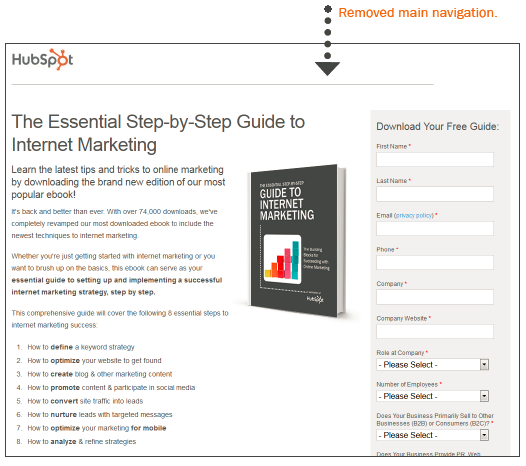
2. Remove the main navigation.

Once a visitor arrives on a landing page, it’s your job to keep them there. So if there are links on the page that enable visitors to move about your website, you run the risk of distracting them, which creates lead generation friction and increases the chance they'll abandon the page before even converting. And, let's face it: No respectable marketer wants that. One of the best ways to reduce this friction and increase your landing page conversion rates is to simply remove the main navigation from the page. Simple as that!

Landing page example with no top navigation.

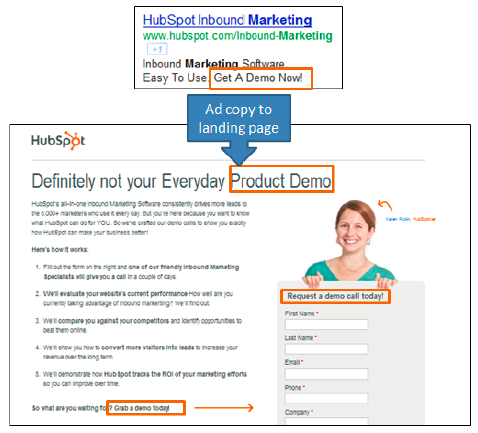
3. Match the headline of the landing page to its corresponding CTA.

Keep your messaging consistent in both your call-to-action (CTA) and the headline of the landing page. If people click on a CTA for a free offer only to find out there’s a catch on the landing page, you’ll instantly lose their trust. Similarly, if the headline reads differently than the CTA, it might lead to confusion, and the visitor might wonder if the CTA is linked to the wrong page. Eliminate any and all confusion, and make sure your landing page consistently reflects what you promised in your call-to-action -- and vice versa.

Landing page example with CTA.

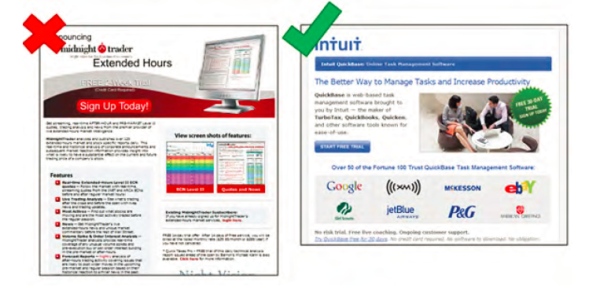
4. Remember: Less is more.

Many of you are probably aware of the phrase “keep it simple, stupid.” Apply that same philosophy to your landing pages. A cluttered page usually results in a distracted, confused, and/or overwhelmed visitor. Talk about landing page friction! Instead, embrace white space, and keep the text and images on the page simple and to-the-point.

Complex versus a simple landing page.

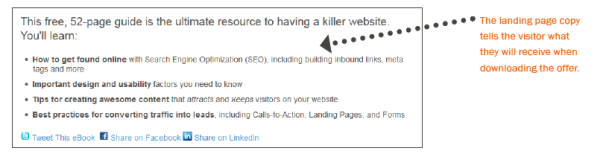
5. Emphasize the offer's value.

Highlight the benefits of the offer with a brief paragraph or a few bullet points. The best landing page description offers more than just a list what comprises the offer; it also clearly highlights the value of the offer and gives visitors a compelling incentive to download. For example, instead of “Includes specifications of product XYZ,” say something along the lines of, “Find out how XYZ can increase productivity by 50%.” In other words, emphasize how the offer addresses a specific problem, need, or interest your target audience cares about.

Landing page example providing value.

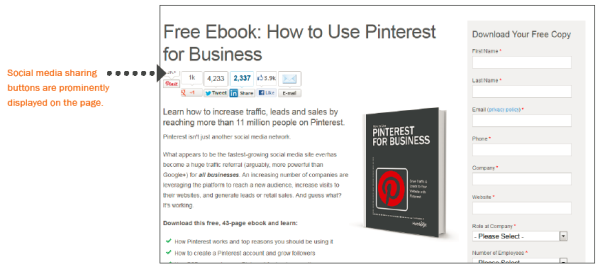
6. Encourage social sharing.

Don’t forget to include social media sharing buttons that enable your prospects to evangelize your content and offers. To limit cluttering, just be sure to only include buttons for the social platforms your audience uses. And don't forget to add an email forwarding option, since people have different sharing preferences. Keep in mind that even if your social media contacts never buy from you, there's always a possibility that someone in their personal network will!

Social media sharing buttons on a landing page.

7. Create more landing pages to generate more leads.

According to HubSpot's Marketing Benchmarks Report, companies see a 55% increase in leads when increasing their number of landing pages from 10 to 15. The takeaway is simple: The more content, offers, and landing pages you create, the more opportunities you have to generate leads for your business. More landing pages also usually means more targeted content that better appeals to your various buyer personas, which can help to increase your conversion rates. To increase the number of landing pages you have on your site, invest in an easy-to-use landing page creation tool, create more offers, tweak the offers you already have to cater to individual personas, and repurpose content you already have. In fact, we elaborate on all of the above in this blog post about why you (yes, you) need to create more landing pages.

Landing page types example.

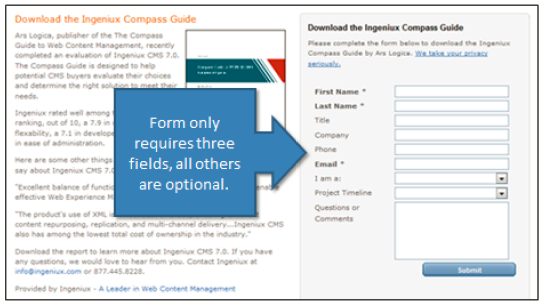
8. Only ask for the information you really need.

You might be wondering how much or how little information you should require in your forms. There is no magic answer to this, but the best balance is to collect only the information you really need to qualify leads. In general, the fewer fields you have on a form, the higher the conversion rate. This is because, with each new field you add to a form, it creates more work for the visitor, and thus fewer conversions. A longer form looks like more work and will often be avoided altogether. On the other hand, the more fields you require, the better quality those leads will likely be, because they thought your offer was valuable enough to warrant a form completion. Essentially, the best way to determine what form length works best for your business is to test it for yourself.

Form fields on a landing page.

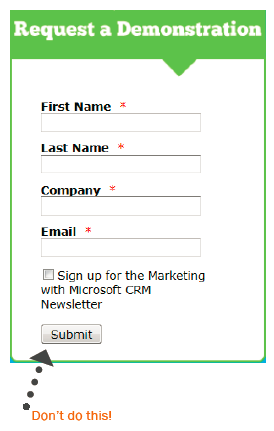
9. Consider whether "To Submit, or Not to Submit?"

That is the question most of your visitors are probably asking. That's why one simple yet effective way to increase form conversion rates is to avoid using the default word "Submit" on your form button. If you think about it, no one wants to “submit” to anything. Instead, turn the statement into a benefit that relates to what prospects will be getting in return. For example, if the form is to download a brochure kit, the submit button should say, “Get Your Brochure Kit.” Other examples include “Download Whitepaper,” “Get Your Free Ebook,” or “Subscribe to Our Newsletter.” Here's another helpful tip: Make the button big, bold, and colorful, and make sure it looks like a button, which is usually beveled and appears “clickable.”

CTA example.

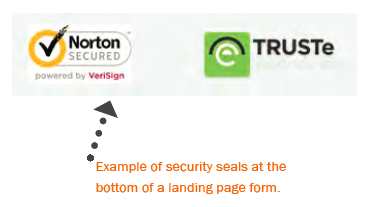
10. Reduce anxiety with proof elements.

People are even more resistant to give up their personal information now than ever before. It's understandable, considering all the spam out there. Luckily, there are a few different features you can add to your landing pages to help reduce visitors' form completion anxiety:

  • Add a privacy message (or a link to your privacy policy) that indicates visitors' email addresses will not be shared or sold.
  • If your form requires sensitive information, include security seals, a BBB rating, or certifications so visitors know their information is safe and secure.
  • Add testimonials or customer logos. It's a great way to leverage social proof. For example, if your offer is for a free trial of your product or service, you might want to include a few customer testimonials about that particular product or service.

Example of trust seals on a landing page.

11. Make the form appear shorter.

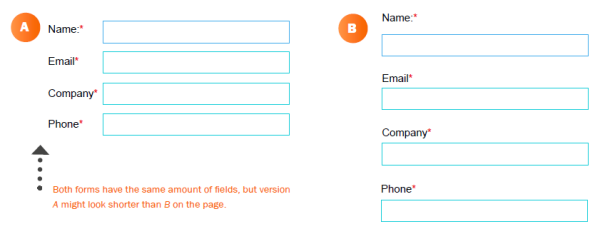
Sometimes people won’t fill out a form just because it looks long and time-consuming. If your form requires a lot of fields, try making the form appear shorter by adjusting its styling. For example, reduce the spacing in between fields or align the titles to the left of each field instead of above it so that the form appears shorter. If the form covers less space on the page, it may seem as if you’re asking for less. And whenever possible, implement Smart Fields -- dynamic form fields that automatically adjust to a shortened version if a visitor has already been entered into your marketing database.

Short form on a landing page.

12. Include rich media on your landing pages.

In this day and age, one of the ways to make your landing pages stand out is to include rich media.

For example, you can have moving GIFs, videos, and interactive images. While design isn't necessarily the most important component of a landing page, it's important that your design helps your landing pages stand out.

The goal is to entice the user to feel compelled to download your content offer. Design can help with this.

13. Pay attention to the copy.

The most critical component of your landing pages is to have copy that inspires users to download your offer. How do you do this?

Well, the best way is to write copy that is targeted toward your persona. This means that your target market should feel like they could've written the copy themselves. When your target market feels like you understand their problems, they're more likely to download your offer.

Landing pages can feel overwhelming to create. However, if you use HubSpot's landing page builder, you can integrate with companies like briX and Ceros to make your landing pages stand out.
 
Editor's note: This post was originally published in December 2012 and has been updated for comprehensiveness.

13 Simple (But Critical) Tips for Creating Better Landing Pages was originally posted by Local Sign Company Irvine, Ca. https://goo.gl/4NmUQV https://goo.gl/bQ1zHR http://www.pearltrees.com/anaheimsigns

The Ultimate Guide to Sales and Marketing

Peanut butter and jelly.

Puppies and the park.

Beach days and ice cream.

Some things just obviously go together — but what if I put sales and marketing together in that list? Would you still think they worked better as a pair?

More than likely, you haven't quite considered your sales and marketing to be the "peanut butter and jelly" of your company. But, sales and marketing alignment is more critical than you think.

Simply put, alignment between marketing and sales is really about focusing on the customer — and, today, the customer's buying behavior has changed significantly.

Fortunately, the better you can align your sales and marketing teams, the more likely you are to delight a prospect. In fact, organizations with tightly aligned sales and marketing teams are 6% more likely to exceed revenue goals.

Here, we're going to explore why sales and marketing matter to a company — and, equally importantly, why they matter together.

To start, let's explore the advantages of both sales and marketing to your organization.

Sales is ultimately critical to your company's bottom line. You cannot have scalable growth without an impressive sales team. At its most basic, your sales team's goal is to first qualify prospects, reach out and build relationships with them, and ultimately, provide a solution that will benefit the prospect. When done well, a sales transaction results in a sale, a satisfied customer, and revenue for your company.

For sales teams to excel, your salespeople must be invested in the success of your customers. They must understand your prospects' pain points and obstacles, and demonstrate how your product or service is a solution — the best solution — to those problems.

Alternatively, marketing is all about igniting interest in potential consumers, and telling the world your company, and its products or services, exists. Marketing uses both emotion and analytics to reach an audience, and convert curious viewers into qualified leads.

Here's the thing, though — today, a buyer isn't following the traditional "marketing to sales to customer" funnel.

Instead, each individual prospect follows a unique path. One prospect might know they want to purchase your product before even speaking with a sales rep, because they've already been convinced by your Instagram account.

Alternatively, another prospect might speak with a sales rep first, and then require additional marketing in the form of webinars or blog posts, before closing the deal.

Your buyer has unlimited information at her fingertips — she can check out your Facebook page, blog posts, website, and customer product reviews before even speaking with a sales rep.

When a prospect who has already read thirteen customer reviews gets in touch with your sales rep, she's going to require a different conversation than a prospect who's only heard of your company from a Facebook ad.

That is why your marketing and sales teams need to be in tight alignment — because your buyer needs to be communicated with, and sold to, wherever and whenever she wants. The traditional sales and marketing tactics no longer work.

To find scalable growth, it's critical your marketing team communicate all the information they have about a prospect to your sales team before a salesperson even gets on the phone.

Sales and marketing alignment can help your company become 67% better at closing deals, and can help generate 209% more revenue from marketing.

Not aligning your sales and marketing teams isn't just unhelpful for the customer — it's also damaging to your bottom line.

But it's easier said than done. Aligning sales and marketing, particularly when you have a growing company, can feel like an incredibly difficult process.

Fortunately, there are a few strategies you can implement to ensure a smoother relationship between the two teams, immediately.

1. Ask your marketing and sales team to create a buyer persona together.

Your marketers have a firm pulse on the consumer — they've conducted extensive research, they've engaged with prospects via social media and email, and they've held focus groups.

But, more than likely, your marketers haven't spoken directly to these prospects. They might not fully understand your prospects biggest pain points, or the challenges they face that your product or service currently can't solve. These insights can only be obtained from your sales team.

Ultimately, to get a full picture of your consumer, it's critical that each team help craft the buyer persona. For instance, perhaps you have your marketing team create an initial buyer persona through research and brainstorming sessions -- but then you gather input from salespeople to modify and refine that persona.

Getting initial input from salespeople, as well as asking for final approval on a buyer persona, is critical to ensure each team is working together with the same consumer in mind.

2. Document content gaps along a buyer's journey.

Your sales and marketing teams should take the time to compile everything both teams have created to help solve for the customer -- including white papers, infographics, e-books, case studies, and email streams.

Then, employees from each team should have a candid discussion about what's missing. Maybe a sales rep notices your marketing team hasn't created any e-books on an issue most of her prospects' face. Alternatively, maybe your marketing team needs your sales team to provide input to craft a more useful customer case study.

Additionally, both teams should take the time to organize and understand what content works best for which stage of the buyer's journey. While likely a tedious process, this will help both teams become more effective in their strategies over the long-term.

3. Keep track of every interaction your customer has with your company.

Nowadays, this is one of the most critical strategies you need to implement. It eliminates friction for the customer, and it also helps your sales reps close more deals.

For instance, consider how you'd feel if you spoke with a sales rep for the first time, and he already knew where you worked, how long you'd been there, which email newsletters you'd subscribed to, and which company networking events you'd attended. You'd likely be more impressed than if you spoke to a sales rep who'd never heard of you before, right?

It's vital you find a way to keep track of each interaction your customer has with your company — a free CRM is incredibly useful for this.

4. Be customer-centric with your language.

All too often, marketers and salespeople use different language and rely on different analytics to measure success. For instance, a marketer's measure of success might be based on blog traffic, Facebook likes, email subscriptions, or YouTube viewers.

Alternatively, a salesperson's ultimate measure of success is revenue.

However, there is one goal both teams share — and that's to be customer-centric.

To align both teams, it's critical your salespeople and marketers consider, first and foremost, the customer. When a marketer emails a prospect, she should consider the person on the other end -- and whether they want to receive that email, and how that email could be helpful for them.

Additionally, when a salesperson picks up the phone, she needs to remember the conversation isn't about making a sale — it's about solving a problem for a prospect.

With this in mind, your teams will have an easier time blurring the lines between their individual tasks and responsibilities, and recognizing their very unified desire to solve for the customer, even over their own processes.


The Ultimate Guide to Sales and Marketing was originally posted by Local Sign Company Irvine, Ca. https://goo.gl/4NmUQV https://goo.gl/bQ1zHR http://www.pearltrees.com/anaheimsigns

What is TikTok For Business & Should You Use It in Your Marketing?

Musical.ly, created in 2014, was a music sharing app whose users would share short videos of themselves lip-synching to different music snippets. The platform was among the top 100 downloaded apps for two years straight, and users posted around 13 million videos per day.

In 2018, Musical.ly was purchased by Chinese tech firm Bytedance and merged with the firm’s new app, TikTok. TikTok, like Musical.ly, is a video sharing social network where users share short clips of themselves lip-synching and dancing to trending music. It’s since expanded to house more diverse videos, like short comedy skits and how-to home improvement videos.

After the merger, TikTok’s active user base grew by almost 800%. With such sizable user activity, marketers have realized that the advertising potential on the app is high. The creators of TikTok have also realized this and recently launched a new platform called TikTok For Business.

The platform’s stated goal is to help businesses unleash their creative side by teaching them how to use the app through their e-learning service and guiding them through making advertisements on the Ads Manager platform.

Marketing Options on TikTok For Business

The sole marketing format for businesses to use on TikTok is video advertisements. The TikTok For Business Ads Manager platform helps marketers create these advertisements, and they can choose from five different formats.

TopView Ads

TopView ads on TikTok are videos that appear once a day, immediately after a user opens their app for the first time. Here’s an example of a TopView ad by candy company M&M that they’ve created to advertise a virtual Halloween experience.

topview ad tiktok Image Source

TopView ads can be up to 60 seconds long, which is longer than the typical run-time for TikTok videos. Because of this, it’s perfect for businesses looking to advertise products or services that require longer periods of attention, like TV trailers.
 

In-Feed Ads

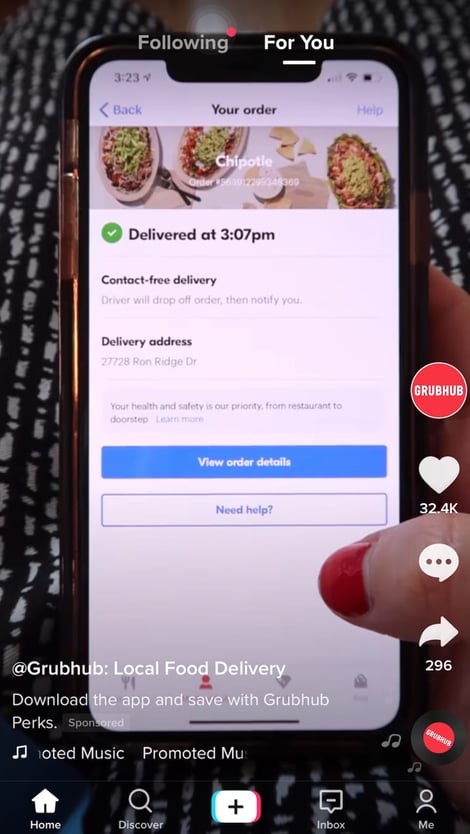
In-Feed ads are videos that appear on a user’s discovery page, otherwise known as a For You page. This is where users land when they open the app. The For You page features videos that the TikTok algorithm believes are of interest to the user based on their app activity.

These ads are the fourth video users see as they scroll through their feed. For reference, this type of advertisement is similar to those that appear in a user’s Instagram feed. Here’s an example of an In-Feed ad created by food delivery service GrubHub.

grubhub in feed tiktok adImage Source

In-Feed ads are especially valuable for marketers looking to use TikTok to drive sales conversions, as the videos can feature a call-to-action (CTA). Acorns, a finance business, has used the In-Feed CTA feature to prompt viewers to download their app.

Image Source

Some brands have created their own version of In-Feed ads by partnering directly with influencers. For example, Raising Cane's Restaurant partnered with famous TikTok influencer Chase Hudson to promote their business (you can check it out in the video below).

@lilhuddy

this my way eating @raising.canes  what's yours #CaniacAmbassador #raisingcanes

♬ Stuntin' On You - Tyla Yaweh


Users who follow Hudson would see this video within their For You feed.

Branded Hashtag

Branded Hashtags are advertisements that businesses use to inspire TikTokers to create content around a brand-related hashtag of their choice. Businesses using this ad format have exclusive access to the hashtag, which is not the case on other social media sites. Its exclusivity comes along with a high price tag, and reported average costs are around $150,000 USD for six days.

For example, say you’re a sportswear company that has just launched a new athletic shirt called Blue Shirt. You may create a branded hashtag called #InMyBlueShirt, where you encourage TikTok users who have your product to post videos of them doing physical activities in the shirt.

Jennifer Lopez, a music artist, has used the Branded Hashtag feature to advertise her song, Pa Ti. The hashtag is called #PaTiChallenge, and Lopez posted a video of herself dancing where she encouraged other TikTok users to take part in the challenge by replicating her dance.

@jlo

Let’s goooo! ✨🚨✨ Can’t wait to see and share some of your best #PaTiChallenge dances! Thanks for kicking it off @charlidamelio! @papijuancho

♬ Pa Ti - Jennifer Lopez & Maluma


The #PaTiChallenge hashtag has garnered 2.4 Billion views.

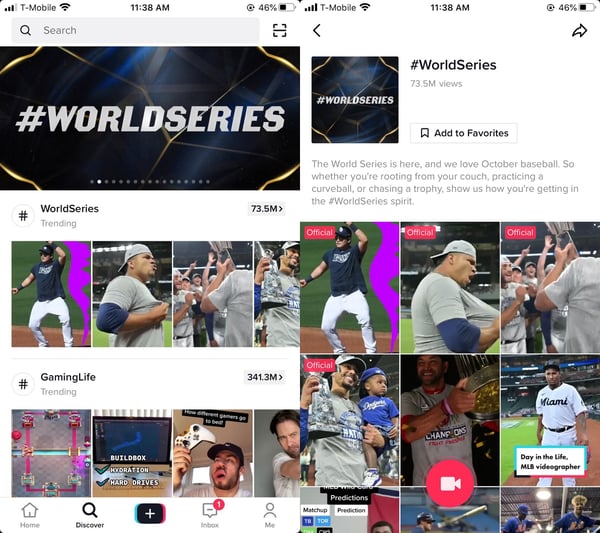
Hashtag Challenges can be featured on TikTok’s Discover page, where users can find new creators and browse trending hashtags. The Discover page is similar to Instagram’s Explore page.

The hashtag challenge #WorldSeries, sponsored by Major League Baseball, is featured on TikTok’s Discover feed, and the hashtag encourages users to post videos showing how they’ve celebrated baseball games. Clicking on the hashtag brings users to an internal landing page that features the sponsors’ logo, challenge description, and other videos using the hashtag.

tiktok discover page branded hashtag landing page demo

Image Source

Brand Takeovers

Brand Takeovers are an ad format that can include TopView, In-Feed, and Branded Hashtags all at once. They can also be videos, gifs, or still images. The takeover aspect of these ads is that TikTok only features one business per day, and the starting cost is around $50,000 USD per day.

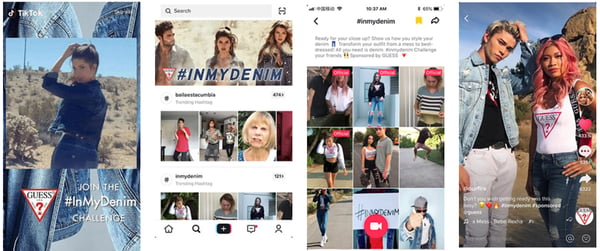
Guess, a fashion company, ran a Brand Takeover on TikTok to advertise their denim jeans. Over six days, their TikTok account gained over 12 thousand new followers and generated a 14.3% total engagement rate. Their Brand Takeover included Top View, Branded Hashtag, and In-Feed ads.

guess jeans brand takeover ad formats

Image Source

Branded Effects

Branded Effects ads use 2D, 3D, or AR to add images of your products into TikTok videos. Brands typically create stickers of their products or create filters that TikTokers can use when creating their videos. These filters and stickers increase engagement and brand awareness, as using them typically involves playing brand-specific games.

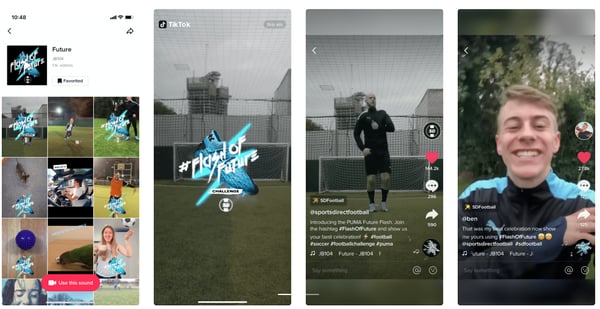
Puma, a clothing company, used the Branded Effects feature to advertise their new soccer shoes. Their 3D sticker prompted users to play a virtual reality game with a soccer ball. They paired their Branded Effects sticker with a hashtag challenged that generated over 100,000 videos of user generated content.

puma shoes branded effects tiktok example

Image Source

Should you use TikTok For Business in your marketing strategy?

TikTok For Business comes at a time when it’s evident that businesses have had success with advertising on TikTok.

Take Dunkin’, for example. Dunkin’, also known as Dunkin’ Donuts, is an American coffee company. They’ve capitalized on the advertising abilities of TikTok and partnered with a popular influencer, Charli D’amelio, who often drinks their coffee in her videos.

At only 16-years-old, D’amelio has over 7 million followers on TikTok. While her platform is primarily centered around dancing videos, she announced her partnership with Dunkin’ in a TikTok video that has been viewed over 59 million times in less than two months. Dunkin’ reported that they saw a 45% sales boost the day after the announcement.

@charlidamelio

is this real life!!!?? my fave drink is now on the menu at @dunkin. order ‘The Charli’ on the Dunkin’ app!!! link in bio. #CharliRunsOnDunkin #ad

♬ original sound - charli d’amelio


Ultimately, the decision to use TikTok For Business in your marketing strategy depends on your overall business goals and desired campaign outcomes. To make the decision easier, we’ve compiled a pro and cons list for marketers to use when making this decision.


TikTok For Business Pros and Cons


pros

Cons

TikTok Ads Manager will help you expose your content to new audiences. 

The ‘similar audiences’ feature helps you select lookalike audiences that are similar to your target ones.

TikTok has over 600 million active monthly users and is available in 155 different countries. If your brand is smaller or less well-known, this could bring significant awareness to new audiences. 

32.5% of TikTok’s user base is between 10 and 19, and 29.5% are between 20 and 29. If your target audiences are of different age groups, you could gain exposure to a new type of customer.

TikTok’s largest user base is not representative of all demographic groups. 

Since its primary user base is very young, the audiences that businesses market to on the platform may be significantly younger than intended target audiences. 

Advertising on the app may require you to tap into a user base that may not understand the need for your product or service.

TikTok thrives off of informal, ‘behind-the-scenes’ content. 

Authenticity matters to Generation Z, and they tend to shy away from the ‘ sales-to-drive ’ leads marketing ads.

If your brand or business typically creates sales-driven formal content, utilizing the platform can help you diversify your content types and display a new, creative side of your business.

TikTok requires niche content. 

The type of content that TikTok calls for may not be in-line with your brand mission. 

If you’re a more serious, sales-focused business, learning to adapt to the fun and exciting content required for TikTok versus just driving sales conversions may be a difficult skill to learn.

44.81% of the world’s population owns a smartphone

As the number of mobile users worldwide continues to grow, having a mobile-first marketing strategy is worth considering.  

You can use TikTok for Business to create advertisements on your phone and essentially run a portion of your marketing strategy from your pocket.

It’s not easy to link your website to your TikTok videos. 

If your website is your primary way of converting leads, you’ll need to get creative and develop additional ways to drive leads.

TikTok has higher engagement rates than Instagram and Twitter. 

In 2019, TikTok’s average engagement rate at all follower levels was higher than both Instagram and Twitter. Small accounts with just 1,000 had an average engagement rate of 9.38%

Even if you’re a smaller brand just starting on TikTok, you’re guaranteed to have an engaging audience. 

TikTok For Business reporting tool can’t be integrated with other platforms

 All marketers know that data is crucial to understanding the success of marketing campaigns. At the moment, it doesn’t seem as though the platform can integrate with your preferred insights tool. 

While the Ads Manager is convenient, it will require an additional step for collecting data that you can use to understand your campaign engagement and ROI.


TikTok For Business can be a valuable tool.

Should you choose to incorporate TikTok’s new service into your marketing strategy, it can be a valuable tool for growth. While the app does call for niche types of content, brands and businesses can diversify their strategy and advertise to a new audience.

Whatever your final decision is, TikTok For Business is available to those who want to harness the app’s advertising potential.


What is TikTok For Business &amp; Should You Use It in Your Marketing? was originally posted by Local Sign Company Irvine, Ca. https://goo.gl/4NmUQV https://goo.gl/bQ1zHR http://www.pearltrees.com/anaheimsigns