Wednesday, October 21, 2020

How to Post to Instagram From Your Computer [6 Easy Steps]

I'll admit it: this post is incredibly timely for me.

I recently watched The Social Dilemma on Netflix, a docu-drama that explores the potentially addictive qualities of social media.

Considering I spend 3+ hours a day on Instagram, I was already all-too-familiar with the habit-forming nature of social media apps.

As a result of watching the film, I immediately deleted the Instagram app from my phone — but not my computer. I'm still allowing myself to check out friends' posts, or post my own content, via my desktop. I just don't want it within easy reach on my phone.

If you'd prefer to post your Instagram content from a computer, you're in luck. Here, we'll explore how you can post images and videos from your desktop computer.

Can I post to Instagram from my computer?

Yes, you can post to Instagram from your PC or Mac desktop, as well as a browser on your phone instead of in-app.

Instagram doesn't offer an official desktop desktop version, however. The social platform is primarily meant to be consumed in-app, which means some features can be a little trickier from your computer.

Having said that, it's absolutely possible to post to Instagram from your computer. There are a few different reasons you might want to do this — for one, if you work as your company's social media manager, it might be easier to upload company posts and videos via your desktop, rather than having your smartphone open at work.

Plus, your company's files might be more easily accessible via desktop than mobile. For instance, if you use Photoshop to edit company photos, it's likely easier to click "Upload" from your desktop when you're done editing, rather than sending that same photo or video to your personal phone.

Alternatively, perhaps you simply prefer the larger screen of desktop. Or, maybe you don't have access to a smartphone so you can't download the app on your phone.

Whatever the reason, don't worry — there's a solution for you. Let's dive into that, next.

How do I post to Instagram from my computer? [PC and Mac]

How to Post a Photo on Chrome Browser

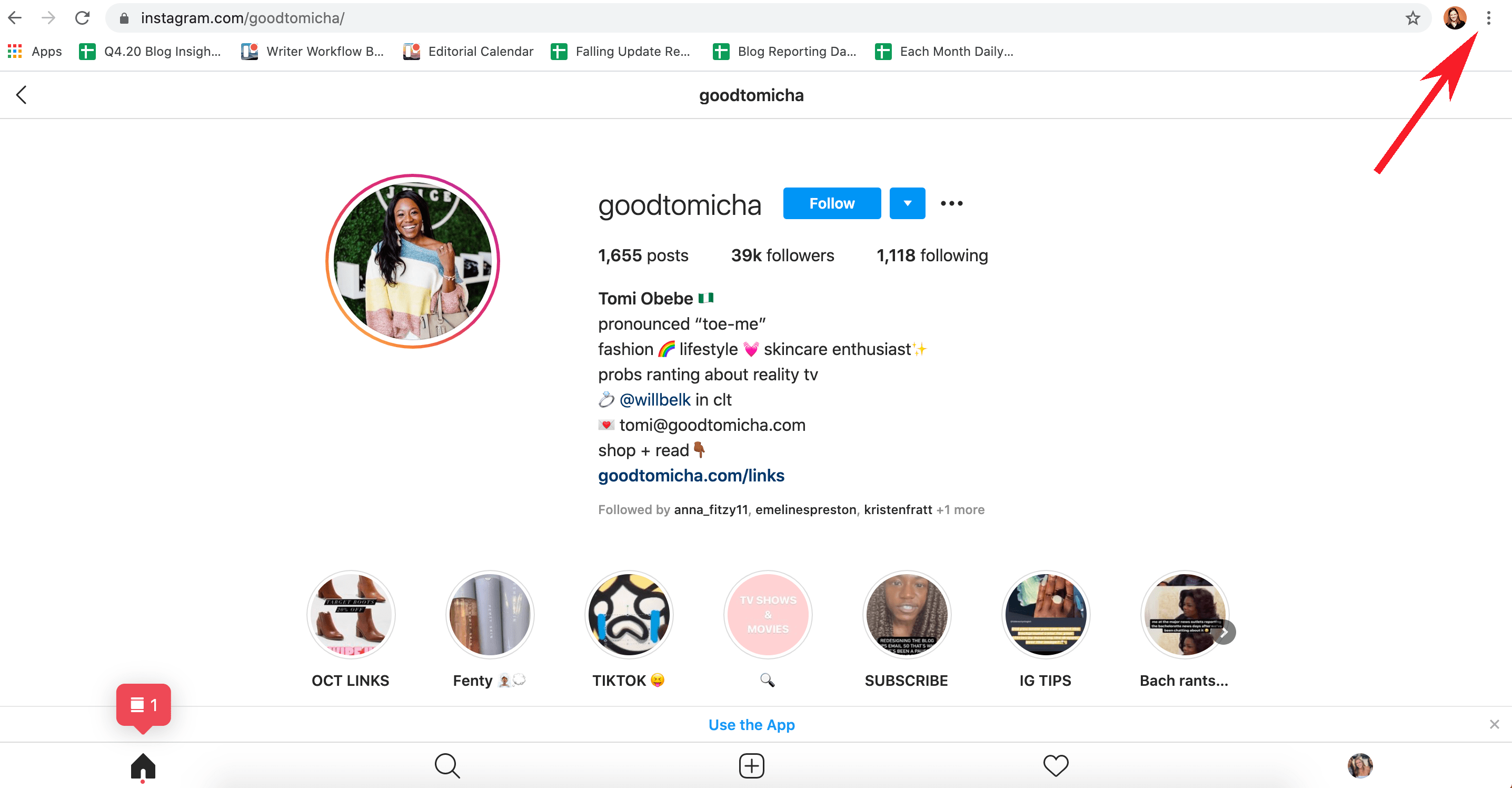
1. Go to https://www.instagram.com/ in your Chrome browser. Click on your Settings (click the three dots in the top right corner of your browser).

click on settings in chrome browser

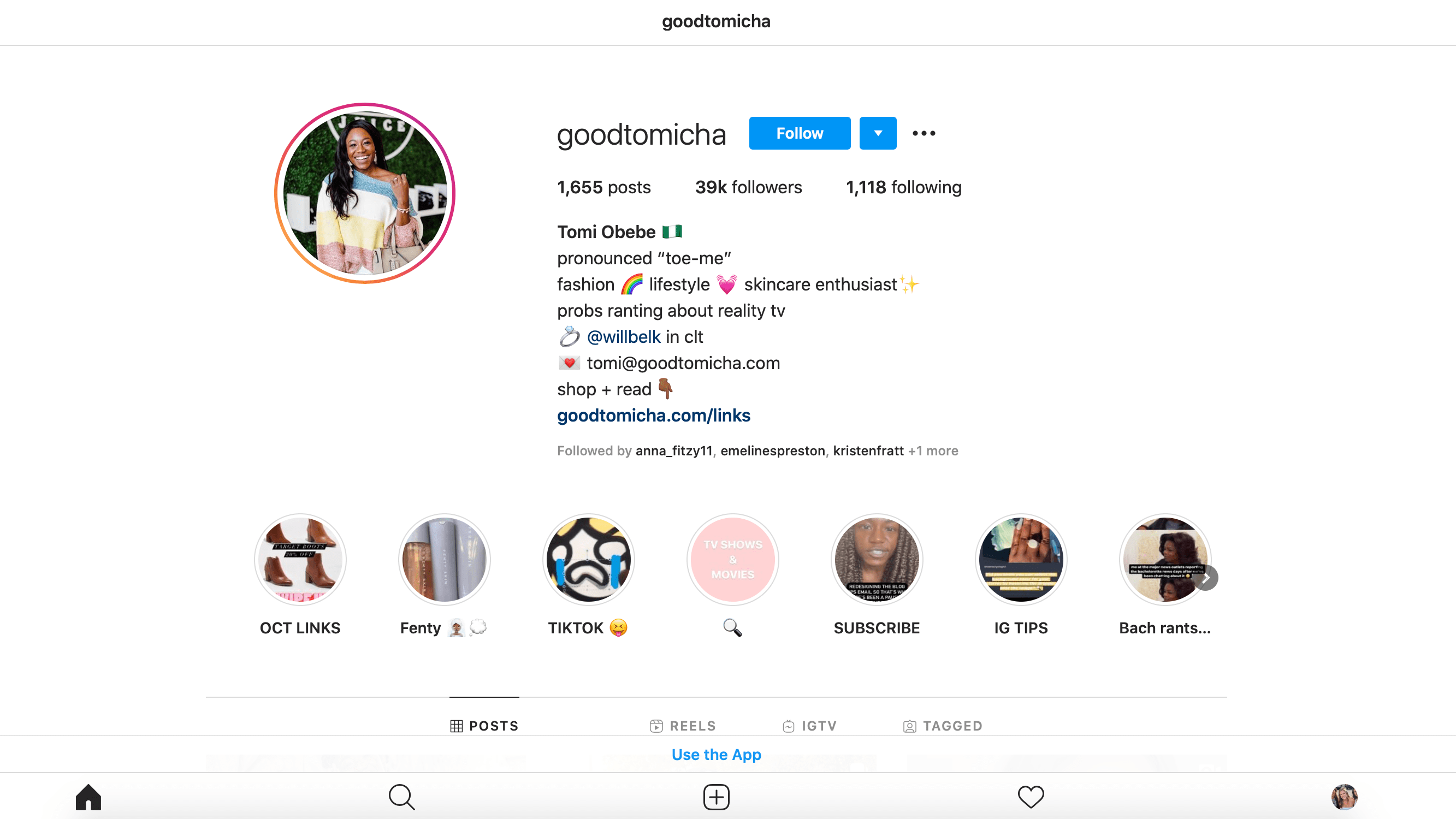
Instagram Account Credit: @Goodtomicha

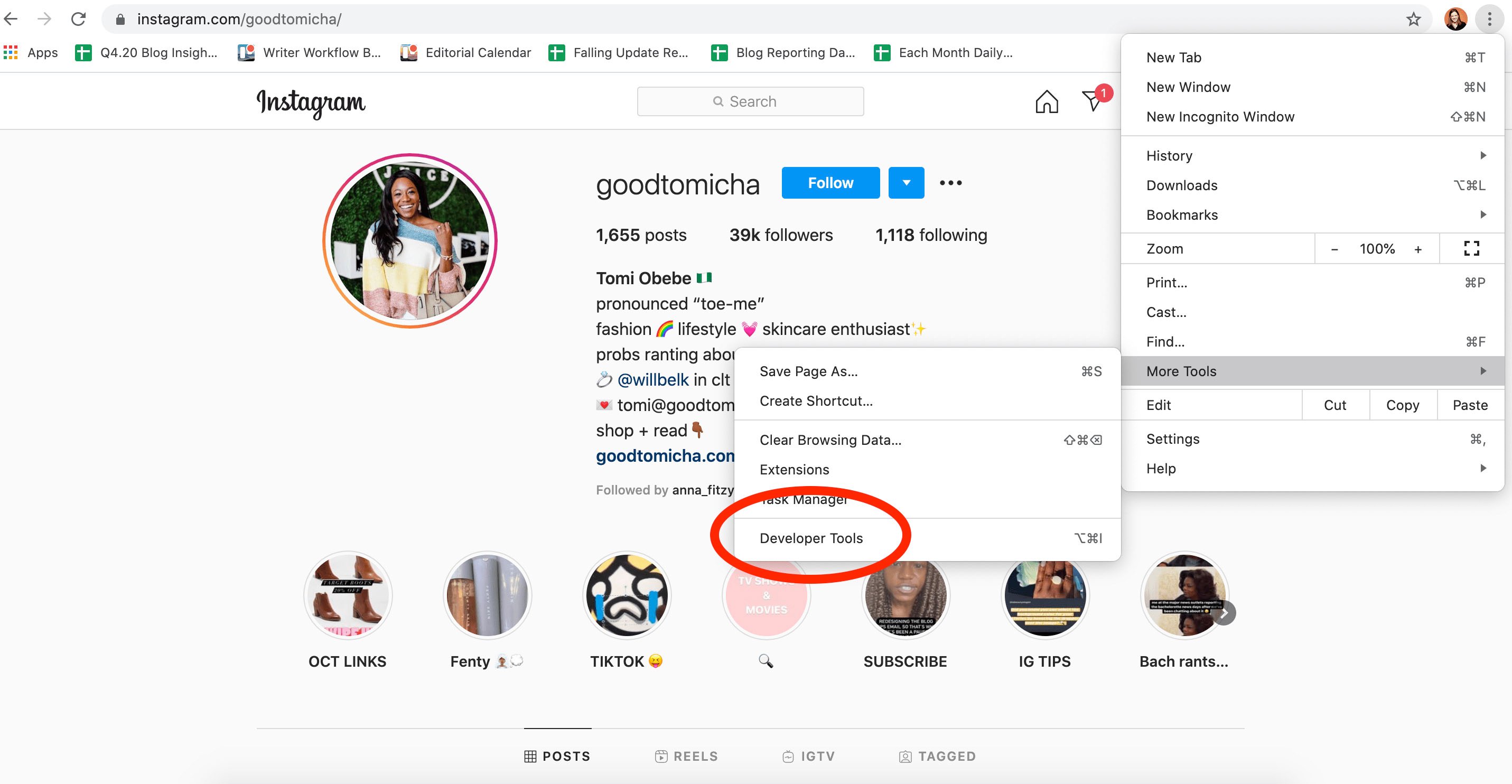
2. Scroll down to "More Tools" in the drop-down menu, and then click "Developer Tools".

find developer tools on google chrome copy

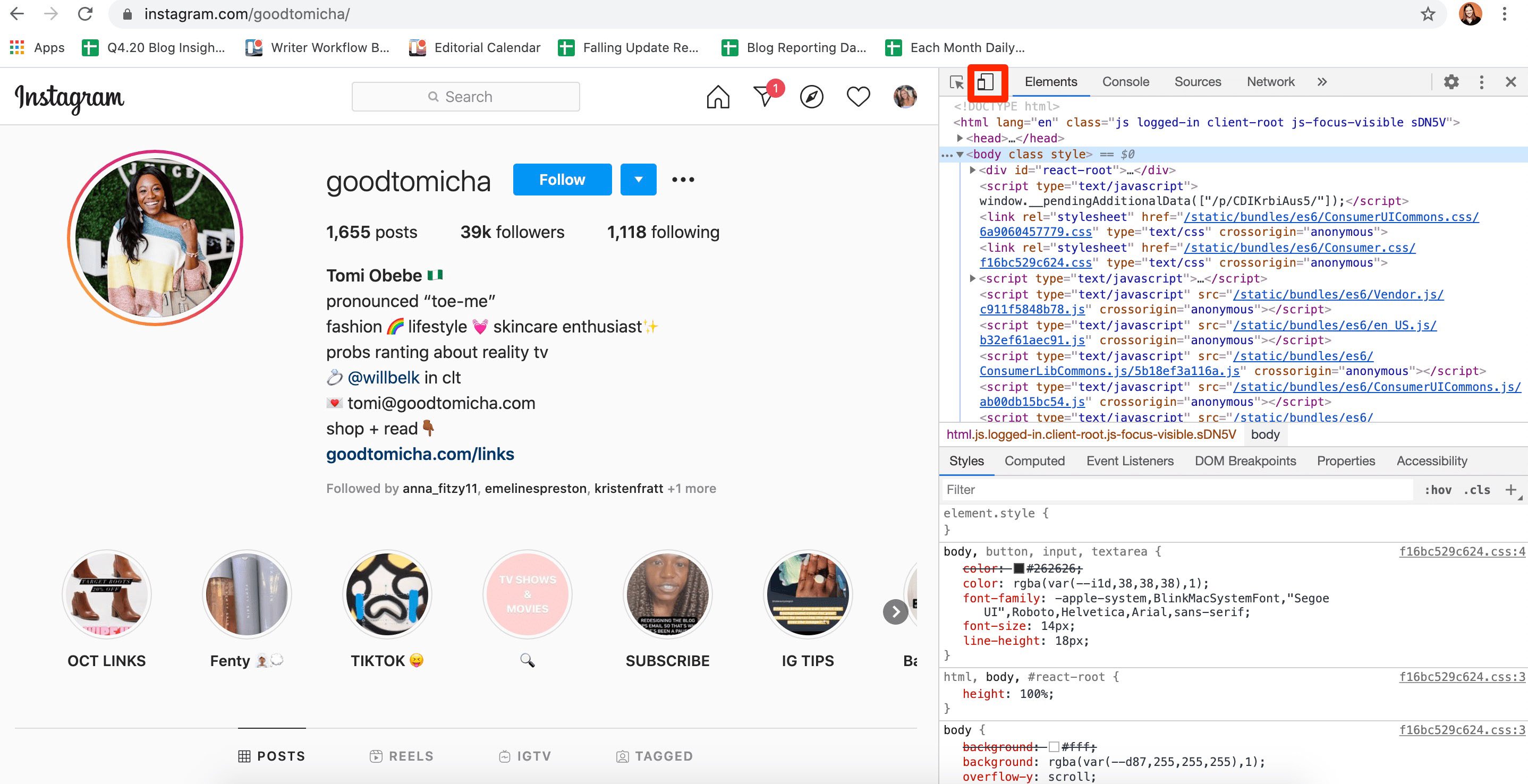
3. Click the "Toggle Device Toolbar" mobile button.

clicking on mobile toggle to change the desktop version to mobile instagram copy

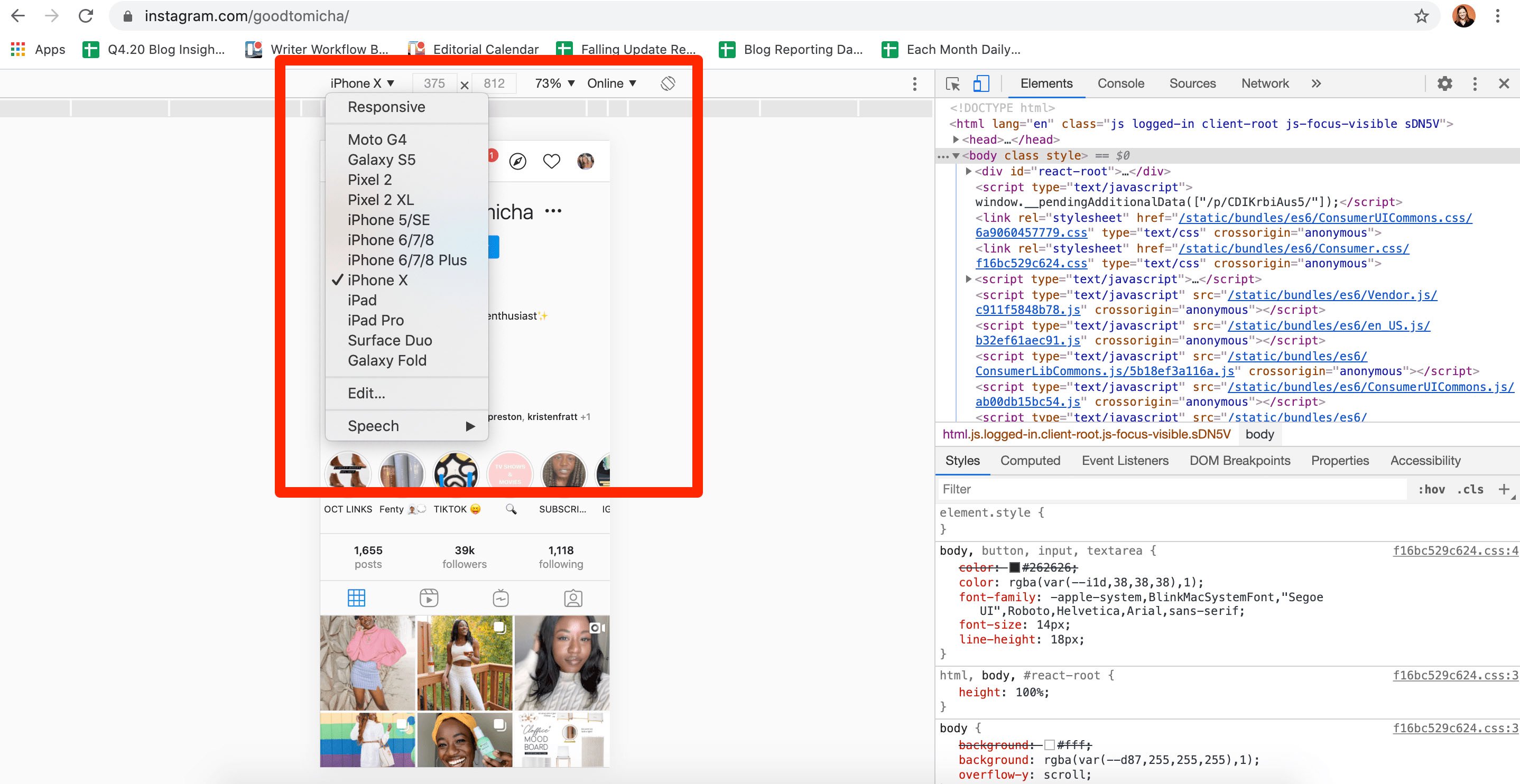
4. Choose which mobile device you'd like on the drop-down menu, as well as how zoomed in you want to be. Then, refresh the page. Now, you're seeing the mobile interface of Instagram from your browser.

changing responsive design on desktop so it resembles instagram on mobile copy

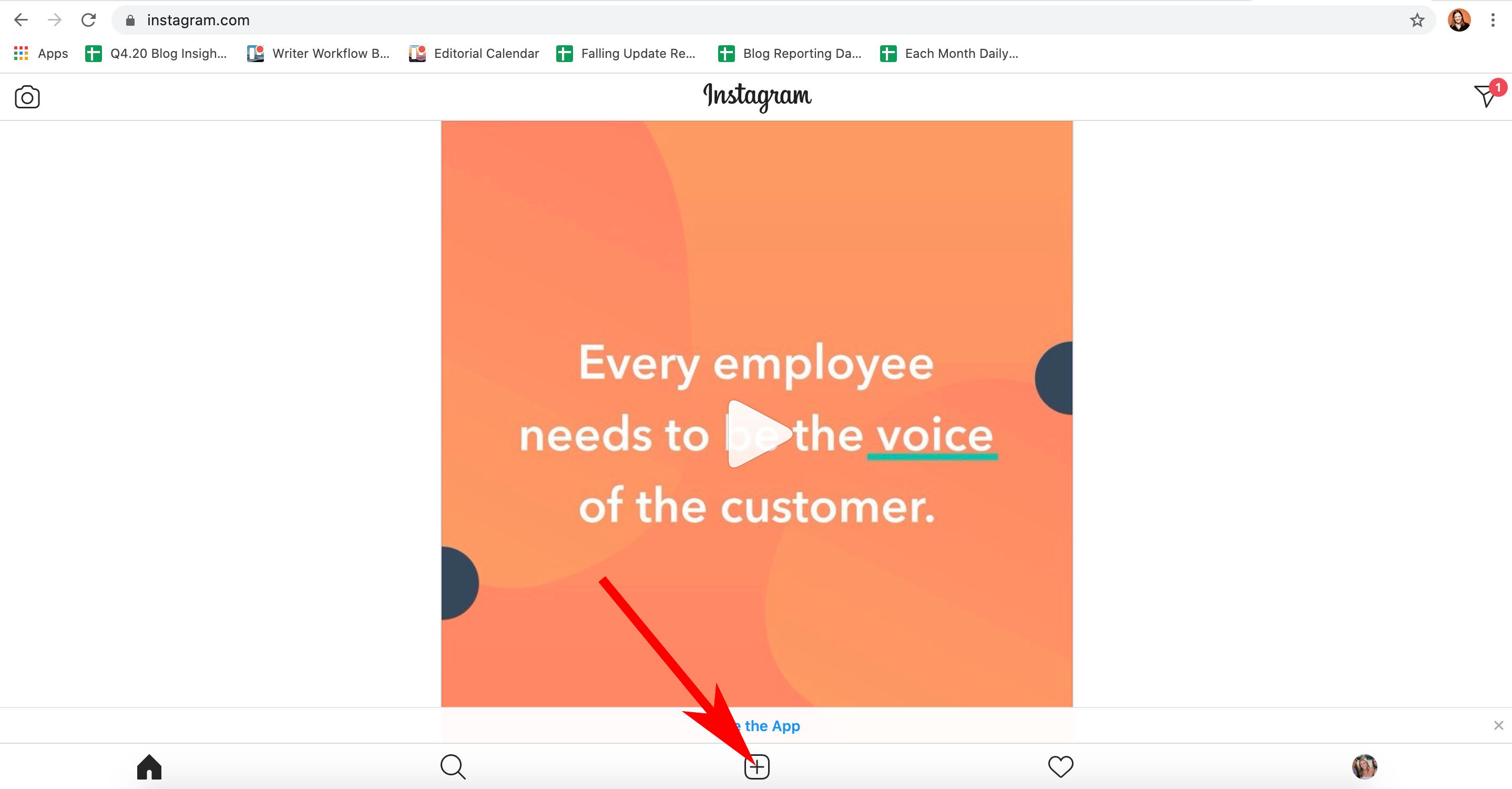
5. You can upload a Instagram post the same way you would via mobile — by clicking the "+" button:

clicking add post on desktop

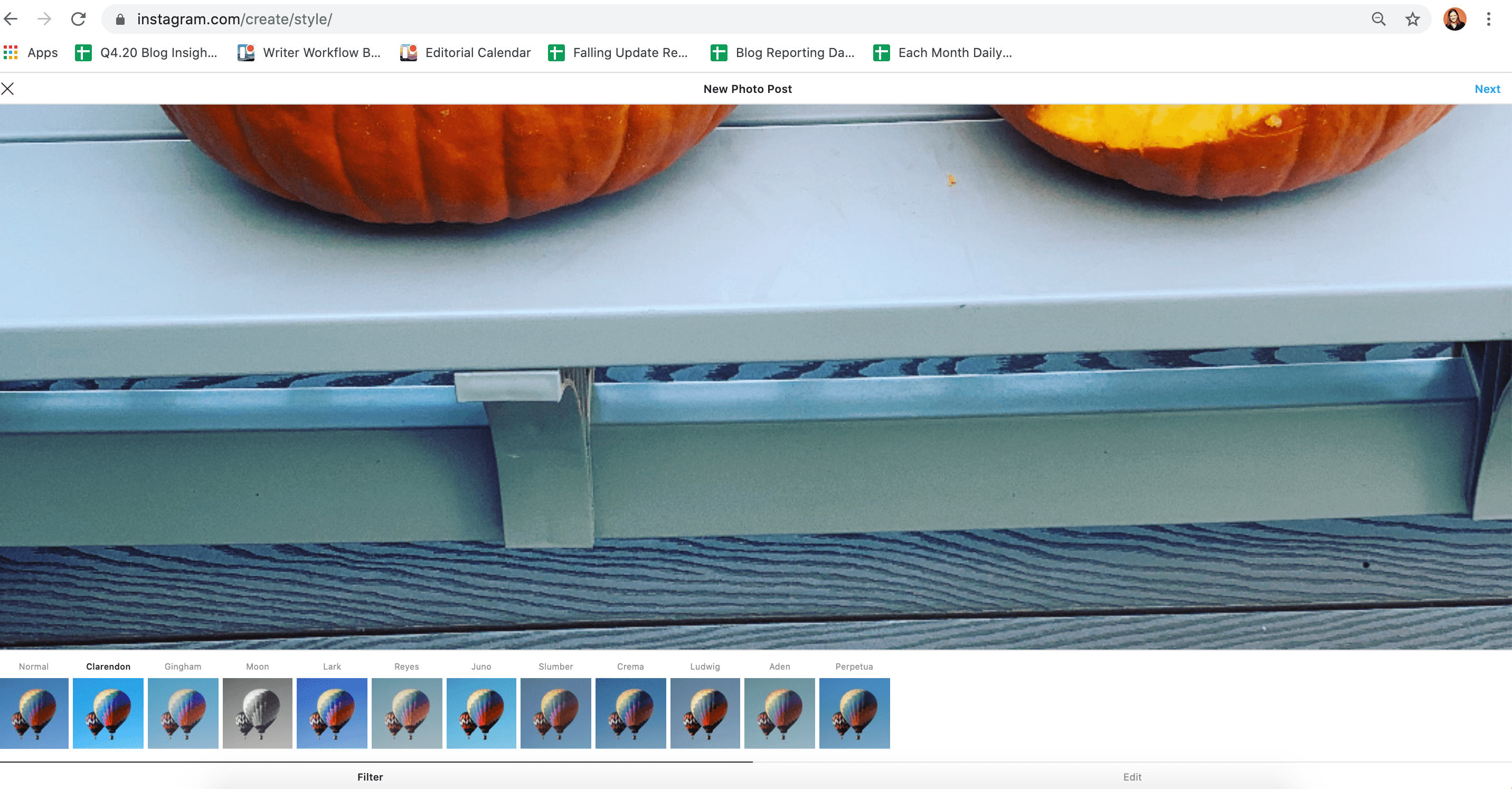
Then, choose filters or other editing features like you would normally, then click "Next" in the top right of your screen:

instagram filters on desktop

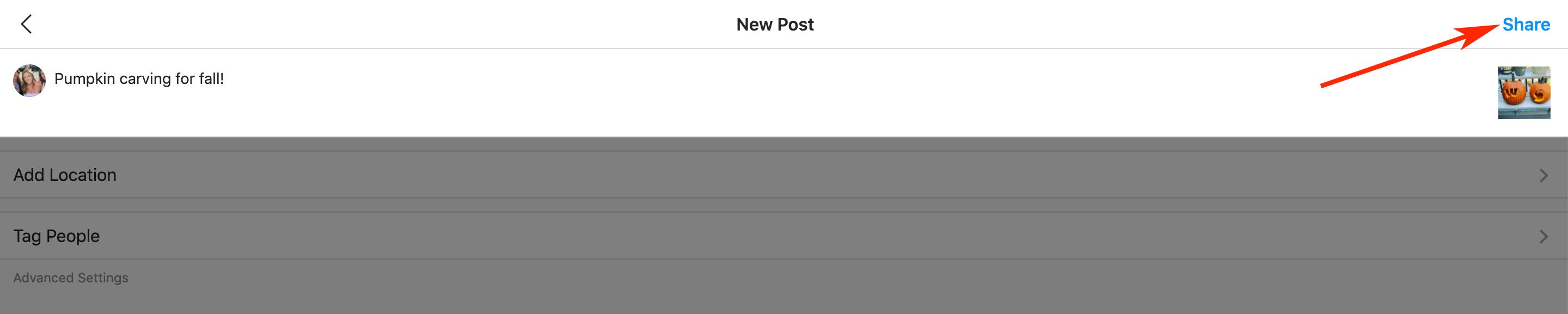
Finally, add a caption, location, or tag people. When you're ready, click "Share" in the top right of your screen.

typing a caption on my instagram post on desktop copy

How to Post a Photo on Safari Browser

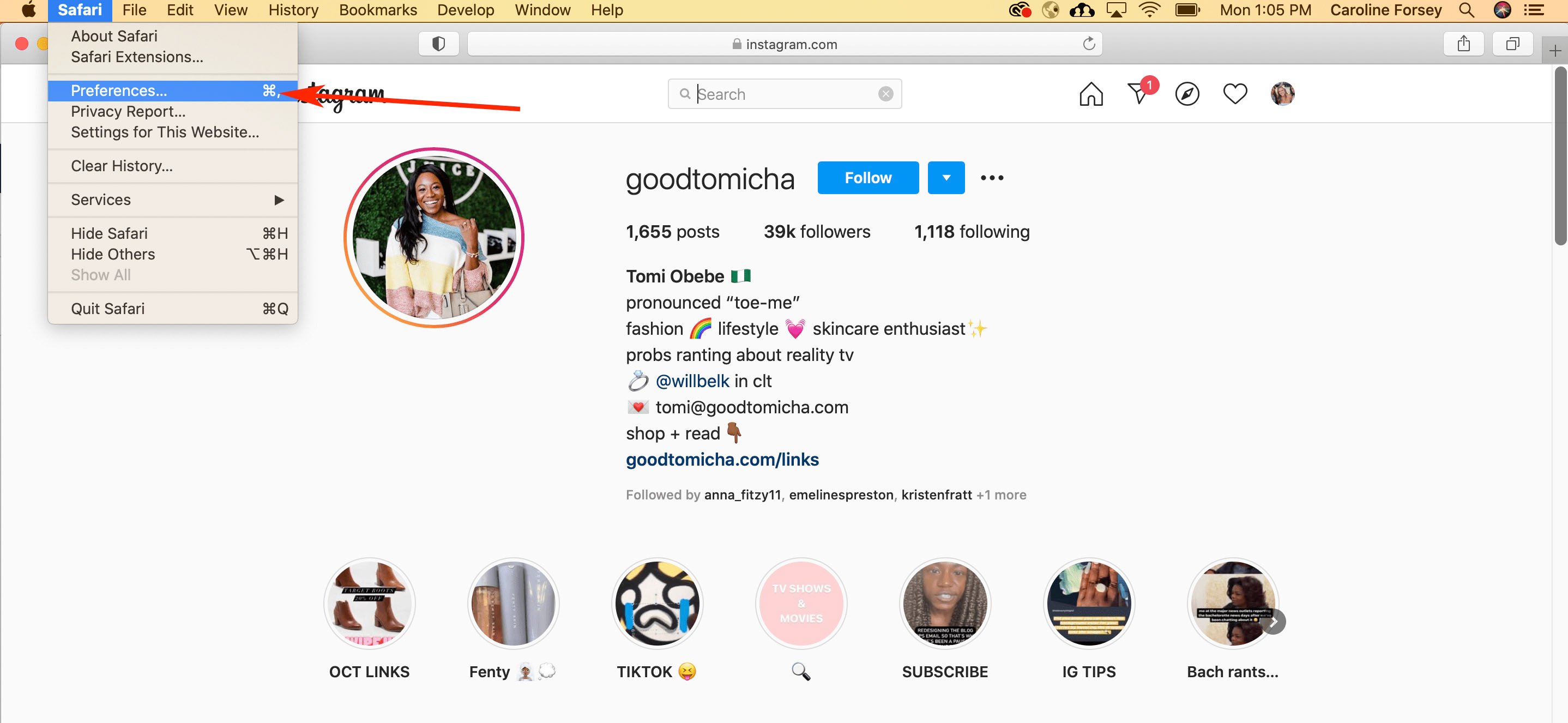
1. Go to https://www.instagram.com/ in your Safari browser. Select "Safari" and then "Preferences" in your menu bar.

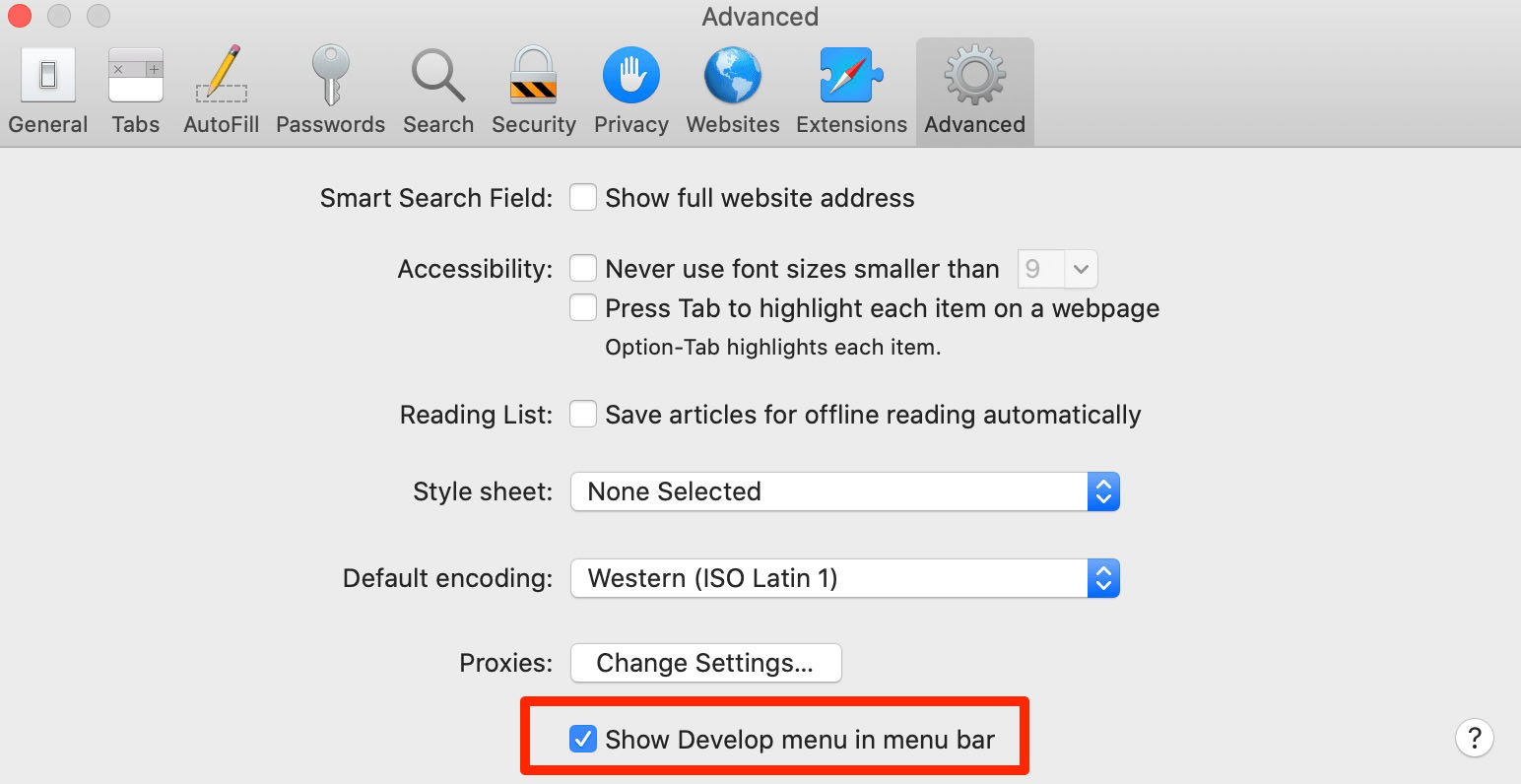
safari prefences drop-down menu2. Toggle over to "Advanced Features" and check the box that reads "Show develop menu in menu bar".

safari advanced preferences copy

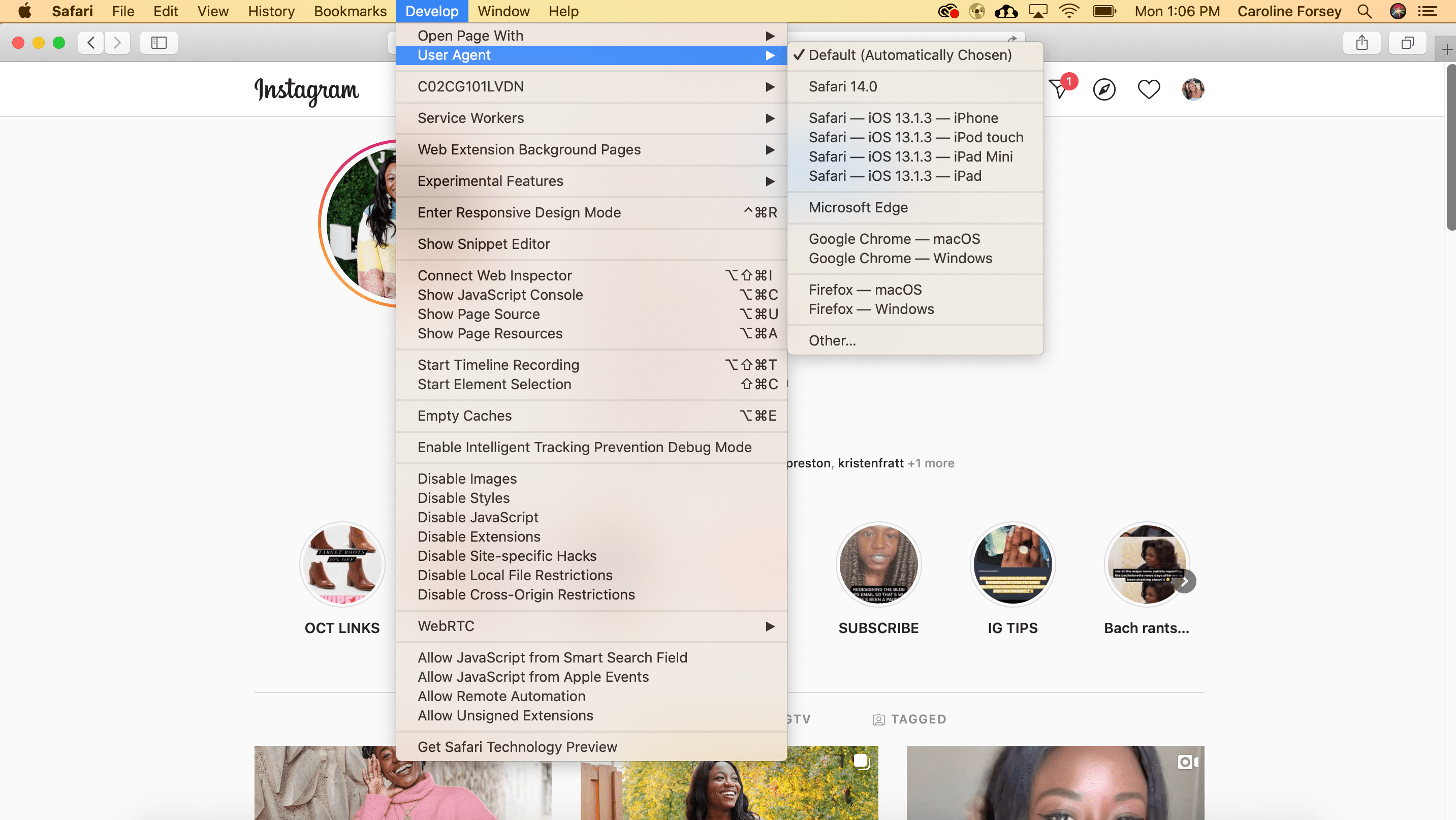
3. Click "Develop" in your menu bar and then scroll to "User Agent". Choose which mobile device you'd like on the drop-down menu.

Screen Shot 2020-10-12 at 1.06.11 PM-min

4. Refresh the page. Now, you're seeing the mobile interface of Instagram from your browser.

Screen Shot 2020-10-12 at 1.06.29 PM-min

(From here on, the instructions for posting an image to Instagram are the same as they are for the Chrome browser instructions, listed above. You can upload a Instagram post the same way you would via mobile — by clicking the "+" button, adding a filter or editing the photo, adding a location and caption, and clicking "Share" when you're ready for your post to go live.)

How to Post a Video on Desktop

To upload a video to Instagram from your desktop, you'll need to use a third-party service that offers social media scheduling software.

There are a few you might try, including the Flume App for Mac (Pro version is $20) or Lately Social ($14 per user per month for Agency plan).

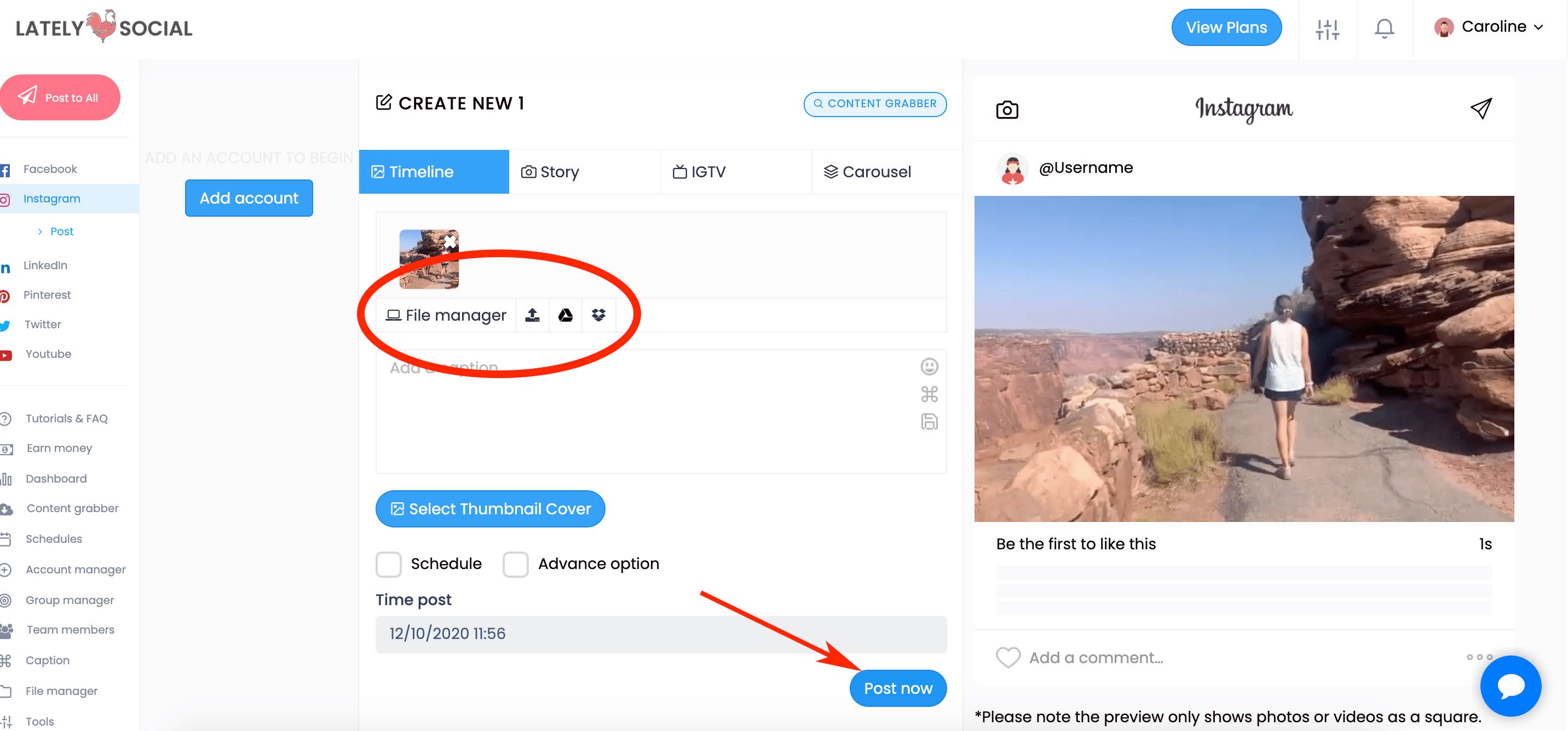
For our purposes, I used Lately Social's free personal plan to upload and post a video directly to my Instagram:

lately social tool dashboard

Of course, if you're doing this regularly it might be worthwhile to explore all the social media scheduling tools at your disposal to choose the one best-suited for your business' needs.


How to Post to Instagram From Your Computer [6 Easy Steps] was originally posted by Local Sign Company Irvine, Ca. https://goo.gl/4NmUQV https://goo.gl/bQ1zHR http://www.pearltrees.com/anaheimsigns

50 Lucrative Blog Niches & Finding One That Works for You

There's a fairly obscure album by a guitarist named Duck Baker called There's Something for Everyone in America. I don't know a ton about it apart from the fact that it came out in 1975 and that its cover art is absolutely next-level.

Blog niche ideas for everyone

Image Source: Best Buy

Neither of those facts is particularly relevant to this article, but the album's title is. That idea that "there's something for everyone" doesn't just apply to America — nor does it have anything to do with what appears to be Lady Justice stabbing a tiger in the heart while Duck Baker casually looks on and smiles from a nearby window.

No, that concept is also relevant to niche blog topics. Everyone has something that's meaningful and interesting to them in its own right, and in a lot of cases, those kinds of passions and pursuits can be channeled into a well-crafted, consistently maintained blog property.

Here, we'll go over what you need to consider when choosing a niche blog topic and look into 50 potential blog niche ideas you can choose from.

How to Choose Your Niche Blog Topic

So what should you blog about? How do you land on the topic that will resonate most with readers and keep you fulfilled in the long run? Well, first and foremost, you need to consider your areas of expertise.

Where are you an authority? What can you talk about comfortably and compellingly? If you write a blog in some niche you only halfway understand, readers won't be receptive to it. They want to hear from an expert — someone who can demonstrate that they're qualified to offer tips or trustworthy opinions. But it doesn't end there.

Writing a blog is a personal pursuit, so you need to write about something that bears personal significance. What do you like to write about? There has to be some degree of joy and enthusiasm behind your blog.

It takes a lot of work to maintain a blog. It's tough to keep that effort up if you don't actually enjoy what you're writing about. You have to start your blog under the assumption that it will take a while to get off the ground.

You're probably not going to be able to monetize your site or sell ad space immediately, so you need to be in it — in large part — for the love of the sport.

Your niche has to reflect your passion because you'll probably be writing for the sake of writing for a while. Attracting an audience neither easy nor a given. If you don't care about your preferred topic, you'll be less inclined to stick it out.

Careers and Education

1. Career Advice

There's always a market for professional guidance — particularly in uncertain times.

2. Learning Employable Skills

Job seekers can always use an edge on their competition. If you can offer the insight or resources to give them that leg up, you can find a solid audience.

3. Professional Social Media Tips

Business owners often look for advice on how to bolster and enhance their presence on social media. If you have some experience in this arena, you can likely find a solid readership.

4. Study Hacks

There will always be a base of students looking to improve their study-game. If you're particularly savvy when it comes to tips and tricks to boost your grades, consider this niche.

Entertainment

5. Acting Tips

If you're an experienced actor who can share stories and insight that'll help newbies refine their craft and prepare for auditions, consider giving this niche a shot.

6. Card and Board Games

There's a lot of material to draw from card and board games. It's a fun niche with an active base.

7. Concert Reviews

This niche is particularly fun and active. If you can reliably make it to shows and offer meaningful criticism, look into it.

8. Film or TV Reviews

There's a sizable audience for an aficionado who can dish out some compelling opinions about new movies or TV shows. If you're an outspoken film connoisseur, try this niche.

9. Music Criticism

This point is similar to the one above. An articulate music buff can rein in a sizable audience by offering their takes on new albums.

10. Stand-Up Comedy Instruction

Newer stand-up comics can always use a little (or a lot) of guidance as they're starting out. There's definitely an audience for a comedy veteran to offer some tips, tricks, and anecdotes.

11. Video Game Tutorials

There's a solid population of gamers looking for walkthroughs and assistance through the trickier parts of certain games. If you're an experienced gamer who can provide that help, look into this niche.

Finance

12. Budget Shopping

Everyone loves a bargain. If you're a particularly deal-savvy shopper, check this niche out.

13. Frugal Living

People are always after ways to live a little smarter financially. This niche lets you demonstrate exactly how cost-conscious you are day-to-day.

14. Investment

Do you have a knack for calling all things Wall Street? If so, consider creating a blog up this alley.

15. Personal Finance

People will always need to know how to balance a checkbook and do taxes, so there's a good chance you can generate readership by covering those kinds of financial fundamentals.

Food and Beverage

16. Coffee

Coffee enthusiasts are always looking for information on new blends. There's a market for someone who can offer some astute coffee reviews and bean referrals.

17. Craft Beers

Similar to coffee, there's an audience that loves craft beer and wants to be pointed towards hot new breweries.

18. Exotic Cuisine

Big-time foodies are active online. A lot of traffic can come with some interesting culinary exploits and tales of exotic cuisines.

19. Kitchen Equipment

Consumer electronics and accessories — specifically, those related to cooking — are always a big draw.

20. Meal Planning

Writing about regimented meal prep can bring in all kinds of readers — from cost-conscious consumers to health nuts.

21. Recipes and Cooking Tutorials

People are always looking for fresh new ways to prepare meals and snacks. If you have a knack for cooking, you might want to look into this idea.

Hobbies

22. Gardening

Green thumb readers can always use some tips, tricks, and new plants to incorporate into their gardening repertoire.

23. Makeup

Makeup tutorials have become a big hit across most social media platforms — a blog that capitalizes on that trend can be lucrative if done right.

24. Photography

Whether it's a forum to offer tips to aspiring photographers or a place to post your own art, a photography blog can draw a solid crowd.

25. Technology

Compellingly writing about new and emerging tech can attract a forward-thinking base looking for the next big thing.

26. Writing

It might be slightly meta, but writing about writing can be a big hit. Many aspiring authors and columnists love a source for new prompts and pointers.

Personal Relationships

27. Blending Families

It's a touchy, tricky subject to handle, but it's a tough challenge a lot of people face. They stand to gain a lot from some sound advice on the topic.

28. Dating

Dating can be a minefield, and if you know how to help people navigate it, you can build a sizable, dedicated following.

29. Parenting

It's arguably the hardest part of life — if you can make it that much easier for people, you'll attract a solid audience.

30. Relationship Advice

Love ain't always easy. That's why plenty of potential readers are looking for someone who can help them figure it out as they go.

31. Weddings

Almost everyone looks forward to their big day, but planning a wedding means having a lot of balls in the air. Anyone who can help soon-to-be newlyweds successfully juggle them can find an audience.

Politics

32. Current Events

In the modern age, people need to stay on top of the news. If you can keep them posted with some eloquence and integrity, you can find readers.

33. Ethics

We could all use a refresher on basic human decency and morality every now and then. A well-crafted ethics blog can rein in a crowd that wants to do that consistently.

34. Political Opinions

Do you have some incisive, compelling political takes to offer? There might just be an audience that wants to hear what you have to say.

35. Political Satire

Sometimes, we need to see the humor in the modern political landscape. If you can tastefully (or not-so-tastefully) find it, there could be some a solid readership for it.

Self-Care

36. Meditation

There are plenty of readers looking to be a bit more mindful and a lot more centered. A meditation blog can tap into that population.

37. Mental Health

It's an important topic that is (deservedly) getting a lot more attention nowadays than it has in recent years. If you can offer some meaningful insight on how to improve readers' mental wellbeing, you'll find an audience.

38. Self-Care

A more general, catch-all self-care blog can register with plenty of potential readers looking to improve every facet of their wellbeing.

39. Skincare

Skincare is a hot topic. There's a massive crowd looking for the best products and techniques to keep their pores small and skin smooth.

Sports and Exercise

40. Extreme Sports

Out-there, wilder sports can be extremely entertaining in their own right, and there's always a market for "extremely entertaining."

41. Personal Training

Hardly anyone can afford a real personal trainer. Posting workouts — no matter how rigorous — can attract an audience composed of everyone from dedicated fitness nuts to out of shape newbies.

42. Running

Running is one of the most fundamental, popular fitness pursuits. There are plenty of readers who would want to hear about your running exploits and anecdotes.

43. Specific Sports

Football, baseball, basketball, soccer — sports are a staple of modern life. If you can consistently break news or offer interesting takes on a given sport, you can find a base.

44. Weight Loss

A lot of people are looking to shed some weight. If you can publish workouts or provide inspiration for weight loss, you can find a fairly dedicated audience.

45. Workout Trends

People want to stay hip to emerging workout trends, so providing news about and guidance for bold new ways to get can help you wrangle in some readers.

Travel

46. Hotel Reviews

Whether they're looking to book rooms or just want to live vicariously through your incredible hotel stays, there will always be a base interested in hotel reviews.

47. Language Instruction

Nesvarbu, ar tai būtų praktiniai, ar asmeniniai tikslai, yra daugybė žmonių, kurie norės išmokti naujų kalbų. That's Lithuanian for, "Whether it be for practical or personal purposes, there are plenty of people who will want to learn new languages."

48. Travel Stories

Travel stories are some of the best ones you can tell. If you have some wild, outlandish exploits to share from your time in Bangkok, Paris, or wherever else, consider maintaining a travel blog.

49. Traveling for Work

Sometimes, travel is for business — not pleasure. There are plenty of readers interested in learning how to do that right.

50. Trip Reviews

A lot of people want to know which destinations are worth their time, and they might find a nicely maintained trip review blog entertaining and appealing.

As you can assume, this list of blog niches isn't exhaustive. There are more than the 50 potential topics I've listed to choose from. If you're looking to start a blog but don't know what to write about, consider your passion and areas of expertise before anything else.

It comes down to a matter of want. You need to consider both what people will want to hear and what you will want to talk about.


50 Lucrative Blog Niches & Finding One That Works for You was originally posted by Local Sign Company Irvine, Ca. https://goo.gl/4NmUQV https://goo.gl/bQ1zHR http://www.pearltrees.com/anaheimsigns

The Ultimate Guide to Amazon Advertising

I'm willing to bet, whenever you have marketing strategy discussions with your team, you typically discuss the same three or four social platforms — Facebook? Check. Instagram? Check. Pinterest? Check.

But — what about Amazon?

In 2018, Amazon launched "Amazon Advertising", (formerly Amazon Marketing Services, or AMS), as a search advertising solution for Amazon vendors. Similar to pay-per-click ads on Google, sellers only pay when shoppers click on ads.

AMS is rapidly growing. In fact, Amazon's ad revenues are projected to amount to 12.75 billion in 2020, with an impressive 23% growth since 2019

If you're already not using AMS, your team should consider it. Amazon Advertising could become a core advertising platform for many businesses, as well as a good alternative to Google and Facebook.

To help you get started advertising on Amazon, we've created this ultimate guide that fleshes out each type of ad you can run on Amazon and some of their best practices. Read on to learn how to advertise on the ecommerce platform in 2020.

Keep reading, or jump to a specific type of Amazon advertising:

1. Amazon Sponsored Ads

2. Amazon Headline Search Ads

3. Amazon Product Display Ads

4. Amazon Native Ads

5. Amazon Video Ads

6. Amazon Stores

Amazon Advertising Strategy

Even though we'll be describing five unique types of Amazon advertisements that all have different best practices, here are seven general tips for shaping a successful Amazon advertising strategy:

1. Determine your goals.

Whether you want to drive more sales or boost brand awareness, Amazon allows you to align your targets with your goals. For instance, you can deem your Advertising Cost of Sales (ACoS) as your metric of success if you're focusing on driving more sales.

Alternatively, you can deem impressions as your metric of success if you're focusing on boosting brand awareness.

Fortunately, Amazon divides its product page up into "Objectives" if it's easiest for you to figure out which Amazon ad product works best for you depending on your goals. For instance, video ads, display ads, audio ads, and custom advertising solutions are recommended if your goal is to grow brand awareness

By working backwards from your goals, you'll ensure the strategy you implement on Amazon is best-suited for your business needs. 

2. Choose the right products to advertise.

Advertising your most popular products gives you the best chance to convert clicks into purchases. You should also make sure these products are in stock and priced competitively. 

Alternatively, perhaps you have a new product or service for which you'd like to increase awareness. When choosing the right products or services to advertise, you'll want to keep your goals in-mind, and also ensure you've done your research to determine whether Amazon is the right platform to showcase your products in the first place. 

3. Craft clear, concise, and compelling product detail pages.

Amazon ads can entice shoppers to visit your product detail pages, but the product detail page is what will ultimately turn those shoppers into customers. To craft a persuasive product detail page, consider including accurate and descriptive titles, high-quality images, and relevant and useful product information.

4. Choose where you want to place your ads.

Amazon offers a variety of products within its full advertising suite — for instance, you can create voice ads to display across Alexa-enabled devices, video ads to stream across Fire TV or Amazon-exclusive sites like IMBD, or display ads to attract Amazon users to your brand. 

Once you've determined whether voice, video, or search is right for you, you'll want to investigate various options, including sponsored brand ads versus sponsored product ads (which we'll discuss in the next step). 

Keep in mind, there are tons of opportunities to place your ads on various devices or sites with Amazon, so consider getting creative. Perhaps an audio advertisement that plays on Alexa-enabed devices is best-suited for your business, or maybe you'll find the highest ROI with Amazon DSP, which allows you to reach Amazon audiences on both Amazon-owned and third-party sites and apps.

5. Test out sponsored brands versus sponsored products.

To explore the differences between sponsored brands versus sponsored products, let's consider the following example.

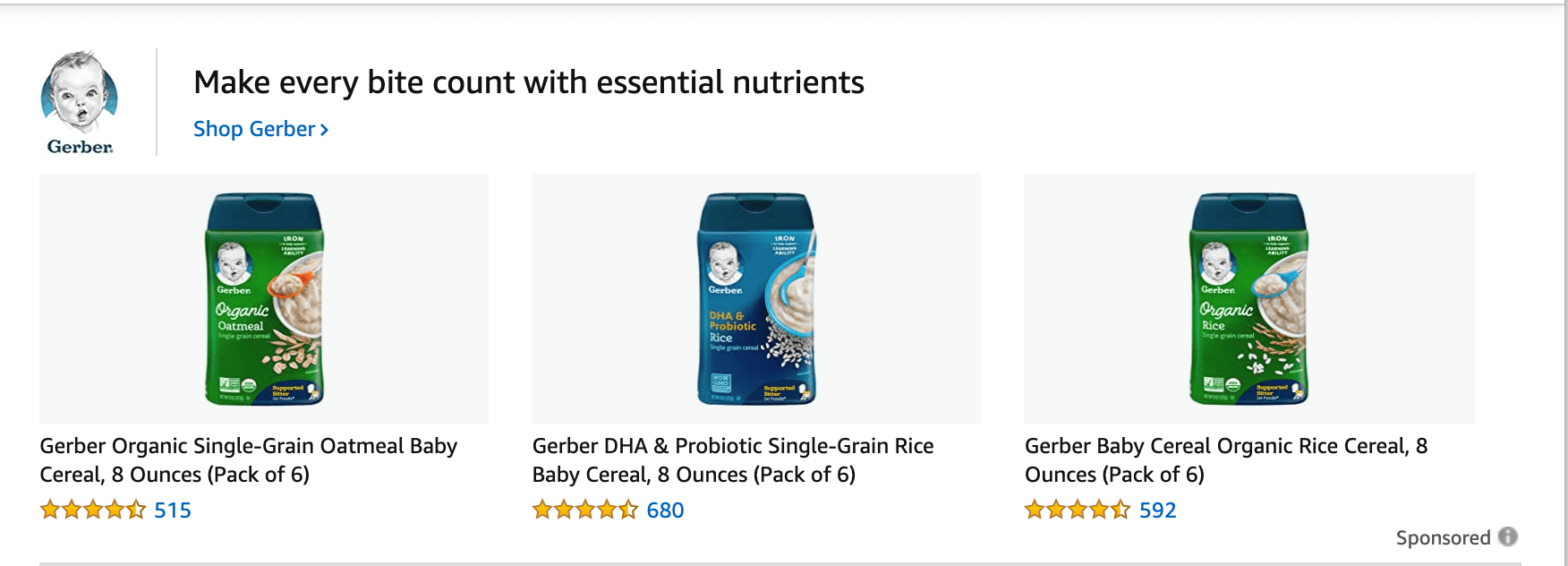
When I search "baby food" on Amazon, the first sponsored placement I see is Gerber's sponsored brand post, which highlights a few different Gerber products to increase brand awareness and drive sales: 

gerber sponsored brand on amazon

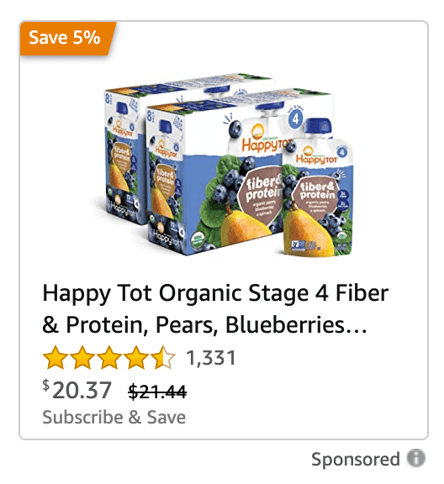
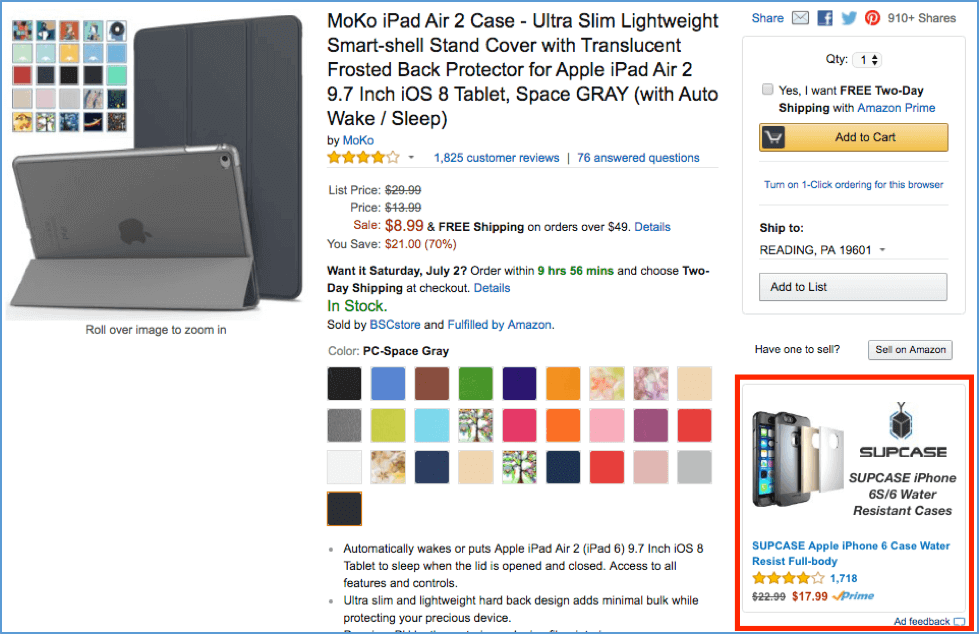
However, consider what happens when I click on an individual Gerber baby food product. In the bottom right of the product screen right below the "Buy Now" button, I see a Happy Family Organics advertisement for an individual product — Stage 4 Fiber & Protein baby food pouches:

happy tot sponsored product on amazon

This is the difference between a sponsored brand versus a sponsored product post. Simply put, a sponsored brand post can display a few of your products or services, and is ultimately best-suited for companies aiming to increase brand awareness around an entire product line. 

Alternatively, a sponsored product post is a cost-per-click (CPC) ad that promotes individual product listings on Amazon. If you're hoping to drive sales to a specific product or you'd like to target a niche audience (for instance, anyone who's already clicked on a competitor's product), this might be the better option for you.

6. Use category-specific targeting. 

Amazon offers advanced targeting functionality to help you display your products alongside top-rated products, or even alongside tangentially-related products — for instance, if you sell K-cups for a keurig, you might serve your ad to Amazon users who've searched for "keurig". 

By using Product Attribute Targeting, you're able to show ads to shoppers who've shown interest in other products within your industry. This advanced targeting capability helps you maximize effectiveness of your ads. Plus, it allows you to increase brand recognition with a high-intent audience. 

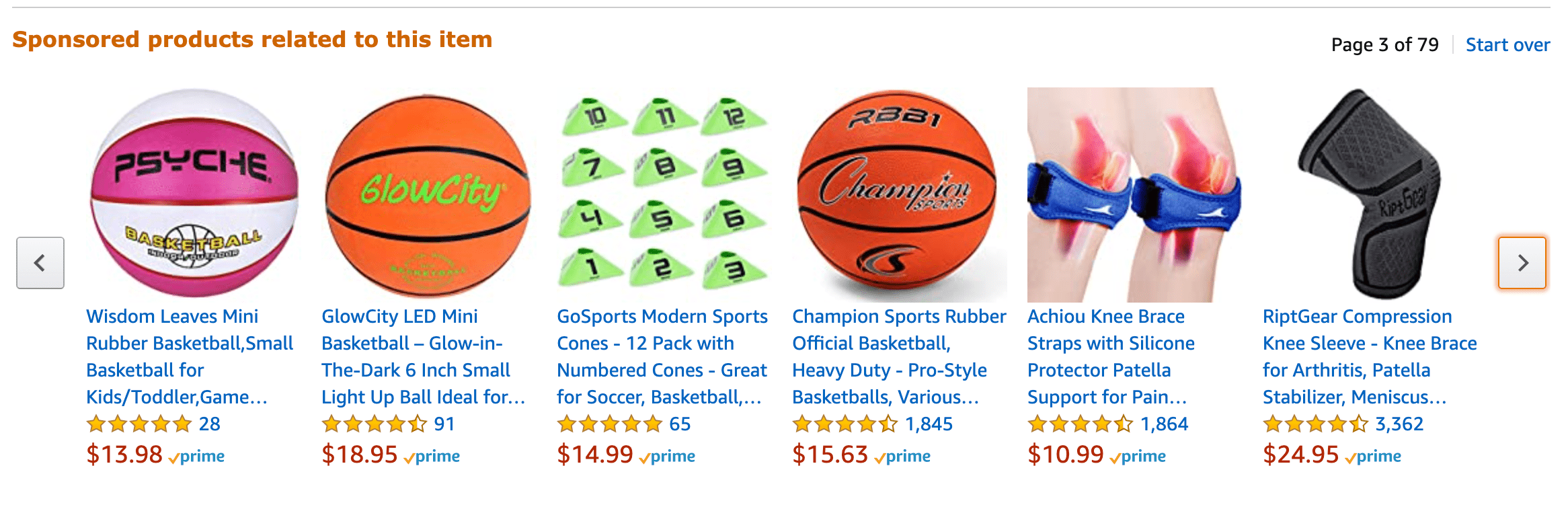
For instance, when I search for basketballs on Amazon and click on a Wilson product, I can scroll down and see a section labelled "Sponsored products related to this item": 

sponsored products related to basketball on amazon

Avid basketball players are likely more inclined to take a look at knee braces or sports cones, making this an effective ad placement. Even if shoppers arent' in the 

even if I'm not in the market right now, I'll ideally keep these brands in-mind for the future. 

7. Take advantage of negative keywords to reduce wasted spend. 

It's important you avoid wasting ad spend by including negative keywords — or which keywords you don't want to appear for — to avoid serving your ad to people who won't convert. 

Consider, for instance, the difference between a search for "granola bars" and a search for "KIND granola bars". You don't want to appear in a search for "KIND granola bars", when the user is clearly determined to find a specific granola brand.

For this reason, you might want to include brands like "KIND" or "Chewy" in your negative keywords list, so your ad can be served to users with a more general interest in perusing various granola brand products. 

You'll also want to include negative keywords if they don't relate to your product to avoid wasting your ad spend towards people who aren't interested in your product. For instance, if your product isn't gluten-free, you'll want "gluten free" on your negative keywords list. 

Additionally, you might consider getting more specific to target your ads at a smaller, more high-intent group of people. Rather than simply targeting "granola bar", you might try targeting "low-sugar granola bar", for instance.

Amazon Sponsored Ads

Amazon Sponsored Product Ads are pay-per-click, keyword-targeted display ads for individual products that appear on the search results and product detail pages. With Sponsored Product Ads, there are three types of keywords you can bid on if you decide to leverage manual targeting — broad, phrase, and exact.

sponsored sock product on amazon

Broad keywords can include words before and after the target keyword, like "white hand mixers", if you sell hand mixers. Targeting these keywords will expose your ads to the greatest amount of traffic.

Phrase keywords focus on how the sequence of the words you use changes the context of a query. For example, "stainless steel hand mixer" indicates you sell hand mixers. But "hand stainless steel mixer" indicates you sell stainless steel mixers, but not necessarily stainless steel hand mixers.

Exact keywords are the most constraining type of targeted keyword — a shopper's search query must contain the exact keyword for your ad to show up and no words can come before or after the keyword. For example, if you choose to target exact keywords, you can target an ad for "hand mixer", but it won't show up for the query "electric hand mixer".

Using Sponsored Product Ads, you can also use automatic keyword targeting, which leverages an algorithm to target the most relevant keywords for your product ads.

To gauge the performance of your ads, Sponsored Product Ads offers a reporting tool that displays your ads' clicks, spend, sales, and advertising cost of sales (ACoS).

Amazon Sponsored Ads Best Practices

Targeting

With Amazon Sponsored Product Ads, you can find keywords that have low conversion rates and flag them as negative. This way, Amazon will stop showing your ad to shoppers who search for those queries. Ensuring you flag certain keywords as negative is critical — even if these keywords have a high click-through-rate, their low conversion rate means they're probably not reaching the right type of shoppers.

Bidding

Available in Manual Targeting ad campaigns, you can leverage Bid+ to boost the odds of your ad appearing at the top of search results. You can only use Bid+ on ads that are eligible to appear at the top of search results, but when you do, you can increase your default bid by up to 50%, keeping your top performing campaigns competitive, without having to constantly adjust your bids manually.

Amazon Headline Search Ads (a.k.a. Sponsored Brand Campaigns)

example of amazon headline search ad of crossbody bag

Image Source

Currently known as Sponsored Brand Campaigns, this type of Amazon advertising allows you to promote keyword-targeted ads of multiple products above, below, and alongside search results.

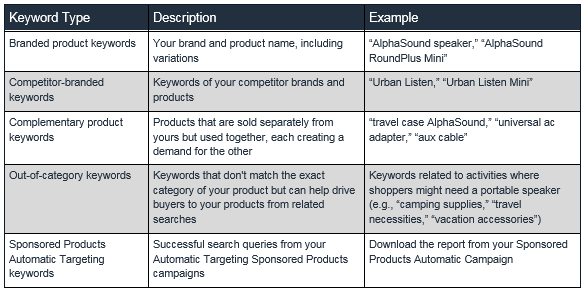
Using Sponsored Brand Campaigns, you can target three types of keywords -- branded product keywords, complementary product keywords, and sponsored products automatic targeting keywords.

Branded product keywords are a combination of your brand name and a product you sell.

Complimentary product keywords are a bundle of two individual products that influence the demand for each other and can be sold together (like ketchup and mustard).

Sponsored products automatic targeting keywords are search queries that you've already experienced success with while running automatic targeted sponsored product campaigns.

Sponsored Brand Campaigns also lets you feature up to three unique products in your ads, customize your ads' image, headline, and landing page, and even tests these elements.

Below is an image from Amazon that details the keywords that you can use for your sponsored brand campaigns:

Amazon details the various types of keywords.

Image Source

To determine how much you pay for Sponsored Brand Campaigns, Amazon uses a pay-per-click, auction-based pricing model, so you'll never pay more than you bid per click. In addition to manual bidding, you can choose automated bidding, which will optimize your ads for conversion.

If you want to know how well your advertisements are performing, Sponsored Brand Campaigns offers a reporting feature that displays your ads' clicks, spend, sales, estimated win rate for keywords, and ACoS (Advertising Cost of Sales).

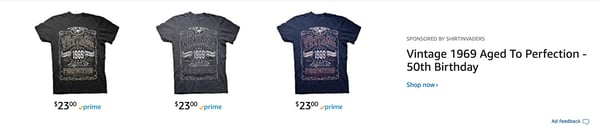
Below, Shirt Invaders promotes three of their T-shirts. Clicking on each of the shirts goes specifically to the product page. However, clicking on the "Shop Now" button below the copy takes you to its Amazon Store:

Shirt Invaders Amazon headline search ads above the search results.Image Source

Sponsored Brand Campaigns Best Practices

Ad Creative

It's a good idea to feature three top-performing products in your Sponsored Brands Campaign to increase the amount of clicks and sales your ads generate.

Amazon also recommends including your product's top benefit in your ad's headline because mobile shoppers can only see the ad's main image and headline.

Additionally, when describing your product, try not to claim your product is "#1" or a "Best Seller" -- your ad won't get approved.

Testing

To run the most accurate and fruitful tests, consider only changing one variable at a time, run them for at least two weeks, and anchor the success of your tests to business goals.

Landing Page Design

With Sponsored Brands, you can direct shoppers to your Amazon store or a customized product page. Consider testing how different product pages convert visitors into customers, as well as the order in which your products appear.

Amazon Product Display Ads

amazon-Product-Display-Ads

Product display ads are pay-per-click ads that appear on product detail pages, customer review pages, on top of the offer listing page, and below search results. 

You can also place these ads on abandoned cart emails, follow-up emails, and recommendations emails. Their main objective is to cross-sell or upsell your customers.

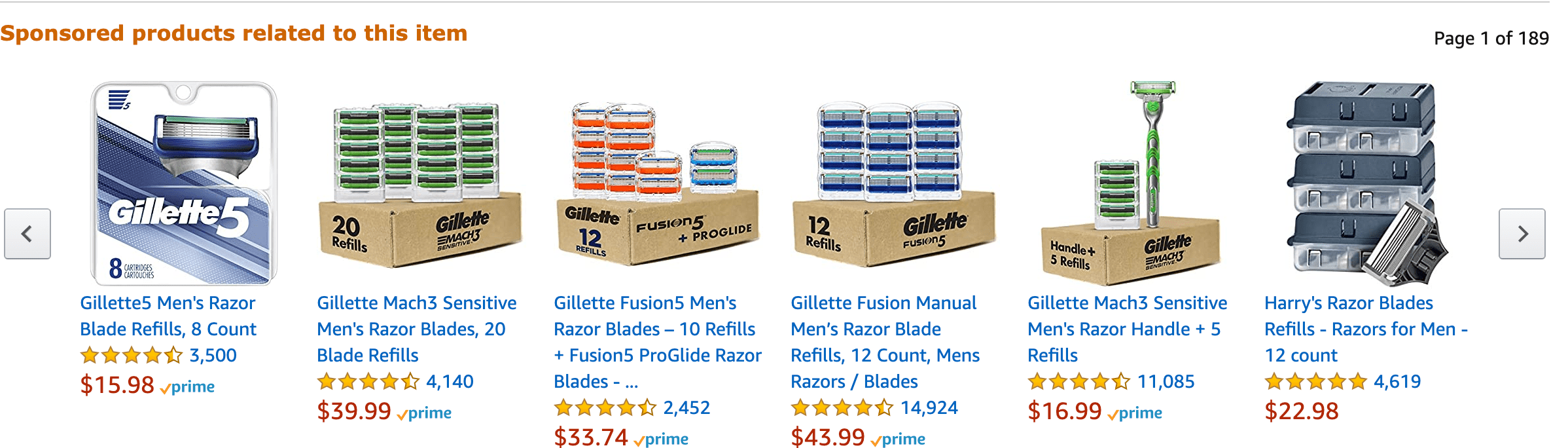
sponsored products related to razors on amazon

Using product display ads, you can use two types of campaign targeting: product and interest. Product targeting is a contextual form of targeting, so you can target specific products and related categories. Interest targeting is a behavioral form of targeting, so you can target shopper interest and reach a larger audience.

Product display ads also let you choose which in-category detail pages you want to advertise on, customize your creative, and offers a reporting tool that displays your campaigns' clicks, spend, sales, advertising cost of sales (ACoS), detail page views, spend, units sold, total sales, and average cost-per-click (ACPC).

Amazon Product Display Ads Best Practices

Targeting

Use product targeting on competitor pages, complementary product detail pages, and your own product detail pages to cross-sell and upsell similar products. Using product targeting on related categories also extends your reach to sections of Amazon's catalogue that are related to your products.

Ad Creative

When crafting your headlines, Amazon allows you to include phrases like "Exclusive", "New", "Buy Now", and "Save Now", but making claims like "#1" or "Beat Seller" will get your ad rejected.

Amazon Native Ads

Amazon Native Ads are ads that you can place on your brand's own website. There are three types of native ads: recommendation ads, search ads, and custom ads.

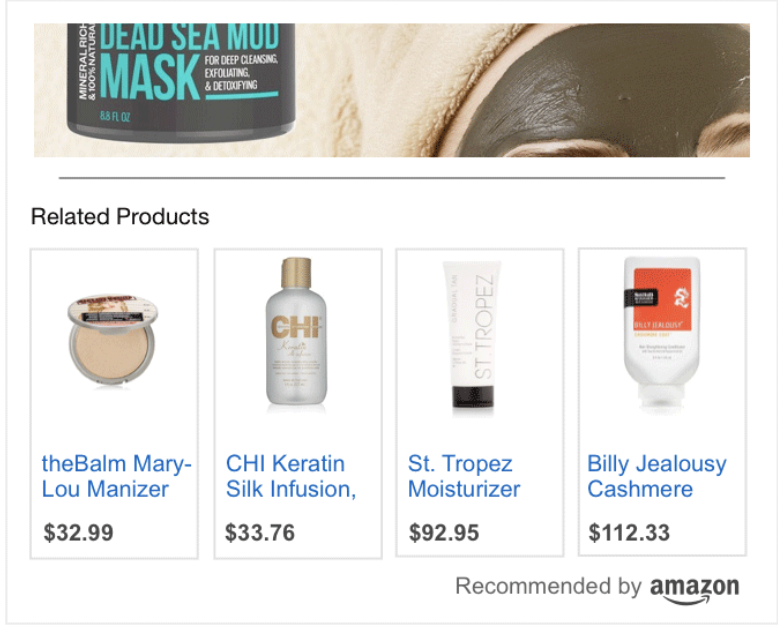
Recommendation ads are ads you can place in product article pages on your website. These ads are dynamic, so Amazon will populate your most relevant product recommendation based on your web page's content and visitors.

Screen Shot 2020-10-13 at 2.28.30 PMImage Source

Search ads are ads that populate on your website based off keywords that your customers search for on Amazon or on your website.

Search ads on Amazon.

Image Source

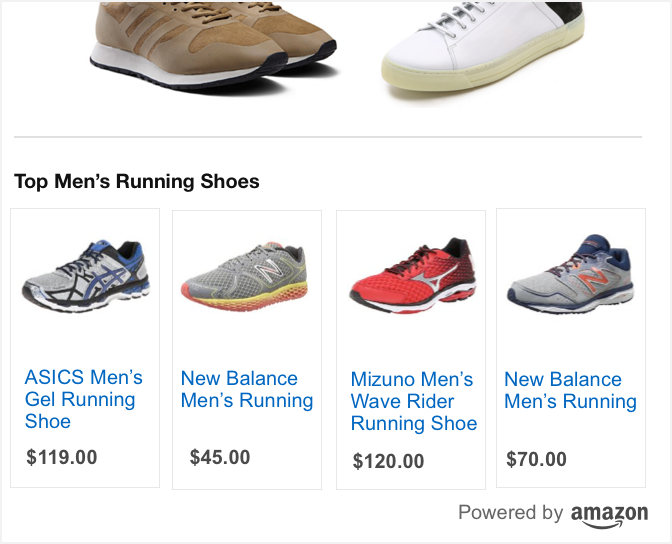
Custom ads allow you to select your own assortment of products you'd like to promote and place them on your product article posts.

Custom ads on Amazon feature men's running shoes.

Image Source

Amazon Native Ads Best Practice

Just like a call-to-action on a blog post, make sure your native shopping ads are extremely relevant to the pages you place them on. This way, when your website visitors finish reading your post, the ads are a natural next step and can lead to more conversions.

Amazon Video Ads

Amazon Video Ads are ads that you can place on Amazon-owned sites like Amazon.com and IMDb, Amazon devices like Fire TV, and various properties across the web. You can buy Amazon video ads regardless of whether you sell products on Amazon or not, and you can set your ad's landing page as an Amazon product page, your own website, or any other web page on the internet.

example of peloton video ad on amazon

Image Source

If you want to work with Amazon's video ad consultants, you can sign up for their managed-service option, but to be eligible, you usually need to spend a minimum of $35,000 on video ads.

Amazon Stores

Users can promote their brand or product on your own multi-page Amazon Store. Using Amazon's templates or drag-and-drop tiles, you can showcase your brand's products or portfolio of work.

With Amazon Stores, brands get an Amazon URL and can view traffic analytics, which enables them to keep track of sales, traffic sources, and ad campaigns.

Additionally, creating an Amazon Store is free.

Amazon Stores Best Practices

Once you create an Amazon Store, you can use the analytics tool to find the top performing keywords which have converted to sales. Additionally, the analytics tool will let you know which products sell.

This lets you know which products you might want to consider for a paid ad campaign. Plus, it also shows what potential buyers are interested in.

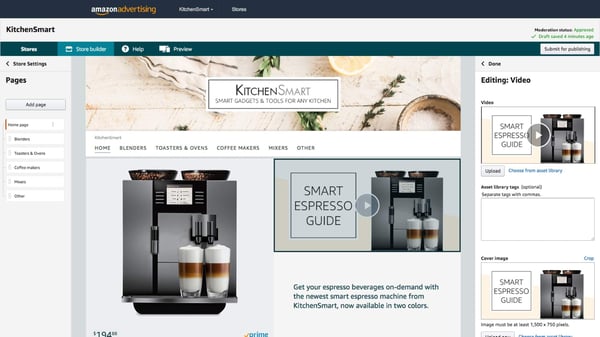
Below is an example of an Amazon Store:

Kitchen Smart Amazon Store featuring their best products.

Image Source

When you create an Amazon Store, the best practices are similar to best practices of any landing page — use clear photos, easy-to-read captions, and clear pricing. Additionally, make sure you showcase your highest performing products. Or you could opt to introduce new products on your Store as well.

Before you craft your Store, come up with the products you want to feature on your navigation. Then, list all your products that you will showcase on those pages. Lastly, gather the clear, professional photos of your product, write your captions, and list your prices.

Ultimately, selling on Amazon can be an impactful marketing strategy for ecommerce brands. As consumers continue to lean into online shopping, Amazon advertising can play a large role in your online sales.

Editor's note: This post was originally published in February 2019 and has been updated for comprehensiveness.


The Ultimate Guide to Amazon Advertising was originally posted by Local Sign Company Irvine, Ca. https://goo.gl/4NmUQV https://goo.gl/bQ1zHR http://www.pearltrees.com/anaheimsigns

The Ultimate Guide to Integrations and Why Your Business Needs Them

Have you ever found yourself working on a project in which you had to toggle between different software and applications? Perhaps you had to plug data from one system into another or rewrite the same content over and over again to ensure it was in multiple locations.

Although few people have the time or patience for this type of tedious work, it’s common and often critical to your business’s success — these mundane tasks need to get done.

What if there was a way to connect your software to the applications you use in a way that successfully brings them together? This would mean all of your information and data would live in a central location with no manual entry required, even if those applications don’t actually come with the software itself … sound nice?

Well, good news! This type of solution exists … it’s called an integration.

Integrations are a complex topic to understand. So, let’s simplify the concept with the help of an analogy we can reference throughout this guide.

Let’s pretend you want to plug your MacBook laptop into your TV using a connector cable so you can watch reruns of Friends on Netflix on the big screen. And integration kind of works like this — I’ll explain more as we go.

applications integration example

Back to our analogy: If your software is your laptop, you’ll use a connector cable, or integration, to then watch Friends on the TV, or application.

example of an integration

Now, let’s run through some commonly asked questions about integrations to help you get a better grasp on what they are, how they work, and why your company needs them.

Why use integrations?

Integrations solve and simplify your need for new software as your business grows and evolves. They allow you to keep the system you’re currently using by simply adding connections to third-party applications to enhance system functionality and provide additional features you may need but aren’t able to build within your software. You can keep your current laptop and TV, and simply use the connector cable to watch Friends on the big screen.

By leveraging integration connections across your systems, you can power your business to achieve a much wider range of tasks on your software as you enhance its functionality. This is especially helpful as your business expands since your needs are bound to change.

Although your software may have the functionality you need when you start your business, you’re likely going to want additional applications to provide the features you end up needing later on, as you grow.

There are many types of integrations, each of which has specific functions to help meet different needs. The easiest way to think about the various types of integrations is by category. Some integrations have several functions, meaning they could technically fit into many categories because they serve more than one main purpose. Other integrations have one specific function.

Who needs integrations?

Integrations are helpful tools for virtually every business, no matter the size or industry. There are integrations suited for every type of company (startups, SMBs, and enterprise companies) with any purpose (advertising, analytics, or content).

If you sell software, as we do at HubSpot, you’ll find yourself not only using connections for your internal software but also for your customers to use along with your software. This is because your software may not have every feature and function your customers need to run their business. So, by adding an integration, they’ll get that added feature or function while continuing to use your software.

Referring back to our analogy, without the integration, or connector cable, your laptop wouldn’t be able to communicate with your TV to allow you to watch Friends on the big screen. You need that integration, or cable, to allow for added functionality and watch the show on TV — without it, this wouldn’t be possible.

How do you get integrations?

Integrations are almost always located in some type of marketplace, where customers can review and browse all of their options. The HubSpot App Marketplace is an example of this. Our marketplace allows visitors to search and learn more about the various integrations and their functions, and then connect HubSpot to their integration of choice.

(No, you can’t go to Best Buy to pick up your integration as you would with your connector cable to watch Friends on your TV… you’re right, the example doesn’t quite work here.)

How do integrations work with APIs?

API stands for application programming interface. An API is an interface that software uses to receive information (whether that’s data, servers, applications, etc.).

All of the integrations we’re going to discuss below are built on APIs. By building integrations on APIs, you can connect your integrations to your software and use them in tandem with one another. The integration allows for the flow of information to and from apps and devices in real-time — APIs allow them to talk to one another.

Think about this in terms of our analogy from above: The application is the TV, the programming allows your laptop to communicate with the TV, and the interface is how you (the user) are able to interact with the application (by watching Friends on your TV). In this example, the API is the port on the side of your laptop in which you actually insert your integration (the cable) to then connect your laptop to your TV.

Integration vs. iPaaS Solution

If you’ve heard of integrations before, chances are you’ve also heard about iPaaS, or Integration Platform as a Service. The difference between the two is an important distinction to make when determining which one you need for your business. While an integration is a one-to-one, direct connection solution, an iPaaS solution is not.

Instead, iPaaS is a cloud-based platform that connects your applications and systems — whether that’s in the cloud or on-premise — between an organization and third-party software without the use of middleware.

So, if you look for an integration solution on your software’s marketplace and don’t find the connection you’re looking for, then you’d turn to an iPaaS solution to solve your need for that connection. There are a few integrations available today (called “connector integrations”, which we’ll look at an example of below) that can help you build custom integrations..

So, which integrations should you actually use? Let’s look at a list of some of the most popular integrations available.

Popular Integrations

The following integrations are categorized by business need to help you browse through your options. (Almost all of these integrations fit into multiple categories, as they have functions that allow them to do multiple things. Below, we placed them in the category they’re best suited for.)

It’s important to note these are just some of today’s popular integrations — there are hundreds of more integrations to learn about and choose from as your business grows.

The list we’ve compiled below is of integrations that connect with HubSpot. This isn’t to say these HubSpot integrations don’t also work with other software. In fact, most of these integrations are compatible with dozens of programs in addition to HubSpot.

Let’s take a look.

Advertising Integrations

Advertising integrations help you market to and reach your target audience. Data about the success of your ads and/ or the leads obtained from them is automatically added to your HubSpot CRM so you can learn more about the people who interact with your ads and nurture them into customers.

1. Facebook Ads

The Facebook Ads integration allows you to connect your Facebook Ads account to HubSpot. This integration gives you the ability to attribute your ads directly to the contacts who interact with them. It also allows you to review real data about which ads impact your bottom line. This simplifies the reporting process for all of your Facebook Ad efforts.

2. AdRoll

Different businesses and products have various buyer personas. The AdRoll integration gives you the opportunity to create personalized retargeting ads for different lead segments in your HubSpot contacts. You can personalize several parts of the ads, such as content and formatting, that will best relate to your prospect.

This allows you to focus on your audience’s attributes so you can effectively reach your prospects — you can gather intricate details about your prospects from your CRM via the integration so you’re able to successfully retarget them.

3. Instapage

If you’re not a developer, creating your website’s landing page might sound like an overwhelming task. The Instapage integration provides a straightforward option for anyone who wants to create and personalize their landing page and then send lead information straight to HubSpot. These details are automatically placed under the associated contact in HubSpot for you— meaning, there’s no need to perform this transfer manually.

Account-Based Marketing (ABM) Integrations

ABM stands for account-based marketing. ABM integrations help you leverage your account and audience data so you can tailor your messaging, CTAs, and marketing strategies to close deals and attract customers.

1. OrgChartHub

The OrgChartHub integration allows you to efficiently build customer organization charts without ever leaving HubSpot. You can create customer organization charts while in HubSpot so you’re able to easily identify unknown contacts, visualize key stakeholders, and customize your sales personas without manually sending any of this information back and forth.

2. CaliberMind

With the CaliberMind integration, you’ll be able to look at your cross-channel account engagement and create alerts for your reps about which deals they should focus on closing to meet quota. The integration takes your contacts directly from HubSpot and automatically matches them to their associated accounts so you don’t have to.

3. Metadata

The Metadata integration provides account-based advertising services. You can automatically identify specific target accounts and contacts from HubSpot to create personalized advertisements at scale to help you close more deals and reach your target audience more effectively.

Analytics and Data Integrations

These integrations help you measure your success across a number of analytics platforms. You can look at your data in different ways and ensure all of this information is well-organized in HubSpot so your team can review it at any time. These integrations help you learn more about which of your efforts are working and which ones need to be modified.

1. Databox

With the increase of remote employees across businesses and the number of people who access their work while on-the-go, having the ability to review and manage your key performance indicators (KPIs) from anywhere can be quite helpful.

The Databox integration provides you with access to all of your analytics data in HubSpot from a wide variety of sources including Google Analytics, SEMRush, mobile, desktop, Facebook, and more.

2. Hotjar

In a world where many website visitors are uninterested in completing forms and providing their personal information, Hotjar is a great way to learn about who your visitors are and what they’re looking for on your site. The Hotjar integration gives you insight into who your website and mobile visitors are and what their needs consist of directly from HubSpot.

3. Klipfolio

The Klipfolio integration shows you your most important metrics in real-time and creates easy-to-read dashboards in HubSpot so you can track and analyze performance across all of your platforms from one location. This allows you to improve your data transparency and reach your targets faster.

Calling Integrations

Whether it’s a meeting with fellow employees or your prospective and current customers, calling integrations will make all phone and video call interactions simple. Your contact’s information and details about the call will be recorded in HubSpot for easy access. This also provides sales reps and support team members with the necessary background information to assist the prospect or customer appropriately.

1. UberConference

With UberConference, it takes just seconds to schedule your meetings with colleagues and prospective customers so you can focus on tasks that require more attention. The integration allows you to schedule meetings quickly and easily without ever having to leave your HubSpot portal.

2. Aircall

Phone calls remain one of the most effective ways to interact with your prospective and current customers. Whether it’s a sales or support call, the Aircall integration allows you to manage your call flows and attentively assist your leads and customers all within HubSpot so your contact’s information lives in one, central location.

3. CallRail

The CallRail integration is a call tracking and analytics system which allows you to customize segments and actions based on your specific calls with prospects and customers. All of your call and text data will automatically be added and organized in HubSpot under the associated contact so you don’t have to manually enter any data.

Connector Integrations

Connector integrations provide you with access to dozens of applications which sync to HubSpot to save you time and add functionality. Some connector integrations offer a wide range of applications and some have more specific types of applications. Additionally, some connector integrations can assist in creating a custom integration to suit your needs.

1. Automate.io

The Automate.io integration connects to HubSpot to give you access to over 80 applications. By syncing with these apps, you’ll be able to transfer data to them to create customized integrations so you can manage all of your data in a way that works for your business all within HubSpot.

2. Zapier

The Zapier integration allows you to automatically connect your software to over 1,000 applications. It links your apps to HubSpot for you in just a few clicks to save you time. There’s no coding required and your apps will be able to begin sharing data in an easy-to-read workflow format in your HubSpot portal.

3. PieSync

The PieSync integration provides real-time, two-way contact sync. This means every time you add a contact to HubSpot, it automatically syncs to an application (such as Google Contacts or Outlook), and vice versa — you don’t need to worry about any importing or exporting, expediting and simplifying your contact syncs.

Content Integrations

Content integrations help you create, design, and share custom content for your website. They also help you learn about who’s interacting with the content and how they’re interacting with it. That information is then synced to HubSpot so you can organize it and add it to specific contacts.

1. Beacon

If your website has a collection of blog posts, the Beacon integration might be a good option for you. The integration ensures your content looks professional and allows you to drive more leads by getting more value out of your existing content — it connects to HubSpot to automatically convert your blog posts into downloadable content such as eBooks.

2. briX

The briX integration connects to HubSpot so you can design and personalize web pages for your site. You don’t need a background in web design or coding to create beautiful pages — the drag-and-drop template and 100+ customizable features make it easy to organize your content in any way you choose. This integration is ideal for easily designing and personalizing web pages directly from HubSpot.

3. Belch.io

Customized landing pages, web pages, and emails provide a professional look and feel for your visitors, leads, and customers while interacting with your business online. The Belch.io integration connects to HubSpot so you can personalize and brand all of these things in just minutes.

It’s a great option for anyone without a background in coding or web development who wants to design and customize their site pages and emails to complement their brand all from HubSpot.

Customer Success Integrations

Customer success integrations connect to HubSpot to make your internal and external interactions with employees (cross-team) and customers straightforward. They simplify communication and help you share information and/or data when you need to.

1. Slack

The Slack integration is a digital workspace and communication tool that allows you to connect and talk with your team members. The integration is ideal for team collaboration and coordination from anywhere.

By connecting the integration to your software, you can use Slack’s and HubSpot’s features in either the application or the software so you don’t have to waste time toggling back and forth — the same information will be found in both locations in real-time.

2. Zendesk

Zendesk offers a ticketing system to keep track of customer inquiries and allows you to keep details about all of your customer interactions in one place. It helps you provide consistent customer experiences among your fellow employees and customers.

By connecting HubSpot to the Zendesk integration, you’ll be able to bring the work of your sales, marketing, and support teams together in a central location. It also allows these departments to communicate with each other while in HubSpot as well.

3. LiveChat

The LiveChat integration allows you to communicate with potential customers in real-time when they need assistance or guidance while on your website from HubSpot. Whether it’s a question about your product or the need for help in the checkout process, LiveChat allows you to walk them through the information they need to help you boost conversions and build strong relationships with prospects and customers.

Ecommerce Integrations

If you have an online store, ecommerce integrations are a great way to learn about what your customers and visitors are doing while they’re on your website. By connecting these integrations to HubSpot, you’ll know when your visitors are most frequently abandoning your site or their carts so you can create re-engagement content to regain their interest.

1. Shopify

The Shopify integration allows you to easily incorporate all of your ecommerce data and customer data within HubSpot. It automatically syncs customer, product, and deal information in HubSpot under the associated customer’s profile, so your entire team can view all of these details in one location. You can also create cart abandonment nurturing tactics, re-engagement ads for your website from HubSpot once you connect the integration to the software.

2. Typeform

The Typeform integration helps you create and design web and mobile forms for your leads. You can create contact forms, sign up forms, quizzes, and more, and all of your responses will automatically be sent directly to HubSpot so you can easily review your results and responses and compile them under the associated contact in HubSpot.

3. Magento

The Magento integration helps you create and send upsell, cross-sell, and reorder emails as well as develop abandoned cart nurturing tactics to boost your conversions. It automatically sends all of your customers’ ecommerce-related data, as well as emails between you and your customers, straight to their respective HubSpot contact record.

Email Integrations

Email integrations help you track a prospect’s interactions with sales reps, personalize your email automation with certain contacts, and measure the success of your email campaigns among your target audience — all from HubSpot.

1. MailChimp

The MailChimp integration allows you to sync HubSpot with your email service provider. You can build email campaigns and rest easy knowing the Intelligent Error Handling feature will continue engaging your contacts even if a syncing error occurs between the software and application.

By connecting MailChimp to HubSpot, you’ll have the ability to automatically add contacts from HubSpot into your application’s email lists and vice versa so you never have to do it manually.

2. Privy

Privy helps you make more sales and turn more prospects into delighted customers. The integration uses targeted pop-up ads, banners, bars, and more to help you boost conversions and decrease page abandonment. It also automatically syncs all of your new leads from your website to HubSpot so the software can help you nurture them and convert them into customers.

3. Front

The Front integration is a collaborative inbox, meaning all members of your team can see and access your contacts, review deals, and see all activity history while working in HubSpot. All of these details are automatically synced in Front and your CRM. This helps you improve your customer experience and ensure it remains consistent no matter which employees your customers work with.

Event and Webinar Integrations

Whether it’s an in-person event, a webinar, an online meeting, or a video conference, the following integrations simplify every aspect of hosting an event. They allow your contacts to book meetings with you and you can update all information related to your contacts post-event or meeting in HubSpot.

1. Eventbrite

Eventbrite helps you use inbound marketing tactics to attract more prospects and customers to your in-person events. Once connected to your software, the integration automatically takes data from your contact lists in HubSpot to help you uncover effective ways to connect with your target audience, face-to-face.

2. GoToWebinar

No matter the type of event you’re hosting, the GoToWebinar integration automatically syncs all of your registrant and participant information in HubSpot under the associated contact. You’ll never have to worry about manually importing data about your webinar contacts again — instead, you’ll have more time to focus on the event itself.

3. Setmore

The Setmore integration simplifies appointment scheduling for you. It automatically imports your booked appointments (and information about the customer who booked the appointment) to HubSpot under the correct contact’s profile so you don’t have to do it manually.

Lead Generation Integrations

Lead generation integrations help you transition early-stage leads into delighted customers. All of your leads’ information will automatically be synced to HubSpot so you can view it at any point during the buyer’s journey. This is helpful to learn more about your target audience and to manage customer information so your sales and support teams can refer to it if needed, all from one location.

1. WordPress

The WordPress integration helps you optimize and align your WordPress website with the data about your contacts and business goals you have in HubSpot. Your HubSpot account and all of your growth tools will automatically be connected to your WordPress site so you can work to attract, engage, and delight site visitors and customers on your site from either WordPress or HubSpot.

2. Unbounce

The Unbounce integration helps you with the lead capturing and nurturing processes. You can create lead generation forms and send all data collected about your leads directly to HubSpot. At any point in time, you can take this data about your leads and use it to create campaigns. You’ll also have the ability to export any data in just seconds from your Unbounce account and share it anywhere.

3. SurveyMonkey

With the SurveyMonkey integration, you can create and distribute custom surveys to your prospects and customers, collect all data obtained, and view your responses within HubSpot. This is ideal because you can then segment and organize all your contacts based on their survey responses to easily manage the type of content and/or follow up they receive.

Live Chat Integrations

By adding live chat integrations to your website, you’ll be able to communicate with prospects in real-time and nurture them into customers. You can answer their questions, respond to their concerns, and assist them in their purchase decisions. Then, this data is compiled into HubSpot under the specific contact it belongs to so you can follow up appropriately.

1. Intercom

The Intercom integration allows you to capture new leads and prospective customers with the help of live chat on your website. Intercom allows you to convert more leads by actively engaging with them at any time while they’re on your website once connected to HubSpot. You can then qualify your leads with custom bots, talk with them directly, and track them — then, all of this information is automatically organized under their contact in HubSpot.

2. ManyChat

Once connected to HubSpot, the ManyChat integration allows you to automate your messenger marketing so you can easily organize, nurture, and track your leads from the software. You can also take any HubSpot form and submit information obtained from it by sending custom field data to HubSpot Form Submissions.

3. Drift

The Drift integration provides live chat for your website so you can assist your leads in real-time form HubSpot. The integration allows you to watch and save all of the lead’s activity on your site in HubSpot under the correct contact. Additionally, your sales reps can use Drift to customize their outreach and follow-ups based on that activity to improve the chances of conversion.

Sales Integrations

Sales integrations help you bring your sales tools, tactics, and prospects’ information together using HubSpot. You’ll be able to keep your marketing, support, and sales details in a central location for all teams to access, analyze, and refer to as needed.

1. HelloSign

Once connected to HubSpot, you’ll automatically be notified of any action a prospect takes on any document you send them with the HelloSign integration. Examples of the actions you’ll be notified about include when a prospect or customer receives, opens, or signs the document.

Then, this activity data is sent to the contact it belongs to in HubSpot so reps know where the prospect or customer is in the buyer’s journey and how they should go about following up with them.

2. Salesforce

If you’re a Salesforce user, you can automatically sync all of your contacts’ information from the database into HubSpot once connected to the Salesforce integration. This allows you to work with reps to get strong lead intelligence and revenue reporting. You can mesh your marketing and sales work, content, and information so you and your team can access any information from either system at any point in time.

3. PandaDoc

When it comes to sales work, there are many tasks involved that don’t necessarily include the process of actually closing a deal. The PandaDoc integration automatically organizes and reviews information from HubSpot about your prospect to help you with non-selling tasks like creating and sending quotes, proposals, and contracts.

Social Media Integrations

Understanding your social media following is a huge part of successful marketing. Social media integrations help you learn about your followers, understand the type of content they interact with and share, and automate specific parts of your social media strategy.

1. Facebook

With the Facebook integration, you can automatically connect your business’s Facebook account to HubSpot. Schedule Facebook posts ahead of time analyze and measure post’s performance. This integration is ideal if you want to manage your Facebook marketing strategy alongside your other social media marketing strategies directly from HubSpot.

2. LinkedIn

By connecting your LinkedIn account to HubSpot through the LinkedIn integration, you can easily engage with your network and communicate with all of your contacts from HubSpot. You can also auto-publish your blogs and share specific content with your followers to nurture them into leads and customers. This integration is also great for tracking engagement along with all of your other social media channels and marketing efforts all from HubSpot’s social media tool.

3. Twitter

Schedule Tweets ahead of time, monitor Twitter streams, view Tweets and Twitter interactions of your competitors, and monitor accounts that are important to your brand from HubSpot with the Twitter integration. All information about your current and new followers will be added to your contact lists in HubSpot so everything is organized appropriately.

Video Integrations

With the rise of video and video marketing in business today, integrations that help you incorporate this media on your website have become quite useful. They allow you to create and implement videos on your site pages and forms as well as measure the success of your video marketing efforts.

1. Wistia

The Wistia integration provides you with the ability to integrate videos on your website, and then incorporate HubSpot forms with those videos to improve video engagement (and hopefully, conversion) rates. If any lead converts on a video, their information is automatically sent to HubSpot so you’ll have their video-viewing data paired with their contact details.

2. YouTube

The YouTube integration connects your YouTube channel to HubSpot. This way, you can easily report on your video and channel success and compare this data to that of your other social platforms using HubSpot’s analytics and social media tools and dashboards.

3. Promo

With the Promo integration, you can choose from over three million clips, templates, and music options to use to create a video for your site directly from HubSpot. You can easily throw in custom messaging, branding, or logos to personalize the video for your business based on a specific prospect’s needs and interests, found under their specific contact in HubSpot.

Get Integrated to Grow Better

Integrations have the power to enhance all aspects of your business. No matter the software you use to run your company, you can find integrations that can help simplify your processes, optimize your efforts, and empower your fellow employees. So, find the right integration marketplace for your software and begin connecting to the applications suited for your business needs.

Editor's note: This post was originally published in July 2019 and has been updated for comprehensiveness.


The Ultimate Guide to Integrations and Why Your Business Needs Them was originally posted by Local Sign Company Irvine, Ca. https://goo.gl/4NmUQV https://goo.gl/bQ1zHR http://www.pearltrees.com/anaheimsigns
Tuesday, October 20, 2020

Integrations: The Newest Addition to Your Marketing Ops

Marketing isn't just about campaigns, content, and creativity. There's a whole lot of "getting things done" that needs to happen behind the scenes for campaigns to roll out on time and performance to scale.

This is where marketing operations comes in — also called marketing ops or MOps, marketing operations is how a marketing team is run. It's the processes, technology, data, and people that power a marketing strategy.

Of these key pillars of marketing operations, data sounds like the most abstract one. But getting the data right in your marketing ops is crucial.

How do you do this? By cleaning, organizing, and enriching the data in every app as well as integrating data between your apps.

An increasingly important role for any team or Marketing Operation Manager is maintaining data quality and connectedness. This not only includes marketing apps but also bridges to other departments in the organization.

Let's dig into how to make this happen so you can scale the impact of your marketing ops.

What are integrations?

An integration brings different pieces of software together and enables their data to interact.

When done well, integrations enable your marketing team to:

  • Create the most holistic marketing ops strategy across your software ecosystem.
  • Allow data to seamlessly flow between key platforms and enrich each one.
  • Automate more tasks and free up time.
  • Provide stronger customer experiences with more accessible and insightful data.
  • Remove data silos and other barriers to collaboration.
  • Deliver accurate insights, reporting, and decision making.

As an example of a valuable integration, think of your CRM and email marketing app. A good email list is a marketer's most treasured possession, but for your email marketing to be successful, you need accurate and in-depth insights into each contact's interests, behavior, and communication preferences. You can solve this by integrating data from your CRM.

The integrations that matter most to your marketing operations depend on your organization and industry.

That said, there are certain integration best practices that businesses with strong marketing operations follow. Let's explore those.

1. Understand the ecosystem your marketing data lives in.

A strong marketing stack that your team loves using is a pivotal part of your marketing operations management.

This can include an all-in-one marketing platform or individual systems for:

One of the first steps to perfect your marketing ops is understanding the ecosystem your marketing data lives in. Some valuable questions to ask are:

  • What data are we collecting in each app?
  • How should data interact with other apps?
  • How can we sync apps to enrich the data in each one?

With answers to these questions in mind, you can decide how best to integrate your apps and allow data to flow between them.

2. Ensure clean, up-to-date data in every app.

To get the best results from integrations, you need high-quality data in every app. Dirty data in one app is bad, but the negative impact is multiplied for every new app it enters.

To prevent this, clean up the data in every app before adding new integrations. This includes:

  • Duplicate contacts
  • Inaccurate contact data
  • Unsubscribes
  • Bounced email addresses

With clean data in every app, you can seamlessly integrate your marketing platforms and create the most streamlined and effective marketing ops.

3. Make your CRM the heart of your marketing ops.

There's a high chance your sales team is already using a CRM to store all of the key insights about your customers and their interactions with your business. That's because centralizing your data in your CRM is one of the best things you can do for strong contact management.

One way to test the strength of your CRM is by checking if anyone in your business can answer questions about a contact and their interactions with your business – whether in sales, support, marketing, or billing – just by glancing at their contact record.

To make this happen, you can use integrations to bring data from other apps into your CRM. The inverse is also valuable: syncing your CRM data with your marketing apps to enrich the data in those places.

Alongside syncing names and emails, you can choose which other information makes sense to have available in your other marketing apps. This could include:

  • Lead status/stage
  • Location
  • Industry
  • Customer Success Owner
  • Business size
  • Communication preferences

4. Use contact segmentation.

Segmenting your contacts using lists, tags, and properties is a fantastic way to deliver the most personalized customer experience. But it's also a key ingredient for effective integrations.

With an iPaaS (Integration Platform as a Service) solution like PieSync, you can create customized workflows and sync data based on specific conditions. That way, you maintain the segmentation of your database across tools. These specific conditions could be configured according to If-this-then-that rules. For instance:

  • IF a contact's Lifecycle Stage is 'Lead'
  • THEN sync the contact to your email marketing tool and add to the list 'List of leads'

If the contact stops being a customer, you can automatically reflect that in your email marketing app, remove the 'Customer' tag, and no longer send relevant communications.

To create powerful if-this-then-that rules, first segment data in individual apps, and then create connections across your ecosystem.

5. Create strong alignment with Sales via integrations.

Your marketing operations strategy isn't just about marketing. It's essential to look at the other teams in your organization and understand how to create the strongest alignment.

The most important bridge for marketers to maintain is with sales. By working collaboratively instead of in silos, marketers can deliver the perfect leads for sales and both teams can share what's working as well as opportunities.

To optimize your bridge with sales, you can integrate your marketing software with sales apps such as:

With your marketing and sales apps in sync, both teams are in the best position to exchange data, deliver unified reporting, and do their best work both independently and together.

6. Integrate customer data with your marketing apps.

Although marketing usually has the strongest alignment with sales, make sure not to forget about your service team.

If your data is siloed, you run the risk of the nightmare scenario of sending a promotion offer to a customer who subscribed a week ago at full price.

With integrated apps and data, you can keep your customers in mind for every marketing campaign and create personalizations based on the products, services, and upgrades that are most relevant to them.

You can align your Marketing and Service team with either:

A good starting point is to make sure that all customer interactions and support requests are synced with your CRM. Marketers can then easily use this information to personalize campaigns and workflows.

Measure the Effectiveness of Your Integrations

You can measure the impact of integrations in your marketing operations strategy by asking if:

  • Your data is accurate, enriched, and reliable in every app.
  • You have a centralized contact database that quickly gives you a 360-degree view of each contact.
  • Your marketing team is aligned with sales and can quickly collaborate.
  • You have removed all data silos.
  • You can personalize marketing campaigns for customers or exclude them from certain messaging.
  • You have clear marketing reporting that brings together data from all channels and apps and highlights key areas for optimization.

As you optimize your marketing operations, remember to look at the holistic view of your marketing stack and the individual pieces of the puzzle. By paying attention to the two in tandem, you can understand where to connect the dots for the best overall outcomes in your marketing team and throughout your organization.

Editor's note: This post was originally published in July 2020 and has been updated for comprehensiveness.


Integrations: The Newest Addition to Your Marketing Ops was originally posted by Local Sign Company Irvine, Ca. https://goo.gl/4NmUQV https://goo.gl/bQ1zHR http://www.pearltrees.com/anaheimsigns