Monday, October 19, 2020

The Ultimate Guide to SEM (Search Engine Marketing)

Search Engine Marketing, or SEM, is one of the most effective ways to grow your business and reach new customers.

While it's critical you employ organic strategies to attract traffic over the long-term, sometimes, you can't properly compete on the SERPs without putting money behind it -- and that's where SEM comes into play.

For instance, consider what happens when I type "summer shoes" into Google:

Zappos clearly has an effective SEO strategy, since its "Summer shoes" page ranks first organically. However, their paid "Summer Shoes" ad, circled above, ranks as the first search result overall.

With 35% of product searches starting on Google, and the average Google search lasting only a minute, it's critical your business's product or service appear at the top of a SERP when a user is searching for it. This isn't always possible organically, particularly when other businesses are paying to ensure their products appear above yours. When this is the case, it's critical you invest in a SEM strategy.

What is Search Engine Marketing (SEM)?

SEM, or search engine marketing, is using paid advertising to ensure that your business's products or services are visible in search engine results pages (SERPs). When a user types in a certain keyword, SEM enables your business to appear as a result for that search query.

To ensure you're able to use SEM to properly advertise your products or services on the SERPs, we've cultivated a list of the best SEM tools, as well as the components of a SEM Ad Auction.

How an Ad Auction Works

Once you're ready to invest in SEM, you'll need to enter into an ad auction -- for our purposes, we'll focus on the ad auction in Google Ads.

In simple terms, every Google ad you see goes through an ad auction before appearing in the SERPs. To enter into an ad auction, you'll first need to identify the keywords you want to bid on, and clarify how much you're willing to spend per click on each of those keywords.

Once Google determines the keywords you bid on are contained within a user's search query, you're entered into the ad auction.

Not every ad will appear on every search related to that keyword. Some keywords don't have enough commercial intent to justify incorporating ads into the page -- for instance, when I type "What is Marketing?" into Google, I don't see any ads appear.

Additionally, even if your keyword is a good fit for an ad, it doesn't mean you'll "win" the bidding. The ad auction considers two main factors when determining which ads to place on the SERP -- your maximum bid, and your ads Quality Score.

A Quality Score is an estimate of the quality of your ads, keywords, and landing pages. You can find your Quality Score, which is reported on a 1-10 scale, in your keywords' "Status" column in your Google Ads account. The more relevant your ad is to a user, as well as how likely a user is to click through and have an enjoyable landing page experience, all factor into your overall Quality Score.

With this in mind, here are some of the factors that should go into your strategy if you want to earn paid ads success:

Keyword Intent

Pay-per-click, or PPC, strategy starts with choosing the right keywords to bid on. That means doing research to determine what keywords to bid on or, in other words, what queries you want your ad to show up for. Start by brainstorming brand terms, terms that describe your product, and even terms that describe your competition.

If you have a small budget, you may only want to bid on keywords that have buying intent. However, if you have a larger budget, you may find that you have room to bid on keywords targeting earlier stages of the buyer's journey or even terms that are loosely related to your products.

Keyword Volume and Competition

If no one's searching for your target keywords, you won't get any results from your ads. At the same time, keywords with extremely high volume attract more competition (and, in some cases, lose relevancy). When doing keyword research, relevant high-volume and low-competition keywords are a sweet spot, but they may not be easy to come by. It then becomes a balancing act between demand (volume) and budget (competition).

Keyword Cost

Ad placement is determined by the bid you specific for the keyword and the quality score Google has given your ad. Higher bids and higher quality ads win the best placement. With this in mind, high competition keywords end up being more expensive. Bidding too low means your ad will not be shown, so you'll want to ensure that you can be competitive based on how much competition is for the keyword.

Account and Campaign Structure

In theory, you could lump all of your keywords together in a single bucket and display one ad for the aggregate lot. But your budget would be eaten up by a handful of high-volume keywords, and your quality score would go down. That's why structuring your Google Ads account properly is so important.
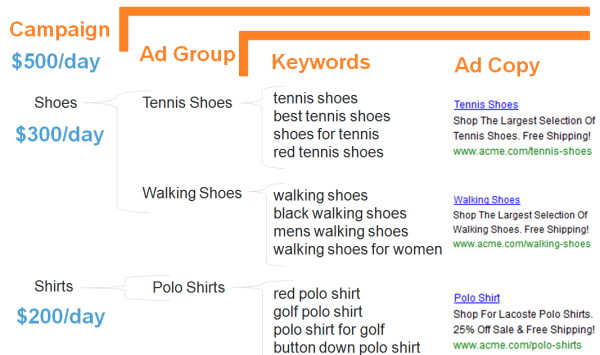
google ads account structure

There are several levels for Google Ads campaign organization:

  • Ad - The copy that's displayed for the keywords you've chosen.
  • Keywords - The queries you're bidding on.
  • Ad Group - Sets of like keywords grouped by theme.
  • Campaign - Highest level for managing ad groups.

At each level, you'll be able to determine what's working and not working, making you more informed about performance and how your money is being spent.

Copy

At the end of the day, when your keywords are chosen and your account is structured, you still have to write good ads and "earn" the click.

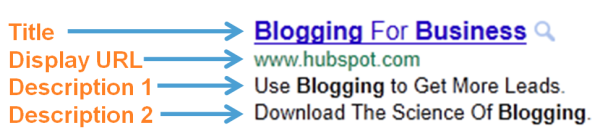
An ad is made up of a few components:

  • Title
  • Display URL
  • Description

anatomy of a google ad

Understand exactly what the searchers are looking for with their queries and see if you write a great ad that makes your offer attractive.

Keep in mind also that SEM isn't a set-it-and-forget-it activity. Ongoing PPC management helps you eliminate budget waste, experiment with ads, and optimize keywords you're bidding for to ensure that you're getting the most ROI from your efforts.

Best SEM tools

  1. HubSpot's Ad Tracking Software
  2. SEMrush
  3. Google Trends
  4. Keywordtool.Io
  5. Google Ads Keyword Planner
  6. SpyFu
  7. WordStream

1. HubSpot's Ad Tracking Software

You're not paying for ads for the fun of it; you're paying for ads because you want to generate leads and drive revenue for your business. The HubSpot Ads tool helps you go beyond traffic and click metrics to analyze exactly how ads are influencing contacts where they are in the buyer's journey. This will help you understand which ads actually work, justify SEM as a channel, and integrate your advertising in with the rest of your marketing efforts.
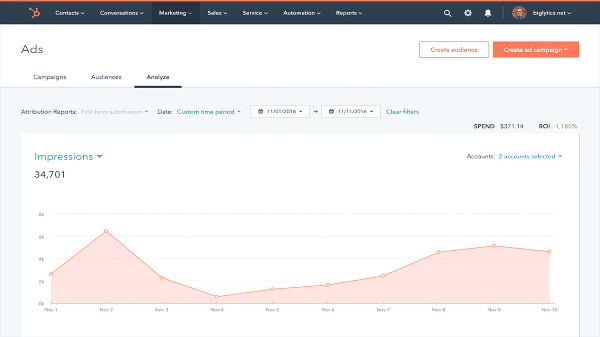
HubSpot SEM Tool

2. SEMrush

SEMRush allows you to conduct extensive keyword research, keyword rank tracking, site audits, traffic analysis, and more. SEMRush is a fantastic tool for finding opportunities to rank for long-tail keywords organically, but additionally, you can use the tool for various SEM efforts. For instance, you can use SEMRush to figure out where your competitors are concentrating their marketing efforts, and analyze their regional presence, to figure out how much money you want to put behind certain keywords.

Additionally, SEMRush enables you to discover your main paid search competitors, figure out which keywords they're bidding on, and study the composition of their ads. This is vital information when you're cultivating your own paid strategy and are unsure how to out-rank other businesses on the SERPs.
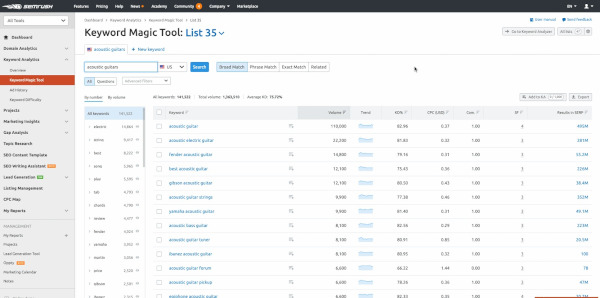
semrush sem tool

3. Google Trends

Google Trends allows you to track search volume for a particular keyword across a specific region, language, or time frame -- which can enable you to identify which search terms are trending, and which ones aren't. Since you don't want to put money behind a keyword that's decreasing in popularity, this is an incredibly useful tool for your SEM efforts.

Additionally, particularly if you work for an ecommerce business, the ability to gauge interest in your product or service in a certain geographical area is undoubtedly powerful for ensuring you tailor your paid efforts to specific locations, saving you money in the long-run.
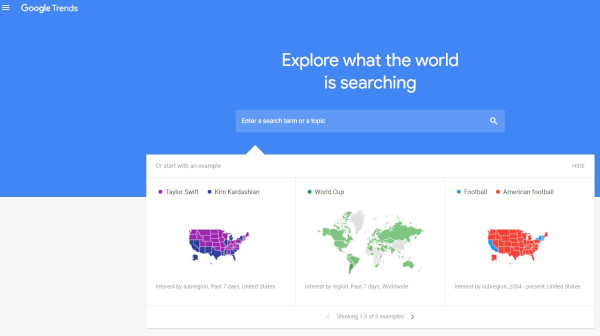
google trends sem tool

4. Keywordtool.io

One of the most helpful features of Keywordtool.Io is its ability to tap into Google, Bing, YouTube, Amazon, Instagram, Twitter, and the App Store, so that you're able to segment your keyword research through various channels and better target your efforts. Additionally, the tool takes your base keyword and provides you with variations of words and phrases, which allows you to cultivate a more extensive list of possible keywords you might want to include in a paid ad.

Using Google Autocomplete to provide relevant keywords for you, the free version of Keywordtool.Io lets you generate up to 750 long-tail keywords and keyword suggestions for every search term. Plus, you can use the tool to analyze search trends on Google, to ensure your desired keywords are increasing in popularity and will continue to serve you well over the long-term.
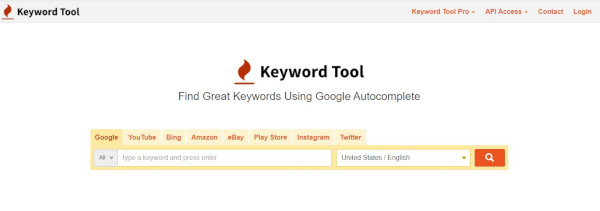
keywordtool.io sem tool

5. Google Ads Keyword Planner

Since Google is likely where you want your ads to appear, it makes sense to consider using Google Ads Keyword Planner to research relevant keywords for your business, and keep track of how searches for certain keywords change over time. The Keyword Planner will help you narrow down a list of possible keywords to ensure you're choosing the most effective ones for your business.

Additionally, Keyword Planner will give you suggested bid estimates for each keyword, so you can determine which keywords work with your advertising budget. Best of all, once you've found your ideal keywords and are ready to launch an ad campaign, you can do it all from within the tool.
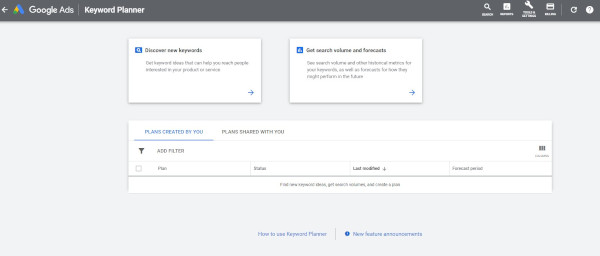
google keyword planner sem tool

6. SpyFu

Ever wish you could see which keywords your competitors are buying on Google, or check out which ad tests they've run? With SpyFu, you're able to do just that -- simply search a domain, and you'll see every keyword that business has bought on Adwords, every organic keyword for which they've ranked, and every ad variation they've had in the last 12 years. Plus, you can monitor your own paid and SEO rankings on Google, Bing, and Yahoo.
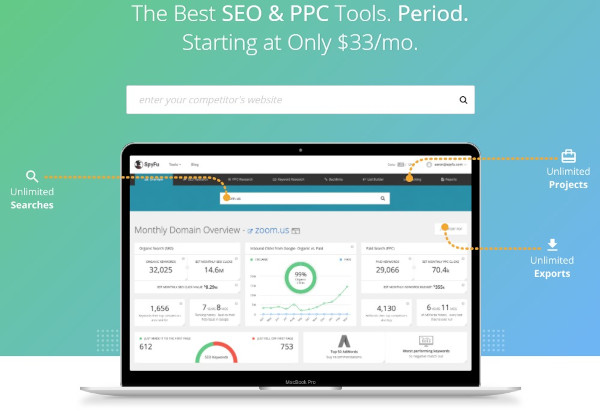
spyfu sem tool

7. WordStream

WordStream is a advertising management solution that can help you research, measure, and optimize your ads for performance. You get access to advanced reporting features for data analysis and tools for creating great ads. In addition, WordStream has alerts and workflow tools to help you make decisions about your campaigns.
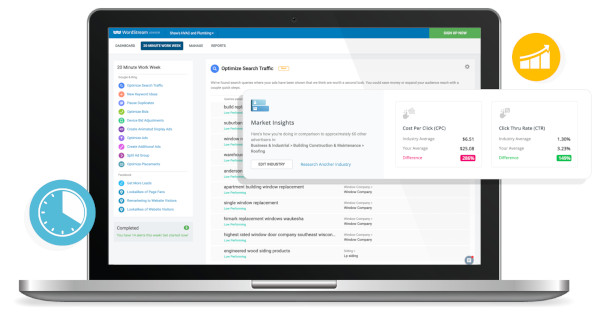
wordstream sem tool

With the above tools and a killer strategy, SEM can be a great strategy for lead generation. There's no reason why you shouldn't start your PPC campaign today.

Editor's note: This post was originally published in April 2019 and has been updated for comprehensiveness.


The Ultimate Guide to SEM (Search Engine Marketing) was originally posted by Local Sign Company Irvine, Ca. https://goo.gl/4NmUQV https://goo.gl/bQ1zHR http://www.pearltrees.com/anaheimsigns

A Brief Timeline of the History of Blogging

Greetings, readers. Welcome to the HubSpot Marketing Blog.

We’re very happy to have you here. You might not realize it, but getting here was no easy task. Today, in 2016, I blog for a living, which is pretty great. But were it not for the long, twisty journey that got blogging to its current state, I might not be here. You might not be reading this.

We've found that there's quite a history behind blogs. According to the documentation we uncovered -- and will share with you below -- they've been around since 1994. They looked a lot different back then, and had many different names and meanings.

Merriam Webster currently defines a blog as “a web site on which someone writes about personal opinions, activities, and experiences.” Remember that -- it’s going to come in handy later. But first, let’s talk about how we got here.

The Blogging Vernacular

The early vocabulary and semantics around blogging are more than a little muddy. As the practice developed, some of the more popular monikers were “weblog,” “personal web page,” and “online diary.” We'll dive into each of these a bit as we explore the more primitive days of blogging.

Now, we simply say “blog” -- that's a pretty popular term in our vocabulary. But what it means continues to change. Bloggers have dozens of platforms and formats available (fun fact: HubSpot has a blogging platform, too), and there's no longer a standard for what a blog is supposed to look like.

And their former look and feel was dictated by the language people used to use to describe the act of blogging. As you'll see below, the word is primarily rooted in the idea of a log on the web. At one time, in fact, blogging was somewhat restrictive and limited to web-only subject matter.

Luckily, we've evolved and expanded how and why we blog since then. One day, someone figured out that we don't have to stick to strictly technical topics when we put things on the Internet. (And thank goodness -- remember that thing I said about blogging for a living?)

So, let's see if we can better understand how that all took place. Grab some popcorn -- you're in for a 22-year-long tale.

The History of Blogging

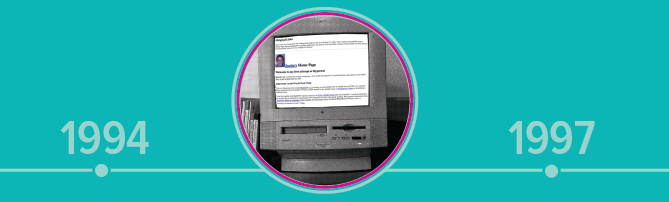
1994-1997: First blogs

1994-1997: First blogs timeline

There’s a bit of debate around the first stages of blogging, much like the rest of its history -- in the first half of the nineties, for example, there wasn’t a ton of online record-keeping, and most primitive blogs are either now archived or nowhere to be found.

Many of these original bloggers -- despite not having yet earned that title -- were the same people who first understood the value of the World Wide Web in the 1980s. One of them was then-Swarthmore-College undergrad, Justin Hall, who created a site called links.net in January 1994. It was essentially a review of HTML examples he came across from various online links, but it was enough for the New York Times Magazine to dub him the “founding father of personal bloggers”.

In that article, Hall brought up the semantics of blogging, and how he was assigned many titles during his primary days online (some of which are hilariously documented here).

“When I first started [blogging], they called it a personal home page,” he said, “then they said I'm one of the first Web diarists, and now I'm one of the first Web bloggers.”

That same year, Claudio Pinhanez (who today is a Social Data Analytics Senior Manager at IBM) began to log short entries into what he called an "Open Diary."

But it wasn’t until December 1997 that the term “weblog” came to be. It was first used by Jorn Barger, creator of the website Robot Wisdom. He pioneered the term to describe a “log” of his internet activity, much like Hall did in 1994, which largely amounted to a list of the links he visited.

That may have set the tone for the new era of blogging that would follow less than a year later, when blogging-specific platforms began to debut.

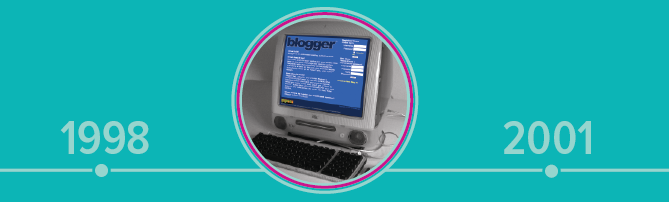
1998-2001: More resources for bloggers

1998-2001: More resources for bloggers timeline

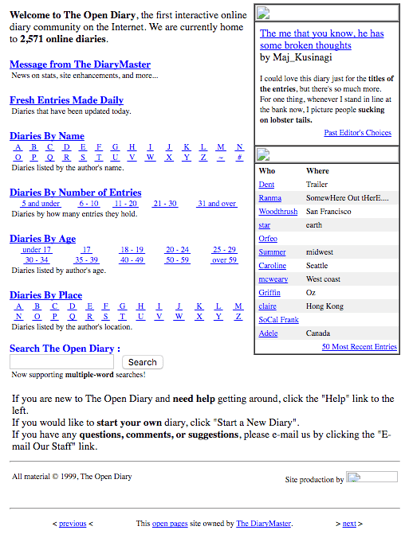
The later part of the nineties saw an uprising in resources created just for bloggers. One of them, Open Diary, launched in October 1998 and became one of the most pivotal blogging platforms -- its name, was a nod to its open, community approach to blogging, as Open Diary was the first of its kind to have a membership model that allowed members of the community to comment on the work of others.

Open Diary circa 1999

Open Diary, c. 1999. Source: Wayback Machine

In 1999 -- though no one is quite sure exactly when -- then-programmer Peter Merholz (who later went on to head up design at Groupon, OpenTable, and Jawbone, among others) shortened the term “weblog” to “blog.”

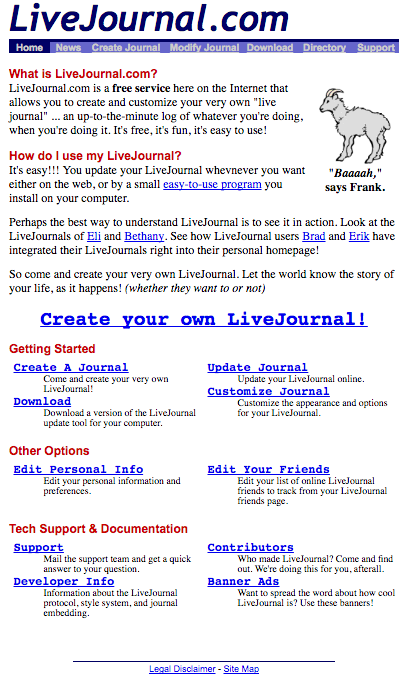
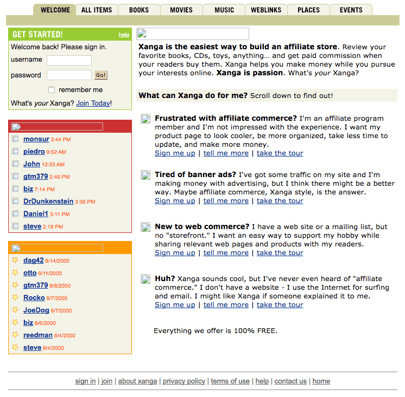
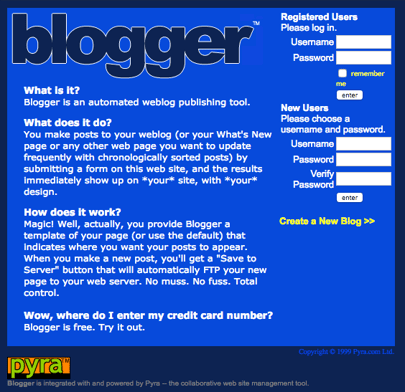
It was part of a period that displayed an influx of blogging opportunities, with each platform attempting to boast its own unique set of features for a particular audience. In 1999 alone, Blogger, (which would go on to be acquired by Google), LiveJournal, and Xanga all launched.

Blogger circa 1999Blogger, c. 1999. Source: Wayback Machine

LiveJournal circa 1999

LiveJournal, c. 1999. Source: Wayback Machine

Xanga circa 2000

Xanga, c. 2000. Source: Wayback Machine

Xanga (for whom Twitter co-founder Biz Stone once served as creative director) actually began as a social networking site -- sometimes compared to MySpace -- and didn’t add blogging features until 2000.

This period of time also saw some of the first rumored video blogs. In January 2000, a man named Adam Kontras accompanied a written blog post with a video that updated friends and family on what he was doing. That November, professor Adrian Miles posted what some speculate to be one of the first video blogs, as well, calling it a “vog.”


"NO PETS ALLOWED. We smuggled him in. It was awesome. Felt all undercover." Source: Adam Kontras

As the sun set on the nineties, blogging began to have quite an impact on many lives. People were starting to figure out how to monetize their blogs -- which we'll get into in a bit -- and the stage was set for businesses and individuals alike to take bloggers seriously.

2002: A big year for blogging

2002: A big year for blogging timeline

The early 2000s saw a few significant events within the blogging realm. Technorati, one of the first blog search engines, launched in February 2002.

That month, blogger Heather B. Armstrong was fired for writing about her colleagues on her personal blog, Dooce.com. While it’s not clear if she was the first blogger to be terminated because of her personal website’s content, it sparked a conversation about the privacy and freedom of expression for bloggers.

The subject arose again in 2004, when Congressional aide and controversial blogger Jessica Cutler would experience the same fate as Armstrong. Cutler, however, blogged anonymously until her identity was revealed by the website Wonkette.

The year 2002 also saw the dawn of “Mommy Bloggers,” which largely consisted of mothers blogging about parenting, aiming to create a sense of support and learning for their readers. Melinda Roberts founded TheMommyBlog.com -- "one of the original mom blogs," she writes -- that April, creating a category that would continue to take storm for over a decade.

The following month, Newsweek predicted that blogs will replace traditional media and, rather in December of that year, it partially came to fruition, when Talking Points Memo broke the written transcript of Trent Lott’s infamous call into "Larry King Live" -- when Lott illustriously sang the praises of Strom Thurmond. Blog entries like these would serve as a precursor to live blogging, which took shape the following year.

In August, Blog Ads was launched by Pressflex LLC. Less than a year later, Google would debut AdSense, which paired blogs with relevant advertisements (at the discretion of the blogger). Being able to advertise on blogs was a major milestone for bloggers, as it created the opportunity to monetize their work. It set the stage for blogs to be sponsored by major brands that fit their respective credos, or receive free products in exchange for endorsements or reviews. Blogging was turning into a business -- and soon, a small population of bloggers would be using what used to be a hobby as their primary source of income.

The tumultuous Gawker -- which New York Magazine cited as the initiation of gossip blogs -- also launched in December 2002, only to cease operations in August 2016 after a high-profile legal battle.

2003: The momentum continues

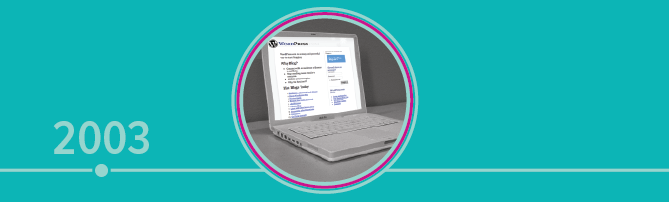
2003: The momentum continues timeline

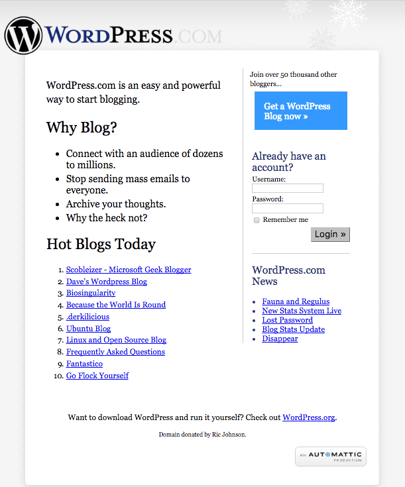
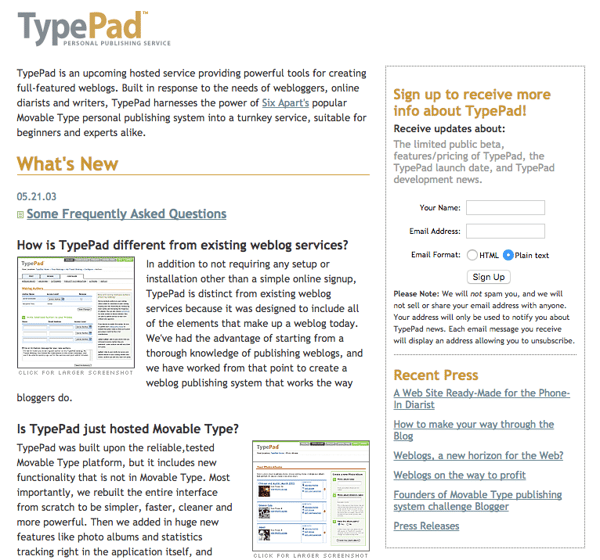
TypePad and WordPress launched in 2003, continuing the trend of providing platform options to a growing number of bloggers. That’s the same year that live blogging is estimated to have started -- the Guardian was one of the first outlets on record to make use of live blogging during the 2003 prime minister's question time. The BBC refers to this blogging activity as “live text,” and has frequently used it for sporting events.

WordPress circa 2005WordPress, c. 2005. Source: Wayback Machine

TypePad circa 2003

TypePad, c. 2003. Source: Wayback Machine

February 2003 also marked Google's acquisition of Pyra Labs -- the makers of Blogger. That was a sign of the growing business of blogging, particularly in the wake of the monetization programs that launched the previous year.

The early 2000s showed the first signs of a rise in political blogs. In 2003, for example, several traditional media outlets were encouraging staff writers and columnists to double as "cyberjournalists," as Matt Welch called them in a piece for the Columbia Journalism Review. It reflected a growing number of political bloggers, with many seasoned reporters looking to blogging for opinion and beat outlets.

That climate primed the blogosphere for what would follow in the latter half of the decade, when the perspectives and analyses of political bloggers began to be preferred sources of information on current events. The line between traditional media and the blogosphere would start to bend, as bloggers were fated to become members of the press.

2004 - 2005: Video and the press

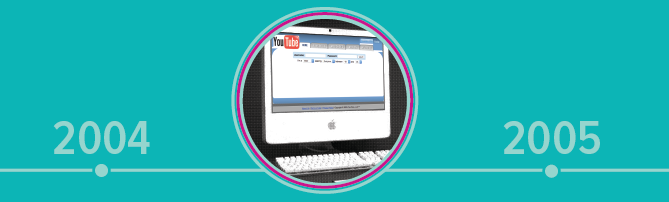
2004-2005: Video and the press timeline

Despite the earliest video blogs being recorded in 2000, it wasn’t until the middle part of the decade that visual content really had the opportunity to take root. In February 2004, videographer Steve Garfield -- who went on to be one of the Web’s first video bloggers declared it to be the “year of the video blog.”

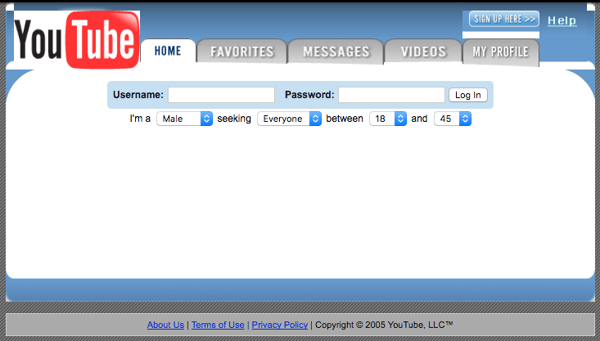
As fate would have it, YouTube launched only a year later in February 2005, shortly thereafter inviting the public to upload their own videos. But it wasn't always what people associate it with now -- it actually began as a short-lived dating site, where singles could use videos to introduce themselves and state their romantic criteria.

YouTube circa 2005YouTube, c. 2005. Source: Wayback Machine

But once YouTube turned its focus to general video uploads (which seemed to take effect by June 2005 according to Wayback Machine), it was part of a series of developments that showed the growing credibility of the online user. With ample resources already built for writers, developers were starting to address other content creators.

And it wasn’t just developers who were lending credibility these online users. In March 2005, blogger Garrett Graff was the first to be granted White House press credentials.

That might have been when the line between news reporting and blogging began to diminish, which some attribute to the launch of the Huffington Post that May. It began as what one case study named a “political forum” -- and the Washington Post called it a “group blog” in a 2007 profile -- but is today one of the highest-profile content aggregators.

Huffington Post is largely a mix of syndicated material and original content from staffers, columnists, and unpaid bloggers. Visit the website, though, and you’ll land on a page of global headlines, lending the visual impression that it’s a news outlet.

It comes as no surprise that one of Huffington Post's co-founders, Jonah Peretti, went on to co-found BuzzFeed. Though BuzzFeed wouldn’t refer to itself as a content aggregator -- it instead identifies as “a cross-platform, global network for news and entertainment” -- it contains a similar vast range of content and, despite having an editorial staff, anyone can post to the site.

These newer platforms raised the question: “Is it a newspaper, or is it a blog?” And as the 21st century progressed, the answer to that question wouldn't become any clearer.

2006-2007: The rise of microblogging and rules

2006-2007: The rise of microblogging and rules timeline

The start of life in 140 characters (or less) began in March 2006, when Twitter co-founder and CEO Jack Dorsey sent out the world’s first tweet.

just setting up my twttr

— 🚶🏽jack (@jack) March 21, 2006

It was the introduction of microblogging -- sharing stories, news, and other types of content in the smallest format possible.

Microblogging continued to gain momentum in February 2007 with the launch of Tumblr -- yet another blogging platform that encouraged users to be brief. It was built, wrote former CNET reporter Josh Lowensohn, for those “who feel they may not have enough content or time to write a full blog, yet still want to write and share links and media.”

But with the introduction of short-form, real-time information sharing also came increasingly visceral communication. There would be countless mean tweets, as well as harmful comments left on blogs. It got to a point where, in March 2007, new media mogul Tim O’Reilly proposed a Blogger’s Code of Conduct in response to threatening comments that a friend had received on her blog. The rules were as follows:

  1. Take responsibility not just for your own words, but for the comments you allow on your blog.
  2. Label your tolerance level for abusive comments.
  3. Consider eliminating anonymous comments.
  4. Ignore the trolls.
  5. Take the conversation offline, and talk directly, or find an intermediary who can do so.
  6. If you know someone who is behaving badly, tell them so.
  7. Don't say anything online that you wouldn't say in person.

It showed that the blogosphere had come a long way since the 1998 introduction of Open Diary. Being able to comment on blogs was becoming less of a novelty, and more a point of contention. Several years later -- in 2013 -- the Huffington Post finally took a cue from rule #3 on the code of conduct, banning anonymous comments on its content and requiring commenters to link their feedback to a Facebook profile.

2008-2011: Blogging Dark Ages

2008-2011: Blogging Dark Ages timeline

During this period of four years, there weren’t many major events that propelled how or why people blogged.

There were a few developments of note, however. In January 2009, the White House blog debuted.

Later that year, the film Julie & Julia premiered, which followed the success of one food blogger whose online work eventually became a book. It was one of the first pop cultural references to the professional success of bloggers, and stood to inspire others -- by 2010, Technorati shared that 11% of bloggers reported earning their primary income from blogging.

Google also made some changes that would impact bloggers in 2011 with its rollout of the "Panda" algorithm change. Its purpose was to lower the rank of sites with what Moz called "thin content," which hurt bloggers producing content that Google deemed to be of lower quality. A lot of that had to do with bloggers having a lack of inbound links -- a link to your website that comes from another one. (My colleague, Lindsay Kolowich, wrote more about that here.) Without many sites linking to these blogs, Google's algorithm would begin to interpret them as less relevant.

2012: Medium is founded

2012: Medium is founded timeline

In August 2012, a co-founder of Pyra Labs -- the creators of Blogger -- Evan Williams, created Medium: One of the newest blogging platforms.

Today, Medium is more than that. People can use it to write and publish original content, like most other blogging platforms. But Medium is continuing to blur the line between news reporting and blogging. In fact, on its website, the company describes itself as serving up “daily news reimagined, straight from the people who are making and living it.”

It was a notable introduction of decentralized content: A concept that allows users to share their work that has been published elsewhere on a content creation platform. That’s different than sharing links on social media, for example, where limited content is displayed. Instead, the full text and images of the work are shared, with the original author and source credited, on a site different from its origin.

It might sound kind of confusing and pointless. But my colleague, Sam Mallikarjunan, explains the benefits of doing something like that in his article, “Why Medium Works.” In sum: Medium has roughly three million viewers, all sharing and reading content. Does your blog have that kind of reach? If it doesn’t, you can reach Medium’s vast audience by syndicating your own content on their platform, drawing more attention to your work.

The same year that Medium launched, LinkedIn introduced its Influencers program, which recruited notable business figures to guest blog on LinkedIn’s publishing platform. Eventually, that platform became open to all LinkedIn members in 2014.

Though LinkedIn’s platform worked a bit differently than Medium’s -- users can’t re-post full bodies of work in the same seamless way on the former -- it does provide another outlet for people to share original content with an audience much larger than they may have received on their own domains. 

2017 saw the latest development of the blogging realm -- the creators of WordPress announced they would be rolling out the .blog domain

Here’s the cool thing about .blog -- even though it was made by the creators of WordPress, you don’t have to use the WordPress platform in order to build a blog on that domain.

“The domain registrations are open to anyone,” wrote Adario Strange of Mashable, “regardless of publishing platform.”

What's Next?

I don’t know about you, but after diving into the history of blogging, I’m pretty excited to see what its future looks like.

Of course, it probably helps that blogging is my line of work. But I’m certainly not alone. Here at HubSpot, our content team has at least three full-time bloggers, and there are an increasing number of job titles that either indicate or include a blogging as a major function.

It makes sense, when you look at the state of blogging now. It's an integral part of marketing and content strategy, and has even shown to increase lead flow up to 700% for some businesses.

How blogging continues to change will determine what our careers look like, and I encourage all marketers -- corporate or otherwise -- to blog on behalf of their respective brands. It might seem like a lot of work, but if the evolution of blogging has indicated nothing else, it's that the sphere will only continue to expand.

And that's something marketers should continue to pay attention to -- not just the growth of blogging, but how many different interpretations of it exist. Just look at Facebook Live, Facebook Instant Articles, and Snapchat Stories against the context of the dictionary definition of a blog from above: “a web site on which someone writes about personal opinions, activities, and experiences.” Replace “writes about” with “shares,” and you could make the case that most of today’s content platforms -- including social media networks -- are their very own versions of blogs.

Want to learn more about the future of blogging and marketing as a whole? Check out the latest edition of our State of Marketing report.

Editor's note: This post was originally published in September 2016 and has been updated for comprehensiveness.


A Brief Timeline of the History of Blogging was originally posted by Local Sign Company Irvine, Ca. https://goo.gl/4NmUQV https://goo.gl/bQ1zHR http://www.pearltrees.com/anaheimsigns
How to Host a Virtual Holiday Party & Bond With Your Team

Throughout my career, I've worked at a company that was fully remote, a company that was partially remote, and several fully in-person organizations.

Each company approached holiday parties differently. In fact, most of the remote organizations didn't even offer team bonding activities.

While we've all probably participated in various holiday parties and team bonding events, those might not have been virtual.

Hosting a virtual team bonding or holiday party can seem daunting. How can you plan activities online? What logistics are involved?

If you're planning a virtual holiday party this year, don't stress.

Let's review some tips from HubSpot's remote workforce on how to host a virtual holiday party.

1. Use a spreadsheet to organize your activities.

Planning a virtual holiday party requires plenty of logistics. That's why you should use a spreadsheet to stay organized.

Kara Korosec, a remote senior customer success manager at HubSpot, says, "I used to coordinate Secret Santa at my last company, a 100% remote company. I set up a spreadsheet where everyone listed some of their interests, then we used a random generator to assign secret Santas. Everyone had a budget of $50 and used the spreadsheet as inspiration for what to get. After the gifts were mailed, we had a Zoom where we shared our gifts and guessed who our secret Santa was."

Regardless of the activity you're doing, it's important to stay organized so it's clear who's running the activities and when the deadlines are.

2. Make it interactive.

Virtual events might automatically feel "hands-off." However, these events can still be interactive. In Korosec's secret Santa example, they opened the gifts on a live Zoom call.

The goal here is to be creative.

Eimear Marrinan, a director of culture at HubSpot, says, "There are a ton of amazing remote vendors and minority-owned businesses that we partner with in the Culture Team. They are doing amazing work. If your budget allows for it, consider outsourcing to the experts. A few brilliant events I have seen: Ski Chalet Experience, Walkthrough Christmas Markets, Cocktails in a Winter Wonderland!"

There are several online games and activities you can use for your virtual holiday party. Below are some of our favorite interactive remote activities:

3. Incorporate food.

When you have an event in person, usually the meal is provided. With remote holiday parties, don't forget about this element.

Emily Tong-Sanchez, a remote revenue operations specialist at HubSpot, says, "Let people comp their meal!"

This gives people a reason to celebrate and enjoy the party.

Marrinan adds, "Ask questions if you're incorporating food. Are there allergies or preferences? If you're arranging a cocktail hour, does everyone drink alcohol? This is all about being inclusive in how you're arranging your event."

If you're sending food, it's important to be aware of any restrictions so your event is inclusive of all participants.

4. Encourage people to dress up.

Holiday parties are usually fun events where everyone can dress up and celebrate. Being remote shouldn't change this.

Tong-Sanchez says, "Encourage people to dress up. We like having a reason to put on fancy clothes!"

5. Always lead with an inclusive mindset.

A major obstacle with remote meetings is that it's hard to feel included.

Marrinan remarks, "We are working in a distributed and remote world right now, so when thinking through a holiday event for you and your team think big & think global. Will the timezone work for all on your team? Do ‘The Holidays' resonate across the globe? Make sure you plan something fun, and inclusive that everyone can get involved in!"

6. Plan in advance.

If you're planning a virtual holiday party, it's important to plan in advance.

Marrinan says, "The end of the year is busy. Really busy! Give people advanced notice and book time in advance. A lot of people are juggling right now, so being protective of time is important! Similarly, be mindful of caregivers on your team, or anyone that may have blocked time in their day."

7. Send something physical.

Just because your event is remote, doesn't mean you can't include a physical element in your virtual holiday party.

"Can you send something out to the team in advance to spur some excitement? This doesn't have to be a physical gift -- maybe it is a handwritten card or a note of gratitude," Marrinan remarks. "A holiday event doesn't have to be a big, big thing. Sometimes it's the simple acts of kindness that go a long way for people."

8. Pick a goal.

When you're planning your holiday party, it's important to decide what your goal is. For example, it's hard to play a game while also getting to know each other.

Caroline Merewether, a strategy and operations manager at HubSpot, says, "The biggest takeaway is to figure out if it's more about deepening relationships or playing a game."

One of Merewether's favorite events her team put on was an Airbnb experience which was a virtual escape room.

"That was fun to do something different and it was a fun mental shift. But it wasn't great for getting to know people because we were trying to solve for clues. For our next party, we wanted to drive conversation between us," she adds.

For her team's next virtual holiday party, they're going to send international candies that will be a great conversation starter for breakout rooms. Then, they're going to do a costume contest and online trivia.

Jeff Boulter, an engineering lead at HubSpot, decided to combine the interactive activity with a way of getting to know each other via an interactive trivia game.

To start, Boulter sent out a Google Form with a mixture of icebreaker questions. A few examples included:

  • What was your first online handle or email address?
  • What course did you do the worst at college?
  • What's the weirdest job you've ever had?
  • What's your least favorite song?
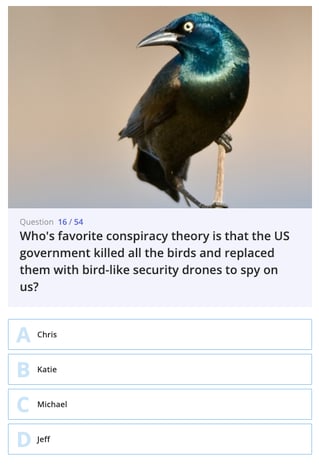
  • What's your favorite conspiracy theory?
  • What's an unusual skill you have?
  • Star Wars or Star Trek?
  • Yanni or Laurel?
  • If you could commit any crime and get away with it, what would it be?
  • What's the worst gift you've ever received?
  • Who would get eaten first if we all got stuck in the 1C elevator?

Then, they used a free online trivia site called MyQuiz. Here, the answers were either picking one person from their squad (who's least favorite song is "It's a Small World", for example) or picking the correct answer amongst 3 other made-up answers. They ended up with 54 questions. See the picture below for what this looked like.

A virtual trivia game.

Ultimately, planning a virtual holiday party takes some planning. But with a little research, you could end up with a fun, interactive game.

As a remote leader, your holiday party can be just as fun and interactive as an in-person event. To learn more, consider taking HubSpot's Remote Leadership Training.


How to Host a Virtual Holiday Party & Bond With Your Team was originally posted by Local Sign Company Irvine, Ca. https://goo.gl/4NmUQV https://goo.gl/bQ1zHR http://www.pearltrees.com/anaheimsigns
9 Australian Websites That Will Inspire Your Design

It's no question that Australia is one of the most visually stunning places on Earth.

And, for generations, Australian artists have embraced the continent's colorful culture in their work.

When walking through a museum or historical location in Australia, you might find canvases covered with vibrant colors and energetic images that feel like they're transporting you into an intense or action-packed scene.

Take, for example, this 1994 painting by Emily Kame Kngwarreye, an Australian high-colorist artis. Here, the painter uses explosions of different colors to simulate the action-packed beginning of Earth.

Image Source

But Australia's colorful, energetic art aesthetic doesn't stop at art museums. Today, it can be seen in architecture, graphic design, and online. In fact, many Australian brands exemplify the region's immersive or eye-popping artistic techniques in web design and user experience.

Whether you're an international marketer learning how to design a unique web experience for visitors around the world, or an Australian designer hoping to get a leg up on the local competition, we've compiled a list of nine stunning Australian company websites you can learn from.

Examples of Australian Websites

Vbreathe

Vbreathe, which sells a high-tech, compact air detoxification system for homes,leverages a full video experience on the homepage of its website.

vbreathe australian website demo

When you enter Vbreathe's site, you instantly see a silent video that uses animations and special effects to demonstrate how the detoxifier works. Then, when you click on the video's overlaid play button, you enter a full-screen product demo video that explains how the product works and why consumers should consider it.

After viewing the silent or full-screen video, visitors can scroll down to find more text-based product details and links to content air detoxification.

All in all, Vbreathe's site does a great job of combining stunning images, videos, and text-based content that educate visitors about in-home air quality and give them the information they need to justify making a purchase.

Kua Coffee

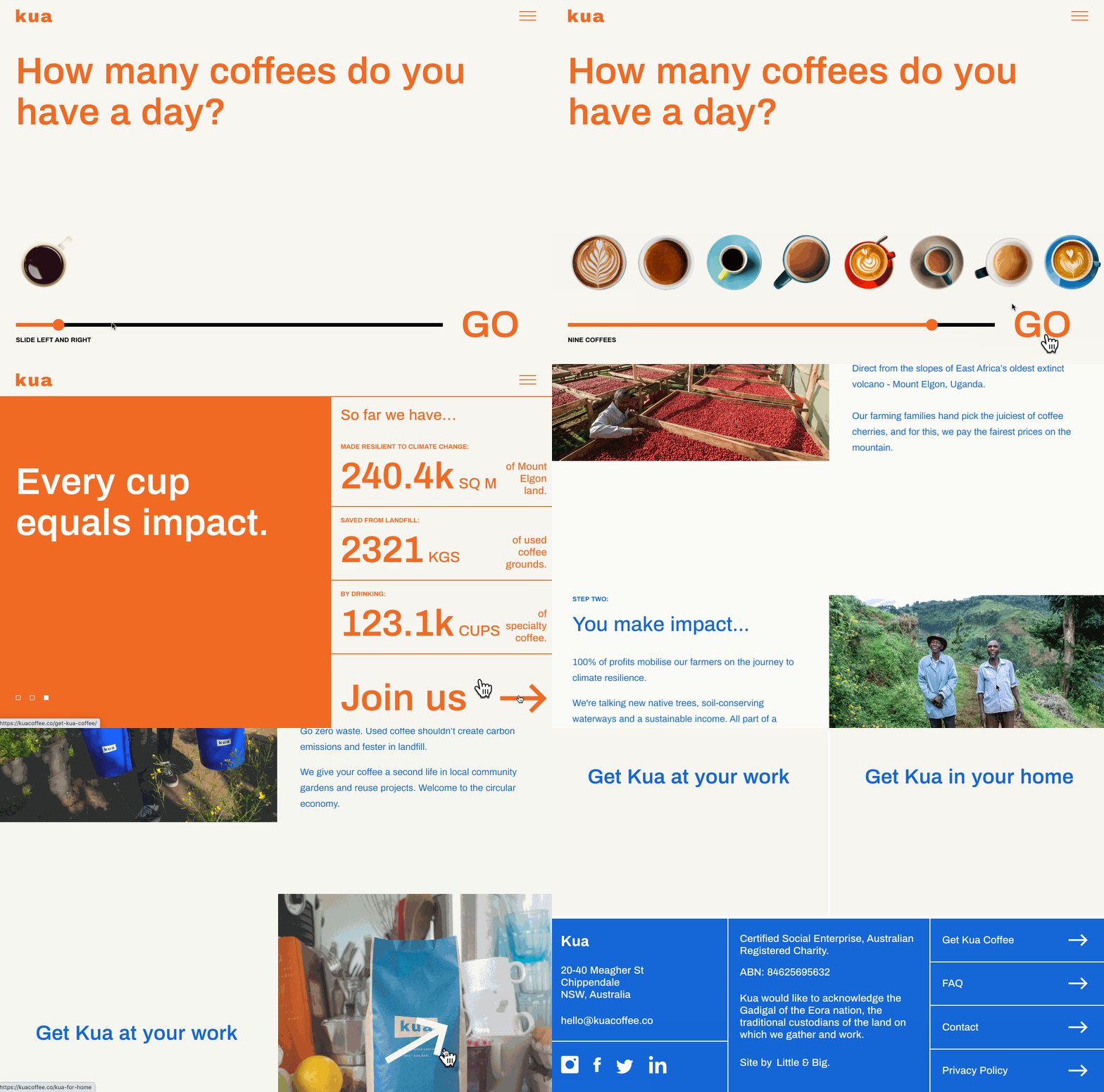
Kua Coffee pulls visitors into its website with an interactive homepage scale that simply asks, "How many coffees do you have a day?"

When you click an amount of coffee you drink on the scale and press "GO," you're sent through a slide show that calculates interesting measurements related to the amount of coffee you drink and explains where that coffee would be sustainably sourced from if you purchase brews from Kua.

kua coffee australian website demo

Once you complete Kua's slideshow, you can scroll through a page that informs you more about the impact of environmentally-friendly coffee brewing and where Kua's ingredients are sourced from.

Kua Coffee's site is a great example of how a brand can create an interactive experience that allows a visitor to think about how they use or consume a product, learn more about how that type of product is made, and find out why a particular brand's product is better than its competition.

Slaven Torline

While some designers might find it difficult to create a memorable site around something as logistical as financial planning, Slaven Torline -- an Australian firm that advises struggling companies -- embraces whitespace and simple animations to create an intriguing, effective, and professional website.

On Slaven Torline's homepage, all you'll find a brief mission statement, an image with a sphere and a cube, and a headline asking "How can we help?"

Slaven Torline australian website demo

When you hover over the sphere, you'll see the word "Insolvency" appear with a few list items to the side explaining how the business can help. When you hover over the square, you'll see something similar around the word "Restructuring.

When you click "Learn more" for either Insolvency or Restructuring, the page expands with the associated shape moving down to a lower corner. From there, the shape's shadow will change based on where your mouse is moving, adding light interactivity to the page.

Overall, Slaven Torline's a great example of how a corporate or B2B company with less visual offerings can still leverage a clever -- yet professional -- aesthetic to create a memorable, interesting, and smooth user experience for its visitors.

SeeMakePlay

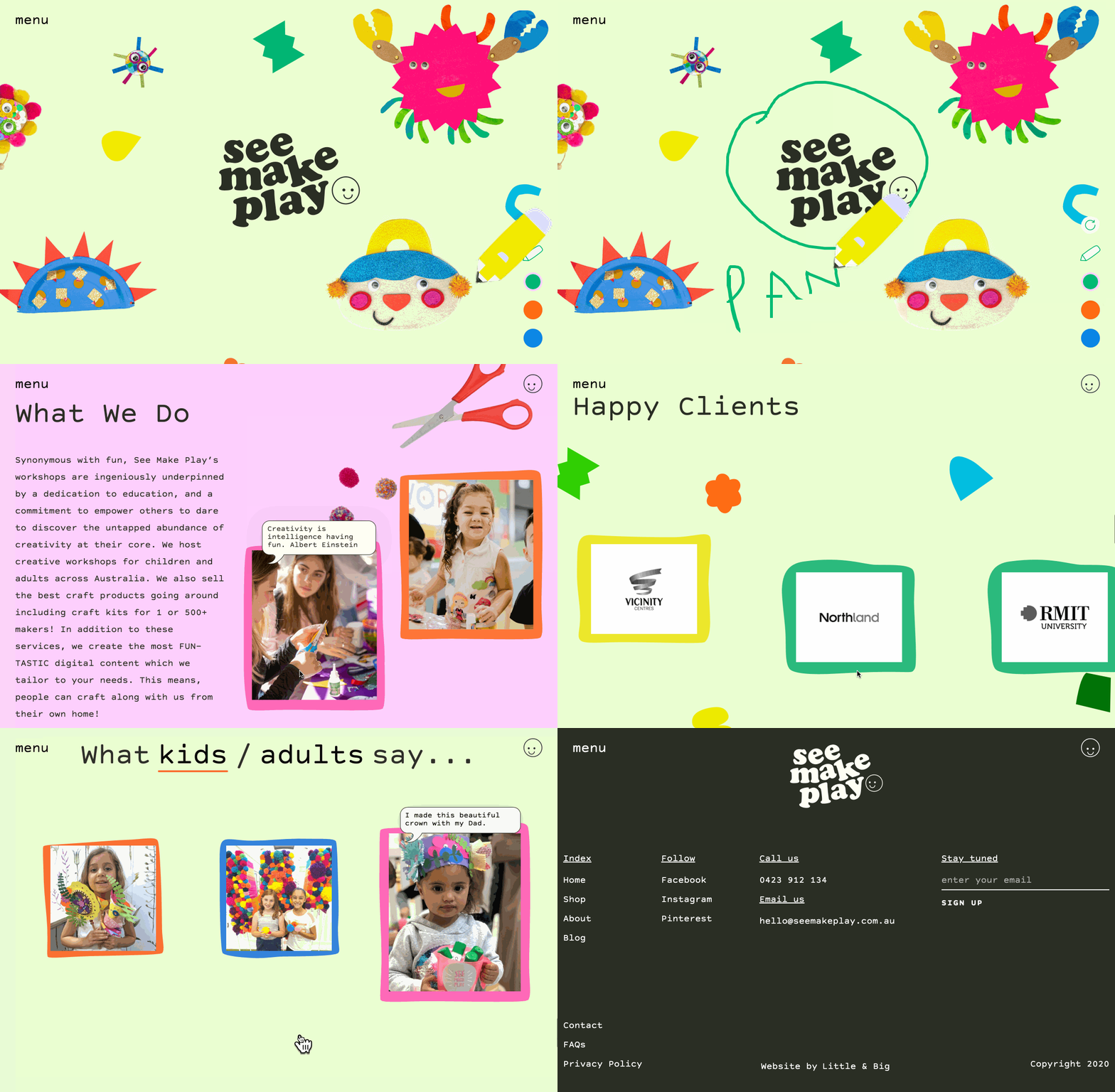
SeeMakePlay is a company that coordinates and teaches arts and crafts to children in schools or at parties. When you visit the site, you'll see a colorful SeeMakePlay logo surrounded by colorful animated characters. And, on the lower-right, you can click a color and a pencil icon which enables you to scribble all over the page and characters.

seemakeplay australian website demo

As you scroll down, you continue to see playful animations, testimonials, and images of happy children, as well as an explanation of how the business works. You can also find an inquiry form allowing you to learn more about the brand.

With SeeMakePlay's website, visitors can experience the fun and excitement of arts and crafts at the top of the homepage, scroll to learn more about the business, and ultimately find out where and how to schedule a class when they reach the bottom. This is an excellent way to pull a visitor through the flywheel as the design attracts, engages, and delights them.

PacVac

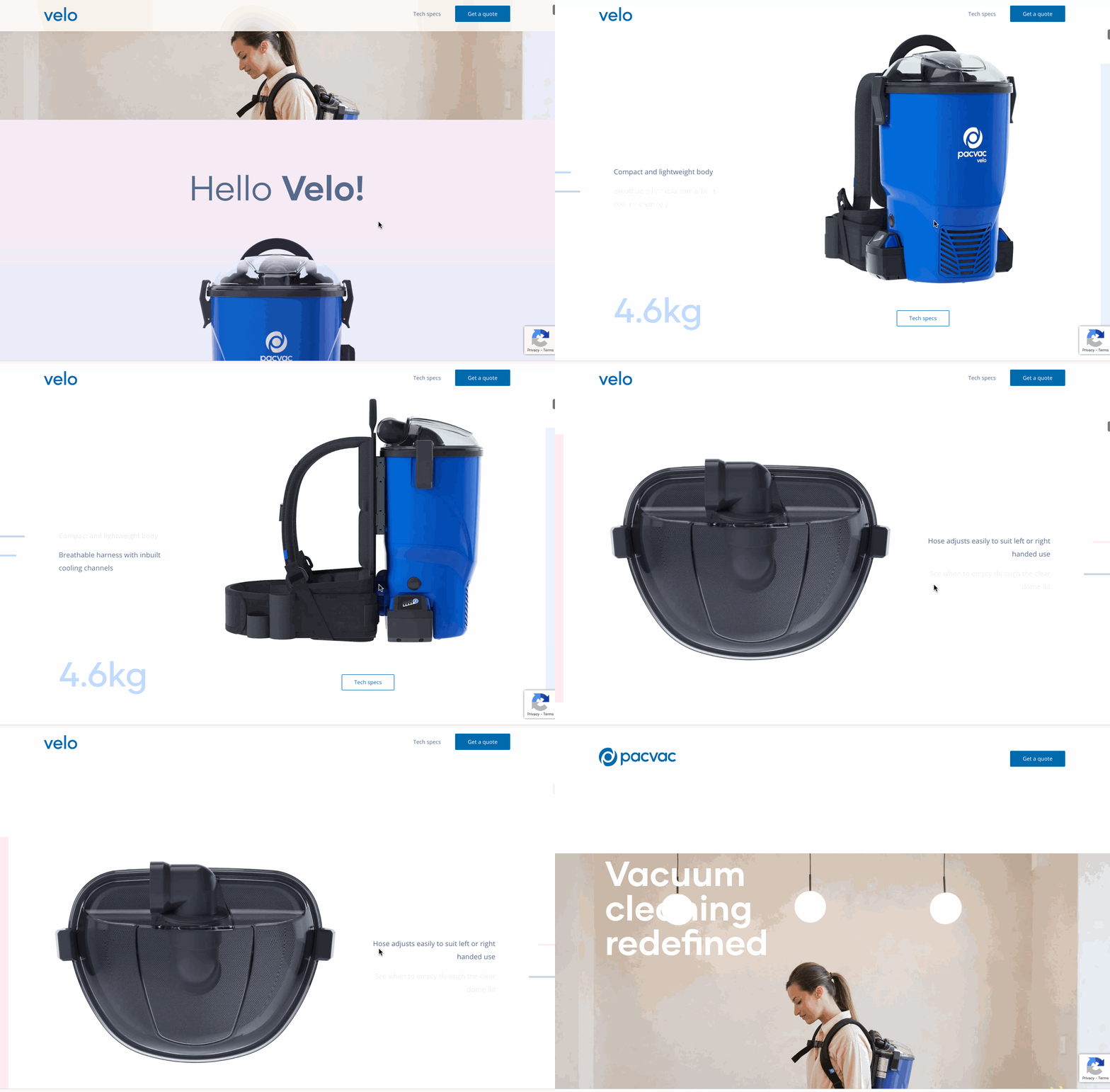
PacVac, an Australian vacuum company, offers its homepage visitors a highly visual and somewhat interactive experience that highlights the major value points of its Velo vacuum cleaner.

When you enter the site, you see a simple image of a woman vacuuming her home. Then as you scroll, you begin to see product shots of the Velo, which pop in front of a white background.

Just when you think this is a standard product site, you might notice that the product shots are animated. For some of them, you can twist and move the Velo in different directions with a simple swipe of your mouse, allowing you to get an interactive 360-degree view of the product.

pacvac australian website demo

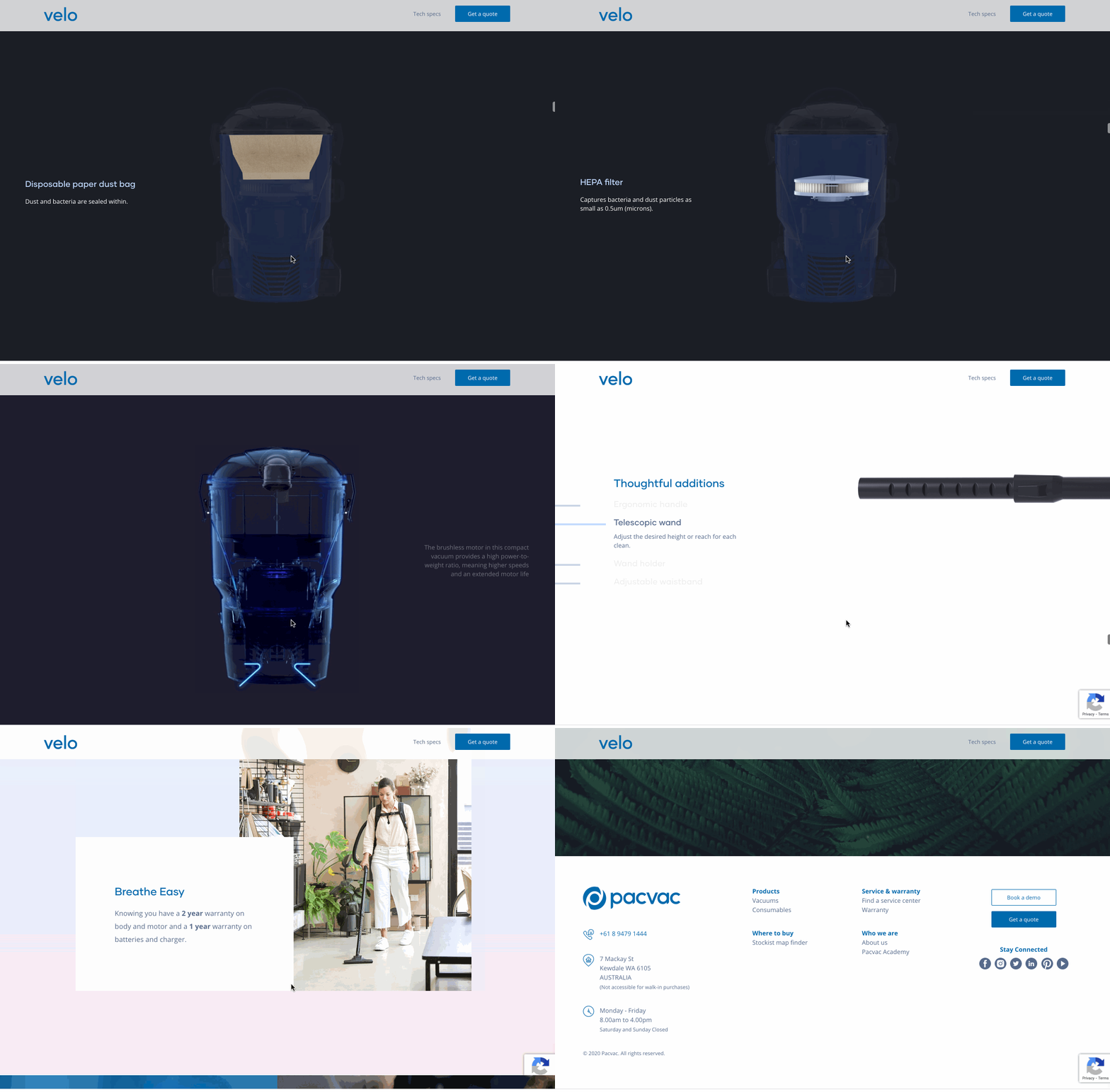
From there, the animations continue to get more advanced with each scroll. At one point you can scroll to see how each piece of Velo's inner machinery works.

pacvac australian website demo

Essentially the home-page of this site feels like a self-paced, interactive video demonstration that shows a visitor everything they need to know about a vacuum without completely overwhelming them. The more you scroll, the more complex the details and animations get.

The progression of VacPac's homepage content lines up well with the average buyer's journey. When a prospect is doing initial research, they might just skim a site for light product information. But, as they get more serious about purchasing a product, they'll look for a longer list of details and specifications before making an informed decision.

The Rocks Markets

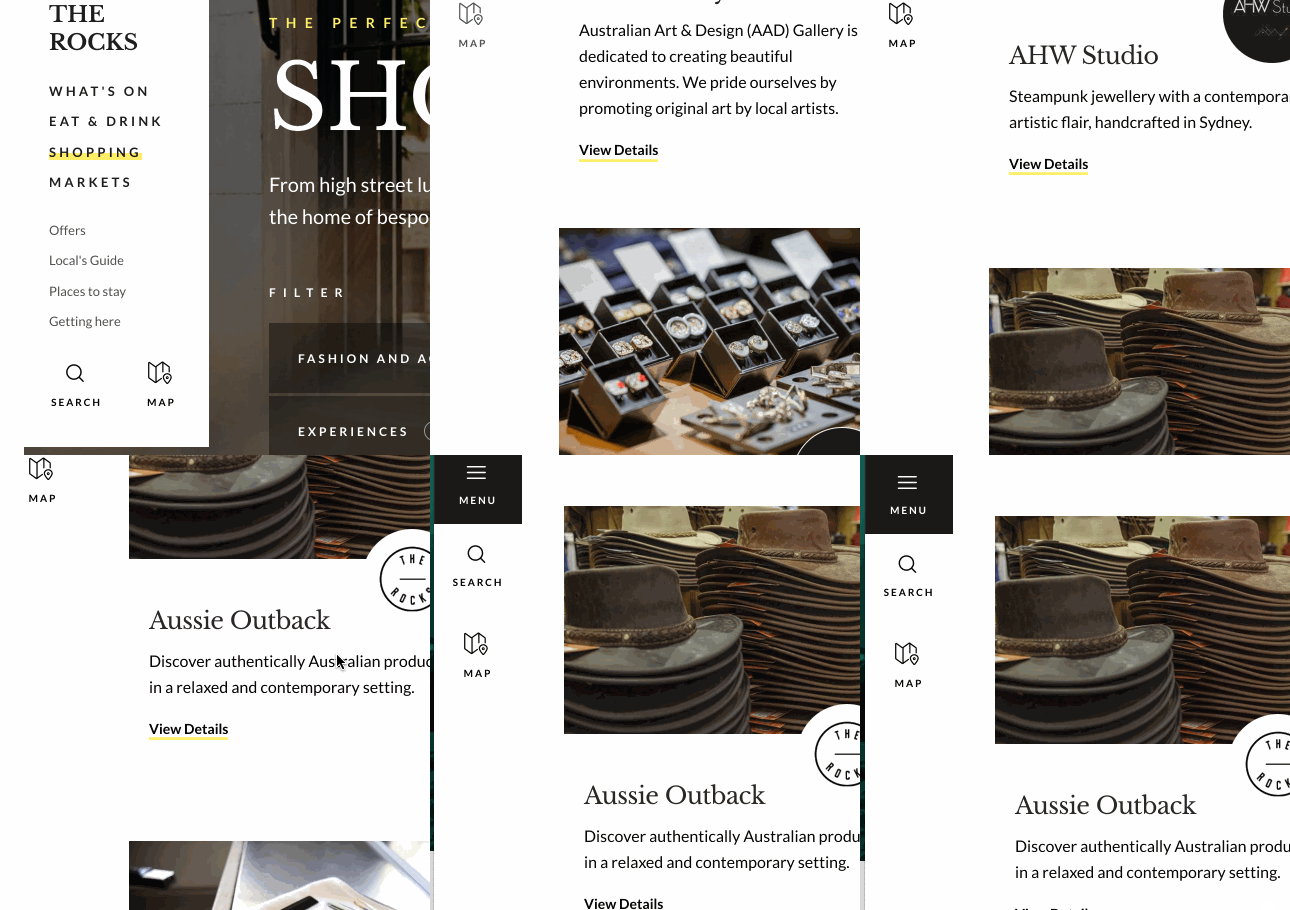
The Rocks Markets is a retail and dining space in Sydney, Australia. While this business could easily place static food shots and basic information on its site and still get great foot traffic as a notable tourist destination, the web designers used the site to embrace color, video, and a sense of movement with each scroll.

The Rocks australian website demo

When you land on the homepage, you can see that the background is a video of delicious foods from different vendors at The Rocks Market. As you scroll, you'll continue to see photos and notice that the page navigation shrinks to give space to the beautiful food photography.

The Rocks Menu australian website demo

The Rocks Markets' site is a great example of how a brand can highlight product videos and imagery, text-based content, a detailed navigation bar, and other information without making a homepage look too busy or overwhelming to understand. When visiting this site, you feel like you've learned almost everything you need to know about the Rocks Market, but still know exactly where to click if you have remaining questions before your visit.

Australian Shopping Sites

Boyd Blue

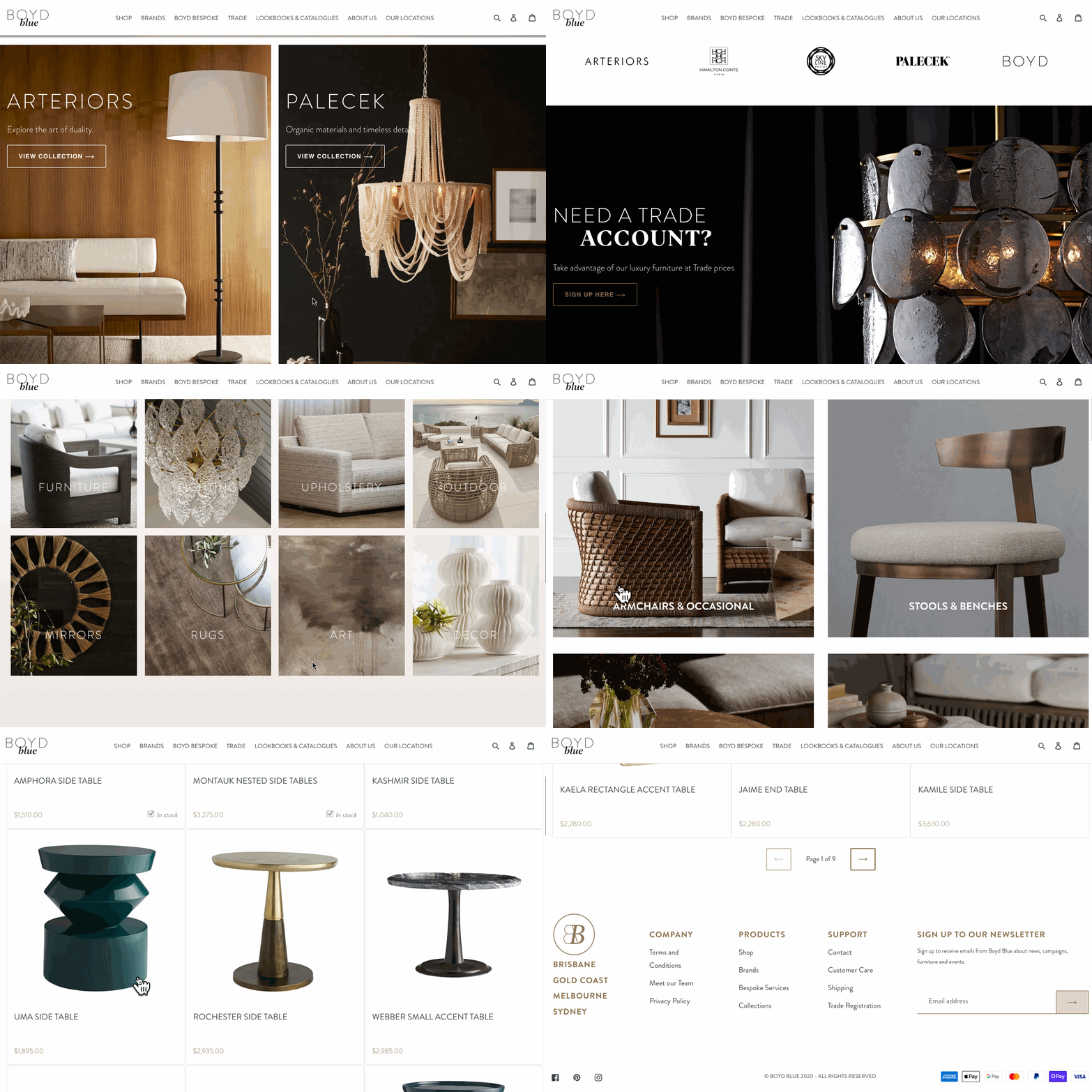
Boyd Blue is a women-fun ecommerce site and store chain that sells a wide range of Australian-made home products -- from furniture to decor.

While many other sites on this list have amped up interactivity, Boyd Blue's designers aired on the side of simplicity by focusing each web page's format around large, high-resolution images of products in natural home settings.

Boyd Blue australian website demo

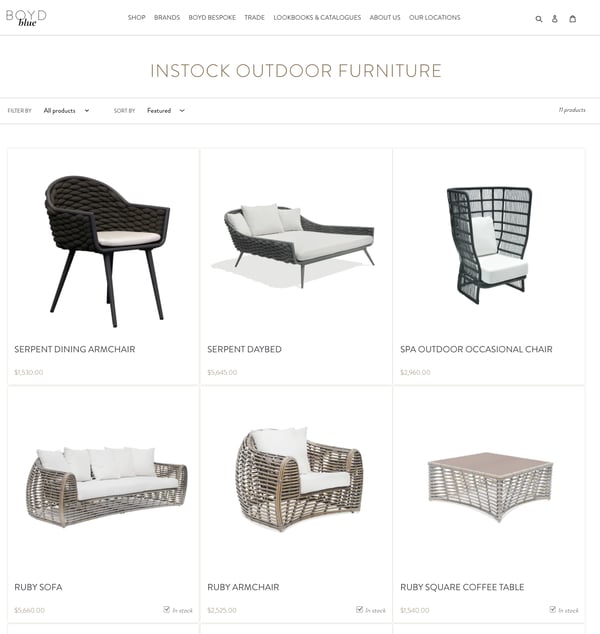
Aside from its beautiful homepage, Boyd Blue's website also features an ecommerce store with a design and UX that's also simple and easy to navigate for quick, frictionless purchases:

boyd blue australian website demo

Rather than burying basic product shots in a page design with tons of descriptive text, the image-centered, light-text design allows users to get an accurate idea of what products will look like in real life, while also enjoying a smooth, aesthetically pleasing web experience.

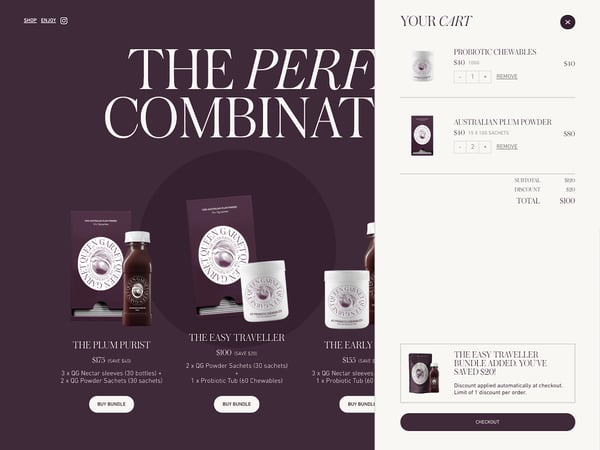
Queen Garnet is an Australian brand that sells plum-based health and wellness products such as supplements, powders, and beverages.

Like a Queen Garnet plum, which has been dubbed a "queen of antioxidants," the QueenGarnet.com's homepage is purple, decorative, and uses regal-looking imager and fonts. When you enter the homepage, you'll see a short, but memorable automatic video that presents one of Queen Garnets products in a castle with a moat surrounding it.

queen garnet australian website demo

As you scroll down the homepage, you'll see light animations that show each recent Queen Garnet product and basic information about it. With each product listing, visitors can click to buy it or learn more about it.

Visitors can also click to the Queen Garnet's ecommerce shop, which has a similar purple aesthetic, and lists all of its products:

queen garnet australian website demo

Queen Garnet's site is a great example of how brands can benefit from light video, basic animations, and a consistent color and style aesthetic. The site's royal-purple theme is not only fun and vibrant, but it could also be very memorable to visitors sifting through a handful of health and wellness sites for the perfect product.

Birdsnest

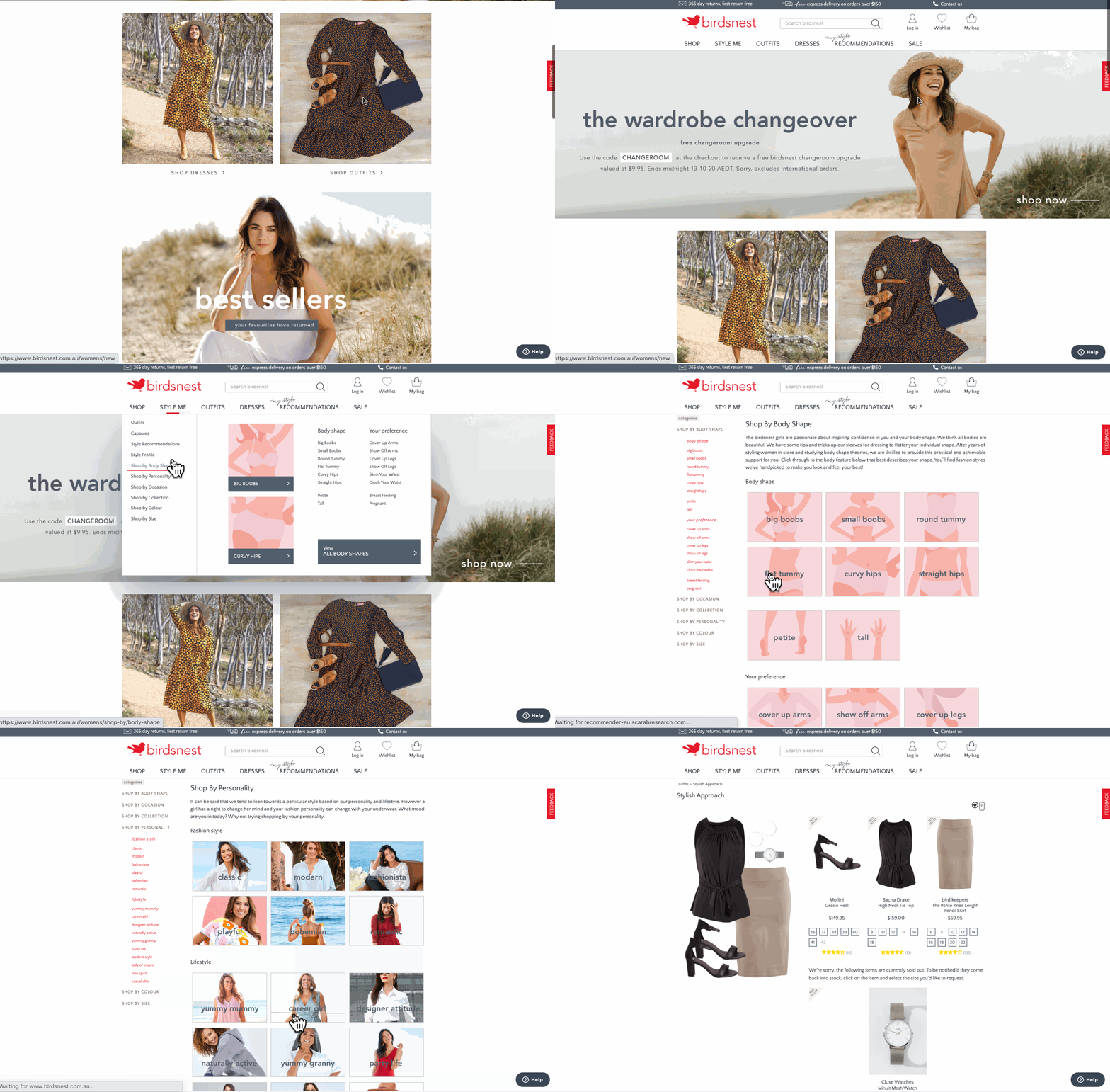
Birdsnest is an ecommerce clothing site that allows you to skim through product listings or get automated product recommendations based on your interests.

The ecommerce brand's website design balances whitespace with colorful product shots to give off a simplistic, friendly, care-free aesthetic.

birdsnest australian shopping website demo

What's most memorable about Birdsnest's site is its user experience.

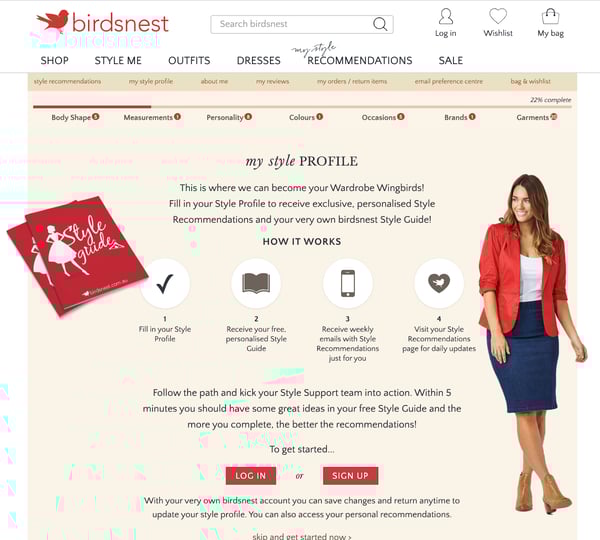
If you're a first time visitor, you can browse products using search filters, or shop by categories including body type, occasion, and even personality. You can also answer a few questions about yourself and your clothing interests to generate a Style Profile that will help the website send you suggestions.

birdsnest style me australian shopping website demo

As you fill out your Style Profile, look at different products, or buy different outfits, the site will learn more about you and give you product suggestions in its Style Me section or through via an email subscription.

This is a great example of how designers and marketing teams can work together to create a highly-personalized shopping experience that can lead multiple groups of people with different interests to product purchases.

If you're interested in building a website and design that does something similar, there are plenty of affordable ecommerce tools that can help businesses in any region with personalization and ecommerce recommendations. Check out this guide to learn more about them.

What Marketers Can Learn From Australian Web Design

Whether you're in Australia or designing a website globally, the examples on this list have highlighted how brands can use color, video, and other elements to make their websites (and brands) seem memorable and unique to all visitors.

Here are a few techniques you can try leveraging:

  • Immersive or Interactive Experiences: Many of the sites above drop the visitor into a video or interactive experience that makes navigating the homepage feel like an entertaining journey. These experiences not only engage the visitor, but they're also memorable and allow prospects to easily digest lots of information about a brand in a short time.
  • High-Resolution Imagery: All of these websites played up imagery, whether the graphics related to products or stirring up emotion. Regardless of the photo strategy, solid photos with great quality will be very memorable to your visitors.
  • Vivid Color Schemes: While some websites on this list masterfully played with white space, all of the examples above had a design scheme that allowed colors related to their images or brands to stand out.

To learn more about designing the best website for achieving your brand's awareness or sales goals, check out this guide. Already have a website? Click here for redesign tips. You can also download the free resource below for even more handy advice.


9 Australian Websites That Will Inspire Your Design was originally posted by Local Sign Company Irvine, Ca. https://goo.gl/4NmUQV https://goo.gl/bQ1zHR http://www.pearltrees.com/anaheimsigns
Sunday, October 18, 2020

Why You Shouldn't Buy Instagram Followers (& What to Do Instead)

You might know your Instagram content is good, but imagine how much better it will seem if it looks like 10,000 people agree.

Whether you’re trying to become a social media celebrity or simply looking to spread brand awareness on Instagram, it can seem tempting to take shortcuts wherever you can in order to expand your audience, including 'buying' Instagram followers.

Here, we’ve gone ahead and covered all the questions you might have about buying Instagram followers to give you a better idea of how it actually works. We’ve also explored the pros and cons, so you can decide for yourself if it’s a good move for your brand.

Can you buy Instagram followers?

Yes, you can buy Instagram followers. There are plenty of cheap services available that allow you to buy 1,000 followers for as little as $10 USD. But you’re only paying for a number. Many of those followers are either bots or inactive accounts, which means they’ll never engage with your posts.

1,000 followers seems like a good deal for the price of a small Starbucks latte. But of course, if it really was that cheap and easy, everyone would be doing it. So what’s the catch? Is buying Instagram followers legal and safe for your business? Is it a worthwhile investment?

The main reason buying Instagram followers can prove to be a wasted investment is because the accounts you follow often aren't real. 

Buying 'Fake' Instagram Followers

The vast majority of purchasable followers are either bots or inactive accounts. Here's how it works:

Instagram Bots

As of 2018, Instagram may have as much as 95 million bots, which accounts for approximately 9.5% of its total user base. There are companies out there who have automated the process of creating bots so well that they can then sell these bots as followers. In some cases, the bots may even assume the identity of a real person, using stolen images and names. 

Depending on the service, these dummy accounts may even seem organic, running on automation to share and like content. Some can even be programmed to produce content. However, because they're not real people, they will not have an organic-looking following to follower ratio. As a result, the engagement they do produce will have little impact.

Without real followers to engage with your content, your posts are essentially hidden from everyone except your inauthentic audience. Plus, your bot followers won’t discuss your brand in real life with friends or family, because, well … they don’t exist in real life (no offense, bots).

Inactive Accounts

However, not all fake followers are bots. There are some companies who sell followers that are genuine accounts.

In this situation, the accounts are created either because they're managed by users whose only goal is to get followed in return or for the sole reason to offer this service. And while these followers might show early engagement, they'll ultimately become a drain on your Instagram account's performance metrics when their accounts go dormant.

After all, if their account was created for the sole purpose of fulfilling sponsorship requests, the real person behind the account has little reason to dwell on the newsfeed, interact with content, or purchase the goods and services being advertised. 

Without that interaction, your follower numbers are inflated with none of the value that organic followers would bring.

When you buy Instagram followers, you’re paying for a number alone. Engagement is not guaranteed, or even likely.

In addition to buying followers directly, you can also pay services to strategically follow other accounts on your behalf based on your preferences (location, hashtag usage, account type, and gender). Ideally, those followed accounts will then follow you back.

With this option, your followers are more likely to be real people, but engagement is still unlikely. Since you can't even guarantee these accounts will follow you back, it’s a risky investment. Most accounts won’t follow you back, and even if they do, they probably aren’t going to be long-term, loyal, or active followers.

Should you buy Instagram followers?

It’s not a good idea to buy Instagram followers. The purchased followers are likely bots or inactive accounts, so they won’t engage with your posts. This means your posts won’t show up on Explore Pages, or on your real audience’s newsfeeds. It will also make it hard to measure metrics.

You'll get early engagement that tapers off.

Purchased Instagram followers also provide no long-term value to your profile's content. The followers you buy might give you views, likes, and comments early into acquiring them as a follower, but the attention they throw you now won't be there later -- when you start reporting on how your Instagram account is performing.

And how helpful, really, are 10,000 followers that don't engage with you? Engagement is key to how Instagram’s algorithm displays posts to users. Without likes or comments, your post probably won’t show up on your audience’s newsfeeds, and it also won’t show up on any Explore Pages.

You could hurt your credibility.

Having a lot of followers could convince users to follow you organically, but it's not a guarantee.

Remember the risks: these followers will probably never like or comment on a post, and if you’re caught with a ton of fake followers, you could ruin your credibility with your real audience.

Users might notice you don’t have a ton of engagement on your posts, which could deter them from following you. If you have 10,000 followers but only four likes per post, it won't take people long to realize something is up.

Think of it this way: would you keep following an account if you saw that most of their “loyal audience” were inactive accounts or bots? I’m guessing not. It could seem deceitful, and lead you to believe the brand couldn’t get authentic followers through good content alone.

Bought Instagram followers can distort your performance metrics.

It’s practically impossible to measure how well your target audience is connecting with your brand if a high percentage of that audience isn’t real. How will you measure posts that do well with your real audience if those bots and inactive accounts skew the ratio?

If you don’t know how well your posts are doing or what your real audience thinks, you’ll never convert your Instagram followers into real customers. And isn’t that the point?

Ultimately, if you pay for Instagram followers, you aren’t paying for quality, real-life followers. You’re paying for a blank number. And since Instagram’s algorithm is largely tied to engagement, not followers, buying followers isn’t a long-term solution. In fact, it isn’t really a solution at all.

Take the time, energy, and money that you would’ve dedicated to buying followers, and focus instead on building genuine relationships with a real audience. If your content is engaging and authentic, your loyal followers will spread the word and engage with your brand without needing any bribes.

Instagram Identifies and Purges Fake Followers

Recently, Instagram has updated its terms of use to identify and remove inauthentic accounts from its platform. Instagram is removing any likes, follows, or comments from third-party apps that are designed to artificially grow accounts' audiences. By buying followers, you violate Instagram's community guidelines and it may trigger a reaction from Instagram moderators. 

Instagram is looking to maintain genuine interactions on its site, protecting real accounts and experiences. Fake or bought activity infringes upon this mission and might result in consequences, so it's better to grow your audience organically.

Alternatives to Buying Instagram Followers

Instagram's new algorithm rewards engagement more than follower count, displaying content similar to posts users engaged with in the past. In order to drive engagement, there are many different actions one can try on the platform to get in front of your ideal audience.

By using good Instagram marketing practices -- whether you are building your personal brand or a company account -- you can better reach the nearly 800 million monthly Instagram users and build an authentic audience. 

1. Make your account public.

First, make your account public so that users can see your profile and content. This way, you can grow your audience organically when your content pops up on users' explore pages, attracting and delighting your target viewership. 

2. Give users a reason to follow you by publishing quality content.

Next, publish a variety of posts to your feed: you can post images, GIFs, videos, Boomerangs, quizzes on your story, how-tos, user-generated content, and so much more. Build trust and excitement among your followers by using high-quality photos, writing catchy captions, posting consistently, and keeping up a unique style overall to differentiate yourself from other accounts. Do your research on which hashtags generate a lot of buzz and which are aligned with your brand -- hashtags can be a great way to reach new audiences if done correctly.

Depending on your brand personality, it can help to be funny or witty in your content. Having an acute awareness of how your brand is perceived and the trends going around Instagram will serve you when choosing content to post and how to interact with your Instagram community. 

3. Use Instagram to its fullest capability.

Lastly, utilize the many different channels on the platform, like Instagram Live, IGTV, Instagram Stories, or Shopping on Instagram. There are so many different ways to connect with users, and by driving engagement through these features, you can drive engagement and traffic organically and authentically.

Editor's note: This post was originally published in March 2020 and has been updated for comprehensiveness.


Why You Shouldn't Buy Instagram Followers (& What to Do Instead) was originally posted by Local Sign Company Irvine, Ca. https://goo.gl/4NmUQV https://goo.gl/bQ1zHR http://www.pearltrees.com/anaheimsigns

Friday, October 16, 2020

Best Display Advertising Campaign: CM.com

We are pleased to announce the latest winner of Bannerflow’s quarterly best display campaign competition for 2020. Our competition highlights the very best display campaigns out there, focusing on the use of technology, design, and overall impact of an ad.

This quarter’s campaign is a great example of a strong message and animation combining to make something even more powerful. And the winner of the best display advertising campaign of summer 2020 was by conversational commerce company CM.com.


CM.com is a global leader in cloud software for conversational commerce and it’s winning display campaign was designed to help launch its latest mobile marketing platform.

Extraordinarily this winning campaign was CM.com’s first campaign built in Bannerflow! We spoke to CM.com Graphic Designer, Davey Vos, and Creative Director, Paul Moelands about the campaign. Plus, Anneloes van Vugt Content, Team Lead at DEPT Agency about developing the concept.

CM.com body image interviewees

What was the purpose of this campaign and how did this translate into design challenges?

Paul Moelands, Creative Director at CM.com: The campaign was for the launch of our Mobile Marketing Cloud and we wanted to hit the ground running with an ad that would resonate with our target audience.

Our concept was turning an anonymous profile into a person with preferences and habits – moving from just a random data profile with nothing, to a real person.

Our audience knows data platforms, and assumes that marketing platforms are mostly anonymous – it’s point and shoot at a million people. We wanted to highlight this as a problem – one that our Mobile Marketing Cloud solution could solve.

Afterall, that’s the purpose of our platform. Mobile marketing cloud makes it possible for you as a company to talk to people with preferences – create mobile marketing campaigns that are relevant, personalised, and contextually make sense.

And that is basically the entire base of the campaign: going from old to new, going from anonymous to personalised.

Can you describe some of the technical details of this particular ad set?

Paul: For us it was important to have an attractive visual that would attract attention – and instantly be understood.

We also decided to animated the banner in such a way that the viewer would understand the steps towards personalised mobile marketing. It’s a 15 second storyline and visual approach explaining how you can go from this to that.

Essentially, we go from a flat stylistic shape to a human profile. And the little bit of animation we use helps to explain that process more clearly. In the past we’ve used animation for specific high profile projects but it was never really a first choice because of production times, costs and effort.

Which design challenges were the most satisfying to solve? How did Bannerflow help?

Davey Vos, Graphic Designer at CM.com: Paul firstly created the master creative in Bannerflow and then I created all the sizes and variations from there. We then scaled the campaign to multiple languages, including language variations in Dutch, English, and Spanish.

In total we made around 30 variations. We have from “Data to Diane”, “to Dave” and “to Danny”, etc. So we have three sets and Diana is one part of it.

examples of different faces from campaign

In the past I only created static banners and this was my first time trying animation in Bannerflow. I didn’t have a lot of animation experience. Fortunately, the program was fairly easy to use and it didn’t take too much time to produce the animated banner set.

This campaign was the first project for me using Bannerflow. In fact, in our product demo we actually practiced using Bannerflow for the campaign. Looking back on it, this was quite helpful because we were able to quickly create and be more efficient when making all the different sizes of the banners.

Wait, this was your first campaign in Bannerflow?

Davey: Yes! In the beginning it took some getting used to, but like I said, it was a good exercise to go live with a big campaign in a new tool we hadn’t quite mastered yet. It was a great choice, but it took a lot of effort!

Paul: I almost cried a couple of times in the beginning from pressing the wrong buttons! But from then on it was an easy process. I think Davey really picked it up and made it work – now we’re happy using the platform.

It really eliminates the process of having to make all the different versions within Photoshop. It makes everything scalable and translatable, giving us more time for creativity than just the factory work.

What did you use for your display campaigns before Bannerflow?

Davey: Well, I started two months ago at CM.com and then we already used Bannerflow. Before then CM.com used Adobe Photoshop and every banner had its own Photoshop documents. With Bannerflow we can now work a lot faster and more efficiently. This allows us to focus more on the context of what we want to tell the audience.

Are the assets for this ad set custom built or are they part of a bigger media campaign?

Paul: We worked with a creative agency called ‘DEPT’ to help generate the campaign concept. Together we workshopped how we would talk about all the pains and needs. Including how we could hit our message with the target audience.

Anneloes van Vugt, Content Team Lead, DEPT Agency: Together with CM.com we aimed to create a campaign which catered to the needs and wants of the target audience, in terms of design and messaging.

Through quantitative and qualitative insights we tried to get inside the heads of the target audience, thinking about how the Mobile Marketing Cloud could really help them excel in their work. We then translated this into a striking pay-off and corresponding assets.

We’re super proud of this strong campaign we created together. 100% on point from a brand and audience perspective!

Paul: From there we created a basic visual, which we then translated into our new visual language. This is an extension of our new brand identity we developed in the summer together with ‘Studio GAAR’ and will be embedded across all marketing campaigns and throughout the entire company.

In general, how do you tackle the design process of building display campaigns?

Davey: We have a team focused on the Mobile Marketing Cloud. All Mobile Marketing Cloud’s visuals are created by our team. I am the Graphic Designer for this team and I work in close cooperation with our Creative Director, Paul. He is our final design check before we go live.

When working on the design process which other tools, beyond Bannerflow, do you use?

Davey: Apart from Bannerflow, mostly Photoshop, Illustrator and InDesign – but now it’s mainly Bannerflow for display ads.

What is it about the Bannerflow platform that makes designing ads easier?

Davey: At the beginning it was a struggle because our initial ad designs were in Photoshop which we then needed to push to Bannerflow. Plus, they were of course animated, and the software was still new to us. However, now we start building out ads straight in Bannerflow and import the different graphical elements to bring the ad to life. Importing the assets is pretty great.

We did push some changes to the live ads too and that was pretty easy. I just made the change and Bannerflow republished to all the different sizes, instantly to Google.

Paul: I think we’re working much more efficiently now – especially in terms of localisation. We’re a global company, with offices across the world. Therefore, we need to produce campaigns that are sensitive to cultural and gender differences.

Using Bannerflow it’s much easier to duplicate a campaign, change the imagery, or message, to match cultural preferences. Today, I think we save roughly to 50 to 70% of the time it normally took to build a campaign – just by using Bannerflow.

Are there any particular favourite features in Bannerflow that have helped you take your ad designs to a higher level?

Paul: It’s a flexible system that gives you a lot of room to be creative. The production part lets you think more creatively and act faster. I think the widgets are good too and that’s something we still need to dive more into.

In the long term it would be great to engage viewers with interactivity in our ads – maybe even incorporating elements of our own products into our banners.

As a designer, how do you continue to find inspiration for your work?

Davey: That’s a good question. I think my creativity mostly comes from my environment, from talking to people or watching how other companies design something. It gives me a lot of creative input, and I use it to think about how I can create something, and just how I can implement those choices in my work.

Paul: For me, it’s very similar. I’ve always had a visual mind, and I dream pictures, and solutions to problems. But it always comes down to how can I get my message across? How can I take the exact points I’m trying to make and put them into a visual?

And that could literally happen when I’m driving down the street and see a building that has a specific architecture – and that could trigger my creativity. The same goes for our new visual language and how we’ve been working with an external agency, turning an idea, into a concept, and being inspired by each other to take it to the next level.

How everything comes together and works as a whole, from all the angles, from all perspectives – everyone and everything building together – that’s magic. And If we can achieve that with the people in the team, with people like Davey and our design team, that inspires me. And if we can work on something together and make it grow then I’m a happy camper.

Want to know more about Bannerflow?

Find out more about how you can use Bannerflow to design outstanding display advertising? Get in contact with us, or apply for a demo now!

The post Best Display Advertising Campaign: CM.com appeared first on Bannerflow.


Best Display Advertising Campaign: CM.com was originally posted by Local Sign Company Irvine, Ca. https://goo.gl/4NmUQV https://goo.gl/bQ1zHR http://www.pearltrees.com/anaheimsigns

20 Stats About Australian Instagram Users & Trends

In July, nearly 41% of Australia's population was on Instagram.

And, with Australia being one of the biggest internet and social media growth regions, its Instagram audiences are likely to keep getting bigger.

Yes. No matter what country you're marketing in, Instagram's platform is primed for brand awareness. You might think with growth stats like this, Australian brands are rushing to Instagram.But that's not the case -- many Australian businesses are actually missing out on the opportunities Instagram offers. In fact, recent research reveals that only 32% of Australian SMBs use it in their social media strategy.

Although Instagram sounds promising, SMBs with limited time, budget, or bandwidth might be hesitant to add any new social platform.

Why? Even though an Instagram account can majorly boost local and global brand awareness, building a scalable strategy for it can seem intimidating and time-consuming for smaller brands.

Luckily, Australian businesses don't just have to launch an Instagram account and hope it works. In 2020, there's plenty of data that can help these brands determine if the platform is appropriate for their goals, and how to engage Australian audiences once they've made a Business page.

If you're an Australian social media marketer looking to improve your Instagram strategy or are working to boost a brand's Australian presence from afar, here are 20 stats to know about Australian Instagram usage, marketing, and peak engagement times.

Australian Instagram Usage Stats to Know

Australian Instagram Users

  • There were 10.45 million Instagram users in Australia in July 2020: roughly 40.8% of its entire population. (NapoleonCat, 2020)
  • Australian Instagram users grew from just over 9 million to 10.45 million between May 2019 and July 2020. (NapoleonCat, 2020)
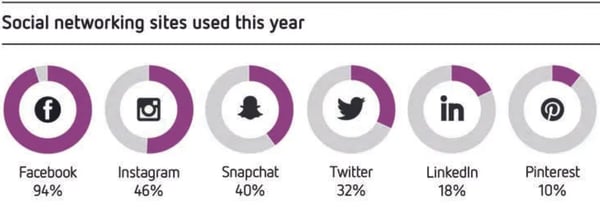
  • 46% of Australian social media users say they regularly use Instagram, making it the second most popular channel in the region. (Yellow Sensis Social Media Report, 2018)

Instagram is the third most commonly used app in Australia

Image Source

  • Most Australian Instagram users are women, with the highest ratio of women to men being in the 45-to-54 age group. (NapoleonCat, 2020)
  • More than 3.2 million Australian Instagram users are 25 to 34, making them the largest user group. (NapoleonCat, 2020)
  • Roughly 9.1 million Instagram users are listed as over 18. (Laurel Papworth, 2020)
  • 48% of Australian Instagram users follow a brand on the platform. (Yellow Sensis Social Media Report, 2020)
  • Instagram is the third-most-used non-gaming mobile app in Australia. (We Are Social, 2019)

Instagram User Behavior in Australia

  • More than 51% of Australian Instagram users log on to the app at least three to five times a week. (Statista, 2018)

Most Australian Instagram users log on to the app at least once daily.

Image Source

  • Three regularly-trending Instagram hashtags in Australia are #photography, #Australia, and #Sydney, which have 450 million, 55 million, and 28 million posts associated with them, respectively. (Talkwalker, 2019)
  • 45% of Australian social media users have taken a selfie for platforms such as Instagram. Selfies posts are more common among men and 18 to 29-year-olds. (Yellow Sensis Social Media Report, 2018)
  • Roughly 40% of Australian social media users have posted a picture of food on channels such as Instagram. (Yellow Sensis Social Media Report, 2018)

Australian Business on Instagram

  • 22% of Australian SMBs have advertised on Instagram (Yellow Sensis Social Media Report, 2020)
  • 32% of Australian SMBs have an Instagram account, compared to 90% and 33% respectively on Facebook and LinkedIn. (Yellow Sensis Social Media Report, 2020)
  • Instagram influencers whose accounts were about yoga experienced 127% growth in overall Australian engagement in March 2020. (Statista, 2020)
  • Also in March 2020, hotel-related Instagram accounts experienced a 100% decrease in Australian engagement. (Statista, 2020)

Peak Engagement Times in Australian

  • When using Instagram in any global region, the best time to post to get local post engagements is 2 PM and 3 PM in your brand's timezone. (HubSpot, 2020)
  • The best day to post on Instagram in Australia is Thursday in the AEDT timezone. (ShareMyInsights, 2020)
  • Weekday posts on Instagram get more impressions from Australians than weekend posts. (ShareMyInsights, 2020)
  • When aiming for global post engagement, the best times to post on Instagram from Australia are 12 AM to 2 AM, 6 AM to 8 AM, and 9 PM to 10 PM AEDT. (ShareMyInsights, 2020)

Growing Australian Brand Awareness with Instagram

From looking at the data above, it's clear that Australian businesses can benefit from Instagram, which has a huge pool of users that will follow, engage with, and potentially purchase products from all sorts of brands on the platform.

But, simply creating an Instagram account and forgetting about it won't boost your brand awareness. To truly gain audience engagement, you'll want to create an active account with content that entertains users, grabs their attention, and educates them about your brand and your products.

If this list has inspired you to get ahead of the one-third of Australian SMBs missing out on Instagram, check out this guide or the free resource below for proven tips on building an effective Instagram strategy.


20 Stats About Australian Instagram Users & Trends was originally posted by Local Sign Company Irvine, Ca. https://goo.gl/4NmUQV https://goo.gl/bQ1zHR http://www.pearltrees.com/anaheimsigns