Wednesday, October 7, 2020

What is Trading Up, and Why It Matters for Marketers

To understand what the term "trading up" means, let's start with a scenario.

You wake up early and jog to the Starbucks on the corner of your street. There, you wait in line to order a pumpkin-spiced latte, as you skim emails on your iPhone.

Afterwards, you return home, put on your new Lululemon workout apparel, and hop on your Peloton for an at-home workout.

In this scenario, you've "traded up" in a variety of consumer categories: including coffee, technology, clothing, and even workout gear.

Why, for instance, did you feel the need to head to Starbucks and pay $6 for a drink, as opposed to making a quick pot of coffee in your Keurig? Alternatively, why not purchase workout apparel from Marshalls or Target?

(No judgment on any of these decisions: I've made them, too.)

Ultimately, trading up refers to a consumer's tendency to pay more for a higher-quality, more expensive product or service from a brand to which they've formed an emotional attachment, and feel a sense of loyalty.

But trading up doesn't just refer to a consumer's behavior in the marketplace at-large: it also refers to a consumer's decision to upgrade their product for a newer model with additional features.

As a marketer, it's critical you understand the concept "trading up" to discern how you might evoke brand loyalty in a crowded marketplace — or, how you might market a new version of your product to existing consumers.

Here, let's explore what trading up means, as well as what it means specifically for marketers.

What does trading up mean?

Trading up in the industry at-large.

There are two contexts in which you'll find the term "trading up" used: within a marketplace at-large, and within your company's own product suite.

To start, let's explore what trading up means within an entire marketplace.

In this context, trading up refers to a consumer's decision to purchase a more expensive product because of the brand value they feel it delivers. This is why consumers will purchase a car for 10X the normal price if it's marked with BMW, but why they might not make the same decision for a car from a lesser-known brand.

There are a few reasons why a consumer will trade up in the marketplace. For one, a consumer might trade up because the brand meets their aspirational vision of who they want to be. There is undoubtedly a different vision that comes to mind when a consumer thinks of Starbucks versus Dunkin' — in exchange for this vision, a consumer might be willing to pay more for a coffee.

These top-of-the-line brands often feel "premium" and luxurious, incentivizing consumers to pay more than they would for another version of that product in the marketplace from a lesser-known or lower-quality brand.

However, that isn't to say that consumers purchase products from certain companies entirely based on brand name alone. No matter how impressive Starbucks' brand image is, it doesn't do much good if the coffee is disgusting.

Ultimately, you can't have one without the other. A brand like Starbucks, BMW, or Apple rises to the top of their industries because they provide high-quality, well-engineered products — not just because they have a good brand image to match.

Additionally, these brands have built a good deal of trust with existing consumers, which leads to positive word-of-mouth marketing. Considering over 90% of consumers trust family and friends' suggestions more than advertising, this is important.

For instance, nowadays, Apple doesn't need to appeal to consumers with constant commercials and billboards — instead, they can trust their loyal brand advocates to do the heavy-lifting (just consider the jokes you find on Twitter when you search "green bubbles", which signifies a non-Apple user).

Suggestions from friends and family is the second powerful reason a consumer will trade up. Perhaps you've never considered purchasing a Peloton, until you heard your friends raving about the product.

Friends will only suggest a product if it's truly high-quality and meets their needs above all other competitors in the marketplace.

Which is why, ultimately, you need both a strong brand and a powerful product or service for consumers to feel they're trading up from the "status quo product" that exists in your industry.

Next, let's explore what it means for a consumer to trade up at your company in particular.

Trading up within a company's product suite.

The second context for trading up is within a company, and is also known as upgrading.

For instance, let's say you sell a starter version of your software, but you've just released a new professional version, with higher-quality features. If your consumers choose to upgrade to the new version of your product, they're "trading up".

In many ways, this mirrors the first definition. You might think of your starter version as a used car, and your professional version as this year's latest model.

To encourage consumers to trade up, you'll want to demonstrate how the new features of your product are powerful and necessary — not just "nice to haves" but "need to haves".

Take a look at Cross-Selling and Upselling: The Ultimate Guide for more information on this.

Trading Up in Marketing

Now that we've explored what trading up means for a consumer, let's explore what it means as a marketer.

Understanding the reasons a consumer might trade up can help you leverage your brand and products to incentivize consumers to feel they're trading up when they purchase your products or services.

How? Through good brand recognition (and a high-quality product, of course).

While I used some major brands in my examples, you don't need to be a large corporation for consumers to feel they're trading up. For instance, consider my new favorite coffee shop, the Bittersweet Shoppe, on Newbury Street. The cozy cafe is filled with sunflowers and offers fantastic customer service — now, when I go there, I feel like I'm trading up from Starbucks. Ultimately, I like the experience of entering their coffee shop, which is what a good brand image is all about.

If you work for a small business, there are plenty of strategies you might implement to create a strong brand, including building a brand strategy, prioritizing consistency, and using a strong mission or vision statement to guide all your decisions.

Additionally, encouraging consumers to trade up, or upgrade, from within your product suite involves strong messaging, sales and marketing alignment, and a true understanding of what your consumers need and how your newer version can meet those challenges, particularly as consumers out-grow your first product.

Ultimately, people don't trade up from brands and products they love. Ensure you're meeting your consumers needs, both through your brand and your products, and they'll tell their friends and family. Soon enough, you'll be the brand people trade up for.

Just consider this: I'm going on six years of owning an iPhone, with no interest in pivoting. Now that's the power of a good brand, and a strong product.


What is Trading Up, and Why It Matters for Marketers was originally posted by Local Sign Company Irvine, Ca. https://goo.gl/4NmUQV https://goo.gl/bQ1zHR http://www.pearltrees.com/anaheimsigns

Tuesday, October 6, 2020

What Is a Marketing Manager?

As marketers, we all want to climb the career ladder as quickly as possible. But if you're going to become a marketing manager one day, you first need to learn what the role demands.

Moving up in ranks means becoming more involved in the marketing process, and eventually becoming the principal implementor.

As a marketing manager, you’d be in charge of a team. Employees will look up to you as you once looked up to your manager.

However, accepting this position comes with increased responsibility. It can feel rewarding to watch your strategies come to life, but it’s important to understand what the role entails.

Below, we'll go over what a marketing manager is, what a marketing manager does, the management process, and the skills and education you'll need to become one.

What does a marketing manager do?

Marketing managers have a variety of responsibilities. While there are industry-specific standards, there are common tasks that all marketing managers will do:

  • Conduct market research to understand the public interest and determine the marketability of products and services.
  • Design creative and unique marketing strategies across multiple channels like social media, tv, billboards, and newspaper articles.
  • Create marketing plans detailing outcomes and goals.
  • Create comprehensive budgets and cost estimates.
  • Negotiate with potential clients and partners to prepare sales and advertisement contracts.
  • Handle public relations and troubleshoot internal and external issues as they arise.

Marketing managers are also responsible for training their team members on campaign-specific marketing plans. They’ll hire new employees to join their team, selecting those they believe will meet intended goals for executing brand strategy. They collaborate with all team members, motivating them to meet goals while providing guidance and delegating tasks.

Marketing Management Process

To succeed in their responsibilities, marketing managers follow a similar process. Each step in that process requires a unique approach depending on the product, service, or business.

Idea Generation

Marketing managers approach the idea generation stage with an intended product in mind or an idea for a product or service that a business hopes to create.

They'll conduct market research to understand current trends and customer interest. If a new product is launching, are there competitors? How successful are they? What are consumers saying about available products, and how can they be improved?

Understanding consumer interests and behaviors is key to beginning this process.

Marketing Plan

After identifying markets and understanding trends, marketing managers will develop a marketing plan that they'll use to implement their strategy. This plan identifies the target audiences, campaign-specific tactics, budget, and goals.

They'll work with different teams, like UX product design, financial departments, and sales engineers, to develop a strategy that  will allow the product to meet its intended goals. While a marketing manager is the chief decision maker, there may be financial aspects that they are not aware of. Collaboration between all teams ensures that the marketing plan is as comprehensive as possible.

The marketing manager will likely conduct tests with intended audiences to ensure that the final marketing plan will drive the most revenue before implementation. This may take the form of focus groups, personal modeling, or consumer interviews.

Implementation and Results

At this point, the marketing manager will work with their team to implement the finalized marketing plan. Timelines will be set for tracking campaign metrics, using data to adapt the strategy if necessary.

Regardless of campaign outcomes, all research and data will inform future marketing processes.

Skills to Become a Marketing Manager

Most companies require their marketing professionals to have a bachelor's degree. Still, since the marketing industry adapts quickly, companies don't necessarily need their marketers or marketing managers to have specialized degrees in specific fields. Some companies may require professional degrees or memberships in professional associations.

However, there is one universal requirement to become a marketing manager — a three- to five-year track record of consistently performing to your potential and achieving your goals. If you want to become a marketing manager one day, your performance as an individual contributor matters more than anything.

For instance, if the main goal is to manage a company’s blog team, one would need to prove that they’ve consistently written quality content that has met their manager’s expectations.

There are basic soft skills that a marketing manager should possess, like creativity, critical thinking, and leadership. However, a combination of these skills along with well-developed hard skills are crucial for job success. There are six essential skills an aspiring marketing manager should work to develop.

1. Communication

A marketing manager's job revolves around communicating with different audiences by developing creative content for advertisements, videos, and articles. This content must also be consistent with the tone, branding, and voice outlined in the marketing plan.

The marketing manager will also be in conversation with their own managers, team members, and external stakeholders.

Understanding how to confidently communicate with different audiences is critical for this role.

2. Budgeting 

Marketing Managers handle all kinds of resources, from campaign budgets to pay-per-click ads to influencer marketing. All of these actions require budgeting skills.

A marketing manager also handles  internal budgets for their team, ensuring that everyone has the resources they need.

3. Negotiation

After creating the marketing plan, the marketing manager will need to convince internal stakeholders of its value. They’ll need to identify the right teams, and convince them of the benefits to the business and intended customers. Without internal buy-in, the campaign may cause internal confusion if all teams aren’t on the same page.

The marketing manager may need to negotiate with other teams if they believe changes need to be made. They may agree with some suggested changes, but they’ll also need to know when to negotiate and advocate for certain elements of their plan if they are called into question.

Externally, the marketing manager may be involved in financial negotiations with outside stakeholders to ensure that budgets aren’t over-spent.

4. Planning and Execution

Long term planning and goal setting are two important skills to be a marketing manager. They need to understand intended outcomes, plan for intended results, and execute the strategy to meet those outcomes. For example, is the ultimate goal to gain 1,000 Instagram followers? How will that happen? What steps need to be taken along the way to reach the goal?

When managing multiple marketing channels and entire teams of people, understanding how much time to dedicate to all aspects of a campaign is essential.

Can you create comprehensive plans to manage your tasks? Can you meet deadlines? Can you deliver high-quality work under said deadlines? These are questions that might be asked when interviewing for a marketing management position.  

5. Collaboration and Delegation

Marketing managers lead an entire marketing team. Size may vary, but there are several people who will work under their direction.

They need to work well with others and enjoy building relationships with internal teams and external stakeholders. However, it's still important to be a leader that can step in and assign tasks when necessary. For example, the marketing manager would ensure that their team members are assigned the right tasks for their skillset, and that individual performance aligns with task expectations.

6. Adaptability

Customer behavior and markets can be volatile, so adapting to changing industry standards is a must. For example, a strategy may need to be adapted after falling short on expected outcomes. Instead of giving up, the marketing manager should devise a plan with their team to come up with alternative options.

7. Empathy 

Understanding markets means understanding consumer needs and predicting what they want and how they'll react to your service. This requires a significant amount of emotional intelligence.

On their teams, marketing managers are responsible for balancing role expectations with team member’s capabilities. For example, if someone on their team is stressed because they aren’t meeting deadlines, it’s the marketing managers job to address the issue with empathy. An effective marketing manager would be able to recognize their stress and work with them to come up with effective ways to meet their goals.

Ultimately, marketing managers develop unique, ambitious marketing strategies for products, 

businesses, and services. They create comprehensive marketing plans, and work with their teams to execute them successfully.

A marketing manager ensures that products, services, and businesses have the best chance to thrive in their intended markets, satisfying both companies and consumers.

Anyone who works to develop the skills outlined in this piece will be successful in their role as marketing manager.


What Is a Marketing Manager? was originally posted by Local Sign Company Irvine, Ca. https://goo.gl/4NmUQV https://goo.gl/bQ1zHR http://www.pearltrees.com/anaheimsigns

3 High-Impact Marketing Strategies You're Probably Overlooking

Everyone wants to be #1 ... especially when it comes to marketing.

Reaching the top of search engine results and creating content that becomes viral is a marketer's dream — but it's often not that simple.

Creating good, high-quality marketing campaigns mean creating content that aligns with your marketing goals, target audience's interests, brand voice, and so much more.

Plus, it needs to be effective without breaking the bank or surpassing the resourcing constraints your team might be up against.

Additionally, building a strong online presence takes time and patience. Marketing campaigns can only be effective once you've invested in properly defining your value proposition, messaging, and brand authority.

Fortunately, there are three high-impact marketing strategies you can implement to see maximum results. Here, we'll dive into three highly effective campaigns you might use for both quick wins, and impressive long-term results.

1. It's More Than Just LinkedIn: Account-Based Marketing

LinkedIn Ads are the leading tool for generating new leads in B2B and a great start to any ABM campaign.

On LinkedIn you can target by company, location, job title, and more, which can help you reach the right people at the right time. You can even set it up right from your Hubspot Account!

But you don't have to stop there. You need to build the journey beyond the ads. For instance, how will you nurture leads, who will nurture them, and when?

To maximize engagement with your ABM campaign, combine it with an inbound campaign. Build an infrastructure of additional content and emails to nurture your new leads and keep them engaged. Be sure to constantly refresh your content to maintain relevance and new interest.

Here's a five-step plan to build an effective ABM campaign with inbound tactics:

  1. Designate an owner of the campaign and ensure buy-in from all team members company-wide.
  2. Create a LinkedIn Lead Generation campaign focused on your ideal companies' industry with captivating ads.
  3. Create or update existing landing pages and content that speak directly to the targeted audience. Customize the messaging and design to really grab their attention and create a connection.
  4. Set up a workflow that will take the new leads and nurture them with the above content, as well as specialized landing pages (for advanced campaigns, set a nurture for each company or industry with customized content and messaging for each).
  5. Monitor the leads and their engagement so you can reach out with the right content at the right time.

2. Two is Better than One: Partnerships

An often untapped source for high-impact marketing is partner collaboration. Finding a partner with whom to create a piece of content is highly effective both in terms of engagement and costs.

Partners will have a different perspective and can provide insights that you might not have considered. Plus, the backlinks is valuable from an SEO perspective. The assets you create with your partner can be shared with both of your brand's networks, expanding your exposure and enabling you to reach new audiences.

Simple ways to create these partnerships include offering a guest blog post, inviting a speaker to join you on a webinar, or creating an infographic that showcases both companies' expertise.

Make sure to choose your partners wisely. Your partner should have shared values, a strong following, and provide value to your target audience.

For instance, in early 2020 our company planned on hosting a Hubspot User Group (HUG) at the Google Campus in Tel Aviv. Following the pandemic and subsequent social distancing, all plans were canceled and companies were forced to adapt at lightning speed. All of a sudden, physical meet-ups were out of the question.

To solve for this, we decided to host a virtual event in less than three weeks. Thanks to a dedicated staff and strong partnerships, some of the industry's top marketing leaders reached out to us about how they could take part in the event.

These leaders' involvement brought on a snowball effect of leads from their networks interested in joining the event. Plus, although our HUGs are normally restricted to 300 registrants due to space limitations, we were able to accept over 1,200 registrants to the virtual event.

3. Actions Speak Louder than Words: Customer Evangelism

Customer evangelism may be one of the most impactful tools for generating high-potential leads. You can create amazing campaigns, but nothing compares to a freely given recommendation by a satisfied client.

The inbound flywheel is made up of three sections; Attract, Engage, and Delight. If you don't delight your customers, then your flywheel can't reach maximum speed.

A customer evangelism program is not a linear campaign. You must delight your customers at all touchpoints, so when an opportunity arises they will gladly recommend you to their network.

Moving beyond impeccable service and outstanding results, think of other creative ways to connect with clients and build your relationships. This can be anything from shout-outs on social media for wins, to sending new year wishes to show you are thinking of them. Ultimately, a little generosity can go a long way.

Recently, one of our customers was on LinkedIn when he came across a post from a connection who hadn't heard of us. Because he was delighted with our services, our customer commented that the connection should check us out — one day later, he was speaking with a sales rep in the first step to becoming a new customer.

You are already constantly in touch with your customers, and they have endless potential to bring in new business — don't let that go to waste.

These strategies are only the first step in building a high-impact marketing strategy. They must be combined with a full strategic plan aligned across your entire company, from marketing to sales to customer success and beyond.

Each campaign is only one block inside a larger marketing plan that needs to cover all stages of the flywheel. No campaign can live on its own.

Additionally, it's important to remember the importance of monitoring old campaigns to gather insights and ensure you're optimizing each future campaign for better results.


3 High-Impact Marketing Strategies You're Probably Overlooking was originally posted by Local Sign Company Irvine, Ca. https://goo.gl/4NmUQV https://goo.gl/bQ1zHR http://www.pearltrees.com/anaheimsigns

The Beginner's Guide to Reminder Advertising

When I go to bed every night, I have to set about five alarms for the morning.

I'm just the type of person that needs a lot of reminders to wake up on time.

In a similar vein, marketers use reminder advertising to stay top-of-mind with potential customers.

And it makes sense.

In the world of sales, 80% of sales require 5 follow-up calls after a meeting. For marketers, it's no different.

Essentially, you have to nurture and continuously remind your audience who you are to convert leads.

In fact, companies excelling at lead nurturing generate 50% more sales-ready leads at 33% lower cost.

Below, let's learn more about reminder advertising and see what it looks like in action.

Reminder advertising is a paid method of marketing that targets people in your audience who are in the consideration stage of the buying process.

During this stage, users are reviewing their options. They're aware of their problem and the companies that might be able to help them. Now, they're trying to figure out which solution is the right way to go.

In this stage, it's important to stay at the forefront of your audience's mind. That's where reminder advertising comes in.

Another way to use reminder advertising is if you own a retail or ecommerce store. With a reminder ad, you can inspire customers to buy more products from you.

In this case, reminder advertising can help customers remember that they like your store and products.

Additionally, you can use reminder advertising when you're at the end of the product life cycle. For example, if a product has launched and you're done with the growth phase, then you can use reminder advertising to keep people interested.

At this point, you might've noticed that this type of advertising doesn't introduce a new product. Instead, these ads are targeted at customers who are already aware of your brand and the products you offer.

Also, these types of ads won't contain a lot of information. Rather, they'll just reinforce key messages and brand awareness. For instance, while you might include brief testimonials, usually just the name of the brand and product with a visual is enough.

The objective is to hopefully serve as a reminder for potential customers and increase demand for your product or service.

So, what tactics can you use for reminder advertising? Let's take a look at a quick list below.

  • Retargeting: Retargeting is when users who were on your website or social media page start seeing ads for your company on other pages they visit online. The whole point of retargeting ads is to remind customers of a product or service they were looking at and didn't buy. Retargeting is essentially a targeted reminder ad.
  • Abandoned cart emails: If a potential customer is on your website, adds a product to their cart, but doesn't complete the purchase, you don't want to lose that sale. To get them to complete their purchase, you can send them an abandoned cart email and remind them that they have items in their cart they may want to buy.
  • Email newsletters: An email newsletter is a great way to stay top-of-mind with your customers. If you're regularly sending them valuable information and perhaps including special offers, they'll be more likely to purchase from you.
  • Display ads: Display ads on Google or Facebook are another excellent option for reminder advertising. You can create a reminder ad that can help reinforce brand awareness.
  • Content: One of the best ways to keep your brand in your audience's mind is to produce content on your website and social media. If someone sees your posts on social media or on your blog, they'll have you in their mind when it's time to purchase.

Now that we know more about reminder advertising, let's look at some examples.

Reminder Advertising Examples

1. Coca-Cola

Since Coca-Cola is an established brand, any ad that isn't aimed at a new product launch serves as a reminder ad.

Take the ad below, for instance.

In this ad, Coca-Cola isn't introducing any new product. All they're doing is trying to remind you that their brand exists and you might be thirsty.

This is a great reminder ad because you're probably not thinking about Coke all day. By seeing these types of messages, you're more likely to purchase a Coke the next time you can.

2. Zillow

Zillow is another brand that benefits from reminder advertising. With Zillow, you can look to buy or rent a new apartment, condo, or house. However, people don't make these big purchases all the time. Instead, Zillow needs to rely on reminder ads so their audience chooses Zillow when it's time to buy a new house.

In the ad below, even the tagline reads, "When you're ready for a change, we're ready to help."

This is a great example of a reminder ad. This shows that Zillow isn't trying to show you anything new, but rather remind you that they'll be there when you're ready to buy a house.

3. McDonald's

Again, McDonald's is a globally recognized brand. If they aren't launching a new product, almost any ad you see from them is a reminder ad.

In this McDonald's ad, the company isn't trying to launch any new menu items or tell you about something new.

Instead, they're just reminding you that the company exists. And hopefully, they made you hungry enough to go buy some French fries.

Ultimately, reminder ads are a great way to stay top-of-mind with your audience. Since most people need to come in contact with your brand several times before they purchase, reminder ads are an excellent way to convert leads.


The Beginner's Guide to Reminder Advertising was originally posted by Local Sign Company Irvine, Ca. https://goo.gl/4NmUQV https://goo.gl/bQ1zHR http://www.pearltrees.com/anaheimsigns

What's Sprite to Coca Cola? An Exploration of Brand Portfolios

Do you know how you have siblings, cousins, aunts, and uncles? Well, brands kind of do too — only their fellow brands probably don't get way too aggressive about the conspiracy theories they believe in while everyone's just trying to enjoy Thanksgiving dinner like somebody's Uncle Gary does every year.

While brands don't go through that kind of situation that totally doesn't apply to me, they're still generally related — falling under umbrellas set by larger, overarching firms. And if we're running with the whole family analogy, the family trees those umbrellas set are known as brand portfolios.

Here, we'll get a more thorough understanding of brand portfolios, see the different kinds of brands that can compose one, and explore some prominent brand portfolio examples.

Firms generally create, expand, and maintain brand portfolios to gain footholds in multiple markets and appeal to a wider variety of prospects. This trend has a presence in virtually every industry. For the sake of example, let's imagine a firm that runs a single fast-food chain.

That flagship brand serves typical fast-food fare at bargain prices. That chain is doing well, but executives at the firm are noticing a significant shift in consumer preferences. Now, a solid segment of the chain's market is starting to err towards healthier options.

The flagship brand's identity has been firmly established as a value-oriented albeit not-so-healthy franchise — so much so that making its menu healthier might alienate the majority of its customers who aren't interested in health-food.

In this case, the firm could explore the possibility of creating a new restaurant — one with an emphasis on healthy options. If it decides to take that route, it would add another brand to its brand portfolio.

The brands contained within your average brand portfolio tend to fall into four main roles: flanker brands, cash cow brands, low-end entry-level brands, and high-end prestige brands. Each category serves a purpose, and in many cases, a firm will create and maintain brands that fulfill different roles to complement one another.

1. Flanker Brand

A flanker brand is a brand a company releases in a product category in which it already has an existing brand. The hope is that the new brand helps increase the company's market share within that product category and serves the needs of prospects the original brand might not cover.

For instance, alcoholic beverage company Molson Coors leverages a flanker brand strategy in its approach to the low-calorie beer market. The company has released multiple brands — including Miller Lite, Coors Light, and Keystone Light — that all occupy a similar niche.

Still, the brands are distinct enough to appeal to different consumers and suit different situations. Even though they're technically competing, flanker brands complement more than they cannibalize. They're designed to help a company flesh out its market presence and crowd out competitors.

2. Cash Cow Brand

A cash cow brand is one that has reached a certain level of maturity with respect to its market presence and ability to make money. These brands can generate enough profit to essentially sustain themselves — keeping themselves afloat after businesses recoup their initial investments from them.

It's much less expensive to sit back and let these brands continue to bring in cash than to launch any sort of new product to replace them. As a result, they're rarely removed from the market.

3. Low-End Entry-Level Brand

A low-end entry-level brand is one that's added to a brand portfolio to be offered at a lower price than the other products or services that portfolio covers. The principle behind low-end entry-level brands has to do with hooking customers.

The idea is that consumers will buy the low-end entry-level brand initially — effectively introducing them to that brand's broader portfolio. Once a customer has engaged with and been impressed by the company behind the low-end entry-level brand, they'll be inclined to explore the broader suite of products in its portfolio.

4. High-End Prestige Brand

High-end prestige brands are ones designed to create the impression of premium quality and luxury. The hope is that some of the esteem the brand creates will trickle down onto the other brands within the company's broader portfolio.

These kinds of brands are tailored to lead consumers to think, "If this company can create a product of its caliber, maybe its other ones are high quality in their own right."

1. Coca Cola

Image Source: Coca Cola

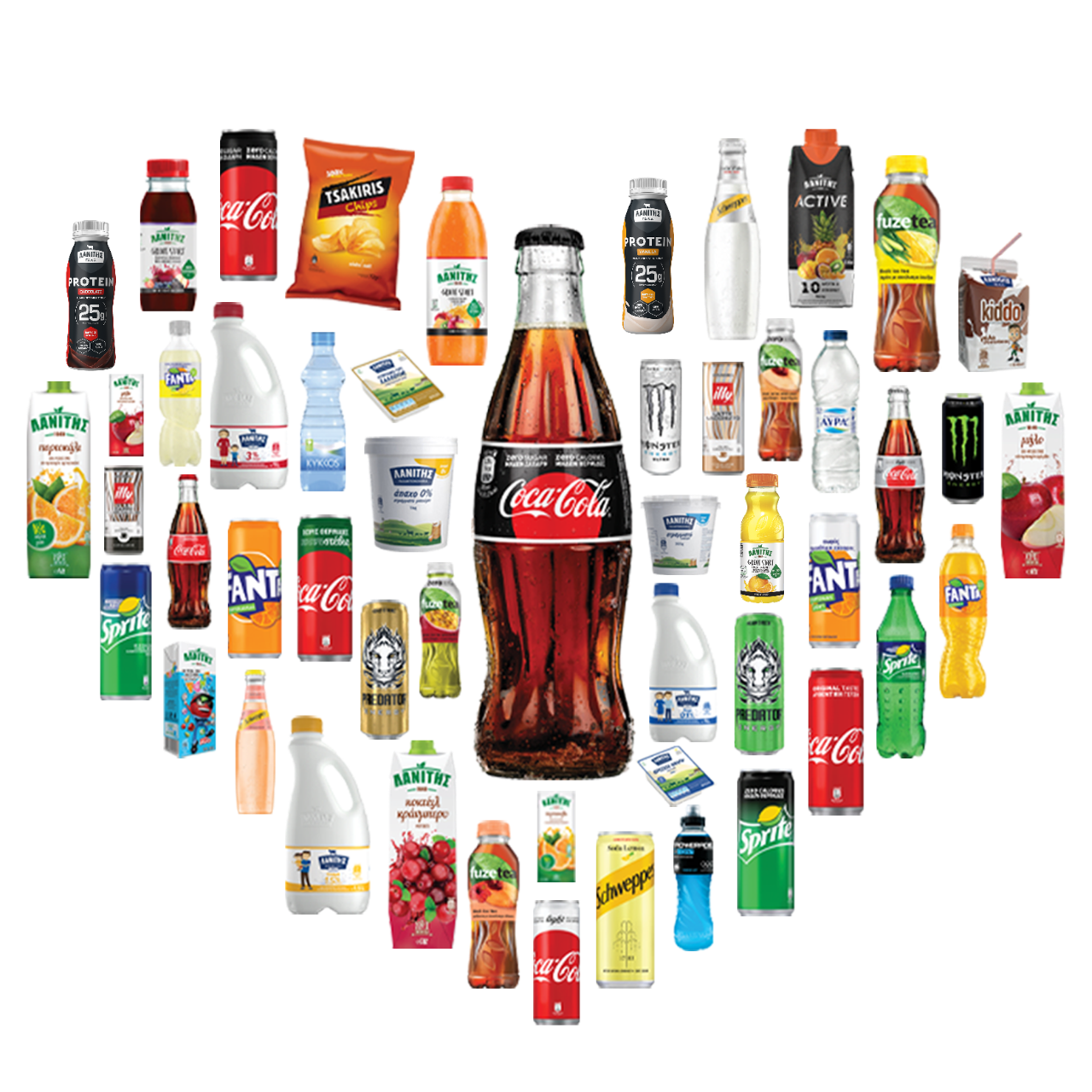
Coca Cola's brand portfolio is about as eclectic, far-reaching as they come — certainly when it comes to the food and beverage industry. Its suite of brands includes drinks and edible products that cover a massive range of purposes, prices, qualities, and regional markets.

2. Nestle

Image Source: Nestle

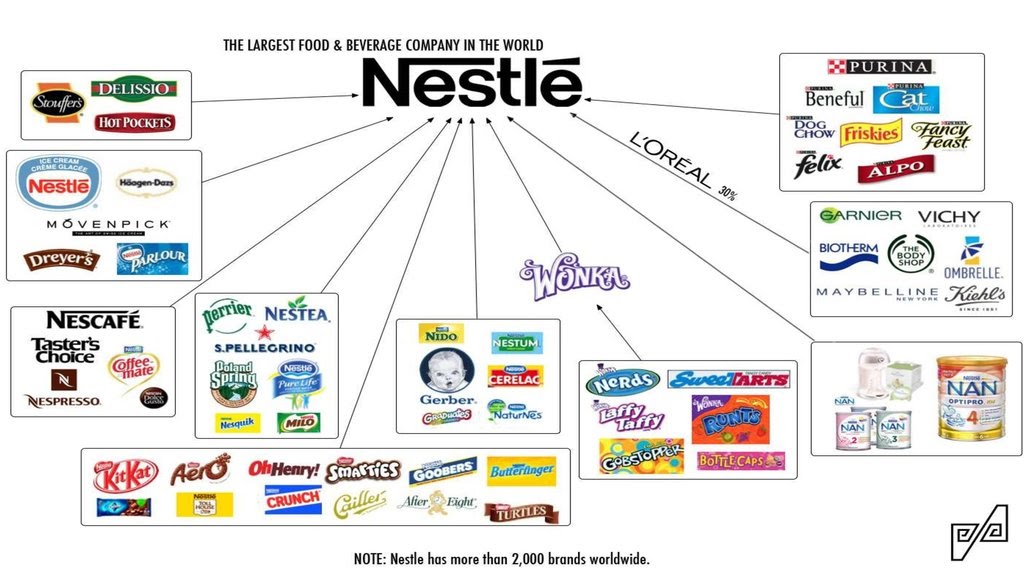
Nestle is the largest food and beverage company in the world, and the graphic above barely scrapes the surface of its scale. Its brand portfolio is eclectic and contains brands that suit a massive variety of categories and needs.

3. General Electric

Image Source: GE

GE's brand portfolio is monolithic, meaning all the brands that fall under its broader portfolio are similarly branded. They all feature fundamentally similar names and sport the same logo.

4. Johnson and Johnson

Image Source: Johnson and Johnson

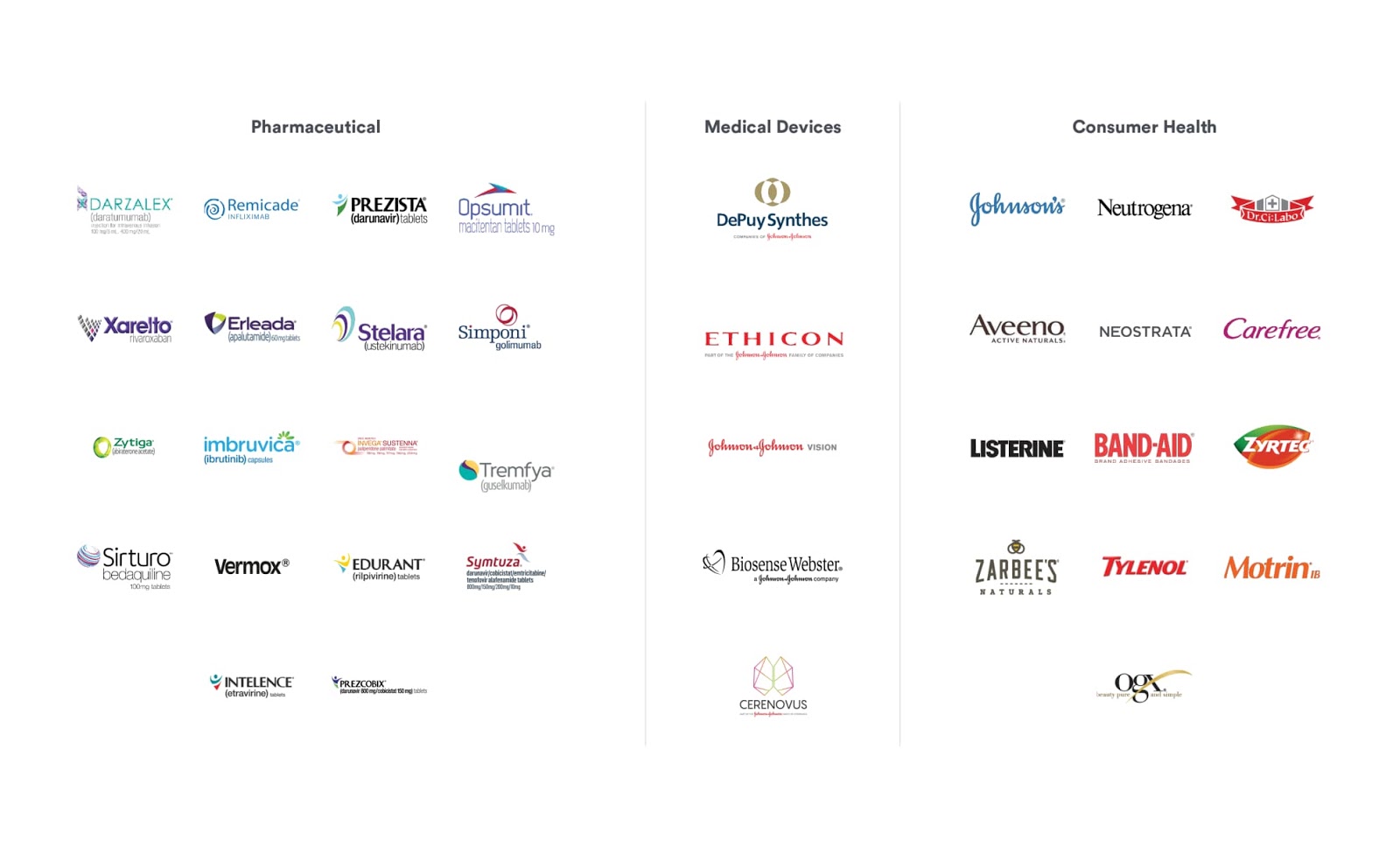
Johnson and Johnson's brand portfolio covers a variety of markets that fit under the broader healthcare industry umbrella.

Major brands generally don't exist in a vacuum. Almost all of them are a part of a broader brand portfolio, so virtually every brand has a firm, company, or conglomerate at the top of its lineage.

That's important to bear in mind when taking actions like trying to be ethical with your dollar. Any brand you use starts somewhere. If you can navigate that product's portfolio back to a company whose values and actions don't sit well with you, you'll know to avoid it.


What's Sprite to Coca Cola? An Exploration of Brand Portfolios was originally posted by Local Sign Company Irvine, Ca. https://goo.gl/4NmUQV https://goo.gl/bQ1zHR http://www.pearltrees.com/anaheimsigns

How to Write a Blog Post Outline: A Simple Formula to Follow

What makes a blog post bad?

There are lots of reasons a blog post could be less-than-perfect. Poor formatting. Poor grammar. Poor word choice. Poor shareability. 

The most pervasive problem? Poor flow. The post jumps from one idea to the next to the next and then circles around again for a split second to the first idea, then back to the fourth, and so on. Or the post reads like a stream of consciousness -- but it wasn't a stylistic choice. 

Luckily, you have a simple solution. Before diving headfirst into writing your post, you can create an outline. 

I'm not talking about jotting down a few quick bullet points -- even experienced writers can go astray with just a few talking points. I'm talking a fully fleshed-out outline with enough details that make it virtually impossible for your writing to go off the deep end. And it's pretty easy to do.

Below is my method for outlining posts and organizing my thoughts. You may prefer to switch up some of the steps depending on your writing style, but your end goal should always be to get an outline detailed enough that its result is a cohesive, logical piece. Here's one way you can do that. 

1. Nail your working title.

This is the most important step of this entire process. You want to have a clear understanding of what you're going to write before you start outlining. 

My colleague Corey wrote an awesome post about how to pick a great working title. Go read it, now. I won't go too much into the weeds here (that's why you should read her post), but a great working title is specific. It's "How to Use Images to Generate Leads on Twitter," not " Twitter lead generation."

Spend time getting your working title to something specific and easy to tackle in a blog post format -- but don't waste time getting nitpicky. You can refine your title later. The goal here is to have a title that gives you a very clear idea of what the whole piece is about. You can make it sound catchy later.  

2. Write down as many distinct takeaways from the article as you can.

Next, you get to brain dump. Write down all the things you want your readers to get out of the article. These won't always be the main sections of your article -- it's just all the things you want your readers to know by the end of reading your post.

This is the only time in the whole process you're not worried about organization -- just let your ideas flow naturally. You need to get out all of your wild and crazy ideas now so they won't muck up your post later in the process.

Let's use the previous example to show you what I mean. If my working title was "How to Use Images to Generate Leads on Twitter," I'd probably want readers to know:

  • What sets a good image apart from a bad one on Twitter
  • Where they can find images to use legally 
  • How they can create images on their own
  • What sizes they need to make images
  • How often they should tweet images
  • How to actually upload an image to Twitter
  • How they can generate a lead on Twitter
  • How long their tweet should be with the image in it
  • What results they should expect to get 

Notice how these are really unfiltered and all over the place. That's okay. We'll wrangle it all in in the next step.

3. Break up those takeaways into larger sections.

Now, we'll take that jumble of ideas and place them into overarching sections. Think of it like sorting laundry -- each thought belongs to a different pile. From your brainstorm, you should come up with a few big themes. Sometimes, one of your brainstorming bullets will be a theme in itself, but usually several bullets will fall under one overarching theme. You may also realize that there's a theme that you may not have any bullets for, but the post definitely calls for it. 

Lots of people recommend sticking to 3-4 larger sections, but it really depends on what type of post you're writing. If you're writing something that's long and comprehensive, you might need more. If it's a quick post, fewer sections would be ideal. But if you need a benchmark, 3-4 sections are fine. 

So if we're writing that post about generating leads on Twitter using images, we'd bucket my ideas into the following buckets:

  1. Intro
  2. Crafting a Twitter Image Lead Gen Strategy
    • How they can generate a lead on Twitter
    • How often they should tweet images
  3. How to Create the Perfect Lead Gen Tweet
    • How long their tweet should be with the image in it
    • How to actually upload an image to Twitter
    • What sizes they need to make images
    • How they can create images on their own
    • Where they can find images to use legally 
    • What sets a good image apart from a bad one on Twitter
  4. Measuring Your Strategy's Success
    • What results they should expect to get

4. Add more takeaways to some sections. 

At this point, you should have a pretty weird looking outline. Mine is. Some sections have lots of little bullet points, others have only a few, and others have nothing. 

Now's the time to fill in the holes. What did you miss in your initial brainstorm? Thinking about what's missing is always hard, but it will help improve your final post significantly. 

Don't forget to beef up your intro here, too. Have a great point you think would set the stage for the article? Add a little reminder below that section so you don't forget it. 

Below shows how my outline's evolved. I italicized all the things I added, and the outline is becoming closer and closer to being a post:

  1. Intro
    • Images work really well on Twitter (find study)
  2. Crafting a Twitter Image Lead Gen Strategy
    • How they can generate a lead on Twitter
    • How often they should tweet images
  3. How to Create the Perfect Lead Gen Tweet
    • How long their tweet should be with the image in it
    • How to actually upload an image to Twitter
    • What sizes they need to make images
    • How they can create images on their own
    • Where they can find images to use legally 
    • What sets a good image apart from a bad one on Twitter
    • Should you tag people in images
    • Should you use photo collages
    • What colors you should use to stand out
  4. Measuring Your Strategy's Success
    • What results they should expect to get
    • Which metrics to look at
    • How to find them in your analytics
    • How to adjust the above to get better results

Essentially, you're re-doing the second step, but in a more controlled, organized manner.

5. Revise, remove, and reorganize details in each section.

Now comes the fun part: editing your outline. You've already done the hard part of actually thinking of your ideas. Now, you're tightening up your outline to include only the most relevant information, revising the sub-bullets to actually make sense, and reorganizing the sub-bullets to tell the most logical story.

First, let me show you what I'd cut -- shown in bold. 

  1. Intro
    • Images work really well on Twitter (find study)
  2. Crafting a Twitter Image Lead Gen Strategy
    • How to generate a lead on Twitter
    • How often they should tweet images
  3. How to Create the Perfect Lead Gen Tweet
    • How long their tweet should be with the image in it
    • How to actually upload an image to Twitter (This is a pretty basic step that someone would already know if they're reading this post.)
    • What sizes they need to make images
    • How they can create images on their own
    • Where they can find images to use legally 
    • What sets a good image apart from a bad one on Twitter
    • Should you tag people in images
    • Should you use photo collages
    • What colors you should use to stand out (Don't believe there's hard data on this, just speculation. Let's cut it.)
  4. Measuring Your Strategy's Success
    • What results they should expect to get (The study in the first part should cover this bullet point.)
    • Which metrics to look at
    • How to find them in your analytics
    • How to adjust the above to get better results

I cut things usually because the sub-bullet didn't add value to the post or the reader would already know it. That's a pretty good benchmark to remember if you're not sure whether to cut something. 

Next, we'll reorganize the remainder of the sub-bullets and rework them to sound like actual takeaways. We'll also turn some of the sub-bullets into sub-sub-bullets. Here's what this outline looks like now:

  1. Intro
    • Images tend to work really well on Twitter (find study)
  2. Crafting a Twitter Image Lead Gen Strategy
    • How to generate a lead on Twitter
    • How lead generation fits in with the rest of your Twitter strategy
  3. How to Create the Perfect Lead Gen Tweet
    • How to choose the right image
      • Creating it on your own 
      • Finding images to use legally
    • Optimizing the image for Twitter
      • Sizing images for Twitter
      • Tagging people in images
      • Using Photo Collages
    • Optimizing the rest of your tweet
      • How long the tweet should be with the image in
  4. Measuring Your Strategy's Success
    • Which metrics to look at
    • How to find them in your analytics
    • How to adjust your strategy to get better results

Ta-da! A much more comprehensive outline that makes your post easy to write.

6. Include links to your examples and/or data.

This is purely a time-saving trick. After you've fully fleshed out and then trimmed your outline, you should look for examples and data to support these claims. Once you find a source to support your arguments, just add them as a note underneath the section -- that way, when you go to write it, it's all organized for you.  

7. If any details come to you that you don't want to forget, add them in. 

Last, but certainly not least, spruce up the outline with anything you don't want to forget while writing. Maybe you're writing the post right away -- or maybe you won't have time to actually start for a few more days. Regardless, having these details in your outline will make sure you're not missing a thing. I do this often if I think of a terrible pun or pop culture reference while outlining ... and trust me, that's something I definitely wouldn't want to forget. ;)

Here's my final outline: 

Blog Post Outline Example

  1. Intro
    • Images tend to work really well on Twitter
  2. Crafting a Twitter Image Lead Gen Strategy
    • How to generate a lead on Twitter
    • How lead generation fits in with the rest of your Twitter strategy
      • Reference Anchorman line: "Come and see how good I look."
  3. How to Create the Perfect Lead Gen Tweet
    • How to choose the right image
      • Creating it on your own 
      • Finding images to use legally
    • Optimizing the image for Twitter
      • Sizing images for Twitter
      • Tagging people in images
      • Using Photo Collages
    • Optimizing the rest of your tweet
      • How long the tweet should be with the image in
  4. Measuring Your Strategy's Success
    • Which metrics to look at
    • How to find them in your analytics
    • How to adjust your strategy to get better results

And that's it! Feel free to take that methodology and apply it to other types of posts. Once you have a solid outline, writing the actual post should be a breeze. It's even easier if you work from a template. 

Editor's note: This post was originally published in May 2014 and has been updated for comprehensiveness.


How to Write a Blog Post Outline: A Simple Formula to Follow was originally posted by Local Sign Company Irvine, Ca. https://goo.gl/4NmUQV https://goo.gl/bQ1zHR http://www.pearltrees.com/anaheimsigns

Sunday, October 4, 2020

7 Tips for Running Engaging Instagram Giveaways (+Tools to Get You Started)

With 80% of Instagram users following at least one business, it makes sense you want to increase your own visibility and reach on the platform -- but with such immense competition, it can be a difficult task to accomplish.

Fortunately, there are a few specific Instagram marketing strategies you can implement that have proven effective. For instance, you might optimize your posting times to ensure maximum engagement, partner with an influencer to spread awareness, or designate a content creator to craft more compelling content.

Additionally, to delight your current followers and attract new visitors to your page, you might consider hosting an Instagram giveaway.

Simply put, an Instagram giveaway allows you to offer something for free in exchange for an Instagram like, comment, or other pre-determined requirement.

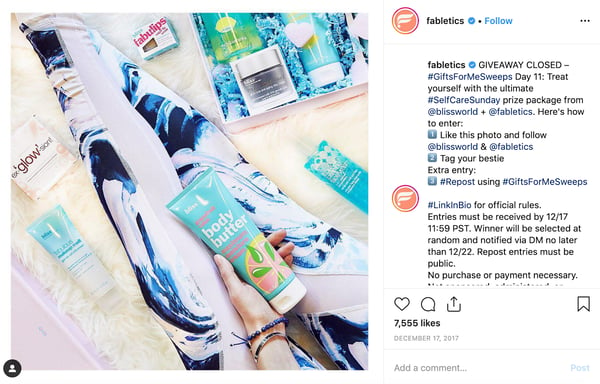
For instance, take a look at this giveaway from Fabletics:

Fabletics hosts an Instagram giveaway.

Image Source

There are a few reasons why this giveaway works -- first, Fabletics partnered with Blissworld, which enables both businesses to reach the other brand's audience. Second, Fabletics asked viewers to "tag your bestie" and follow both brands. This doubles the reach they might've had if they'd only asked one follower to comment.

When done correctly, giveaways can help you establish your brand on Instagram, cultivate a loyal following, and share your impressive products or services with a larger audience than you could organically.

Here, we've created a complete guide on how to run your own giveaway, to ensure you're able to delight and engage both new and existing followers on Instagram.

1. Choose the prize for your giveaway.

The first thing you'll want to do is decide on the product, service, or experience you'll giveaway as your prize. This will vary depending on your goal -- if you want to spread awareness around a product launch, for instance, you'll likely want to giveaway that specific product as your prize.

Alternatively, perhaps you want to partner with a brand and create a unique prize that will appeal to each of your audiences.

Lastly, you might try offering an experience instead of a specific product or service -- like a weekend trip, a spa day, or the chance to meet a leader in your industry.

2. Determine the entry-criteria for your contest.

Your entry-criteria depends, again, on your ultimate goal. For instance, if you simply want to spread brand awareness, you might ask each participant to like your post and comment with the name of a friend -- this allows you to increase your reach quickly, and could result in new followers.

Alternatively, maybe you want to draw attention to your blog, or another page on your website. If this is the case, you might ask participants to go to your blog or web page to find entry-criteria there -- such as a question you then want them to answer in your Instagram comments section.

Lastly, perhaps you've partnered with a brand and, in exchange for one of their products as a prize, they've asked you to include a request to follow their brand as part of your entry-criteria.

3. Decide on a goal for your Instagram contest.

By determining a specific goal, you're able to tailor your strategy more specifically and keep track of whether or not your giveaway was successful.

Your goal might be an increase in website traffic, more followers, an increase in engagement, or a boost in sales -- it's to you to choose what makes the most sense for your brand.

4. Consider a brand partnership.

To explore the benefits of brand partnerships for Instagram giveaways, I spoke with Conor Janda, an Associate Manager of Marketing Partnerships at Chomps. He told me, "A giveaway is a nice way to align with peer brands and partners, and drive traffic to your account."

Janda also mentioned giveaways are particularly successful when new brands partner together. "For instance, a brand might post a recipe, and then mention specific brands in the ingredients section," he told me. "A successful giveaway is typically when a brand partners with a content creator or influencer to make something specific, and then they push that prize out through both of their channels."

Ultimately, a giveaway could allow you to reach a similar brand's followers, and vice-versa -- a win, win.

5. Select a campaign hashtag.

On Instagram, hashtags help your content surface on Explore channels, and oftentimes increase visibility on the platform. Consider creating a compelling and unique campaign hashtag to help spread awareness of your giveaway. For instance, along with #giveaway, you might include #winitwednesday #[yourbrand]giveaway #[yourbrand]contest, or something of similar nature.

6. Put a time-limit on your contest.

Tell your participants how long they have to complete your requirements by putting a time limit in your caption, and then adding "Giveaway Closed" at the end of that time. For instance, you might put, "Giveaway! Over the next 24 hours, please tag a friend in the comments and include your favorite place to travel for a chance to stay overnight at one of our resorts."

The time-limit will ideally create a sense of urgency, and incentivize followers to engage with your post more quickly -- which will also help your giveaway stay at the top of your followers' Instagram feeds.

7. Launch and promote your Instagram contest.

Once you've chosen your prize, entry-criteria, potential partners, hashtag, time-limit, and goal, you're finally ready to launch and promote your post! Remember, Instagram users favor posts during a certain time in the day, so you'll want to plan wisely.

Additionally, you'll likely attract further attention to your giveaway if you also post giveaway details on a blog post, Facebook page, or another social channel. Consider where else you can promote your giveaway for optimal results.

Instagram Giveaway Rules

Instagram's rules are relatively simple when it comes to giveaways.

First and foremost, it's critical you include a statement like the following, so viewers know your promotion is not tied to Instagram:

"Per Instagram rules, this promotion is in no way sponsored, administered, or associated with Instagram, Inc. By entering, entrants confirm that they are 13+ years of age, release Instagram of responsibility, and agree to Instagram's terms of use."

Additionally, you'll want to ensure you don't ask participants to tag themselves in your content, or tag something that isn't in the photo -- Instagram will penalize you for this.

Take a look at Instagram's promotion guidelines for a full list of rules and regulations.

Instagram Giveaway Ideas

Once you're ready to post your giveaway, there are a few different action items you might ask your participants to accomplish in exchange for the chance to win.

Here's a list of some of the more common giveaway ideas:

  1. Like to win: Have followers like your post for a chance to win a free product or service. This helps you boost engagement.
  2. Tag a friend to win: Have followers tag one of their friends in the comments section for a chance to win. This allows your brand to reach new potential leads on Instagram and grow your audience.
  3. Like and share to win: You might ask followers to like your giveaway and repost it on their own channels for the chance to greatly expand your brand's reach -- if ten followers with 100 followers each re-post, that's a chance to reach 1,000 new people.
  4. Follow to win: Ask followers to follow your brand, or a partner (or both) for the chance to win. This is a popular tactic since it's an easy way to increase your follower count.
  5. Photo contest: Ask participants to upload a photo of themselves using your product or service. This is another easy opportunity to spread brand awareness, since your participants' posts will be seen by their own network of followers and friends. You should ask participants to include your brand's hashtag, or tag your brand, for optimal visibility.
  6. Caption this: Some brands post images and leave the caption section blank with a "Caption this for a chance to win" command. Your participants will enjoy the chance to offer creative captions for your image, and you'll be able to add the caption to your post with credit to the winner once your giveaway ends.

Instagram Giveaway Picker Tools

Once you've closed your giveaway contest, it's time to pick a winner -- but how can you do that and ensure fairness?

There are a few tools you can use to truly randomize your winner. Here are a few options:

1. Use a free number generator.

While admittedly tedious, particularly if you have hundreds of entries, you might consider counting the total number of participants who engaged with your giveaway, and then using a number generator to select your winner.

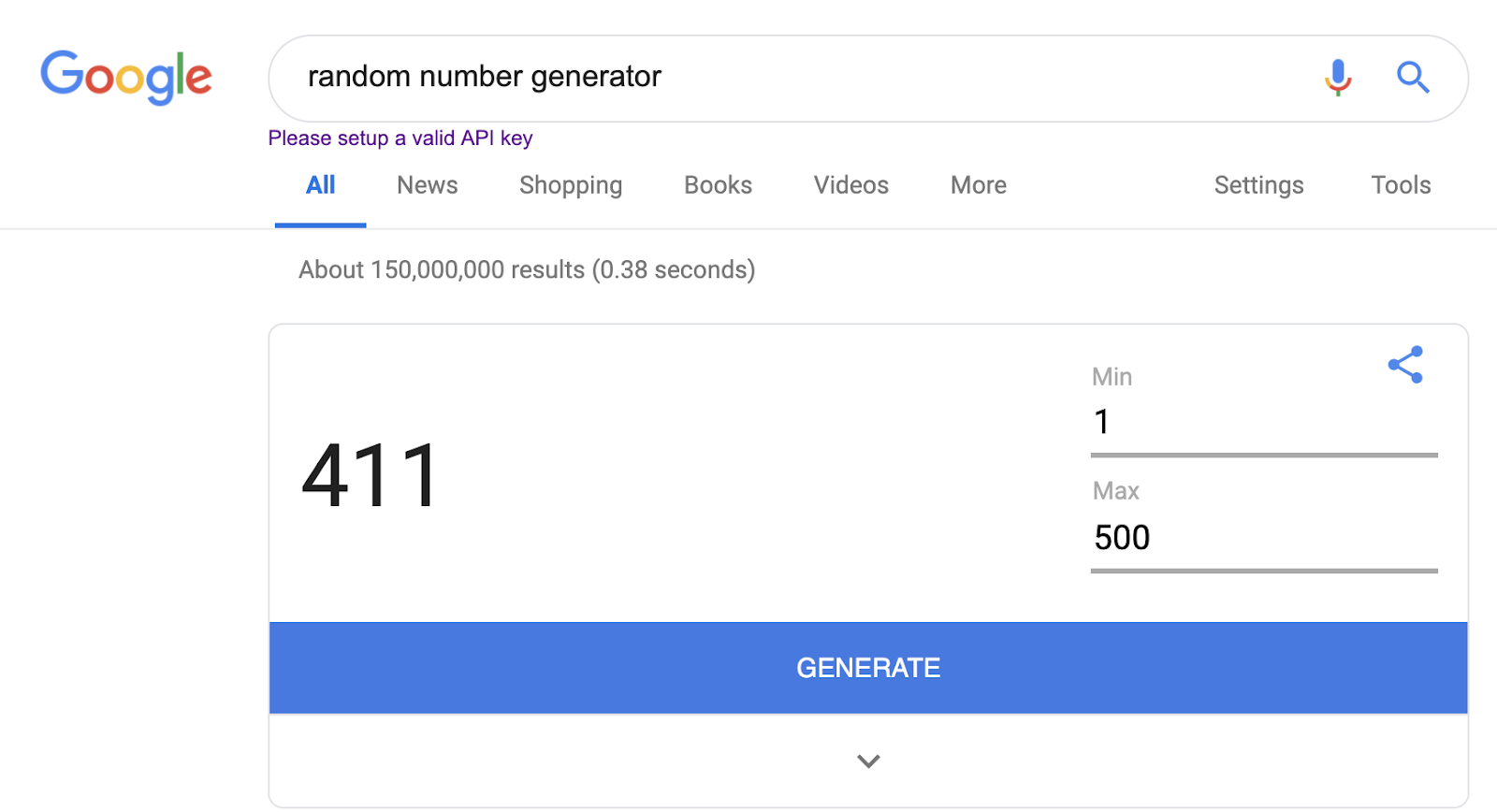
For instance, let's say you count 500 participants in your comments section. Go to Google and type "random number generator" into the search box, and Google's number generator will appear as a box in the search results (you can also use another number generator tool, if you want).

Your minimum should stay 1, and your maximum should be the total number of participants. When you click "Generate", the tool will provide a random number. Now, simply go back to your comments section and count until you land on the username that matches that number.

2. Use Easypromos' Instagram Sweepstakes App.

You might consider using a tool like Easypromos' Instagram Sweepstakes App to organize your giveaway, which can help you ensure fairness and efficiency when choosing a winner.

With Easypromos' app, you can filter finalists based on number of mentioned friends. Once you've closed your giveaway, the tool can randomly select between one and 1,000 winners, and alternate winners automatically. The tool provides a test run that you can try before the final draw.

Best of all, Easypromos' offers a link to a certificate of validity that guarantees the draw has been random, ensuring a level of transparency and honesty between you and your participants. You can customize the certificate for your brand.

3. Use a random name picker.

This last option is likely the most tedious, but if your giveaway participant pool is relatively small, you could consider using a random name picker to choose your winner by username instead of number. Particularly if you've already compiled your list of names into a spreadsheet, this could be a good option for you.

To use a random name picker, go to a website like Miniwebtool.com and input all usernames, each on a separate line, into the text box. Then click the "Pick a name" button.

1. Wishpond

Wishpond is a great tool that can help you organize and track your Instagram giveaways.

With Wishpond, you can run an Instagram hashtag giveaway and view all the entrants on your dashboard. You can even add a voting capability for users to vote on the best entry.

The goal of this type of tool is to help you take your giveaway and promotions to the next level. If you want to run regular contests on Instagram, it might make sense to invest in a platform like this.

2. Easypromos

Similar to Wishpond, Easypromos makes running an Instagram giveaway or contest a seamless process.

This tool will help you track comments on one or several posts. It will help you determine if people tagged the right amount of friends in the comments section and help you randomly choose the winner.

The basic plan is affordable, with no-frills added. This is a great option if you want to run simple giveaways without adding on landing pages or marketing automation.

Alternatively, if you are running enterprise level giveaways, there are other paid options that will include the features you need.

3. Woobox

With Woobox, you can easily create and run successful contests, giveaways, polls, coupons, forms, and more.

You can download your Instagram comments and pick one or several random winners. Additionally, this tool allows you to easily collect winner contact info and export Instagram comments.

If you're looking to use an affordable tool, this is an excellent option. There is a free plan for smaller giveaways, but also an enterprise level power plan for larger contests.

Using a tool is a great way to organize and track your giveaways. Now, let's see what a giveaway looks like in action.

Instagram Giveaway Examples

1. Domino's

Dominos Instagram giveaway.

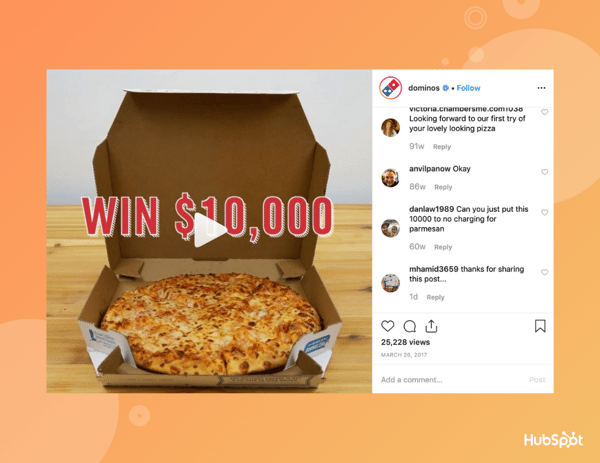
One of the more impressive giveaways in this list, Domino's offered the chance to win $10,000 for any participant who followed @Dominos, posted a picture to prove they're a superfan, and used the hashtag #PieceofthePieContest.

With simple, clear instructions, I'm willing to bet this was a successful giveaway as followers quickly spread the word about their love for Dominos -- and likely incentivized followers to order a pizza from the brand.

2. Ali Fedotowsky

Ali Fedotowsky hosts an Instagram giveaway.

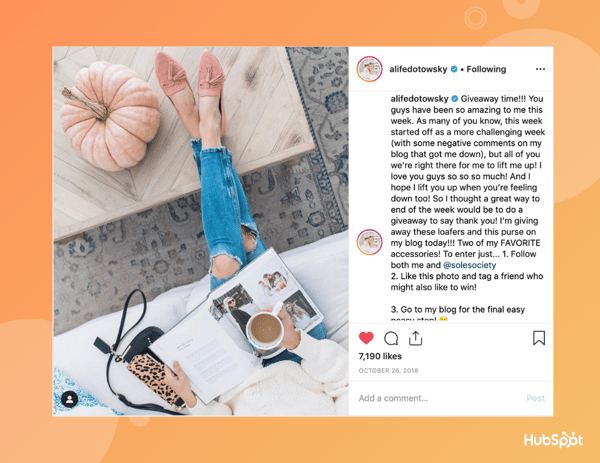
Ali Fedotowsky, a lifestyle and fashion blogger and ex-Bachelorette, partnered with Sole Society to giveaway a pair of loafers and a purse. Since she's also well-known as an affordable fashion influencer, the partnership makes sense, and likely resulted in new followers for both Ali and Sole Society.

Additionally, Ali wisely instructed participants to check out her blog for the final requirement, likely resulting in an up-tick in traffic.

3. Cakesmiths

Cakesmiths hosted an Instagram giveaway.

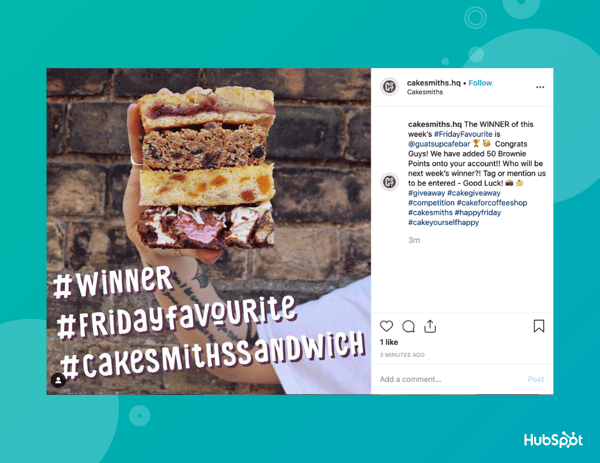
Cakesmiths does a giveaway every Friday and uses the same hashtag, #FridayFavourite, to evoke loyalty and engagement from their Instagram followers. Cakesmiths is proof you don't need any outrageous prizes for a giveaway -- sometimes, a simple treat will do.

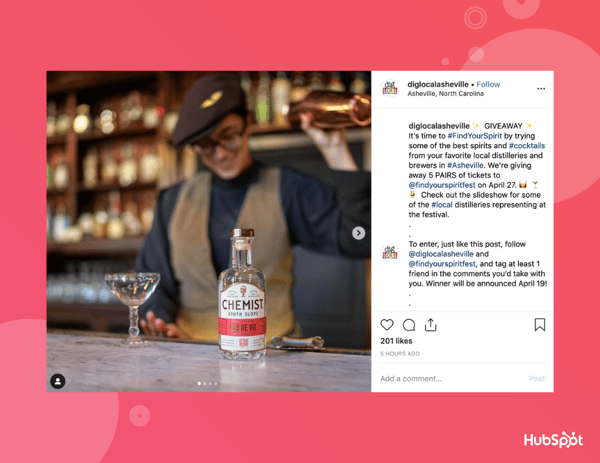
4. Dig Local Asheville

Dig Local Asheville Instagram giveaway.

Dig Local Asheville partnered with @findyourspiritfest to inspire people to visit distilleries in the local Asheville, N.C. area. This is a good example of how you might use your giveaway to increase awareness and excitement regarding one of your company's upcoming events.

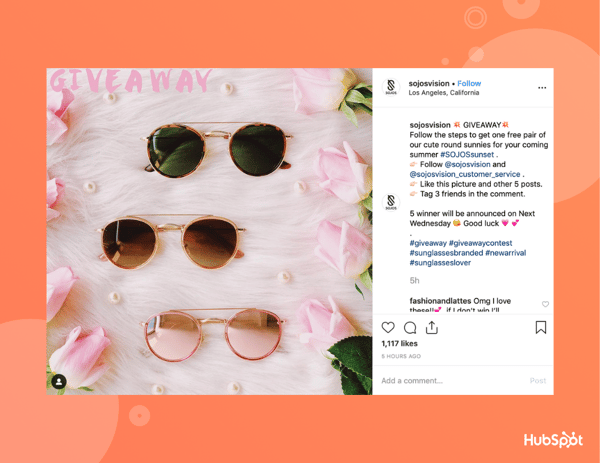
5. SojoS Vision

SojoS Vision sunglasses giveaway on Instagram.

SojoS Vision cleverly asked participants to like six of their photos instead of just one, which likely helped them increase their Instagram engagement rates. Additionally, SojoS included 'Giveaway' text at the top of the image -- if your followers don't often stop to read captions, this is a smart way to draw more attention to your giveaway.

If you're interested in learning more about Instagram marketing, consider taking an online course, like HubSpot's Instagram Marketing Course.

Ultimately, running a social media giveaway should help you increase your brand recognition and attract more followers.

Editor's note: This post was originally published in April 2019 and has been updated for comprehensiveness.


7 Tips for Running Engaging Instagram Giveaways (+Tools to Get You Started) was originally posted by Local Sign Company Irvine, Ca. https://goo.gl/4NmUQV https://goo.gl/bQ1zHR http://www.pearltrees.com/anaheimsigns

Saturday, October 3, 2020

How to Create an Editorial Calendar in Google Calendar [Free Templates]

One of the most frequent questions we get from aspiring and current inbound marketers is, "How do you manage all of that content?"

When we tell them we use an editorial calendar, the next question is often, "Oh, how much does that cost?"

Nothing. Because, for the most part, we use Google Calendar.

Surprised? There are a lot of great calendar tools out there you can choose from. (In fact, for those of you who are HubSpot customers, there's a marketing calendar built right into HubSpot's software.) But after trying a ton of other solutions, our team found that we really operated the best with just a simple Google Calendar. In fact, this has actually been the longest-running editorial calendar solution our team has ever seen.

Here's how we set it up.

Follow Along With Free Editorial Calendar Templates

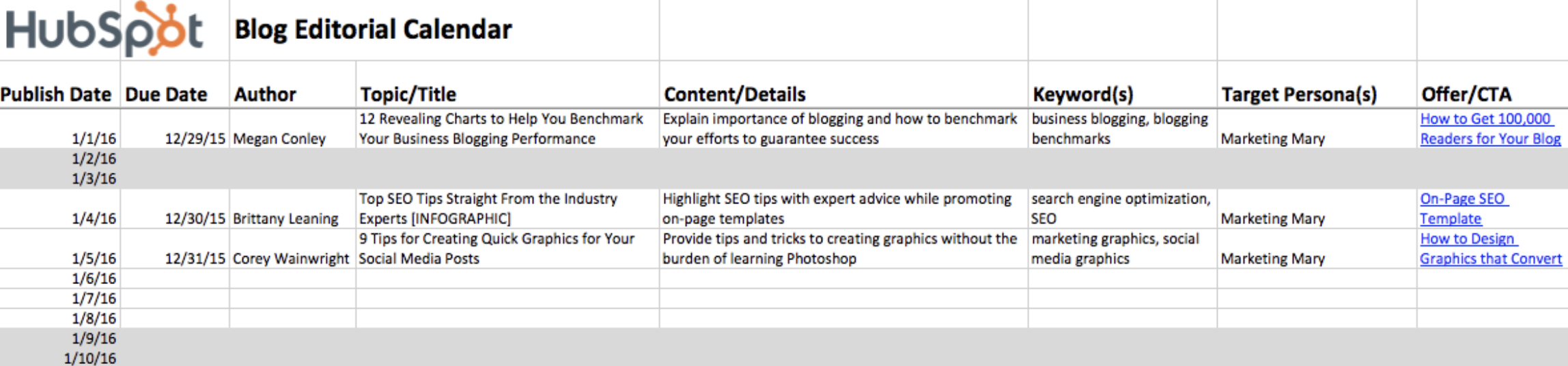
HubSpot's Blog Editorial Calendar - Free Template in ExcelDownload the Template for Free

1. Download HubSpot's free editorial calendar templates.

First thing's first: Download the calendar templates, above (they're free.) By doing this, you'll have three editorial calendar templates on your computer to use at your leisure: one for Google Calendar, one for Excel, and one for Google Sheets. In this blog post, we'll be going over how to import the Excel template into Google Calendar.

2. Customize your template and prepare for import into Google Calendar.

By default, the publish dates on the templates you download will be stamped for the year 2016. Feel free to change them to the present year in the spreadsheet itself -- you can also drag them to the dates of your choosing after you upload the file into Google Calendar.

Google Calendar makes it easy to load a calendar you might have pre-created in another program into Google. This includes Microsoft Excel. Here's how to import the Excel calendar template you downloaded in the previous step into Google Calendar:

3. Open Google Calendar.

Once you've downloaded (or, for that matter, created) a calendar that opens in Microsoft Excel, it's time to open Google Calendar. Just make sure you're already logged into the Gmail account you want this calendar to give access to.

4. Use the lefthand dropdown menu to create a new calendar.

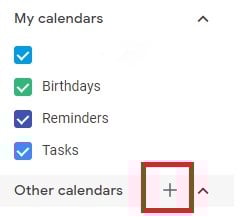
Now it's time to set up your Google Calendar to accommodate the information in your Excel spreadsheet. First, go into your Google Calendar and click the plus sign to the right of "Other Calendars," as shown in the screenshot below. In the dropdown menu that appears, select "Create new calendar."

Adding a New Calendar in Google Calendar

5. Fill out the details of your new calendar.

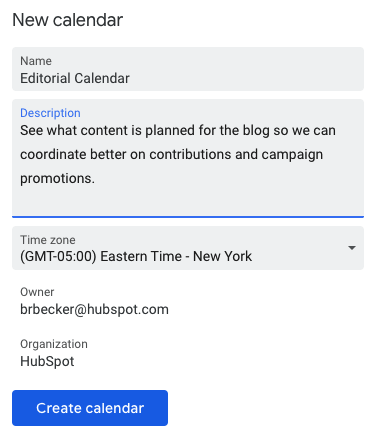
Fill out the fields that appear on the next screen. This includes a brief description of your calendar, as shown below, to give people proper context when you invite them into this calendar. When you're done filling in the details, click "Create calendar."

Adding Details in Google Calendar to Create New Calendar

6. Import your XLS or CSV file from the same dropdown menu.

Using the same dropdown menu you used to create your editorial calendar, you'll now import the Excel file itself into Google Calendar. Click that plus sign and select "Import."

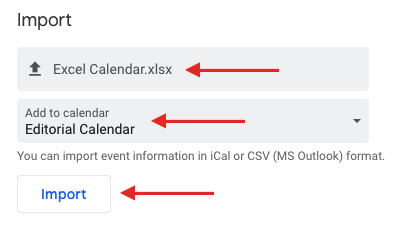
Click the upload box that reads "Select file from your computer," and locate the file entitled "Blog Editorial Calendar - Excel" that was included in the ZIP file you downloaded in Step 1, above.

7. Select which calendar to add this file to.

In the second box below your imported file, click the "Add to calendar" dropdown. Be sure to choose the name of the calendar you just created from the dropdown menu, as shown below. Then, click "Import."

Import Excel Calendar in Google Calendar

8. Click Import.

Once you've uploaded your Excel file and selected the calendar you want to add this file to, click "Import." You should see an Import calendar dialog box telling you that seven events were successfully imported. Click "Close."

Now, if you didn't change the dates of the first seven assignments in the original Excel document, you can now. Navigate to January 3, 2016, which is the start of your calendar. Be sure all of your other calendars are temporarily hidden by clicking the colored box to the left of the calendar name. On the week of January 3, 2016, you should just see one "Blog TBD" calendar event on each day from 10 a.m. to 11 a.m.

Use the edit window of each assignment to change the publish date. For example, if you're satisfied with the 10 a.m. publish time, you can simply change the date from January X, 2016 to January X, 2019. Each assignment will then appear as event blocks in your 2019 monthly calendar view.

9. Determine your publishing schedule.

Now that you have your calendar created, it's time to fill it in with assignments for the year. This is when you have to make some decisions about your blog's publishing schedule.

While the Excel file you imported accounts for one blog post per day, this doesn't mean you need to publish seven days a week. Maybe you want to publish every Monday, Wednesday, and Friday. Or perhaps you plan on publishing on just Thursdays. Remember, the key to successful blogging is quality over quantity. Don't overcommit to a blogging schedule if the quality of your content will take a hit. (Read this blog post for some great benchmark data on how often companies should blog.)

If you decide to decrease the number of days you want to publish, click on the calendar event of that day and select "Delete."

Even if you wanted to publish multiple times a day, updating this calendar is as easy as adding an event. Select a slot on your calendar to add another "Blog TBD" event and copy the default description from another one of the events you imported.

Next, it's time for some minor adjustments. Currently, the "Blog TBD" events are set for 10 a.m. Feel free to move these events to whichever time your blog publishes during the day. 

10. Set up recurring events.

Now that you have your publish dates and times set, you can make these recurring events on your calendar. If you have a regular publishing schedule, like every Monday, Wednesday, and Friday at 10:00 a.m., then put that in as a recurring "slot" on your calendar. It's okay if you don't have a piece of completed content -- or even a working title -- to put there yet. It's just a reminder that you want to publish something that day.

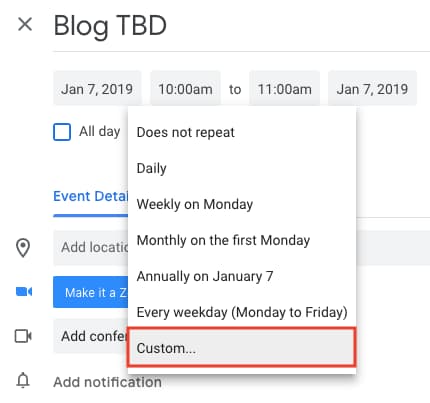
To add your recurring slot, click on your first "Blog TBD" event and click the pencil icon to edit your event. This will take you to the details of the post, where you can create a custom recurring schedule for each assignment, as shown in the screenshot below.

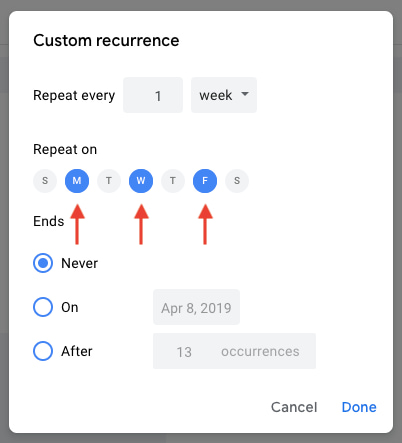
Setting Custom Repeat Schedule in Google Calendar for Recurring EventYou can set the post up as a recurring post so it automatically appears every Monday, Wednesday, and Friday at 10:00 a.m. (or whatever days and times you want).

Setting Custom Recurrence in Google Calendar for Recurring Event

Once you've selected the recurring days, hit "Done" and "Save," and you'll have an editorial calendar framework to work with.

For now, keep the title of the event as "Blog TBD," but feel free to customize the description with any extra details you want to be sure you include for each post. Wait to invite any guest, as we'll use this to assign posts to an author once you begin filling in your topics. With everything complete, click "Save."

If you don't have a recurring schedule like this, you might not be in need of an editorial calendar just yet -- but it is a good way to set goals for yourself. If you know you want to publish a certain number of posts each week, even if you don't hit every single slot, it's a good reminder for yourself and your team that this is something you should all be striving for.

11. Fill your publishing slots.

Now that you know all of the slots you want to fill, you gotta actually ... you know ... fill 'em. (If you don't have topic ideas yet, check out this free topic idea generator. It'll give you some good ideas for content to put in the calendar.)

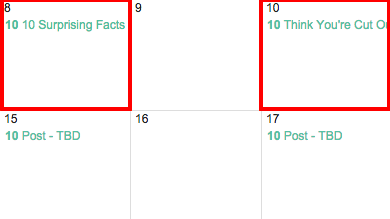
Let's say one of the posts you want to write is "10 Surprising Facts About Tapirs," and one of the posts you've already written and want to publish later is "Think You're Cut Out to Own a Tapir? Read This First." Cool! Just add 'em both to the calendar by clicking on "Post - TBD" on the correct date, choosing "Edit Event," and then changing the "Post - TBD" text to the actual title of the post.

Changing Name of Post in Google Editorial Calendar

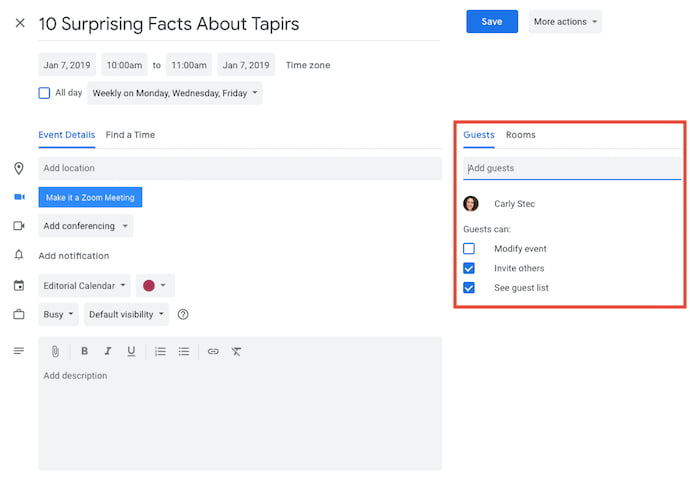
Now, let's say you don't actually want to write "10 Surprising Facts About Tapirs," and you want your colleague to write it instead. To assign the post an author, you'll invite them to the event as a guest. To do this, click on the event, hit "Edit Event," then invite that colleague to the post by typing his or her name or email address into the "Add guests" box, selecting "Add" when their name pops up, and hitting "Save" on the event once you're done.

Adding Guests in Google Calendar

Now, anyone can see who is responsible for writing the post that's going up in that time slot.

You can take it a step further by adding details to the "Description" box of the event, as shown in the large box in the screenshot above. You might include a quick synopsis, the keywords you plan to target the post for, the target audience you're trying to reach, and the offer or CTA you will direct the reader to at the end of the post. Don't forget a due date for the draft.

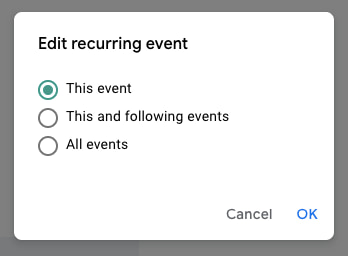
Before Google Calendar will let you save the event, you'll see a dialog box asking if you would like to change just this event or all of the events in the series. Select "Only this event."

Edit Recurring Event to Save Only This Event

Repeat these steps to assign each blog topic today and in the future.

12. Share your editorial calendar with others.

Now that you have your calendar set up, you can start to invite people to see it. I'd recommend you start with your immediate team and regular contributors -- as well as anyone who regularly asks you about publishing content on your company blog.

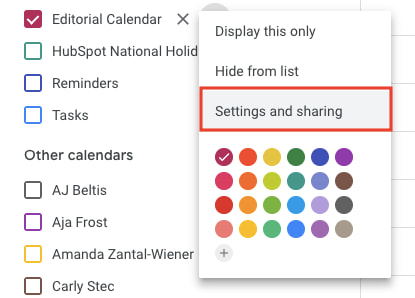
To share this editorial calendar with people, simply find your editorial calendar under "My Calendars," as shown below. Click the three dots next to the calendar name and then select "Settings and sharing" when it appears in the dropdown menu. You'll be taken to the same screen we saw when you first filled out the details of your editorial calendar in Step 2.

Sharing Settings in Google CalendarThen, you can add in the names of people with whom you'd like to share the calendar and set the right permission levels for each invitee.

It's wise to keep those with the permission settings to manage changes and sharing to a minimum so there aren't too many cooks in the kitchen -- but I recommend you let everyone see all event details so it's clear exactly what content is going up in each slot.

Under the "Share with specific people" heading, enter the email addresses of those on your content team and decide if they have viewing, editing, or admin privileges. Save your updated settings.

Why Using Google Calendar as an Editorial Calendar Works

I mentioned earlier that we tried a lot of different editorial calendar solutions, and this is the only one that's stuck for more than a couple months. I think one reason for that is because we use Gmail for our corporate email, which means everyone on our team is already in Gmail (and their calendar, specifically) all day. As a result, it isn't hard for people to form a habit of checking the editorial calendar, because it's not difficult for them to find it.

Google Calendar also makes things really easy to move around and schedule because ... well ... it's already a calendar. It has all the functionality you need to schedule stuff out and let the people who need to know about it know. When we were using other solutions for this, we were trying to hack a calendaring function instead of just relying on one that already existed.

Along those lines, adding people to view your calendar is simple, which makes it easy for multiple teams to collaborate, see what's being published, and figure out when they might be able to launch content and campaigns.

Finally, this sets a precedent for other teams to coordinate with you in a really simple way. You can have a calendar for upcoming campaigns, offers, social media pushes, product launches -- you name it. And you can all share those calendars with one another for a single-screen view of everything that's going on so you can coordinate more easily.

Are there other solutions of there for maintaining an editorial calendar? Of course. But if you're looking for a minimum viable product, and a free one at that, this ain't too shabby. It's kept our content team sane, agile, and transparent for quite some time -- and I think it could do the same for you.

Editor's note: This post was originally published in January 2019 and has been updated for comprehensiveness.


How to Create an Editorial Calendar in Google Calendar [Free Templates] was originally posted by Local Sign Company Irvine, Ca. https://goo.gl/4NmUQV https://goo.gl/bQ1zHR http://www.pearltrees.com/anaheimsigns

Friday, October 2, 2020

How to Use Instagram: A Beginner's Guide

Over the past few years, Instagram has seen exponential growth -- from one million users in December 2010 to over one billion in 2020.

If you're interested in getting an Instagram account, or just created one but aren't sure how to use it, you're in luck. Here, we're going to cover all the basics, so you can see why Instagram is the top social media platform for engagement today.

It's hard to remember a time before Instagram. "Do it for the 'gram" has become a common saying, which means, essentially, "Do something so we can take a picture and post it to Instagram."

If you're not part of the one billion on Instagram, you might want to reconsider. The app is a great chance to stay apart of friends' lives -- when I want to see how my college friends are doing, I don't check Facebook, I check Instagram. Plus, you can follow your favorite celebrities or political figures to see candid photos of their everyday lives.

Additionally, it's a phenomenal platform for investigating what other brands are doing -- for instance, Nike uses the Instagram Stories' feature to promote inspirational athlete stories you won't find anywhere else.

If you're ready to sign up for Instagram, follow these steps below:
  • Go to the Instagram site on your desktop, or download the Instagram app from the App Store (iPhone) or Google Play Store (Android).
  • If you're on desktop, click "Log in with Facebook", or fill in the form with mobile number or email, name, username, and password. Then click "Sign up".
  • On Android, click "Sign Up With Email or Phone Number".
  • On iPhone, select "Create New Account".
  • Enter your email address and phone number, then click "Next". Alternatively, you can also sign up with your Facebook account on the app.
  • Once you've filled out your username and password, you will be instructed to fill out your profile info. Then, tap "Done".
  • If you register with Facebook, you'll need to log into your Facebook account if you're currently logged out.

How Do Instagram Notifications Work?

When your account is created, you'll want to adjust your notifications so you only receive the information you want. For instance, you can choose to receive notifications when you get likes from everyone -- but, alternatively, you might decide to only receive notifications when you get a like from someone you follow. Or, you might turn off notifications for likes altogether.

You can adjust notifications to "Off", "From People I Follow", or "From Everyone", for the following categories -- Comments, Comment Likes, Likes and Comments on Photos of You, Follower Requests, Accepted Follow Requests, Friends on Instagram, Instagram Direct, Photos of You, Reminders, First Posts and Stories, Product Announcements, View Counts, Support Requests, Live Videos, Mentions in Bio, IGTV Video Updates, and Video Chats.

If you're overwhelmed by that list, I get it -- I am, too. If you're unsure what notifications you want to receive, you might start with your notifications on "From Everyone", and if certain notifications begin to annoy you, you can turn them off later.

To customize which notifications you receive, follow these steps:

1. Go to your personal account (which you'll find by pressing the person icon at the bottom right of your screen). Then, click the "Settings" icon (the circle icon beside "Edit Profile").

cog icon for settings next to the edit profile button in instagram

2. Scroll down to "Push Notification Settings".

push notification settings option in instagram

3. Check off the notifications you want to receive.

notifications option within instagram settings with sections for likes, comments, and comment likes

And that's it! Next, let's explore how to connect your other social media accounts to your Instagram, so when you post an image to Instagram, you can share it with your other online audiences, as well.

Connect to Other Social Accounts

When you post an image to Instagram, you have the option to share it on other social media accounts, like your Facebook or Twitter.

To link your other social media accounts to your Instagram, follow these steps:

1. Go to "Settings" and click "Linked Accounts".

linked accounts option in instagram settings

2. Select whichever social media channels you'd like to link to, and input the necessary information to incorporate the channel with your Instagram.

share settings menu in instagram

In the next section, "Upload, Edit, and Post an Image", I'll show you when a linked account comes in handy.

Upload, Edit, and Post an Image

Now, for the most important part of Instagram -- how to upload and post an image.

Instagram is an entirely visual platform. Unlike Facebook, which relies on both text and pictures, or Twitter, which relies on text alone, Instagram's sole purpose is to enable users to share images or videos with their audience.

On Facebook, you might choose to post 100 photos in an album. On Instagram, you need to be choosier about which photos you post. There are a few reasons for this -- first, you don't want to post more than once a day (typically). For the purpose of scarcity alone, you don't want to post too many similar photos. For instance, it would be odd for you to post ten photos from the same beach vacation on your Instagram. Instead, you might choose one or two.

Additionally, you want your overall profile aesthetic to look diverse.

To learn more about Instagram account themes and get inspiration, take a look at "12 Stunning Instagram Themes (& How to Borrow Them for Your Own Feed)".

Additionally, if you want to embark on a deep-dive, you can take HubSpot's Instagram Marketing Course.

Now that we've covered that, let's explore how to upload, edit, and post an image.

1. Click the "+" icon in the bottom center of your screen.

instagram homepage with + icon at the bottom in the center

2. Here, you have three options. You can look through your Photos library on your phone, you can take a new picture from right within Instagram, or you can take a new video. For our purposes, I looked through my Photos library and found a picture of Boston I wanted to use. Then, I clicked "Next" in the top right.

instagram library option

3. There are two categories you can use to edit your image -- "Filter" and "Edit". Instagram automatically shows you filters first. You can scroll through the carousel and click any of the filters to apply it to your image. Additionally, if you want to use a filter but you want to tone it down, double tap the filter and move the cursor to the left to lessen the intensity of the filter.

instagram filter option

4. Next, click "Edit". Here, you can adjust contrast, brightness, structure, warmth, and more. When you're happy with your edited image, or if you don't want to edit it at all, click "Next" in the top right.

instagram edit option

5. Now, you can add a caption, tag people (you can only tag someone if they also have an Instagram account), and add a location. Additionally, click the button beside Facebook or another linked social media account to share your image on that platform, as well. When you're ready to publish, click "Share" in the top right.

new post in instagram with add caption option

Upload a Image or Video to Your Stories

In 2016, Instagram launched "Stories", a feature that allows you to post videos or images that disappear after 24-hours. Instagram's Stories feature is similar to Snapchat in terms of content -- users often post more casual and candid videos and images, offering glimpses into their every day lives.

For instance, you might post a heavily-edited picture of yourself and friends at a baseball game. But you might post a more candid video to your Story of the stadium singing "Sweet Caroline".

To learn how to upload an image or video to your Stories, follow these steps:

1. Click the camera icon in the top left.

camera icon in the top left of instagram homepage

2. Once you're within the Stories feature, you can take a picture or video right from within the app. Alternatively, if you have an image saved to your phone that you'd like to use, click the small square in the bottom left corner.

instagram stories box at the bottom left of camera feature

3. Click on a photo you'd like to use in your Stories.

camera roll in instagram

4. In the top right, you have a few different editing features. The smiley face lets you add a location, hashtag, time, date, and other fun images or emojis to your picture. The pencil lets you handwrite or draw on your image. And the "Aa" icon is your text button. Once you click "Aa", you have the option to change your font by clicking "Classic" at the top.

stories in instagram

5. If you click the smiley face icon, you'll see the following screen. Simply click on one of the icons to add them to your image. If you don't like it, drag it to the bottom, and a trash can will appear so you can delete it.

icons in instagram

6. For instance, I clicked the smiley face icon to add a location and hashtag to my image. You can also swipe to the left or right to add filters to your photo or video. Once you're happy with your content, you can either click the "+ Your Story" icon in the bottom left, which allows you to share your Story with everyone who follows you, or select "Send To" to send the post to someone specific.

new photo post in instagram with icons and send to button at the bottom right

How to Follow on Instagram

It's incredibly easy to find and follow users. Using Instagram's search feature, you can find celebrities, brands, and friends. Additionally, you can search "Tags" or "Places". "Tags" is particularly useful if you know what type of content you want to find, but you're not sure who posts about it.

For instance, you might search "#familyrecipes" under tags -- your results will include any images with that hashtag. As you peruse, you might find someone who posts content you really like, and you can choose to follow them so their content appears on your feed.

To follow someone, follow these three easy steps.

1. Click on the search icon on the bottom of your screen (it looks like a magnifying glass).

search feature in instagram with magnifier icon

2. Next, type in a person or brand. For this example, I began searching "mandym" (Mandy Moore) and found her as #1 in the search results. Alternatively, I could've clicked "Tags" or "Places" to search those categories.

search feature for "mandym" in instagram

3. Once you're on someone else's account, you'll see a blue "Follow" button at the top. For public profiles, you can click and immediately begin following that account. However, if the profile is private, you may need to wait for them to accept you first.

follow button on mandy moore's profile on instagram

And that's it! You're on your way to becoming a pro. To take your account to the next level, plan out your next posts using an array of content ideas and templates.

Editor's note: This post was originally published in November 2018 and has been updated for comprehensiveness.


How to Use Instagram: A Beginner's Guide was originally posted by Local Sign Company Irvine, Ca. https://goo.gl/4NmUQV https://goo.gl/bQ1zHR http://www.pearltrees.com/anaheimsigns