Tuesday, September 15, 2020

How to Build a Brand Through Live Streaming [+ Examples]

Nowadays, it's critical you invest in a video marketing strategy to build brand awareness and expand your reach, particularly since so many people prefer watching video over other types of content.

But even the most robust video marketing strategy often misses one key element: live streaming.

Over the past few years, live streaming has become a popular marketing tool. In fact, in 2019 alone, people watched 1.1 billion hours of live video, and 82% of people prefer live video from a brand over standard social media posts.

Additionally, live streaming is an effective method for building trust and demonstrating authenticity.

Besides the trust factor, there are plenty of other incredible live streaming benefits that can boost your brand, including maximizing audience reach, demonstrating creativity, enabling direct communication between your brand and audience, and cost-efficiency compared to other video strategies. 

However, one significant downside to live streaming is the unpredictable nature of it, which makes your content prone to flaws. To minimize those risks, it's of the utmost importance to thoroughly plan your streams beforehand.

Here, let's dive into six common use cases for live streaming, as well as how some major brands use live streaming to promote new products or reach new audiences.

6 Ways to Use Live Streaming to Build a Brand

Now, let's take a closer look at some of the most common use cases of live streaming for brands.

Unlike traditional videos, live videos allow for direct communication with your audience. Therefore, brands tend to take full advantage of this factor in the following types of live streaming.

1. Brand news and messages.

If you choose to pre-record your company updates, it can appear inauthentic and lack warmth. Announcements or other news-related messages are a wonderful opportunity to keep in touch with your customers, and live streaming is an effective method to do that.

By live streaming brand news, you're showing your audience you care enough about them to speak directly to them. Additionally, you can live stream such announcements internally to your workers and achieve the same effect.

2. Live interviews.

Let's talk about something very exciting — live interviews. Although it might seem obvious, live interviews should be live streamed, not pre-recorded. Creating such content can certainly raise awareness about your brand, especially if you invite big names to your stream. You can host pro live interviews in a matter of two clicks in Restream Studio. No third-party apps are needed — just your browser, web cam, and microphone.

3. Webinars.

Another effective opportunity to boost your brand via live streaming is by hosting webinars. Get your leads and conduct an educational session, explaining the principles of your work and promoting your brand values.

Such educational events can potentially attract a more diverse demographic. This way, you will be able to positively impact your brand's awareness and the desire of the viewers to become its advocate.

4. Live Q&A.

Similarly to webinars, live Q&A sessions allow for continuous communication with your viewers. This provides your audience with an opportunity to learn exactly what they want about your brand, and gives them the sense that you care about making them feel heard.

Additionally, live Q&As seem to be the easiest and quickest way to tell the world what is your brand about. Depending on the topic, you can ask any employee to provide answers in the Q&A.

For instance, if you feel the questions are going to be product-specific, consider asking a Product Manager or Product Developer to answer questions. Alternatively, you can always ask a PR, marketing, or social media manager to participate in the Q&A. Your audience will appreciate being able to put a face behind the brand.

5. Product promotions and releases.

A few major brands such as Apple or Nestle — which we'll dive into, below — use live streaming to promote new product releases. This provides a sense of authenticity and trust into your product releases — plus, seeing a live release of a product is exciting and builds excitement around the release.

Additionally, you can always record your streams and repurpose them on product landing pages later on.

6. Influencer live streams.

Using influencers in live streams is rapidly gaining popularity, particularly since influencer marketing allows you to reach a larger and more diverse audience. Plus, influencers likely already know how to speak on-camera to an audience, so it saves your employees some stress if they don't want to be on-camera.

Additionally, you might be able to save some resources by hiring an influencer to conduct the live stream with his or her own equipment.

6 Examples of Brands Using Live Streaming

Now that we've covered potential use cases for live streaming, let's see how a few brands use live streaming to build or expand on their own brand.

1. Apple

One of the biggest tech companies in the world, Apple is continuously developing and expanding on its products, and often chooses live streaming to promote its new releases.

The company vigorously promotes its new products online twice a year. The live product release doesn't need any explanation. However, Apple makes a "Show El Grande" out of a traditional presentation. These events gather more than 10 million viewers across the world.

2. Microsoft

As another tech giant that uses a similar strategy to Apple, Microsoft live streams product announcements and internal training for workers, as well as software releases and updates.

Events like XBOX games releases gather millions of viewers, which results in consumer awareness and excitement.

3. Nissan and General Motors

Both these automobile manufacturers have presented their new cars via live streams. Nissan streamed its Maxima at the 2016 New York auto show, and General Motors became the first automotive brand to showcase its product on a Facebook live stream.

LIVE on #Periscope: Lights, Camera, introducing the All-New Maxima! https://t.co/Ilms7YVw9g

— Nissan (@NissanUSA) April 2, 2015


4. Kohl's

Another successful live streaming strategy was used by Kohl's in 2016. It used influencer marketing to promote its Black Friday sales on Facebook Live. Kohl's partnered with famous vlogger Judy Travis and managed to raise awareness and increase sales.

5. Nestle

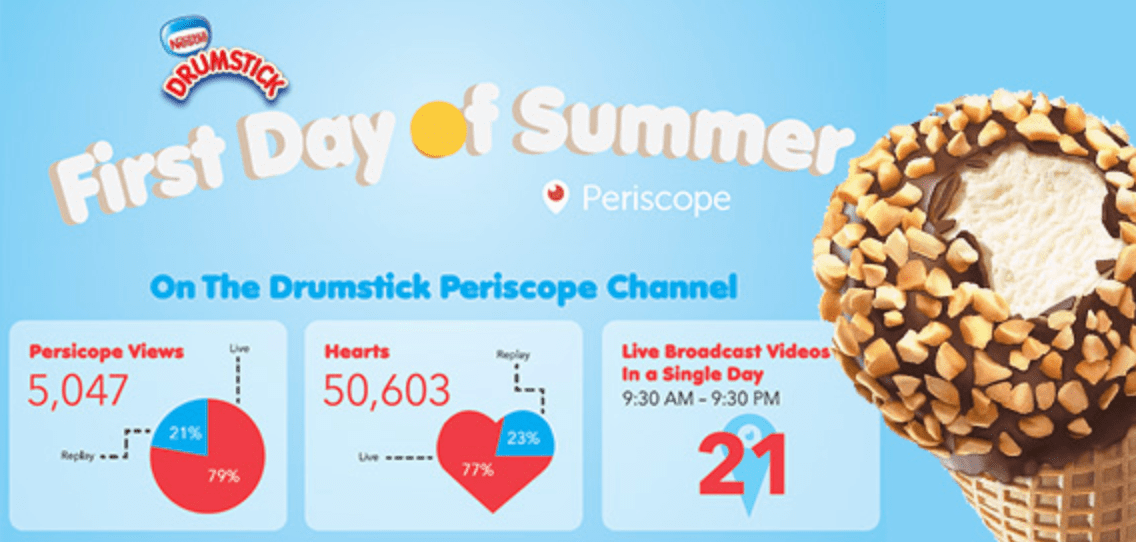
Another example of a successful influencer live stream is Nestle's Drumstick marketing campaign. The brand masterfully took advantage of the trending hashtag #FirstDayOfSummer and partnered with some rising influencers on Twitter's Periscope.

The campaign quickly went viral thanks to the influencers' live videos, promoting Drumsticks.

nestle-live-streamingImage Source

6. Ninja

Arguably the most exciting development of an individual brand has been shown by Richard Tyler Blevins, better known as Ninja. He used to be a professional gamer and started live streaming in 2011.

Blevins actively followed the gamer trends and achieved his popularity thanks to Fortnite. By the year 2020, Ninja had more than 23 million subscribers and an extremely popular brand in the gaming world. He often uses live streaming to connect with his audience and expand his reach.

ninja-live-streamImage Source

Which streaming platform is the best to build your brand?

The golden rule is to choose a live streaming platform where you believe most of your consumers are. This way, you ensure your resources will be spent well. However, if your goal is to attract some new potential audiences, you can try investing in a platform that could help you expand your reach.

Another important factor you should consider when choosing a platform is how many viewers it has. The more people circulate around a streaming platform, the better it will be for your campaign. Some of the best streaming platforms include YouTube Live, Facebook Live, LinkedIn Live, Periscope, and Instagram.

However, you don't necessarily have to choose one specific streaming platform. With services like Restream.io, you can simultaneously multi-stream your live content to as many platforms as you'd like, thus maximizing your audience reach.

If you're convinced live streaming could be an effective strategy for your own brand, take a look at How to Live Stream Successfully: A Preparation Checklist for Marketers to learn how to plan your first live streaming event.


How to Build a Brand Through Live Streaming [+ Examples] was originally posted by Local Sign Company Irvine, Ca. https://goo.gl/4NmUQV https://goo.gl/bQ1zHR http://www.pearltrees.com/anaheimsigns

12 Tactics That Take Webinars From Good to Great, According to HubSpot Marketers

In 2020, with conferences and events going virtual, a number of brands around the world have heavily embraced webinars. 

Along with allowing marketers to educate audiences about topics related to their brand, webinars can also offer major lead generation benefits.

But, while a number of successful marketing pros make creating webinars look easy, there's actually a hefty amount of work that needs to go into planning them in order to see solid engagement.

The lead-up to a webinar requires other facets of inbound to come into play -- everything from getting a speaker to join the webinar, to planning blog and social posts to promote it, to developing the actual topics and focus for the event.

At this point, you might be asking yourself if there's a checklist that can assist you in your webinar planning.

Well, look no further. Below, I've outlined 12 tactics you should focus on to ensure you and your team are fully prepared to put on a high-quality, successful webinar.

How to Prepare for an Engaging Webinar

1. Interact with your audience through promotions before the webinar.

If your audience doesn't know about your webinar or isn't excited about the topic, they won't sign up. 

Be sure to tweet about the event, write blog posts promoting it, and come up with other creative ways to share it online. To engage attendees -- even before your event, your promotional messages, such as social posts or emails, can ask for people to submit their questions or comments beforehand.

Also, if you have some type of webinar giveaway or special feature during the webinar, circulate that information to further differentiate your webinar from similar events held by competitors.

For example, we once gave out tickets to INBOUND, our inbound marketing conference, to a person who tweeted our webinar's hashtag before, during, and after the webinar. This helped us get audiences to participate in promotions on top of our other marketing efforts. 

For more on promoting webinars and other virtual events, check out these tips from HubSpot experts.

2. Create an eye-popping slide deck.

To keep an audience engaged for 30 minutes to an hour, you'll need to give them something nice to look at. So, make your slide deck is visually appealing.

Create image-heavy slides that relate to the topic you are discussing. Using copy on slides is fine -- if done correctly. Don't simply write a paragraph on a slide in black and white. Instead, make sure the copy adds to the presentation. Stick to one color palette throughout the webinar deck, and try not to make it too busy. 

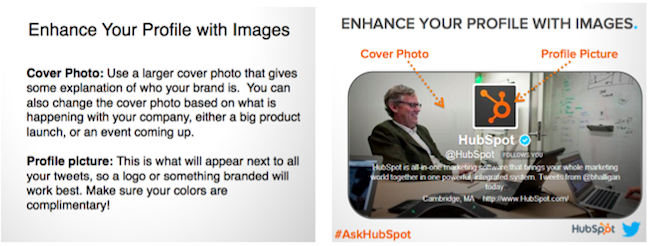
Take a look here to see what a blase, paragraph-only slide looks like (on the left) and what one with color and images (in other words, one that's got some life to it) looks like (on the right):

engaging webinar slide deck with images

3. Dedicate a hashtag to your webinar.

As mentioned in the first section, you can consider using a hashtag through the webinar marketing process that is unique to your virtual event. Using a lesser-known hashtag or creating a brand new one will help ensure all tweets with the hashtag are about your webinar.

For example, we used #TwitterQA for a past webinar that featured a Q&A with an Twitter executive. In scenarios like this, we use a webinar hashtag well before the webinar to create a community of people with something in common. During the webinar, we use the hashtag to interact with the audience, answer technical questions, and gather questions for the Q&A portion.

Finally, after the webinar, we use the hashtag to follow up on any unanswered questions and send additional information. 

4. Seek one or more thought leaders or experts to present.

Nothing is worse on a webinar than a monotone speaker who puts the audience half asleep. Pick a webinar host who is personable, energetic, and an expert in the topic you plan on discussing.

Additionally, if you have more than one speaker, have them play off of each other, making the webinar a discussion instead of two different monologues.

If you are able to access experts in your industry, or thought leaders with higher followings on platforms like LinkedIn, you should also consider including them in your webinar.

Leveraging experts will make your event more interesting for your audience and could also pull in listeners that have followed that experts work. You can additionally leverage these people for online co-marketing tactics before, during, and after the event. 

5. Meet with all the speakers beforehand.

For an extra smooth webinar, consider hosting a quick meeting that will allow you and other webinar panelists to walk through the webinar topic and get to know eachother. 

Juliana Nicholson, a HubSpot Program Manager who's been involved with a number of webinars including our Adapt series, strongly encourages a get together like this before you launch the event.

"Don't have the first time your host and panelists meet be the day of your webinar," says Juliana Nicholson, a HubSpot Program Manager. "Set up some time ahead of the event for the host and speakers to get to know each other, and run through day-of details."

Nicholson, who most recently planned webinar content for our Adapt 2020 series, explains, "Everything from pronouncing people's names to knowing who to call of first for each question will feel a lot more smooth day of, if you practice beforehand."

6. Leverage speaker and company social media handles in your promotions.

While the webinar is being run by you and your organization, you'll still want to allow your audience to interact with the speaker(s) as well, so be sure to make their Twitter handle(s) known, both in your promotions, as well as throughout the webinar presentation.

Not only does it give a personal touch to your webinars, but also think of all the new followers you could get!

7. Have at least one host or moderator.

Getting one or more speakers to join your webinar can really liven the conversation, but that convo can lose track pretty quickly if no one is assigned to moderate the discussion.

Simply put, a webinar host can help with the flow of the presentation. This person introduces the speakers, asks any questions that come up during the webinar or Q&A, and concludes the event. If any problems arise, this person can address them easily, without causing the speakers to get off-topic. 

8. Leverage different types of media in your webinar.

To keep audiences engaged during the event, you should consider using a variety of media types for your webinar.

Do you have a short video or animation that will help your demonstrate your point? Does sharing your screen temporarily help get a point across? Would a downloadable checklist help your audience follow along with your discussion? Think about how you can complement your webinar with other forms of media, either during or after the webinar.

Recently, we hosted a webinar with Guy Kawasaki that was 100% screen-sharing. Guy walked us through his daily social media activities, down to how he takes screenshots and posts them on Twitter! Talk about a highly interactive webinar. 

9. Consider other audience engagement strategies. 

With webinar platforms expanding their features daily, there are now many more ways to engage your audiences than there were in the past. For example, many platforms let audiences comment with questions, vote in polls, or take quizzes during the webinar. 

As a moderator or webinar planner, get creative and consider ways to leverage these elements so your audience doesn't feel like they're passively listening to speakers rather than engaging with them. 

"Don't let audience engagement be an afterthought. Know how and when you want to engage the audience," Nicholson advises. "Will you have formal Q+A? How will people submit questions? When will you answer those questions? All this should be pre-determined and clearly communicated to set your attendees up for a good experience."

10. Perform thorough audio and video checks.

Even in today's world, technical problems happen with software. Do your best to avoid them when on the air live by testing your webinar platform ahead of time.

For example, you might not realize it, but your computer's sound could be muffled, or your headphones could prevent people from hearing sounds played on your screen. This is why you'll want to do at least one sound check before you present.

Similarly, you'll also want to make sure you pick a workspace with good lighting.

"It's better to have attendees be front lit (think a desk lamp) than back lit (think sitting in front of a window) to avoid shadowy faces and glare-y viewing experiences," says Nicholson.

Additionally, you should also troubleshoot for more unexpected technical slip ups. For example, if you're going to be sharing your screen or switching controls, have a pre-webinar dry run where speakers can practice before doing it live.

Ultimately, it's always best to find out where mistakes could occur before the actual webinar so you don't waste your time or that of your guest speaker(s).

11. Take time zones into consideration when scheduling your event.

When choosing a time to host your live event, keep in mind that not everyone will be in your time zone. HubSpot is located in Eastern Standard Time, so we try to host webinars at a time that works for other areas around the country and across the globe.

For example, though 1 p.m. to 3 p.m. EST often works for us, it may not suit our European audience well, so we'll need to find a time that works for both of us.

Nicholson also suggests that marketers should "make it clear if your webinar will be recorded and that by signing up someone will get that recording. You'll increase conversions even when someone cant attend live."

12. Host your webinar in a quiet, non-distracting workspace. 

Don't underestimate the importance of the physical location of your webinar. I sit next to a sales team who are on the phone all day. If I tried to host a webinar from my desk, the audience would hardly be able to hear me! Thus, I make sure to find a quiet (sound proof is even better) room elsewhere in the office.

If you have multiple people speaking in the same room, make sure to have a high-quality speakerphone. To avoid any technical problems, I avoid using the wireless internet when at all possible and test everything beforehand.

Planning the Perfect Webinar

Yes, it takes lots of time to plan a webinar, but the benefits might just be worth it. As you plan, keep in mind that most of the tips on this list aim to boost audience engagement.

While an informative webinar is a great start, sharing a basic lecture with your attendees might not cut it. Your audience will listen more actively, enjoy the content more, and continue signing up for webinars if they feel engaged throughout the event.

For more webinar tips, check out this ultimate guide. If you already think you're planning great webinars, but don't know where to start with promoting them, check out this post with tips from HubSpot marketing experts


12 Tactics That Take Webinars From Good to Great, According to HubSpot Marketers was originally posted by Local Sign Company Irvine, Ca. https://goo.gl/4NmUQV https://goo.gl/bQ1zHR http://www.pearltrees.com/anaheimsigns

Saturday, September 12, 2020

How to Learn Social Media Marketing: 39 Resources for Beginners

Social media is no longer an optional marketing channel -- it's a necessary one.

But that doesn't mean results are a given. When it comes to social media, you'll either have a lot of success interacting with your customers, or you'll see little results -- and that depends on the level of effort you put into it.

For every business that has found success in social media marketing, there are at least two more spinning their social wheels with no tangible results. It's time to change that trend.

For many, social media is simply a place to post links to content they've created in hopes that thousands will see it, click through, and share with their followers. So they have profiles on every network, and every network looks exactly the same; line after line of self-promotion.

This is not going to bring results. In fact, Facebook's algorithm now penalizes link-based content, and Instagram has made it all-but-impossible to share a link.

Half-heartedly sharing your content on social media is not social media marketing. It's spamming.

Social marketing is a lot of work, and it takes time listening and responding. After all, it's social, and anything social takes an investment of effort and skill.

To hone these skills, check out these resources that will help you develop the skills needed to be effective on social media. (You may want to bookmark this post so you can easily refer to it again later.) Click the links below to jump to each section of resources in this article:

How to Learn Social Media Marketing: 40 Free Resources

Social Media Marketing Blogs

Social marketing is a science involving special communication skills. And the landscape changes constantly.

One of the best ways to develop your social media prowess and to stay up-to-date is to follow experts in the field. These blogs are always fresh with actionable information you can use to improve your marketing:

1. Social Media Explorer

SME is both a strategic services agency and a blog with a bevy of social media and marketing experts. The SME blog is consistently considered one of the most insightful in the industry, and several of its authors have written popular books on several aspects of digital and social marketing.

2. Scott Monty

Monty is a marketing guru who covers a ton of subjects. However, his social media articles are always eye-opening. If you haven't heard of him yet, check out his "this week in digital" posts -- these will keep you up-to-date with all the news on social, and every other aspect of digital marketing as well.

3. Social Media Examiner

Not to be confused with Social Media Explorer, the Examiner is one of the top blogs in the world for social media. Its social media reports are filled with all the important data social marketers want, and the blog posts are filled with valuable tips, as well. If I had to pick just one social media blog to follow, this is the one I would choose.

4. HubSpot Marketing Blog

Right here on the HubSpot Marketing Blog, you can find breaking news and actionable how-to guides on every social network there is.

Social Media Publishing Templates

5. Social Media Content Calendar Template

Before you load your social media content into a publishing tool (HubSpot has one, when you're ready for it), you'll want to organize it all in an offline calendar. The free template linked above allows you to sort your social media content in a spreadsheet that's designed to help you track the day, time, and social media channel on which everything you create is being promoted.

6. Social Media Calendar Templates

This social media template helps you track your social media campaigns not just by social network, but by how much engagement they get, which holidays they're aligned with, and which ones have paid promotion behind them.

7. Airtable's Content Calendar

Once you've organized your social media calendar into a spreadsheet -- like the one linked to #6, above -- you might also want to load this content into a project management platform so you can track its progress in real time. Airtable is one such platform to help you do that, and it comes with a content calendar format so you don't have to shoehorn the platform around your business.

8. Social Media Image Templates

It's well-known that visuals get more engagement on social media than just text. Get your designs off on the right foot with this collection of social media image templates.

9. Instagram Templates for Business

Instagram is the most image-focused social network out there, and because of that, not just any image will reach your audience. To cut through the crowds, use this collection of Instagram templates to create brand-aligned posts that resonate with your audience.

Social Media Marketing Ebooks

These ebooks will provide deeper information on specific networks and topics.

10. How to Use Instagram for Business

This step-by-step guide explains the reasons to create a business Instagram account and how to execute on Instagram to drive results.

11. A Visual Guide to Creating the Perfect LinkedIn Company Page

If you're building a company page for the first time, or trying to upgrade your page, this guide will show you exactly how to do everything from crafting an engaging company description to creating an eye-catching banner image.

12. How to Attract Customers with Facebook

This multi-page ebook will show you how to use Facebook to drive real business results for your organization.

13. How to Get More Twitter Followers

HubSpot partnered with the experts at Twitter to provide actionable tips for social media managers starting new accounts to build a following, and fast.

14. The Beginner's Guide to Social Media

Here's an amazing guide from Moz. The 12 chapters in this book are filled with valuable information that every marketer absolutely needs to know. Bookmark this guide, you'll refer to it more than once.

15. How to Create High-Quality Videos for Social Media

Like images, videos drive a ton of engagement on social media. And although the idea of shooting a quality video for your social channels sounds daunting, it's actually easier than you think. Grab the free guide above to learn how to quickly turn your office into a production studio.

Social Media Marketing Courses

16. Developing an End-to-End Instagram Marketing Strategy for Your Business

This free course in the HubSpot Academy will teach you how to stand up an Instagram marketing strategy in just 95 minutes. The course consists of 3 lessons, 13 videos, and 3 quizzes.

17. Putting Social Media to Work for Your Coaching Business

Even consultants need consultants to learn how to, well, be a consultant. The free Udemy course linked above will teach you how to use social media to market your business as a coach or consultant in your industry.

18. Developing an End-to-End Facebook Marketing Strategy

Opposite the Instagram marketing course linked in #16, above, take this hour-long course to learn the basics of Facebook marketing.

19. Social Media Influencer Course

You've probably heard of influencer marketing -- it's particularly common in the context of social media. Take this course by Captevrix to learn how to work with an Influencer who resonates with your audience to promote your brand.

Social Media Marketing Videos

Videos are my second favorite medium to learn, behind books. Being able to glean from the brightest minds on any subject as if you're face-to-face is powerful. These videos will give you valuable insights, just how to do social media, but you'll get insights into the why and what as well.

20. The #AskGaryVee Show

You can't talk about social media without talking about the speaker, author, and social expert Gary Vaynerchuk. On the Gary Vee Show, he takes questions from his audience and answers them as only he can. If you have a burning question on social media marketing, send it to him.

21. TED Talks: Social Media Marketing

If you aren't in love with TED, you might want to check your pulse. This is a playlist of videos from TED Talks on social media. There may not be that much actionable advice in these videos, but if you want to become an expert on social media, these videos will give you insight into the deeper subject like "the hidden influence of social networks."

22. Learn Social Media Marketing

If you're really new to social media, and you want to learn through a structured lesson experience, consider Lynda's massive library on social marketing courses.

23. Free Social Media Certification

HubSpot Academy has a breadth of video courses across inbound and digital marketing. Their free social media course is an eight-step video curriculum that teaches you the fundamentals of managing a social media campaign for your business. It also earns you a fresh Social Media Certification.

Social Media Podcasts

If you like to learn while you chill, work out, or commute to and from work, podcasts are one of the best ways to do it. And these podcasts will help you develop your social media expertise.

24. Social Media Marketing Podcast

Michael Stelzner, from Social Media Examiner, brings you success stories and expert interviews from leading social media marketing pros.

25. The Social Toolkit

If you like to stay up-to-date on digital tools, apps, and software for social media marketing, this is the podcast for you.

26. The Social Pros Podcast

Every episode of the Social Pros Podcast shines the light on real pros doing real work for real companies. You'll get insights from Jay Baer of Convince and Convert when you tune in.

Slideshows & Infographics About Social Media

If you're a visual learner, these slide decks and infographics provide great ways to learn social media.

27. The B2B Social Media Palette

This SlideShare walks you through the channels and tools you'll need to be most effective at B2B social media marketing. Sometimes, success can be found by using the right tools and channels for the right audience.

28. The Complete Guide to the Best Times to Post on Social Media

Timing is very important when it comes to social media. Post it the wrong time, and your update can go completely unnoticed because of the flood of updates in your audience's feeds. Being able to master the timing of social media is critical to effective marketing.

29. 58 Social Media Tips for Content Marketers

This slideshow is from the folks at Content Marketing Institute. This deck shows the proper methods for promoting your content over social media. This is a must-read for any social marketer who wants to use those channels to promote content.

30. The Best and Worst Times to Post on Social Media

Again, timing is everything. This infographic lays out the best and worst times to post on each major network. You should save this infographic for referencing when you schedule your social media posts.

Social Media Marketing Books

Books are my favorite way to learn. Many experts agree that if you read a book a week, on your area of expertise, for 5 years, you will have the equivalent of a Ph.D. on the subject. That may or may not be true, but reading books from the experts definitely doesn't make you a worse marketer. Here are some books to get you started.

31. The B2B Social Media Book

This book covers the specific application of social marketing to B2B companies, to leverage social media to drive leads and revenue.

32. The Art of Social Media: Power Tips for Power Users

You've got to read this book by the legendary former Chief Evangelist of Apple, Guy Kawasaki. He's one of the pioneers of social and content marketing, and this book is filled with expert advice from one of the best.

33. The Tao of Twitter

This book is supposed to be for busy marketers who need to get the basics of Twitter down quickly. It shows you how to connect and start creating meaningful connections in less than two hours.

34. The Ultimate Guide to Facebook Advertising

Facebook is one of the most effective advertising and PPC platforms available. You can target a plethora of metrics, allowing you to drill down and advertise to a very specific audience. This book will show you how to optimize your Facebook ads.

35. Jab, Jab, Right Hook: How to Tell Your Story in a Noisy Social World

Gary Vaynerchuk gives insight into how he uses a conversational, reactionary approach to engaging his audience. He gives concrete, visual examples of great social marketing, as well as not-so-great ones.

36. The New Rules of Marketing and PR

David Meerman Scott's book on digital marketing is an international bestseller, and worth every penny. Some argue that it should be required reading for any marketer -- and in this marketer's opinion, "Just read it."

37. Likeable Social Media

Dave Kerpen claims the secret to viral social marketing is to be likable. When someone likes you, they'll recommend you. But being likable on social networks is easier said than done. This book will help you crack that code.

38. Social Media Marketing for Dummies

One of my mentors taught me to read children's books on a subject if I just couldn't grasp a concept. That principle gave way to movements like "Explain It Like I'm 5." And, sometimes you just need it broken down like you're, well, less than an expert on the topic, to put it gently. If that's you, this book is valuable. Go ahead and buy it -- we won't call you dummy.

39. Contagious: Why Things Catch On

This book by Jonah Berger provides a strong foundation to understand how content goes viral -- and how to create ideas on social media that are so catchy, your audience won't be able to help but click them.

Now that you've reviewed the top social media marketing resources, it's time to create your action plan for getting out there and actually doing it.

1. Go where your customers are.

You don't have to be on every network. It's a common mistake when starting out to overextend across platforms. If you're running short on marketing resources, identify which platform (or two) your audience is most likely to be found and then double-down on creating meaningful content and experiences on that platform. You can always expand your efforts into different platforms later.

2. Be helpful. Period.

Audiences watch TV to be entertained, get informed, or unwind, not to view commercials. The same is true for social media users. Chances are, if you do nothing except promote yourself, you won't get far with social media because signing into social media is not indicative that they're ready to be sold to.

So how do you meet audiences on their turf in a way that's earns you meaningful awareness and engagement? The 80/20 Rule.

This "rule" states that successful social media marketing means providing something for the audience 80% of the time and promoting your brand 20% of the time. If your audience is hungry for your content, they're much more willing to also accept promotional messaging as long as it's not too overwhelming or obtrusive.

3. Set realistic and measurable goals.

If you begin your social media marketing efforts with no destination in mind, you may find yourself floundering. Get clear on what you need from your efforts so that you can set goals and measure your progress towards them.

For example, you might be using social media to increase your brand awareness, which means you'd look at your posts' reach and how your audience is growing. On the other hand, if you want to drive traffic from your website, you might measure click-throughs.

It's important also to begin with a benchmark so that you can set realistic goals. Shooting for the moon is nice, but you'll also want to measure against achievable milestones to gauge performance and make accurate (within reason) predictions for strategic planning.

4. Maximize your existing resources.

Sit down and decide on a publishing schedule that is appropriate for the network you've chosen and the resources you have for content creation. Creating content can be arduous, even if you choose just one or two platforms, so it's important not to overtax your resources. Instead, consider ways that you can utilize, adapt, and repurpose existing content to make your resources stretch even further.

5. Have conversations.

Don't forget the "social" in "social media." Social media marketing isn't about broadcasting; it's about communicating. By interacting with your audience online, you can increase brand awareness by increasing engagement. In addition, this engagement tends to be more memorable and delightful than non-personalized interactions.

6. Listen to your audience.

Customer feedback, direct mentions of your brand, and even industry chatter can all inform your social strategy. By listening to the conversations your audience has on social media, you can come up with new ideas for content based on real-time industry trends, shifting your social media marketing strategy to fit their needs. Social listening tools such as HubSpot and Sprout Social can streamline this process and lead to amazing insights.

7. Don't get trapped by #followback loops.

You may notice trends such as #followfridays as you're establishing your platform. It may be tempting to participate, but these follow chains can often lead to a large audience of unengaged followers who aren't interested in your brand. This isn't an ideal way to grow. The best thing you can do is check out these follow trains and see if there are any individuals that you or your business wants to follow based on their perspectives rather than simply as a reciprocal act of increasing numbers.

8. Focus on quality, not quantity.

This tip can be applied to so many things in the social media space:

  • Quality, not quantity, of followers
  • Quality, not quantity, of posts you create
  • Quality, not quantity, of promotions

The fact of the matter is, even though it may seem like slow growth over time, quality matters on social media and will drive more meaningful results and better ROI, which is the foundation of successful social media marketing.

9. Never copy/paste the same message into every social profile.

If you're on multiple platforms, it's best to adhere to best practices for that specific platform. While it may be tempting to create the same message and promote the same way to save time, this can actually hurt the experience for social media users. Each platform has different native browsing behavior, image thumbnail formats, character counts, best practices for hashtags, and more. For optimal experience (and performance), understand what works best on each social media channel and tailor your messaging to fit.

10. Never stop learning.

No matter how many social networks you set out to master, or how long you work in the social marketing field, there is one secret that will ensure you're successful: Never stop learning.

Social media constantly changes, so it's impossible to master this topic with a once-and-done approach; it requires continual education.

The list above is massive, I know, and there's no way to consume all these resources in the next week. But if you set yourself to learning every day, every week, every month, every year, you'll eventually be the one writing the books that help others learn social marketing.

It all begins with learning.

Editor's note: This post was originally published in April 2019 and has been updated for comprehensiveness.


How to Learn Social Media Marketing: 39 Resources for Beginners was originally posted by Local Sign Company Irvine, Ca. https://goo.gl/4NmUQV https://goo.gl/bQ1zHR http://www.pearltrees.com/anaheimsigns

27 Striking Examples of Minimal Design That'll Kickstart Your Creative Process

If you've been on the internet, chances are you've come across stark, simple websites or ad creative. In fact, this design sensibility — known as minimalist design — has been rising in popularity, though it's far from a passing trend.

What is minimalist design?

Minimalism is a design aesthetic that embodies the phrase "less is more." With minimalist design, you push an idea by stripping it down to essential (sometimes bare) elements, using clean, modern, and minimal aesthetic, font, and color choices.

Whether you're curating an Instagram feed or designing a web page, there are plenty of advantages to minimalist design.

Minimalist Graphic Design

Rather than bogging your audience down with vibrant patterns or paragraphs of text, a minimalist approach allows you to focus on a few key components of your brand you feel are truly important.

However, minimalist isn't as simple as white space. To avoid creating boring or uninspiring designs in your attempt to become minimalist, it's critical you take a look at some successful examples of minimal design, ranging from posters to logos, to kickstart your creative process.

1. Braga Da Cruz

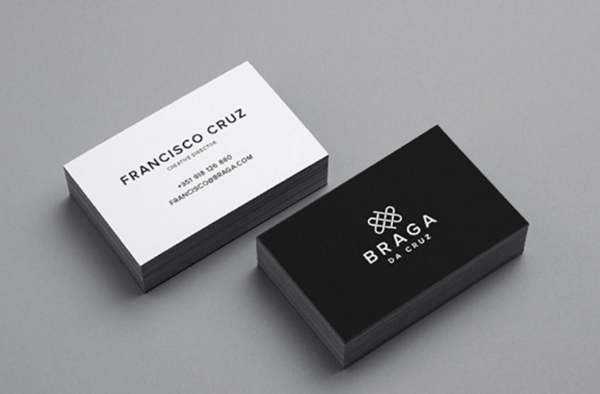
braga da cruz minimalist design on business cards with monochrome palette, sans serif font, and simple line logo

These Braga Da Cruz jewelry store business cards, designed by Luke Halota, are a good example of how minimalism can help brand name stand out on the page. Halota uses grids to center the company name on one side, with a small, unobtrusive logo placed above. On the back, he makes sure to use simple white space to make Francisco Cruz the focal point.

2. Visme

visme minimalist design with striking image but simple one-color background

Minimalism doesn't have to be boring. Here, Visme created a pop-up ad where the primary focus remains on the "Join us!" blue button, which contrasts nicely against the orange background. Additionally, to grab the viewer's attention, Visme placed a large lion's head image on the left side of the ad.

3. Heather Shaw Book Design

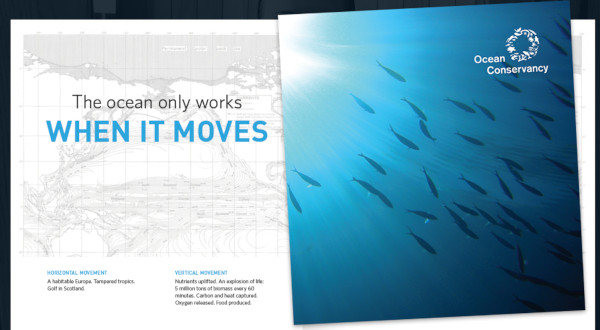
heather shaw minimalist ad with a large photo of the ocean and a large tagline

Heather Shaw ensures true simplicity in her Ocean Conservancy book, which grabs the reader's attention with minimal text and colors. The information is plainly outlined and easy-to-follow. Additionally, there's a lightly outlined sketch of an ocean behind the text -- while not overbearing, it adds texture to the design.

4. Helix Sleep by Stefanie Brückler

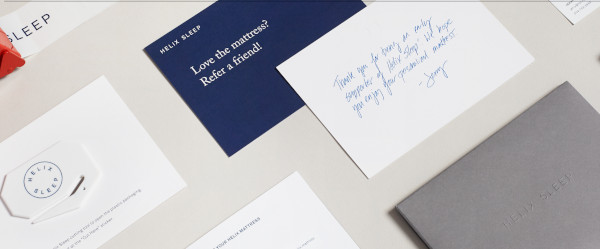
helix sleep minimalist design with solid colors and thin blocky lettering

These Helix Sleep referral cards look both sleek and helpful. Stefanie Brückler uses contrasting colors and clean font to ensure the cards can do their jobs without seeming unoriginal.

5. Pixite by Peter Komierowski

minimalist design with flat design line work

On his page, Komierowski explains, "I was asked by Pixite to create a set of nature-inspired shapes for their app Fragment." Ultimately, his design is aesthetically-pleasing and fun, with simple, cohesive lines that form the shape of a fox.

6. Mastercard by Pentagram

mastercard minimalist logo on billboard

One of the most iconic minimalist designs, Mastercard's financial design is undoubtedly a staple of the brand. The simple red and orange circles signify connectedness and seamlessness. The circles are recognizable enough that Mastercard can use the icon in place of any brand text, and still convey its ownership.

Minimalist Web Design

You can take the tenets of minimalist design and apply them to brand websites, resulting in clean interfaces that guide users where you need them to go. Here are great examples of minimalism used on the web:

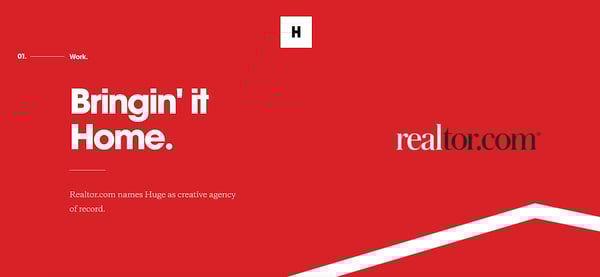
1. Huge Inc.

minimalist web design with three simple colors, a short tagline, and some line work

Huge Inc.'s homepage is clean and polished, with minimal text to ensure a new viewer doesn't feel overwhelmed by the page. Additionally, the small details -- like the black that appears in the logo as well as the second half of realtor.com, and the small jagged line in the bottom right corner -- signify a sense of cohesiveness.

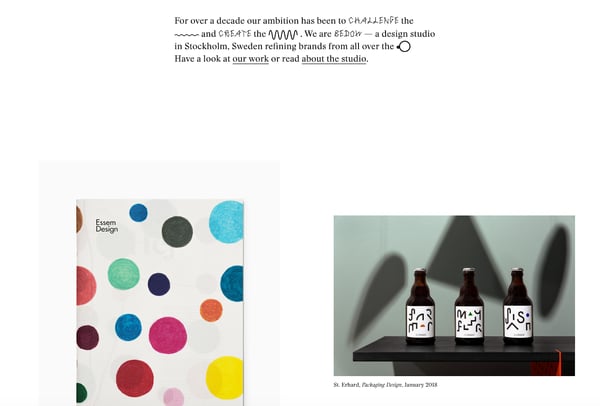
2. Bedow

minimalist web design without elements, opting for text and images only

Bedow, a Stockholm-based design studio, knows its viewers priorities, and thus doesn't waste time with a busy homepage -- instead, they include a short blurb about their studio, and then leave a section of white space before displaying some of their designs.

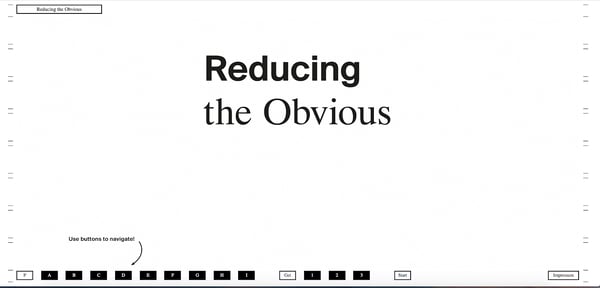
3. Reducing the Obvious

minimalist web design relying on font for aesthetics

One of the more simple designs in the list, Reducing the Obvious's design is compelling and mysterious, with little information displayed on the homepage. However, the page is still helpful and inviting, with a small "Use buttons to navigate!" command in the bottom left.

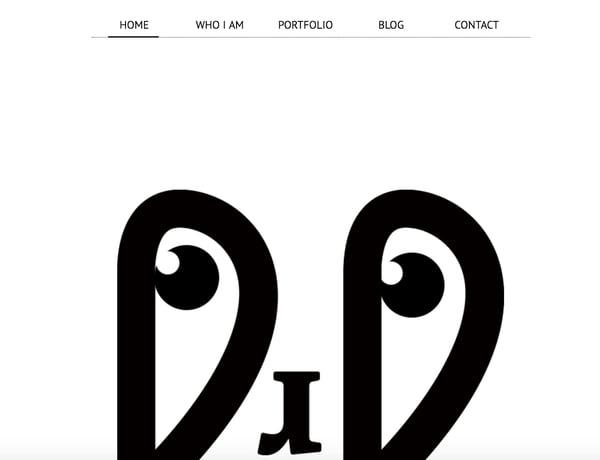
4. Jorgeriera Flores

minimalist web design with just a menu and a face

Jorgeriera Flores' page is fun and inviting, with a blinking, life-like design and a clean navigation bar. Additionally, the creature's nose serves as a "J", demonstrating Flores' attention-to-detail.

5. Design Co.

minimalist design with text over linework

Oftentimes, minimalist design enables a brand to convey its purpose more powerfully than it could with a busier page. Design Co., for instance, is able to capture the viewer's attention with its compelling message -- spreading the creative spirit across 7,107 islands -- by ensuring its background, while colorful, is devoid of distracting add-ons. Additionally, the small white logo serves to reinforce their main point.

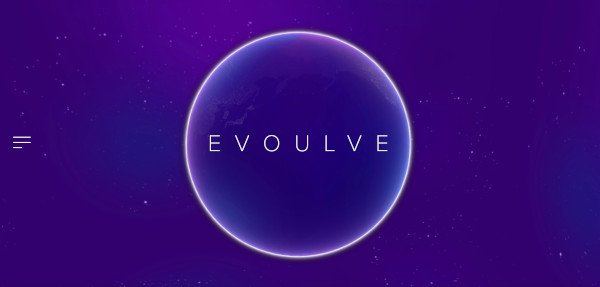
6. Evoulve

evoulve minimalist web design with just the logo and the hamburger menu

It's impossible to see a page like this and not find yourself curious to explore further. Evoulve does a good job expressing a sense of innovation and sleekness -- with its world-icon and bright, futuristic design -- without needing any additional text or imagery to compel the user to explore further.

7. Tim Brack

minimalist design with just text and name

Brack's use of white space and overlapping elements serves to create a clean and inviting homepage. Additionally, the photo of himself with a pig highlights a sense of playfulness and humor, and you're able to obtain most relevant information -- including Tim's title as art director -- instantly, without any distraction.

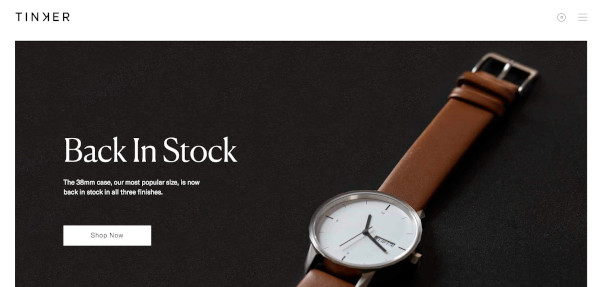
8. Tinker

tinker minimalist web design with product photo and simple tagline

Minimalism is often accomplished best when a brand knows exactly why a visitor might come across their website. In this case, Tinker understands its viewers are looking to browse and potentially purchase a watch, so it aims its design-elements to drive attention toward that single purpose.

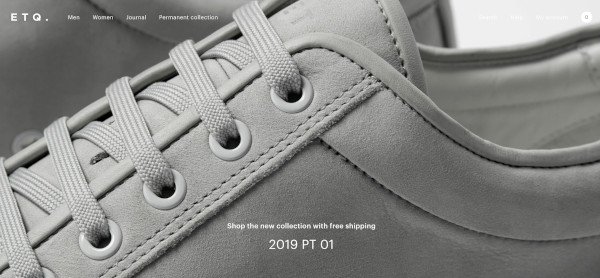
9. ETQ Amsterdam

etq amsterdam minimalist web design with few words and a large product photo

The close-up of the shoe offers a new viewpoint, making ETQ's homepage intriguing and original even in its simplicity. Additionally, the small white font looks simple and clean against the photo background.

Minimalist Logo Design

The logo is one of your most important elements in your design arsenal. You don't want a beautiful minimalist design to be supported by a clunky and overdone logo. These brands used minimal logos to support the feel of the rest of their brand:

1. UBAR

minimalist monochrome logo with a line underneath the first letter

The bold block text and black-and-white contrast lends itself well to Simon McWhinnie's UBAR design. The simplicity allows the text to dominate the logo and evokes a sense of power and strength.

2. Cloud Bed by Michael Spitz

minimalist logo with a blue bed and a cloud made from negative space

If you have one product you sell well, why complicate it? This logo, designed by Michael Spitz, communicates the brand's product -- bedding -- without text. Additionally, it's clean and calming, particularly with the use of light blue and white, which ensures a sense of calmness for the viewer.

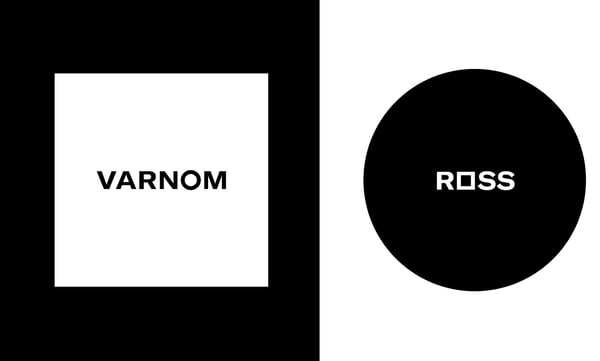
3. Varnom Ross by Bibliothèque

minimalist logo design with monochrome and geometric shapes

Varnom Ross's logo is bold, powerful, and striking. Additionally, the replicated box shape around the Varnom, used again as the "o" in Ross, signifies a sense of cohesiveness.

4. The Row Apartment Homes by PurdyLogo

minimalist logo with vintage vibe

This logo looks retro and funky, but it uses plenty of white space, as well as white lines within the letters, to maintain simplicity. Additionally, the colors work well together, ensuring "Row" stands out most prominently in the logo.

Minimalist Poster Design

Posters need to say a lot in a finite amount of space. That's why minimalism works so well in poster design. Here are some great examples that support this idea:

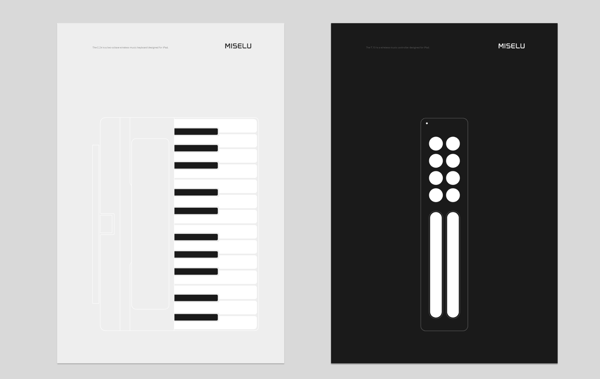
1. Miselu

minimalist poster design with deconstructed piano and guitar

Miselu's graphic design undoubtedly supports the notion that less is more. On their page, Miselu explains the design as "simultaneously edgy, approachable, and clearly expresses our core business: music". Ultimately, these posters, along with their other designs, reinforce their core products while remaining simple enough to be adaptable as their brand changes over time.

2. Ilmars Rumpeters

minimalist design with flat design apple and funky text

Ilmars Rumpeters created multiple simple covers for Jauna Gaita magazine, and this one in particular stands out as attention-grabbing and bold, with its vibrant colors and intriguing font. With minimalism, you want your focus to be on one or two elements -- in this case, Rumpeters succeeded in drawing primary attention to the apple, and then to the magazine title itself.

3. Paul Rand

paul rand minimalist poster with three colors and simple shapes

Paul Rand, a famous logo creator and graphic designer, created this poster to advertise the International Design Conference in Aspen, 1966. Ultimately, the piece is intriguing and complex even in its minimalism, causing viewers to likely pause and wonder over the significance of the black splatters or egg-shape in the background.

Minimalist Text Design

You'll notice in each of the designs above, the text is chosen intentionally and displayed in a way that adds rather than detracts from the visual elements. With a minimalist design, one of the first things you'll want to consider is the font choices used throughout the website or marketing collateral. You'll want to choose fonts that are:

  • Crisp
  • Clear
  • Legible
  • Easy to read (even at small sizes)
  • Simple
  • Consistent
  • Geometrical

Here are some examples of fonts used in minimalist design:

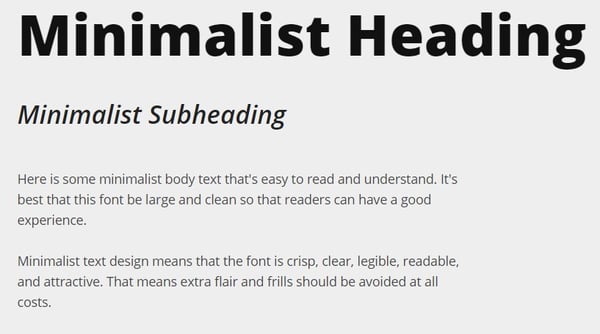
1. Open Sans

minimalist text design with heading, subheading, and body font in open sans

Because serifs can be more difficult to read, especially on the web, minimalist designs often use sans-serif fonts. Open Sans is the quintessential sans-serif font (except perhaps Arial) and is easy-to-read and modern. The body text in particular is particularly crisp, making it ideal for long-form text in a minimalist setting (like a blog).

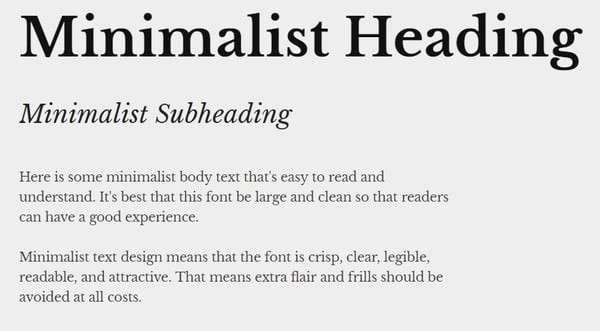
2. Libre Baskerville

minimalist text design with heading, subheading, and body font in libre baskerville

Even though sans-serif fonts are a staple of minimalist design, serifs still have their place. Libre Baskerville does a great job of providing an air of elegance and class without sacrificing readability. The body text is just as easy on the eyes as Open Sans, and even the italicized subeading text is legible (though you wouldn't want to rely on it too much).

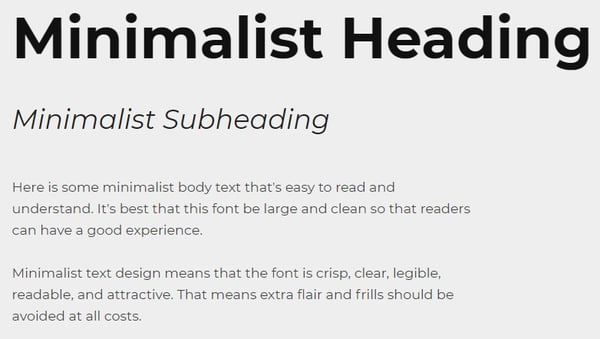
3. Montserrat

minimalist text design with heading, subheading, and body font in montserratMontserrat has some lovely rounded lines, making the letter shapes easily recognizable, and the italicized subheading provides a more dynamic look when paired with the bold headers and clean body font.

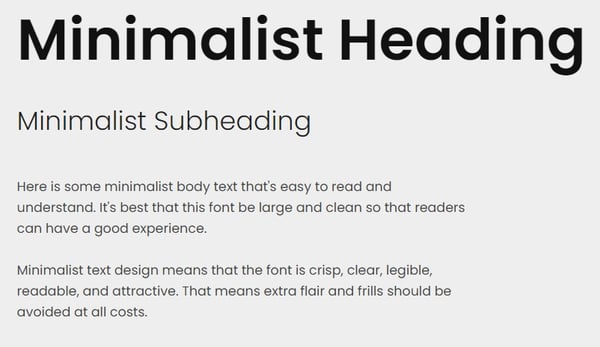
4. Poppins

minimalist text design with heading, subheading, and body font in poppins

Minimalist text design certainly doesn't mean devoid of personality, as you can see from the graphic, web, and poster designs above. Poppins is a great font family that adds a bit of fun to the minimalist style with overly rounded and almost cartoonish letters. At the same time, it looks modern and professional.

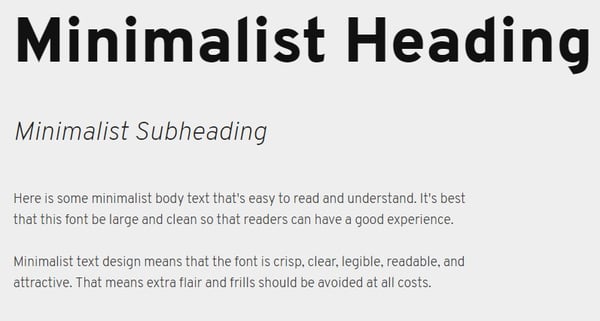
5. Overpass

minimalist text design with heading, subheading, and body font in overpass

Overpass provides a more industrial look with its narrow letter shapes and sharp corners.

Now that you've seen several iterations of what minimalist design looks like in action, you can begin to create your visual marketing strategy and design marketing materials that supports your brand in a clean and modern but still attractive way.

Editor's note: This post was originally published in February 2019 and has been updated for comprehensiveness.


27 Striking Examples of Minimal Design That'll Kickstart Your Creative Process was originally posted by Local Sign Company Irvine, Ca. https://goo.gl/4NmUQV https://goo.gl/bQ1zHR http://www.pearltrees.com/anaheimsigns

Friday, September 11, 2020

8 Common Instagram Marketing Mistakes to Avoid in 2020

Since coming into existence in 2010, Instagram has given brands the opportunity to engage with their audience and tell their story through the power of visuals.

The Facebook-owned app was one of the fastest growing major social networks in 2014, and is now home to more than 1 billion users.

Along with growing its user base, Instagram has expanded its features as well. In the last five years alone, it's embraced business accounts, live video, and advertising, but it's also become a leading platform for social media stories

In addition to the network’s impressive growth, users are also highly engaged with the platform. Each day, half of all users use the app and spend an average of 21 minutes on the app. Top brands have quickly realized the potential Instagram presents.

But, while a number of brands have absolutely thrived on the platform, many still struggle to grow their audiences there. This is because a number of seemingly small mistakes could impact your whole strategy on the fast-paced platform.

Whether you’re considering joining, are new to the network, or feel like your Instagram game is lacking, learning about some of the most common Instagram mistakes can help you avoid them and build an effective social strategy.

In this post, we've gathered a list of eight mistakes brands make on the platform, backed by data and HubSpot's own social media team.

The Most Common Mistakes Brands Make on Instagram

1. Brands don't take time to plan out an Instagram strategy.

Instagram offers brands a means of telling their story through photographs, video clips, live video, and Stories, but with all of the features on the app, it can be tempted to create content for every possible post and hope that it's engaging.

When used strategically Instagram is ideal for showcasing products being used in real-life situations, showing the progress of something through photos over time (such as the construction of a vehicle, the making of a new record, showing a new office space from empty to furnished and functional, or a new or favorite recipe from ingredients to the plated final product), or even answering frequently asked questions through short video clips or Instagram Live.

Yes, the possibilities are near limitless on Instagram, but like any other form of digital marketing, you’ll want to define goals early on and create a strategy to help you reach them.

Whether you’re on Instagram to increase brand awareness, showcase a new product line, or add a human element to your brand, each piece of content you publish on the platform should be adding value and help you attain goals.

Who’s doing it right? Quest Nutrition

Quest Nutrition is a nutrition company popular amongst the low carb and fitness crowds. They create nutritional food and drink products to help people reach their own health and fitness goals. According to TOTEMS Analytics, Quest Nutrition grows in follower count by roughly 15k / month. There’s no questioning how well of a job they do connecting with their audience and their lifestyles.

Furthermore, they’re making it work in a somewhat surprising fashion, through video.

Instagram introduced a 15-second video component to their platform back in June of 2013, and the adoption and engagement rates have been lesser than photo content. However, Quest Nutrition has found a way to make it work, driving far more engagement with video content, according to PicStats.

Here’s an example of Quest Nutrition creating a “how-to” video with one of their products, all while sticking to their #CheatClean (health and wellness) message and strategy.

2. Brands focus on production quality rather than audience value.

Because major brands might post high-resolution photos and video content on Instagram, smaller brands might get the impression that you need a fancy camera or a studio to succeed on Instagram. This is far from the truth, according to HubSpot's Social Media Manager Kelly Hendrickson:

"Quality is more than the video equipment you use to film or the design software you use to create. Quality is about providing value," Hendrickson explains.

When you don't focus on creating content that your audience enjoys or values, they might be less likely to like it, share it, or keep following you. 

Take a second to think about how Instagram works. Users typically scroll through a single column of photos, quickly glancing at photos and skimming captions, only slowing down and stopping when something catches their eyes or piques their interest.

Other times they’re exploring content via hashtags, tapping quickly through Instagram Stories, or scrolling through a 3-column search layout until a photo or video stands out.

The more focus you put on the quality and value of the content you’re publishing on Instagram, the more likely users will be to slow down, stop at, and engage with your account and content.

Hendrickson suggests asking yourself, "What can your audience get from your brand’s Instagram account that they can’t get anywhere else? How are you improving their experience on the platform? How are you identifying with them?"

Who’s doing it right? Taco Bell

Taco Bell is no stranger to effectively utilizing social media. By summer of 2020, they had well over 1.4 million followers over a thousand posts with well over that amount of engagements.  

And while you might not typically group fast food and photography, Taco Bell has always made it work and taken full advantage of Instagram's highly-engaged user base.

The fast-food chain does an extraordinary job leveraging vibrant colors in their photos and creates a laidback, entertaining feel through photo and video captions.

Taco Bell's posts and Stories, which often contain delectable images of food are eye-catching, relevant, engaging, and make you crave their products. On top of showing images of their most hunger-inducing meals, Taco Bell also regularly highlights images of customers eating their products in daily life.

Here's just one example where Taco Bell highlighted a recent graduate eating a wrap:


3. Brands don't determine a posting frequency that's right for them.

While a number of studies in the last decade hinted that posting more often each day would create more engagement, newer research has debunked the theory that you must post as much as possible to be successful on the current Instagram platform. 

As part of your Instagram strategy, post frequency should be addressed and studied, but you should take more than engagement into account. For example, if posting a lot doesn't get you high engagements, but still takes time away from your overall social media strategy, you might want to post less. On the other hand, if you're a large company that has the resources to post more highly engaging content each day, that might be a tactic you should continue.

Ultimately, you'll want to look for a happy medium between quantity and quality, ensuring one isn’t sacrificed for the other. If you determine that you’re able to post quality content 15 times-per-day, it’s important you stick to a similar posting schedule for a bit and pivot if your engagement numbers change. 

Who’s doing it right? MAC Cosmetics

MAC Cosmetics is a cosmetics manufacturer founded in 1984 in Toronto, Canada. According to TOTEMS Analytics, MAC Cosmetics grows in follower count on Instagram by roughly 231k / month. A post on Instagram earns the cosmetics manufacturer an impressive 34k likes and 300+ comments on average according to PicStats.

MAC Cosmetics is close to hitting 3 million followers and that’s due in part to their frequent and consistent posting schedule. It’s uncommon to go a day without seeing several quality posts from the brand.

Again, it’s worth noting that the brand isn’t sacrificing quality, as you’ll see in the examples below.


4. Brands purchase followers or engagements.

If you're even slightly considering buying followers or engagements, stop. For years, the network has been cracking down on fake and spam accounts, and they’re taking them out in massive numbers.

"Social media companies are savvy. Whether it be Twitter purging bots or TikTok shadow banning users, social media companies can sniff out fakes pretty quickly. And here’s the thing, so can you audience," Hendrickson reveals. 

"A high purchased follower account won’t meet your brand’s goal of being on Instagram in the first place," Hendrickson explains. "In fact, it can harm them. Do those purchased followers help your genuine audience build an affinity for your brand? Does it make them look to your brand for value? Does it make them trust you?"

"In the end, all these purchases end up doing, is having your audience ask why the likes are so low on a post when you have so many followers," Hendrickson points out. 

So, what should you do instead? Focus on real engagement, like the accounts noted in this post. 

Who’s doing it right? Nike

Nike is a multinational corporation known for their footwear, apparel, sporting equipment, and services. The brand is often referenced for their innovative marketing strategies, and they’ve earned an impressive Instagram audience with a whopping 120 million followers

Nike’s attention to quality, compelling and influential messages, and an ability to create genuine connections with their audience through photo and video is what’s earned them one of the most dominant presences on the social network.

The high-quality photos, captivating captions, utilization of location tagging, and branded hashtags are working well for the brand as you’ll see below.

5. Brands focus on gaining -- but not retaining -- followers.

Instagram users are engaged and they’re consuming and enjoying branded content at impressive rates. The social network continues to give brands huge opportunities for growth. However, an engaged following today doesn’t guarantee an engaged following tomorrow. How you interact with and leverage your Instagram following can mean the difference between flourishing and flopping on the social network.

One of the simplest and most effective ways to offset the additional resources needed to create a successful Instagram presence can be found within your audience. Instagram is the perfect platform for promoting user-generated content (UGC), probably more so than any other social network. Whether you’re running a photo contest or are encouraging the use of a branded hashtag, Instagram is the perfect platform for building real relationships with real people.

Give your followers the opportunity to spread your message, share your content, use your hashtags, and serve as advocates to your brand.

Who’s doing it right? BarkBox

BarkBox is a monthly surprise package for dogs that includes toys, treats, and goodies. The company donates 10% of their profits to dogs in need and has already rescued 800 puppies. 

The brand has one of the funniest, most entertaining accounts on Instagram. They feature some of the most popular dogs of Instagram on their account, which has helped them promote engagement, grow their following, and promote branded hashtags. They’ve also created a VIP program that helps them earn business return via Instagram.

There’s a reason BarkBox is raking in 15k likes and 1k comments average on each post.

Try not to laugh (volume recommended).


6. Brands are overly promotional.

Is there anything more unflattering than brands posting nothing but promotional content on their social networks? Buy this, sale on this, big savings, free shipping!

Overly promotional posts come across as selfish, lazy, and depending on timing, potentially distasteful. While there’s certainly a time and a place to be promotional, brands succeeding on Instagram are the ones delivering powerful and meaningful messages, visually presenting their culture, sharing quality photos and videos, and engaging with their audience.

In addition, it’s no secret Instagram is a Facebook-owned entity. If you remember, Facebook made a News Feed update back in November of 2014 announcing significant drops in organic reach for promotional posts.

Don’t be tacky on Instagram.

Who’s doing it right? Ben & Jerry’s

Ben & Jerry’s is a dairy company known for their delicious ice cream, and more recently, their mouth-watering Instagram feed.  The chain's Instagram account has over 1.5 million followers.

Instead of posting pictures of ice cream every day (which would most likely still work for them), Ben & Jerry’s regularly shares fans’ photos on their page. What better way to get people excited about taking pictures with your product than sharing them publicly for the world to see? It’s worked well for the brand that on average scoops 20k likes-per-post according to PicStats.

Below is an example of user-generated content shared by Ben & Jerry’s, along with a video post delivering a very powerful message while utilizing their product.


7. Brands use as many hashtags as they can think of. 

Similar to other social networks, hashtags play an important role in the discovery process on Instagram. While, lesser-known brands or brands with low follower counts can use popular but relevant hashtags to optimize their posts, using too many can make your brand look spammy, desperate, or out of touch.

While past research once suggested that brands should use 11 or more of Instagram's 30 allotted hashtags for each post, Sprout Social now suggests that less is more. According to the social media software company, using two to five relevant hashtags in a post can yield more engagements that using 10 or more. 

Many brands take a "less is more" approach to Instagram hashtags

Image Source

In terms of relevancy, brands should also be sure to avoid misusing hashtags in an attempt to increase exposure. This is a surefire way to lose credibility and come off as lazy on a network that was built on authenticity and quality.

Who’s doing it right? GoPro

GoPro is the creator of the "world’s most versatile camera," a favorite amongst extreme athletes, amateur photographers, and pets around the world. According to TOTEM Analytics, GoPro grows in follower count on Instagram by roughly 221k / month and is one of the most popular brands on the network.

With 4.3m followers, GoPro could probably eliminate hashtags completely without sacrificing engagement. The brand chooses to leverage the discovery mechanism and it’s just one of the reasons they’ve created such a memorable Instagram presence.

Below is a GoPro post that gets a couple things right in the hashtag category. For starters, they’re utilizing more than one hashtag. More importantly, they’re utilizing hashtags that are relevant to the photo.

8. Brands avoid Instagram completely.

If you’re still questioning whether or not Instagram has a place in your social media marketing strategy, you’re not alone.

Despite all the opportunities Instagram provides, smart marketers still will approach any new social media platform with caution. They'll ask themselves questions like, "Do I have enough time to manage another social network?," "Is it worth joining Instagram if my business or offerings aren't visually friendly?," or "Do I have the right resources to create quality photos and videos?"

The truth is, the questions above are absolutely worth asking -- especially if your brand has a limited budget or social team. However, you shouldn't let these fears hinder your social strategy too much, especially when the social platform's history is as long and successful as Instagram's.

As the fastest growing major social network with one of the most engaged audiences, it’s becoming increasingly difficult to overlook Instagram's value.

As we mentioned above, in less than six years, the platform's grown to a whopping 1 billion users, while hosting millions of active businesses and influencers who regularly spread awareness about products. 

In 2020, it's safe to say that Instagram is worth considering.

Who’s doing it right? General Electric

General Electric is a power and water, oil and gas, energy management, aviation, healthcare, transportation, and capital corporation. While they may not be the first brand that comes to mind when you think Instagram, General Electric has been known for leveraging social media to connect with their audience.

The brand does an incredible job bringing their core values to life through photo and video on Instagram. In addition, they’ve found a way to take an otherwise very serious subject matter and make it educational, interesting, and exciting.

Working around the clock to build, power, move, and cure the world is the theme they showcase throughout photos and videos like the following:


A Mistake-Free Instagram Marketing Strategy

In recent years, Instagram's gone from a social network known for selfies and food pictures to a platform brands are leveraging to deliver meaningful messages, tell stories, and engage with people on a human to human level.

We’ll continue to hear about, read about, speak about, and experience firsthand the opportunity Instagram presents to brands and marketers as network continues to grow.

Brands getting the most out of the network are the ones posting quality content on a consistent basis, and are doing so with a purpose. Even brands that aren't thought of as visually friendly are leveraging the network and seeing it work.

The Instagram community is genuinely interested in connecting with these brands; so much so that they've expressed interest in learning more about brands and products after they've been inspired by what they’re posting.

Editor's Note: This post was originally published in March 2015 but was updated in August 2020 for comprehensiveness and freshness. 


8 Common Instagram Marketing Mistakes to Avoid in 2020 was originally posted by Local Sign Company Irvine, Ca. https://goo.gl/4NmUQV https://goo.gl/bQ1zHR http://www.pearltrees.com/anaheimsigns

Thursday, September 10, 2020

How to Create a Professional Email Address [+ Examples]

News flash -- your email address from high school won’t cut it in the real world. Even if “baseballbro25@aim.com” serves as a nostalgic reminder for your peak athletic years, it’ll look like an eyesore on your resume and prompt any recruiter or hiring manager to press delete.

That said, there’s probably at least one person who has the same name as you, so the email address with just your first and last name has most likely been taken by now.

Fortunately, though, a professional email address isn’t limited to just your first and last name. There are plenty of ways you can choose one that any recruiter or hiring manager would consider professional.

1. Choose your email host.

When you first get started with your business, you're going to purchase a domain and hosting site.

One way to create a business email address is to look for the hosting package that includes business email. It's usually an additional cost, but many users choose to set up their business email this way because of the ease.

If you choose this way of creating a business email, you'll need to go to your hosting site and set up your email. Usually this means going to the "Email" section of your hosting site and choosing an email (tips and examples below).

However, another way to set up email is to go through G-Suite instead of your hosting platform (this is what we do at HubSpot). Google will walk you through this process, so it's usually as simple as 1, 2, 3.

2. Connect your email to an email client.

Next, if you chose to host your email through your hosting platform, you'll need to connect your email address to an email client.

To do this, you'll log in to your hosting platform, go to the "Email" section, and find a button that says "Set up Mail Client" or something to that affect.

This will walk you through the process of setting up your email with Outlook, Gmail, or any mail app.

3. Connect your email to your marketing automation software.

Finally, you'll want to make sure that your marketing automation platform has access to your email.

To do this with HubSpot, you can follow these instructions.

Usually, this process will include going to your settings and looking for a "Domains" or "Email Sending" button.

Once you've found this in your automation software, it should walk you through the process of connecting your email.

Now that you know how to set up your business email, let's review some ideas and examples to help you choose your naming conventions.

Professional Email Address Ideas and Examples

Combine your names.

  • First name + last name = cliffordchi@domain.com
  • First name . last name = clifford.chi@domain.com
  • First name - last name = clifford-chi@domain.com
  • First name . middle name . last name = clifford.douglas.chi@domain.com
  • First name - middle name - last name = clifford-douglas-chi@domain.com
  • First initial + last name = cchi@domain.com
  • First initial + middle name + last name = cdouglaschi@domain.com
  • First initial + middle initial +last name = cdchi@domain.com

Shorten your names.

  • cliffchi@domain.com
  • cliffdougchi@domain.com
  • cliffdouglaschi@domain.com
  • clifforddougchi@domain.com

Combine your name with your profession, city, or degree.

  • cliffordchiwriter@domain.com
  • cliffchiwriter@domain.com
  • cchiwriter@domain.com
  • cliffordchiboston@domain.com
  • cliffchiboston@domain.com
  • cchiboston@domain.com
  • cliffordchimfa@domain.com
  • cliffchimfa@domain.com
  • cchimfa@domain.com

Surprisingly, choosing a professional email address can be quite challenging, especially since you can’t spice it up like you can with your personal one. But, as you can see, there are still plenty of ways for choosing a strong professional email address, and, hopefully, we helped you find one.

Editor's note: This post was originally published in October 2018 and has been updated for comprehensiveness.


How to Create a Professional Email Address [+ Examples] was originally posted by Local Sign Company Irvine, Ca. https://goo.gl/4NmUQV https://goo.gl/bQ1zHR http://www.pearltrees.com/anaheimsigns