Monday, February 7, 2022

8 Valentine's Day Marketing Campaigns We Love

Love, flowers, chocolate, blah blah blah ...

Where are the marketing results?!

Okay, probably not what your Valentine's date cares about. But if you're a marketer, you might be interested in merging the most lovey-dovey of days with your marketing. But how?

Download Now: Free Ad Campaign Planning Kit

Well, these companies have figured out some creative ways to leverage the warm and fuzzies (or unadulterated rage and crushing loneliness ... whatever) that Valentine's Day instills in people.

If you don't have a marketing campaign planned for the 14th, maybe some of these will inspire you to get in on some last-minute Valentine's Day action.

8 Effective Valentine's Day Marketing Campaigns

1. Ranch Dressing's Customized Bottle

Nothing says Valentine's Day like giving someone a bottle of — Ranch Dressing?

In 2021, while flower companies and B2C brands were highlighting the romantic gifts partners could give to each other, Hidden Valley took a funny approach to this strategy by offering audiences customized Valentine's Day-themed bottles of Ranch salad dressing.
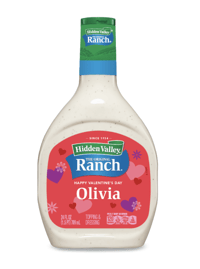
Ranch Dressing Customized Valentine's Day bottle

While this seems like an odd gift to some, Hidden Valley knows that they have fans out there that just love to cover everything they eat with Ranch dressing. To those audiences, this gift is funny, personalized, and potentially useful.

2. Pandora's Little Acts of Love

A common pushback people give for Valentine’s Day is that appreciation for loved ones should be shared all year round. Jewelry company Pandora emphasized that small acts of love are suitable anytime with their "Little Acts of Love" placement in 2022. 

The ad shows couples displaying acts of kindness towards one another that would be appreciated any day of the year. This ad reminds us all that thoughtful gestures can go a long way.

3. 1-800-Flowers' Galentine's Day

Valentine’s Day isn’t just for significant others, and 1-800-Flowers wants friendships to be celebrated as well.

This ad depicts two friends talking about how they established their friendship, reminding the viewer that platonic love also deserves to be celebrated. The two friends in the ad ask each other thoughtful questions about their friendship and how much they mean to each other. 

It’s an emotional ad that will inspire you to call your best friend, and maybe send them some flowers.

4. Hallmark's Tell Them They Matter This Valentine's Day

A Valentine’s Day ad with an important message — everyone deserves to feel like they matter. This ad depicts a young woman who is inundated with negative messages from peers on social media. The messages are pretty bleak and would be hard to hear for anyone. 

At the end, she finds a Valentine’s Day card in her locker from her best friend reminding her she matters and is loved, which helps drown out the negativity of the messages at the top of the ad. Though more series in nature, this heartwarming ad shows how powerful our words really are, and inspires us to show more kindness to one another.

5. Target Valentine's Day Haul Instagram Post

Many people have experienced walking into Target without a list, relying on Target to tell them what they need. This user-generated post on Target’s Instagram account captures the spirit of what we all love about Target — how easy it is to load up on fun items (though our bank accounts may not share the love). 

In the video, the original poster fills their cart with festive Valentine’s Day merchandise at their local Target. Though it isn’t a traditionally produced ad, it’s a relatable post for Target shoppers who may have been inspired to visit their local store and pick up some of the items they saw featured in the post to celebrate.

6. MeUndies Match Me Valentine's Day

This relatable MeUndies ad from 2021 captures the spirit of communicating via Zoom that many people have become familiar with since early 2020. 

In the ad, couples talk about some of their pre-pandemic plans including travel, and weddings. Though many of those events didn’t go as planned, the couples talked about ways they’ve grown closer despite the challenges and uncertainty brought on by the pandemic all while wearing matching merch from MeUndies.

7. Winc's Be Wine Instagram Post

Wine is a popular Valentine’s Day gift that is up there with roses and chocolate. Wine subscription company Winc typically devotes real estate on their social channels for Valentine’s Day-themed posts in the weeks leading up to the holiday. 

In 2021, the Winc Instagram account had a series of posts consisting of unique and user-generated content related to Valentine’s Day. The "Be Wine?" post was among the most popular. We loved the punny caption and heart-themed visuals.

8. OpenTable's Millennial Experiences

If you’ve ever marketed to millennials, you may know that millennials value experiential gifts. Or, as OpenTable says in this 2020 ad, dates. 

In 2020 OpenTable released 14 ads as part of a two-week countdown to Valentine’s Day, encouraging customers to make reservations early to avoid the holiday rush.

Each of the ads targeted a different audience that could benefit from using OpenTable to make Valentine’s Day reservations, with a clear call-to-action and messaging that appeals to the ideal viewer. 

Honorable Mention: Match.com's "Match Made in Hell" campaign.

Technically, this campaign wasn't created for Valentine's Day specifically. But, many of our marketers thought it had all the perfect elements of a great Valentine's Day campaign. Because of this, we wouldn't be surprised if it sees a lot of circulation in February.

In the commercial, directed by actor Ryan Reynolds, Satan sits in Hell using Match's app when he sees he's matched with a woman named 2020. When he meets up with her on Earth, he nervously says "Hi 2-0-2-0." She replies, "Please, call me 2020" — pronouncing it like the year. 

As the commercial continues, 2020's character appears to be the epitome of everything that happened in 2020.

For example, which launched in December, shows Satan and 2020 causing mischief, stealing toilet paper from store shelves, having a picnic inn empty stadiums, and ultimately posing for a selfie in front of a dumpster fire.

The couple frolics to the familiar sounds of Taylor Swift's hit song, "Love Story." which also sparks a sense of rom-com nostalgia for millennials. 

On the same day of this ad's release, Match and Reynolds also shared another commercial showing the pair explaining how they met in couple's counseling.

In this video, Satan explains how he found 2020 on Match:

"I started by using the Match custom search filter. I filtered out joy, happiness, toilet paper, and reason," Satan says in the video below:

Although this didn't launch in February, it was a very clever newsjacking example that many of our marketers say they enjoyed when they were asked to share their favorite Valentine's campaigns.

While 2020 was a difficult year for many, Match and Reynolds identified a tasteful way to create content that audiences could relate to. At the same time, they still told an epic, hilarious love story with a pleasant, entertaining tone. Although they discussed a truly terrible year, they did so in a way that felt like escapism for the viewer.

Valentine's Day Campaign Takeaways

As you create and launch Valentine's Day campaigns, take note of these strategies many of the brands above used:

  • Grab your audience's attention: Like with any holiday, marketers around the globe are churning out content around it. To compete with this overly saturated Valentine's Day ad landscape, you'll need to grab and keep your viewer's attention with entertaining elements or valuable information.
  • Be relatable: Around this time of year, many people are inundated with high-budget Valentine's Day ads that offer them no useful information or value. Even if you want to tell a mushy romance-fueled love story with your content, make sure it still feels relatable or authentic. To do this, you can leverage tactics like telling a story your audience will relate to, or leveraging user-generated content from your followers — like Twitter has.
  • Test out different platforms: While some companies on this list took to Instagram, others embraced physical campaign strategies like special products or billboard use. 

Editor's Note: This blog post was originally published in Feb. 2013, but was updated for comprehensiveness.

Improve your website with effective technical SEO. Start by conducting this audit.  

8 Valentine's Day Marketing Campaigns We Love was originally posted by Local Sign Company Irvine, Ca. https://goo.gl/4NmUQV https://goo.gl/bQ1zHR http://www.pearltrees.com/anaheimsigns


How to Share an Instagram Story in Under 5 Steps

Have you ever watched an Instagram story and thought, "[Insert name of friend] needs to see this?"

Download Now: Free Instagram for Business Kit + Templates

One of my favorite aspects of Instagram — and social media in general — is its shareability. For businesses, it's also a great way to engage your audience, share relevant content, and tell a bigger brand story.

However, when it comes to reposting content on Instagram, the steps aren't always straightforward. Here, we'll cover how to share content to your Instagram story.

Table of Contents

How to Share an Instagram Story

How to Share an Instagram Post to My Story

Why Brands Share Instagram Stories and Posts

As I mentioned above, businesses can repost content on Instagram to engage their followers and share on-brand content.

But what, exactly, should you share? It's a good idea to share content that meets at least one of the following criteria:

  • The content is directly related to my brand
  • The content reflects my brand's aesthetic
  • A customer has tagged or mentioned my brand
  • My followers will find the content valuable

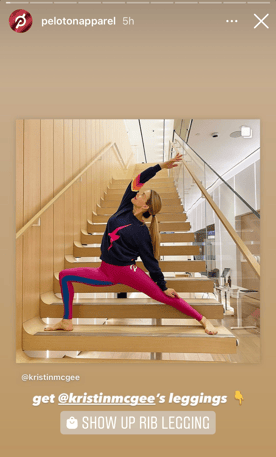
Here's an example — Peloton's apparel brand, @PeletonApparel, regularly shares posts from customers wearing its clothing – and they typically add a call to action, such as a link to its shop. It's an excellent way to leverage user generated content to engage a community and build brand advocates.

peleton

A word of caution here — when it comes to reposting user-generated content, brands should always ask for permission from users before reposting content. Certain users value their privacy over others — and you never want to overstep those boundaries.

Now, let's cover how to repost content on your Instagram Story.

How to Share an Instagram Story to My Story

Your ability to repost someone's Story depends on whether the original creator tagged you.

If the user hasn't tagged you, you’re limited in what you can do. Currently, there's no feature that allows you to repost stories without a tag. However, you can share it via direct messages to another follower.

If you were tagged in a story, you can easily reshare it to your story by following the steps below:

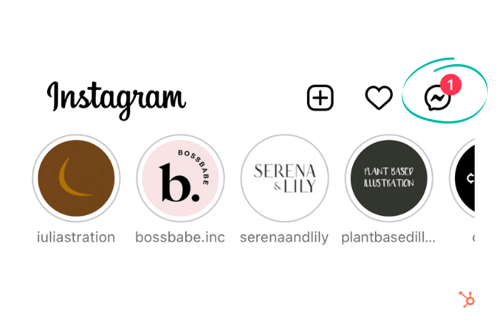
  1. Tap the direct messages icon in the upper right-hand corner.

InstagramStep4

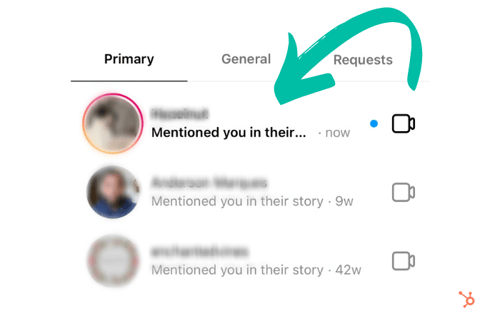
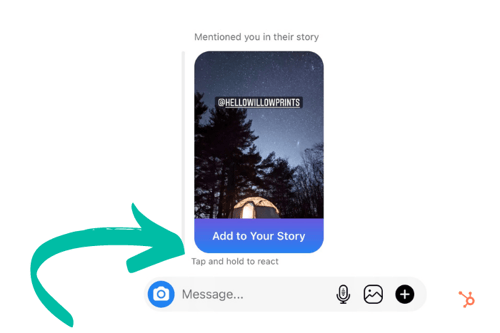
2. Locate and open the tagging notification.

InstagramStep5

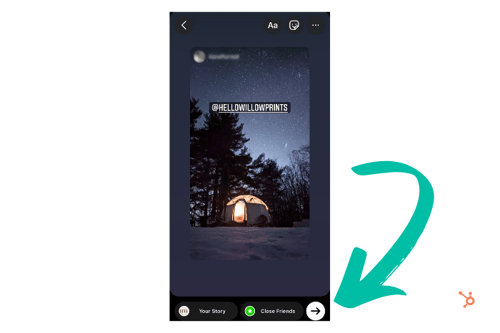
3. Tap "Add to Your Story." From here, you can add your own text, filters, and stickers to the post — or continue to the next step.

InstagramStep6

4. Lastly, tap "Send."

InstagramStep7Once your post is live, viewers can see the original story, along with any comments or stickers you may have added.

How to Share an Instagram Post to My Story

You can share another user's in-feed post to your story in four quick steps:

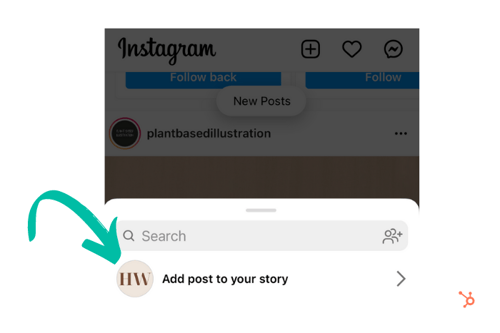
1. Tap that airplane icon below the photo or video in your feed.
InstagramStep12. From the pop-up menu, tap "Add post/video to your story."

InstagramStep2

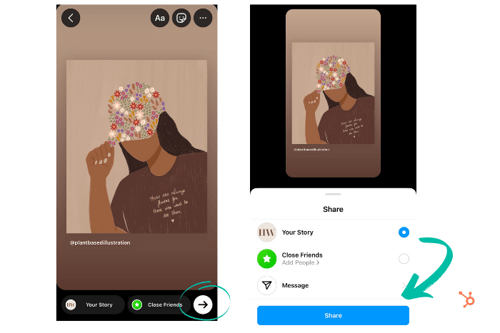
3. Next, you can add text, filters, or stickers to the story — or move to the next step.

4. Tap "Send To" then "Share."

InstagramStep3Why Can’t I Share Someone's Instagram Story?

Keep in mind that many users enable story sharing by default, but others may opt to disable this feature. Similarly, users may put their profile on private mode. If they haven't accepted your follow request, you won't be able to view their stories.

Of course, you can screenshot or screen record a story before it expires. However, when it comes to sharing and reposting content, it's important to remember that certain users value their privacy more than others. To avoid crossing any lines, it's a good habit to ask for permission before sharing any content to your page.

New Call-to-action


How to Share an Instagram Story in Under 5 Steps was originally posted by Local Sign Company Irvine, Ca. https://goo.gl/4NmUQV https://goo.gl/bQ1zHR http://www.pearltrees.com/anaheimsigns
Resume Tips to Get You The Job You Want, Straight from Recruiters

I can't think of many tasks people dread more than writing a resume. There are so many little things you need to add, rephrase, check, double-check, triple-check.

Post-pandemic, the job search is a whole different ball game, with new considerations you haven’t faced before.

→ Download Now: 12 Resume Templates [Free Download]

A checklist makes everything seem less daunting so that’s what much of this article will be, and the best part is it’s recruiter-approved. Let’s dive in.


1. Include your contact information.

This seems like a given, right? Not exactly.

"You would be surprised to know how many really good resumes I've come across with no contact information," says Ira Hughley, senior technical recruiter at HubSpot.

Make sure your full name, email address, and location are included. Don't write out your full home address though, only a city and state.

While your location may not be too relevant to the job itself, as more roles are remote than ever before, employers still want to know your general location for tax and law purposes.

This also means that you should probably remove references that are too local, as your resume will likely reach a broader audience than before.

Lastly, make sure your email address is professional. While the time of MSN and AIM usernames are long gone, many of us still use old addresses we created long before we were in the workforce.

With this in mind, create a simple email with your first and last name. If it's already taken, consider adding your industry to your email. E.g.: martinabretous.writing@gmail.com

2. Tailor your resume to the role.

One of the biggest mistakes job seekers make is using the same resume for every role they apply for.

Hughley recommends having multiple resume versions for each role category you're interested in.

"Don't try to cram all of your experience into the resume," he says. "Sometimes you can talk to them during the interview."

The same goes for keeping old roles that are no longer relevant.

"Be 110% sure that your work experience and interests match the job opportunity you are looking to get," says Hughley. "Too often, I see resumes with tons of experience in areas other than the one being applied for."

Instead, note roles that highlight your experience and show why you are a good fit for the role.

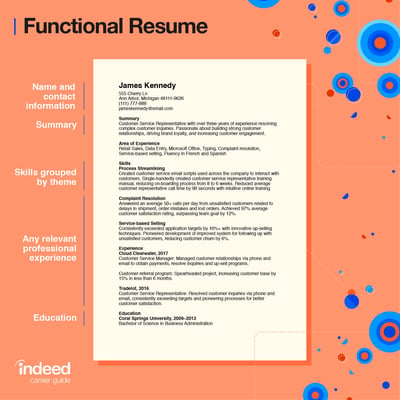
"What if I’m transitioning to a new industry and don’t have much experience, what should I do?" In this case, build a functional resume that frames your past experience to match the job you’re seeking.​​how to write a good resume

Image Source

For instance, say you’re transitioning to a developer role but only have experience in writing. Well, developer roles require problem-solving, critical thinking, time management, and a willingness to learn.

In this case, you can highlight the same skills in your writing role, like:

  • Meeting deadlines – time management
  • Brainstorming new article ideas – critical thinking
  • Analyzing article performance and suggesting optimization strategies – problem-solving

While you may not have the experience, you probably have transferable skills that will help you excel in your new role.

3. Describe your experience in detail.

When it comes to the experience section, there are the basics we all know to input: Previous companies, job titles, and responsibilities. There are two additional details you shouldn’t forget to add: The results you achieved and the awards you received.

One issue Hughley often sees with resumes is that they're too vague.

"Highlight yourself! Sometimes, I see just a title and no highlights or takeaways from that role," he says. "This is the time to brag about what you have accomplished, even if it's just a couple of bullet points."

HubSpot Recruiter Timothy Dixon-Traylor says we often leave out important details that could help us stand out.

"I believe the most important part of the resume is to show how you've made an impact in your current and previous roles," he said. "This can be done by quantifying your results and impacts, as best you can."

Dixon-Traylor continues, "Most recruiters and hiring managers will be asking themselves, 'How can this person help elevate the team and the organization?'Quantifying your contributions will be your first step showcasing how," he said. 

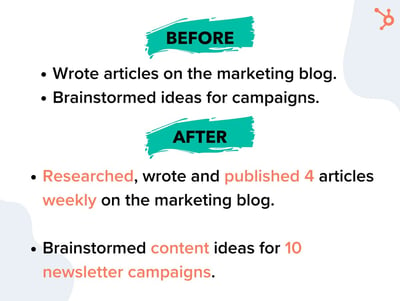
Resume tips example before and after

Did your work lead to higher revenue, conversions, traffic, etc? Make sure to mention that and add figures.

Next, use action verbs. Instead of "worked on," write "led," "managed," "brainstormed." This adds specificity to your responsibilities and helps employers better understand your previous roles.

"Avoid short phrases such as "assist customers" or "make cold calls to prospects," Dixon-Traylor says. "What are you assisting these customers to do? How many customers are you working with a day? Do you have any KPIs or metrics that align with those activities? It goes back to my previous point of quantifying your impact to show how valuable you are."

Another thing to avoid? Fluff.

Dixon-Traylor suggests asking yourself if your content is showcasing your abilities and the value you bring. If not, go back to the drawing board. 

4. Summarize your experience in a "Key Skills" section.

Your skills section is one of the most important in your resume. Hiring managers and automated resume scanners look at this section to assess if you have the relevant skills.

As such, do not put your skills section all the way at the bottom. Instead, put it toward the top of the resume above your experience section or to the side. Ideally, the hiring manager gets a sense of your skills and your experience shows how you gained them.

5. Design your resume using a template that fits the tone of your industry.

Every industry has an unofficial way of doing things when it comes to hiring.

For instance, traditionally creative industries tend to allow (and in some cases promote) showing some personality in resumes. This can range from adding your picture to your resume to using bright colors and illustrations.

Be sure to follow the tone that’s most appropriate for your industry – no need to reinvent the wheel when the guide is already there.

In addition, Dixton-Traylor suggests using a good balance of white space without crowding the page.

"Use as much white space as possible, on one to two pages that showcase the value you bring," he says. "Add the technologies, skills, systems, or programs that you have hands-on experience working with. This can range from technical tools, such as Tableau and HubSpot down to simple tools like POS systems, Microsoft Office, or Google Suite."

Want more design tips? Jump to this section

6. Incorporate keywords from the job description.

There are two reasons you want your resume to have the keywords from the job description:

  • It will show hiring managers that your skills and experience closely align with the job req.
  • You will ensure that your resume successfully passes through automated resume scanners, which look for keyword matches.

7. Proofread for grammar, brevity, and specific action verbs.

One thing you don’t want is an error in your resume. It can affect your credibility and make you look unprofessional.

So, the first step is proofreading your resume. Once you complete it, leave it for a few hours or days then give it another look.

Then, run it through grammar editing software to make sure everything is correct. Here are some good options:

8. Convert your resume to a PDF file.

Imagine you spend hours formatting your resume just for it all to get lost once someone else opens it. That’s what happens when you submit your resume using Word.

Instead, convert your final resume into a PDF file to preserve your formatting. This also ensures easy uploading on most hiring forms.

How The Pandemic Impacted The Hiring Process

When COVID-19 surfaced in early March of 2020, it created a lot of uncertainty in the market. Unemployment rates skyrocketed to 14.7%, as companies struggled with

Now, two years later, the outlook is more positive.

"The talent pool has drastically expanded because most companies are remote, which means that talent is no longer limited by location," Hughley says.

This is great news for job seekers who were once constrained to the job opportunities in their local areas. A job market that was favorable to companies has now switched to being favorable to job seekers.

Employers have to offer better benefits with more flexibility to be competitive, everything from remote stipends to unlimited vacation days.

"There is a shift now as well because many recruitment platforms have moved to online or virtual strategy," Hughley adds. "We have to find more creative ways to connect to candidates to make for the best candidate experience.

Lastly, Hughley says that the pandemic has made hiring managers more empathetic toward candidates.

"When I think of [...] all that applicants have had to endure, I make a conscious effort to lead all hiring and conversations with empathy," he says.

Dixon-Traylor adds the pandemic has brought more humanity into the hiring process. 

"Pre-pandemic, I loved advocating for candidates who don’t have 'ideal' backgrounds - from job hoppers and folks who have gaps to folks who don’t have direct experience, but have impeccable transferable skills," he said. "Since the pandemic, I advocate even more those communities, in the entire hiring process."

He continues to say that he looks at hiring as a long-term strategy, guiding hiring managers through their unconscious biases and helping them understand minimum requirements versus what can be coached or taught.

The Ultimate Checklist of Resume Tips

Contact Information Tips

  • Include your basic contact information – including your name, email address, and phone number – at the top?
  • Is your email address professional? (e.g. sara@gmail.com vs. saracutiebear@gmail.com)
  • Is your email address associated with a familiar domain, like Gmail? Outdated domains can be a red flag for tech-savvy companies.
  • Do your resume details align with your LinkedIn profile? Hiring managers will likely review both.
  • Have you included links to social media profiles, portfolios, and a personal website if relevant?
  • Have you audited your social profiles to ensure no unprofessional content is available to the public?
  • Have you customized any communication within your resume that addresses the company or hiring manager by name?
  • Have you granted the recipient the proper permissions to view it (or opened up permissions to everyone)? If you're sending your resume as a Google Doc.

Featured Resource: 12 Free Resume Templates

resume templates

Download 12 free designed, formatted, and customizable resume templates here.

Writing for Your Industry Tips

  • Are you writing in a tone that matches that of the company to which you're applying? For instance, while still writing professionally, you might use a different tone when applying to work at a new tech startup versus an established accounting firm.
  • Have you customized your resume for the specific job to which you're applying? Highlight work experience and skills that are relevant to the position – don't just write down every job you've ever held.
  • Do you have a clear objective at the top of your resume that is company-focused, rather than you-focused? You don't need one, but you do need a "Key Skills" section that summarizes who you are and what you can offer the company.
  • Have you included both accomplishments and responsibilities under each job? Both should be easy to ascertain when scanning your resume.
  • Have you used numbers and metrics where possible to better convey your success? For example: "Generated 150 marketing-qualified leads," "Increased Instagram followers by 25%," "Oversaw a $250K budget."
  • Do you illustrate career progression? It should be clear if you were promoted, gained additional responsibility, or switched jobs laterally to acquire more skills.
  • What company details have you added? List not only the names of companies but a short description of what each company does.
  • Have you included your tenure at each company?
  • Have you included relevant information about your education?
  • Does your unique value proposition shine through? E.g., something that makes you stand out from other applicants, or highlights that you're uniquely qualified for the position.
  • If relevant for the position, have you included links to a portfolio or samples of your work?

Formatting and Design Tips

  • Have you used a resume template so the layout of your resume is visually appealing and easy to read? Get 10 free templates here.
  • Is your resume too creative? (For instance, if you're applying for a creative position and have formatted your resume as an infographic ... is it really simple enough to read, or is it best to save that creativity for your portfolio?
  • Have you selected a clear, easy-to-read font? Is your name clearly stated at the top? It's a good idea to make your name slightly larger than all other text – employers read many resumes every week, and you need to be memorable.
  • Have you made use of common formatting conventions that make content easier to read, such as bullet points and header text?
  • Has your formatting remained consistent across all positions? For example, if you've bolded job titles, are all job titles indeed bolded?
  • Are your margins even?
  • Are all items properly aligned? For example, if you've right-aligned dates, are they all lining up in tandem with one another?
  • Are all links you've included clickable?
  • Have you converted your resume to a format that allows all recipients to read it as intended, without downloading specific fonts or needing special software? A PDF format is recommended.

Editing Tips

  • Have you included keywords in your resume? If you're submitting to an automated system, it might be critical to get past filters. Be sure your resume directly reflects some of the software and skills mentioned in the job description.
  • Have you edited it for brevity? Try to keep your resume to about one page per 10 years of job experience, if possible.
  • Have you removed irrelevant job experiences?
  • Is each section of your resume ranked in a way that highlights your skills and what you have to offer the employer? For instance, if you're a recent graduate with internships in different fields, you might list your most relevant experience at the top, instead of ordering everything by date.
  • Have you edited out generic action verbs in favor of more specific ones? For instance, "managed" instead of simply "worked."
  • Have you made use of a thesaurus to prevent monotony?
  • Have you found more professional alternatives to unprofessional-sounding terms? "Tasked with," for example, can make you seem less proactive than someone who "coordinated" various projects regardless of who told them to.
  • Are your special skills truly special? While speaking a foreign language is indeed noteworthy, these days, it might be redundant to mention that you're proficient in Microsoft Word or capable of using email.
  • Have you done a sweep for annoying jargon or business babble? Everything should be clearly articulated, so it's easy for the hiring manager to quickly understand what you do.
  • Is everything 100% true? If you write that you're fluent in a foreign language on your resume, you should be prepared to speak that language during your interview.
  • Have you conducted spelling grammar checks?
  • Finally, have you asked a friend who hasn't read your resume before to provide a final glance for errors, inconsistencies, or confusing phrasing?

If you've checked the boxes of all the resume tips that apply to you, you should be ready to submit your application.

Editor's Note: This post was originally published in March 2018 and has been updated for comprehensiveness.

New Call-to-action


Resume Tips to Get You The Job You Want, Straight from Recruiters was originally posted by Local Sign Company Irvine, Ca. https://goo.gl/4NmUQV https://goo.gl/bQ1zHR http://www.pearltrees.com/anaheimsigns
Friday, February 4, 2022

Permalinks: What They Are & How to Structure Them for Max SEO Value

What comes to mind when you think of SEO?

"Permalink" probably isn't the first or second thing, maybe not even the 10th thing.

→ Download Now: SEO Starter Pack [Free Kit]

The truth is, permalinks and SEO have a lot more in common than you may realize, and — when done correctly — can play an important role in improving your website's ranking. Luckily, they are also simple to master.

Let's get into how permalinks work, how to create them, and set them on WordPress.

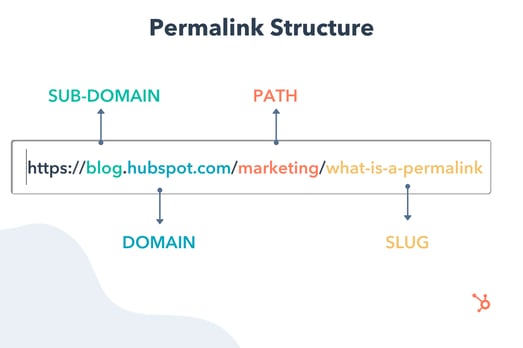
Let's break down this post's permalink.

Permalink structure example

You first have your domain (and subdomain in some cases) which is where your website lives. It's followed by the path, which indicates the location of the page. In this example, the article is located under the "Marketing" category.

The last part of your URL is the slug — an essential part of your permalink and vital for SEO because it tells search engines how to index your site.

Each component creates a permanent link leading to a specific page on your website that is unlikely to change, hence the name "permanent."

When you don't customize your URLs using permalinks, you get a randomized ID. The problem is that this isn't attractive to site visitors and isn't optimized for search engines.

Let's say you're blogging about sponsored tweets and their value. Would you rather have the URL look like this:

yourdomain.com/sponsored-tweets-guide

Or like this:

yourdomain.com/post-id?=5726fjwenfkd

Probably the first one, right?

Great slugs should include the keywords targeted in the post. Take our example above: "sponsored-tweets-guide."

From this permalink, the reader (and Google) know the page is a guide to sponsored tweets and targets the keyword "sponsored tweets." This makes it easier for readers to find and share your content.

In addition, using keywords with high monthly search volume (MSV) in your slug can help you increase your ranking.

That's why when using a content management system (CMS) like CMS Hub or WordPress, you want to think about your permalink structure early on in your web development process.

What's the difference between a permalink and a URL?

A URL is a web address that directs to a page or file. It can include a domain name only, or also a path, slug, and other information depending on the page you are accessing.

On the other hand, a permalink refers to a specific URL structure — a tool made popular by bloggers for sharing and SEO purposes. While every permalink is a URL, not every URL is a permalink.

The Best Permalink Structures

With several permalink structures to choose from, think about your content and your audience to determine what format will work best.

For instance, a news site can greatly benefit from having a slug that includes a date and title. This lets readers know quickly by scanning what the post is about and when it was written.

On the flip side, if you manage a blog that prioritizes evergreen content and has pages that get constantly updated, you'll likely want to avoid having any dates in your titles.

That can signal to readers that your content is old and therefore, irrelevant. Instead, have a simple slug that only includes your article title.

It's all about using a structure that will benefit you (and your users) in the long run. Once you decide on a permalink structure, you can set it up in your CMS.

How to Make a Permalink

To make a permalink, all you need is:

  • Your domain name
  • Your slug
  • Your path (if you have several topic categories and want to organize your content)

Then, there are a few best practices to keep in mind when deciding on your permalink structure:

  • Keep it short – Avoid articles like "the," "a," "an" and create a slug that's a shorter version of your title. E.g.: If your article is titled, "How to Create an Instagram Story," your slug can simply be /Instagram-story.
  • Include your main keywords – Optimize your slug by including your keywords. Make sure the keyword you use directly relates to the content on the page.

Now, in terms of where you go to create your permalink, that's typically on your CMS or Website Builder — such as WordPress, Wix, HubSpot CMS Hub, and Drupal. The ideal time to do this is shortly after developing your site but before any posts go live. However, you can also do this at any point.

If you decide to change old URLs to reflect your new structure, be sure to update all backlinks or set up redirects for those pages.

So, you're probably wondering how to optimize a permalink for WordPress. We'll cover that next.

Using Permalinks with WordPress

When you create a post in WordPress, the permalink will not be optimized unless you have already set the structure. Otherwise, it will look like a random ID.

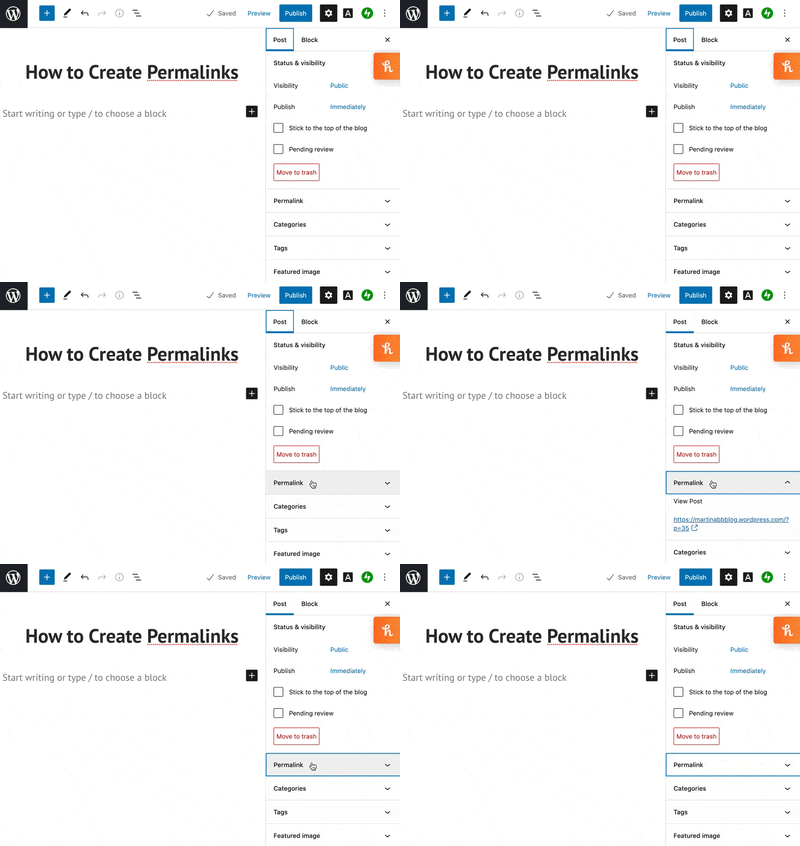
You can find the permalink on the page post while you're editing, as seen in the example below.Permalink in Wordpress blog post editing

Changing permalinks is a fairly simple process, and you won't need to install plugins to do so. You can select from a few structures or customize your own.

More on this in the next section.

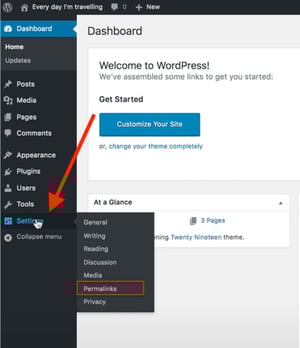
1. Open "Settings" and click on ‘Permalinks."

How to change permalink structure on WordPress

Image Source

The first step in structuring your permalink is to open the "Settings" section of your WordPress dashboard. This should bring you to a list of options with various subheadings.

Once you click on this option, you'll be taken to a screen with a variety of options to choose from. Depending on your preference of how you want your post to be archived and searched, you can pick the one that most aligns with your goal.

2. Choose a permalink structure option.

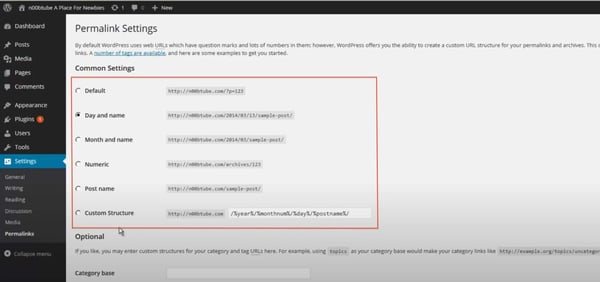
WordPress permalink settings

Image Source

Here are the different choices you'll have and what they mean:

  • Default — Avoid this default option if you're looking for maximum SEO value. It's the post identification number, with no other information.
  • Day and name — This option sets up the slug to be the day the post went live and the name of your post. A good reason to use this is if you have multiple posts of the same name but want the differentiator to be the date it was posted.
  • Month and name — The same as the previous option, this time with the month being displayed. This is a great option if you have a monthly column, such as a "Favorites" or "Best Of."
  • Numeric — Numeric is another choice that's safe to ignore, as this structure is all numbers and provides little SEO value. If you're archiving posts numerically, as a way to look back and see previous posts, numeric is the choice for you.
  • Post name — Choosing this route is an okay method for SEO, but not the best, as Google likes to focus strictly on keywords when ranking posts.

Learn more about that "custom structure" option next.

3. Consider creating a custom permalink structure.

If you're not too excited about the structures WordPress offers, you can create your own permalink structure in minutes.

You'll create a formula for your permalink structure, and every time a post goes live, it will follow that formula.

For example, let's say you have a lifestyle blog and a travel category (i.e., path) under which you post about your latest vacations.

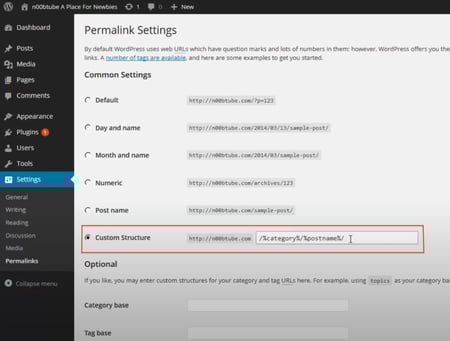
If you wanted to set the structure to be the category followed by the year and post name, here's what you would put in the box:

/%category%/%year%postname%/

Permalink custom structure settings in Wordpress

Image Source

A backslash separates each custom structure, and each tag starts with the percent sign.

You can find all of the structure tag options available to you on WordPress here.

Change a Permalink Without Hurting SEO

If you decide to change a permalink, it's important to do so with care. This is because it will affect both the internal and external links to the page.

Make sure to set up a 301 redirect. This notifies your visitors and Google that your page has a new location. 

Google will keep track of both the redirect source (the old permalink) and the new redirect target (the new permalink) — and will eventually update the new permalink in search results.

Without a 301 redirect, your website will have broken permalinks and missing URLs — which may create a negative user experience. Search engines, like Google, will also lower your organic search ranking to prevent sending visitors to broken pages.

When creating permalinks, the main thing to keep in mind is focusing on SEO (i.e., keywords) and user experience. They're the virtual key (pun intended) to making sure your content is found by the people you want to reach.

Editor's Note: This post was originally published in October of 2019 and has been updated for comprehensiveness.

marketing


Permalinks: What They Are & How to Structure Them for Max SEO Value was originally posted by Local Sign Company Irvine, Ca. https://goo.gl/4NmUQV https://goo.gl/bQ1zHR http://www.pearltrees.com/anaheimsigns
The Beginner's Guide to Share of Voice

If you've ever been in charge of gathering reports for your marketing team, then you know there are a plethora of metrics you can measure.

One metric that gets overlooked is share of voice. However, this is a versatile metric that you can use in a competitive analysis for social media, organic traffic, or even paid advertising.

As a marketer, share of voice is important because it helps you understand how well your brand is performing against the competition. Below, we’ll review everything you need to know about share of voice.

→ Download Now: Market Research Templates [Free Kit]

This metric was mainly used as a way to measure success in paid advertising, however it's much more than that now. You can calculate share of voice for organic traffic and social media, in addition to paid advertising.

By calculating your share of voice, you'll have a better understanding of many people know about your brand, and you can identify areas to work on. For example, if you have a high share of voice in social media, but not as much in organic traffic, then you know you need to improve your organic traffic strategies.

While share of voice isn't the same thing as market share (more on that below), share of voice tends to correlate with market share and revenue. For instance, the more you're dominating in the conversation online, the more market share you'll have and the more authority you'll have among users.

Share of Voice Formula

To calculate share of voice, divide your brand's measures by the total market measures. This could be your social mentions, paid advertising clicks, or website traffic.

To find these numbers, you'll need to use some of your marketing tools. You can look at your social media automation tool, for instance, to count how many mentions your brand has. Then, you can calculate how many mentions your competitors have. After you add all those together, you can divide your mentions by the total to find the share of voice percentage.

Calculating share of voice should help you learn which channels need your attention the most and how you stack up against competitors. Now, let's see which channels you should calculate share of voice for.

Share of Voice Metrics by Channel

Advertising

When it comes to advertising, it's important to find your share of voice to see how much ad space you're taking up compared to the competition.

To find this, you'll divide how well you did in a paid advertising metric (such as impression shares), by the total number in the industry.

For PPC ads, you can look at impression shares, which represent the amount of times your ads were shown to users compared to the number of times your ads could have been shown, based on your keyword and campaign settings. If you’re using Google Ads, you can find "Impression Share" into your account, going to campaigns, clicking the column icon, selecting “modify.” From there click “competitor metrics” and then add impression share columns by checking the boxes next to their names. Then click “apply” and the impressions data should show up in your table.

Share of voice is important in advertising because it will help you budget, measure campaign effectiveness, and give you a competitive advantage.

News Outlets and Blogs

Measuring your share of voice across news and media tracks how often your brand is mentioned across these platforms. Find out which publications are talking about you and the context of these mentions.

Use this information to help you identify writers or outlets that would be interested in covering your brand or related topics, find out industry related trends, and compare how competitors are doing. Harnessing this information can simplify research for your PR team and give you helpful industry insight.

You can get notifications of mentions using Google News alerts, but for more in depth feedback, you’ll want to use a listening tool.

SEO and Organic Search

To measure your brand’s share of voice in organic search, you’ll need to look at your brand occurrence in search results pages (SERPS). Typically the number of impressions is the metric used to measure this, but you could also use clicks. There are several tools you can utilize to pull this information (more on those in the next section).

Performing an SEO share of voice analysis will help you figure out which websites rank most for a set of keywords of your choice.

Once you’ve decided on a list of keywords or topics you’d like to focus on, pop them into a keyword research tool. Pull the 1st page (SERP) rankings from the results for each topic. From there you can export this data into a table or chart to get a better visual of the data.

Social Media

Social media is one of the main channels where you can use share of voice as a measure of success since social media is where consumers go to be heard. Statista reports that in 2021 there were 295 million social media users in the U.S. alone. With even more users around the globe, you’ll want to tap into the conversations people are having and use that data to improve your marketing strategy.

With social media, you can measure brand mentions, hashtags, reach, impressions, or even sentiment.

To calculate, use a social media tool to measure brand mentions. Calculate yours, your competitors, then add those numbers together and divide your mentions by the total.

Share of voice is important in social media because it will help you determine which competitors are getting mentioned more, so you can analyze what you do versus what they do. This will help you identify gaps in your strategy. Ask yourself, what platforms are working for your competitors, which influencers talk about them, and where they're the most popular.

While calculating share of voice may seem daunting at first, the good news is there are plenty of software and tools available that will help you gather the information you need. Here are some of our favorites.

1. HubSpot Social Media Management Software

share of voice tools HubSpotBest for: Social Media Share of Voice

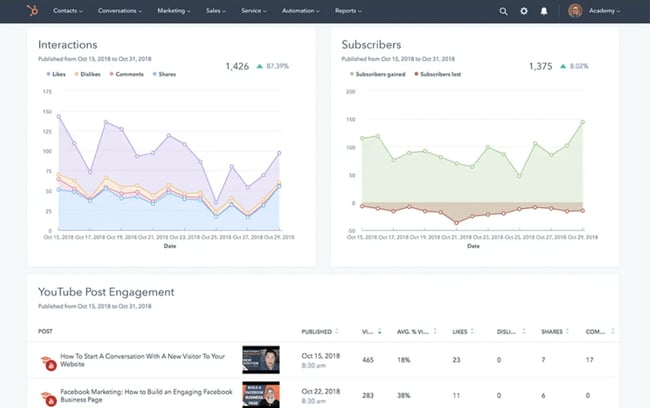
This all-in-one tool will help you build and track marketing campaigns, but it is also an effective social listening tool. With HubSpot, you can create keyword monitoring streams, track social media interactions and trigger email alerts when prospects mention your brand. Save time as this tool allows you to track multiple social platforms in one spot, automate monitoring, and focus on the interactions that matter most.

Why we like it:HubSpot let’s you link all of your interactions back to your CRM and makes it easy to evaluate campaign results with their ready-made reports.

2. Hootsuite

share of voice tools HootsuiteImage Source

Best for:Social Media Share of Voice

Hootsuite lets you keep an eye on conversations mentioning your brand, monitor relevant keywords, and hashtags. Similar to HubSpot, Hootsuite allows users to access this information from an easy to use dashboard without having to toggle back and forth from various social media accounts.

Why we like it: Hootsuite is a great entry level option for those new to social monitoring tools.

3. Talkwalker

share of voice tools TalkwalkerImage Source

Best for: News, Blog, and Social Media Share of Voice

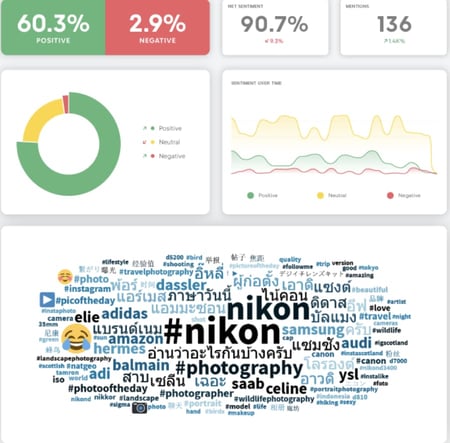
Talkwalker monitors brand mentions across news, social media platforms, blogs and the web. This tool also dives deep to help you get insight on not only share of voice, but user sentiment. Talkwalker will give you sentiment analysis for up to 25 languages, a great option for those who do business internationally.

Why we like it: Their AI visual listening feature lets you track brand logos on the web and across social media to help you gain a more comprehensive picture of how your brand is doing.

4. Google Ads

share of voice tools Google Ads

Image Source

Best for: PPC and Advertising Share of Voice

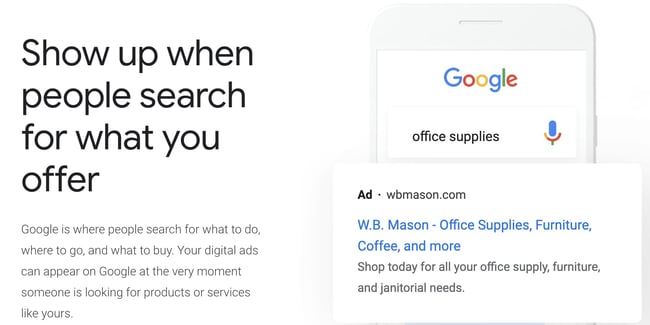
When you need to measure PPC share of voice, it’s hard to beat Google Ads as a tool. To find your PPC share of voice, use their impression share metric. Conveniently, Google's tools work together, so if you already have Search Console, you could link it to your Google Ads account.

Why we like it: Google Ads is so widely used, it’s often already a component of marketing campaigns. Having the Impressions share metric built in makes pulling this data a simple task.

5. Ahrefs

Best for: SEO Share of Voice

When measuring SEO share of voice, Ahrefs is a reliable tool. You can easily get a snapshot of your organic traffic compared to your competitors using their batch analysis feature. Alternatively, you could use hrefs to track competitors' share of voice by comparing them against the keywords you want to rank for. It’s a great overall tool for most SEO needs.

Why we like it: Ahrefs is an all-in-one SEO tool that can help you tackle a myriad of SEO tasks from topic research to website audits.

6. SEMrush

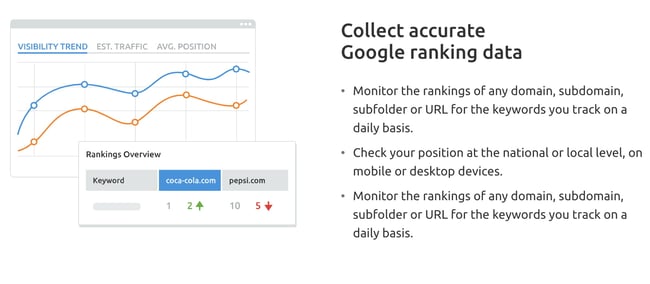
share of voice tools SEMrush Position TrackingImage Source

Best for: SEO Share of Voice

Like Ahrefs, SEMrush is another great all-in-one SEO tool that can also help you measure share of voice. This can be done through SEMrush’s position tracking tool. You’ll need a business subscription to access it, but it’s worth it for large enterprises. In addition to the position tracking tool, you can measure share of voice by location or topic, as well as discover new competitors.

Why we like it: in addition to share of voice metrics, SEMrush can be utilized for content marketing needs and technical SEO. Their keyword gap feature can help you identify areas for organic search improvement.

7. Brandwatch

share of voice tools BrandwatchImage Source

Best for: Web and Social Media Share of Voice

Brandwatch is another tool that can help you track your brand’s share of voice across social media, web, and news mentions. You can compare share of voice by brand or opt to compare customer sentiment, location, and other demographics. This tool is great if you’re looking to dig into customer insights of your competitors.

Why we like it: Brandwatch’s customer sentiment analysis will help you identify any roadblocks or risks, plus add helpful context to the data in your reports.

Now, you might be wondering, "How can I generate these reports?"

Share of Voice Reports

To create a share of voice report, you should be able to use your marketing automation tool to gather the numbers. Most of the tools listed above, like HubSpot, will generate reports for you, or have the option to export the data.

If exporting you can put the data in whatever format you like as long as it makes sense to you and your team. You can simply create an excel sheet and begin calculating the share of voice for several channels including social media, news, advertising, or organic traffic.

Calculating share of voice is a great way to learn how well you perform against your competitors. Use the insights you gain to better serve your audience, stay on top of trends, and outperform the competition. The best part is that you can use this metric for several marketing channels, from advertising to social media.

This article was originally published March 10, 2021 and has been updated for comprehensiveness.

New Call-to-action


The Beginner's Guide to Share of Voice was originally posted by Local Sign Company Irvine, Ca. https://goo.gl/4NmUQV https://goo.gl/bQ1zHR http://www.pearltrees.com/anaheimsigns
The Plain English Guide to Demand-Side Platforms (DSP)

As a marketer, you might be focused on creating organic content most of the time. But you should keep in mind that paid advertising is just as important.

When you manage the paid ads for your business, you can go through individual ad managers such as Google Ads or Facebook Ads. However, that's not the only option. You can also use demand-side platforms (DSP), which are automated, as a way to purchase and manage your online ads.

Access Now: Free Media Planning Template

According to a 2021 study published by Statista, the US was the largest programmatic advertising market worldwide, spending an estimated $70 billion in 2020. Marketers are increasingly using DSPs as a way of purchasing, managing, and tracking online advertising. Below, let's review all the basics about DSP advertising.

With a DSP, you can purchase mobile ads on apps, banner ads on search engines, and video ads on Facebook, Instagram, Google, and even more platforms. Instead of using both Google Ads and Facebook Ads, for instance, you can purchase those ads in one place on a DSP.

The purpose of this is to make ad buying faster, cheaper, and more efficient. Now, let's dive into how DSP platforms work and why you should use one.

How do DSPs work?

DSPs work by using programmatic advertising, which is the buying and selling of ads in real-time through an automated system. With real-time bidding, ad placements are auctioned off in milliseconds.

When you get started with DSP advertising, you'll need to begin strategizing how much you want to spend. Think about what an effective cost per click and cost per action might be. This will help you set up your online ads so the platform knows how much to spend in any given auction.

The best DSP platforms will allow you to include multiple rich media ads, including video, images, and animation.

Why use a DSP?

The main reason for using a DSP is that it makes your digital ad experience easier and more cost-effective. You can control, track, and maximize all your digital ads in one place. This means you can manage an entire ad campaign across sites on one dashboard. For example, you can show someone an ad on Google, then show them ads on Facebook, and then across other sites they visit — all in one campaign. Before DSPs, those would be separate campaigns on Google and Facebook Ads.

This means you can advertise on many networks, including all the major publishers, in addition to more. With the number of networks, you'll have a more global reach.

Additionally, DSPs often partner with third-party data providers, giving you better tracking and reporting capabilities than a single network usually provides. And in the planning process, the targeting options are more personalized, meaning you can get better conversion rates.

When you're choosing a platform to work with, you'll want to look at how many ad exchanges the DSP has access to because that affects how many people you can reach. Plus, you'll want to consider cost, training (full service or self-service), support, and ease of use.

Now that you know more about DSP advertising and how it works, let's discuss the platforms that can help you do it.

1. Basis Technologies

DSP example Basis Technologies

Image Source

Best for: Large or enterprise level companies

Basis Technologies is an omnichannel DSP built to generate better outcomes for your ad campaigns. One of the best features is that it uses AI machine learning to automatically analyze data from numerous campaign parameters to optimize your ads.

With this DSP, you'll be able to target hyper-local audiences across devices and multiple touchpoints. You'll also get access to the industry's leading exchanges, along with 25,000+ audience segments across over 30 different data providers.

Why we like it: Basis Technologies harnesses the power of machine learning to analyze data and automate processes.

2. Google Marketing Platform

DSP example Google Marketing Platform

Image Source

Best for: Small to large businesses or agencies

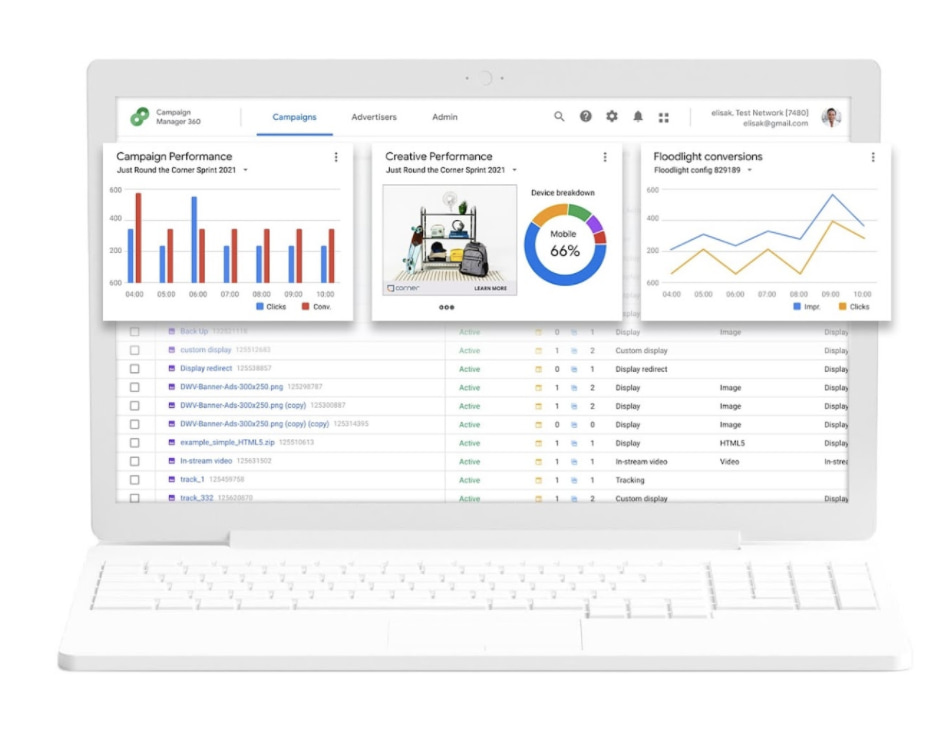
Google Marketing Platform is Google's unified advertising and analytics platform for smarter marketing and better results. This DSP has several products for both small businesses and enterprise companies, including Campaign Manager 360 and Display & Video 360 (formerly DoubleClick).

With this product, you can save time with cross-channel ad management to maximize insights and optimize media and creative performance across all your digital campaigns. The flexibility is the standout feature of this DSP. You can use third-party features and integrations so you can choose the capabilities that best help you manage and measure your campaigns.

Why we like it: Google’s products are designed to work together, but also give the flexibility to use third-party features and server to server integrations.

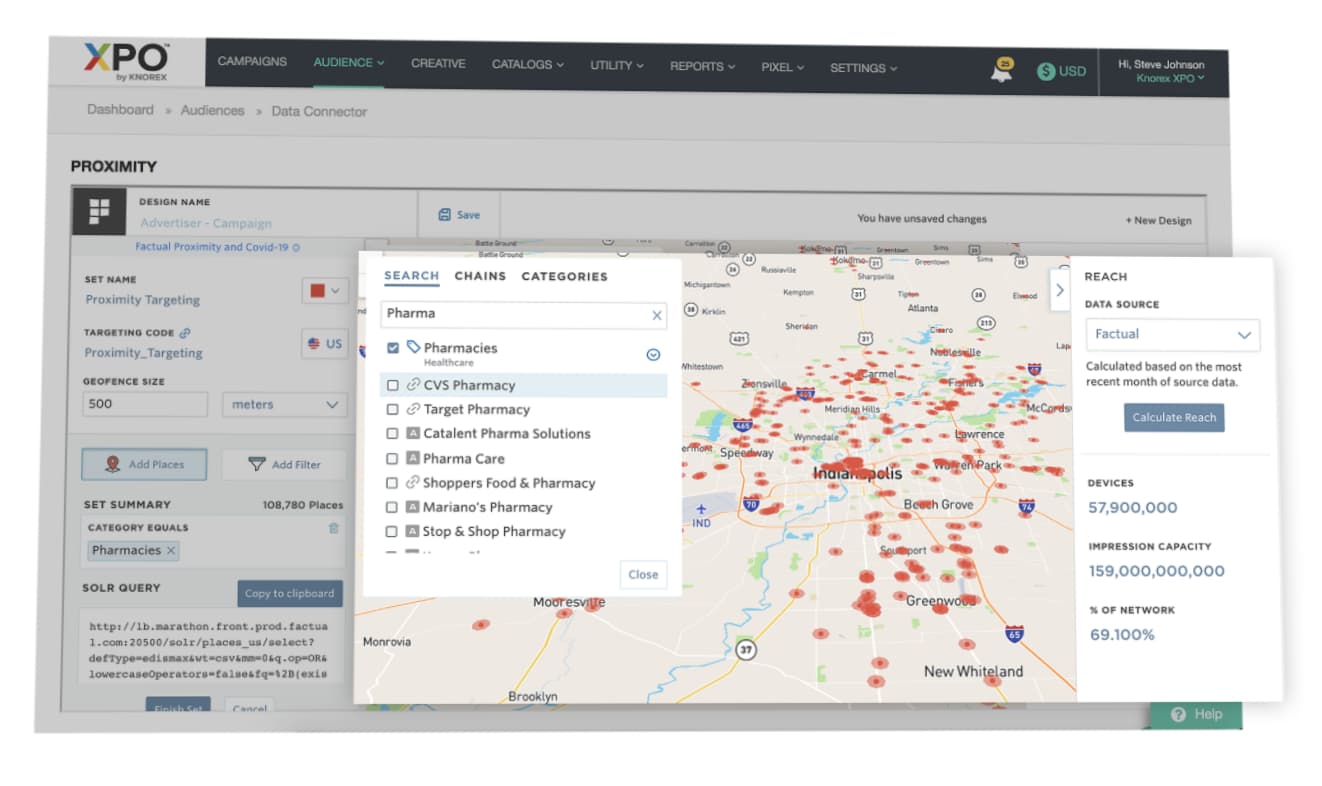
3. Knorex

DSP examples Knorex

Image Source

Best for: Mid-sized to large advertising agencies

Knorex is a universal advertising platform that automates personalized marketing across channels, devices, and ad formats. You can market on Google Search, Facebook, Instagram, and LinkedIn all in one place.

This DSP also uses AI to learn from past data to predict and adjust ad budgets dynamically in real-time to drive higher efficiency.

Why we like it: Knorex values security, offering a variety of brand privacy and security tools out of the box.

4. Jampp

DSP example Jampp

Image Source

Best for: Gaming apps and companies looking for a mobile DSP solution

Jampp is a DSP that leverages unique contextual and behavioral signals to deliver customers and in-app purchases through programmatic advertising.

The key features of this platform are user acquisition, app retargeting, geolocated ads, dynamic ads, and predictive bidding. This is mainly a mobile user acquisition and app retargeting DSP where you can focus on mobile-first ads.

Why we like it: Jampp’s app retargeting helps re-engage existing customers and uses their previous behavior to predict whether or not they will convert.

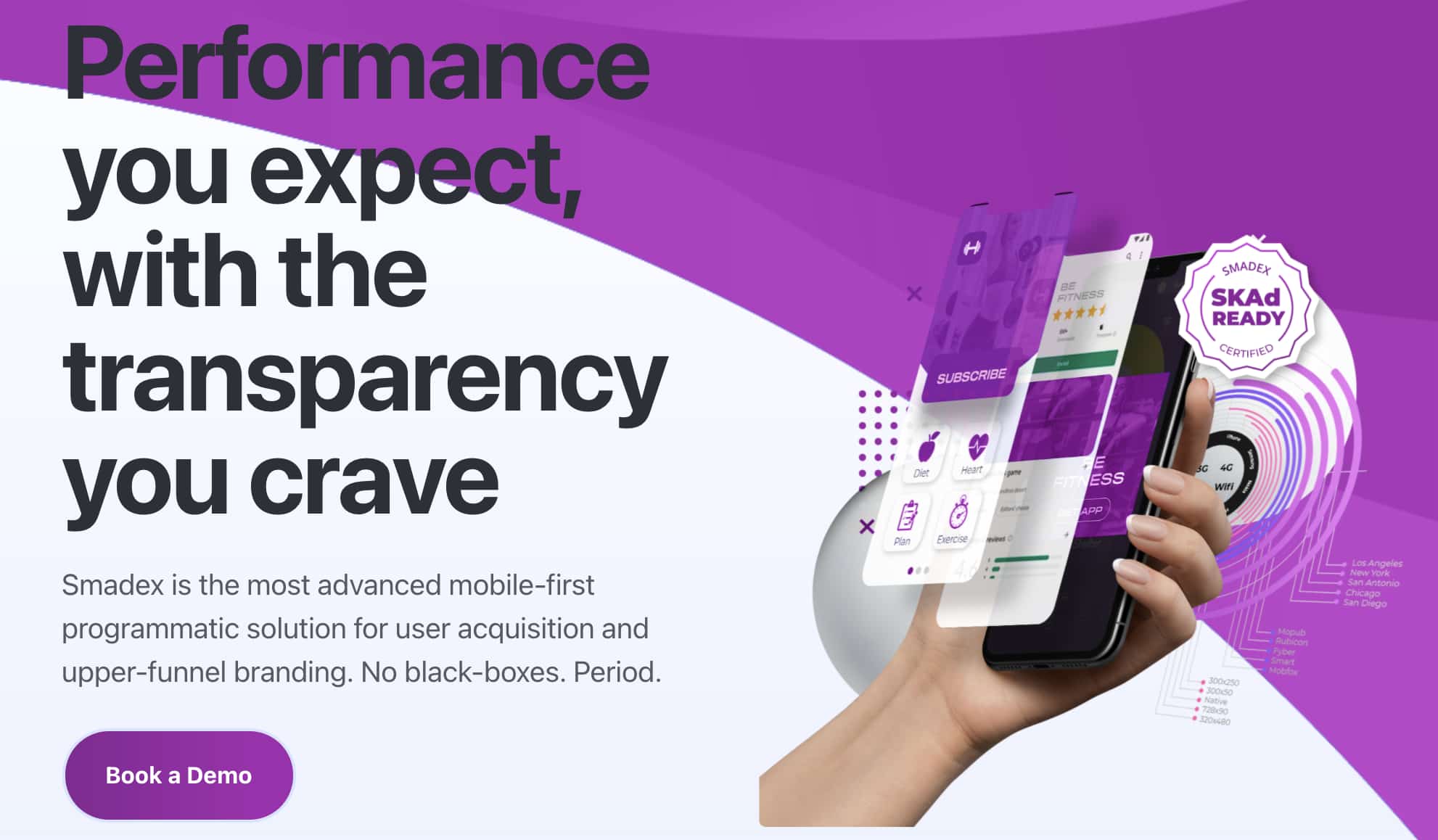
5. Smadex

DSP example Smadex

Image Source

Best for: Companies needing a mobile-first DSP solution

Smadex is a mobile DSP engineered for growth. The platform uses a combination of its own programmatic advertising technology, machine learning, and first-party data.

With this platform, you can reach global audiences at scale and re-engage audiences with its retargeting capabilities.

Why we like it: Smadex values security just as much as helping your brand scale. It ranked #1 for fraudless DSP installations by Kochava Traffic Index and holds an IAB (Internet Advertising Bureau) Gold Standard certification.

6. MediaMath

DSP examples MediaMath

Image Source

Best for: Mid-sized to large agencies that want a custom solution

MediaMath is a customizable DSP that provides brands with a myriad of options for managing their campaigns. Opt to use their built-in creative tools to run ads on their server or choose one of your own. You can even use APIs to run on top of your core foundation.

Why we like it: MediaMath’s product is not a one-size-fits-all DSP. Brands can tailor their components to build an advertising solution that suits their needs.

7. Amazon DSP

Amazon DSP

Image Source

Best for: Ecommerce brands that want to advertise on Amazon (and Amazon-owned sites)

Amazon is one of the world's largest online retailers, so it’s no surprise that brands would want to tap into their advertising audience. Both advertisers who sell products on Amazon and those who don’t can use Amazon DSP. They offer two options: self-service and managed service. With self-service, brands are in full control of their ad campaigns. Those who are new to programmatic advertising or need guidance are advised to use the managed option, however that comes with a $35,000 minimum spend.

Why we like it: Amazon DSP can greatly increase brand awareness for sellers on and off Amazon.

DSPs Still Require Research

When you choose a DSP, make sure you understand how many inventory sources it accesses, which third-party data integrations it offers, and what targeting criteria are available. To successfully run programmatic ads on a DSP, you'll need to reach global audiences with personalized ads. While using a DSP simplifies paid ad management, it won’t replace customer research and having a clear idea of who your target audience is.

This article was originally published March 5, 2021, and has been updated for comprehensiveness.

paid media template


The Plain English Guide to Demand-Side Platforms (DSP) was originally posted by Local Sign Company Irvine, Ca. https://goo.gl/4NmUQV https://goo.gl/bQ1zHR http://www.pearltrees.com/anaheimsigns
Thursday, February 3, 2022

How to Decline a Job Offer

Before you decline a job offer, ask yourself some key questions:

  • Why are you no longer interested in the job?
  • Are your reasons for losing interest short-term, or longer-term reasons that you can’t change?
  • If you don’t accept the offer, will you regret turning it down?

If you’ve answered all of these questions and still feel like you want to decline, read on to discover the different ways to decline a job offer.

Free Kit: Everything You Need for Your Job Search

Know exactly what you need? Jump to one of the following sections:

How to Politely Decline a Job Offer

Politely declining a job offer focuses on three key things: being prompt, showing appreciation, and giving a brief reason. We’ll discuss each further below.

1. Be prompt.

Let the hiring manager, recruiter, or relevant individual know as soon as you know you won’t accept a job offer. Putting it off can cause inconvenience, and they may have other candidates that they want to notify of their acceptance to fill the position as soon as possible.

2. Show your appreciation.

It’s essential to show your appreciation to the hiring manager or team responsible for interviewing you and the time they’ve spent communicating with you throughout the process. Showing this gratitude goes a long way in terms of expressing appreciation, and doing this can leave a positive impression if your paths ever cross in the future.

3. Give a reason, but keep it brief.

There’s no need to go into incredible detail about why you’re declining an offer, but it can be valuable to give a brief reason as to why you’re moving on. So, for example, you can say something like:

“At this time, I don’t think I should leave my current position,” or, “After some thought, I don’t think this position matches my current career goals.”

It’s also not necessary to give a reason all the time, especially if it’s due to something like red flags you noticed in the boss or if you didn’t like the company. If you have a reason like this, it’s best to simply express thanks and say you won’t accept the offer.

How to Decline a Job Offer Due to Salary

Sometimes you’ll decline a job offer because the salary offered is lower than your expectations, which is a valid reason for looking elsewhere.

Follow the tips mentioned above about politely declining a job offer and, when giving your reason, you can specify that it is about salary. Without going too in-depth, you can be short and to the point and say that the salary does not meet your desired expectations. Here’s an example of how you can note salary as a reason when declining a job offer:

“While this position excites me, I, unfortunately, must decline the job offer as the salary doesn’t meet my desired expectations. I appreciate the opportunity, and thank you for taking the time to consider me for the position.”

How to Decline a Job Offer Over the Phone

There is debate about the best medium for declining a job offer. While some may prefer one medium over the other, the most important thing is that you’re expressing appreciation. Below we’ll go over declining a job offer over the phone.

  1. First, call at an appropriate time where you can reach the correct person, like when they’re less busy, like right when a workday would begin or after a lunch break.
  2. Try to speak to an actual person versus leaving a voicemail, but if you can’t get through, you can leave a voicemail asking them to call you back.

It may seem nerve-wracking to decline a job offer over the phone as you have to speak to the direct individual, but it shouldn’t bring too much trouble if you follow this template. Also, it’s likely the hiring manager or responsible interviewer won’t want to spend a significant amount of time on the phone, especially if you clearly state your reason.

“Hi, this is [Your name]. I was hoping to speak with [Name of the hiring manager or DRI].

I’m calling today because I wanted to let you know that I won’t be accepting the job offer due to [Reason]. I appreciate the time you took to interview and consider me for the position and extend an offer. Thank you!”

The hiring manager or responsible person may ask questions, so be prepared for the possibility of more conversation.

If you choose to leave a voicemail, here’s a sample template:

“Hi, this is [Your name], hoping to reach [name of responsible individual]. I’m calling regarding the job offer and wanted to let you know that I can’t accept the offer at this time due to [Reason]. I appreciate the time you took to interview and consider me for the position and extend an offer. Thank you!”

Please note that you don’t have to give a reason; you can simply say you can’t accept the offer.

How to Decline a Job Offer Over Email

Declining a job offer over email follows the same practices: be prompt, express appreciation, and give a brief reason. Also, if you’re using email because you made a phone call but couldn’t get through, mention that and say something along the lines of “I hoped to get in touch with you over the phone, but wasn’t able to get through.”

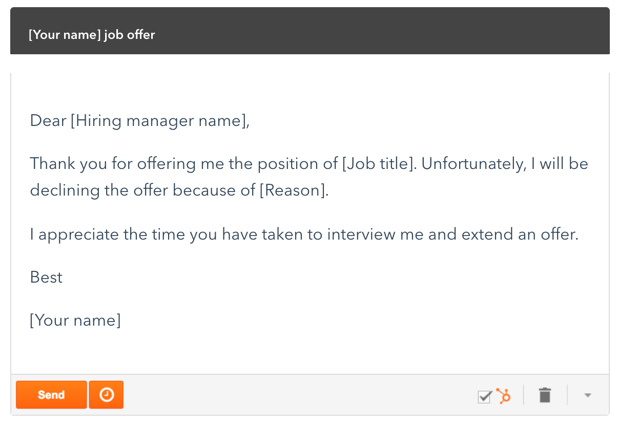
Here’s a sample template:

how to decline a job offer sample emailDepending on your reason for leaving, you can input your information. For example, if you accepted a job somewhere else, or you’re simply just not ready to leave your company.

How to Decline a Job Offer You Already Accepted

Declining a job offer you’ve already accepted can be a bit tricky, so here are some tips.

The most important thing to do is read the contract you signed to see if there is a clause or statement that dictates how you should decline the offer. For example, some contracts state that you need to make people aware of this within a specific time frame.

The best way to decline the offer is over the phone, so you can speak to someone and clearly explain yourself. State the reason you’re going back on your acceptance, express appreciation, and say thank you.

Be aware that you may put the business in a challenging situation so that the conversation may be extremely brief.

Here’s a sample template that you can use over the phone or via email:

“Hi [Hiring manager or DRI], this is [Your name]. Unfortunately, after giving it a bit more thought, I will have to decline this offer. I’ve realized that [Reason], and I’m sorry for any inconvenience this may cause your business. I’m thankful for the time you spent interviewing me and extending my offer.”

Over to You

Whatever your reasoning is, declining a job offer can be nerve-wracking. If you use our templates and can be prompt and appreciative, you may find that it’s not so bad, and you may even end up developing relationships that can help you with your career further down the line.

Apply for a job, keep track of important information, and prepare for an interview with the help of this free job seekers kit.


How to Decline a Job Offer was originally posted by Local Sign Company Irvine, Ca. https://goo.gl/4NmUQV https://goo.gl/bQ1zHR http://www.pearltrees.com/anaheimsigns