Monday, September 13, 2021

10 Real Estate Social Media Marketing Strategies That'll Bring in New Business

The following is a guest post by Leslie Mann, a real estate agent with Gibson Sotheby's International Realty of Weston, MA.

Buying or selling a home is an important financial (and emotional) decision. Most people are full of questions when they undertake this endeavor.

Your clients want more than someone with a real estate license. They want an agent who will protect their interests and help them navigate the complexities of property ownership. The agent they choose must be someone they'll feel confident having by their side throughout the process.

That's where social media comes in. If applied correctly, it can be a great way to open a dialogue, share advice, and forge an ongoing relationship with buyers, sellers, and renters. In this post, learn the benefits of using social media for real estate, a handy list of do’s and don’ts for agents to follow, and examples of posts you can incorporate into your real estate social media strategy.

Free Resource: Real Estate Strategy Template

Ryan Tombul, Nashville Realtor, J.D., says, “Social media doubles as an avenue for free marketing that allows agents to supplement exposure for listings within their own personal network and beyond.” Read on to discover real estate social media strategy tips, as well as things you should avoid. 

Tips That Agents Should Embrace

1. Promote the town, not just the house.

Homebuyers want to know the good, bad, and ugly of each town to which they're considering a move. Yet, most real estate blogs simply give buyers basic demographic statistics and perhaps some flowery language about the area. Instead, use your social media channels to provide potential clients a far richer understanding of the markets you serve, letting them know the pros and cons of each neighborhood.

Many cities have a "@CityOf ..." Twitter handle, which you can mention directly in your own tweets. Use these handles to promote properties you have listed in that city. City accounts on Twitter tend to be receptive to these shout-outs and might retweet you — increasing your post's reach to their followers.

Instagram Business accounts are also prime real estate (no pun intended) for you to post beautiful photos of the town in which your properties are listed.

2. Be yourself.

I've heard of many realtors who pay a ghost writer to write their marketing copy, yet this approach has its shortcomings. The copy simply doesn't ring true; it fails to give clients a sense of who you really are. Studies show that consumers want to make a personal connection with those whom they do business with, and there's no shortcut to writing your own authentic social media content that resembles who you are as a real estate agency.

Let your personality shine through across each social network you're on. It's a great way to open a dialogue with a client before they ever pick up the phone.

3. Educate your buyers.

Some of the most trying days as a real estate agent prove to be great lessons we can share with our clients. Talking about common real estate pitfalls makes your buyers smarter, giving them a smoother browsing experience and qualifying them to work with you.

Social media is the perfect outlet for this. If you have a blog, consider writing articles about home-buying tips, and use social media to promote them. Perhaps you can tweet a "Real Estate Fact of the Day," hashtagging #realestate while you're at it.

4. Chat with your followers.

Home buyers today expect instant responses to their questions, but where they ask those questions has changed.

Home buyers are calling real estate agents much less than they used to with questions about a property or neighborhood. They're going online, using Facebook's Recommendations feature, and tweeting at real estate offices on Twitter. Be ready for this outreach, answer them, and use these questions as an opportunity to start dialogue with followers who might be in the early stages of the buying process.

5. Respond to comments, good and bad.

Respond promptly and courteously to engage readers who post comments on your social media sites. One caveat: Don't feel compelled to respond to those who post abusive comments. Social media does lure its share of online bullies, and not every remark aimed at your is worth your breath.

Resist the temptation to get into battle with your harshest critics, and acknowledge those who praise your service. A lot of people who reach out to you are simply looking for more information about a listing -- or a listing they might've thought was still available, but has been sold or rented. Absorb their frustration and use their comment as an opportunity to pivot their interest to other properties.

Practices That Agents Should Avoid

6. Shouting about your home listings

It's fine to let people know about the homes you're marketing, but don't make the house itself the primary topic of your conversation. Think about common questions home buyers and sellers ask you, and turn these into posts. Provide valuable content and you'll keep people coming back.

7. Forgetting video

There are more than 8 billion daily video views on Facebook.

It's tempting to skip the expense of shooting and editing a video, but online video is an important element of home marketing. Think about it: Home buyers are visual buyers, and if done well, a video creates an emotional connection with them that they might not have from just a photo-based listing.

YouTube videos also improve your website's ranking in search engines like Google -- a common place where home buyers and renters start their search for a new home.

8. Assuming you're only connecting with first-time buyers

According to a recent PDF by the National Association of Realtors (NAR), 24% of home buyers in America are 41-50 years old or younger. About 22% of them are first-time buyers. If you think you're just talking to first-time home buyers on social media, think again.

If you think you think you're just talking to first-time home buyers on social media, think again.

Social networks like Facebook are great places to engage "fans" and learn what they're looking for from their agent, but keep in mind they're not all new to the buying process. Have content suited for all levels of home-buying experience ready to serve up to your fans and followers -- you never know whom you'll be connecting with.

9. Talking to yourself

A post, link, photo, or tweet on your profile might look nice to you, but it means very little if it doesn't resonate with the people who are following your page.

Social media is more about listening than about talking. Pay attention to what people are saying about you and your brand. Solicit and gather feedback through informal polls or via free survey services like Survey Monkey or Google Forms. This will ensure each and every piece of content you share on social media reflects the interests of your customers.

10. Ignoring your existing clients

Invite your previous buyers and sellers to join you on social media. That way, your sites becomes richer communities of shared experiences and objective advice from those who recently completed the home buying/selling journey.

Using Social Media for Real Estate

It may not seem like the right channel to use for your industry, but using social media for real estate has various benefits. Most significantly, there are more than 3.78 billion social media users globally, and the average person spends close to 2 ½ hours using social media every single day. So, statistically speaking, your audience is already on social media — why not meet them where they already are?

Second, social media also offers targeted advertising options tailored to audiences in specific locations — isn’t that just what realtors look for? 

Lastly, having a social media presence helps you build brand awareness and generate trust with your audience. They may not be ready to make a purchase yet or even reach out to begin a conversion, but if they see you’re consistently active on your platforms, or they come across one of your advertisements, they may make a mental note of what you offer and come back to you when they’re prepared to begin their process. 

COVID-19 has also impacted the real estate market, just as it has for other industries, so leveraging social media will help you stay up-to-date with current trends.

Social Media House-Buying Trends from COVID-19

While social media has always been a tool for realtors to leverage, COVID-19 has brought it center stage. 

One of the biggest changes is the rise of virtual showings. Some agencies reserved virtual viewings for specific circumstances or luxury homes, but it has now become a common practice: “We used to keep our virtual tours for our luxury homes, but we’ve found it adds to the home buying experience for our clients,” says Lisa Alexander, president of Del-Co Realty. 

As health and safety restrictions are lifted, virtual showings are likely here to stay as buyers have realized a significant benefit from them: reduced costs. Buyers searching for new homes in locations they’re not in can save time and money on travel costs until they’re sure about their options. 

The length of the searching process is also lowered, as buyers can view multiple homes in a short period via online video or virtual tour, as opposed to waiting weeks for an open house or for there to be a space for them during a showing. 

Given its relevance, let’s go over the various ways to leverage different social media platforms to share real estate content. 

Real Estate Social Media Content

Realtors can benefit from using many of the same platforms that most businesses can benefit from — Facebook, Instagram, and TikTok. Let’s discuss how you can use them, and then go over content ideas to share on each platform. 

Facebook for Realtors

Facebook is an excellent tool for real estate professionals. It offers various high-quality options: targeted ads for local listings, Facebook messenger for conversations with clients, and the ability to share multiple forms of multimedia: images, videos, and even live video. 

Instagram for Realtors

On Instagram, Realtors can create a business account and include contact CTA buttons so those who land on your profile can send you a message on the platform, an email about a property image they saw that intrigued them, or other personalized options. 

The platform is great for sharing high-quality image content, and the image below is an example of a new property announcement. 
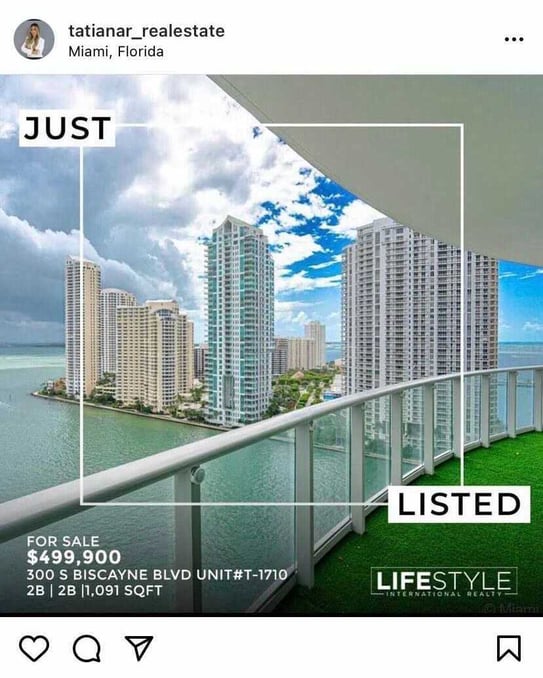
realtor social media example instagram post announcing new listing


TikTok for Realtors

TikTok is an emerging platform for all industries, but it can be extremely beneficial for realtors, especially considering that the audience favors behind-the-scenes type content, which is exactly what house walkthroughs are (the video below is an example).


In addition, TikTok users don’t expect content to be high-quality or professional-grade, which is even better for realtors that can just use a phone camera on-site to take a video. Below we’ll go over additional content ideas to post on social media. 

Real Estate Social Media Ideas

Going live for open house and virtual showings.

Realtors can do this on Instagram, Facebook, and TikTok, and a benefit to going live is that the videos can be saved and later shared to your profile, acting as an additional form of content. 

Answering audience questions. 

All social media platforms are a great place to answer audience questions, as you can engage with your audience and develop a rapport that leads to a working relationship. The TikTok below is an example of a realtor answering an audience question about financing a home. 


Another benefit to answering questions publicly is that it’s public, and everyone can see your responses. This can help interested buyers approach you with qualified, further-down-the-funnel questions. 

Share customer testimonials and success stories.

All platforms are a great place to share customer testimonials, helping you use user-generated content to establish legitimacy and credibility with your audience. The Facebook post below is an example of a client testimonial. 


Property photos.

Property photos are a must for realtors on social media, especially on Instagram and Facebook. You can give clients a sneak peek of what to expect from the property and entice them to reach out to you to learn more through a virtual or in-person tour. 

Here’s an example of high-quality property photos on Instagram:


You can share property photos on TikTok as still images, but the platform is better suited for video. 

Property videos and tours. 

All three platforms are great for video, as it gives your audiences an interactive way to learn about different properties. If they’re still curious after watching the video, they can click on a CTA button on your profile to ask for more info. 

Here is an example of a property tour on TikTok:


And here’s an example from Instagram:


Realtor bios.

Relationships between agents and clients are important, as they trust you to take to heart the things that they care about and point them in the right direction. As a result, using social media to share realtor bios is worth considering. Your audience can learn more about what you offer and reach out if it feels like a good match. 
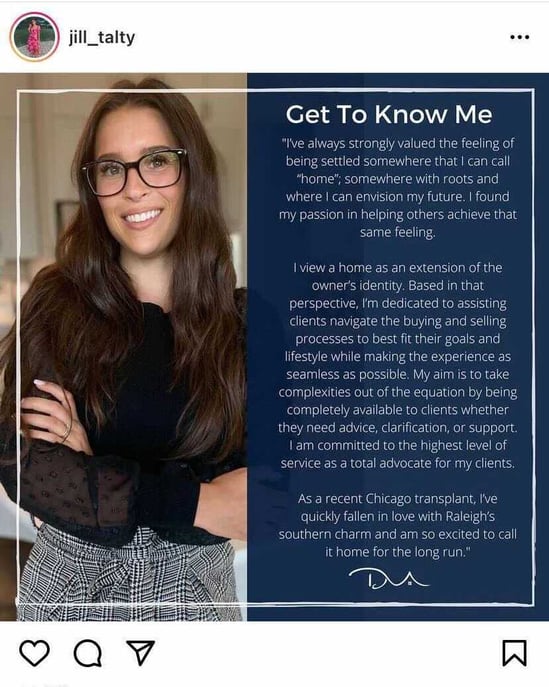
real estate social media realtor bio instagram post example

If you're looking for more supporting information, the statistics below will further emphasize the importance of using social media for real estate. 

Real Estate Social Media Statistics

  • In 2020, 44% of real estate agents generated the most clients via social media, only topped by referrals. 
  • 82% of agents plan to improve their social media presence to grow their business in 2021. 
  • The National Association of Realtors 2021 Realtor Technology survey found that 53% of respondents say that social media is one of the most valuable technology tools they use. 
  • 74% of realtors use Facebook for professional purposes. 
  • Clubhouse, a social media app that prioritizes audio, has real estate conversation clubs with over 50k followers
  • 81% of older millennials, 80% of younger millennials, and 78% of Gen X found their home on a mobile device

At the end of the day, your followers may prove themselves to be your strongest property advocates. 

If you take the time to create a social media presence that includes high-quality photos of the properties you sell, you interact with clients, and you follow a consistent schedule, you’ll likely find yourself generating new clients and closing on more homes.
New call-to-action


10 Real Estate Social Media Marketing Strategies That'll Bring in New Business was originally posted by Local Sign Company Irvine, Ca. https://goo.gl/4NmUQV https://goo.gl/bQ1zHR http://www.pearltrees.com/anaheimsigns


The Ultimate Guide to Podcast Advertising and Sponsorship

According to research by Podcast Insights, there are more than 2 million active podcasts and counting.

As a marketer for a small to mid-sized business, you might be interested in podcast sponsorship, but not know where to start. Mainly because there are so many podcasts to choose from. How do you know which podcasts your target audience is listening to?

Download Now: Free Ad Campaign Planning Kit

To help you determine what ad strategy is right for you and where to put your podcast dollars, I spoke to HubSpot's podcasting team and did some additional research to comprise a list of helpful strategies for finding, vetting, and advertising on a podcast that aligns with your brand.

Podcast Advertising Terminology

Tips for Finding and Sponsoring Podcasts

How to Advertise on Podcasts

Navigating Podcast Sponsorship

Podcast Advertising Terminology

Before we discuss the ins and outs of podcast advertising, let’s review the terminology you need to know before reaching out to podcast hosts and networks.

  • CPM Rate: CPM stands for "cost per mille." The CPM represents a flat standard rate advertisers pay for every 1,000 impressions.
  • Host-Read Ad: a pre-recorded ad that is voiced by the host(s) of the podcast.
  • Dynamic Insertion: the use of software to automatically insert ads into pre-existing podcast audio. These ads can be easily changed across a podcast’s entire catalog without making changes to the original audio file.
  • Programmatic Ad: pre-recorded advertisements that do not feature the original host of the podcast. Programmatic ads are typically deployed using dynamic insertion.
  • Pre-Roll Ad: an ad placed at the beginning of a podcast episode.
  • Mid-Roll Ad: an ad placed near the middle of a podcast episode.
  • Post-Roll Ad: an ad placed at the end of a podcast episode.
  • CTA: Call to action; unique URLs and discount codes are typically included in podcast CTAs to measure the performance of an ad’s effectiveness on a particular podcast.
  • Downloads: how many times a podcast episode has been downloaded from a podcast hosting site. The most common metric to determine the impressions/listens of a podcast.
  • Live-Read Ad: an ad that is performed live during a podcast episode, as opposed to being scripted and edited or dynamically inserted into the episode.

Now that you're familiar with the necessary terminology, let's discuss how to find and sponsor podcasts.


1. Consider podcast demographics.

While different types of TV shows might attract different audiences or demographics, the podcast demographics don't change drastically from show to show, according to HubSpot's former Podcast Manager Sam Balter.

Balter explained that the podcast audience demographic, which is generally made up of "affluent educated millennials" is a "good audience for brands pretty much regardless of what show you’re on."

Why is the podcast audience so good? Because of their age, income, and education level, this particular group of people is old enough to make purchasing decisions and has enough income to make those purchases. Because many of them have jobs or are in higher education, these listeners might be interested in learning about a wide range of products or services that make daily life or work easier for them.

According to Alanah Joseph, Senior Marketing Manager on the HubSpot Podcasts team, understanding the listener of the show is key to successful ad placements. She says:

"When reviewing the custom ad placements on HubSpot Podcast Network shows, we define success through more than one lens. We’re looking at the ad from the point of a listener. Does the ad feel like it’s an authentic part of the show? Is it enjoyable to listen to?

From the lens of an advertiser, we’re measuring success by the size of the audience, specifically the number of downloads. Although there are other metrics we’d like to track and report, we’re limited in the data we can collect."

Another great thing about podcast listeners is that they'll tune into podcast episodes for a longer amount of time than they will to other content, like video. The podcast audience also enjoys long-form podcasts that are 30 minutes or longer. Since there's much less drop-off on a podcast compared to other forms of content, like video, this means that ads could be placed towards the beginning or end of an episode and still have a good chance of being heard.

2. Understand standard podcast ad pricing.

The next question you might be asking is, "How much will advertising on a podcast cost?"

If you're new to the podcast advertising world, you might not know how ads are usually prices. You might be worried that all podcast ads might have vastly different prices — or that podcasters will charge a lot for a poor ad slot.

Podcast ad pricing might be more transparent than you think. According to Balter, podcasters and podcast networks commonly use the same formula to determine how much an ad in their podcasts will cost.

If you want to get a ballpark idea of what ad slots for a specific show might cost before reaching out to a podcast team or network, plug the metrics you can find for that show's previous episodes into the formula shown below.

As mentioned in the terminology section, CPM stands for "cost per mille," or cost per 1,000 impressions.

Balter says that the cost of a standard ad in a podcast usually costs between $10 and $50 with more popular podcasts also charging a premium.

However, if you want to do a more intensive promotion — such as a full sponsored podcast episode — this cost may vary based on what the content will entail from the podcasters. For example, Gimlet, a prominent podcast network that produces shows like Mastercard's "Fortune Favors the Bold", offers two tiers of advertising: audio ads and branded podcasts.

3. Look for podcasts that relate to your brand or industry.

Because the pool of podcasts is so large, there are plenty of opportunities to connect with niche audiences that relate to your specific industry.

When an ad relates to the topic of a podcast series or episode, it might feel more natural to the listener. It's also strategically smart because listeners who are interested in this industry might identify with pain points that your service aims to solve.

For example, if you place an ad about your B2B recruiting service on a podcast that discusses human resources, listeners who own or manage a B2B company, or human resources employees, might want to use your service to make their jobs easier.

Here's an example outside of the B2B world. On an episode of "The Joe Rogan Experience", a general podcast that zones in on topics like technology, science, and entertainment, Joe Rogan reads a script that talks about how he uses ExpressVPN and Cash App in his daily life. Before going into detail about how he uses these products, he also notes that these companies sponsored the episode.

In the ad, Rogan explains that he uses ExpressVPN to protect his internet data and personal information, while he uses Cash App to pay friends or make transactions on the go from his phone. If you can't listen to the podcast, here's a quick excerpt from the ad:

"With all the recent news about online security breaches, it's very hard not to worry about where your data goes. Making an online purchase or simply accessing your email could put your private information at risk ... That's why I decided to take back my privacy using ExpressVPN. ExpressVPN has easy-to-use apps and runs seamlessly in the background of my computer phone tablet."

Although Rogan notes that he's reading sponsored material before beginning the segment, the services he discusses relate to technology, handy apps, and internet security, which are topics that he has covered on "The Joe Rogan Experience". Additionally, these topics might be interesting to the millennial podcast audience which is highly tuned into smartphone and computer technology.

Lastly, because Rogan describes his own experiences with ExpressVPN, the segment feels less like an ad and more like a friendly recommendation. In fact, listeners who are fans of Rogan might trust that he has used the advertised product and that he had a good experience with it. If they think he's a credible recommendation source, they might choose or consider ExpressVPN when looking for a data security provider.

After an example, you need a brief section that sums up what readers should get from the example. In this case, something like, "One of the main selling points of advertising on a podcast is that listeners are already comfortable with the host. When the host reads your ad copy, there's already a level of trust between the host and the audience that wouldn't be there with alternative mediums like video or display ads. It's almost like a lightweight celebrity endorsement."

4. Use your competitors for inspiration.

As with any new marketing or advertising technique, a competitive analysis can help you identify what similar companies are doing, as well as opportunities where you can get ahead of them.

If you have a direct competitor who has advertised on various podcasts, see if those shows might fit your ad strategy as well. Similarly, if there are brands in your industry that provide non-competing services and use podcast advertising, try to identify shows that they advertise on.

From there, you could either look into contacting these podcast producers or their networks or look for podcasts that have a similar level of success and discuss similar topics. While you shouldn't directly copy what your competitor is doing, a competitive analysis could still inspire you to develop an ad strategy or promotional content that improves upon that of similar brands.

5. Purchase multiple ads for small shows rather than one for big podcasts.

As you start researching podcasts, you might find a long list of shows that will align very well with your product or service. When that happens, do you invest in one expensive ad for the biggest show with the most promising numbers? Or, do you use that money for multiple ads on different podcast episodes?

Balter says, "It’s better to play an ad multiple times on a smaller show than try to a single ad on a big show."

If major podcasts have a huge listenership and ad premiums, you'll have to pay much more for one or two ads that may or may not be memorable. While you might get great visibility, this could be a huge gamble. If the ads don't provide ROI, you'll lose ad dollars.

That's why the safest strategy is to follow Balter's advice and choose frequency over sheer audience reach.

Look at a number of smaller podcasts that still have engaging content and really relate to your product or business. Then invest a bit of your spend in each. If one or two don't pan out well but the others do, consider swapping the low-performing podcasts out with other shows or purchasing more ads on episodes of podcasts that are giving you revenue or brand awareness.

6. Advertise on multiple podcasts within the same network.

If you plan to invest in multiple podcasts — or multiple ads within a podcast episode — and find a network that produces multiple shows that align with your product, consider building a relationship with that network and putting your ad dollars there.

In the podcast world, Balter explains that advertising on shows within the same network is called a "pulsing" strategy, adding that it's better than airing multiple ads on one podcast episode but still can have similar reach.

"Because people who listen to Gimlet shows are likely to listen to other Gimlet shows, you can get a solid number of impressions off of a few shows over a relatively short amount of time without inundating listeners with the same ad over and over again."

Here's an example of a Hendrick's Gin ad that Gimlet has circulated on a number of its podcasts and displayed on its advertising page.

The native ad begins by telling listeners that the episode they're listening to is sponsored by Hendrick's Gin. Then the ad's narrator goes on to discuss the flavors associated with the beverage and how people who drink it are looking to escape from their mundane life.

This Hendrick's ad feels unique but it speaks to a wide variety of people that could be bored with their lives and doesn't note specific industries. The ad also doesn't specify the podcast it's on which makes it easy to place in many different ones.

7. Be vigilant of dishonest podcasters.

As you research various podcasts — especially those that are smaller, you might realize that it's easy to find numbers and success metrics for some, while others are less transparent. Because of this, you'll want to do some extra digging and properly vet the podcasts at the top of your list to make sure they're legitimate.

Balter warns, "Downloads are not algorithmically verified, therefore people sometimes make up how many downloads their show gets. So, if you’re sponsoring a less reputable podcast, make sure to get download numbers for a single episode."

If you want to verify that the podcast is giving accurate numbers before reaching out to them, here are a few steps you can take.

  • Look at all the sites they post their podcasts on: If they post on a major site like SoundCloud or Spotify, you should be able to see general platform-provided view numbers to get an idea of how successful their podcast was.
  • Look for them on social media: While podcasters might not be airing episodes on social media, they might have a following or a few social accounts to spread awareness of the show. If they do, look at the follower count, likes, and visual signs of engagement on these pages. If you can find signs of social engagement and a following, this might be a sign that they have a legitimate audience.
  • Work with a credible network: Many credible networks might be transparent about podcast numbers to potential and current advertisers. Additionally, you can look at the success of the network's other shows as evidence that they're associated with engaging content.

When you do finally talk to the podcast producers, get as much specific data as possible about views and impressions. If they have or have had advertisers in the past, you might want to ask them if their advertisers have seen an ROI. If they can show proof that advertisers make more money than they spend on ad slots, this shows that ads on this podcast can be successful.

8. Consider purchasing back catalog space.

A back catalog is a collection of a podcast's previously recorded episodes. Back catalog podcast episodes might still be listened to, shared quite regularly by listeners, and up for grabs when it comes to ad space.

Because back catalog episodes have already aired and don't seem like an obvious ad opportunity, Balter says this tactic is "interesting and something a lot of people don’t consider."

If you do decide to advertise in back catalog podcasts, zone specifically into evergreen episodes that will continue to remain relevant for a longer period of time.

For example, if you're a marketer for an e-commerce home-shopping site, you could advertise in back catalog podcasts about DIY ideas or home decorating. This type of podcast won't age drastically over time and might be relevant to anyone listening to podcasts about those topics.

While these podcasts might've already been promoted during their first launch, podcasters are often encouraged to re-promote evergreen back catalog content. Your brand could also share the podcast on your company's social channels for some added promotion.

9. Determine what type of promotion you'd like to run.

While some companies like to create standard native ads that exist as pre-roll or mid-roll within a podcast episode, other brands might pay the podcast producers to create sponsored content.

Similarly, advertisers might want to script the ad and have the host read it, or have the host casually work product discussion into the podcast conversation, so it feels more natural. Some podcasts may only offer certain types of sponsorship options, but if you still want to consider the different types, here are a few with an example for each:

Native Ad:

A native ad is created by the brand for the podcast. With this common strategy, you'll create a short audio clip that discusses your product, service, or another promotion related to your brand. These usually run for 30 seconds or less and sound a lot like audio ads you'd hear on traditional radio stations. These ads usually air as pre-roll or mid-roll ads after a podcast host says something like, "And now, a word from our sponsors."

Below is an example of an ad for the Toyota RAV4. In the 30-second ad, a narrator describes all the unique features that make the car safe, reliable, and fast. Like the Hendrick's Gin ad noted above, the ad doesn't acknowledge a specific podcast so it can be shared on multiple different shows.

If you're looking for inspiration for a quirkier native ad, check out GEICO's list of ads, which have been aired on both radio and podcasts.

Sponsored Content:

With sponsored content or branded podcasts, you pay the podcast production team to create interesting content about a topic related to your industry of the company.

While the content might not discuss your product outright, the podcast hosts will note that your brand sponsored the podcast — and most likely include some information about your product or service.

If the podcast is valuable and interesting to the listener, they might remember your brand and affiliate informative content with your company.

One recent example was a mini-series called "The Sauce" in 2018. The podcast, sponsored by McDonald's — and created by Gizmodo and Onion Labs — investigated why people rioted over the removal of Szechuan Sauce from the McDonald's menu. While the podcast has since been removed from Apple podcasts, you can find a short preview for it on Gizmodo's Facebook page.

Paid Interview:

This is a type of sponsored content where an expert from or affiliated with an advertising brand is interviewed in exchange for the sponsorship dollars. While this gives your company's experts an opportunity to spread brand awareness and show their expertise, it also allows the podcast to create interesting interview content about a topic related to its own mission.

In the example below, Daymond John interviews a rep from ZipRecruiter, on the podcast, "Rise and Grind." Because the podcast series regularly discussed business, entrepreneurship, and management, this ZipRecruiter-sponsored interview about hiring talent, still feels like a natural piece of content.

This paid interview tactic could also work for businesses in other industries as well. For example, if you're a marketer for a cookbook publisher, you could pay for a chef who created some of a new book's recipes to get interviewed on a podcast related to cooking, home-making, or DIY.

In another example, if your company sells medical devices, you could pay for your CEO or an executive to be interviewed on a podcast that touches on medical news or technological advances.

In either example, audiences who listen to those podcasts because they want to learn more about topics or products within their industry might hear the interviews, gain insight from the experts, and trust your brand more.

Product Placement:

This is a form of sponsored content where podcasters are paid to mention your product casually in the podcast's discussion.

In a classic example, the "My Brother, My Brother, and Me" podcast aired an episode about Totinos which was sponsored by Totinos.

While the hosts played games and had random discussions about life, as they've done in most of their episodes, they were chewing Totino's pizza rolls most of the time and made each game or featured piece of content center around the food product.

Direct Response Ads

This is a native ad that feels like a product placement where the host reads a short script written by the advertiser. The ad ends with the host telling listeners to do something, such as click a link or use a coupon code. Unlike the more traditional pre-roll or mid-roll native ad, the listener is still immersed in the experience of listening to the host.

Although the host notes that their discussion is sponsored, it still might make the listener feel like they are getting a solid recommendation from the host.

On Dax Shepard's podcast, "The Armchair Expert," he includes at least one direct response ad in the middle of each episode. At the 65:00 mark of this episode, Shepard reads a script that explains the benefits of using the meal-delivery service DoorDash. Then, he tells listeners to download DoorDash and use the code "DAX" to get $5 off of their first order:

10. Purchase ad spots online.

If you're just looking to purchase a standard ad slot and already have an audio clip, some tools allow you to purchase space and target ads to appear on multiple podcasts.

For example, if you're just planning to target one or two simple native ads to millennials on Spotify, you might want to use Spotify Ad Studio to create and launch basic native ads on the music platform. If you want to launch to multiple host-read ads in a number of different podcasts, you could consider using a service like Midroll, where you can submit ad information and purchase ad slots in a variety of different podcasts.

11. Or, reach out personally to podcasts you'd like to work with.

If you want to do something that requires more planning, like sponsored content, a paid interview, or preparing scripted product placements, you should make an in-person connection with podcasters. 

"By being intentional when looking for creators, we can create a truly collaborative environment and allow creators to infuse their personality and voice into our ads," says Joseph.

Once you've done your research and found a few podcasts you're interested in, reach out to begin discussing your advertising options. Send an email with a little bit about your brand and why you think you could work well with them as an advertiser. Be sure to also ask about their growth and key success metrics to confirm that they are as promising as you think.

Need help reaching out to potential podcast hosts or networks you’d like to sponsor? Check out the template below.

Podcast Sponsorship Template

Once you find the podcasters you'd like to partner with, keeping them involved in the creative process is key. Avoid handing them a dry script to read verbatim. "I've learned the more we allow our podcasters to participate in the creation of the ad, the better the ad will be," Joseph says. 

12. Monitor your progress.

Regardless of what type of promotion you purchase, you should be tracking your money spent compared to the money the advertisement earned. This will help you determine the ROI of your campaigns.

If you're publishing promotions on multiple podcasts, this will be an important way to tell which might warrant more advertisements and which might require less to no ad spend.

With this post on marketing ROI, you can learn how to use a simple formula to calculate and find a few examples of how it can be used when strategizing in the real world.

How to Advertise on Podcasts

Ready to launch your advertising campaign on relevant podcasts? Here’s what you should consider.

1. Determine the type of ad you want to run.

As we reviewed above in the podcast terminology section, there are a few different types of podcast ads to consider. The right type of podcast ad for you will depend on your budget and the goals of your campaign.

Host-read ads tend to cost more than programmatic ads, however, according to Nielsen host-read ads are more effective because hosts have already established trust and recognition with their audiences.

2. Select the best ad placement for your campaign.

Additionally, ad placement and length matter. Though the first few minutes of a podcast reaches the widest audience, pre-roll ads, or ads that play at the beginning of a podcast episode, tend to have a lower CPM rate because users can easily skip over the ad.

Podcast Advertising

Image Source

On the other hand, mid-roll ad placements tend to have a higher CPM rate because listeners who reach the middle of an episode tend to be more engaged and likely to follow a CTA. In terms of length, 30-second ad placements have an average CPM of $18, while 60-second ad placements have an average CPM of $25.

3. How to write a podcast ad.

Now that you know what type of ad you want to run and have determined the placement, it’s time to tackle the messaging. Whether you are doing host-read or programmatic ads, the on-air talent needs talking points from you to ensure the ad shares information that is relevant to your campaign.

Here are the elements to include when writing a podcast ad script.

Hook the Listener

Begin with a bold or attention-grabbing statement to get the listener’s attention and reduce the likelihood of them fast-forwarding through the ad.

Personal Story

Once the audience is hooked on the ad, the on-air talent should introduce the product and share a quick personal story outlining why they enjoy the product. A simple way to do this is to mention what problem they were experiencing, how they were introduced to the product, and the positive results or solutions they experienced after using the product.

Call to Action

Close the ad by creating a clear call-to-action (CTA) for the listener. A popular CTA used in podcast advertising is special codes and unique URLs specifically for that show. These are easy for the audience to remember because they are typically related to the name of the podcast, and can be easily measured for KPI tracking.

4. How to create a podcast ad.

Once the script has been finalized, share it with the on-air talent so they can record the ad as a standalone mp3 file. During the post-production process, the ad should be placed in the episode audio file during the designated placement time. If using dynamic insertion technology, upload the mp3 file to the podcast hosting software so it can be automatically played during the episode.

Navigating Podcast Sponsorship

The podcast landscape is a pool of growing opportunities for marketers. And, if you're ready to start testing the sponsorship waters, be sure to keep these key tips in mind.

  • Find podcasts that align with your brand: People are listening to an episode to get informed about a specific topic. If your ad aligns well with it, they might be interested in learning more about your product.
  • Choose frequency over audience reach: It's less risky and more efficient to invest in multiple ads on smaller podcasts rather than just one or two ads on a major podcast.
  • Consider working with a network: Networks may provide more legitimate view numbers and have a variety of podcasts with similar audiences that you can air your ads on.

With the right strategy in place, you can get your product in front of an engaged community of potential buyers through podcast advertising.

advertising plan


The Ultimate Guide to Podcast Advertising and Sponsorship was originally posted by Local Sign Company Irvine, Ca. https://goo.gl/4NmUQV https://goo.gl/bQ1zHR http://www.pearltrees.com/anaheimsigns

What International Marketers Should Know About Instagram Lite

Instagram is a top-rated app, with more than 1 billion monthly active users. Within the app, individual users, influencers, brands, and businesses alike share high-quality photo and video content, interact in comments, and exchange direct messages.

However, as it is a visual-centered platform, some people across the globe have trouble using the app as they don't have the same access to cellular data and internet connection required to load many of the app's features.

As Instagram wants its platform to be accessible to all, they created a solution: Instagram Lite. Read on to discover what it is, the features it offers, and how it may affect global social media marketing.  

New Data: Instagram Engagement Report [2021 Version]

What is Instagram Lite?

Instagram Lite is an Android app that is significantly smaller in size (2MB vs. 30-80MB+) than the original Instagram app, so users with differing cellular and internet connection can still benefit from what it has to offer without experiencing a lagging app or differing user experience.

The goal was to create a more accessible app for emerging markets. Tzach Hadar, Director of Product Management at Facebook Tel Aviv, says “Our teams build these lightweight versions of our apps for people with low connectivity or limited data plans because our basic premise is to leave no one behind.” As such, Instagram Lite still contains many of the valued features within the original app:

  • Photo and video sharing
  • Stories, stickers, and gifs
  • Explore page and recommendation algorithms
  • Messaging/DMs (groups supported)
  • Reels and Reels tab
  • Dark mode

As it is a less-heavy load on devices, features that require significant data or connection have been left out, such as:

  • Animations when switching between Stories
  • Story filters and AR filters
  • Swipe-to-type controls
  • Going Live
  • Shopping and Product tabs

The app is able to save such significant space on devices by running off of code saved to the cloud rather than on the phone. Kelly Hendrickson, Social Media Marketing Manager at HubSpot, says “What excited me most about Instagram Lite is that it makes the platform more accessible. It requires less space on a phone as well as less data, making it easier to run. This is key in emerging markets.”

benefits of instagram lite

Where is Instagram Lite available?

Instagram Lite is currently available in 170 countries, with India being the largest country of access. Worldwide release is set to happen soon.

What is the Instagram Lite UX like?

The most significant difference between the Instagram Lite UX is the quality of content on the app, and a lack of graphics and animations that need data to load. While images aren’t grainy or pixelated, they may not be HD in order to ensure that users can load content without experiencing any lagging. A prime example is that when navigating between two different Stories, the animation that is present in the original app is missing.

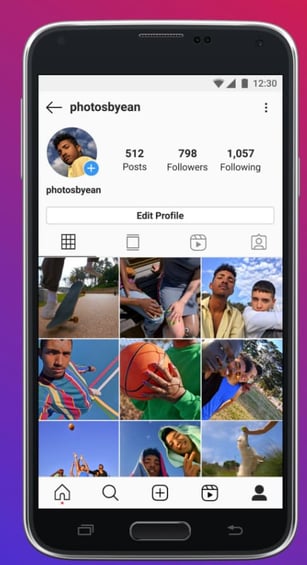
Other than that, the Instagram Lite UX is not much different from the original Instagram app. For instance, users have the same profile tab (as shown in the image below) with their profile photo, follower and following count, an image feed, and a Reels tab for those who create them.

instagram lite profile tab ux example

Image Source

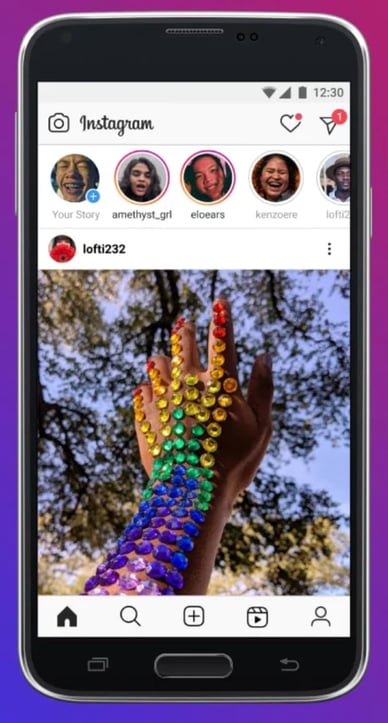
The home tab, where your Instagram Feed is displayed, is the same as well, with the stories carousel in the top portion of the screen, the heart icon showing likes and interactions, and the messaging arrow button.

instagram lite feed ux example

Image Source

If you want to share a post on Instagram Lite, the post button is in the navigation footer instead of above the Stories carousel.

Will Instagram Lite impact global social media marketing?

When Instagram Lite becomes available globally, it will require marketers to pivot from typical Instagram marketing strategies. As it currently doesn’t support ads, marketers will have to focus on engagement and building an audience rather than using shoppable tools to drive sales. Hendrickson says, “Part of pulling back features, though, is the removal of advertising. This reminds us how vital Instagram is for brand awareness. When someone can no longer purchase from within the platform, you have the opportunity to influence their decisions down the road by becoming a valuable account for them to follow.”

how instagram lite will affect international marketing

In addition, marketers will need to be mindful of the quality of photos and videos they upload, as the app is meant to save space and require minimal data usage. Instead, your Instagram Lite strategy may focus on high-quality copy and influencer partnerships in new countries as a means of attracting audience attention, driving engagement, and converting users to paying customers via links to website landing pages.

Marketers will also need to create content able to be understood by those in different markets and relevant to their interests.

Before Instagram Lite becomes available in your country, take the time to research emerging markets that already have access to the app, learn more about their interests and pain points, and begin creating a strategy that will help you show them the value you can provide.

Then, when the app becomes available, you’ll be ready to leverage the information you learned to begin posting on the app.

instagram statistics


What International Marketers Should Know About Instagram Lite was originally posted by Local Sign Company Irvine, Ca. https://goo.gl/4NmUQV https://goo.gl/bQ1zHR http://www.pearltrees.com/anaheimsigns

How One HubSpotter Created a Framework to Reduce Meeting Fatigue

This post is a part of Made @ HubSpot, an internal thought leadership series through which we extract lessons from experiments conducted by our very own HubSpotters.

A few months ago, I came to a startling realization: My job is meetings.

Maybe you can relate. From morning to night, I spend my time jumping from Zoom call to Zoom call. I race to grab a snack in the two minutes I'm afforded in-between calls, and I'm mentally exhausted by the end of the day. It's a struggle to decompress before spending time with friends and family.

And, equally challenging, the amount of meetings I have takes away from my ability to get my work done.

I'm Chris Saly — an Engineering Lead at HubSpot.

As an engineer, my day job was code. Sure, we needed meetings to discuss things and stay updated as a team, but the main mechanism and value of my job was the quality and reliability of the code I produced.

Now, the primary value of my job is talking to others. Whether it's as a mentor, being involved in tactical decisions, or helping set a strategic vision, most of these goals are communicated through meetings.

However, there are some very real consequences to my role as an EL. Among other things, my meeting-heavy life was taking its toll on my mental health, relationships, and workplace productivity.

I knew something had to change. Here, I'll show you how I incorporated a framework into my calendar planning to reduce meetings, and take back control of my time.

Download Now: Free Meeting Agenda Template

My Job is Meetings

As an engineering lead, I manage the 12 engineers in my group and provide a strategic vision for the pillar in collaboration with my project management, business system analysts, and design peers.

We build internal tools and systems that support the HubSpot Sales, Success, Support, Marketing, and Operations teams to do their jobs day-to-day.

As a result, in additional to the typical duties of an EL at HubSpot, there is also a healthy dose of stakeholder management thrown in, as well.

The nature of my role means that meetings cover a wide range of topics. I might go from one meeting talking about the three year vision for HubSpot's Sales team, to a systems design discussion on something we're building right now, to a mentoring conversation with a Tech Lead and then into a critsit retrospective.

What I've realized is that my job is now meetings.

What prompted this?

I noticed a a number of days over the last several months where despite finishing work at 5 or 6, closing the laptop and entirely disconnecting from work, I was still amped up and my brain was in 'work mode' at 9 PM.

I was struggling to decompress. And considering nearly half of professionals report a high degree of exhaustion after numerous daily video calls, I'm willing to bet most of you understand this frustration.

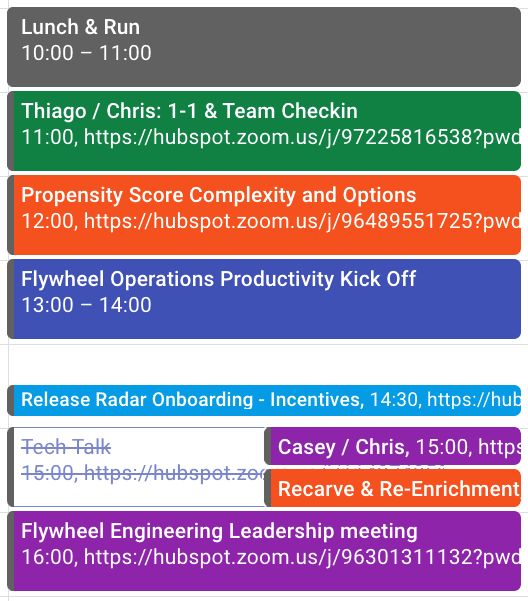
My calendar on Oct 28th last year is a fair example of what a typical day would look like before Christmas:

  • Start my day with a 1-1 with a Tech Lead to discuss mentorship and team health.
  • Followed by a conversation across multiple product groups on the technical feasibility of a specific suggestion for a 2021 compass item.
  • Then a kickoff meeting for our pillar that is partially selling the vision and partially a social chat.
  • After a quick break we're onto an in-depth technical overview of a system we need to start using as engineers.
  • Capping off the day with a meeting with ELs+Director in Flywheel that, depending on the day, might cover people management, technical visioning, or our groups strategy.

So … What's The Problem?

While I was feeling overwhelmed, I didn't really understand why, so I took a couple of steps to figure out where things were going wrong.

First, I made a table of all of my meetings, categorized by their purpose, and calculated the amount of time I spent on them on a weekly basis (see below for more details on this)

I also did some soul-searching to see how I was feeling about my meetings. Whether there were days I dreaded, or days I really enjoyed, and tried to get in touch with why I felt that way.

This gave me a couple of realizations. First, I realized the ratio of time spent on supporting teams that report to me, working with peers, and staying abreast of things happening in the company felt right to me.

However, the sheer volume of meetings had crept up on me. Over the course of the previous six months, my group had doubled in size and meetings had passed a threshold without me noticing.

I also realized my meeting load on a weekly basis varied depending on when all my recurring meetings happened to fall.

And, perhaps most challenging of all, I realized there were no themes or focus to my meeting days. One meeting might be deep in the weeds, and the next would be a 30,000 foot view. Changing contexts throughout the day like that is hard, and takes unnecessary mental energy.

Plus, as I'm sure most can relate, the pandemic made my life outside of work Zoom-heavy, as well, with remote birthdays and happy hours. All of which is to say: I was tired of all the screen time.

When I thought about how this all affected me, I came up with the following list:

  • I sometimes end the day not being able to turn of my brain and spend time with family & friends.
  • It's a mentally taxing thing to change contexts all day long time and it has an outsized effect on how much energy I have for myself at the end of the day.
  • I often feel like I'm running in place trying to take notes, digest information, grab a snack, and use the bathroom as I go from one meeting to the next.
  • I struggle to make time for things like AMAs, All Hands, Science Fair, Tech Talk & Hub Talks. After Christmas I had a 12 week tech talk backlog because I just didn't have the time or capacity to watch them.

If this list resonates with you, don't despair and keep reading. Fortunately, I came up with a solution to my meetings-heavy job.

A New Framework for Meetings

If my job is meetings, I needed a framework for those meetings to live in — which included boundaries and rules to keep my sanity, as the old ad-hoc approach clearly wasn't cutting it any more.

First, here are the boundaries I set in regards to my mental health:

  • No more than 90 minutes of meetings in one go: There's only so long I can pay attention and go without a bathroom break.
  • Scheduled 15/30 minute breaks before and after any 60 minute block: I book these in as 'meeting gap' meetings on my calendar to stop people booking over them.
  • No more than 2.5 hours of meetings in the periods before or after lunch: If I go beyond this I can't decompress in the evenings.
  • Hard stop of meetings at 5 PM: I need at least 15 mins to wrap up my thoughts for the day, send a few slacks and take notes for tomorrow. Trying to send a message at 6pm when hangry isn't a good idea.
  • Friday has no meetings, and certainly no meetings after 3 PM on Friday: I use Friday as a catchup and focus day so keeping it free of meetings is key to that. I also need time to wind down from the week and if I'm leaving stuff undone it really affects my weekend

Obviously, these aren't set in stone, and I'm willing to make exceptions to these if there is a genuine need e.g. If there's a critsit or a big business impact.

But for regular day-to-day meetings, I've found there are very few meetings that can't wait a couple of days. I've also realized meetings rarely need to be more than 90 minutes.

If I need exceptions to these boundaries more than once or twice a month, my spidey sense starts tingling.

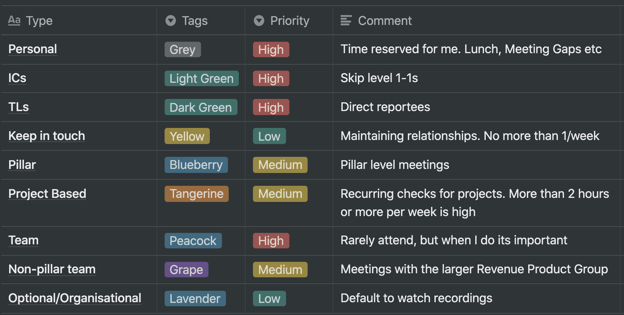
Once I set those mental health boundaries, I took it a step further by creating a table to organize my meetings and discover patterns.

First, I put all my meetings into a spreadsheet, tagged each with some relevant tags, and used that as my basis for both analyzing and changing my meeting schedule. It allowed me to play with meeting cadences, and see how it would affect the overall picture.

It also gave me a some data I could analyze to answer the following questions:

  • How much time was I spending with teams in my pillar versus my peers and the pillar structure versus the larger Revenue Product Group?
  • How much time on broader company alignment like tech talk, AMA, science fair, company talks, etc?
  • Was I over-indexing on supporting any particular group and did the overall balance feel right?
  • Were there any low priority meetings that were too frequent?
  • Was the meeting volume per week roughly the same? And is that what I wanted?

Let's dive into some of the features of this table now.

1. Color Coding

I've been color coding my calendar for over a year now and it's been really useful, but it's been ad hoc and I often forget or change what the colors mean without thinking about it. This time I wrote it down to keep myself honest, and so I can refer back to it if I need to.

Color coding my calendar makes it easy to see at a glance what my day and week looks like. If there are too many yellows or reds (meaning medium or high priority) on my calendar I know I need to reschedule or skip some meetings. If I have a day that looks like a rainbow, that probably means I'll be changing contexts all the time and should try to move things. If I have a solid block of color with no grey in it, I have no 'me time' and will be fried by the end of the day. Any of these things are enough to get my spidey senses tingly.

Here's how to change colors in Google calendar.

2. Meeting Frequency

My meetings had a jumble of recurrences that had grown organically and could be on any schedule, which led to a pretty messy and inconsistent calendar. To help make things clearer and more regular I've categorized them into buckets with default recurrences:

  • Weekly: High value, high impact. Things that require regular and high volume communication e.g. Direct reports/mentorship, an active project that is close to going live.
  • Twice a Month: Things that require ongoing close alignment e.g. same level peers and high stakes projects.
  • Monthly: Important topics that don't change all that rapidly e.g. skip-level 1-1s, project updates.
  • Every two months: Just keeping in touch e.g social and connection keeping, interesting projects but doesn't need active involvement.
  • Quarterly: Alignment and planning e.g. product group meetings, OKRs, etc.

Using this rubric has a few benefits:

  • It made me think about the purpose of meetings and decide what the appropriate cadence is
  • It gave me a common benchmark to compare meetings so I have comparably valuable meetings on similar cadences
  • With most meetings now happening once or twice a month, I can often pair similar meetings on the same day which means less context switching.

3. 'Week in Month' Meetings

Before I started this my recurring meetings were generally on an 'every X week' basis — as in all of my meetings recurred every 2, 3, 4 weeks.

The change I've made here is to move all meetings to a 'week in month' basis. This means that instead of meeting with someone every four weeks, I'll meet with them every 3rd Thursday, or instead of every two weeks, it's every 2nd and 4th Tuesday.

This approach has a number of benefits:

  • It combines with 'meeting frequency' above to allow me to theme days and weeks so I'm not changing contexts all the time
  • It gives a certain cadence to the month e.g. it's the middle of the month so I know I'm talking to team X this week
  • There are 12 months in the year but 13 blocks of 4 weeks, so it inherently slightly decreases the number of meetings
  • It frees up the 29th, 30th & 31st as mostly meeting-free days
  • Aspects of our business and lives often run on a monthly cadence and tying meetings to that same cadence can be a really useful tool. (Examples of this might include Irish public Holidays, which typically fall on the first Friday of the month and people often take the Thursday or Monday to make it a long weekend; performance reviews and ACR often happen at the beginning of the month; and sales have end-of-month targets, which leads to more pressure on the systems in the last few days of the month.)

All of this color coordination and categorization is well and good — but I'm betting you're thinking, Well … did it work?

Let's dive into results now.

So ... Is It Working?

I've been making these changes since the beginning of the year and I've had great results so far.

My mental health has improved and I have more time and energy for myself each day after work. I've drastically decreased the amount of days that I struggle to decompress when the work day is done.

I've caught up on all the tech talks and I'm following up on action items from meetings more reliably and quickly. I also have more time to get non-meeting work done, and generally feel much more productive.

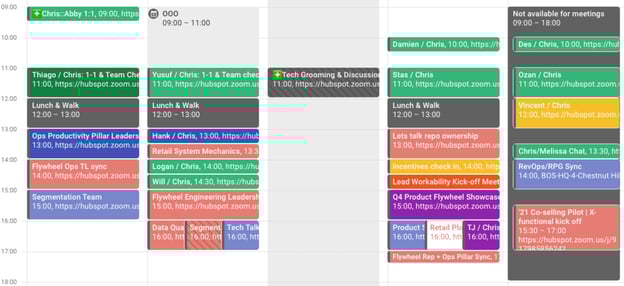
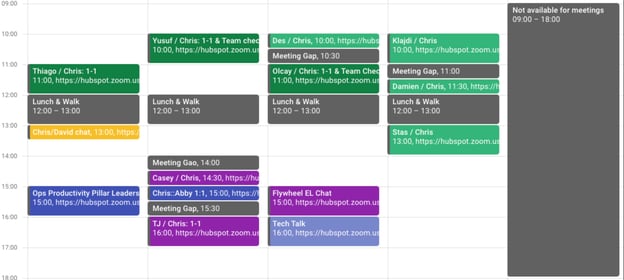
This was a fairly typical way for my calendar to look before:

And this is a typical week now:

Ultimately, what worked for me might not work for you.

But I encourage anyone who feels overwhelmed by their schedule to take the time to proactively assess and diagnose for redundancies, wasted time, or time that could be better spent re-charging. Simply taking the time to analyze my calendar enabled me to create a more efficient schedule that worked for me.

So maybe that's really the lesson here: Figure out how your job can work for you, not the other way around. Each person is unique with specific preferences, and if you don't fight for your calendar to look the way you need it to … who will?  

meeting agenda template


How One HubSpotter Created a Framework to Reduce Meeting Fatigue was originally posted by Local Sign Company Irvine, Ca. https://goo.gl/4NmUQV https://goo.gl/bQ1zHR http://www.pearltrees.com/anaheimsigns

Friday, September 10, 2021

2021 YouTube Demographics [New Data] [+What Each Generation is Watching]

Chances are, you've probably spent an afternoon falling down a rabbit hole of YouTube videos.

I certainly have, and I think I'd be pretty embarrassed to see the total amount of time I've spent on the platform.

While it's a great source of entertainment, YouTube has also proved itself to be a valuable tool for marketers. In fact, 70% of viewers bought from a brand after seeing content on YouTube. And, with a global user base of more than 2 billion people, it's also safe to assume that your target audience is on the platform.

However, just as it is for all social networks, building a presence on YouTube requires understanding which segments of your audience are already there and what they're watching. Having that information makes it easier to create content that speaks to their interests, maximize ROI, and achieve general marketing success. In this post, we'll go over key YouTube statistics you need to know for 2021 to help you succeed in your marketing efforts.

→ Free Templates: How to Use YouTube for Business [Download Now]2021 YouTube Demographics

Below, we'll go over the most critical YouTube statistics that show marketers how global audiences are using the platform.

General YouTube User Demographics

  • YouTube is the second most visited website in the world. (Hootsuite)
  • YouTube accounts for more than 25% of total worldwide mobile traffic. (Sandvine)
  • YouTube has 2+ billion users, making up almost one-third of the entire internet. (YouTube for Press)
  • These 2+ billion users are present in over 100 countries and consume content in 80 different languages. (YouTube for Press)
  • YouTube users watch one billion hours of content daily. (Hootsuite)
  • YouTube is the second most popular channel for businesses sharing video content. (Buffer)
  • 70% of viewers bought from a brand after seeing content on YouTube. (Google Ads)
  • YouTube will make 5.6 billion in advertising revenue in 2021 in the U.S. (eMarketer)
  • YouTube is the top video streaming app, and the average user spends 23.2 hours per month watching content. (App Annie)
  • The most popular YouTube search query is "song." (Hootsuite)
  • The most popular YouTube video is Pinkfong's Kids Songs & Stories Baby Shark Dance, with 7.85 billion views. (Statista)
  • The three most popular videos on YouTube are commentary videos (like vlogs), product reviews (like unboxings), and how-to/tutorial style videos. (MediaKix)
  • Global users watched over 100 billion hours of gaming content in 2020. (YouTube)
  • YouTube TV ended Q3 2020 with 3 million subscribers. (Alphabet)
  • 70% of people used YouTube to exercise in 2020. (YouTube)
  • Livestreams on YouTube grew 45% in the first half of 2020. (YouTube)

YouTube Age Demographics

  • In Q3 2020, 77% of 15-to-25-year-olds and 70% of 45-to-64-year-olds in the U.S. used YouTube. (Statista)
  • 21.2% of YouTube's global audience is between 25 and 34, and 17% is between 35 and 44. (Hootsuite)
  • 80% of U.S. parents with a child age 11 or younger say their child watches videos on YouTube, and 53% of those children use the platform daily. (Pew Research Center)
  • Outside of China, 77% of Gen Z, 75% of millennials, 61% of Gen X, and 44% of Baby Boomers visit YouTube daily. (GlobalWebIndex)
  • 18-to-34-year-olds use YouTube to view video content on their TVs 7.9% more often than basic cable and 14.5% than premium cable. (Variety)
  • 46% of Gen Z and Millennials in the U.S. and UK say they've watched a virtual event on YouTube. (GlobalWebIndex)

YouTube Gender Demographics

Please note that audience data for individuals who do not identify as cisgender men and women are not reported.

  • 45.8% of YouTube's total advertising audience is female. (Hootsuite)
  • 54.2% of YouTube's total advertising audience is male. (Hootsuite)
  • Male and female internet users in the United States use YouTube at equal levels. (Statista)

YouTube Geography Demographics

  • As of February 2021, 16.6% of YouTube site visits come from the United States, 9.4% comes from India, and 4.9% comes from Japan. (Alexa)
  • YouTube has launched local versions of the platform in more than 100 countries. (YouTube for Press)
  • eMarketer predicts that the number of YouTube users in India will reach 342 million in 2021. (eMarketer)
  • 86% of U.S. viewers say they often use YouTube to learn new things. (Think With Google)

What Different Generations Watch on YouTube

What Gen Z Watches on YouTube

  • 85% of teens use YouTube, making it the most popular among teens. (Pew Research)
  • 7 in 10 said watching videos with others helps them feel more connected. (Think With Google)
  • 80% of Gen Z teens say YouTube has helped them become more knowledgeable about something. (Think With Google)
  • 68% of Gen Z teens say YouTube has helped them improve or gain skills that will help them prepare for the future. (Think With Google)
  • When asked which platforms they turn to when they want to relax or cheer up, Gen Zers said YouTube was number one. (Think With Google)
  • Eight in 10 of Gen Z teens said they proactively share YouTube videos with their parents or other adult family members. (Think With Google)

Takeaways for Video Marketers

Based on the research, Gen Z turns to YouTube when they want to learn something or improve a skill. They also use the platform to deepen real-life connections and take a break from the stress of being a teenager. If you're targeting Gen Z, educational and entertaining content will reign supreme.

What Millennials Watch on YouTube

  • 70% of millennial users watched YouTube in the past year to learn how to do something new or learn more about something they're interested in. (Think with Google)
  • Nearly 60% of millennial women on YouTube say they are more likely to remember a brand that's LGBT-friendly. (Think with Google)
  • 45% of millennial YouTube users agree that a YouTuber inspired them to make a personal change in their life. (Think with Google)
  • YouTube reaches more millennials than all the TV networks combined. (The Shelf)
  • When learning something new, millennials are 2.7X as likely to prefer to do so by watching a YouTube video compared to reading a book. (Think with Google)
  • Millennials prefer watching:
    • News and human interest stories to keep up to date
    • Unboxing and product review videos to influence spending
    • Quick and fun entertainment content (The Shelf)

Takeaways for Video Marketers

Similar to Gen Z, millennials go to YouTube when they want to learn something or be entertained. Additionally, they go to the platform to be inspired, watch TV, and catch up on the news. If you're targeting millennials, news stories, product reviews, entertaining content, and inspiring content will win out.

What Gen X Watches on YouTube

  • 75% of Gen Xers watch YouTube videos that relate to past events or people. (Think With Google)
  • Gen Xers search for things such as "Prince Purple Rain" or "Commercials from the 90s" on YouTube. (Think With Google)
  • Gen Xers spend more time watching video content on their computers and smartphones than they are on traditional TV. (Nielson)
  • 73% of Gen Xers watch YouTube to learn how to do something. Similarly, they enjoy DIY content for things like cooking and home repair. (Think With Google)
  • 68% of Gen Xers watch YouTube to stay up to date on news and pop culture. (Think With Google)

Takeaways for Video Marketers

Gen Xers are goal-oriented. They usually go to YouTube with a purpose -- either to learn something, watch nostalgic videos, or stay up to date on news and pop culture. To properly target Gen Xers, consider posting DIY videos and throwback content.

What Boomers Watch on YouTube

  • Some of baby boomers' most-watched categories on YouTube are entertainment, music, and news. (Think With Google)
  • 67% of Baby Boomers, ages 57 – 75, watch YouTube. (The Shelf)
  • Boomers are 1.3X more likely to prefer watching a YouTube tutorial video than reading instructions. (Think With Google)
  • 1 in 3 boomers say they use YouTube to learn about a product or service. (Think With Google)
  • 68% of boomers say they watch YouTube videos to be entertained. (Think With Google)

Takeaways for Video Marketers

Baby boomers have the most spending power of any generation and they go to YouTube to learn how to use products and watch tutorials. Additionally, they want to save time. If they can catch up on their favorite news and entertainment on the site, that's where they go. If you're targeting Boomers on YouTube, you can post how-to and tutorial content.

How to Target the Right Demographic on YouTube

While each generation might watch fairly similar content, it's important to remember that the goal is different. For Gen X it might be to reminisce, while for Boomers it's to save time, and for Millenials and Gen Z it's to learn something new.

To properly target the right demographic on YouTube, pay attention to the most popular categories and types of videos they watch on the platform.

Let Data Drive Your YouTube Strategy

Use these statistics to create a YouTube marketing strategy that speaks to your audience's interests, drives revenue, and increases conversions.

Editor's note: This post was originally published in April 2019 and has been updated for comprehensiveness.

New call-to-action


2021 YouTube Demographics [New Data] [+What Each Generation is Watching] was originally posted by Local Sign Company Irvine, Ca. https://goo.gl/4NmUQV https://goo.gl/bQ1zHR http://www.pearltrees.com/anaheimsigns

Rebranding for success: merging Com Hem and Tele2

Rebranding is a process that can make or break an organisation. It’s a project that is years in the making. And requires the very best people and tools to get the job done as smoothly as possible.

One such organisation that successfully rebranded is Swedish company Tele2. In the Spring of 2021 it merged its fixed broadband and TV operation products from Com Hem, with its mobile operation, Tele2, under a new and upgraded Tele2 brand.

Therefore, we are delighted that Bannerflow played its part in the relaunch!  How? Through the updating of live advertising and the creation of hundreds of new ads for the newly merged operation.

We spoke to Elina Soreby, Brand Manager at Tele2 about the rebrand and the challenges of such an important undertaking.

Elina Soreby interview image

What were the challenges when rebranding Com Hem to Tele2?

Elina Soreby, Brand Manager, Tele2: The challenge for our team was that we wanted to modernise our graphic identity. While at the same time merging our different offers, media plans, sales peak seasons, and introducing our new brand to the market. It was our biggest release and launch ever!

Additionally, all external marketing brand touch points such as 1:1 communication, Tele2 stores, landlords, retail, the website and all internal communication were to go live at the same time. Coordinating this seamlessly as we transitioned to one brand was both a great and interesting challenge!

How did display advertising help promote the rebrand?

Elina Soreby: Tele2 uses display advertising a lot. We produce many different formats every month and it’s a great way to promote our different offers and products.

Therefore, it was a central part of our marketing mix when promoting the rebrand and communicating that Tele2 and Com Hem were becoming one.

Tele2 ad example

How important is it working simultaneously across formats and channels for campaigns?

Elina Soreby: It is very important for us to have easy, and simultaneous tools such as Bannerflow. Especially as it enables us to create the volume of ad formats we need on time. In particular, Bannerflow helps us to be effective across many different connected areas.

For example, the process of digital material production, having an overview of all digital materials, and providing live feedback on all formats. Additionally, the process of quickly delivering the formats helps us in our daily work – no matter if it’s a rebranding campaign, a launch campaign, or hardware sale.

How did you prepare for rebranding across your different advertising channels?

Elina Soreby: Firstly, we had weekly syncs in the marketing advertising team focused specifically on the rebranding campaign. We also aligned with different areas in the organisation such as UX, content, as well as weekly media syncs.

In addition, we had primary syncs with our media agency who helped us prepare our different media channels. Even with the ongoing pandemic, we were able to stay on track by helping each other and working closely across different forums – making sure we were aligned in our messaging as much as possible.

During the pandemic, how important was it to stay hyper relevant and get messages out quickly?

Elina Soreby: It’s always important to get out messages quickly. Yet it was more of a challenge due to the pandemic and adapting to new ways of working. Therefore, we were extremely happy to have got both the release and rebranding out as quickly as we could – and as close to our original plan as possible.

The launch was on the 27th of April, and thanks to a great team effort on the day everything went smoothly. Since then, we have updated all our creative materials and maintained our discipline across our messaging regarding Tele2’s rebrand.

How has technology enabled your team to maintain standards and work together?

Elina Soreby: Technology, such as Bannerflow, has helped our team to remain efficient. Plus, enable us to focus on our goals across our communication and message.

Since we worked from home during Spring 2021, we needed tools that gave us a clear overview of all the materials we were working on at the same time too.

Indeed, for us production can be a complicated process. For example, when producing material with four different main messages (which for us means over 100 formats), materials must be sent to different key stakeholders, reviewed and then updated before delivery to our media agency. This process takes time.

What made you realise Bannerflow was the right solution for your organisation?

Elina Soreby: Bannerflow is a great solution for our organisation since we work with so many different channels and formats. Every month we produce many new creatives due to new campaign periods. Therefore, it was important we had a more efficient way of working as we were previously only producing one format at a time.

What do you see as the ingredients for creating a memorable digital campaign that performs?

Elina Soreby: We believe in a marketing mix that helps us reach our target group through different channels. A great message, an attractive offer, and a story that creates an emotional connection to the viewer. These elements all help to make a campaign memorable.

Next steps

If you would like to see for yourself how the Bannerflow platform can benefit your business, then apply for a demo now. Our experts are ready to help you and find the best solution for your advertising needs.

The post Rebranding for success: merging Com Hem and Tele2 appeared first on Bannerflow.


Rebranding for success: merging Com Hem and Tele2 was originally posted by Local Sign Company Irvine, Ca. https://goo.gl/4NmUQV https://goo.gl/bQ1zHR http://www.pearltrees.com/anaheimsigns